
vue2中trhee.js加载模型展示天空盒子

创建相机
this.camera = new THREE.PerspectiveCamera(45,this.viewNode.clientWidth / this.viewNode.clientHeight,1,9999999)
调整相机位置
this.camera.position.set(600, 800, 1000)this.camera.lookAt(0, 0, 0)
创建渲染器
this.renderer = new THREE.WebGLRenderer({ antialias: true,alpha: true })this.renderer.setSize(this.viewNode.clientWidth, this.viewNode.clientHeight)this.renderer.setPixelRatio(window.devicePixelRatio)this.renderer.shadowMap.enabled = true // 启用阴影this.viewNode.appendChild(this.renderer.domElement)
添加轨道控制器
// 添加轨道控制器this.controls = new OrbitControls(this.camera, this.renderer.domElement)this.controls.enableDamping = truethis.controls.dampingFactor = 0.05this.controls.maxPolarAngle = Math.PI * 0.45this.controls.minPolarAngle = Math.PI * 0.1this.controls.minDistance = 5this.controls.maxDistance = 30this.controls.enableRotate = false // 禁止相机旋转this.controls.enableZoom = false // 禁止相机缩放this.controls.enablePan = false // 禁止相机平移this.initLights()this.initWater()this.initSky()this.loadGLTFModel()},
天空盒子
initSky() {this.sky = new Sky()this.sky.name='sky'this.sky.scale.setScalar(999999) // 调整天空盒子的大小this.scene.add(this.sky)const skyUniforms = this.sky.material.uniformsskyUniforms['turbidity'].value = 10skyUniforms['rayleigh'].value = 2skyUniforms['mieCoefficient'].value = 0.005skyUniforms['mieDirectionalG'].value = 0.8const parameters = {elevation: 2,azimuth: 180}const pmremGenerator = new THREE.PMREMGenerator(this.renderer)const phi = THREE.MathUtils.degToRad(90 - parameters.elevation)const theta = THREE.MathUtils.degToRad(parameters.azimuth)const sun = new THREE.Vector3()sun.setFromSphericalCoords(1, phi, theta)this.sky.material.uniforms['sunPosition'].value.copy(sun)},
添加模型的点击事件
onMouseClick(event) {const mouse = new THREE.Vector2()mouse.x = (event.clientX / this.viewNode.clientWidth) * 2 - 1mouse.y = -(event.clientY / this.viewNode.clientHeight) * 2 + 1const raycaster = new THREE.Raycaster()raycaster.setFromCamera(mouse, this.camera)console.log(';点击了模型上的某一个点点击了模型上的某一个点点击了模型上的某一个点');const intersects = raycaster.intersectObjects(this.scene.children, true)if (intersects.length > 0) {console.log(';点击了模型上的某一个点点击了模型上的某一个点点击了模型上的某一个点');const baifenDom = document.querySelector('.baifen')const intersect = intersects[0]console.log(intersect,'intersect-*-*-*--*');// if (intersect.object.type === this.model) {if (intersect.object.type === "Mesh" && intersect.object.parent.type === "Group") {console.log(this.icondom,'icon-*-*-*--*');console.log(this.divdom,'divdivdiv-*-*-*--*');// // 清除上一次点击的所有操作this.icondom&&this.scene.remove(this.icondom);this.divdom&&baifenDom.removeChild(this.divdom)// 创建icon图标const iconGeometry = new THREE.SphereGeometry(0.5, 60, 60);const iconMaterial = new THREE.MeshBasicMaterial({ color: 0xffff00 });this.icondom = new THREE.Mesh(iconGeometry, iconMaterial);this.icondom.position.set(intersect.point.x, intersect.point.y, intersect.point.z);this.scene.add(this.icondom);console.log( intersect,'baifenDombaifenDom');this.divdom = document.createElement('div')this.divdom.style.position = 'absolute'this.divdom.style.width = '200px'this.divdom.style.height = '200px'this.divdom.style.backgroundColor = 'rgba(0, 0, 0, 0.5)'this.divdom.style.color = 'white'this.divdom.style.padding = '10px'this.divdom.style.borderRadius = '5px'this.divdom.style.zIndex = '1000'this.divdom.style.top = `${event.clientY}px`this.divdom.style.left = `${event.clientX}px`this.divdom.innerHTML = `点击了模型上的某一个点,位置为: (${intersect.point.x}, ${intersect.point.y}, ${intersect.point.z})`baifenDom.appendChild(this.divdom)// 调整相机位置以拉近模型// this.camera.position.set(intersect.point.x, intersect.point.y, intersect.point.z + 10); // 将相机位置设置为点击点的位置,并在z轴上偏移10单位以拉近模型// this.camera.lookAt(intersect.point); // 让相机看向点击点}}},
完整代码
<template><div class="contente"><div class="baifen"><div class="app-wrap" ref="view"></div></div></div>
</template><script>
import * as THREE from 'three'
import { OrbitControls } from 'three/examples/jsm/controls/OrbitControls'
import { Water } from 'three/examples/jsm/objects/Water.js'
import { Sky } from 'three/examples/jsm/objects/Sky.js'
import { GLTFLoader } from 'three/examples/jsm/loaders/GLTFLoader.js'
// 导入glb模型
// const gltfModel = './models/dapeng2.glb' // 改为使用公共路径export default {name: 'MineTd',data() {return {viewNode: null,animationId: null,scene: null,camera: null,renderer: null,controls: null,water: null,sky: null,model: null,mixer: null, // 用于动画混合器moveForward: false,moveBackward: false,moveLeft: false,moveRight: false,moveSpeed: 0.05, // 相机移动速度icondom: null,divdom: null,}},mounted() {this.$nextTick(() => {this.initScene()this.animate()})window.addEventListener('resize', this.onWindowResize)document.addEventListener('keydown', this.onKeyDown)document.addEventListener('keyup', this.onKeyUp)this.$refs.view.addEventListener('click', this.onMouseClick)},methods: {initScene() {this.viewNode = this.$refs.view// 创建场景this.scene = new THREE.Scene()// 创建相机this.camera = new THREE.PerspectiveCamera(45,this.viewNode.clientWidth / this.viewNode.clientHeight,1,9999999)// // 调整相机位置this.camera.position.set(600, 800, 1000)this.camera.lookAt(0, 0, 0)// 创建渲染器this.renderer = new THREE.WebGLRenderer({ antialias: true,alpha: true })this.renderer.setSize(this.viewNode.clientWidth, this.viewNode.clientHeight)this.renderer.setPixelRatio(window.devicePixelRatio)this.renderer.shadowMap.enabled = true // 启用阴影this.viewNode.appendChild(this.renderer.domElement)// 添加轨道控制器this.controls = new OrbitControls(this.camera, this.renderer.domElement)this.controls.enableDamping = truethis.controls.dampingFactor = 0.05this.controls.maxPolarAngle = Math.PI * 0.45this.controls.minPolarAngle = Math.PI * 0.1this.controls.minDistance = 5this.controls.maxDistance = 30this.controls.enableRotate = false // 禁止相机旋转this.controls.enableZoom = false // 禁止相机缩放this.controls.enablePan = false // 禁止相机平移this.initLights()this.initWater()this.initSky()this.loadGLTFModel()},initLights() {// 环境光const ambientLight = new THREE.AmbientLight(0xffffff, 0.6)this.scene.add(ambientLight)// 平行光const directionalLight = new THREE.DirectionalLight(0xffffff, 0.8)directionalLight.position.set(10, 10, 10)directionalLight.castShadow = true // 启用阴影投射this.scene.add(directionalLight)},initWater() {const waterGeometry = new THREE.PlaneGeometry(100, 100)this.water = new Water(waterGeometry, {textureWidth: 512,textureHeight: 512,waterNormals: new THREE.TextureLoader().load('https://threejs.org/examples/textures/waternormals.jpg',texture => {texture.wrapS = texture.wrapT = THREE.RepeatWrapping}),alpha: 1.0,waterColor: 0x001e0f,distortionScale: 3.7,fog: this.scene.fog !== undefined,depth: 10,flowDirection: new THREE.Vector2(1, 0.1),scale: 4.0})this.water.rotation.x = -Math.PI / 2this.water.receiveShadow = true // 接收阴影this.water.name = 'water' // 设置namethis.scene.add(this.water)},initSky() {this.sky = new Sky()this.sky.name='sky'this.sky.scale.setScalar(999999) // 调整天空盒子的大小this.scene.add(this.sky)const skyUniforms = this.sky.material.uniformsskyUniforms['turbidity'].value = 10skyUniforms['rayleigh'].value = 2skyUniforms['mieCoefficient'].value = 0.005skyUniforms['mieDirectionalG'].value = 0.8const parameters = {elevation: 2,azimuth: 180}const pmremGenerator = new THREE.PMREMGenerator(this.renderer)const phi = THREE.MathUtils.degToRad(90 - parameters.elevation)const theta = THREE.MathUtils.degToRad(parameters.azimuth)const sun = new THREE.Vector3()sun.setFromSphericalCoords(1, phi, theta)this.sky.material.uniforms['sunPosition'].value.copy(sun)},loadGLTFModel() {const loader = new GLTFLoader()const loadingManager = new THREE.LoadingManager()// 加载管理器loadingManager.onProgress = (url, loaded, total) => {const progress = (loaded / total * 100).toFixed(2)console.log(`加载进度: ${progress}%`)}// 加载GLB模型loader.load("/models/dapeng2.gltf", // 修改为.glb文件(gltf) => {this.model = gltf.scenethis.model.name = 'dapeng'// 遍历模型网格启用阴影this.model.traverse((node) => {if (node.isMesh) {node.castShadow = truenode.receiveShadow = true}})// 调整模型位置和大小this.model.position.set(0, 1, 0) // 将模型位置调整到相机的正下方this.model.scale.set(0.2, 0.2, 0.2)// 将模型添加到场景this.scene.add(this.model)// 处理动画if (gltf.animations && gltf.animations.length) {this.mixer = new THREE.AnimationMixer(this.model)gltf.animations.forEach((clip) => {const action = this.mixer.clipAction(clip)action.play()})}const bbox = new THREE.Box3().setFromObject(this.model);
const center = bbox.getCenter(new THREE.Vector3());
// this.camera.position.set(center.x+1000, center.y+1000, center.z+600);
// this.camera.lookAt(scene.position); // 让相机看向场景中心},(xhr) => {console.log(`模型加载中: ${(xhr.loaded / xhr.total * 100)}%`)},(error) => {console.error('模型加载失败:', error)this.$message.error('模型加载失败,请检查模型文件是否存在')})},animate() {this.animationId = requestAnimationFrame(this.animate)// 更新水面动画if (this.water) {this.water.material.uniforms['time'].value += 1.0 / 60.0}// 更新模型动画if (this.mixer) {this.mixer.update(0.016) // 假设60fps}this.controls.update()this.renderer.render(this.scene, this.camera)// 根据键盘输入移动相机if (this.moveForward) {this.camera.position.z -= this.moveSpeed}if (this.moveBackward) {this.camera.position.z += this.moveSpeed}if (this.moveLeft) {this.camera.position.x -= this.moveSpeed}if (this.moveRight) {this.camera.position.x += this.moveSpeed}},onMouseClick(event) {const mouse = new THREE.Vector2()mouse.x = (event.clientX / this.viewNode.clientWidth) * 2 - 1mouse.y = -(event.clientY / this.viewNode.clientHeight) * 2 + 1const raycaster = new THREE.Raycaster()raycaster.setFromCamera(mouse, this.camera)console.log(';点击了模型上的某一个点点击了模型上的某一个点点击了模型上的某一个点');const intersects = raycaster.intersectObjects(this.scene.children, true)if (intersects.length > 0) {console.log(';点击了模型上的某一个点点击了模型上的某一个点点击了模型上的某一个点');const baifenDom = document.querySelector('.baifen')const intersect = intersects[0]console.log(intersect,'intersect-*-*-*--*');// if (intersect.object.type === this.model) {if (intersect.object.type === "Mesh" && intersect.object.parent.type === "Group") {console.log(this.icondom,'icon-*-*-*--*');console.log(this.divdom,'divdivdiv-*-*-*--*');//  // 清除上一次点击的所有操作this.icondom&&this.scene.remove(this.icondom);this.divdom&&baifenDom.removeChild(this.divdom)// 创建icon图标const iconGeometry = new THREE.SphereGeometry(0.5, 60, 60);const iconMaterial = new THREE.MeshBasicMaterial({ color: 0xffff00 });this.icondom = new THREE.Mesh(iconGeometry, iconMaterial);this.icondom.position.set(intersect.point.x, intersect.point.y, intersect.point.z);this.scene.add(this.icondom);console.log( intersect,'baifenDombaifenDom');this.divdom = document.createElement('div')this.divdom.style.position = 'absolute'this.divdom.style.width = '200px'this.divdom.style.height = '200px'this.divdom.style.backgroundColor = 'rgba(0, 0, 0, 0.5)'this.divdom.style.color = 'white'this.divdom.style.padding = '10px'this.divdom.style.borderRadius = '5px'this.divdom.style.zIndex = '1000'this.divdom.style.top = `${event.clientY}px`this.divdom.style.left = `${event.clientX}px`this.divdom.innerHTML = `点击了模型上的某一个点,位置为: (${intersect.point.x}, ${intersect.point.y}, ${intersect.point.z})`baifenDom.appendChild(this.divdom)// 调整相机位置以拉近模型// this.camera.position.set(intersect.point.x, intersect.point.y, intersect.point.z + 10); // 将相机位置设置为点击点的位置,并在z轴上偏移10单位以拉近模型// this.camera.lookAt(intersect.point); // 让相机看向点击点}}},onKeyDown(event) {switch (event.key) {case 'w':this.moveForward = truebreakcase 's':this.moveBackward = truebreakcase 'a':this.moveLeft = truebreakcase 'd':this.moveRight = truebreak}},onKeyUp(event) {switch (event.key) {case 'w':this.moveForward = falsebreakcase 's':this.moveBackward = falsebreakcase 'a':this.moveLeft = falsebreakcase 'd':this.moveRight = falsebreak}},onWindowResize() {if (this.viewNode) {this.camera.aspect = this.viewNode.clientWidth / this.viewNode.clientHeightthis.camera.updateProjectionMatrix()this.renderer.setSize(this.viewNode.clientWidth, this.viewNode.clientHeight)}}},beforeDestroy() {window.removeEventListener('resize', this.onWindowResize)document.removeEventListener('keydown', this.onKeyDown)document.removeEventListener('keyup', this.onKeyUp)if (this.animationId) {cancelAnimationFrame(this.animationId)}if (this.scene) {this.scene.clear()}if (this.renderer) {this.renderer.dispose()this.renderer.forceContextLoss()this.renderer.content = null}if (this.mixer) {this.mixer.stopAllAction()}}
}
</script><style lang="scss" scoped>
.contente {width: 100%;height: 100%;position: relative;.baifen {background: #fff;height: 100%;position: relative;.app-wrap {width: 100%;height: 100%;position: relative;overflow: hidden;}}
}
</style>
相关文章:

vue2中trhee.js加载模型展示天空盒子
创建相机 this.camera new THREE.PerspectiveCamera(45,this.viewNode.clientWidth / t…...

安装Office自定义项,安装期间出错
个人博客地址:安装Office自定义项,安装期间出错 | 一张假钞的真实世界 卸载PowerDesigner后,打开“WPS文字”时出现下图错误: 解决方法: 按“WinR”快捷键,打开【运行】框,在对话框中输入“re…...

代码审查中的自动化与AI应用
代码审查(Code Review)作为软件开发中的一项重要实践,通常被认为是提高代码质量、减少bug和提升团队协作的重要手段。随着开发规模的不断扩大,手动代码审查在效率、准确性、以及可扩展性上都存在明显的局限性。尤其是在敏捷开发和…...

蓝桥杯模拟算法:蛇形方阵
P5731 【深基5.习6】蛇形方阵 - 洛谷 | 计算机科学教育新生态 我们只要定义两个方向向量数组,这种问题就可以迎刃而解了 比如我们是4的话,我们从左向右开始存,1,2,3,4 到5的时候y就大于4了就是越界了&…...

PostGIS笔记:PostgreSQL 数据库与用户 基础操作
数据库基础操作包括数据模型的实现、添加数据、查询数据、视图应用、创建日志规则等。我这里是在Ubuntu系统学习的数据库管理。Windows平台与Linux平台在命令上几乎无差异,只是说在 Windows 上虽然也能运行良好,但在性能、稳定性、功能扩展等方面&#x…...

Nginx中部署多个前端项目
1,准备前端项目 tlias系统的前端资源 外卖项目的前端资源 2,nginx里面的html文件夹中新建,tlias和sky两个文件夹。 切记这是在nginx/html下创建的 mkdir sky mkdir tlias 把tlias和sky的资源都放到对应的文件夹中 3,编辑配置ngi…...

人力资源管理HR系统的需求设计和实现
该作者的原创文章目录: 生产制造执行MES系统的需求设计和实现 企业后勤管理系统的需求设计和实现 行政办公管理系统的需求设计和实现 人力资源管理HR系统的需求设计和实现 企业财务管理系统的需求设计和实现 董事会办公管理系统的需求设计和实现 公司组织架构…...

2025年美赛B题-结合Logistic阻滞增长模型和SIR传染病模型研究旅游可持续性-成品论文
模型设计思路与创新点: 建模的时候应该先确定我们需要建立什么类的模型?优化类还是统计类?这个题需要大量的数据分析,因此我们可以建立一个统计学模型。 统计学建模思路:观察规律,建立模型,参…...

【太阳——几何计算】
题目 代码 #include <bits/stdc.h> using namespace std; using PII pair<int, int>; using ll long long; const int N 1e5 10; set<PII> s; bool st[N]; struct node {int x, y, id; } arr[2 * N]; int main() {int n, X, Y;cin >> n >> …...
嵌入式MCU面试笔记2
目录 串口通信 概论 原理 配置 HAL库代码 1. 初始化函数 2. 数据发送和接收函数 3. 中断和DMA函数 4. 中断服务函数 串口通信 概论 我们知道,通信桥接了两个设备之间的交流。一个经典的例子就是使用串口通信交换上位机和单片机之间的数据。 比较常见的串…...

云原生时代,如何构建高效分布式监控系统
文章目录 一.监控现状二.Thanos原理分析SidecarQuerierStoreCompactor 三.Sidecar or ReceiverThanos Receiver工作原理 四.分布式运维架构 一.监控现状 Prometheus是CNCF基金会管理的一个开源监控项目,由于其良好的架构设计和完善的生态,迅速成为了监控…...

mysql从全备文件中提取单库或单表进行恢复——筑梦之路
前提条件 与业务确认涉及业务、数据库IP、数据误删除时间点、数据删除涉及的SCHEMA、数据表,确认该数据库为MySQLdump备份方式,备份策略为每日凌晨1点进行数据库全备份,备份保留7天,业务误删除数据时间点为当日10点左右࿰…...

渗透测试技法之口令安全
一、口令安全威胁 口令泄露途径 代码与文件存储不当:在软件开发和系统维护过程中,开发者可能会将口令以明文形式存储在代码文件、配置文件或注释中。例如,在开源代码托管平台 GitHub 上,一些开发者由于疏忽,将包含数据…...

火语言RPA--配置文件读取
🚩【组件功能】:读取配置文件信息以字典类型输出。 配置预览 配置说明 要读取的文件 支持T或# 读取配置文件的路径及名称,绝对路径。 配置文件类型 INI或XML两种选项供选择。 编码 写入配置文件的编码,以列表方式供选择&am…...

电子应用设计方案104:智能家庭AI弹簧床系统设计
智能家庭 AI 弹簧床系统设计 一、引言 智能家庭 AI 弹簧床系统旨在为用户提供更加舒适、个性化的睡眠体验,通过结合人工智能技术和先进的床垫设计,实时监测和调整睡眠环境,以满足不同用户的需求。 二、系统概述 1. 系统目标 - 自动适应用户…...

基于paddleocr的表单关键信息抽取
全流程如下: 数据集 XFUND数据集是微软提出的一个用于KIE任务的多语言数据集,共包含七个数据集,每个数据集包含149张训练集和50张验证集分别为: ZH(中文)、JA(日语)、ES(西班牙)、FR(法语)、IT(意大利)、DE(德语)、PT(葡萄牙)&a…...

爬虫基础之爬取某基金网站+数据分析
声明: 本案例仅供学习参考使用,任何不法的活动均与本作者无关 网站:天天基金网(1234567.com.cn) --首批独立基金销售机构-- 东方财富网旗下基金平台! 本案例所需要的模块: 1.requests 2.re(内置) 3.pandas 4.pyecharts 其他均需要 pip install 模块名 爬取步骤: …...

深入理解动态规划(dp)--(提前要对dfs有了解)
前言:对于动态规划:该算法思维是在dfs基础上演化发展来的,所以我不想讲的是看到一个题怎样直接用动态规划来解决,而是说先用dfs搜索,一步步优化,这个过程叫做动态规划。(该文章教你怎样一步步的…...

(1)STM32 USB设备开发-基础知识
开篇感谢: 【经验分享】STM32 USB相关知识扫盲 - STM32团队 ST意法半导体中文论坛 单片机学习记录_桃成蹊2.0的博客-CSDN博客 USB_不吃鱼的猫丿的博客-CSDN博客 1、USB鼠标_哔哩哔哩_bilibili usb_冰糖葫的博客-CSDN博客 USB_lqonlylove的博客-CSDN博客 USB …...

基于STM32单片机设计的宠物喂食监控系统
1. 项目开发背景 随着宠物数量的增加,尤其是人们对宠物的养护需求日益增多,传统的人工喂养和管理方式难以满足现代养宠生活的需求。人们越来越希望通过智能化手段提高宠物养护的质量和效率,特别是对于宠物喂食、饮水、温湿度控制等方面的智能…...

MATLAB绘图:随机彩色圆点图
这段代码在MATLAB中生成并绘制了500个随机位置和颜色的散点图。通过随机生成的x和y坐标以及颜色,用户可以直观地观察到随机点的分布。这种可视化方式在数据分析、统计学和随机过程的演示中具有广泛的应用。 文章目录 运行结果代码代码讲解 运行结果 代码 clc; clea…...

重定向与缓冲区
4种重定向 我们有如下的代码: #include <stdio.h> #include <sys/types.h> #include <sys/stat.h> #include <fcntl.h> #include <unistd.h> #include <string.h>#define FILE_NAME "log.txt"int main() {close(1)…...

【Elasticsearch】index:false
在 Elasticsearch 中,index 参数用于控制是否对某个字段建立索引。当设置 index: false 时,意味着该字段不会被编入倒排索引中,因此不能直接用于搜索查询。然而,这并不意味着该字段完全不可访问或没有其他用途。以下是关于 index:…...

Golang Gin系列-8:单元测试与调试技术
在本章中,我们将探讨如何为Gin应用程序编写单元测试,使用有效的调试技术,以及优化性能。这包括设置测试环境、为处理程序和中间件编写测试、使用日志记录、使用调试工具以及分析应用程序以提高性能。 为Gin应用程序编写单元测试 设置测试环境…...
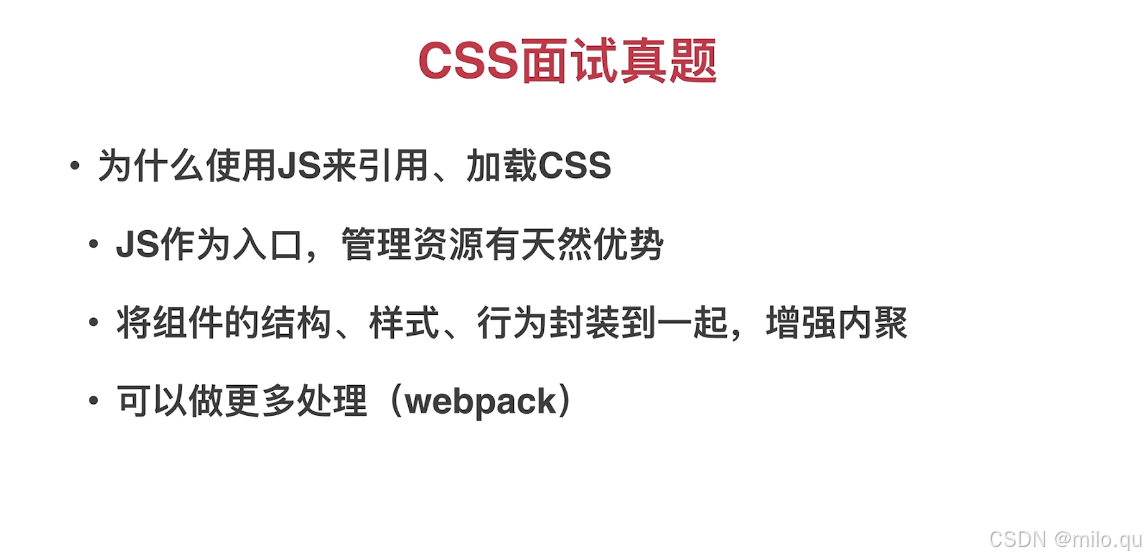
九、CSS工程化方案
一、PostCSS介绍 二、PostCSS插件的使用 项目安装 - npm install postcss-cli 全局安装 - npm install postcss-cli -g postcss-cli地址:GitHub - postcss/postcss-cli: CLI for postcss postcss地址:GitHub - postcss/postcss: Transforming styles…...

YOLOv11改进,YOLOv11检测头融合DSConv(动态蛇形卷积),并添加小目标检测层(四头检测),适合目标检测、分割等任务
前言 精确分割拓扑管状结构例如血管和道路,对各个领域至关重要,可确保下游任务的准确性和效率。然而,许多因素使任务变得复杂,包括细小脆弱的局部结构和复杂多变的全局形态。在这项工作中,注意到管状结构的特殊特征,并利用这一知识来引导 DSCNet 在三个阶段同时增强感知…...

大数据治理实战指南:数据质量、合规与治理架构
📝个人主页🌹:一ge科研小菜鸡-CSDN博客 🌹🌹期待您的关注 🌹🌹 引言 随着企业数字化转型的加速,大数据已成为驱动业务决策的核心资产。然而,数据治理的缺失或不完善&…...

SQL Server 建立每日自动log备份的维护计划
SQLServer数据库可以使用维护计划完成数据库的自动备份,下面以在SQL Server 2012为例说明具体配置方法。 1.启动SQL Server Management Studio,在【对象资源管理器】窗格中选择数据库实例,然后依次选择【管理】→【维护计划】选项࿰…...
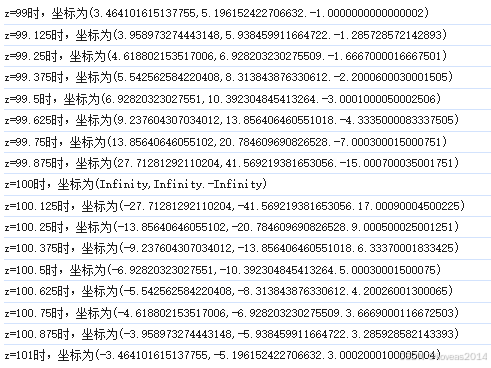
three.js+WebGL踩坑经验合集(4.2):为什么不在可视范围内的3D点投影到2D的结果这么不可靠
上一篇,笔者留下了一个问题,three.js内置的THREE.Vector3.project方法算出来的结果对于超出屏幕可见范围的点来说错得相当离谱。 three.jsWebGL踩坑经验合集(4.1):THREE.Line2的射线检测问题(注意本篇说的是Line2,同样也不是阈值…...

window保存好看的桌面壁纸
1、按下【WINR】快捷键调出“运行”窗口,输入以下命令后回车。 %localappdata%\Packages\Microsoft.Windows.ContentDeliveryManager_cw5n1h2txyewy\LocalState\Assets 2、依次点击【查看】【显示】,勾选【隐藏的项目】,然后按【CtrlA】全部…...