
星火大模型接入及文本生成HTTP流式、非流式接口(JAVA)
文章目录
- 一、接入星火大模型
- 二、基于JAVA实现HTTP非流式接口
- 1.配置
- 2.接口实现
- (1)分析接口请求
- (2)代码实现
- 3.功能测试
- (1)测试对话功能
- (2)测试记住上下文功能
- 三、基于JAVA实现HTTP流式接口
- 1.接口实现
- (1)分析接口请求
- (2)代码实现
- 2.功能测试
- (1)测试对话功能
- (2)测试记住上下文功能
一、接入星火大模型
首先,需要在讯飞开放平台(https://passport.xfyun.cn/login)进行登录:

-
点击这个+创建应用:

-
创建应用:

-
查看创建好的应用:

点击创建的应用可以查看各种鉴权信息,如调用http接口需要的APIPassword。
二、基于JAVA实现HTTP非流式接口
非流式,即一次性返回生成的内容,返回为一个接口;流式,即一边生成一边返回,会返回多个接口,所有接口的文本内容拼接起来构成完整的回答。
本文以模型Spark Lite为例,重要信息(APIPassword、接口地址)在这个页面查看:https://console.xfyun.cn/services/cbm
接口文档在这个地址查看:https://www.xfyun.cn/doc/spark/HTTP%E8%B0%83%E7%94%A8%E6%96%87%E6%A1%A3.html#_1-%E6%8E%A5%E5%8F%A3%E8%AF%B4%E6%98%8E
1.配置
- 需要先创建好Spring Boot项目,配置applicaiton.yml如下:
port: 9000# 星火大模型相关配置
spark:# http鉴权相关配置http:httpApiPassword: ""# 模型相关配置,参考https://console.xfyun.cn/services/cbmmodel:temperature: 0.5 #核采样阈值,用于决定结果随机性,取值越高随机性越强,即相同的问题得到的不同答案的可能性越高。取值范围 (0,1],默认为0.5topK: 4 # 平衡生成文本的质量和多样性,较小的 k 值会减少随机性,使得输出更加稳定;而较大的 k 值会增加随机性,产生更多新颖的输出。取值范围[1, 6],默认为4max_tokens: 1024 # 允许回复的最大tokens数量modelName: "lite"apiHttpUrl: "https://spark-api-open.xf-yun.com/v1/chat/completions"historyRememberCount: 100 # 记录的上下文条数,为0则表示单轮问答不记住上下文
- pom.xml如下:
<?xml version="1.0" encoding="UTF-8"?>
<project xmlns="http://maven.apache.org/POM/4.0.0"xmlns:xsi="http://www.w3.org/2001/XMLSchema-instance"xsi:schemaLocation="http://maven.apache.org/POM/4.0.0 http://maven.apache.org/xsd/maven-4.0.0.xsd"><modelVersion>4.0.0</modelVersion><groupId>org.example</groupId><artifactId>spark</artifactId><version>1.0-SNAPSHOT</version><properties><maven.compiler.source>8</maven.compiler.source><maven.compiler.target>8</maven.compiler.target><project.build.sourceEncoding>UTF-8</project.build.sourceEncoding></properties><dependencies><dependency><groupId>org.springframework.boot</groupId><artifactId>spring-boot-starter-web</artifactId><version>2.7.6</version></dependency><dependency><groupId>org.projectlombok</groupId><artifactId>lombok</artifactId><version>1.18.30</version></dependency><dependency><groupId>com.alibaba</groupId><artifactId>fastjson</artifactId><version>2.0.43</version></dependency><dependency><groupId>org.springframework.boot</groupId><artifactId>spring-boot-starter-test</artifactId><version>2.7.18</version><scope>test</scope></dependency><dependency><groupId>org.springframework.boot</groupId><artifactId>spring-boot-starter-websocket</artifactId><version>2.7.18</version></dependency></dependencies></project>
2.接口实现
(1)分析接口请求
- 请求头:
Content-Type: application/json
Authorization: Bearer 123456
- 请求体:
{"model": "generalv3.5","user": "用户唯一id","messages": [{"role": "system","content": "你是知识渊博的助理"},{"role": "user","content": "你好,讯飞星火"}],// 下面是可选参数"temperature": 0.5,"top_k": 4,"stream": false,"max_tokens": 1024
}
- 正常响应:
{"code": 0,"message": "Success","sid": "cha000b0003@dx1905cd86d6bb86d552","choices": [{"message": {"role": "assistant","content": "你好,我是由科大讯飞构建的星火认知智能模型。\n如果你有任何问题或者需要帮助的地方,请随时告诉我!我会尽力为你提供解答和支持。请问有什么可以帮到你的吗?"},"index": 0}],"usage": {"prompt_tokens": 6,"completion_tokens": 42,"total_tokens": 48}
}
- 错误响应:
{"error": {"message": "invalid user","type": "api_error","param": null,"code": null}
}
(2)代码实现
- 主方法:
//从application.yml中引入一些必要的配置@Value("${spark.http.httpApiPassword}")private String httpApiPassword;@Value("${spark.model.apiHttpUrl}")private String apiUrl;@Value("${spark.model.temperature}")private float temperature;@Value("${spark.model.topK}")private int topK;@Value("${spark.model.modelName}")private String model;@Value("${spark.model.max_tokens}")private int maxTokens;@Value("${spark.model.historyRememberCount}")private int historyRememberCount;private final ObjectMapper objectMapper = new ObjectMapper();public SparkResponse completions(String systemContent, String userContent, String userId) throws IOException {URL url = new URL(apiUrl);HttpURLConnection connection = (HttpURLConnection) url.openConnection();connection.setRequestMethod("POST");// 设置请求头connection.setRequestProperty("Authorization", "Bearer " + httpApiPassword);connection.setRequestProperty("Content-Type", "application/json");// 设置请求体,发起请求connection.setDoOutput(true);connection.getOutputStream().write(buildRequestBody(systemContent, userContent, userId,false).toJSONString().getBytes());// 获取响应SparkResponse res = parseResponse(connection);// 将响应加到上下文中if(historyRememberCount>0){rememberCompletionsAnswer(userId,res);}return res;}
- 构建请求体:
private JSONObject buildRequestBody(String systemContent, String userContent, String userId, boolean isStreaming) {// 加入一些大模型参数JSONObject requestBody = new JSONObject();requestBody.put("model", model);requestBody.put("temperature", temperature);requestBody.put("top_k", topK);requestBody.put("max_tokens", maxTokens);requestBody.put("stream", isStreaming);JSONArray messages = new JSONArray();// 将历史上下文加入请求中if (historyRememberCount > 0&&!historyDialoguesMap.isEmpty()&&historyDialoguesMap.containsKey(userId)) {messages.addAll(historyDialoguesMap.get(userId));}// 构建此轮dialogue并加入到上下文中Dialogue messageSystem = null;if (StringUtils.isNotEmpty(systemContent)) {messageSystem = new Dialogue("system", systemContent);messages.add(messageSystem);}Dialogue messageUser = new Dialogue("user", userContent);messages.add(messageUser);if(historyRememberCount > 0){historyInsert(userId,messageSystem);historyInsert(userId,messageUser);}requestBody.put("messages", messages);return requestBody;}/*** 上下文添加方法*/public void historyInsert(String userId, Dialogue dialogue) {if(dialogue == null){return;}if (historyDialoguesMap.containsKey(userId)) {List<Dialogue> historyDialogues = historyDialoguesMap.get(userId);historyDialogues.add(dialogue);if (historyDialogues.size() > historyRememberCount) {historyDialogues.remove(0);}}else{List<Dialogue> historyDialogues = new ArrayList<>();historyDialogues.add(dialogue);historyDialoguesMap.put(userId,historyDialogues);if (historyDialogues.size() > historyRememberCount) {historyDialogues.remove(0);}}}
- 定义响应体类:
/*** 星火大模型返回类型封装*/
@AllArgsConstructor
@NoArgsConstructor
@Data
public class SparkResponse implements Serializable {private static final long serialVersionUID = 1L;private Integer code;private String message;private String sid;private String id;private Long created;private List<Choices> choices;private JSONObject usage;private JSONObject error;
}
@Data
@AllArgsConstructor
@NoArgsConstructor
public class Choices implements Serializable {private static final long serialVersionUID = 1L;private Dialogue message;private Dialogue delta;private int index;
}
/*** 与大模型的会话*/
@Data
@AllArgsConstructor
@NoArgsConstructor
public class Dialogue {/*** 角色:system  user  assistant*/private String role;private String content;private int index;public Dialogue(String role, String content) {this.role=role;this.content=content;}
}
- 获取响应:
private SparkResponse parseResponse(HttpURLConnection connection) throws IOException {int responseCode = connection.getResponseCode();log.info("SparkHttpAPI completions responseCode:{}", responseCode);if (responseCode == HttpURLConnection.HTTP_OK) {try (InputStream inputStream = connection.getInputStream()) {return objectMapper.readValue(inputStream, SparkResponse.class);}} else {throw new SparkResponseParseException("NonStreaming Completions Result Parse Error");}}
- 将响应加到上下文中:
public void rememberCompletionsAnswer(String userId, SparkResponse res){historyInsert(userId, res.getChoices().get(0).getMessage());}
3.功能测试
(1)测试对话功能
@Autowiredprivate SparkHttpAPI sparkHttpAPITest;@Testvoid completions() {String systemContent = "你是知识渊博的助理";String userContent = "告诉我讯飞星火认知大模型的应用场景有哪些?";try{SparkResponse ans= sparkHttpAPITest.completions(systemContent,userContent,"111");System.out.println(ans);}catch (Exception e){log.error("测试不通过",e);}}

(2)测试记住上下文功能
@Testvoid historyTest() {String systemContent = "你是知识渊博的律师";String userContent = "小王偷了小李门口的鞋子,小王犯法吗?";try {SparkResponse ans = sparkHttpAPITest.completions(systemContent, userContent, "111");System.out.println(ans);userContent = "小王犯了什么罪";ans = sparkHttpAPITest.completions(null, userContent, "111");System.out.println(ans);} catch (Exception e) {log.error("测试不通过", e);}}

三、基于JAVA实现HTTP流式接口
接口文档也在这个地址查看:https://www.xfyun.cn/doc/spark/HTTP%E8%B0%83%E7%94%A8%E6%96%87%E6%A1%A3.html#_1-%E6%8E%A5%E5%8F%A3%E8%AF%B4%E6%98%8E
1.接口实现
(1)分析接口请求
- 响应格式:
相比非流式略微有一些不同,响应分成了多次,最后一个data:[DONE]为结束标志。
data:{"code":0,"message":"Success","sid":"cha000b000c@dx1905cf38fc8b86d552","id":"cha000b000c@dx1905cf38fc8b86d552","created":1719546385,"choices":[{"delta":{"role":"assistant","content":"你好"},"index":0}]}data:{"code":0,"message":"Success","sid":"cha000b000c@dx1905cf38fc8b86d552","id":"cha000b000c@dx1905cf38fc8b86d552","created":1719546385,"choices":[{"delta":{"role":"assistant","content":",很高兴"},"index":0}]}data:{"code":0,"message":"Success","sid":"cha000b000c@dx1905cf38fc8b86d552","id":"cha000b000c@dx1905cf38fc8b86d552","created":1719546385,"choices":[{"delta":{"role":"assistant","content":"为你解答问题"},"index":0}]}data:{"code":0,"message":"Success","sid":"cha000b000c@dx1905cf38fc8b86d552","id":"cha000b000c@dx1905cf38fc8b86d552","created":1719546385,"choices":[{"delta":{"role":"assistant","content":"。\n"},"index":0}]}data:{"code":0,"message":"Success","sid":"cha000b000c@dx1905cf38fc8b86d552","id":"cha000b000c@dx1905cf38fc8b86d552","created":1719546387,"choices":[{"delta":{"role":"assistant","content":"我是讯飞星火认知大模型,由科大讯飞构建的认知智能系统。"},"index":0}]}data:{"code":0,"message":"Success","sid":"cha000b000c@dx1905cf38fc8b86d552","id":"cha000b000c@dx1905cf38fc8b86d552","created":1719546388,"choices":[{"delta":{"role":"assistant","content":"我具备与人类进行自然交流的能力,可以高效地满足各领域的认知智能需求。"},"index":0}]}data:{"code":0,"message":"Success","sid":"cha000b000c@dx1905cf38fc8b86d552","id":"cha000b000c@dx1905cf38fc8b86d552","created":1719546389,"choices":[{"delta":{"role":"assistant","content":"无论你有什么问题或者需要帮助的地方,我都将尽我所能提供支持和解决方案。请随时告诉我你的需求!"},"index":0}]}data:{"code":0,"message":"Success","sid":"cha000b000c@dx1905cf38fc8b86d552","id":"cha000b000c@dx1905cf38fc8b86d552","created":1719546389,"choices":[{"delta":{"role":"assistant","content":""},"index":0}],"usage":{"prompt_tokens":6,"completion_tokens":68,"total_tokens":74}}data:[DONE]
(2)代码实现
- 主方法:
public void streamingCompletions(String systemContent, String userContent, Consumer<SparkResponse> responseConsumer, String userId) throws IOException {URL url = new URL(apiUrl);HttpURLConnection connection = (HttpURLConnection) url.openConnection();connection.setRequestMethod("POST");// 设置请求头connection.setRequestProperty("Authorization", "Bearer " + httpApiPassword);connection.setRequestProperty("Content-Type", "application/json");// 设置请求体connection.setDoOutput(true);connection.getOutputStream().write(buildRequestBody(systemContent, userContent, userId,true).toJSONString().getBytes());// 获取响应parseResponseStreaming(connection, responseConsumer, userId);}
- 解析响应:
private void parseResponseStreaming(HttpURLConnection connection, Consumer<SparkResponse> responseConsumer, String userId) throws IOException {int responseCode = connection.getResponseCode();log.info("SparkHttpAPI completions responseCode:{}", responseCode);if (responseCode == HttpURLConnection.HTTP_OK) {try (InputStream inputStream = connection.getInputStream();BufferedReader reader = new BufferedReader(new InputStreamReader(inputStream))) {String line;while ((line = reader.readLine()) != null) {if (!line.trim().isEmpty()) {line = line.replaceFirst("data: ", "");if (line.equals("[DONE]")) {return;}try {SparkResponse response = objectMapper.readValue(line, SparkResponse.class);if(historyRememberCount>0){rememberStreamingAnswer(userId,response);}responseConsumer.accept(response); // 将解析的响应传递给调用方} catch (Exception e) {log.error("Failed to parse response line: {}", line, e);}}}}} else {throw new SparkResponseParseException("Streaming Completions Result Parse Error");}}
- 记住响应到上下文中:
public void rememberStreamingAnswer(String userId, SparkResponse res){historyInsert(userId, res.getChoices().get(0).getDelta());}
2.功能测试
(1)测试对话功能
@Testvoid streamingCompletions() {String systemContent = "你是知识渊博的助理";String userContent = "告诉我讯飞星火认知大模型的应用场景有哪些?";try {sparkHttpAPITest.streamingCompletions(systemContent, userContent, SparkHttpResponseHandler::handleResponse, "111");} catch (Exception e) {log.error("测试不通过", e);}}
- 其中的SparkHttpResponseHandler用于处理流式响应:
/*** 处理流式接口响应*/
public class SparkHttpResponseHandler {public static void handleResponse(SparkResponse response) {System.out.println("Received response: " + response);}
}
- 执行结果:
2025-01-24 10:21:29.901  INFO 25120 --- [           main] org.example.llm.SparkHttpAPI             : SparkHttpAPI completions responseCode:200
Received response: SparkResponse(code=0, message=Success, sid=cha000beda5@dx194961d49a99a4b532, id=cha000beda5@dx194961d49a99a4b532, created=1737685289, choices=[Choices(message=null, delta=Dialogue(role=assistant, content=我是科大讯飞研发, index=0), index=0)], usage=null, error=null)
Received response: SparkResponse(code=0, message=Success, sid=cha000beda5@dx194961d49a99a4b532, id=cha000beda5@dx194961d49a99a4b532, created=1737685289, choices=[Choices(message=null, delta=Dialogue(role=assistant, content=的以中文为核心的, index=0), index=0)], usage=null, error=null)
Received response: SparkResponse(code=0, message=Success, sid=cha000beda5@dx194961d49a99a4b532, id=cha000beda5@dx194961d49a99a4b532, created=1737685290, choices=[Choices(message=null, delta=Dialogue(role=assistant, content=新一代认知智能大, index=0), index=0)], usage=null, error=null)
Received response: SparkResponse(code=0, message=Success, sid=cha000beda5@dx194961d49a99a4b532, id=cha000beda5@dx194961d49a99a4b532, created=1737685290, choices=[Choices(message=null, delta=Dialogue(role=assistant, content=模型,我能够在与, index=0), index=0)], usage=null, error=null)
Received response: SparkResponse(code=0, message=Success, sid=cha000beda5@dx194961d49a99a4b532, id=cha000beda5@dx194961d49a99a4b532, created=1737685290, choices=[Choices(message=null, delta=Dialogue(role=assistant, content=人自然的对话互动, index=0), index=0)], usage=null, error=null)
Received response: SparkResponse(code=0, message=Success, sid=cha000beda5@dx194961d49a99a4b532, id=cha000beda5@dx194961d49a99a4b532, created=1737685290, choices=[Choices(message=null, delta=Dialogue(role=assistant, content=的过程中,同时提, index=0), index=0)], usage=null, error=null)
Received response: SparkResponse(code=0, message=Success, sid=cha000beda5@dx194961d49a99a4b532, id=cha000beda5@dx194961d49a99a4b532, created=1737685290, choices=[Choices(message=null, delta=Dialogue(role=assistant, content=供以下多种能力:, index=0), index=0)], usage=null, error=null)
Received response: SparkResponse(code=0, message=Success, sid=cha000beda5@dx194961d49a99a4b532, id=cha000beda5@dx194961d49a99a4b532, created=1737685290, choices=[Choices(message=null, delta=Dialogue(role=assistant, content= 1. 内容生成, index=0), index=0)], usage=null, error=null)
Received response: SparkResponse(code=0, message=Success, sid=cha000beda5@dx194961d49a99a4b532, id=cha000beda5@dx194961d49a99a4b532, created=1737685290, choices=[Choices(message=null, delta=Dialogue(role=assistant, content=能力:我可以生成, index=0), index=0)], usage=null, error=null)
Received response: SparkResponse(code=0, message=Success, sid=cha000beda5@dx194961d49a99a4b532, id=cha000beda5@dx194961d49a99a4b532, created=1737685290, choices=[Choices(message=null, delta=Dialogue(role=assistant, content=多种类型多种风格, index=0), index=0)], usage=null, error=null)
Received response: SparkResponse(code=0, message=Success, sid=cha000beda5@dx194961d49a99a4b532, id=cha000beda5@dx194961d49a99a4b532, created=1737685290, choices=[Choices(message=null, delta=Dialogue(role=assistant, content=的内容,例如邮件, index=0), index=0)], usage=null, error=null)
Received response: SparkResponse(code=0, message=Success, sid=cha000beda5@dx194961d49a99a4b532, id=cha000beda5@dx194961d49a99a4b532, created=1737685290, choices=[Choices(message=null, delta=Dialogue(role=assistant, content=、文案、公文、作, index=0), index=0)], usage=null, error=null)
Received response: SparkResponse(code=0, message=Success, sid=cha000beda5@dx194961d49a99a4b532, id=cha000beda5@dx194961d49a99a4b532, created=1737685291, choices=[Choices(message=null, delta=Dialogue(role=assistant, content=文、对话等; 2, index=0), index=0)], usage=null, error=null)
Received response: SparkResponse(code=0, message=Success, sid=cha000beda5@dx194961d49a99a4b532, id=cha000beda5@dx194961d49a99a4b532, created=1737685291, choices=[Choices(message=null, delta=Dialogue(role=assistant, content=. 自然语言理解, index=0), index=0)], usage=null, error=null)
Received response: SparkResponse(code=0, message=Success, sid=cha000beda5@dx194961d49a99a4b532, id=cha000beda5@dx194961d49a99a4b532, created=1737685291, choices=[Choices(message=null, delta=Dialogue(role=assistant, content=能力:我可以理解, index=0), index=0)], usage=null, error=null)
Received response: SparkResponse(code=0, message=Success, sid=cha000beda5@dx194961d49a99a4b532, id=cha000beda5@dx194961d49a99a4b532, created=1737685291, choices=[Choices(message=null, delta=Dialogue(role=assistant, content=对话和篇章,并可, index=0), index=0)], usage=null, error=null)
Received response: SparkResponse(code=0, message=Success, sid=cha000beda5@dx194961d49a99a4b532, id=cha000beda5@dx194961d49a99a4b532, created=1737685291, choices=[Choices(message=null, delta=Dialogue(role=assistant, content=以实现文本摘要、, index=0), index=0)], usage=null, error=null)
Received response: SparkResponse(code=0, message=Success, sid=cha000beda5@dx194961d49a99a4b532, id=cha000beda5@dx194961d49a99a4b532, created=1737685291, choices=[Choices(message=null, delta=Dialogue(role=assistant, content=信息抽取、多语言, index=0), index=0)], usage=null, error=null)
Received response: SparkResponse(code=0, message=Success, sid=cha000beda5@dx194961d49a99a4b532, id=cha000beda5@dx194961d49a99a4b532, created=1737685291, choices=[Choices(message=null, delta=Dialogue(role=assistant, content=翻译、阅读理解、, index=0), index=0)], usage=null, error=null)
Received response: SparkResponse(code=0, message=Success, sid=cha000beda5@dx194961d49a99a4b532, id=cha000beda5@dx194961d49a99a4b532, created=1737685291, choices=[Choices(message=null, delta=Dialogue(role=assistant, content=情感分析等能力;, index=0), index=0)], usage=null, error=null)
Received response: SparkResponse(code=0, message=Success, sid=cha000beda5@dx194961d49a99a4b532, id=cha000beda5@dx194961d49a99a4b532, created=1737685291, choices=[Choices(message=null, delta=Dialogue(role=assistant, content= 3. 知识问答, index=0), index=0)], usage=null, error=null)
Received response: SparkResponse(code=0, message=Success, sid=cha000beda5@dx194961d49a99a4b532, id=cha000beda5@dx194961d49a99a4b532, created=1737685292, choices=[Choices(message=null, delta=Dialogue(role=assistant, content=能力:我可以回答, index=0), index=0)], usage=null, error=null)
Received response: SparkResponse(code=0, message=Success, sid=cha000beda5@dx194961d49a99a4b532, id=cha000beda5@dx194961d49a99a4b532, created=1737685292, choices=[Choices(message=null, delta=Dialogue(role=assistant, content=各种各样的问题,, index=0), index=0)], usage=null, error=null)
Received response: SparkResponse(code=0, message=Success, sid=cha000beda5@dx194961d49a99a4b532, id=cha000beda5@dx194961d49a99a4b532, created=1737685292, choices=[Choices(message=null, delta=Dialogue(role=assistant, content=包括医学知识、百, index=0), index=0)], usage=null, error=null)
Received response: SparkResponse(code=0, message=Success, sid=cha000beda5@dx194961d49a99a4b532, id=cha000beda5@dx194961d49a99a4b532, created=1737685292, choices=[Choices(message=null, delta=Dialogue(role=assistant, content=科知识、天文地理, index=0), index=0)], usage=null, error=null)
Received response: SparkResponse(code=0, message=Success, sid=cha000beda5@dx194961d49a99a4b532, id=cha000beda5@dx194961d49a99a4b532, created=1737685292, choices=[Choices(message=null, delta=Dialogue(role=assistant, content=等; 4. 推理, index=0), index=0)], usage=null, error=null)
Received response: SparkResponse(code=0, message=Success, sid=cha000beda5@dx194961d49a99a4b532, id=cha000beda5@dx194961d49a99a4b532, created=1737685292, choices=[Choices(message=null, delta=Dialogue(role=assistant, content=能力:我拥有基于, index=0), index=0)], usage=null, error=null)
Received response: SparkResponse(code=0, message=Success, sid=cha000beda5@dx194961d49a99a4b532, id=cha000beda5@dx194961d49a99a4b532, created=1737685292, choices=[Choices(message=null, delta=Dialogue(role=assistant, content=思维链的推理能力, index=0), index=0)], usage=null, error=null)
Received response: SparkResponse(code=0, message=Success, sid=cha000beda5@dx194961d49a99a4b532, id=cha000beda5@dx194961d49a99a4b532, created=1737685292, choices=[Choices(message=null, delta=Dialogue(role=assistant, content=,能够进行科学推, index=0), index=0)], usage=null, error=null)
Received response: SparkResponse(code=0, message=Success, sid=cha000beda5@dx194961d49a99a4b532, id=cha000beda5@dx194961d49a99a4b532, created=1737685292, choices=[Choices(message=null, delta=Dialogue(role=assistant, content=理、常识推理等;, index=0), index=0)], usage=null, error=null)
Received response: SparkResponse(code=0, message=Success, sid=cha000beda5@dx194961d49a99a4b532, id=cha000beda5@dx194961d49a99a4b532, created=1737685292, choices=[Choices(message=null, delta=Dialogue(role=assistant, content= 5. 数学能力, index=0), index=0)], usage=null, error=null)
Received response: SparkResponse(code=0, message=Success, sid=cha000beda5@dx194961d49a99a4b532, id=cha000beda5@dx194961d49a99a4b532, created=1737685293, choices=[Choices(message=null, delta=Dialogue(role=assistant, content=:我具备数学思维, index=0), index=0)], usage=null, error=null)
Received response: SparkResponse(code=0, message=Success, sid=cha000beda5@dx194961d49a99a4b532, id=cha000beda5@dx194961d49a99a4b532, created=1737685293, choices=[Choices(message=null, delta=Dialogue(role=assistant, content=,能理解数学问题, index=0), index=0)], usage=null, error=null)
Received response: SparkResponse(code=0, message=Success, sid=cha000beda5@dx194961d49a99a4b532, id=cha000beda5@dx194961d49a99a4b532, created=1737685293, choices=[Choices(message=null, delta=Dialogue(role=assistant, content=,进行计算、推理, index=0), index=0)], usage=null, error=null)
Received response: SparkResponse(code=0, message=Success, sid=cha000beda5@dx194961d49a99a4b532, id=cha000beda5@dx194961d49a99a4b532, created=1737685293, choices=[Choices(message=null, delta=Dialogue(role=assistant, content=、证明,并能给出, index=0), index=0)], usage=null, error=null)
Received response: SparkResponse(code=0, message=Success, sid=cha000beda5@dx194961d49a99a4b532, id=cha000beda5@dx194961d49a99a4b532, created=1737685293, choices=[Choices(message=null, delta=Dialogue(role=assistant, content=解题步骤。 6., index=0), index=0)], usage=null, error=null)
Received response: SparkResponse(code=0, message=Success, sid=cha000beda5@dx194961d49a99a4b532, id=cha000beda5@dx194961d49a99a4b532, created=1737685293, choices=[Choices(message=null, delta=Dialogue(role=assistant, content= 代码理解与生成, index=0), index=0)], usage=null, error=null)
Received response: SparkResponse(code=0, message=Success, sid=cha000beda5@dx194961d49a99a4b532, id=cha000beda5@dx194961d49a99a4b532, created=1737685293, choices=[Choices(message=null, delta=Dialogue(role=assistant, content=能力:我可以进行, index=0), index=0)], usage=null, error=null)
Received response: SparkResponse(code=0, message=Success, sid=cha000beda5@dx194961d49a99a4b532, id=cha000beda5@dx194961d49a99a4b532, created=1737685293, choices=[Choices(message=null, delta=Dialogue(role=assistant, content=代码理解、代码修, index=0), index=0)], usage=null, error=null)
Received response: SparkResponse(code=0, message=Success, sid=cha000beda5@dx194961d49a99a4b532, id=cha000beda5@dx194961d49a99a4b532, created=1737685293, choices=[Choices(message=null, delta=Dialogue(role=assistant, content=改以及代码生成等, index=0), index=0)], usage=null, error=null)
Received response: SparkResponse(code=0, message=Success, sid=cha000beda5@dx194961d49a99a4b532, id=cha000beda5@dx194961d49a99a4b532, created=1737685293, choices=[Choices(message=null, delta=Dialogue(role=assistant, content=工作; 此外,我, index=0), index=0)], usage=null, error=null)
Received response: SparkResponse(code=0, message=Success, sid=cha000beda5@dx194961d49a99a4b532, id=cha000beda5@dx194961d49a99a4b532, created=1737685294, choices=[Choices(message=null, delta=Dialogue(role=assistant, content=还具备对话游戏、, index=0), index=0)], usage=null, error=null)
Received response: SparkResponse(code=0, message=Success, sid=cha000beda5@dx194961d49a99a4b532, id=cha000beda5@dx194961d49a99a4b532, created=1737685294, choices=[Choices(message=null, delta=Dialogue(role=assistant, content=角色扮演等特色能, index=0), index=0)], usage=null, error=null)
Received response: SparkResponse(code=0, message=Success, sid=cha000beda5@dx194961d49a99a4b532, id=cha000beda5@dx194961d49a99a4b532, created=1737685294, choices=[Choices(message=null, delta=Dialogue(role=assistant, content=力,等待你的探索, index=0), index=0)], usage=null, error=null)
Received response: SparkResponse(code=0, message=Success, sid=cha000beda5@dx194961d49a99a4b532, id=cha000beda5@dx194961d49a99a4b532, created=1737685294, choices=[Choices(message=null, delta=Dialogue(role=assistant, content=。 我可以对多元, index=0), index=0)], usage=null, error=null)
Received response: SparkResponse(code=0, message=Success, sid=cha000beda5@dx194961d49a99a4b532, id=cha000beda5@dx194961d49a99a4b532, created=1737685294, choices=[Choices(message=null, delta=Dialogue(role=assistant, content=能力实现融合统一, index=0), index=0)], usage=null, error=null)
Received response: SparkResponse(code=0, message=Success, sid=cha000beda5@dx194961d49a99a4b532, id=cha000beda5@dx194961d49a99a4b532, created=1737685294, choices=[Choices(message=null, delta=Dialogue(role=assistant, content=,对真实场景下的, index=0), index=0)], usage=null, error=null)
Received response: SparkResponse(code=0, message=Success, sid=cha000beda5@dx194961d49a99a4b532, id=cha000beda5@dx194961d49a99a4b532, created=1737685294, choices=[Choices(message=null, delta=Dialogue(role=assistant, content=需求,我具备提出, index=0), index=0)], usage=null, error=null)
Received response: SparkResponse(code=0, message=Success, sid=cha000beda5@dx194961d49a99a4b532, id=cha000beda5@dx194961d49a99a4b532, created=1737685294, choices=[Choices(message=null, delta=Dialogue(role=assistant, content=问题、规划问题、, index=0), index=0)], usage=null, error=null)
Received response: SparkResponse(code=0, message=Success, sid=cha000beda5@dx194961d49a99a4b532, id=cha000beda5@dx194961d49a99a4b532, created=1737685294, choices=[Choices(message=null, delta=Dialogue(role=assistant, content=解决问题的闭环能, index=0), index=0)], usage=null, error=null)
Received response: SparkResponse(code=0, message=Success, sid=cha000beda5@dx194961d49a99a4b532, id=cha000beda5@dx194961d49a99a4b532, created=1737685294, choices=[Choices(message=null, delta=Dialogue(role=assistant, content=力。进一步地,我, index=0), index=0)], usage=null, error=null)
Received response: SparkResponse(code=0, message=Success, sid=cha000beda5@dx194961d49a99a4b532, id=cha000beda5@dx194961d49a99a4b532, created=1737685295, choices=[Choices(message=null, delta=Dialogue(role=assistant, content=可以持续从海量数, index=0), index=0)], usage=null, error=null)
Received response: SparkResponse(code=0, message=Success, sid=cha000beda5@dx194961d49a99a4b532, id=cha000beda5@dx194961d49a99a4b532, created=1737685295, choices=[Choices(message=null, delta=Dialogue(role=assistant, content=据和大规模知识中, index=0), index=0)], usage=null, error=null)
Received response: SparkResponse(code=0, message=Success, sid=cha000beda5@dx194961d49a99a4b532, id=cha000beda5@dx194961d49a99a4b532, created=1737685295, choices=[Choices(message=null, delta=Dialogue(role=assistant, content=不断学习进化,这, index=0), index=0)], usage=null, error=null)
Received response: SparkResponse(code=0, message=Success, sid=cha000beda5@dx194961d49a99a4b532, id=cha000beda5@dx194961d49a99a4b532, created=1737685295, choices=[Choices(message=null, delta=Dialogue(role=assistant, content=些能力使得我能够, index=0), index=0)], usage=null, error=null)
Received response: SparkResponse(code=0, message=Success, sid=cha000beda5@dx194961d49a99a4b532, id=cha000beda5@dx194961d49a99a4b532, created=1737685295, choices=[Choices(message=null, delta=Dialogue(role=assistant, content=在多个行业和领域, index=0), index=0)], usage=null, error=null)
Received response: SparkResponse(code=0, message=Success, sid=cha000beda5@dx194961d49a99a4b532, id=cha000beda5@dx194961d49a99a4b532, created=1737685295, choices=[Choices(message=null, delta=Dialogue(role=assistant, content=发挥越来越重要的, index=0), index=0)], usage=null, error=null)
Received response: SparkResponse(code=0, message=Success, sid=cha000beda5@dx194961d49a99a4b532, id=cha000beda5@dx194961d49a99a4b532, created=1737685295, choices=[Choices(message=null, delta=Dialogue(role=assistant, content=作用。 同时基于, index=0), index=0)], usage=null, error=null)
Received response: SparkResponse(code=0, message=Success, sid=cha000beda5@dx194961d49a99a4b532, id=cha000beda5@dx194961d49a99a4b532, created=1737685295, choices=[Choices(message=null, delta=Dialogue(role=assistant, content=我的能力,我将结, index=0), index=0)], usage=null, error=null)
Received response: SparkResponse(code=0, message=Success, sid=cha000beda5@dx194961d49a99a4b532, id=cha000beda5@dx194961d49a99a4b532, created=1737685295, choices=[Choices(message=null, delta=Dialogue(role=assistant, content=合科大讯飞以及行, index=0), index=0)], usage=null, error=null)
Received response: SparkResponse(code=0, message=Success, sid=cha000beda5@dx194961d49a99a4b532, id=cha000beda5@dx194961d49a99a4b532, created=1737685295, choices=[Choices(message=null, delta=Dialogue(role=assistant, content=业生态伙伴的相关, index=0), index=0)], usage=null, error=null)
Received response: SparkResponse(code=0, message=Success, sid=cha000beda5@dx194961d49a99a4b532, id=cha000beda5@dx194961d49a99a4b532, created=1737685296, choices=[Choices(message=null, delta=Dialogue(role=assistant, content=产品,完成多模态, index=0), index=0)], usage=null, error=null)
Received response: SparkResponse(code=0, message=Success, sid=cha000beda5@dx194961d49a99a4b532, id=cha000beda5@dx194961d49a99a4b532, created=1737685296, choices=[Choices(message=null, delta=Dialogue(role=assistant, content=理解和生成等相关, index=0), index=0)], usage=null, error=null)
Received response: SparkResponse(code=0, message=Success, sid=cha000beda5@dx194961d49a99a4b532, id=cha000beda5@dx194961d49a99a4b532, created=1737685296, choices=[Choices(message=null, delta=Dialogue(role=assistant, content=工作。, index=0), index=0)], usage=null, error=null)
Received response: SparkResponse(code=0, message=Success, sid=cha000beda5@dx194961d49a99a4b532, id=cha000beda5@dx194961d49a99a4b532, created=1737685296, choices=[Choices(message=null, delta=Dialogue(role=assistant, content=null, index=0), index=0)], usage={"prompt_tokens":12,"completion_tokens":304,"total_tokens":316}, error=null)
(2)测试记住上下文功能
@Testvoid historyTest() {String systemContent = "你是知识渊博的律师";String userContent = "小王偷了小李门口的鞋子,小王犯法吗?";try {sparkHttpAPITest.streamingCompletions(systemContent, userContent, SparkHttpResponseHandler::handleResponse,"111");userContent = "小王犯了什么罪";sparkHttpAPITest.streamingCompletions(null, userContent, SparkHttpResponseHandler::handleResponse,"111");} catch (Exception e) {log.error("测试不通过", e);}}
- 执行结果:
2025-01-24 10:24:38.667  INFO 33000 --- [           main] org.example.llm.SparkHttpAPI             : SparkHttpAPI completions responseCode:200
Received response: SparkResponse(code=0, message=Success, sid=cha000bf839@dx19496202bdeb8f2532, id=cha000bf839@dx19496202bdeb8f2532, created=1737685478, choices=[Choices(message=null, delta=Dialogue(role=assistant, content=小, index=0), index=0)], usage=null, error=null)
Received response: SparkResponse(code=0, message=Success, sid=cha000bf839@dx19496202bdeb8f2532, id=cha000bf839@dx19496202bdeb8f2532, created=1737685478, choices=[Choices(message=null, delta=Dialogue(role=assistant, content=王的行为, index=0), index=0)], usage=null, error=null)
Received response: SparkResponse(code=0, message=Success, sid=cha000bf839@dx19496202bdeb8f2532, id=cha000bf839@dx19496202bdeb8f2532, created=1737685478, choices=[Choices(message=null, delta=Dialogue(role=assistant, content=是否构成犯罪, index=0), index=0)], usage=null, error=null)
Received response: SparkResponse(code=0, message=Success, sid=cha000bf839@dx19496202bdeb8f2532, id=cha000bf839@dx19496202bdeb8f2532, created=1737685478, choices=[Choices(message=null, delta=Dialogue(role=assistant, content=,取决于具体的法律, index=0), index=0)], usage=null, error=null)
Received response: SparkResponse(code=0, message=Success, sid=cha000bf839@dx19496202bdeb8f2532, id=cha000bf839@dx19496202bdeb8f2532, created=1737685478, choices=[Choices(message=null, delta=Dialogue(role=assistant, content=条文和司法解释, index=0), index=0)], usage=null, error=null)
Received response: SparkResponse(code=0, message=Success, sid=cha000bf839@dx19496202bdeb8f2532, id=cha000bf839@dx19496202bdeb8f2532, created=1737685479, choices=[Choices(message=null, delta=Dialogue(role=assistant, content=。, index=0), index=0)], usage=null, error=null)
Received response: SparkResponse(code=0, message=Success, sid=cha000bf839@dx19496202bdeb8f2532, id=cha000bf839@dx19496202bdeb8f2532, created=1737685479, choices=[Choices(message=null, delta=Dialogue(role=assistant, content=在大多数情况下,偷窃是一种违法行为,因为它侵犯了他人的财产权。然而,如果小王只是出于好奇或者误认为鞋子属于他而拿走,那么这种行为可能不会被视为犯罪。, index=0), index=0)], usage=null, error=null)
Received response: SparkResponse(code=0, message=Success, sid=cha000bf839@dx19496202bdeb8f2532, id=cha000bf839@dx19496202bdeb8f2532, created=1737685480, choices=[Choices(message=null, delta=Dialogue(role=assistant, content=此外,如果小王的行为是出于善意,例如他误以为鞋子是自己的,那么这种行为可能不会被认定为犯罪。但是,如果他的行为导致了小李的财产损失,那么他可能需要承担相应的赔偿责任。, index=0), index=0)], usage=null, error=null)
Received response: SparkResponse(code=0, message=Success, sid=cha000bf839@dx19496202bdeb8f2532, id=cha000bf839@dx19496202bdeb8f2532, created=1737685480, choices=[Choices(message=null, delta=Dialogue(role=assistant, content=总之,小王是否犯法需要根据具体情况来判断。如果您有关于这个问题的疑问,建议您咨询专业的律师以获取准确的法律建议。, index=0), index=0)], usage={"prompt_tokens":35,"completion_tokens":129,"total_tokens":164}, error=null)
2025-01-24 10:24:41.009  INFO 33000 --- [           main] org.example.llm.SparkHttpAPI             : SparkHttpAPI completions responseCode:200
Received response: SparkResponse(code=0, message=Success, sid=cha000bf847@dx194962034c8b8f2532, id=cha000bf847@dx194962034c8b8f2532, created=1737685481, choices=[Choices(message=null, delta=Dialogue(role=assistant, content=小, index=0), index=0)], usage=null, error=null)
Received response: SparkResponse(code=0, message=Success, sid=cha000bf847@dx194962034c8b8f2532, id=cha000bf847@dx194962034c8b8f2532, created=1737685481, choices=[Choices(message=null, delta=Dialogue(role=assistant, content=王的行为, index=0), index=0)], usage=null, error=null)
Received response: SparkResponse(code=0, message=Success, sid=cha000bf847@dx194962034c8b8f2532, id=cha000bf847@dx194962034c8b8f2532, created=1737685481, choices=[Choices(message=null, delta=Dialogue(role=assistant, content=可能构成盗窃, index=0), index=0)], usage=null, error=null)
Received response: SparkResponse(code=0, message=Success, sid=cha000bf847@dx194962034c8b8f2532, id=cha000bf847@dx194962034c8b8f2532, created=1737685481, choices=[Choices(message=null, delta=Dialogue(role=assistant, content=罪。, index=0), index=0)], usage=null, error=null)
Received response: SparkResponse(code=0, message=Success, sid=cha000bf847@dx194962034c8b8f2532, id=cha000bf847@dx194962034c8b8f2532, created=1737685482, choices=[Choices(message=null, delta=Dialogue(role=assistant, content=根据《中华人民共和国刑法》第二百六十四条,盗窃公私财物,数额较大或者多次盗窃的,处三年以下有期徒刑、拘役或者管制,并处或者单处罚金;数额巨大或者有其他严重情节的,处三年以上十年以下有期徒刑,并处罚金;, index=0), index=0)], usage=null, error=null)
Received response: SparkResponse(code=0, message=Success, sid=cha000bf847@dx194962034c8b8f2532, id=cha000bf847@dx194962034c8b8f2532, created=1737685482, choices=[Choices(message=null, delta=Dialogue(role=assistant, content=数额特别巨大或者有其他特别严重情节的,处十年以上有期徒刑或者无期徒刑,并处罚金或者没收财产。然而,如果小王是出于好奇或者误认为鞋子属于他而拿走,那么这种行为可能不会被视为犯罪。, index=0), index=0)], usage=null, error=null)
Received response: SparkResponse(code=0, message=Success, sid=cha000bf847@dx194962034c8b8f2532, id=cha000bf847@dx194962034c8b8f2532, created=1737685483, choices=[Choices(message=null, delta=Dialogue(role=assistant, content=此外,如果小王的行为导致了小李的财产损失,那么他可能需要承担相应的赔偿责任。请注意,这只是一般情况下的法律解释,具体情况需要根据案件的具体事实和证据来判断。, index=0), index=0)], usage=null, error=null)
Received response: SparkResponse(code=0, message=Success, sid=cha000bf847@dx194962034c8b8f2532, id=cha000bf847@dx194962034c8b8f2532, created=1737685483, choices=[Choices(message=null, delta=Dialogue(role=assistant, content=如果您有关于这个问题的疑问,建议您咨询专业的律师以获取准确的法律建议。, index=0), index=0)], usage={"prompt_tokens":218,"completion_tokens":175,"total_tokens":393}, error=null)
相关文章:
星火大模型接入及文本生成HTTP流式、非流式接口(JAVA)
文章目录 一、接入星火大模型二、基于JAVA实现HTTP非流式接口1.配置2.接口实现(1)分析接口请求(2)代码实现 3.功能测试(1)测试对话功能(2)测试记住上下文功能 三、基于JAVA实现HTTP流…...

如何将电脑桌面默认的C盘设置到D盘?详细操作步骤!
将电脑桌面默认的C盘设置到D盘的详细操作步骤! 本博文介绍如何将电脑桌面(默认为C盘)设置在D盘下。 首先,在D盘建立文件夹Desktop,完整的路径为D:\Desktop。winR,输入Regedit命令。(或者单击【…...

toRow和markRow的用法以及使用场景
Vue3 Raw API 完整指南 1. toRaw vs markRaw 1.1 基本概念 toRaw: 返回响应式对象的原始对象,用于临时获取原始数据结构,标记过后将会失去响应式markRaw: 标记一个对象永远不会转换为响应式对象,返回对象本身 1.2 使用对比 // toRaw 示例…...

Java中ExecutorService接口介绍、应用场景和示例代码
概述 ExecutorService 是 Java 中用于管理线程池的接口,它属于 java.util.concurrent 包。它提供了用于管理并发任务的功能,包括任务的提交、执行和线程池的生命周期管理。以下是对 ExecutorService 的详细讲解、应用场景和示例代码。 1. 详细讲解 1.…...

java 判断Date是上午还是下午
我要用Java生成表格统计信息,如下图所示: 所以就诞生了本文的内容。 在 Java 里,判断 Date 对象代表的时间是上午还是下午有多种方式,下面为你详细介绍不同的实现方法。 方式一:使用 java.util.Calendar Calendar 类…...

开源 CSS 框架 Tailwind CSS v4.0
开源 CSS 框架 Tailwind CSS v4.0 于 1 月 22 日正式发布,除了显著提升性能、简化配置体验外,还增强了功能特性,具体如下1: 性能提升 采用全新的高性能引擎 Oxide,带来了构建速度的巨大飞跃: 全量构建速度…...
)
微信小程序中实现进入页面时数字跳动效果(自定义animate-numbers组件)
微信小程序中实现进入页面时数字跳动效果 1. 组件定义,新建animate-numbers组件1.1 index.js1.2 wxml1.3 wxss 2. 使用组件 1. 组件定义,新建animate-numbers组件 1.1 index.js // components/animate-numbers/index.js Component({properties: {number: {type: Number,value…...

Kafka生产者ACK参数与同步复制
目录 生产者的ACK参数 ack等于0 ack等于1(默认) ack等于-1或all Kafka的同步复制 使用误区 生产者的ACK参数 Kafka的ack机制可以保证生产者发送的消息被broker接收成功。 Kafka producer有三种ack机制 ,分别是 0,1…...

C语言------数组从入门到精通
1.一维数组 目标:通过思维导图了解学习一维数组的核心知识点: 1.1定义 使用 类型名 数组名[数组长度]; 定义数组。 // 示例: int arr[5]; 1.2一维数组初始化 数组的初始化可以分为静态初始化和动态初始化两种方式。 它们的主要区别在于初始化的时机和内存分配的方…...

FLTK - FLTK1.4.1 - 搭建模板,将FLTK自带的实现搬过来做实验
文章目录 FLTK - FLTK1.4.1 - 搭建模板,将FLTK自带的实现搬过来做实验概述笔记my_fltk_test.cppfltk_test.hfltk_test.cxx用adjuster工程试了一下,好使。END FLTK - FLTK1.4.1 - 搭建模板,将FLTK自带的实现搬过来做实验 概述 用fluid搭建UI…...

postgres基准测试工具pgbench如何使用自定义的表结构和自定义sql
使用 pgbench 进行 PostgreSQL 性能测试时,可以自定义表结构和测试脚本来更好地模拟实际使用场景。以下是一个示例,说明如何自定义表结构和测试脚本。 自定义表结构 创建自定义表结构的 SQL 脚本。例如,创建一个名为 custom_schema.sql 的文…...

开发者交流平台项目部署到阿里云服务器教程
本文使用PuTTY软件在本地Windows系统远程控制Linux服务器;其中,Windows系统为Windows 10专业版,Linux系统为CentOS 7.6 64位。 1.工具软件的准备 maven:https://archive.apache.org/dist/maven/maven-3/3.6.1/binaries/apache-m…...
长期研究计划)
Seed Edge- AGI(人工智能通用智能)长期研究计划
Seed Edge 是字节跳动豆包大模型团队推出的 AGI(人工智能通用智能)长期研究计划12。以下是对它的具体介绍1: 名称含义 “Seed” 即豆包大模型团队名称,“Edge” 代表最前沿的 AGI 探索,整体意味着该项目将在 AGI 领域…...

DeepSeek学术写作测评第二弹:数据分析、图表解读,效果怎么样?
我是娜姐 迪娜学姐 ,一个SCI医学期刊编辑,探索用AI工具提效论文写作和发表。 针对最近全球热议的DeepSeek开源大模型,娜姐昨天分析了关于论文润色、中译英的详细效果测评: DeepSeek学术写作测评第一弹:论文润色&#…...

从单体应用到微服务的迁移过程
目录 1. 理解单体应用与微服务架构2. 微服务架构的优势3. 迁移的步骤步骤 1:评估当前单体应用步骤 2:确定服务边界步骤 3:逐步拆分单体应用步骤 4:微服务的基础设施和工具步骤 5:管理和优化微服务步骤 6:逐…...

Direct2D 极速教程(2) —— 画淳平
极速导航 创建新项目:002-DrawJunpeiWIC 是什么用 WIC 加载图片画淳平 创建新项目:002-DrawJunpei 右键解决方案 -> 添加 -> 新建项目 选择"空项目",项目名称为 “002-DrawJunpei”,然后按"创建" 将 “…...

Lustre Core 语法 - 比较表达式
概述 Lustre v6 中的 Lustre Core 部分支持的表达式种类中,支持比较表达式。相关的表达式包括 , <>, <, >, <, >。 相应的文法定义为 Expression :: Expression Expression | Expression <> Expression | Expression < Expression |…...
] 的使用详解)
C# 中 [MethodImpl(MethodImplOptions.Synchronized)] 的使用详解
总目录 前言 在C#中,[MethodImpl(MethodImplOptions.Synchronized)] 是一个特性(attribute),用于标记方法,使其在执行时自动获得锁。这类似于Java中的 synchronized 关键字,确保同一时刻只有一个线程可以执…...

在win11系统笔记本中使用Ollama部署deepseek制作一个本地AI小助手!原来如此简单!!!
大家新年好啊,明天就是蛇年啦,蛇年快乐! 最近DeepSeek真的太火了,我也跟随B站,使用Ollama在一台Win11系统的笔记本电脑部署了DeepSeek。由于我的云服务器性能很差,虽然笔记本的性能也一般,但是…...

03.01、三合一
03.01、[简单] 三合一 1、题目描述 三合一。描述如何只用一个数组来实现三个栈。 你应该实现push(stackNum, value)、pop(stackNum)、isEmpty(stackNum)、peek(stackNum)方法。stackNum表示栈下标,value表示压入的值。 构造函数会传入一个stackSize参数…...
【Super Tilemap Editor使用详解】(十五):从 TMX 文件导入地图(Importing from TMX files)
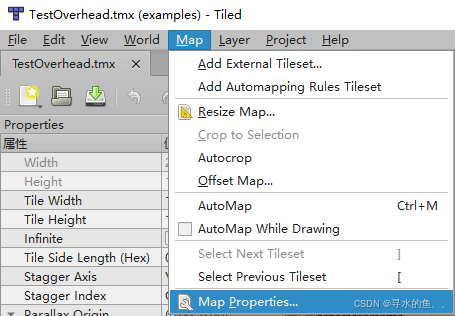
Super Tilemap Editor 支持从 TMX 文件(Tiled Map Editor 的文件格式)导入图块地图。通过导入 TMX 文件,你可以将 Tiled 中设计的地图快速转换为 Unity 中的图块地图,并自动创建图块地图组(Tilemap Group)。以下是详细的导入步骤和准备工作。 一、导入前的准备工作 在导…...

在FreeBSD下安装Ollama并体验DeepSeek r1大模型
在FreeBSD下安装Ollama并体验DeepSeek r1大模型 在FreeBSD下安装Ollama 直接使用pkg安装即可: sudo pkg install ollama 安装完成后,提示: You installed ollama: the AI model runner. To run ollama, plese open 2 terminals. 1. In t…...

低代码系统-产品架构案例介绍、明道云(十一)
明道云HAP-超级应用平台(Hyper Application Platform),其实就是企业级应用平台,跟微搭类似。 通过自设计底层架构,兼容各种平台,使用低代码做到应用搭建、应用运维。 企业级应用平台最大的特点就是隐藏在冰山下的功能很深…...
)
编解码技术:最大秩距离码(Maximum Rank Distance Code)
最大秩距离码(Maximum Rank Distance Code,简称MRD码)是一类用于处理矩阵或线性空间中错误校正的编码。其主要特点是在矩阵数据结构中具备检测和纠正错误的能力,设计目标是实现给定矩阵尺寸和错误纠正能力下的最大可能码字数。MRD…...

Linux 4.19内核中的内存管理:x86_64架构下的实现与源码解析
在现代操作系统中,内存管理是核心功能之一,它直接影响系统的性能、稳定性和多任务处理能力。Linux 内核在 x86_64 架构下,通过复杂的机制实现了高效的内存管理,涵盖了虚拟内存、分页机制、内存分配、内存映射、内存保护、缓存管理等多个方面。本文将深入探讨这些机制,并结…...

python:taichi 绘制太极图
安装 pip install taichi pip install opencv-python pycairo where ti # -- taichi 高性能可视化 Demo 展览 ti gallery D:\Python39\Lib\site-packages\taichi\examples\algorithm\circle-packing\ 点击图片,执行 circle_packing_image.py 可见 编写 taijitu.py 如…...

Linux(19)——使用正则表达式匹配文本
新年快乐! 目录 一、正则表达式: 二、通过 grep 匹配正则表达式: 三、查找匹配项: 一、正则表达式: 正则表达式使用模式匹配机制查找特定内容,vim、grep 和 less 命令都可以使用正则表达式,P…...

USB 3.1-GL3510-52芯片原理图设计
USB 3.1-GL3510-52芯片原理图设计 端口功能与兼容性物理层集成与性能电源相关特性充电功能其他特性原理图接口防护ESD 保护要求 GL3510-52是一款由Genesys Logic(创惟科技)研发的USB转换芯片,具有以下特点: 端口功能与兼容性 它…...

TCP是怎么判断丢包的?
丢包在复杂的网络环境中,是一种常见的现象。 TCP(传输控制协议)作为一种可靠传输协议,内置了多种机制来检测和处理丢包现象,从而保证数据的完整性和传输的可靠性。本文将介绍TCP判断丢包的原理和机制。 一、TCP可靠传…...

DevEco Studio 4.1中如何创建OpenHarmony的Native C++ (NAPI)程序
目录 引言 操作步骤 结语 引言 OpenHarmony的开发工具变化很快,有的时候你安装以前的教程进行操作时会发现界面和操作方式都变了,进行不下去了。比如要在OpenHarmony中通过NAPI调用C程序,很多博文(如NAPI篇【1】——如何创建含…...