
亚博microros小车-原生ubuntu支持系列:17 gmapping
前置依赖
先看下亚博官网的介绍
Gmapping简介
gmapping只适用于单帧二维激光点数小于1440的点,如果单帧激光点数大于1440,那么就会出【[mapping-4] process has died】 这样的问题。
Gmapping是基于滤波SLAM框架的常用开源SLAM算法。
Gmapping基于RBpf粒子滤波算法,即时定位和建图过程分离,先进行定位再进行建图。
Gmapping在RBpf算法上做了两个主要的改进:改进提议分布和选择性重采样。
优点:Gmapping可以实时构建室内地图,在构建小场景地图所需的计算量较小且精度较高。
缺点:随着场景增大所需的粒子增加,因为每个粒子都携带一幅地图,因此在构建大地图时所需内存和计算量都会增加。因此不适合构建大场景地图。并且没有回环检测,因此在回环闭合时可能会造成地图错位,虽然增加粒子数目可以使地图闭合但是以增加计算量和内存为代价。

底层转换
ros2 launch yahboomcar_bringup yahboomcar_bringup_launch.py #底层数据程序
参见:https://blog.csdn.net/bohu83/article/details/145394204
ros2 launch yahboomcar_nav map_gmapping_launch.py #建图节点
from launch import LaunchDescription
from launch_ros.actions import Node
import os
from launch.actions import IncludeLaunchDescription
from launch.launch_description_sources import PythonLaunchDescriptionSource
from ament_index_python.packages import get_package_share_directorydef generate_launch_description():slam_gmapping_launch = IncludeLaunchDescription(PythonLaunchDescriptionSource([os.path.join(get_package_share_directory('slam_gmapping'), 'launch'),'/slam_gmapping.launch.py']))base_link_to_laser_tf_node = Node(package='tf2_ros',executable='static_transform_publisher',name='base_link_to_base_laser',arguments=['-0.0046412', '0' , '0.094079','0','0','0','base_link','laser_frame'])return LaunchDescription([slam_gmapping_launch,base_link_to_laser_tf_node])
这里启动了一个launch文件-slam_gmapping_launch和一个发布静态变换的节点-base_link_to_laser_tf_node。
从代码上看,依赖了slam_gmapping.
slam_gammping
可以从网上找个资料大概了解下,也可以看官网文档:gmapping - ROS Wiki

从文档大概看就是订阅话题:/scan 激光雷达数据、tf 坐标变换;发布了话题:map_metadata、map\~entropy 服务:dynamic_map 获取地图数据
launch还是要引用代码,所以apt-install 办法不适合,需要找源码编译安装。
https://github.com/ros-perception/slam_gmapping
找了这个地址,试了下编译安装。
CMake Error at CMakeLists.txt:5 (find_package):By not providing "Findcatkin.cmake" in CMAKE_MODULE_PATH this project hasasked CMake to find a package configuration file provided by "catkin", butCMake did not find one.Could not find a package configuration file provided by "catkin" with anyof the following names:catkinConfig.cmakecatkin-config.cmakeAdd the installation prefix of "catkin" to CMAKE_PREFIX_PATH or set"catkin_DIR" to a directory containing one of the above files. If "catkin"provides a separate development package or SDK, be sure it has beeninstalled.我的测试环境是ubuntu 22+ ros2 humble.系统缺少 catkin 这个包.
因为在ros2 中catkin 已经被ament取代,如何用ros2 中colcon build 编译 ros中 catkin的功能包?
需要修改源码和cmakelists把catkin相关的更换成ament,我看了下比较麻烦,直接使用了亚博官方的代码。工程结构如下所示,就是指定了启动脚本:src/slam_gmapping/launch/slam_gmapping.launch.py跟slam_gmapping.yaml

slam_gmapping.launch.py,这里启动了slam_gmapping的节点,加载了slam_gmapping.yaml参数文件。
slam_gmapping.yaml
/slam_gmapping:ros__parameters:angularUpdate: 0.5astep: 0.05base_frame: base_footprintmap_frame: mapodom_frame: odomdelta: 0.05iterations: 5kernelSize: 1lasamplerange: 0.005lasamplestep: 0.005linearUpdate: 1.0llsamplerange: 0.01llsamplestep: 0.01lsigma: 0.075lskip: 0lstep: 0.05map_update_interval: 5.0maxRange: 6.0maxUrange: 4.0minimum_score: 0.0occ_thresh: 0.25ogain: 3.0particles: 30qos_overrides:/parameter_events:publisher:depth: 1000durability: volatilehistory: keep_allreliability: reliable/tf:publisher:depth: 1000durability: volatilehistory: keep_lastreliability: reliableresampleThreshold: 0.5sigma: 0.05srr: 0.1srt: 0.2str: 0.1stt: 0.2temporalUpdate: 1.0transform_publish_period: 0.05use_sim_time: falsexmax: 10.0xmin: -10.0ymax: 10.0ymin: -10.0
运行
启动小车代理:

首先启动小车处理底层数据程序,
ros2 launch yahboomcar_bringup yahboomcar_bringup_launch.py
from ament_index_python.packages import get_package_share_pathfrom launch import LaunchDescription
from launch.actions import DeclareLaunchArgument
from launch.conditions import IfCondition, UnlessCondition
from launch.substitutions import Command, LaunchConfigurationfrom launch_ros.actions import Node
from launch_ros.parameter_descriptions import ParameterValuedef generate_launch_description():package_path = get_package_share_path('yahboomcar_nav')default_rviz_config_path = package_path / 'rviz/view.rviz'rviz_arg = DeclareLaunchArgument(name='rvizconfig', default_value=str(default_rviz_config_path),description='Absolute path to rviz config file')rviz_node = Node(package='rviz2',executable='rviz2',name='rviz2',output='screen',arguments=['-d', LaunchConfiguration('rvizconfig')],)return LaunchDescription([rviz_arg,rviz_node])
bohu@bohu-TM1701:~/yahboomcar/yahboomcar_ws$ ros2 launch yahboomcar_bringup yahboomcar_bringup_launch.py
[INFO] [launch]: All log files can be found below /home/bohu/.ros/log/2025-01-30-14-52-59-130561-bohu-TM1701-316456
[INFO] [launch]: Default logging verbosity is set to INFO
---------------------robot_type = x3---------------------
[INFO] [complementary_filter_node-1]: process started with pid [316458]
[INFO] [ekf_node-2]: process started with pid [316460]
[INFO] [static_transform_publisher-3]: process started with pid [316462]
[INFO] [joint_state_publisher-4]: process started with pid [316464]
[INFO] [robot_state_publisher-5]: process started with pid [316466]
[INFO] [static_transform_publisher-6]: process started with pid [316468]
[static_transform_publisher-3] [WARN] [1738219979.422738190] []: Old-style arguments are deprecated; see --help for new-style arguments
[static_transform_publisher-6] [WARN] [1738219979.430808316] []: Old-style arguments are deprecated; see --help for new-style arguments
[static_transform_publisher-3] [INFO] [1738219979.474861598] [base_link_to_base_imu]: Spinning until stopped - publishing transform
[static_transform_publisher-3] translation: ('-0.002999', '-0.003000', '0.031701')
[static_transform_publisher-3] rotation: ('0.000000', '0.000000', '0.000000', '1.000000')
[static_transform_publisher-3] from 'base_link' to 'imu_frame'
[static_transform_publisher-6] [INFO] [1738219979.486498703] [static_transform_publisher_dyynkHgPuvMB4QSZ]: Spinning until stopped - publishing transform
[static_transform_publisher-6] translation: ('0.000000', '0.000000', '0.050000')
[static_transform_publisher-6] rotation: ('0.000000', '0.000000', '0.000000', '1.000000')
[static_transform_publisher-6] from 'base_footprint' to 'base_link'
[complementary_filter_node-1] [INFO] [1738219979.494221633] [complementary_filter_gain_node]: Starting ComplementaryFilterROS
[robot_state_publisher-5] [WARN] [1738219979.497129656] [kdl_parser]: The root link base_link has an inertia specified in the URDF, but KDL does not support a root link with an inertia.  As a workaround, you can add an extra dummy link to your URDF.
[robot_state_publisher-5] [INFO] [1738219979.497311822] [robot_state_publisher]: got segment base_link
[robot_state_publisher-5] [INFO] [1738219979.497405894] [robot_state_publisher]: got segment imu_Link
[robot_state_publisher-5] [INFO] [1738219979.497427256] [robot_state_publisher]: got segment jq1_Link
[robot_state_publisher-5] [INFO] [1738219979.497440404] [robot_state_publisher]: got segment jq2_Link
[robot_state_publisher-5] [INFO] [1738219979.497453384] [robot_state_publisher]: got segment radar_Link
[robot_state_publisher-5] [INFO] [1738219979.497465220] [robot_state_publisher]: got segment yh_Link
[robot_state_publisher-5] [INFO] [1738219979.497477294] [robot_state_publisher]: got segment yq_Link
[robot_state_publisher-5] [INFO] [1738219979.497489516] [robot_state_publisher]: got segment zh_Link
[robot_state_publisher-5] [INFO] [1738219979.497501480] [robot_state_publisher]: got segment zq_Link
[joint_state_publisher-4] [INFO] [1738219980.049008205] [joint_state_publisher]: Waiting for robot_description to be published on the robot_description topic...
然后,启动rviz,可视化建图,终端输入,
ros2 launch yahboomcar_nav display_launch.py
此时还没运行建图节点,所以没有数据。接下来运行建图节点,终端输入,
ros2 launch yahboomcar_nav map_gmapping_launch.py
from launch import LaunchDescription
from launch_ros.actions import Node
import os
from launch.actions import IncludeLaunchDescription
from launch.launch_description_sources import PythonLaunchDescriptionSource
from ament_index_python.packages import get_package_share_directorydef generate_launch_description():slam_gmapping_launch = IncludeLaunchDescription(PythonLaunchDescriptionSource([os.path.join(get_package_share_directory('slam_gmapping'), 'launch'),'/slam_gmapping.launch.py']))base_link_to_laser_tf_node = Node(package='tf2_ros',executable='static_transform_publisher',name='base_link_to_base_laser',arguments=['-0.0046412', '0' , '0.094079','0','0','0','base_link','laser_frame'])return LaunchDescription([slam_gmapping_launch,base_link_to_laser_tf_node])
#启动键盘控制
ros2 run yahboomcar_ctrl yahboom_keyboard
控制小车慢慢转一圈。最终效果如下
生成的map

建图完毕后,输入以下指令保存地图,终端输入,
ros2 launch yahboomcar_nav save_map_launch.py
from ament_index_python.packages import get_package_share_pathfrom launch import LaunchDescription
from launch.actions import DeclareLaunchArgument
from launch.substitutions import LaunchConfigurationfrom launch_ros.actions import Node
import osdef generate_launch_description():package_share_path = str(get_package_share_path('yahboomcar_nav'))package_path = os.path.abspath(os.path.join(package_share_path, "../../../../src/yahboomcar_nav"))map_name = "yahboom_map"default_map_path = os.path.join(package_path, 'maps', map_name)map_arg = DeclareLaunchArgument(name='map_path', default_value=str(default_map_path),description='The path of the map')map_saver_node = Node(package='nav2_map_server',executable='map_saver_cli',arguments=['-f', LaunchConfiguration('map_path'), '--ros-args', '-p', 'save_map_timeout:=60000.00'],)return LaunchDescription([map_arg,map_saver_node])
bohu@bohu-TM1701:~/yahboomcar/yahboomcar_ws$ ros2 launch yahboomcar_nav save_map_launch.py
[INFO] [launch]: All log files can be found below /home/bohu/.ros/log/2025-01-30-15-33-14-161314-bohu-TM1701-319017
[INFO] [launch]: Default logging verbosity is set to INFO
[INFO] [map_saver_cli-1]: process started with pid [319018]
[map_saver_cli-1] [INFO] [1738222394.419546962] [map_saver]:
[map_saver_cli-1] map_saver lifecycle node launched.
[map_saver_cli-1] Waiting on external lifecycle transitions to activate
[map_saver_cli-1] See https://design.ros2.org/articles/node_lifecycle.html for more information.
[map_saver_cli-1] [INFO] [1738222394.419654445] [map_saver]: Creating
[map_saver_cli-1] [INFO] [1738222394.419713380] [map_saver]: Configuring
[map_saver_cli-1] [INFO] [1738222394.420777030] [map_saver]: Saving map from 'map' topic to '/home/bohu/yahboomcar/yahboomcar_ws/src/yahboomcar_nav/maps/yahboom_map' file
[map_saver_cli-1] [WARN] [1738222394.420801411] [map_saver]: Free threshold unspecified. Setting it to default value: 0.250000
[map_saver_cli-1] [WARN] [1738222394.420813330] [map_saver]: Occupied threshold unspecified. Setting it to default value: 0.650000
[map_saver_cli-1] [WARN] [1738222395.293844583] [map_io]: Image format unspecified. Setting it to: pgm
[map_saver_cli-1] [INFO] [1738222395.294086677] [map_io]: Received a 384 X 608 map @ 0.05 m/pix
[map_saver_cli-1] [INFO] [1738222395.473549155] [map_io]: Writing map occupancy data to /home/bohu/yahboomcar/yahboomcar_ws/src/yahboomcar_nav/maps/yahboom_map.pgm
[map_saver_cli-1] [INFO] [1738222395.474901659] [map_io]: Writing map metadata to /home/bohu/yahboomcar/yahboomcar_ws/src/yahboomcar_nav/maps/yahboom_map.yaml
[map_saver_cli-1] [INFO] [1738222395.475071124] [map_io]: Map saved
[map_saver_cli-1] [INFO] [1738222395.475082707] [map_saver]: Map saved successfully
[map_saver_cli-1] [INFO] [1738222395.737027994] [map_saver]: Destroying
[INFO] [map_saver_cli-1]: process has finished cleanly [pid 319018]
会有两个文件生成,一个是yahboom_map.pgm,一个是yahboom_map.yaml,看下yaml的内容,
image: yahboom_map.pgm
mode: trinary
resolution: 0.05
origin: [-10, -10, 0]
negate: 0
occupied_thresh: 0.65
free_thresh: 0.25
-
image:表示地图的图片,也就是yahboom_map.pgm
-
mode:该属性可以是trinary、scale或者raw之一,取决于所选择的mode,trinary模式是默认模式
-
resolution:地图的分辨率, 米/像素
-
origin:地图左下角的 2D 位姿(x,y,yaw), 这里的yaw是逆时针方向旋转的(yaw=0 表示没有旋转)。目前系统中的很多部分会忽略yaw值。
-
negate:是否颠倒 白/黑 、自由/占用 的意义(阈值的解释不受影响)
-
occupied_thresh:占用概率大于这个阈值的的像素,会被认为是完全占用。
-
free_thresh:占用概率小于这个阈值的的像素,会被认为是完全自由。
其他的属性:
TFtree

节点通讯图

应该是小车第一次运行激光雷达进行建图。
以上
相关文章:
亚博microros小车-原生ubuntu支持系列:17 gmapping
前置依赖 先看下亚博官网的介绍 Gmapping简介 gmapping只适用于单帧二维激光点数小于1440的点,如果单帧激光点数大于1440,那么就会出【[mapping-4] process has died】 这样的问题。 Gmapping是基于滤波SLAM框架的常用开源SLAM算法。 Gmapping基于RBp…...

Python 变量和简单数据类型思维导图_2025-01-30
变量和简单数据类型思维导图 下载链接腾讯云盘: https://share.weiyun.com/15A8hrTs...

小麦重测序-文献精读107
Whole-genome sequencing of diverse wheat accessions uncovers genetic changes during modern breeding in China and the United States 中国和美国现代育种过程中小麦不同种质的全基因组测序揭示遗传变化 大豆重测序-文献精读53_gmsw17-CSDN博客 大豆重测序二ÿ…...

Django基础之ORM
一.前言 上一节简单的讲了一下orm,主要还是做个了解,这一节将和大家介绍更加细致的orm,以及他们的用法,到最后再和大家说一下cookie和session,就结束了全部的django基础部分 二.orm的基本操作 1.settings.py&#x…...

大模型知识蒸馏技术(2)——蒸馏技术发展简史
版权声明 本文原创作者:谷哥的小弟作者博客地址:http://blog.csdn.net/lfdfhl2006年模型压缩研究 知识蒸馏的早期思想可以追溯到2006年,当时Geoffrey Hinton等人在模型压缩领域进行了开创性研究。尽管当时深度学习尚未像今天这样广泛普及,但Hinton的研究已经为知识迁移和模…...

android获取EditText内容,TextWatcher按条件触发
android获取EditText内容,TextWatcher按条件触发 背景:解决方案:效果: 背景: 最近在尝试用原生安卓实现仿element-ui表单校验功能,其中涉及到EditText组件内容的动态校验,初步实现功能后&#…...

毕业设计--具有车流量检测功能的智能交通灯设计
摘要: 随着21世纪机动车保有量的持续增加,城市交通拥堵已成为一个日益严重的问题。传统的固定绿灯时长方案导致了大量的时间浪费和交通拥堵。为解决这一问题,本文设计了一款智能交通灯系统,利用车流量检测功能和先进的算法实现了…...

[权限提升] 操作系统权限介绍
关注这个专栏的其他相关笔记:[内网安全] 内网渗透 - 学习手册-CSDN博客 权限提升简称提权,顾名思义就是提升自己在目标系统中的权限。现在的操作系统都是多用户操作系统,用户之间都有权限控制,我们通过 Web 漏洞拿到的 Web 进程的…...
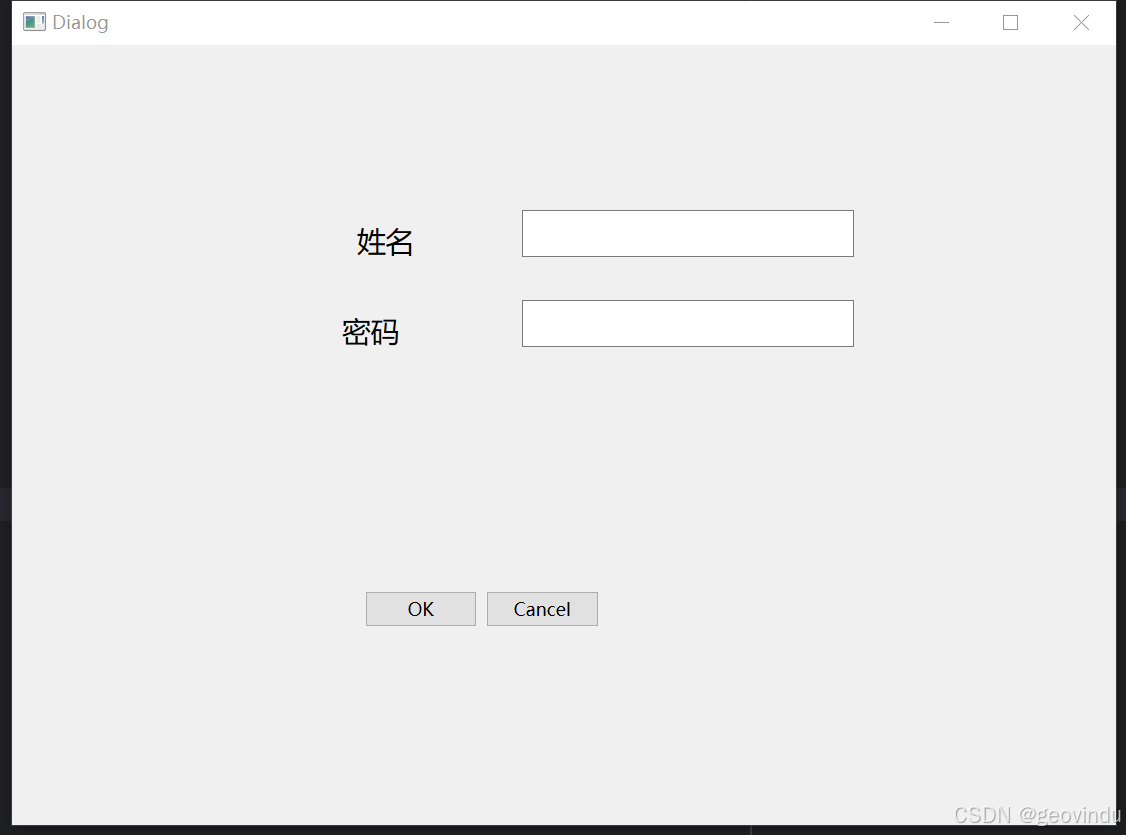
Qt Designer and Python: Build Your GUI
1.install pyside6 2.pyside6-designer.exe 发送到桌面快捷方式 在Python安装的所在 Scripts 文件夹下找到此文件。如C:\Program Files\Python312\Scripts 3. 打开pyside6-designer 设计UI 4.保存为simple.ui 文件,再转成py文件 用代码执行 pyside6-uic.exe simpl…...

数据结构与算法之栈: LeetCode LCR 152. 验证二叉搜索树的后序遍历序列 (Ts版)
验证二叉搜索树的后序遍历序列 https://leetcode.cn/problems/er-cha-sou-suo-shu-de-hou-xu-bian-li-xu-lie-lcof/description/ 描述 请实现一个函数来判断整数数组 postorder 是否为二叉搜索树的后序遍历结果 示例 1 输入: postorder [4,9,6,5,8] 输出: false解释&#…...
)
蓝桥备赛指南(5)
这篇文章相对简单,主要是让大家简单了解下stack函数。 stack的定义和结构 stack是一种先进后出的数据结构,使用前也需要包含头文件<stack>。stack提供了一组函数来操作和访问元素,但它的功能相对简单。 stack的常用函数 1.push&…...

[STM32 - 野火] - - - 固件库学习笔记 - - -十三.高级定时器
一、高级定时器简介 高级定时器的简介在前面一章已经介绍过,可以点击下面链接了解,在这里进行一些补充。 [STM32 - 野火] - - - 固件库学习笔记 - - -十二.基本定时器 1.1 功能简介 1、高级定时器可以向上/向下/两边计数,还独有一个重复计…...
)
【面试题】 Java 三年工作经验(2025)
问题列表 为什么选择 spring boot 框架,它与 Spring 有什么区别?spring mvc 的执行流程是什么?如何实现 spring 的 IOC 过程,会用到什么技术?spring boot 的自动化配置的原理是什么?如何理解 spring boot 中…...

【信息系统项目管理师-选择真题】2006下半年综合知识答案和详解
更多内容请见: 备考信息系统项目管理师-专栏介绍和目录 文章目录 【第1题】【第2题】【第3题】【第4题】【第5题】【第6题】【第7题】【第8题】【第9题】【第10题】【第11题】【第12题】【第13题】【第14题】【第15题】【第16题】【第17题】【第18题】【第19题】【第20题】【第…...
(read)-示例及核心部件)
easyexcel-导入(读取)(read)-示例及核心部件
文章目录 导入(读取)(read)-示例及核心部件导入(读取)(read)-核心部件EasyExcel(EasyExcelFactory) # 入口read() # read()方法用于构建workbook(工作簿)对象,new ExcelReaderBuilder()doReadAll()这里选XlsxSaxAnalyser这个实现类吧然后到这个类XlsxRowHandler&…...

IPhone13 Pro Max设备详情
目录 产品宣传图内部图——后设备详细信息 产品宣传图 内部图——后 设备详细信息 信息收集于HubWeb.cn...

K8S中高级存储之PV和PVC
高级存储 PV和PVC 由于kubernetes支持的存储系统有很多,要求客户全都掌握,显然不现实。为了能够屏蔽底层存储实现的细节,方便用户使用, kubernetes引入PV和PVC两种资源对象。 PV(Persistent Volume) PV是…...

SVG 矩形:深入理解与实际应用
SVG 矩形:深入理解与实际应用 引言 SVG(可缩放矢量图形)是一种基于可扩展标记语言的图形矢量格式,用于在网页上创建矢量图形。SVG矩形是SVG图形中的一种基本形状,它允许用户在网页上绘制不同大小和颜色的矩形。本文将…...

高效学习方法分享
高效学习方法分享 引言 在信息高速发展的今天,学习已经成为每个人不可或缺的一部分。你是否曾感到学习的疲惫,信息的爆炸让你无从下手?今天,我们将探讨几种高效的学习方法,帮助你从中找到适合自己的学习之道。关于学…...

Linux---架构概览
一、Linux 架构分层的深度解析 1. 用户空间(User Space) 用户空间是应用程序运行的环境,与内核空间隔离,确保系统稳定性。 应用程序层: 用户程序:如 edge、vim,通过调用标准库(如 …...

2501,20个窗口常用操作
窗口是屏幕上的一个矩形区域.窗口分为3种:覆盖窗口,弹窗和子窗口.每个窗口都有由系统绘画的"非客户区"和应用绘画的"客户区". 在MFC中,CWnd类为各种窗口提供了基类. 1,通过窗柄取得CWnd指针 可调用Cwnd::FromHandle函数,通过窗柄取得Cwnd指针. void CD…...

[论文总结] 深度学习在农业领域应用论文笔记14
当下,深度学习在农业领域的研究热度持续攀升,相关论文发表量呈现出迅猛增长的态势。但繁荣背后,质量却不尽人意。相当一部分论文内容空洞无物,缺乏能够落地转化的实际价值,“凑数” 的痕迹十分明显。在农业信息化领域的…...

蓝桥杯例题一
不管遇到多大的困难,我们都要坚持下去。每一次挫折都是我们成长的机会,每一次失败都是我们前进的动力。路漫漫其修远兮,吾将上下而求索。只有不断努力奋斗,才能追逐到自己的梦想。不要害怕失败,害怕的是不敢去尝试。只…...

WPF基础 | 深入 WPF 事件机制:路由事件与自定义事件处理
WPF基础 | 深入 WPF 事件机制:路由事件与自定义事件处理 一、前言二、WPF 事件基础概念2.1 事件的定义与本质2.2 常见的 WPF 事件类型 三、路由事件3.1 路由事件的概念与原理3.2 路由事件的三个阶段3.3 路由事件的标识与注册3.4 常见的路由事件示例 四、自定义事件处…...

C++封装红黑树实现mymap和myset和模拟实现详解
文章目录 map和set的封装map和set的底层 map和set的模拟实现insertiterator实现的思路operatoroperator- -operator[ ] map和set的封装 介绍map和set的底层实现 map和set的底层 一份模版实例化出key的rb_tree和pair<k,v>的rb_tree rb_tree的Key和Value不是我们之前传统意…...

洛谷P11464 支配剧场
支配剧场 题目背景 May all the beauty be blessed. 题目描述 布洛妮娅和符华在寻找琪亚娜的途中,被支配之律者困在了支配剧场的高塔回廊之中。布洛妮娅敏锐地发现,虚无回廊是由一些支配之律者生成的积木构成的,只要击碎其中一些积木&#…...

自动化数据备份与恢复:让数据安全无忧
友友们好! 我的新专栏《Python进阶》正式启动啦!这是一个专为那些渴望提升Python技能的朋友们量身打造的专栏,无论你是已经有一定基础的开发者,还是希望深入挖掘Python潜力的爱好者,这里都将是你不可错过的宝藏。 在这个专栏中,你将会找到: ● 深入解析:每一篇文章都将…...

如何用matlab画一条蛇
文章目录 源代码运行结果代码说明结果 源代码 % 画蛇的代码 % 2025-01-28/Ver1 % 清空环境 clc; clear; close all;% 定义蛇的身体坐标 t linspace(0, 4*pi, 100); % 参数化变量 x t; % x坐标 y sin(t) 0.5 * sin(3*t); % y坐标,形成更复…...

DVC - 数据版本和机器学习实验的命令行工具和 VS Code 扩展
文章目录 一、关于 DVC二、快速启动三、DVC的工作原理四、VS代码扩展五、安装Snapcraft(Linux)Chocolatey (Windows)Brew (mac OS)Anaconda (Any platform)PyPI(Python)Package (Platform-specific)Ubuntu / Debian (deb)Fedora /…...
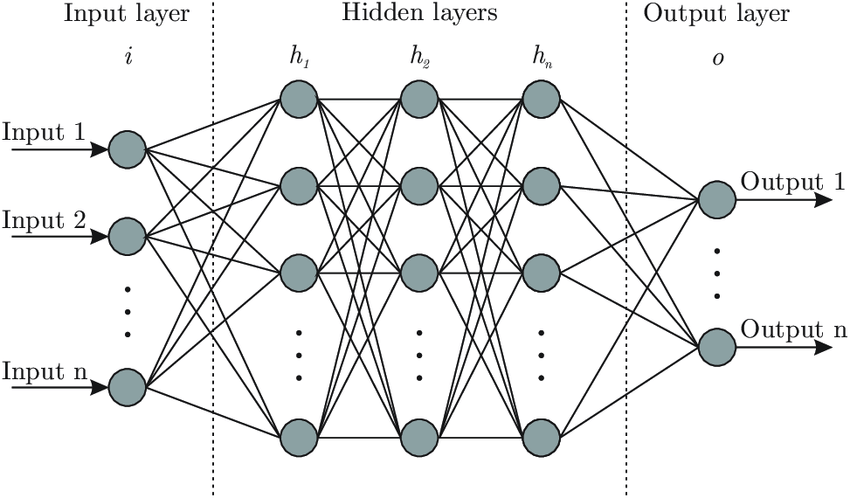
理解神经网络:Brain.js 背后的核心思想
温馨提示 这篇文章篇幅较长,主要是为后续内容做铺垫和说明。如果你觉得文字太多,可以: 先收藏,等后面文章遇到不懂的地方再回来查阅。直接跳读,重点关注加粗或高亮的部分。放心,这种“文字轰炸”不会常有的,哈哈~ 感谢你的耐心阅读!😊 欢迎来到 brain.js 的学习之旅!…...