
【deepseek实战】绿色好用,不断网
前言
最佳deepseek火热网络,我也开发一款windows的电脑端,接入了deepseek,基本是复刻了网页端,还加入一些特色功能。
助力国内AI,发出自己的热量
说一下开发过程和内容的使用吧。
目录
一、介绍
二、具体工作
1.1、引用
1.2、主界面
1.3、主界面布局
1.4 、消息类
1.5 、设置
三、运行图示
四、总结
五、下载
一、介绍
- 目标:个人桌面AI助手,避免与专属API冲突,因为官网一些原因断网,自己接入API,确保能上deepseek。
先上图,确定是否需要使用:

- 软件是免费的,自己用自己的key或者别人的key,没有key可以联系我
二、具体工作
1.1、引用
dotnet8.0
<TargetFramework>net8.0-windows</TargetFramework>PackageReference
<PackageReference Include="Newtonsoft.Json" Version="13.0.3" /><PackageReference Include="System.Drawing.Common" Version="8.0.0" /><PackageReference Include="System.Speech" Version="8.0.0" /><PackageReference Include="Spire.Doc" Version="12.8.0" /> Newtonsoft.Json 编译和反编译API信息
System.Drawing 绘制库,画界面主要
System.Speech 语音接入
Spire.Doc 文档使用
这几个引用根据自己需要添加
1.2、主界面
信息处理,分为及时信息和二次信息处理,这样能对文本信息进行个人需要处理
private async Task<ChatMessage> StreamResponseAsync(string apiKey, List<ChatMessage> chatHistory, string language, CancellationToken cancellationToken)
{var deepseekService = new DeepseekService(currentUser, _printService);var messages = chatHistory.Select(m => new ChatMessage{Role = m.Role,MessageType = m.MessageType,Content = m.Content}).ToList();try{var typingDelay = TimeSpan.FromMilliseconds(50);var buffer = new StringBuilder();var responseMessage = new ChatMessage{Role = "assistant",MessageType = MessageType.Answer,Content = string.Empty,WrappedContent = string.Empty};// 创建响应消息但不立即添加到历史记录var responseIndex = _displayHistory .Count;// 实时处理流式响应 - deepseek输出开始var charCount = 0;var tempBuffer = new StringBuilder();await foreach (var chunk in deepseekService.StreamChatResponseAsync(apiKey, messages, language).WithCancellation(cancellationToken)){if (string.IsNullOrEmpty(chunk) || _isStopping || cancellationToken.IsCancellationRequested) {// Immediately return if stoppingreturn new ChatMessage{Role = "assistant",MessageType = MessageType.Answer,Content = "对话已终止",WrappedContent = "对话已终止"};}tempBuffer.Append(chunk);charCount += chunk.Length;// 每20个字符更新一次显示if (charCount >= 20){buffer.Append(tempBuffer.ToString());tempBuffer.Clear();charCount = 0;await Dispatcher.InvokeAsync(() => {responseMessage.Content = buffer.ToString();responseMessage.WrappedContent = WrapText(responseMessage.Content+"\n回答完成1",ChatHistoryRichTextBox?.ActualWidth - 20 ?? ChatMessage.DefaultBorderWidth);// 更新_curchat_curchatMesg = responseMessage;// 只在第一次更新时添加消息if (_displayHistory .Count == responseIndex) {_displayHistory .Add(responseMessage);} else {_displayHistory [responseIndex] = responseMessage;}UpdateChatHistoryDisplayList(_displayHistory);});          await Task.Delay(typingDelay);}}// 处理剩余不足20字符的内容if (tempBuffer.Length > 0){buffer.Append(tempBuffer.ToString());await Dispatcher.InvokeAsync(() => {responseMessage.Content = buffer.ToString() ;responseMessage.WrappedContent = WrapText(responseMessage.Content+"\n回答完成2",ChatHistoryRichTextBox?.ActualWidth - 20 ?? ChatMessage.DefaultBorderWidth);          // 更新_curchat_curchatMesg = responseMessage;_displayHistory [responseIndex] = responseMessage;UpdateChatHistoryDisplayList(_displayHistory);});}// deepseek输出完成 - 流式响应结束// 进行最后的换行检查await Dispatcher.InvokeAsync(() => {responseMessage.WrappedContent = WrapText(responseMessage.Content+"\n回答完成3", ChatHistoryRichTextBox?.ActualWidth - 20 ?? ChatMessage.DefaultBorderWidth);// 更新_curchat_curchatMesg = responseMessage;_displayHistory [responseIndex] = responseMessage;UpdateChatHistoryDisplayList(_displayHistory);});return responseMessage;}catch (Exception ex){return new ChatMessage{Role = "assistant",MessageType = MessageType.Answer,Content = $"Error: {ex.Message}",WrappedContent = $"Error: {ex.Message}"};}finally{// 清空输入框InputTextBox.Text = string.Empty;}
}
1.3、主界面布局
<Window x:Class="AIzhushou.MainWindow"xmlns="http://schemas.microsoft.com/winfx/2006/xaml/presentation"xmlns:x="http://schemas.microsoft.com/winfx/2006/xaml"xmlns:local="clr-namespace:AIzhushou.Converters"Title="智能聊天助手" Height="820" Width="420" MinHeight="800" MinWidth="400"WindowStartupLocation="Manual"Background="#333333" ResizeMode="CanResizeWithGrip"><Window.Resources><ResourceDictionary><ResourceDictionary.MergedDictionaries><ResourceDictionary Source="/Styles.xaml"/></ResourceDictionary.MergedDictionaries><local:EndMarkVisibilityConverter x:Key="EndMarkVisibilityConverter"/><local:MathConverter x:Key="MathConverter"/></ResourceDictionary></Window.Resources><Viewbox Stretch="Uniform"><Grid Width="420" Height="760" Background="#333333"><Grid.ColumnDefinitions><ColumnDefinition Width="63*"/><ColumnDefinition Width="337*"/></Grid.ColumnDefinitions><Grid.RowDefinitions><RowDefinition Height="Auto"/><RowDefinition Height="*"/><RowDefinition Height="Auto"/><RowDefinition Height="Auto"/><RowDefinition Height="Auto"/></Grid.RowDefinitions><!-- Top Buttons --><DockPanel Grid.Row="0" Grid.Column="1" Margin="265,0,20,5" Width="88"><Button  x:Name="setting" Style="{StaticResource MainButtonStyle}"Click="setting_Click" Height="40" Width="40" RenderTransformOrigin="0.5,0.5"DockPanel.Dock="Right"><Image Source="pack://application:,,,/AIzhushou;component/Img/icons8-home-page-50.png" Width="30" Height="30"/></Button></DockPanel><!-- Chat History Label --><Label Style="{StaticResource SectionLabelStyle}" Content="聊天记录" Margin="22,0,0,0" Grid.ColumnSpan="2" VerticalAlignment="Center"/><!-- Chat History RichTextBox --><Border Grid.Row="1" Style="{StaticResource ChatBorderStyle}" HorizontalAlignment="Left"Grid.ColumnSpan="2" Margin="15,0,0,10"><Border.Resources><Style TargetType="ScrollViewer" BasedOn="{StaticResource CustomScrollViewerStyle}" /></Border.Resources><RichTextBox x:Name="ChatHistoryRichTextBox" Style="{StaticResource ChatHistoryRichTextBoxStyle}"Loaded="ChatHistoryRichTextBox_Loaded" Width="380" Margin="-10,0,0,0"><RichTextBox.Resources><!-- 设置 Paragraph 的 Margin --><Style TargetType="Paragraph"><Setter Property="Margin" Value="0"/></Style></RichTextBox.Resources></RichTextBox></Border><!-- New Conversation Button --><StackPanel Grid.Row="2" Orientation="Horizontal" HorizontalAlignment="Left" Margin="0,10,0,10" Grid.Column="1"><!--<Button x:Name="FreshButton" Style="{StaticResource FreshButtonStyle}" Click="freshButton_Click" Height="36" Width="120"><Button.Content><StackPanel Orientation="Horizontal"><Image Source="pack://application:,,,/AIzhushou;component/Img/icons8-refresh-96.png" Width="20" Height="20" Margin="0,0,5,0"/><TextBlock Text="刷新刚才回答" VerticalAlignment="Center" Foreground="#4d6bfe"/></StackPanel></Button.Content></Button>--><Button x:Name="NewConversationButton" Style="{StaticResource NewConversationButtonStyle}"Click="NewConversationButton_Click" Margin="90,0,5,0" Height="36" Width="120"><Button.Content><StackPanel Orientation="Horizontal"><Image Source="pack://application:,,,/AIzhushou;component/Img/icons8-talk-64.png" Width="20" Height="20" Margin="0,0,5,0"/><TextBlock Text="开启新对话" VerticalAlignment="Center" Foreground="#4d6bfe"/></StackPanel></Button.Content></Button></StackPanel><!-- Input Label --><Label Grid.Row="3" Style="{StaticResource SectionLabelStyle}" Content="输入消息" Margin="22,0,0,0" Grid.ColumnSpan="2" VerticalAlignment="Center"/><!-- Input Section --><Grid Grid.Row="4" HorizontalAlignment="Left" VerticalAlignment="Bottom"Margin="22,0,0,-10" Width="378" Grid.ColumnSpan="2"><Grid.ColumnDefinitions><ColumnDefinition Width="*"/><ColumnDefinition Width="Auto"/></Grid.ColumnDefinitions><!-- Input TextBox --><TextBox x:Name="InputTextBox" Grid.Column="0"Style="{StaticResource InputTextBoxStyle}"TextWrapping="Wrap" AcceptsReturn="True"KeyDown="InputTextBox_KeyDown"PreviewKeyDown="InputTextBox_KeyDown"/><!-- Send Button --><Border Grid.Column="1" Style="{StaticResource SendButtonBorderStyle}" Margin="10,0,0,0"><Button x:Name="SendButton" Style="{StaticResource SendButtonStyle}"Content="发送" Click="SendButton_Click" IsEnabled="True"/></Border></Grid></Grid></Viewbox>
</Window>
1.4 、消息类
设计这个是为了对消息类对API的信息进行存入和处理
public enum MessageType{Question,Answer}public class ChatMessage{public static double DefaultBorderWidth { get; set; } = 300;public string Role { get; set; }public string Content { get; set; }public string WrappedContent { get; set; }public double BorderWidth { get; set; } = DefaultBorderWidth;public Brush BackgroundColor { get; set; }public Brush TextColor { get; set; }public DateTime Timestamp { get; set; } public MessageType MessageType { get; set; }public ChatMessage(){Role = string.Empty;Content = string.Empty;WrappedContent = string.Empty;Timestamp = DateTime.Now;BackgroundColor = Brushes.White;TextColor = Brushes.Black;}public ChatMessage(string content, string wrappedContent, double borderWidth) : this(){Content = content;WrappedContent = wrappedContent;BorderWidth = borderWidth;}}1.5 、设置
API KEY这里是必须填写的,不填写是无法进行问题的回答

这里是代码
private void SaveButton_Click(object sender, RoutedEventArgs e)
{// 更新用户信息currentUser.Username = UsernameTextBox.Text;currentUser.Password = PasswordBox.Password;currentUser.AiUrl = AiUrlTextBox.Text;currentUser.ModelUrl = ModelUrlTextBox.Text;currentUser.ApiKey = ApiKeyTextBox.Text == "请输入deepseek的API keys" ? string.Empty : ApiKeyTextBox.Text;// 保存语言设置var selectedLanguage = ((ComboBoxItem)LanguageComboBox.SelectedItem).Content.ToString();string languageCode = selectedLanguage == "中文" ? "zh-CN" : "en-US";AppSettings.Instance.DefaultLanguage = languageCode;AppSettings.Instance.SaveLanguageSettings(languageCode);// 保存复制选项设置//AppSettings.Instance.CopyCurrent = CopyCurrentRadio.IsChecked == true;AppSettings.Instance.Save();// 保存到配置文件string configPath = System.IO.Path.Combine(Environment.GetFolderPath(Environment.SpecialFolder.ApplicationData),"AIzhushou","config.json");// 确保目录存在var directoryPath = System.IO.Path.GetDirectoryName(configPath);if (string.IsNullOrEmpty(directoryPath)){throw new InvalidOperationException("无法确定配置文件的目录路径");}System.IO.Directory.CreateDirectory(directoryPath);// 序列化保存string json = Newtonsoft.Json.JsonConvert.SerializeObject(currentUser);System.IO.File.WriteAllText(configPath, json);MessageBox.Show("设置保存成功", "提示", MessageBoxButton.OK, MessageBoxImage.Information);this.Close();
}
三、运行图示

四、总结
- 实测了windows c#版本和python版本, c#版比python版本的性能更好,可能C#是微软亲儿子原因?
- 一定用要异步处理,没有什么特别需要
- AI里面,deepseek是真的强
- 如果需要提供协助,可以私信我
写着写着就这么多了,可能不是特别全,不介意费时就看看吧。有时间还会接着更新。
五、下载
AI助手绿色免安装下载 支持deepseek
AI助手项目下载
相关文章:
【deepseek实战】绿色好用,不断网
前言 最佳deepseek火热网络,我也开发一款windows的电脑端,接入了deepseek,基本是复刻了网页端,还加入一些特色功能。 助力国内AI,发出自己的热量 说一下开发过程和内容的使用吧。 目录 一、介绍 二、具体工作 1.1、引…...

【基于SprintBoot+Mybatis+Mysql】电脑商城项目之修改密码和个人资料
🧸安清h:个人主页 🎥个人专栏:【Spring篇】【计算机网络】【Mybatis篇】 🚦作者简介:一个有趣爱睡觉的intp,期待和更多人分享自己所学知识的真诚大学生。 目录 🎃1.修改密码 -持久…...

3.攻防世界 weak_auth
题目描述提示 是一个登录界面,需要密码登录 进入题目页面如下 弱口令密码爆破 用1 or 1 #试试 提示用admin登录 则尝试 用户名admin密码:123456 直接得到flag 常用弱口令密码(可复制) 用户名 admin admin-- admin or -- admin…...
完全指南:用类型安全表达多样性)
Rust枚举(Enum)完全指南:用类型安全表达多样性
枚举(Enum)是Rust类型系统的核心特性之一,它不仅能够表示简单的选项集合,还能携带复杂数据,配合模式匹配实现强大的逻辑控制。本文将通过具体示例,深入解析Rust枚举的完整用法。 一、基础枚举定义 1.1 简单…...

『Apisix进阶篇』结合Consul作服务发现实战演练
文章目录 一、引言二、APISIX与Consul集成2.1 环境准备2.2 配置Consul服务发现2.2.1 修改APISIX配置文件2.2.2 重启APISIX 2.3 在路由中使用Consul服务发现2.3.1 创建路由2.3.2 验证路由 2.4 高级配置2.4.1 服务过滤2.4.2 多数据中心支持 三、总结 📣读完这篇文章里…...
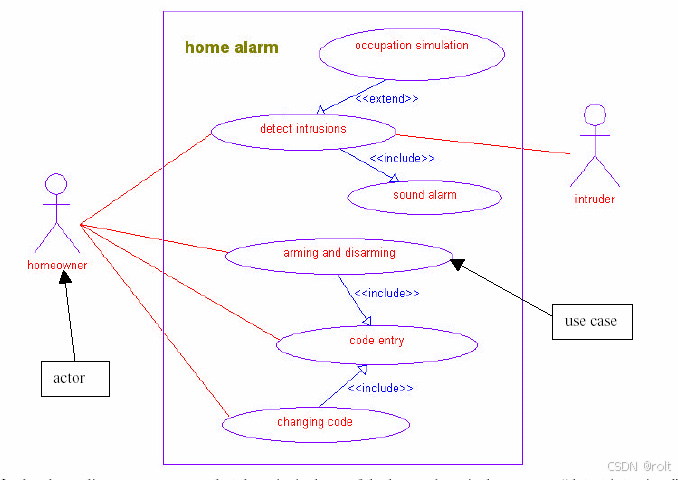
家用报警器的UML 设计及其在C++和VxWorks 上的实现01
M.W.Richardson 著,liuweiw 译 论文描述了如何运用 UML(统一建模语言)设计一个简单的家用报警器,并实现到 VxWorks 操作系统上。本文分两个部分,第一部分描述了如何用 UML 设计和验证家用报警器的模型,以使…...

BUU24 [GXYCTF2019]BabyUpload 1
开局上传文件 上传muma.php 上传.htaccess文件也被打回 再次求助互联网,才发现这提示给的多么明显,上传.htaccess文件是检查文件类型(Contnet-Type),上传muma.php是检查后缀里头有没有ph ,检查文件类型那…...

贪心与单调栈的艺术:从三道 LeetCode 题看最小字典序问题(316/402/1081)
前言 欢迎来到我的算法探索博客,在这里,我将通过解析精选的LeetCode题目,与您分享深刻的解题思路、多元化的解决方案以及宝贵的实战经验,旨在帮助每一位读者提升编程技能,领略算法之美。 👉更多高频有趣Lee…...

医疗信息分析与知识图谱系统设计方案
医疗信息分析与知识图谱系统设计方案 0. 系统需求 0.1 项目背景 本系统旨在通过整合医疗机构现有的信息系统数据,结合向量数据库、图数据库和开源AI模型,实现医疗数据的深度分析、疾病预测和医疗知识图谱构建,为医疗决策提供智能化支持。 …...

【含开题报告+文档+PPT+源码】基于SpringBoot的校园论坛系统的设计与实现
开题报告 本研究论文主要探讨并实现了一个基于SpringBoot框架构建的全方位校园论坛系统。此系统旨在为校内师生提供一个信息交流与分享的互动平台,核心功能涵盖了校园新闻新闻的实时浏览与更新,用户可自主发布各类主题帖子,并支持深度互动&a…...

关于视频字幕
文章目录 视频字幕分类内嵌字幕内封字幕外挂字幕 字幕格式纯文本字幕特效字幕图形字幕 简易修改字幕修改时间同步PotplayerSubtitleEdit 提取蓝光原盘字幕参考资料 视频字幕分类 内嵌字幕 合成到画面的硬字幕,不可移除。 内封字幕 常见的如 MKV 文件,…...

【AI 语音】实时语音交互优化全解析:从 RTC 技术到双讲处理
网罗开发 (小红书、快手、视频号同名) 大家好,我是 展菲,目前在上市企业从事人工智能项目研发管理工作,平时热衷于分享各种编程领域的软硬技能知识以及前沿技术,包括iOS、前端、Harmony OS、Java、Python等…...

使用 Let‘s Encrypt 和 OpenResty 实现域名转发与 SSL 配置
在搭建网站或服务时,确保域名的安全性和正确的流量转发是非常重要的。本文将介绍如何使用 Let’s Encrypt 获取免费的 SSL 证书,并将其配置到 OpenResty 中,同时实现特定的域名转发规则。这不仅可以提升网站的安全性,还能优化流量…...

代码随想录算法训练营| 二叉树总结
代码随想录 二叉树的理论基础:二叉树种类、存储方式、遍历方式、定义方式 二叉树遍历:深度优先和广度优先 二叉树属性:对称、深度、节点、平衡、路径、回溯 修改与构造:反转、构造、合并 涉及到二叉树的构造,无论普…...

数据结构(栈结构之顺序栈操作实现一)
目录 一.栈结构之顺序栈操作实现 1.项目结构以及初始代码 2.初始化栈结构 3.入栈操作并显示 4.出栈操作并显示出栈元素 5.获取栈长度 6.清空栈 7.销毁栈 8.动态扩展栈空间 一.栈结构之顺序栈操作实现 1.项目结构以及初始代码 SeqStack.h #ifndef __SEQSTACK_H__ #de…...

【React】受控组件和非受控组件
目录 受控组件非受控组件基于ref获取DOM元素1、在标签中使用2、在组件中使用 受控组件 表单元素的状态(值)由 React 组件的 state 完全控制。组件的 state 保存了表单元素的值,并且每次用户输入时,React 通过事件处理程序来更新 …...
 》笔记-Chapter2-HTML 中的 JavaScript)
【JavaScript】《JavaScript高级程序设计 (第4版) 》笔记-Chapter2-HTML 中的 JavaScript
二、HTML 中的 JavaScript 将 JavaScript 插入 HTML 的主要方法是使用<script>元素。 <script>元素有下列 8 个属性。 async:可选。表示应该立即开始下载脚本,但不能阻止其他页面动作,比如下载资源或等待其他脚本加载。只对外部…...

tcpdump 的工作层次
理解 tcpdump 的工作层次需要结合 网络分层模型 和 数据包捕获机制(如 pcap)来回答。以下是详细的解释: 物理层 vs. 数据链路层 物理层(Physical Layer,OSI 第1层) 负责传输原始比特流(如电信号…...

vue2:如何动态控制el-form-item之间的行间距
需求 某页面有查看和编辑两种状态: 编辑: 查看: 可以看到,查看时,行间距太大导致页面不紧凑,所以希望缩小查看是的行间距。 行间距设置 行间距通常是通过 CSS 的 margin 或 padding 属性来控制的。在 Element UI 的样式表中,.el-form-item 的下边距(margin-bottom)…...

亚博microros小车-原生ubuntu支持系列:20 ROS Robot APP建图
依赖工程 新建工程laserscan_to_point_publisher src/laserscan_to_point_publisher/laserscan_to_point_publisher/目录下新建文件laserscan_to_point_publish.py #!/usr/bin/env python3import rclpy from rclpy.node import Node from geometry_msgs.msg import PoseStam…...
计算机毕业设计Python+Vue.js游戏推荐系统 Steam游戏推荐系统 Django Flask 游 戏可视化 游戏数据分析 游戏大数据 爬虫
温馨提示:文末有 CSDN 平台官方提供的学长联系方式的名片! 温馨提示:文末有 CSDN 平台官方提供的学长联系方式的名片! 温馨提示:文末有 CSDN 平台官方提供的学长联系方式的名片! 作者简介:Java领…...

Qt最新热点
Qt的最新热点主要集中在以下几个方面: 跨平台开发:Qt继续强调其在跨平台开发方面的优势,支持在Windows、macOS、Linux以及移动操作系统(如Android和iOS)上的应用开发。 Qt for Python:Qt for Python(PySide2和PySide6)的发展,为Python开发者提供了更强大的工具来创建桌…...

k8sollama部署deepseek-R1模型,内网无坑
这是目录 linux下载ollama模型文件下载到本地,打包迁移到k8s等无网络环境使用下载打包ollama镜像非k8s环境使用k8s部署访问方式非ollama运行deepseek模型linux下载ollama 下载后可存放其他服务器 curl -L https://ollama.com/download/ollama-linux-amd64.tgz -o ollama-linu…...

音频录制一般在什么情况下会选择保存为PCM?什么情况会选择保存为WAV?
在音频开发中,选择保存为 PCM 或 WAV 格式取决于具体的应用场景和需求。以下是两种格式的特点以及适用场景的分析: PCM 格式 特点: 原始音频数据: PCM 是未压缩的原始音频数据,没有任何文件头或元数据。数据直接以二进制形式存储,通常是采样点的值。文件体积较大: 由于…...

【Elasticsearch】nested聚合
在 Elasticsearch 中,嵌套聚合(nestedaggregation)的语法形式用于对嵌套字段(nestedfields)进行聚合操作。嵌套字段是 Elasticsearch 中的一种特殊字段类型,用于存储数组中的对象,这些对象需要独…...

从零创建 Vue 3 项目
Vue 3 作为当前最流行的前端框架之一,提供了多种创建项目的方式。本文将详细介绍七种常见的创建 Vue 3 项目的方法,涵盖从本地开发到在线编辑器的多种场景,帮助您选择最适合的方式 快速创建 Vue 3项目 进行开发。 方法一:使用 Vue…...

Day48_20250130【回校继续打卡】_单调栈part1_739.每日温度|496.下一个更大元素I|503.下一个更大元素II
Day48_20250130_单调栈part1_739.每日温度|496.下一个更大元素I|503.下一个更大元素II 20250130补完 739.每日温度 题目 给定一个整数数组 temperatures ,表示每天的温度,返回一个数组 answer ,其中 answer[i] 是指对于第 i 天࿰…...

spy-debugger + Charles 调试移动端/内嵌小程序H5
简介说明: PC端可以用F12进行console等进行调试,但移动端App中使用webview就无法进行实时调试,针对这种情况 1. 安装 全局安装 spy-debugger sudo npm install spy-debugger -g // window不用加sudo2. spy-debugger 证书 其实spy-debugg…...

【NLP 20、Encoding编码 和 Embedding嵌入】
目录 一、核心定义与区别 二、常见Encoding编码 (1) 独热编码(One-Hot Encoding) (2) 位置编码(Positional Encoding) (3) 标签编码(Label Encoding) (4) 注意事项 三、常见Embedding词嵌入 (1) 基础词嵌入…...
-二叉树的属性)
【LeetCode 刷题】二叉树(3)-二叉树的属性
此博客为《代码随想录》二叉树章节的学习笔记,主要内容为二叉树的属性相关的题目解析。 文章目录 101. 对称二叉树104.二叉树的最大深度111.二叉树的最小深度222.完全二叉树的节点个数110.平衡二叉树257. 二叉树的所有路径404.左叶子之和513.找树左下角的值112. 路…...