
zephyr devicetree
Syntax and structure — Zephyr Project Documentation

Input files
There are four types of devicetree input files:
-
sources (
.dts) -
includes (
.dtsi) -
overlays (
.overlay) -
bindings (
.yaml)
The devicetree files inside the zephyr directory look like this:
boards/<ARCH>/<BOARD>/<BOARD>.dts
dts/common/skeleton.dtsi
dts/<ARCH>/.../<SOC>.dtsi
dts/bindings/.../binding.yaml
Generally speaking, every supported board has a BOARD.dts file describing its hardware. For example, the reel_board has boards/phytec/reel_board/reel_board.dts.
BOARD.dts includes one or more .dtsi files. These .dtsi files describe the CPU or system-on-chip Zephyr runs on, perhaps by including other .dtsi files. They can also describe other common hardware features shared by multiple boards. In addition to these includes, BOARD.dts also describes the board’s specific hardware.
The dts/common directory contains skeleton.dtsi, a minimal include file for defining a complete devicetree. Architecture-specific subdirectories (dts/<ARCH>) contain .dtsi files for CPUs or SoCs which extend skeleton.dtsi.
The C preprocessor is run on all devicetree files to expand macro references, and includes are generally done with #include <filename> directives, even though DTS has a /include/ "<filename>" syntax.
BOARD.dts can be extended or modified using overlays. Overlays are also DTS files; the .overlay extension is just a convention which makes their purpose clear. Overlays adapt the base devicetree for different purposes:
-
Zephyr applications can use overlays to enable a peripheral that is disabled by default, select a sensor on the board for an application specific purpose, etc. Along with Configuration System (Kconfig), this makes it possible to reconfigure the kernel and device drivers without modifying source code.
-
Overlays are also used when defining Shields.
The build system automatically picks up .overlay files stored in certain locations. It is also possible to explicitly list the overlays to include, via the DTC_OVERLAY_FILE CMake variable. See Set devicetree overlays for details.
The build system combines BOARD.dts and any .overlay files by concatenating them, with the overlays put last. This relies on DTS syntax which allows merging overlapping definitions of nodes in the devicetree. See Example: FRDM-K64F and Hexiwear K64 for an example of how this works (in the context of .dtsi files, but the principle is the same for overlays). Putting the contents of the .overlay files last allows them to override BOARD.dts.
Devicetree bindings (which are YAML files) are essentially glue. They describe the contents of devicetree sources, includes, and overlays in a way that allows the build system to generate C macros usable by device drivers and applications. The dts/bindings directory contains bindings.
Scripts and tools
The following libraries and scripts, located in scripts/dts/, create output files from input files. Their sources have extensive documentation.
dtlib.py
A low-level DTS parsing library.
edtlib.py
A library layered on top of dtlib that uses bindings to interpret properties and give a higher-level view of the devicetree. Uses dtlib to do the DTS parsing.
gen_defines.py
A script that uses edtlib to generate C preprocessor macros from the devicetree and bindings.
In addition to these, the standard dtc (devicetree compiler) tool is run on the final devicetree if it is installed on your system. This is just to catch errors or warnings. The output is unused. Boards may need to pass dtc additional flags, e.g. for warning suppression. Board directories can contain a file named pre_dt_board.cmake which configures these extra flags, like this:
list(APPEND EXTRA_DTC_FLAGS "-Wno-simple_bus_reg")
Output files
These are created in your application’s build directory.
Warning
Don’t include the header files directly. Devicetree access from C/C++ explains what to do instead.
<build>/zephyr/zephyr.dts.pre
The preprocessed DTS source. This is an intermediate output file, which is input to gen_defines.py and used to create zephyr.dts and devicetree_generated.h.
<build>/zephyr/include/generated/zephyr/devicetree_generated.h
The generated macros and additional comments describing the devicetree. Included by devicetree.h.
<build>/zephyr/zephyr.dts
The final merged devicetree. This file is output by gen_defines.py. It is useful for debugging any issues. If the devicetree compiler dtc is installed, it is also run on this file, to catch any additional warnings or errors.
A devicetree on its own is only half the story for describing hardware, as it is a relatively unstructured format. Devicetree bindings provide the other half.
A devicetree binding declares requirements on the contents of nodes, and provides semantic information about the contents of valid nodes. Zephyr devicetree bindings are YAML files in a custom format (Zephyr does not use the dt-schema tools used by the Linux kernel).
相关文章:
zephyr devicetree
Syntax and structure — Zephyr Project Documentation Input files There are four types of devicetree input files: sources (.dts) includes (.dtsi) overlays (.overlay) bindings (.yaml) The devicetree files inside the zephyr directory look like this: …...

学习笔记:机器学习中的数学原理(一)
1. 集合 集合分为有限集和无限集; 对于有限集,两集合元素数相等即为等势; 对于无限集,两集合元素存在一一映射关系即为等势; 无限集根据是否与正整数集等势分为可数集和不可数集。 2. sigmoid函数(也叫…...

鼠标滚轮冒泡事件@wheel.stop
我有一个页面,是在画布上的组件,但是组件中有一个table,table中数据多了,就会出现滚动条,正常情况下,滚动条用鼠标滚轮就可以滑动,但是这个table是在画布上,滚动滚轮会让画布缩放 在table外层的div上加上 wheel.stop,就生效了 wheel.stop 用途:这个修饰符用于处理鼠…...

Unity DoTween使用文档
DoTween 使用文档 DoTween 是 Unity 中非常流行的动画补间插件。它通过链式调用方式,让开发者可以快速创建平滑、自然的动画效果。本文将介绍 DoTween 的基础用法、缓动曲线原理(包含常见缓动曲线的数学公式与参数说明)、案例演示以及一些常…...
:嵌入式开发中的节省内存利器)
C语言中的共用体(Union):嵌入式开发中的节省内存利器
在进行嵌入式开发时,我们常常会听到这样一句话:“内存就是金钱。” 在嵌入式系统中,内存资源通常是非常稀缺的,尤其是在一些微控制器(如STM32、ESP32等)的开发中,我们需要尽可能地精打细算&…...

Java 线程池:7参数配置、4拒绝策略与执行流程详解
1. 为什么需要线程池? 在 Java 并发编程中,线程的创建和销毁是一项昂贵的操作。频繁地创建和销毁线程会带来较高的系统开销,甚至可能因线程数过多而导致 OOM(OutOfMemoryError) 或 CPU 过载。 线程池(Thre…...

代码随想录算法【Day38】
Day38 322. 零钱兑换 思路 完全背包 代码 class Solution { public:int coinChange(vector<int>& coins, int amount) {vector<int> dp(amount 1, INT_MAX);dp[0] 0;for (int i 0; i < coins.size(); i) { // 遍历物品for (int j coins[i]; j <…...

c# Lazy<T>单例模式 - 延迟初始化单例实例示例与详解
Lazy 延迟初始化单例实例示例与详解 Lazy<T> 是 C# 中用于延迟初始化的类,它允许你在第一次访问对象时才创建实例,而不是在程序启动时就创建实例。这在单例模式中非常有用,因为它可以避免不必要的资源消耗。 1. Lazy 的基本用法 Laz…...

51单片机之冯·诺依曼结构
一、概述 8051系列单片机将作为控制应用最基本的内容集成在一个硅片上,其内部结构如图4-1所示。作为单一芯片的计算机,它的内部结构与一台计算机的主机非常相似。其中微处理器相当于计算机中的CPU,由运算器和控制器两个部分构成;…...

Safari常用快捷键
一、书签边栏 1、显示或隐藏书签边栏:Control-Command-1 2、选择下一个书签或文件夹:向上头键或向下头键 3、打开所选书签:空格键 4、打开所选文件夹:空格键或右箭头键 5、关闭所选文件夹:空格键或左箭头键 6、更…...

02.07 TCP服务器与客户端的搭建
一.思维导图 二.使用动态协议包实现服务器与客户端 1. 协议包的结构定义 首先,是协议包的结构定义。在两段代码中,pack_t结构体都被用来表示协议包: typedef struct Pack {int size; // 记录整个协议包的实际大小enum Type type; …...
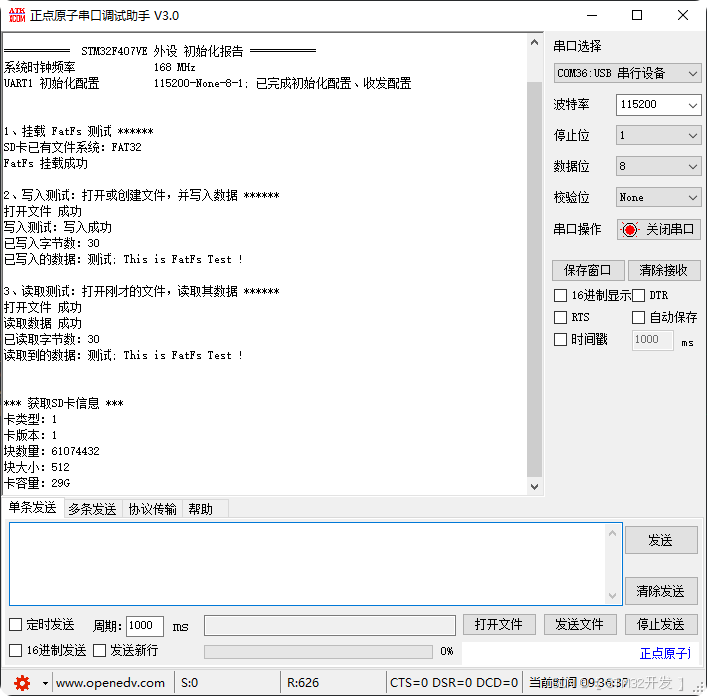
【CubeMX+STM32】SD卡 文件系统读写 FatFs+SDIO+DMA
本篇,将使用CubeMXKeil,创建一个SD卡的 FatFSSDIODMA 文件系统读写工程。 目录 一、简述 二、CubeMX 配置 FatFSSDIO DMA 三、Keil 编辑代码 四、实验效果 实现效果,如下图: 一、简述 上两篇,已循序渐进讲解了SD、…...

51单片机之使用Keil uVision5创建工程以及使用stc-isp进行程序烧录步骤
一、Keil uVision5创建工程步骤 1.点击项目,新建 2.新建目录 3.选择目标机器,直接搜索at89c52选择,然后点击OK 4.是否添加起吊文件,一般选择否 5.再新建的项目工程中添加文件 6.选择C文件 7.在C文件中右键,添加…...

aws(学习笔记第二十七课) 使用aws API Gateway+lambda体验REST API
aws(学习笔记第二十七课) 使用aws API Gatewaylambda体验REST API 学习内容: 使用aws API Gatewaylambda 1. 使用aws API Gatewaylambda 作成概要 使用api gateway定义REST API,之后再接收到了http request之后,redirect到lambda进行执行。…...

React - jsx 语法
在 React 中,JSX(JavaScript XML)是一种语法扩展,它允许开发者在 JavaScript 代码中使用类似 HTML 的语法。JSX 提升了代码的可读性和可维护性,使得编写和构建用户界面更加直观。它被广泛应用于 React 组件的定义。 一…...

5 前端系统开发:Vue2、Vue3框架(上):Vue入门式开发和Ajax技术
文章目录 前言一、Vue框架(简化DOM操作的一个前端框架):基础入门1 Vue基本概念2 快速入门:创建Vue实例,初始化渲染(1)创建一个入门Vue实例(2)插值表达式:{{表…...

快速在wsl上部署学习使用c++轻量化服务器-学习笔记
知乎上推荐的Tinywebserver这个服务器,快速部署搭建,学习c服务器开发 仓库地址 githubhttps://link.zhihu.com/?targethttps%3A//github.com/qinguoyi/TinyWebServerhttps://link.zhihu.com/?targethttps%3A//github.com/qinguoyi/TinyWebServer 在…...

2025年Android NDK超全版本下载地址
Unity3D特效百例案例项目实战源码Android-Unity实战问题汇总游戏脚本-辅助自动化Android控件全解手册再战Android系列Scratch编程案例软考全系列Unity3D学习专栏蓝桥系列ChatGPT和AIGC 👉关于作者 专注于Android/Unity和各种游戏开发技巧,以及各种资源分…...

React 设计模式:实用指南
React 提供了众多出色的特性以及丰富的设计模式,用于简化开发流程。开发者能够借助 React 组件设计模式,降低开发时间以及编码的工作量。此外,这些模式让 React 开发者能够构建出成果更显著、性能更优越的各类应用程序。 本文将会为您介绍五…...

B站自研的第二代视频连麦系统(上)
导读 本系列文章将从客户端、服务器以及音视频编码优化三个层面,介绍如何基于WebRTC构建视频连麦系统。希望通过这一系列的讲解,帮助开发者更全面地了解 WebRTC 的核心技术与实践应用。 背景 在文章《B站在实时音视频技术领域的探索与实践》中ÿ…...

centOS8安装MySQL8设置开机自动启动失败
提供一个终极解决方案虽然systemctl 更符合管理预期但是不能用 使用一下命令 修改配置文件、修改mysql.service全是问题 systemctl start mysqld systemctl enable mysqld systemctl daemon-reload完全不生效各种报错 提示配置文件内容有问题 Main process exited, codeexite…...

使用Python实现PDF与SVG相互转换
目录 使用工具 使用Python将SVG转换为PDF 使用Python将SVG添加到现有PDF中 使用Python将PDF转换为SVG 使用Python将PDF的特定页面转换为SVG SVG(可缩放矢量图形)和PDF(便携式文档格式)是两种常见且广泛使用的文件格式。SVG是…...

[渗透测试]热门搜索引擎推荐— — shodan篇
[渗透测试]热门搜索引擎推荐— — shodan篇 免责声明:本文仅用于分享渗透测试工具,大家使用时,一定需要遵守相关法律法规。 除了shodan,还有很多其他热门的,比如:fofa、奇安信的鹰图、钟馗之眼等࿰…...

基于物联网技术的智能寻车引导系统方案:工作原理、核心功能及系统架构
本文专为IT技术员、软件开发工程师及智能停车领域专业人士打造,旨在深入剖析智能寻车引导系统的构建与优化过程。如需获取详细解决方案可前往文章最下方获取,如有项目需求及技术合作可私信作者。 智能寻车引导系统是一种集智能化、自动化于一体的停车管理…...

【React】合成事件语法
React 合成事件是 React 为了处理浏览器之间的事件差异而提供的一种跨浏览器的事件系统。它封装了原生的 DOM 事件,提供了一致的事件处理机制。 合成事件与原生事件的区别: 合成事件是 React 自己实现的,封装了原生事件。合成事件依然可以通…...
Redis02 - 持久化
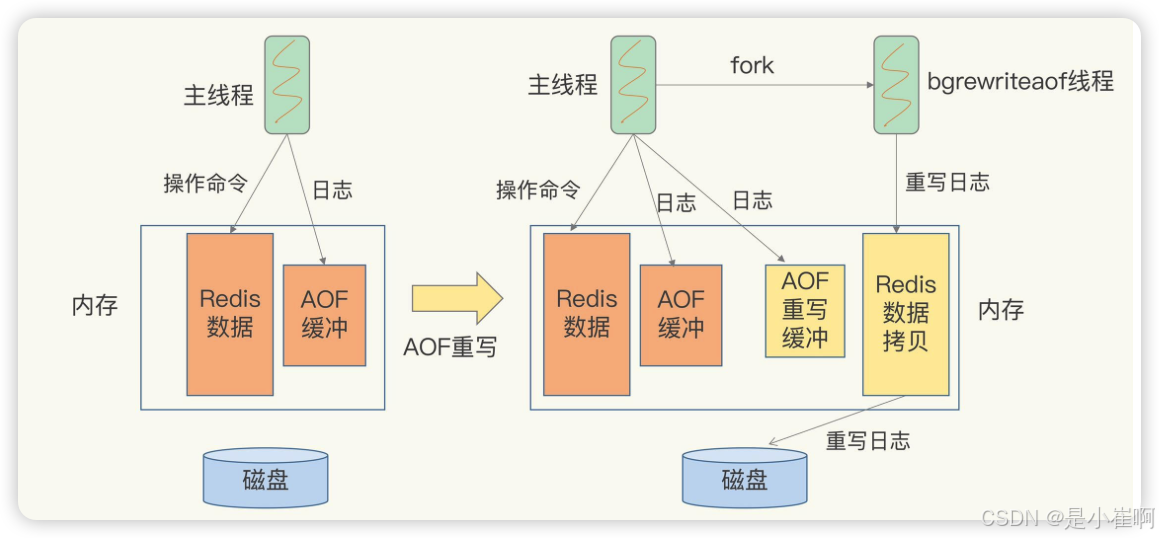
Redis持久化 文章目录 Redis持久化一:持久化简介1:Redis为什么要进行持久化2:Redis持久化的方式 二:RDB持久化介绍1:手动触发RDB2:自动触发RDB3:redis.conf中进行RDB的配置4:RDB优缺…...

初始JavaEE篇 —— Spring Web MVC入门(上)
找往期文章包括但不限于本期文章中不懂的知识点: 个人主页:我要学编程程(ಥ_ಥ)-CSDN博客 所属专栏:JavaEE 目录 RequestMappingg 注解介绍 Postman的介绍与使用 PostMapping 与 GetMapping 注解 构造并接收请求 接收简单参数 接收对象…...

c++计算机教程
目的 做出-*/%计算机 要求 做出可以计算-*/%的计算机 实现 完整代码 #include<bits/stdc.h> int main() {std::cout<<"加 减- 乘* 除/ 取余% \没有了|(因为可以算三位)"<<"\n"<<"提示:每打完一个符号或打完一个数,\…...

Leetcode—487. 最大连续1的个数 II【中等】Plus
2025每日刷题(210) Leetcode—487. 最大连续1的个数 II 实现代码 class Solution { public:int findMaxConsecutiveOnes(vector<int>& nums) {int zeros 0;int ans 0;for(int l 0, r 0; r < nums.size(); r) {if(nums[r] 0) {zeros;…...

【MySQL】窗口函数详解(概念+练习+实战)
文章目录 前言1. SQL窗口函数 1.1 窗口函数概念1.2 窗口函数语法1.3 常见窗口函数 1.3.1 聚合窗口函数1.3.2 专用窗口函数 1.4 窗口函数性能比较 2. LeetCode 例题 2.1 LeetCode SQL 178:分数排名2.2 LeetCode SQL 184:最高工资2.3 LeetCode SQL 185&am…...