
基于YoloV11和驱动级鼠标模拟实现Ai自瞄
本文将围绕基于 YoloV11 和驱动级鼠标实现 FPS 游戏 AI 自瞄展开阐述。
需要着重强调的是,本文内容仅用于学术研究和技术学习目的。严禁任何个人或组织将文中所提及的技术、方法及思路应用于违法行为,包括但不限于在各类游戏中实施作弊等违规操作。若因违反此声明而产生的一切法律后果,均与本文作者无关。
一、原理
AI 自瞄是一种借助人工智能技术自动控制瞄准目标的功能,在 FPS(第一人称射击)游戏场景中,基于目标检测算法(如 YOLO 系列)和驱动级模拟鼠标来实现 AI 自瞄

- 图像采集
- 游戏画面截取:要实现 AI 自瞄,首先需要获取游戏画面信息。一般通过屏幕截图的方式来完成,在计算机系统层面,利用相关的图形 API(如 Windows 系统下的 GDI、DirectX 等)可以截取游戏窗口内的图像。截取到的画面将作为后续目标检测算法的输入数据。
- 实时性要求:为了保证自瞄的及时性和准确性,图像采集需要具备较高的帧率,通常每秒要截取数十帧甚至上百帧的画面,以确保能够实时捕捉游戏中目标的动态变化。
- 目标检测
- 特征提取与模型训练:目标检测是 AI 自瞄的核心环节之一。以 YOLO(You Only Look Once)系列算法为例,其基本思想是将输入的图像划分为多个网格,然后通过卷积神经网络(CNN)对每个网格进行特征提取。在训练阶段,使用大量包含目标对象(如游戏中的敌人)的图像数据进行训练,让模型学习目标的特征和位置信息。训练好的模型能够识别出图像中目标的类别和位置。
- 目标定位:在实际应用中,将采集到的游戏画面输入到训练好的目标检测模型中,模型会输出目标在图像中的位置信息,通常以边界框(bounding box)的形式表示,包含目标的左上角和右下角坐标,从而确定目标在画面中的具体位置。
- 坐标转换
- 图像坐标到屏幕坐标:目标检测模型输出的是目标在图像中的坐标,而要实现鼠标的自动瞄准,需要将这些图像坐标转换为屏幕上的实际坐标。这需要考虑图像在屏幕上的位置、缩放比例等因素。通过一定的数学变换公式,可以将图像坐标映射到屏幕坐标,从而确定目标在屏幕上的具体位置。
- 分辨率适配:不同的游戏和显示器可能具有不同的分辨率,因此在进行坐标转换时,需要对不同的分辨率进行适配,确保在各种分辨率下都能准确地将目标的图像坐标转换为屏幕坐标。
- 驱动级模拟鼠标
- 鼠标控制原理:驱动级模拟鼠标是实现 AI 自瞄的关键步骤。在操作系统层面,鼠标的移动和点击操作是通过向系统发送特定的输入信号来实现的。驱动级模拟鼠标可以绕过游戏的输入检测机制,直接向操作系统发送鼠标控制信号,从而实现鼠标的自动移动和点击。
- 精准控制:根据目标在屏幕上的坐标,计算出鼠标需要移动的距离和方向,然后通过驱动级模拟鼠标技术,精确地控制鼠标移动到目标位置。同时,还可以根据游戏的实际情况,模拟鼠标的点击操作,实现自动射击。
实时反馈与调整 - 动态跟踪:在游戏中,目标对象通常是动态移动的,因此 AI 自瞄系统需要实时跟踪目标的位置变化。通过不断地采集游戏画面、进行目标检测和坐标转换,系统可以实时获取目标的最新位置信息,并及时调整鼠标的移动方向和距离,确保始终瞄准目标。
- 误差修正:由于各种因素的影响,如网络延迟、图像采集误差等,可能会导致目标检测和坐标转换出现一定的误差。为了提高自瞄的准确性,系统需要具备误差修正机制,通过不断地反馈和调整,减小误差,使鼠标能够更加精准地瞄准目标。
二、代码实现
1.实现图像识别
- 实时获取游戏图像
- 使用Mss截图方式,提高截图速度,并使用多线程加快截图和图像检测的速度
-
import timeimport threadingimport mssimport numpy as npimport cv2import threadingdef screenshot_thread(width, height, shift_x, screenshot_interval, lock, latest_screenshot):last_screenshot_time = time.time()with mss.mss() as sct:monitor = sct.monitors[0]start_x = (monitor["width"] - width) // 2 + shift_xstart_y = (monitor["height"] - height) // 2monitor_area = {"left": start_x,"top": start_y,"width": width,"height": height}while True:current_time = time.time()if current_time - last_screenshot_time > screenshot_interval:try:sct_img = sct.grab(monitor_area)screenshot_np = np.array(sct_img)screenshot_np = cv2.cvtColor(screenshot_np, cv2.COLOR_BGRA2BGR)with lock:latest_screenshot = screenshot_nplast_screenshot_time = current_timeexcept Exception as e:print(f"截图时发生错误: {e}")time.sleep(0.001)
- 目标检测
- 使用本地已训练好的模型进行检测,并将检测结果显示在一个框内
- 考虑到部分游戏全屏后会出现游戏画面默认置顶的情况,所以我们使用win32模块将小窗口强制置顶在游戏画面之上,便于我们观察
-
import timeimport cv2import numpy as npimport win32guiimport win32conimport mssfrom ultralytics import YOLOdef detect_and_process(model, width, height, shift_x, window_name, lock, latest_screenshot, target_center_coordinates,shift_pressed, coordinate_smoother, logitech):history_boxes = []history_confidences = []history_size = 5topmost_interval = 1last_topmost_time = time.time()with mss.mss() as sct:monitor = sct.monitors[0]start_x = (monitor["width"] - width) // 2 + shift_xstart_y = (monitor["height"] - height) // 2while True:current_time = time.time()if current_time - last_topmost_time > topmost_interval:hwnd = win32gui.FindWindow(None, window_name)if hwnd != 0:win32gui.SetWindowPos(hwnd, win32con.HWND_TOPMOST, 0, 0, 0, 0, win32con.SWP_NOMOVE | win32con.SWP_NOSIZE)last_topmost_time = current_timewith lock:if latest_screenshot is None:continuescreenshot_np = latest_screenshot.copy()try:results = model(screenshot_np, verbose=False, half=True)except Exception as e:print(f"目标检测时发生错误: {e}")continuemax_conf = 0best_box = Nonedrawn_y_ranges = []for result in results:boxes = result.boxes.cpu().numpy()for box in boxes:x1, y1, x2, y2 = box.xyxy[0].astype(int)is_overlap = any(y1 < y2_ and y2 > y1_ for y1_, y2_ in drawn_y_ranges)if is_overlap:continueconf = box.conf[0]history_confidences.append(conf)if len(history_confidences) > history_size:history_confidences.pop(0)smoothed_conf = np.mean(history_confidences)if smoothed_conf > max_conf:max_conf = smoothed_confbest_box = boxdrawn_y_ranges.append((y1, y2))result_image = screenshot_np.copy()if best_box is not None:x1, y1, x2, y2 = best_box.xyxy[0].astype(int)current_box = np.array([x1, y1, x2, y2])history_boxes.append(current_box)if len(history_boxes) > history_size:history_boxes.pop(0)avg_box = np.mean(history_boxes, axis=0).astype(int)x1, y1, x2, y2 = avg_boxcls = int(best_box.cls[0])class_name = results[0].names[cls]conf = max_confcv2.rectangle(result_image, (x1, y1), (x2, y2), (0, 255, 0), 2)label = f'{class_name}: {conf:.2f}'cv2.putText(result_image, label, (x1, y1 - 10), cv2.FONT_HERSHEY_SIMPLEX, 0.9, (0, 255, 0), 2)x_center = (x1 + x2) // 2y_center = (y1 + y2) // 2screen_x_center = start_x + x_centerscreen_y_center = start_y + y_centertarget_center_coordinates.append((screen_x_center, screen_y_center))if len(target_center_coordinates) > 100:target_center_coordinates.pop(0)if shift_pressed:smoothed_x, smoothed_y = coordinate_smoother.smooth_coordinate(screen_x_center, screen_y_center)logitech.mouse_move((smoothed_x, smoothed_y))cv2.imshow(window_name, result_image)if cv2.waitKey(1) & 0xFF == ord('q'):break
- 目标敌人的坐标
- 我们以屏幕左上角定为坐标(0,0)鼠标坐标为屏幕中心(960,540)实时获取目标中心的坐标点,计算鼠标到目标坐标点的x,y轴距离,转化为数值存储在一个数组中,便于鼠标移动模块实时调用
-
target_center_coordinates = []def store_target_center_coordinates(x_center, y_center):"""存储目标中心坐标点,并控制列表长度不超过 100:param x_center: 目标中心的 x 坐标:param y_center: 目标中心的 y 坐标"""target_center_coordinates.append((x_center, y_center))if len(target_center_coordinates) > 100:target_center_coordinates.pop(0)def get_target_center_coordinates():"""获取存储的目标中心坐标点列表:return: 目标中心坐标点列表"""return target_center_coordinates
- 将以上的图像识别并输出坐标制作成一个py文件,封装成一个目标检测模块
-
import numpy as npimport cv2from ultralytics import YOLOimport win32guiimport win32conimport timeimport threadingimport mssimport osfrom pynput import keyboardimport ctypesimport pyautoguiimport torch# PID 控制器类class PID:def __init__(self, P=0.2, I=0.01, D=0.1):self.kp, self.ki, self.kd = P, I, Dself.uPrevious, self.uCurent = 0, 0self.setValue, self.lastErr, self.errSum = 0, 0, 0self.errSumLimit = 10def pidPosition(self, setValue, curValue):err = setValue - curValuedErr = err - self.lastErrself.errSum += erroutPID = self.kp * err + self.ki * self.errSum + self.kd * dErrself.lastErr = errreturn outPID# 罗技驱动类class LOGITECH:def __init__(self):self.dll = Noneself.state = Falseself.load_dll()def load_dll(self):try:dll_path = os.path.join(os.path.dirname(os.path.abspath(__file__)), 'logitech.driver.dll')self.dll = ctypes.CDLL(dll_path)self.dll.device_open.restype = ctypes.c_intresult = self.dll.device_open()self.state = (result == 1)self.dll.moveR.argtypes = [ctypes.c_int, ctypes.c_int, ctypes.c_bool]self.dll.moveR.restype = Noneexcept FileNotFoundError:print(f'错误, 找不到 DLL 文件')except OSError as e:print(f'错误, 加载 DLL 文件失败: {e}')def mouse_move(self, end_xy, min_xy=2):if not self.state:returnend_x, end_y = end_xypid_x = PID()pid_y = PID()new_x, new_y = pyautogui.position()move_x = pid_x.pidPosition(end_x, new_x)move_y = pid_y.pidPosition(end_y, new_y)move_x = np.clip(move_x, -min_xy if move_x < 0 else min_xy, None).astype(int)move_y = np.clip(move_y, -min_xy if move_y < 0 else min_xy, None).astype(int)self.dll.moveR(move_x, move_y, True)# 平滑坐标的函数,使用简单移动平均class CoordinateSmoother:def __init__(self, window_size=5):self.window_size = window_sizeself.x_buffer = []self.y_buffer = []def smooth_coordinate(self, x, y):self.x_buffer.append(x)self.y_buffer.append(y)if len(self.x_buffer) > self.window_size:self.x_buffer.pop(0)self.y_buffer.pop(0)smoothed_x = int(np.mean(self.x_buffer))smoothed_y = int(np.mean(self.y_buffer))return smoothed_x, smoothed_y# 全局变量target_center_coordinates = []latest_screenshot = Nonelock = threading.Lock()logitech = LOGITECH()coordinate_smoother = CoordinateSmoother()shift_pressed = False# 初始化模型和窗口def init_model_and_window(model_path, window_name, width, height, shift_x):model_path = os.path.join(os.path.dirname(os.path.abspath(__file__)), model_path)if not os.path.exists(model_path):print(f"模型文件 {model_path} 不存在,请检查。")return None, Nonemodel = YOLO(model_path)model.fuse()device = 'cuda' if torch.cuda.is_available() else 'cpu'model.to(device)cv2.namedWindow(window_name, cv2.WINDOW_NORMAL)cv2.resizeWindow(window_name, width, height)time.sleep(0.1)hwnd = win32gui.FindWindow(None, window_name)win32gui.SetWindowPos(hwnd, win32con.HWND_TOPMOST, 0, 0, 0, 0, win32con.SWP_NOMOVE | win32con.SWP_NOSIZE)return model, hwnd# 截图线程函数def screenshot_thread(width, height, shift_x, screenshot_interval):global latest_screenshotlast_screenshot_time = time.time()with mss.mss() as sct:monitor = sct.monitors[0]start_x = (monitor["width"] - width) // 2 + shift_xstart_y = (monitor["height"] - height) // 2monitor_area = {"left": start_x,"top": start_y,"width": width,"height": height}while True:current_time = time.time()if current_time - last_screenshot_time > screenshot_interval:try:sct_img = sct.grab(monitor_area)screenshot_np = np.array(sct_img)screenshot_np = cv2.cvtColor(screenshot_np, cv2.COLOR_BGRA2BGR)with lock:latest_screenshot = screenshot_nplast_screenshot_time = current_timeexcept Exception as e:print(f"截图时发生错误: {e}")time.sleep(0.001)# 实时存放目标中心坐标点的函数def store_target_center_coordinates(x_center, y_center):global target_center_coordinatestarget_center_coordinates.append((x_center, y_center))if len(target_center_coordinates) > 100:target_center_coordinates.pop(0)# 目标检测和处理函数def detect_and_process(model, width, height, shift_x, window_name):history_boxes = []history_confidences = []history_size = 5topmost_interval = 1last_topmost_time = time.time()with mss.mss() as sct:monitor = sct.monitors[0]start_x = (monitor["width"] - width) // 2 + shift_xstart_y = (monitor["height"] - height) // 2while True:current_time = time.time()if current_time - last_topmost_time > topmost_interval:hwnd = win32gui.FindWindow(None, window_name)if hwnd != 0:win32gui.SetWindowPos(hwnd, win32con.HWND_TOPMOST, 0, 0, 0, 0, win32con.SWP_NOMOVE | win32con.SWP_NOSIZE)last_topmost_time = current_timewith lock:if latest_screenshot is None:continuescreenshot_np = latest_screenshot.copy()try:results = model(screenshot_np, verbose=False, half=True)except Exception as e:print(f"目标检测时发生错误: {e}")continuemax_conf = 0best_box = Nonedrawn_y_ranges = []for result in results:boxes = result.boxes.cpu().numpy()for box in boxes:x1, y1, x2, y2 = box.xyxy[0].astype(int)is_overlap = any(y1 < y2_ and y2 > y1_ for y1_, y2_ in drawn_y_ranges)if is_overlap:continueconf = box.conf[0]history_confidences.append(conf)if len(history_confidences) > history_size:history_confidences.pop(0)smoothed_conf = np.mean(history_confidences)if smoothed_conf > max_conf:max_conf = smoothed_confbest_box = boxdrawn_y_ranges.append((y1, y2))result_image = screenshot_np.copy()if best_box is not None:x1, y1, x2, y2 = best_box.xyxy[0].astype(int)current_box = np.array([x1, y1, x2, y2])history_boxes.append(current_box)if len(history_boxes) > history_size:history_boxes.pop(0)avg_box = np.mean(history_boxes, axis=0).astype(int)x1, y1, x2, y2 = avg_boxcls = int(best_box.cls[0])class_name = results[0].names[cls]conf = max_confcv2.rectangle(result_image, (x1, y1), (x2, y2), (0, 255, 0), 2)label = f'{class_name}: {conf:.2f}'cv2.putText(result_image, label, (x1, y1 - 10), cv2.FONT_HERSHEY_SIMPLEX, 0.9, (0, 255, 0), 2)x_center = (x1 + x2) // 2y_center = (y1 + y2) // 2screen_x_center = start_x + x_centerscreen_y_center = start_y + y_centerstore_target_center_coordinates(screen_x_center, screen_y_center)if shift_pressed:smoothed_x, smoothed_y = coordinate_smoother.smooth_coordinate(screen_x_center, screen_y_center)logitech.mouse_move((smoothed_x, smoothed_y))cv2.imshow(window_name, result_image)if cv2.waitKey(1) & 0xFF == ord('q'):break# 封装获取目标中心坐标的函数def get_target_center_coordinates():global target_center_coordinatesreturn target_center_coordinates# 键盘事件处理函数def on_press(key):global shift_pressedif key == keyboard.Key.shift:shift_pressed = Truedef on_release(key):global shift_pressedif key == keyboard.Key.shift:shift_pressed = Falseif key == keyboard.Key.esc:return Falsedef main():model_path = 'best.pt'window_name = 'Detection Result'width, height = 320, 320shift_x = 120screenshot_interval = 0.1import torch # 导入 torch 库model, hwnd = init_model_and_window(model_path, window_name, width, height, shift_x)if model is None:returnscreenshot_t = threading.Thread(target=screenshot_thread, args=(width, height, shift_x, screenshot_interval))screenshot_t.daemon = Truescreenshot_t.start()keyboard_listener = keyboard.Listener(on_press=on_press, on_release=on_release)keyboard_listener.start()try:detect_and_process(model, width, height, shift_x, window_name)except KeyboardInterrupt:print("程序被用户手动中断。")except Exception as e:print(f"程序运行过程中发生错误: {e}")finally:cv2.destroyAllWindows()keyboard_listener.stop()print("存储的目标中心坐标点:", get_target_center_coordinates())if __name__ == "__main__":main()
-
注意:一定要安装python所需的依赖库,最好是在虚拟环境中运行(如Anaconda)
2.驱动级鼠标移动
-
import osimport ctypesimport pyautoguiimport timefrom math import sqrtfrom screenshot import get_target_center_coordinatesfrom pynput import keyboardimport tkinter as tkfrom tkinter import ttkclass PID:def __init__(self, P=2.0, I=0.02, D=0.5): # 增大 P 值以加快响应速度self.kp, self.ki, self.kd = P, I, Dself.uPrevious, self.uCurent = 0, 0self.setValue, self.lastErr, self.errSum = 0, 0, 0self.errSumLimit = 10def pidPosition(self, setValue, curValue):err = setValue - curValuedErr = err - self.lastErrself.errSum += erroutPID = self.kp * err + self.ki * self.errSum + self.kd * dErrself.lastErr = errreturn outPIDclass LOGITECH:def __init__(self):self.dll = Noneself.state = Falseself.load_dll()def load_dll(self):try:file_path = os.path.abspath(os.path.dirname(__file__))self.dll = ctypes.CDLL(f'{file_path}/logitech.driver.dll')self.dll.device_open.restype = ctypes.c_intresult = self.dll.device_open()self.state = (result == 1)self.dll.moveR.argtypes = [ctypes.c_int, ctypes.c_int, ctypes.c_bool]self.dll.moveR.restype = Noneexcept FileNotFoundError:print(f'错误, 找不到 DLL 文件')except OSError as e:print(f'错误, 加载 DLL 文件失败: {e}')def mouse_move(self, end_xy, min_xy=0.5, distance_threshold=5, max_x_move=500, max_y_move=400):if not self.state:returnend_x, end_y = end_xynew_x, new_y = pyautogui.position()# 计算目标坐标与当前鼠标坐标的距离distance = sqrt((end_x - new_x) ** 2 + (end_y - new_y) ** 2)print(f"目标坐标与当前鼠标坐标的距离: {distance}")# 如果距离小于阈值,不进行移动if distance < distance_threshold:print("距离小于阈值,不进行移动")returnpid_x = PID(P=sensitivity)pid_y = PID(P=sensitivity)move_x = pid_x.pidPosition(end_x, new_x)move_y = pid_y.pidPosition(end_y, new_y)# 限制 x 轴移动范围move_x = max(-max_x_move, min(max_x_move, move_x))# 限制 y 轴移动范围move_y = max(-max_y_move, min(max_y_move, move_y))move_x = max(min_xy, move_x) if move_x > 0 else min(-min_xy, move_x) if move_x < 0 else int(move_x)move_y = max(min_xy, move_y) if move_y > 0 else min(-min_xy, move_y) if move_y < 0 else int(move_y)move_x = int(move_x)move_y = int(move_y)print(f"传递给 moveR 的参数: x={move_x}, y={move_y}")result = self.dll.moveR(move_x, move_y, True)print(f"moveR 函数的返回值: {result}")logitech = LOGITECH()aiming = False # 新增状态变量,用于跟踪是否正在瞄准sensitivity = 2.0 # 初始化灵敏度def move_mouse_to_coordinate(end_xy):logitech.mouse_move(end_xy)def on_press(key):global aimingtry:if key == keyboard.Key.shift:aiming = True # 按下 Shift 键,开始瞄准except AttributeError:passdef on_release(key):global aimingif key == keyboard.Key.shift:aiming = False # 松开 Shift 键,停止瞄准if key == keyboard.Key.esc:return Falsedef update_sensitivity(value):global sensitivitysensitivity = float(value)print(f"当前灵敏度: {sensitivity}")# 创建 Tkinter 窗口root = tk.Tk()root.title("灵敏度调整")# 创建滑动条sensitivity_scale = ttk.Scale(root, from_=0.1, to=5.0, orient=tk.HORIZONTAL,command=update_sensitivity, value=sensitivity)sensitivity_scale.pack(pady=20)# 启动 Tkinter 窗口的事件循环root.update()root.withdraw() # 隐藏窗口,避免干扰with keyboard.Listener(on_press=on_press, on_release=on_release) as listener:try:while True:if aiming:# 获取目标中心坐标coordinates = get_target_center_coordinates()if coordinates:print(coordinates)# 假设 coordinates 是一个包含 (x, y) 坐标的元组或列表move_mouse_to_coordinate(coordinates)time.sleep(0.05) # 缩短循环时间间隔root.update() # 更新 Tkinter 窗口except KeyboardInterrupt:print("程序已被手动中断,正在退出...")root.destroy() # 关闭 Tkinter 窗口
3.启动文件
- 制作启动文件有利于隐藏其他两个文件的进程,可以有效防止系统检测
-
import subprocessimport osimport sysimport loggingimport ctypes# 配置日志记录logging.basicConfig(level=logging.INFO, format='%(asctime)s - %(levelname)s - %(message)s')# 定义 Windows API 相关常量和函数PROCESS_ALL_ACCESS = 0x1F0FFFTH32CS_SNAPPROCESS = 0x00000002CreateToolhelp32Snapshot = ctypes.windll.kernel32.CreateToolhelp32SnapshotProcess32First = ctypes.windll.kernel32.Process32FirstProcess32Next = ctypes.windll.kernel32.Process32NextOpenProcess = ctypes.windll.kernel32.OpenProcessTerminateProcess = ctypes.windll.kernel32.TerminateProcessCloseHandle = ctypes.windll.kernel32.CloseHandleclass PROCESSENTRY32(ctypes.Structure):_fields_ = [("dwSize", ctypes.c_ulong),("cntUsage", ctypes.c_ulong),("th32ProcessID", ctypes.c_ulong),("th32DefaultHeapID", ctypes.POINTER(ctypes.c_ulong)),("th32ModuleID", ctypes.c_ulong),("cntThreads", ctypes.c_ulong),("th32ParentProcessID", ctypes.c_ulong),("pcPriClassBase", ctypes.c_long),("dwFlags", ctypes.c_ulong),("szExeFile", ctypes.c_char * 260)]def get_script_paths():"""获取 script1.py 和 script2.py 的文件路径"""current_dir = os.path.dirname(os.path.abspath(__file__))script1_path = os.path.join(current_dir, 'detection', 'screenshot.py')script2_path = os.path.join(current_dir, 'detection', 'logihub.py')return script1_path, script2_pathdef run_hidden(script_path):"""以隐藏窗口的方式异步启动 Python 脚本,并尽量隐藏进程"""startupinfo = Noneif sys.platform.startswith('win'):startupinfo = subprocess.STARTUPINFO()startupinfo.dwFlags |= subprocess.STARTF_USESHOWWINDOWstartupinfo.wShowWindow = subprocess.SW_HIDEtry:process = subprocess.Popen(['python', script_path], startupinfo=startupinfo)logging.info(f"成功启动脚本: {script_path}")# 这里可以添加更复杂的隐藏进程逻辑,比如修改进程的可见性属性等return processexcept FileNotFoundError:logging.error("Python 解释器未找到,请确保 Python 已正确安装并配置到系统环境变量中。")return Noneexcept Exception as e:logging.error(f"启动脚本 {script_path} 时发生其他错误: {e}")return Nonedef main():"""主函数,负责启动两个脚本并等待它们执行完毕"""script1_path, script2_path = get_script_paths()logging.info(f"正在启动 {script1_path} 和 {script2_path}")process1 = run_hidden(script1_path)process2 = run_hidden(script2_path)if process1 and process2:logging.info(f"{script1_path} 和 {script2_path} 已成功启动")try:# 等待两个进程执行完毕process1.wait()process2.wait()logging.info(f"{script1_path} 和 {script2_path} 执行完毕")except Exception as e:logging.error(f"等待进程执行时发生错误: {e}")else:logging.error("启动脚本时出现问题")if __name__ == "__main__":main()
三、开源
此项目已在GitCode平台开源可以使用作者上传的项目直接启动
- 使用Git克隆仓库中的文件
-
git clone https://gitcode.com/2401_86455622/MRAI.git
-
衷心感谢各位读者拨冗阅读本文。若您在阅读过程中发现任何问题,或有相关疑问需要探讨,烦请在评论区留言,我将认真对待每一条反馈并及时予以回应。
相关文章:
基于YoloV11和驱动级鼠标模拟实现Ai自瞄
本文将围绕基于 YoloV11 和驱动级鼠标实现 FPS 游戏 AI 自瞄展开阐述。 需要着重强调的是,本文内容仅用于学术研究和技术学习目的。严禁任何个人或组织将文中所提及的技术、方法及思路应用于违法行为,包括但不限于在各类游戏中实施作弊等违规操作。若因违…...

【核心特性】从鸭子类型到Go的io.Writer设计哲学
在编程语言的设计中,鸭子类型和接口设计是两种非常重要的理念。它们都强调了对象的行为和能力,而非其具体的类型或继承关系。Go 语言的io.Writer 接口是这种设计理念的典型代表,它通过简洁的接口定义,实现了强大的功能和灵活性。 …...
:实现高性能网络通信的底层机制)
InfiniBand与IP over InfiniBand(IPOIB):实现高性能网络通信的底层机制
在现代高性能计算(HPC)和数据中心环境中,网络通信的效率和性能至关重要。InfiniBand(IB)作为一种高性能的串行计算机总线架构,以其低延迟、高带宽和高可靠性而广泛应用于集群计算和数据中心。IP over InfiniBand(IPOIB)则是在InfiniBand网络上实现IP协议的一种方式,它…...

vue2和vue3插槽slot最通俗易懂的区别理解
在 Vue 的组件通信中,slot(插槽)的编译优化是一个重要的性能提升点。以下是 Vue2 和 Vue3 在 slot 处理上的差异及优化原理,用更直观的方式解释: Vue2 的 Slot 更新机制 想象一个父子组件场景: 父组件&am…...

在 Go 中实现事件溯源:构建高效且可扩展的系统
事件溯源(Event Sourcing)是一种强大的架构模式,它通过记录系统状态的变化(事件)来重建系统的历史状态。这种模式特别适合需要高可扩展性、可追溯性和解耦的系统。在 Go 语言中,事件溯源可以通过一些简单的…...

七、I2C通信读取LM75B温度
7.1 概述 I2C(Inter-Integrated Circuit)是一种同步、多主从、串行通信协议,由飞利浦公司开发,主要用于短距离通信,尤其在集成电路之间。 7.1.1 主要特点 两线制:仅需SDA(数据线)…...

Python 调用 Azure OpenAI API
在人工智能和机器学习快速发展的今天,Azure OpenAI 服务为开发者提供了强大的工具来集成先进的 AI 能力到他们的应用中。本文将指导您如何使用 Python 调用 Azure OpenAI API,特别是使用 GPT-4 模型进行对话生成。 准备工作 在开始之前,请确保您已经: 拥有一个 Azure 账户…...

Spring Boot 配置JPA数据库主从读写分离失败及解决办法
因为是老项目, Spring Boot 是1.4, 使用 AbstractRoutingDataSource 来做主从切换, 配置切面类在进入事务时切换成主库, 但实际运行起来却失败, 写操作路由到了从库 查了很多文章, 试了很多方法都无效, 包括修改注解 Transactional 的 propagation 属性, 清空主从标记等等 打…...

基于华为云镜像加速器的Docker环境搭建与项目部署指南
基于华为云镜像加速器的Docker环境搭建与项目部署指南 一、安装Docker1.1 更新系统包1.2 安装必要的依赖包1.3 移除原有的Docker仓库配置(如果存在)1.4 添加华为云Docker仓库1.5 安装Docker CE1.6 启动Docker服务1.7 验证Docker是否安装成功1.8 添加华为云镜像加速器地址二、…...

讲解下SpringBoot中MySql和MongoDB的配合使用
在Spring Boot中,MySQL和MongoDB可以配合使用,以充分发挥关系型数据库和非关系型数据库的优势。MySQL适合处理结构化数据,而MongoDB适合处理非结构化或半结构化数据。以下是如何在Spring Boot中同时使用MySQL和MongoDB的详细讲解。 1. 添加依…...

CSS 属性选择器详解与实战示例
CSS 属性选择器是 CSS 中非常强大且灵活的一类选择器,它能够根据 HTML 元素的属性和值来进行精准选中。在实际开发过程中,属性选择器不仅可以提高代码的可维护性,而且能够大大优化页面的样式控制。本文将结合菜鸟教程的示例,从基础…...

2025 游戏试玩打码平台PHP源码
源码介绍 2025 游戏试玩打码平台PHP源码 开发语言:PHP 数据库:MySQL 源码程序采用yii框架phpMysql语言开发 功能完善,无后门 程序功能有: 1.游戏试玩功能 2.广告体验功能 3.打码功能 4.新人任务 5.开启宝箱功能 6.站长联盟功能 7.兑换商城功…...
)
【Matlab算法】基于人工势场的多机器人协同运动与避障算法研究(附MATLAB完整代码)
📚基于人工势场的多机器人协同运动与避障算法研究 摘要1. 引言2. 方法说明2.1 人工势场模型2.2 运动控制流程3. 核心函数解释3.1 主循环结构3.2 力计算函数4. 实验设计4.1 参数配置4.2 测试场景5. 结果分析5.1 典型运动轨迹5.2 性能指标6. 总结与建议成果总结改进方向附录:完…...

自动化办公|xlwings 数据类型和转换
xlwings 数据类型和转换:Python 与 Excel 的桥梁 在使用 xlwings 进行 Python 和 Excel 数据交互时,理解两者之间的数据类型对应关系至关重要。本篇将详细介绍 Python 数据类型与 Excel 数据类型的对应关系,以及如何进行数据类型转换。 一、…...
模型的双星故障监测算法(MATLAB代码实现——ARAIM))
北斗导航 | 基于多假设解分离(MHSS)模型的双星故障监测算法(MATLAB代码实现——ARAIM)
===================================================== github:https://github.com/MichaelBeechan CSDN:https://blog.csdn.net/u011344545 ===================================================== 双星故障监测算法 一、多星故障MHSS模型流程1、数据预处理2、构建假设模…...

部署 ollama + deepseek + open-webui 遇到的常见问题与解决建议
前言 前面部署了 ollama deepseek open-webui 这里聊聊部署过程中遇到的一些问题和解决方案。 包含 ollama 容器部署 和 本地部署 中所遇问题和解决方案。 1. ollama proxy 网络代理问题 ollama 容器部署 用不了 http https 的 proxy 代理(配全局都没用…...

sql难点
一、 假设你有一个查询,需要根据 id 是否为 null 来动态生成 SQL 条件: xml复制 <select id"getResources" resultType"Resource">SELECT * FROM resources<where><if test"id ! null">and id <!…...

oracle表分区--范围分区
文章目录 oracle表分区分区的原因分区的优势oracle表分区的作用oracle表分区类型一、范围分区二、 创建分区表和使用:1、按照数值范围划分2、按照时间范围3、MAXVALUE2. 向现有表添加新的分区3、 分区维护和重新组织(合并/删除) oracle表分区…...

mysql读写分离与proxysql的结合
上一篇文章介绍了mysql如何设置成主从复制模式,而主从复制的目的,是为了读写分离。 读写分离,拿spring boot项目来说,可以有2种方式: 1)设置2个数据源,读和写分开使用 2)使用中间件…...

elment-plus的表单的其中一项通过了验证再去走别的函数怎么写,不是全部内容通过验证
<template> <el-form ref"formRef" :model"formData" :rules"formRules"> <el-form-item label"身份证号" prop"idCard"> <el-input v-model"formData.idCard" blur"getDetail()"…...

蓝桥杯试题:归并排序
一、问题描述 在一个神秘的岛屿上,有一支探险队发现了一批宝藏,这批宝藏是以整数数组的形式存在的。每个宝藏上都标有一个数字,代表了其珍贵程度。然而,由于某种神奇的力量,这批宝藏的顺序被打乱了,探险队…...

Untiy3d 铰链、弹簧,特殊的物理关节
(一)铰链组件 1.创建一个立方体和角色胶囊 2.给角色胶囊挂在控制脚本和刚体 using System.Collections; using System.Collections.Generic; using UnityEngine;public class plyer : MonoBehaviour {// Start is called once before the first execut…...
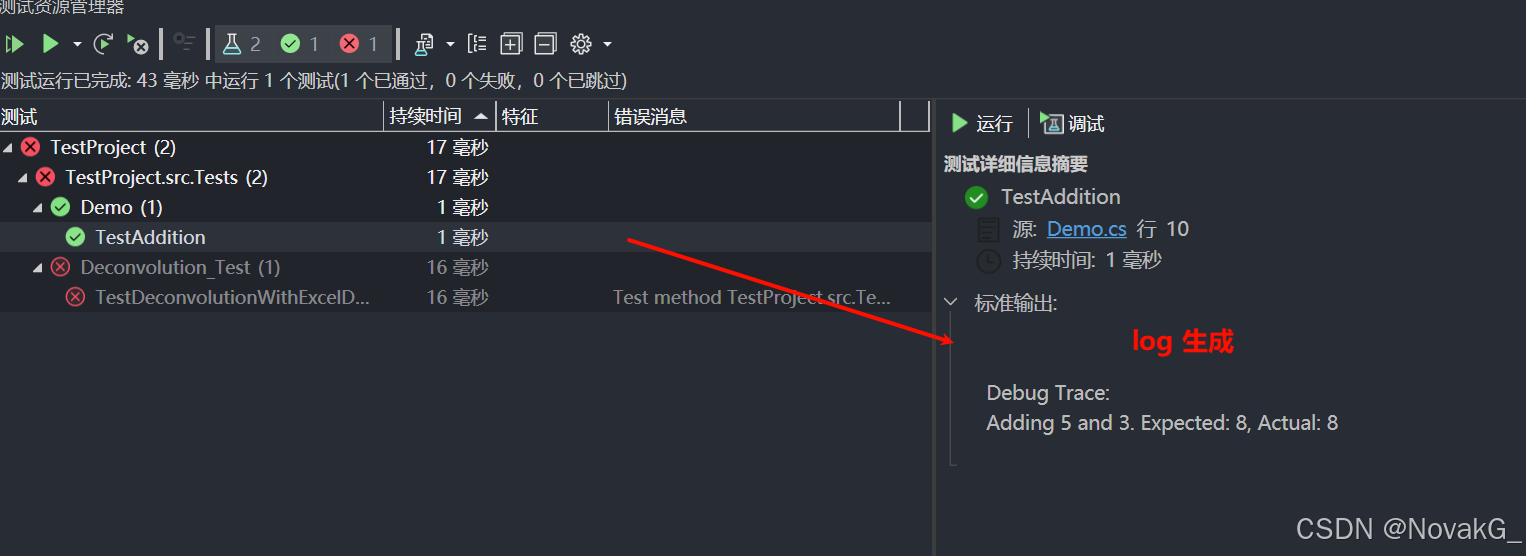
Visual Studio 进行单元测试【入门】
摘要:在软件开发中,单元测试是一种重要的实践,通过验证代码的正确性,帮助开发者提高代码质量。本文将介绍如何在VisualStudio中进行单元测试,包括创建测试项目、编写测试代码、运行测试以及查看结果。 1. 什么是单元测…...

Leetcode - 周赛435
目录 一、3442. 奇偶频次间的最大差值 I二、3443. K 次修改后的最大曼哈顿距离三、3444. 使数组包含目标值倍数的最少增量四、3445. 奇偶频次间的最大差值 II 一、3442. 奇偶频次间的最大差值 I 题目链接 本题使用数组统计字符串 s s s 中每个字符的出现次数,然后…...

CentOS本机配置为时间源
CentOS本机配置为时间源 安装chrony,默认已安装修改配置文件 /etc/chrony.conf客户端配置 安装chrony,默认已安装 yum -y install chrony修改配置文件 /etc/chrony.conf # cat /etc/chrony.conf | grep -Ev "^$|#" server ceph00 iburst dri…...

算法之 数论
文章目录 质数判断质数3115.质数的最大距离 质数筛选204.计数质数2761.和等于目标值的质数对 2521.数组乘积中的不同质因数数目 质数 质数的定义:除了本身和1,不能被其他小于它的数整除,最小的质数是 2 求解质数的几种方法 法1,根…...
 AOSP12下载编译)
Android车机DIY开发之软件篇(十二) AOSP12下载编译
Android车机DIY开发之软件篇(十二) AOSP12下载编译 sudo apt-get update sudo apt-get install git-core gnupg flex bison gperf build-essential zip curl zlib1g-dev gcc-multilib gmultilib libc6-dev-i386 lib32ncurses5-dev libx11-dev lib32z-dev ccache libgl1-mesa-…...

docker 导出导入
1第一步骤docker save docker save -o database-export-4.1.0.tar database-export-4.1.0.jar:latest 2检查镜像ls -l, 注意:文件可能没有其他文件导出权限:chmod 644 database-export-4.1.0.tar 3在新的服务器导入: docker load -i databa…...

OSPF高级特性(3):安全特效
引言 OSPF的基础我们已经结束学习了,接下来我们继续学习OSPF的高级特性。为了方便大家阅读,我会将高级特性的几篇链接放在末尾,所有链接都是站内的,大家点击即可阅读: OSPF基础(1):工…...

基于SSM的农产品供销小程序+LW示例参考
1.项目介绍 系统角色:管理员、农户功能模块:用户管理、农户管理、产品分类管理、农产品管理、咨询管理、订单管理、收藏管理、购物车、充值、下单等技术选型:SSM,Vue(后端管理web),uniapp等测试…...