
Unity 位图字体
下载Bitmap Font Generator
BMFont - AngelCode.com
解压后不用安装直接双击使用


提前设置
1、设置Bit depth为32
Options->Export options
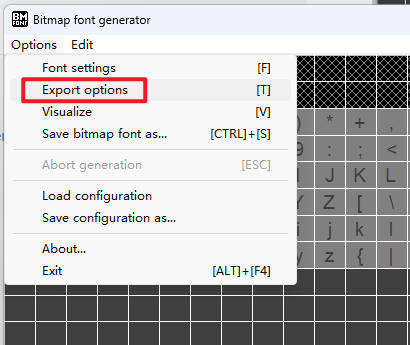
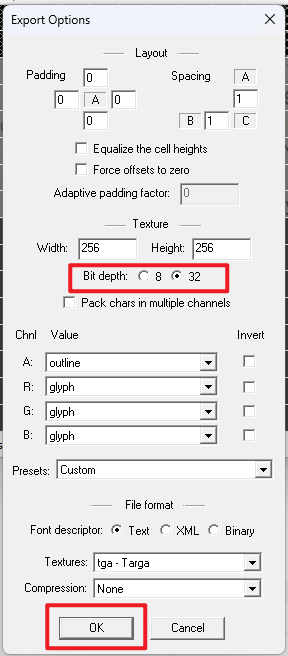
2、清空所选字符
因为我们将在后边导入需要的字符。
Edit->Select all chars 先选择所有字符
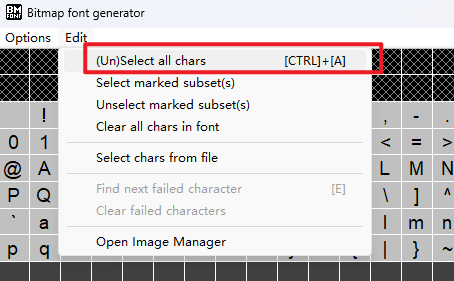
Edit->Clear all chars in font 再清空所有字符
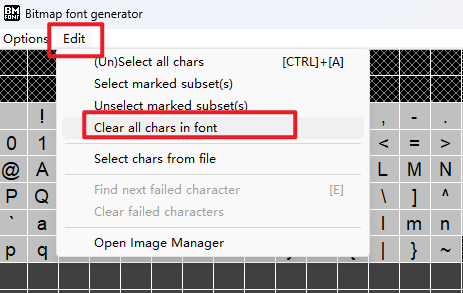
配置字符
1、打开Open Image Manager
Edit->Open Image Manager
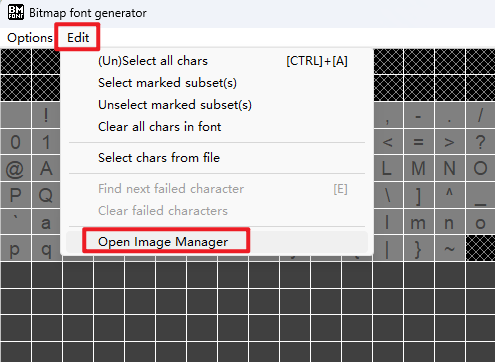
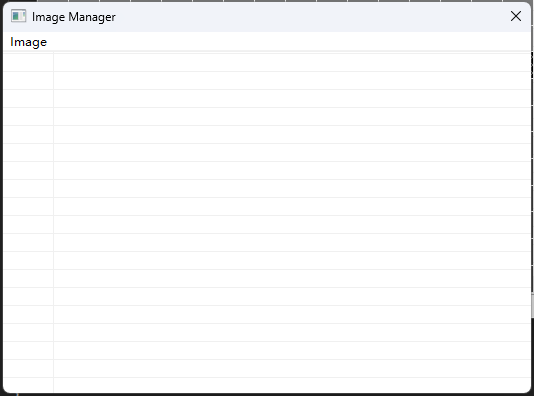
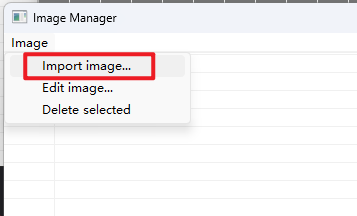
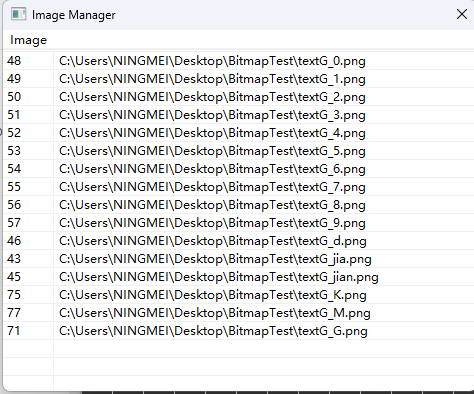
2、配置字符和对应的字符图片
先准备这些字符的ASCII码
可以通过在线工具查询:ASCII编码转换,ASCII码在线查询工具

| 字符 | ASCII码 |
| 0 | 48 |
| 1 | 49 |
| 2 | 50 |
| 3 | 51 |
| 4 | 52 |
| 5 | 53 |
| 6 | 54 |
| 7 | 55 |
| 8 | 56 |
| 9 | 57 |
| . | 46 |
| + | 43 |
| - | 45 |
| K | 75 |
| M | 77 |
| G | 71 |
点击Image->Import image,开始配置
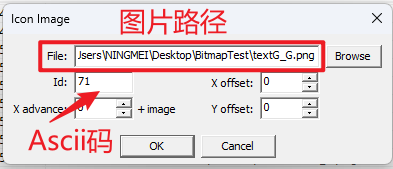
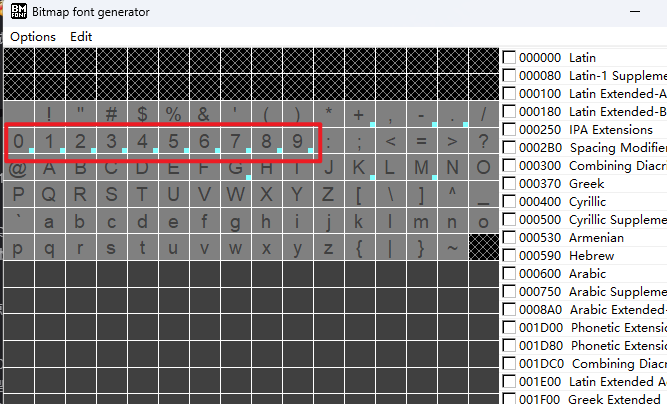
返回主界面,查看标有小亮点的字符为已配置成功的字符
导出文件
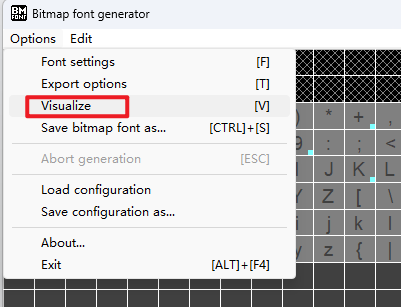
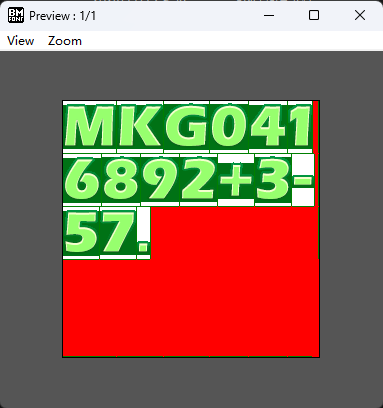
导出前可以预览一下 Options->Visualize
直接导出
Options->Save bitmap font as....
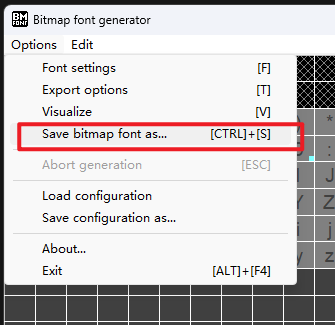
导出成功

导入Unity使用
创建下面两个脚本,将其放到Editor文件夹下
using UnityEngine;
using UnityEditor;
using System;
using System.IO;public class BFImporter : AssetPostprocessor
{static void OnPostprocessAllAssets(string[] importedAssets, string[] deletedAssets, string[] movedAssets, string[] movedFromAssetPaths){foreach (string str in importedAssets){DoImportBitmapFont(str);}foreach (string str in deletedAssets){DelBitmapFont(str);}for (var i = 0; i < movedAssets.Length; i++){MoveBitmapFont(movedFromAssetPaths[i], movedAssets[i]);}}public static bool IsFnt(string path){return path.EndsWith(".fnt", StringComparison.OrdinalIgnoreCase);}public static void DoImportBitmapFont(string fntPath){if (!IsFnt(fntPath)) return;TextAsset fnt = AssetDatabase.LoadMainAssetAtPath(fntPath) as TextAsset;string text = fnt.text;FntParse parse = FntParse.GetFntParse(ref text);if (parse == null) return;string fntName = Path.GetFileNameWithoutExtension(fntPath);string rootPath = Path.GetDirectoryName(fntPath);string fontPath = string.Format("{0}/{1}.fontsettings", rootPath, fntName);Texture2D[] textures = DoImportTextures(parse, rootPath, fnt);if (textures.Length > 1){Debug.LogError(fntPath + " has more than one texture!");}Font font = AssetDatabase.LoadMainAssetAtPath(fontPath) as Font;if (font == null){font = new Font();AssetDatabase.CreateAsset(font, fontPath);AssetDatabase.WriteImportSettingsIfDirty(fontPath);AssetDatabase.ImportAsset(fontPath);}Material material = AssetDatabase.LoadAssetAtPath(fontPath, typeof(Material)) as Material;if (material == null){material = new Material(Shader.Find("UI/Default"));material.name = "Font Material";AssetDatabase.AddObjectToAsset(material, fontPath);// unity 5.4+ cannot refresh it immediately, must import itAssetDatabase.ImportAsset(fontPath);}font.material = material;material.mainTexture = textures[0];font.characterInfo = parse.charInfos;SerializedObject so = new SerializedObject(font);so.Update();so.FindProperty("m_FontSize").floatValue = Mathf.Abs(parse.fontSize);so.FindProperty("m_LineSpacing").floatValue = parse.lineHeight;so.FindProperty("m_Ascent").floatValue = parse.lineBaseHeight;SerializedProperty prop = so.FindProperty("m_Descent");if (prop != null)prop.floatValue = parse.lineBaseHeight - parse.lineHeight;UpdateKernings(so, parse.kernings);so.ApplyModifiedProperties();so.SetIsDifferentCacheDirty();AssetDatabase.DeleteAsset(fntPath);AssetDatabase.SaveAssets();// unity 5.5 can not load custom fontReloadFont(fontPath);}private static Texture2D[] DoImportTextures(FntParse parse, string rootPath, TextAsset fnt){int len = parse.textureNames.Length;Texture2D[] textures = new Texture2D[len];for (int i = 0; i < len; i++){string texPath = string.Format("{0}/{1}", rootPath, parse.textureNames[i]);Texture2D texture = AssetDatabase.LoadMainAssetAtPath(texPath) as Texture2D;if (texture == null){Debug.LogErrorFormat(fnt, "{0}: not found '{1}'.", typeof(BFImporter), texPath);return textures;}TextureImporter texImporter = AssetImporter.GetAtPath(texPath) as TextureImporter;texImporter.textureType = TextureImporterType.GUI;texImporter.mipmapEnabled = false;texImporter.SaveAndReimport();textures[i] = texture;}return textures;}private static void UpdateKernings(SerializedObject so, Kerning[] kernings){int len = kernings != null ? kernings.Length : 0;SerializedProperty kerningsProp = so.FindProperty("m_KerningValues");if (len == 0){kerningsProp.ClearArray();return;}int propLen = kerningsProp.arraySize;for (int i = 0; i < len; i++){if (propLen <= i){kerningsProp.InsertArrayElementAtIndex(i);}SerializedProperty kerningProp = kerningsProp.GetArrayElementAtIndex(i);kerningProp.FindPropertyRelative("second").floatValue = kernings[i].amount;SerializedProperty pairProp = kerningProp.FindPropertyRelative("first");pairProp.Next(true);pairProp.intValue = kernings[i].first;pairProp.Next(false);pairProp.intValue = kernings[i].second;}for (int i = propLen - 1; i >= len; i--){kerningsProp.DeleteArrayElementAtIndex(i);}}private static void DelBitmapFont(string fntPath){if (!IsFnt(fntPath)) return;string fontPath = fntPath.Substring(0, fntPath.Length - 4) + ".fontsettings";AssetDatabase.DeleteAsset(fontPath);}private static void MoveBitmapFont(string oldFntPath, string nowFntPath){if (!IsFnt(nowFntPath)) return;string oldFontPath = oldFntPath.Substring(0, oldFntPath.Length - 4) + ".fontsettings";string nowFontPath = nowFntPath.Substring(0, nowFntPath.Length - 4) + ".fontsettings";AssetDatabase.MoveAsset(oldFontPath, nowFontPath);}// new font can not display via Text in unity 5.5// must import import itprivate static void ReloadFont(string fontPath){var tmpPath = Path.Combine(Path.GetTempPath(), Path.GetRandomFileName());AssetDatabase.ExportPackage(fontPath, tmpPath);AssetDatabase.DeleteAsset(fontPath);var startTime = DateTime.Now;EditorApplication.CallbackFunction func = null;func = () =>{TimeSpan dalt = DateTime.Now - startTime;if (dalt.TotalSeconds >= 0.1){EditorApplication.update -= func;AssetDatabase.ImportPackage(tmpPath, false);File.Delete(tmpPath);}};EditorApplication.update += func;}
}
using UnityEngine;
using System.Xml;
using System;
using System.Collections.Generic;
using System.Text.RegularExpressions;public struct Kerning
{public int first;public int second;public int amount;
}public class FntParse
{public int textureWidth;public int textureHeight;public string[] textureNames;public string fontName;public int fontSize;public int lineHeight;public int lineBaseHeight;public CharacterInfo[] charInfos { get; private set; }public Kerning[] kernings { get; private set; }public static FntParse GetFntParse(ref string text){FntParse parse = null;if (text.StartsWith("info")){parse = new FntParse();parse.DoTextParse(ref text);}else if (text.StartsWith("<")){parse = new FntParse();parse.DoXMLPase(ref text);}return parse;}#region xmlpublic void DoXMLPase(ref string content){XmlDocument xml = new XmlDocument();xml.LoadXml(content);XmlNode info = xml.GetElementsByTagName("info")[0];XmlNode common = xml.GetElementsByTagName("common")[0];XmlNodeList pages = xml.GetElementsByTagName("pages")[0].ChildNodes;XmlNodeList chars = xml.GetElementsByTagName("chars")[0].ChildNodes;fontName = info.Attributes.GetNamedItem("face").InnerText;fontSize = ToInt(info, "size");lineHeight = ToInt(common, "lineHeight");lineBaseHeight = ToInt(common, "base");textureWidth = ToInt(common, "scaleW");textureHeight = ToInt(common, "scaleH");int pageNum = ToInt(common, "pages");textureNames = new string[pageNum];for (int i = 0; i < pageNum; i++){XmlNode page = pages[i];int pageId = ToInt(page, "id");textureNames[pageId] = page.Attributes.GetNamedItem("file").InnerText;}charInfos = new CharacterInfo[chars.Count];for (int i = 0; i < chars.Count; i++){XmlNode charNode = chars[i];charInfos[i] = CreateCharInfo(ToInt(charNode, "id"),ToInt(charNode, "x"),ToInt(charNode, "y"),ToInt(charNode, "width"),ToInt(charNode, "height"),ToInt(charNode, "xoffset"),ToInt(charNode, "yoffset"),ToInt(charNode, "xadvance"),ToInt(charNode, "page"));}// kerningsXmlNode kerningsNode = xml.GetElementsByTagName("kernings")[0];if (kerningsNode != null && kerningsNode.HasChildNodes){XmlNodeList kerns = kerningsNode.ChildNodes;kernings = new Kerning[kerns.Count];for (int i = 0; i < kerns.Count; i++){XmlNode kerningNode = kerns[i];kernings[i] = new Kerning();kernings[i].first = ToInt(kerningNode, "first");kernings[i].second = ToInt(kerningNode, "second");kernings[i].amount = ToInt(kerningNode, "amount");}}}private static int ToInt(XmlNode node, string name){return int.Parse(node.Attributes.GetNamedItem(name).InnerText);}#endregion#region textprivate Regex pattern;public void DoTextParse(ref string content){// letter=" " // \S+=".+?"// letter="x" // \S+=".+?"// letter=""" // \S+=".+?"// letter="" // \S+// char // \S+pattern = new Regex(@"\S+="".+?""|\S+");string[] lines = content.Split(new char[] { '\r', '\n' }, StringSplitOptions.RemoveEmptyEntries);ReadTextInfo(ref lines[0]);ReadTextCommon(ref lines[1]);for (int j = 0; j < textureNames.Length; j++){ReadTextPage(ref lines[j + 2]);}// don't use count of chars, count is incorrect if has space //ReadTextCharCount(ref lines[3]);List<CharacterInfo> list = new List<CharacterInfo>();int i = 2 + textureNames.Length;int l = lines.Length;for (; i < l; i++){if (!ReadTextChar(i - 4, ref lines[i], ref list))break;}charInfos = list.ToArray();// skip empty linefor (; i < l; i++){if (lines[i].Length > 0)break;}// kerningsif (i < l){int count = 0;if (ReadTextCount(ref lines[i++], out count)){int start = i;kernings = new Kerning[count];for (; i < l; i++){if (!ReadTextKerning(i - start, ref lines[i], ref list))break;}};}}private void ReadTextInfo(ref string line){string[] keys;string[] values;SplitParts(line, out keys, out values);for (int i = keys.Length - 1; i >= 0; i--){switch (keys[i]){case "face": fontName = values[i]; break;case "size": fontSize = int.Parse(values[i]); break;}}}private void ReadTextCommon(ref string line){string[] keys;string[] values;SplitParts(line, out keys, out values);for (int i = keys.Length - 1; i >= 0; i--){switch (keys[i]){case "lineHeight": lineHeight = int.Parse(values[i]); break;case "base": lineBaseHeight = int.Parse(values[i]); break;case "scaleW": textureWidth = int.Parse(values[i]); break;case "scaleH": textureHeight = int.Parse(values[i]); break;case "pages": textureNames = new string[int.Parse(values[i])]; break;}}}private void ReadTextPage(ref string line){string[] keys;string[] values;SplitParts(line, out keys, out values);string textureName = null;int pageId = -1;for (int i = keys.Length - 1; i >= 0; i--){switch (keys[i]){case "file": textureName = values[i]; break;case "id": pageId = int.Parse(values[i]); break;}}textureNames[pageId] = textureName;}private bool ReadTextCount(ref string line, out int count){string[] keys;string[] values;SplitParts(line, out keys, out values);count = 0;for (int i = keys.Length - 1; i >= 0; i--){switch (keys[i]){case "count":count = int.Parse(values[i]);return true;}}return false;}private bool ReadTextChar(int idx, ref string line, ref List<CharacterInfo> list){if (!line.StartsWith("char")) return false;string[] keys;string[] values;SplitParts(line, out keys, out values);int id = 0, x = 0, y = 0, w = 0, h = 0, xo = 0, yo = 0, xadvance = 0;for (int i = keys.Length - 1; i >= 0; i--){switch (keys[i]){case "id": id = int.Parse(values[i]); break;case "x": x = int.Parse(values[i]); break;case "y": y = int.Parse(values[i]); break;case "width": w = int.Parse(values[i]); break;case "height": h = int.Parse(values[i]); break;case "xoffset": xo = int.Parse(values[i]); break;case "yoffset": yo = int.Parse(values[i]); break;case "xadvance": xadvance = int.Parse(values[i]); break;}}list.Add(CreateCharInfo(id, x, y, w, h, xo, yo, xadvance));return true;}private bool ReadTextKerning(int idx, ref string line, ref List<CharacterInfo> list){if (!line.StartsWith("kerning")) return false;string[] keys;string[] values;SplitParts(line, out keys, out values);Kerning kerning = new Kerning();for (int i = keys.Length - 1; i >= 0; i--){switch (keys[i]){case "first": kerning.first = int.Parse(values[i]); break;case "second": kerning.second = int.Parse(values[i]); break;case "amount": kerning.amount = int.Parse(values[i]); break;}}kernings[idx] = kerning;return true;}private bool SplitParts(string line, out string[] keys, out string[] values){MatchCollection parts = pattern.Matches(line);int count = parts.Count;keys = new string[count - 1];values = new string[count - 1];for (int i = count - 2; i >= 0; i--){string part = parts[i + 1].Value;int pos = part.IndexOf('=');keys[i] = part.Substring(0, pos);values[i] = part.Substring(pos + 1).Trim('"');}return true;}#endregionprivate CharacterInfo CreateCharInfo(int id, int x, int y, int w, int h, int xo, int yo, int xadvance, int page = 0){Rect uv = new Rect();uv.x = (float)x / textureWidth + page;uv.y = (float)y / textureHeight;uv.width = (float)w / textureWidth;uv.height = (float)h / textureHeight;uv.y = 1f - uv.y - uv.height;Rect vert = new Rect();vert.x = xo;
#if UNITY_5_0 || UNITY_5_1 || UNITY_5_2// unity 5.0 can not support baseline for vert.y = yo;
#elsevert.y = yo - lineBaseHeight;
#endifvert.width = w;vert.height = h;vert.y = -vert.y;vert.height = -vert.height;CharacterInfo charInfo = new CharacterInfo();charInfo.index = id;#if UNITY_5_3_OR_NEWER || UNITY_5_3 || UNITY_5_2charInfo.uvBottomLeft = new Vector2(uv.xMin, uv.yMin);charInfo.uvBottomRight = new Vector2(uv.xMax, uv.yMin);charInfo.uvTopLeft = new Vector2(uv.xMin, uv.yMax);charInfo.uvTopRight = new Vector2(uv.xMax, uv.yMax);charInfo.minX = (int)vert.xMin;charInfo.maxX = (int)vert.xMax;charInfo.minY = (int)vert.yMax;charInfo.maxY = (int)vert.yMin;charInfo.bearing = (int)vert.x;charInfo.advance = xadvance;
#else
#pragma warning disable 618charInfo.uv = uv;charInfo.vert = vert;charInfo.width = xadvance;
#pragma warning restore 618
#endifreturn charInfo;}
}将这两个文件直接拖入Unity中,系统自动生成字体文件


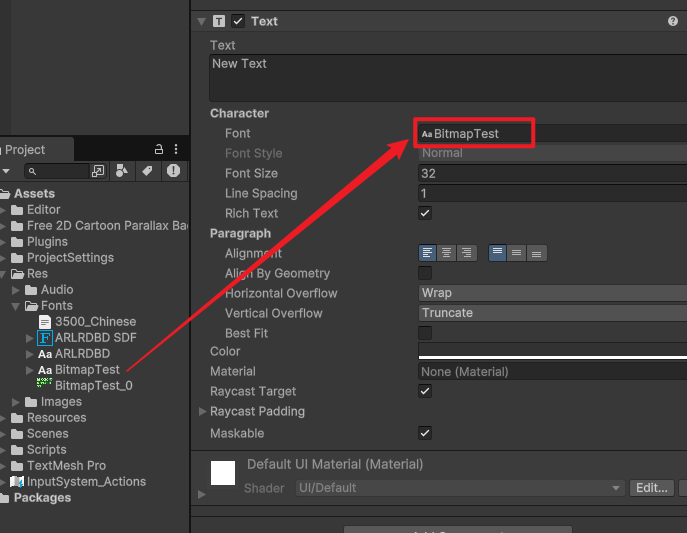
直接使用

相关文章:
Unity 位图字体
下载Bitmap Font Generator BMFont - AngelCode.com 解压后不用安装直接双击使用 提前设置 1、设置Bit depth为32 Options->Export options 2、清空所选字符 因为我们将在后边导入需要的字符。 Edit->Select all chars 先选择所有字符 Edit->Clear all chars i…...

Linux 网络与常用操作(适合开发/运维/网络工程师)
目录 OSI 七层协议简介 应用层 传输层 Linux 命令!!! 1. ifconfig 命令 简介 1. 查看网络地址信息 2. 指定开启、或者关闭网卡 3. 修改、设置 IP 地址 4. 修改机器的 MAC 地址信息 5. 永久修改网络设备信息 2. route 路由命令 …...

指定定网卡名称
一、PCIe网卡名称指定 原理:利用udev规则匹配PCIe设备的硬件特征(如总线位置、MAC地址等),覆盖默认命名规则 4 。 步骤: 获取设备信息: Bash udevadm info -a -p /sys/class/net/<原设备名> # 如e…...

linux 安装启动zookeeper全过程及遇到的坑
1、下载安装zookeeper 参考文章:https://blog.csdn.net/weixin_48887095/article/details/132397448 2、启动失败 1、启动失败JAVA_HOME is not set and java could not be found in PATH 已安装 JAVA 配置了JAVA_HOME,还是报错解决方法:参考…...

RD-搭建测试环境
测试团队职责 环境验证:确保开发部署的测试环境可访问,页面/接口无阻塞问题; 配置检查**:核对数据库连接、接口域名、HT证书等关键配置; 数据准备**:导入基线数据,隔离测试与生产数据࿱…...

MySQL数据库——表的约束
1.空属性(null/not null) 两个值:null(默认的)和not null(不为空) 数据库默认字段基本都是字段为空,但是实际开发时,尽可能保证字段不为空,因为数据为空没办法…...

ArcGIS Pro进行坡度与坡向分析
在地理信息系统中,坡度分析是一项至关重要的空间分析方法,旨在精确计算地表或地形的坡度,为地形特征识别、土地资源规划、环境保护、灾害预警等领域提供科学依据。本文将详细介绍如何利用ArcGIS Pro这一强大的地理信息系统软件,进…...

【MySQL常见疑难杂症】MySQL数据库底层图例
● Connectors(连接者):指的是不同语言中与SQL的交互,从图3-1中可以看到目前流行的语言都支持MySQL客户端连接。 ● Connection Pool(连接池):管理缓冲用户连接、线程处理等需要缓存的需求。…...

nats集群搭建
本次使用三台机器搭建nats集群,ip分别为192.168.20.7、192.168.20.8、192.168.20.10,预先在三台机器上装好nats,版本为0.0.35。 1. 在192.168.20.7机器上操作,配置server.conf # 为节点设置唯一的名称 server_name: node1 port: …...

谈谈对线程的认识
面对这样的一个多核CPU时代, 实现并发编程是刚需. 多进程实现并发编程, 效果是特别理想的. 但是, 多线程编程模型有一个明显的缺点, 就是进程太重了, 效率不高. 创建一个进程, 消耗时间比较多. 销毁一个进程, 消耗时间也比较多. 调度一个进程, 消耗时间也比较多. 这里的时…...

Vue 和 React 响应式的区别
React 和 Vue 在响应式机制上的核心区别主要体现在数据变化侦测方式、更新触发逻辑和设计理念上,具体如下: 一、数据变化侦测方式 Vue 的响应式 原理:通过 Proxy(Vue3)或 Object.defineProperty(Vue2&#…...

无人机遥控器接口作用详解!
USB接口: 功能:USB接口是一种通用串行总线接口,用于连接外部设备,如手机、平板、电脑或充电设备。在无人机遥控器上,USB接口通常用于数据传输和充电。 应用:用户可以通过USB接口将遥控器与电脑连接&#…...

【数据分析】1 认识数据分析
一、课程核心内容结构 1. 课程定位 商业数据分析导论课:旨在为初学者奠定扎实的基础,介绍数据分析的基本概念、方法和应用场景。后续模块:包括职业发展路径、技能要求等深入内容,帮助学习者规划未来的职业道路。目标群体&#x…...

ASP.NET Core 简单文件上传
使用异步 JavaScript 和 XML(AJAX)进行简单的文件上传;用 C# 编写的服务器端代码。 使用AJAX和ASP.NET Core MVC上传文件再简单不过了。这不依赖于jQuery。此代码允许上传多个文件,并与 .NET Core 3.1、.NET 6和.NET 8兼容。 如果…...

策略模式Spring框架下开发实例
策略类Spring框架下开发实例 先列出策略模式下需要那些类: 策略接口 (Strategy),定义所有策略类必须遵循的行为。 具体策略类(如 ConcreteStrategyA、ConcreteStrategyB),实现不同的算法或行为。 上下文类 (Context),…...

量子计算驱动的金融衍生品定价革命:突破传统蒙特卡洛模拟的性能边界
引言:金融计算的算力困局 某国际投行采用128量子位处理器对亚洲期权组合定价时,其量子振幅估计算法在2.7秒内完成传统GPU集群需要68小时的计算任务。在蒙特卡洛路径模拟实验中,量子随机游走算法将10,000维衍生品的价格收敛速度提升4个数量级…...

华为昇腾 910B 部署 DeepSeek-R1 蒸馏系列模型详细指南
本文记录 在 华为昇腾 910B(65GB) * 8 上 部署 DeepSeekR1 蒸馏系列模型(14B、32B)全过程与测试结果。 NPU:910B3 (65GB) * 8 (910B 有三个版本 910B1、2、3) 模型:DeepSeek-R1-Distill-Qwen-14B、DeepSeek…...

pyscenic运行报错:ValueError: Intersection of gene_names and tf_names is empty
pyscenic运行报错:ValueError: Intersection of gene_names and tf_names is empty 首先查一下是否有重复基因 python check_common_genes.pycheck_common_genes.py import pandas as pd# 定义文件路径 #这是转置后的基因表达矩阵 expression_matrix_file "…...

Selenium实战案例2:东方财富网股吧评论爬取
上一篇文章,我们使用Selenium完成了网页内文件的自动下载,本文我们将使用Selenium来爬取东方财富网股吧内笔记的评论数据。 网页内容分析 网页内容的分析是web自动化中的关键一步。通过分析网页结构,我们可以确定需要抓取的数据位置以及操作元素的方式。…...

python的多线程机制和构造
Python的多线程机制和构造是一个复杂且多方面的主题,涉及到线程的基本概念、实现方式、同步机制以及实际应用。以下将详细介绍Python中的多线程机制和构造。 1. 线程的基本概念 线程是进程内的执行单元,每个线程共享进程的地址空间和资源。一个进程至少…...
webmin配置终端显示样式,模仿UbuntuDesktop终端
webmin配置终端显示样式,模仿UbuntuDesktop终端 在webmin中,默认情况下是没有图形化桌面的,因此终端界面也不会像 Ubuntu Desktop 那样有预设的紫色背景和颜色主题。不过,你可以通过修改 ~/.bashrc 文件,并结合安装和…...

移动通信发展史
概念解释 第一代网络通信 1G 第二代网络通信 2G 第三代网络通信 3G 第四代网络通信 4G 4g网络有很高的速率和很低的延时——高到500M的上传和1G的下载 日常中的4G只是用到了4G技术 运营商 移动-从民企到国企 联通-南方教育口有人 电信 铁通:成立于 2000 年…...

OutOfMemoryError unable to create new native thread
现象 生产环境大量的报OutOfMemoryError: unable to create new native thread Caused by: java.lang.OutOfMemoryError: unable to create new native threadat java.lang.Thread.start0(Native Method) [na:1.8.0_291]at java.lang.Thread.start(Thread.java:717) [na:1.8.…...

探索无网用Deepseek+qwen来助力Solidworks二次开发
在本教程中,我们将详细介绍如何在本地环境中使用 DeepSeek 和 Qwen 模型,结合 AnythingLLM,构建一个用于 SolidWorks 二次开发的私有化智能知识库。 目录 前言 环境准备 2.1 安装 Ollama 2.2 安装 Docker Desktop DeepSeek 本地部署 3.1…...

MAC快速本地部署Deepseek (win也可以)
MAC快速本地部署Deepseek (win也可以) 下载安装ollama 地址: https://ollama.com/ Ollama 是一个开源的大型语言模型(LLM)本地运行框架,旨在简化大模型的部署和管理流程,使开发者、研究人员及爱好者能够高效地在本地环境中实验和…...

deepseek清华大学第二版 如何获取 DeepSeek如何赋能职场应用 PDF文档 电子档(附下载)
deepseek清华大学第二版 DeepSeek如何赋能职场 pdf文件完整版下载 https://pan.baidu.com/s/1aQcNS8UleMldcoH0Jc6C6A?pwd1234 提取码: 1234 或 https://pan.quark.cn/s/3ee62050a2ac...

ResponseUtil.out 方法分析
文章目录 1. 问题背景2. ResponseUtil.out 方法分析a. 方法功能b. 序列化过程c. 注解 JsonInclude(JsonInclude.Include.NON_NULL) 的作用 3. Java 对象如何被序列化为 JSON4. 序列化的时机5. 谁操作序列化6. 自动序列化的条件7. 总结8. 可能的问题和注意 1. 问题背景 在 Admi…...

基于Flask框架的食谱数据可视化分析系统的设计与实现
【Flask】基于Flask框架的食谱数据可视化分析系统的设计与实现 (完整系统源码开发笔记详细部署教程)✅ 目录 一、项目简介二、项目界面展示三、项目视频展示 一、项目简介 在当今数字化时代,信息可视化已成为一种高效的数据理解和传播手段。…...

【量化策略】布林带突破策略
【量化策略】布林带突破策略 🚀量化软件开通 🚀量化实战教程 技术背景与应用场景 布林带(Bollinger Bands)是由约翰布林格(John Bollinger)在1980年代初期开发的一种技术分析工具,它通过计算…...

java后端开发day18--学生管理系统
(以下内容全部来自上述课程) 1.业务分析并搭建主菜单 1.需求 采取控制台的方式去书写学生管理系统 2.分析 1.初始菜单 2.学生类 属性:id,姓名,年龄,家庭住址 3.添加功能 键盘录入每一个学生信息并添…...