
【微知】如何查看Mellanox网卡上的光模块的信息?(ethtool -m enp1s0f0 看型号、厂商、生产日期等)
背景
服务器上插入的光模块经常被忽略,往往这里是定位问题最根本的地方。如何通过命令查看?
命令
ethtool提供了-m参数,m是module-info的意思,他是从光模块的eeprom中读取数据。(应该是用i2c协议读取的)
ethtool -m enp1s0f0

实操
本文实操2种光模块插在同一个设备上(设备是CX5 25G)。
一个是1G的千兆SFP光模块
另一个是25G的SFP28的光模块

SFP和SFP28的区别参考兄弟篇:https://blog.csdn.net/essencelite/article/details/138551156
25G 光模块信息
[root@localhost ~]# ethtool -m enp1s0f0Identifier : 0x03 (SFP)Extended identifier : 0x04 (GBIC/SFP defined by 2-wire interface ID)Connector : 0x07 (LC)Transceiver codes : 0x00 0x00 0x00 0x00 0x00 0x00 0x00 0x00 0x02Transceiver type : Extended: 100G Base-SR4 or 25GBase-SREncoding : 0x03 (NRZ)BR, Nominal : 25750MBdRate identifier : 0x00 (unspecified)Length (SMF,km) : 0kmLength (SMF) : 0mLength (50um) : 0mLength (62.5um) : 0mLength (Copper) : 10mLength (OM3) : 70mLaser wavelength : 850nmVendor name : DTZVendor OUI : 44:7c:7fVendor PN : SFP28-25G-SRVendor rev : 1AOption values : 0x00 0x1aOption : RX_LOS implementedOption : TX_FAULT implementedOption : TX_DISABLE implementedBR margin, max : 0%BR margin, min : 0%Vendor SN : 2312280516Date code : 231228Optical diagnostics support : YesLaser bias current : 7.000 mALaser output power : 0.6205 mW / -2.07 dBmReceiver signal average optical power : 1.0533 mW / 0.23 dBmModule temperature : 33.24 degrees C / 91.83 degrees FModule voltage : 3.2922 VAlarm/warning flags implemented : YesLaser bias current high alarm : OffLaser bias current low alarm : OffLaser bias current high warning : OffLaser bias current low warning : OffLaser output power high alarm : OffLaser output power low alarm : OffLaser output power high warning : OffLaser output power low warning : OffModule temperature high alarm : OffModule temperature low alarm : OffModule temperature high warning : OffModule temperature low warning : OffModule voltage high alarm : OffModule voltage low alarm : OffModule voltage high warning : OffModule voltage low warning : OffLaser rx power high alarm : OffLaser rx power low alarm : OffLaser rx power high warning : OffLaser rx power low warning : OffLaser bias current high alarm threshold : 15.000 mALaser bias current low alarm threshold : 0.000 mALaser bias current high warning threshold : 15.000 mALaser bias current low warning threshold : 0.000 mALaser output power high alarm threshold : 3.4674 mW / 5.40 dBmLaser output power low alarm threshold : 0.0724 mW / -11.40 dBmLaser output power high warning threshold : 1.7378 mW / 2.40 dBmLaser output power low warning threshold : 0.1445 mW / -8.40 dBmModule temperature high alarm threshold : 75.00 degrees C / 167.00 degrees FModule temperature low alarm threshold : -5.00 degrees C / 23.00 degrees FModule temperature high warning threshold : 73.00 degrees C / 163.40 degrees FModule temperature low warning threshold : -3.00 degrees C / 26.60 degrees FModule voltage high alarm threshold : 3.6300 VModule voltage low alarm threshold : 2.9700 VModule voltage high warning threshold : 3.4650 VModule voltage low warning threshold : 3.1350 VLaser rx power high alarm threshold : 3.4674 mW / 5.40 dBmLaser rx power low alarm threshold : 0.0468 mW / -13.30 dBmLaser rx power high warning threshold : 1.7378 mW / 2.40 dBmLaser rx power low warning threshold : 0.0933 mW / -10.30 dBm
千兆光模块信息

[root@localhost ~]# ethtool -m enp1s0f0Identifier : 0x03 (SFP)Extended identifier : 0x04 (GBIC/SFP defined by 2-wire interface ID)Connector : 0x07 (LC)Transceiver codes : 0x00 0x00 0x00 0x01 0x20 0x40 0x0c 0x05 0x00Transceiver type : Ethernet: 1000BASE-SXTransceiver type : FC: intermediate distance (I)Transceiver type : FC: Shortwave laser w/o OFC (SN)Transceiver type : FC: Multimode, 62.5um (M6)Transceiver type : FC: Multimode, 50um (M5)Transceiver type : FC: 200 MBytes/secTransceiver type : FC: 100 MBytes/secEncoding : 0x01 (8B/10B)BR, Nominal : 1300MBdRate identifier : 0x00 (unspecified)Length (SMF,km) : 0kmLength (SMF) : 0mLength (50um) : 80mLength (62.5um) : 30mLength (Copper) : 0mLength (OM3) : 300mLaser wavelength : 850nmVendor name : OEMVendor OUI : 00:1b:21Vendor PN : SFP-G-TVendor rev : AOption values : 0x00 0x12Option : RX_LOS implementedOption : TX_DISABLE implementedBR margin, max : 0%BR margin, min : 0%Vendor SN : HYBG000001Date code : 240401Optical diagnostics support : YesLaser bias current : 6.000 mALaser output power : 0.5000 mW / -3.01 dBmReceiver signal average optical power : 0.4098 mW / -3.87 dBmModule temperature : 24.25 degrees C / 75.65 degrees FModule voltage : 3.3725 VAlarm/warning flags implemented : YesLaser bias current high alarm : OffLaser bias current low alarm : OffLaser bias current high warning : OffLaser bias current low warning : OffLaser output power high alarm : OffLaser output power low alarm : OffLaser output power high warning : OffLaser output power low warning : OffModule temperature high alarm : OffModule temperature low alarm : OffModule temperature high warning : OffModule temperature low warning : OffModule voltage high alarm : OffModule voltage low alarm : OffModule voltage high warning : OffModule voltage low warning : OffLaser rx power high alarm : OffLaser rx power low alarm : OffLaser rx power high warning : OffLaser rx power low warning : OffLaser bias current high alarm threshold : 15.000 mALaser bias current low alarm threshold : 1.000 mALaser bias current high warning threshold : 13.000 mALaser bias current low warning threshold : 2.000 mALaser output power high alarm threshold : 1.9952 mW / 3.00 dBmLaser output power low alarm threshold : 0.1584 mW / -8.00 dBmLaser output power high warning threshold : 1.5848 mW / 2.00 dBmLaser output power low warning threshold : 0.1778 mW / -7.50 dBmModule temperature high alarm threshold : 95.00 degrees C / 203.00 degrees FModule temperature low alarm threshold : -45.00 degrees C / -49.00 degrees FModule temperature high warning threshold : 85.00 degrees C / 185.00 degrees FModule temperature low warning threshold : -40.00 degrees C / -40.00 degrees FModule voltage high alarm threshold : 3.6000 VModule voltage low alarm threshold : 3.0000 VModule voltage high warning threshold : 3.5000 VModule voltage low warning threshold : 3.1000 VLaser rx power high alarm threshold : 1.1220 mW / 0.50 dBmLaser rx power low alarm threshold : 0.0199 mW / -17.01 dBmLaser rx power high warning threshold : 1.0000 mW / 0.00 dBmLaser rx power low warning threshold : 0.0223 mW / -16.52 dBm
关键信息分析
Identifier 查看型号,这里主要25G和1G是相同的,会决定外形和引脚
Identifier : 0x03 (SFP)
Connector: 使用 LC(Lucent Connector)光纤连接器。(Lucent /ˈluːsnt/ adj.透明的,光亮的;)
Connector : 0x07 (LC)
Transceiver type 可以看到支持的速率,可以看到光模块的速率型号
Transceiver type : Extended: 100G Base-SR4 or 25GBase-SR
Transceiver type : Ethernet: 1000BASE-SX
BR, Nominal 可以看到比特率(Bit Rate),这个直接决定相同引脚的速率
BR, Nominal : 25750MBd (可见是25.75G)
BR, Nominal : 1300MBd(可见是1.3G)
Laser wavelength 是光线的波长,850nm都是多模的,如果是1350nm是单模
Laser wavelength : 850nm
Vendor name 可以查看光模块的厂商,可以看到25G的是DTZ的和照片相同,另一个是OEM
Vendor name : DTZ
Vendor name : OEM
Vendor PN 厂商的产品序号,这个一定程度标注速率,25G、1G,
Vendor PN : SFP28-25G-SR
Vendor PN : SFP-G-T
Length (OM3): 在 OM3 多模光纤上,最大传输距离为 70 米。
Length (Copper) : 10m 同轴电缆最大10m
Date code 可以看到生产日期
Date code : 231228
Date code : 240401
可见,光模块型号、厂商、生产日期、速率、波长、比特率支持速率这些都能读取到。
相关文章:
【微知】如何查看Mellanox网卡上的光模块的信息?(ethtool -m enp1s0f0 看型号、厂商、生产日期等)
背景 服务器上插入的光模块经常被忽略,往往这里是定位问题最根本的地方。如何通过命令查看? 命令 ethtool提供了-m参数,m是module-info的意思,他是从光模块的eeprom中读取数据。(应该是用i2c协议读取的)…...

yum源选要配置华为云的源,阿里云用不了的情况
curl -O /etc/yum.repos.d/CentOS-Base.repo https://repo.huaweicloud.com/repository/conf/CentOS-7-reg.repo...

nginx accesslog 打印自定义header
比如我在请求的header中添加了一个path-match-type,那我现在nginx的accesslog 中打印出来,应该如何配置呢? rootnginx-59f5d66df6-jw5k8:/# cat /etc/nginx/nginx.conf user nginx; worker_processes auto;error_log /var/log/nginx/erro…...

好数——前缀和思想(题目分享)
今天我的舍友去参加“传智杯”广东省的省赛,跟我说了这样一道题,他说他想不出来怎么去优化代码,怎么做都是套用两层for循环超时,下面我就根据题意,使用前缀和的算法去优化一下思路,题目本身是不难的&#x…...

MWC 2025 | 移远通信大模型解决方案加速落地,引领服务机器人创新变革
随着人工智能、大模型等技术的蓬勃发展,生成式AI应用全面爆发。在此背景下,服务机器人作为大模型技术在端侧落地的关键场景,迎来了前所未有的发展机遇。 作为与用户直接交互的智能设备,服务机器人需要应对复杂场景下的感知、决策和…...

【大模型基础_毛玉仁】0.概述
更多内容:XiaoJ的知识星球 【大模型基础_毛玉仁】 系列文章参考 系列文章 【大模型基础_毛玉仁】0.概述 【大模型基础_毛玉仁】1.1 基于统计方法的语言模型 更新中。。。。。。 参考 书籍:大模型基础_完整版.pdf Github:https://github.co…...

ADB、Appium 和 大模型融合开展移动端自动化测试
将 ADB、Appium 和 大模型(如 GPT、LLM) 结合,可以显著提升移动端自动化测试的智能化水平和效率。以下是具体的实现思路和应用场景: 1. 核心组件的作用 ADB(Android Debug Bridge): 用于与 Android 设备通信,执行设备操作(如安装应用、获取日志、截图等)。Appium: 用…...

springboot425-基于SpringBoot的BUG管理系统(源码+数据库+纯前后端分离+部署讲解等)
💕💕作者: 爱笑学姐 💕💕个人简介:十年Java,Python美女程序员一枚,精通计算机专业前后端各类框架。 💕💕各类成品Java毕设 。javaweb,ssm…...

Ubuntu系统上部署Node.js项目的完整流程
以下是在Ubuntu系统上部署Node.js项目的完整流程,分为系统初始化、环境配置、项目部署三个部分: 一、系统初始化 & 环境准备 bash # 1. 更新系统软件包 sudo apt update && sudo apt upgrade -y# 2. 安装基础工具 sudo apt install -y buil…...

X Window---图形接口
摘抄自 鸟哥的linux私房菜 基础篇 第四版 有鉴于图形用户接口(Graphical User Interface, GUI) 的需求日益加重,在 1984 年由 MIT 与其他第三方首次发表了 X Window System ,并且更在 1988 年成立了非营利性质的 XFree86 这个组织。所谓的XFree86 其实是…...
)
数据序列化协议 Protobuf 3 介绍(Go 语言)
Protobuf 3 入门 1. 什么是序列化? 1.1 概念 序列化(Serialization 或 Marshalling) 是指将数据结构或对象的状态转换成可存储或传输的格式。反向操作称为反序列化(Deserialization 或 Unmarshalling),它…...

FineReport 操作注意
1.父单元格重复的时候,如何取消合并 效果如下: 只需要在单元格中,将数据设置为【列表】即可。 2.待定...

3D手眼标定转换详细实施步骤及原理概述
3D手眼标定转换详细实施步骤及原理概述 一、手眼标定的核心目标二、3D手眼标定的原理概述一、基本概念与坐标系定义**二、数学建模与方程推导****1. 坐标变换的齐次矩阵表示****2. 手眼标定方程推导** **三、方程求解方法****1. 分离旋转与平移****2. 旋转矩阵求解****3. 平移向…...

Verilog:SCCB控制器
目录 一、SCCB协议 (1)SCCB时序 (2)与I2C的区别 二、Verilog 实现 (1)设计要求 (2)设计要点 (3)模块完整代码 三、功能验证 (1)写…...

维度建模基础篇:从理论到核心组件解析
维度建模基础篇:从理论到核心组件解析 引言 在数据仓库与商业智能(BI)领域,维度建模(Dimensional Modeling)作为一种经典的数据组织方法论,自Kimball提出以来,已成为构建高效分析型系统的核心范式1,2,3。其以业务需求为导向,通过事实表与维度表的组合,实现对复杂…...
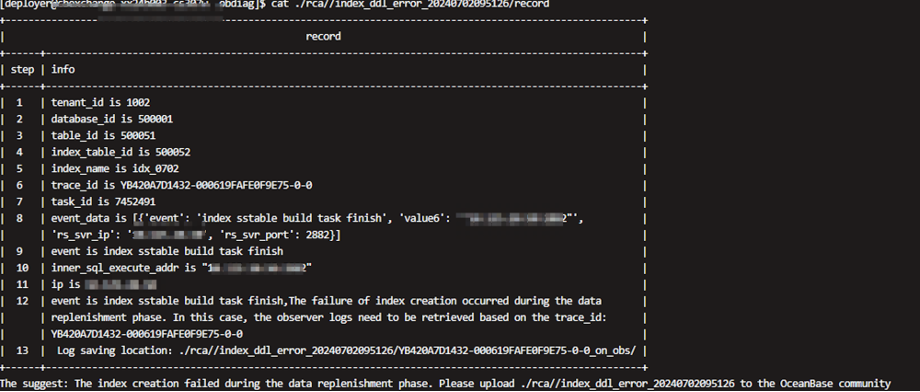
与中国联通技术共建:通过obdiag分析OceanBase DDL中的报错场景
中国联通软件研究院(简称联通软研院)在全面评估与广泛调研后,在 2021年底决定采用OceanBase 作为基础,自研分布式数据库产品CUDB(即China Unicom Database,中国联通数据库)。目前,该…...

大数据与网络安全讲座
🍅 点击文末小卡片 ,免费获取网络安全全套资料,资料在手,涨薪更快 大数据的价值为大家公认。业界通常以4个“V”来概括大数据的基本特征——Volume(数据体量巨大)、Variety(数据类型繁多)、Value(价值密度低)、Velocity(处理速度快…...

AtCoder Beginner Contest 395 E
点我写题 题意:给个有向图,从1出发,每次可以走一条有向边,花费为1,也可以选择把全部有向边翻转,花费x,问到n的最小花费 思路:最短路dp,定义dis[i][0/1]表示走到i为止&…...

Linux进程管理6 - CFS调度
0、CFS调度器 CFS调度器使用完全公平调度算法。 完全公平调度算法引入虚拟运行时间的概念:虚拟运行时间 = 实际运行时间 * nice_0_weight / 进程的权重。完全公平调度算法使用红黑树把进程按虚拟运行时间从小到大排序,每次调度选择虚拟运行时间最小的进程。时间片 操作系统进…...

张驰咨询:用六西格玛重构动力电池行业的BOM成本逻辑
在动力电池行业,BOM(物料清单)成本每降低1%,都可能改写企业的利润曲线。某头部企业的三元锂电池BOM成本曾较行业标杆高出11%,单电芯利润率被压缩至3%的生死线。然而,通过张驰咨询的六西格玛方法论ÿ…...
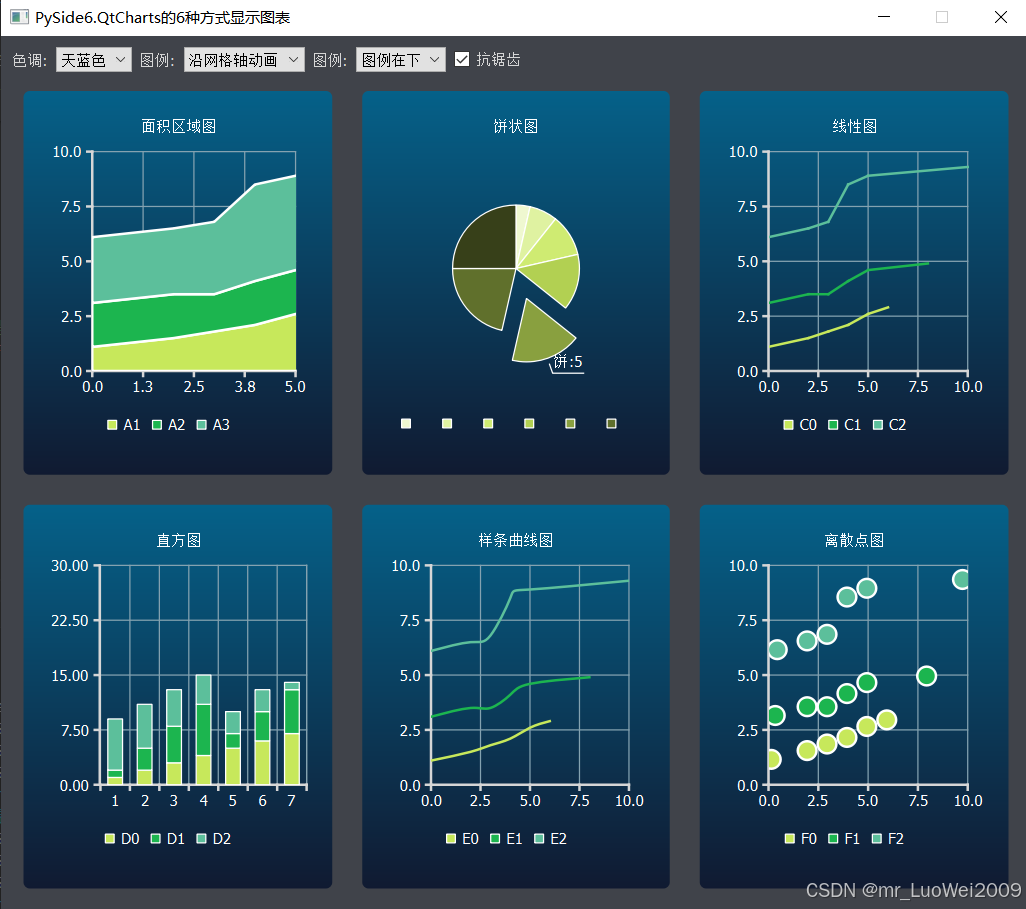
pyside6学习专栏(九):在PySide6中使用PySide6.QtCharts绘制6种不同的图表的示例代码
PySide6的QtCharts类支持绘制各种型状的图表,如面积区域图、饼状图、折线图、直方图、线条曲线图、离散点图等,下面的代码是采用示例数据绘制这6种图表的示例代码,并可实现动画显示效果,实际使用时参照代码中示例数据的格式将实际数据替换即可…...
:使用Environment环境组件读取值)
SpringBoot获取YAML配置文件中的属性值(二):使用Environment环境组件读取值
Spring Boot 使用 Properties 和 YAML 配置文件文件,系列文章: 《Spring使用@Value注解与@PropertySource注解加载配置文件》 《SpringBoot获取YAML配置文件中的属性值(一):使用@Value注解、@ConfigurationProperties注解》 《SpringBoot获取YAML配置文件中的属性值(二)…...

14天 -- Redis 的持久化机制有哪些?Redis 主从复制的实现原理是什么? Redis 数据过期后的删除策略是什么?
Redis 的持久化机制有哪些? Redis 是一种高性能的键值存储系统,主要用于缓存、消息队列等场景。为了防止数据丢失,Redis 提供了多种持久化机制,主要包括以下两种: 1. RDB(Redis Database Backupÿ…...

《深度学习实战》第10集:联邦学习与隐私保护
第10集:联邦学习与隐私保护 2025年3月4日更新了代码,补充了实例程序运行截图 和 如何提高模型准确率的方法 系统梳理 集集精彩 代码验证 保证实战 随着数据隐私问题日益受到关注,联邦学习(Federated Learning) 作为一…...
?)
如何解决跨域请求的问题(CORS)?
文章目录 1. 引言2. 理解 CORS2.1 CORS 基本概念2.2 同源策略与跨域分类 3. CORS 的核心机制3.1 预检请求(Preflight Request)3.2 简单请求 4. 服务器端配置 CORS4.1 关键响应头4.2 Node.js (Express) 示例4.3 其他后端语言配置 5. 前端处理 CORS 请求5.…...

【数据结构】二叉树总结篇
遍历 递归 递归三部曲: 1.参数和返回值 2.终止条件 3.单层逻辑(遍历顺序) var preorderTraversal function(root) { // 第一种let res[];const dfsfunction(root){if(rootnull)return ;//先序遍历所以从父节点开始res.push(root.val);//递归…...

软考-数据库开发工程师-3.1-数据结构-线性结构
第3章内容比较多,内容考试分数占比较大,6分左右 线性表 1、线性表的定义 一个线性表是n个元素的有限序列(n≥0),通常表示为(a1,a2, a3,…an). 2、线性表的顺序存储(顺序表) 是指用一组地址连续的存储单元依次存储线性表中的数据元…...

【五.LangChain技术与应用】【2.LangChain虚拟环境搭建(下):环境优化与调试】
一、Docker化部署:别让你的环境成为薛定谔的猫 经历过"在我机器上能跑"惨案的老铁都懂,传统虚拟环境就像个黑盒子。去年我帮客户部署LangChain应用,因为glibc版本差了0.1,整个服务直接崩成烟花。从那天起,我所有项目都强制上Docker! Dockerfile生存指南: #…...

deepseek+mermaid【自动生成流程图】
成果: 第一步打开deepseek官网(或百度版(更快一点)): 百度AI搜索 - 办公学习一站解决 第二步,生成对应的Mermaid流程图: 丢给deepseek代码,或题目要求 生成mermaid代码 第三步将代码复制到me…...

Java实现大数据量导出报表
一、实现方式 在Java中,导出数据到Excel有多种方式,每种方式都有其优缺点,适用于不同的场景。以下是常见的几种方式及其特点: 1.1 Apache POI Apache POI 是 Java 中最流行的库,支持读写 Excel 文件(包括…...