
Vue+el-upload配置minIO实现大文件的切片并发上传、上传进度展示、失败重试功能
vue3+el-upload实现切片上传
效果图
初始界面

上传中的界面

上传完成的界面

上传失败的界面

<template><div><el-uploadclass="BigFileUpload"ref="uploadRef"action="#"drag:show-file-list="false":on-change="handleFileChange":on-exceed="handleExceed":on-error="handleError":http-request="handleUpload":limit="fileLimit":file-list="fileList"><div:class="['BigFileUpload-text',fileList.length > 0 ? 'BigFileUpload-text-hasFileList' : 'BigFileUpload-text-noFileList']"><img class="el-upload__img" src="@/assets/newUI/icon-upload.png" /><div class="el-upload__text">将文件拖到此处,或<em>点击上传</em></div></div><template #tip><div class="el-upload__tip">导入规则:只允许上传大小不超过{{ fileSize / 1024 }}GB的文件。</div></template></el-upload><div:class="['BigFileUpload-list',fileList.length > 0 ? 'BigFileUpload-list-hasFileList' : 'BigFileUpload-list-noFileList']"><div class="fileList" v-for="(file, index) in fileList" :key="index"><el-image fit="scale-down" :src="computedFileIcon(file)" class="image file-image"></el-image><div class="file-name">{{ file.name }}</div><div class="file-progress"><div v-if="fileStatus === 'fail'" class="fail"><span class="text">上传失败!</span><span class="btn" @click="handleReTry(file)">点击重试</span></div><div v-if="fileStatus === 'success'" class="success"><span>100%上传完成</span><el-icon @click="handleRemove(file)"><Delete /></el-icon></div><div v-if="fileStatus === 'loading'" class="uploading"><span>{{ percentage }}%上传中</span></div></div></div></div></div>
</template><script setup>
import { ref, getCurrentInstance } from 'vue'
import { watch } from 'vue-demi'
import axios from 'axios'
import SparkMD5 from 'spark-md5'
import { getToken } from '@/utils/auth'
import { getUserAgentInfo } from '@/api/login'
import box from '@/assets/images/knowdge/box.png'
import jpg from '@/assets/images/knowdge/image.png'
import word from '@/assets/images/knowdge/DOC.png'
import xslx from '@/assets/images/knowdge/XLS.png'
import pdf from '@/assets/images/knowdge/PDF.png'
import ppt from '@/assets/images/knowdge/PPT.png'
import video from '@/assets/images/knowdge/video.png'
import mp3 from '@/assets/images/knowdge/video.png'
import zip from '@/assets/images/knowdge/zip.png'
import other from '@/assets/images/knowdge/file.png'
import txt from '@/assets/images/knowdge/TXT.png'
const imgList = {ppt: ppt,doc: word,docx: word,xlsx: xslx,xls: xslx,pdf: pdf,pdfx: pdf,zip: zip,rar: zip,jpg: jpg,jpeg: jpg,png: jpg,webp: jpg,mp3: mp3,mp4: video,txt: txt
}
let timeStamp = 0
const props = defineProps({chunkSize: {type: Number,default: 10 // 默认分片大小 10MB},actionURL: {type: String,required: true // 文件上传接口地址},fileLimit: {type: Number,default: 1},MAX_REQUEST: {// 最大并发数type: Number,default: 5},maxRetries: {// 重试次数type: Number,default: 2},// 大小限制(MB)fileSize: {type: Number,default: 200},// 大小限制(MB)fileListArr: {type: Array,default: []}
})
const { proxy } = getCurrentInstance()
const emit = defineEmits(['upload-success', 'upload-remove'])
const fileList = ref([])
const file = ref(null) // 当前上传的文件
const fileMd5 = ref('') // 文件的 MD5 值
const fileName = ref('') // 文件名称
const fileType = ref('') // 文件类型,带".",例如 :  .mp3
const totalChunks = ref(0) // 文件的分片总数量
const uploadedChunks = ref([]) // 已上传的分片索引
const requestPool = ref([]) // 文件请求池
let chunkCountList = ref([]) // 选择的文件切片总数数组
let MAX_REQUEST = props.MAX_REQUEST // 最大请求数
let httpRequestParams = {}
const percentage = ref(0) // 进度
const fileStatus = ref('') // 当前上传的文件状态loading上传中,success上传成功,fail上传失败
let isAbortRequest = false // 是否放弃请求
// 计算文件类型
const computedFileIcon = fileItem => {const index = fileItem.name.lastIndexOf('.')const ext = fileItem.name.substr(index + 1)return imgList[ext] || other
}
// 计算文件的 MD5
const calculateFileMd5 = file => {return new Promise(resolve => {const reader = new FileReader()const spark = new SparkMD5.ArrayBuffer()reader.onload = e => {spark.append(e.target.result)resolve(spark.end())}reader.readAsArrayBuffer(file)})
}
// 文件选择回调
const handleFileChange = async uploadFile => {console.log(123)// 校验网络状态// if (!navigator.onLine) {//   this.$message.error('请检查网络连接');//   return false; // 阻止上传// }// 校验文件大小if (props.fileSize) {const isLt = file.size / 1024 / 1024 > props.fileSizeif (isLt) {console.log('上传文件已超过4G!')return false}}const index = uploadFile.name.lastIndexOf('.')const ext = uploadFile.name.substr(index + 1)// 文件file.value = uploadFile.raw// 文件名称fileName.value = uploadFile.name// 文件类型fileType.value = ext
}
// 开始上传
const startUpload = async () => {if (!file.value) {alert('请先选择文件!')return}uploadedChunks.value = []isAbortRequest = falsepercentage.value = 0fileStatus.value = 'loading'// 分片上传totalChunks.value = Math.ceil(file.value.size / (props.chunkSize * 1024 * 1024))// 计算文件的 MD5fileMd5.value = await calculateFileMd5(file.value)sliceFile()
}
// 将文件切片
const sliceFile = () => {// 用一个数组保存,一个文件切出来的总数chunkCountList.value.push(totalChunks.value)for (let i = 0; i < totalChunks.value; i++) {const size = props.chunkSize * 1024 * 1024const chunk = file.value.slice(i * size, (i + 1) * size) // 获取切片requestPool.value.push({ chunk, index: i }) // 加入请求池}timeStamp = new Date().getTime()processPool() // 处理请求池
}
// 处理请求池中的切片上传
const processPool = () => {while (requestPool.value.length > 0 && MAX_REQUEST > 0 && !isAbortRequest) {// 取出一个切片const { chunk, index } = requestPool.value.shift()// 接口切片uploadChunk(chunk, index).then(() => {if (requestPool.value.length > 0) {processPool() // 继续处理请求池}}).finally(() => {MAX_REQUEST++ // 释放一个请求槽})MAX_REQUEST-- // 占用一个请求槽}
}
// 上传分片
const uploadChunk = async (chunk, chunkIndex, retries = 0) => {const formData = new FormData()formData.append('fileName', fileName.value)formData.append('fileMD5', fileMd5.value)formData.append('chunkIndex', chunkIndex)formData.append('totalIndex', totalChunks.value)formData.append('file', chunk)formData.append('type', `.${fileType.value}`)formData.append('timeStamp', timeStamp)try {await axios.post(props.actionURL, formData, {headers: {'Content-Type': 'multipart/form-data',Authorization: 'Bearer ' + getToken(),Clientid: getUserAgentInfo()}}).then(res => {uploadedChunks.value.push(chunkIndex)if (res.data.data.status === 3) {console.log('上传完成:')httpRequestParams.onSuccess(res.data)percentage.value = 100fileStatus.value = 'success'emit('upload-success', res.data.data) // 通知父组件上传成功}if (res.data.data.status === 2) {const percent = (uploadedChunks.value.length / totalChunks.value) * 100percentage.value = Math.round(percent)fileStatus.value = 'loading'}if (res.data.data.status === -2) {// 接口出现错误-2console.log('后端合并失败-2:', res.data)isAbortRequest = truerequestPool.value.length = 0MAX_REQUEST = props.MAX_REQUESTfileStatus.value = 'fail'proxy.$refs.uploadRef.onError(new Error(`后端合并失败-2!`))httpRequestParams.onError(new Error(`后端合并失败-2!`))proxy.$refs.uploadRef.abort()throw new Error(`后端合并失败-2!`)}if (res.data.code === 510) {// 后端限流console.log('后端限流:', res.data)isAbortRequest = truerequestPool.value.length = 0props.MAX_REQUESTfileStatus.value = 'fail'httpRequestParams.onError()proxy.$refs.uploadRef.abort()throw new Error(`后端限流!`)}})} catch (error) {// 失败重试// console.log('失败重试:', error)// if (retries < props.maxRetries) {//   console.warn(`分片 ${chunkIndex} 上传失败,正在重试 (${retries + 1}/${props.maxRetries})`)//   await uploadChunk(chunk, chunkIndex, retries + 1) // 重试// } else {isAbortRequest = truerequestPool.value.length = 0MAX_REQUEST = props.MAX_REQUESTfileStatus.value = 'fail'proxy.$refs.uploadRef.abort()httpRequestParams.onError()throw new Error(`分片 ${chunkIndex} 上传失败,重试次数用尽!`)// }}
}
// 文件列表移除文件
const handleRemove = file => {if (props.fileLimit === 1) {proxy.$refs['uploadRef'].clearFiles()fileList.value = []emit('upload-remove')}
}
// 上传失败,重试
const handleReTry = file => {percentage.value = 0uploadedChunks.value = []// 自动触发上传startUpload()
}
// 文件超出个数限制
const handleExceed = () => {proxy.$modal.msgError(`上传文件数量不能超过 ${props.fileLimit} 个!`)
}
// 文件上传失败
const handleError = () => {percentage.value = 0fileStatus.value = 'fail'
}
// 文件上传进度
const handleUpload = async parms => {console.log(parms)httpRequestParams = parms// 文件列表fileList.value = [{name: fileName.value}]console.log(fileList.value, "fileList.value");// 自动触发上传startUpload()
}
watch(() => props.fileListArr,newVal => {if (newVal && newVal.length > 0) {fileList.value = newValfileStatus.value = 'success'}},{ immediate: true }
)
</script><style lang="scss" scoped>
.BigFileUpload {width: 100%;min-width: 440px;:deep .el-upload-dragger {height: 132px;padding: 0;border-radius: 4px 4px 4px 4px;border: 1px dashed #2e75ff;}.BigFileUpload-text {margin-top: 20px;}.el-upload__img {width: 54px;height: 54px;}.el-upload__tip {margin-top: 0;font-family:PingFang SC,PingFang SC;font-weight: 400;font-size: 12px;color: #141d39;line-height: 24px;text-align: left;font-style: normal;text-transform: none;}
}
</style>
相关文章:
Vue+el-upload配置minIO实现大文件的切片并发上传、上传进度展示、失败重试功能
vue3el-upload实现切片上传 效果图 初始界面 上传中的界面 上传完成的界面 上传失败的界面 <template><div><el-uploadclass"BigFileUpload"ref"uploadRef"action"#"drag:show-file-list"false":on-change"…...

正则表达式梳理(基于python)
正则表达式(regular expression)是一种针对字符串匹配查找所定义的规则模式,独立于语言,但不同语言在实现上也会存在一些细微差别,下面基于python对常用的相关内容进行梳理。 文章目录 一、通用常识1.通配符ps.反义 2.…...

Scala 中 val 和对象内部状态的关系
在 Scala 中,val 用于声明不可变的变量,这意味着一旦 val 被赋值,它的引用(即指向的内存地址)就不能再改变。然而,这并不影响对象内部的状态(即对象的属性)是否可以改变。具体来说&a…...

skynet简单游戏服务器的迭代
在上一篇的基础上做了改进,主要三个更新: 基础框架引入多一层redis缓存,用于持久化数据,加速数据访问。原本需要通过mysql读取的操作,直接改成与redis层交互,redis会自动写入mysql,保证AP 最终…...

Python学习第八天
查看函数参数 操作之前给大家讲一个小技巧:如何查看函数的参数(因为python的底层源码是C语言并且不是开放的,也一直困扰着刚学习的我,这个参数叫什么名之类的看doc又总是需要翻译挺麻烦的)。 比如我们下面要说到的op…...

美股回测:历史高频分钟数据的分享下载与策略解析20250305
美股回测:历史高频分钟数据的分享下载与策略解析20250305 在金融分析和投资决策的精细化过程中,美股历史分钟高频数据发挥着至关重要的作用。这些数据以其详尽性和精确性,记录了股票每分钟的价格波动和成交量变化,为投资者提供了…...

【仿muduo库one thread one loop式并发服务器实现】
文章目录 一、项目介绍1-1、项目总体简介1-2、项目开发环境1-3、项目核心技术1-4、项目开发流程1-5、项目如何使用 二、框架设计2-1、功能模块划分2-1-1、SERVER模块2-1-2、协议模块 2-2、项目蓝图2-2-1、整体图2-2-2、模块关系图2-2-2-1、Connection 模块关系图2-2-2-2、Accep…...

服务流程设计和服务或端口重定向及其websocket等应用示例
服务流程设计和服务或端口重定向及其websocket等应用示例 目录 服务或端口重定向的服务设计和websocket等应用示例 一、通用请求控制流程 1.1、入口 1.2、所有GET请求首先预检控制单元 1.3、http请求会分别自动307重定向 1.4、所有请求首先执行跨源控制单元 1.5、然后…...

【数据库】关系代数
关系代数 一、关系代数的概念二、关系代数的运算2.1 并、差、交2.2 投影、选择2.3 笛卡尔积2.4 连接2.5 重命名2.6 优先级 一、关系代数的概念 关系代数是一种抽象的数据查询语言用对关系的运算来表达查询 运算对象:关系运算符:4类运算结果:…...

ubuntu20 安装python2
1. 确保启用了 Universe 仓库 在某些情况下,python2-minimal 包可能位于 Universe 仓库中。你可以通过以下命令启用 Universe 仓库并更新软件包列表: bash复制 sudo add-apt-repository universe sudo apt update 然后尝试安装: bash复制…...

MySQL无法连接到本地localhost的解决办法2024.11.8
问题描述:我的MySQL可以远程连接服务器,但无法连接自己的localhost。 错误提示: 2003 - Cant connet to MySQL server on localhost(10061 "Unknown error")查找问题原因: 1. 检查环境变量是否正确:发现没…...

【Leetcode 每日一题】1328. 破坏回文串
问题背景 给你一个由小写英文字母组成的回文字符串 p a l i n d r o m e palindrome palindrome,请你将其中 一个 字符用任意小写英文字母替换,使得结果字符串的 字典序最小 ,且 不是 回文串。 请你返回结果字符串。如果无法做到࿰…...

最新Spring Security实战教程(一)初识Spring Security安全框架
🌷 古之立大事者,不惟有超世之才,亦必有坚忍不拔之志 🎐 个人CSND主页——Micro麦可乐的博客 🐥《Docker实操教程》专栏以最新的Centos版本为基础进行Docker实操教程,入门到实战 🌺《RabbitMQ》…...

Docker的常用镜像
Docker的常用镜像命令主要包括镜像的查看、搜索、拉取、删除、构建等操作,以下是综合多个来源的总结: 一、基础镜像操作 查看本地镜像 docker images• 显示所有本地镜像,包含仓库名(REPOSITORY)、标签(TAG…...

告别GitHub连不上!一分钟快速访问方案
一、当GitHub抽风时,你是否也这样崩溃过? 😡 npm install卡在node-sass半小时不动😭 git clone到90%突然fatal: early EOF🤬 改了半天hosts文件,第二天又失效了... 根本原因:传统代理需要复杂…...

MapReduce 深度解析:原理与案例实战
在大数据时代,数据量的爆炸性增长对数据处理提出了前所未有的挑战。MapReduce 作为一种编程模型和并行处理框架,能够让我们在分布式环境下高效处理海量数据。本文将详细讲解 MapReduce 的基本原理、工作流程,并通过一个案例来展示如何应用这种…...

Android中的Fragment是什么以及它有哪些生命周期方法
Android中的Fragment介绍 Fragment,直译为“碎片”或“片段”,是Android中的一种组件,可以看作是Activity的模块化部分。它可以在一个Activity中承载一部分用户界面和逻辑,并能被多个Activity复用。通过Fragment,开发…...

Leetcode 1477. 找两个和为目标值且不重叠的子数组 前缀和+DP
原题链接: Leetcode 1477. 找两个和为目标值且不重叠的子数组 class Solution { public:int minSumOfLengths(vector<int>& arr, int target) {int narr.size();int sum0;int maxnINT_MAX;vector<int> dp(n,maxn);//dp[i]表示以索引i之前的满足要求…...

Ubuntu 22.04安装NVIDIA A30显卡驱动
一、安装前准备 1.禁用Nouveau驱动 Ubuntu默认使用开源Nouveau驱动,需要手动禁用: vim /etc/modprobe.d/blacklist-nouveau.conf # 添加以下内容: blacklist nouveau options nouveau modeset0 # 更新内核并重启: update-initr…...

R语言绘图:韦恩图
韦恩分析 韦恩分析(Venn Analysis)常用于可视化不同数据集之间的交集和并集。维恩图(Venn diagram),也叫文氏图、温氏图、韦恩图、范氏图,用于显示元素集合重叠区域的关系型图表,通过图形与图形…...

Stable Diffusion Prompt编写规范详解
Stable Diffusion Prompt编写规范详解 一、语法结构规范 (一)基础模板框架 [质量强化] [主体特征] [环境氛围] [风格控制] [镜头参数]质量强化:best quality, ultra detailed, 8k resolution主体特征:(1girl:1.3), long …...

大模型推理框架Triton使用教程:从青铜到王者的修炼
1 相关预备知识 模型:包含了大量参数的一个网络(参数结构),体积10MB-10GB不等模型格式:相同的模型可以有不同的存储格式(可类比音视频文件),目前主流有torch、tf、onnx和trt&#x…...

C#+Halcon 检测稳定性提升的方式
前言 众所周知,C#是一个带垃圾回收机制的语言,开发过程中不需要考虑垃圾回收,你就可劲造吧。但我们在设计图像处理软件时,应时刻对图像等大内存资源进行管控,做到自行管控,及时释放,不应将其交…...
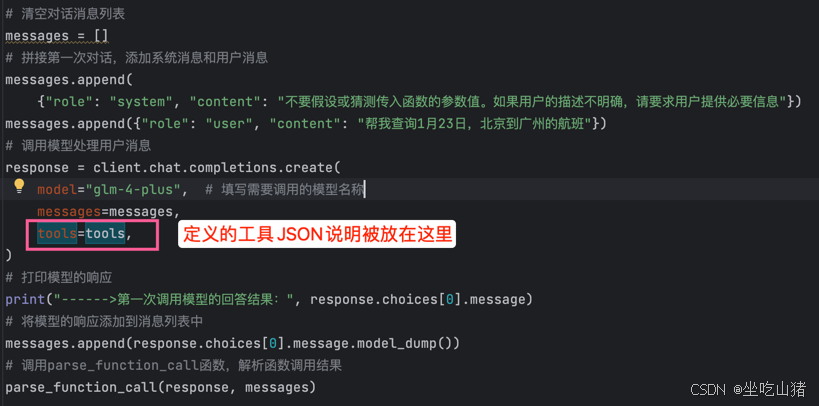
智谱AI-FunctionCall
智谱AI-FunctionCall 编写FuncationCall大模型的函数调用,先直观的感受一下的感受下FunctionCall的魅力 文章目录 智谱AI-FunctionCall[toc]1-参考网址2-思路整理3-代码拆件1-[非核心]两个业务函数2-[非核心]业务函数的JsonSchema定义3-[核心]FunctionCall的调用1-打…...

android亮灭屏流程分析
前言 亮灭涉及的东西非常多,因此单独写一个文档,进行详细说明,亮灭屏包括的东西不只是亮灭屏,还包括亮度调节、屏幕状态变化等东西。本文仅作学习使用,不涉及商业,侵权请联系删除。 framework层的学习链接…...

Docker Desktop常见问题记录
1.docker pull报错,无法连接https://registry-1.docker.io/v2/ 报错信息如下: Error response from daemon: Get "https://registry-1.docker.io/v2/": net/http: request canceled while waiting for connection(Client.Timeout exceeded …...

vscode+vue前端开发环境配置
目录 一、安装Vue二、使用vue新建项目 一、安装Vue 在node.js安装好之后, npm config set registry https://registry.npmmirror.com# 安装vue相关工具,webpack用来项目构建、打包、资源整合等。 npm install webpack -g# 安装vue-cli脚手架 npm insta…...

Qt5 C++ QMap使用总结
文章目录 功能解释代码使用案例代码解释注意事项代码例子参考 功能解释 QList<T> QMap::values() const Returns a list containing all the values in the map, in ascending order of their keys. If a key is associated with multiple values, all of its values wi…...

《解锁HarmonyOS NEXT高阶玩法:艺术图像识别功能开发全攻略》
在当今数字化时代,AI技术不断拓展其应用边界,为各行业带来前所未有的变革。在艺术领域,AI图像识别技术能够帮助艺术从业者、爱好者快速识别艺术品风格、作者,甚至挖掘艺术品背后的历史文化信息。本文将结合HarmonyOS NEXT API 12及…...

post get 给后端传参数
post 方式一 : data: params 作为请求体(Request Body)传递: 你已经展示了这种方式,通过data字段直接传递一个对象或数组。这种方式通常用于传递复杂的数据结构。dowmfrom: function (params) { return request({ u…...