
工程化与框架系列(26)--前端可视化开发
前端可视化开发 📊
引言
前端可视化是现代Web应用中不可或缺的一部分,它能够以直观的方式展示复杂的数据和信息。本文将深入探讨前端可视化开发的关键技术和最佳实践,包括图表绘制、数据处理、动画效果等方面。
可视化技术概述
前端可视化主要包括以下技术方向:
- Canvas绘图:像素级别的图形绘制
- SVG矢量图:可缩放的矢量图形
- WebGL 3D:三维图形渲染
- 可视化库:ECharts、D3.js等
- 地理信息:地图可视化
Canvas图形绘制
基础绘图API
// Canvas绘图管理器
class CanvasRenderer {private canvas: HTMLCanvasElement;private ctx: CanvasRenderingContext2D;constructor(canvas: HTMLCanvasElement) {this.canvas = canvas;this.ctx = canvas.getContext('2d')!;this.initializeCanvas();}// 初始化画布private initializeCanvas(): void {// 设置画布尺寸为显示尺寸的2倍,提高清晰度const displayWidth = this.canvas.clientWidth;const displayHeight = this.canvas.clientHeight;this.canvas.width = displayWidth * 2;this.canvas.height = displayHeight * 2;// 缩放上下文以匹配显示尺寸this.ctx.scale(2, 2);// 设置默认样式this.ctx.lineWidth = 2;this.ctx.strokeStyle = '#333';this.ctx.fillStyle = '#666';}// 清空画布clear(): void {this.ctx.clearRect(0, 0, this.canvas.width, this.canvas.height);}// 绘制直线drawLine(startX: number,startY: number,endX: number,endY: number,options: LineOptions = {}): void {this.ctx.save();// 应用样式选项if (options.color) this.ctx.strokeStyle = options.color;if (options.width) this.ctx.lineWidth = options.width;if (options.dash) this.ctx.setLineDash(options.dash);// 绘制路径this.ctx.beginPath();this.ctx.moveTo(startX, startY);this.ctx.lineTo(endX, endY);this.ctx.stroke();this.ctx.restore();}// 绘制矩形drawRect(x: number,y: number,width: number,height: number,options: ShapeOptions = {}): void {this.ctx.save();// 应用样式选项if (options.fillColor) this.ctx.fillStyle = options.fillColor;if (options.strokeColor) this.ctx.strokeStyle = options.strokeColor;if (options.lineWidth) this.ctx.lineWidth = options.lineWidth;// 绘制矩形if (options.fillColor) {this.ctx.fillRect(x, y, width, height);}if (options.strokeColor) {this.ctx.strokeRect(x, y, width, height);}this.ctx.restore();}// 绘制圆形drawCircle(x: number,y: number,radius: number,options: ShapeOptions = {}): void {this.ctx.save();// 应用样式选项if (options.fillColor) this.ctx.fillStyle = options.fillColor;if (options.strokeColor) this.ctx.strokeStyle = options.strokeColor;if (options.lineWidth) this.ctx.lineWidth = options.lineWidth;// 绘制圆形this.ctx.beginPath();this.ctx.arc(x, y, radius, 0, Math.PI * 2);if (options.fillColor) {this.ctx.fill();}if (options.strokeColor) {this.ctx.stroke();}this.ctx.restore();}// 绘制文本drawText(text: string,x: number,y: number,options: TextOptions = {}): void {this.ctx.save();// 应用样式选项if (options.font) this.ctx.font = options.font;if (options.color) this.ctx.fillStyle = options.color;if (options.align) this.ctx.textAlign = options.align;if (options.baseline) this.ctx.textBaseline = options.baseline;// 绘制文本this.ctx.fillText(text, x, y);this.ctx.restore();}
}// 绘图选项接口
interface LineOptions {color?: string;width?: number;dash?: number[];
}interface ShapeOptions {fillColor?: string;strokeColor?: string;lineWidth?: number;
}interface TextOptions {font?: string;color?: string;align?: CanvasTextAlign;baseline?: CanvasTextBaseline;
}// 使用示例
const canvas = document.getElementById('canvas') as HTMLCanvasElement;
const renderer = new CanvasRenderer(canvas);// 绘制图形
renderer.drawRect(50, 50, 100, 80, {fillColor: '#f0f0f0',strokeColor: '#333'
});renderer.drawCircle(200, 100, 40, {fillColor: '#1890ff'
});renderer.drawLine(50, 200, 250, 200, {color: '#666',width: 2,dash: [5, 5]
});renderer.drawText('Hello Canvas', 100, 250, {font: '20px Arial',color: '#333',align: 'center'
});
动画实现
// 动画管理器
class AnimationManager {private animations: Animation[];private isRunning: boolean;private lastTime: number;constructor() {this.animations = [];this.isRunning = false;this.lastTime = 0;this.animate = this.animate.bind(this);}// 添加动画addAnimation(animation: Animation): void {this.animations.push(animation);if (!this.isRunning) {this.start();}}// 移除动画removeAnimation(animation: Animation): void {const index = this.animations.indexOf(animation);if (index !== -1) {this.animations.splice(index, 1);}if (this.animations.length === 0) {this.stop();}}// 启动动画循环private start(): void {this.isRunning = true;this.lastTime = performance.now();requestAnimationFrame(this.animate);}// 停止动画循环private stop(): void {this.isRunning = false;}// 动画循环private animate(currentTime: number): void {if (!this.isRunning) return;// 计算时间增量const deltaTime = currentTime - this.lastTime;this.lastTime = currentTime;// 更新所有动画this.animations.forEach(animation => {animation.update(deltaTime);});// 继续动画循环requestAnimationFrame(this.animate);}
}// 动画基类
abstract class Animation {protected duration: number;protected elapsed: number;protected isComplete: boolean;constructor(duration: number) {this.duration = duration;this.elapsed = 0;this.isComplete = false;}// 更新动画状态update(deltaTime: number): void {if (this.isComplete) return;this.elapsed += deltaTime;if (this.elapsed >= this.duration) {this.elapsed = this.duration;this.isComplete = true;}const progress = this.elapsed / this.duration;this.onUpdate(this.easeInOut(progress));}// 缓动函数protected easeInOut(t: number): number {return t < 0.5? 2 * t * t: -1 + (4 - 2 * t) * t;}// 动画更新回调protected abstract onUpdate(progress: number): void;
}// 圆形动画示例
class CircleAnimation extends Animation {private renderer: CanvasRenderer;private startRadius: number;private endRadius: number;private x: number;private y: number;constructor(renderer: CanvasRenderer,x: number,y: number,startRadius: number,endRadius: number,duration: number) {super(duration);this.renderer = renderer;this.x = x;this.y = y;this.startRadius = startRadius;this.endRadius = endRadius;}protected onUpdate(progress: number): void {const currentRadius = this.startRadius + (this.endRadius - this.startRadius) * progress;this.renderer.clear();this.renderer.drawCircle(this.x, this.y, currentRadius, {fillColor: '#1890ff'});}
}// 使用示例
const canvas = document.getElementById('canvas') as HTMLCanvasElement;
const renderer = new CanvasRenderer(canvas);
const animationManager = new AnimationManager();// 创建并添加动画
const circleAnimation = new CircleAnimation(renderer,200,200,0,100,1000 // 1秒
);animationManager.addAnimation(circleAnimation);
SVG图形绘制
SVG基础组件
// SVG渲染器
class SVGRenderer {private svg: SVGSVGElement;constructor(container: HTMLElement, width: number, height: number) {this.svg = document.createElementNS('http://www.w3.org/2000/svg', 'svg');this.svg.setAttribute('width', width.toString());this.svg.setAttribute('height', height.toString());this.svg.setAttribute('viewBox', `0 0 ${width} ${height}`);container.appendChild(this.svg);}// 创建矩形createRect(x: number,y: number,width: number,height: number,options: SVGShapeOptions = {}): SVGRectElement {const rect = document.createElementNS('http://www.w3.org/2000/svg', 'rect');rect.setAttribute('x', x.toString());rect.setAttribute('y', y.toString());rect.setAttribute('width', width.toString());rect.setAttribute('height', height.toString());this.applyShapeOptions(rect, options);this.svg.appendChild(rect);return rect;}// 创建圆形createCircle(cx: number,cy: number,r: number,options: SVGShapeOptions = {}): SVGCircleElement {const circle = document.createElementNS('http://www.w3.org/2000/svg', 'circle');circle.setAttribute('cx', cx.toString());circle.setAttribute('cy', cy.toString());circle.setAttribute('r', r.toString());this.applyShapeOptions(circle, options);this.svg.appendChild(circle);return circle;}// 创建路径createPath(d: string,options: SVGShapeOptions = {}): SVGPathElement {const path = document.createElementNS('http://www.w3.org/2000/svg', 'path');path.setAttribute('d', d);this.applyShapeOptions(path, options);this.svg.appendChild(path);return path;}// 创建文本createText(x: number,y: number,text: string,options: SVGTextOptions = {}): SVGTextElement {const textElement = document.createElementNS('http://www.w3.org/2000/svg', 'text');textElement.setAttribute('x', x.toString());textElement.setAttribute('y', y.toString());textElement.textContent = text;if (options.fontSize) {textElement.style.fontSize = options.fontSize;}if (options.fontFamily) {textElement.style.fontFamily = options.fontFamily;}if (options.fill) {textElement.setAttribute('fill', options.fill);}if (options.textAnchor) {textElement.setAttribute('text-anchor', options.textAnchor);}this.svg.appendChild(textElement);return textElement;}// 应用形状样式选项private applyShapeOptions(element: SVGElement,options: SVGShapeOptions): void {if (options.fill) {element.setAttribute('fill', options.fill);}if (options.stroke) {element.setAttribute('stroke', options.stroke);}if (options.strokeWidth) {element.setAttribute('stroke-width', options.strokeWidth.toString());}if (options.opacity) {element.setAttribute('opacity', options.opacity.toString());}}
}// SVG样式选项接口
interface SVGShapeOptions {fill?: string;stroke?: string;strokeWidth?: number;opacity?: number;
}interface SVGTextOptions {fontSize?: string;fontFamily?: string;fill?: string;textAnchor?: 'start' | 'middle' | 'end';
}// 使用示例
const container = document.getElementById('container')!;
const renderer = new SVGRenderer(container, 400, 300);// 创建各种SVG图形
renderer.createRect(50, 50, 100, 80, {fill: '#f0f0f0',stroke: '#333',strokeWidth: 2
});renderer.createCircle(200, 100, 40, {fill: '#1890ff',opacity: 0.8
});renderer.createPath('M100,100 L200,100 L150,50 Z', {fill: '#666',stroke: '#333',strokeWidth: 1
});renderer.createText(150, 200, 'Hello SVG', {fontSize: '20px',fontFamily: 'Arial',fill: '#333',textAnchor: 'middle'
});
数据可视化实现
柱状图实现
// 柱状图渲染器
class BarChart {private svg: SVGRenderer;private width: number;private height: number;private padding: number;constructor(container: HTMLElement,width: number,height: number,padding: number = 40) {this.width = width;this.height = height;this.padding = padding;this.svg = new SVGRenderer(container, width, height);}// 渲染柱状图render(data: BarData[]): void {// 计算坐标轴范围const maxValue = Math.max(...data.map(d => d.value));const chartWidth = this.width - 2 * this.padding;const chartHeight = this.height - 2 * this.padding;const barWidth = chartWidth / data.length * 0.8;const barGap = chartWidth / data.length * 0.2;// 绘制坐标轴this.drawAxis(chartWidth, chartHeight, maxValue);// 绘制柱子data.forEach((item, index) => {const x = this.padding + index * (barWidth + barGap);const barHeight = (item.value / maxValue) * chartHeight;const y = this.height - this.padding - barHeight;// 绘制柱子this.svg.createRect(x, y, barWidth, barHeight, {fill: item.color || '#1890ff',opacity: 0.8});// 绘制标签this.svg.createText(x + barWidth / 2,this.height - this.padding + 20,item.label,{fontSize: '12px',textAnchor: 'middle'});// 绘制数值this.svg.createText(x + barWidth / 2,y - 5,item.value.toString(),{fontSize: '12px',textAnchor: 'middle'});});}// 绘制坐标轴private drawAxis(chartWidth: number,chartHeight: number,maxValue: number): void {// X轴this.svg.createPath(`M${this.padding},${this.height - this.padding} ` +`L${this.width - this.padding},${this.height - this.padding}`,{stroke: '#666',strokeWidth: 1});// Y轴this.svg.createPath(`M${this.padding},${this.padding} ` +`L${this.padding},${this.height - this.padding}`,{stroke: '#666',strokeWidth: 1});// Y轴刻度const tickCount = 5;for (let i = 0; i <= tickCount; i++) {const y = this.height - this.padding - (i / tickCount) * chartHeight;const value = Math.round(maxValue * (i / tickCount));// 刻度线this.svg.createPath(`M${this.padding - 5},${y} L${this.padding},${y}`,{stroke: '#666',strokeWidth: 1});// 刻度值this.svg.createText(this.padding - 10,y,value.toString(),{fontSize: '12px',textAnchor: 'end'});}}
}// 数据接口
interface BarData {label: string;value: number;color?: string;
}// 使用示例
const container = document.getElementById('chart-container')!;
const chart = new BarChart(container, 600, 400);const data: BarData[] = [{ label: '一月', value: 120, color: '#1890ff' },{ label: '二月', value: 200, color: '#2fc25b' },{ label: '三月', value: 150, color: '#facc14' },{ label: '四月', value: 180, color: '#223273' },{ label: '五月', value: 240, color: '#8543e0' }
];chart.render(data);
饼图实现
// 饼图渲染器
class PieChart {private svg: SVGRenderer;private width: number;private height: number;private radius: number;constructor(container: HTMLElement,width: number,height: number) {this.width = width;this.height = height;this.radius = Math.min(width, height) / 3;this.svg = new SVGRenderer(container, width, height);}// 渲染饼图render(data: PieData[]): void {const total = data.reduce((sum, item) => sum + item.value, 0);let startAngle = 0;// 绘制扇形data.forEach(item => {const percentage = item.value / total;const endAngle = startAngle + percentage * Math.PI * 2;// 计算扇形路径const path = this.createArcPath(this.width / 2,this.height / 2,this.radius,startAngle,endAngle);// 绘制扇形this.svg.createPath(path, {fill: item.color || '#1890ff',stroke: '#fff',strokeWidth: 1});// 计算标签位置const labelAngle = startAngle + (endAngle - startAngle) / 2;const labelRadius = this.radius * 1.2;const labelX = this.width / 2 + Math.cos(labelAngle) * labelRadius;const labelY = this.height / 2 + Math.sin(labelAngle) * labelRadius;// 绘制标签this.svg.createText(labelX,labelY,`${item.label} (${Math.round(percentage * 100)}%)`,{fontSize: '12px',textAnchor: 'middle'});startAngle = endAngle;});}// 创建扇形路径private createArcPath(cx: number,cy: number,radius: number,startAngle: number,endAngle: number): string {const start = {x: cx + Math.cos(startAngle) * radius,y: cy + Math.sin(startAngle) * radius};const end = {x: cx + Math.cos(endAngle) * radius,y: cy + Math.sin(endAngle) * radius};const largeArcFlag = endAngle - startAngle <= Math.PI ? '0' : '1';return ['M', cx, cy,'L', start.x, start.y,'A', radius, radius, 0, largeArcFlag, 1, end.x, end.y,'Z'].join(' ');}
}// 数据接口
interface PieData {label: string;value: number;color?: string;
}// 使用示例
const container = document.getElementById('pie-container')!;
const chart = new PieChart(container, 400, 400);const data: PieData[] = [{ label: '产品A', value: 30, color: '#1890ff' },{ label: '产品B', value: 20, color: '#2fc25b' },{ label: '产品C', value: 25, color: '#facc14' },{ label: '产品D', value: 15, color: '#223273' },{ label: '产品E', value: 10, color: '#8543e0' }
];chart.render(data);
最佳实践与建议
-
性能优化
- 使用适当的渲染技术
- 实现图形缓存
- 优化动画性能
- 控制重绘频率
-
代码组织
- 模块化设计
- 组件封装
- 统一接口
- 类型定义
-
用户体验
- 流畅的动画
- 交互响应
- 适当的提示
- 错误处理
-
可维护性
- 清晰的架构
- 完善的文档
- 单元测试
- 代码规范
总结
前端可视化开发需要考虑以下方面:
- 选择合适的可视化技术
- 设计清晰的架构
- 实现高效的渲染
- 优化性能和体验
- 保持代码可维护性
通过合理的技术选型和架构设计,可以构建出高性能、易用的可视化应用。
学习资源
- Canvas API文档
- SVG开发指南
- WebGL教程
- 数据可视化最佳实践
- 性能优化技巧
如果你觉得这篇文章有帮助,欢迎点赞收藏,也期待在评论区看到你的想法和建议!👇
终身学习,共同成长。
咱们下一期见
💻
相关文章:
--前端可视化开发)
工程化与框架系列(26)--前端可视化开发
前端可视化开发 📊 引言 前端可视化是现代Web应用中不可或缺的一部分,它能够以直观的方式展示复杂的数据和信息。本文将深入探讨前端可视化开发的关键技术和最佳实践,包括图表绘制、数据处理、动画效果等方面。 可视化技术概述 前端可视化…...

ubuntu 20.04 C++ 源码编译 cuda版本 opencv4.5.0
前提条件是安装好了cuda和cudnn 点击下载: opencv_contrib4.5.0 opencv 4.5.0 解压重命名后 进入opencv目录,创建build目录 “CUDA_ARCH_BIN ?” 这里要根据显卡查询一下,我的cuda是11,显卡1650,所以是7.5 查询方法1࿱…...

2025-03-07 学习记录--C/C++-PTA 习题8-5 使用函数实现字符串部分复制
合抱之木,生于毫末;九层之台,起于累土;千里之行,始于足下。💪🏻 一、题目描述 ⭐️ 二、代码(C语言)⭐️ #include <stdio.h> #define MAXN 20void strmcpy( char…...

【星云 Orbit•STM32F4】13. 探索定时器:基本定时器
【星云 Orbit•STM32F4】13. 探索定时器:基本定时器 七律 定时器 芯片之心精巧藏, 定时精准度量长。 初学莫畏千般难, 动手方知妙用强。 为读者提供完整代码,但不提供代码文件,也别做“三键”工程师。唯有自己动手&…...

江科大51单片机笔记【10】蜂鸣器(上)
一、蜂鸣器 1.原理 蜂鸣器是一种将电信号转换为声音信号的器件,常同来产生设备的按键音、报警音等提示信号蜂鸣器按驱动方式可分为有源蜂鸣器和无源蜂鸣器(外观基本一样)有源蜂鸣器:内部自带振荡源,将正负极接上直流…...

最新版本WebContext构造函数-避坑
import org.thymeleaf.context.IWebContext; import org.thymeleaf.context.WebContext; 当你想把页面信息全部获取出来存到redis缓存中使用时,SpringWebContext在Spring5中报错 SpringWebContext ctx new SpringWebContext(request, response,request.getServlet…...

Java基础系列:深入解析Object类与面向对象编程核心机制
目录 一、Object类:万物之源的方法解析 1. 核心方法全景图 2. 关键方法深度剖析 2.1 equals与hashCode的契约关系 2.2 clone方法的三重陷阱 2.3 finalize方法的死亡警告 二、面向对象三大支柱解析 1. 封装(Encapsulation)安全防线 2…...

Spring Boot API 项目中 HAProxy 与 Nginx 的选择与实践
在开发 Spring Boot 构建的 RESTful API 项目时,负载均衡和反向代理是提升性能与可用性的关键环节。HAProxy 和 Nginx 作为两种流行的工具,经常被用于流量分发,但它们各有侧重。究竟哪一个更适合你的 Spring Boot API 项目?本文将…...

C++ 数据结构详解及学习规划
C++数据结构详解及学习规划 一、C++常用数据结构详解与示例 以下是C++中核心数据结构的分类及具体实现示例: 1. 线性数据结构 a. 数组(Array) • 定义:存储固定大小、同类型元素的连续内存结构。 • 特点:快速随机访问(O(1)),但插入/删除效率低(O(n))。 • 应用场…...

Spring Boot启动流程及源码实现深度解析
Spring Boot启动流程及源码实现深度解析 一、启动流程概述 Spring Boot的启动流程围绕SpringApplication类展开,核心流程可分为以下几个阶段: 初始化阶段:推断应用类型,加载ApplicationContextInitializer和ApplicationListene…...

2025 开发AI软件的应用场景和优势
在人工智能技术持续突破的今天,AI软件开发已从实验室走向千行百业的核心战场。本文深入剖析医疗影像诊断、智能制造预测性维护、金融风控决策链等六大落地场景,揭示AI如何通过算法重构业务流程——某三甲医院通过病理AI系统将诊断效率提升4倍,…...

忘记dedecms后台超级管理员账号和密码的解决方案
解决方案: 方案一、数据库修改: 1、前提是您能登录到数据库后台,登录MySQL数据库管理工具(如phpMyAdmin) 2、打开数据库中的 dede_admin 表,找到管理员记录,将 pwd 字段的值改成 f297a57a5a7…...
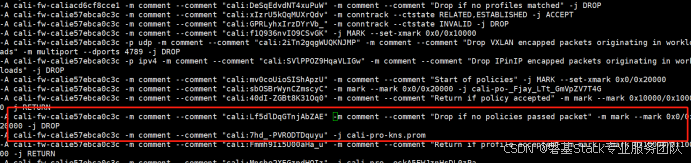
Kubernetes中的 iptables 规则介绍
#作者:邓伟 文章目录 一、Kubernetes 网络模型概述二、iptables 基础知识三、Kubernetes 中的 iptables 应用四、查看和调试 iptables 规则五、总结 在 Kubernetes 集群中,iptables 是一个核心组件, 用于实现服务发现和网络策略。iptables 通…...

标量、向量、矩阵与张量:从维度理解数据结构的层次
在数学和计算机科学中,维度描述了数据结构的复杂性,而标量、向量、矩阵、张量则是不同维度的数据表示形式。它们的关系可以理解为从简单到复杂的扩展,以下是详细解析: 1. 标量(Scalar):0维数据 定义:单个数值,没有方向,只有大小。 维度:0维(无索引)。 示例: 温度…...

OpenCV 颜色空间:原理与操作指南
颜色空间原理 RGB 颜色空间 RGB(Red, Green, Blue)是最常见的颜色空间,它通过红、绿、蓝三种颜色通道的不同强度组合来表示颜色。在 OpenCV 中,RGB 图像的每个像素由三个 8 位无符号整数(0 - 255)分别表示…...

Windows 11下Git Bash执行cURL脚本400问题、CMD/PowerShell不能执行多行文本等问题记录及解决方案
问题 在Postman里可成功执行的POST请求: 找到Postman的Code 因为cURL基本上算是行业标准,所以Postman默认选中cURL,支持切换不同的开发语言: 点击上图右上角的复制按钮,得到cURL脚本。 Windows 11家庭版ÿ…...
配置参数说明)
Mysql配置文件My.cnf(my.ini)配置参数说明
一、my.cnf 配置文件路径:/etc/my.cnf,在调整了该文件内容后,需要重启mysql才可生效。 1、主要参数 basedir path # 使用给定目录作为根目录(安装目录)。 datadir path # 从给定目录读取数据库文件。 pid-file filename # 为mysq…...
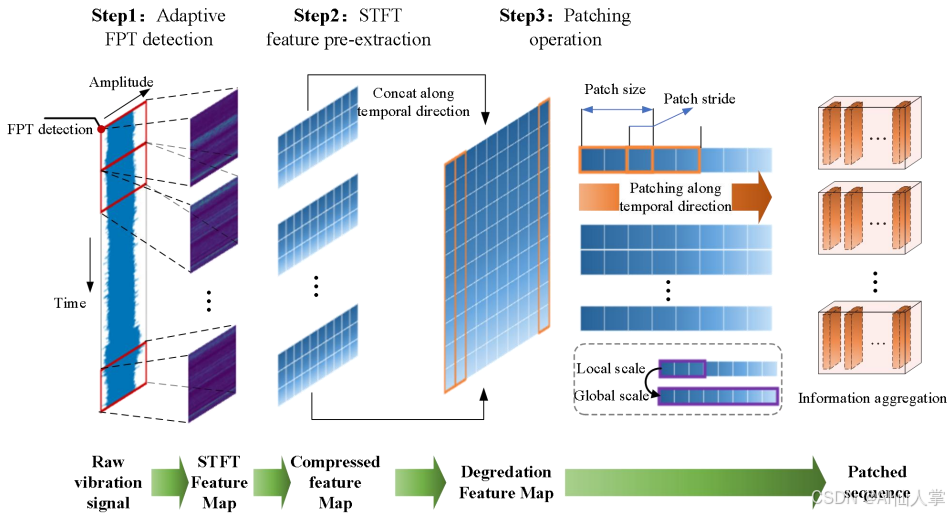
利用LLMs准确预测旋转机械(如轴承)的剩余使用寿命(RUL)
研究背景 研究问题:如何准确预测旋转机械(如轴承)的剩余使用寿命(RUL),这对于设备可靠性和减少工业系统中的意外故障至关重要。研究难点:该问题的研究难点包括:训练和测试阶段数据分布不一致、长期RUL预测的泛化能力有限。相关工作:现有工作主要包括基于模型的方法、数…...
)
【RAG】RAG 系统的基本搭建流程(ES关键词检索示例)
RAG 系统的基本搭建流程 搭建过程: 文档加载,并按一定条件切割成片段将切割的文本片段灌入检索引擎封装检索接口构建调用流程:Query -> 检索 -> Prompt -> LLM -> 回复 1. 文档的加载与切割 # !pip install --upgrade openai…...

记录小白使用 Cursor 开发第一个微信小程序(二):创建项目、编译、预览、发布(250308)
文章目录 记录小白使用 Cursor 开发第一个微信小程序(二):创建项目、编译、预览、发布(250308)一、创建项目1.1 生成提示词1.2 生成代码 二、编译预览2.1 导入项目2.2 编译预览 三、发布3.1 在微信开发者工具进行上传3…...

游戏引擎学习第146天
音高变化使得对齐读取变得不可能,我们可以支持循环声音了。 我们今天的目标是完成之前一段时间所做的音频代码。这个项目并不依赖任何引擎或库,而是一个教育项目,目的是展示从头到尾运行一个游戏所需要的全部代码。无论你对什么方面感兴趣&a…...

nodejs关于后端服务开发的探究
前提 在当前的环境中关于web server的主流开发基本上都是java、php之类的,其中java spring系列基本上占了大头,而python之流也在奋起直追,但别忘了nodejs也是可以做这个服务的,只是位置有点尴尬,现在就来探究下nodejs…...

Java 大视界 -- Java 大数据在智能体育赛事运动员表现分析与训练优化中的应用(122)
💖亲爱的朋友们,热烈欢迎来到 青云交的博客!能与诸位在此相逢,我倍感荣幸。在这飞速更迭的时代,我们都渴望一方心灵净土,而 我的博客 正是这样温暖的所在。这里为你呈上趣味与实用兼具的知识,也…...

线性代数之矩阵特征值与特征向量的数值求解方法
文章目录 前言1. 幂迭代法(Power Iteration)幂法与反幂法求解矩阵特征值幂法求最大特征值编程实现补充说明 2. 逆幂迭代法(Inverse Iteration)移位反幂法 3. QR 算法(QR Algorithm)——稠密矩阵理论推导编程…...

SparkAi系统体验
DeepSeek-R1-671B大模型满血版私有化部署高可用教程-SparkAi系统集成图文教程 一、SparkAI是什么二、功能模块介绍系统快速体验 三、系统功能模块3.1 AI全模型支持/插件系统3.2 AI智能体应用3.3 AI专业绘画3.4 AI视频生成3.5 Dall-E2/E3/E4绘画3.6 智能思维导图生成3.7 AI绘画广…...

软件工程---构件
在软件工程中,构件是一个独立的、可复用的软件单元,它具有明确的功能、接口和行为,并且可以在不同的环境中加以集成和复用。构件的概念是软件架构和组件化开发的核心思想之一,其目的是促进软件系统的模块化、可维护性和可扩展性。…...

视频录像机视频通道是指什么
视频录像机的视频通道是指摄像机在监控矩阵或硬盘录像机设备上的视频输入的物理位置。 与摄像头数量关系:在视频监控系统中,有多少个摄像头就需要多少路视频通道,通道数量决定了视频录像机可接入摄像头的数量,一般硬盘录像机有4路…...

【Unity】 HTFramework框架(六十一)Project窗口文件夹锁定器
更新日期:2025年3月7日。 Github源码:[点我获取源码] Gitee源码:[点我获取源码] 索引 Project窗口文件夹锁定器框架文件夹锁定自定义文件夹锁定限制条件 Project窗口文件夹锁定器 在Project窗口中,文件夹锁定器能够为任何文件夹加…...

INFINI Labs 产品更新 | Easysearch 增加异步搜索等新特性
INFINI Labs 产品更新发布!此次更新,Easysearch 增加了新的功能和数据类型,包括 wildcard 数据类型、Point in time 搜索 API、异步搜索 API、数值和日期字段的 doc-values 搜索支持,Console 新增了日志查询功能。 INFINI Easyse…...

3.6c语言
#define _CRT_SECURE_NO_WARNINGS #include <math.h> #include <stdio.h> int main() {int sum 0,i,j;for (j 1; j < 1000; j){sum 0;for (i 1; i < j; i){if (j % i 0){sum i;} }if (sum j){printf("%d是完数\n", j);}}return 0; }#de…...