
DeepSeek 助力 Vue3 开发:打造丝滑的表格(Table)之添加列宽调整功能,示例Table14_06带搜索功能的固定表头表格
前言:哈喽,大家好,今天给大家分享一篇文章!并提供具体代码帮助大家深入理解,彻底掌握!创作不易,如果能帮助到大家或者给大家一些灵感和启发,欢迎收藏+关注哦 💕



目录
- DeepSeek 助力 Vue3 开发:打造丝滑的表格(Table)之添加列宽调整功能,示例Table14_06带搜索功能的固定表头表格
- 📚页面效果
- 📘组件代码
- 📚代码测试
- 📚测试代码正常跑通,附其他基本代码
- 📘编写路由 src\router\index.js
- 📘编写展示入口 src\App.vue
- 📚页面效果
- 📚展望
- 📚相关文章
📚📗📕📘📖🕮💡📝🗂️✍️🛠️💻🚀🎉🏗️🌐🖼️🔗📊👉🔖⚠️🌟🔐⬇️·正文开始⬇️·🎥😊🎓📩😺🌈🤝🤖📜📋🔍✅🧰❓📄📢📈 🙋0️⃣1️⃣2️⃣3️⃣4️⃣5️⃣6️⃣7️⃣8️⃣9️⃣🔟🆗*️⃣#️⃣
DeepSeek 助力 Vue3 开发:打造丝滑的表格(Table)之添加列宽调整功能,示例Table14_06带搜索功能的固定表头表格
📚页面效果

📘组件代码
<!-- TableView14_06.vue 带搜索功能的固定表头表格 -->
<template><div class="table-demo"><h2>6. 添加表头固定功能,带搜索功能的固定表头表格</h2><p class="description">使用 show-search 启用表格搜索功能</p><div class="table-container"><Table:data="customers":columns="columns"fixed-headerfixed-header-height="300px"show-searchborder/></div></div>
</template><script setup>
import { ref } from 'vue'
import Table from '@/components/Table/Table.vue'const customers = ref([{ id: 1, name: '张三', age: 28, city: '北京', level: '黄金' },{ id: 2, name: '李四', age: 35, city: '上海', level: '白银' },{ id: 3, name: '王五', age: 42, city: '广州', level: '铂金' },{ id: 4, name: '赵六', age: 31, city: '深圳', level: '黄金' },{ id: 5, name: '钱七', age: 29, city: '杭州', level: '白银' },{ id: 6, name: '孙八', age: 45, city: '成都', level: '钻石' },{ id: 7, name: '周九', age: 33, city: '武汉', level: '黄金' },{ id: 8, name: '吴十', age: 38, city: '南京', level: '铂金' }
])const columns = ref([{ title: '姓名', dataIndex: 'name', width: '120px' },{ title: '年龄', dataIndex: 'age', width: '80px' },{ title: '城市', dataIndex: 'city', width: '120px' },{ title: '会员等级', dataIndex: 'level', width: '120px' }
])
</script><style scoped>
.table-demo {padding: 20px;
}.description {margin: 16px 0;color: #333;
}.table-container {border: 1px solid #ebeef5;border-radius: 4px;
}
</style>
📚代码测试
运行正常
📚测试代码正常跑通,附其他基本代码
- 添加路由
- 页面展示入口
📘编写路由 src\router\index.js
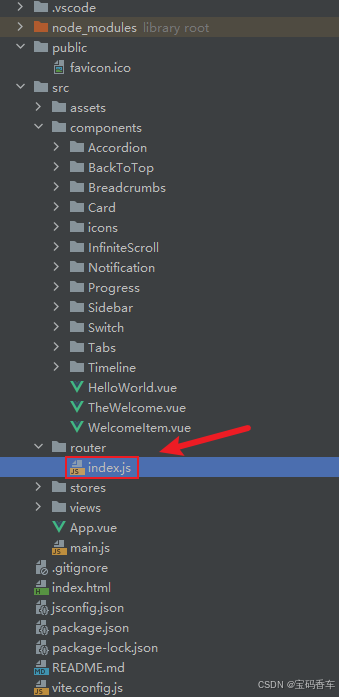
import { createRouter, createWebHistory } from 'vue-router'
import RightClickMenuView from '../views/RightClickMenuView.vue'
import RangePickerView from '../views/RangePickerView.vue'const router = createRouter({history: createWebHistory(import.meta.env.BASE_URL),routes: [{path: '/',name: 'progress',component:  () => import('../views/ProgressView.vue'),},{path: '/tabs',name: 'tabs',// route level code-splitting// this generates a separate chunk (About.[hash].js) for this route// which is lazy-loaded when the route is visited.// 标签页(Tabs)component: () => import('../views/TabsView.vue'),},{path: '/accordion',name: 'accordion',// 折叠面板(Accordion)component: () => import('../views/AccordionView.vue'),},{path: '/timeline',name: 'timeline',// 时间线(Timeline)component: () => import('../views/TimelineView.vue'),},{path: '/backToTop',name: 'backToTop',component: () => import('../views/BackToTopView.vue')},{path: '/notification',name: 'notification',component: () => import('../views/NotificationView.vue')},{path: '/card',name: 'card',component: () => import('../views/CardView.vue')},{path: '/infiniteScroll',name: 'infiniteScroll',component: () => import('../views/InfiniteScrollView.vue')},{path: '/switch',name: 'switch',component: () => import('../views/SwitchView.vue')},{path: '/sidebar',name: 'sidebar',component: () => import('../views/SidebarView.vue')},{path: '/breadcrumbs',name: 'breadcrumbs',component: () => import('../views/BreadcrumbsView.vue')},{path: '/masonryLayout',name: 'masonryLayout',component: () => import('../views/MasonryLayoutView.vue')},{path: '/rating',name: 'rating',component: () => import('../views/RatingView.vue')},{path: '/datePicker',name: 'datePicker',component: () => import('../views/DatePickerView.vue')},{path: '/colorPicker',name: 'colorPicker',component: () => import('../views/ColorPickerView.vue')},{path: '/rightClickMenu',name: 'rightClickMenu',component: RightClickMenuView},{path: '/rangePicker',name: 'rangePicker',component: () => import('../views/RangePickerView.vue')},{path: '/navbar',name: 'navbar',component: () => import('../views/NavbarView.vue')},{path: '/formValidation',name: 'formValidation',component: () => import('../views/FormValidationView.vue')},{path: '/copyToClipboard',name: 'copyToClipboard',component: () => import('../views/CopyToClipboardView.vue')},{path: '/clickAnimations',name: 'clickAnimations',component: () => import('../views/ClickAnimationsView.vue')},{path: '/thumbnailList',name: 'thumbnailList',component: () => import('../views/ThumbnailListView.vue')},{path: '/keyboardShortcuts',name: 'keyboardShortcuts',component: () => import('../views/KeyboardShortcutsView.vue')},{path: '/commentSystem',name: 'commentSystem',component: () => import('../views/CommentSystemView.vue')},{path: '/qRCode',name: 'qRCode',component: () => import('../views/QRCodeView.vue')},{path: '/radioButton',name: 'radioButton',component: () => import('../views/RadioButtonView.vue')},{path: '/slider',name: 'slider',component: () => import('../views/SliderView.vue')},{path: '/scrollAnimations',name: 'scrollAnimations',component: () => import('../views/ScrollAnimationsView.vue')},{path: '/textInputView',name: 'textInputView',component: () => import('../views/TextInputView.vue')},{path: '/divider',name: 'divider',component: () => import('../views/DividerView.vue')},{path: '/checkbox',name: 'checkbox',component: () => import('../views/CheckboxView.vue')},{path: '/tagInput',name: 'tagInput',component: () => import('../views/TagInputView.vue')},{path: '/dropdownSelect',name: 'dropdownSelect',component: () => import('../views/DropdownSelectView.vue')},{path: '/list',name: 'list',component: () => import('../views/ListView.vue')},{path: '/header',name: 'header',component: () => import('../views/HeaderView.vue')},{path: '/footer',name: 'footer',component: () => import('../views/FooterView.vue')},{path: '/pagination',name: 'pagination',component: () => import('../views/PaginationView.vue')},{path: '/floatingActionButton',name: 'floatingActionButton',component: () => import('../views/FloatingActionButtonView.vue')},{path: '/gridLayout',name: 'gridLayout',component: () => import('../views/GridLayoutView.vue')},{path: '/passwordInput',name: 'passwordInput',component: () => import('../views/PasswordInputView.vue')},{path: '/flexbox',name: 'flexbox',component: () => import('../views/FlexboxView.vue')},{path: '/modal',name: 'modal',component: () => import('../views/ModalView.vue')},{path: '/richTextEditor',name: 'richTextEditor',component: () => import('../views/RichTextEditorView.vue')},{path: '/timePickerView',name: 'timePickerView',component: () => import('../views/TimePickerView.vue')},{path: '/multistepForm',name: 'multistepForm',component: () => import('../views/MultistepFormView.vue')},{path: '/table1',name: 'table1',component: () => import('../views/TableView1.vue')},{path: '/table2',name: 'table2',component: () => import('../views/TableView2.vue')},{path: '/table3',name: 'table3',component: () => import('../views/TableView3.vue')},{path: '/table4',name: 'table4',component: () => import('../views/TableView4.vue')},{path: '/table5',name: 'table5',component: () => import('../views/TableView5.vue')},{path: '/table6',name: 'table6',component: () => import('../views/TableView6.vue')},{path: '/table7',name: 'table7',component: () => import('../views/TableView7.vue')},{path: '/table8',name: 'table8',component: () => import('../views/TableView8.vue')},{path: '/table9',name: 'table9',component: () => import('../views/TableView9.vue')},{path: '/table10',name: 'table10',component: () => import('../views/TableView10.vue')},{path: '/table11',name: 'table11',component: () => import('../views/TableView11.vue')},{path: '/table12',name: 'table12',component: () => import('../views/TableView12.vue')},{path: '/table12_02',name: 'table12_02',component: () => import('../views/TableView12_02.vue')},{path: '/table14',name: 'table14',component: () => import('../views/TableView14.vue')},{path: '/table14_01',name: 'table14_01',component: () => import('../views/TableView14_01.vue')},{path: '/table14_02',name: 'table14_02',component: () => import('../views/TableView14_02.vue')},{path: '/table14_03',name: 'table14_03',component: () => import('../views/TableView14_03.vue')},{path: '/table14_04',name: 'table14_04',component: () => import('../views/TableView14_04.vue')},{path: '/table14_05',name: 'table14_05',component: () => import('../views/TableView14_05.vue')},{path: '/table14_06',name: 'table14_06',component: () => import('../views/TableView14_06.vue')}],
})export default router
📘编写展示入口 src\App.vue
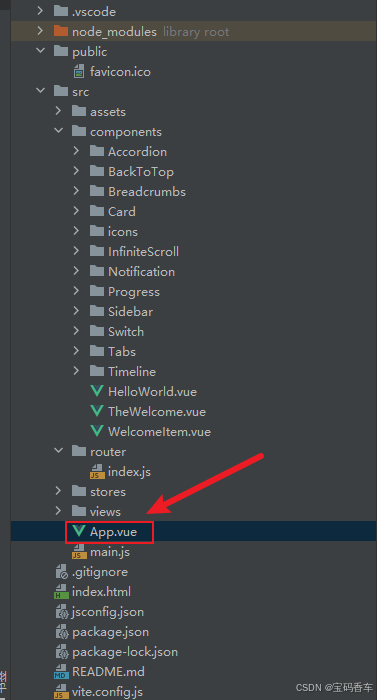
<script setup>
import { RouterLink, RouterView } from 'vue-router'
import HelloWorld from './components/HelloWorld.vue'
</script><template><header><img alt="Vue logo" class="logo" src="@/assets/logo.svg" width="125" height="125" /><div class="wrapper"><HelloWorld msg="You did it!" /><nav><RouterLink to="/">Progress</RouterLink><RouterLink to="/tabs">Tabs</RouterLink><RouterLink to="/accordion">Accordion</RouterLink><RouterLink to="/timeline">Timeline</RouterLink><RouterLink to="/backToTop">BackToTop</RouterLink><RouterLink to="/notification">Notification</RouterLink><RouterLink to="/card">Card</RouterLink><RouterLink to="/infiniteScroll">InfiniteScroll</RouterLink><RouterLink to="/switch">Switch</RouterLink><RouterLink to="/sidebar">Sidebar</RouterLink><RouterLink to="/breadcrumbs">Breadcrumbs</RouterLink><RouterLink to="/masonryLayout">MasonryLayout</RouterLink><RouterLink to="/rating">Rating</RouterLink><RouterLink to="/datePicker">DatePicker</RouterLink><RouterLink to="/colorPicker">ColorPicker</RouterLink><RouterLink to="/rightClickMenu">RightClickMenu</RouterLink><RouterLink to="/rangePicker">RangePicker</RouterLink><RouterLink to="/navbar">Navbar</RouterLink><RouterLink to="/formValidation">FormValidation</RouterLink><RouterLink to="/copyToClipboard">CopyToClipboard</RouterLink><RouterLink to="/clickAnimations">ClickAnimations</RouterLink><RouterLink to="/thumbnailList">ThumbnailList</RouterLink><RouterLink to="/keyboardShortcuts">KeyboardShortcuts</RouterLink><RouterLink to="/commentSystem">CommentSystem</RouterLink><RouterLink to="/qRCode">QRCode</RouterLink><RouterLink to="/radioButton">RadioButton</RouterLink><RouterLink to="/slider">Slider</RouterLink><RouterLink to="/scrollAnimations">ScrollAnimations</RouterLink><RouterLink to="/textInputView">TextInput</RouterLink><RouterLink to="/divider">Divider</RouterLink><RouterLink to="/checkbox">Checkbox</RouterLink><RouterLink to="/tagInput">TagInput</RouterLink><RouterLink to="/dropdownSelect">DropdownSelect</RouterLink><RouterLink to="/list">List</RouterLink><RouterLink to="/header">Header</RouterLink><RouterLink to="/footer">Footer</RouterLink><RouterLink to="/pagination">Pagination</RouterLink><RouterLink to="/floatingActionButton">FloatingActionButton</RouterLink><RouterLink to="/gridLayout">GridLayout</RouterLink><RouterLink to="/passwordInput">PasswordInput</RouterLink><RouterLink to="/flexbox">Flexbox</RouterLink><RouterLink to="/modal">Modal</RouterLink><RouterLink to="/richTextEditor">RichTextEditor</RouterLink><RouterLink to="/timePickerView">TimePickerView</RouterLink><RouterLink to="/multistepForm">MultistepFormView</RouterLink><RouterLink to="/table1">Table1</RouterLink><RouterLink to="/table2">Table2</RouterLink><RouterLink to="/table3">Table3</RouterLink><RouterLink to="/table4">Table4</RouterLink><RouterLink to="/table5">Table5</RouterLink><RouterLink to="/table6">Table6空状态</RouterLink><RouterLink to="/table7">Table7空状态2</RouterLink><RouterLink to="/table8">Table8基础加载状态</RouterLink><RouterLink to="/table9">Table9自定义加载文本</RouterLink><RouterLink to="/table10">Table10完全自定义加载内容</RouterLink><RouterLink to="/table11">Table11加载结合分页</RouterLink><RouterLink to="/table12">Table12启用列宽调整</RouterLink><RouterLink to="/table12_02">table12_02自定义选择列宽度</RouterLink><RouterLink to="/table14">table14 添加表头固定功能</RouterLink><RouterLink to="/table14_01">table14_01</RouterLink><RouterLink to="/table14_02">table14_02</RouterLink><RouterLink to="/table14_03">table14_03</RouterLink><RouterLink to="/table14_04">table14_04</RouterLink><RouterLink to="/table14_05">table14_05</RouterLink><RouterLink to="/table14_06">table14_06</RouterLink></nav></div></header><RouterView />
</template><style scoped>
header {line-height: 1.5;max-height: 100vh;
}.logo {display: block;margin: 0 auto 2rem;
}nav {width: 100%;font-size: 12px;text-align: center;margin-top: 2rem;
}nav a.router-link-exact-active {color: var(--color-text);
}nav a.router-link-exact-active:hover {background-color: transparent;
}nav a {display: inline-block;padding: 0 1rem;border-left: 1px solid var(--color-border);
}nav a:first-of-type {border: 0;
}@media (min-width: 1024px) {header {display: flex;place-items: center;padding-right: calc(var(--section-gap) / 2);}.logo {margin: 0 2rem 0 0;}header .wrapper {display: flex;place-items: flex-start;flex-wrap: wrap;}nav {text-align: left;margin-left: -1rem;font-size: 1rem;padding: 1rem 0;margin-top: 1rem;}
}
</style>
📚页面效果
📚展望
佛山南海的上市企业蒙娜丽莎集团基于 DeepSeek 本地化部署,成功搭建蒙娜丽莎营销 M-AI 平台,这是 DeepSeek-R1 模型在国内建陶行业企业营销系统的创新性应用。该平台整合了先进技术,与 “蒙娜丽莎会员之家” 小程序实现深度融合,还开发出 PC 独立使用端口,极大地拓展了用户使用场景。通过该平台,用户可以享受平台联网搜索、图像生成等功能,随时了解蒙娜丽莎集团及品牌资讯,24 小时在线获取个性化信息内容。这一平台的搭建为企业重构价值链和核心竞争力,进一步提升了蒙娜丽莎品牌的智能化服务水平,为用户提供更精准的材质匹配、空间设计建议及全屋美学解决方案,带来更智能、更高效、更优质的体验。
📚相关文章
-
DeepSeek 助力 Vue 开发:打造丝滑的右键菜单(RightClickMenu)https://blog.csdn.net/qq_33650655/article/details/145706658
-
DeepSeek 助力 Vue 开发:打造丝滑的范围选择器(Range Picker)https://blog.csdn.net/qq_33650655/article/details/145713572
-
DeepSeek 助力 Vue 开发:打造丝滑的导航栏(Navbar)https://blog.csdn.net/qq_33650655/article/details/145732421
-
DeepSeek 助力 Vue 开发:打造丝滑的表单验证(Form Validation)https://blog.csdn.net/qq_33650655/article/details/145735582
-
DeepSeek 助力 Vue 开发:打造丝滑的复制到剪贴板(Copy to Clipboard)https://blog.csdn.net/qq_33650655/article/details/145739569
-
DeepSeek 助力 Vue 开发:打造丝滑的点击动画(Click Animations)https://blog.csdn.net/qq_33650655/article/details/145766184
-
DeepSeek 助力 Vue 开发:打造丝滑的缩略图列表(Thumbnail List)https://blog.csdn.net/qq_33650655/article/details/145776679
-
DeepSeek 助力 Vue 开发:打造丝滑的 键盘快捷键(Keyboard Shortcuts) https://blog.csdn.net/qq_33650655/article/details/145780227
-
DeepSeek 助力 Vue 开发:打造丝滑的评论系统(Comment System)https://blog.csdn.net/qq_33650655/article/details/145781104
-
DeepSeek 助力 Vue 开发:打造丝滑的二维码生成(QR Code)https://blog.csdn.net/qq_33650655/article/details/145797928
-
DeepSeek 助力 Vue 开发:打造丝滑的单选按钮(Radio Button)https://blog.csdn.net/qq_33650655/article/details/145810620
-
DeepSeek 助力 Vue 开发:打造丝滑的滑块(Slider)https://blog.csdn.net/qq_33650655/article/details/145817161
-
DeepSeek 助力 Vue 开发:打造丝滑的滚动动画(Scroll Animations)https://blog.csdn.net/qq_33650655/article/details/145818571
-
DeepSeek 助力 Vue 开发:打造丝滑的文本输入框(Text Input)https://blog.csdn.net/qq_33650655/article/details/145837003
-
DeepSeek 助力 Vue 开发:打造丝滑的分割线(Divider)https://blog.csdn.net/qq_33650655/article/details/145849100
-
DeepSeek 助力 Vue 开发:打造丝滑的 复选框(Checkbox)https://blog.csdn.net/qq_33650655/article/details/145855695
-
DeepSeek 助力 Vue3 开发:打造丝滑的标签输入(Tag Input)https://blog.csdn.net/qq_33650655/article/details/145858574
-
DeepSeek 助力 Vue3 开发:打造丝滑的下拉选择框(Dropdown Select)https://blog.csdn.net/qq_33650655/article/details/145861882
-
DeepSeek 助力 Vue3 开发:打造丝滑的列表(List)https://blog.csdn.net/qq_33650655/article/details/145866384
-
DeepSeek 助力 Vue3 开发:打造丝滑的页眉(Header)https://blog.csdn.net/qq_33650655/article/details/145885122
-
DeepSeek 助力 Vue3 开发:打造丝滑的页脚(Footer)https://blog.csdn.net/qq_33650655/article/details/145886306
-
DeepSeek 助力 Vue3 开发:打造丝滑的分页(Pagination)https://blog.csdn.net/qq_33650655/article/details/145886824
-
DeepSeek 助力 Vue3 开发:打造丝滑的悬浮按钮(Floating Action Button)
https://blog.csdn.net/qq_33650655/article/details/145888339 -
DeepSeek 助力 Vue3 开发:打造丝滑的网格布局(Grid Layout)https://blog.csdn.net/qq_33650655/article/details/145893422
-
DeepSeek 助力 Vue3 开发:打造丝滑的密码输入框(Password Input))https://blog.csdn.net/qq_33650655/article/details/145903079
-
DeepSeek 助力 Vue3 开发:打造丝滑的弹性布局(Flexbox)https://blog.csdn.net/qq_33650655/article/details/145938677
-
DeepSeek 助力 Vue3 开发:打造丝滑的模态框(Modal)https://blog.csdn.net/qq_33650655/article/details/145938939
-
DeepSeek 助力 Vue3 开发:打造丝滑的时间选择器(Time Picker)https://blog.csdn.net/qq_33650655/article/details/145939053
-
DeepSeek 助力 Vue3 开发:打造丝滑的表格(Table)示例1:基础表格 https://blog.csdn.net/qq_33650655/article/details/145939144
-
DeepSeek 助力 Vue3 开发:打造丝滑的表格(Table)示例2: 分页和排序 https://blog.csdn.net/qq_33650655/article/details/146025347
-
DeepSeek 助力 Vue3 开发:打造丝滑的表格(Table)示例3: 行选择 https://blog.csdn.net/qq_33650655/article/details/146025478
-
DeepSeek 助力 Vue3 开发:打造丝滑的表格(Table)示例4: 自定义插槽 https://blog.csdn.net/qq_33650655/article/details/146025513
-
DeepSeek 助力 Vue3 开发:打造丝滑的表格(Table)示例5: 搜索和过滤 https://blog.csdn.net/qq_33650655/article/details/146025532
-
DeepSeek 助力 Vue3 开发:打造丝滑的表格(Table)之功能优化,添加表格空状态提示 https://blog.csdn.net/qq_33650655/article/details/146042249
-
DeepSeek 助力 Vue3 开发:打造丝滑的表格(Table)之功能优化,添加表格空状态提示,带插图的空状态,Table7空状态2 https://blog.csdn.net/qq_33650655/article/details/146046044
-
DeepSeek 助力 Vue3 开发:打造丝滑的表格(Table)之功能优化,基础加载状态,Table8基础加载状态 https://blog.csdn.net/qq_33650655/article/details/146049283
-
DeepSeek 助力 Vue3 开发:打造丝滑的表格(Table)之功能优化,自定义加载文本,Table9自定义加载文本https://blog.csdn.net/qq_33650655/article/details/146049592
-
DeepSeek 助力 Vue3 开发:打造丝滑的表格(Table)之功能优化,完全自定义加载内容,Table10完全自定义加载内容 https://blog.csdn.net/qq_33650655/article/details/146049663
-
DeepSeek 助力 Vue3 开发:打造丝滑的表格(Table)之功能优化,加载结合分页 ,Table11加载结合分页 https://blog.csdn.net/qq_33650655/article/details/146049727
-
DeepSeek 助力 Vue3 开发:打造丝滑的表格(Table)之功能优化,添加列宽调整功能Table12 https://blog.csdn.net/qq_33650655/article/details/146139452
-
DeepSeek 助力 Vue3 开发:打造丝滑的表格(Table)之添加列宽调整功能,示例Table14基础固定表头示例https://blog.csdn.net/qq_33650655/article/details/146166033
-
DeepSeek 助力 Vue3 开发:打造丝滑的表格(Table)之添加列宽调整功能,示例Table14_01基础固定表头示例 https://blog.csdn.net/qq_33650655/article/details/146162035
-
DeepSeek 助力 Vue3 开发:打造丝滑的表格(Table)之添加列宽调整功能,示例Table14_02带边框和斑马纹的固定表头表格 https://blog.csdn.net/qq_33650655/article/details/146162045
-
DeepSeek 助力 Vue3 开发:打造丝滑的表格(Table)之添加列宽调整功能,示例Table14_03可调整列宽的固定表头表格 https://blog.csdn.net/qq_33650655/article/details/146162057
-
DeepSeek 助力 Vue3 开发:打造丝滑的表格(Table)之添加列宽调整功能,示例Table14_04带选择框的固定表头表格 https://blog.csdn.net/qq_33650655/article/details/146162076
-
DeepSeek 助力 Vue3 开发:打造丝滑的表格(Table)之添加列宽调整功能,示例Table14_05可排序的固定表头表格 https://blog.csdn.net/qq_33650655/article/details/146162098
到此这篇文章就介绍到这了,更多精彩内容请关注本人以前的文章或继续浏览下面的文章,创作不易,如果能帮助到大家,希望大家多多支持宝码香车~💕,若转载本文,一定注明本文链接。

更多专栏订阅推荐:
👍 html+css+js 绚丽效果
💕 vue
✈️ Electron
⭐️ js
📝 字符串
✍️ 时间对象(Date())操作
相关文章:
DeepSeek 助力 Vue3 开发:打造丝滑的表格(Table)之添加列宽调整功能,示例Table14_06带搜索功能的固定表头表格
前言:哈喽,大家好,今天给大家分享一篇文章!并提供具体代码帮助大家深入理解,彻底掌握!创作不易,如果能帮助到大家或者给大家一些灵感和启发,欢迎收藏关注哦 💕 目录 Deep…...

MySQL再次基础 向初级工程师迈进
作者:在计算机行业找不到工作的大四失业者 Run run run ! ! ! 1、MySQL概述 1.1数据库相关概念 1.2MySQL数据库 2、SQL 2.1SQL通用语法 SQL语句可以单行或多行书写,以分号结尾。SQL语句可以使用空格/缩进来增强语句的可读性。MySQL数据库的SQL语句不区…...

使用 Doris 和 Hudi
作为一种全新的开放式的数据管理架构,湖仓一体(Data Lakehouse)融合了数据仓库的高性能、实时性以及数据湖的低成本、灵活性等优势,帮助用户更加便捷地满足各种数据处理分析的需求,在企业的大数据体系中已经得到越来越…...

Linux———迷你在线商城
一、项目简介 1、演示视频 商城项目演示视频 2、功能概述 用户认证管理:支持用户注册、登录和注销操作,通过SQLite数据库存储用户信息(如用户名和密码),确保用户数据的安全性和完整性。 商品展示:能够根据…...

城市林业的无声革命:人工智能与古老生态学如何重新设计城市
城市林业的无声革命:人工智能与古老生态学如何重新设计城市 在摩天大楼的阴影下,一场静悄悄的变革正在发生——它融合了硅芯片与古老根系,算法与原住民智慧。 作者:保罗桑杜 作者利用 PicLumen 创建的图像 城市森林不再只是城市…...

Linux第七讲:基础IO
Linux第七讲:基础IO 1.什么是文件2.文件操作的复习2.1文件基本操作复习2.2将信息输出到显示器,你有哪种方法2.3stdin、stdout、stderror2.4细节问题讲解 3.系统文件IO3.1open函数使用3.1.1理解标志位3.1.2权限问题3.1.3write和read接口介绍3.1.4谈谈fd以…...

【GIT】重新初始化远程仓库
有的时候我们克隆远端仓库会出错: git clone --depth 1 git116.*.*.*:/srv/customs.git D:\dev\projects\kdy\customs11\customs Cloning into D:\dev\projects\kdy\customs11\customs... remote: Enumerating objects: 1494, done. remote: Counting objects: 100…...

力扣热题 100:多维动态规划专题经典题解析
系列文章目录 力扣热题 100:哈希专题三道题详细解析(JAVA) 力扣热题 100:双指针专题四道题详细解析(JAVA) 力扣热题 100:滑动窗口专题两道题详细解析(JAVA) 力扣热题 100:子串专题三道题详细解析(JAVA) 力…...

【Unity】在项目中使用VisualScripting
1. 在packagemanager添加插件 2. 在设置中进行初始化。 Edit > Project Settings > Visual Scripting Initialize Visual Scripting You must select Initialize Visual Scripting the first time you use Visual Scripting in a project. Initialize Visual Scripting …...

Pytest自动化测试框架pytest-xdist分布式测试插件
平常我们功能测试用例非常多时,比如有1千条用例,假设每个用例执行需要1分钟,如果单个测试人员执行需要1000分钟才能跑完; 当项目非常紧急时,会需要协调多个测试资源来把任务分成两部分,于是执行时间缩短一…...

文件解析漏洞靶场解析全集详解
lls解析漏洞 目录解析 在网站的下面将一个1.asp文件夹,在里面建一个2.txt文件在里面写入<% -now()%>这个显示时间的代码,再将文件名改为2.jpg。 发现2.jpg文件以asp形式执行 畸形文件解析 将2.jpg文件移到网站的下面与1.asp并列,将名…...

C语言数据结构:数组
1. 数组(Array) 1.1 定义 数组是一种线性数据结构,由相同类型的元素组成,这些元素在内存中按顺序存储。数组的大小在声明时确定,且不可动态改变。 1.2 类型细分 根据维度和用途,数组可以分为以下几种类型…...

LeetCode-移动零
一、题目描述 给定一个数组 nums,编写一个函数将所有 0 移动到数组的末尾,同时保持非零元素的相对顺序。 请注意 ,必须在不复制数组的情况下原地对数组进行操作。 示例 1: 输入: nums [0,1,0,3,12] 输出: [1,3,12,0,0]示例 2: 输入: nums […...

PDF Reader
Acrobat Reader...

孔夫子根剧关键字获取在售商品 API
要使用孔夫子旧书网根据关键字获取在售商品的 API,需要以下步骤1: 注册与认证:在孔夫子旧书网的开发者平台注册一个账号,登录后创建一个新的应用,以获取 API 密钥(key)和调用密钥(s…...

Qt的QToolButton设置弹出QMenu下拉菜单
在Qt中,使用QToolButton显示下拉菜单可以通过以下步骤实现: 基本实现步骤 创建QToolButton:实例化一个QToolButton对象。创建QMenu:实例化一个QMenu作为下拉菜单。添加菜单项:通过QMenu::addAction方法添加动作&…...

【一次成功】Win10本地化单机部署k8s v1.31.2版本及可视化看板
【一次成功】Win10本地化单机部署k8s v1.31.2版本及可视化看板 零、安装清单一、安装Docker Desktop软件1.1 安装前<启用或关闭Windows功能> 中的描红的三项1.2 查看软件版本1.3 配置Docker镜像 二、更新装Docker Desktop三、安装 k8s3.1 点击启动安装3.2 查看状态3.3 查…...

Elasticsearch Java High Level Client [7.17] 使用
es 的 HighLevelClient存在es源代码的引用,结合springboot使用时,会存在es版本的冲突,这里记录下解决冲突和使用方式(es已经不建议使用这个了)。 注意es服务端的版本需要与client的版本对齐,否则返回数据可…...

Vue项目搜索引擎优化(SEO)终极指南:从原理到实战
文章目录 1. SEO基础与Vue项目的挑战1.1 为什么Vue项目需要特殊SEO处理?1.2 搜索引擎爬虫工作原理 2. 服务端渲染(SSR)解决方案2.1 Nuxt.js框架实战原理代码实现流程图 2.2 自定义SSR实现 3. 静态站点生成(SSG)技术3.1…...
)
LeetCode:93. 复原 IP 地址(DFS Java)
目录 93. 复原 IP 地址 题目描述: 实现代码与解析: DFS 原理思路: 93. 复原 IP 地址 题目描述: 有效 IP 地址 正好由四个整数(每个整数位于 0 到 255 之间组成,且不能含有前导 0)…...

Spring Boot 中实现全局 Token 验证的两种方式
文章目录 学习文章:Spring Boot 中实现全局 Token 验证的两种方式 一、为什么需要全局 Token 验证?二、使用拦截器实现全局 Token 验证1. 创建 Token 验证拦截器2. 注册拦截器3. 测试拦截器 三、使用过滤器实现全局 Token 验证1. 创建 Token 验证过滤器2…...

【性能测试】Jmeter下载安装、环境配置-小白使用手册(1)
本篇文章主要包含Jmeter的下载安装、环境配置 添加线程组、结果树、HTTP请求、请求头设置。JSON提取器的使用,用户自定义变量 目录 一:引入 1:软件介绍 2:工作原理 3:安装Jmeter 4:启动方式 …...

【Matlab仿真】如何解决三相交流信号源输出波形失真问题?
问题描述 如标题所示,在搭建simulink模型过程中,明明模型搭建的没有问题,但是输出的波形却不是理想的正弦波,影响问题分析。 问题分析 以三相交流信号源输出波形为例,输出信号理应为三相正弦量,但是仿真…...
Fiora聊天系统本地化部署:Docker搭建与远程在线聊天的实践指南
文章目录 前言1.关于Fiora2.安装Docker3.本地部署Fiora4.使用Fiora5.cpolar内网穿透工具安装6.创建远程连接公网地址7.固定Uptime Kuma公网地址 前言 这个通讯软件泛滥的时代,每天都在刷着同样的朋友圈、看着千篇一律的表情包,是不是觉得有点腻了&#…...

metersphere接口测试(1)使用MeterSphere进行接口测试
文章目录 前言接口文档单接口测试环境配置梳理接口测试场景测试接口 接口自动化怎么写复用性高的自动化测试用例 总结 前言 大汉堡工作第203天,本篇记录我第一次接触接口测试任务,最近有些懈怠啊~ 接口文档 首先就是接口地址,接口测试时用…...

【实战ES】实战 Elasticsearch:快速上手与深度实践-8.2.2成本优化与冷热数据分离
👉 点击关注不迷路 👉 点击关注不迷路 👉 点击关注不迷路 文章大纲 8.2.2AWS OpenSearch Serverless 成本优化与冷热数据分离深度实践1. 成本构成分析与优化机会识别1.1 Serverless模式成本分布1.2 冷热数据特征分析数据特征矩阵 2. 冷热数据…...

MTK Android12 安装app添加密码锁限制
提示:通过安装前输入密码的需求,来熟悉了解PMS 基本的安装流程 文章目录 一、需求实现需求原因提醒 二、UML图-类图三、参考资料四、实现效果五、需求修改点修改文件及路径具体修改内容 六、源码流程分析PMS的复杂性代码量实现aidl 接口PackageManagerSe…...
)
Redis 集合(Set)
Redis 集合(Set) Redis 是一款高性能的键值数据库,以其高性能、易用性以及丰富的数据结构而广受欢迎。在 Redis 中,集合(Set)是一种重要的数据结构,它支持多种操作,如添加、删除、查找元素,以及集合间的运算。本文将详细介绍 Redis 集合的特点、操作和应用场景。 Redi…...

[数据结构]堆详解
目录 一、堆的概念及结构 二、堆的实现 1.堆的定义 2堆的初始化 3堆的插入 编辑 4.堆的删除 5堆的其他操作 6代码合集 三、堆的应用 (一)堆排序(重点) (二)TOP-K问题 一、堆的概念及结构 堆的…...

基于Python+Vue开发的旅游景区管理系统源码+运行步骤
项目简介 该项目是基于PythonVue开发的旅游景区管理系统(前后端分离),这是一项为大学生课程设计作业而开发的项目。该系统旨在帮助大学生学习并掌握Python编程技能,同时锻炼他们的项目设计与开发能力。通过学习基于Python的旅游景…...