
【工具】C#游戏防沉迷小工具
背景介绍
嘿,各位小伙伴!今天想跟大家唠唠我为啥要搞这么个防沉迷小工具。
咱都清楚,现在这游戏啊,玩起来那叫一个带劲,但时间一长,不仅眼睛累,心也跟着累。有些游戏,规则定得挺有意思:要是玩超过 15 分钟,你就可以秒退了,系统不会给你什么惩罚。这不,我就寻思着,要是有个东西能帮咱盯着游戏开始的时间,到时候提醒咱一声,那该多好啊!我可以根据当前局势判断要不要退出,要是碰到开挂的、花钱的,那果断推出,不能苦了自己舒服了别人。
于是,我就琢磨着做这么个防沉迷小工具。它的功能说白了就是:在后台悄悄看着游戏进程,一旦快到那个关键的 15 分钟(或者你可以自己定别的时长),就给你来个提醒,比如播放个声音,或者用其他方式。这样,咱就能根据当时的游戏情况,决定是赶紧退出 “保全自己”,还是再坚持一会儿。
而且啊,这小工具还很灵活,支持各种配置。你可以根据自己的喜好,调整提醒的时间、方式啥的,想怎么来就怎么来。不管你是想避开那些开挂的,还是不想被诱导花冤枉钱,有了它,都能帮你更果断地做出选择,不至于让自己玩得太累,让别人占了便宜。
总之,这防沉迷小助手就是咱在游戏世界里的一位贴心 “小管家”,帮咱把握好分寸,让咱玩得开心又不 “上头”。
一、需求设计目标
在游戏场景中,许多防沉迷系统采用强制退出机制。本工具旨在实现柔性提醒机制,通过声音、弹窗、窗口抖动等方式提醒用户,同时满足以下工程目标:
- 可配置化:支持配置进程匹配规则、提醒策略等参数
- 扩展性:可灵活添加新的提醒方式
- 健壮性:避免资源泄漏,处理进程访问异常
- 低侵入性:不修改目标进程内存或行为
效果如下:

二、架构设计
采用分层架构:
- 配置层:处理XML配置加载
- 监控层:实现进程状态检测
- 策略层:多种提醒策略实现
- UI层:提供配置界面和状态显示
三、关键模块实现
3.1 配置管理模块
使用.NET ConfigurationSection实现自定义配置:
public class ProcessMonitorSection : ConfigurationSection
{[ConfigurationProperty("ProcessItems")]public ProcessItemCollection ProcessItems => (ProcessItemCollection)this["ProcessItems"];
}
优势:
- 配置热加载能力
- 强类型配置访问
- 配置验证机制
3.2 进程监控引擎
核心监控流程:
关键技术点:
- 通配符转正则表达式
private Regex ConvertWildcardToRegex(string pattern)
{return new Regex("^" + Regex.Escape(pattern).Replace("\\*", ".*").Replace("\\?", ".") + "$", RegexOptions.IgnoreCase);
}
- 进程生命周期管理
- 异常处理机制
3.3 策略模式实现提醒
策略接口定义:
public interface IAlertStrategy
{Task ExecuteAsync(AlertContext context);
}
具体策略示例(窗口抖动):
public class WindowShakeStrategy : IAlertStrategy
{public async Task ExecuteAsync(AlertContext context){await Task.Run(() => {for (int i = 0; i < 3; i++) {NativeMethods.ShakeWindow(_windowHandle);Thread.Sleep(200);}});}
}
策略组合配置示例:
<add processNamePattern="notepad++" addictionTime="300"soundAlert="Alarm01.wav"messageBoxText="该休息了!"showMessageBox="true"/>
四、工程实践亮点
4.1 资源管理
- 实现IDisposable接口
- 使用using语句确保资源释放
- 定时器生命周期控制
4.2 并发控制
- 锁机制保护共享资源
lock (_lock)
{// 访问_monitorItems
}
- 异步策略执行避免UI阻塞
4.3 可观测性
- 日志跟踪系统状态
- 异常捕获与处理
catch (Exception ex) when (ex is Win32Exception || ex is InvalidOperationException)
{// 处理进程访问异常
}
五、使用与扩展
5.1 配置示例
<ProcessItems><add processNamePattern="game*.exe" addictionTime="900"soundAlert="alert.wav"messageBoxText="游戏时间已达15分钟"showMessageBox="true"/>
</ProcessItems>
5.2 扩展新策略
- 实现IAlertStrategy接口
- 在配置中添加新策略参数
- 在工厂方法中创建策略实例
示例(邮件提醒策略):
public class EmailAlertStrategy : IAlertStrategy
{public Task ExecuteAsync(AlertContext context){return Task.Run(() => {// 发送邮件逻辑});}
}
六、完整代码
- AppForm.cs
using System;
using System.Collections.Generic;
using System.ComponentModel;
using System.Configuration;
using System.Data;
using System.Drawing;
using System.Linq;
using System.Text;
using System.Threading.Tasks;
using System.Windows.Forms;namespace AntiAddictionAides
{public partial class AppForm : Form{#region 函数public AppForm(){InitializeComponent();#region 初始化Inst = this;var headers = new string[] { "序号", "进程信息", "防沉迷时间(秒)", "声音提示", "弹框提示", "窗口抖动" };foreach(var v in headers){this.listViewProcess.Columns.Add(v).TextAlign = HorizontalAlignment.Center;}this.listViewProcess.AutoResizeColumns(ColumnHeaderAutoResizeStyle.HeaderSize);this.listViewProcess.Columns[1].Width = 150;this.listViewProcess.Columns[3].Width = 150;this.listViewProcess.Columns[4].Width = 400;this.listViewProcess.Columns[5].Width = 96;// 读取配置项_processMonitor = new ProcessMonitor();var configItems = LoadProcessConfig();foreach(var v in configItems){var lv = this.listViewProcess.Items.Add($"{this.listViewProcess.Items.Count + 1}");lv.SubItems.AddRange(new string[] {v.ProcessNamePattern,v.AddictionTime.ToString(),v.SoundAlert,v.MessageBoxText,(v.ShowMessageBox ? "是" : "否")});var monitor = _processMonitor.SetMonitor(v.ProcessNamePattern, TimeSpan.FromSeconds(v.AddictionTime));if(!string.IsNullOrWhiteSpace(v.SoundAlert)){monitor.AddAlert(new SoundAlertStrategy(v.SoundAlert));}if (!string.IsNullOrWhiteSpace(v.MessageBoxText)){monitor.AddAlert(new MessageBoxAlertStrategy(v.MessageBoxText));}if(v.ShowMessageBox){monitor.AddAlert(new WindowShakeStrategy(this.Handle));}}#endregion}public static void Log(string info){lock(Inst){Console.WriteLine($"[{DateTime.Now}]{info}");}}#endregion#region 内部函数static List<ProcessItem> LoadProcessConfig(){var config = new List<ProcessItem>();try{var section = ConfigurationManager.GetSection("ProcessMonitor") as ProcessMonitorSection;foreach (ProcessItemElement element in section.ProcessItems){config.Add(new ProcessItem{ProcessNamePattern = element.ProcessNamePattern,AddictionTime = element.AddictionTime,SoundAlert = element.SoundAlert,MessageBoxText = element.MessageBoxText,ShowMessageBox = element.ShowMessageBox});}}catch (Exception ex){AppForm.Log($"配置加载失败: {ex.Message}");}return config;}class ProcessItem{public string ProcessNamePattern { get; set; }public int AddictionTime { get; set; }public string SoundAlert { get; set; }public string MessageBoxText { get; set; }public bool ShowMessageBox { get; set; }}#endregion#region 属性变量ProcessMonitor _processMonitor;public static AppForm Inst { get; set; }#endregion#region 事件private void buttonStart_Click(object sender, EventArgs e){if(buttonStart.Text == "启动"){_processMonitor.Start();buttonStart.Text = "停止";}else{_processMonitor.Stop();buttonStart.Text = "启动";}}#endregion}#region 配置public class ProcessMonitorSection : ConfigurationSection{[ConfigurationProperty("ProcessItems")]public ProcessItemCollection ProcessItems =>(ProcessItemCollection)this["ProcessItems"];}public class ProcessItemCollection : ConfigurationElementCollection{protected override ConfigurationElement CreateNewElement() =>new ProcessItemElement();protected override object GetElementKey(ConfigurationElement element) =>((ProcessItemElement)element).ProcessNamePattern;}public class ProcessItemElement : ConfigurationElement{[ConfigurationProperty("processNamePattern", IsRequired = true)]public string ProcessNamePattern =>(string)this["processNamePattern"];[ConfigurationProperty("addictionTime", IsRequired = true)]public int AddictionTime =>(int)this["addictionTime"];[ConfigurationProperty("soundAlert", IsRequired = false)]public string SoundAlert =>(string)this["soundAlert"];[ConfigurationProperty("messageBoxText", IsRequired = false)]public string MessageBoxText =>(string)this["messageBoxText"];[ConfigurationProperty("showMessageBox", IsRequired = true)]public bool ShowMessageBox =>(bool)this["showMessageBox"];}#endregion
}
- ProcessMonitor.cs
using System;
using System.Collections.Generic;
using System.ComponentModel;
using System.Diagnostics;
using System.IO;
using System.Media;
using System.Text.RegularExpressions;
using System.Threading;
using System.Threading.Tasks;namespace AntiAddictionAides
{public class ProcessMonitor : IDisposable{private readonly Timer _timer;private readonly Dictionary<string, MonitorItem> _monitorItems = new Dictionary<string, MonitorItem>();private readonly object _lock = new object();private bool _disposed;public ProcessMonitor(){_timer = new Timer(CheckProcesses, null, Timeout.Infinite, Timeout.Infinite);}public void Start(){// 每30秒检查一次_timer.Change(0, 5000);}public void Stop(){_timer.Change(Timeout.Infinite, Timeout.Infinite);}public MonitorItem SetMonitor(string processNamePattern, TimeSpan threshold){var regex = ConvertWildcardToRegex(processNamePattern);var monitor = new MonitorItem(regex, threshold);lock (_lock){_monitorItems[processNamePattern] = monitor;}AppForm.Log($"添加监控,进程:{processNamePattern} 沉迷时间:{threshold.TotalSeconds} 秒");return monitor;}public void RemoveMonitor(string processNamePattern){lock (_lock){if (_monitorItems.TryGetValue(processNamePattern, out var item)){item.Dispose();_monitorItems.Remove(processNamePattern);}}AppForm.Log($"删除监控,进程:{processNamePattern}");}private void CheckProcesses(object state){lock (_lock){foreach (var item in _monitorItems.Values){AppForm.Log($"任务检查,进程:{item.ProcessNameRegex}");foreach (var process in Process.GetProcesses()){try{if (!item.ProcessNameRegex.IsMatch(process.ProcessName)){continue;}item.Alert(process);}catch (Exception ex) when (ex is Win32Exception || ex is InvalidOperationException){// 处理进程访问异常}finally{process.Dispose();}}}}}private Regex ConvertWildcardToRegex(string pattern){return new Regex("^" +Regex.Escape(pattern).Replace("\\*", ".*").Replace("\\?", ".") +"$", RegexOptions.IgnoreCase);}public void Dispose(){Dispose(true);GC.SuppressFinalize(this);}protected virtual void Dispose(bool disposing){if (!_disposed){if (disposing){Stop();foreach (var item in _monitorItems.Values){item.Dispose();}_timer.Dispose();}_disposed = true;}}~ProcessMonitor(){Dispose(false);}public class MonitorItem{public Dictionary<int, AlertContext> ProcessAlert { get; set; }public Regex ProcessNameRegex { get; }public TimeSpan Threshold { get; }public List<IAlertStrategy> Alerts { get; private set; }public MonitorItem(Regex regex, TimeSpan threshold, IAlertStrategy[] alerts = null){ProcessNameRegex = regex;Threshold = threshold;Alerts = new List<IAlertStrategy>();if (alerts != null){Alerts.AddRange(alerts);}ProcessAlert = new Dictionary<int, AlertContext>();}AlertContext GetAlertContext(Process process, int pid=0, string pname=null){AlertContext context;lock (ProcessAlert){if (!ProcessAlert.TryGetValue(process.Id, out context) || process.ProcessName != context.ProcessName){if(pid > 0 && !string.IsNullOrWhiteSpace(pname)){context = new AlertContext(){ProcessId = pid,ProcessName = pname,LastPlayed = DateTime.Now};ProcessAlert[pid] = context;}}}return context;}public void Alert(Process process){var pinfo = $"[{process.Id}-{process.ProcessName}]";AlertContext context = GetAlertContext(process, process.Id, process.ProcessName);if (context == null){AppForm.Log($"获取告警上下文失败:{pinfo}");return;}AppForm.Log($"获取{pinfo}上下文信息,告警数:{context.AlertNum} 最近时间:{context.LastPlayed}");if (context.AlertNum > 3){AppForm.Log($"进程{pinfo}告警数{context.AlertNum}超限,已忽略");return;}context.RunTime = DateTime.Now - process.StartTime;if (context.RunTime < Threshold){AppForm.Log($"进程{pinfo}未达沉迷时限,已忽略");return;}if (DateTime.Now - context.LastPlayed < TimeSpan.FromSeconds(10)){AppForm.Log($"进程{pinfo}仍在提醒期限内,已忽略");return;}context.AlertNum++;context.LastPlayed = DateTime.Now;AppForm.Log($"进程{pinfo}在{context.LastPlayed}触发提醒{context.AlertNum}");// 默认提示音if (Alerts.Count == 0){new SoundAlertStrategy("Alarm01.wav").ExecuteAsync(context);}else{foreach(var v in Alerts){v.ExecuteAsync(context);}}}public int AddAlert(IAlertStrategy alert){int idx = 0;lock(Alerts){Alerts.Add(alert);idx = Alerts.Count;}return idx;}public void RemoveAlert(int idx){if(idx < 0 || idx >= Alerts.Count){return;}lock (Alerts){Alerts.RemoveAt(idx);}}public void Dispose(){foreach(var v in Alerts){if(v is SoundAlertStrategy sa){sa.Dispose();}}}}}public class WinMediaWav{public static readonly string MediaPath = Path.Combine(Environment.GetFolderPath(Environment.SpecialFolder.Windows), "Media");public static string[] Wavs{get{return null;}}public static string Wav(string name){var file = Path.Combine(MediaPath, name);var files = new string[] { name, file, file + ".wav" };foreach(var v in files){if (File.Exists(v)){return v;}}return null;}}public interface IAlertStrategy{Task ExecuteAsync(AlertContext context);}public class SoundAlertStrategy : IAlertStrategy{private readonly SoundPlayer _player;public SoundAlertStrategy(string soundFilePath){_player = new SoundPlayer(WinMediaWav.Wav(soundFilePath));}public Task ExecuteAsync(AlertContext context){AppForm.Log($"执行提示音{context.RunTime} {context.ProcessId}-{context.ProcessName}");return Task.Run(() => _player.PlaySync());}public void Dispose(){_player.Dispose();}}public class MessageBoxAlertStrategy : IAlertStrategy{private string Text { get; set; }public MessageBoxAlertStrategy(string text){Text = text;}public Task ExecuteAsync(AlertContext context){return Task.Run(() =>{AppForm.Log($"执行弹框提醒{context.RunTime} {context.ProcessId}-{context.ProcessName}");var result = System.Windows.Forms.MessageBox.Show(Text ?? $"老铁,醒醒,该休息啦!",$"防沉迷提醒-{context.ProcessName} 沉迷时间:{context.RunTime}",System.Windows.Forms.MessageBoxButtons.OK,System.Windows.Forms.MessageBoxIcon.Information);});}}public class WindowShakeStrategy : IAlertStrategy{private readonly IntPtr _windowHandle;public WindowShakeStrategy(IntPtr hWnd){_windowHandle = hWnd;}public async Task ExecuteAsync(AlertContext context){await Task.Run(() =>{AppForm.Log($"执行窗口抖动提醒{context.RunTime} {context.ProcessId}-{context.ProcessName}");for (int i = 0; i < 3; i++){NativeMethods.ShakeWindow(_windowHandle);Thread.Sleep(200);}});}}public class AlertContext{public int ProcessId { get; set; }public string ProcessName { get; set; }public TimeSpan RunTime { get; set; }public DateTime LastPlayed { get; set; } = DateTime.MinValue;public int AlertNum { get; set; }}internal static class NativeMethods{[System.Runtime.InteropServices.DllImport("user32.dll")]private static extern bool GetWindowRect(IntPtr hWnd, out RECT lpRect);[System.Runtime.InteropServices.DllImport("user32.dll")]private static extern bool SetWindowPos(IntPtr hWnd, IntPtr hWndInsertAfter, int X, int Y, int cx, int cy, uint uFlags);[System.Runtime.InteropServices.StructLayout(System.Runtime.InteropServices.LayoutKind.Sequential)]private struct RECT{public int Left;public int Top;public int Right;public int Bottom;}public static void ShakeWindow(IntPtr hWnd){const uint SWP_NOSIZE = 0x0001;const uint SWP_NOZORDER = 0x0004;const int SHAKE_DISTANCE = 10; // 抖动幅度const int SHAKE_SPEED = 20;    // 抖动速度(毫秒)// 获取原始窗口位置if (!GetWindowRect(hWnd, out RECT originalRect))return;int originalX = originalRect.Left;int originalY = originalRect.Top;// 抖动动画for (int i = 0; i < 3; i++){// 右移SetWindowPos(hWnd, IntPtr.Zero,originalX + SHAKE_DISTANCE, originalY,0, 0, SWP_NOSIZE | SWP_NOZORDER);System.Threading.Thread.Sleep(SHAKE_SPEED);// 左移SetWindowPos(hWnd, IntPtr.Zero,originalX - SHAKE_DISTANCE, originalY,0, 0, SWP_NOSIZE | SWP_NOZORDER);System.Threading.Thread.Sleep(SHAKE_SPEED);}// 恢复原始位置SetWindowPos(hWnd, IntPtr.Zero,originalX, originalY,0, 0, SWP_NOSIZE | SWP_NOZORDER);}}
}
- App.Config
<?xml version="1.0" encoding="utf-8"?>
<configuration><!-- 必须放在最前面 --><configSections><section name="ProcessMonitor" type="AntiAddictionAides.ProcessMonitorSection, AntiAddictionAides" /></configSections><startup><supportedRuntime version="v4.0" sku=".NETFramework,Version=v4.5" /></startup><ProcessMonitor><ProcessItems><add processNamePattern="notepad++" addictionTime="300" soundAlert="Alarm01.wav" messageBoxText="该休息了!" showMessageBox="true" /><add processNamePattern="chrome*" addictionTime="3600" soundAlert="Alarm02.wav" messageBoxText="注意用眼健康" showMessageBox="false" /></ProcessItems></ProcessMonitor>
</configuration>
相关文章:
【工具】C#游戏防沉迷小工具
背景介绍 嘿,各位小伙伴!今天想跟大家唠唠我为啥要搞这么个防沉迷小工具。 咱都清楚,现在这游戏啊,玩起来那叫一个带劲,但时间一长,不仅眼睛累,心也跟着累。有些游戏,规则定得挺有意…...

深圳南柯电子|净水器EMC测试整改:水质安全与电磁兼容性的双赢
在当今注重健康生活的时代,净水器作为家庭用水安全的第一道防线,其性能与安全性备受关注。其中,电磁兼容性(EMC)测试是净水器产品上市前不可或缺的一环,它直接关系到产品在复杂电磁环境中的稳定运行及不对其…...

SpeechCraf论文学习
Abstract 核心问题 挑战 语音风格包含细微的多样化信息(如情感、语调、节奏),传统基于标签/模板的标注方法难以充分捕捉,制约了语音-语言多模态模型的性能。 数据瓶颈: 大规模数据收集与高质量标注之间存在矛盾&…...

Work【2】:PGP-SAM —— 无需额外提示的自动化 SAM!
文章目录 前言AbstractIntroductionMethodsContextual Feature ModulationProgressive Prototype RefinementPrototype-based Prompt Generator ExperimentDatasetsImplementation DetailsResults and AnalysisAblation Study 总结 前言 和大家分享一下我们发表在 ISBI 2025 上…...

数据安全之策:备份文件的重要性与自动化实践
在信息化高速发展的今天,数据已成为企业运营和个人生活中不可或缺的重要资源。无论是企业的财务报表、客户资料,还是个人的家庭照片、学习笔记,数据的丢失或损坏都可能带来无法挽回的损失。因此,备份文件的重要性日益凸显…...

uniapp+Vue3 组件之间的传值方法
一、父子传值(props / $emit 、ref / $refs) 1、props / $emit 父组件通过 props 向子组件传递数据,子组件通过 $emit 触发事件向父组件传递数据。 父组件: // 父组件中<template><view class"container">…...

WebSocket生命周期和vue中使用
ing。。。晚点更新 进入页面,生命周期挂载后,window监听ws连接online 正常情况,心跳包检测避免断开 非正常情况,ws.onclose断开, 判断1000状态吗,触发重连函数。 定时器,重连,判断…...

blender使用初体验(甜甜圈教程)
使用blender 建模了甜甜圈,时间空闲了,但愿能创建点好玩的吸引人的东西...

web3区块链
Web3 是指下一代互联网,也被称为“去中心化互联网”或“区块链互联网”。它是基于区块链技术构建的,旨在创建一个更加开放、透明和用户主导的网络生态系统。以下是关于 Web3 的一些关键点: ### 1. **核心概念** - **去中心化**࿱…...

大模型学习笔记------Llama 3模型架构之旋转编码(RoPE)
大模型学习笔记------Llama 3模型架构之旋转编码(RoPE) 1、位置编码简介1.1 绝对位置编码1.2 相对位置编码 2、旋转编码(RoPE)2.1 基本概念---旋转矩阵2.2 RoPE计算原理2.2.1 绝对位置编码2.2.2 相对位置编码 3、旋转编码…...

04 1个路由器配置一个子网的dhcp服务
前言 这是最近一个朋友的 ensp 相关的问题, 这里来大致了解一下 ensp, 计算机网络拓扑 相关基础知识 这里一系列文章, 主要是参照了这位博主的 ensp 专栏 这里 我只是做了一个记录, 自己实际操作了一遍, 增强了一些 自己的理解 当然 这里仅仅是一个 简单的示例, 实际场景…...

安装open-webui
open-webui是一个开源的大语言模型交互界面 前提:Ollama已安装,并下载了deepseek-r1:1.5b模型 拉取镜像 docker pull ghcr.io/open-webui/open-webui:main 配置docker-compose.yml services:open-webui:image: ghcr.io/open-webui/open-webui:mainv…...

HCIA-11.以太网链路聚合与交换机堆叠、集群
链路聚合背景 拓扑组网时为了高可用,需要网络的冗余备份。但增加冗余容易后会出现环路,所以我们部署了STP协议来破除环路。 但是,根据实际业务的需要,为网络不停的增加冗余是现实需要的一部分。 那么,为了让网络冗余…...
)
不与最大数相同的数字之和(信息学奥赛一本通-1113)
【题目描述】 输出一个整数数列中不与最大数相同的数字之和。 【输入】 输入分为两行: 第一行为N(N为接下来数的个数,N < 100); 第二行N个整数,数与数之间以一个空格分开,每个整数的范围是-1000,000到1000,000。 【…...

Blender学习方法与技巧
以下是针对Blender零基础用户的学习教程推荐与高效学习方法总结,结合了多个优质资源整理而成,帮助快速入门: 一、Blender学习方法与技巧 制定学习计划与目标 明确短期目标(如掌握基础操作)和长期目标(如独立…...

Amazon RDS ProxySQL 探索(一)
:::info 💡 在日常开发中,开发者们会涉及到数据库的连接,在使用Amazon RDS数据库时,若使用集群模式或者多数据库时,会出现一写多读多个Endpoint,在实际开发中, 开发者们配置数据库连接通常希望走…...
)
HTML嵌入CSS样式超详解(尊享)
一、行内样式(Inline CSS) 1. 定义与语法 行内样式是直接在HTML标签中使用style属性来定义样式。这种方式只对当前标签生效。 <tagname style"css 样式">2. 示例 <p style"color: red; font-size: 14px;">这是一个红…...

[C语言基础]13.动态内存管理
动态内存管理 1. 动态内存分配2. 动态内存函数的介绍2.1 malloc2.2 free2.3 calloc2.4 realloc 3. 动态内存错误3.1 NULL指针解引用3.2 动态开辟空间越界访问3.3 非动态开辟内存使用free释放3.4 free释放动态开辟内存的一部分3.5 同一块动态内存多次释放3.6 动态开辟内存未释放…...

200多种算法应用于二维和三维无线传感器网络(WSN)覆盖场景
2.1 二元感知模型 在当前无线传感器网络(WSN)覆盖场景中,最常见且理想的感知模型是二元感知模型[27]。如图2所示, Q 1 Q_1 Q1和 Q 2 Q_2 Q2代表平面区域内的两个随机点。 Q 1 Q_1 Q1位于传感器的检测区域内,其感…...

模拟类似 DeepSeek 的对话
以下是一个完整的 JavaScript 数据流式获取实现方案,模拟类似 DeepSeek 的对话式逐段返回效果。包含前端实现、后端模拟和详细注释: <!DOCTYPE html> <html lang"en"> <head><meta charset"UTF-8"><titl…...
开发实现 息屏/亮屏 详情)
鸿蒙(OpenHarmony)开发实现 息屏/亮屏 详情
官网参考链接 实现点击关闭屏幕,定时5秒后唤醒屏幕 权限 {"name": "ohos.permission.POWER_OPTIMIZATION"}代码实现 import power from ohos.power;Entry Component struct Page3 {private timeoutID: number | null null; // 初始化 timeout…...

Flutter PopScope对于iOS设置canPop为false无效问题
这个问题应该出现很久了,之前的组件WillPopScope用的好好的,flutter做优化打算“软性”处理禁用返回手势,出了PopScope,这个组件也能处理在安卓设备上的左滑返回事件。但是iOS上面左滑返回手势禁用,一直无效。 当然之…...

SpringBoot + ResponseBodyEmitter 实时异步流式推送,优雅!
ChatGPT 的火爆,让流式输出技术迅速走进大众视野。在那段时间里,许多热爱钻研技术的小伙伴纷纷开始学习和实践 SSE 异步处理。 我当时也写过相关文章,今天,咱们换一种更为简便的方式来实现流式输出,那就是 Respon…...

网络运维学习笔记(DeepSeek优化版) 016 HCIA-Datacom综合实验01
文章目录 综合实验1实验需求总部特性 分支8分支9 配置一、 基本配置(IP二层VLAN链路聚合)ACC_SWSW-S1SW-S2SW-Ser1SW-CoreSW8SW9DHCPISPGW 二、 单臂路由GW 三、 vlanifSW8SW9 四、 OSPFSW8SW9GW 五、 DHCPDHCPGW 六、 NAT缺省路由GW 七、 HTTPGW 综合实…...

02 windows qt配置ffmpeg开发环境搭建
版本说明 首先我使用ffmpeg版本是4.2.1 QT使用版本5.14.2 我选择是c编译 在02Day.pro⾥⾯添加ffmpeg头⽂件和库⽂件路径 win32 { INCLUDEPATH $$PWD/ffmpeg-4.2.1-win32-dev/include LIBS $$PWD/ffmpeg-4.2.1-win32-dev/lib/avformat.lib \$$PWD/ffmpeg-4.2.1-win32-dev/l…...

vue-treeselect 【单选/多选】的时候只选择最后一层(绑定的值只绑定最后一层)
欢迎访问我的个人博客 |snows_ls BLOGhttp://snows-l.site 一、单选 1、问题: vue-treeselect 单选的时候只选择最后一层(绑定的值只绑定最后一层) 2、方法 1、只需要加上 :disable-branch-nodes"true" 就行࿰…...

焊接机器人与线激光视觉系统搭配的详细教程
以下是关于焊接机器人与线激光视觉系统搭配的详细教程,包含核心程序框架、调参方法及源码实现思路。本文综合了多个技术文档与专利内容,结合工业应用场景进行系统化总结。 一、系统硬件配置与视觉系统搭建 1. 硬件组成 焊接机器人系统通常由以下模块构…...
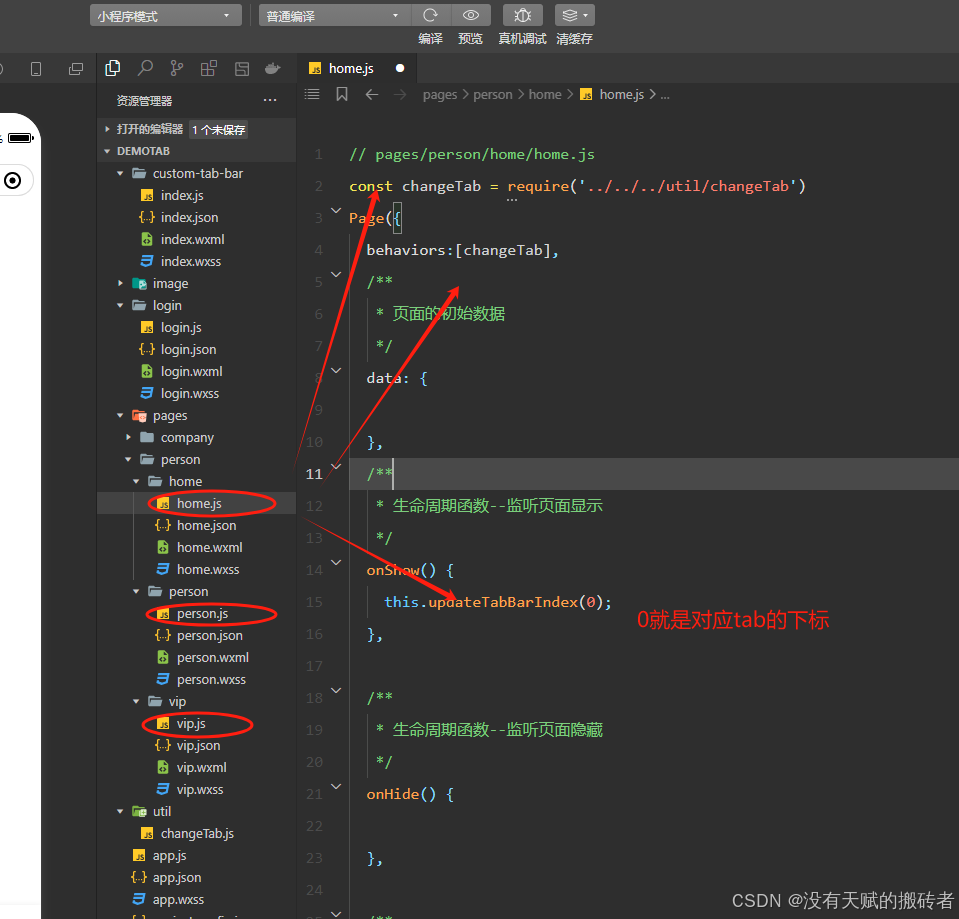
微信小程序实现根据不同的用户角色显示不同的tabbar并且可以完整的切换tabbar
直接上图上代码吧 // login/login.js const app getApp() Page({/*** 页面的初始数据*/data: {},/*** 生命周期函数--监听页面加载*/onLoad(options) {},/*** 生命周期函数--监听页面初次渲染完成*/onReady() {},/*** 生命周期函数--监听页面显示*/onShow() {},/*** 生命周期函…...

Git 本地常见快捷操作
Git 本地常见快捷操作 📌 1. 基本操作 操作命令初始化 Git 仓库git init查看 Git 状态git status添加所有文件到暂存区git add .添加指定文件git add <file>提交更改git commit -m "提交信息"修改最后一次提交信息git commit --amend -m "新…...

Elastic Stack 8.16.0 日志收集平台的搭建
简介 1.1 ELK 介绍 ELK 是 Elasticsearch、Logstash、Kibana 三款开源工具的首字母缩写,构成了一套完整的日志管理解决方案,主要用于日志的采集、存储、分析与可视化。 1)Logstash:数据管道工具,负责从…...