
Elasticsearch:使用 AI SDK 和 Elastic 构建 AI 代理
作者:来自 Elastic Carly Richmond

你是否经常听到 AI 代理(AI agents)这个词,但不太确定它们是什么,或者如何在 TypeScript(或 JavaScript)中构建一个?跟我一起深入了解 AI 代理的概念、它们的可能应用场景,以及一个使用 AI SDK 和 Elasticsearch 构建的旅行规划代理示例。
你是否经常听到 AI 代理这个词,但不太确定它们是什么,或者它们如何与 Elastic 关联?在这里,我将深入探讨 AI 代理,具体包括:
-
什么是 AI 代理?
-
AI 代理可以解决哪些问题?
-
一个基于 AI SDK、TypeScript 和 Elasticsearch 的旅行规划代理示例,代码可在 GitHub 上找到。
什么是 AI 代理?
AI 代理是一种能够自主执行任务并代表人类采取行动的软件,它利用人工智能实现这一目标。AI 代理通过结合一个或多个大语言模型(large language models - LLMs)与用户定义的工具(或函数)来执行特定操作。例如,这些工具可以执行以下操作:
-
从数据库、传感器、API 或 Elasticsearch 等搜索引擎提取信息。
-
执行复杂计算,并让 LLM 总结其结果。
-
基于各种数据输入快速做出关键决策。
-
根据响应触发必要的警报和反馈。
AI 代理可以做什么?
AI 代理可以根据其类型在多个领域中应用,可能的示例包括:
-
基于效用的代理:评估行动并提供推荐以最大化收益,例如根据用户的观看历史推荐电影和电视剧。
-
基于模型的代理:根据传感器输入实时决策,例如自动驾驶汽车或智能吸尘器。
-
学习型代理:结合数据和机器学习识别模式和异常,例如用于欺诈检测。
-
投资建议代理:根据用户的风险偏好和现有投资组合提供投资建议,以最大化收益。如果能权衡准确性、声誉风险和监管因素,这将加速决策过程。
-
简单聊天机器人:如当前的聊天机器人,可访问用户账户信息并用自然语言回答基本问题。
示例:旅行规划助手
为了更好地理解 AI 代理的功能,以及如何使用熟悉的 Web 技术构建一个 AI 代理,我们来看一个使用 AI SDK、TypeScript 和 Elasticsearch 编写的简单旅行规划助手示例。

架构
我们的示例由 5 个不同的元素组成:
-
一个名为 weatherTool 的工具,从 Weather API 获取提问者指定位置的天气数据。
-
一个名为 fcdoTool 的工具,从 GOV.UK content API 提供目的地的当前旅行状态。
-
flightTool 工具使用简单查询从 Elasticsearch 获取航班信息。
-
以上所有信息都会传递给 LLM GPT-4 Turbo。
模型选择
在构建你的第一个 AI 代理时,确定使用哪个模型可能会很困难。资源如 Hugging Face Open LLM Leaderboard 是一个不错的起点。此外,你还可以参考 Berkeley Function-Calling Leaderboard 来获取工具使用的指导。
在我们的案例中,AI SDK 特别推荐使用具有强大工具调用能力的模型,例如 gpt-4 或 gpt-4-turbo,这在其 Prompt Engineering 文档中有详细说明。如果选择了错误的模型,可能会导致 LLM 无法按预期调用多个工具,甚至会出现兼容性错误,如下所示:
# Llama3 lack of tooling support (3.1 or higher)
llama3 does not support tools# Unsupported toolChoice option to configure tool usage
AI_UnsupportedFunctionalityError: 'Unsupported tool choice type: required' functionality not supported.
先决条件
要运行此示例,请确保按照仓库 README 中的先决条件进行操作。
基础聊天助手
你可以使用 AI SDK 创建的最简单的 AI 代理将生成来自 LLM 的响应,而无需任何额外的上下文。AI SDK 支持许多 JavaScript 框架,具体可参考其文档。然而,AI SDK UI 库文档列出了对 React、Svelte、Vue.js 和 SolidJS 的不同支持,许多教程针对 Next.js。因此,我们的示例使用 Next.js 编写。
任何 AI SDK 聊天机器人的基本结构使用 useChat 钩子来处理来自后端路由的请求,默认情况下是 /api/chat/:

page.tsx 文件包含了我们在 Chat 组件中的客户端实现,包括由 useChat hook 暴露的提交、加载和错误处理功能。加载和错误处理功能是可选的,但建议提供请求状态的指示。与简单的 REST 调用相比,代理可能需要相当长的时间来响应,因此在此过程中保持用户更新状态非常重要,避免用户快速连续点击和重复调用。
由于该组件涉及客户端交互,我使用了 use client 指令,以确保该组件被视为客户端包的一部分:
'use client';import { useChat } from '@ai-sdk/react';
import Spinner from './components/spinner';export default function Chat() {/* useChat hook helps us handle the input, resulting messages, and also handle the loading and error states for a better user experience */const { messages, input, handleInputChange, handleSubmit, isLoading, stop, error, reload } = useChat();return (<div className="chat__form"><div className="chat__messages">{/* Display all user messages and assistant responses */messages.map(m => (<div key={m.id} className="message"><div>{ /* Messages with the role of *assistant* denote responses from the LLM*/ }<div className="role">{m.role === "assistant" ? "Sorley" : "Me"}</div>{ /* User or LLM generated content */}<div className="itinerary__div" dangerouslySetInnerHTML={{ __html: markdownConverter.makeHtml(m.content) }}></div></div></div>))}</div>{/* Spinner shows when awaiting a response */isLoading && (<div className="spinner__container"><Spinner /><button id="stop__button" type="button" onClick={() => stop()}>Stop</button></div>)}{/* Show error message and return button when something goes wrong */error && (<><div className="error__container">Unable to generate a plan. Please try again later!</div><button id="retry__button" type="button" onClick={() => reload()}>Retry</button></>)}{ /* Form using default input and submission handler form the useChat hook */ }<form onSubmit={handleSubmit}><inputclassName="search-box__input"value={input}placeholder="Where would you like to go?"onChange={handleInputChange}disabled={error != null}/></form></div>);
}
Chat 组件将通过钩子暴露的 input 属性保持用户输入,并在提交时将响应发送到相应的路由。我使用了默认的 handleSubmit 方法,它将调用 /ai/chat/ 的 POST 路由。
该路由的处理程序位于 /ai/chat/route.ts 中,通过 OpenAI provider 程序初始化与 gpt-4-turbo LLM 的连接:
import { openai } from '@ai-sdk/openai';
import { streamText } from 'ai';
import { NextResponse } from 'next/server';// Allow streaming responses up to 30 seconds to address typically longer responses from LLMs
export const maxDuration = 30;// Post request handler
export async function POST(req: Request) {const { messages } = await req.json();try {// Generate response from the LLM using the provided model, system prompt and messagesconst result = streamText({model: openai('gpt-4-turbo'),system: 'You are a helpful assistant that returns travel itineraries',messages});// Return data stream to allow the useChat hook to handle the results as they are streamed through for a better user experiencereturn result.toDataStreamResponse();} catch(e) {console.error(e);return new NextResponse("Unable to generate a plan. Please try again later!");}
}
请注意,上述实现将默认从环境变量 OPENAI_API_KEY 中提取 API 密钥。如果需要自定义 OpenAI 提供程序的配置,可以使用 createOpenAI 方法来覆盖提供程序的设置。
通过以上路由,结合 Showdown 帮助将 GPT 的 Markdown 输出格式化为 HTML,再加上一些 CSS 魔法(在 globals.css 文件中),我们最终得到了一个简单的响应式 UI,可以根据用户的提示生成行程:
基本的 LLM 行程视频
添加工具
向 AI 代理添加工具基本上就是创建 LLM 可以使用的自定义功能,以增强其生成的响应。在此阶段,我将添加 3 个新的工具,LLM 可以选择在生成行程时使用,如下图所示:

天气工具
虽然生成的行程是一个很好的开始,但我们可能希望添加 LLM 没有经过训练的额外信息,比如天气。这促使我们编写第一个工具,它不仅可以作为 LLM 的输入,还能提供额外的数据,帮助我们调整 UI。
创建的天气工具,完整代码如下,接受一个参数 location,LLM 将从用户输入中提取该位置。schema 属性使用 TypeScript 的 schema 验证库 Zod 来验证传入的参数类型,确保传递的是正确的参数类型。description 属性允许你定义工具的功能,帮助 LLM 决定是否调用该工具。
import { tool as createTool } from 'ai';
import { z } from 'zod';import { WeatherResponse } from '../model/weather.model';export const weatherTool = createTool({description: 'Display the weather for a holiday location',parameters: z.object({location: z.string().describe('The location to get the weather for')}),execute: async function ({ location }) {// While a historical forecast may be better, this example gets the next 3 daysconst url = `https://api.weatherapi.com/v1/forecast.json?q=${location}&days=3&key=${process.env.WEATHER_API_KEY}`;try {const response = await fetch(url);const weather : WeatherResponse = await response.json();return { location: location, condition: weather.current.condition.text, condition_image: weather.current.condition.icon,temperature: Math.round(weather.current.temp_c),feels_like_temperature: Math.round(weather.current.feelslike_c),humidity: weather.current.humidity};} catch(e) {console.error(e);return { message: 'Unable to obtain weather information', location: location};}}
});
你可能已经猜到,execute 属性是我们定义异步函数并实现工具逻辑的地方。具体来说,发送到天气 API 的位置会传递给我们的工具函数。然后,响应会被转换为一个单一的 JSON 对象,可以显示在 UI 上,并且也用于生成行程。
鉴于我们目前只运行一个工具,因此不需要考虑顺序或并行流程。简单来说,就是在原始 api/chat 路由中处理 LLM 输出的 streamText 方法中添加 tools 属性:
import { weatherTool } from '@/app/ai/weather.tool';// Other imports omittedexport const tools = {displayWeather: weatherTool,
};// Post request handler
export async function POST(req: Request) {const { messages } = await req.json();// Generate response from the LLM using the provided model, system prompt and messages (try catch block omitted)const result = streamText({model: openai('gpt-4-turbo'),system: 'You are a helpful assistant that returns travel itineraries based on the specified location.',messages,maxSteps: 2,tools});// Return data stream to allow the useChat hook to handle the results as they are streamed through for a better user experiencereturn result.toDataStreamResponse();
}
工具输出与消息一起提供,这使我们能够为用户提供更完整的体验。每条消息包含一个 parts 属性,其中包含 type 和 state 属性。当这些属性的值分别为 tool-invocation 和 result 时,我们可以从 toolInvocation 属性中提取返回的结果,并按需要显示它们。
更改后的 page.tsx 源代码将显示天气摘要以及生成的行程:
'use client';import { useChat } from '@ai-sdk/react';
import Image from 'next/image';import { Weather } from './components/weather';import pending from '../../public/multi-cloud.svg';export default function Chat() {/* useChat hook helps us handle the input, resulting messages, and also handle the loading and error states for a better user experience */const { messages, input, handleInputChange, handleSubmit, isLoading, stop, error, reload } = useChat();return (<div className="chat__form"><div className="chat__messages">{/* Display all user messages and assistant responses */messages.map(m => (<div key={m.id} className="message"><div>{ /* Messages with the role of *assistant* denote responses from the LLM */}<div className="role">{m.role === "assistant" ? "Sorley" : "Me"}</div>{ /* Tool handling */}<div className="tools__summary">{m.parts.map(part => {if (part.type === 'tool-invocation') {const { toolName, toolCallId, state } = part.toolInvocation;if (state === 'result') {{ /* Show weather results */}if (toolName === 'displayWeather') {const { result } = part.toolInvocation;return (<div key={toolCallId}><Weather {...result} /></div>);}} else {return (<div key={toolCallId}>{toolName === 'displayWeather' ? (<div className="weather__tool"><Image src={pending} width={80} height={80} alt="Placeholder Weather"/><p className="loading__weather__message">Loading weather...</p></div>) : null}</div>);}}})}</div>{ /* User or LLM generated content */}<div className="itinerary__div" dangerouslySetInnerHTML={{ __html: markdownConverter.makeHtml(m.content) }}></div></div></div>))}</div>{ /* Spinner and loading handling omitted */ }{ /* Form using default input and submission handler form the useChat hook */}<form onSubmit={handleSubmit}><inputclassName="search-box__input"value={input}placeholder="Where would you like to go?"onChange={handleInputChange}disabled={error != null}/></form></div>);
}
上述代码将向用户提供以下输出:

FCO 工具
AI 代理的强大之处在于 LLM 可以选择触发多个工具来获取相关信息,以生成响应。假设我们想要查看目标国家的旅行指南。下面的代码展示了如何创建一个新的工具 fcdoGuidance,它可以触发一个对 GOV.UK Content API 的 API 调用:
import { tool as createTool } from 'ai';
import { z } from 'zod';import { FCDOResponse } from '../model/fco.model';export const fcdoTool = createTool({description: 'Display the FCDO guidance for a destination',parameters: z.object({country: z.string().describe('The country of the location to get the guidance for')}),execute: async function ({ country }) {const url = `https://www.gov.uk/api/content/foreign-travel-advice/${country.toLowerCase()}`;try {const response = await fetch(url, { headers: { 'Content-Type': 'application/json' } });const fcoResponse: FCDOResponse = await response.json();const alertStatus: string = fcoResponse.details.alert_status.length == 0 ? 'Unknown' : fcoResponse.details.alert_status[0].replaceAll('_', ' ');return { status: alertStatus, url: fcoResponse.details?.document?.url};} catch(e) {console.error(e);return { message: 'Unable to obtain FCDO information', location: location};}}
});
你会注意到,格式与之前讨论的天气工具非常相似。事实上,要将该工具包含到 LLM 输出中,只需将其添加到 tools 属性,并修改 /api/chat 路由中的提示即可:
// Imports omittedexport const tools = {fcdoGuidance: fcdoTool,displayWeather: weatherTool,
};// Post request handler
export async function POST(req: Request) {const { messages } = await req.json();// Generate response from the LLM using the provided model, system prompt and messages (try/ catch block omitted)const result = streamText({model: openai('gpt-4-turbo'),system:"You are a helpful assistant that returns travel itineraries based on a location" + "Use the current weather from the displayWeather tool to adjust the itinerary and give packing suggestions." +"If the FCDO tool warns against travel DO NOT generate an itinerary.",messages,maxSteps: 2,tools});// Return data stream to allow the useChat hook to handle the results as they are streamed through for a better user experiencereturn result.toDataStreamResponse();
}
一旦将显示工具输出的组件添加到页面,对于不建议旅行的国家,输出应该如下所示:

支持工具调用的LLM可以选择是否调用工具,除非它认为有必要。使用gpt-4-turbo时,我们的两个工具会并行调用。然而,之前尝试使用llama3.1时,取决于输入,只有一个模型会被调用。
航班信息工具
RAG(Retrieval Augmented Generation - 检索增强生成)指的是一种软件架构,其中从搜索引擎或数据库中提取的文档作为上下文传递给 LLM,以基于提供的文档集来生成回应。这种架构允许 LLM 根据它之前没有训练过的数据生成更准确的回应。虽然 Agentic RAG 通过定义的工具或结合向量或混合搜索处理文档,但也可以像我们这里所做的那样,利用 RAG 作为与传统词汇搜索的复杂流程的一部分。
为了将航班信息与其他工具一起传递给LLM,最后一个工具 flightTool 通过 Elasticsearch JavaScript 客户端,从 Elasticsearch 中拉取出发和到达航班的航班信息,使用提供的出发地和目的地:
import { tool as createTool } from 'ai';
import { z } from 'zod';import { Client } from '@elastic/elasticsearch';
import { SearchResponseBody } from '@elastic/elasticsearch/lib/api/types';import { Flight } from '../model/flight.model';const index: string = "upcoming-flight-data";
const client: Client = new Client({node: process.env.ELASTIC_ENDPOINT,auth: {apiKey: process.env.ELASTIC_API_KEY || "",},
});function extractFlights(response: SearchResponseBody<Flight>): (Flight | undefined)[] {return response.hits.hits.map(hit => { return hit._source})
}export const flightTool = createTool({description:"Get flight information for a given destination from Elasticsearch, both outbound and return journeys",parameters: z.object({destination: z.string().describe("The destination we are flying to"),origin: z.string().describe("The origin we are flying from (defaults to London if not specified)"),}),execute: async function ({ destination, origin }) {try {const responses = await client.msearch({searches: [{ index: index },{query: {bool: {must: [{match: {origin: origin,},},{match: {destination: destination,},},],},},},// Return leg{ index: index },{query: {bool: {must: [{match: {origin: destination,},},{match: {destination: origin,},},],},},},],});if (responses.responses.length < 2) {throw new Error("Unable to obtain flight data");}return {outbound: extractFlights(responses.responses[0] as SearchResponseBody<Flight>),inbound: extractFlights(responses.responses[1] as SearchResponseBody<Flight>)};} catch (e) {console.error(e);return {message: "Unable to obtain flight information",location: location,};}},
});
这个示例使用了 Multi search API 来分别拉取出发和到达航班的信息,然后通过 extractFlights 工具方法提取文档。
为了使用工具的输出,我们需要再次修改我们的提示和工具集合,更新 /ai/chat/route.ts 文件:
// Imports omitted// Allow streaming responses up to 30 seconds to address typically longer responses from LLMs
export const maxDuration = 30;export const tools = {getFlights: flightTool,displayWeather: weatherTool,fcdoGuidance: fcdoTool
};// Post request handler
export async function POST(req: Request) {const { messages } = await req.json();// Generate response from the LLM using the provided model, system prompt and messages (try/ catch block omitted)const result = streamText({model: openai('gpt-4-turbo'),system:"You are a helpful assistant that returns travel itineraries based on location, the FCDO guidance from the specified tool, and the weather captured from the displayWeather tool." + "Use the flight information from tool getFlights only to recommend possible flights in the itinerary." + "Return an itinerary of sites to see and things to do based on the weather." + "If the FCDO tool warns against travel DO NOT generate an itinerary.",messages,maxSteps: 2,tools});// Return data stream to allow the useChat hook to handle the results as they are streamed through for a better user experiencereturn result.toDataStreamResponse();
}
通过最终的提示,所有 3 个工具将被调用,以生成包含航班选项的行程:

总结
如果你之前对 AI 代理还不完全了解,现在你应该清楚了!我们通过使用 AI SDK、Typescript 和 Elasticsearch 的简单旅行规划示例来进行了解。我们可以扩展我们的规划器,添加其他数据源,允许用户预订旅行以及旅游,甚至根据位置生成图像横幅(目前 AI SDK 中对此的支持仍处于实验阶段)。
如果你还没有深入了解代码,可以在这里查看!
资源
- AI SDK 核心文档
- AI SDK 核心 > 工具调用
- Elasticsearch JavaScript 客户端
- 旅行规划 AI 代理 | GitHub
想要获得 Elastic 认证吗?查看下次 Elasticsearch 工程师培训的时间!
Elasticsearch 拥有众多新功能,可以帮助你为你的使用案例构建最佳搜索解决方案。深入了解我们的示例笔记本,了解更多内容,开始免费云试用,或在本地机器上尝试 Elastic。
原文:Building AI Agents with AI SDK and Elastic - Elasticsearch Labs
相关文章:
Elasticsearch:使用 AI SDK 和 Elastic 构建 AI 代理
作者:来自 Elastic Carly Richmond 你是否经常听到 AI 代理(AI agents)这个词,但不太确定它们是什么,或者如何在 TypeScript(或 JavaScript)中构建一个?跟我一起深入了解 AI 代理的概…...

SQLAlchemy 支持特殊字符
postgresql 实践 pydantic 实践(一)基础 pydantic 实践(二)数据校验 SQLAlchemy 介绍与实践 SQLAlchemy 支持特殊字符 SQLAlchemy 支持特殊字符 1. 字符集介绍分析2. MySQL 支持特殊字符2.1. 更新 MySQL 字符集为 utf8mb42.2 更新…...

Docker 快速入门指南
Docker 快速入门指南 1. Docker 常用指令 Docker 是一个轻量级的容器化平台,可以帮助开发者快速构建、测试和部署应用程序。以下是一些常用的 Docker 命令。 1.1 镜像管理 # 搜索镜像 docker search <image_name># 拉取镜像 docker pull <image_name>…...

计算机网络 - OSI 七层模型
OSI 七层模型 OSI(Open System Interconnection,开放系统互联)模型由 ISO(国际标准化组织) 制定,目的是为不同计算机网络系统之间的通信提供一个标准化的框架。它将网络通信划分为 七个层次,每…...

如何调整yarn.nodemanager.vmem-pmem-ratio参数?
调整 yarn.nodemanager.vmem-pmem-ratio 参数的步骤如下: 1. 打开 YARN 配置文件 找到 yarn-site.xml 文件,该文件通常位于 Hadoop 配置目录中,例如 /etc/hadoop/conf 或 /opt/module/hadoop-3.1.3/etc/hadoop。 2. 找到并修改 yarn.nodemana…...

自顶向下学习K8S--部署Agones
本文在本人博客,原文地址:http://viogami.tech/index.php/blog/346/ 我是gopher,离不开云原生,自然也逃不了理解docker和K8S这俩。今天抽空想玩下agones,进而对K8S有实践性的理解。 学一个新事物从底层理论学肯定是最…...

unity中Xcharts图表鼠标悬浮表现异常
鼠标悬浮在面板附近,只显示单独的一个项目 而且无论鼠标如何移动,根本没有效果。 解决方案: 需要在对应的Canvas上绑定主相机才可以 鼠标移动到项目上就有信息展示了...
)
2025年最新自动化/控制保研夏令营预推免面试真题分享(东南大学苏州校区/华东理工/南航/天大)
笔者来2021级本科自动化专业,以下部分将介绍我在夏令营以及预推免期间发生经历和问题 东南大学苏州校区蒙纳士大学联培 东南大学苏州校区的项目算是一个比较小众的项目,是第一年在苏州校区,二三年到南京校区找导师(不提供住宿自…...

【Java SE】包装类 Byte、Short、Integer、Long、Character、Float、Double、Boolean
参考笔记:java 包装类 万字详解(通俗易懂)_java包装类-CSDN博客 目录 1.简介 2.包装类的继承关系图 3.装箱和拆箱 3.1 介绍 3.2 手动拆装箱 3.3. 自动拆装箱 4.关于String类型的转化问题 4.1 String类型和基本类型的相互转化 4.1.1 String —…...

口腔种植全流程AI导航系统及辅助诊疗与耗材智能化编程分析
一、系统架构与编程框架设计 口腔种植全流程人工智能导航系统的开发是一项高度复杂的多学科融合工程,其核心架构需在医学精准性、工程实时性与临床实用性之间实现平衡。系统设计以模块化分层架构为基础,结合高实时性数据流与多模态协同控制理念,覆盖从数据采集、智能决策到…...

小林coding-10道Java集合面试题
1.数组与集合区别,用过哪些?说说Java中的集合?Java中的线程安全的集合是什么?Collections和Collection的区别?集合遍历的方法有哪些? 2.List?讲一下java里面list的几种实现,几种实现有什么不同ÿ…...

Java 集合中ArrayList与LinkedList的性能比较
一、需求: 头部插入:向列表头部插入10万个整数。随机访问:从列表中间位置连续获取1万个元素。头部删除:从列表头部连续删除10万个元素。 二、 使用ArrayList与LinkedList测试 //常量定义,用于测试操作的次数…...
——前提)
SQL问题分析与诊断(8)——前提
8.1. 前提 与其他关系库类似,SQL Server中,当我们对存在性能问题的SQL语句进行分析和诊断时,除了获取该SQL语句本身外,还需要获取SQL语句相应的查询计划及其相关的数据环境。这里,所谓数据环境,具体是指SQ…...

漏洞发现:AWVS 联动 XRAY 图形化工具.(主动+被动 双重扫描)
漏洞发现:AWVS 联动 XRAY 图形化工具. 漏洞发现是网络安全领域的关键环节,指通过技术手段识别计算机系统、网络设备或软件中存在的设计缺陷、配置错误或代码漏洞的过程。这些漏洞可能被攻击者利用,导致数据泄露、服务中断或权限提升等风险。…...

上门家政小程序实战,从0到1解决方案
一、逻辑分析 上门家政小程序主要涉及用户端和服务端两大部分。用户端需要实现服务浏览、预约下单、订单跟踪等功能;服务端则要处理订单管理、服务人员管理、数据统计等任务。以下是详细的功能模块分析: 用户注册与登录:用户通过手机号或第三…...
Linux ping/telnet/nc命令
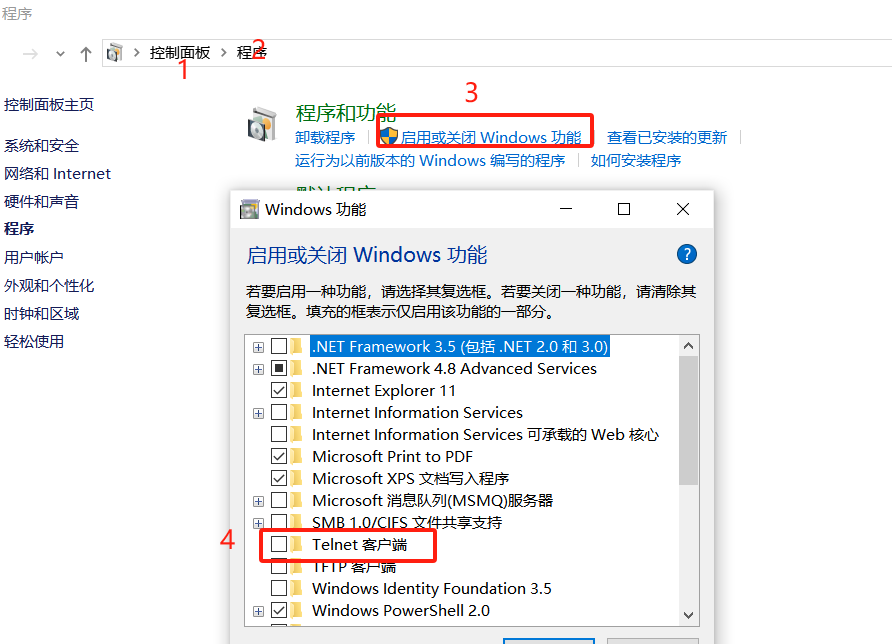
在Linux操作系统中,ping命令用于测试网络连接和发送数据包到目的主机。 然而,ping命令默认情况下只能测试IP地址和域名,而无法直接测试端口号。 ping www.baidu.comping 192.168.0.1 测试端口 如果你想测试特定端口是否开放并响应ÿ…...

Netty - 从Nginx 四层(TCP/UDP)流量中获取客户端真实/网络出口IP
文章目录 一、背景与原理1.1 问题场景网络架构影响分析1.1 客户端与Nginx之间存在的NAT/VPN1.2 Nginx与RPC服务之间的NAT 1.2 技术原理 二、环境配置验证2.1 Nginx配置2.2 版本要求 三、Netty服务端实现3.1 Pipeline配置(核心代码)3.2 协议处理器实现3.3…...

【持续集成和持续部署】
大致流程: 提交代码--拉取下来新代码并自动构建与部署--应用接口探活--执行自动化测试--输出自动化测试报告 一、持续集成(Continuous Integration,CI) 持续集成是一种软件开发实践,开发团队成员频繁地将代码集成到…...

Transformers中的BertConfig、BertModel详解
目录 一、功能 二、用法 1.导入BertConfig 2. 初始化默认配置 3.使用配置初始化模型 使用场景: 1.自定义小型BERT模型 2.加载预训练模型配置 从 Hugging Face 模型库加载 bert-base-uncased 的默认配置: 通过 BertConfig,你可以灵活定义…...

Ubuntu下载docker、xshell
配置:VMware虚拟机、Ubuntu24.04.1 首先打开vm启动虚拟机 下载docker Ubuntu启动之后,按CTRLALTT 打开终端 1.更新软件包索引并安装依赖 sudo apt-get updatesudo apt-get install \ca-certificates \curl \gnupg \lsb-release 2.添加docker官方的GP…...
迅为iTOP-RK3576人工智能开发板Android 系统接口功能测试
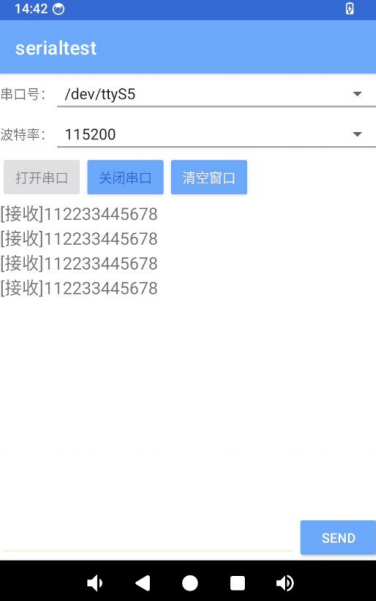
2.1 开机启动 开发板接通电源,并按下电源开关,系统即启动,在启动过程中,系统会显示下图中的开机画面,它们分别是 Android 系统启动时的 Logo 画面: 最后会显示如下解锁画面: 2.2 命令终端 将…...

Android设计模式之工厂方法模式
一、定义: 定义一个用于创建对象的接口,让子类决定实例化哪个类。 二、组成: 1.抽象工厂:工厂模式的核心,声明工厂方法,返回抽象产品对象。 2.具体工厂:实现工厂方法,返还具体的产品…...
的典型系统、硬件配置和内存大小)
端侧设备(如路由器、家庭网关、边缘计算盒子、工业网关等)的典型系统、硬件配置和内存大小
🏠 家用/工业级边缘设备硬件概览 类型常见设备示例CPU 架构内存范围操作系统类型家用路由器TP-Link、小米、华硕、OpenWrtARM Cortex-A7/A964MB~256MBOpenWrt / DD-WRT / Embedded Linux智能家庭网关华为、绿米、天猫精灵、Aqara HubARM Cortex-M/R128MB~512MBEmbedded Lin…...

office_word中使用宏以及DeepSeek
前言 Word中可以利用DeepSeek来生成各种宏,从而生成我们需要各种数据和图表,这样可以大大减少我们手工的操作。 1、Office的版本 采用的是微软的office2016,如下图: 2、新建一个Word文档 3、开启开发工具 这样菜单中的“开发工具…...

数据结构day04
一 栈 1栈的基本概念 各位同学大家好,从这个小节开始,我们会正式进入第三章的学习,我们会学习栈和队列,那这个小节中我们会先认识栈的基本概念。我们会从栈的定义和栈的基本操作来认识栈这种数据结构,也就是要探讨栈的…...

质量工程:数字化转型时代的质量体系重构
前言:质量理念的范式转移阅读原文 如果把软件开发比作建造摩天大楼: 传统测试 竣工后检查裂缝(高成本返工) 质量工程 从地基开始的全流程监理体系(设计图纸→施工工艺→建材选择→竣工验收) IEEE研究…...
)
数据结构C语言练习(单双链表)
本篇练习题(单链表): 1.力扣 203. 移除链表元素 2.力扣 206. 反转链表 3.力扣 876. 链表的中间结点 4.力扣 21. 合并两个有序链表 5. 牛客 链表分割算法详解 6.牛客 链表回文结构判断 7. 力扣 160. 相交链表 8. 力扣 141 环形链表 9. 力扣 142 环形链表 II…...
)
QScreen 捕获屏幕(截图)
一、QScreen核心能力解析 硬件信息获取 // 获取主屏幕对象 QScreen* primaryScreen QGuiApplication::primaryScreen();// 输出屏幕参数 qDebug() << "分辨率:" << primaryScreen->size(); qDebug() << "物理尺寸:" << primar…...

pyQt学习笔记——Qt资源文件(.qrc)的创建与使用
Qt资源文件(.qrc)的创建与使用 1. 选择打开资源2. 创建新资源3. 添加资源文件夹4. 选择要加载的图片文件5. 编译resource.qrc文件6. 替换PySlide6为PyQt57. 其他说明 1. 选择打开资源 在Qt项目中,可以通过windowIcon点击选择打开资源。 2. 创…...

优雅的开始一个Python项目
优雅的开始一个Python项目 这是我在初始化一个Python项目时,一键生成的项目文件。它自动完成了git初始化、环境管理、日志模块这三件事情,并在最后进入了虚拟环境。 uv安装 uv是一个现代的Python包管理和项目管理工具。uv中文文档 安装uv: # unix: …...