
STM32智能手表——任务线程部分
RTOS和LVGL我没学过,但是应该能硬啃这个项目例程
├─Application/User/Tasks            # 用于存放任务线程的函数
│  ├─user_TaskInit.c                # 初始化任务
│  ├─user_HardwareInitTask.c        # 硬件初始化任务
│  ├─user_RunModeTasks.c            # 运行模式任务
│  ├─user_KeyTask.c                 # 按键任务
│  ├─user_DataSaveTask.c            # 数据保存任务
│  ├─user_MessageSendTask.c         # 消息发送任务
│  ├─user_ChargeCheckTask.c         # 充电检查任务
│  ├─user_SensUpdateTask.c          # 传感器更新任务
│  ├─user_ScrRenewTask.c            # 屏幕刷新任务
一、TaskInit 任务初始化
该文件初始化嵌入式系统任务
1. Tasks
线程ID和成员
osThreadId_t LvHandlerTaskHandle;
const osThreadAttr_t LvHandlerTask_attributes = {.name = "LvHandlerTask",.stack_size = 128 * 24,  // 3KB栈空间.priority = osPriorityLow,
};
我们联系一下 Linux 的线程:
首先是定义一个线程 ID
//CMSIS-RTOS2
osThreadId_t LvHandlerTaskHandle;//Linux
pthread_t threadId;
然后我们查看官网提供的API文档:

这段代码,只对 name,stack_size以及 priority 成员进行赋值。
name:线程的名字
stack_size:栈的大小
由于内存的最小寻址单元通常是1Byte,那么这段代码所开辟的栈空间为:
128*24B=2^7*2^3*3B=2^10*3=3KB
priority:优先级
这里要提到优先级,其枚举类型为:
typedef enum {osPriorityIdle          = -3,         ///< Priority: idle (lowest)osPriorityLow           = -2,         ///< Priority: lowosPriorityBelowNormal   = -1,         ///< Priority: below normalosPriorityNormal        =  0,         ///< Priority: normal (default)osPriorityAboveNormal   = +1,         ///< Priority: above normalosPriorityHigh          = +2,         ///< Priority: highosPriorityRealtime      = +3,         ///< Priority: realtime (highest)osPriorityError         = 0x84,       ///< System cannot determine priority or illegal priority.osPriorityReserved      = 0x7FFFFFFF  ///< Prevents enum down-size compiler optimization.
} osPriority;
创建线程
void User_Tasks_Init(void)
{/* add threads, ... */LvHandlerTaskHandle  = osThreadNew(LvHandlerTask, NULL, &LvHandlerTask_attributes);KeyTaskHandle 			 = osThreadNew(KeyTask, NULL, &KeyTask_attributes);ScrRenewTaskHandle   = osThreadNew(ScrRenewTask, NULL, &ScrRenewTask_attributes);TimeRenewTaskHandle  = osThreadNew(TimeRenewTask, NULL, &TimeRenewTask_attributes);HomeUpdataTaskHandle = osThreadNew(HomeUpdata_Task, NULL, &HomeUpdataTask_attributes);}
类似于 linux 的 create,返回类型为线程 ID。
Parameters
| func | thread function. |
| argument | pointer that is passed to the thread function as start argument. |
| attr | thread attributes; NULL: default values. |
2. Message queues
首先也是类似于线程一样,定义 ID
//Key message
osMessageQueueId_t Key_MessageQueue;
osMessageQueueId_t Idle_MessageQueue;
osMessageQueueId_t Stop_MessageQueue;
osMessageQueueId_t IdleBreak_MessageQueue;
osMessageQueueId_t HomeUpdata_MessageQueue;
osMessageQueueId_t DataSave_MessageQueue;
和上面一样,也是创建队列:
/* add queues, ... */Key_MessageQueue = osMessageQueueNew(1, 1, NULL);Idle_MessageQueue = osMessageQueueNew(1, 1, NULL);Stop_MessageQueue = osMessageQueueNew(1, 1, NULL);IdleBreak_MessageQueue = osMessageQueueNew(1, 1, NULL);HomeUpdata_MessageQueue = osMessageQueueNew(1, 1, NULL);DataSave_MessageQueue = osMessageQueueNew(2, 1, NULL);Parameters
| msg_count | maximum number of messages in queue. |
| msg_size | maximum message size in bytes. |
| attr | message queue attributes; NULL: default values. |
3. 定时器
/* start timers, add new ones, ... */IdleTimerHandle = osTimerNew(IdleTimerCallback, osTimerPeriodic, NULL, NULL);osTimerStart(IdleTimerHandle,100);//100msParameters
| func | function pointer to callback function. |
| type | osTimerOnce for one-shot or osTimerPeriodic for periodic behavior. |
| argument | argument to the timer callback function. |
| attr | timer attributes; NULL: default values. |
返回值为 timer ID。
4. LVGL Tick
void TaskTickHook(void)
{//to increase the LVGL ticklv_tick_inc(1);//to increase the timerpage's timer(put in here is to ensure the Real Time)if(ui_TimerPageFlag){ui_TimerPage_ms+=1;if(ui_TimerPage_ms>=10){ui_TimerPage_ms=0;ui_TimerPage_10ms+=1;}if(ui_TimerPage_10ms>=100){ui_TimerPage_10ms=0;ui_TimerPage_sec+=1;uint8_t IdleBreakstr = 0;osMessageQueuePut(IdleBreak_MessageQueue, &IdleBreakstr, 0, 0);}if(ui_TimerPage_sec>=60){ui_TimerPage_sec=0;ui_TimerPage_min+=1;}if(ui_TimerPage_min>=60){ui_TimerPage_min=0;}}
}
LVGL心跳:每毫秒调用lv_tick_inc(1),驱动LVGL内部动画和事件。
计时器逻辑:更新计时器时间,并在用户操作时通过消息队列打断空闲状态。
心跳更新
void lv_tick_inc(uint32_t tick_period)tick_period – 此函数的调用周期(以毫秒为单位)
传送信息给消息队列
osMessageQueuePut(IdleBreak_MessageQueue, &IdleBreakstr, 0, 0);Put a Message into a Queue or timeout if Queue is full.
Parameters
| mq_id | message queue ID obtained by osMessageQueueNew. |
| msg_ptr | pointer to buffer with message to put into a queue. |
| msg_prio | message priority. |
| timeout | Timeout Values or 0 in case of no time-out. |
阻塞函数 osMessageQueuePut 将 msg_ptr 指向的消息放入参数 mq_id 指定的消息队列中。参数 msg_prio 用于在插入时根据消息的优先级(数字越高表示优先级越高)对消息进行排序。
参数 timeout 指定系统等待将消息放入队列的时间。在系统等待时,调用此函数的线程将进入阻塞状态。参数 timeout 可以具有以下值:
- 当 timeout 为 0 时,函数立即返回(即 try 语义)。
- 当 timeout 设置为 osWaitForever 时,该函数将等待无限时间,直到消息被传递(即等待语义)。
- 所有其他值在 kernel ticks 中指定超时时间(即定时等待语义)。
5. LvHandlerTask (LVGL处理任务)
空闲检测:通过lv_disp_get_inactive_time获取用户无操作时间。
实时性:osDelay(1)确保界面流畅响应。
void LvHandlerTask(void *argument) {while (1) {if (lv_disp_get_inactive_time(NULL) < 1000) {// 如果用户1秒内无操作,发送空闲打断消息osMessageQueuePut(IdleBreak_MessageQueue, &IdleBreakstr, 0, 0);}lv_task_handler(); // LVGL任务处理osDelay(1);        // 1ms延迟}
}
lv_disp_get_inactive_time(NULL) < 1000Get elapsed time since last user activity on a display (e.g. click)
获取自上次用户活动以来在显示器上经过的时间(例如,单击)
Parameters:
disp – pointer to a display (NULL to get the overall smallest inactivity)
disp – 指向显示的指针(NULL表示总的最小不活动)
Returns:
elapsed ticks (milliseconds) since the last activity
6. 看门狗
开发者这段代码注释掉了,后面再看看。
7. 小结
接下来,我们把初始化代码的框架给出来:

二、KeyTask 按键任务
这部分很简单,按下就将向消息队列发送数据。
void KeyTask(void *argument)
{uint8_t keystr=0;uint8_t Stopstr=0;uint8_t IdleBreakstr=0;while(1){switch(KeyScan(0)){case 1://向两个消息队列发送数据keystr = 1;osMessageQueuePut(Key_MessageQueue, &keystr, 0, 1);//退出空闲状态osMessageQueuePut(IdleBreak_MessageQueue, &IdleBreakstr, 0, 1);break;case 2:break;}osDelay(1);}
}
三、ScrRenewTask 屏幕更新任务
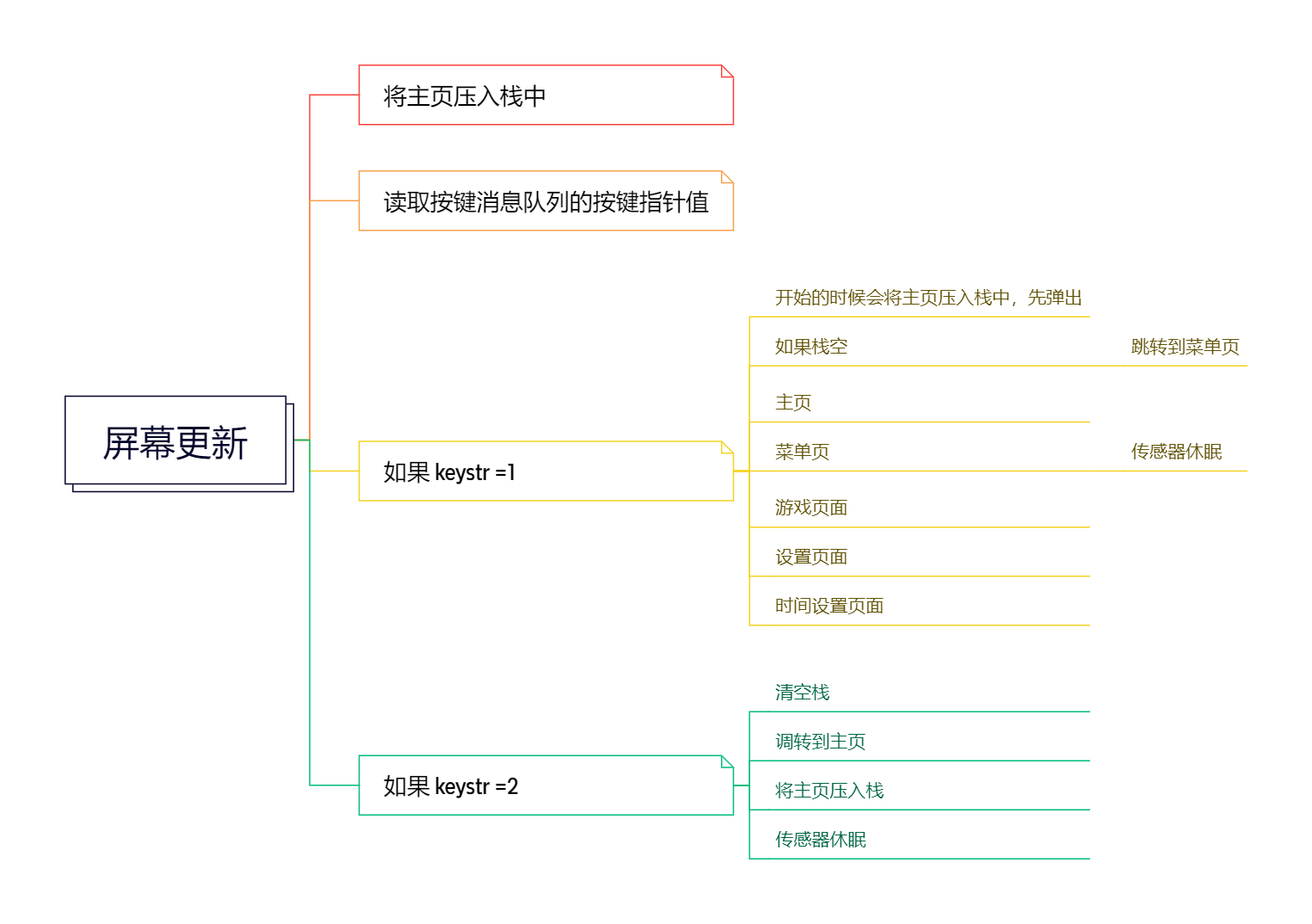
上面的按键任务,很自然会想到屏幕更新,肯定要切屏的。
而栈可以实现切换页面。
而 PageStack.c 实现了导航栈:
#include "PageStack.h"uint8_t user_Stack_Push(user_Stack_T* stack, StackData_t datain)
{if(stack->Top_Point == MAX_DEPTH - 1){return -1;}stack->Data[stack->Top_Point++] = datain;return 0;
}uint8_t user_Stack_Pop(user_Stack_T* stack)
{if(stack->Top_Point == 0){return -1;}stack->Data[--stack->Top_Point] = NULL;return 0;
}uint8_t user_Stack_isEmpty(user_Stack_T* stack)
{if(stack->Top_Point == 0){return 1;} return 0;
}void user_Stack_Clear(user_Stack_T* stack)
{while(!user_Stack_isEmpty(stack)){user_Stack_Pop(stack);}
}
回到更新屏幕的代码中:
void ScrRenewTask(void *argument)
{uint8_t keystr=0;//将主页压入导航栈user_Stack_Push(&ScrRenewStack,(long long int)&ui_HomePage);while(1){//检查按键消息队列if(osMessageQueueGet(Key_MessageQueue,&keystr,NULL,0)==osOK){//key1 pressedif(keystr == 1){// 弹出当前页面user_Stack_Pop(&ScrRenewStack);// 检查栈是否为空if(user_Stack_isEmpty(&ScrRenewStack)){// 栈空时初始化并跳转到菜单页ui_MenuPage_screen_init();lv_scr_load_anim(ui_MenuPage,LV_SCR_LOAD_ANIM_MOVE_RIGHT,0,0,true);// 重建导航栈(主页->菜单页)user_Stack_Push(&ScrRenewStack,(long long int)&ui_HomePage);user_Stack_Push(&ScrRenewStack,(long long int)&ui_MenuPage);}// 当前是主页else if(ScrRenewStack.Data[ScrRenewStack.Top_Point-1] == (long long int)&ui_HomePage){// 刷新主页ui_HomePage_screen_init();lv_scr_load_anim(ui_HomePage,LV_SCR_LOAD_ANIM_MOVE_RIGHT,0,0,true);}// 当前是菜单页else if(ScrRenewStack.Data[ScrRenewStack.Top_Point-1] == (long long int)&ui_MenuPage){// 刷新菜单页ui_MenuPage_screen_init();lv_scr_load_anim(ui_MenuPage,LV_SCR_LOAD_ANIM_MOVE_RIGHT,0,0,true);//传感器休眠代码//HR sensor sleep//EM7028_hrs_DisEnable();//sensor sleep//LSM303DLH_Sleep();//SPL_Sleep();}//其他页面处理,游戏页面、设置页面、时间设置页面else if(ScrRenewStack.Data[ScrRenewStack.Top_Point-1] == (long long int)&ui_GameSelectPage){ui_GameSelectPage_screen_init();lv_scr_load_anim(ui_GameSelectPage,LV_SCR_LOAD_ANIM_MOVE_RIGHT,0,0,true);}else if(ScrRenewStack.Data[ScrRenewStack.Top_Point-1] == (long long int)&ui_SetPage){ui_SetPage_screen_init();lv_scr_load_anim(ui_SetPage,LV_SCR_LOAD_ANIM_MOVE_RIGHT,0,0,true);}else if(ScrRenewStack.Data[ScrRenewStack.Top_Point-1] == (long long int)&ui_DateTimeSetPage){ui_DateTimeSetPage_screen_init();lv_scr_load_anim(ui_DateTimeSetPage,LV_SCR_LOAD_ANIM_MOVE_RIGHT,0,0,true);}}	//key2 pressed// 按键2处理(返回主页)else if(keystr == 2){// 清空导航栈user_Stack_Clear(&ScrRenewStack);// 初始化并跳转到主页ui_HomePage_screen_init();lv_scr_load_anim(ui_HomePage,LV_SCR_LOAD_ANIM_MOVE_RIGHT,0,0,true);// 将主页压入栈user_Stack_Push(&ScrRenewStack,(long long int)&ui_HomePage);// 传感器休眠代码//HR sensor sleep//EM7028_hrs_DisEnable();//sensor sleep//LSM303DLH_Sleep();//SPL_Sleep();}}	osDelay(10);}
}
获取消息队列的按键值
osMessageQueueGet(Key_MessageQueue,&keystr,NULL,0)==osOK参数
| mq_id | 通过 osMessageQueueNew 获取的消息队列 ID。 |
| msg_ptr | 指向要从队列中获取的消息的缓冲区的指针。 |
| msg_prio | 指向消息优先级或 NULL 的缓冲区的指针。 |
| 超时 | 超时值或 0(如果没有超时) |
可能的 osStatus_t 返回值:
- osOK:已从队列中检索到消息。
- osErrorTimeout:在给定时间内无法从队列中检索消息(定时等待语义)。
- osErrorResource:没有要从队列中获取的内容(尝试语义)。
- osErrorParameter:参数 mq_id 为 NULL 或无效,ISR 中指定的非零超时。
- osErrorSafetyClass:调用线程安全等级低于指定消息队列的安全等级。
屏幕加载函数
void lv_scr_load_anim(lv_obj_t * new_scr,           // 新屏幕对象lv_scr_load_anim_t anim_type, // 动画类型uint32_t time,                // 动画持续时间(毫秒)uint32_t delay,               // 动画延迟时间(毫秒)bool auto_del                 // 是否自动删除旧屏幕
);
四、HomePageTask 主页时间更新
void TimeRenewTask(void *argument)
{uint8_t value_strbuf[10];while(1){//检查当前显示的是否为主页if(ScrRenewStack.Data[ScrRenewStack.Top_Point-1] == (long long int)&ui_HomePage){/*闪烁效果lv_obj_set_style_text_opa(ui_TimeColonLabel, 0, LV_PART_MAIN | LV_STATE_DEFAULT);osDelay(500);lv_obj_set_style_text_opa(ui_TimeColonLabel, 255, LV_PART_MAIN | LV_STATE_DEFAULT);*///time get and renew the screenRTC_DateTypeDef nowdate;RTC_TimeTypeDef nowtime;HAL_RTC_GetTime(&hrtc,&nowtime,RTC_FORMAT_BIN);//Ҫψgettime,·üЂ²»Áˊ±¼䊉 HAL_RTC_GetDate(&hrtc,&nowdate,RTC_FORMAT_BIN);//变化时更新显示if(ui_TimeMinuteValue != nowtime.Minutes){ui_TimeMinuteValue = nowtime.Minutes;sprintf(value_strbuf,"%02d",ui_TimeMinuteValue);lv_label_set_text(ui_TimeMinuteLabel, value_strbuf);}if(ui_TimeHourValue != nowtime.Hours){ui_TimeHourValue = nowtime.Hours;sprintf(value_strbuf,"%2d",ui_TimeHourValue);lv_label_set_text(ui_TimeHourLabel, value_strbuf);}if(ui_DateDayValue != nowdate.Date){ui_DateDayValue = nowdate.Date;ui_DataWeekdayValue = nowdate.WeekDay;sprintf(value_strbuf,"%2d-%02d",ui_DateMonthValue,ui_DateDayValue);lv_label_set_text(ui_DateLabel, value_strbuf);lv_label_set_text(ui_DayLabel, ui_Days[ui_DataWeekdayValue-1]);}if(ui_DateMonthValue != nowdate.Month){ui_DateMonthValue = nowdate.Month;ui_DateDayValue = nowdate.Date;ui_DataWeekdayValue = nowdate.WeekDay;sprintf(value_strbuf,"%2d-%02d",ui_DateMonthValue,ui_DateDayValue);lv_label_set_text(ui_DateLabel, value_strbuf);lv_label_set_text(ui_DayLabel, ui_Days[ui_DataWeekdayValue-1]);}}osDelay(500);}
}/*** @brief homepage check the battery power and other data* @param argument: Not used* @retval None*/
void HomeUpdata_Task(void *argument)
{while(1){uint8_t HomeUpdataStr;if(osMessageQueueGet(HomeUpdata_MessageQueue,&HomeUpdataStr,NULL,0)==osOK){/*//batuint8_t value_strbuf[5];//计算电池电量ui_BatArcValue = PowerCalculate();if(ui_BatArcValue>0 && ui_BatArcValue<=100){}else{ui_BatArcValue=0;}//steps步数统计if(!Sensor_MPU_Erro){unsigned long STEPS = 0;if(!Sensor_MPU_Erro)dmp_get_pedometer_step_count(&STEPS);ui_StepNumValue = (uint16_t)STEPS;}//temp and humi 温湿度读取if(!Sensor_AHT21_Erro){//temp and humi messurefloat humi,temp;AHT_Read(&humi,&temp);//checkif(temp>-10 && temp<50 && humi>0 && humi<100){ui_EnvTempValue = (int8_t)temp;ui_EnvHumiValue = (int8_t)humi;}}//set text 更新UI显示if(ScrRenewStack.Data[ScrRenewStack.Top_Point-1] == (long long int)&ui_HomePage){//bat set text 电池电量显示更新lv_arc_set_value(ui_BatArc, ui_BatArcValue);sprintf(value_strbuf,"%2d%%",ui_BatArcValue);lv_label_set_text(ui_BatNumLabel, value_strbuf);//step set text 步数显示更新sprintf(value_strbuf,"%d",ui_StepNumValue);lv_label_set_text(ui_StepNumLabel, value_strbuf);//send data save message queue 发送数据保存消息uint8_t Datastr = 3;osMessageQueuePut(DataSave_MessageQueue, &Datastr, 0, 1);//humi and temp set text 温湿度显示更新lv_arc_set_value(ui_TempArc, ui_EnvTempValue);lv_arc_set_value(ui_HumiArc, ui_EnvHumiValue);sprintf(value_strbuf,"%d",ui_EnvTempValue);lv_label_set_text(ui_TempNumLabel, value_strbuf);sprintf(value_strbuf,"%d",ui_EnvHumiValue);lv_label_set_text(ui_HumiNumLabel, value_strbuf);}*/}osDelay(500);}
}五、SensorPageTask
/*** @brief  心率数据更新任务* @param  argument: RTOS任务参数(未使用)* @retval None*/
void HRDataRenewTask(void *argument)
{uint8_t value_strbuf[4];  // 用于格式化显示的字符串缓冲区uint8_t IdleBreakstr = 0;  // 空闲状态打断标志uint16_t dat = 0;  // 临时数据存储uint8_t hr_temp = 0;  // 临时心率值存储while(1)  // 任务主循环{// 检查当前显示的是否为心率页if(ScrRenewStack.Data[ScrRenewStack.Top_Point-1] == (long long int)&ui_HRPage){// 发送空闲状态打断消息osMessageQueuePut(IdleBreak_MessageQueue, &IdleBreakstr, 0, 1);/*// 注释掉的心率传感器处理代码// 唤醒心率传感器EM7028_hrs_Enable();// 检查传感器是否就绪if(!Sensor_EM_Erro){// 计算心率值(临界区保护)vTaskSuspendAll();  // 挂起所有任务hr_temp = HR_Calculate(EM7028_Get_HRS1(), user_HR_timecount);xTaskResumeAll();   // 恢复任务调度// 检查心率值是否有效并更新显示if(ui_HRValue != hr_temp && hr_temp>50 && hr_temp<120){// 更新UI显示ui_HRValue = hr_temp;sprintf(value_strbuf, "%d", ui_HRValue);lv_label_set_text(ui_HRPageNumLabel, value_strbuf);}}*/}osDelay(50);  // 每50ms执行一次}
}/*** @brief  传感器数据更新任务* @param  argument: RTOS任务参数(未使用)* @retval None*/
void SensorDataRenewTask(void *argument)
{uint8_t value_strbuf[6];  // 用于格式化显示的字符串缓冲区uint8_t IdleBreakstr = 0;  // 空闲状态打断标志while(1)  // 任务主循环{// 检查当前显示的是否为血氧页if(ScrRenewStack.Data[ScrRenewStack.Top_Point-1] == (long long int)&ui_SPO2Page){// 发送空闲状态打断消息osMessageQueuePut(IdleBreak_MessageQueue, &IdleBreakstr, 0, 1);// 血氧传感器唤醒代码(待实现)// sensor wake up}// 检查当前显示的是否为指南针页else if(ScrRenewStack.Data[ScrRenewStack.Top_Point-1] == (long long int)&ui_CompassPage){// 发送空闲状态打断消息osMessageQueuePut(IdleBreak_MessageQueue, &IdleBreakstr, 0, 1);// 指南针数据处理代码(待实现)}osDelay(300);  // 每300ms执行一次}
}
心率部分,作者用的是原 FreeRTOS 的API,比如挂起和恢复任务调度:
vTaskSuspendAll()
xTaskResumeAll()
对应CMSIS 应该为:
osKernelSuspend()
osKernelResume()
六、MessageSendTask 蓝牙
// BLE消息数据结构
struct {RTC_DateTypeDef nowdate;  // 当前日期RTC_TimeTypeDef nowtime;  // 当前时间int8_t humi;              // 湿度值int8_t temp;             // 温度值uint8_t HR;              // 心率值uint8_t SPO2;            // 血氧值uint16_t stepNum;        // 步数
} BLEMessage;// 时间设置消息结构
struct {RTC_DateTypeDef nowdate;  // 要设置的日期RTC_TimeTypeDef nowtime; // 要设置的时间
} TimeSetMessage;/* Private function prototypes -----------------------------------------------*//*** @brief  从字符串中提取命令* @param  str: 输入字符串* @param  cmd: 输出命令缓冲区* @retval None*/
void StrCMD_Get(uint8_t *str, uint8_t *cmd)
{uint8_t i = 0;// 提取'='前的命令部分while(str[i] != '=') {cmd[i] = str[i];i++;}
}/*** @brief  解析时间格式字符串并设置RTC* @param  str: 时间格式字符串(格式:OV+ST=20230629125555)* @retval None*/
uint8_t TimeFormat_Get(uint8_t *str)
{// 解析年月日时分秒(从字符串中提取)TimeSetMessage.nowdate.Year = (str[8]-'0')*10 + str[9]-'0';TimeSetMessage.nowdate.Month = (str[10]-'0')*10 + str[11]-'0';TimeSetMessage.nowdate.Date = (str[12]-'0')*10 + str[13]-'0';TimeSetMessage.nowtime.Hours = (str[14]-'0')*10 + str[15]-'0';TimeSetMessage.nowtime.Minutes = (str[16]-'0')*10 + str[17]-'0';TimeSetMessage.nowtime.Seconds = (str[18]-'0')*10 + str[19]-'0';// 检查时间有效性if(TimeSetMessage.nowdate.Year>0 && TimeSetMessage.nowdate.Year<99 && TimeSetMessage.nowdate.Month>0 && TimeSetMessage.nowdate.Month<=12&& TimeSetMessage.nowdate.Date>0 && TimeSetMessage.nowdate.Date<=31&& TimeSetMessage.nowtime.Hours>=0 && TimeSetMessage.nowtime.Hours<=23&& TimeSetMessage.nowtime.Minutes>=0 && TimeSetMessage.nowtime.Minutes<=59&& TimeSetMessage.nowtime.Seconds>=0 && TimeSetMessage.nowtime.Seconds<=59){// 设置RTC时间和日期RTC_SetDate(TimeSetMessage.nowdate.Year, TimeSetMessage.nowdate.Month, TimeSetMessage.nowdate.Date);RTC_SetTime(TimeSetMessage.nowtime.Hours, TimeSetMessage.nowtime.Minutes, TimeSetMessage.nowtime.Seconds);printf("TIMESETOK\r\n");  // 发送设置成功响应}
}/*** @brief  BLE消息发送任务* @param  argument: RTOS任务参数(未使用)* @retval None*/
void MessageSendTask(void *argument)
{while(1)  // 任务主循环{// 检查是否有新数据通过UART接收if(HardInt_uart_flag){HardInt_uart_flag = 0;  // 清除标志位// 发送空闲状态打断消息uint8_t IdleBreakstr = 0;osMessageQueuePut(IdleBreak_MessageQueue, &IdleBreakstr, NULL, 1);printf("RecStr:%s\r\n", HardInt_receive_str);  // 打印接收到的字符串// 命令解析和处理if(!strcmp(HardInt_receive_str, "OV")) {printf("OK\r\n");  // 简单响应}else if(!strcmp(HardInt_receive_str, "OV+VERSION")) {printf("VERSION=V2.3\r\n");  // 返回固件版本}else if(!strcmp(HardInt_receive_str, "OV+SEND")) {// 获取当前各项数据HAL_RTC_GetTime(&hrtc, &(BLEMessage.nowtime), RTC_FORMAT_BIN);HAL_RTC_GetDate(&hrtc, &BLEMessage.nowdate, RTC_FORMAT_BIN);BLEMessage.humi = ui_EnvHumiValue;BLEMessage.temp = ui_EnvTempValue;BLEMessage.HR = ui_HRValue;BLEMessage.SPO2 = ui_SPO2Value;BLEMessage.stepNum = ui_StepNumValue;// 打印各项数据printf("data:%2d-%02d\r\n", BLEMessage.nowdate.Month, BLEMessage.nowdate.Date);printf("time:%02d:%02d:%02d\r\n", BLEMessage.nowtime.Hours, BLEMessage.nowtime.Minutes, BLEMessage.nowtime.Seconds);printf("humidity:%d%%\r\n", BLEMessage.humi);printf("temperature:%d\r\n", BLEMessage.temp);printf("Heart Rate:%d%%\r\n", BLEMessage.HR);printf("SPO2:%d%%\r\n", BLEMessage.SPO2);printf("Step today:%d\r\n", BLEMessage.stepNum);}// 处理时间设置命令(格式:OV+ST=20230629125555)else if(strlen(HardInt_receive_str) == 20) {uint8_t cmd[10];memset(cmd, 0, sizeof(cmd));StrCMD_Get(HardInt_receive_str, cmd);  // 提取命令// 检查是否为时间设置命令且系统处于应用模式if(user_APPSy_EN && !strcmp(cmd, "OV+ST")) {TimeFormat_Get(HardInt_receive_str);  // 解析并设置时间}}memset(HardInt_receive_str, 0, sizeof(HardInt_receive_str));  // 清空接收缓冲区}osDelay(1000);  // 每1秒检查一次}
}
七、StopEnterTask
/*** @brief  进入空闲状态任务(降低亮度)* @param  argument: RTOS任务参数(未使用)* @retval None*/
void IdleEnterTask(void *argument)
{uint8_t Idlestr = 0;       // 进入空闲状态消息uint8_t IdleBreakstr = 0;   // 退出空闲状态消息while(1)  // 任务主循环{// 检查是否收到进入空闲状态消息(降低背光)if(osMessageQueueGet(Idle_MessageQueue, &Idlestr, NULL, 1) == osOK){LCD_Set_Light(5);  // 设置最低背光亮度(5%)}// 检查是否收到退出空闲状态消息(恢复背光)if(osMessageQueueGet(IdleBreak_MessageQueue, &IdleBreakstr, NULL, 1) == osOK){IdleTimerCount = 0;  // 重置空闲计时器LCD_Set_Light(ui_LightSliderValue);  // 恢复用户设置的背光亮度}osDelay(10);  // 每10ms检查一次}
}/*** @brief  进入停止模式任务(深度睡眠)* @param  argument: RTOS任务参数(未使用)* @retval None*/
void StopEnterTask(void *argument)
{uint8_t Stopstr;          // 进入停止模式消息uint8_t HomeUpdataStr;   // 主页更新消息uint8_t Wrist_Flag = 0;  // 手腕检测标志while(1){// 检查是否收到进入停止模式消息if(osMessageQueueGet(Stop_MessageQueue, &Stopstr, NULL, 0) == osOK){/***** 睡眠前操作 *****/sleep:IdleTimerCount = 0;  // 重置空闲计时器// 关闭外设以省电LCD_RES_Clr();        // 复位LCDLCD_Close_Light();    // 关闭背光CST816_Sleep();       // 触摸屏进入睡眠/***** 进入停止模式 *****/vTaskSuspendAll();  // 挂起所有任务(防止任务调度干扰)// 关闭看门狗(根据实际情况可选)//WDOG_Disnable();// 禁用SysTick中断(防止唤醒)CLEAR_BIT(SysTick->CTRL, SysTick_CTRL_TICKINT_Msk);// 进入STOP模式(保持主稳压器开启,WFI唤醒)HAL_PWR_EnterSTOPMode(PWR_MAINREGULATOR_ON, PWR_STOPENTRY_WFI);/***** 唤醒后操作 *****/// 重新启用SysTickSET_BIT(SysTick->CTRL, SysTick_CTRL_TICKINT_Msk);// 重新配置系统时钟(STOP模式会关闭HSI)HAL_SYSTICK_Config(SystemCoreClock / (1000U / uwTickFreq));SystemClock_Config();// 恢复任务调度xTaskResumeAll();/***** 唤醒后初始化 *****//*// 可选:MPU6050手腕检测逻辑if(user_MPU_Wrist_EN){uint8_t hor = MPU_isHorizontal();  // 检测设备是否水平if(hor && user_MPU_Wrist_State == WRIST_DOWN){user_MPU_Wrist_State = WRIST_UP;Wrist_Flag = 1;  // 标记为手腕抬起唤醒}else if(!hor && user_MPU_Wrist_State == WRIST_UP){user_MPU_Wrist_State = WRIST_DOWN;IdleTimerCount = 0;goto sleep;  // 如果手腕放下,重新进入睡眠}}*/// 检查唤醒源(按键1、充电状态或手腕抬起)if(!KEY1 || HardInt_Charg_flag || Wrist_Flag){Wrist_Flag = 0;  // 清除标志// 继续执行唤醒流程}else{IdleTimerCount = 0;goto sleep;  // 无有效唤醒源,重新睡眠}// 重新初始化外设LCD_Init();                      // 初始化LCDLCD_Set_Light(ui_LightSliderValue); // 恢复背光CST816_Wakeup();                // 唤醒触摸屏// 可选:充电检测// if(ChargeCheck()) { HardInt_Charg_flag = 1; }// 发送主页更新消息osMessageQueuePut(HomeUpdata_MessageQueue, &HomeUpdataStr, 0, 1);}osDelay(100);  // 每100ms检查一次}
}/*** @brief  空闲计时器回调函数* @param  argument: RTOS定时器参数(未使用)* @retval None*/
void IdleTimerCallback(void *argument)
{IdleTimerCount += 1;  // 计数器递增(每100ms触发一次)// 达到背光关闭时间阈值(ui_LTimeValue单位秒×10)if(IdleTimerCount == (ui_LTimeValue * 10)){uint8_t Idlestr = 0;osMessageQueuePut(Idle_MessageQueue, &Idlestr, 0, 1);  // 触发降低背光}// 达到系统休眠时间阈值(ui_TTimeValue单位秒×10)if(IdleTimerCount == (ui_TTimeValue * 10)){uint8_t Stopstr = 1;IdleTimerCount = 0;  // 重置计数器osMessageQueuePut(Stop_MessageQueue, &Stopstr, 0, 1);  // 触发深度睡眠}
}
相关文章:
STM32智能手表——任务线程部分
RTOS和LVGL我没学过,但是应该能硬啃这个项目例程 ├─Application/User/Tasks # 用于存放任务线程的函数 │ ├─user_TaskInit.c # 初始化任务 │ ├─user_HardwareInitTask.c # 硬件初始化任务 │ ├─user_RunModeTasks.c…...

SQL命令
一、表的创建 SQL MS Access、MySQL 和 SQL Server 数据类型 | 菜鸟教程 SQL Server 和 MySQL 中的 Date 函数 | 菜鸟教程 1.1、创建表 CREATE TABLE Citys (CityID int PRIMARY KEY,CityName varchar(255) );CREATE TABLE Per (PersonID int PRIMARY KEY, …...

DRM_CLIENT_CAP_UNIVERSAL_PLANES和DRM_CLIENT_CAP_ATOMIC
drmSetClientCap(fd, DRM_CLIENT_CAP_UNIVERSAL_PLANES, 1); drmSetClientCap(fd, DRM_CLIENT_CAP_ATOMIC, 1); 这两行代码用于启用 Linux DRM(Direct Rendering Manager)客户端的两个关键特性,具体作用如下: 1. drmSetClientCap…...

anaconda安装 创建虚拟环境+pycharm中conda环境配置
miniconda下载安装参考以下链接: https://blog.csdn.net/2301_76831056/article/details/143165738?fromshareblogdetail&sharetypeblogdetail&sharerId143165738&sharereferPC&sharesourceweixin_63339973&sharefromfrom_link (注…...

EasyExcel导出导入excel工具类
接上一篇EasyExcel导出导入excel的文章,附上一份完整的工具类代码。对于字体颜色名称,请参考这篇文章。 POI字体颜色 小技巧 类转换用属性拷贝不同类如果有相同属性,则使用反射验证,减少代码量 private List<Person> vali…...
终端SSH连接工具SecureCRT安装和连接Linux
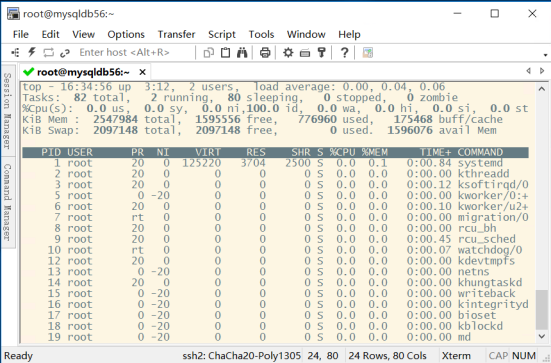
SecureCRT 9.5是一款集终端仿真与加密功能于一身的专业软件,其坚如磐石的安全性、高效的信息传输能力以及高度可定制的会话管理,使得它成为众多用户的首选。该软件不仅支持SSH2、SSH1、Telnet等多种协议,还提供了Relogin、Serial、TAPI、RAW等…...

赛逸展2025“创新引擎”启动:限量席位,点亮科技绿色新征程
当今时代,科技革新与绿色发展已然成为推动社会进步的双引擎。2025第七届亚洲消费电子技术贸易展(赛逸展)敏锐捕捉这一趋势,重磅打造“科技创新专区”,并面向科技、绿色企业吹响限量招募号角。 这个独具特色的专区紧扣…...

Spring的 init-method, @PostConstruct, InitializingBean 对比
Spring的 init-method, PostConstruct, InitializingBean 对比 在Spring框架中,init-method、PostConstruct和InitializingBean都是用于定义Bean初始化后执行逻辑的机制,但它们在实现方式、耦合度、执行顺序及适用场景上有所不同。以下是它们的对比总结…...
)
Gogs 精简备份与恢复方案(仅SQLite数据库和配置)
一、备份方案设计 1. 备份内容 SQLite数据库文件:/home/git/gogs/data/gogs.db 配置和附件:/home/git/gogs/custom 整个目录 2. 备份策略 每周日凌晨2点执行完整备份 保留最近4周的备份文件 备份存储在独立分区 /backup(使用永久化挂载…...
FPGA实现数码管显示分秒时间
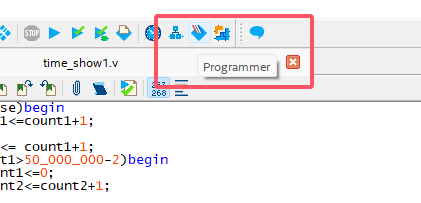
目录 一. verilog实现 二. 烧录验证 三. 结果验证 使用开发板:DE2-115开发板 一. verilog实现 要实现分和秒,需要知道定时器的频率,通过查手册可知,我使用的开发板时钟为50hz,也就是时钟一个周期是2微秒。 5000000…...

读书记录九之《在峡江的转弯处-陈行甲人生笔记》
距离上本读完的书,写读后感有很长一段时间了,中间读了几本书,但都没写点文字,没错,是懒病又犯了。陈行甲这本书,一开始从网络上推荐看到,看之前介绍是一本人物自传的回忆录。我个人对这类贴近的…...
可视化开发:用Qt实现Excel级动态柱状图
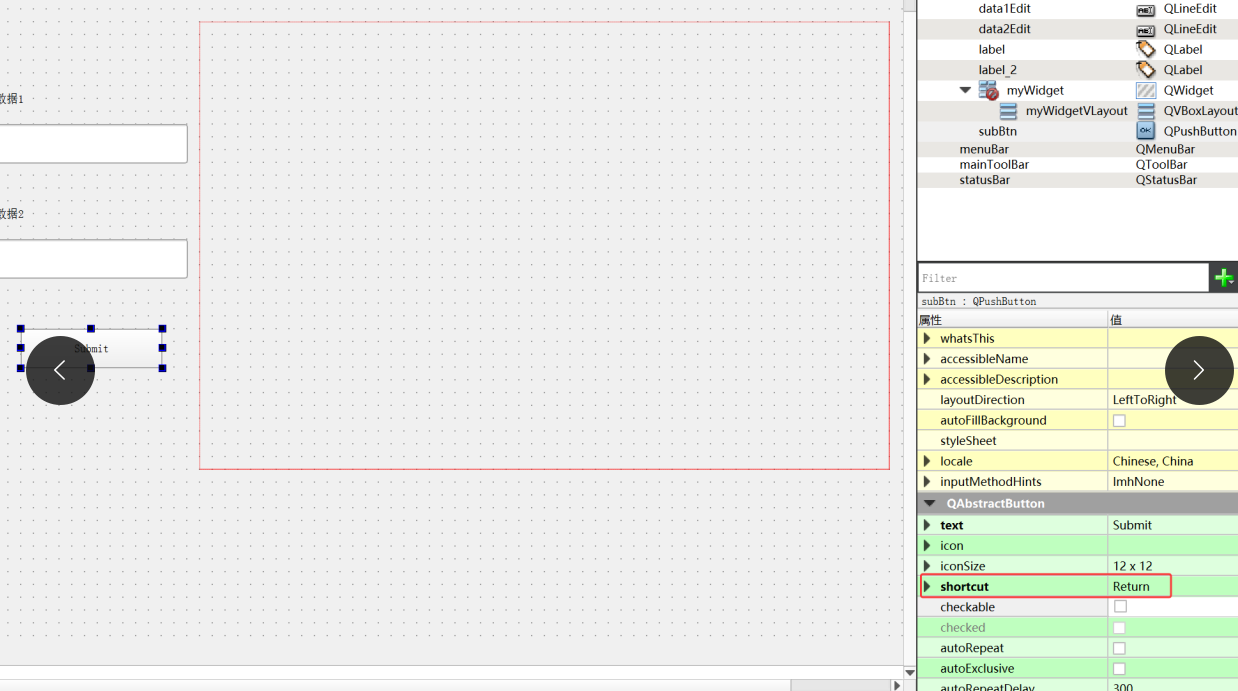
Qt柱状图 QtChart 首先我们介绍一下 图表建立的基础:Qt Charts QtChart 是Qt框架的一个模块,专注与提供交互式数据可视化功能 俗话就是 用于用户轻松创建各种类型的图表和图形界面 它包含的图表类型有很多:折线图,饼图&#x…...

从零实现Json-Rpc框架】- 项目实现 - 基于Dispatcher模块的RPC框架
📢博客主页:https://blog.csdn.net/2301_779549673 📢博客仓库:https://gitee.com/JohnKingW/linux_test/tree/master/lesson 📢欢迎点赞 👍 收藏 ⭐留言 📝 如有错误敬请指正! &…...
kubekey -实现懒人一键部署K8S集群
kubekey -实现懒人一键部署K8S集群 操作步骤 官网: https://kubesphere.io/zh/ 一、执行以下命令快速创建一个 Kubernetes 集群。 Master节点 如果您访问 GitHub/Googleapis 受限,请登录 Linux 主机,执行以下命令设置下载区域。 [roottest ~]…...

Android设计模式之模板方法模式
一、定义: 定义一个操作中的算法的框架,而将一些步骤延迟到子类中,使得子类可以不改变一个算法的结构即可重定义该算法的某些特定步骤。 二、结构: AbstractClass抽象类:定义算法的骨架,包含模板方法和若干…...

李宏毅机器学习笔记(1)—机器学习基本概念+深度学习基本概念
机器学习基本概念 1、获取模型 步骤 1.1、假定未知函数 带未知参数的函数 1.2、定义损失函数 真实值:label MAE MSE 几率分布,cross-entropy? 1.3、优化 单独考虑一个参数 让损失函数最小,找导数为零的点 单独考虑w,w…...
数字IC后端项目常见问题之streamOut layermap和innovus drc violation
Q1:我需要将Innovus设计GDS导出到Virtuoso,但发现写出GDS的过程会报如下所示的警告。这里写出GDS使用的是Virtuoso (DFII) streamOut mapping文件! Clock Gen模块Routing DRC,Timing分析及解决 streamOut tease.gds2 -mapFile cd…...

短剧系统开发动漫短剧系统源码开发上线小程序app教程
一、市场规模与用户增长:突破677亿,Z世代成主力 整体扩张 2025年短剧市场预计同比增长15%,规模达677.9亿元,用户规模6.62亿(占网民59.7%)。动漫短剧作为细分领域,增速显著受益于二次元文化渗透&…...

太阳能高杆路灯:照亮未来的新光
在全球能源转型进程加速以及可持续发展理念日益深入人心的背景下,太阳能高杆路灯作为融合新能源技术、智能控制技术与多功能集成特性的创新产品,正逐步革新传统路灯的格局。其不仅有效解决了传统路灯对电网供电的依赖问题,更为城市及乡村的照…...
《C++Linux编程进阶:从0实现muduo 》-第8讲.C++面试如何高效获取线程ID
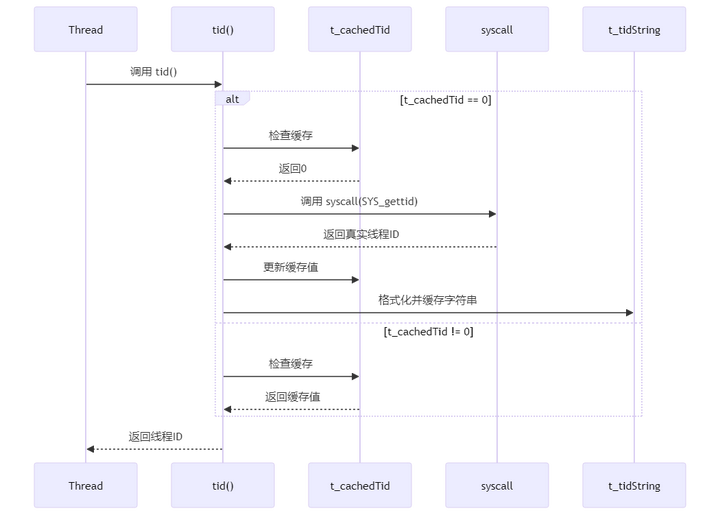
章节重点 在C面试时,经常被问到如果高效获取线程ID,但不少同学都不知道如何回答。 重点是通过__thread关键字。 重点内容 视频讲解:《CLinux编程进阶:从0实现muduo C网络框架系列》-第8讲. C面试如何高效获取线程ID 测试获取线…...

【Tauri2】011——菜单menu(2)
前言 前面简单地创建了菜单,接下来就来试试菜单中的action Rust中菜单项注册action AppHandle in tauri - Rusthttps://docs.rs/tauri/2.4.0/tauri/struct.AppHandle.html#method.on_menu_event这就需要用到App或者AppHandle中的方法on_menu_event #[must_use] …...

架构设计基础系列:面向对象设计的原则
引言 面向对象设计(Object-Oriented Design,OOD)是软件开发中的重要概念,其核心在于通过对象、类、继承、封装和多态等机制,实现对现实世界问题的抽象和建模。OOD不仅有助于提高代码的可重用性、可维护性和可扩展性&a…...

UE5学习笔记 FPS游戏制作35 使用.csv配置文件
文章目录 导入.csv要求首先创建一个结构体导入配置文件读取配置 导入 .csv要求 第一行必须包含标题 第一列的内容必须不能重复,因为第一列会被当成行的名字,在数据处理中发挥类似于字典的key的作用 当前的配置文件内容如下 首先创建一个结构体 结构…...
嵌入式单片机ADC数模转换的基本方法
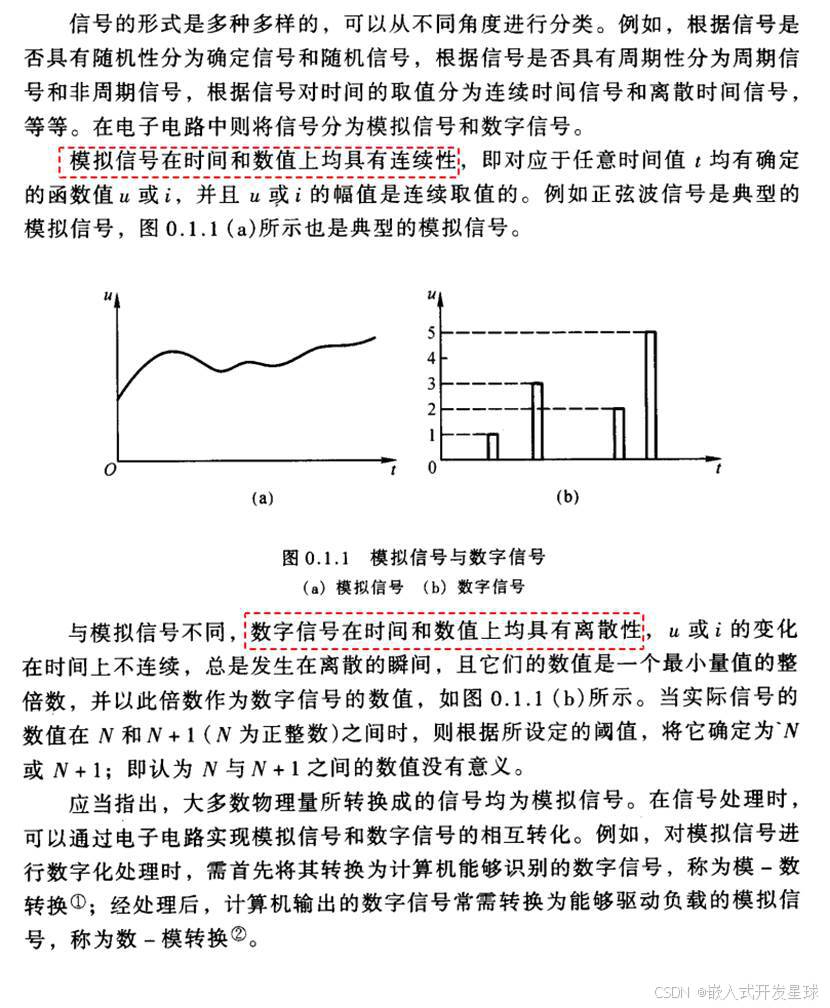
第一:模数转换的概述 1:模数转换的概念 一般在电路中,信号分为两种,一种是模拟信号,一种是数字信号,绝大多数传感器采集的都是模拟信号,如温度、湿度、烟雾浓度、亮度.......,但是对于计算机需要处理的数字信号,那就需要利用电路把模拟信号转换为数字信号,这个转换的…...

Web数据挖掘及其在电子商务中的研究与应用
标题:Web数据挖掘及其在电子商务中的研究与应用 内容:1.摘要 随着互联网的飞速发展,Web数据呈现出爆炸式增长,电子商务领域更是积累了海量数据。在此背景下,对Web数据进行有效挖掘并应用于电子商务具有重要意义。本研究旨在探索Web数据挖掘技…...

01-Docker 安装
1、安装环境介绍 安装环境:Linux CentOS 7 本安装教程参考Docker官方文档,地址如下:https://docs.docker.com/engine/install/centos/ 2、卸载旧版docker 首先如果系统中已经存在旧的Docker,则先卸载: yum remove do…...

Redis 的缓存雪崩、击穿、穿透及其解决办法
文章目录 Redis 的缓存雪崩、击穿、穿透及其解决办法缓存雪崩解决办法 缓存击穿解决方案 缓存穿透解决方案 Redis 的缓存雪崩、击穿、穿透及其解决办法 本篇文章回顾 Redis 当中缓存崩溃、击穿、穿透现象以及相应的解决办法,主要的参考资料是:https://w…...

使用 Selenium 构建简单高效的网页爬虫
在当今数据驱动的世界中,网络爬虫已成为获取网络信息的重要工具。本文将介绍如何使用 Python 和 Selenium 构建一个简单而高效的网页爬虫,该爬虫能够处理现代网站的动态内容,支持代理设置和用户配置文件。 为什么选择 Selenium? …...
性能比拼: Pingora vs Nginx (My NEW Favorite Proxy)
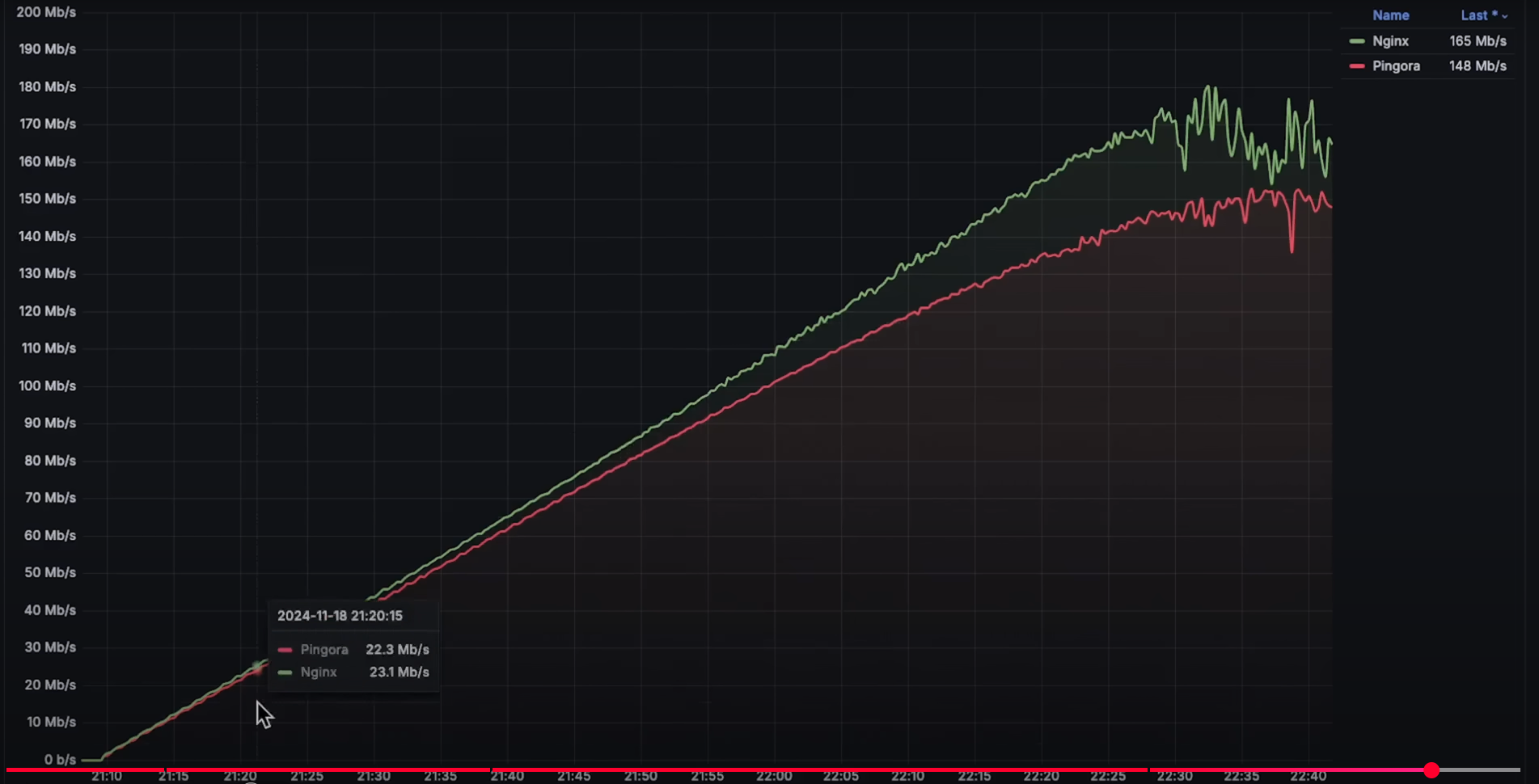
本内容是对知名性能评测博主 Anton Putra Pingora vs Nginx Performance Benchmark: My NEW Favorite Proxy! 内容的翻译与整理, 有适当删减, 相关指标和结论以原作为准 介绍 在本视频中,我们将对比 Nginx 和 Pingora(一个用于构建网络服务的 Rust 框架…...
Ranger一分钟
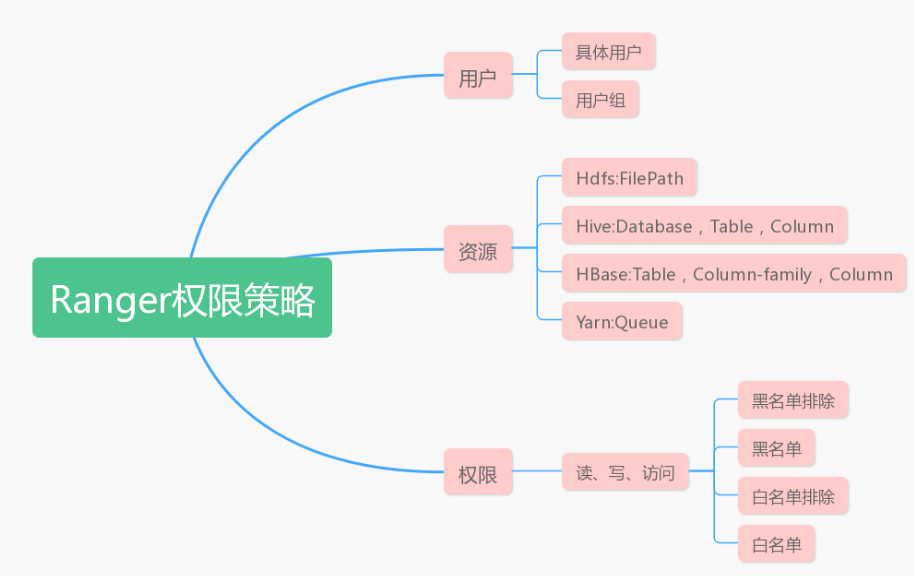
简介 Ranger Admin:Web UIPolicy Admin Tool:定义和管理策略的模块Ranger Plugins:HDFS、Hive、HBase、Kafka、Storm、YARNRanger UserSync: LDAP、Active DirectoryRanger KMS:管理和保护数据加密的密钥 加密密钥管理…...