
通过ansible+docker-compose快速安装一主两从redis+三sentinel
目录
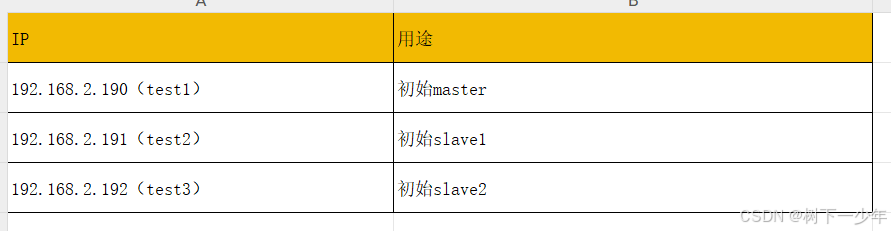
示例主机列表
架构参考
文件内容
安装脚本
ansible变量,需修改
ansible配置文件和主机清单,需修改
运行方式
验证故障转移master
涉及redis镜像和完整的脚本文件
示例主机列表
架构参考
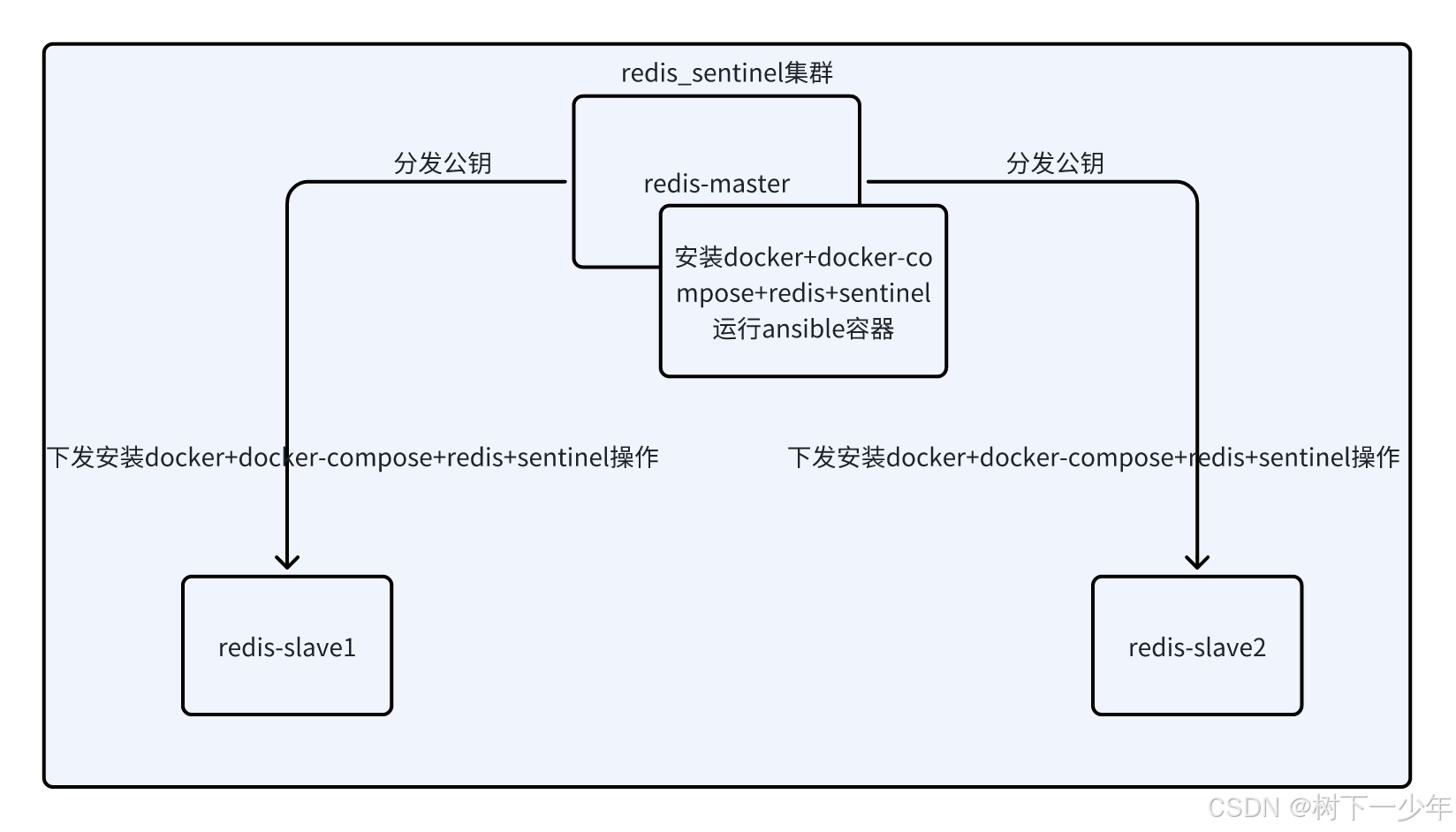
文件内容
安装脚本
#!/bin/bashset -e
export path=`pwd`
export capath="/opt/.certs"
export docker_data=$(awk -F': ' '/docker_data_dir:/ {print $2}' group_vars/all.yml)
export ansible_log_dir="$path/log"
ssh_pass="sulibao"os_arch=$(uname -m)if [[ "$os_arch" == "x86_64" ]]; thenARCH="x86"echo -e "Detected Operating System: $OS, Architecture:X86"mkdir -p $ansible_log_dir
elif [[ "$os_arch" == "aarch64" ]]; thenARCH="arm64"echo -e "Detected Operating System: $OS, Architecture: ARM64"mkdir -p $ansible_log_dir
elseecho -e "Unsupported architecture detected: $os_arch"exit 1
fifunction check_arch() {if [ -f /etc/redhat-release ]; thenOS="RedHat"elif [ -f /etc/kylin-release ]; thenOS="kylin"elseecho "Unknow linux distribution."fiOS_ARCH=$(uname -a)if [[ "$OS_ARCH" =~ "x86" ]]thenARCH="x86"echo -e  "The operating system is $OS,the architecture is X86."elif [[ "$OS_ARCH" =~ "aarch" ]]thenARCH="arm64"echo -e  "The operating system is $OS,the architecture is Arm."fi
}function check_docker() {echo "Make sure docker is installed and running."if ! [ -x "$(command -v docker)" ]; thenecho "docker not find."create_docker_group_and_userinstall_dockerelseecho "docker exists."fiif ! systemctl is-active --quiet docker; thenecho "docker is not running."create_docker_group_and_userinstall_dockerelseecho "docker is running."fi
}function check_docker_compose() {if ! [ -x "$(command -v docker-compose)" ]; thenecho "docker-compose not find."install_docker_compose   elseecho "docker-compose exist."fi
}function create_docker_group_and_user() {if ! getent group docker >/dev/null 2>&1; thengroupadd dockerecho "docker group created successfully."elseecho "docker group already exists."fiif ! id -u docker >/dev/null 2>&1; thenuseradd -m -s /bin/bash -g docker dockerecho "docker user has been created and added to docker group."elseecho "docker user already exists."fi
}function install_docker() {echo "Installing docker."if [[ "$ARCH" == "x86" ]]thenexport DOCKER_OFFLINE_PACKAGE=$path/packages/docker/x86/docker-27.2.0.tgzelseexport DOCKER_OFFLINE_PACKAGE=$path/packages/docker/arm64/docker-27.2.0.tgzfitar axvf $DOCKER_OFFLINE_PACKAGE -C /usr/bin/ --strip-components=1cp -v -f $path/packages/docker/docker.service /usr/lib/systemd/system/test -d /etc/docker || mkdir -p /etc/dockerenvsubst '$docker_data' < $path/packages/docker/daemon.json > /etc/docker/daemon.jsonsystemctl stop firewalldsystemctl disable firewalldsystemctl daemon-reloadsystemctl enable docker.service --nowsystemctl restart docker || :maxSecond=60for i in $(seq 1 $maxSecond); doif systemctl is-active --quiet docker; thenbreakfisleep 1doneif ((i == maxSecond)); thenecho "Failed to start the docker server, please check the docker start log."exit 1fiecho "Docker has started successfully and the installation is complete."
}function install_docker_compose {echo "Installing docker-compose."if [[ "$ARCH" == "x86" ]]thenexport DOCKER_COMPOSE_OFFLINE_PACKAGE=$path/packages/docker-compose/x86/docker-compose-linux-x86_64cp -v -f $DOCKER_COMPOSE_OFFLINE_PACKAGE /usr/local/bin/docker-composeelseexport DOCKER_COMPOSE_OFFLINE_PACKAGE=$path/packages/docker-compose/arm64/docker-compose-linux-aarch64cp -v -f $DOCKER_COMPOSE_OFFLINE_PACKAGE /usr/local/bin/docker-composefi
}function load_ansible_image() {if [[ "$ARCH" == "x86" ]]thendocker load -i $path/packages/ansible/x86/ansible_images.tgzelsedocker load -i $path/packages/ansible/arm64/ansible_images.tgzfiecho -e "Loaded ansible image."
}function ensure_ansible() {echo -e "Checking the status of the ansible."if test -z "$(docker ps -a | grep ansible_sulibao)"; thenecho -e "Ansible is not running, will run."run_ansibleelseecho -e "Ansible is running, will restart."docker restart ansible_sulibaofi
}function run_ansible() {echo -e "Installing Ansible container."if [[ "$ARCH" == "x86" ]]thendocker run --name ansible_sulibao --network="host" --workdir=$path -d -e LANG=C.UTF-8 -e ssh_password=$ssh_pass --restart=always -v /etc/localtime:/etc/localtime:ro -v ~/.ssh:/root/.ssh -v $path:$path -v "$capath":"$capath" ansible:latest sleep 31536000elsedocker run --name ansible_sulibao --network="host" --workdir=$path -d -e LANG=C.UTF-8 -e ssh_password=$ssh_pass --restart=always -v /etc/localtime:/etc/localtime:ro -v ~/.ssh:/root/.ssh -v $path:$path -v "$capath":"$capath" ansible-arm:latest sleep 31536000fiecho -e "Installed Ansible container."
}function  create_ssh_key(){echo -e "Creating sshkey."docker exec -i ansible_sulibao /bin/sh -c 'echo -e "y\n"|ssh-keygen -t rsa -N "" -C "deploy@redis_sentinel" -f ~/.ssh/id_rsa_ansible_redis -q'  echo -e "\nCreated sshkey."}function copy_ssh_key() {echo -e "Copying sshkey."docker exec -i ansible_sulibao /bin/sh -c "cd $path && ansible-playbook  ssh-access.yml -e ansible_ssh_pass=$ssh_pass"  echo -e "\nCopied sshkey."
}function install_docker_slave() {echo -e "Installing docker for slave nodes."docker exec -i ansible_sulibao /bin/sh -c "cd $path && ansible-playbook  ./docker.yml"echo -e "\nInstalled docker for slave nodes."
}function install_redis() {echo -e "Install redis."docker exec -i ansible_sulibao /bin/sh -c "cd $path && ansible-playbook  ./redis.yml"echo -e "\nInstalled redis."
}check_arch
check_docker
check_docker_compose
load_ansible_image
ensure_ansible
create_ssh_key
copy_ssh_key
install_docker_slave
install_redis
ansible变量,需修改
vim group_vars/all.ymldocker_data_dir: /app/docker_data   #安装的docker数据目录
data_dir: /app     #存放redis文件的数据目录
redis_sentinel_port: 26379    #sentinel端口
redis_pass: "sulibao"     #redis认证密码
image_redis: "registry.cn-chengdu.aliyuncs.com/su03/redis:7.2.7"   #redis和sentinel使用的镜像
ansible配置文件和主机清单,需修改
[root@test1 redis_data]# cat ansible.cfg
[defaults]
inventory=./hosts
remote_user = root
transport= ssh
remote_port = 22
private_key_file= /root/.ssh/id_rsa_ansible_redis
log_path = ./log/ansible.log
stdout_callback=debug
host_key_checking=false
command_warnings=False
fact_caching_connections=/tmp/ansible_facts
fact_caching_timeout=86400
gathering=smart
pipelining=True
deprecation_warnings = False[ssh_connection]
ssh_args=-o ControlMaster=auto -o ControlPersist=60s
[root@test1 redis_data]# cat hosts
[redis_master]    #初始master的地址
192.168.2.190
[redis_slave1]    #初始slave1的地址
192.168.2.191
[redis_slave2]    #初始slave2的地址
192.168.2.192[redis_slave:children]
redis_slave1
redis_slave2[redis:children]
redis_master
redis_slave1
redis_slave2
运行方式
bash setup.sh验证故障转移master
#初始集群信息,test1为master,test2、test3为slave
docker exec -it redis-master bash
root@test1:/data# redis-cli -a sulibao role
Warning: Using a password with '-a' or '-u' option on the command line interface may not be safe.
1) "master"
2) (integer) 35726
3) 1) 1) "192.168.2.191"2) "6379"3) "35726"2) 1) "192.168.2.192"2) "6379"3) "35585"#模拟master(test1)挂机,出现新master(test2),test3仍为slave
[root@test1 redis_data]# docker stop redis-master
redis-master
[root@test2 ~]# docker exec -it redis-slave1 bash
root@test2:/data# redis-cli -a sulibao role
Warning: Using a password with '-a' or '-u' option on the command line interface may not be safe.
1) "master"
2) (integer) 68953
3) 1) 1) "192.168.2.192"2) "6379"3) "68953"#旧master(test1)恢复,成为slave角色。此时master为test2,test1、test3为slave
[root@test1 redis_data]# docker start redis-master
redis-master
root@test2:/data# redis-cli -a sulibao role
Warning: Using a password with '-a' or '-u' option on the command line interface may not be safe.
1) "master"
2) (integer) 87291
3) 1) 1) "192.168.2.192"2) "6379"3) "87291"2) 1) "192.168.2.190"2) "6379"3) "87291"
涉及redis镜像和完整的脚本文件
脚本文件:通过网盘分享的文件:redis_data.tgz
链接: https://pan.baidu.com/s/12Hd22VSxdduktkyr7Lhijg?pwd=abvn 提取码: abvn
镜像文件:通过网盘分享的文件:redis-727-x86.tgz
链接: https://pan.baidu.com/s/1D4xQkrSU4opm-9RVhk6Gmg?pwd=aiw3 提取码: aiw3
相关文章:
通过ansible+docker-compose快速安装一主两从redis+三sentinel
目录 示例主机列表 架构参考 文件内容 安装脚本 ansible变量,需修改 ansible配置文件和主机清单,需修改 运行方式 验证故障转移master 涉及redis镜像和完整的脚本文件 示例主机列表 架构参考 文件内容 安装脚本 #!/bin/bashset -e export pa…...

前端和AI怎么高度融合
前端工程师和人工智能(AI)结合可以创造出更加智能和交互式的用户体验。以下是一些前端工程师可以与AI结合的方式: AI聊天机器人:前端工程师可以开发基于AI的聊天机器人,用于与用户交互并提供实时帮助和支持。 个性化推…...
mysql docker容器启动遇到的问题整理
好几个月没折腾mysql的部署,弄了下,又遇到不少问题 问题一:Access denied for user ‘root‘‘172.18.0.1‘ docker容器启动后,本地navicat 连接报这个错误 查到两个方案,一个貌似是要让root用户能在任意ip地址&…...

HTTP keepalive 详解
一、简介 HTTP协议早期版本,比如1.0,默认是不使用持久连接的,也就是每个请求/响应之后都会关闭TCP连接。这样的话,每次请求都需要重新建立连接,增加了延迟和资源消耗。Keep-Alive的作用是保持连接,让多个请…...

长短期记忆神经网络(LSTM)基础学习与实例:预测序列的未来
目录 1. 前言 2. LSTM的基本原理 2.1 LSTM基本结构 2.2 LSTM的计算过程 3. LSTM实例:预测序列的未来 3.1 数据准备 3.2 模型构建 3.3 模型训练 3.4 模型预测 3.5 完整程序预测序列的未来 4. 总结 1. 前言 在深度学习领域,循环神经网络&…...

青少年编程与数学 02-015 大学数学知识点 01课题、概要
青少年编程与数学 02-015 大学数学知识点 01课题、概要 一、线性代数二、概率论与数理统计三、微积分四、优化理论五、离散数学六、数值分析七、信息论 《青少年编程与数学》课程要求,在高中毕业前,尽量完成大部分大学数学知识的学习。一般可以通过线上课…...

C++多继承
可以用多个基类来派生一个类。 格式为: class 类名:类名1,…, 类名n { private: … ; //私有成员说明; public: … ; //公有成员说明; protected: … ; //保护的成员说明; }; class D: public A, protected B, private C { …//派…...

【深度学习新浪潮】DeepSeek近期的技术进展及未来动向
一、近期技术进展 模型迭代与性能提升 DeepSeek-V3-0324版本更新:2025年3月24日发布,作为V3的小版本升级,参数规模达6850亿,采用混合专家(MoE)架构,激活参数370亿。其代码能力接近Claude 3.7,数学推理能力显著提升,且在开源社区(如Hugging Face)上线。DeepSeek-R1模…...

工业4.0时代下的人工智能新发展
摘要:随着德国工业4.0时代以及中国制造2025的提出,工业智能化的改革的时代正逐渐到来,然而我国整体工业水平仍然处于工业2.0水平。围绕工业4.0中智能工厂、智能生产、智能物流这三大主题,结合国内外研究现状,对人工智能…...
监控易一体化运维:高性能与易扩展,赋能运维新高度
在当今数字化时代,云技术、大数据、智慧城市等前沿科技蓬勃发展,企业和城市对 IT 基础设施的依赖程度与日俱增。在这样的大环境下,运维系统的高性能与易扩展性对于保障业务稳定运行和推动发展的关键意义。今天,为大家深入剖析监控…...
机器学习stats_linregress
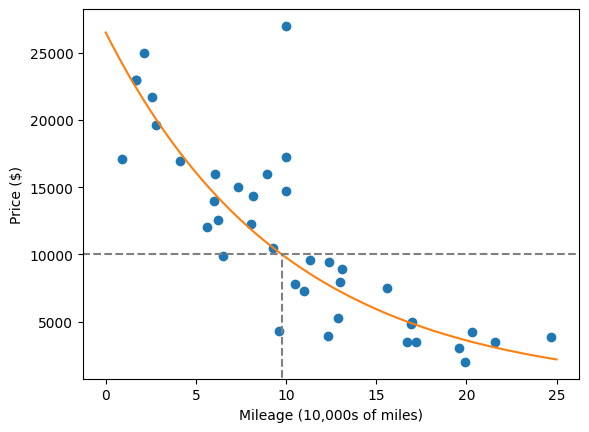
import numpy as np from scipy import stats# r stats.linregress(xs, ys) 是一个用于执行简单线性回归的函数,通常来自 scipy.stats 库。# 具体含义如下:# stats.linregress:执行线性回归分析,拟合一条最佳直线来描述两个变量 …...
Linux系统01---指令
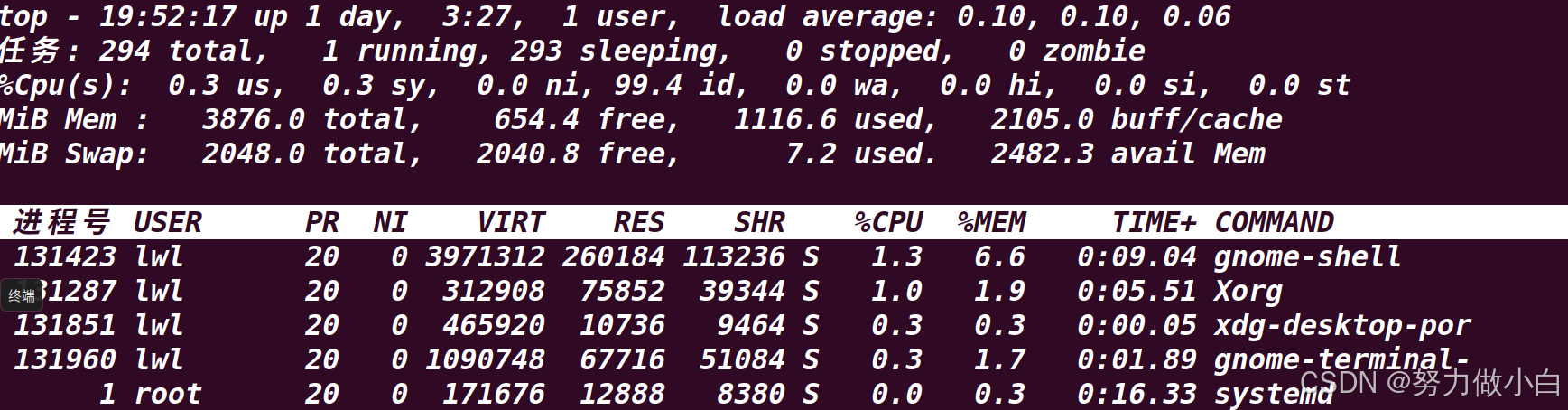
目录 学习的方法 Linux 系统介绍 2.1 Unix 操作系统(了解) 2.2 Linux 操作系统(了解) 2.3 Linux 操作系统的主要特性(重点) 2.4 Linux 与 Unix 的区别与联系 2.5 GUN 与 GPL(了解&#…...
【蓝桥杯14天冲刺课题单】Day 8
1.题目链接:19714 数字诗意 这道题是一道数学题。 先考虑奇数,已知奇数都可以表示为两个相邻的数字之和,2k1k(k1) ,那么所有的奇数都不会被计入。 那么就需要考虑偶数什么情况需要被统计。根据打表,其实可以发现除了…...

23.6 CharGLM多模态API实战:24k上下文角色一致性优化全解析
CharGLM多模态API实战:24k上下文角色一致性优化全解析 关键词:多模态大模型, CharGLM API 调用, 角色一致性控制, 上下文感知, 对话系统优化 演示 CharGLM 的对话效果 CharGLM 作为支持 24k 上下文窗口的多模态对话模型,在角色扮演场景中展现出强大的交互能力。本节通过实…...

DeepSeek 开源的 3FS 如何?
DeepSeek 3FS(Fire-Flyer File System)是一款由深度求索(DeepSeek)于2025年2月28日开源的高性能并行文件系统,专为人工智能训练和推理任务设计。以下从多个维度详细解析其核心特性、技术架构、应用场景及行业影响&…...

基于 Three.js 实现 3D 数学欧拉角
大家好!我是 [数擎AI],一位热爱探索新技术的前端开发者,在这里分享前端和Web3D、AI技术的干货与实战经验。如果你对技术有热情,欢迎关注我的文章,我们一起成长、进步! 开发领域:前端开发 | AI 应…...

AI Agent成为行业竞争新焦点:技术革新与商业重构的双重浪潮
近年来,AI Agent(人工智能代理)凭借其自主感知、决策与执行能力,迅速成为全球科技与商业领域的核心竞争赛道。无论是互联网巨头、初创企业,还是传统行业,均在加速布局这一领域,试图在智能化浪潮…...
Hive聚合函数深度解析:从基础统计到多维聚合的12个生产级技巧)
大数据(4.5)Hive聚合函数深度解析:从基础统计到多维聚合的12个生产级技巧
目录 背景一、Hive聚合函数分类与语法1. 基础聚合函数2. 高级聚合函数 二、6大核心场景与案例场景1:基础统计(SUM/COUNT)场景2:多维聚合(GROUPING SETS)场景3:层次化聚合(ROLLUP&…...
:一文读懂短距离无线通信技术)
无线通信技术(四):一文读懂短距离无线通信技术
目录 一.技术介绍 1.1 Wi-Fi 1.2 蓝牙 1.3 ZigBee 1.4 IrDA 1.5 NFC 1.6 UWB 二.技术对比 三.未来趋势与挑战 3.1 技术融合 3.2 标准化难题 3.3 新兴应用 短距离无线通信技术是物联网、智能家居、移动支付等领域的核心支撑。这些技术通过不同频段、传输方式和场景…...

SqlServer整库迁移至Oracle
import pandas as pd from sqlalchemy import create_engine, text import cx_Oracle from sqlalchemy.exc import DatabaseError import traceback# SQL Server 配置 sql_server_conn_str mssqlpyodbc://用户名:密码数据库地址:端口/库名?driverODBCDriver11forSQLServer sq…...

通过 Docker Swarm 集群探究 Overlay 网络跨主机通信原理
什么是Overlay网络, 用于解决什么问题 ? Overlay网络通过在现有网络之上创建一个虚拟网络层, 解决不同主机的容器之间相互通信的问题 如果没有Overlay网络,实现跨主机的容器通信通常需要以下方法: 端口映射使用宿主机网络模式 这些方法牺牲了容器网络…...

HarmonyOS NEXT开发进阶(十四):HarmonyOS应用开发者基础认证试题集汇总及答案解析
文章目录 一、前言二、判断题(134道)三、单选题(210道)四、多选题(123道)五、拓展阅读 一、前言 鸿蒙原生技能学习阶段,通过官方认证的资格十分有必要,在项目实战前掌握基础开发理论…...
)
linux shell 删除空行(remove empty lines)
命令行 grep -v ^$ file sed /^$/d file 或 sed -n /./p file awk /./ {print} file 或 awk {if($0!" ") print} tr -s "n"vim交互 %s/^n//g...
MSVC编译遇到C2059、C2143、C2059、C2365、C2059等错误的解决方案
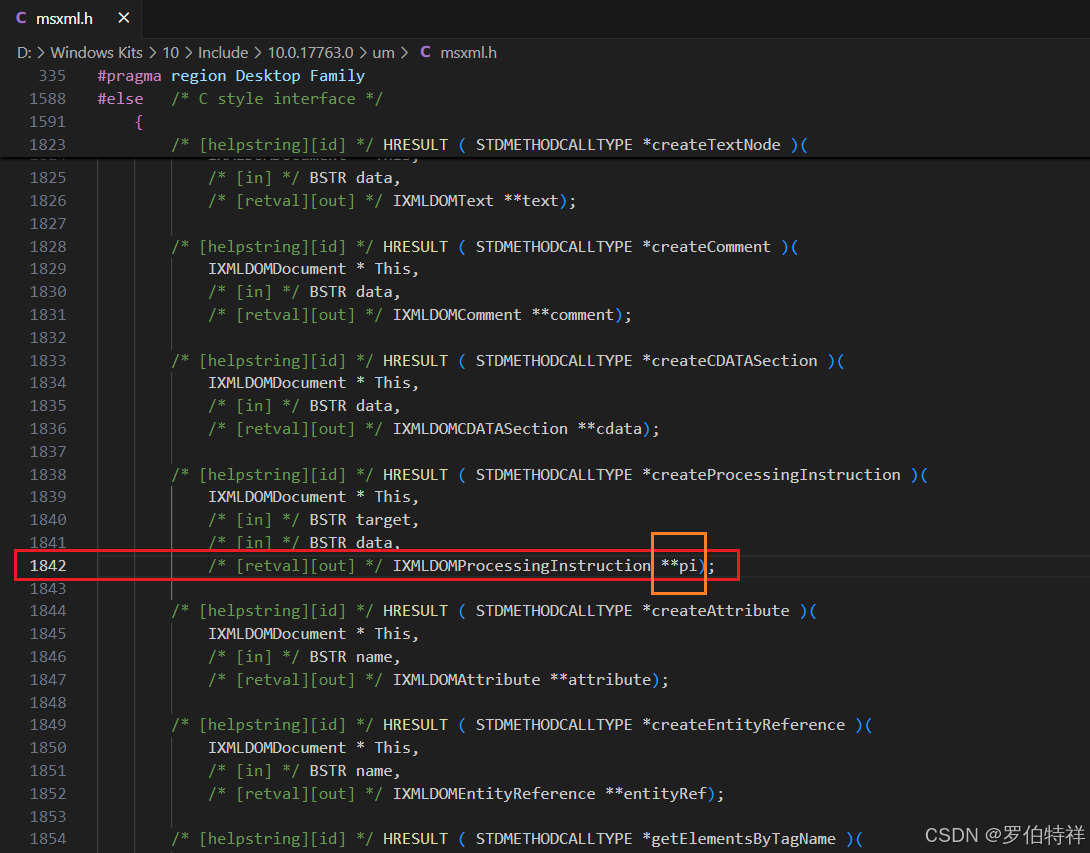
MSVC编译时,遇到如下错误: c:\program files (x86)\windows kits\10\include\10.0.18362.0\um\msxml.h(1842): error C2059: 语法错误:“常数” [D:\jenkins_home\workspace\xxx.vcxproj] c:\program files (x86)\windows kits\10\include\10.0.18362.0…...

AI重塑云基础设施,亚马逊云科技打造AI定制版IaaS“样板房”
AI正在彻底重塑云基础设施。 IDC最新《2025年IDC MarketScape:全球公有云基础设施即服务(IaaS)报告》显示,AI正在通过多种方式重塑云基础设施,公有云IaaS有望继续保持快速增长,预计2025年全球IaaS的整体规…...

Linux系统之systemctl管理服务及编译安装配置文件安装实现systemctl管理服务
目录 一.systemctl 管理服务 1.systemctl管理 2.设置服务卡机自启动或开机不启动 二.编译安装配置文件编写使得可以使用systemctl管理 1、编写配置文件原因 2、添加配置文件实现systemctl管理服务 一.systemctl 管理服务 1.systemctl管理 基本格式: systemc…...
【NLP 52、多模态相关知识】
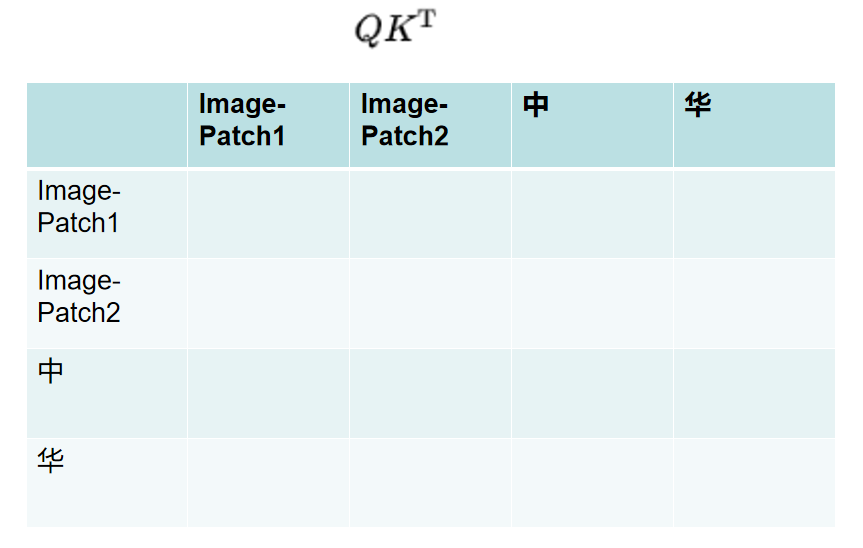
生活应该是美好而温柔的,你也是 —— 25.4.1 一、模态 modalities 常见: 文本、图像、音频、视频、表格数据等 罕见: 3D模型、图数据、气味、神经信号等 二、多模态 1、Input and output are of different modalities (eg: tex…...
)
【树莓派Pico FreeRTOS】-软件定时器(Software Timers)
软件定时器(Software Timers) 文章目录 软件定时器(Software Timers)1、硬件准备2、软件准备3、FreeRTOS的软件定时器介绍3.1 触发一次定时器(Oneshort Timer)3.2 重复定时器RP2040 由 Raspberry Pi 设计,具有双核 Arm Cortex-M0+ 处理器和 264KB 内部 RAM,并支持高达 16MB 的…...

My first day in QT programming
My first QT code this->setWindowTitle("HelloWorld"); //设置窗口名称 this->resize(400, 300); //设置窗口大小 QPushButton* btn new QPushButton; //新建按钮组件 btn->setParent(this); //为按钮指定父对象 …...

MySQL分组的时候遇到ONLY_FULL_GROUP_BY报错和解决
一、ONLY_FULL_GROUP_BY 错误的根本原因 MySQL 5.7 及以上版本默认启用了 sql_modeonly_full_group_by 严格模式。该模式强制要求: SELECT 中的非聚合字段必须出现在 GROUP BY 子句中;所有非聚合字段需通过聚合函数(如 MAX、MIN、SUM&#…...