
MCP协议的Streamable HTTP:革新数据传输的未来
引言
在数字化时代,数据传输的效率和稳定性是推动技术进步的关键。MCP(Model Context Protocol)作为AI生态系统中的重要一环,通过引入Streamable HTTP传输机制,为数据交互带来了革命性的变化。本文将深入解读MCP协议的Streamable HTTP,从会话协商到正式通信传输数据的全过程,探讨其技术架构、协议内容、实现方式以及对AI应用的影响。
技术架构
MCP协议采用客户端-服务器架构,其核心组件包括:
- MCP主机(MCP Host):包含MCP客户端的应用程序,如Claude Desktop、Cursor IDE等AI工具。
- MCP客户端(MCP Client):在主机内部与服务器保持1:1连接的协议实现。
- MCP服务器(MCP Server):轻量级程序,通过标准化协议暴露特定功能,可以是本地Node.js/Python程序或远程服务。
MCP服务器提供三类标准能力:
- 资源(Resources):如文件读取、API数据获取。
- 工具(Tools):第三方服务或功能函数,如Git操作、浏览器控制。
- 提示词(Prompts):预定义的任务模板,增强模型特定场景表现。
Streamable HTTP的协议内容
Streamable HTTP作为MCP协议的一项重大更新,旨在解决传统HTTP+SSE方案的局限性,同时保留其优势。其核心内容包括以下几个方面:
- 统一消息入口:所有客户端到服务器的消息都通过
/message端点发送,不再需要专门的SSE端点。 - 动态升级SSE流:服务器可以根据需要将客户端发往
/message的请求升级为SSE连接,用于推送通知或请求。 - 会话管理机制:客户端通过请求头中的
Mcp-Session-Id与服务器建立会话,服务器可选择是否维护会话状态。 - 支持无状态服务器:服务器可以选择完全无状态运行,不再需要维持长期连接。
实现方式
从会话协商到正式通信传输数据
1. 会话协商
会话协商是Streamable HTTP通信的初始阶段,客户端与服务器通过以下步骤建立会话:
- 客户端发送初始化请求:客户端通过HTTP POST向MCP服务器的
/message端点发送一个InitializeRequest消息,携带协议版本和客户端能力信息。 - 服务器响应初始化:服务器收到请求后,返回一个
InitializeResult消息,包含服务器支持的协议版本、服务器能力以及会话ID(Mcp-Session-Id)。 - 客户端发送已初始化通知:客户端收到服务器的响应后,发送一个
Initialized通知,告知服务器初始化已完成。
示例:客户端发送初始化请求
POST /message HTTP/1.1
Host: mcp.example.com
Content-Type: application/json
Accept: text/event-stream, application/json{"jsonrpc": "2.0", "method": "initialize", "params": {"clientInfo": {"name": "MCP Client", "version": "1.0"}, "capabilities": {}}}
示例:服务器响应初始化
HTTP/1.1 200 OK
Content-Type: application/json
Mcp-Session-Id: 12345{"jsonrpc": "2.0", "id": 1, "result": {"serverInfo": {"name": "MCP Server", "version": "1.0"}, "capabilities": {}}}
示例:客户端发送已初始化通知
POST /message HTTP/1.1
Host: mcp.example.com
Content-Type: application/json
Accept: text/event-stream, application/json
Mcp-Session-Id: 12345{"jsonrpc": "2.0", "method": "initialized", "params": {}}
2. 正式通信传输数据
会话建立后,客户端和服务器可以通过以下步骤进行正式通信:
- 客户端发送消息:客户端通过HTTP POST向MCP服务器的
/message端点发送JSON-RPC消息,携带会话标识Mcp-Session-Id。 - 服务器处理请求并响应:服务器根据请求内容处理消息,并通过SSE流或JSON对象返回响应。
- 动态升级为SSE流:如果需要实时推送消息,服务器可以将连接升级为SSE流。
- 断线重连与数据恢复:如果网络波动导致连接中断,客户端可以携带
Last-Event-ID重新连接,服务器根据该ID重放未发送的消息。
示例:客户端发送消息
POST /message HTTP/1.1
Host: mcp.example.com
Content-Type: application/json
Accept: text/event-stream, application/json
Mcp-Session-Id: 12345{"jsonrpc": "2.0", "id": 1, "method": "get_file", "params": {"path": "/example.txt"}}
示例:服务器响应并升级为SSE流
HTTP/1.1 200 OK
Content-Type: text/event-stream
Cache-Control: no-cache
Connection: keep-alive
Mcp-Session-Id: 12345data: {"jsonrpc": "2.0", "id": 1, "result": "File content here"}
示例:客户端断线重连
GET /message HTTP/1.1
Host: mcp.example.com
Accept: text/event-stream
Last-Event-ID: 12345
Mcp-Session-Id: 12345
示例:服务器重放未发送的消息
data: {"jsonrpc": "2.0", "id": 2, "result": "Continued content here"}
服务端代码实现
from datetime import datetime
from starlette.applications import Starlette
from starlette.requests import Request
from starlette.routing import Route
from starlette.responses import JSONResponse, StreamingResponse
import json
import uuid
from starlette.middleware.cors import CORSMiddleware
import asyncio
from typing import Dict, Any
import aiofiles
import random# 存储会话ID和对应的任务队列
sessions: Dict[str, Dict[str, Any]] = {}# 添加CORS支持
app = Starlette()
app.add_middleware(CORSMiddleware,allow_origins=["*"],allow_credentials=True,allow_methods=["*"],allow_headers=["*"],expose_headers=["Mcp-Session-Id"],
)@app.route('/message', methods=["POST", "GET"])
async def handle_message(request: Request):"""处理POST和GET请求。"""session_id = request.headers.get("Mcp-Session-Id") or request.query_params.get("Mcp-Session-Id")if request.method == "POST":try:data = await request.json()if data.get("method") == "initialize":# 初始化会话session_id = str(uuid.uuid4())sessions[session_id] = {"initialized": True,"task_queue": asyncio.Queue()}response = JSONResponse(content={"jsonrpc": "2.0","id": data.get("id"),"result": {"serverInfo": {"name": "MCP Server", "version": "1.0"},"capabilities": {},},})response.headers["Mcp-Session-Id"] = session_idreturn responseelif session_id and sessions.get(session_id, {}).get("initialized"):# 处理已初始化的请求if data.get("method") == "get_file":try:# 异步读取文件内容content = await async_read_file(data.get("params", {}).get("path", ""))return JSONResponse(content={"jsonrpc": "2.0","id": data.get("id"),"result": content,})except Exception as e:return JSONResponse(content={"jsonrpc": "2.0","id": data.get("id"),"error": f"Error reading file: {str(e)}",})else:return JSONResponse(content={"error": "Unknown method"})else:return JSONResponse(content={"error": "Session not initialized"}, status_code=400)except Exception as e:return JSONResponse(content={"error": f"Internal server error: {str(e)}"}, status_code=500)elif request.method == "GET":# 处理SSE流请求if not session_id or session_id not in sessions:return JSONResponse(content={"error": "Session not found"}, status_code=404)async def event_generator(session_id):while True:try:message = await asyncio.wait_for(sessions[session_id]["task_queue"].get(), timeout=10)  # 超时时间10秒yield f"data: {json.dumps(message)}\n\n"except asyncio.TimeoutError as e:yield f"data: {e}\n\n"  # 发送空数据作为心跳包,防止超时断开return StreamingResponse(event_generator(session_id), media_type="text/event-stream")async def async_read_file(path: str) -> str:"""异步读取文件内容。"""try:async with aiofiles.open(path, "r") as file:content = await file.read()return contentexcept Exception as e:raise Exception(f"Error reading file: {str(e)}")async def background_task(session_id: str, task: Dict[str, Any]):"""后台任务处理。"""# 模拟耗时操作await asyncio.sleep(1)# 将结果放入任务队列sessions[session_id]["task_queue"].put_nowait(task)@app.on_event("startup")
async def startup_event():async def push_test_messages():while True:sp = random.randint(1, 3)await asyncio.sleep(sp)  # 每5秒推送一个消息for session_id in sessions.keys():if sessions[session_id]["initialized"]:sessions[session_id]["task_queue"].put_nowait({"message": f"Hello from server!", "sleep": sp,"datetime": datetime.now().strftime("%Y-%m-%d %H:%M:%S")})asyncio.create_task(push_test_messages())  # 创建后台任务if __name__ == "__main__":import uvicornuvicorn.run(app, host="0.0.0.0", port=8000)
客户端代码实现
import httpx
import json
import asyncio
import aiofilesclass MCPClient:def __init__(self, server_url: str):self.server_url = server_urlself.session_id = Noneself.headers = {"Content-Type": "application/json","Accept": "text/event-stream, application/json"}async def initialize(self):"""初始化会话。"""async with httpx.AsyncClient() as client:try:response = await client.post(f"{self.server_url}/message",headers=self.headers,json={"jsonrpc": "2.0","method": "initialize","params": {"clientInfo": {"name": "MCP Client", "version": "1.0"},"capabilities": {},},},)response.raise_for_status()self.session_id = response.headers.get("Mcp-Session-Id")print(f"Session ID: {self.session_id}")return self.session_idexcept Exception as e:print(f"Failed to initialize session: {e}")return Noneasync def send_message(self, method: str, params: dict = None):"""发送消息。"""if not self.session_id:await self.initialize()async with httpx.AsyncClient() as client:try:response = await client.post(f"{self.server_url}/message",headers={"Mcp-Session-Id": self.session_id, **self.headers},json={"jsonrpc": "2.0","id": 1,"method": method,"params": params or {},},)response.raise_for_status()return response.json()except Exception as e:print(f"Failed to send message: {e}")return Noneasync def listen_sse(self):if not self.session_id:await self.initialize()async with httpx.AsyncClient(timeout=None) as client:  # 取消超时限制try:async with client.stream("GET",f"{self.server_url}/message",headers={"Mcp-Session-Id": self.session_id, **self.headers},) as response:async for line in response.aiter_lines():if line.strip():  # 避免空行print(f"SSE Message: {line}")except Exception as e:print(f"Failed to listen SSE: {e}")await self.reconnect()async def reconnect(self):"""断线重连。"""print("Attempting to reconnect...")await asyncio.sleep(5)  # 等待5秒后重试await self.initialize()await self.listen_sse()async def main():client = MCPClient("http://localhost:8000")await client.initialize()response = await client.send_message("get_file", {"path": "/Users/houjie/PycharmProjects/python-sdk/examples/mcp-server/example.txt"})print(f"Response: {response}")await client.listen_sse()if __name__ == "__main__":asyncio.run(main())
前端页面代码实现
<!DOCTYPE html>
<html lang="en">
<head><meta charset="UTF-8"><meta name="viewport" content="width=device-width, initial-scale=1.0"><title>MCP Streamable HTTP Demo</title><style>body {font-family: Arial, sans-serif;margin: 0;padding: 20px;background-color: #f5f5f5;}.container {max-width: 800px;margin: 0 auto;background-color: white;padding: 20px;border-radius: 8px;box-shadow: 0 2px 4px rgba(0, 0, 0, 0.1);}h1 {text-align: center;color: #333;}.message-area {margin-top: 20px;}.message {padding: 10px;margin-bottom: 10px;border-radius: 4px;background-color: #e9f7fe;border-left: 4px solid #0099cc;}.sse-message {padding: 10px;margin-bottom: 10px;border-radius: 4px;background-color: #f0f9ff;border-left: 4px solid #0077cc;}button {background-color: #0099cc;color: white;border: none;padding: 10px 15px;border-radius: 4px;cursor: pointer;font-size: 14px;}button:hover {background-color: #0077cc;}input[type="text"] {width: 100%;padding: 10px;margin-bottom: 10px;border: 1px solid #ddd;border-radius: 4px;font-size: 14px;}</style>
</head>
<body><div class="container"><h1>MCP Streamable HTTP Demo</h1><div><input type="text" id="serverUrl" placeholder="Enter server URL" value="http://localhost:8000"><button id="initBtn">Initialize Session</button></div><div id="sessionId"></div><div><input type="text" id="filePath" placeholder="Enter file path"><button id="sendBtn">Send Message</button></div><div class="message-area" id="messages"></div></div><script>let client = null;let sessionInitialized = false;document.getElementById('initBtn').addEventListener('click', async () => {const serverUrl = document.getElementById('serverUrl').value;client = new MCPClient(serverUrl);await client.initialize();sessionInitialized = true;document.getElementById('sessionId').textContent = `Session ID: ${client.session_id}`;});document.getElementById('sendBtn').addEventListener('click', async () => {if (!sessionInitialized) {alert('Please initialize the session first.');return;}const filePath = document.getElementById('filePath').value;const response = await client.send_message('get_file', { path: filePath });addMessage(`Response: ${JSON.stringify(response)}`);});class MCPClient {constructor(serverUrl) {this.serverUrl = serverUrl;this.session_id = null;this.headers = {'Content-Type': 'application/json','Accept': 'text/event-stream, application/json'};}async initialize() {try {const response = await fetch(`${this.serverUrl}/message`, {method: 'POST',headers: this.headers,body: JSON.stringify({jsonrpc: '2.0',method: 'initialize',params: {clientInfo: { name: 'MCP Client', version: '1.0' },capabilities: {}}})});if (!response.ok) {throw new Error(`HTTP error! status: ${response.status}`);}this.session_id = response.headers.get('Mcp-Session-Id');addMessage(`Session ID: ${this.session_id}`);this.listen_sse();} catch (error) {addMessage(`Failed to initialize session: ${error}`);}}async send_message(method, params) {if (!this.session_id) {await this.initialize();}try {const response = await fetch(`${this.serverUrl}/message`, {method: 'POST',headers: { 'Mcp-Session-Id': this.session_id, ...this.headers },body: JSON.stringify({jsonrpc: '2.0',id: 1,method: method,params: params || {}})});if (!response.ok) {throw new Error(`HTTP error! status: ${response.status}`);}return await response.json();} catch (error) {addMessage(`Failed to send message: ${error}`);return null;}}listen_sse() {if (!this.session_id) {return;}const eventSource = new EventSource(`${this.serverUrl}/message?Mcp-Session-Id=${this.session_id}`, {headers: { 'Mcp-Session-Id': this.session_id }});eventSource.onmessage = (event) => {addSSEMessage(event.data);};eventSource.onerror = (error) => {addMessage(`Failed to listen SSE: ${error}`);this.reconnect();};}async reconnect() {addMessage('Attempting to reconnect...');await new Promise(resolve => setTimeout(resolve, 5000));await this.initialize();this.listen_sse();}}function addMessage(message) {const messagesDiv = document.getElementById('messages');const messageDiv = document.createElement('div');messageDiv.className = 'message';messageDiv.textContent = message;messagesDiv.appendChild(messageDiv);messagesDiv.scrollTop = messagesDiv.scrollHeight;}function addSSEMessage(message) {const messagesDiv = document.getElementById('messages');const messageDiv = document.createElement('div');messageDiv.className = 'sse-message';messageDiv.textContent = `SSE Message: ${message}`;messagesDiv.appendChild(messageDiv);messagesDiv.scrollTop = messagesDiv.scrollHeight;}</script>
</body>
</html>
运行步骤
-
安装依赖:
确保安装了所需的库:pip install starlette uvicorn httpx aiofiles -
启动服务器:
将服务端代码保存为server.py,然后运行以下命令启动服务器:uvicorn server:app --reload -
运行客户端:
将客户端代码保存为client.py,然后运行以下命令启动客户端:python client.py -
打开前端页面:
将前端页面代码保存为index.html,然后在浏览器中打开该文件。
示例运行效果
客户端输出
Session ID: 587bb6ad-08f5-4102-8b27-4c276e9d7815
Response: {'jsonrpc': '2.0', 'id': 1, 'result': 'File content here'}
Listening for SSE messages...
SSE Message: data: {"message": "Hello from server!", "sleep": 1, "datetime": "2024-01-01 12:00:00"}
SSE Message: data: {"message": "Hello from server!", "sleep": 2, "datetime": "2024-01-01 12:00:02"}
...
服务器输出
INFO:     Started server process [12345]
INFO:     Waiting for application startup.
INFO:     Application startup complete.
INFO:     Uvicorn running on http://0.0.0.0:8000 (Press CTRL+C to quit)
INFO:     127.0.0.1:51487 - "POST /message HTTP/1.1" 200 OK
前端页面效果
前端页面将显示会话ID、发送的消息以及接收到的SSE流消息。
调试
- 检查服务器日志:查看服务器日志,确认是否生成了
Mcp-Session-Id并返回给客户端。 - 检查网络请求:使用浏览器开发者工具(F12),查看网络请求的响应头,确认是否包含
Mcp-Session-Id。 - 检查跨域问题:确保服务器正确配置了 CORS,允许前端页面的域名和端口。
希望这些信息能够帮助你成功实现基于MCP协议的Streamable HTTP服务端、客户端和前端页面。
相关文章:

MCP协议的Streamable HTTP:革新数据传输的未来
引言 在数字化时代,数据传输的效率和稳定性是推动技术进步的关键。MCP(Model Context Protocol)作为AI生态系统中的重要一环,通过引入Streamable HTTP传输机制,为数据交互带来了革命性的变化。本文将深入解读MCP协议的…...

dify中配置使用Ktransformer模型
一共是两个框架一个是Ktransformer,一个是dify。 Ktransformer用来部署LLM,比如Deepseek,而LLm的应用框架平台Dify主要用来快速搭建基于LLM应用。 这篇教程主要是用来介绍两个框架的交互与对接的,不是部署Ktransformer也部署部署Dify,要部署Dify、Ktransformer可以直接参考…...

从代码学习深度学习 - GRU PyTorch版
文章目录 前言一、GRU模型介绍1.1 GRU的核心机制1.2 GRU的优势1.3 PyTorch中的实现二、数据加载与预处理2.1 代码实现2.2 解析三、GRU模型定义3.1 代码实现3.2 实例化3.3 解析四、训练与预测4.1 代码实现(utils_for_train.py)4.2 在GRU.ipynb中的使用4.3 输出与可视化4.4 解析…...

二叉树 递归
本篇基于b站灵茶山艾府的课上例题与课后作业。 104. 二叉树的最大深度 给定一个二叉树 root ,返回其最大深度。 二叉树的 最大深度 是指从根节点到最远叶子节点的最长路径上的节点数。 示例 1: 输入:root [3,9,20,null,null,15,7] 输出&…...
关于 |-> + ##[min:max] 的联合理解)
#SVA语法滴水穿石# (002)关于 |-> + ##[min:max] 的联合理解
今天,我们着重理解一些概念。依靠死记硬背去理解知识点,是不长久的,必须深刻理解知识点的精髓,才能长久记忆。 先看如下的代码: property a2b_p; //描述属性@(posedge clk) $rose(tagError) |-> ##[2:4] $rose(tErrorBit); endproperty a2b_a: asser…...

反常积分和定积分的应用 2
世界尚有同类 前言伽马函数的推论关于数学的思考平面图形的面积笛卡尔心形线伯努利双纽线回顾参数方程求面积星型线摆线 旋转体体积一般轴线旋转被积函数有负数部分曲线的弧长最后一个部分内容-旋转曲面侧表面积直角坐标系极坐标系参数方程 总结 前言 力大出奇迹。好好加油。 …...

新零售系统是什么样的?有什么好处?
一、新零售系统的核心架构与特征 技术驱动的分层架构 **前端展示层:**支持多终端适配(如APP、小程序、线下智能设备),采用响应式设计提升用户体验。 **业务中台层:**基于微服务架构(如Spring Clou…...

Element-plus弹出框popover,使用自定义的图标选择组件
自定义的图标选择组件是若依的项目的 1. 若依的图标选择组件 js文件,引入所有的svg图片 let icons [] // 注意这里的路径,一定要是自己svg图片的路径 const modules import.meta.glob(./../../assets/icons/svg/*.svg); for (const path in modules)…...

16进制在蓝牙传输中的应用
在蓝牙传输中,16进制(Hexadecimal)是一种常用的数据表示方法。它主要用于描述数据包的内容、地址、命令、参数等信息。以下是16进制在蓝牙传输中的具体应用场景和作用: 1. 数据包的表示 蓝牙通信中,所有数据最终都以二…...
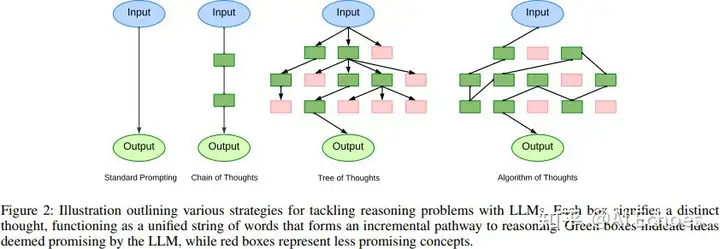
思维链 Chain-of-Thought(COT)
思维链 Chain-of-Thought(COT):思维链的启蒙 3. 思维链 Chain-of-Thought(COT)存在问题?2. 思维链 Chain-of-Thought(COT)是思路是什么?1. 什么是 思维链 Chain-of-Thoug…...
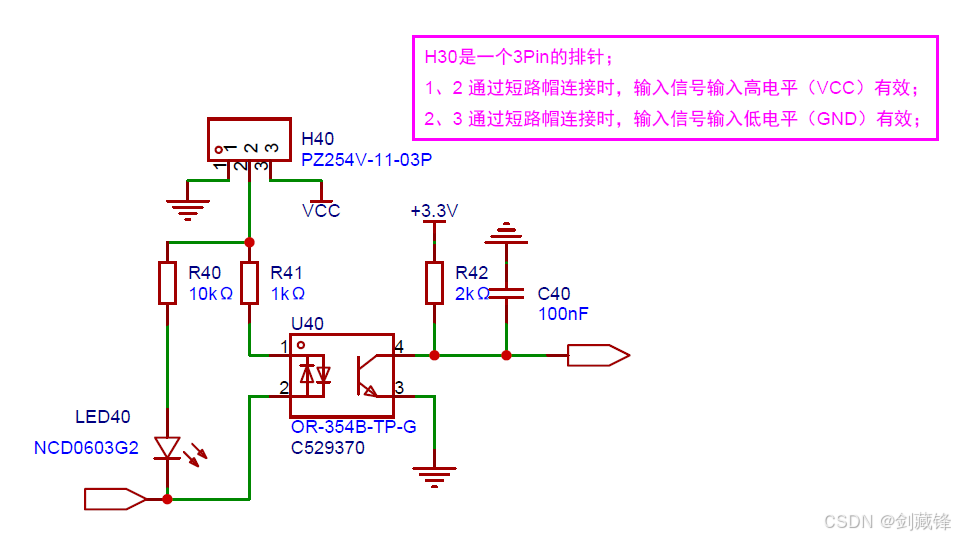
硬件电路(23)-输入隔离高低电平有效切换电路
一、概述 项目中为了防止信号干扰需要加一些隔离电路,而且有时传感器的信号是高有效有时是低有效,所以基于此背景,设计了一款方便实现高低电平有效检测切换电路。 二、应用电路...

多表查询的多与一
1.查寻表需要的条件 1.1.首先我们要了解查询表有哪些 1.1.1.多对一 多对一就是一个年表拥有例外一个表的多条数据 一个表对应立一个表的多条数据,另一个表对应这个表的多条数据 这个点被称为多对一 1.1.2.多对多 多对多简单来说就是需要一个中间商 中间商就…...
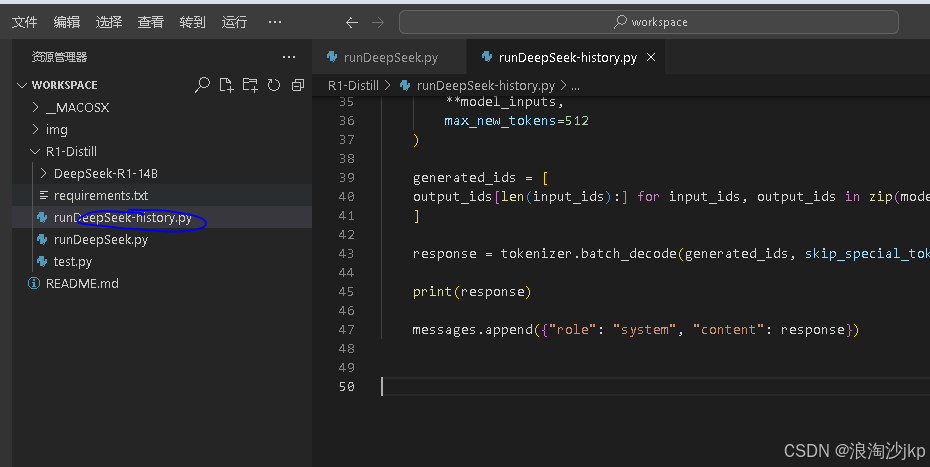
大模型学习二:DeepSeek R1+蒸馏模型组本地部署与调用
一、说明 DeepSeek R1蒸馏模型组是基于DeepSeek-R1模型体系,通过知识蒸馏技术优化形成的系列模型,旨在平衡性能与效率。 1、技术路径与核心能力 基础架构与训练方法 DeepSeek-R1-Zero:通过强化学习(RL)训练&…...
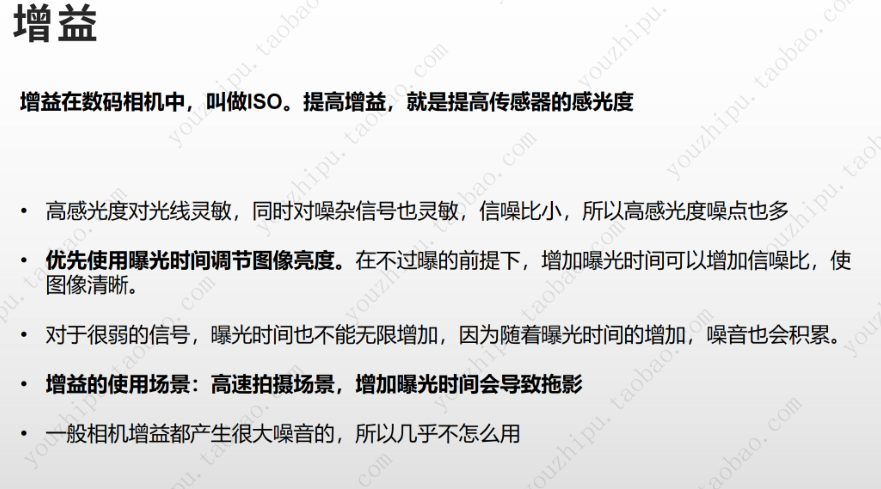
相机的曝光和增益
文章目录 曝光增益增益原理主要作用增益带来的影响增益设置与应用 曝光 参考:B站优致谱视觉 增益 相机增益是指相机在拍摄过程中对图像信号进行放大的一种操作,它在提高图像亮度和增强图像细节方面起着重要作用,以下从原理、作用、影响以…...
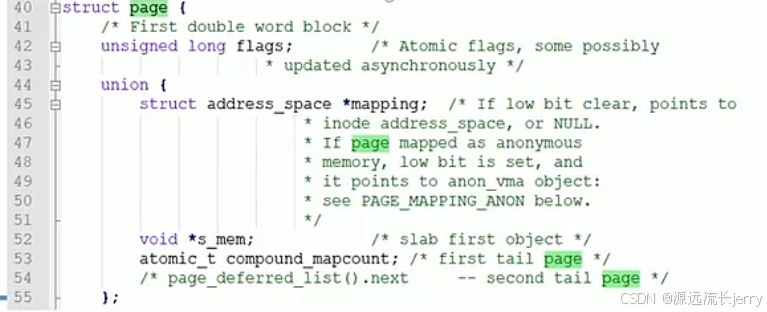
Linux内核物理内存组织结构
一、系统调用sys_mmap 系统调用mmap用来创建内存映射,把创建内存映射主要的工作委托给do_mmap函数,内核源码文件处理:mm/mmap.c 二、系统调用sys_munmap 1、vma find_vma (mm, start); // 根据起始地址找到要删除的第一个虚拟内存区域 vma 2…...

【PostgreSQL内核学习:深入理解 PostgreSQL 中的 tuplesort_performsort 函数】
深入理解 PostgreSQL 中的 tuplesort_performsort 函数 函数概述函数源码函数签名核心功能相关函数简介 代码结构与逻辑分析1. 内存上下文切换2. 调试跟踪(可选)3. 状态机逻辑(switch 分支)4. 调试跟踪(完成时…...

谷歌 Gemini 2.5 Pro 免费开放
2025 年 3 月 30 日,谷歌宣布将最新的 Gemini AI 旗舰模型 Gemini 2.5 Pro 免费向所有 Gemini 应用用户开放。以下是关于此次免费开放的一些具体信息1: 背景:此前,Gemini 2.5 Pro 仅向支付 19.99 美元月费的 Gemini Advanced 用户…...

(多看) CExercise_05_1函数_1.2计算base的exponent次幂
题目: 键盘录入两个整数:底(base)和幂指数(exponent),计算base的exponent次幂,并打印输出对应的结果。(注意底和幂指数都可能是负数) 提示:求幂运算时,基础的思路就是先无脑把指数转…...

leetcode刷题 - 数组理论基础
数组是内存空间连续存储、相同类型数据的集合。遍历方式:下标索引 下标:从 0 开始 数组的元素不能删除,只能覆盖 定义一维数组: int arr0[10]; int arr1[10] { 100, 90,80,70,60,50,40,30,20,10 }; int arr2[ ] { 100,90,80,7…...

Jetpack Compose `ACTION_HOVER_EXIT` 事件异常解决方案
Jetpack Compose 1.6.6 版本中 ACTION_HOVER_EXIT 事件异常解决方案 问题现象 在 Android 应用开发中使用 Jetpack Compose 1.6.6 版本时,部分设备会出现以下崩溃日志: java.lang.IllegalStateException: The ACTION_HOVER_EXIT event was not cleare…...
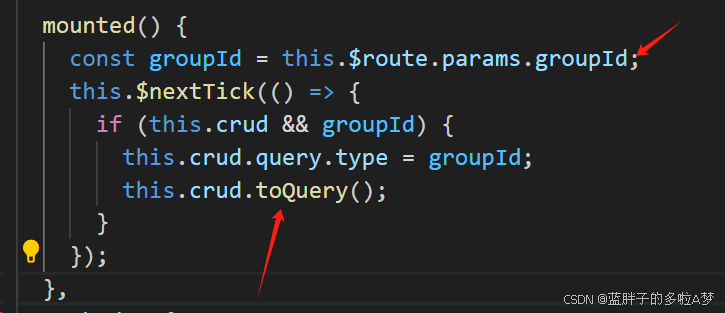
Vuue2 element-admin管理后台,Crud.js封装表格参数修改
需求 表格数据调用列表接口,需要多传一个 Type字段,而Type字段的值 需要从跳转页面Url上面获取到,并赋值给Type,再传入列表接口中,最后拿到表格数据并展示 遇到的问题 需求很简单,但是因为表格使用的是统…...

Tiktok矩阵运营中使用云手机的好处
Tiktok矩阵运营中使用云手机的好处 云手机在TikTok矩阵运营中能够大幅提高管理效率、降低封号风险,并节省成本,是非常实用的运营工具。TikTok矩阵运营使用云手机有很多优势,特别是对于需要批量管理账号、提高运营效率的团队来说。以下是几个…...
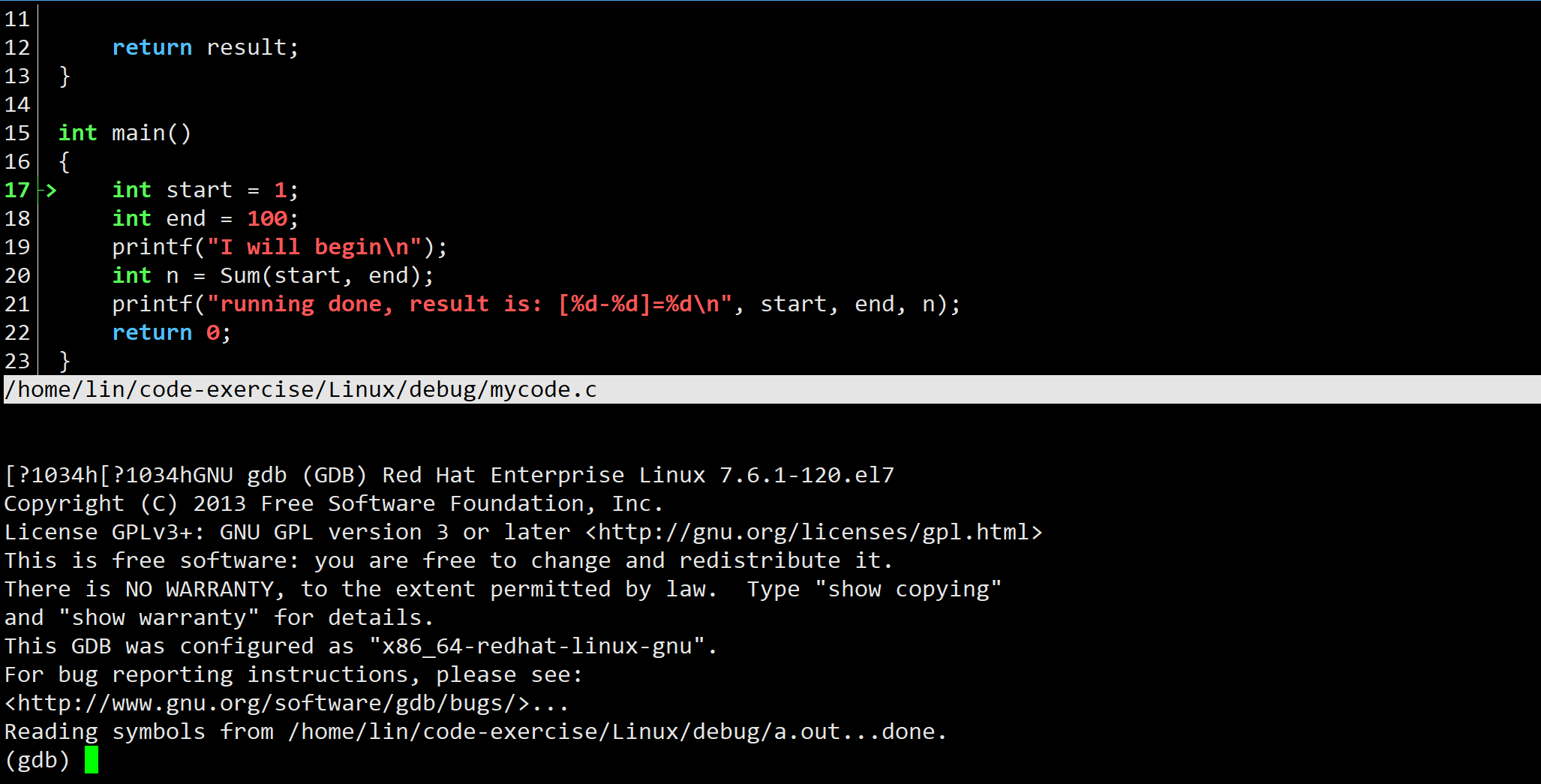
Linux下调试器gdb_cgdb使用
文章目录 一、样例代码二、使用watchset var确定问题原因条件断点 一、样例代码 #include <stdio.h>int Sum(int s, int e) {int result 0;int i;for(i s; i < e; i){result i;}return result; }int main() {int start 1;int end 100;printf("I will begin…...
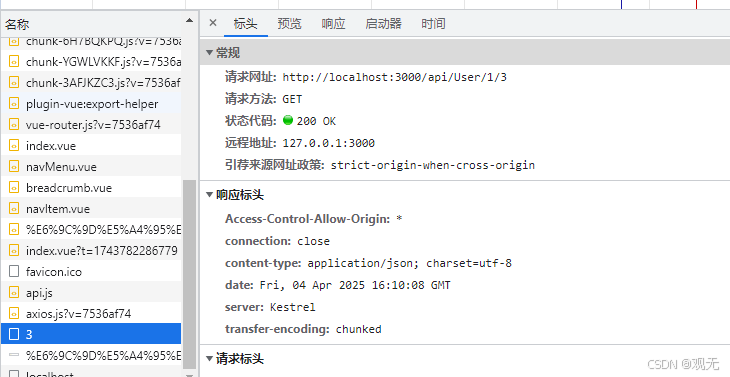
Vite环境下解决跨域问题
在 Vite 开发环境中,可以通过配置代理来解决跨域问题。以下是具体步骤: 在项目根目录下找到 vite.config.js 文件:如果没有,则需要创建一个。配置代理:在 vite.config.js 文件中,使用 server.proxy 选项来…...

超简单:Linux下opencv-gpu配置
1.下载opencv和opencv_contrib安装包 1)使用命令下 git clone https://github.com/opencv/opencv.git -b 4.9.0 git clone https://github.com/opencv/opencv_contrib.git -b 4.9.02)复制链接去GitHub下载然后上传到服务器 注意:看好版本&a…...

【matplotlib参数调整】
1. 基本绘图函数常用参数 折线图 import matplotlib.pyplot as plt import numpy as npx np.linspace(0, 10, 100) y np.sin(x)plt.plot(x, y, colorred, linestyle--, linewidth2,markero, markersize5, labelsin(x), alpha0.8) plt.title(折线图示例) plt.xlabel(X 轴) p…...

CSS语言的数据挖掘
数据挖掘与CSS语言的结合 引言 在现代社会,数据已然成为企业和个人决策的重要基础。通过有效的数据挖掘技术,能够从海量数据中提取出有价值的信息。在这个过程中,编程语言的选择至关重要。尽管CSS(层叠样式表)主要用…...

如何判断一条连接是TCP连接还是UDP连接?
在网络通信中,判断一条连接是UDP连接还是TCP连接,可以从协议特性、端口使用、应用场景以及抓包分析等方面入手: 1、基于协议头标志判断: TCP和UDP协议在网络层的头部信息存在差异。在实际的网络通信数据中,通过获取数…...

泰博云平台solr接口存在SSRF漏洞
免责声明:本号提供的网络安全信息仅供参考,不构成专业建议。作者不对任何由于使用本文信息而导致的直接或间接损害承担责任。如涉及侵权,请及时与我联系,我将尽快处理并删除相关内容。 漏洞描述 SSRF漏洞是一种在未能获取服务器…...

31天Python入门——第20天:魔法方法详解
你好,我是安然无虞。 文章目录 魔法方法1. __new__和__del__2. __repr__和__len__3. __enter__和__exit__4. 可迭代对象和迭代器5. 中括号[]数据操作6. __getattr__、__setattr__ 和 __delattr__7. 可调用的8. 运算符 魔法方法 魔法方法: Python中的魔法方法是一类…...