
Unity3D仿星露谷物语开发33之光标位置可视化
1、目标
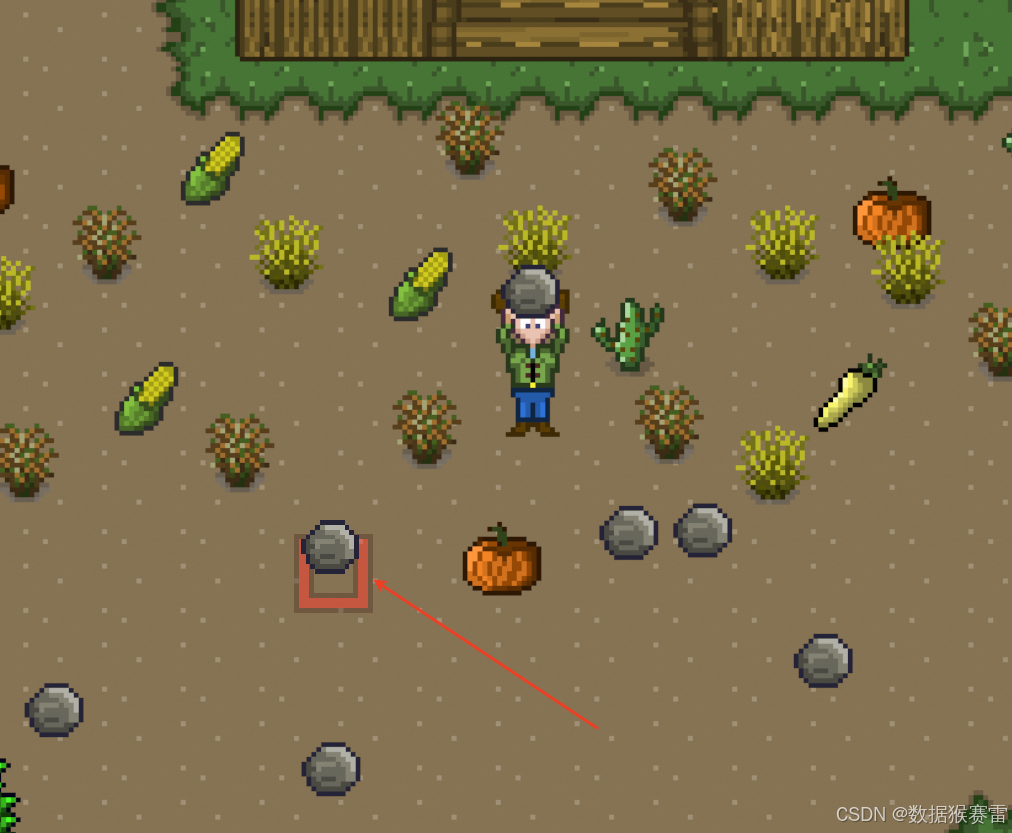
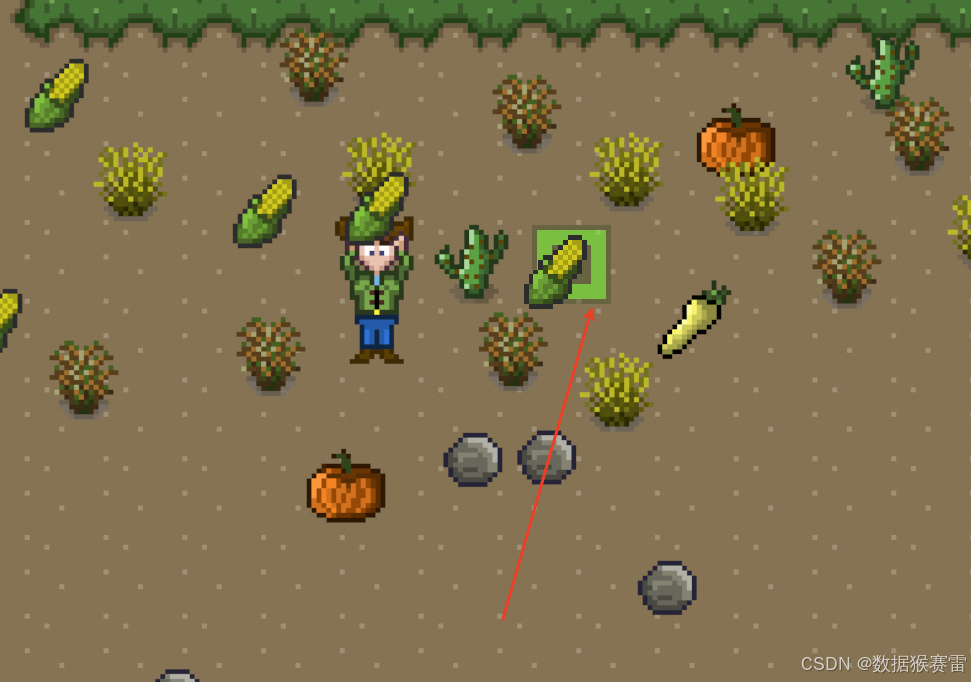
当从道具栏中拖出一个道具到地面的时候,光标区域会显示是否可放置物体的可视化显示。绿色表示可以放置物体,红色表示不可以放置物体。
2、优化InventoryManager脚本
添加2个方法:
/// <summary>/// Returns the itemDetails(from the SO_ItemList)for the currently selected item in the inventoryLocation,/// or null if an item isn't selected/// </summary>/// <param name="inventoryLocation"></param>/// <returns></returns>public ItemDetails GetSelectedInventoryItemDetails(InventoryLocation inventoryLocation){int itemCode = GetSelectedInventoryItem(inventoryLocation);if(itemCode == -1){return null;}else{return GetItemDetails(itemCode);}}/// <summary>/// Set the selected inventory item for inventoryLocation to itemCode/// </summary>/// <param name="inventoryLocation"></param>/// <param name="itemCode"></param>public void SetSelectedInventoryItem(InventoryLocation inventoryLocation, int itemCode){selectedInventoryItem[(int)inventoryLocation] = itemCode; }完整的代码如下:
using System;
using System.Collections;
using System.Collections.Generic;
using UnityEngine;public class InventoryManager : SingletonMonobehaviour<InventoryManager>
{private Dictionary<int, ItemDetails> itemDetailsDictionary;private int[] selectedInventoryItem; // the index of the array is the inventory list, and the value is the item code,表明每个位置对应被选中物品的codepublic List<InventoryItem>[] inventoryLists; // 每个位置的库存清单// 每个位置的库存数。 The index of the array is the inventory list(from the// InventoryLocation enum), and the value is the capacity of that inventory list[HideInInspector] public int[] inventoryListCapacityIntArray; [SerializeField] private SO_ItemList itemList = null;protected override void Awake(){base.Awake();// Create Inventory listsCreateInventoryLists();// Create item details dictionaryCreateItemDetailsDictionary();// Initialize selected inventory item arrayselectedInventoryItem = new int[(int)InventoryLocation.count];for(int i = 0; i < selectedInventoryItem.Length; i++){selectedInventoryItem[i] = -1;}}private void CreateInventoryLists(){inventoryLists = new List<InventoryItem>[(int)InventoryLocation.count];for (int i = 0; i < (int)InventoryLocation.count; i++){inventoryLists[i] = new List<InventoryItem>();}// initialize inventory list capacity arrayinventoryListCapacityIntArray = new int[(int)InventoryLocation.count];// initialize player inventory list capacityinventoryListCapacityIntArray[(int)InventoryLocation.player] = Settings.playerInitialInventoryCapacity;}/// <summary>/// Populates the itemDetailsDictionary from the scriptable object items list/// </summary>private void CreateItemDetailsDictionary(){itemDetailsDictionary = new Dictionary<int, ItemDetails>();foreach (ItemDetails itemDetails in itemList.itemDetails) {itemDetailsDictionary.Add(itemDetails.itemCode, itemDetails);}}/// <summary>/// Add an item to the inventory list for the inventoryLocation and then destroy the gameObjectToDelete/// 角色拾取到物品后,物品需要消失掉/// </summary>/// <param name="inventoryLocation"></param>/// <param name="item"></param>/// <param name="gameObjectToDelete"></param>public void AddItem(InventoryLocation inventoryLocation, Item item, GameObject gameObjectToDelete){AddItem(inventoryLocation, item);Destroy(gameObjectToDelete);}/// <summary>/// Add an item to the inventory list for the inventoryLocation/// </summary>/// <param name="inventoryLocation"></param>/// <param name="item"></param>public void AddItem(InventoryLocation inventoryLocation, Item item){int itemCode = item.ItemCode;List<InventoryItem> inventoryList = inventoryLists[(int)inventoryLocation];// Check if inventory already contains the itemint itemPosition = FindItemInInventory(inventoryLocation, itemCode);if(itemPosition != -1){AddItemPosition(inventoryList, itemCode, itemPosition);}else{AddItemPosition(inventoryList, itemCode);}// Send event that inventory has been updatedEventHandler.CallInventoryUpdatedEvent(inventoryLocation, inventoryLists[(int)inventoryLocation]);  }/// <summary>/// Add item to position in the inventory/// </summary>/// <param name="inventoryList"></param>/// <param name="itemCode"></param>/// <param name="position"></param>/// <exception cref="NotImplementedException"></exception>private void AddItemPosition(List<InventoryItem> inventoryList, int itemCode, int position){InventoryItem inventoryItem = new InventoryItem();int quantity = inventoryList[position].itemQuantity + 1;inventoryItem.itemQuantity = quantity;inventoryItem.itemCode = itemCode;inventoryList[position] = inventoryItem;Debug.ClearDeveloperConsole();//DebugPrintInventoryList(inventoryList);}/// <summary>/// Get the item type description for an item type - returns the item type description as a string for a given ItemType/// </summary>/// <param name="itemType"></param>/// <returns></returns>public string GetItemTypeDescription(ItemType itemType){string itemTypeDescription;switch (itemType){case ItemType.Breaking_tool:itemTypeDescription = Settings.BreakingTool;break;case ItemType.Chopping_tool:itemTypeDescription = Settings.ChoppingTool;break;case ItemType.Hoeing_tool:itemTypeDescription = Settings.HoeingTool;break;case ItemType.Reaping_tool:itemTypeDescription = Settings.ReapingTool;break;case ItemType.Watering_tool:itemTypeDescription = Settings.WateringTool;break;case ItemType.Collecting_tool:itemTypeDescription = Settings.CollectingTool;break;default:itemTypeDescription = itemType.ToString();break;}return itemTypeDescription;}/// <summary>/// Remove an item from the inventory, and create a game object at the position it was dropped/// </summary>/// <param name="inventoryLocation"></param>/// <param name="itemCode"></param>public void RemoveItem(InventoryLocation inventoryLocation, int itemCode){List<InventoryItem> inventoryList = inventoryLists[(int)inventoryLocation];// Check if inventory already contains the itemint itemPosition = FindItemInInventory(inventoryLocation, itemCode);if(itemPosition != -1){RemoveItemAtPosition(inventoryList, itemCode, itemPosition);}// Send event that inventory has been updatedEventHandler.CallInventoryUpdatedEvent(inventoryLocation, inventoryLists[(int)inventoryLocation]);}private void RemoveItemAtPosition(List<InventoryItem> inventoryList, int itemCode, int position){InventoryItem inventoryItem = new InventoryItem();int quantity = inventoryList[position].itemQuantity - 1;if(quantity > 0){inventoryItem.itemQuantity = quantity;inventoryItem.itemCode = itemCode;inventoryList[position] = inventoryItem;}else{inventoryList.RemoveAt(position);   }}/// <summary>/// Swap item at fromItem index with item at toItem index in inventoryLocation inventory list/// </summary>/// <param name="inventoryLocation"></param>/// <param name="fromItem"></param>/// <param name="toItem"></param>public void SwapInventoryItems(InventoryLocation inventoryLocation, int fromItem, int toItem){// if fromItem index and toItemIndex are within the bounds of the list, not the same, and greater than or equal to zeroif(fromItem < inventoryLists[(int)inventoryLocation].Count && toItem < inventoryLists[(int)inventoryLocation].Count&& fromItem != toItem && fromItem >= 0 && toItem >= 0){InventoryItem fromInventoryItem = inventoryLists[(int)inventoryLocation][fromItem];InventoryItem toInventoryItem = inventoryLists[(int)inventoryLocation][toItem];inventoryLists[(int)inventoryLocation][toItem] = fromInventoryItem;inventoryLists[(int)inventoryLocation][fromItem] = toInventoryItem;// Send event that inventory has been updatedEventHandler.CallInventoryUpdatedEvent(inventoryLocation, inventoryLists[(int)inventoryLocation]);}}private void DebugPrintInventoryList(List<InventoryItem> inventoryList){foreach(InventoryItem inventoryItem in inventoryList){Debug.Log("Item Description:" + InventoryManager.Instance.GetItemDetails(inventoryItem.itemCode).itemDescription + "    Item Quantity:" + inventoryItem.itemQuantity);}Debug.Log("*******************************************************************************");}/// <summary>/// Add item to the end of the inventory /// </summary>/// <param name="inventoryList"></param>/// <param name="itemCode"></param>/// <exception cref="NotImplementedException"></exception>private void AddItemPosition(List<InventoryItem> inventoryList, int itemCode){InventoryItem inventoryItem = new InventoryItem(); inventoryItem.itemCode = itemCode;inventoryItem.itemQuantity = 1;inventoryList.Add(inventoryItem);//DebugPrintInventoryList(inventoryList);}/// <summary>/// Find if an itemCode is already in the inventory. Returns the item position/// in the inventory list, or -1 if the item is not in the inventory/// </summary>/// <param name="inventoryLocation"></param>/// <param name="itemCode"></param>/// <returns></returns>/// <exception cref="NotImplementedException"></exception>public int FindItemInInventory(InventoryLocation inventoryLocation, int itemCode){List<InventoryItem> inventoryList = inventoryLists[(int)inventoryLocation];for (int i = 0; i < inventoryList.Count; i++){if(inventoryList[i].itemCode == itemCode){return i;}}return -1;}/// <summary>/// Returns the itemDetails (from the SO_ItemList) for the itemCode, or null if the item doesn't exist/// </summary>/// <param name="itemCode"></param>/// <returns></returns>public ItemDetails GetItemDetails(int itemCode) {ItemDetails itemDetails;if(itemDetailsDictionary.TryGetValue(itemCode, out itemDetails)){return itemDetails;}else{return null;}}/// <summary>/// Get the selected item for inventoryLocation -- returns itemCode for -1 if nothing is selected/// </summary>/// <param name="inventoryLocation"></param>/// <returns></returns>private int GetSelectedInventoryItem(InventoryLocation inventoryLocation){return selectedInventoryItem[(int)inventoryLocation];}/// <summary>/// Returns the itemDetails(from the SO_ItemList)for the currently selected item in the inventoryLocation,/// or null if an item isn't selected/// </summary>/// <param name="inventoryLocation"></param>/// <returns></returns>public ItemDetails GetSelectedInventoryItemDetails(InventoryLocation inventoryLocation){int itemCode = GetSelectedInventoryItem(inventoryLocation);if(itemCode == -1){return null;}else{return GetItemDetails(itemCode);}}/// <summary>/// Set the selected inventory item for inventoryLocation to itemCode/// </summary>/// <param name="inventoryLocation"></param>/// <param name="itemCode"></param>public void SetSelectedInventoryItem(InventoryLocation inventoryLocation, int itemCode){selectedInventoryItem[(int)inventoryLocation] = itemCode;  }/// <summary>/// Clear the selected inventory item for inventoryLocation/// </summary>/// <param name="inventoryLocation"></param>public void ClearSelectedInventoryItem(InventoryLocation inventoryLocation){selectedInventoryItem[(int)inventoryLocation] = -1;}
}
3、创建GridCursor脚本
在Assets -> Scripts -> UI 下创建脚本命名为GridCursor。
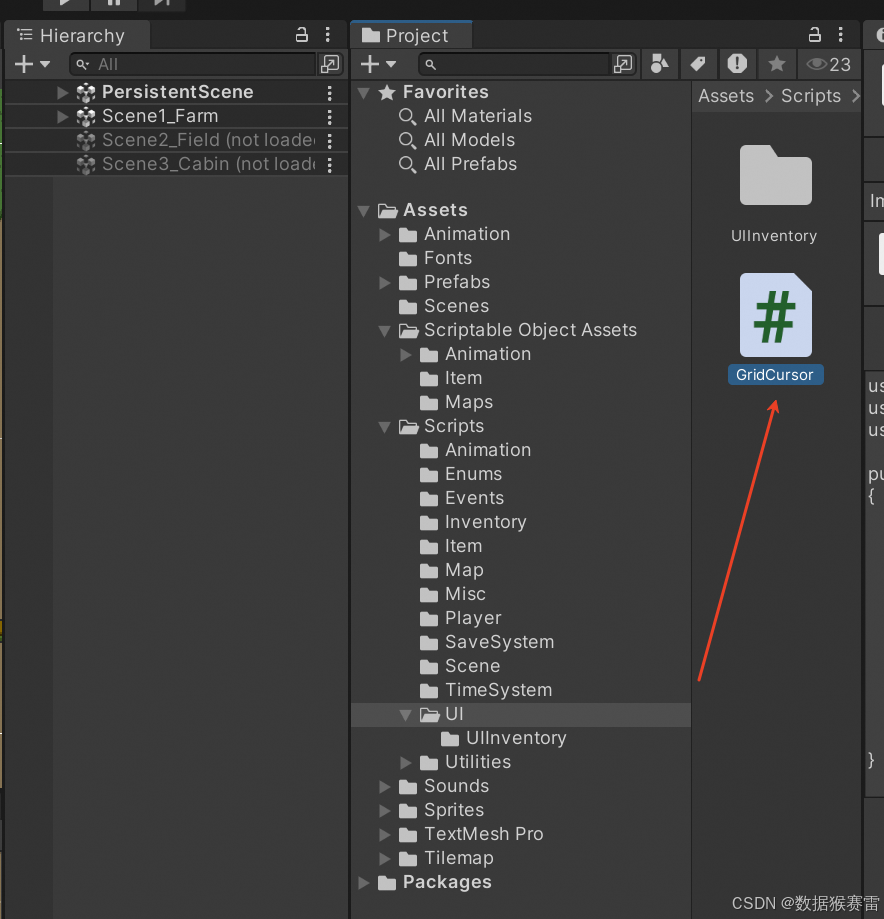
完整代码如下:
using System.Collections;
using System.Collections.Generic;
using UnityEngine;
using UnityEngine.UI;public class GridCursor : MonoBehaviour
{private Canvas canvas; // 存储白色画布,UI光标位于其中private Grid grid;  // tilemap地图private Camera mainCamera; // 对主相机的引用[SerializeField] private Image cursorImage = null;[SerializeField] private RectTransform cursorRectTransform = null;  // 光标对象的引用[SerializeField] private Sprite greenCursorSprite = null;[SerializeField] private Sprite redCursorSprite = null;private bool _cursorPositionIsValid = false;public bool CursorPositionIsValid { get => _cursorPositionIsValid; set => _cursorPositionIsValid = value; }private int _itemUseGridRadius = 0;public int ItemUseGridRadius { get => _itemUseGridRadius; set => _itemUseGridRadius = value; }private ItemType _selectedItemType;public ItemType SelectedItemType { get => _selectedItemType; set => _selectedItemType = value; }private bool _cursorIsEnabled = false;public bool CursorIsEnabled { get => _cursorIsEnabled; set => _cursorIsEnabled = value; }private void OnDisable(){EventHandler.AfterSceneLoadEvent -= SceneLoaded;}private void OnEnable(){EventHandler.AfterSceneLoadEvent += SceneLoaded;}// Start is called before the first frame updatevoid Start(){mainCamera = Camera.main;canvas = GetComponentInParent<Canvas>();}// Update is called once per framevoid Update(){if (CursorIsEnabled){DisplayCursor();}}private Vector3Int DisplayCursor(){if (grid != null){   // 之所以需要Grid是因为某些定位是基于grid的// Get grid position for cursorVector3Int gridPosition = GetGridPositionForCursor();// Get grid position for playerVector3Int playerGridPosition = GetGridPositionForPlayer();// Set cursor sprite,基于gridPosition和playerGridPosition设置光标的有效性SetCursorValidity(gridPosition, playerGridPosition);// Get rect transform position for cursorcursorRectTransform.position = GetRectTransformPositionForCursor(gridPosition);return gridPosition;}else{return Vector3Int.zero;}}public Vector3Int GetGridPositionForCursor(){// z is how far the objects are in front of the camera - camera is at -10 so objects are(-)-10 in front = 10Vector3 worldPosition = mainCamera.ScreenToWorldPoint(new Vector3(Input.mousePosition.x, Input.mousePosition.y, -mainCamera.transform.position.z));return grid.WorldToCell(worldPosition);}public Vector3Int GetGridPositionForPlayer(){return grid.WorldToCell(Player.Instance.transform.position);}public Vector2 GetRectTransformPositionForCursor(Vector3Int gridPosition){Vector3 gridWorldPosition = grid.CellToWorld(gridPosition);Vector2 gridScreenPosition = mainCamera.WorldToScreenPoint(gridWorldPosition);return RectTransformUtility.PixelAdjustPoint(gridScreenPosition, cursorRectTransform, canvas);}private void SceneLoaded(){grid = GameObject.FindObjectOfType<Grid>();}private void SetCursorValidity(Vector3Int cursorGridPosition, Vector3Int playerGridPosition){SetCursorToValid();// Check item use radius is validif(Mathf.Abs(cursorGridPosition.x -  playerGridPosition.x) > ItemUseGridRadius|| Mathf.Abs(cursorGridPosition.y - playerGridPosition.y) > ItemUseGridRadius){SetCursorToInvalid();return;}// Get selected item details ItemDetails itemDetails = InventoryManager.Instance.GetSelectedInventoryItemDetails(InventoryLocation.player);if(itemDetails == null){SetCursorToInvalid();return;}// Get grid property details at cursor positionGridPropertyDetails gridPropertyDetails = GridPropertiesManager.Instance.GetGridPropertyDetails(cursorGridPosition.x, cursorGridPosition.y);if(gridPropertyDetails != null){// Determine cursor validity based on inventory item selected and grid property detailsswitch (itemDetails.itemType){case ItemType.Seed:if (!IsCursorValidForSeed(gridPropertyDetails)){SetCursorToInvalid();return;}break;case ItemType.Commodity:if (!IsCursorValidForCommodity(gridPropertyDetails)){SetCursorToInvalid();return;}break;case ItemType.none:break;case ItemType.count:break;default:break;}}else{SetCursorToInvalid();return;}}private bool IsCursorValidForSeed(GridPropertyDetails gridPropertyDetails){return gridPropertyDetails.canDropItem;}private bool IsCursorValidForCommodity(GridPropertyDetails gridPropertyDetails){return gridPropertyDetails.canDropItem;}private void SetCursorToValid(){cursorImage.sprite = greenCursorSprite;CursorPositionIsValid = true;}private void SetCursorToInvalid(){cursorImage.sprite = redCursorSprite;CursorPositionIsValid = false;}/// <summary>/// DisableCursor is called in the UIInventorySlot.ClearCursors() method when an inventory slot item is no longer selected/// </summary>public void DisableCursor(){cursorImage.color = Color.clear;CursorIsEnabled = false;}/// <summary>/// EnableCursor is called in the UIInventorySlot.SetSelectedItem() method when an inventory slot item is selected and its itemUseGrid radius>0/// </summary>public void EnableCursor(){cursorImage.color = new Color(1f, 1f, 1f, 1f);CursorIsEnabled = true;}}
4、优化UIInventorySlot脚本
增加如下变量:
private GridCursor gridCursor;在Start()中添加:
gridCursor = FindObjectOfType<GridCursor>();添加如下方法:
private void ClearCursors()
{// Disable cursorgridCursor.DisableCursor();// Set item type to nonegridCursor.SelectedItemType = ItemType.none;
}
在SetSelectedItem方法中添加如下方法:
// Set use radius for cursors gridCursor.ItemUseGridRadius = itemDetails.itemUseGridRadius;// If item requires a grid cursor then enable cursorif(itemDetails.itemUseGridRadius > 0){gridCursor.EnableCursor();}else{gridCursor.DisableCursor();}// Set item typegridCursor.SelectedItemType = itemDetails.itemType;在ClearSelectedItem方法中添加:
ClearCursors();在DropSelectedItemAtMousePosition方法中,删除如下3行代码:
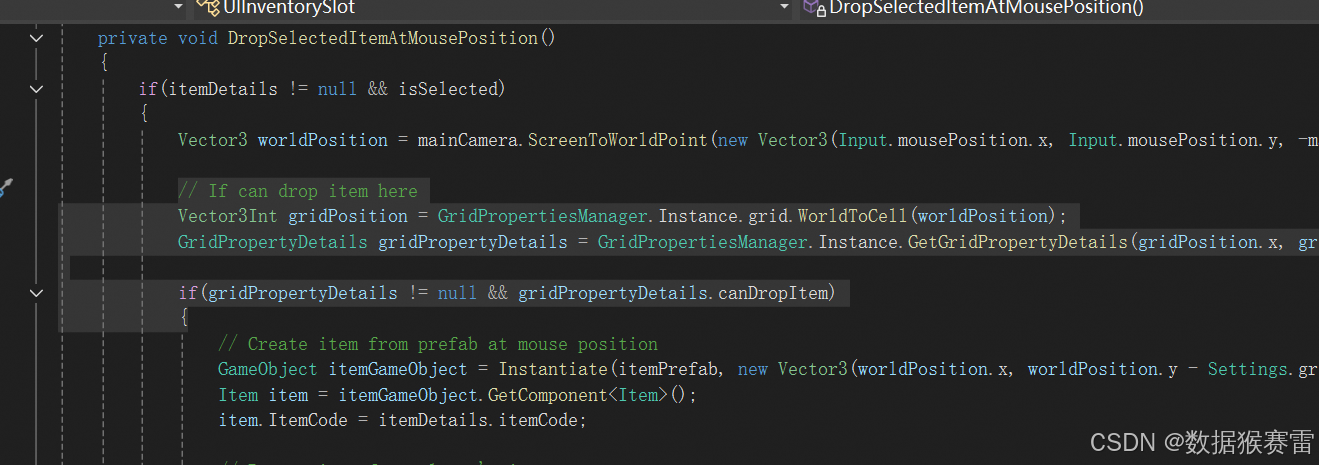
替换为:
if (gridCursor.CursorPositionIsValid) {Vector3 worldPosition = mainCamera.ScreenToWorldPoint(new Vector3(Input.mousePosition.x, Input.mousePosition.y, -mainCamera.transform.position.z));5、创建Panel
在Hierarchy -> PersistentScene -> UI -> MainGameUICanves -> UICanvasGroup下创建新的Panel命令为UIPanel。
并且移到第一个位置。
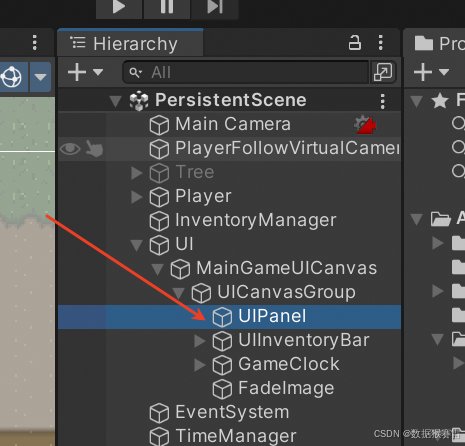
设置UIPanel的Image组件,其Source Image为None,Color的值全为0。
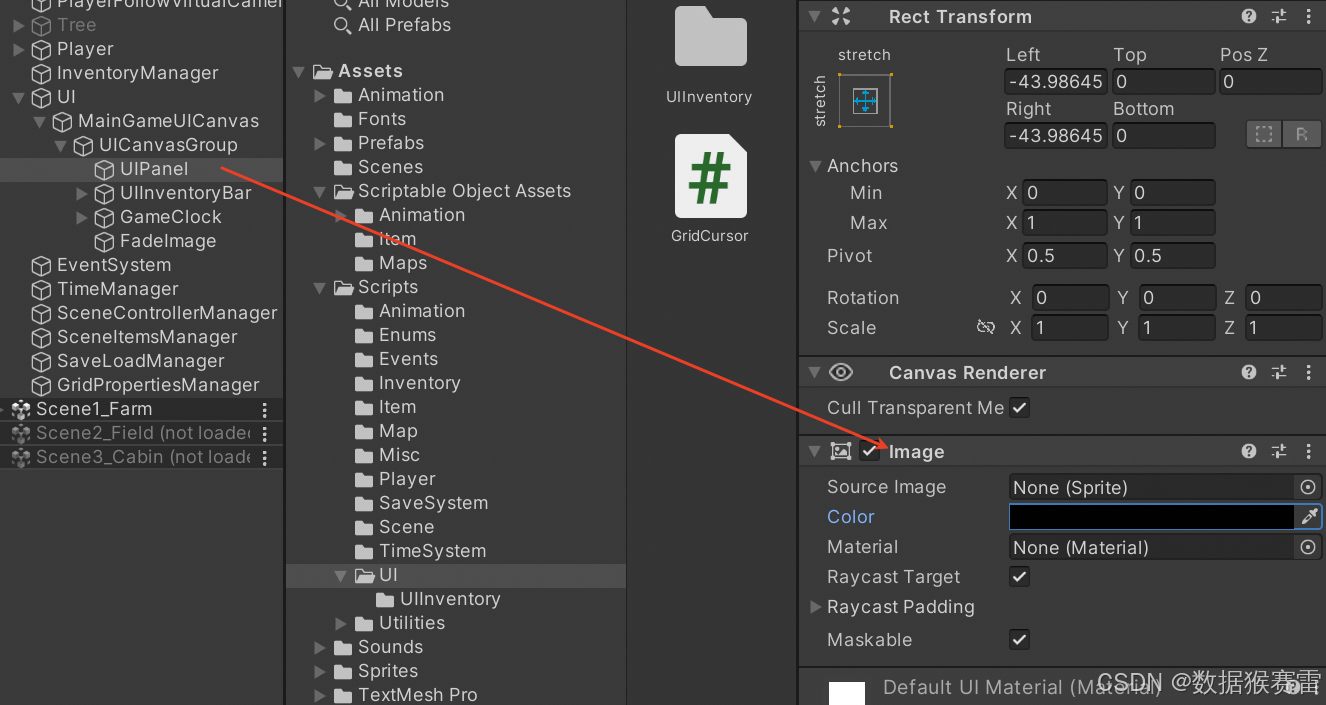
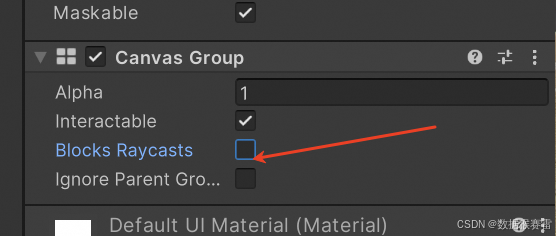
添加Canvas Group组件,反勾选Blocks Raycasts。
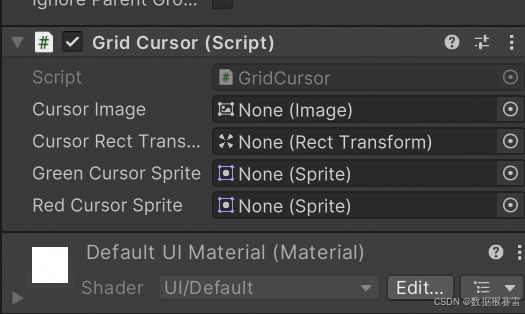
添加Grid Cursor组件:
在UIPanel下创建空物体命名为GridCursor。
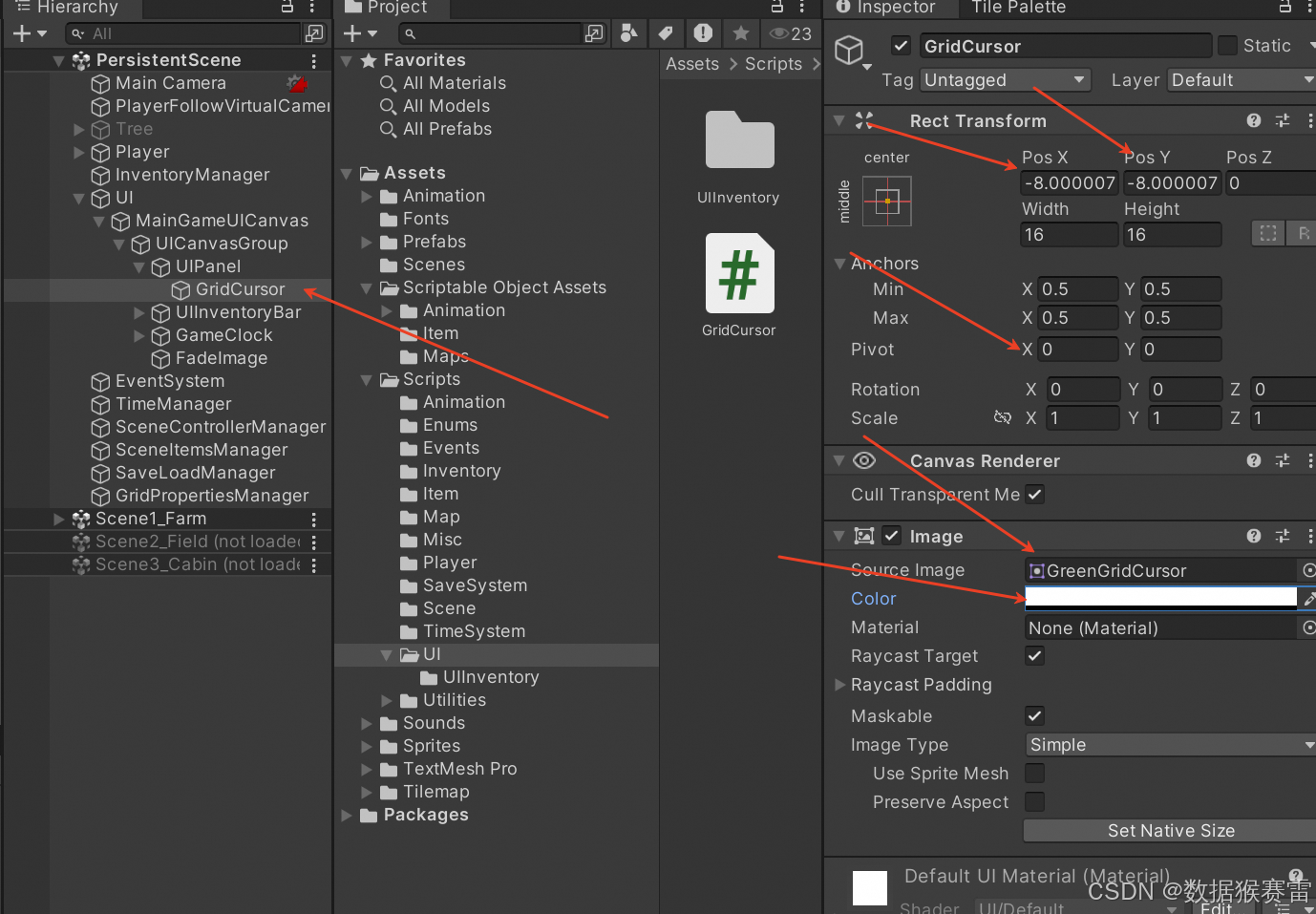
给GridCursor添加Image组件,Source Image选择“GreenGridCursor”图形,并且设置Color的透明度为0。
设置GridCursor的其他属性如上。
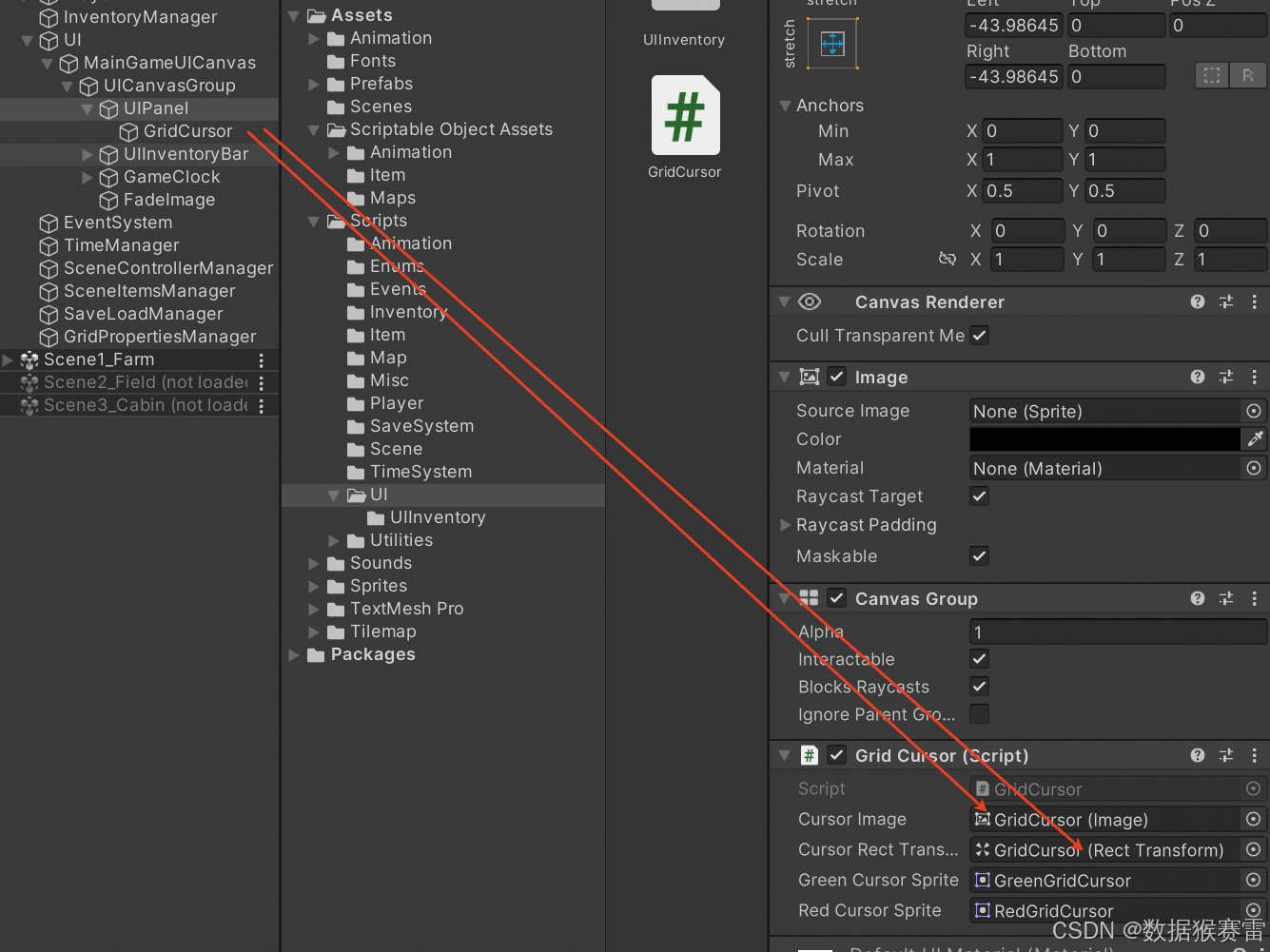
回到UIPanel物体,设置属性如下:
6、运行程序
不能放置的情况:
可以放置的情况:
相关文章:
Unity3D仿星露谷物语开发33之光标位置可视化
1、目标 当从道具栏中拖出一个道具到地面的时候,光标区域会显示是否可放置物体的可视化显示。绿色表示可以放置物体,红色表示不可以放置物体。 2、优化InventoryManager脚本 添加2个方法: /// <summary>/// Returns the itemDetails&…...
蓝桥杯冲刺题单--二分
二分 知识点 二分: 1.序列二分:在序列中查找(不怎么考,会比较难?) 序列二分应用的序列必须是递增或递减,但可以非严格 只要r是mid-1,就对应mid(lr1)/2 2.答…...

《深度探秘:SQL助力经典Apriori算法实现》
在数据的广袤世界里,隐藏着无数有价值的信息,等待着我们去挖掘和发现。关联规则挖掘算法,作为数据挖掘领域的关键技术,能够从海量数据中找出事物之间潜在的关联关系,为商业决策、学术研究等诸多领域提供有力支撑。其中…...
MySQL原理(一)
目录 一、理解MySQL的服务器与客户端关系 1:MySQL服务器与客户端 2:服务器处理客户端请求 3:常见的存储引擎 二、字符集和比较规则 1:字符集和比较规则简介 2:字符集和比较规则应用 3:乱码原因&…...

Docker+Jenkins+Gitee自动化项目部署
前置条件 docker安装成功 按照下面配置加速 sudo mkdir -p /etc/docker sudo tee /etc/docker/daemon.json <<-EOF {"registry-mirrors": ["https://register.librax.org"] } EOF sudo systemctl daemon-reload sudo systemctl restart docker一、…...

Nginx 499 错误的原因及解决方法
Nginx 499 错误的原因及解决方法 原因 客户端超时: 客户端在等待服务器响应时超时,导致连接被关闭。 解决方法:优化服务端响应时间,或调大客户端的连接超时时间。 服务端响应过慢: 后端服务处理请求时间过长。 解决方法…...

Linux网络多进程并发服务器和多线程并发服务器
多进程 还是以大小写转换为例子 #include <stdio.h> #include <stdlib.h> #include <string.h> #include <unistd.h> #include <pthread.h> #include <sys/socket.h> #include <arpa/inet.h> #include "wrap.h" #include…...

VScode 画时序图(FPGA)
1、先安装插件: 2、然后就可以编写一个.js文件,如下: {signal: [{name: clk, wave: p.......|..},{name: rstn, wave: 01......|..},{name: din_vld, wave: 0.1.0...|..},{name: din, wave: "x.x...|..", data: ["D0", …...
:搭建k8s集群 (1.28版本))
Kubernetes 集群搭建(二):搭建k8s集群 (1.28版本)
(一)虚拟环境准备 名称ip备注m1192.168.101.131mastern1192.168.101.132workern2192.168.101.133worker (二)所有主机统一配置 2.1 关闭防火墙和selinux systemctl stop firewalld systemctl disable firewalld sed -i s/enfo…...
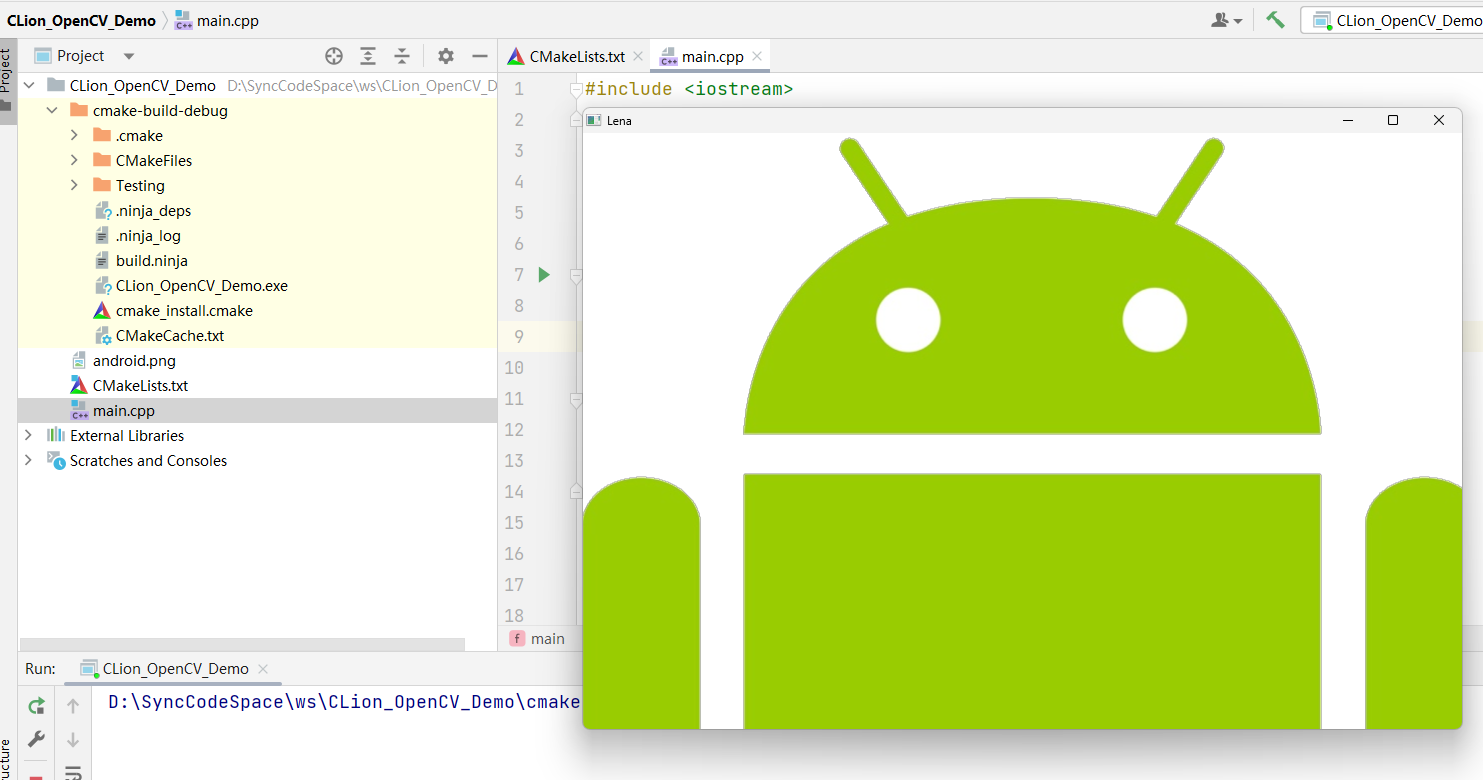
一文详解OpenCV环境搭建:Windows使用CLion配置OpenCV开发环境
在计算机视觉和图像处理领域,OpenCV 是一个不可或缺的工具。其为开发者提供了一系列广泛的算法和实用工具,支持多种编程语言,并且可以在多个平台上运行。对于希望在其项目中集成先进视觉功能的开发者来说,掌握如何配置和使用OpenC…...
)
Python爬取数据(二)
一.example2包下的 1.re模块的compile函数使用 import repatternre.compile(r\d) print(pattern) 2.match的方法使用 import re patternre.compile(r\d) # m1pattern.match(one123twothree345four) #参数2:指定起始位置(包含),参数3:终止位置(包含),…...

前端用用jsonp的方式解决跨域问题
前端用用jsonp的方式解决跨域问题 前端用用jsonp的方式解决跨域问题 前端用用jsonp的方式解决跨域问题限制与缺点:前端后端测试使用示例 限制与缺点: 不安全、只能使用get方式、后台需要相应jsonp方式的传参 前端 function jsonp(obj) {// 动态生成唯…...
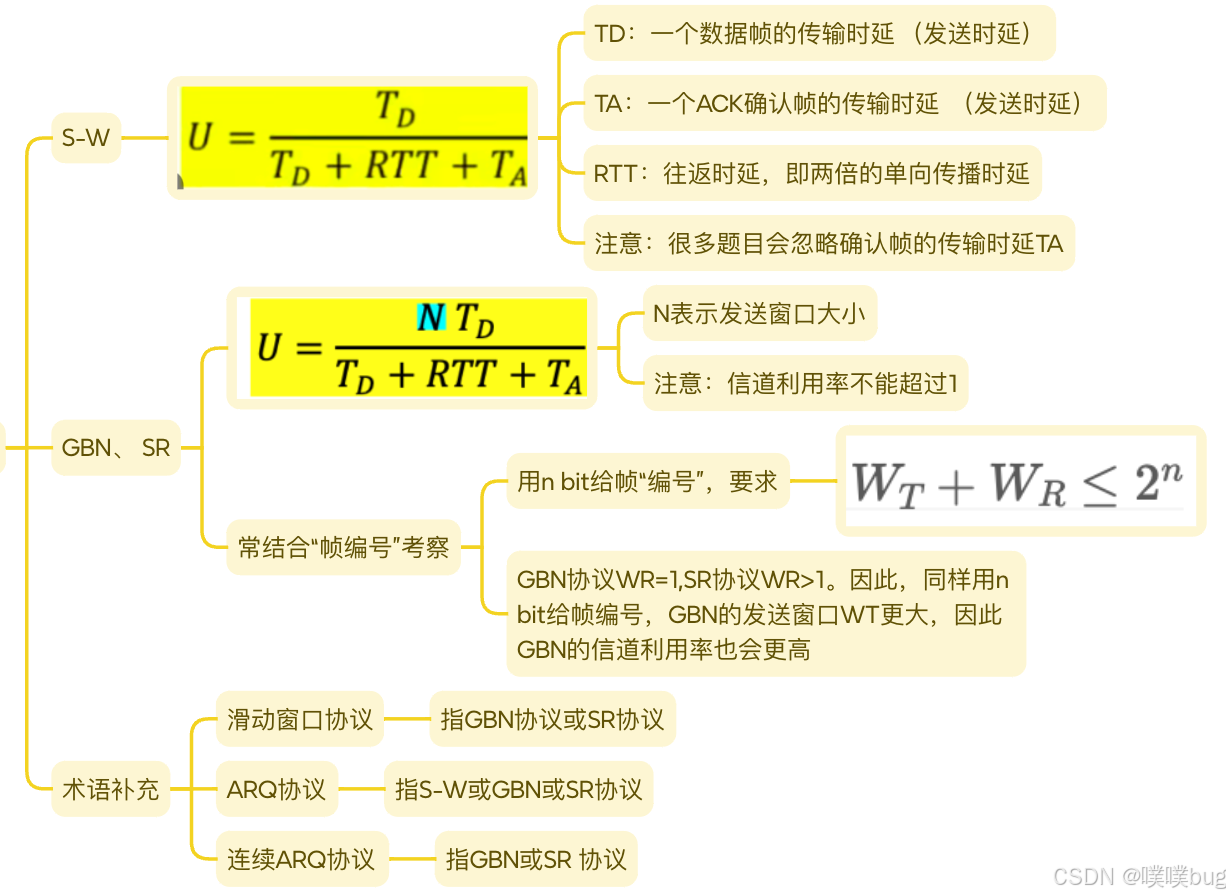
计算机网络 3-2 数据链路层(流量控制与可靠传输机制)
3.4 流量控制与可靠传输机制 流量控制:指由接收方控制发送方的发送速率,使接收方有足够的缓冲空间来接收每个帧 滑动窗口流量控制:一种更高效的流量控制方法。 在任意时刻,发送方都维持一组连续的允许发送帧的序号,称为发送窗口…...

科普:原始数据是特征向量么?
一、输入向量 x \mathbf{x} x是特征向量 机器学习算法公式中的输入向量 x \mathbf{x} x通常要求是特征向量。原因如下: 从算法原理角度:机器学习算法旨在通过对输入数据的学习来建立模型,以实现对未知数据的预测或分类等任务。特征向量是对…...
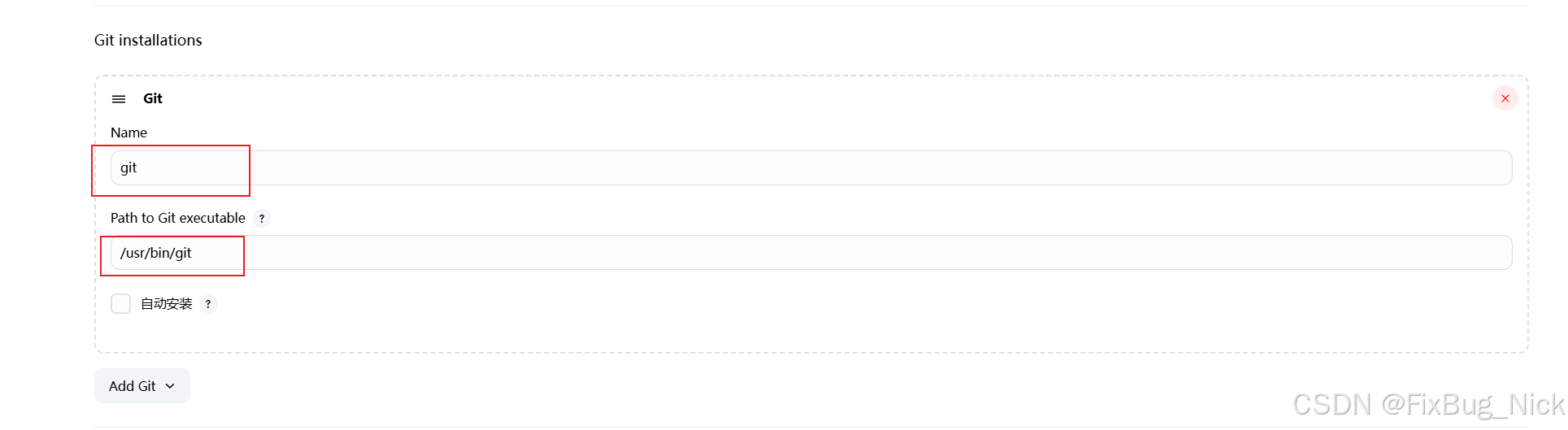
Jenkins配置的JDK,Maven和Git
1. 前置 在配置前,我们需要先把JDK,Maven和Git安装到Jenkins的服务器上。 (1)需要进入容器内部,执行命令:docker exec -u root -it 容器号/容器名称(2选1) bash -- 容器名称 dock…...
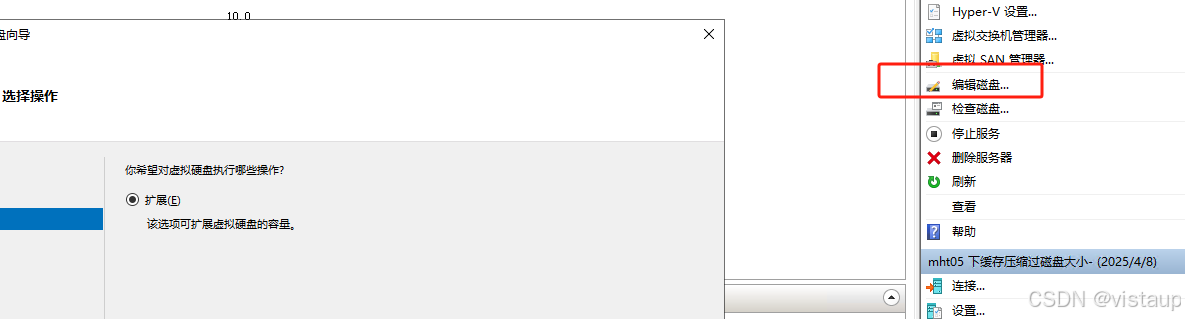
有效压缩 Hyper-v linux Centos 的虚拟磁盘 VHDX
参考: http://www.360doc.com/content/22/0505/16/67252277_1029878535.shtml VHDX 有个不好的问题就是,如果在里面存放过文件再删除,那么已经使用过的空间不会压缩,导致空间一直被占用。那么就需要想办法压缩空间。 还有一点&a…...

网络空间安全(53)XSS
一、定义与原理 XSS(Cross Site Scripting),全称为跨站脚本攻击,是一种网站应用中的安全漏洞攻击。其原理是攻击者利用网站对用户输入内容校验不严格等漏洞,将恶意脚本(通常是JavaScript,也可以…...
(Go语言版))
【LeetCode 热题100】45:跳跃游戏 II(详细解析)(Go语言版)
🚀 力扣 45:跳跃游戏 II(全解法详解) 📌 题目描述 给你一个非负整数数组 nums,表示你最初位于数组的第一个位置。 数组中的每个元素表示你在该位置可以跳跃的最大长度。 你的目标是使用 最少的跳跃次数 到…...
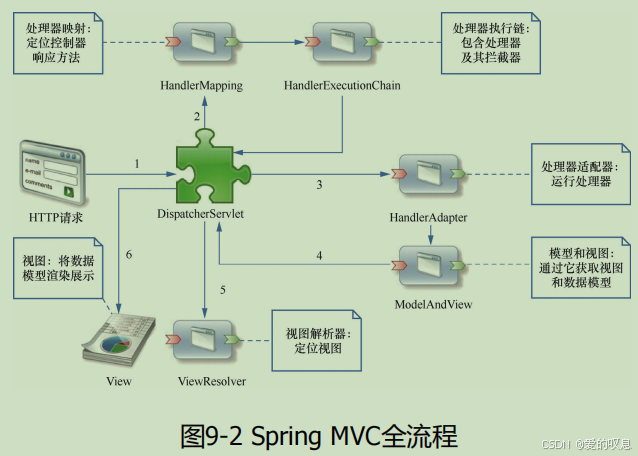
Spring MVC 框架 的核心概念、组件关系及流程的详细说明,并附表格总结
以下是 Spring MVC 框架 的核心概念、组件关系及流程的详细说明,并附表格总结: 1. 核心理念 Spring MVC 是基于 MVC(Model-View-Controller)设计模式 的 Web 框架,其核心思想是 解耦: Model:数…...

使用 redis 实现消息队列
方案1: 使用list做消息队列问题1: 如何保证消息不丢失问题 2: 重复消费/幂等 方案 2: zset实现消息队列方案 3: 发布/订阅(pub/sub)问题1: 如何保证消息不丢失问题 2: 重复消费/幂等 方案 4: Stream 实现消息队列问题1: 如何保证消息不丢失问题 2: 重复消费/幂等 方案1: 使用li…...
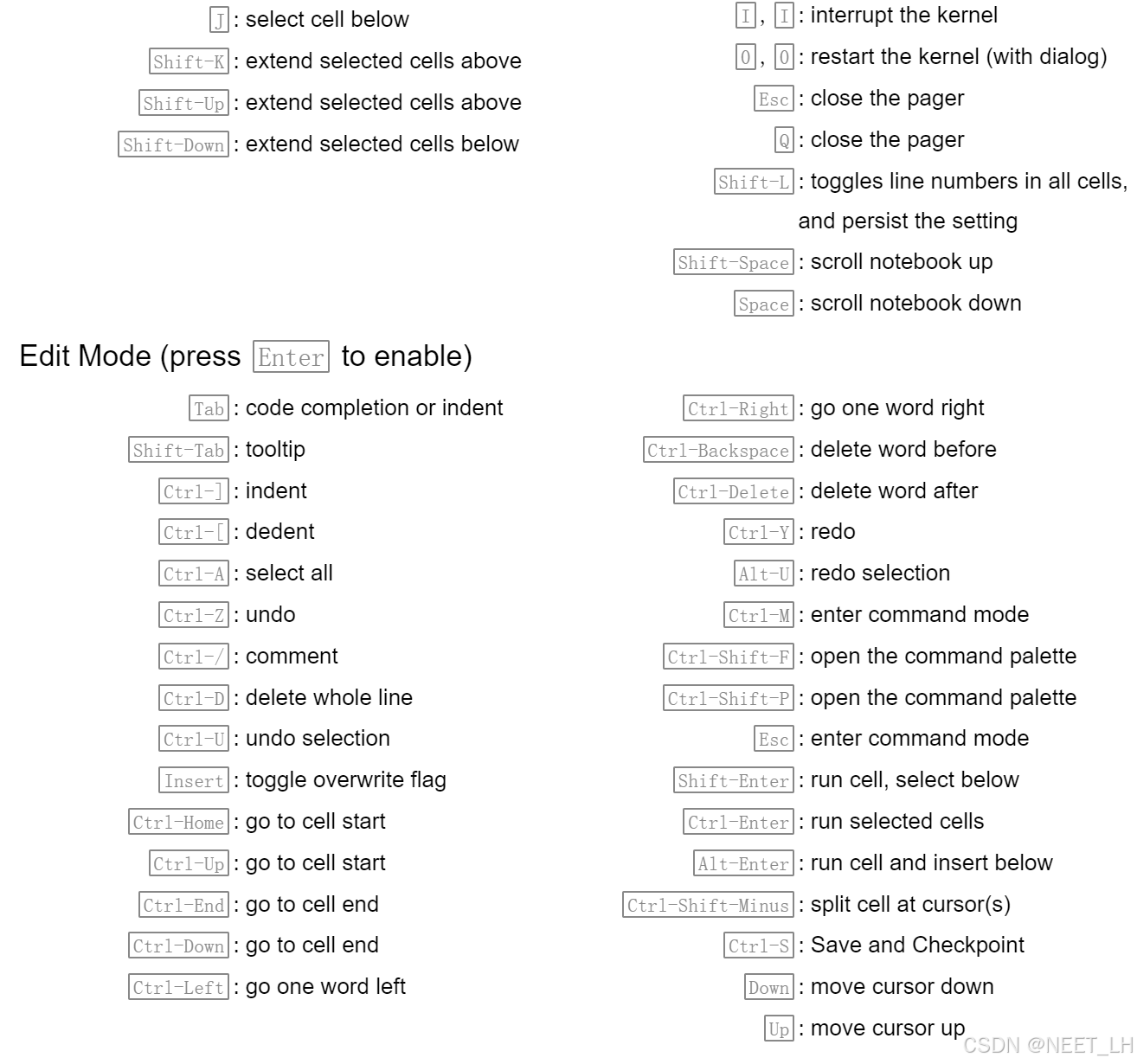
金融数据分析(Python)个人学习笔记(6):安装相关软件
python环境的安装请查看Python个人学习笔记(1):Python软件的介绍与安装 一、pip 在windows系统中检查是否安装了pip 打开命令提示符的快捷键:winR,然后输入cmd 在命令提示符中执行如下命令 python -m pip --version…...

Android Material Design 3 主题配色终极指南:XML 与 Compose 全解析
最小必要颜色配置 <!-- res/values/themes.xml --> <style name"Theme.MyApp" parent"Theme.Material3.DayNight"><!-- 基础三原色 --><item name"colorPrimary">color/purple_500</item><item name"col…...

PyTorch参数管理详解:从访问到初始化与共享
本文通过实例代码讲解如何在PyTorch中管理神经网络参数,包括参数访问、多种初始化方法、自定义初始化以及参数绑定技术。所有代码可直接运行,适合深度学习初学者进阶学习。 1. 定义网络与参数访问 1.1 定义单隐藏层多层感知机 import torch from torch…...

页面简单传参
#简单的情景:你需要在帖子主页传递参数给帖子详情页面,携带在主页获得的帖子ID。你有以下几种传递方法# #使用Vue3 TS# 1. 通过 URL 参数传递(Query 参数) 这是最简单、最常用的方法,ID 会显示在 URL 中的 ? 后面…...

nginx路径匹配的优先级
在 Nginx 配置中,当请求 /portal/agent/sse 时,会匹配 location ~* /sse$ 规则,而不是 location /portal。原因如下: 匹配规则解析 location ~* /sse$ ~* 表示 不区分大小写的正则匹配/sse$ 表示以 /sse 结尾的路径匹配结果&#…...
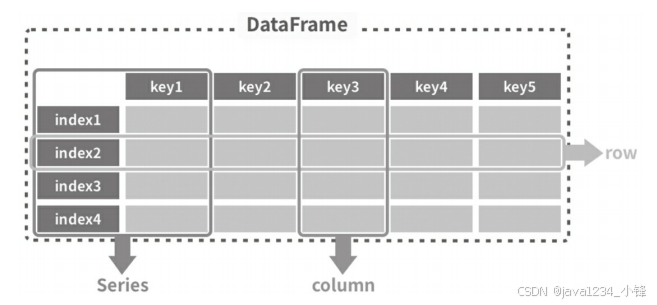
一周学会Pandas2 Python数据处理与分析-Pandas2一维数据结构-Series
锋哥原创的Pandas2 Python数据处理与分析 视频教程: 2025版 Pandas2 Python数据处理与分析 视频教程(无废话版) 玩命更新中~_哔哩哔哩_bilibili Pandas提供Series和DataFrame作为数组数据的存储框架。 Series(系列、数列、序列)是一个带有…...
DApp实战篇:前端技术栈一览
前言 在前面一系列内容中,我们由浅入深地了解了DApp的组成,从本小节开始我将带领大家如何完成一个完整的DApp。 本小节则先从前端开始。 前端技术栈 在前端开发者速入:DApp中的前端要干些什么?文中我说过,即便是在…...
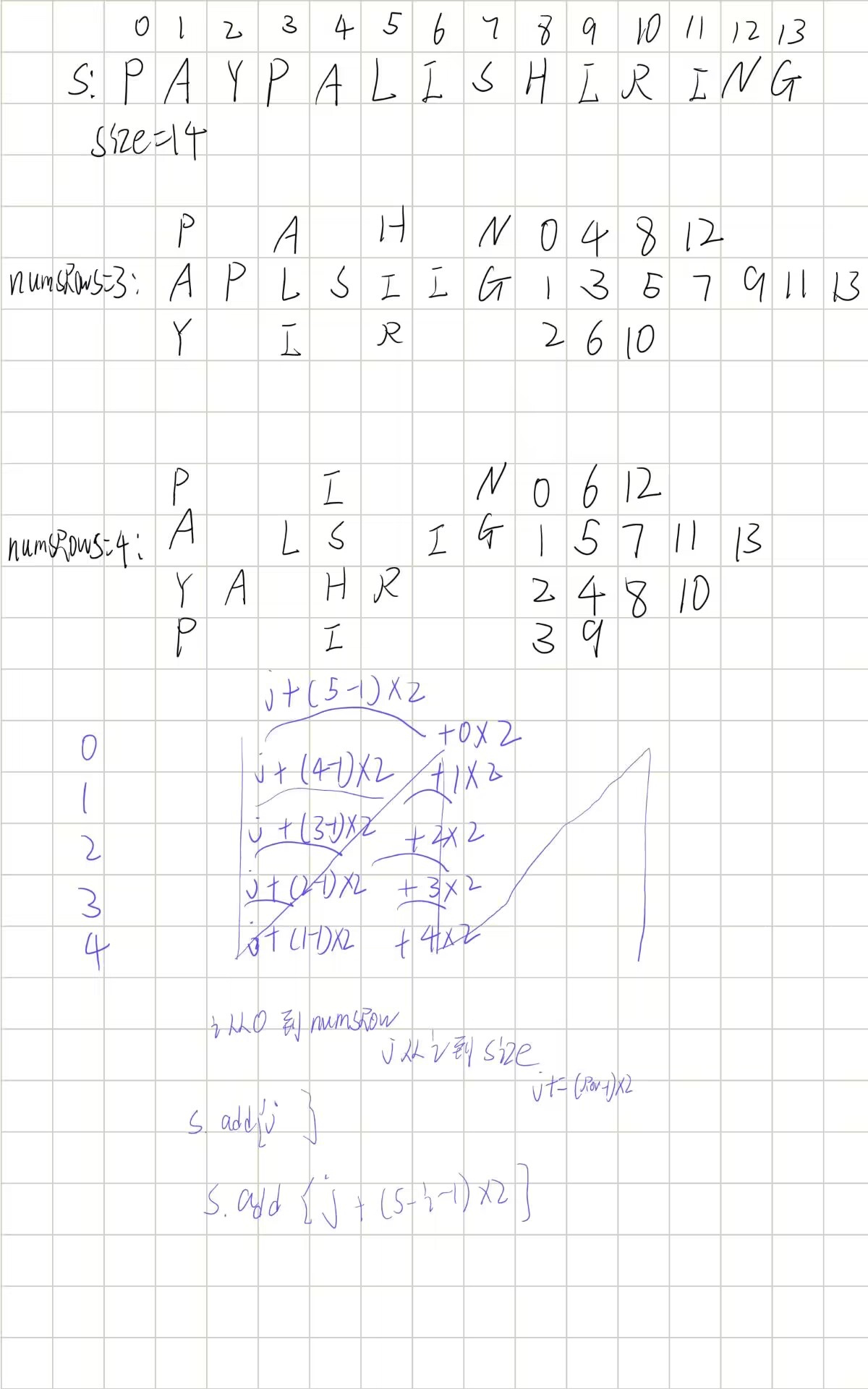
leetcode6.Z字形变换
题目说是z字形变化,但其实模拟更像n字形变化,找到字符下标规律就逐个拼接就能得到答案 class Solution {public String convert(String s, int numRows) {if(numRows1)return s;StringBuilder stringBuilder new StringBuilder();for (int i 0; i <…...

HarmonyOS应用开发者高级-编程题-001
题目一:跨设备分布式数据同步 需求描述 开发一个分布式待办事项应用,要求: 手机与平板登录同一华为账号时,自动同步任务列表任一设备修改任务状态(完成/删除),另一设备实时更新任务数据在设备离线时能本地存储,联网后自动同步实现方案 // 1. 定义分布式数据模型 imp…...

鸿蒙开发者高级认证编程题库
题目一:跨设备分布式数据同步 需求描述 开发一个分布式待办事项应用,要求: 手机与平板登录同一华为账号时,自动同步任务列表任一设备修改任务状态(完成/删除),另一设备实时更新任务数据在设备离线时能本地存储,联网后自动同步实现方案 // 1. 定义分布式数据模型 imp…...