
LLM_基于OpenAI的极简RAG
一、RAG主要流程
注:
- generate和embedding可以不同模型
- LLM-embedding: 推荐使用 智源的BGE
BAAI/bge-en-icl $0.0100/Mtoken- In-context Learning (ICL) : 通过提供少量示例(few-shot examples)来显著提升模型处理新任务的能力
- 也可以用阿里云的
text-embedding-v3
- LLM generate:可以直接用
deepseek-chat
- LLM-embedding: 推荐使用 智源的BGE
- 保存chunks embedding
- 可以用简单的dict
- 可以用向量数据库
chromadb等
二、本地保存的全流程实现
2.1 文本保存成Embedding chunks
2.1.1 文档读取&拆分成chunk——以text文档为例
pdf文档解析可以看这个文档: https://www.aneasystone.com/archives/2025/03/pdf-parser-libraries.html
load_documents(dir_path: str) -> List[str]: 读取文件下所有的txt文件split_into_clean_chunks(docs: List[str], chunk_size: int = 30) -> List[str]: 将读取的文件内容,拆分为大小为chunk_size的chunk列表
def load_documents(dir_path: str) -> List[str]:docs = []for f in os.listdir(dir_path):if f.endswith('.txt'):with open(os.path.join(dir_path, f), 'r', encoding='utf-8') as f_o:docs.append(f_o.read())return docsdef preprocess_text(text: str) -> str:text = text.lower()# Remove special characters, keeping only alphanumeric characters and spacestext = ''.join(char for char in text if char.isalnum() or char.isspace())return textdef split_into_clean_chunks(docs: List[str], chunk_size: int = 30) -> List[str]:chunks = [] for doc in docs: words = doc.split() for i in range(0, len(words), chunk_size):chunk = " ".join(words[i:i + chunk_size]) chunks.append(preprocess_text(chunk))return chunks def prepare_text_test():cur_p = os.path.dirname(__file__)dir_p = os.path.join(cur_p, "data")documents = load_documents(dir_p)preprocessed_chunks = split_into_clean_chunks(documents)for i in range(2):print(f"Chunk {i+1}: {preprocessed_chunks[i][:50]} ... ")print("-" * 50)
2.1.2 embedding & save
- 分批生成Embedding:
generate_embeddings(chunks: List[str], batch_size: int = 10) -> np.ndarray- 每batch_size大小chunks, 调用一次api
BAAI/bge-en-icl generate_embeddings_batch调用
- 每batch_size大小chunks, 调用一次api
- 保存成简单的Dict:
add_to_vector_store(embeddings: np.ndarray, chunks: List[str])- 保存成:
{0:{"embedding": "np.arrray", "chunk": "string"}}
- 保存成:
def generate_embeddings_batch(chunks_batch: List[str], model: str = "BAAI/bge-en-icl") -> List[List[float]]:"""# BAAI/bge-en-icl 	$0.0100/Mtoken  """response = emb_client.embeddings.create(model=model,   input=chunks_batch,encoding_format='float')embeddings = [item.embedding for item in response.data]return embeddingsdef generate_embeddings(chunks: List[str], batch_size: int = 10) -> np.ndarray:all_embeddings = []for i in tqdm(range(0, len(chunks), batch_size)):batch = chunks[i:i + batch_size]embeddings = generate_embeddings_batch(batch)all_embeddings.extend(embeddings)return np.array(all_embeddings)vector_store: dict[int, dict[str, object]] = {}
def add_to_vector_store(embeddings: np.ndarray, chunks: List[str]) -> None:for embedding, chunk in zip(embeddings, chunks):vector_store[len(vector_store)] = {"embedding": embedding, "chunk": chunk}
三、简单RAG流程
3.1 检索相关片段
- query转成embedding:
generate_embeddings([query_text])[0] - 基于query和保存的向量文档
vector_store,搜索最相关的TopN个文档碎片similarity_search(query_embedding: np.ndarray, top_k: int = 5)
def cosine_similarity(vec1: np.ndarray, vec2: np.ndarray) -> float:dot_product = np.dot(vec1, vec2)return dot_product / (np.linalg.norm(vec1) * np.linalg.norm(vec2))def similarity_search(query_embedding: np.ndarray, top_k: int = 5) -> List[str]:similarities = []for key, value in vector_store.items():similarity = cosine_similarity(query_embedding, value["embedding"])similarities.append((key, similarity))similarities = sorted(similarities, key=lambda x: x[1], reverse=True)# 倒序排序取Top Nreturn [vector_store[key]["chunk"] for key, _ in similarities[:top_k]]def retrieve_relevant_chunks(query_text: str, top_k: int = 5) -> List[str]:query_embedding = generate_embeddings([query_text])[0]relevant_chunks = similarity_search(query_embedding, top_k=top_k)return relevant_chunks3.2 构建提示
- System: 指出根据提供信息回答问题
- Context: 放入检索出来的文档片
- Question: 提问的文本
def construct_prompt(query: str, context_chunks: List[str]) -> str:"""通过将查询与检索到的上下文片段结合,构建提示。参数:query (str): 要构建提示的查询文本。context_chunks (List[str]): 要包含在提示中的相关上下文片段列表。返回:str: 用于作为 LLM 输入的构建好的提示。"""# chinese_prompt_template = """# System:# 你是一个问答机器人。你的任务是根据下述给定的已知信息回答用户问题。# 如果已知信息不包含用户问题的答案,或者已知信息不足以回答用户的问题,请直接回复"我无法回答您的问题"。# 已知信息:# {context} # 检索出来的原始文档# 用户问题:# {query} # 用户的提问# 回答:# """context = "\n".join(context_chunks)system_message = ("You are a helpful assistant. Only use the provided context to answer the question. ""If the context doesn't contain the information needed, say 'I don't have enough information to answer this question.'")prompt = f"System: {system_message}\n\nContext:\n{context}\n\nQuestion:\n{query}\n\nAnswer:"return prompt3.3 生成答案
def generate_response(prompt: str,model: str = "deepseek-chat",client_in = None,max_tokens: int = 512,temperature: float = 1,top_p: float = 0.9,top_k: int = 50
) -> str:"""根据构建的prompt从OpenAI-模型生成回答Args:prompt (str): construct_prompt 生成的提示词model (str): LLM default "deepseek-chat" "google/gemma-2-2b-it 国内无法正常使用".max_tokens (int): 生成回答的最多tokens数  Default is 512.temperature (float): Sampling temperature for response diversity. Default is 0.5.top_p (float): Probability mass for nucleus sampling. Default is 0.9.top_k (int): Number of highest probability tokens to consider. Default is 50.Returns:str: The generated response from the chat model."""client = client_in if client_in is not None else clientresponse = client.chat.completions.create(model=model,   max_tokens=max_tokens,   temperature=temperature,   top_p=top_p,   extra_body={   "top_k": top_k  },messages=[   {"role": "user", "content": [  {"type": "text",  # Type of content (text in this case)"text": prompt  # The actual prompt text}]}])# Return the content of the first choice in the responsereturn response.choices[0].message.contentdef basic_rag_pipeline(query: str, model: str="deepseek-chat", api_client=None) -> str:"""实现基础检索增强生成(RAG) pipeline检索相关片段 -> 构建提示 -> 并生成回答Args:query (str): 输入查询,用于生成回答。Returns:str: 基于查询和检索到的上下文,由 LLM 生成的回答。"""relevant_chunks = retrieve_relevant_chunks(query)prompt = construct_prompt(query, relevant_chunks)response = generate_response(prompt, model=model, client_in=api_client)return response
四、测试
def RAG_test():cur_p = os.path.dirname(__file__)dir_p = os.path.join(cur_p, "data")documents = load_documents(dir_p)preprocessed_chunks = split_into_clean_chunks(documents)emb_f = os.path.join(cur_p, "data", "embeddings.json")embeddings = load_embedding(emb_f)add_to_vector_store(embeddings, preprocessed_chunks)test_f = os.path.join(cur_p, "data", 'val.json')with open(test_f, 'r') as file:validation_data = json.load(file)sample_query = validation_data['basic_factual_questions'][0]['question'] expected_answer = validation_data['basic_factual_questions'][0]['answer'] print(f"Sample Query: {sample_query}\n")print(f"Expected Answer: {expected_answer}\n")print("🔍 Running the Retrieval-Augmented Generation (RAG) pipeline...")print(f"📥 Query: {sample_query}\n")# Run the RAG pipeline and get the response# $0.02/$0.04 in/out Mtoken google/gemma-3-4b-it# response = basic_rag_pipeline(sample_query, model='google/gemma-3-4b-it', api_client=emb_client)response = basic_rag_pipeline(sample_query, model='deepseek-chat', api_client=client)# Print the response with better formattingprint("🤖 AI Response:")print("-" * 50)print(response.strip())print("-" * 50)# Print the ground truth answer for comparisonprint("✅ Ground Truth Answer:")print("-" * 50)print(expected_answer)print("-" * 50)response_embedding = generate_embeddings([response])[0]ground_truth_embedding = generate_embeddings([expected_answer])[0]similarity = cosine_similarity(response_embedding, ground_truth_embedding)print(f"✅ similarity: {similarity:.5f}")
输出如下:
Sample Query: What is the mathematical representation of a qubit in superposition?
Expected Answer: |ψ⟩ = α|0⟩ + β|1⟩, where α and β are complex numbers satisfying |α|² + |β|² = 1, representing the probability amplitudes for measuring the qubit in state |0⟩ or |1⟩ respectively.🔍 Running the Retrieval-Augmented Generation (RAG) pipeline...
📥 Query: What is the mathematical representation of a qubit in superposition?🤖 AI Response:
--------------------------------------------------
The mathematical representation of a qubit in superposition is given by:
**ψ = α|0⟩ + β|1⟩**,
where α and β are complex numbers satisfying |α|² + |β|² = 1. These represent the probability amplitudes for measuring the qubit in state |0⟩ or |1⟩, respectively.  (Answer derived directly from the provided context.)
--------------------------------------------------
✅ Ground Truth Answer:
--------------------------------------------------
|ψ⟩ = α|0⟩ + β|1⟩, where α and β are complex numbers satisfying |α|² + |β|² = 1, representing the probability amplitudes for measuring the qubit in state |0⟩ or |1⟩ respectively.
--------------------------------------------------
✅ similarity: 0.92927
五、关于api
- deepseek:
client = OpenAI(api_key=api_key, base_url="https://api.deepseek.com")- 官网:deepseek
- 模型:
deepseek-chat: 2元/8元 in/out Mtoken | 0.5元 输入缓存命中
- deepinfra
emb_client = OpenAI(api_key=df_api_key, base_url="https://api.deepinfra.com/v1/openai")- 官网:deepinfra
- 模型:
BAAI/bge-en-icl: $0.0100/Mtoken ;google/gemma-3-4b-it: $0.02/$0.04 in/out Mtoken
- 阿里云百炼
client = OpenAI(api_key=os.getenv("DASHSCOPE_API_KEY"), base_url="https://dashscope.aliyuncs.com/compatible-mode/v1")- 官网:阿里云百炼
- 模型:
qwen-max,qwen-plus,qwen-turbo,qwen-long通义千问模型列表
六、保存到向量数据库的RAG
- 和简单实现的差异
- 分批生成Embedding:
generate_embeddings -> simpleVectorDB.batch_add_documents()- 还是调用
generate_embeddings_batch调用 - batch_add_documents 中直接用 collection.add 保存到了向量数据库中
- 不用再执行简单实现中的
add_to_vector_store
- 不用再执行简单实现中的
- 还是调用
- 搜索最相关的TopN个文档碎片
- 分批生成Embedding:
import chromadb
from chromadb.config import Settings
from functools import partialclass simpleVectorDB:def __init__(self, collection_name, embedding_fn=generate_embeddings_batch):self.collection_name = collection_nameself.chroma_client = chromadb.Client(Settings(allow_reset=True))self.collection = self.chroma_client.get_or_create_collection(name=collection_name)self.embedding_fn = embedding_fnself.add_counts = 0def add_documents(self, documents):'''向 collection 中添加文档与向量'''# print(f'self.add_counts={self.add_counts}', documents[:2])self.collection.add(embeddings=self.embedding_fn(documents),documents=documents,ids=[f"id{self.add_counts}_{i}" for i in range(len(documents))])self.add_counts += 1def reset(self):self.chroma_client.reset()self.collection = self.chroma_client.get_or_create_collection(name=self.collection_name)self.add_counts = 0def search(self, query: str, top_n: int=5):'''检索向量数据库'''results = self.collection.query(query_embeddings=self.embedding_fn([query]),n_results=top_n)return results['documents'][0]def batch_add_documents(self, chunks: List[str], batch_size: int = 10):all_embeddings = []for i in tqdm(range(0, len(chunks), batch_size)):self.add_documents(chunks[i:i + batch_size])def vdb_search_test():cur_p = os.path.dirname(__file__)dir_p = os.path.join(cur_p, "data")documents = load_documents(dir_p)preprocessed_chunks = split_into_clean_chunks(documents)v_db = simpleVectorDB('ragVectorDB-tt1', partial(generate_embeddings_batch, model='text-embedding-v3', emb_client=ali_client))v_db.reset()v_db.batch_add_documents(preprocessed_chunks)query_text = "What is Quantum Computing?"relevant_chunks = v_db.search(query_text)for idx, chunk in enumerate(relevant_chunks):print(f"Chunk {idx + 1}: {chunk[:50]} ... ")print("-" * 50)  # Print a separator line
6.1 完整pipeline示例
class VDB_RAG_Bot:def __init__(self, collection_name: str='ragVectorDB', client: OpenAI = ali_client,embedding_fn=partial(generate_embeddings_batch, model='text-embedding-v3', emb_client=ali_client)):self.v_db = simpleVectorDB('ragVectorDB', partial(generate_embeddings_batch, model='text-embedding-v3', emb_client=ali_client))self.client = clientdef db_prepare(self, doc_dir: str):documents = load_documents(doc_dir)preprocessed_chunks = split_into_clean_chunks(documents)self.v_db.batch_add_documents(preprocessed_chunks)def chat(self, query: str,model: str = "qwen-long",max_tokens: int = 512,temperature: float = 1,top_p: float = 0.9,top_k: int = 50):"""Args:query (str): 提问model (str): LLM default "qwen-long".max_tokens (int): 生成回答的最多tokens数 Default is 512.temperature (float): Sampling temperature for response diversity. Default is 0.5.top_p (float): Probability mass for nucleus sampling. Default is 0.9.top_k (int): Number of highest probability tokens to consider. Default is 50."""relevant_chunks = self.v_db.search(query)prompt = construct_prompt(query, relevant_chunks)response = generate_response(prompt, model=model, client_in=self.client,max_tokens=max_tokens,temperature=temperature,top_p=top_p,top_k=top_k)return responsedef VDB_RAG_test():cur_p = os.path.dirname(__file__)dir_p = os.path.join(cur_p, "data")ali_client = OpenAI(api_key=ali_api_key, base_url="https://dashscope.aliyuncs.com/compatible-mode/v1")chat_box = VDB_RAG_Bot(collection_name='ragVectorDB', client=ali_client,embedding_fn=partial(generate_embeddings_batch, model='text-embedding-v3', emb_client=ali_client))chat_box.db_prepare(dir_p)test_f = os.path.join(cur_p, "data", 'val.json')with open(test_f, 'r') as file:validation_data = json.load(file)sample_query = validation_data['basic_factual_questions'][0]['question'] expected_answer = validation_data['basic_factual_questions'][0]['answer'] print(f"Sample Query: {sample_query}\n")print(f"Expected Answer: {expected_answer}\n")print("🔍 Running the Retrieval-Augmented Generation (RAG) pipeline...")print(f"📥 Query: {sample_query}\n")response = chat_box.chat(sample_query)print("🤖 AI Response:")print("-" * 50)print(response.strip())print("-" * 50)# Print the ground truth answer for comparisonprint("✅ Ground Truth Answer:")print("-" * 50)print(expected_answer)print("-" * 50)response_embedding = generate_embeddings_batch([response])[0]ground_truth_embedding = generate_embeddings_batch([expected_answer])[0]similarity = cosine_similarity(response_embedding, ground_truth_embedding)print(f"✅ similarity: {similarity:.5f}")输出如下:
Sample Query: What is the mathematical representation of a qubit in superposition?
Expected Answer: |ψ⟩ = α|0⟩ + β|1⟩, where α and β are complex numbers satisfying |α|² + |β|² = 1, representing the probability amplitudes for measuring the qubit in state |0⟩ or |1⟩ respectively.🔍 Running the Retrieval-Augmented Generation (RAG) pipeline...
📥 Query: What is the mathematical representation of a qubit in superposition?model='qwen-long'
🤖 AI Response:
--------------------------------------------------
A qubit in superposition is mathematically represented as:\[ \alpha|0\rangle + \beta|1\rangle \]where \( \alpha \) and \( \beta \) are complex numbers called probability amplitudes, and \( |0\rangle \) and \( |1\rangle \) are the basis states of the qubit. The probabilities of measuring the qubit in state \( |0\rangle \) or \( |1\rangle \) are given by \( |\alpha|^2 \) and \( |\beta|^2 \), respectively, with the condition that \( |\alpha|^2 + |\beta|^2 = 1 \).
--------------------------------------------------
✅ Ground Truth Answer:
--------------------------------------------------
|ψ⟩ = α|0⟩ + β|1⟩, where α and β are complex numbers satisfying |α|² + |β|² = 1, representing the probability amplitudes for measuring the qubit in state |0⟩ or |1⟩ respectively.
--------------------------------------------------
✅ similarity: 0.91612
相关文章:

LLM_基于OpenAI的极简RAG
一、RAG主要流程 #mermaid-svg-gXjcqQe5kyb41Yz2 {font-family:"trebuchet ms",verdana,arial,sans-serif;font-size:16px;fill:#333;}#mermaid-svg-gXjcqQe5kyb41Yz2 .error-icon{fill:#552222;}#mermaid-svg-gXjcqQe5kyb41Yz2 .error-text{fill:#552222;stroke:#55…...
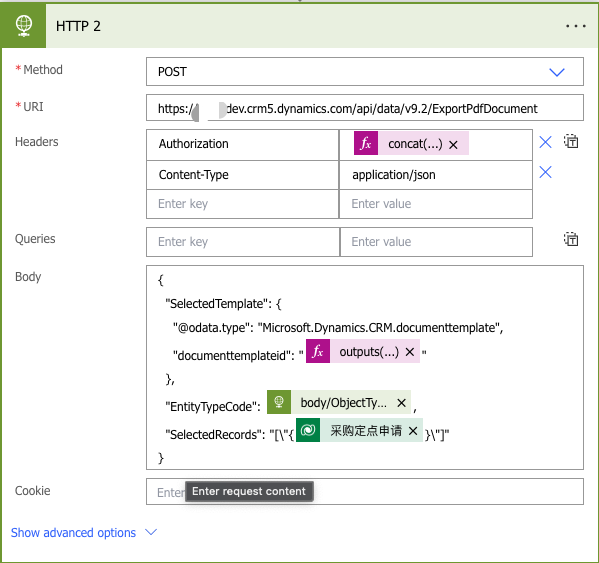
Dynamics365 ExportPdfTemplateExportWordTemplate两个Action调用的body构造
这两天在用ExportPdfTemplate做pdf导出功能时,遇到了如下问题InnerException : Microsoft.OData.ODataException: An unexpected StartArray node was found when reading from the JSON reader. A PrimitiveValue node was expected. 我的场景是使用power automate…...

Java 程序调试与生产问题排查工具Arthas
好的,以下是修改后的博客内容,将公司信息替换为通用的占位符: 深入探索 Arthas:Java 程序调试与生产问题排查的利器 在 Java 开发中,调试和诊断问题往往是一个复杂且耗时的过程。Arthas(Alibaba Java Dia…...

day26图像处理OpenCV
文章目录 一、OpenCV1.介绍2.下载3.图像的表示4.图像的基本操作4.1图片读取或创建4.1.1读取4.1.2创建 4.2创建窗口4.3显示图片4.3.1设置读取的图片4.3.2设置显示多久4.3.3释放 4.4.保存图片4.5图片切片(剪裁)4.6图片大小调节 5.在图像中绘值5.1绘制直线5…...
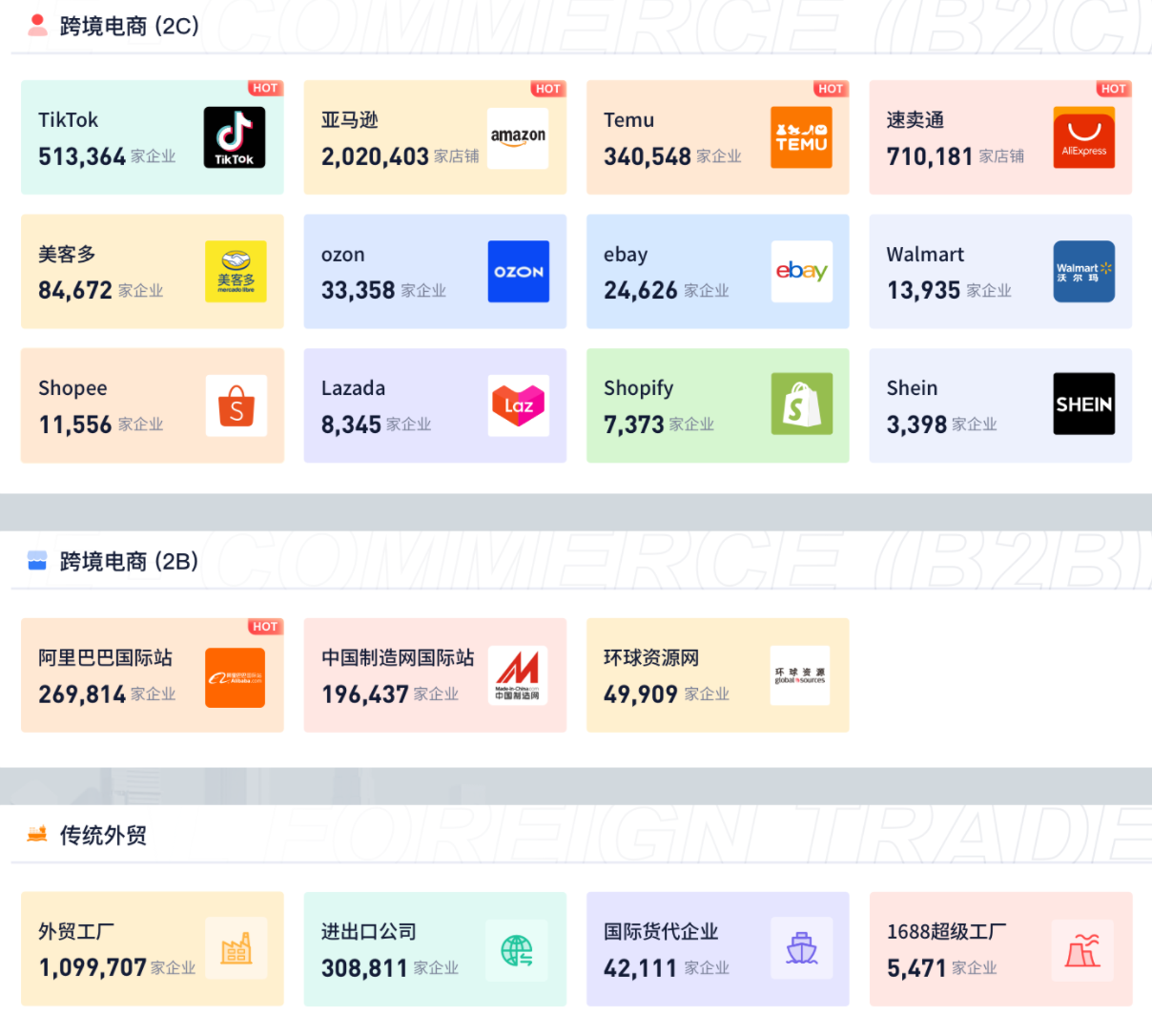
国际物流怎么找客户?选择适合自己的企业拓客平台
在国际物流行业,获客一直是企业发展的核心难题。无论是跨境电商、传统外贸,还是国际货代,找到精准的客户资源并高效转化,是决定企业能否抢占市场蓝海的关键。今天,我们就来聊聊如何选择一个真正适合的国际物流拓客平台…...

2025年Y1大型游乐设施修理证报考要求
Y1大型游乐设施修理证是从事大型游乐设施维修、保养的必备资质,由国家市场监督管理总局颁发。报考需满足以下条件: 1. 基本条件 年龄:18周岁以上,60周岁以下; 学历:初中及以上文化程度; 健康…...

第四十六篇 人力资源管理数据仓库架构设计与高阶实践
声明:文章内容仅供参考,需仔细甄别。文中技术名称属相关方商标,仅作技术描述;代码示例为交流学习用途;案例数据已脱敏,技术推荐保持中立;法规解读仅供参考,请以《网络安全法》《数据…...

分布式ID生成算法:雪花算法和UUID
在分布式系统中,生成全局唯一ID是核心需求之一。雪花算法和UUID是两种广泛使用的解决方案。 1. 雪花算法 工作原理 分布式ID生成器:由Twitter开源,专为分布式系统设计。组成结构(64位二进制): 符号位&…...
高效查询Redis中大数据的实践与优化指南
个人名片 🎓作者简介:java领域优质创作者 🌐个人主页:码农阿豪 📞工作室:新空间代码工作室(提供各种软件服务) 💌个人邮箱:[2435024119qq.com] 📱个人微信&a…...

操作系统 4.2-键盘
键盘中断初始化和处理 提取的代码如下: // con_init 函数,初始化控制台(包括键盘)的中断 void con_init(void) {set_trap_gate(0x21, &keyboard_interrupt); } // 键盘中断处理函数 .globl _keyboard_interrupt _keyboard…...
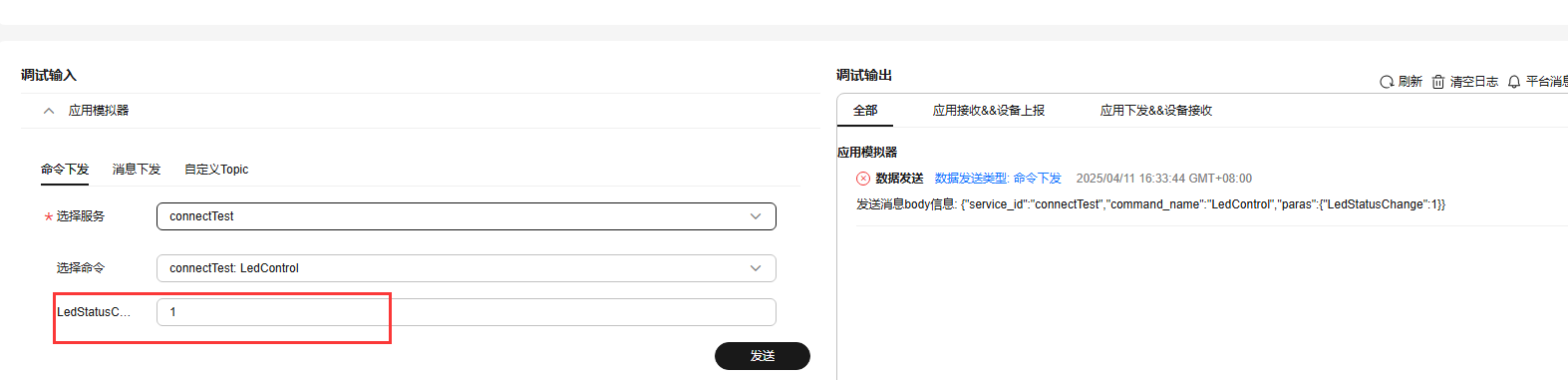
STM32+EC600E 4G模块 与华为云平台通信
前言 由于在STM32巡回研讨会上淘了一块EC600E4G模块以及刚办完电信卡多了两张副卡,副卡有流量刚好可以用一下,试想着以后画一块ESP32板子搭配这个4G模块做个随身WIFI,目前先用这个模块搭配STM32玩一下云平顺便记录一下。 实验目的 实现STM…...

进行性核上性麻痹患者,饮食 “稳” 健康
进行性核上性麻痹作为一种复杂且罕见的神经系统退行性疾病,给患者的身体机能和日常生活带来严重挑战。在积极接受专业治疗的同时,合理的饮食安排对于维持患者营养状况、缓解症状及提升生活质量起着关键作用。以下为患者提供一些健康饮食建议。 首先&…...
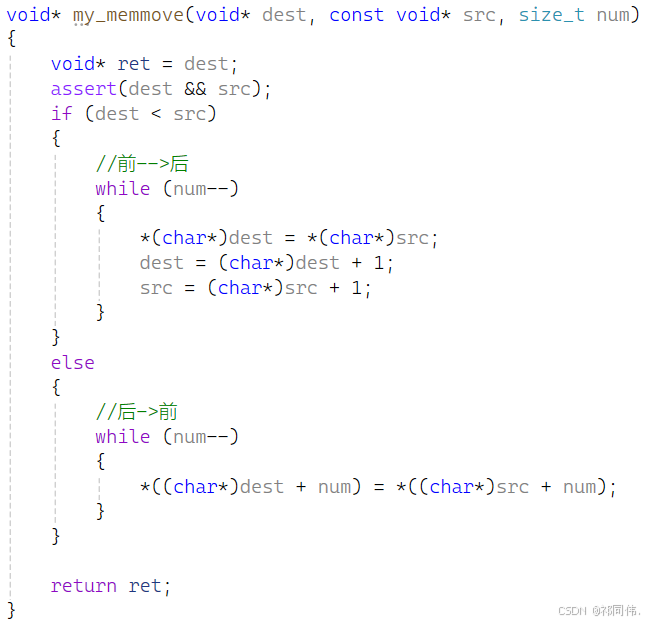
【数据结构 · 初阶】- 顺序表
目录 一、线性表 二、顺序表 1.实现动态顺序表 SeqList.h SeqList.c Test.c 问题 经验:free 出问题,2种可能性 解决问题 (2)尾删 (3)头插,头删 (4)在 pos 位…...
NHANES指标推荐:aMED
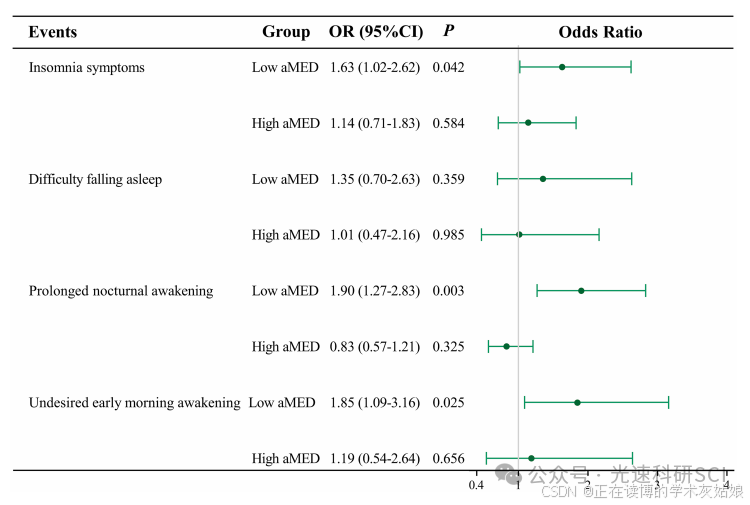
文章题目:The moderating effect of alternate Mediterranean diet on the association between sedentary behavior and insomnia in postmenopausal women DOI:10.3389/fnut.2024.1516334 中文标题:替代性地中海饮食对绝经后女性久坐行为与…...

ngx_cycle_modules
Ubuntu 下 nginx-1.24.0 源码分析 - ngx_cycle_modules-CSDN博客 定义在 src/core/ngx_module.c ngx_int_t ngx_cycle_modules(ngx_cycle_t *cycle) {/** create a list of modules to be used for this cycle,* copy static modules to it*/cycle->modules ngx_pcalloc(…...
Spring Cloud 远程调用
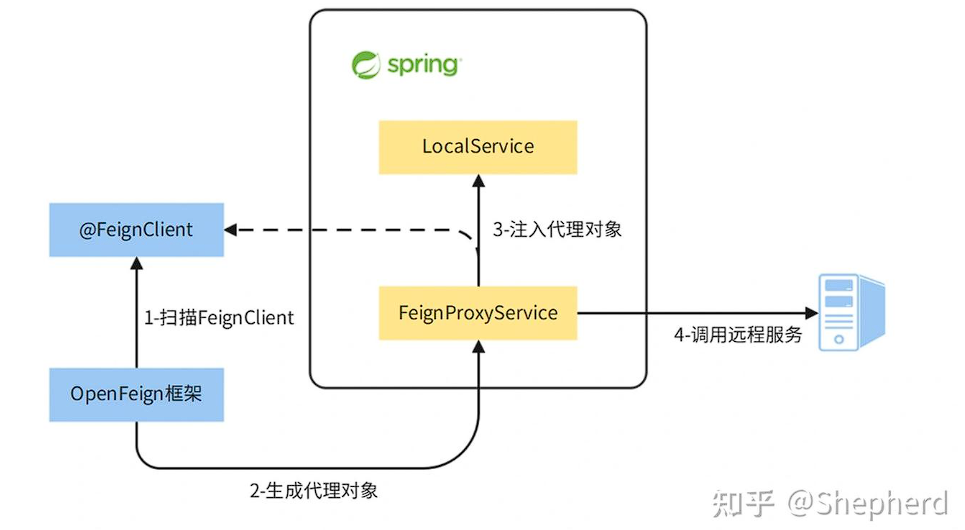
4.OpenFeign的实现原理是什么? 在使用OpenFeign的时候,主要关心两个注解,EnableFeignClients和FeignClient。整体的流程分为以下几个部分: 启用Feign代理,通过在启动类上添加EnableFeignClients注解,开启F…...
)
YOLO学习笔记 | YOLOv8环境搭建全流程指南(2025.4)
===================================================== github:https://github.com/MichaelBeechan CSDN:https://blog.csdn.net/u011344545 ===================================================== YOLOv8环境搭建 一、环境准备与工具配置1. Conda虚拟环境搭建2. CUDA与…...
创建docx文档和表格)
使用Apache POI(Java)创建docx文档和表格
1、引入poi 依赖组件 <dependency><groupId>org.apache.poi</groupId><artifactId>poi-scratchpad</artifactId><version>4.0.0</version> </dependency> <dependency><groupId>org.apache.poi</groupId>&…...
力扣 — — 最长公共子序列
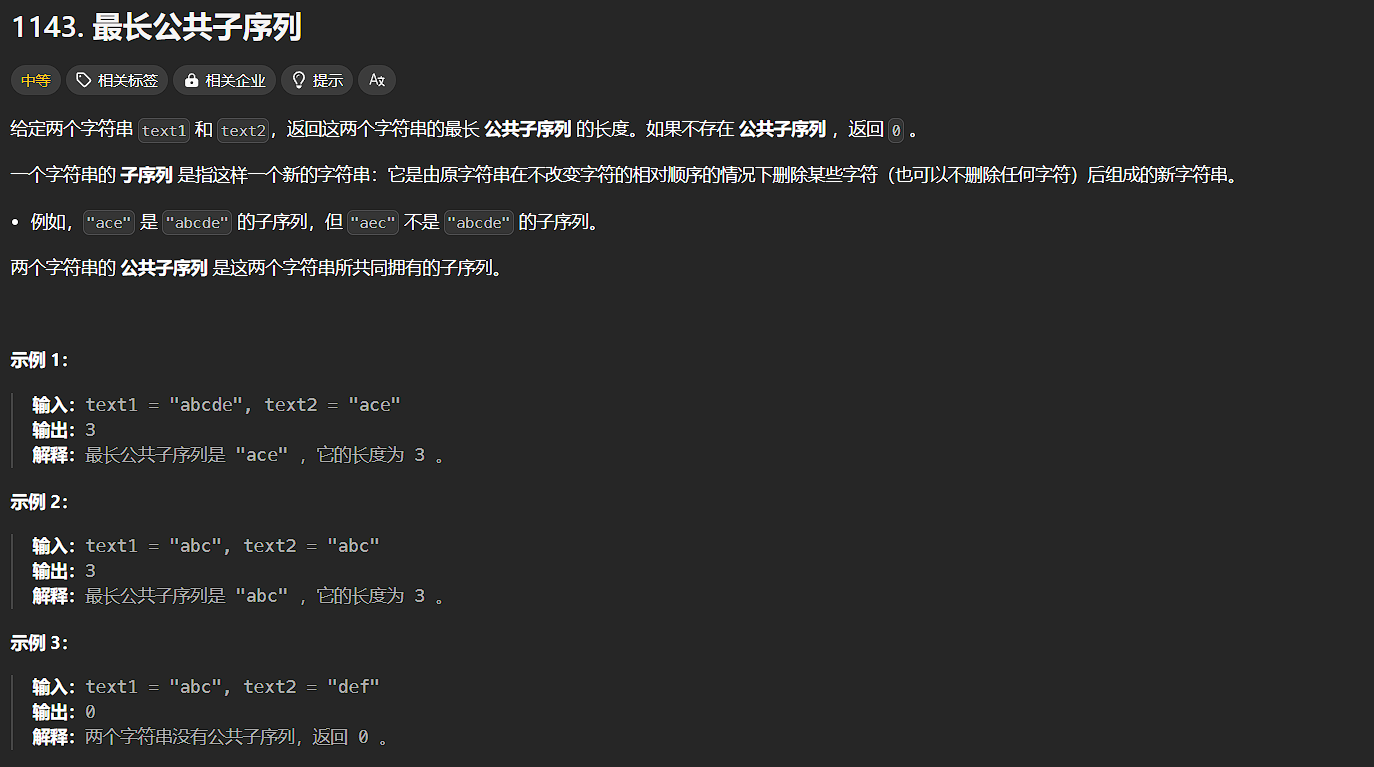
力扣 — — 最长公共子序列 最长公共子序列 题源:1143. 最长公共子序列 - 力扣(LeetCode) 题目: 分析: 一道经典的题目:最长公共子序列(LCS) 题目大意:求两个字符串的最长公共序列。 算法&…...

当一个 HTTP 请求发往 Kubernetes(K8s)部署的微服务时,整个过程流转时怎样的?
以下是一个简单的示意图来展示这个过程: 1. 请求发起 客户端(可以是浏览器、移动应用或者其他服务)发起一个 HTTP 请求到目标微服务的地址。这个地址可以是服务的域名、IP 地址或者 Kubernetes 服务的 ClusterIP、NodePort 等。 2. 外部流量…...
面向对象--关联知识点(1)命名空间)
C#核心学习(十五)面向对象--关联知识点(1)命名空间
目录 一、命名空间基本概念:代码的"虚拟文件夹" 二 、命名空间的普通使用 三 、不同命名空间中相互使用 需要引用命名空间或指明出处 四、命名空间可以包裹命名空间(嵌套命名空间使用) 五、 关于修饰类的访问修饰符 一、命名空…...

淘宝商品数据实时抓取 API 开发指南:从接口申请到数据解析实战
一、引言 在当今电商蓬勃发展的时代,淘宝作为国内电商巨头,其平台上汇聚了海量商品信息。对于电商从业者、数据分析爱好者以及众多依赖淘宝商品数据开展业务的企业而言,能够实时获取淘宝商品数据具有极高价值。例如,电商运营者…...
)
【嵌入式硬件】LAN9253说明书(中文版)
目录 1.介绍 1.1总体介绍 1.2模式介绍 1.2.1微控制器模式: 1.2.2 扩展模式 1.2.3 数字IO模式 1.2.4 各模式图 2.引脚说明 2.1 引脚总览 2.2 引脚描述 2.2.1 LAN端口A引脚 2.2.2 LAN端口B引脚 2.2.3 LAN端口A和、B电源和公共引脚 2.2.4 SPI/SQI PINS 2.2.5 分布式时…...
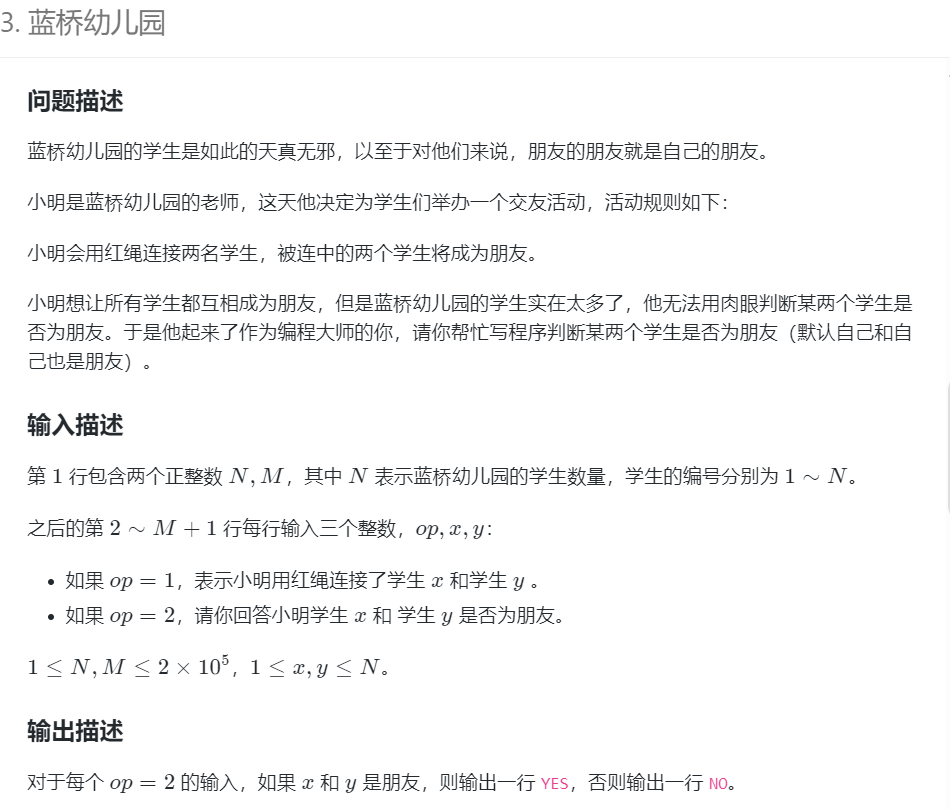
蓝桥杯-蓝桥幼儿园(Java-并查集)
并查集的核心思想 并查集主要由两个操作构成: Find:查找某个元素所在集合的根节点。并查集的特点是,每个元素都指向它自己的父节点,根节点的父节点指向它自己。查找过程中可以通过路径压缩来加速后续的查找操作,即将路…...

C++蓝桥杯填空题(攻克版)
片头 嗨~小伙伴们,咱们继续攻克填空题,先把5分拿到手~ 第1题 数位递增的数 这道题,需要我们计算在整数 1 至 n 中有多少个数位递增的数。 什么是数位递增的数呢?一个正整数如果任何一个数位不大于右边相邻的数位。比如…...
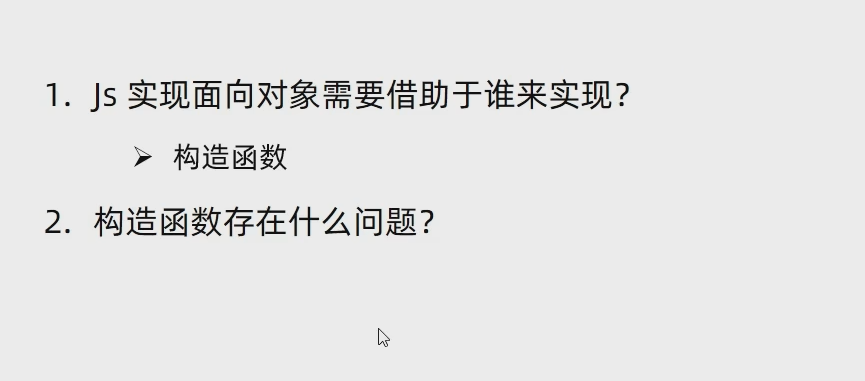
JS 构造函数实现封装性
通过构造函数实现封装性,构造函数生成的对象独立存在互不影响 创建实例对象时,其中函数的创建会浪费内存...
交换机:为音频和视频系统赋能的多面利器)
以太网供电(PoE)交换机:为音频和视频系统赋能的多面利器
近年来,物联网(IoT)视频设备的普及浪潮正以稳健的步伐持续推进。诸如摄像机、支持视频功能的办公自动化系统等物联网视频设备,凭借其远程会议支持、安全性强化以及便捷性提升等诸多优势,赢得了市场的广泛青睐。以太联Intellinet,作…...

《深度剖析分布式软总线:软时钟与时间同步机制探秘》
在分布式系统不断发展的进程中,设备间的协同合作变得愈发紧密和复杂。为了确保各个设备在协同工作时能够有条不紊地进行,就像一场精准的交响乐演出,每个乐器都要在正确的时间奏响音符,分布式软总线中的软时钟与时间同步机制应运而…...
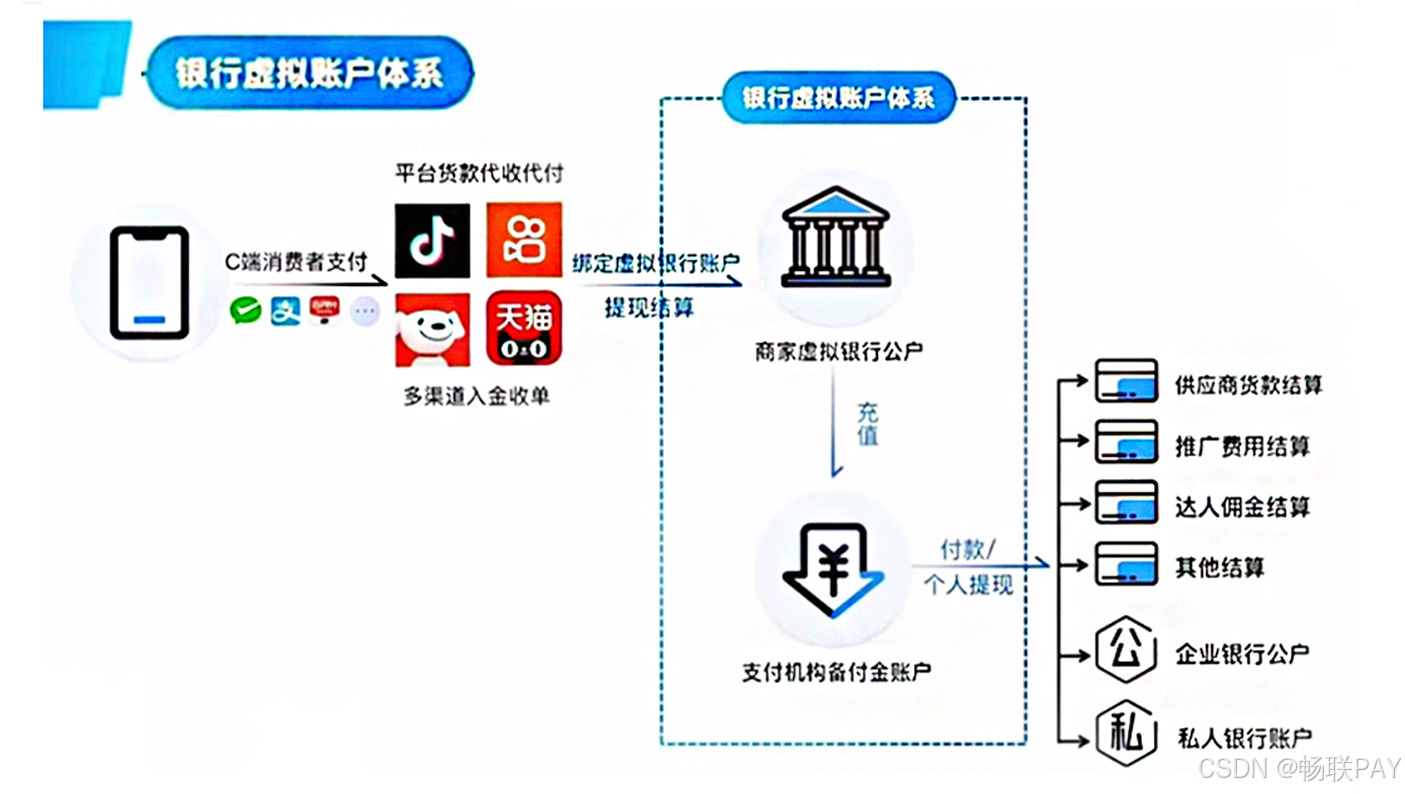
一站式云分账系统!智能虚拟户分账系统成电商合规“刚需”
电商智能分账解决:电商一站式破解多平台资金管理难题集中管理分账,分账后秒到,并为针对电商行业三大核心痛点提供高效应对策略: 1. 票据合规困境 智能对接上下游交易数据流,构建自动化票据协同机制,有效规…...

服务器加空间失败 growpart /dev/vda 1
[rootecm-2c5 ~]# growpart /dev/vda 1 unexpected output in sfdisk --version [sfdisk,来自 util-linux 2.23.2] [rootecm-2c5 ~]# xfs_info /dev/vda1 meta-data/dev/vda1 isize512 agcount21, agsize1310656 blks sectsz512 attr2, projid32bit1 crc1 finobt0…...