
VLM-R1GRPO微调,强化学习训练, 实战训练教程(2)
https://www.dong-blog.fun/post/2013
VLM-R1GRPO微调, 实战训练教程(1):
https://www.dong-blog.fun/post/1961
本博客这次使用多图进行GRPO。
官方git项目:https://github.com/om-ai-lab/VLM-R1?tab=readme-ov-file
1. 基本介绍
此项目更新了,支持更多功能。
git clone此项目:
git config --global http.proxy "http://127.0.0.1:10828"
git config --global https.proxy "http://127.0.0.1:10828"git clone https://github.com/om-ai-lab/VLM-R1.git --depth=1
This repository supports:
- Full Fine-tuning for GRPO: see run_grpo_rec.sh
- Freeze Vision Modules: set freeze_vision_modules as true in the script.
- LoRA Fine-tuning for GRPO: see run_grpo_rec_lora.sh
- Multi-node Training: see multinode_training_demo.sh
- Multi-image Input Training: see run_grpo_gui.sh
- For your own data: see here
- Support various VLMs: see How to add a new model, now we support QwenVL and InternVL
2. 自有数据
单图:
{"id": 1,"image": "Clevr_CoGenT_TrainA_R1/data/images/CLEVR_trainA_000001_16885.png","conversations": [{"from": "human", "value": "<image>What number of purple metallic balls are there?"},{"from": "gpt", "value": "0"}]
}
多图:
{"id": 1,"image": ["Clevr_CoGenT_TrainA_R1/data/images/CLEVR_trainA_000001_16885.png", "Clevr_CoGenT_TrainA_R1/data/images/CLEVR_trainA_000001_16886.png"],"conversations": [{"from": "human", "value": "<image><image>What number of purple metallic balls in total within the two images?"},{"from": "gpt", "value": "3"}]
}
- 数据加载部分已经支持多图:
# ... existing code ...
if isinstance(item['image'], list):# if the image is a list, then it is a list of images (for multi-image input)item['image_path'] = [os.path.join(image_folder, image) for image in item['image']]del item['image'] # remove the image column so that it can be loaded later
# ... existing code ...
- 对话构建部分也支持多图:
# ... existing code ...
'prompt': [{'role': 'user','content': [*({'type': 'image', 'text': None} for _ in range(len(example['image_path']))),{'type': 'text', 'text': question_prompt.format(Question=example['problem'])}]
}]
# ... existing code ...
训练流程架构
VLMGRPOTrainer
├── 初始化阶段
│   ├── 加载基础模型 (支持LoRA和PEFT)
│   ├── 冻结视觉模块 (根据配置)
│   ├── 创建参考模型 (用于KL散度计算)
│   ├── 加载奖励模型集合 (支持多奖励函数融合)
│   └── 配置生成参数 (max_completion_length/temperature等)
│
├── 训练步骤
│   ├── 生成阶段
│   │   ├── 使用基础模型生成候选响应 (num_generations次/样本)
│   │   └── 使用vLLM加速生成 (可选)
│   │
│   ├── 奖励计算
│   │   ├── 调用所有奖励函数计算综合得分
│   │   └── 应用reward_weights加权
│   │
│   ├── 策略优化
│   │   ├── 计算策略梯度 (带epsilon裁剪)
│   │   ├── 多步迭代优化 (num_iterations次/批)
│   │   └── 同步参考模型 (TR-DPO策略)
│   │
│   └── 日志记录
│       ├── 记录(prompt, completion)样本
│       └── 监控KL散度/奖励值等指标
│
└── 特殊处理├── DeepSpeed ZeRO-3支持├── 梯度检查点优化└── 多GPU分布式训练
关键实现片段
# 生成阶段核心逻辑(简化)
def training_step(self, model, inputs):# 多步迭代优化for _ in range(self.num_iterations): # 生成候选响应with torch.no_grad():outputs = model.generate(inputs, generation_config=self.generation_config,num_return_sequences=self.num_generations)# 计算奖励值rewards = []for reward_func in self.reward_funcs:if isinstance(reward_func, PreTrainedModel):reward_values = reward_func(outputs).logitselse:  # 自定义奖励函数reward_values = reward_func(inputs["prompt"], outputs)rewards.append(reward_values)total_reward = torch.stack(rewards).sum(0)# 策略梯度计算policy_logits = model(outputs, labels=outputs).logitsref_logits = self.ref_model(outputs, labels=outputs).logits# 带裁剪的梯度更新ratio = (policy_logits - ref_logits).exp()clipped_ratio = torch.clamp(ratio, 1-self.epsilon, 1+self.epsilon)loss = -torch.min(ratio * total_reward, clipped_ratio * total_reward).mean()# 梯度累积loss = loss / self.args.gradient_accumulation_stepsself.accelerator.backward(loss)# TR-DPO模型同步if self.global_step % self.ref_model_sync_steps == 0:self._sync_ref_model()# 参考模型同步逻辑
def _sync_ref_model(self):# 指数移动平均更新alpha = self.args.ref_model_mixup_alphafor param, ref_param in zip(self.model.parameters(), self.ref_model.parameters()):ref_param.data = alpha * param.data + (1 - alpha) * ref_param.data
3. 制作训练数据
x05生成训练数据集代码.py
import os
import json
from pathlib import Pathdef generate_jsonl_dataset():# 1. 读取prompt2.txt里的文件内容with open('prompt2.txt', 'r', encoding='utf-8') as f:prefix_str = f.read().strip()# 基础路径base_path = "/data/xiedong/VLM-train-project/tasks-json-ui-doctor"# 输出文件output_file = "ui_doctor_dataset.jsonl"# 获取所有子目录并按数字排序subdirs = [d for d in os.listdir(base_path) if os.path.isdir(os.path.join(base_path, d))]# 过滤出纯数字的子目录并按数字大小排序numeric_subdirs = sorted([d for d in subdirs if d.isdigit()],key=lambda x: int(x))sample_id = 1with open(output_file, 'w', encoding='utf-8') as out_f:# 遍历每个子目录(已排序)for dir_name in numeric_subdirs:dir_path = os.path.join(base_path, dir_name)# 获取当前目录下的所有step_*.json文件并按数字排序json_files = sorted([f for f in os.listdir(dir_path) if f.startswith('step_') and f.endswith('.json')],key=lambda x: int(x.split('_')[1].split('.')[0]))# 遍历排序后的json文件for file_name in json_files:json_path = os.path.join(dir_path, file_name)# 读取json文件with open(json_path, 'r', encoding='utf-8') as json_f:data = json.load(json_f)# 处理input和output字段input_data = data['input']output_data = data['output']# 收集图片路径image_paths = []# 处理screen_path1if 'screen_path1' in input_data and input_data['screen_path1']:img_path = os.path.join(dir_name, input_data['screen_path1'])image_paths.append(img_path)# 处理screen_path2if 'screen_path2' in input_data and input_data['screen_path2']:img_path = os.path.join(dir_name, input_data['screen_path2'])image_paths.append(img_path)# 构建conversationsconversations = [{"from": "human","value": prefix_str + json.dumps(input_data, ensure_ascii=False)},{"from": "gpt","value": json.dumps(output_data, ensure_ascii=False)}]# 构建最终样本sample = {"id": sample_id,"image": image_paths,"conversations": conversations}# 写入jsonl文件out_f.write(json.dumps(sample, ensure_ascii=False) + '\n')sample_id += 1print(f"数据集已生成,共{sample_id-1}个样本,保存到{output_file}")if __name__ == "__main__":generate_jsonl_dataset()
一个json是这个样子:
==================================================
完整的JSON结构:
==================================================
{"id": 1,"image": ["43688/43688_2.jpg","43688/43688_3.jpg"],"conversations": [{"from": "human","value": "# Role: 手机任务执行专家\n\n## Profile\n- author: LangGPT\n- version: 1.0\n- language: 中英文\n- description: 你是一个手机任务执行专家,可以根据UI图和任务提示,输出具体的操作动作\n\n## Skills\n- 根据UI图识别出当前所在UI界面的信息\n- 为了完成任务,需要输出具体动作\n- 分析任务描述,提供精确的执行步骤\n- 精通不同类型的动作空间,并能生成相应的操作指令\n\n## Background\n在手机任务执行中,AI需要根据任务描述、UI图以及历史操作,确定精确的动作,并给出相应的操作参数。\n下面这个json是一个输入示例:\n{\n    \"task_content\": \"在书架中找到剑来,前往内容页,使用章节下载功能,先选择第5章,第7章,再选择第10章进行下载。\",\n    \"task_path\": {\n        \"1\": \"打开APP\",\n        \"2\": \"点击剑来\",\n        \"3\": \"点击小说界面\",\n        \"4\": \"点击订阅\",\n        \"5\": \"点击继续订阅\",\n        \"6\": \"等待\",\n        \"7\": \"点击自定义\",\n        \"8\": \"点击第5章 道破\",\n        \"9\": \"点击第7章 碗水\",\n        \"10\": \"等待\",\n        \"11\": \"点击第10章 食牛之气\",\n        \"12\": \"点击下载\",\n        \"13\": \"等待\",\n        \"14\": \"等待\"\n    },\n    \"screen_path1\": \"9953_0.jpg\",\n    \"screen_path2\": \"9953_1.jpg\",\n    \"history_path_all\": [\n        \"打开APP\"\n    ],\n    \"app_name\": \"起点读书\",\n    \"action_type_list\": {\n        \"open_app\": \"打开APP\",\n        \"click\": \"点击\",\n        \"long_click\": \"长按\",\n        \"type\": \"输入\",\n        \"swipe\": \"滑动\",\n        \"task_completed\": \"任务完成\",\n        \"task_impossible\": \"任务无法完成\",\n        \"inquiry\": \"反问\",\n        \"wait\": \"等待\",\n        \"back\": \"回退\"\n    }\n}\n输入的json中的字段的含义是:\n- task_content 当前任务的总体描述\n- task_path 当前任务所需要的执行步骤\n- screen_path1 上次步骤中的手机UI图,真实情况下这是一张图而不是路径名\n- screen_path2 这次步骤中的手机UI图,真实情况下这是一张图而不是路径名\n- history_path_all 之前执行过的执行步骤\n- app_name 当前操作的APP名称\n- action_type_list 允许的动作空间的类型\n\n\n\n## 动作空间\n\n你的输出是此时应该进行的执行步骤,使用动作空间里的动作表达,下面是动作空间的所有允许操作:\n\n- open_app  打开APP,这代表打开微信:\n\"action_parameter\": {\n    \"open_app\": \"微信\"\n}\n\n- click 点击区域对应边界框,这代表点击这个框\"37,378,227,633\"里面的区域:\n\"action_parameter\": {\n    \"click\": \"37,378,227,633\"\n}\n\n- long_click 长按区域对应边界框,这代表长按这个框\"763,2183,1151,2706\"里面的区域:\n\"action_parameter\": {\n    \"long_click\": \"763,2183,1151,2706\"\n}\n\n- type 输入内容,这代表输入\"无锡\"\n\"action_parameter\": {\n    \"type\": \"无锡\"\n}\n\n• swipe 滑动区域,这代表从坐标\"158,1557\"滑动到\"122,1253\":\n\"action_parameter\": {\n    \"swipe\": \"158,1557,122,1253\"\n}\n\n• task_completed 任务完成,这代表任务已完成并返回描述信息:\n\"action_parameter\": {\n    \"task_completed\": \"任务已完成,已在视频号中搜索并浏览了与无锡相关的视频。视频内容介绍了无锡的城市风貌和地标建筑。\"\n}\n\n• inquiry 反问,这代表返回反问内容和候选列表:\n\"action_parameter\": {\n    \"inquiry\": \"{\\n  \\\"Question\\\": \\\"搜索笑脸后有多个表情包,请问您想发送哪一个?\\\",\\n  \\\"CandidatesList\\\": \\\"['黄色大笑脸', '手绘风格笑脸', '红晕笑脸', '黄色微笑脸', '小笑脸', '手指笑脸', '捂脸笑脸', '狗狗笑脸', '向日葵笑脸', '简单线条笑脸', '气到变形笑脸', '太阳笑脸', '躺着的笑脸', '狡黠笑脸']\\\",\\n  \\\"PicDescribe\\\": \\\"聊天界面中显示了表情搜索结果,包含多个笑脸表情包。\\\",\\n  \\\"AnswerIndex\\\": 0\\n}\"\n}\n\n• wait 等待,这代表等待:\n\"action_parameter\": {\n    \"wait\": \"\"\n}\n\n• back 回退,这代表回退:\n\"action_parameter\": {\n    \"back\": \"\"\n}\n\n## Goals\n根据任务描述、UI图和历史执行步骤,生成准确的手机操作动作。\n\n## OutputFormat\n{\n    \"action_type\": \"{动作类型}\",\n    \"action_parameter\": {动作参数},\n    \"action_description\": \"{动作描述}\"\n}\n这是一个输出例子,输出的json需要有字段action_type、action_parameter、action_description\n{\n    \"action_type\": \"click\",\n    \"action_parameter\": {\n        \"click\": \"49,721,1368,1008\"\n    },\n    \"action_description\": \"点击剑来\"\n}\n\n## Rules\n1. 根据输入的任务内容和UI图,生成合适的手机操作。\n2. 动作类型和参数需要与实际手机操作的UI区域对应。\n3. 输出需要是json字符串,而且是有效的动作表达。\n\n## Workflows\n1. 收集并分析任务描述、UI图及历史步骤。\n2. 根据UI图识别当前步骤的具体位置和操作类型。\n3. 生成与任务相关的动作空间,并匹配合适的动作。\n4. 输出符合要求的手机操作动作,需要是json字符串表达格式。\n\n## 开始任务\n\n请根据以下的任务描述、UI图以及历史操作,确定精确的动作,输出相应的操作参数:{\"task_content\": \"打开淘宝 app。点击屏幕底部的 '购物车' 图标。浏览购物车中的商品,找到你喜欢的商品并点击进入商品详情页。点击商品店铺中的 '关注' 按钮。\", \"task_path\": {\"1\": \"打开APP\", \"2\": \"点击底部购物车\", \"3\": \"点击商品金丝楠木书签定制高端送礼\", \"4\": \"等待\", \"5\": \"点击店铺\", \"6\": \"点击关注\", \"7\": \"点击X按钮\", \"8\": \"点击UIAgent标注辅助工具\"}, \"screen_path1\": \"<image>\", \"screen_path2\": \"<image>\", \"history_path_all\": [\"打开APP\", \"点击底部购物车\", \"点击商品金丝楠木书签定制高端送礼\"], \"app_name\": \"淘宝\", \"action_type_list\": {\"open_app\": \"打开APP\", \"click\": \"点击\", \"long_click\": \"长按\", \"type\": \"输入\", \"swipe\": \"滑动\", \"task_completed\": \"任务完成\", \"task_impossible\": \"任务无法完成\", \"inquiry\": \"反问\", \"wait\": \"等待\", \"back\": \"回退\"}}"},{"from": "gpt","value": "{\"action_type\": \"wait\", \"action_parameter\": {\"wait\": \"\"}, \"action_description\": \"等待\"}"}]
}==================================================
解析conversations中的value字段:
==================================================对话 1 (human):
----------------------------------------
(原始字符串内容):
# Role: 手机任务执行专家## Profile
- author: LangGPT
- version: 1.0
- language: 中英文
- description: 你是一个手机任务执行专家,可以根据UI图和任务提示,输出具体的操作动作## Skills
- 根据UI图识别出当前所在UI界面的信息
- 为了完成任务,需要输出具体动作
- 分析任务描述,提供精确的执行步骤
- 精通不同类型的动作空间,并能生成相应的操作指令## Background
在手机任务执行中,AI需要根据任务描述、UI图以及历史操作,确定精确的动作,并给出相应的操作参数。
下面这个json是一个输入示例:
{"task_content": "在书架中找到剑来,前往内容页,使用章节下载功能,先选择第5章,第7章,再选择第10章进行下载。","task_path": {"1": "打开APP","2": "点击剑来","3": "点击小说界面","4": "点击订阅","5": "点击继续订阅","6": "等待","7": "点击自定义","8": "点击第5章 道破","9": "点击第7章 碗水","10": "等待","11": "点击第10章 食牛之气","12": "点击下载","13": "等待","14": "等待"},"screen_path1": "9953_0.jpg","screen_path2": "9953_1.jpg","history_path_all": ["打开APP"],"app_name": "起点读书","action_type_list": {"open_app": "打开APP","click": "点击","long_click": "长按","type": "输入","swipe": "滑动","task_completed": "任务完成","task_impossible": "任务无法完成","inquiry": "反问","wait": "等待","back": "回退"}
}
输入的json中的字段的含义是:
- task_content 当前任务的总体描述
- task_path 当前任务所需要的执行步骤
- screen_path1 上次步骤中的手机UI图,真实情况下这是一张图而不是路径名
- screen_path2 这次步骤中的手机UI图,真实情况下这是一张图而不是路径名
- history_path_all 之前执行过的执行步骤
- app_name 当前操作的APP名称
- action_type_list 允许的动作空间的类型## 动作空间你的输出是此时应该进行的执行步骤,使用动作空间里的动作表达,下面是动作空间的所有允许操作:- open_app  打开APP,这代表打开微信:
"action_parameter": {"open_app": "微信"
}- click 点击区域对应边界框,这代表点击这个框"37,378,227,633"里面的区域:
"action_parameter": {"click": "37,378,227,633"
}- long_click 长按区域对应边界框,这代表长按这个框"763,2183,1151,2706"里面的区域:
"action_parameter": {"long_click": "763,2183,1151,2706"
}- type 输入内容,这代表输入"无锡"
"action_parameter": {"type": "无锡"
}• swipe 滑动区域,这代表从坐标"158,1557"滑动到"122,1253":
"action_parameter": {"swipe": "158,1557,122,1253"
}• task_completed 任务完成,这代表任务已完成并返回描述信息:
"action_parameter": {"task_completed": "任务已完成,已在视频号中搜索并浏览了与无锡相关的视频。视频内容介绍了无锡的城市风貌和地标建筑。"
}• inquiry 反问,这代表返回反问内容和候选列表:
"action_parameter": {"inquiry": "{\n  \"Question\": \"搜索笑脸后有多个表情包,请问您想发送哪一个?\",\n  \"CandidatesList\": \"['黄色大笑脸', '手绘风格笑脸', '红晕笑脸', '黄色微笑脸', '小笑脸', '手指笑脸', '捂脸笑脸', '狗狗笑脸', '向日葵笑脸', '简单线条笑脸', '气到变形笑脸', '太阳笑脸', '躺着的笑脸', '狡黠笑脸']\",\n  \"PicDescribe\": \"聊天界面中显示了表情搜索结果,包含多个笑脸表情包。\",\n  \"AnswerIndex\": 0\n}"
}• wait 等待,这代表等待:
"action_parameter": {"wait": ""
}• back 回退,这代表回退:
"action_parameter": {"back": ""
}## Goals
根据任务描述、UI图和历史执行步骤,生成准确的手机操作动作。## OutputFormat
{"action_type": "{动作类型}","action_parameter": {动作参数},"action_description": "{动作描述}"
}
这是一个输出例子,输出的json需要有字段action_type、action_parameter、action_description
{"action_type": "click","action_parameter": {"click": "49,721,1368,1008"},"action_description": "点击剑来"
}## Rules
1. 根据输入的任务内容和UI图,生成合适的手机操作。
2. 动作类型和参数需要与实际手机操作的UI区域对应。
3. 输出需要是json字符串,而且是有效的动作表达。## Workflows
1. 收集并分析任务描述、UI图及历史步骤。
2. 根据UI图识别当前步骤的具体位置和操作类型。
3. 生成与任务相关的动作空间,并匹配合适的动作。
4. 输出符合要求的手机操作动作,需要是json字符串表达格式。## 开始任务请根据以下的任务描述、UI图以及历史操作,确定精确的动作,输出相应的操作参数:{"task_content": "打开淘宝 app。点击屏幕底部的 '购物车' 图标。浏览购物车中的商品,找到你喜欢的商品并点击进入商品详情页。点击商品店铺中的 '关注' 按钮。", "task_path": {"1": "打开APP", "2": "点击底部购物车", "3": "点击商品金丝楠木书签定制高端送礼", "4": "等待", "5": "点击店铺", "6": "点击关注", "7": "点击X按钮", "8": "点击UIAgent标注辅助工具"}, "screen_path1": "<image>", "screen_path2": "<image>", "history_path_all": ["打开APP", "点击底部购物车", "点击商品金丝楠木书签定制高端送礼"], "app_name": "淘宝", "action_type_list": {"open_app": "打开APP", "click": "点击", "long_click": "长按", "type": "输入", "swipe": "滑动", "task_completed": "任务完成", "task_impossible": "任务无法完成", "inquiry": "反问", "wait": "等待", "back": "回退"}}对话 2 (gpt):
----------------------------------------
(JSON格式内容):docker run -it --gpus '"device=1,2,3"' \
--shm-size=64g \
-v ./tasks-json-ui-doctor:/tasks-json-ui-doctor \
-v ./ui_doctor_dataset.jsonl:/datasets/ui_doctor_dataset.jsonl \
-v ./VLM-R1:/VLM-R1 \
--net host \
kevinchina/deeplearning:2.5.1-cuda12.4-cudnn9-devel-vlmr1 bash
{"action_type": "wait","action_parameter": {"wait": ""},"action_description": "等待"
}
4. Docker环境
docker build -f Dockerfile -t kevinchina/deeplearning:2.5.1-cuda12.4-cudnn9-devel-vlmr1-0401 .或者:docker build --network=host --build-arg http_proxy=http://101.136.19.26:10828 --build-arg https_proxy=http://101.136.19.26:10828 -f Dockerfile -t kevinchina/deeplearning:2.5.1-cuda12.4-cudnn9-devel-vlmr1-0401 .
安装一些包:
pip install babel python-Levenshtein matplotlib pycocotoolsdocker commit 810854b5d4b4 kevinchina/deeplearning:2.5.1-cuda12.4-cudnn9-devel-vlmr1-0401-package
5. 开始训练
启动容器:
cd /data/xiedong/VLM-train-projectdocker run -it --gpus '"device=1,2,3,4,5"' \
--shm-size=64g \
-v ./tasks-json-ui-doctor:/tasks-json-ui-doctor \
-v ./ui_doctor_dataset.jsonl:/datasets/ui_doctor_dataset.jsonl \
-v ./Qwen2.5-VL-7B-Instruct:/Qwen2.5-VL-7B-Instruct \
--net host \
kevinchina/deeplearning:2.5.1-cuda12.4-cudnn9-devel-vlmr1-0401-package-rdma bash
在容器中编辑启动脚本:
cd /workspacevim src/open-r1-multimodal/run_scripts/run_grpo_gui.sh
修改 --nproc_per_node 指定显卡,
修改 --model_name_or_path 指定模型文件,
修改 --image_folders 指定图片路径前缀,
修改 --data_file_paths 指定训练数据,
修改 --max_prompt_length 模型生成的最大长度,
修改 --num_train_epochs 指定训练轮数,
修改 --per_device_train_batch_size 指定batch。
– num_generations 表示对每个提示(prompt)生成的不同回复数量,全局批次大小(num_processes * per_device_batch_size)必须能被这个值整除
最终我的:
cd src/open-r1-multimodalexport DEBUG_MODE="true"
# export CUDA_VISIBLE_DEVICES=4,5,6,7RUN_NAME="Qwen2.5-VL-3B-GRPO-GUI_multi-image"
export LOG_PATH="./debug_log_$RUN_NAME.txt"torchrun --nproc_per_node="5" \--nnodes="1" \--node_rank="0" \--master_addr="127.0.0.1" \--master_port="22346" \src/open_r1/grpo_jsonl.py \--deepspeed local_scripts/zero3.json \--output_dir output/$RUN_NAME \--model_name_or_path /Qwen2.5-VL-7B-Instruct \--dataset_name none \--image_folders /tasks-json-ui-doctor \--data_file_paths /datasets/ui_doctor_dataset.jsonl \--freeze_vision_modules true \--max_prompt_length 4096 \--num_generations 5 \--per_device_train_batch_size 1 \--gradient_accumulation_steps 1 \--logging_steps 1 \--bf16 \--torch_dtype bfloat16 \--data_seed 42 \--report_to none \--gradient_checkpointing true \--attn_implementation flash_attention_2 \--num_train_epochs 1 \--run_name $RUN_NAME \--save_steps 100 \--save_only_model true
运行训练:
bash src/open-r1-multimodal/run_scripts/run_grpo_gui.sh
训练日志:
{'loss': 0.0, 'grad_norm': 7.915220396365858, 'learning_rate': 9.99982068141064e-07, 'completion_length': 138.40000915527344, 'rewards/accuracy_reward': 0.7174350023269653, 'rewards/format_reward': 1.0, 'reward': 1.7174350023269653, 'reward_std': 0.0657886490225792, 'kl': 0.0004730224609375, 'clip_ratio': 0.0, 'epoch': 0.0}0%| | 3/167300 [00:57<871:05:01, 18.74s/it]
6. 多机多卡
要执行一下命令,安装libibverbs1才能使用rdma网卡,加速训练
sudo apt-get update
sudo apt-get install libibverbs1 -y
docker commit a04ef2131657 kevinchina/deeplearning:2.5.1-cuda12.4-cudnn9-devel-vlmr1-0401-package-rdma
数据集挂载到 /tasks-json-ui-doctor
子目录:tasks_json/
子目录:ui_doctor_dataset.jsonl
cd src/open-r1-multimodalexport DEBUG_MODE="true"RUN_NAME="Qwen2.5-VL-7B-GRPO-GUI_multi-image"
export LOG_PATH="./debug_log_$RUN_NAME.txt"torchrun --nproc_per_node=8 \--nnodes=2 \--node_rank="${RANK}" \--master_addr="${MASTER_ADDR}" \--master_port="${MASTER_PORT}" \src/open_r1/grpo_jsonl.py \--deepspeed local_scripts/zero3.json \--output_dir /output_qwen25vl7b_xd/$RUN_NAME \--model_name_or_path /Qwen2.5-VL-7B-Instruct \--dataset_name none \--image_folders /tasks-json-ui-doctor/tasks_json \--data_file_paths /tasks-json-ui-doctor/ui_doctor_dataset.jsonl \--freeze_vision_modules true \--max_prompt_length 4096 \--num_generations 8 \--per_device_train_batch_size 1 \--gradient_accumulation_steps 1 \--logging_steps 1 \--bf16 \--torch_dtype bfloat16 \--data_seed 42 \--report_to "tensorboard" \--logging_dir "/mnt/cluster123" \--gradient_checkpointing true \--attn_implementation flash_attention_2 \--num_train_epochs 2 \--run_name $RUN_NAME \--save_steps 100 \--save_only_model true \----reward_method "llm"
环境变量:
CUDA_DEVICE_MAX_CONNECTIONS 1
NCCL_DEBUG INFO
NCCL_IB_DISABLE 0
7. tensorboard日志
tensorboard --logdir 目录路径 --host 0.0.0.0
8. 模型推理效果尝试-vllm
开个服务:
docker run -it --rm --gpus '"device=1,2"' -v /ssd/xiedong/checkpoint-2600:/ssd/xiedong/checkpoint-2600 --shm-size 16G --net host kevinchina/deeplearning:llamafactory20250311-3 bashllamafactory-cli webui
启动API,两张卡所以参数tensor-parallel-siz给2。
vllm serve /ssd/xiedong/checkpoint-2600 --max-model-len 16384 --tensor-parallel-size 2 --mm-processor-kwargs '{"min_pixels": 784, "max_pixels": 2352000, "fps": 1}' --limit-mm-per-prompt "image=2"vllm serve /ssd/xiedong/checkpoint-2600 --max-model-len 16384 --tensor-parallel-size 2 --limit-mm-per-prompt "image=2"
随机选一个样本出来的代码:
import json
import randomdef print_random_line_details():jsonl_file = "ui_doctor_dataset.jsonl"try:with open(jsonl_file, 'r', encoding='utf-8') as f:# 读取所有行到列表中lines = f.readlines()if not lines:print(f"错误:文件 {jsonl_file} 是空的")return# 随机选择一行random_line = random.choice(lines)data = json.loads(random_line)  # 解析JSONprint("="*50)print("完整的JSON结构:")print("="*50)print(json.dumps(data, indent=2, ensure_ascii=False))print("\n" + "="*50)print("解析conversations中的value字段:")print("="*50)for i, conv in enumerate(data['conversations'], 1):print(f"\n对话 {i} ({conv['from']}):")print("-"*40)value = conv['value']# 尝试解析为JSONtry:value_data = json.loads(value)print("(JSON格式内容):")print(json.dumps(value_data, indent=2, ensure_ascii=False))except json.JSONDecodeError:# 如果不是JSON,直接打印原始值print("(原始字符串内容):")print(value)except FileNotFoundError:print(f"错误:文件 {jsonl_file} 不存在")except json.JSONDecodeError:print(f"错误:文件 {jsonl_file} 的随机行不是有效的JSON格式")except KeyError:print("错误:JSON结构中缺少'conversations'字段")if __name__ == "__main__":print_random_line_details()
API请求代码:
import requests
import base64# 将图片编码为 base64
def encode_image_to_base64(image_path):with open(image_path, "rb") as image_file:return base64.b64encode(image_file.read()).decode('utf-8')prompt_a = r"""# Role: 手机任务执行专家## Profile
- author: LangGPT
- version: 1.0
- language: 中英文
- description: 你是一个手机任务执行专家,可以根据UI图和任务提示,输出具体的操作动作## Skills
- 根据UI图识别出当前所在UI界面的信息
- 为了完成任务,需要输出具体动作
- 分析任务描述,提供精确的执行步骤
- 精通不同类型的动作空间,并能生成相应的操作指令## Background
在手机任务执行中,AI需要根据任务描述、UI图以及历史操作,确定精确的动作,并给出相应的操作参数。
下面这个json是一个输入示例:
{"task_content": "在书架中找到剑来,前往内容页,使用章节下载功能,先选择第5章,第7章,再选择第10章进行下载。","task_path": {"1": "打开APP","2": "点击剑来","3": "点击小说界面","4": "点击订阅","5": "点击继续订阅","6": "等待","7": "点击自定义","8": "点击第5章 道破","9": "点击第7章 碗水","10": "等待","11": "点击第10章 食牛之气","12": "点击下载","13": "等待","14": "等待"},"screen_path1": "9953_0.jpg","screen_path2": "9953_1.jpg","history_path_all": ["打开APP"],"app_name": "起点读书","action_type_list": {"open_app": "打开APP","click": "点击","long_click": "长按","type": "输入","swipe": "滑动","task_completed": "任务完成","task_impossible": "任务无法完成","inquiry": "反问","wait": "等待","back": "回退"}
}
输入的json中的字段的含义是:
- task_content 当前任务的总体描述
- task_path 当前任务所需要的执行步骤
- screen_path1 上次步骤中的手机UI图,真实情况下这是一张图而不是路径名
- screen_path2 这次步骤中的手机UI图,真实情况下这是一张图而不是路径名
- history_path_all 之前执行过的执行步骤
- app_name 当前操作的APP名称
- action_type_list 允许的动作空间的类型## 动作空间你的输出是此时应该进行的执行步骤,使用动作空间里的动作表达,下面是动作空间的所有允许操作:- open_app  打开APP,这代表打开微信:
"action_parameter": {"open_app": "微信"
}- click 点击区域对应边界框,这代表点击这个框"37,378,227,633"里面的区域:
"action_parameter": {"click": "37,378,227,633"
}- long_click 长按区域对应边界框,这代表长按这个框"763,2183,1151,2706"里面的区域:
"action_parameter": {"long_click": "763,2183,1151,2706"
}- type 输入内容,这代表输入"无锡"
"action_parameter": {"type": "无锡"
}• swipe 滑动区域,这代表从坐标"158,1557"滑动到"122,1253":
"action_parameter": {"swipe": "158,1557,122,1253"
}• task_completed 任务完成,这代表任务已完成并返回描述信息:
"action_parameter": {"task_completed": "任务已完成,已在视频号中搜索并浏览了与无锡相关的视频。视频内容介绍了无锡的城市风貌和地标建筑。"
}• inquiry 反问,这代表返回反问内容和候选列表:
"action_parameter": {"inquiry": "{\n  \"Question\": \"搜索笑脸后有多个表情包,请问您想发送哪一个?\",\n  \"CandidatesList\": \"['黄色大笑脸', '手绘风格笑脸', '红晕笑脸', '黄色微笑脸', '小笑脸', '手指笑脸', '捂脸笑脸', '狗狗笑脸', '向日葵笑脸', '简单线条笑脸', '气到变形笑脸', '太阳笑脸', '躺着的笑脸', '狡黠笑脸']\",\n  \"PicDescribe\": \"聊天界面中显示了表情搜索结果,包含多个笑脸表情包。\",\n  \"AnswerIndex\": 0\n}"
}• wait 等待,这代表等待:
"action_parameter": {"wait": ""
}• back 回退,这代表回退:
"action_parameter": {"back": ""
}## Goals
根据任务描述、UI图和历史执行步骤,生成准确的手机操作动作。## OutputFormat
{"action_type": "{动作类型}","action_parameter": {动作参数},"action_description": "{动作描述}"
}
这是一个输出例子,输出的json需要有字段action_type、action_parameter、action_description
{"action_type": "click","action_parameter": {"click": "49,721,1368,1008"},"action_description": "点击剑来"
}## Rules
1. 根据输入的任务内容和UI图,生成合适的手机操作。
2. 动作类型和参数需要与实际手机操作的UI区域对应。
3. 输出需要是json字符串,而且是有效的动作表达。## Workflows
1. 收集并分析任务描述、UI图及历史步骤。
2. 根据UI图识别当前步骤的具体位置和操作类型。
3. 生成与任务相关的动作空间,并匹配合适的动作。
4. 输出符合要求的手机操作动作,需要是json字符串表达格式。## 开始任务请根据以下的任务描述、UI图以及历史操作,确定精确的动作,输出相应的操作参数:{"task_content": "【前置条件:字体调至最大】\n骑自行车到保利观塘泽园,找找最近的路", "task_path": {"1": "打开APP", "2": "点击路线按钮", "3": "点击终点输入框", "4": "输入保利观塘泽园", "5": "点击保利观塘·泽园", "6": "等待", "7": "等待", "8": "点击"}, "screen_path1": "<image>", "screen_path2": "<image>", "history_path_all": ["打开APP", "点击路线按钮"], "app_name": "腾讯地图", "action_type_list": {"open_app": "打开APP", "click": "点击", "long_click": "长按", "type": "输入", "swipe": "滑动", "task_completed": "任务完成", "task_impossible": "任务无法完成", "inquiry": "反问", "wait": "等待", "back": "回退"}}"""# 构造请求数据
data = {"model": "/ssd/xiedong/checkpoint-2600",  # 模型名称"messages": [{"role": "user","content": [{"type": "text","text": prompt_a},{"type": "image_url","image_url": {"url": f"data:image/png;base64,{encode_image_to_base64('43688_2.jpg')}"}},{"type": "image_url","image_url": {"url": f"data:image/png;base64,{encode_image_to_base64('43688_3.jpg')}"}}]}],"max_tokens": 2048,"temperature": 0.1
}# 发送 POST 请求
response = requests.post("http://101.136.19.26:8000/v1/chat/completions",  # vLLM 的 OpenAI API 兼容端点json=data,headers={"Authorization": "Bearer no-key-required"}  # vLLM 不需要 API 密钥
)# 输出结果
print(response.json()["choices"][0]["message"]["content"])
9. 带有反思过程的推理代码-测官网模型
返回的结果没有反思过程,用官网的代码试试:
https://huggingface.co/omlab/Qwen2.5VL-3B-VLM-R1-REC-500steps
开个服务:
docker run -it --rm --gpus '"device=1,2"' -v /ssd/xiedong/Qwen2.5VL-3B-VLM-R1-REC-500steps:/Qwen2.5VL-3B-VLM-R1-REC-500steps --shm-size 16G --net host kevinchina/deeplearning:llamafactory20250311-3 bash
启动API,两张卡所以参数tensor-parallel-siz给2。
vllm serve /Qwen2.5VL-3B-VLM-R1-REC-500steps --max-model-len 16384 --tensor-parallel-size 2 --limit-mm-per-prompt "image=2"
推理过程需要修改vllm的代码,有点麻烦:https://docs.vllm.ai/en/stable/features/reasoning_outputs.html
先使用简单框架看看模型是否能推理。
pip install qwen-vl-utils -i https://mirrors.tuna.tsinghua.edu.cn/pypi/web/simple
这个推理代码可行:
import os
import torch
from PIL import Image
import re
from transformers import Qwen2_5_VLForConditionalGeneration, AutoProcessordef process_vision_info(messages_list):"""处理消息中的视觉信息"""image_inputs = []video_inputs = []for messages in messages_list:images_for_this_conversation = []videos_for_this_conversation = []for message in messages:if message["role"] == "user" or message["role"] == "assistant":content = message["content"]if isinstance(content, list):for item in content:if item.get("type") == "image":image_path = item.get("image")# 处理文件路径if isinstance(image_path, str):if image_path.startswith("file://"):image_path = image_path[7:]print(f"开始处理图像: {image_path}")if os.path.exists(image_path):try:image = Image.open(image_path).convert('RGB')images_for_this_conversation.append(image)print(f"成功加载图像: {image_path}, 尺寸: {image.size}")except Exception as e:print(f"加载图像时出错: {image_path}, 错误: {e}")else:print(f"警告: 图像文件不存在: {image_path}")elif item.get("type") == "video":# 视频处理(如需要)passimage_inputs.append(images_for_this_conversation)video_inputs.append(videos_for_this_conversation)print(f"处理图像数: {sum(len(imgs) for imgs in image_inputs)}")return image_inputs, video_inputsdef extract_bbox_answer(content):"""Extract bounding box coordinates from model output"""answer_tag_pattern = r'<answer>(.*?)</answer>'bbox_pattern = r'\{.*\[(\d+),\s*(\d+),\s*(\d+),\s*(\d+)]\s*.*\}'content_answer_match = re.search(answer_tag_pattern, content, re.DOTALL)if content_answer_match:content_answer = content_answer_match.group(1).strip()bbox_match = re.search(bbox_pattern, content_answer, re.DOTALL)if bbox_match:bbox = [int(bbox_match.group(1)), int(bbox_match.group(2)), int(bbox_match.group(3)), int(bbox_match.group(4))]return bboxreturn [0, 0, 0, 0]def load_model(model_path):"""Load VLM-R1 model"""model = Qwen2_5_VLForConditionalGeneration.from_pretrained(model_path,torch_dtype=torch.bfloat16,device_map="cuda:0",)processor = AutoProcessor.from_pretrained(model_path)return model, processordef inference_rec(model_path, image_path, question):"""Perform reference expression comprehension using VLM-R1-REC modelArgs:model_path: Model path or Hugging Face model IDimage_path: Path to image filequestion: Question text, typically asking to find a specific regionReturns:Model output and extracted bounding box coordinates"""print(f"Loading model: {model_path}")model, processor = load_model(model_path)print("Model loaded successfully")# Ensure path format is correct and load imageif image_path.startswith("file://"):image_path = image_path[7:]if not os.path.exists(image_path):raise FileNotFoundError(f"Image file not found: {image_path}")image = Image.open(image_path).convert('RGB')print(f"Image loaded, size: {image.size}")# Format question with templateformatted_question = f"{question} First output the thinking process in <think> </think> tags and then output the final answer in <answer> </answer> tags. Output the final answer in JSON format."# Prepare input using message templatemessages = [{"role": "user","content": [{"type": "image", "image": image_path},{"type": "text", "text": formatted_question}]}]text = processor.apply_chat_template(messages, tokenize=False, add_generation_prompt=True)# Process inputinputs = processor(text=text,images=[image],padding=True,return_tensors="pt",).to("cuda:0")# Generate outputprint("Generating output...")with torch.no_grad():generated_ids = model.generate(**inputs, use_cache=True, max_new_tokens=256, do_sample=False)# Decode outputinput_length = inputs.input_ids.shape[1]generated_ids_trimmed = generated_ids[0][input_length:]output_text = processor.decode(generated_ids_trimmed, skip_special_tokens=True, clean_up_tokenization_spaces=False)# Extract bounding boxbbox = extract_bbox_answer(output_text)return output_text, bboxdef visualize_bbox(image_path, bbox):"""Visualize bounding box on the imageArgs:image_path: Path to image filebbox: Bounding box coordinates [x1, y1, x2, y2]Returns:Image with drawn bounding box"""try:from PIL import ImageDrawimport matplotlib.pyplot as pltimage = Image.open(image_path).convert('RGB')draw = ImageDraw.Draw(image)# Draw bounding boxdraw.rectangle([(bbox[0], bbox[1]), (bbox[2], bbox[3])], outline="red", width=3)# Save imageplt.figure(figsize=(10, 10))plt.imshow(image)plt.axis('off')plt.savefig('result_bbox.jpg')plt.close()return imageexcept ImportError:print("Cannot visualize bounding box, please install PIL and matplotlib")return Nonedef main():# Specify model path and inputmodel_path = "/Qwen2.5VL-3B-VLM-R1-REC-500steps"image_path = "/app/COCO_train2014_000000581857.jpg"question = "Please provide the bounding box coordinate of the region this sentence describes: the lady with the blue shirt."print(f"=== Using VLM-R1-REC model to find regions in the image ===")print(f"Model: {model_path}")print(f"Image: {image_path}")print(f"Question: {question}")print("-" * 50)# Check if image file existsif not os.path.exists(image_path):print(f"Warning: Image file '{image_path}' does not exist!")returntry:with Image.open(image_path) as img:print(f"Image size: {img.size}, Format: {img.format}")except Exception as e:print(f"Image found but cannot be opened: {e}")return# Run inferencetry:output_text, bbox = inference_rec(model_path, image_path, question)# Output resultsprint(f"Model output: {output_text}")print(f"Extracted bounding box: {bbox}")print(f"Coordinate format: [x1, y1, x2, y2] - coordinates of top-left and bottom-right points")# Visualize resultvisualize_bbox(image_path, bbox)print(f"Result saved as result_bbox.jpg")except Exception as e:import tracebackprint(f"Error during inference: {e}")print(traceback.format_exc())if __name__ == "__main__":main()
10. 带有反思过程的推理代码-测自己训练的模型
开个服务:
docker run -it --rm --gpus '"device=1,2"' -v /ssd/xiedong/checkpoint-2600:/ssd/xiedong/checkpoint-2600 --shm-size 16G --net host kevinchina/deeplearning:llamafactory20250311-3 bash先使用简单框架看看模型是否能推理。
pip install qwen-vl-utils -i https://mirrors.tuna.tsinghua.edu.cn/pypi/web/simple
这个推理代码可行:
wget http://156.226.171.29:7860/43688_2.jpg
wget http://156.226.171.29:7860/43688_3.jpg
import os
import torch
from PIL import Image
from transformers import Qwen2_5_VLForConditionalGeneration, AutoProcessordef process_vision_info(messages_list):"""处理消息中的视觉信息"""image_inputs = []video_inputs = []for messages in messages_list:images_for_this_conversation = []videos_for_this_conversation = []for message in messages:if message["role"] == "user" or message["role"] == "assistant":content = message["content"]if isinstance(content, list):for item in content:if item.get("type") == "image":image_path = item.get("image")# 处理文件路径if isinstance(image_path, str):if image_path.startswith("file://"):image_path = image_path[7:]print(f"开始处理图像: {image_path}")if os.path.exists(image_path):try:image = Image.open(image_path).convert('RGB')images_for_this_conversation.append(image)print(f"成功加载图像: {image_path}, 尺寸: {image.size}")except Exception as e:print(f"加载图像时出错: {image_path}, 错误: {e}")else:print(f"警告: 图像文件不存在: {image_path}")elif item.get("type") == "video":# 视频处理(如需要)passimage_inputs.append(images_for_this_conversation)video_inputs.append(videos_for_this_conversation)print(f"处理图像数: {sum(len(imgs) for imgs in image_inputs)}")return image_inputs, video_inputsdef load_model(model_path):"""Load VLM-R1 model"""model = Qwen2_5_VLForConditionalGeneration.from_pretrained(model_path,torch_dtype=torch.bfloat16,device_map="cuda:0",)processor = AutoProcessor.from_pretrained(model_path)return model, processordef inference_rec_combined(model_path, image_paths, question):"""Perform reference expression comprehension using VLM-R1-REC model with multiple images in a single inferenceArgs:model_path: Model path or Hugging Face model IDimage_paths: List of paths to image filesquestion: Question text, typically asking to find a specific regionReturns:Model output for the combined image input"""print(f"Loading model: {model_path}")model, processor = load_model(model_path)print("Model loaded successfully")# Load all imagesimages = []image_content = []for i, image_path in enumerate(image_paths):print(f"\nProcessing image {i+1}/{len(image_paths)}: {image_path}")# Ensure path format is correctif image_path.startswith("file://"):image_path = image_path[7:]if not os.path.exists(image_path):print(f"Warning: Image file '{image_path}' does not exist!")return f"Image file not found: {image_path}"image = Image.open(image_path).convert('RGB')print(f"Image loaded, size: {image.size}")images.append(image)image_content.append({"type": "image", "image": image_path})# Format question with templateformatted_question = f"{question} First output the thinking process in <think> </think> tags and then output the final answer in <answer> </answer> tags. Output the final answer in JSON format."# Add all images to a single message contentcontent = image_content.copy()content.append({"type": "text", "text": formatted_question})# Prepare input using message template with multiple imagesmessages = [{"role": "user","content": content}]text = processor.apply_chat_template(messages, tokenize=False, add_generation_prompt=True)# Process input with all imagesinputs = processor(text=text,images=images,padding=True,return_tensors="pt",).to("cuda:0")# Generate outputprint("Generating output...")with torch.no_grad():generated_ids = model.generate(**inputs, use_cache=True, max_new_tokens=256, do_sample=False)# Decode outputinput_length = inputs.input_ids.shape[1]generated_ids_trimmed = generated_ids[0][input_length:]output_text = processor.decode(generated_ids_trimmed, skip_special_tokens=True, clean_up_tokenization_spaces=False)return output_textprompt_a = r"""# Role: 手机任务执行专家## Profile
- author: LangGPT
- version: 1.0
- language: 中英文
- description: 你是一个手机任务执行专家,可以根据UI图和任务提示,输出具体的操作动作## Skills
- 根据UI图识别出当前所在UI界面的信息
- 为了完成任务,需要输出具体动作
- 分析任务描述,提供精确的执行步骤
- 精通不同类型的动作空间,并能生成相应的操作指令## Background
在手机任务执行中,AI需要根据任务描述、UI图以及历史操作,确定精确的动作,并给出相应的操作参数。
下面这个json是一个输入示例:
{"task_content": "在书架中找到剑来,前往内容页,使用章节下载功能,先选择第5章,第7章,再选择第10章进行下载。","task_path": {"1": "打开APP","2": "点击剑来","3": "点击小说界面","4": "点击订阅","5": "点击继续订阅","6": "等待","7": "点击自定义","8": "点击第5章 道破","9": "点击第7章 碗水","10": "等待","11": "点击第10章 食牛之气","12": "点击下载","13": "等待","14": "等待"},"screen_path1": "9953_0.jpg","screen_path2": "9953_1.jpg","history_path_all": ["打开APP"],"app_name": "起点读书","action_type_list": {"open_app": "打开APP","click": "点击","long_click": "长按","type": "输入","swipe": "滑动","task_completed": "任务完成","task_impossible": "任务无法完成","inquiry": "反问","wait": "等待","back": "回退"}
}
输入的json中的字段的含义是:
- task_content 当前任务的总体描述
- task_path 当前任务所需要的执行步骤
- screen_path1 上次步骤中的手机UI图,真实情况下这是一张图而不是路径名
- screen_path2 这次步骤中的手机UI图,真实情况下这是一张图而不是路径名
- history_path_all 之前执行过的执行步骤
- app_name 当前操作的APP名称
- action_type_list 允许的动作空间的类型## 动作空间你的输出是此时应该进行的执行步骤,使用动作空间里的动作表达,下面是动作空间的所有允许操作:- open_app  打开APP,这代表打开微信:
"action_parameter": {"open_app": "微信"
}- click 点击区域对应边界框,这代表点击这个框"37,378,227,633"里面的区域:
"action_parameter": {"click": "37,378,227,633"
}- long_click 长按区域对应边界框,这代表长按这个框"763,2183,1151,2706"里面的区域:
"action_parameter": {"long_click": "763,2183,1151,2706"
}- type 输入内容,这代表输入"无锡"
"action_parameter": {"type": "无锡"
}• swipe 滑动区域,这代表从坐标"158,1557"滑动到"122,1253":
"action_parameter": {"swipe": "158,1557,122,1253"
}• task_completed 任务完成,这代表任务已完成并返回描述信息:
"action_parameter": {"task_completed": "任务已完成,已在视频号中搜索并浏览了与无锡相关的视频。视频内容介绍了无锡的城市风貌和地标建筑。"
}• inquiry 反问,这代表返回反问内容和候选列表:
"action_parameter": {"inquiry": "{\n  \"Question\": \"搜索笑脸后有多个表情包,请问您想发送哪一个?\",\n  \"CandidatesList\": \"['黄色大笑脸', '手绘风格笑脸', '红晕笑脸', '黄色微笑脸', '小笑脸', '手指笑脸', '捂脸笑脸', '狗狗笑脸', '向日葵笑脸', '简单线条笑脸', '气到变形笑脸', '太阳笑脸', '躺着的笑脸', '狡黠笑脸']\",\n  \"PicDescribe\": \"聊天界面中显示了表情搜索结果,包含多个笑脸表情包。\",\n  \"AnswerIndex\": 0\n}"
}• wait 等待,这代表等待:
"action_parameter": {"wait": ""
}• back 回退,这代表回退:
"action_parameter": {"back": ""
}## Goals
根据任务描述、UI图和历史执行步骤,生成准确的手机操作动作。## OutputFormat
{"action_type": "{动作类型}","action_parameter": {动作参数},"action_description": "{动作描述}"
}
这是一个输出例子,输出的json需要有字段action_type、action_parameter、action_description
{"action_type": "click","action_parameter": {"click": "49,721,1368,1008"},"action_description": "点击剑来"
}## Rules
1. 根据输入的任务内容和UI图,生成合适的手机操作。
2. 动作类型和参数需要与实际手机操作的UI区域对应。
3. 输出需要是json字符串,而且是有效的动作表达。## Workflows
1. 收集并分析任务描述、UI图及历史步骤。
2. 根据UI图识别当前步骤的具体位置和操作类型。
3. 生成与任务相关的动作空间,并匹配合适的动作。
4. 输出符合要求的手机操作动作,需要是json字符串表达格式。## 开始任务请根据以下的任务描述、UI图以及历史操作,确定精确的动作,输出相应的操作参数:{"task_content": "【前置条件:字体调至最大】\n骑自行车到保利观塘泽园,找找最近的路", "task_path": {"1": "打开APP", "2": "点击路线按钮", "3": "点击终点输入框", "4": "输入保利观塘泽园", "5": "点击保利观塘·泽园", "6": "等待", "7": "等待", "8": "点击"}, "screen_path1": "<image>", "screen_path2": "<image>", "history_path_all": ["打开APP", "点击路线按钮"], "app_name": "腾讯地图", "action_type_list": {"open_app": "打开APP", "click": "点击", "long_click": "长按", "type": "输入", "swipe": "滑动", "task_completed": "任务完成", "task_impossible": "任务无法完成", "inquiry": "反问", "wait": "等待", "back": "回退"}}"""def main():# Specify model path and inputmodel_path = "/ssd/xiedong/checkpoint-2600"image_path1 = "/app/43688_2.jpg"image_path2 = "/app/43688_3.jpg"question = prompt_aprint(f"=== Using VLM-R1-REC model to find regions in the images ===")print(f"Model: {model_path}")print(f"Images: {image_path1}, {image_path2}")print(f"Question: {question[:100]}...")  # Print just the start of the questionprint("-" * 50)# Check if image files existfor image_path in [image_path1, image_path2]:if not os.path.exists(image_path):print(f"Warning: Image file '{image_path}' does not exist!")returntry:with Image.open(image_path) as img:print(f"Image {image_path} size: {img.size}, Format: {img.format}")except Exception as e:print(f"Image found but cannot be opened: {e}")return# Run inference with combined image approachtry:print("\n=== Running inference with combined images ===")result = inference_rec_combined(model_path, [image_path1, image_path2], question)print(f"\n--- Results for combined inference ---")print(f"Model output: {result[:200]}...")  # Print just the start of the outputexcept Exception as e:import tracebackprint(f"Error during inference: {e}")print(traceback.format_exc())if __name__ == "__main__":main()
11. think 标签如何引入的
- 在
src/open-r1-multimodal/src/open_r1/grpo_jsonl.py文件中定义了SYSTEM_PROMPT变量(第494-498行),其中包含了指导模型使用<think>和<answer>标签的说明:
SYSTEM_PROMPT = ("A conversation between User and Assistant. The user asks a question, and the Assistant solves it. The assistant ""first thinks about the reasoning process in the mind and then provides the user with the answer. The reasoning ""process and answer are enclosed within <think> </think> and <answer> </answer> tags, respectively, i.e., ""<think> reasoning process here </think><answer> answer here </answer>"
)
- 在实际训练中,没有直接使用
SYSTEM_PROMPT,而是通过 VLM 模块的get_question_template方法来获取问题模板,这个方法定义在src/open-r1-multimodal/src/open_r1/vlm_modules/qwen_module.py的第66-73行:
@staticmethod
def get_question_template(task_type: str):match task_type:case "rec":return "{Question} First output the thinking process in <think> </think> tags and then output the final answer in <answer> </answer> tags. Output the final answer in JSON format."case _:return "{Question} First output the thinking process in <think> </think> tags and then output the final answer in <answer> </answer> tags."
- 这个模板在
grpo_jsonl.py的第514行被调用获取:
question_prompt = vlm_module_cls.get_question_template(task_type="default")
- 然后在
make_conversation_from_jsonl函数(第573-599行)中使用这个模板来格式化问题:
def make_conversation_from_jsonl(example):if 'image_path' in example and example['image_path'] is not None:# Don't load image here, just store the pathreturn {'image_path': [p for p in example['image_path']], # Store path instead of loaded image'problem': example['problem'],'solution': f"<answer> {example['solution']} </answer>",'accu_reward_method': example['accu_reward_method'],'prompt': [{'role': 'user','content': [*({'type': 'image', 'text': None} for _ in range(len(example['image_path']))),{'type': 'text', 'text': question_prompt.format(Question=example['problem'])}]}]}else:return {'problem': example['problem'],'solution': f"<answer> {example['solution']} </answer>",'accu_reward_method': example['accu_reward_method'],'prompt': [{'role': 'user','content': [{'type': 'text', 'text': question_prompt.format(Question=example['problem'])}]}]}
- 在训练过程中,使用
format_reward函数(第468-483行)检查模型的输出是否符合<think>...</think><answer>...</answer>格式:
def format_reward(completions, **kwargs):"""Reward function that checks if the completion has a specific format."""pattern = r"<think>.*?</think>\s*<answer>.*?</answer>"completion_contents = [completion[0]["content"] for completion in completions]matches = [re.fullmatch(pattern, content, re.DOTALL) for content in completion_contents]current_time = datetime.now().strftime("%d-%H-%M-%S-%f")if os.getenv("DEBUG_MODE") == "true":log_path = os.getenv("LOG_PATH")with open(log_path.replace(".txt", "_format.txt"), "a", encoding='utf-8') as f:f.write(f"------------- {current_time} Format reward -------------\n")for content, match in zip(completion_contents, matches):f.write(f"Content: {content}\n")f.write(f"Has format: {bool(match)}\n")return [1.0 if match else 0.0 for match in matches]
综上所述,<think> 提示词是通过 question_prompt 变量引入到训练数据中的,这个变量是通过调用 vlm_module_cls.get_question_template(task_type="default") 方法获取的,它告诉模型在回答问题时先在 <think> 标签中思考推理过程,然后在 <answer> 标签中给出最终答案。同时,项目使用 format_reward 函数来检查模型输出是否遵循了这种格式,如果符合则给予奖励。
12. reward_funcs 奖励函数
可以通过--reward_funcs和--reward_method参数来配置奖励函数。
- 使用
--reward_funcs参数
在GRPOScriptArguments类中定义了reward_funcs参数,它是一个字符串列表,默认值为["accuracy", "format"]:
reward_funcs: list[str] = field(default_factory=lambda: ["accuracy", "format"],metadata={"help": "List of reward functions. Possible values: 'accuracy', 'format'"},
)
这些字符串对应于reward_funcs_registry字典中的键,该字典在代码中定义:
reward_funcs_registry = {"accuracy": accuracy_reward,"format": format_reward,
}
在您的训练命令中,您可以这样设置:
--reward_funcs "accuracy" "format"
这将同时使用准确性奖励和格式奖励。
- 使用
--reward_method参数
您在训练命令中使用了--reward_method "llm"参数。这个参数指定了用于accuracy_reward函数的具体方法:
def accuracy_reward(completions, solution, **kwargs):"""Reward function that checks if the completion is correct using symbolic verification, exact string matching, or fuzzy matching."""contents = [completion[0]["content"] for completion in completions]rewards = []for content, sol, accu_reward_method in zip(contents, solution, kwargs.get("accu_reward_method")):# if accu_reward_method is defined, use the corresponding reward function, otherwise use the default reward functionif accu_reward_method == "mcq":reward = mcq_reward(content, sol)elif accu_reward_method == 'yes_no':reward = yes_no_reward(content, sol)elif accu_reward_method == 'llm':reward = llm_reward(content, sol)elif accu_reward_method == 'map':reward = map_reward(content, sol)elif accu_reward_method == 'math':reward = math_reward(content, sol)else:reward = default_accuracy_reward(content, sol) rewards.append(reward)
--reward_method "llm"表示使用llm_reward函数来评估答案的正确性。而llm_reward函数使用外部LLM(通过OpenAI API)来评估模型生成的答案与标准答案的相似度。
根据代码,以下是可用的奖励方法:
-
默认方法(不指定
--reward_method):使用default_accuracy_reward,它会尝试多种方法来评估答案的正确性。 -
mcq:用于多项选择题,使用
mcq_reward函数。 -
yes_no:用于是/否问题,使用
yes_no_reward函数。 -
llm:使用外部LLM评估答案,通过
llm_reward函数。 -
map:计算预测边界框与真实边界框之间的平均精度(mAP),使用
map_reward函数。 -
math:用于数学问题,使用
math_reward函数。
13. 多阶段think的引入
提示词修改
grpo.jsonl.py 中有question_prompt = vlm_module_cls.get_question_template(task_type="default")
会从qwen_module.py 中取出模板:
“{Question} First output the thinking process in tags and then output the final answer in tags.”
最终 grpo.jsonl.py 中 make_conversation_from_jsonl 利用模板组装大模型输入:
return {'image_path': [p for p in example['image_path']], # Store path instead of loaded image'problem': example['problem'],'solution': f"<answer> {example['solution']} </answer>",'accu_reward_method': example['accu_reward_method'],'prompt': [{'role': 'user','content': [*({'type': 'image', 'text': None} for _ in range(len(example['image_path']))),{'type': 'text', 'text': question_prompt.format(Question=example['problem'])}]}]}
首先,需要在提示词中注入给大模型的规则,提示词会成为这里的Question。
提示词要修改为:vlm_prompt.txt
需要主动提示让模型输出需要有think标签,和整体逻辑是自洽的。
对于一张图或者两张图,需要给大模型说明清楚。
奖励函数修改
修改grpo_jsonl.py
格式奖励函数要修改,有<think></think>对是0.5分、
有<answer></answer>对是0.5分、
<think></think>对里的数据是json格式是0.5分、
<answer></answer>对里的数据是json格式是0.5分、
<think></think>对里的数据有我写的四个字段是0.5分。
新的格式奖励函数:
def format_reward(completions, **kwargs):"""Reward function that checks if the completion has a specific format and structure."""completion_contents = [completion[0]["content"] for completion in completions]rewards = []for content in completion_contents:score = 0.0# Check for <think></think> tags (0.5 points)think_match = re.search(r'<think>(.*?)</think>', content, re.DOTALL)if think_match:score += 0.5think_content = think_match.group(1).strip()# Check if think content is valid JSON (0.5 points)try:think_json = json.loads(think_content)score += 0.5# Check if think content has the required fields (0.5 points)required_fields = ["task_interpretation", "current_page_audit", "path_alignment_check", "action_validation"]if all(field in think_json for field in required_fields):score += 0.5except json.JSONDecodeError:pass # Not valid JSON, no additional points# Check for <answer></answer> tags (0.5 points)answer_match = re.search(r'<answer>(.*?)</answer>', content, re.DOTALL)if answer_match:score += 0.5answer_content = answer_match.group(1).strip()# Check if answer content is valid JSON (0.5 points)try:json.loads(answer_content)score += 0.5except json.JSONDecodeError:pass # Not valid JSON, no additional pointsrewards.append(score)# Debug loggingcurrent_time = datetime.now().strftime("%d-%H-%M-%S-%f")if os.getenv("DEBUG_MODE") == "true":log_path = os.getenv("LOG_PATH")with open(log_path.replace(".txt", "_format.txt"), "a", encoding='utf-8') as f:f.write(f"------------- {current_time} Format reward -------------\n")for content, reward in zip(completion_contents, rewards):f.write(f"Content: {content}\n")f.write(f"Format score: {reward}\n")return rewards
奖励函数与训练稳定性
奖励函数修改从原来的"全有或全无"(0或1分)变成了一个更细粒度的评分系统(0.5分一档,最高2.5分),这可能会对GRPO的训练稳定性产生以下几个方面的影响:
1. 对优势函数计算的影响
在GRPO中,奖励函数的值主要用于计算"优势函数"(advantages),计算方式为:
advantages = (rewards - mean_grouped_rewards) / (std_grouped_rewards + 1e-4)
这里的关键点是:
- GRPO并不直接使用原始奖励值,而是将其标准化(通过减去同一prompt下所有生成结果的平均值,再除以标准差)
- 标准化后的优势函数反映的是相对的优劣,而非绝对值
2. 对训练的潜在影响
-
奖励分布更加连续:
- 积极影响:更细粒度的奖励可以提供更丰富的梯度信号,使模型能够区分"部分正确"和"完全错误"的输出
- 可能的挑战:如果奖励分布变化较大,可能导致优势函数的方差增大
-
优势函数的数值范围:
- 当所有奖励都是0或1时,优势函数的数值范围是相对稳定的
- 当奖励范围扩大到最高2.5分时,优势函数的值可能会有更大的波动
- 不过,由于GRPO中有标准化步骤,这种影响会被一定程度地缓解
-
标准差的影响:
- 由于优势函数计算中包含了标准差项
(std_grouped_rewards + 1e-4),如果奖励分布变得更加离散(一些样本得2.5分,一些得0分),标准差可能会增大 - 标准差增大会降低优势函数的绝对值大小,从而对训练产生一定影响
- 由于优势函数计算中包含了标准差项
3. 优化策略
GRPO的损失函数计算如下:
coef_1 = torch.exp(per_token_logps - old_per_token_logps)
coef_2 = torch.clamp(coef_1, 1 - self.epsilon, 1 + self.epsilon)
per_token_loss1 = coef_1 * advantages.unsqueeze(1)
per_token_loss2 = coef_2 * advantages.unsqueeze(1)
per_token_loss = -torch.min(per_token_loss1, per_token_loss2)
优势函数的大小会直接影响损失函数的梯度方向和幅度。奖励值的变化主要通过优势函数来影响训练。
结论与建议
-
总体稳定性影响: 由于GRPO中有标准化步骤,奖励函数值的绝对大小变化对训练的影响会被一定程度地缓解。修改后的奖励函数相比之前的0/1分系统,提供了更细粒度的信号,这通常是有益的。
-
可能的改进空间:
- 归一化: 如果担心奖励值范围扩大导致不稳定,可以考虑将最终的format_reward分数除以2.5,使其仍然保持在0-1之间
rewards.append(score / 2.5) # 将最高2.5分缩放到1分-
训练参数调整: 如果发现训练不稳定,可以尝试减小学习率或增大batch size
-
混合策略: 可以考虑将format_reward和accuracy_reward赋予不同的权重,例如通过GRPO的reward_weights参数
修改文件
/workspace/src/open-r1-multimodal/src/open_r1/grpo_jsonl.py
14. 新的训练指令
cd src/open-r1-multimodalexport DEBUG_MODE="true"RUN_NAME="Qwen2.5-VL-7B-GRPO-GUI_multi-image"
export LOG_PATH="./debug_log_$RUN_NAME.txt"export OPENAI_API_BASE="http://101.136.19.27:7869/v1"
export OPENAI_API_KEY="ns34xx.."torchrun --nproc_per_node=8 \--nnodes=5 \--node_rank="${RANK}" \--master_addr="${MASTER_ADDR}" \--master_port="${MASTER_PORT}" \src/open_r1/grpo_jsonl.py \--deepspeed local_scripts/zero3.json \--output_dir /output_qwen25vl7b_xd/$RUN_NAME \--model_name_or_path /Qwen2.5-VL-7B-Instruct \--dataset_name none \--image_folders /tasks-json-ui-doctor-small/tasks_json \--data_file_paths /tasks-json-ui-doctor-json/ui_doctor_dataset0411.jsonl \--freeze_vision_modules true \--max_prompt_length 8192 \--num_generations 4 \--per_device_train_batch_size 2 \--gradient_accumulation_steps 1 \--logging_steps 1 \--bf16 \--torch_dtype bfloat16 \--data_seed 42 \--report_to "tensorboard" \--logging_dir "/mnt/cluster1" \--gradient_checkpointing true \--attn_implementation flash_attention_2 \--num_train_epochs 2 \--run_name $RUN_NAME \--save_steps 100 \--save_only_model true \--reward_method "llm"
相关文章:
)
VLM-R1GRPO微调,强化学习训练, 实战训练教程(2)
https://www.dong-blog.fun/post/2013 VLM-R1GRPO微调, 实战训练教程(1): https://www.dong-blog.fun/post/1961 本博客这次使用多图进行GRPO。 官方git项目:https://github.com/om-ai-lab/VLM-R1?tabreadme-ov-f…...

系统弹出消息功能,且保证用户只能获取弹出一次消息
要实现系统弹出消息功能,且保证用户只能获取弹出一次消息,你可以借助 Redis 来达成。基本思路是:把消息存于 Redis 的列表中,同时用 Redis 的集合记录用户是否已接收过该消息。下面是一个示例工具类,其中包含推送消息和…...

Python代码解释
文章目录 代码解析执行过程等价写法其他类似操作 这段代码使用了 Python 的 map() 函数和 lambda 表达式来对列表中的每个元素进行平方运算。让我详细解释一下: 代码解析 numbers [1, 2, 3, 4] squared list(map(lambda x: x**2, numbers))numbers [1, 2, 3, …...

GPIO_ReadInputData和GPIO_ReadInputDataBit区别
目录 1、GPIO_ReadInputData: 2、GPIO_ReadInputDataBit: 总结 GPIO_ReadInputData 和 GPIO_ReadInputDataBit 是两个函数,通常用于读取微控制器GPIO(通用输入输出)引脚的输入状态,特别是在STM32系列微控制器中。它们之间的主要…...

MySQL数据库编程总结
MySQL数据库编程总结 一、数据库概述 数据库定义 • 数据库是管理数据的软件系统,用于高效存储、管理和检索数据,减少冗余。 • 核心功能:通过SQL语言定义、操作数据,维护完整性和安全性。 常见数据库 • MySQL、Oracle、SQL Ser…...
leetcode-419.棋盘上的战舰
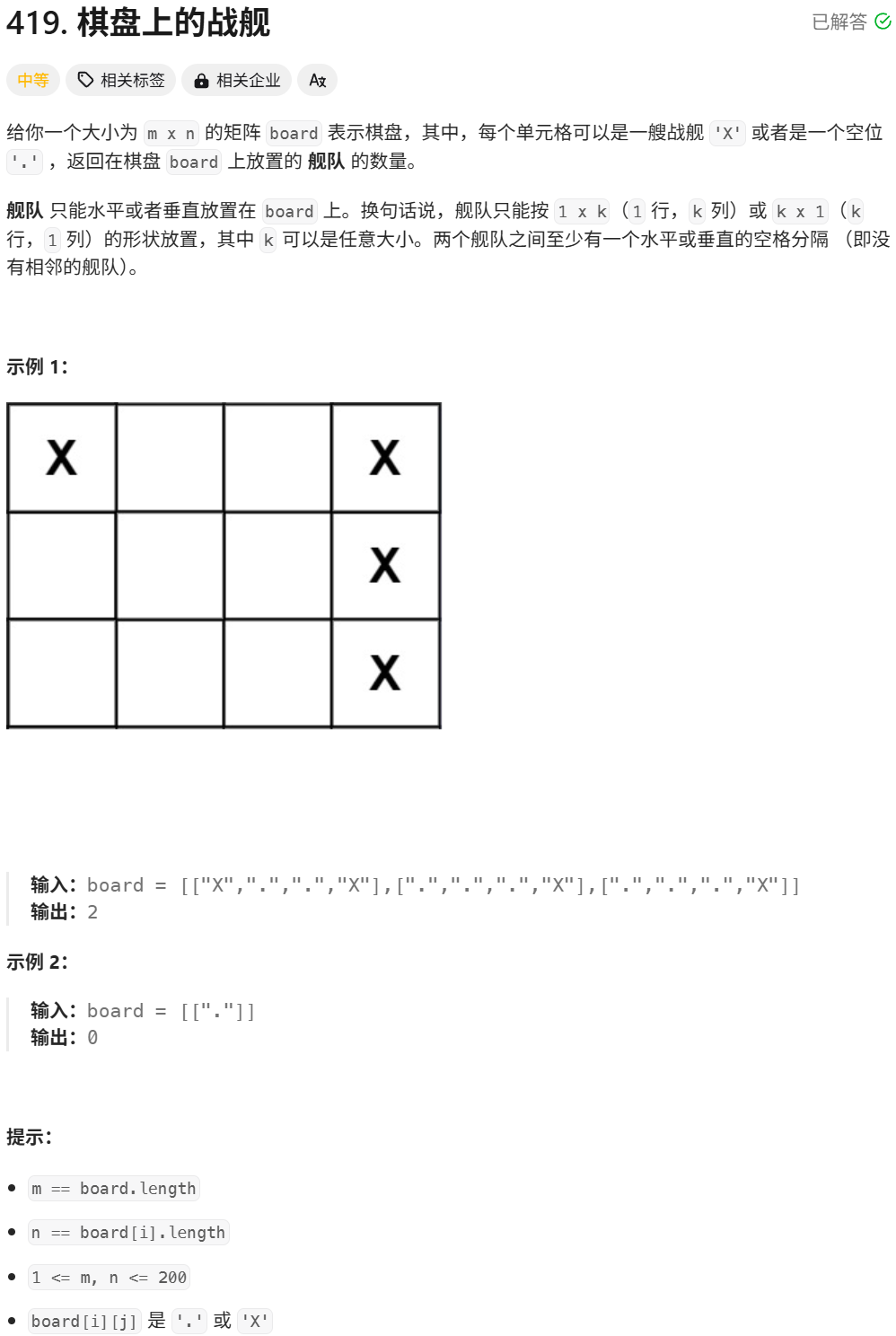
leetcode-419.棋盘上的战舰 文章目录 leetcode-419.棋盘上的战舰一.题目描述二.第一次代码提交三.第二次代码提交 一.题目描述 二.第一次代码提交 class Solution { public:int countBattleships(vector<vector<char>>& board) {int m board.size(); //列数i…...
使用uglifyjs对静态引入的js文件进行压缩
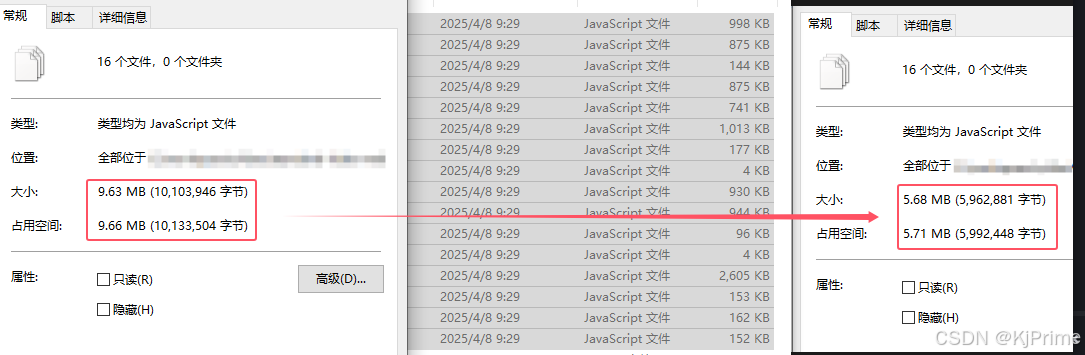
前言 因为有时候js文件没有npm包,或者需要修改,只能引入静态的js,那么这个时候就可以对js进行压缩了。我其实想通过vite、webpack等插件进行压缩的,可是他都不能定位到public目录下面的文件,所以我只能自己压缩了。编…...

ecovadis评分要求,如何提高ecovadis分数,未来展望
EcoVadis评分要求、提升方法及未来展望 1. EcoVadis评分概述 EcoVadis是全球领先的企业可持续发展评级平台,评估企业在环境(E)、劳工与人权(L)、商业道德(B)、可持续采购(S&#x…...
程序加壳脱壳原理和实现
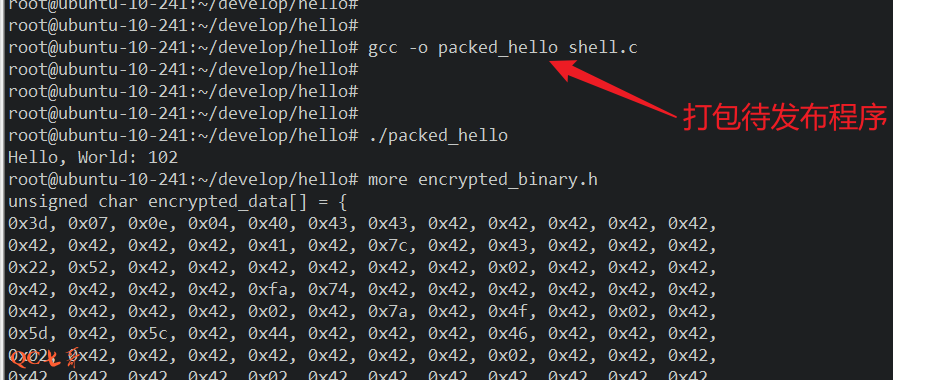
理论 一个可运行的执行文件,至少会有一个代码段,程序的入口点指向代码段,程序运行的时候,从入口点开始执行代码段指令 为了将一个正常的程序进行加壳保护,至少要三部分逻辑配合 1、待加壳保护的程序 2、加壳逻辑 3…...
【数据分析实战】使用 Matplotlib 绘制折线图
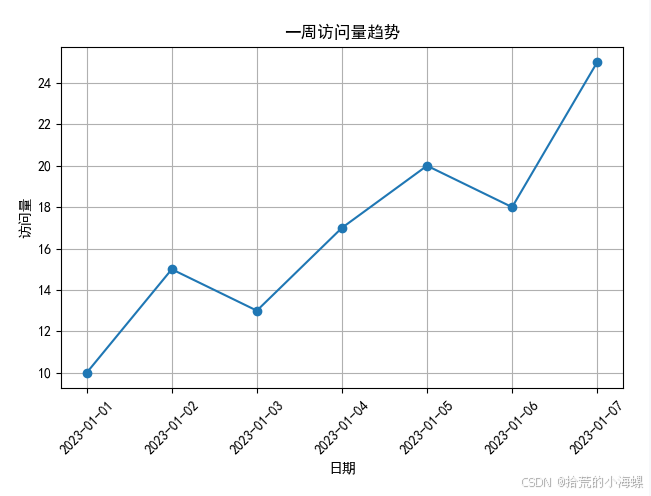
1、简述 在日常的数据分析、科研报告、项目可视化展示中,折线图是一种非常常见且直观的数据可视化方式。本文将带你快速上手 Matplotlib,并通过几个实际例子掌握折线图的绘制方法。 Matplotlib 是 Python 中最常用的数据可视化库之一,它能够…...
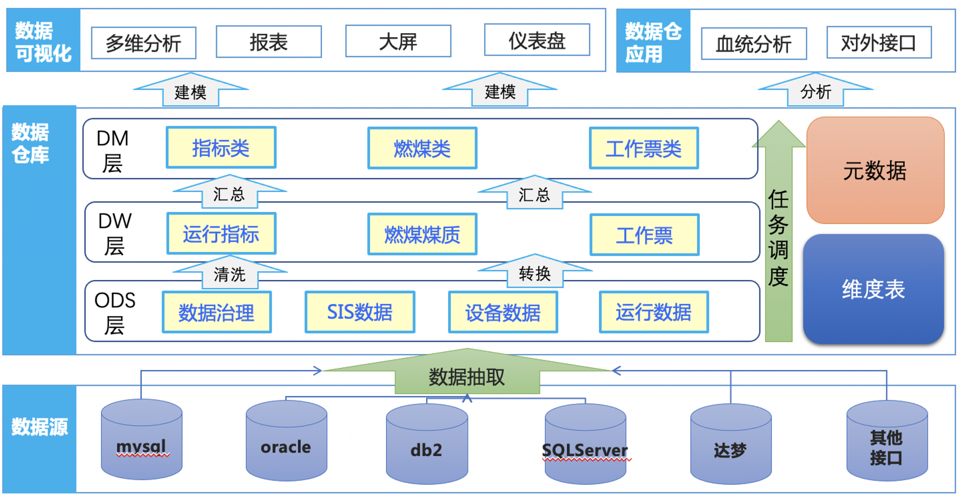
数据仓库标准库模型架构相关概念浅讲
数据仓库与模型体系及相关概念 数据仓库与数据库的区别可参考:数据库与数据仓库的区别及关系_数据仓库和数据库-CSDN博客 总之,数据库是为捕获数据而设计,数据仓库是为分析数据而设计 数据仓库集成工具 在一些大厂中,其会有自…...
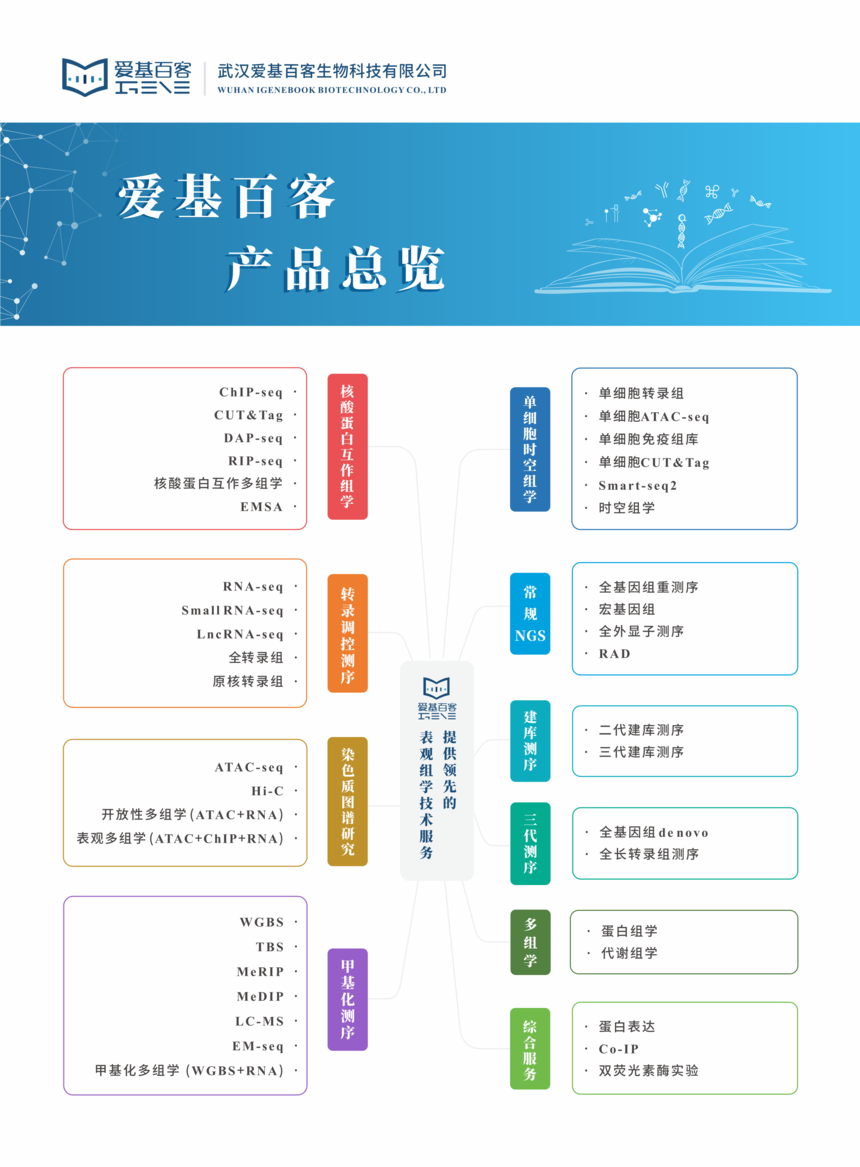
亚洲区域健康人群免疫细胞marker
最近发现一篇文献,作者来自新加坡基因研究所,这篇文章大概是整理了619个亚洲人群的免疫多样性图集(AIDA),跨越了7个国家,最终使用了1,265,624个免疫细胞的单细胞数据,并最终确定了8种主要的免疫…...

tree-sitter的grammar.js解惑
❓问题1:grammar.js 不是用正则表达式 /.../ 吗?为什么有 print 这样的字符串? ✅ 回答: grammar.js 分成两类“终结符”表示法: 表达方式含义xxx直接匹配该字符串字面量/regex/匹配符合正则的文本 💡 …...
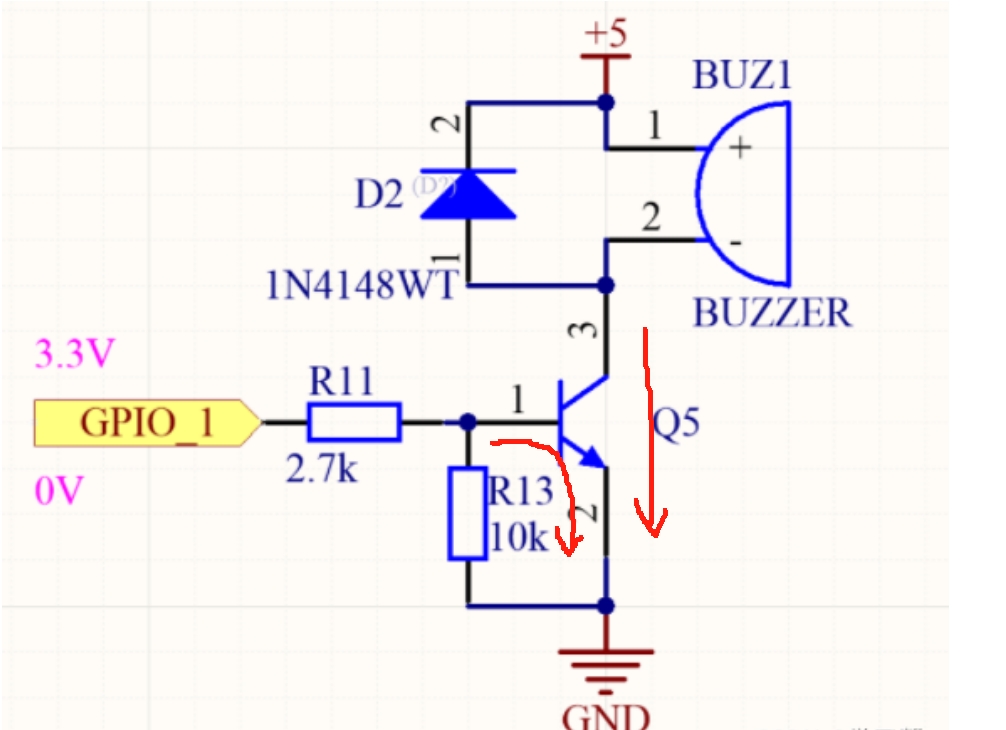
三极管以及mos管
三极管与mos管的高低电平导通判断 (1)三极管的高低电平导通判断 三极管中有2个PN结,分别称为发射结和集电极结,按材料划分为硅材料三极管(硅管),锗材料三极管(锗管)&am…...

第十七天 - Jenkins API集成 - 流水线自动化 - 练习:CI/CD流程优化
前言 在DevOps实践中,持续集成与持续交付(CI/CD)是现代软件工程的核心支柱。作为业界使用最广泛的自动化服务器,Jenkins凭借其强大的插件生态和灵活的流水线配置能力,成为企业级CI/CD落地的首选工具。本文将深入解析J…...
PPT模板之--个人简历
还在为制作 PPT 时毫无头绪、对着空白页面抓耳挠腮而烦恼吗?别担心,这里就是你的 PPT 灵感补给站!在这个快节奏的信息时代,一份吸睛又高效的 PPT 至关重要,它能在商务汇报中助你赢得先机,在课堂展示时让你脱…...
)
【远程工具】1.1 时间处理设计与实现(datetime库lib.rs)
一、设计原理与决策 时间单位选择 采用**秒(s)**作为基准单位,基于以下考虑: 国际单位制(SI)基本时间单位 整数秒(i64)方案优势: 精确无误差(相比浮点数&am…...

Nginx常用工具
Nginx常用工具 Nginx常用工具vscode配置Nginx插件在线生成Nginx配置文件Nginx可视化配置工具 Nginx常用工具 编写Nginx配置时,使用VSCodeNginx插件,能实现自动补全格式化配置. vscode配置Nginx插件 Nginx代码高亮插件: nginx-formatter Nginx代码格式化插件&#…...
之三)
应用安全系列之四十五:日志伪造(Log_Forging)之三
1、简介 针对Java的日志系统有多种,本文主要描述如何通过修改配置文件来解决logback和log4j的日志伪造问题。 2、logback 2.1、系统提供的解决方案 在logback.xml中配置编码器自动转义特殊字符: 复制 <configuration><appender name"C…...
springboot--页面的国际化
今天来实现页面中的国际化 首先,需要创建一个新的spring boot项目,导入前端模板,在我的博客中可以找到,然后将HTML文件放在templates包下,将其他的静态资源放在statics包下,如下图结构 页面的国际化主要在首…...
前端学习10—Ajax
1 AJAX 简介 AJAX 全称为 Asynchronous JavaScript And XML,就是异步的 JS 和 XML 通过 AJAX 可以在浏览器中向服务器发送异步请求,最大优势为:无刷新获取数据 AJAX 不是新的编程语言,而是一种将现有的标准组合在一起使用的新方…...

list的常见接口使用
今天,我们来讲解一下C关于STL标准库中的一个容器list的常见接口。 在我们之前c语言数据结构中,我们已经了解过了关于链表的知识点了,那么对于现在理解它也是相对来说比较容易的了。 数据结构--双向循环链表-CSDN博客 1. 定义与包含头文件 …...
一维差分数组
2.一维差分 - 蓝桥云课 问题描述 给定一个长度为 n 的序列 a。 再给定 m 组操作,每次操作给定 3 个正整数 l, r, d,表示对 a_{l} 到 a_{r} 中的所有数增加 d。 最终输出操作结束后的序列 a。 Update: 由于评测机过快,n, m 于 20…...
再次重拾jmeter之踩坑
1.添加“csv数据文件设置”,运行时提示 java.lang.IllegalArgumentException: Filename must not be null or empty检查多次后才发现因为我运行的是整个线程组,所以对应http请求下不能包括空的csv文件 2. 填写ip时不能加/,要在路径里加&…...

Flink的 RecordWriter 数据通道 详解
本文从基础原理到代码层面逐步解释 Flink 的RecordWriter 数据通道,尽量让初学者也能理解。 1. 什么是 RecordWriter? 通俗理解 RecordWriter 是 Flink 中负责将数据从一个任务(Task)发送到下游任务的组件。想象一下,…...
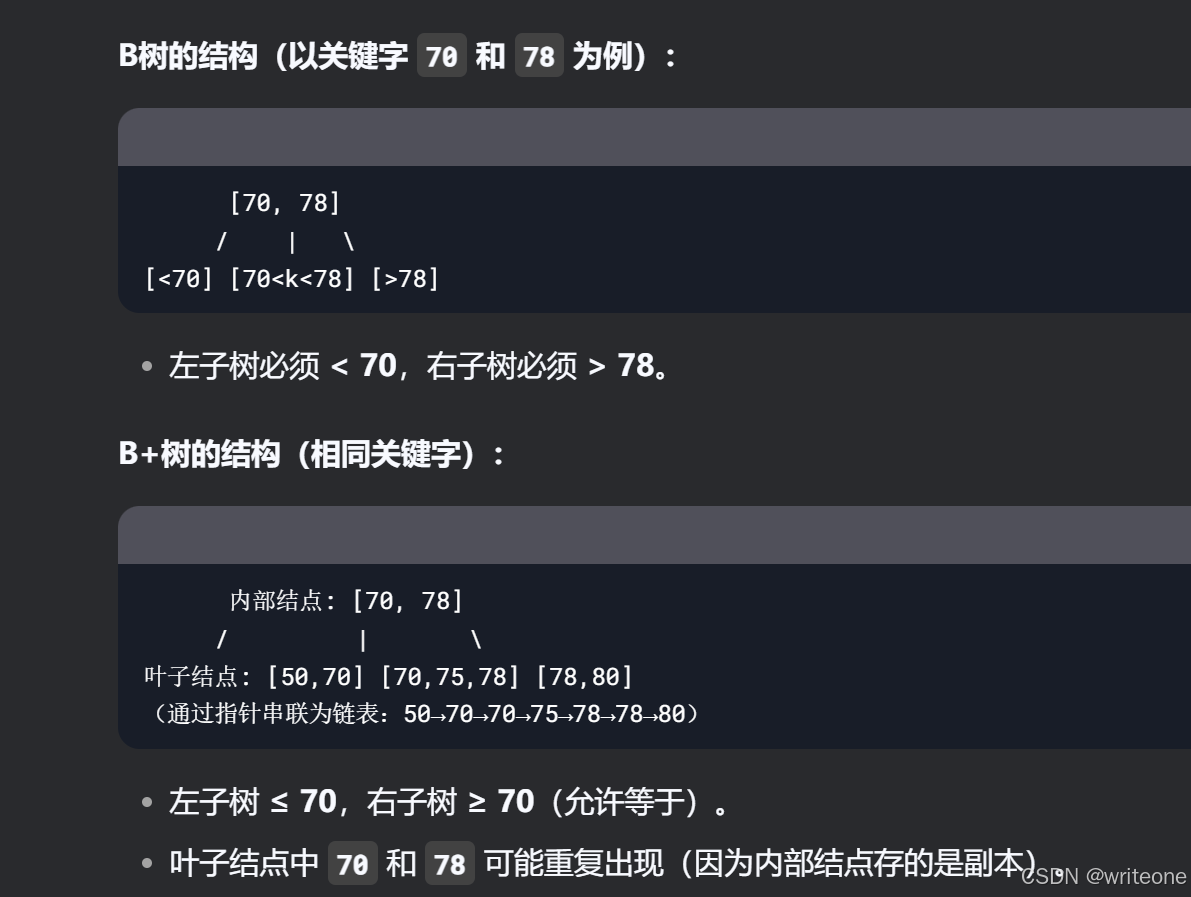
4-6记录(B树)
找左边右下或者右边左下 转化成了前驱后继的删除 又分好几种情况: 1. 只剩25,小于2,所以把父亲拉到25旁边,兄弟的70顶替父亲 对于25,25的后继就是70,25后继的后继是71(中序遍历) 2. 借左子树…...
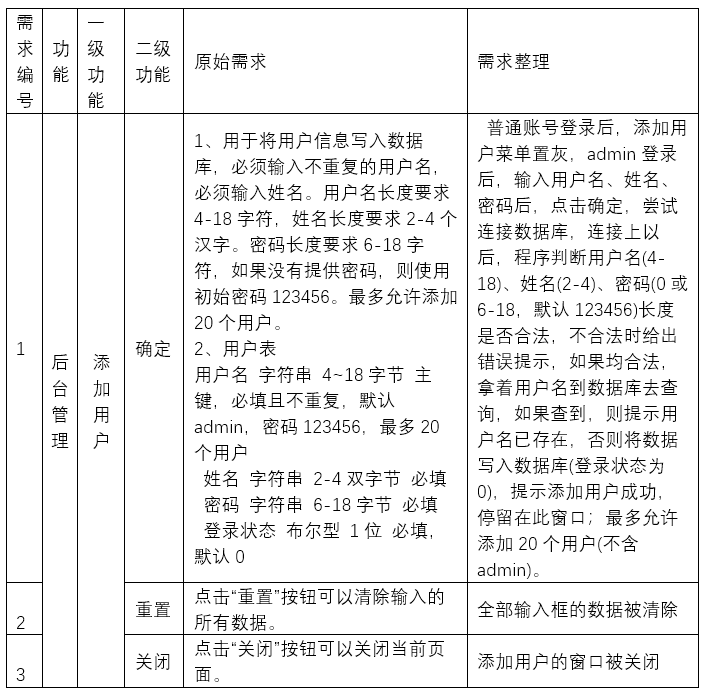
06软件测试需求分析案例-添加用户
给职业顾问部的老师添加用户密码后,他们才能登录使用该软件。只有admin账户具有添加用户、修改用户信息、删除用户的权利。admin是经理或团队的第一个人的账号,后面招一个教师就添加一个账号。 通读需求是提取信息,提出问题,输出…...
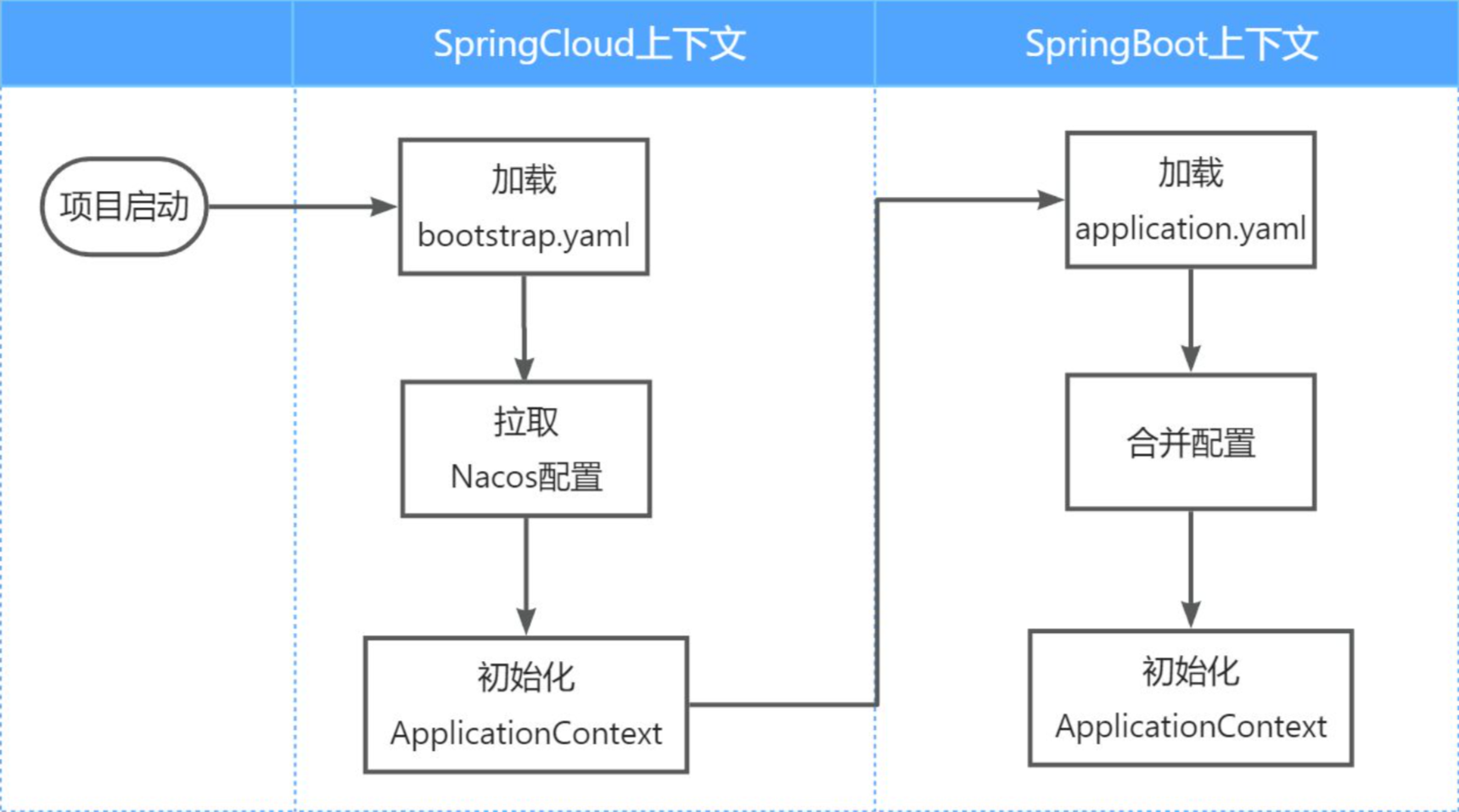
Nacos服务发现和配置管理
目录 一、Nacos概述 1. Nacos 简介 2. Nacos 特性 2.1 服务发现与健康监测 2.2 动态配置管理 2.3 动态DNS服务 2.4 其他关键特性 二、 服务注册和发现 2.1 核心概念 2.2 Nacos注册中心 2.3 Nacos单机模式 2.4 案例——服务注册与发现 2.4.1 父工程 2.4.2 order-p…...

【KWDB 创作者计划】第一卷:基础架构篇
以下是KWDB技术白皮书第一卷:基础架构篇的完整内容展示,包含要求的三个核心章节的深度解析。我们将以技术严谨性结合可读性的方式呈现,实际交付时会进一步扩展示意图和代码示例。 目录 KWDB技术白皮书卷一:基础架构篇 1. 数…...

对接日本金融市场数据全指南:K线、实时行情与IPO新股
一、日本金融市场特色与数据价值 日本作为全球第三大经济体,其金融市场具有以下显著特点: 成熟稳定:日经225指数包含日本顶级蓝筹股独特交易时段:上午9:00-11:30,下午12:30-15:00(JST)高流动性…...