
【速写】formatting_func与target_modules的细节(peft)
文章目录
- SFTTrainer的构造参数版本差异
- 怎么写formatting_func?
- 关于lora_config中的target_modules
- 能否在target_modules中指定特定某个模块?
以下面的示例pipeline为案:
# -*- coding: utf8 -*-
# @author: caoyang
# @email: caoyang@stu.sufe.edu.cnfrom datasets import load_dataset
from transformers import AutoModelForCausalLM, AutoTokenizer, BitsAndBytesConfig, TrainingArguments
from peft import LoraConfig, prepare_model_for_kbit_training, get_peft_model
from trl import SFTTrainerdef lora_pipeline(model_path,dataset_path,prompt_formatter,lora_config,trainer_arguments,quantization_config = None,):tokenizer = AutoTokenizer.from_pretrained(model_path)dataset = load_dataset(dataset_path, split="train[:500]") train_dataset = dataset.map(prompt_formatter)del datasetif quantization_config is not None:quantization_config = BitsAndBytesConfig(**quantization_config)model = AutoModelForCausalLM.from_pretrained(model_path,device_map = "auto",quantization_config = quantization_config,)model.config.pretraining_tp = 1else:model = AutoModelForCausalLM.from_pretrained(model_path,device_map = "auto",)model.config.use_cache = Falsetokenizer = AutoTokenizer.from_pretrained(model_path, trust_remote_code=True)lora_config = {"lora_alpha": 32,"lora_dropout": .1,'r': 64,"bias": "none","task_type": "CASUAL_LM","target_modules": ["k_proj", "v_proj", "q_proj"],}lora_config = LoraConfig(**lora_config)# If `prepare_model_for_kbit_training` is ignored, and `gradient_checkpointing = True` (for GPU memory saving)# Then you need set `model.enable_input_require_grads()`model = prepare_model_for_kbit_training(model)# model.enable_input_require_grads()model = get_peft_model(model, lora_config)training_arguments = TrainingArguments(**{"output_dir": output_dir,"per_device_train_batch_size": 2,"gradient_accumulation_steps": 4,"optim": "adamw_torch","learning_rate": 2e-4,"lr_scheduler_type": "cosine","num_train_epochs": 1,"logging_steps": 10,"fp16": True,"gradient_checkpointing": True,})trainer = SFTTrainer(model = model,train_dataset = train_dataset,args = training_arguments,peft_config = peft_config,)trainer.train()trainer.model.save_pretrained(output_dir)
关注两个问题:
- SFTTrainer的构造参数(目前不同版本差异较大)
- LoraConfig的构造参数
SFTTrainer的构造参数版本差异
目前存在版本差异,一些示例中会指出SFTTrainer可以设置dataset_text_field,max_seq_length,tokenizer等参数,下面是deepseek输出的参数说明:
核心的几个参数
-
model- 类型:
Union[PreTrainedModel, nn.Module, str] - 说明:要训练的模型,可以是模型实例或Hub模型名称(如
"gpt2")。
- 类型:
-
args- 类型:
TrainingArguments - 说明:训练配置参数(如学习率、批次大小、日志策略等)。
- 类型:
-
train_dataset- 类型:
Optional[Dataset] - 说明:训练数据集,需是
datasets.Dataset格式。
- 类型:
-
eval_dataset- 类型:
Optional[Dataset] - 说明:验证数据集(可选)。
- 类型:
数据相关参数
-
dataset_text_field- 类型:
Optional[str] - 说明:数据集中包含文本的字段名。如果未提供,需通过
formatting_func自定义格式。
- 类型:
-
formatting_func- 类型:
Optional[Callable] - 说明:自定义函数,用于将样本转换为模型所需的文本格式(如添加提示模板)。
- 类型:
-
max_seq_length- 类型:
Optional[int] - 说明:文本的最大序列长度(超过部分会被截断)。
- 类型:
-
packing- 类型:
bool(默认False) - 说明:是否将多个短样本打包到一个输入中以提高效率(类似
fill_length)。
- 类型:
训练优化参数
-
peft_config- 类型:
Optional[PeftConfig] - 说明:PEFT(参数高效微调)配置,例如LoRA、Adapter等。
- 类型:
-
neftune_noise_alpha- 类型:
Optional[float] - 说明:NEFTune噪声的强度(用于防止过拟合)。
- 类型:
其他参数
-
tokenizer- 类型:
Optional[PreTrainedTokenizer] - 说明:分词器实例。若未提供且
model为字符串,会自动加载。
- 类型:
-
data_collator- 类型:
Optional[DataCollator] - 说明:自定义数据整理器(默认使用
DataCollatorForLanguageModeling)。
- 类型:
-
callbacks- 类型:
Optional[List[TrainerCallback]] - 说明:训练回调函数列表(如早停、日志等)。
- 类型:
-
compute_metrics- 类型:
Optional[Callable] - 说明:计算评估指标的函数。
- 类型:
继承自Trainer的参数
SFTTrainer还支持Trainer类的所有参数,例如:
optimizers、lr_scheduler、logging_dir、resume_from_checkpoint等。
示例代码
from trl import SFTTrainer
from transformers import TrainingArgumentstrainer = SFTTrainer(model="gpt2",args=TrainingArguments(output_dir="./output", per_device_train_batch_size=4),train_dataset=dataset,dataset_text_field="text",max_seq_length=512,packing=True,peft_config=lora_config,
)
详细参数请参考trl官方文档。
但是实际上在 trl 0.16.0版本中,显然是没有dataset_text_field,max_seq_length,tokenizer等参数,如果设置会报Unexpected keyword arguments错误:
class SFTTrainer(transformers.trainer.Trainer)|  SFTTrainer(model: Union[str, torch.nn.modules.module.Module, transformers.modeling_utils.PreTrainedModel], args: Union[trl.trainer.sft_config.SFTConfig, transformers.training_args.TrainingArguments, NoneType] = None, data_collator: Optional[transformers.data.data_collator.DataCollator] = None, train_dataset: Union[datasets.arrow_dataset.Dataset, datasets.iterable_dataset.IterableDataset, NoneType] = None, eval_dataset: Union[datasets.arrow_dataset.Dataset, dict[str, datasets.arrow_dataset.Dataset], NoneType] = None, processing_class: Union[transformers.tokenization_utils_base.PreTrainedTokenizerBase, transformers.image_processing_utils.BaseImageProcessor, transformers.feature_extraction_utils.FeatureExtractionMixin, transformers.processing_utils.ProcessorMixin, NoneType] = None, compute_loss_func: Optional[Callable] = None, compute_metrics: Optional[Callable[[transformers.trainer_utils.EvalPrediction], dict]] = None, callbacks: Optional[list[transformers.trainer_callback.TrainerCallback]] = None, optimizers: tuple = (None, None), optimizer_cls_and_kwargs: Optional[tuple[Type[torch.optim.optimizer.Optimizer], dict[str, Any]]] = None, preprocess_logits_for_metrics: Optional[Callable[[torch.Tensor, torch.Tensor], torch.Tensor]] = None, peft_config: Optional[ForwardRef('PeftConfig')] = None, formatting_func: Union[Callable[[dict], str], Callable[[dict], list[str]], NoneType] = None)|  |  Trainer for Supervised Fine-Tuning (SFT) method.|  |  This class is a wrapper around the [`transformers.Trainer`] class and inherits all of its attributes and methods.|  |  Example:|  |  ```python|  from datasets import load_dataset|  from trl import SFTTrainer|  |  dataset = load_dataset("roneneldan/TinyStories", split="train[:1%]")|  |  trainer = SFTTrainer(model="Qwen/Qwen2-0.5B-Instruct", train_dataset=dataset)|  trainer.train()|  ```|  |  Args:|      model (`Union[str, PreTrainedModel]`):|          Model to be trained. Can be either:|  |          - A string, being the *model id* of a pretrained model hosted inside a model repo on huggingface.co, or|            a path to a *directory* containing model weights saved using|            [`~transformers.PreTrainedModel.save_pretrained`], e.g., `'./my_model_directory/'`. The model is|            loaded using [`~transformers.AutoModelForCausalLM.from_pretrained`] with the keywork arguments|            in `args.model_init_kwargs`.|          - A [`~transformers.PreTrainedModel`] object. Only causal language models are supported.|      args ([`SFTConfig`], *optional*, defaults to `None`):|          Configuration for this trainer. If `None`, a default configuration is used.|      data_collator (`DataCollator`, *optional*):|          Function to use to form a batch from a list of elements of the prcessed `train_dataset` or `eval_dataset`.|          Will default to [`~transformers.default_data_collator`] if no `processing_class` is provided, an instance|          of [`~transformers.DataCollatorWithPadding`] otherwise if the processing_class is a feature extractor or|          tokenizer.|      train_dataset ([`~datasets.Dataset`] or [`~datasets.IterableDataset`]):|          Dataset to use for training. SFT supports both [language modeling](#language-modeling) type and|          [prompt-completion](#prompt-completion) type. The format of the samples can be either:|  |          - [Standard](dataset_formats#standard): Each sample contains plain text.|          - [Conversational](dataset_formats#conversational): Each sample contains structured messages (e.g., role|            and content).|  |          The trainer also supports processed datasets (tokenized) as long as they contain an `input_ids` field.|      eval_dataset ([`~datasets.Dataset`], [`~datasets.IterableDataset`] or `dict[str, Union[Dataset, IterableDataset]]`):|          The trainer also supports processed datasets (tokenized) as long as they contain an `input_ids` field.|      eval_dataset ([`~datasets.Dataset`], [`~datasets.IterableDataset`] or `dict[str, Union[Dataset, IterableDataset]]`):|          Dataset to use for evaluation. It must meet the same requirements as `train_dataset`.|      processing_class ([`~transformers.PreTrainedTokenizerBase`], *optional*, defaults to `None`):|          Processing class used to process the data. If `None`, the processing class is loaded from the model's name|          with [`~transformers.AutoTokenizer.from_pretrained`].|      callbacks (list of [`~transformers.TrainerCallback`], *optional*, defaults to `None`):|          List of callbacks to customize the training loop. Will add those to the list of default callbacks|          detailed in [here](https://huggingface.co/docs/transformers/main_classes/callback).|  |          If you want to remove one of the default callbacks used, use the [`~transformers.Trainer.remove_callback`]|          method.|      optimizers (`tuple[torch.optim.Optimizer, torch.optim.lr_scheduler.LambdaLR]`, *optional*, defaults to `(None, None)`):|          A tuple containing the optimizer and the scheduler to use. Will default to an instance of [`AdamW`] on your|          model and a scheduler given by [`get_linear_schedule_with_warmup`] controlled by `args`.|      optimizer_cls_and_kwargs (`Tuple[Type[torch.optim.Optimizer], Dict[str, Any]]`, *optional*, defaults to `None`):|          A tuple containing the optimizer class and keyword arguments to use.|          Overrides `optim` and `optim_args` in `args`. Incompatible with the `optimizers` argument.|  |          Unlike `optimizers`, this argument avoids the need to place model parameters on the correct devices before initializing the Trainer.|      preprocess_logits_for_metrics (`Callable[[torch.Tensor, torch.Tensor], torch.Tensor]`, *optional*, defaults to `None`):|          A function that preprocess the logits right before caching them at each evaluation step. Must take two|          tensors, the logits and the labels, and return the logits once processed as desired. The modifications made|          by this function will be reflected in the predictions received by `compute_metrics`.|  |          Note that the labels (second parameter) will be `None` if the dataset does not have them.|      peft_config ([`~peft.PeftConfig`], *optional*, defaults to `None`):|          PEFT configuration used to wrap the model. If `None`, the model is not wrapped.|      formatting_func (`Optional[Callable]`):|          Formatting function applied to the dataset before tokenization.|  |  Method resolution order:
Help on class SFTTrainer in module trl.trainer.sft_trainer:class SFTTrainer(transformers.trainer.Trainer)|  SFTTrainer(model: Union[str, torch.nn.modules.module.Module, transformers.modeling_utils.PreTrainedModel], args: Union[trl.trainer.sft_config.SFTConfig, transformers.training_args.TrainingArguments, NoneType] = None, data_collato
r: Optional[transformers.data.data_collator.DataCollator] = None, train_dataset: Union[datasets.arrow_dataset.Dataset, datasets.iterable_dataset.IterableDataset, NoneType] = None, eval_dataset: Union[datasets.arrow_dataset.Dataset, d
ict[str, datasets.arrow_dataset.Dataset], NoneType] = None, processing_class: Union[transformers.tokenization_utils_base.PreTrainedTokenizerBase, transformers.image_processing_utils.BaseImageProcessor, transformers.feature_extraction
_utils.FeatureExtractionMixin, transformers.processing_utils.ProcessorMixin, NoneType] = None, compute_loss_func: Optional[Callable] = None, compute_metrics: Optional[Callable[[transformers.trainer_utils.EvalPrediction], dict]] = Non
e, callbacks: Optional[list[transformers.trainer_callback.TrainerCallback]] = None, optimizers: tuple = (None, None), optimizer_cls_and_kwargs: Optional[tuple[Type[torch.optim.optimizer.Optimizer], dict[str, Any]]] = None, preprocess
_logits_for_metrics: Optional[Callable[[torch.Tensor, torch.Tensor], torch.Tensor]] = None, peft_config: Optional[ForwardRef('PeftConfig')] = None, formatting_func: Union[Callable[[dict], str], Callable[[dict], list[str]], NoneType]
= None)|  |  Trainer for Supervised Fine-Tuning (SFT) method.|  |  This class is a wrapper around the [`transformers.Trainer`] class and inherits all of its attributes and methods.|  |  Example:|  |  ```python|  from datasets import load_dataset|  from trl import SFTTrainer|  |  dataset = load_dataset("roneneldan/TinyStories", split="train[:1%]")|  |  trainer = SFTTrainer(model="Qwen/Qwen2-0.5B-Instruct", train_dataset=dataset)|  trainer.train()|  ```|  |  Args:|      model (`Union[str, PreTrainedModel]`):|          Model to be trained. Can be either:|  |          - A string, being the *model id* of a pretrained model hosted inside a model repo on huggingface.co, or|            a path to a *directory* containing model weights saved using|            [`~transformers.PreTrainedModel.save_pretrained`], e.g., `'./my_model_directory/'`. The model is|            loaded using [`~transformers.AutoModelForCausalLM.from_pretrained`] with the keywork arguments|            in `args.model_init_kwargs`.|          - A [`~transformers.PreTrainedModel`] object. Only causal language models are supported.|      args ([`SFTConfig`], *optional*, defaults to `None`):|          Configuration for this trainer. If `None`, a default configuration is used.|      data_collator (`DataCollator`, *optional*):|          Function to use to form a batch from a list of elements of the prcessed `train_dataset` or `eval_dataset`.|          Will default to [`~transformers.default_data_collator`] if no `processing_class` is provided, an instance|          of [`~transformers.DataCollatorWithPadding`] otherwise if the processing_class is a feature extractor or|          tokenizer.|      train_dataset ([`~datasets.Dataset`] or [`~datasets.IterableDataset`]):|          Dataset to use for training. SFT supports both [language modeling](#language-modeling) type and|          [prompt-completion](#prompt-completion) type. The format of the samples can be either:|  |          - [Standard](dataset_formats#standard): Each sample contains plain text.|          - [Conversational](dataset_formats#conversational): Each sample contains structured messages (e.g., role|            and content).|  |          The trainer also supports processed datasets (tokenized) as long as they contain an `input_ids` field.|      eval_dataset ([`~datasets.Dataset`], [`~datasets.IterableDataset`] or `dict[str, Union[Dataset, IterableDataset]]`):|          Dataset to use for evaluation. It must meet the same requirements as `train_dataset`.|      processing_class ([`~transformers.PreTrainedTokenizerBase`], *optional*, defaults to `None`):|          Processing class used to process the data. If `None`, the processing class is loaded from the model's name|          with [`~transformers.AutoTokenizer.from_pretrained`].|      callbacks (list of [`~transformers.TrainerCallback`], *optional*, defaults to `None`):|          List of callbacks to customize the training loop. Will add those to the list of default callbacks|          detailed in [here](https://huggingface.co/docs/transformers/main_classes/callback).|  |          If you want to remove one of the default callbacks used, use the [`~transformers.Trainer.remove_callback`]|          method.|      optimizers (`tuple[torch.optim.Optimizer, torch.optim.lr_scheduler.LambdaLR]`, *optional*, defaults to `(None, None)`):|          A tuple containing the optimizer and the scheduler to use. Will default to an instance of [`AdamW`] on your|          model and a scheduler given by [`get_linear_schedule_with_warmup`] controlled by `args`.|      optimizer_cls_and_kwargs (`Tuple[Type[torch.optim.Optimizer], Dict[str, Any]]`, *optional*, defaults to `None`):|          A tuple containing the optimizer class and keyword arguments to use.|          Overrides `optim` and `optim_args` in `args`. Incompatible with the `optimizers` argument.|  |          Unlike `optimizers`, this argument avoids the need to place model parameters on the correct devices before initializing the Trainer.|      preprocess_logits_for_metrics (`Callable[[torch.Tensor, torch.Tensor], torch.Tensor]`, *optional*, defaults to `None`):|          A function that preprocess the logits right before caching them at each evaluation step. Must take two|          tensors, the logits and the labels, and return the logits once processed as desired. The modifications made|          by this function will be reflected in the predictions received by `compute_metrics`.|  |          Note that the labels (second parameter) will be `None` if the dataset does not have them.|      peft_config ([`~peft.PeftConfig`], *optional*, defaults to `None`):|          PEFT configuration used to wrap the model. If `None`, the model is not wrapped.|      formatting_func (`Optional[Callable]`):|          Formatting function applied to the dataset before tokenization.|  |  Method resolution order:|      SFTTrainer|      transformers.trainer.Trainer|      builtins.object|  |  Methods defined here:|  |  __init__(self, model: Union[str, torch.nn.modules.module.Module, transformers.modeling_utils.PreTrainedModel], args: Union[trl.trainer.sft_config.SFTConfig, transformers.training_args.TrainingArguments, NoneType] = None, data_col
lator: Optional[transformers.data.data_collator.DataCollator] = None, train_dataset: Union[datasets.arrow_dataset.Dataset, datasets.iterable_dataset.IterableDataset, NoneType] = None, eval_dataset: Union[datasets.arrow_dataset.Datase
t, dict[str, datasets.arrow_dataset.Dataset], NoneType] = None, processing_class: Union[transformers.tokenization_utils_base.PreTrainedTokenizerBase, transformers.image_processing_utils.BaseImageProcessor, transformers.feature_extrac
tion_utils.FeatureExtractionMixin, transformers.processing_utils.ProcessorMixin, NoneType] = None, compute_loss_func: Optional[Callable] = None, compute_metrics: Optional[Callable[[transformers.trainer_utils.EvalPrediction], dict]] =None, callbacks: Optional[list[transformers.trainer_callback.TrainerCallback]] = None, optimizers: tuple = (None, None), optimizer_cls_and_kwargs: Optional[tuple[Type[torch.optim.optimizer.Optimizer], dict[str, Any]]] = None, prepro
cess_logits_for_metrics: Optional[Callable[[torch.Tensor, torch.Tensor], torch.Tensor]] = None, peft_config: Optional[ForwardRef('PeftConfig')] = None, formatting_func: Union[Callable[[dict], str], Callable[[dict], list[str]], NoneTy
pe] = None)|      Initialize self.  See help(type(self)) for accurate signature.
对此,在 trl==0.16.0 版本中,SFTTrainer 的实现逻辑可能与更新版本有所不同。如果你没有指定 dataset_text_field 或 formatting_func,SFTTrainer 仍然可以运行,但它的默认行为可能依赖于以下机制:
1. 默认的数据处理逻辑
在旧版 SFTTrainer 中,如果没有显式指定 dataset_text_field 或 formatting_func,训练器可能会尝试以下方式处理数据:
(1) 直接使用 dataset 的 "text" 字段
- 默认假设数据集有一个名为
"text"的字段,包含输入文本。 - 例如,如果你的数据集是
{"text": "Hello, world!", ...},它会自动使用"text"作为输入。
(2) 如果没有 "text" 字段,尝试其他常见字段名
- 可能会尝试
"input"、"content"、"sentence"等常见字段名。 - 如果找不到匹配的字段,可能会报错。
(3) 如果数据集是 datasets.Dataset 且只有一个文本列
- 直接使用唯一的文本列作为输入。
2. 标签(Target)的处理
在监督微调(SFT)中,通常输入和标签是相同的文本(即模型学习预测下一个 token,类似于语言模型训练)。因此:
- 不需要显式指定标签字段,因为输入文本本身会被用作标签(通过移位实现)。
- 例如,输入
"Hello, world!"的标签是"Hello, world!"的下一个 token 序列。
如果数据集中有单独的标签字段(如 "output"),则需要通过 formatting_func 显式组合输入和标签:
def formatting_func(sample):return f"Input: {sample['input']}\nOutput: {sample['output']}"trainer = SFTTrainer(...,formatting_func=formatting_func,
)
3. 为什么没有 max_seq_length 也能运行?
在旧版中:
- 如果没有指定
max_seq_length,可能会使用模型的默认最大长度(如tokenizer.model_max_length)。 - 或者直接处理完整文本(不截断),但可能因显存不足而报错。
4. 验证默认行为的实验方法
如果不确定 SFTTrainer 如何处理数据,可以通过以下方式调试:
(1) 打印分词后的输入
from transformers import AutoTokenizertokenizer = AutoTokenizer.from_pretrained("your_model")
dataset = ...  # 你的数据集# 模拟 SFTTrainer 的数据处理
tokenized_input = tokenizer(dataset[0]["text"], truncation=True, max_length=512)
print(tokenized_input)
(2) 检查数据集字段名
print(dataset.column_names) # 查看所有字段名
(3) 自定义 formatting_func 显式控制输入
def formatting_func(sample):# 明确组合输入和标签(如有)return f"{sample['input']} {sample['output']}"trainer = SFTTrainer(..., formatting_func=formatting_func)
总结
- 旧版
trl==0.16.0可能默认使用"text"字段作为输入,或尝试自动推断输入文本。 - 标签通常是输入文本本身(自回归训练),除非通过
formatting_func自定义。 - 如果不确定逻辑,建议显式定义
formatting_func。
怎么写formatting_func?
如果你的数据集已经是 {"text": "Hello world!", ...} 这样的格式(即每个样本直接包含一个 "text" 字段,且文本已经是预处理好的输入),那么 formatting_func 可以非常简单,甚至不需要额外定义,因为 SFTTrainer 默认会直接使用 "text" 字段(或通过 dataset_text_field 指定字段名)。
但如果你希望显式定义一个 formatting_func(比如为了更灵活地控制输入格式,或者未来可能扩展字段),可以按以下方式实现:
1. 直接返回 "text" 字段(最简情况)
如果数据集已经是 {"text": "..."} 格式,且无需修改文本内容:
def formatting_func(sample):return sample["text"]  # 直接返回 "text" 字段的内容# 初始化 SFTTrainer
trainer = SFTTrainer(...,formatting_func=formatting_func,  # 显式指定# dataset_text_field="text",       # 如果未定义 formatting_func,可以用这个替代
)
2. 添加提示模板(Prompt Template)
如果你想为文本添加固定的提示词(例如对话模板):
def formatting_func(sample):return f"### Instruction: Write a sentence.\n### Output: {sample['text']}"# 输出示例:
# ### Instruction: Write a sentence.
# ### Output: Hello world!
3. 多字段组合
如果数据集中有多个字段(例如 "input" 和 "output"),需要组合成单一文本:
def formatting_func(sample):return f"Input: {sample['input']}\nOutput: {sample['output']}"# 输出示例:
# Input: Say hello.
# Output: Hello world!
4. 处理特殊标记(如 EOS)
如果需要为文本添加结束标记(如 <|endoftext|>):
def formatting_func(sample):return sample["text"] + "<|endoftext|>" # 假设分词器能识别此标记
验证 formatting_func 的输出
在训练前,可以先手动检查格式化后的文本是否符合预期:
sample = {"text": "Hello world!"}
print(formatting_func(sample))  # 输出: Hello world!
关键注意事项
-
字段名必须匹配:
sample["text"]中的"text"必须和你的数据集字段名一致(例如你的数据集可能是{"content": ...},则需要改为sample["content"])。 -
避免冗余处理:
如果数据已经是预处理的完整文本,直接返回sample["text"]即可,无需额外修改。 -
分词器的兼容性:
如果添加了自定义标记(如### Instruction:),确保分词器能正确编码它们(不会被拆分成无意义的子词)。
完整示例代码
from datasets import Dataset
from transformers import AutoModelForCausalLM, AutoTokenizer, TrainingArguments
from trl import SFTTrainer# 示例数据集
data = {"text": ["Hello world!", "How are you?"]}
dataset = Dataset.from_dict(data)# 模型和分词器
model_name = "gpt2"
model = AutoModelForCausalLM.from_pretrained(model_name)
tokenizer = AutoTokenizer.from_pretrained(model_name)
tokenizer.pad_token = tokenizer.eos_token  # 设置填充标记# 定义 formatting_func
def formatting_func(sample):return sample["text"]# 训练配置
training_args = TrainingArguments(output_dir="./results",per_device_train_batch_size=4,num_train_epochs=1,
)# 初始化 SFTTrainer
trainer = SFTTrainer(model=model,args=training_args,train_dataset=dataset,formatting_func=formatting_func,  # 显式指定# dataset_text_field="text",     # 或直接指定字段名(新版trl支持)
)trainer.train()
关于lora_config中的target_modules
显然它不太像是model.named_parameters中的命名法,那么具体应该怎么设置,以及指定对自己想要微调的模块进行lora呢?
在 peft.LoraConfig 中,target_modules 指定的模块名称 并不直接等同于 model.named_parameters() 中的参数名称,而是需要匹配模型内部的 子模块(Layer)的名称(通常是线性层、注意力投影层等)。以下是具体解析和操作方法:
1. target_modules 的命名规则
target_modules 需要匹配模型 内部子模块的变量名(通常是 nn.Linear 层的名称),而非参数路径(如 model.layers.0.self_attn.q_proj.weight)。例如:
- 对于 LLaMA、GPT-2 等 Transformer 模型,常见的模块名称为:
q_proj、k_proj、v_proj(注意力层的查询、键、值投影)o_proj(注意力输出投影)gate_proj、up_proj、down_proj(MLP 层,如 LLaMA 的 FFN)
- 对于 其他模型(如 BERT),可能是
query、key、value等。
2. 如何确定模型的模块名称?
方法 1:直接打印模型结构
运行以下代码查看模型的所有子模块名称:
from transformers import AutoModelForCausalLMmodel = AutoModelForCausalLM.from_pretrained("your_model_name")
for name, module in model.named_modules():if isinstance(module, nn.Linear):  # 只打印线性层print(name)
输出示例(以 LLaMA 为例):
model.layers.0.self_attn.q_proj
model.layers.0.self_attn.k_proj
model.layers.0.self_attn.v_proj
model.layers.0.self_attn.o_proj
model.layers.0.mlp.gate_proj
model.layers.0.mlp.up_proj
model.layers.0.mlp.down_proj
...
此时 target_modules 应取 最后一级的名称(如 q_proj、gate_proj)。
方法 2:查阅模型文档
- HuggingFace 模型的文档通常会说明注意力层和 MLP 层的命名(例如 LLaMA 结构)。
- 参考官方示例代码(如 peft 的 LORA 配置)。
3. 编写 target_modules 的规则
- 通用 Transformer 模型(如 LLaMA、GPT-2):
target_modules = ["q_proj", "k_proj", "v_proj"] # 仅注意力层 # 或扩展至 MLP 层 target_modules = ["q_proj", "k_proj", "v_proj", "gate_proj", "up_proj", "down_proj"] - BERT 类模型:
target_modules = ["query", "key", "value"] # 注意名称可能不同 - 自定义模型:根据
named_modules()的输出选择。
4. 常见模型的 target_modules 示例
| 模型类型 | 推荐 target_modules |
|---|---|
| LLaMA-7B/13B | ["q_proj", "k_proj", "v_proj", "o_proj"] |
| GPT-2 | ["c_attn"](需特殊处理,见下方说明) |
| Mistral | 同 LLaMA |
| BERT | ["query", "key", "value"] |
特殊情况:GPT-2 的 c_attn
GPT-2 的注意力层将 q_proj、k_proj、v_proj 合并为一个 c_attn 层,因此需要单独处理:
target_modules = ["c_attn"] # 会同时对 q,k,v 应用 LoRA
5. 验证 LoRA 是否应用成功
初始化后,检查模型的可训练参数:
model = AutoModelForCausalLM.from_pretrained("your_model")
peft_config = LoraConfig(target_modules=["q_proj", "v_proj"], ...)
model = get_peft_model(model, peft_config)
model.print_trainable_parameters()  # 查看可训练参数数量
如果输出显示可训练参数远小于原始参数,说明 LoRA 已正确应用。
6. 完整代码示例(LLaMA 微调)
from peft import LoraConfig
from transformers import AutoModelForCausalLM
from trl import SFTTrainer# 定义 LoRA 配置
peft_config = LoraConfig(r=8,lora_alpha=32,target_modules=["q_proj", "k_proj", "v_proj"],  # 关键参数lora_dropout=0.1,bias="none",task_type="CAUSAL_LM",
)# 加载模型
model = AutoModelForCausalLM.from_pretrained("meta-llama/Llama-2-7b-hf")# 初始化 SFTTrainer
trainer = SFTTrainer(model=model,peft_config=peft_config,...  # 其他参数
)
总结
target_modules的名称来自 模型子模块的变量名,而非named_parameters()的路径。- 通过
named_modules()或文档确定正确的模块名称。 - 不同模型的模块命名可能不同(如 LLaMA 的
q_projvs BERT 的query)。 - 初始化后务必检查
print_trainable_parameters()确认 LoRA 生效。
能否在target_modules中指定特定某个模块?
在 peft.LoraConfig 中,如果你直接指定 完整的模块路径(如 model.layers.0.self_attn.q_proj),会报错。因为 target_modules 需要的是 模块的通用名称(如 q_proj),而不是具体层级的路径名称。
1. 为什么不能直接写完整路径?
target_modules的设计目的是 匹配所有同名模块(例如所有层的q_proj),而不是单个特定层。- 如果你强行写入完整路径(如
model.layers.0.self_attn.q_proj),peft会尝试在所有模块中查找完全匹配的名称,但实际模块名称是q_proj(不带路径前缀),因此会报错:ValueError: Target modules ['model.layers.0.self_attn.q_proj'] not found in the model.
2. 如何正确指定单个模块?
方法 1:用通用名称(如 q_proj)
peft_config = LoraConfig(target_modules=["q_proj"],  # 对所有层的 q_proj 应用 LoRA...
)
- 效果:会对模型中所有名为
q_proj的模块(如第0层、第1层…的q_proj)应用 LoRA。
方法 2:通过自定义修改模型(不推荐)
如果非要针对某一层的特定模块,需要直接修改模型结构(例如给目标模块单独命名):
# 不推荐!仅演示逻辑
model.layers[0].self_attn.q_proj.custom_name = "my_special_q_proj"  # 假设可以这样改
peft_config = LoraConfig(target_modules=["my_special_q_proj"])
- 问题:这种操作需要侵入式修改模型,可能破坏预训练权重,且不符合 LoRA 的设计初衷。
3. 验证模块名称是否匹配
运行以下代码检查模型的所有线性层名称:
from torch import nn
for name, module in model.named_modules():if isinstance(module, nn.Linear):print(name)  # 输出如 "model.layers.0.self_attn.q_proj"
- 在
target_modules中只需取 最后一级名称(如q_proj)。
4. 如果只想微调特定层怎么办?
LoRA 的设计初衷是轻量化微调所有相关层。如果一定要限制层数,可以通过以下方式间接实现:
(1) 手动冻结其他层
# 先对所有 q_proj 应用 LoRA
peft_config = LoraConfig(target_modules=["q_proj"])# 然后手动冻结不需要的层
for name, param in model.named_parameters():if "layers.1." in name:  # 例如冻结第1层及之后的参数param.requires_grad = False
(2) 使用不同的 r 或 lora_alpha
通过调整秩(r)和缩放系数(lora_alpha),控制不同层的重要性:
peft_config = LoraConfig(target_modules=["q_proj"],r=8,          # 其他层用默认秩layers_to_transform=[0],  # 某些版本的 peft 支持此参数
)
注意:
layers_to_transform仅在部分peft版本中支持,需检查文档。
5. 完整代码示例(正确用法)
from peft import LoraConfig
from transformers import AutoModelForCausalLMmodel = AutoModelForCausalLM.from_pretrained("meta-llama/Llama-2-7b-hf")# 正确:用通用名称指定模块
peft_config = LoraConfig(target_modules=["q_proj"],  # 对所有层的 q_proj 应用 LoRAr=8,lora_alpha=32,lora_dropout=0.1,
)# 错误:尝试用完整路径(会报错)
# peft_config = LoraConfig(target_modules=["model.layers.0.self_attn.q_proj"])
总结
- 不要在
target_modules中写完整路径(如model.layers.0.self_attn.q_proj),只需提供模块的通用名称(如q_proj)。 - LoRA 会 自动匹配所有同名模块,无法直接指定单个特定层(除非修改模型结构或手动冻结其他层)。
- 通过
named_modules()确认模块名称,优先遵循peft的默认设计逻辑。
相关文章:
)
【速写】formatting_func与target_modules的细节(peft)
文章目录 SFTTrainer的构造参数版本差异怎么写formatting_func?关于lora_config中的target_modules能否在target_modules中指定特定某个模块? 以下面的示例pipeline为案: # -*- coding: utf8 -*- # author: caoyang # email: caoyangstu.sufe.edu.cnfr…...
YOLOv2学习笔记
YOLOv2 背景 YOLOv2是YOLO的第二个版本,其目标是显著提高准确性,同时使其更快 相关改进: 添加了BN层——Batch Norm采用更高分辨率的网络进行分类主干网络的训练 Hi-res classifier去除了全连接层,采用卷积层进行模型的输出&a…...

第十五届蓝桥杯----数字串个数\Python
目录 问题: 思想: 代码: 问题: Q:小蓝想要构造出一个长度为 10000 的数字字符串,有以下要求: 1) 小蓝不喜欢数字 0 ,所以数字字符串中不可以出现 0 ; 2) 小蓝喜欢数字 3 和 7 ,所以数字字符串中必须…...
【YOLOv8改进 - 卷积Conv】PConv(Pinwheel-shaped Conv): 风车状卷积用于红外小目标检测, 复现!
YOLOv8目标检测创新改进与实战案例专栏 专栏目录: YOLOv8有效改进系列及项目实战目录 包含卷积,主干 注意力,检测头等创新机制 以及 各种目标检测分割项目实战案例 专栏链接: YOLOv8基础解析+创新改进+实战案例 文章目录 YOLOv8目标检测创新改进与实战案例专栏介绍摘要文章链…...

LeetCode:链表
160. 相交链表 /*** 单链表的定义* Definition for singly-linked list.* public class ListNode {* int val;* ListNode next;* ListNode(int x) {* val x;* next null;* }* }*/ public class Solution {public ListNode getIntersectionN…...
Dockerfile项目实战-单阶段构建Vue2项目
单阶段构建镜像-Vue2项目 1 项目层级目录 以下是项目的基本目录结构: 2 Node版本 博主的Windows电脑安装了v14.18.3的node.js版本,所以直接使用本机电脑生成项目,然后拷到了 Centos 7 里面 # 查看本机node版本 node -v3 创建Vue2项目 …...

音视频小白系统入门笔记-0
本系列笔记为博主学习李超老师课程的课堂笔记,仅供参阅 音视频小白系统入门课 音视频基础ffmpeg原理 绪论 ffmpeg推流 ffplay/vlc拉流 使用rtmp协议 ffmpeg -i <source_path> -f flv rtmp://<rtmp_server_path> 为什么会推流失败? 默认…...
Zabbix 简介+部署+对接Grafana(详细部署!!)
目录 一.Zabbix简介 1.Zabbix是什么 2.Zabbix工作原理(重点) 3.Zabbix 的架构(重点) 1.服务端 2.客户端: 4.Zabbix和Prometheus区别 二.Zabbix 部署 1.前期准备 2.安装zabbix软件源和组件 3.安装数据库…...

C++: Initialization and References to const 初始化和常引用
cpp primer 5e, P97. 理解 这是一段很容易被忽略、 但是又非常重要的内容。 In 2.3.1 (p. 51) we noted that there are two exceptions to the rule that the type of a reference must match the type of the object to which it refers. The first exception is that we …...
Ubuntu2404装机指南
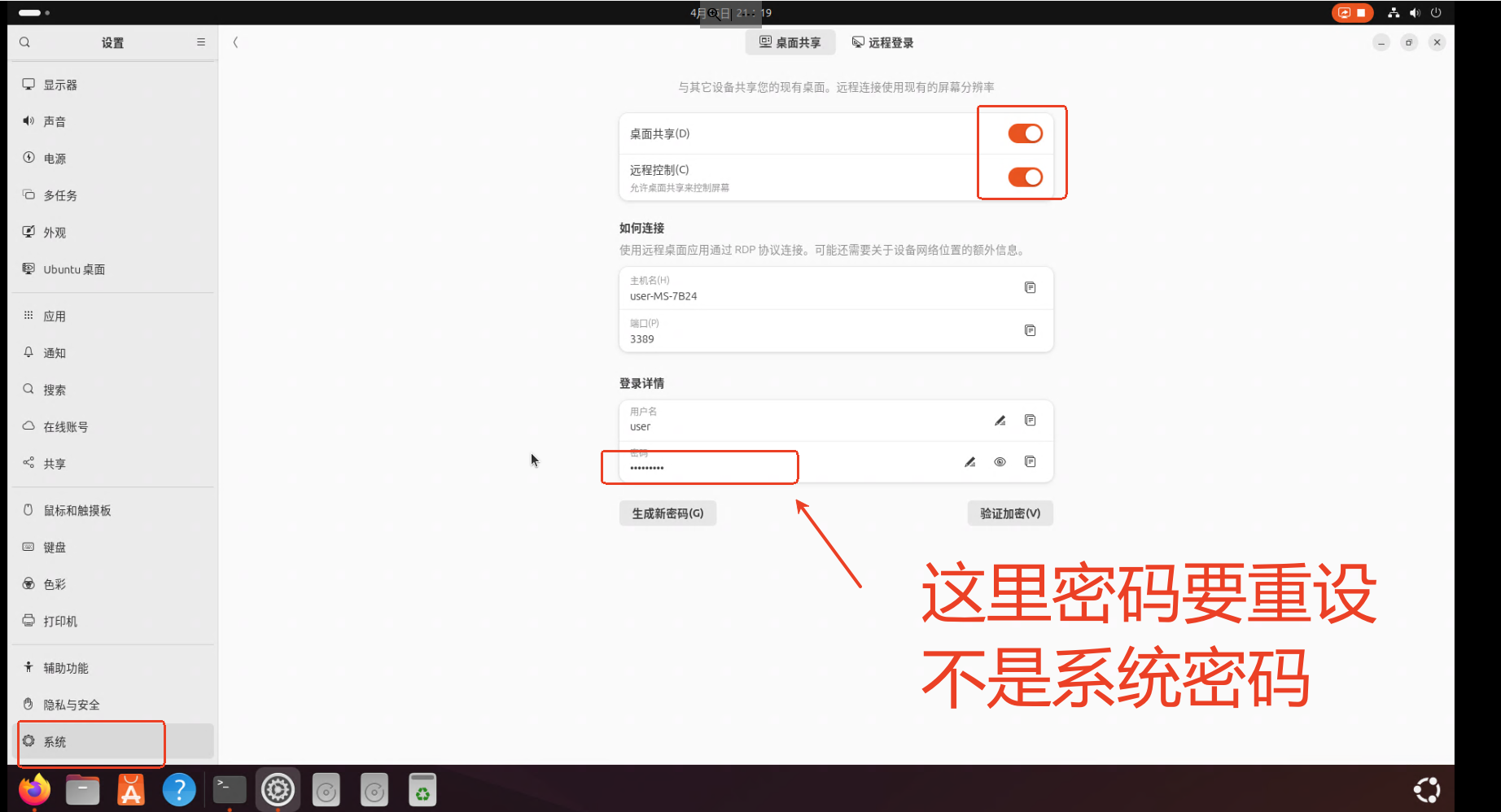
因为原来的2204升级到2404后直接嘎了,于是要重新装一下Ubuntu2404 Ubuntu系统下载 | Ubuntuhttps://cn.ubuntu.com/download我使用的是balenaEtcher将iso文件烧录进U盘后,使用u盘安装,默认选的英文版本, 安装后,安装…...

职坐标:智慧城市未来发展的核心驱动力
内容概要 智慧城市的演进正以颠覆性创新重构人类生存空间,其发展脉络由物联网、人工智能与云计算三大技术支柱交织而成。这些技术不仅推动城市治理从经验决策转向数据驱动模式,更通过实时感知与智能分析,实现交通、能源等领域的精准调控。以…...

DAY 45 leetcode 28的kmp算法实现
KMP算法的思路 例: 文本串:a a b a a b a a f 模式串:a a b a a f 两个指针分别指向上下两串,当出现分歧时,并不将上下的都重新回退,而是利用“next数组”获取已经比较过的信息,上面的指针不…...

从代码学习深度学习 - 自注意力和位置编码 PyTorch 版
这里写自定义目录标题 前言一、自注意力:Transformer 的核心1.1 多头注意力机制的实现1.2 缩放点积注意力1.3 掩码和序列处理1.4 自注意力示例二、位置编码:为序列添加位置信息2.1 位置编码的实现2.2 可视化位置编码总结前言 深度学习近年来在自然语言处理、计算机视觉等领域…...
 的波形发生器)
设计和实现一个基于 DDS(直接数字频率合成) 的波形发生器
设计和实现一个基于 DDS(直接数字频率合成) 的波形发生器 1. 学习和理解IP软核和DDS 关于 IP 核的使用方法 IP 核:在 FPGA 设计中,IP 核(Intellectual Property Core)是由硬件描述语言(HDL&a…...

AWS IAM权限详解:10个关键权限及其安全影响
1. 引言 在AWS (Amazon Web Services) 环境中,Identity and Access Management (IAM) 是确保云资源安全的核心组件。本文将详细解析10个关键的IAM权限,这些权限对AWS的权限管理至关重要,同时也可能被用于权限提升攻击。深入理解这些权限对于加强AWS环境的安全性至关重要。 2.…...

UniRig ,清华联合 VAST 开源的通用自动骨骼绑定框架
UniRig是清华大学计算机系与VAST联合开发的前沿自动骨骼绑定框架,专为处理复杂且多样化的3D模型而设计。基于强大的自回归模型和骨骼点交叉注意力机制,UniRig能够生成高质量的骨骼结构和精确的蒙皮权重,大幅提升动画制作的效率和质量。 UniR…...

DELL电脑开机进入自检界面
疑难解答 - 如何解决开机直接进入BIOS画面 添加链接描述 一、DELL电脑开机自检提示please run setup program 未设置一天中的时间-请运行安装程序(Time-of-day not set - please run SETUP program) 配置信息无效-请运行安装程序(Invalid configuration information - ple…...

分库分表-除了hash分片还有别的吗?
在分库分表的设计中,除了常见的 Hash 分片,还有多种策略根据业务场景灵活选择。以下是几种主流的分库分表策略及其应用场景、技术实现和优缺点分析,结合项目经验(如标易行投标服务平台的高并发场景)进行说明: 一、常见分库分表策略 1. 范围分片(Range Sharding) 原理:…...

Spring Cloud初探之使用load balance包做负载均衡(三)
一、背景说明 基于前一篇文章《Spring Cloud初探之nacos服务注册管理(二)》,我们已经将服务注册到nacos。接下来继续分析如何用Spring cloud的load balance做负载均衡。 load balance是客户端负载均衡组件。本质是调用方拿到所有注册的服务实例列表,然…...

MySQL 数据库备份和恢复全指南
MySQL 是一款常用的开源数据库系统,在日常运维中,数据备份和恢复是系统管理的重要一环。本文将细致介绍 MySQL 两大备份方案—— mysqldump 和 XtraBackup,包括备份方式、恢复步骤、定时脚本、远程备份和常见问题处理方案。 一、mysqldump 备…...

Linux 命令全解析:从零开始掌握 Linux 命令行
Linux 作为一款强大的开源操作系统,广泛应用于服务器、嵌入式系统以及超级计算机领域。掌握 Linux 命令行技能,是每一位开发者和系统管理员的必备能力。本文将从基础开始,为你详细介绍常用的 Linux 命令,以及它们的使用场景和示例…...

vector常用的接口和底层
一.vector的构造函数 我们都是只讲常用的。 这四个都是比较常用的。 第一个简单来看就是无参构造,是通过一个无参的对象来对我们的对象进行初始化的,第一个我们常用来当无参构造来使用。 第二个我们常用的就是通过多个相同的数字来初始化一个vector。 像…...

VMware安装Ubuntu实战分享
1.前期准备 1. 硬件要求 确保您的计算机满足以下基本硬件要求,以便顺利运行 VMware 和 Ubuntu: 处理器: 至少支持虚拟化技术(如 Intel VT-x 或 AMD-V)。可以在 BIOS 设置中启用此功能。 内存: 至少 4GB …...

解锁Grok-3的极致潜能:高阶应用与创新实践
引言 Grok-3,作为xAI公司推出的第三代人工智能模型,以其强大的推理能力和多模态处理能力在全球AI领域掀起了热潮。不仅在数学、科学和编程等基准测试中超越了众多主流模型,其独特的DeepSearch和Big Brain模式更赋予了它处理复杂任务的卓越性…...

【2025年3月中科院1区SCI】Rating entropy等级熵及5种多尺度,特征提取、故障诊断新方法!
引言 2025年3月,研究者在国际机械领域顶级期刊《Mechanical Systems and Signal Processing》(JCR 1区,中科院1区 Top,IF:7.9)上以“Rating entropy and its multivariate version”为题发表科学研究成果。…...
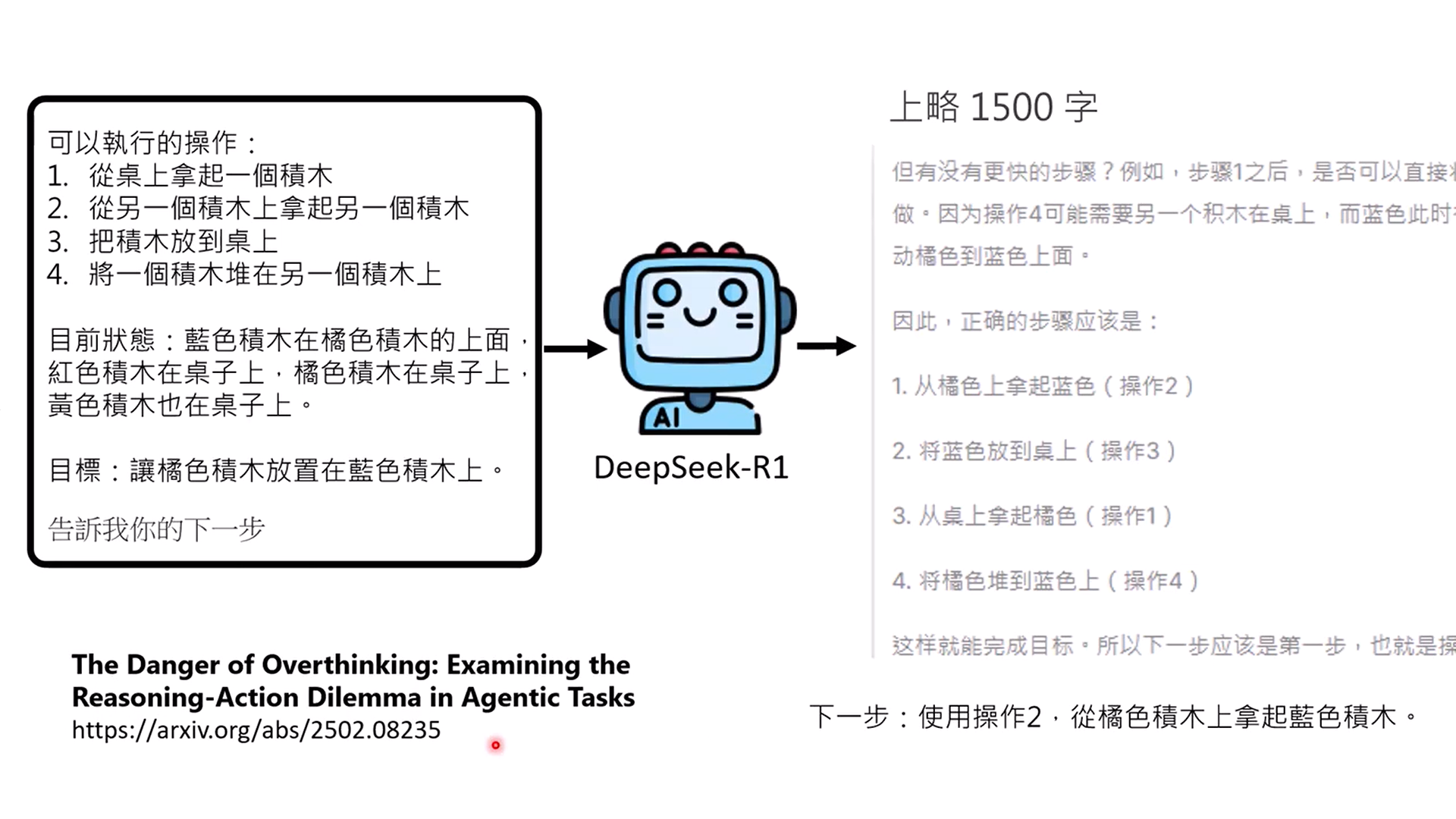
【AI学习】李宏毅老师讲AI Agent摘要
在b站听了李宏毅2025最新的AI Agent教程,简单易懂,而且紧跟发展,有大量最新的研究进展。 教程中引用了大量论文,为了方便将来阅读相关论文,进一步深入理解,做了截屏纪录。 同时也做一下分享。 根据经验调整…...
Nacos-Controller 2.0:使用 Nacos 高效管理你的 K8s 配置
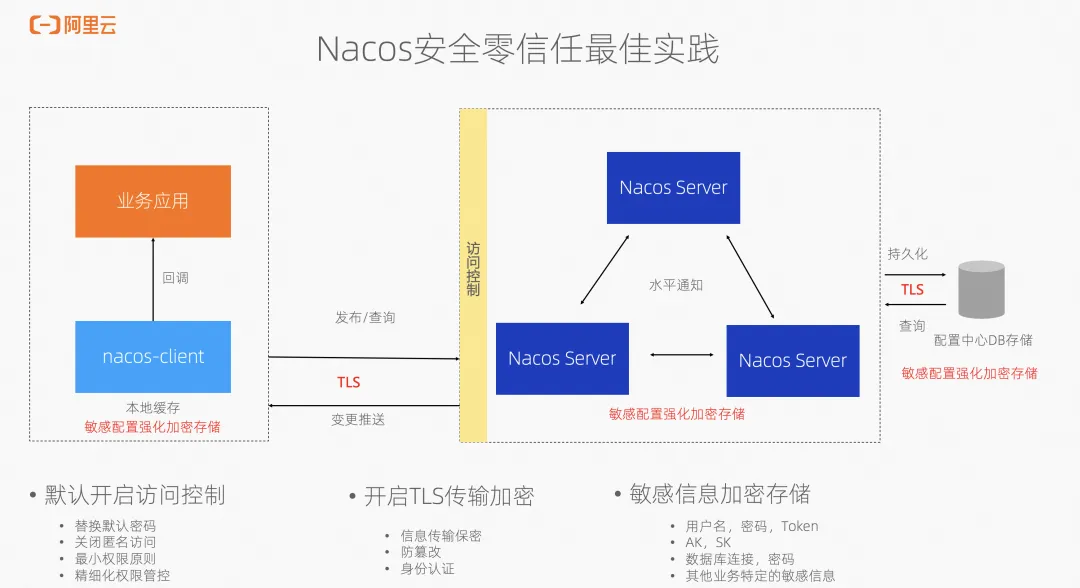
作者:濯光、翼严 Kubernetes 配置管理的局限 目前,在 Kubernetes 集群中,配置管理主要通过 ConfigMap 和 Secret 来实现。这两种资源允许用户将配置信息通过环境变量或者文件等方式,注入到 Pod 中。尽管 Kubernetes 提供了这些强…...
)
小程序获取用户总结(全)
获取方式 目前小程序获取用户一共有3中(自己接触到的),但由于这个API一直在改,所以不确定后期是否有变动,还是要多关注官方公告。 方式一 使用wx.getUserInfo 实例: wxml 文件<button open-type="getUserInfo" bindgetuserinfo="onGetUserInfo&quo…...
:SQL条件判断、排序、插入、更新、删除)
SQL(2):SQL条件判断、排序、插入、更新、删除
1、满足条件 AND和OR,简单 SELECT * FROM 表 WHERE countryCN AND alexa > 50;SELECT * FROM Websites WHERE countryUSA OR countryCN;2、排序,掌握:<order by,降序怎么表示> 就没问题 默认升序,ASC表示升…...

玩转Docker | 使用Docker部署Xnote笔记工具
玩转Docker | 使用Docker部署Xnote笔记工具 前言一、Xnote介绍Xnote简介1.2 Xnote特点二、系统要求环境要求环境检查Docker版本检查检查操作系统版本三、部署Xnote服务下载镜像编辑配置文件编辑部署文件创建容器检查容器状态检查服务端口安全设置四、访问Xnote服务访问Xnote首页…...