
(免费)flask调用讯飞星火AI,实现websocket
本文章可借鉴学习,不可直接盗用
接入ai要获取ID,Secret,Key,和接口地址,由于我们服务接口类型是websocket,所以要获取相应的接口地址。(千万不要复制粘贴到http的了)
还要获取domain,在操作文档中找到对应模型的admain
安装库pip install flask websocket-client werkzeug
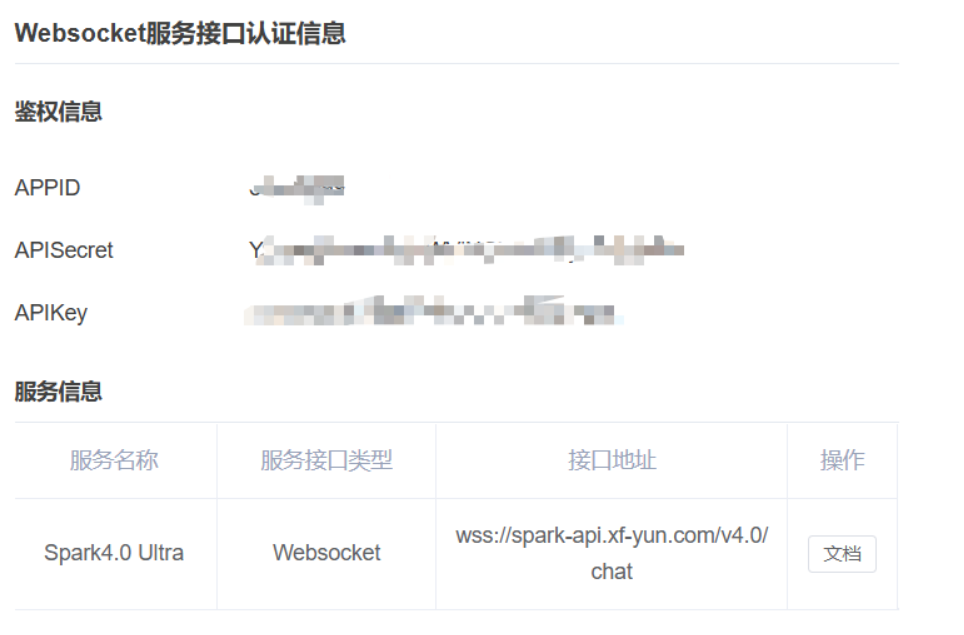
具体看这篇文章
Django接入 免费的 AI 大模型——讯飞星火(2025年4月最新!!!)_星火大模型 api password-CSDN博客
# coding: utf-8
import _thread as thread
import base64
import datetime
import hashlib
import hmac
import json
import ssl
from urllib.parse import urlparse, urlencode
from wsgiref.handlers import format_date_time
from time import mktime
import websocketclass Ws_Param:def __init__(self, APPID, APIKey, APISecret, gpt_url):self.APPID = APPIDself.APIKey = APIKeyself.APISecret = APISecretself.host = urlparse(gpt_url).netlocself.path = urlparse(gpt_url).pathself.gpt_url = gpt_urldef create_url(self):now = datetime.datetime.now()date = format_date_time(mktime(now.timetuple()))signature_origin = f"host: {self.host}\ndate: {date}\nGET {self.path} HTTP/1.1"signature_sha = hmac.new(self.APISecret.encode("utf-8"),signature_origin.encode("utf-8"),digestmod=hashlib.sha256).digest()signature_sha_base64 = base64.b64encode(signature_sha).decode("utf-8")authorization_origin = (f'api_key="{self.APIKey}", algorithm="hmac-sha256", 'f'headers="host date request-line", signature="{signature_sha_base64}"')authorization = base64.b64encode(authorization_origin.encode("utf-8")).decode("utf-8")url_params = {"authorization": authorization,"date": date,"host": self.host}return f"{self.gpt_url}?{urlencode(url_params)}"def on_error(ws, error):print("### 连接错误:", error)def on_close(ws, close_status_code, close_msg):print("### 连接关闭 ###")def on_open(ws):thread.start_new_thread(run, (ws,))def run(ws):data = json.dumps(gen_params(ws.appid, ws.query, ws.domain))ws.send(data)def on_message(ws, message):try:data = json.loads(message)code = data['header']['code']if code != 0:print(f"请求错误: {code}, 错误信息: {data['header']['message']}")else:choices = data["payload"]["choices"]content = choices["text"][0]["content"]print(content, end='')if choices["status"] == 2:print("\n#### 会话结束")ws.close()except Exception as e:print("### 消息解析异常:", e)def gen_params(appid, query, domain):return {"header": {"app_id": appid, "uid": "1234"},"parameter": {"chat": {"domain": domain, "temperature": 0.5, "max_tokens": 4096}},"payload": {"message": {"text": [{"role": "user", "content": query}]}}}def main(appid, api_secret, api_key, gpt_url, domain, query):# 验证密钥格式(APPID长度8,APIKey和APISecret长度32)if not (len(appid) == 8 and len(api_key) == 32 and len(api_secret) == 32):print("错误: API密钥格式不正确")returnws_param = Ws_Param(appid, api_key, api_secret, gpt_url)ws_url = ws_param.create_url()ws = websocket.WebSocketApp(ws_url,on_open=on_open,on_message=on_message,on_error=on_error,on_close=on_close)ws.appid = appidws.query = queryws.domain = domainws.run_forever(sslopt={"cert_reqs": ssl.CERT_NONE})if __name__ == "__main__":# 根据截图中的 Websocket 认证信息修正参数(Spark4.0 Ultra 配置)main(appid="",                  # 截图中显示的 APPIDapi_secret="",  # 截图中 APISecret(注意核对隐藏字符)api_key="",      # 截图中 APIKeygpt_url="",  # Websocket 地址需与控制台一致domain="4.0Ultra",                 # Spark4.0 对应 domainquery="你叫什么名字")
注意这里要替换成你的密钥,接口地址和domain
运行结果如下

前端templates\index.html
<!-- templates/index.html -->
<!DOCTYPE html>
<html lang="zh-CN">
<head><meta charset="UTF-8"><meta name="viewport" content="width=device-width, initial-scale=1.0"><title>AI 智能助手</title><link href="https://cdn.bootcdn.net/ajax/libs/font-awesome/6.4.0/css/all.min.css" rel="stylesheet"><style>:root {--primary-color: #4a90e2;--secondary-color: #f5f5f5;--success-color: #34d399;--error-color: #ef4444;}* {box-sizing: border-box;margin: 0;padding: 0;}body {font-family: 'Segoe UI', system-ui, -apple-system, sans-serif;background: #f0f2f5;min-height: 100vh;}.container {max-width: 1200px;margin: 0 auto;padding: 20px;}.chat-container {background: white;border-radius: 12px;box-shadow: 0 4px 6px rgba(0, 0, 0, 0.1);height: 80vh;display: flex;flex-direction: column;}#chat-box {flex: 1;overflow-y: auto;padding: 20px;scroll-behavior: smooth;}.message {display: flex;gap: 12px;margin-bottom: 16px;}.message.user {flex-direction: row-reverse;}.avatar {width: 40px;height: 40px;border-radius: 50%;background: var(--secondary-color);display: flex;align-items: center;justify-content: center;flex-shrink: 0;}.message-content {max-width: 70%;padding: 12px 16px;border-radius: 12px;position: relative;}.user .message-content {background: var(--primary-color);color: white;border-radius: 12px 12px 0 12px;}.bot .message-content {background: var(--secondary-color);border-radius: 12px 12px 12px 0;}.file-upload {background: #f8fafc;border: 2px dashed #cbd5e1;border-radius: 8px;padding: 16px;text-align: center;margin: 16px 0;cursor: pointer;transition: all 0.3s ease;}.file-upload:hover {border-color: var(--primary-color);background: rgba(74, 144, 226, 0.05);}.input-area {border-top: 1px solid #eee;padding: 16px;display: flex;gap: 12px;background: white;}#user-input {flex: 1;padding: 12px;border: 1px solid #e2e8f0;border-radius: 8px;font-size: 16px;transition: all 0.3s ease;}#user-input:focus {outline: none;border-color: var(--primary-color);box-shadow: 0 0 0 3px rgba(74, 144, 226, 0.2);}button {padding: 12px 24px;background: var(--primary-color);color: white;border: none;border-radius: 8px;cursor: pointer;transition: all 0.2s ease;display: flex;align-items: center;gap: 8px;}button:hover {background: #357abd;transform: translateY(-1px);}button:disabled {background: #94a3b8;cursor: not-allowed;}.file-item {display: flex;align-items: center;gap: 8px;padding: 8px;background: white;border-radius: 8px;margin: 8px 0;}.file-icon {font-size: 20px;}.progress-bar {height: 4px;background: #e2e8f0;border-radius: 2px;overflow: hidden;margin-top: 8px;}.progress {width: 0%;height: 100%;background: var(--primary-color);transition: width 0.3s ease;}@media (max-width: 768px) {.container {padding: 10px;}.message-content {max-width: 85%;}}</style>
</head>
<body><div class="container"><h1 style="margin-bottom: 20px; color: #1e293b;">AI 智能助手 <i class="fas fa-robot"></i></h1><div class="chat-container"><div id="chat-box"><div class="message bot"><div class="avatar"><i class="fas fa-robot"></i></div><div class="message-content">您好!我是智能助手,可以回答各种问题,也可以帮您分析上传的文件</div></div></div><div class="input-area"><label class="file-upload"><input type="file" id="file-input" hidden multiple><i class="fas fa-cloud-upload-alt"></i> 点击上传文件</label><input type="text" id="user-input" placeholder="输入消息..."><button onclick="sendMessage()" id="send-btn"><i class="fas fa-paper-plane"></i> 发送</button></div></div></div><script>let isSending = false// 文件上传处理document.getElementById('file-input').addEventListener('change', async function(e) {const files = e.target.filesfor (let file of files) {await uploadFile(file)}e.target.value = ''})async function uploadFile(file) {const formData = new FormData()formData.append('file', file)try {showFileItem(file)const response = await fetch('/upload', {method: 'POST',body: formData})const data = await response.json()if (response.ok) {updateFileStatus(file.name, 'success', data.url)} else {updateFileStatus(file.name, 'error', data.error)}} catch (error) {updateFileStatus(file.name, 'error', '上传失败')}}function showFileItem(file) {const chatBox = document.getElementById('chat-box')const itemId = `file-${Date.now()}`const html = `<div class="file-item" id="${itemId}"><i class="fas fa-file-alt file-icon"></i><div style="flex:1"><div>${file.name}</div><div class="progress-bar"><div class="progress"></div></div></div></div>`chatBox.insertAdjacentHTML('beforeend', html)chatBox.scrollTop = chatBox.scrollHeight}function updateFileStatus(filename, status, message) {const items = document.querySelectorAll('.file-item')const item = Array.from(items).find(el =>el.textContent.includes(filename))if (!item) returnif (status === 'success') {item.innerHTML = `<i class="fas fa-check-circle" style="color: var(--success-color)"></i><div style="flex:1"><div>${filename}</div><a href="${message}" target="_blank" style="color: var(--primary-color); text-decoration: none">查看文件 <i class="fas fa-external-link-alt"></i></a></div>`} else {item.innerHTML = `<i class="fas fa-times-circle" style="color: var(--error-color)"></i><div style="flex:1"><div>${filename}</div><div style="color: var(--error-color)">${message}</div></div>`}}// 消息处理async function sendMessage() {if (isSending) returnconst input = document.getElementById('user-input')const message = input.value.trim()if (!message) returnisSending = trueinput.disabled = truedocument.getElementById('send-btn').disabled = truetry {appendMessage(message, 'user')input.value = ''const response = await fetch('/chat', {method: 'POST',headers: { 'Content-Type': 'application/json' },body: JSON.stringify({ message })})const data = await response.json()if (response.ok) {appendMessage(data.response, 'bot')} else {appendMessage(`错误:${data.error}`, 'bot')}} catch (error) {appendMessage('网络请求失败', 'bot')} finally {isSending = falseinput.disabled = falsedocument.getElementById('send-btn').disabled = falseinput.focus()}}function appendMessage(message, sender) {const chatBox = document.getElementById('chat-box')const isUser = sender === 'user'const messageEl = document.createElement('div')messageEl.className = `message ${isUser ? 'user' : 'bot'}`messageEl.innerHTML = `<div class="avatar">${isUser ? '<i class="fas fa-user"></i>' : '<i class="fas fa-robot"></i>'}</div><div class="message-content">${message}</div>`chatBox.appendChild(messageEl)chatBox.scrollTop = chatBox.scrollHeight}// 回车发送document.getElementById('user-input').addEventListener('keypress', (e) => {if (e.key === 'Enter' && !e.shiftKey) {e.preventDefault()sendMessage()}})</script>
</body>
</html>
后端flask自命名
# app.py
import os
from flask import Flask, render_template, request, jsonify, send_from_directory
from werkzeug.utils import secure_filename
import _thread as thread
import base64
import datetime
import hashlib
import hmac
import json
import ssl
from urllib.parse import urlparse, urlencode
from wsgiref.handlers import format_date_time
from time import mktime
import websocketapp = Flask(__name__)
app.config.update({'UPLOAD_FOLDER': 'uploads','MAX_CONTENT_LENGTH': 100 * 1024 * 1024,  # 100MB'ALLOWED_EXTENSIONS': {'txt', 'pdf', 'png', 'jpg', 'jpeg', 'gif', 'zip', 'exe', 'apk'}
})# 配置信息(生产环境建议使用环境变量)
CONFIG = {"APPID": "ba110a39","API_SECRET": "NWQ5Nzk1OGY5MjkxNGQyMjMyOGFkNjgy","API_KEY": "63f807b3f65c6c98a249c167403901f2","GPT_URL": "wss://spark-api.xf-yun.com/v4.0/chat","DOMAIN": "4.0Ultra"
}os.makedirs(app.config['UPLOAD_FOLDER'], exist_ok=True)class WsParam:def __init__(self, appid, api_key, api_secret, gpt_url):self.APPID = appidself.APIKey = api_keyself.APISecret = api_secretself.host = urlparse(gpt_url).netlocself.path = urlparse(gpt_url).pathself.gpt_url = gpt_urldef create_url(self):now = datetime.datetime.now()date = format_date_time(mktime(now.timetuple()))signature_origin = f"host: {self.host}\ndate: {date}\nGET {self.path} HTTP/1.1"signature_sha = hmac.new(self.APISecret.encode("utf-8"),signature_origin.encode("utf-8"),digestmod=hashlib.sha256).digest()signature_sha_base64 = base64.b64encode(signature_sha).decode("utf-8")authorization_origin = (f'api_key="{self.APIKey}", algorithm="hmac-sha256", 'f'headers="host date request-line", signature="{signature_sha_base64}"')authorization = base64.b64encode(authorization_origin.encode("utf-8")).decode("utf-8")return f"{self.gpt_url}?{urlencode({'authorization': authorization, 'date': date, 'host': self.host})}"def allowed_file(filename):return '.' in filename and \filename.rsplit('.', 1)[1].lower() in app.config['ALLOWED_EXTENSIONS']def get_spark_response(query):response_text = []def on_message(ws, message):data = json.loads(message)if data["header"]["code"] != 0:raise Exception(f'请求错误: {data["header"]["code"]}, {data["header"]["message"]}')else:choices = data["payload"]["choices"]text = choices["text"][0]["content"]response_text.append(text)if choices["status"] == 2:ws.close()def on_error(ws, error):raise Exception(f"WebSocket错误: {error}")def on_close(ws, *args):passdef on_open(ws):data = json.dumps({"header": {"app_id": CONFIG["APPID"], "uid": "1234"},"parameter": {"chat": {"domain": CONFIG["DOMAIN"], "temperature": 0.5, "max_tokens": 4096}},"payload": {"message": {"text": [{"role": "user", "content": query}]}}})ws.send(data)ws_param = WsParam(CONFIG["APPID"], CONFIG["API_KEY"], CONFIG["API_SECRET"], CONFIG["GPT_URL"])ws_url = ws_param.create_url()ws = websocket.WebSocketApp(ws_url,on_open=on_open,on_message=on_message,on_error=on_error,on_close=on_close)ws.run_forever(sslopt={"cert_reqs": ssl.CERT_NONE})return "".join(response_text)@app.route('/')
def index():return render_template('index.html')@app.route('/chat', methods=['POST'])
def chat():try:user_input = request.json.get('message')if not user_input:return jsonify({"error": "空消息"}), 400ai_response = get_spark_response(user_input)return jsonify({"response": ai_response})except Exception as e:return jsonify({"error": str(e)}), 500@app.route('/upload', methods=['POST'])
def upload_file():if 'file' not in request.files:return jsonify({"error": "没有选择文件"}), 400file = request.files['file']if file.filename == '':return jsonify({"error": "没有选择文件"}), 400if file and allowed_file(file.filename):filename = secure_filename(file.filename)file.save(os.path.join(app.config['UPLOAD_FOLDER'], filename))return jsonify({"filename": filename,"url": f"/uploads/{filename}"})return jsonify({"error": "文件类型不允许"}), 400@app.route('/uploads/<filename>')
def uploaded_file(filename):return send_from_directory(app.config['UPLOAD_FOLDER'], filename)if __name__ == '__main__':app.run(debug=True)
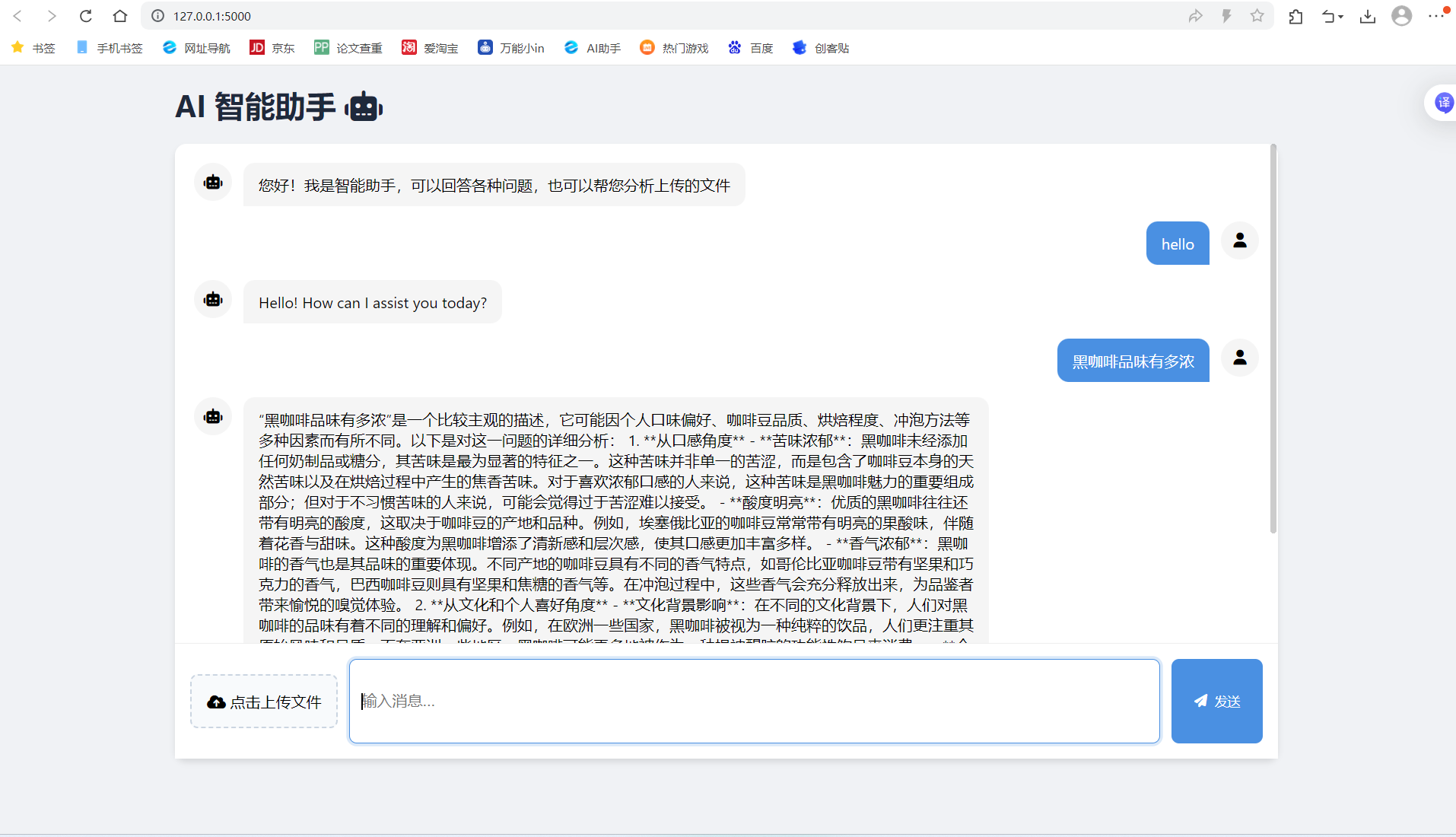
运行结果(未添加结束对话功能和加载进度,待自行开发)
相关文章:
(免费)flask调用讯飞星火AI,实现websocket
本文章可借鉴学习,不可直接盗用 接入ai要获取ID,Secret,Key,和接口地址,由于我们服务接口类型是websocket,所以要获取相应的接口地址。(千万不要复制粘贴到http的了) 还要获取doma…...

ARINC818协议-持续
一、帧头帧尾 SOF 和 EOF 分别代表视频帧传输的开始与结束,它们在封装过程有多种状态,SOF 分为 SOFi 和 SOFn,EOF 分为 EOFt 和 EOFn。传输系统中的视频信息包括像素数据信 息和辅助数据信息,分别存储在有效数据中的对象 0 和对象…...
)
分布式笔记(一)
分布式系统问题 并发性 没有全局时钟 故障独立性 分布式系统概念 分布式优势 资源共享、开放性、并发性、可扩展性、容错性 问题挑战 分布式系统总部特性很难了解 分布式系统响应不可预知 不能自顶向下 设计原则 透明性 开放性:按照普遍标准 可扩展性…...

linux常用基础命令_最新版
echo off setlocal enabledelayedexpansion :: Copyright © 2025 xianwen.deng :: All rights reserved. :: 591278546qq.com :: Version: 1.0 for /f “tokens2 delims:” %%a in (‘chcp’) do set “codepage%%a” set codepage!codepage: ! echo Codepage: !codepag…...
2021-11-09 C++三位数平方含有该数
缘由求解,运算函数,哪位大神教一下-编程语言-CSDN问答 void 三位数平方含有该数() {//缘由https://ask.csdn.net/questions/7560152?spm1005.2025.3001.5141int a 100, aa 1000, f 0;while (a < aa){f a*a;while (f > a)if ((f - a) % aa)f …...

MATLAB 程序实现了一个层次化光网络的数据传输模拟系统
% 主程序 num_pods = 4; % Pod 数量 num_racks_per_pod = 4; % 每个 Pod 的 Rack 数量 num_nodes_per_rack = 4; % 每个 Rack 的 Node 数量 max_wavelength = 50; % 可用波长数(根据冲突图动态调整) num_packets = 1000; % 模拟的…...

解锁 MCP 协议:AI 与数据交互的新桥梁
在人工智能(AI)蓬勃发展的当下,大型语言模型(LLM)展现出了令人惊叹的生成与推理能力。然而,它们在数据访问方面却面临着严峻的 “数据孤岛” 挑战。传统模式下,每个数据源都需要专门的连接器&am…...
StarRocks Community Monthly Newsletter (Mar)
版本动态 3.4.1 版本更新 核心功能升级 数据安全与权限管控 支持「安全视图」功能,严格管控视图查询权限 MySQL协议连接支持SSL认证,保障数据传输安全 存算分离架构增强 支持自动创建Snapshot(集群恢复更便捷) Storage Volu…...
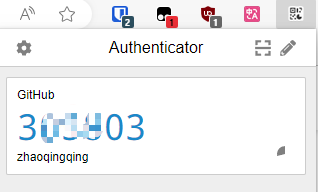
Github 2FA(Two-Factor Authentication/两因素认证)
Github 2FA认证 多因素用户认证(Multi-Factor Authentication),基本上各个大互联网平台,尤其是云平台厂商(如:阿里云的MFA、华为云、腾讯云/QQ安全中心等)都有启用了,Github算是搞得比较晚些了。 双因素身…...

动态规划 -- 简单多状态dp,打家劫舍问题
1 按摩师 面试题 17.16. 按摩师 - 力扣(LeetCode) 本题的意思简单理解就是,如果我们接受了第 i 个预约,那么第 i -1 个预约和第 i1 个预约我们都是无法接受的,只能至少间隔一个选择。 按照以前的经验,我们…...

list的模拟实现和反向迭代器的底层
1:list的模拟实现 1:链表的节点 对于list的模拟实现,我们需要先定义一个节点的类可以使用(class也可以使用struct) // List的节点类 template<class T> struct ListNode {ListNode(const T& val T()){_p…...
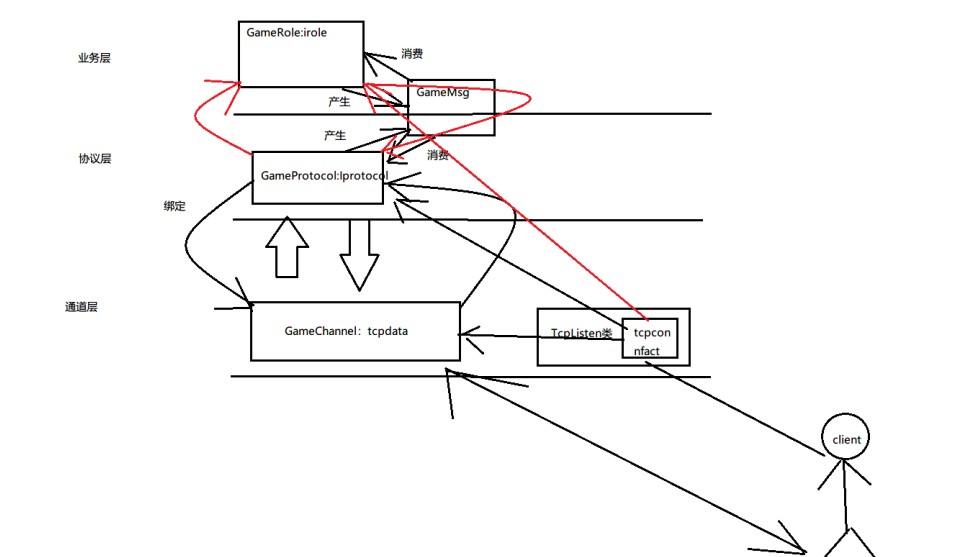
C++学习之游戏服务器开发⑤AOI业务逻辑
目录 1.项目进度回顾 2.完善整体架构 3.AOI网格思路 4.网络AOI数据结构 5.游戏世界类添加,删除和构造 6.AOI查找实现 7.GAMEROLE类结合AOI 8.登陆时发送ID和姓名 9.登陆时发送周围玩家位置 10.玩家上线完成 11.玩家下线处理 1.项目进度回顾 时间轮调度处理…...

C/C++语言常见问题-智能指针、多态原理
文章目录 智能指针实现原理智能指针,里面的计数器何时会改变std::shared_ptr的引用计数器:std::weak_ptr的弱引用计数器:std::unique_ptr的控制块:总结: 智能指针和管理的对象分别在哪个区面向对象的特性:多…...

Python 实现日志备份守护进程
实训背景 假设你是一名运维工程师,需要为公司的监控系统开发一个简单的日志备份守护进程。该进程需满足以下需求: 后台运行:脱离终端,长期监控指定目录(如 /var/log/app/)中的日志文件。自动备份…...
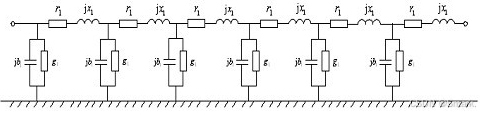
Electricity Market Optimization 探索系列(VII)- 直流潮流方程的推导及例题
本文参考书籍:电力经济与电力市场,甘德强,杨莉,冯冬涵 著 link \hspace{1.6em} 文章的结构如下:围绕电力传输系统中短线路的等值等效模型,从节点注入功率的角度和线路功率的角度分析电网中的潮流࿰…...

DataOutputStream 终极解析与记忆指南
DataOutputStream 终极解析与记忆指南 一、核心本质 DataOutputStream 是 Java 提供的数据字节输出流,继承自 FilterOutputStream,用于写入基本数据类型和字符串的二进制数据。 作用:1.将java程序中的数据直接写入到文件,写到文…...

Spring AI与通义千问的完美结合:构建智能对话应用
Spring AI是Spring生态系统中的新成员,它为开发人员提供了一套简单而强大的工具,用于集成各种AI大模型。本文将介绍如何使用Spring AI与阿里云通义千问大模型进行集成,构建智能对话应用,帮助你快速掌握AI应用开发的核心技能。 引言 随着人工智能技术的快速发展,越来越多的…...
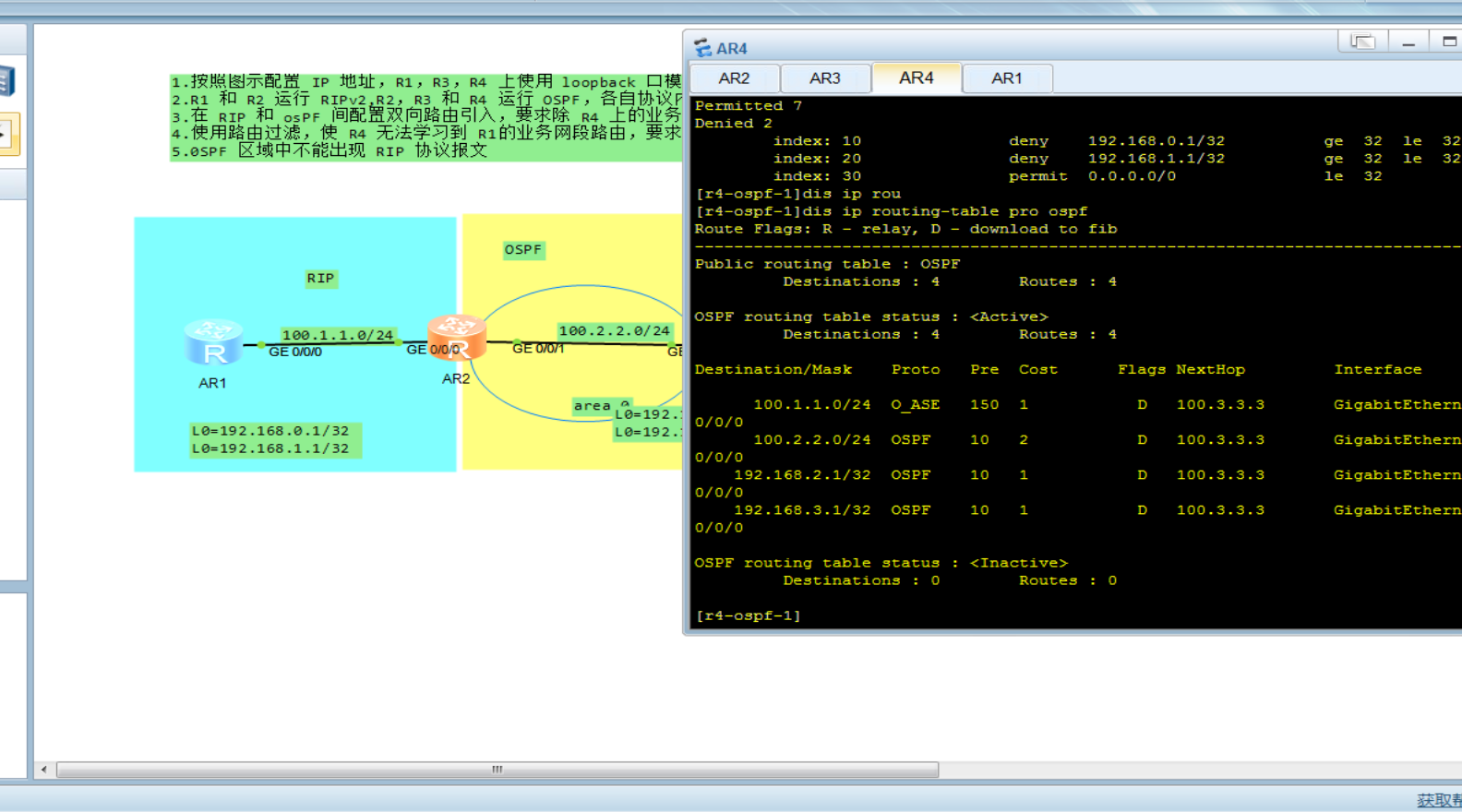
路由过滤实验
实验拓扑以及要求 此实验总结 1.ip-prefix 拒绝192.168.4.1 32,这样写的话并不会匹配192.168.4.1 32,需要加上范围less-eq 32,也就是说,192.168.4.1 32只是规则的范围,匹配还是得写范围 2.router-policy适合用在边界路由器引入 filter-policy都可以用 配置IP 配置ospf,rip …...
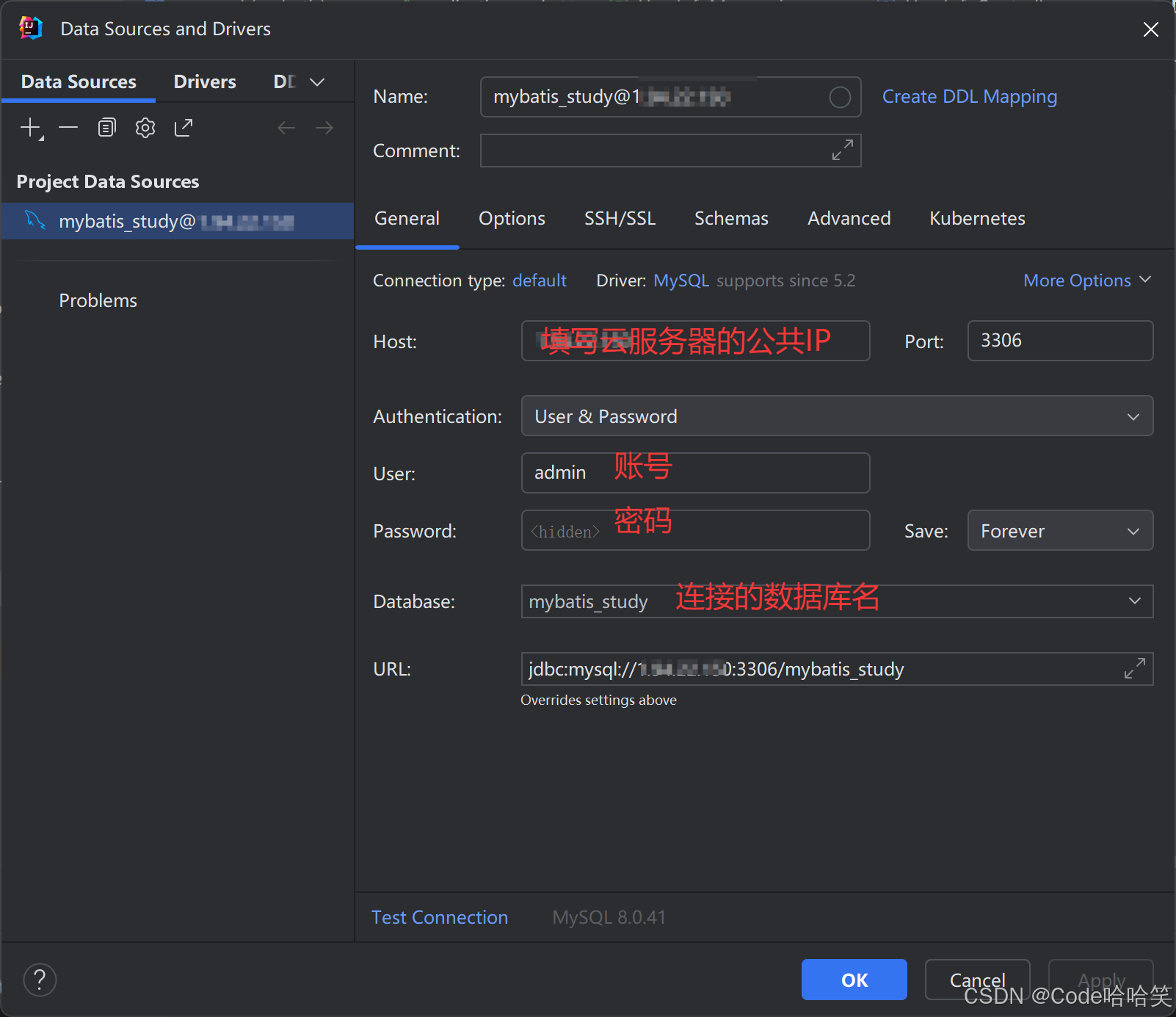
Idea连接远程云服务器上的MySQL,开放云服务器端口
1.开放云服务器的3306端口 (1)进入到云服务器的控制台 (2)点击使用的云服务器 (3)点击 配置安全组规则 (4)添加规则 (5)开放端口 2.创建可以远程访问…...

Oracle查询大表的全部数据
2000w的大表 表结构如下,其中id是索引 查询处理慢的写法 List<String> queryLoidForPage(Integer startNum,Integer endNum){try {Connection oracleConnection initBean.oracleConnection;Statement stmt oracleConnection.createStatement();// 4.执行查…...

Java锁的分类与解析
在多线程编程中,锁是确保共享资源不会同时被多个线程访问的关键工具。Java 提供了多种锁的实现方式,可以根据不同的需求选择适合的锁。本文将从多个维度对 Java 的锁进行分类,并对每种锁的特性进行详细解析。 锁的分类 锁的分类并没有唯一标…...

PyTorch生成式人工智能实战(1)——神经网络与模型训练过程详解
PyTorch生成式人工智能实战(1)——神经网络与模型训练过程详解 0. 前言1. 传统机器学习与人工智能2. 人工神经网络基础2.1 人工神经网络组成2.2 神经网络的训练 3. 前向传播3.1 计算隐藏层值3.2 执行非线性激活3.3 计算输出层值3.4 计算损失值3.5 实现前…...
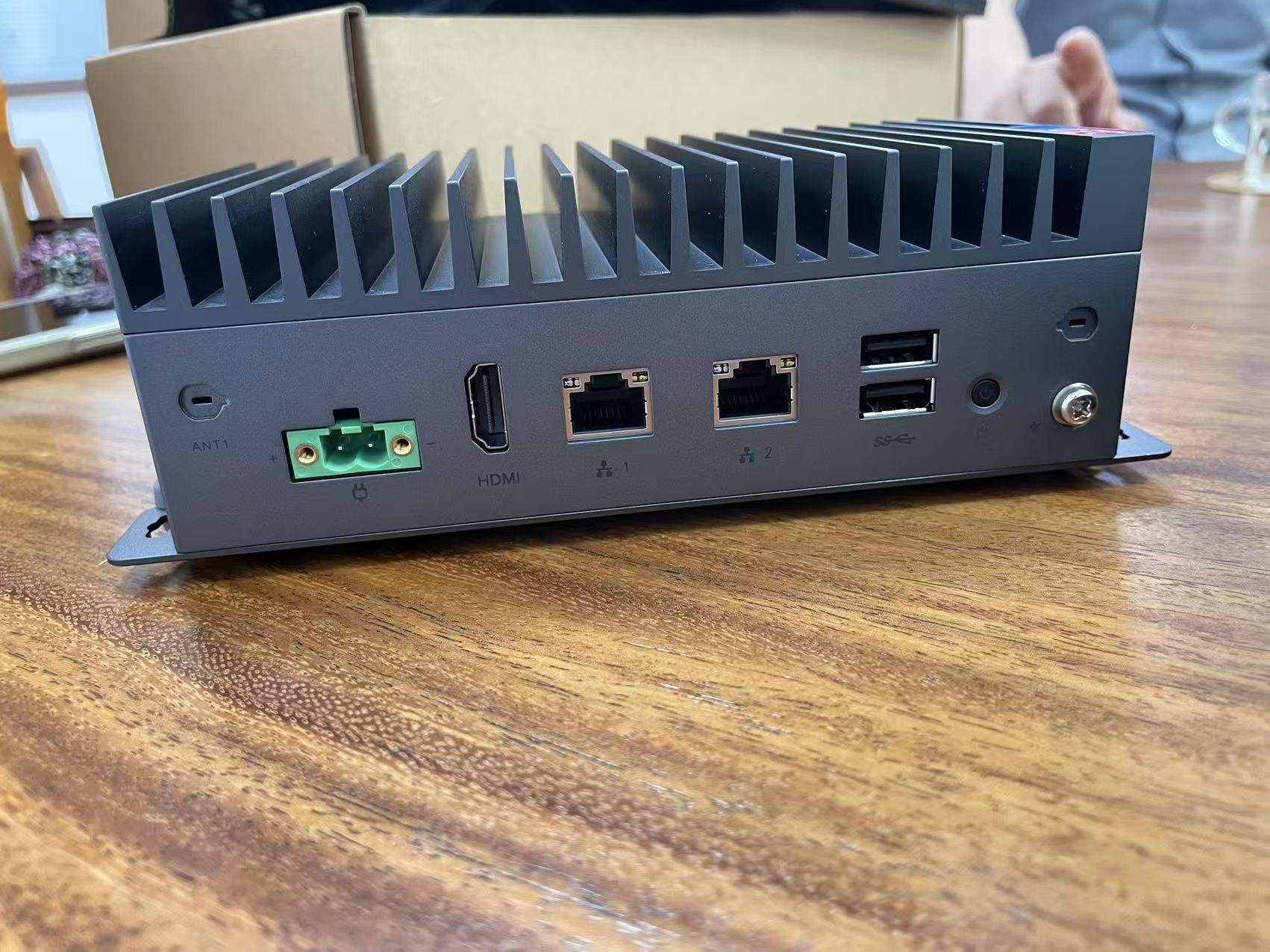
基于X86/Nvidia+FPGA大模型具身智能机器人控制器解决方案,同时拥有算力与实时的便利
2025年成为人形机器人产业化元年,行业已突破早期实验室研发阶段,进入"场景验证量产爬坡"新周期,预计2031年具身智能市场规模有望突破万亿元。这一进程的背后,是硬件算力、实时控制、环境适应等底层技术的系统性突破——…...
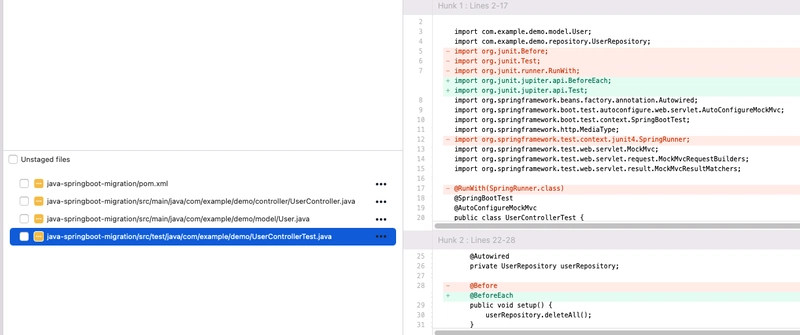
使用 OpenRewrite 简化 Java 和 SpringBoot 迁移
大家好,这里是架构资源栈!点击上方关注,添加“星标”,一起学习大厂前沿架构! 移民的挑战 随着 Spring Boot 2.x 等旧版本即将到期且不再获得支持,迁移到较新版本对于安全性、兼容性和性能改进至关重要。但…...

2025中国移动云智算大会回顾:云智变革,AI+跃迁
4月10日,2025中国移动云智算大会在苏州举办。会上,中国移动开启“由云向智”新范式,以“智”为核心开辟算网新生态,彰显其在AI新时代的战略远见与技术引领力。 “云智算”将如何通过算网基础设施与人工智能核心技术的深度融合&am…...

ubuntu 2204 安装 vcs 2023
系统 : Ubuntu 22.04.1 LTS vcs 软件 : 有已经安装好的软件(位于redhat8.10),没找到安装包 . 安装好的目录文件 占用 94 G注意 : 该虚拟机(包括安装好的软件)有114G,其中安装好的目录文件占用94GB // 即 我要把 这里 已经安装好的软件(包括scl/vcs/verdi 和其他软件) 在 …...

C#实例化类型详解:从概念到实战
在C#编程中,实例化类型是构建程序的核心操作。本文将通过通俗易懂的案例,深入解析类型实例化的原理与实践技巧,帮助开发者快速掌握这一基础但至关重要的概念。 实例化类型是什么? 定义 通过类型模板创建具体对象的过程称为实例…...

Redis的Key的过期策略
我们都知道Redis的键值对是可以设置过期时间的,那么就会涉及到一个问题,Redis到底是如何做到响应快的同时有能快速地释放掉过期的键值对的呢?不卖关子了,直接说答案,那就是Redis两个策略:定期删除和惰性删除…...

python爬虫降低IP封禁,python爬虫除了使用代理IP和降低请求频率,还有哪些方法可以应对IP封禁?
文章目录 前言1. 利用 CDN 节点2. 模拟真实用户行为3. 使用 IP 池轮换策略4. 处理 Cookie 和会话信息5. 分布式爬虫 前言 除了使用代理 IP 和降低请求频率,以下这些方法也能应对 IP 封禁: Python 3.13.2安装教程(附安装包)Python…...
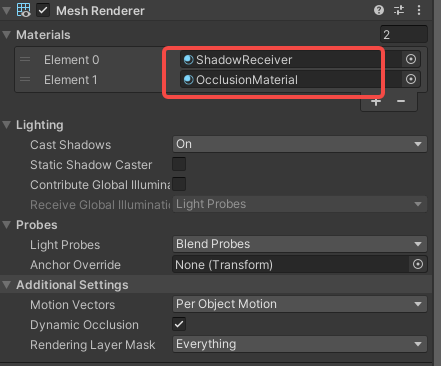
Unity URP Moblie AR示例工程,真机打包出来,没阴影
效果: unity ar示例演示 现象: 真机打包测试私活没有阴影 Unity版本:2022.3.4f1c1 分析原因: Prefab :ARFeatheredPlane中也有材质,一个用于环境遮挡,一个用于阴影接受。 按理说有啊。 urp …...