
shiro使用
shiro是apache提供的一种安全框架。他可以将登录,权限这一方面简单化。
使用shiro需要引入
<dependency><groupId>org.apache.shiro</groupId><artifactId>shiro-core</artifactId><version>1.9.0</version></dependency><dependency><groupId>junit</groupId><artifactId>junit</artifactId><version>4.12</version></dependency>
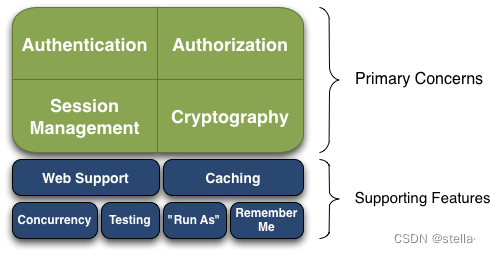
下图是他所提供的功能。
,
下图是使用层面的三个角色,通过subject也就是用户,将判断交给securityManager,而securityManger会将他交给Realm,也就是判断层。
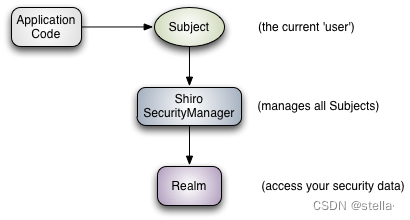
我们可以用shiro为我们提供的realm,也可以重写realm。因为,在实际中,我们的数据都是从数据库中来的,所以我们都是重写realm。
继承AuthorizingRealm,他会让我们重写两个方法,分别是认证,和授权方面的内容。
package com.example.shirodemo;import lombok.val;
import org.apache.shiro.authc.*;
import org.apache.shiro.authz.AuthorizationInfo;
import org.apache.shiro.authz.SimpleAuthorizationInfo;
import org.apache.shiro.crypto.hash.Md5Hash;
import org.apache.shiro.realm.AuthenticatingRealm;
import org.apache.shiro.realm.AuthorizingRealm;
import org.apache.shiro.subject.PrincipalCollection;
import org.springframework.util.ObjectUtils;import java.util.*;public class MyRealm extends AuthorizingRealm {Map<Object, String> userMap = new HashMap<>(16);{userMap.put("cmc", new Md5Hash("123456").toHex());super.setName("myRealm"); // 设置自定义Realm的名称,取什么无所谓..}//    认证@Overrideprotected AuthenticationInfo doGetAuthenticationInfo(AuthenticationToken authenticationToken) throws AuthenticationException {String s = userMap.get(authenticationToken.getPrincipal());UsernamePasswordToken usernamePasswordToken = (UsernamePasswordToken) authenticationToken;if (!ObjectUtils.isEmpty(s)) {char[] password = usernamePasswordToken.getPassword();Md5Hash md5Hash = new Md5Hash(password);if (s.equals(md5Hash.toHex())){return new SimpleAuthenticationInfo(authenticationToken.getPrincipal(),authenticationToken.getCredentials(),"authentication");}}throw new AuthenticationException("账号或密码错误");}//传进来他的唯一标识,然后根据唯一标识查找他的角色public Set<String> getRolesByUserName(String userName){Set<String> permissions = new HashSet<>();permissions.add("admin");return permissions;}//    认证@Overrideprotected AuthorizationInfo doGetAuthorizationInfo(PrincipalCollection principalCollection) {String userName = (String) principalCollection.getPrimaryPrincipal();// 从数据库获取角色和权限数据Set<String> roles = getRolesByUserName(userName);Set<String> permissions = getPermissionsByUserName(userName);SimpleAuthorizationInfo simpleAuthorizationInfo = new SimpleAuthorizationInfo();simpleAuthorizationInfo.setStringPermissions(permissions);simpleAuthorizationInfo.setRoles(roles);return simpleAuthorizationInfo;}//根据唯一标识查询他的权限private Set<String> getPermissionsByUserName(String userName) {Set<String> set = new HashSet<>();set.add("*");return set;}
}
我们在实现类中进行判断。
package com.example.shirodemo;import org.apache.shiro.SecurityUtils;
import org.apache.shiro.authc.UsernamePasswordToken;
import org.apache.shiro.codec.Hex;
import org.apache.shiro.crypto.hash.Md5Hash;
import org.apache.shiro.crypto.hash.SimpleHash;
import org.apache.shiro.mgt.DefaultSecurityManager;
import org.apache.shiro.realm.SimpleAccountRealm;
import org.apache.shiro.subject.Subject;
import org.junit.Before;
import org.junit.Test;import java.io.UnsupportedEncodingException;
import java.nio.charset.StandardCharsets;
import java.time.LocalDateTime;
import java.time.ZoneOffset;
import java.util.Arrays;public class AuthenticationTest {@Testpublic void testAuthentication() throws UnsupportedEncodingException {// 1.构建SecurityManager环境DefaultSecurityManager defaultSecurityManager = new DefaultSecurityManager();defaultSecurityManager.setRealm(new MyRealm());// 2.主体提交认证请求SecurityUtils.setSecurityManager(defaultSecurityManager); // 设置SecurityManager环境Subject subject = SecurityUtils.getSubject(); // 获取当前主体String password ="123456";UsernamePasswordToken token = new UsernamePasswordToken("cmc", password);subject.login(token); // 登录// subject.isAuthenticated()方法返回一个boolean值,用于判断用户是否认证成功System.out.println("isAuthenticated:" + subject.isAuthenticated()); // 输出truesubject.checkPermissions("user:add","user:modify");subject.checkRoles("admin");subject.logout(); // 登出Long second = LocalDateTime.now().toEpochSecond(ZoneOffset.of("+8"));//161ea5d3a6218591ba3cc387bf3c8becMd5Hash md5Hash = new Md5Hash(password, String.valueOf(second));System.out.println(md5Hash.toBase64());System.out.println(md5Hash.toHex());System.out.println("isAuthenticated:" + subject.isAuthenticated()); // 输出false}
}
你可以通过使用MD5对密码进行非对称加密。shiro为我们提供了加密对象。
//加密名
//密码
//加入随机数
//加密次数
String encodePassword = new SimpleHash(alogrithmName, password, salt, times).toString();
通过上面的加密方法基本上可以完成非常好的加密了。
如果你想要使用的简单方法的话,使用这个方法即可
String password=new MD5(password,salt).toHex();
shiro的基本使用讲解完了。最重要的还是要和框架融合。
那在spring中应该如何融合呢?
springboot中使用
导包
在你的springboot中加入shiro包。
<dependency><groupId>org.apache.shiro</groupId><artifactId>shiro-spring</artifactId><version>1.9.0</version></dependency><dependency><groupId>javax.servlet</groupId><artifactId>javax.servlet-api</artifactId><version>4.0.1</version><scope>provided</scope></dependency>
配置
package com.example.shirodemo.config;import com.example.shirodemo.shiro.MyRealm;
import org.apache.shiro.authc.credential.HashedCredentialsMatcher;
import org.apache.shiro.spring.security.interceptor.AuthorizationAttributeSourceAdvisor;
import org.apache.shiro.spring.web.ShiroFilterFactoryBean;
import org.apache.shiro.util.ThreadContext;
import org.apache.shiro.web.mgt.DefaultWebSecurityManager;
import org.springframework.aop.framework.autoproxy.DefaultAdvisorAutoProxyCreator;
import org.springframework.beans.factory.annotation.Qualifier;
import org.springframework.context.annotation.Bean;
import org.springframework.context.annotation.Configuration;
import java.util.HashMap;
import java.util.Map;@Configuration
public class ShiroConfig {//将自定义的realm丢入ioc中,这里我加入了密码加密//放入securityManager中@Beanpublic DefaultWebSecurityManager getDefaultWebSecurityManager(MyRealm realm){DefaultWebSecurityManager securityManager=new DefaultWebSecurityManager();//securityManager要完成校验,需要realmsecurityManager.setRealm(realm);ThreadContext.bind(securityManager);//加上这句代码手动绑定return securityManager;}@Beanpublic ShiroFilterFactoryBean getShiroFilterFactoryBean(DefaultWebSecurityManager defaultWebSecurityManager){ShiroFilterFactoryBean filter=new ShiroFilterFactoryBean();filter.setSecurityManager(defaultWebSecurityManager);//设置shiro的拦截规则//anon 匿名用户可访问   authc  认证用户可访问//user 使用RemeberMe的用户可访问  perms  对应权限可访问//role  对应的角色可访问Map<String,String> filterMap=new HashMap<>();filterMap.put("/login","anon");filterMap.put("/register","anon");filterMap.put("static/**","anon");filterMap.put("/**","authc");filter.setFilterChainDefinitionMap(filterMap);//设置未授权页面跳转到登录页面filter.setUnauthorizedUrl("/unauthorized");return filter;}//使Shiro的注解可以加载执行@Beanpublic DefaultAdvisorAutoProxyCreator getDefaultAdvisorAutoProxyCreator(){DefaultAdvisorAutoProxyCreator autoProxyCreator=new DefaultAdvisorAutoProxyCreator();autoProxyCreator.setProxyTargetClass(true);return autoProxyCreator;}//权限注解加载@Beanpublic AuthorizationAttributeSourceAdvisor getAuthorizationAttributeSourceAdvisor(DefaultWebSecurityManager defaultWebSecurityManager){AuthorizationAttributeSourceAdvisor advisor=new AuthorizationAttributeSourceAdvisor();advisor.setSecurityManager(defaultWebSecurityManager);return advisor;}//加入密码的暗文判断@Beanpublic HashedCredentialsMatcher getHashedCredentialsMatcher(){HashedCredentialsMatcher matcher=new HashedCredentialsMatcher();//matcher就是用来指定加密规则//加密方式matcher.setHashAlgorithmName("md5");//hash次数,这里的hash次数要与存储时加密的hash次数保持一致matcher.setHashIterations(1);return matcher;}@Beanpublic MyRealm getMyRealm(HashedCredentialsMatcher matcher){MyRealm myRealm = new MyRealm();myRealm.setCredentialsMatcher(matcher);return myRealm;}
}
里面加入了生效注解,我们可以直接使用注解了。
声明一个处理全局异常的类,用来接受无权限的报错
package com.example.shirodemo.shiro;import com.example.shirodemo.entity.sys.User;
import com.example.shirodemo.service.UserService;
import jakarta.annotation.Resource;
import org.apache.shiro.authc.*;
import org.apache.shiro.authz.AuthorizationInfo;
import org.apache.shiro.authz.SimpleAuthorizationInfo;
import org.apache.shiro.crypto.hash.Md5Hash;
import org.apache.shiro.realm.AuthorizingRealm;
import org.apache.shiro.subject.PrincipalCollection;
import org.springframework.context.annotation.ComponentScan;
import org.springframework.stereotype.Component;
import org.springframework.util.ObjectUtils;import java.util.HashMap;
import java.util.HashSet;
import java.util.Map;
import java.util.Set;public class MyRealm extends AuthorizingRealm {@ResourceUserService userService;//    认证@Overrideprotected AuthenticationInfo doGetAuthenticationInfo(AuthenticationToken authenticationToken) throws AuthenticationException {System.out.println(authenticationToken.getPrincipal());User user = userService.lambdaQuery().eq(User::getUsername, authenticationToken.getPrincipal()).one();if (ObjectUtils.isEmpty(user)){return null;}//e10adc3949ba59abbe56e057f20f883ereturn new SimpleAuthenticationInfo(user.getUsername(),user.getPassword(),"");}//传进来他的唯一标识,然后根据唯一标识查找他的角色public Set<String> getRolesByUserName(String userName){Set<String> permissions = new HashSet<>();permissions.add("admin");return permissions;}//    认证@Overrideprotected AuthorizationInfo doGetAuthorizationInfo(PrincipalCollection principalCollection) {String userName = (String) principalCollection.getPrimaryPrincipal();// 从数据库获取角色和权限数据Set<String> roles = getRolesByUserName(userName);Set<String> permissions = getPermissionsByUserName(userName);SimpleAuthorizationInfo simpleAuthorizationInfo = new SimpleAuthorizationInfo();simpleAuthorizationInfo.setStringPermissions(permissions);simpleAuthorizationInfo.setRoles(roles);return simpleAuthorizationInfo;}//根据唯一标识查询他的权限private Set<String> getPermissionsByUserName(String userName) {Set<String> set = new HashSet<>();return set;}
}
realm你可以自己进行更改。你还可以加入加密规则。
@Beanpublic HashedCredentialsMatcher getHashedCredentialsMatcher(){HashedCredentialsMatcher matcher=new HashedCredentialsMatcher();//matcher就是用来指定加密规则//加密方式matcher.setHashAlgorithmName("md5");//hash次数,这里的hash次数要与存储时加密的hash次数保持一致matcher.setHashIterations(1);return matcher;}//自定义Realm@Beanpublic MyRealm getMyRealm(HashedCredentialsMatcher matcher){MyRealm myRealm=new MyRealm();//设置加密规则myRealm.setCredentialsMatcher(matcher);return myRealm;}相关文章:
shiro使用
shiro是apache提供的一种安全框架。他可以将登录,权限这一方面简单化。 使用shiro需要引入 <dependency><groupId>org.apache.shiro</groupId><artifactId>shiro-core</artifactId><version>1.9.0</version></depend…...
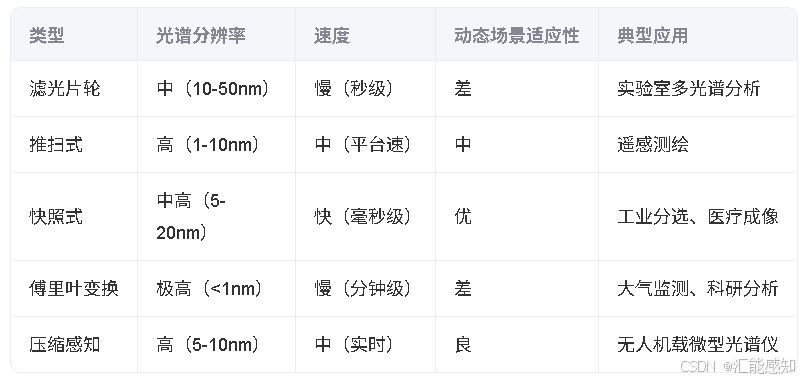
光谱相机的成像方式
光谱相机的成像方式决定了其如何获取物体的空间与光谱信息,核心在于分光技术与扫描模式的结合。以下是主要成像方式的分类解析: 一、滤光片切换型 1. 滤光片轮(Filter Wheel) 原理:通过旋转装有多个窄带…...

浅析MySQL事务锁
在 MySQL 中,事务锁是用于确保数据一致性和并发控制的重要机制。事务锁可以帮助防止多个事务同时修改同一数据,从而避免数据不一致和脏读、不可重复读、幻读等问题。 以下是 MySQL 事务锁的关键点总结: 事务锁:用于确保数据一致性和并发控制。锁的类型: 行级锁:InnoDB,粒…...
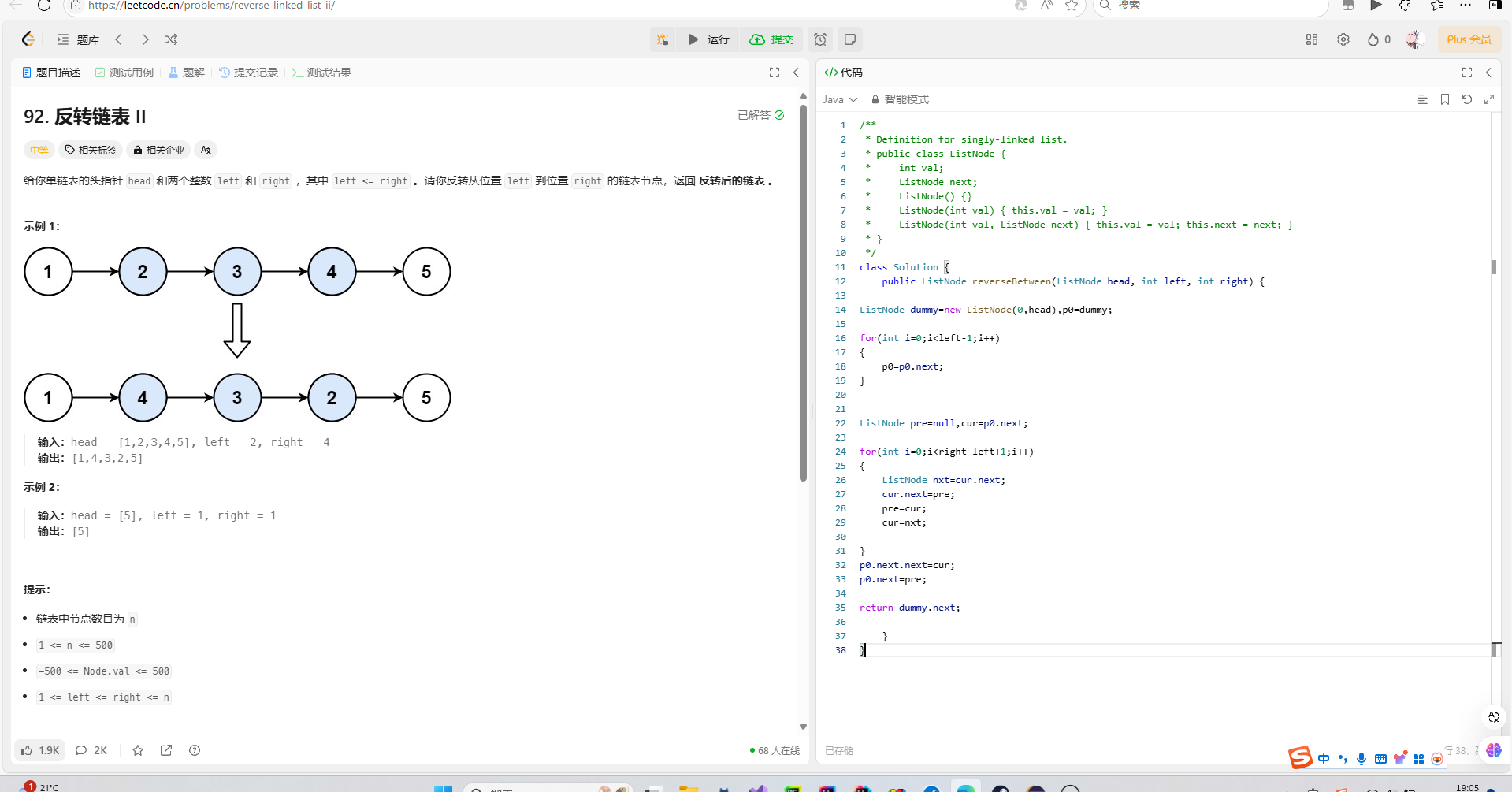
算法-链表
小细节 初始化问题 我们这样子new一个ListNode 它里面的默认值是0,所以我们不能这样 如果我们为空,我们要返回null 节点结束条件判断(多创建节点问题) 参考示例3217 解析: 我的答案是多了一个无用节点 这是因为我每…...

ON DUPLICATE KEY UPDATE 更底层解释它的优势
从更底层来看,ON DUPLICATE KEY UPDATE 的优势主要源于以下几个方面: 1. 减少网络往返次数 先查询再更新:这种方式需要客户端和数据库服务器之间进行多次网络通信。首先,客户端发送一个 SELECT 查询请求,然后等待服务…...
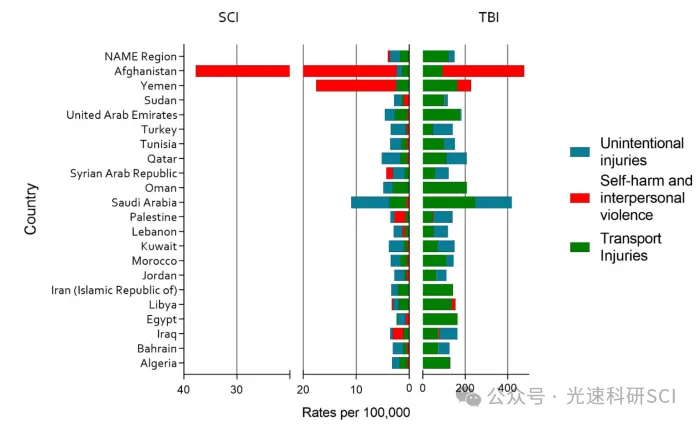
3.8/Q1,GBD数据库最新文章解读
文章题目:Regional and National Burden of Traumatic Brain Injury and Spinal Cord Injury in North Africa and Middle East Regions, 1990-2021: A Systematic Analysis for The Global Burden of Disease Study 2021 DOI:10.1007/s44197-025-00372-…...
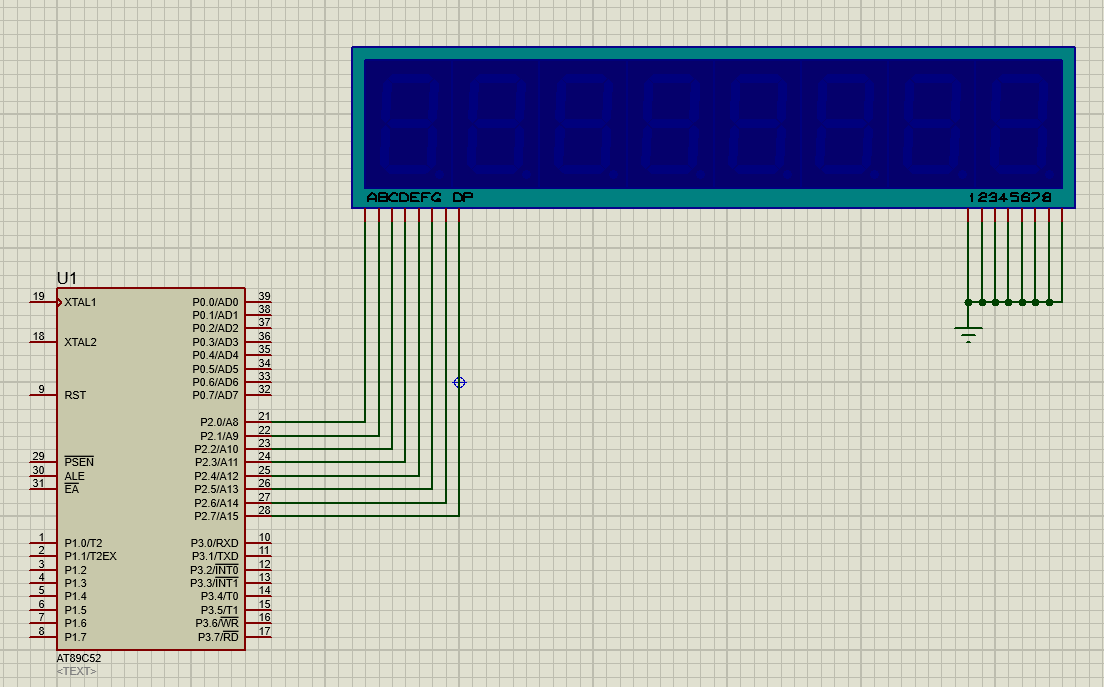
51单片机实验二:数码管静态显示
目录 一、实验环境与实验器材 二、实验内容及实验步骤 1.单个数码管显示 2.六个数码管依次从0~F变换显示 3.proteus仿真 一、实验环境与实验器材 环境:Keli,STC-ISP烧写软件,Proteus. 器材:TX-1C单片机(STC89C52RC…...

Linux驱动开发进阶(八)- GPIO子系统BSP驱动
文章目录 1、前言2、pinctrl子系统3、pinctrl bsp驱动4、gpio子系统5、gpio bsp驱动 1、前言 学习参考书籍以及本文涉及的示例程序:李山文的《Linux驱动开发进阶》本文属于个人学习后的总结,不太具备教学功能。 2、pinctrl子系统 在讨论gpio子系统时&…...
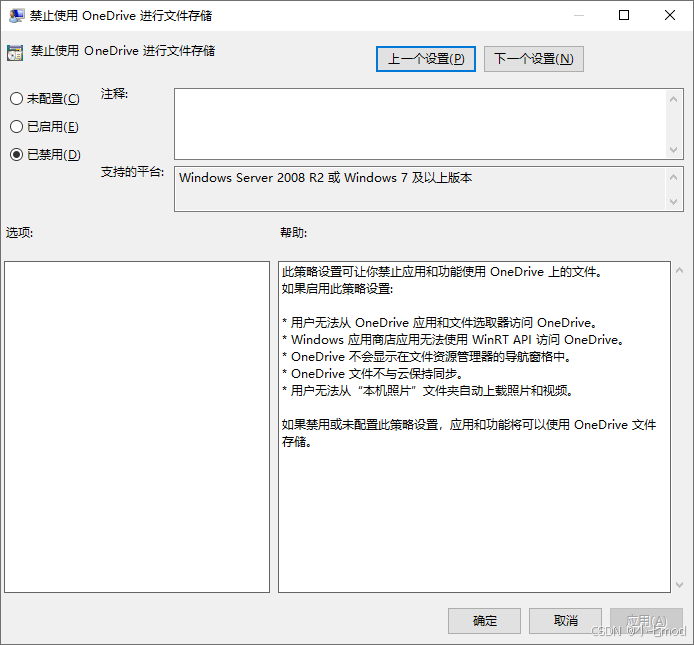
【Windows】安装或者点击OneDrive没有任何反应的解决方案
一些Windows企业版或者神州网信政府版的策略会禁止使用OneDrive,双击OneDrive安装程序或者点击OneDrive软件会没有任何反应。通过下面的设置可以解除相关的限制。 1、修改注册表 打开注册表管理器。依次HKEYLOCAL_MACHINE\Software\Policies\Microsoft\Windows\One…...

Android tinyalsa库函数剖析
1. PCM 流控制函数 打开、关闭及状态检查 pcm_open(unsigned int card, unsigned int device, unsigned int flags, struct pcm_config *config) 打开指定声卡(card)和设备(device)的 PCM 流。 flags 参数确定流的方向࿱…...

PyCharm Flask 使用 Tailwind CSS v3 配置
安装 Tailwind CSS 步骤 1:初始化项目 在 PyCharm 终端运行:npm init -y安装 Tailwind CSS:npm install -D tailwindcss3 postcss autoprefixer初始化 Tailwind 配置文件:npx tailwindcss init这会生成 tailwind.config.js。 步…...

Python爬虫第17节-动态渲染页面抓取之Selenium使用下篇
目录 引言 一、获取节点信息 1.1 获取属性 1.2 获取文本值 1.3 获取ID、位置、标签名、大小 二、切换Frame 三、延时等待 3.1 隐式等待 3.2 显式等待 四、前进后退 五、Cookies 六、选项卡管理 七、异常处理 引言 这一节我们继续讲解Selenium的使用下篇࿰…...
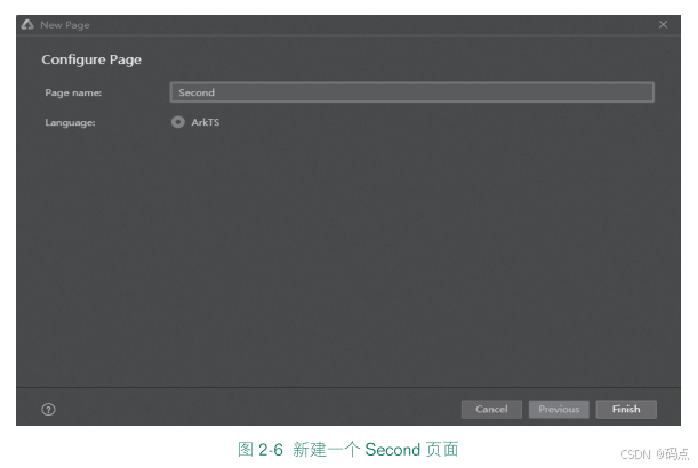
HarmonyOS 第2章 Ability的开发,鸿蒙HarmonyOS 应用开发入门
第2章 Ability的开发 本章内容 本章介绍HarmonyOS的核心组件Ability的开发。 2.1 Ability概述 2.2 FA模型介绍 2.3 Stage模型介绍 2.4 Ability内页面的跳转和数据传递 2.5 Want概述 2.6 实战:显式Want启动Ability 2.7 实战:隐式Want打开应用管理 2.8 小结 2.9 习题 2.1 Abili…...
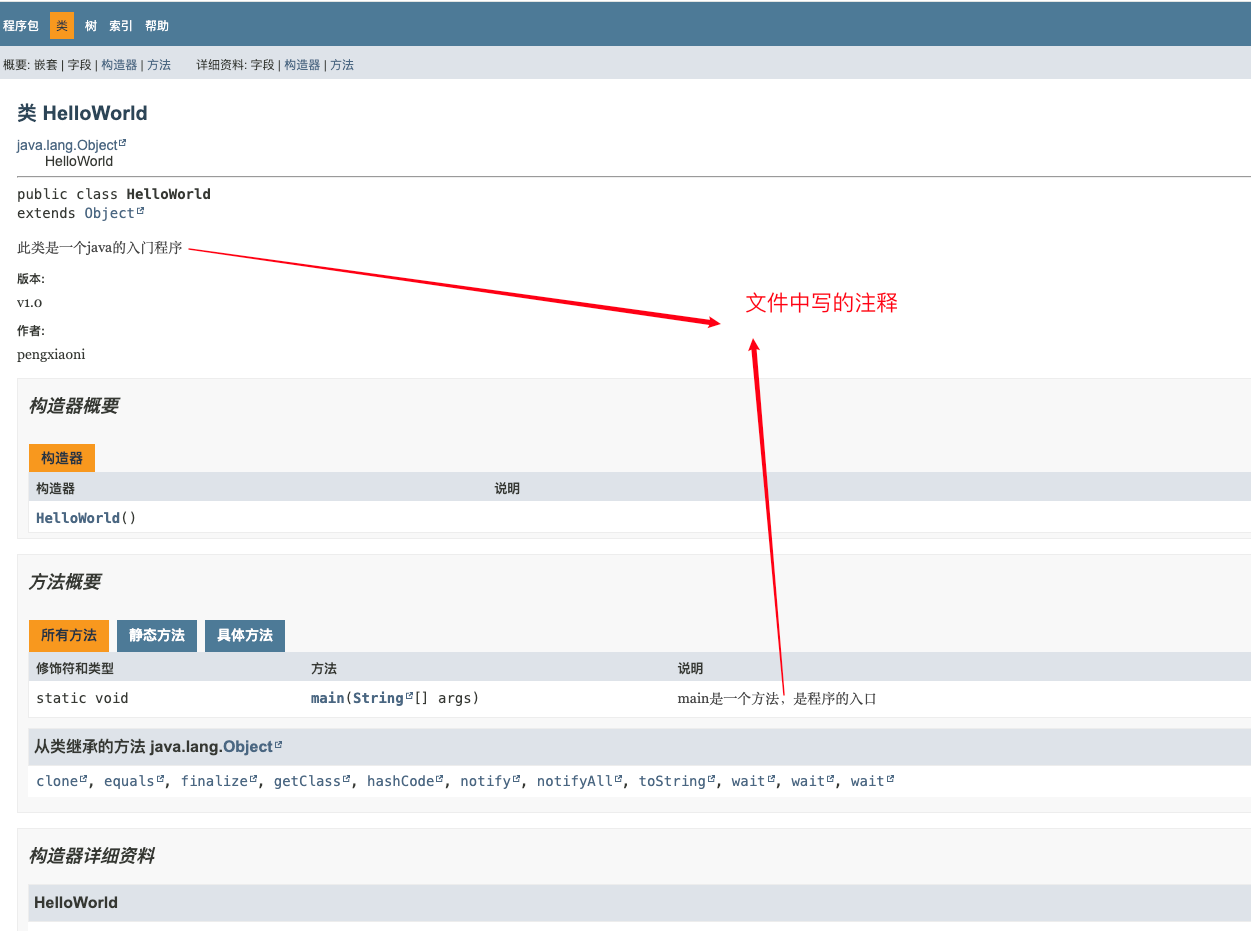
day2-小白学习JAVA---java第一个程序
java第一个程序 1、新建一个文件,以.java为结尾2、用编辑器打开后写入代码(本人写前端,所以用vscode,也可用其他)3、编译文件4、运行文件5、HelloWorld代码解释6、文档注释 1、新建一个文件,以.java为结尾 …...

Rockchip 新一代 64 位处理器 RK3562--九鼎开发板
RK3562 是 Rockchip 新一代 64 位处理器 RK3562(Quad-core ARM Cortex-A53,主频 最高 2.0GHz),最大支持 8GB 内存;内置独立的 NPU,可用于轻量级人工智能应用,RK3562 拥有 PCIE2.1/USB3.0 OTG/…...
z-library电子图书馆最新地址的查询方法
对于喜欢读书的伙伴们,应该都听说过z站(z-library),优点多多,缺点就是地址不稳定,经常会变化网站地址。然后我最近发现了一个工具,可以不间断更新官方可用的z站地址:电子书最新地址...

常见MQ及类MQ对比:Redis Stream、Redis Pub/Sub、RocketMQ、Kafka 和 RabbitMQ
常见MQ及类MQ对比 基于Grok调研 Redis Stream、Redis Pub/Sub、RocketMQ、Kafka 和 RabbitMQ 关键点: Redis Pub/Sub 适合简单实时消息,但不持久化,消息可能丢失。Redis Stream 提供持久化,适合需要消息历史的场景,但…...
)
Kaggle-Bag of Words Meets Bags of Popcorn-(二分类+NLP+Bert模型)
Bag of Words Meets Bags of Popcorn 题意: 有很多条电影评论记录,问你每一条记录是积极性的评论还是消极性的评论。 数据处理: 1.首先这是文件是zip形式,要先解压,注意sep ‘\t’。 2.加载预训练的 BERT 分词器 …...
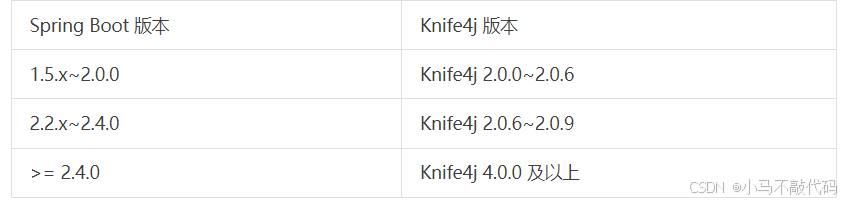
Spring Boot 3 + SpringDoc:打造接口文档
1、背景公司 新项目使用SpringBoot3.0以上构建,其中需要对外输出接口文档。接口文档一方面给到前端调试,另一方面给到测试使用。 2、SpringDoc 是什么? SpringDoc 是一个基于 Spring Boot 项目的库,能够自动根据项目中的配置、…...
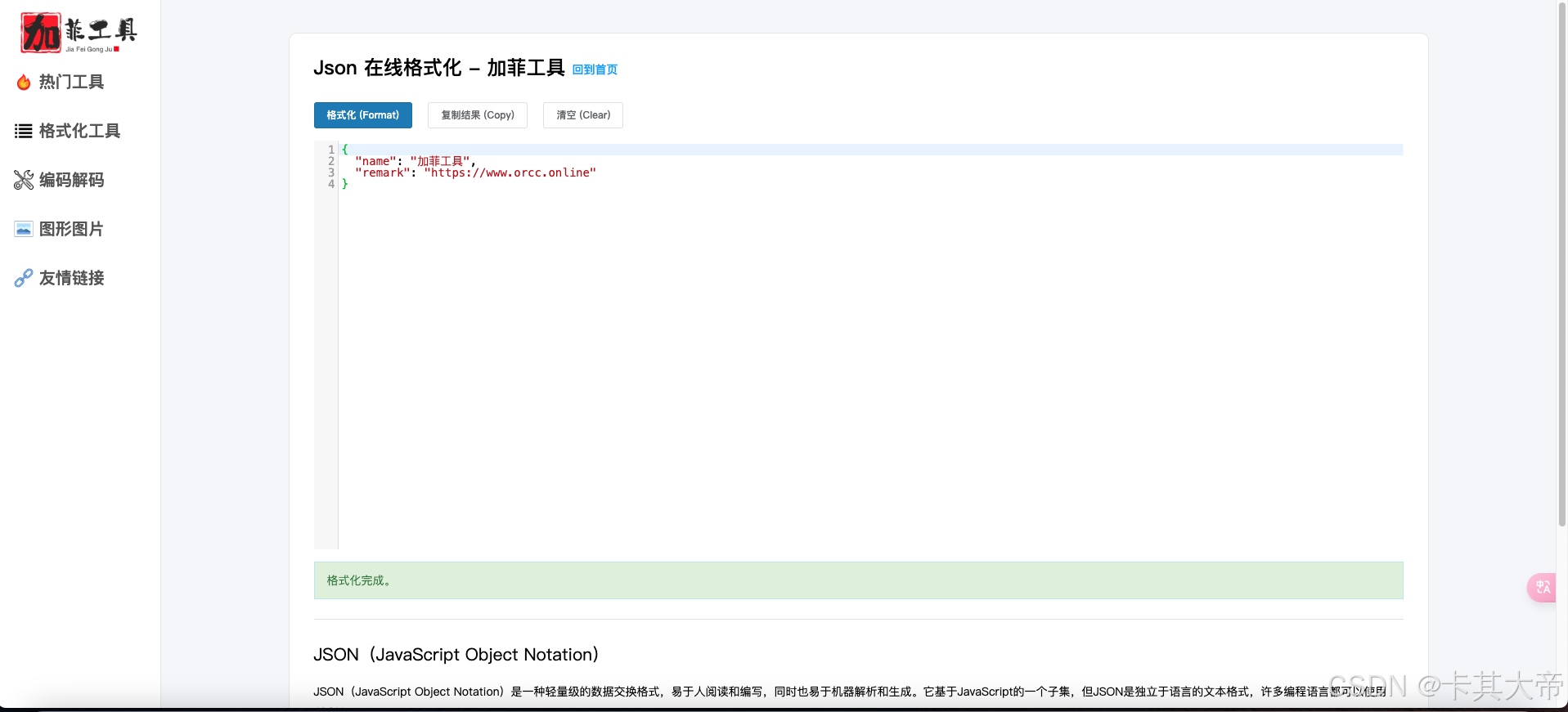
Json 在线格式化 - 加菲工具
Json 在线格式化 打开网站 加菲工具 选择“Json 在线格式化” 或者直接进入 https://www.orcc.top/tools/json 输入Json,点击左上角的“格式化”按钮 得到格式化后的结果...

React 列表渲染基础示例
React 中最常见的一个需求就是「把一组数据渲染成一组 DOM 元素」,比如一个列表。下面是我写的一个最小示例,目的是搞清楚它到底是怎么工作的。 示例代码 // 定义一个静态数组,模拟后续要渲染的数据源 // 每个对象代表一个前端框架…...
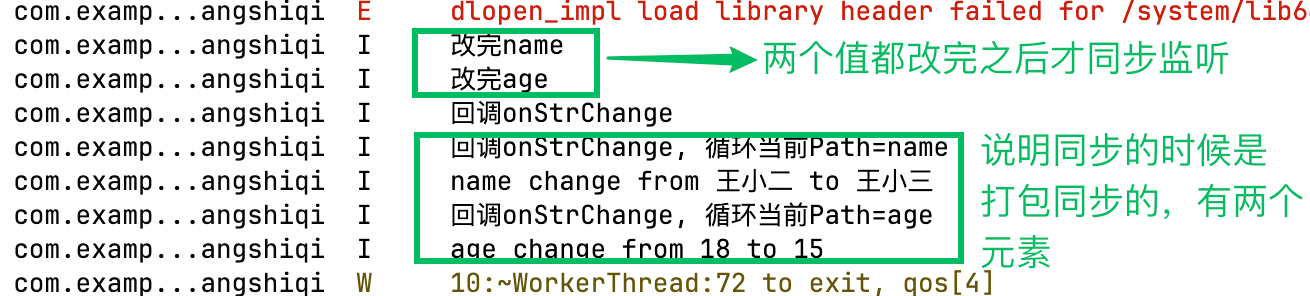
HarmonyOS-ArkUI V2装饰器: @Monitor装饰器:状态变量修改监听
Monitor作用 Monitor的作用就是来监听状态变量的值变化的。被Monitor修饰的函数,会在其对应监听的变量发生值的变化时,回调此函数,从而可以让您知道是什么值发生变化了,变化前是什么值,变化后是什么值。 V1版本的装饰器,有个叫@Watch的装饰器,其实也有监听变化的能力,…...
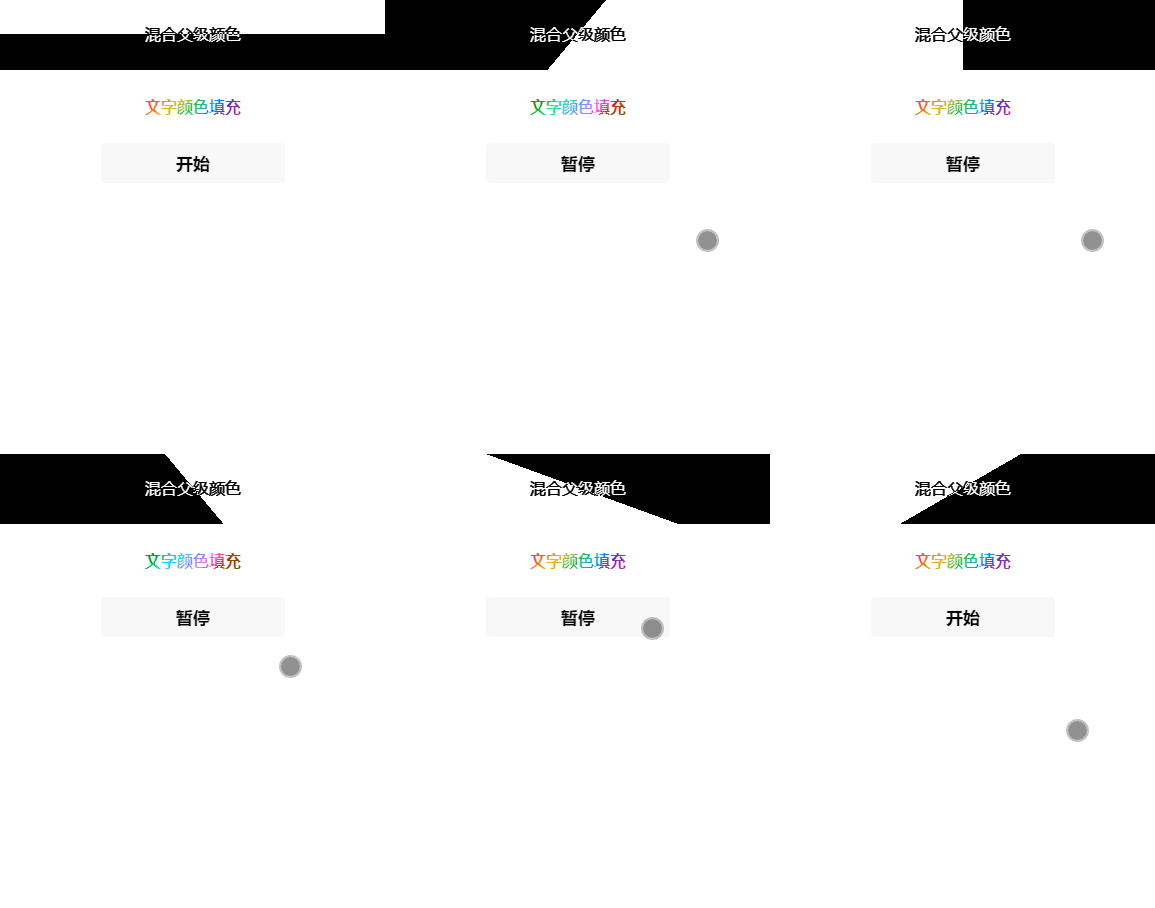
微信小程序文字混合、填充动画有效果图
效果图 .wxml <view class"text" style"--deg:{{deg}}deg;"><view>混合父级颜色</view> </view> <view class"fill {{status?action:}}">文字颜色填充</view> <button bind:tap"setStatus"…...
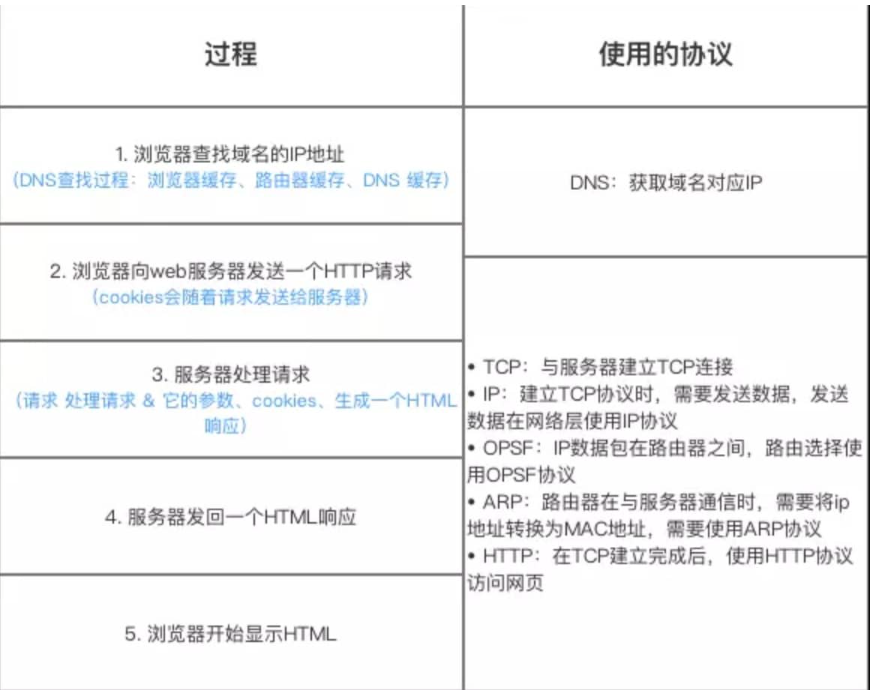
【计算机网络 | 第一篇】计算机网络基础知识
网络分层模型 1.OSI七层模型国际标准化组织提出的一个网络分层模型,总共有七层,其大体功能以及每一层分工如下所示: 每一层都专注做一件事,并且每一层都需要下一层提供的功能。 OSI七层模型七层结构体系清晰,理论完整…...

二叉树理论基础
二叉树种类 满二叉树:每个非叶子节点都有且只有两个子节点。 和完全二叉树:除了最底层外,其他各层都是满的;最底层的节点都集中在左侧。 二叉搜索树:对于任意节点 u,左子树上所有节 点的值都小于 u.val…...
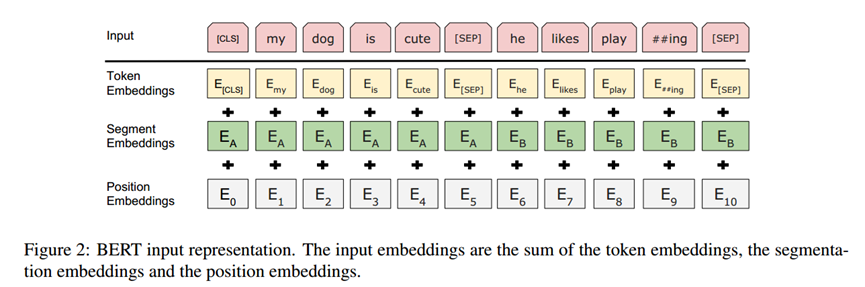
再读bert(Bidirectional Encoder Representations from Transformers)
再读 BERT,仿佛在数字丛林中邂逅一位古老而智慧的先知。初次相见时,惊叹于它以 Transformer 架构为罗盘,在预训练与微调的星河中精准导航,打破 NLP 领域长久以来的迷雾。而如今,书页间跃动的不再仅是 Attention 机制精…...
uCOS3实时操作系统(系统架构和中断管理)
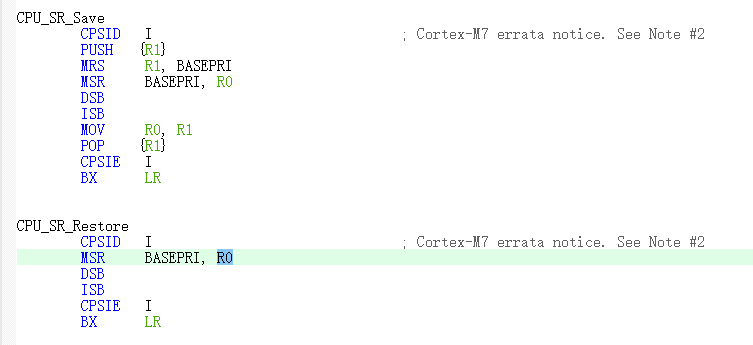
文章目录 系统架构中断管理ARM中断寄存器相关知识ucos中断机制 系统架构 ucos主要包含三个部分的源码: 1、OS核心源码及其配置文件(ucos源码) 2、LIB库文件源码及其配置文件(库文件,比如字符处理、内存管理࿰…...
图像预处理-图像噪点消除
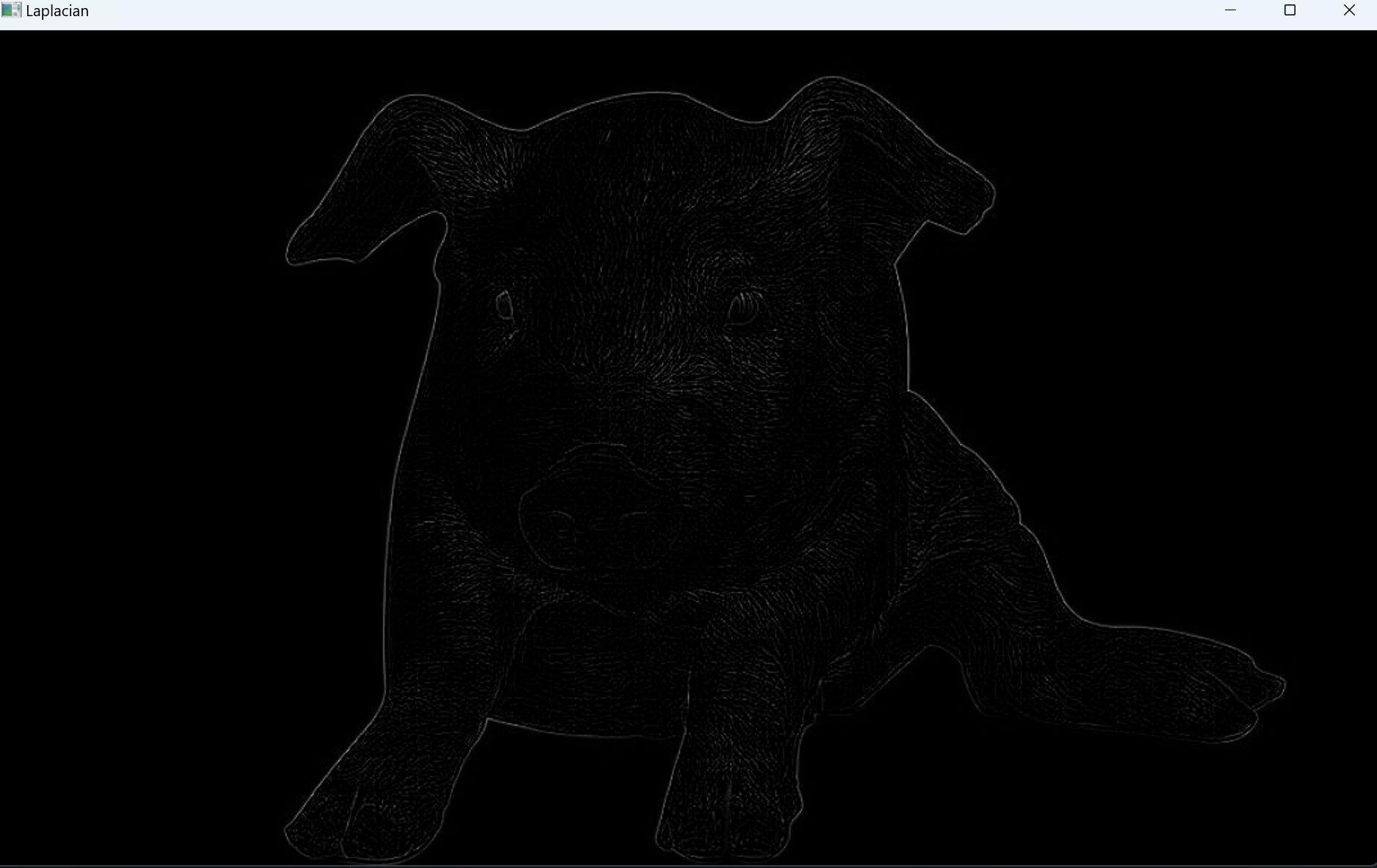
一.基本介绍 噪声:指图像中的一些干扰因素,也可以理解为有那么一些点的像素值与周围的像素值格格不入。常见的噪声类型包括高斯噪声和椒盐噪声。 滤波器:也可以叫做卷积核 - 低通滤波器是模糊,高通滤波器是锐化 - 低通滤波器就…...
6.数据手册解读—运算放大器(二)
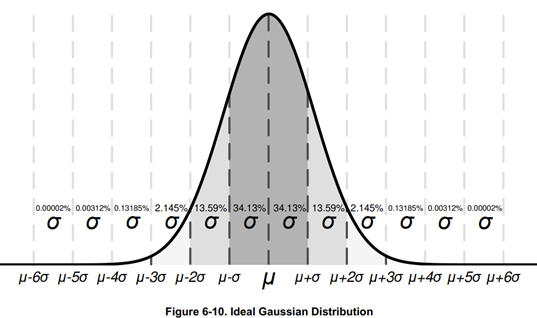
目录 6、细节描述 6.1预览 6.2功能框图 6.3 特征描述 6.3.1输入保护 6.3.1 EMI抑制 6.3.3 温度保护 6.3.4 容性负载和稳定性 6.3.5 共模电压范围 6.3.6反相保护 6.3.7 电气过载 6.3.8 过载恢复 6.3.9 典型规格与分布 6.3.9 散热焊盘的封装 6.3.11 Shutdown 6.4…...
用 Deepseek 写的uniapp油耗计算器
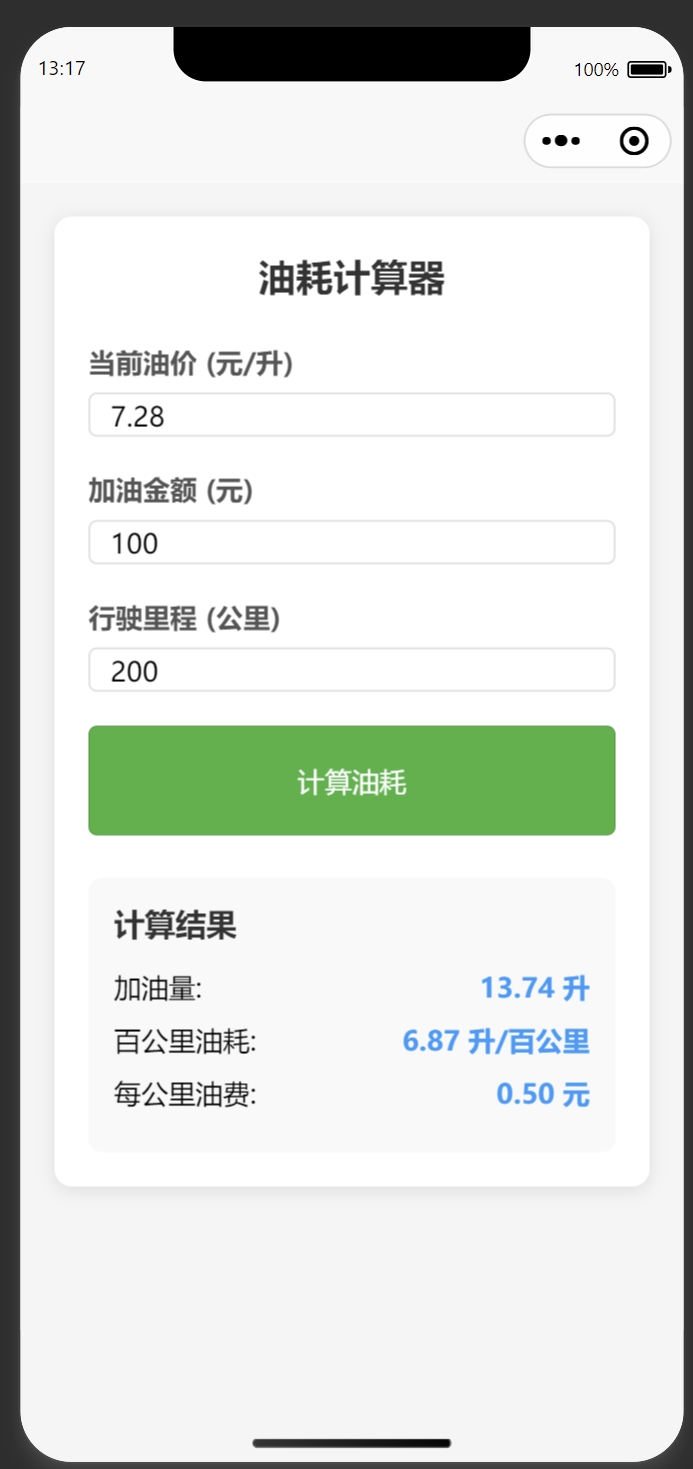
下面是一个基于 Uniapp 的油耗计算器实现,包含 Vue 组件和页面代码。 1. 创建页面文件 在 pages 目录下创建 fuel-calculator 页面: <!-- pages/fuel-calculator/fuel-calculator.vue --> <template><view class"container"…...