
Linux ALSA音频工具aplay、arecord、amixer的使用方法
ALSA 是Advanced Linux Sound Architecture的缩写,先进的Linux音频架构,为Linux操作系统提供音频和MIDI功能。
aplay命令
aplay是播放命令。
root@imx6ul7d:~# aplay -h
Usage: aplay [OPTION]... [FILE]...-h, --help              help--version           print current version
-l, --list-devices      list all soundcards and digital audio devices
-L, --list-pcms         list device names
-D, --device=NAME       select PCM by name
-q, --quiet             quiet mode
-t, --file-type TYPE    file type (voc, wav, raw or au)
-c, --channels=#        channels
-f, --format=FORMAT     sample format (case insensitive)
-r, --rate=#            sample rate
-d, --duration=#        interrupt after # seconds
-s, --samples=#         interrupt after # samples per channel
-M, --mmap              mmap stream
-N, --nonblock          nonblocking mode
-F, --period-time=#     distance between interrupts is # microseconds
-B, --buffer-time=#     buffer duration is # microseconds--period-size=#     distance between interrupts is # frames--buffer-size=#     buffer duration is # frames
-A, --avail-min=#       min available space for wakeup is # microseconds
-R, --start-delay=#     delay for automatic PCM start is # microseconds(relative to buffer size if <= 0)
-T, --stop-delay=#      delay for automatic PCM stop is # microseconds from xrun
-v, --verbose           show PCM structure and setup (accumulative)
-V, --vumeter=TYPE      enable VU meter (TYPE: mono or stereo)
-I, --separate-channels one file for each channel
-i, --interactive       allow interactive operation from stdin
-m, --chmap=ch1,ch2,..  Give the channel map to override or follow--disable-resample  disable automatic rate resample--disable-channels  disable automatic channel conversions--disable-format    disable automatic format conversions--disable-softvol   disable software volume control (softvol)--test-position     test ring buffer position--test-coef=#       test coefficient for ring buffer position (default 8)expression for validation is: coef * (buffer_size / 2)--test-nowait       do not wait for ring buffer - eats whole CPU--max-file-time=#   start another output file when the old file has recordedfor this many seconds--process-id-file   write the process ID here--use-strftime      apply the strftime facility to the output file name--dump-hw-params    dump hw_params of the device--fatal-errors      treat all errors as fatal
Recognized sample formats are: S8 U8 S16_LE S16_BE U16_LE U16_BE S24_LE S24_BE U24_LE U24_BE S32_LE S32_BE U32_LE U32_BE FLOAT_LE FLOAT_BE FLOAT64_LE FLOAT64_BE IEC958_SUBFRAME_LE IEC958_SUBFRAME_BE MU_LAW A_LAW IMA_ADPCM MPEG GSM S20_LE S20_BE U20_LE U20_BE SPECIAL S24_3LE S24_3BE U24_3LE U24_3BE S20_3LE S20_3BE U20_3LE U20_3BE S18_3LE S18_3BE U18_3LE U18_3BE G723_24 G723_24_1B G723_40 G723_40_1B DSD_U8 DSD_U16_LE DSD_U32_LE DSD_U16_BE DSD_U32_BE
Some of these may not be available on selected hardware
The available format shortcuts are:
-f cd (16 bit little endian, 44100, stereo)
-f cdr (16 bit big endian, 44100, stereo)
-f dat (16 bit little endian, 48000, stereo)
-t, 指定输出数据格式,默认是wave格式,还支持raw,voc,au,后两种格式不懂。
-D,指定播放设备,设备名的格式为hw:0,0,表示0号card的0号device。
-c,指定channel数。
-f, 指定语音数据格式,有很多格式可以选择。
-r, 指定采样频率,例如5512/8000/11025/16000/22050/32000/44100/48000/64000/88200/96000/176400/192000。
-d,指定播放的时长,单位秒。
-l, 播放设备列表
实例
罗列播放设备。
root@imx6ul7d:~# aplay -l
**** List of PLAYBACK Hardware Devices ****
card 0: wm8962audio [wm8962-audio], device 0: HiFi wm8962-0 [HiFi wm8962-0]Subdevices: 1/1Subdevice #0: subdevice #0
card 0: wm8962audio [wm8962-audio], device 1: HiFi-ASRC-FE (*) []Subdevices: 1/1Subdevice #0: subdevice #0
root@imx6ul7d:~#
播放音频文件。其中-Dhw:0,0 表示card0,device0,对应到aplay -l命令中的设备列表; -d 5表示播放5秒。
root@imx6ul7d:~# aplay -Dhw:0,0 -d5 /unit_tests/ASRC/audio8k16S.wav
Playing WAVE '/unit_tests/ASRC/audio8k16S.wav' : Signed 16 bit Little Endian, Rate 8000 Hz, Stereo
root@imx6ul7d:~#
arecord 命令
arecord是录音命令。
root@imx6ul7d:~# arecord -h
Usage: arecord [OPTION]... [FILE]...-h, --help              help--version           print current version
-l, --list-devices      list all soundcards and digital audio devices
-L, --list-pcms         list device names
-D, --device=NAME       select PCM by name
-q, --quiet             quiet mode
-t, --file-type TYPE    file type (voc, wav, raw or au)
-c, --channels=#        channels
-f, --format=FORMAT     sample format (case insensitive)
-r, --rate=#            sample rate
-d, --duration=#        interrupt after # seconds
-s, --samples=#         interrupt after # samples per channel
-M, --mmap              mmap stream
-N, --nonblock          nonblocking mode
-F, --period-time=#     distance between interrupts is # microseconds
-B, --buffer-time=#     buffer duration is # microseconds--period-size=#     distance between interrupts is # frames--buffer-size=#     buffer duration is # frames
-A, --avail-min=#       min available space for wakeup is # microseconds
-R, --start-delay=#     delay for automatic PCM start is # microseconds(relative to buffer size if <= 0)
-T, --stop-delay=#      delay for automatic PCM stop is # microseconds from xrun
-v, --verbose           show PCM structure and setup (accumulative)
-V, --vumeter=TYPE      enable VU meter (TYPE: mono or stereo)
-I, --separate-channels one file for each channel
-i, --interactive       allow interactive operation from stdin
-m, --chmap=ch1,ch2,..  Give the channel map to override or follow--disable-resample  disable automatic rate resample--disable-channels  disable automatic channel conversions--disable-format    disable automatic format conversions--disable-softvol   disable software volume control (softvol)--test-position     test ring buffer position--test-coef=#       test coefficient for ring buffer position (default 8)expression for validation is: coef * (buffer_size / 2)--test-nowait       do not wait for ring buffer - eats whole CPU--max-file-time=#   start another output file when the old file has recordedfor this many seconds--process-id-file   write the process ID here--use-strftime      apply the strftime facility to the output file name--dump-hw-params    dump hw_params of the device--fatal-errors      treat all errors as fatal
Recognized sample formats are: S8 U8 S16_LE S16_BE U16_LE U16_BE S24_LE S24_BE U24_LE U24_BE S32_LE S32_BE U32_LE U32_BE FLOAT_LE FLOAT_BE FLOAT64_LE FLOAT64_BE IEC958_SUBFRAME_LE IEC958_SUBFRAME_BE MU_LAW A_LAW IMA_ADPCM MPEG GSM S20_LE S20_BE U20_LE U20_BE SPECIAL S24_3LE S24_3BE U24_3LE U24_3BE S20_3LE S20_3BE U20_3LE U20_3BE S18_3LE S18_3BE U18_3LE U18_3BE G723_24 G723_24_1B G723_40 G723_40_1B DSD_U8 DSD_U16_LE DSD_U32_LE DSD_U16_BE DSD_U32_BE
Some of these may not be available on selected hardware
The available format shortcuts are:
-f cd (16 bit little endian, 44100, stereo)
-f cdr (16 bit big endian, 44100, stereo)
-f dat (16 bit little endian, 48000, stereo)
-t,指定输出数据格式,默认是wave格式,还支持raw,voc,au,后两种格式不懂。
-D,指定record设备,设备名的格式为hw:0,0,表示0号card的0号device。
-c,指定channel数,默认是mono,即one channel,最大可以到32。但实际上,如果只有一个麦克风,就只能录制mono音轨。
-f,指定语音数据格式,有很多格式可以选择,例如S8 U8 S16_LE S16_BE U16_LE U16_BE…。
-r,指定采样频率,例如5512/8000/11025/16000/22050/32000/44100/48000/64000/88200/96000/176400/192000。
-d,指定录音的时长。
-vv,在命令行录音的时候使用,可以看到一个由#符号组成的横向的实时音量显示。
实例
罗列录音设备。
root@imx6ul7d:~# arecord -l
**** List of CAPTURE Hardware Devices ****
card 0: wm8962audio [wm8962-audio], device 0: HiFi wm8962-0 [HiFi wm8962-0]Subdevices: 1/1Subdevice #0: subdevice #0
card 0: wm8962audio [wm8962-audio], device 1: HiFi-ASRC-FE (*) []Subdevices: 1/1Subdevice #0: subdevice #0
root@imx6ul7d:~#
一边录音,一边播放。其中 -d5表示录音5秒,-Dhw0,0表示card0,device0;r48000表示采样率是48000;-c2表示两声道;-fS16_LE表示数据格式是S16_LE;-traw表示录音是raw文件。
root@imx6ul7d:~# arecord -d5 -Dhw:0,0 -r48000 -c2 -fS16_LE -traw | aplay -Dhw:0,0 -r48000 -c2 -fS16_LE
Recording raw data 'stdin' : Signed 16 bit Little Endian, Rate 48000 Hz, Stereo
Playing raw data 'stdin' : Signed 16 bit Little Endian, Rate 48000 Hz, Stereo
root@imx6ul7d:~#
aplay和arecord其他参考命令
root@imx6ul7d:~# arecord | aplay
用上面的命令,你就能感知到默认情况的input delay,感觉大概半秒多钟。如果这样:
root@imx6ul7d:~# arecord --period-size 128 | aplay -B 10
就几乎感觉不到延迟。以上两种情况,区别非常明显。
查看系统语音设备:
root@imx6ul7d:~# cat /proc/asound/cards0 [wm8962audio    ]: wm8962-audio - wm8962-audiowm8962-audio
root@imx6ul7d:~#
amixer命令
amixer用于配置音频的各个参数。
root@imx6ul7d:~# amixer -h
Usage: amixer <options> [command]Available options:-h,--help       this help-c,--card N     select the card-D,--device N   select the device, default 'default'-d,--debug      debug mode-n,--nocheck    do not perform range checking-v,--version    print version of this program-q,--quiet      be quiet-i,--inactive   show also inactive controls-a,--abstract L select abstraction level (none or basic)-s,--stdin      Read and execute commands from stdin sequentially-R,--raw-volume Use the raw value (default)-M,--mapped-volume Use the mapped volumeAvailable commands:scontrols       show all mixer simple controlsscontents       show contents of all mixer simple controls (default command)sset sID P      set contents for one mixer simple controlsget sID        get contents for one mixer simple controlcontrols        show all controls for given cardcontents        show contents of all controls for given cardcset cID P      set control contents for one controlcget cID        get control contents for one controlAvailable advanced commands:sevents         show the mixer events for simple controlsevents          show the mixer events for controls
root@imx6ul7d:~#
alsamixer命令可以获取图形化界面,通过方向键来设置对应参数。如下所示。
root@imx6ul7d:~# alsamixer
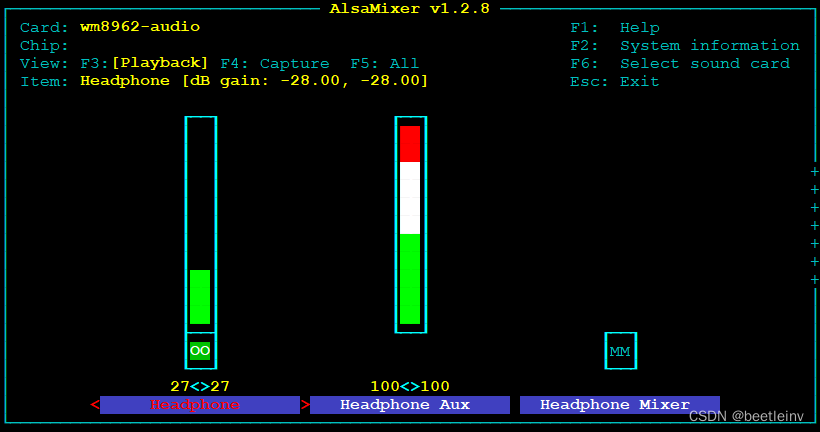
除了图形化模式,我们还可以用命令行模式。首先查看一下contents,如下。
root@imx6ul7d:~# amixer contents
numid=124,iface=CARD,name='Headphone Jack'; type=BOOLEAN,access=r-------,values=1: values=on
numid=29,iface=MIXER,name='Headphone Aux Volume'; type=INTEGER,access=rw---R--,values=2,min=0,max=7,step=0: values=7,7| dBscale-min=-7.00dB,step=1.00dB,mute=0
numid=30,iface=MIXER,name='Headphone Mixer Switch'; type=BOOLEAN,access=rw------,values=2: values=off,off
numid=28,iface=MIXER,name='Headphone ZC Switch'; type=BOOLEAN,access=rw------,values=2: values=off,off
numid=27,iface=MIXER,name='Headphone Switch'; type=BOOLEAN,access=rw------,values=2: values=on,on
numid=26,iface=MIXER,name='Headphone Volume'; type=INTEGER,access=rw---R--,values=2,min=0,max=127,step=0: values=93,93| dBscale-min=-121.00dB,step=1.00dB,mute=1
numid=24,iface=MIXER,name='ADC High Performance Switch'; type=BOOLEAN,access=rw------,values=1: values=on
numid=21,iface=MIXER,name='ADC L/R Swap Switch'; type=BOOLEAN,access=rw------,values=1: values=off
numid=23,iface=MIXER,name='ADC Monomix Switch'; type=BOOLEAN,access=rw------,values=1: values=on
numid=14,iface=MIXER,name='Capture HPF Cutoff'; type=INTEGER,access=rw------,values=1,min=0,max=7,step=0: values=0
numid=13,iface=MIXER,name='Capture HPF Mode'; type=ENUMERATED,access=rw------,values=1,items=2; Item #0 'Hi-fi'; Item #1 'Application': values=0
numid=12,iface=MIXER,name='Capture HPF Switch'; type=BOOLEAN,access=rw------,values=1: values=on
... ...
根据contents中的内容,可以用cget或cset读取设置参数。
查看获取某个设置项的值用amixer cget +控制参数
根据控制参数类型设置控制参数使用amixer cset +控制参数+" "+参数
以contents中的第二项为例来演示cget和cset。
读取耳机的音量为7。
root@imx6ul7d:~# amixer cget numid=29,iface=MIXER,name='Headphone Aux Volume'
numid=29,iface=MIXER,name='Headphone Aux Volume'; type=INTEGER,access=rw---R--,values=2,min=0,max=7,step=0: values=7,7| dBscale-min=-7.00dB,step=1.00dB,mute=0
root@imx6ul7d:~#
设置耳机的音量为5。
root@imx6ul7d:~# amixer cset numid=29,iface=MIXER,name='Headphone Aux Volume' 5
numid=29,iface=MIXER,name='Headphone Aux Volume'; type=INTEGER,access=rw---R--,values=2,min=0,max=7,step=0: values=5,5| dBscale-min=-7.00dB,step=1.00dB,mute=0
root@imx6ul7d:~#
cget/cset命令在controls、cset cID P、cget cID亦适用。
controls show all controls for given card
contents show contents of all controls for given card
cset cID P set control contents for one control
cget cID get control contents for one control
类似的,还有另外一套sget/sset系列的命令:
scontrols show all mixer simple controls
scontents show contents of all mixer simple controls (default command)
sset sID P set contents for one mixer simple control
sget sID get contents for one mixer simple control
也是同样做法,例如用scontents查看有哪些参数可以控制:
root@imx6ul7d:~# amixer scontents
Simple mixer control 'Headphone',0Capabilities: volume pswitchPlayback channels: Front Left - Front RightCapture channels: Front Left - Front RightLimits: 0 - 127Front Left: 93 [73%] [-28.00dB] Playback [on]Front Right: 93 [73%] [-28.00dB] Playback [on]
Simple mixer control 'Headphone Aux',0Capabilities: volumePlayback channels: Front Left - Front RightCapture channels: Front Left - Front RightLimits: 0 - 7Front Left: 7 [100%] [0.00dB]Front Right: 7 [100%] [0.00dB]
Simple mixer control 'Headphone Mixer',0Capabilities: pswitchPlayback channels: Front Left - Front RightMono:Front Left: Playback [off]Front Right: Playback [off]
... ...
同理,scontents的项目用sget和sset配置。
root@imx6ul7d:~# amixer sget 'Headphone',0
Simple mixer control 'Headphone',0Capabilities: volume pswitchPlayback channels: Front Left - Front RightCapture channels: Front Left - Front RightLimits: 0 - 127Front Left: 93 [73%] [-28.00dB] Playback [on]Front Right: 93 [73%] [-28.00dB] Playback [on]
root@imx6ul7d:~#
如果想要修改对应设置,用amixer sset ,具体用法是:
amixer sset sID(控制字符串) P(支持的某个值)
其中sID,就是上面的Simple mixer control后面的那个字符串,比如’Headphone’,0
而对其设置就是,先看看其提供了哪些供你设置的值:
root@imx6ul7d:~# amixer sset 'Headphone',0 100
Simple mixer control 'Headphone',0Capabilities: volume pswitchPlayback channels: Front Left - Front RightCapture channels: Front Left - Front RightLimits: 0 - 127Front Left: 100 [79%] [-21.00dB] Playback [on]Front Right: 100 [79%] [-21.00dB] Playback [on]
root@imx6ul7d:~#
参考资料
https://www.cnblogs.com/cslunatic/p/3227655.html
https://cs.pynote.net/sf/linux/shell/202207131/
相关文章:
Linux ALSA音频工具aplay、arecord、amixer的使用方法
ALSA 是Advanced Linux Sound Architecture的缩写,先进的Linux音频架构,为Linux操作系统提供音频和MIDI功能。 aplay命令 aplay是播放命令。 rootimx6ul7d:~# aplay -h Usage: aplay [OPTION]... [FILE]...-h, --help help--version …...
编写一个最简单的Linux服务端和客户端程序
2023年8月3日,周四下午 这篇文章我从下午开始写了几个小时, 这篇文件基本总结了我今天学到的知识, 在写这篇文章的过程中灵感不断涌现、想明白了很多知识点,非常酣畅淋漓。 什么叫做深度学习?这就是深度学习&#…...

openKylin顺利加入RISC-V 基金会,推动架构芯片与操作系统协同发展
日前开放麒麟openKylin宣布,正式加入RISC-V基金会,由此成为其产业联盟成员。 公开资料显示,ISC-V是由加州大学伯克利分校研究团队在 2010年推出的一个开源指令集架构(ISA)。并且RISC-V拥有免费、高效、简洁和开放等特性qlbrsb。 作为新生的…...
SSM(Vue3+ElementPlus+Axios+SSM前后端分离)【二】
文章目录 SSM--基础环境搭建【二】项目介绍项目功能/界面● SSM 整合项目界面 项目全局配置web.xmlSpringMVC 配置 SSM–基础环境搭建【二】 项目介绍 项目功能/界面 ● SSM 整合项目界面 项目全局配置web.xml 配置furns_ssm\src\main\webapp\WEB-INF\web.xml , 和项目全局…...
出现一次的数字(其他数字出现三次,两次)
位运算的知识点: 异或运算具有以下几个重要性质 交换律:a ^ b b ^ a 结合律:a ^ (b ^ c) (a ^ b) ^ c 任何数与0异或等于它本身:a ^ 0 a 任何数与自身异或等于0:a ^ a 0 对于数组中所有元素进行异或运算…...

Rust- 智能指针
Smart pointers A smart pointer is a data structure that not only acts like a pointer but provides additional functionality. This “smartness” comes from the fact that smart pointers encapsulate additional logical or semantic rules, which are automaticall…...
什么是微服务
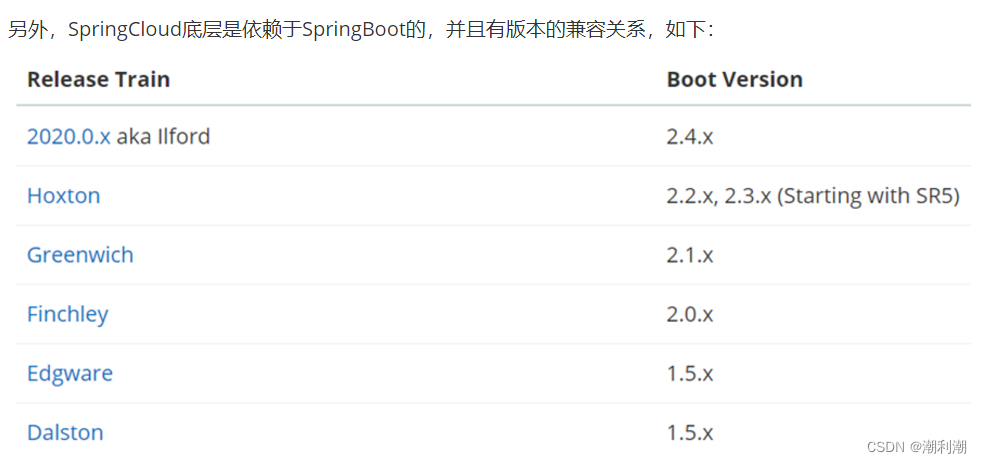
微服务的架构特征: 单一职责:微服务拆分粒度更小,每一个服务都对应唯一的业务能力,做到单一职责自治:团队独立、技术独立、数据独立,独立部署和交付面向服务:服务提供统一标准的接口࿰…...

无人机电力巡检方案在电网安全与维护中的应用
目前,无人机技术已经在各行各业都有广泛的应用,其中之一就是在电力巡检中的应用。无人机电力巡检方案以其高效、安全、精准的特点,为电网安全与维护带来了重大突破和进步。 一、无人机电力巡检方案是高效巡检的利器 传统的电力巡检方式需要人…...
网络工程师 快速入门
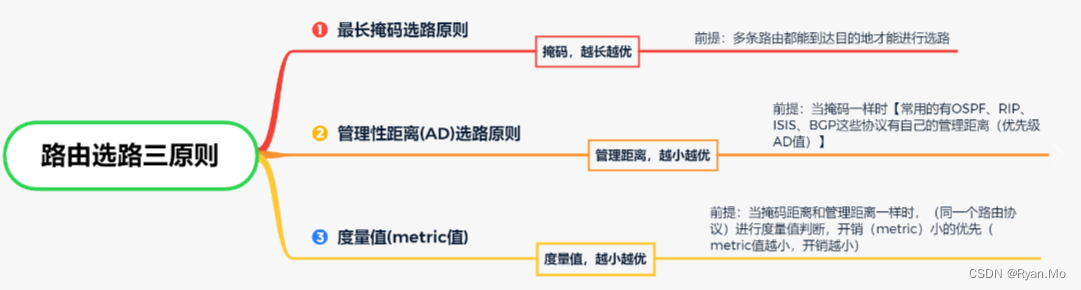
需要掌握 以下技术 1.网络 基础 知识 TCP/IP 、OSI 7层协议、IP地址、ARP地址解析协议、ICMP(英特网控制报文协议,ping)等 入门面试常问问题。 2.路由 路由匹配 三原则、静态路由、OSPF路由协议。 2.交换 如何放数据? VLAN TRU…...
Linux系统vim查看文件中文乱码
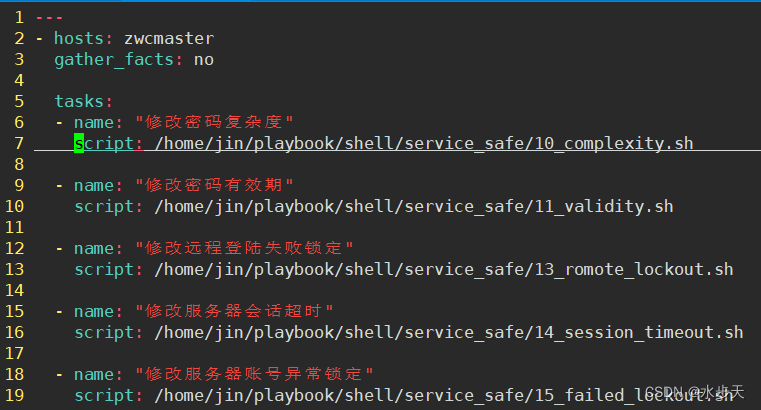
Linux系统查看文件-cat中文正常显示 vim中文乱码 1、背景2、环境3、目的4、原因5、操作步骤5.1、修改vim编码配置 6、验证 1、背景 服务器部署业务过程中查看文件内容,使用cat 命令查看中文正常显示,使用vim命令查看显示中文乱码 cat 查看 vim 查看 …...

BladeX框架开源-工作-笔记-Docker部署-Jenkins配置
BladeX框架开源-工作-笔记-Docker部署-Jenkins配置 文章目录 BladeX框架开源-工作-笔记-Docker部署-Jenkins配置第一章-概要-BladeX框架简介与git地址第二章-BladeX框架前后端项目Docker部署与DockerFile配置文件2.1-开始部署阶段,默认服务器上面已有Nacos服务2.2-采…...
Modbus tcp转ETHERCAT网关modbus tcp/ip协议
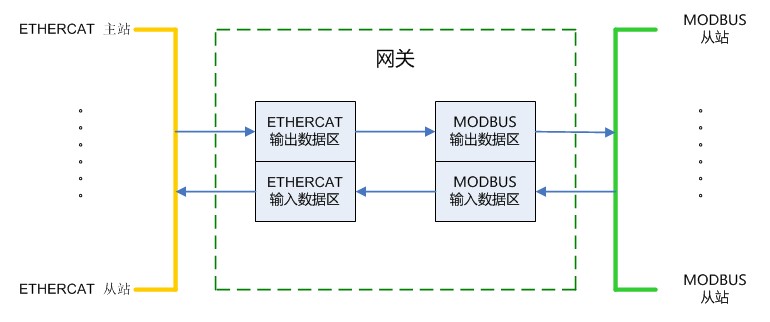
捷米JM-ECT-TCP网关能够连接到Modbus tcp总线和ETHERCAT总线中,实现两种不同协议设备之间的通讯。这个网关能够大大提高工业生产的效率和生产效益,让生产变得更加智能化。捷米JM-ECT-TCP 是自主研发的一款 ETHERCAT 从站功能的通讯网关。该产品主要功能是…...
RK356x Android11更换默认的Launcher
1、 开发环境 ubuntu版本:18.04 开发平台:RK356x Android版本:android11 2、目的 android11 系统自带了一个启动器Launcher3,在android源码路径下的packages/apps/Launcher3下,现需要将我们自己开发的Launcher放到a…...

Python 操作 MySQL 数据库
Python 操作 MySQL 数据库 Python 标准数据库接口为 Python DB-API,Python DB-API为开发人员提供了数据库应用编程接口。 Python 数据库接口支持非常多的数据库,你可以选择适合你项目的数据库: GadFlymSQLMySQLPostgreSQLMicrosoft SQL Se…...
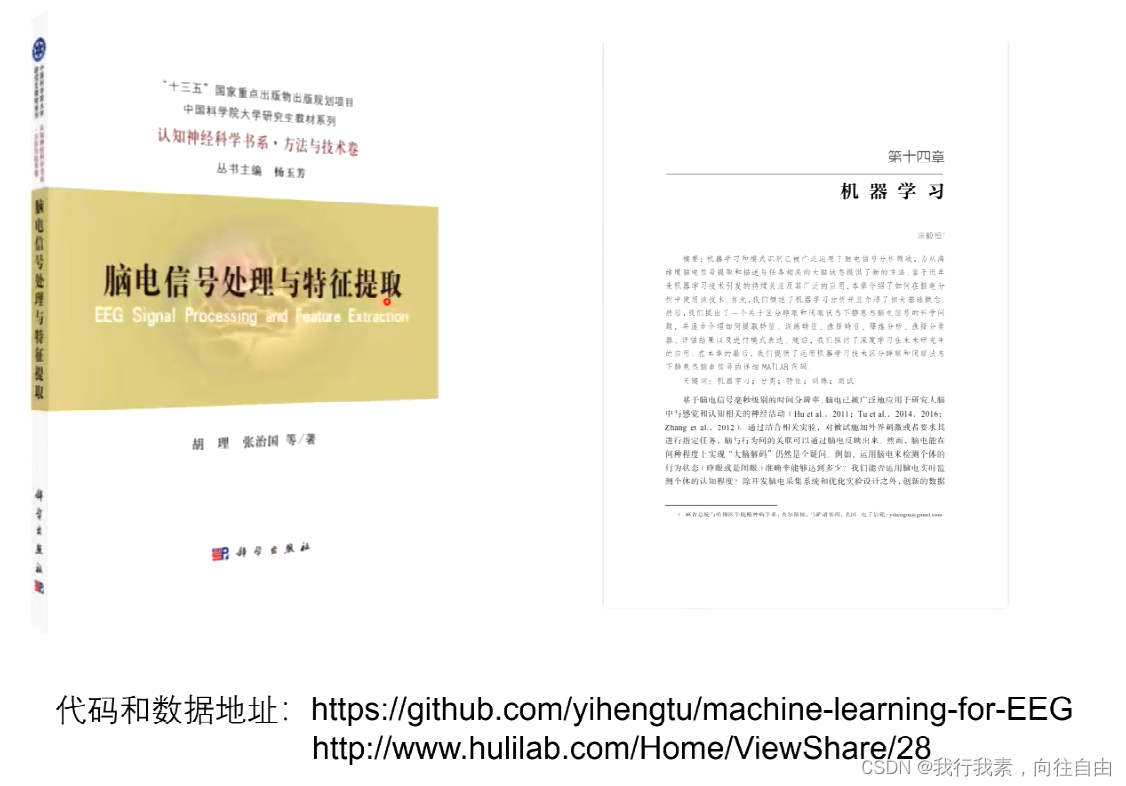
脑电信号处理与特征提取——6.运用机器学习技术和脑电进行大脑解码(涂毅恒)
目录 六、运用机器学习技术和脑电进行大脑解码 6.1 前言 6.2 基于脑电数据的机器学习基础分析 6.3 基于脑电数据的机器学习进阶分析 6.4 代码解读 六、运用机器学习技术和脑电进行大脑解码 6.1 前言 6.2 基于脑电数据的机器学习基础分析 6.3 基于脑电数据的机器学习进阶分…...
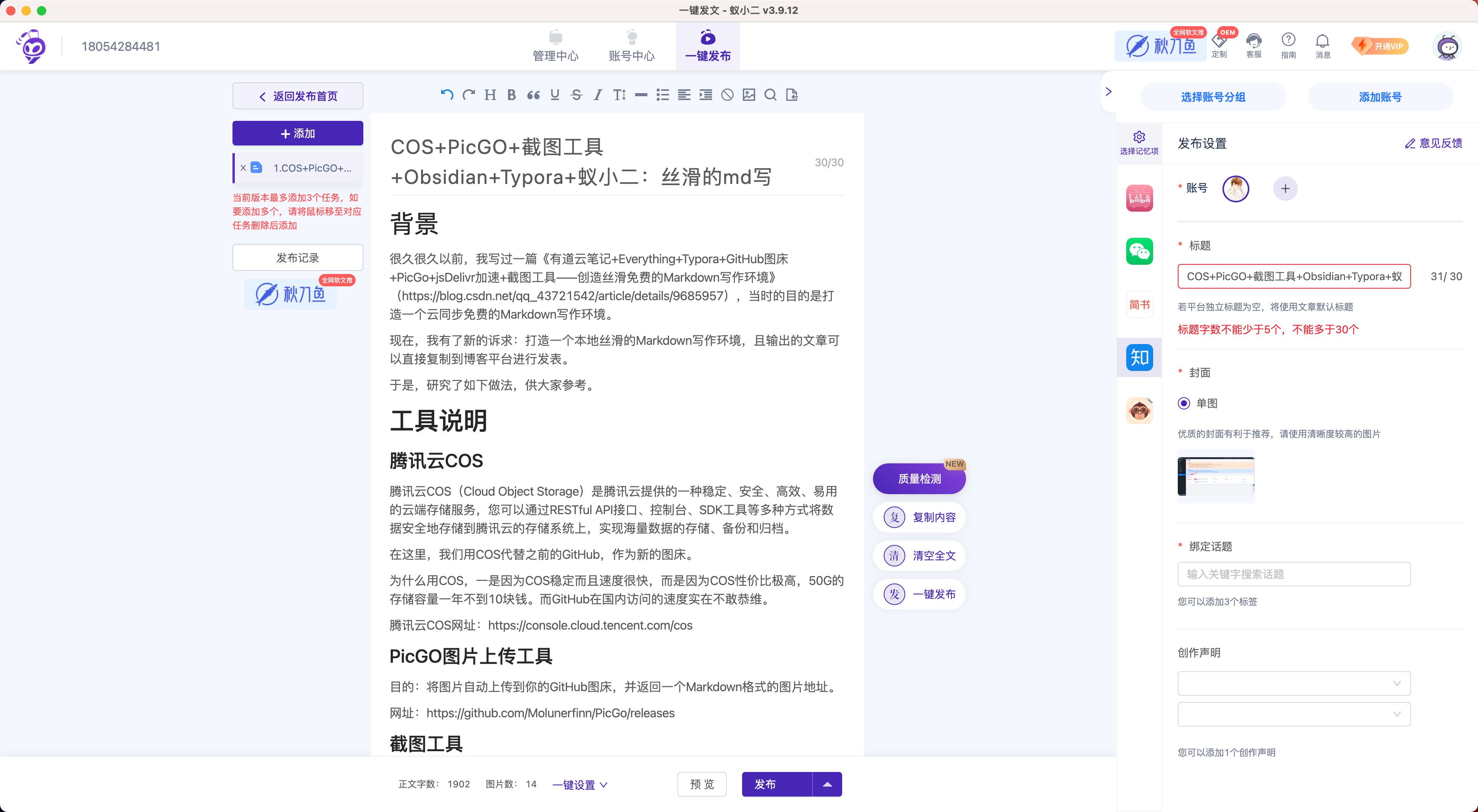
腾讯云COS+PicGO+截图工具+Obsidian+Typora+蚁小二:打造丝滑稳定的Markdown写作和分发环境
背景 很久很久以前,我写过一篇《有道云笔记EverythingTyporaGitHub图床PicGojsDelivr加速截图工具——创造丝滑免费的Markdown写作环境》(https://blog.csdn.net/qq_43721542/article/details/9685957),当时的目的是打造一个云同…...

LeetCode--HOT100题(18)
目录 题目描述:73. 矩阵置零(中等)题目接口解题思路1代码解题思路2代码 PS: 题目描述:73. 矩阵置零(中等) 给定一个 m x n 的矩阵,如果一个元素为 0 ,则将其所在行和列的所有元素都…...

ES6的语法兼容IE浏览器
案例1 zdsxData.zdsxData.forEach(el>{let str <tr> <td><a href${el.url} target"_blank"><font color"#79EEFF">${el.sxms}</font></a></td> <td>${el.gjjd}</td> <td>${el.zrr}<…...

【opencv学习】鼠标回调函数、鼠标控制画矩形
#include <iostream> #include <opencv2/opencv.hpp> using namespace cv; #define WinDow "程序窗口"void MouseHandle(int event, int x, int y, int flags, void* param);//鼠标回调函数 void Drawrectangle(cv::Mat& img, cv::Rect box);//矩形绘…...

Typescript面试题
文章目录 了解过TS吗?使用ts写一个对象属性约束说一下typescript中的泛型如何在TS中对函数的返回值进行类型约束ts和js相比有什么区别 了解过TS吗? ts是一种基于静态类型检查的强类型语言 let num:number20 console.log(num) console.log("str&qu…...

SITS2026未公开技术纪要:为什么92%的AI编程工具在遗留系统中失效?3个架构适配公式+2个轻量改造模板
第一章:SITS2026案例:大厂AI编程工具实践 2026奇点智能技术大会(https://ml-summit.org) 在SITS2026(Software Intelligence & Tooling Summit 2026)技术实践中,国内头部科技企业联合推出基于大模型的端到端AI编…...

青岛做人流术前有什么注意事项
在进行人流手术前,为了确保手术的安全性和有效性,有一些重要的注意事项需要您了解和遵守。以下是一些关键的术前准备事项,帮助您更好地为手术做好准备。1. 选择正规医院选择一家具备合法资质的正规妇产医院至关重要。青岛新阳光妇产医院是经青…...
)
告别乱码!手把手教你用LvglFontTool为LVGL嵌入式UI制作中文字库(附SPI Flash/SD卡存储方案)
嵌入式UI开发实战:LVGL中文字库高效制作与存储方案全解析 在嵌入式系统开发中,图形用户界面(GUI)的中文显示一直是开发者面临的棘手问题。当你在STM32或ESP32上使用LVGL构建交互界面时,是否遇到过这样的场景:精心设计的界面在显示…...

Ostrakon-VL-8B实战落地:深夜食堂风格终端生成货架巡检报告
Ostrakon-VL-8B实战落地:深夜食堂风格终端生成货架巡检报告 1. 项目背景与核心价值 在零售和餐饮行业,货架巡检是一项耗时且容易出错的工作。传统方法需要人工逐一检查商品摆放、价签信息、库存状态等,不仅效率低下,还容易遗漏细…...

SpringBoot项目集成AspectJ:从依赖配置到实战问题排查
1. 为什么选择AspectJ与SpringBoot集成 在Java开发领域,AOP(面向切面编程)是解决横切关注点的利器。Spring框架自带的AOP功能已经很强大了,但为什么我们还需要引入AspectJ呢?这就像你已经有了一把瑞士军刀,…...
)
别再死磕数学公式了!用C++手搓一个遗传算法求解器(附完整代码与避坑指南)
用C实战遗传算法:从原理到避坑指南 遗传算法作为模拟自然进化过程的优化方法,在工程优化、机器学习等领域有着广泛应用。但许多开发者虽然理解其理论框架,却在具体实现时频频踩坑。本文将用C带你完整实现一个遗传算法求解器,重点解…...

SAP物料主数据增强进阶:除了MARA,如何搞定MARC工厂级数据与F4搜索帮助增强?
SAP物料主数据增强进阶:MARC工厂级数据与F4搜索帮助实战解析 物料主数据增强是SAP实施过程中最常见的开发需求之一。当基础字段增强已经不能满足业务需求时,开发者往往需要面对两个更具挑战性的场景:工厂级数据(MARC表)…...

AI Agent 长链工作流的最大隐形黑洞:Claude 提示缓存的架构纪律拆解
你的 AI Agent 刚跑完 50 轮工具调用,账单却比预期高出 5 倍。系统提示 2 万 token、工具定义、项目上下文,每次步骤都原封不动地重新塞回 LLM。行业默认“全量历史重传”是必须付出的代价,可真实生产环境里,这部分重复计算往往占…...

从零到一:在eNSP中解锁USG6000V防火墙的Web管理界面
1. 初识eNSP与USG6000V防火墙 第一次接触华为eNSP模拟器和USG6000V防火墙时,我完全被这个虚拟网络实验室震撼到了。想象一下,不用花一分钱买硬件设备,就能在电脑上搭建完整的网络环境,这简直是网络工程师的福音。USG6000V作为华为…...

【生成式编程安全生死线】:从GitHub Copilot到CodeWhisperer,必须启用的4层静态+动态校验机制
第一章:智能代码生成代码安全性检查 2026奇点智能技术大会(https://ml-summit.org) 智能代码生成工具(如Copilot、CodeWhisperer、Tabnine)在提升开发效率的同时,可能引入未经验证的安全隐患——包括硬编码密钥、不安全的反序列化…...