
AntD-tree组件使用详析
目录
一、selectedKeys与onSelect
官方文档
代码演示
onSelect
注意事项
二、expandedKeys与onExpand
官方文档
代码演示
onExpand
注意事项
三、loadedKeys与onLoad和onExpand
官方文档
代码演示
onExpand与onLoad:
注意事项
四、loadData
官方文档
代码演示
loadData:
注意事项
五、树节点局部节点刷新
实现思路
代码演示
六、递归获取与修改数据
获取数据
修改数据
七、总结
最近一周都在忙关于文件管理的东西,从提出这个需求到目前实现为止已经快一周的时间了。从最开始的找插件,然后发现没有插件可以用,再到打算自己手撸一个发现手写树状图过于困难,且因为技术力的原因估计会留下很多坑。所以在经过多方考虑以后觉得还是通过 antd-tree+手动控制的方式去实现一个文件管理页面。
下面我将着重讲解我在使用antd-tree组件时遇到的各种苦难已经官方文档中方法属性的应用。
一、selectedKeys与onSelect
官方文档
| 参数 | 说明 | 类型 | 版本 |
|---|---|---|---|
| selectedKeys | (受控)设置选中的树节点 | string[] | |
| onSelect | 点击树节点触发 | function(selectedKeys, e:{selected: bool, selectedNodes, node, event}) |
代码演示

onSelect
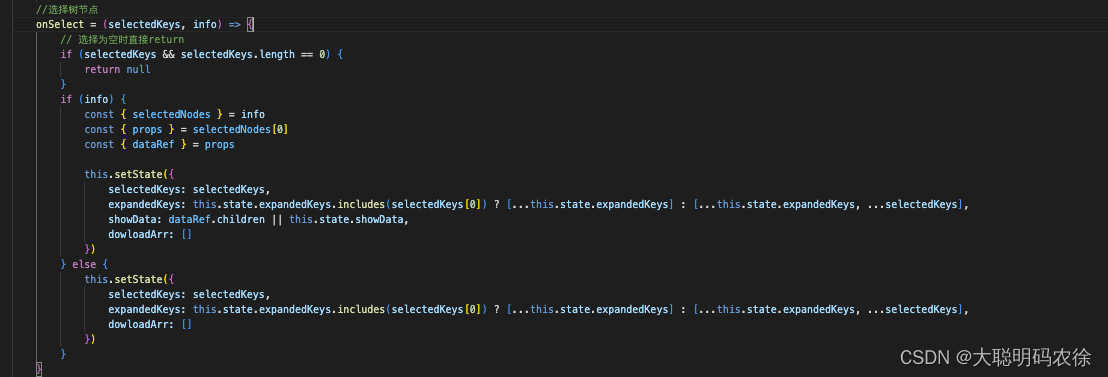
形参:
selectedKeys: 代表当前选中的树节点的key值。获取的值的格式为:[ 'key' ]。可以通过selectedKeys[0]取值。
info: 当前选择的树节点的信息。可以通过info.selectedNodes.props.dataRef.children来获取当前节点的子节点。
注意事项
这里需要注意的是selectedKeys是一个数组类型。有且只有一个当前选中的节点key。一旦点击其他节点,数组内的值就会被替换。
如果树组件设置了selectedKeys这个属性,那么需要在onSelect函数执行时将值赋给该属性。
二、expandedKeys与onExpand
官方文档
| 参数 | 说明 | 类型 | 默认值 | 版本 |
|---|---|---|---|---|
| expandedKeys | (受控)展开指定的树节点 | string[] | [] | |
| onExpand | 展开/收起节点时触发 | function(expandedKeys, {expanded: bool, node}) | - |
代码演示

onExpand
 形参:
形参:
expandedKeys: 代表当前打开的树节点的key值。
info: 当前打开的树节点的信息。
注意事项
这里需要注意的是,expandedKeys也是一个数组的格式,但它与selectedKeys的区别是selectedKeys始终是一个长度为0或1的数组,而expandedKeys则是包含所有被打开的树节点的key值。
三、loadedKeys与onLoad和onExpand
官方文档
| 参数 | 说明 | 类型 | 默认值 | 版本 |
|---|---|---|---|---|
| loadedKeys | (受控)已经加载的节点,需要配合 loadData 使用 | string[] | [] | 3.7.0 |
| onExpand | 展开/收起节点时触发 | function(expandedKeys, {expanded: bool, node}) | - | |
| onLoad | 节点加载完毕时触发 | function(loadedKeys, {event, node}) | - | 3.7.0 |
代码演示

onExpand与onLoad: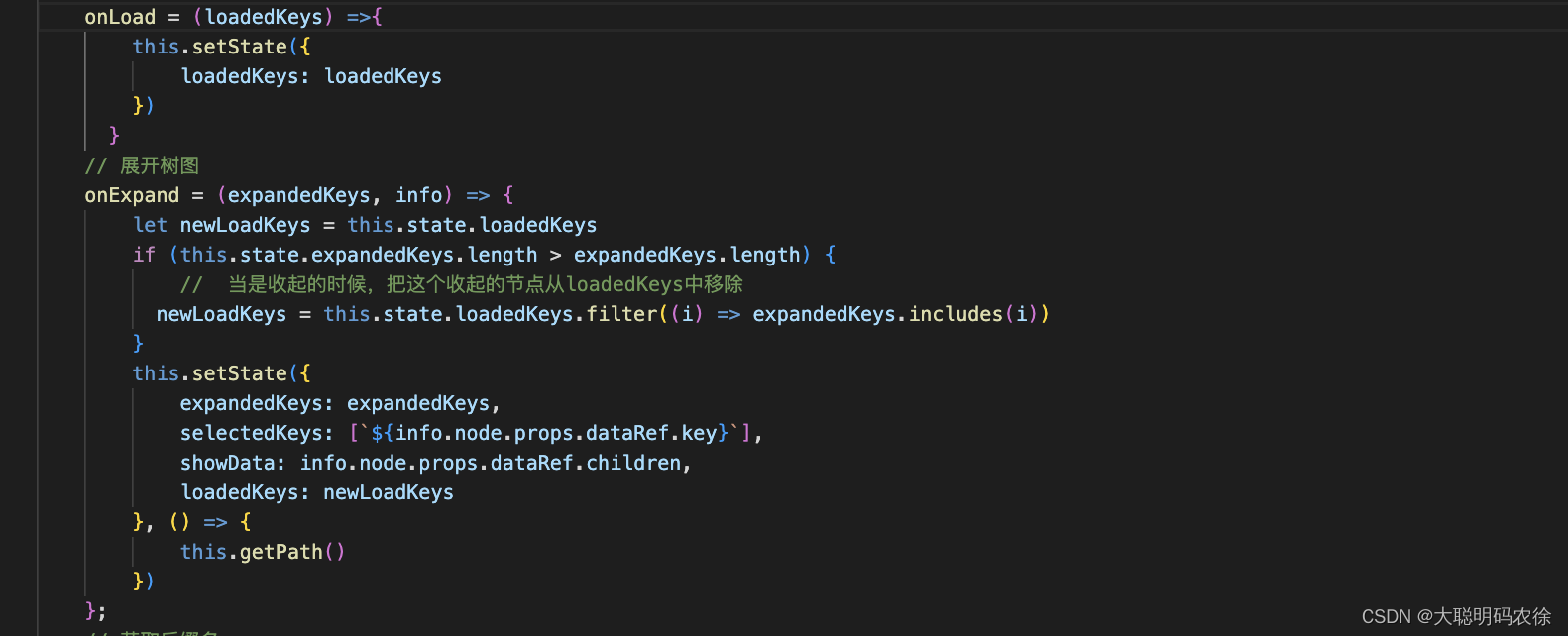
形参:
loadedKeys:已经完成加载的树节点的key,是一个数组的数据类型。
注意事项
这里需要注意的是loadedKeys是一个数组数据类型,且可以存放多个key。一旦被加载过以后,无论怎么点击都不会再触发重新刷新重新加载了。如果想让其刷新,请移步至节点刷新。
四、loadData
官方文档
| 参数 | 说明 | 类型 | 默认值 | 版本 |
|---|---|---|---|---|
| loadData | 异步加载数据 | function(node) | - | |
| loadedKeys | (受控)已经加载的节点,需要配合 loadData 使用 | string[] | [] | 3.7.0 |
| treeData | treeNodes 数据,如果设置则不需要手动构造 TreeNode 节点(key 在整个树范围内唯一) | array\<{key, title, children, [disabled, selectable]}> | - |
代码演示
loadData:
形参:
treeNode :要加载的树节点的信息。
注意事项
这里需要注意的是如果你的树节点,是通过点击以后再加载子节点,那么对于后端的数据格式返回可能就有一些要求了。比如 title 与 isLeaf 等。当然也可以在loadData中自行设置。
loadData中代码的大概流程就是先判断 treeNode 是否有 children这个属性,注意是是否有这个属性,如果有这个属性但这个属性为空数组,在执行中也会判定为true从而不会执行更新操作,而是直接return出去。
五、树节点局部节点刷新
实现思路
因为tree的机制问题,当key节点加载过以后该节点将不会再被重新加载,因此如果我上传了一个文件,实际上服务器上已经有文件了,但因为节点刷新问题,该节点没有重新刷新,我就看不到对应的节点文件。因此需要进行局部节点刷新。
满足节点刷新的条件有这几个。
- 1. loadedKeys中移除该节点的key值和其子孙节点的key值
- 2. treeData中将该节点的children属性删除
- 3. expandedKeys中移除A节点下的所有子孙节点的key值
完成这三点以后再将selectedKeys选取到该节点 ,并将以上数据重新赋值给对应的属性即可完成节点刷新操作。
代码演示
updateTree = () =>{const { selectedKeys , expandedKeys, loadedKeys, treeData } = this.state// 获取新的expandedKeys数组,不包含该节点及子节点const newExpandedKeys = expandedKeys.filter(item =>{return item.indexOf(selectedKeys[0]) == -1})// 获取新的loadedKeys数组,不包含该节点及子节点const newLoadedKeys = loadedKeys.filter(item =>{return item.indexOf(selectedKeys[0]) == -1})const newTreedata = treeDatathis.setState({expandedKeys: [...newExpandedKeys,...[`${selectedKeys[0]}`]],loadedKeys: [...newLoadedKeys],treeData: this.removeShowData(newTreedata),selectedKeys: [`${selectedKeys[0]}`],})}// 获取新的treeData数据removeShowData = (datas) => {const { selectedKeys } = this.stateconst newData = datas;function setGrayNode(data){ //遍历树 获取id数组for(var i=0;i<data.length;i++){if(data[i].key == selectedKeys[0]){// 如果某一个节点是禁用的,它的所有子节点都应该禁用delete data[i].childrencontinue;} else {if(data[i].children){// 如果当前节点有子节点,就递归调用一次setGrayNode(data[i].children);}}}}setGrayNode(newData)return newData;}这里需要注意的是 expandedKeys 虽然删除了当前节点,但要想操作通顺需要再次手动赋值,将该节点打开,并获取新的数据。这样就省去了用户需要再次点击节点的尴尬情况。
六、递归获取与修改数据
因为这是一个树状图,数据结构也稍微复杂一些,所以获取数据时难免需要通过递归拿取数据。所以需要一个递归函数取实现数据的拿取。
获取数据
//递归获取Showdata数据 getShowData = (datas) => {const { selectedKeys } = this.statedatas.map(item => {const { key, children } = itemif (key == selectedKeys[0]) {//符合条件this.setState({showData: datas})return}//如果有孩子,再次调用自己,将孩子传进去。if (children && children.length > 0) {this.getShowData(children)}})}修改数据
// 获取新的treeData数据removeShowData = (datas) => {const { selectedKeys } = this.stateconst newData = datas;function setGrayNode(data){ //遍历树 获取id数组for(var i=0;i<data.length;i++){if(data[i].key == selectedKeys[0]){// 如果某一个节点是禁用的,它的所有子节点都应该禁用delete data[i].childrencontinue;} else {if(data[i].children){// 如果当前节点有子节点,就递归调用一次setGrayNode(data[i].children);}}}}setGrayNode(newData)return newData;}七、总结
一个星期下来还是比较累的,原因是因为组件使用不熟练,且自己的技术力较弱导致的,但好在也顺利完成任务,倒也没有什么大碍。记录一下这一个星期以来遇到的一些问题和实践吧。前端小白一枚,如有错误欢迎指正。
源码:
import React, { Component } from 'react';
import { connect } from 'dva';
import {Modal,Button,Tree,Row,Col,Empty,Tooltip,Icon,Upload,Popconfirm,Select,Spin,notification
} from 'antd';
import { formatMessage, FormattedMessage } from 'umi-plugin-locale';
import globalUtil from '../../utils/global'
import download from '@/utils/download';
import apiconfig from '../../../config/api.config';
import SVG from './svg';
import styles from './index.less';const { TreeNode, DirectoryTree } = Tree;
@connect(({ appControl }) => ({appDetail: appControl.appDetail,})
)class Index extends Component {constructor(props) {super(props);this.state = {treeData: [],selectedKeys: [],expandedKeys: [],pathArr: [],keyArr: [],dowloadArr: [],path: '',podsList: [],selectDefaultValue: '',hostPath: this.props && this.props.hostPath,selectLoading: false,treeDataLoading: false,loadedKeys:[]}}componentDidMount() {this.fetchInstanceInfo()}// 获取podnamefetchInstanceInfo = () => {const { dispatch } = this.props;dispatch({type: 'appControl/fetchPods',payload: {team_name: globalUtil.getCurrTeamName(),app_alias: this.props.appAlias,},callback: res => {if (res && res.list) {this.setState({podsList: res.list.new_pods,selectDefaultValue: res && res.list && res.list.new_pods[0] && res.list.new_pods[0].pod_name,selectLoading: true}, () => {if (this.props.isType) {this.determineStorageType()}else{this.getListFiles()}})}}});};// 获取文件类型determineStorageType = () => {this.props.dispatch({type: 'appControl/determineStorageType',payload: {team_name: globalUtil.getCurrTeamName(),group_id: this.props.appAlias,region_name: globalUtil.getCurrRegionName(),pod_name: this.state.selectDefaultValue,namespace: this.props.appDetail && this.props.appDetail.service && this.props.appDetail.service.namespace,volume_path: this.props && his.props.volumePath,},callback: res => {if(res){this.setState({hostPath: res.bean,},()=>{this.getListFiles()})}}});};// 获取文件列表getListFiles = () => {this.props.dispatch({type: 'appControl/getListFiles',payload: {team_name: globalUtil.getCurrTeamName(),group_id: this.props.appAlias,region_name: globalUtil.getCurrRegionName(),pod_name: this.state.selectDefaultValue,host_path: this.props.appDetail && this.props.appDetail.service && this.props.appDetail.service.extend_method == 'state_multiple' ? `${this.state.hostPath}/${this.state.selectDefaultValue}` : this.state.hostPath,extend_method: this.props.appDetail && this.props.appDetail.service && this.props.appDetail.service.extend_method},callback: res => {if (res && res.list) {res.list.map((item, index) => {item.key = index,item.isLeaf = item.is_leaf})this.setState({treeData: res.list,showData: res.list,treeDataLoading: true})}},handleError: res =>{if(res){notification.error({ message: formatMessage({id:'componentOverview.body.DirectoryPersistence.error'}) });this.setState({showData: [],treeData: []})}}});}// 获取文件列表updataListFiles = (path) => {this.setState({treeDataLoading: false},()=>{this.props.dispatch({type: 'appControl/getListFiles',payload: {team_name: globalUtil.getCurrTeamName(),group_id: this.props.appAlias,region_name: globalUtil.getCurrRegionName(),pod_name: this.state.selectDefaultValue,host_path: this.props.appDetail && this.props.appDetail.service && this.props.appDetail.service.extend_method == 'state_multiple' ? `${this.state.hostPath}/${this.state.selectDefaultValue}${path}` : `${this.state.hostPath}${path}`,extend_method: this.props.appDetail && this.props.appDetail.service && this.props.appDetail.service.extend_method},callback: res => {if (res && res.list) {res.list.map((item, index) => {item.key = index,item.isLeaf = item.is_leaf})this.setState({treeData: res.list,showData: res.list,treeDataLoading: true})}},handleError: res =>{if(res){notification.error({ message: formatMessage({id:'componentOverview.body.DirectoryPersistence.error'}) });this.setState({showData: [],treeData: []})}}});})}// 加载树图onLoadData = treeNode =>new Promise(resolve => {if (treeNode.props.children) {resolve();return;}setTimeout(() => {this.props.dispatch({type: 'appControl/getListFiles',payload: {team_name: globalUtil.getCurrTeamName(),group_id: this.props.appAlias,region_name: globalUtil.getCurrRegionName(),pod_name: this.state.selectDefaultValue,host_path: this.props.appDetail && this.props.appDetail.service && this.props.appDetail.service.extend_method == 'state_multiple' ? `${this.state.hostPath}/${this.state.selectDefaultValue}/${this.state.path}` : `${this.state.hostPath}/${this.state.path}`,extend_method: this.props.appDetail && this.props.appDetail.service && this.props.appDetail.service.extend_method},callback: res => {if (res) {if (res.list && res.list.length == 0) {this.setState({treeData: [...this.state.treeData],showData: res.list});treeNode.props.dataRef.children = []resolve();} else {const arr = res.listarr.map((item, index) => {item.key = `${treeNode.props.eventKey}-${index}`item.isLeaf = item.is_leaf})treeNode.props.dataRef.children = arrthis.setState({treeData: [...this.state.treeData],showData: res.list});resolve();}}}});}, 100)});// 渲染函数renderTreeNodes = data =>data && data.map((item, index) => {if (item.isLeaf) {return (<TreeNode title={item.title} key={item.key} dataRef={item} >{this.renderTreeNodes(item.children)}</TreeNode>);}return null;});//选择树节点 onSelect = (selectedKeys, info) => {// 选择为空时直接returnif (selectedKeys && selectedKeys.length == 0) {return null}if (info) {const { selectedNodes } = infoconst { props } = selectedNodes[0]const { dataRef } = propsthis.setState({selectedKeys: selectedKeys,expandedKeys: this.state.expandedKeys.includes(selectedKeys[0]) ? [...this.state.expandedKeys] : [...this.state.expandedKeys, ...selectedKeys],showData: dataRef.children || this.state.showData,dowloadArr: [],pathArr: [],path: ''}, () => {this.getPath()})} else {this.setState({selectedKeys: selectedKeys,expandedKeys: this.state.expandedKeys.includes(selectedKeys[0]) ? [...this.state.expandedKeys] : [...this.state.expandedKeys, ...selectedKeys],dowloadArr: [],pathArr: [],path: ''}, () => {this.getPath()})}}onLoad = (loadedKeys) =>{this.setState({loadedKeys: loadedKeys})}// 展开树图onExpand = (expandedKeys, info) => {let newLoadKeys = this.state.loadedKeysif (this.state.expandedKeys.length > expandedKeys.length) {//  当是收起的时候,把这个收起的节点从loadedKeys中移除newLoadKeys = this.state.loadedKeys.filter((i) => expandedKeys.includes(i))}this.setState({expandedKeys: expandedKeys,selectedKeys: [`${info.node.props.dataRef.key}`],showData: info.node.props.dataRef.children,loadedKeys: newLoadKeys}, () => {this.getPath()})};// 获取后缀名getSvgIcon = (name) => {if (name) {const str = name.substr(name.lastIndexOf('.') + 1)return `${str}`}}// 鼠标点击folderClick = (data) => {// 判断data数据是否有孩子,如果没有就加载,如果有就if (data && data.children && data.children.length > 0) {this.setState({expandedKeys: [...this.state.expandedKeys, ...[`${data.key}`]],selectedKeys: [`${data.key}`],showData: data.children,dowloadArr: []}, () => {this.getPath()})} else {this.setState({expandedKeys: [...this.state.expandedKeys, ...[`${data.key}`]],selectedKeys: [`${data.key}`],dowloadArr: []}, () => {this.getPath()})}}//递归获取Showdata数据 getShowData = (datas) => {const { selectedKeys } = this.statedatas.map(item => {const { key, children } = itemif (key == selectedKeys[0]) {this.setState({showData: datas})}if (children && children.length > 0) {this.getShowData(children)}})}// 获取key值的path数据getPathData = (data) => {const { treeData, keyArr } = this.statedata.map(item => {const { title, children } = itemif (keyArr.indexOf(`${item.key}`) != -1) {const arr = this.state.pathArrarr.push(title)this.setState({pathArr: arr})}if (children && children.length > 0) {this.getPathData(children)}})}//递归获取path数据 getPath = () => {const { selectedKeys, treeData, pathArr } = this.stateif (selectedKeys == []) {return}if (selectedKeys && selectedKeys[0]) {const length = selectedKeys[0].lengthconst str = selectedKeys[0]const arr = str.split("-")const keyArr = []for (let index = 0; index < arr.length + 1; index++) {const newarr = arr.slice(0, index)const newstr = newarr.join("-")keyArr.push(newstr)}keyArr.shift();this.setState({keyArr: keyArr,pathArr: []}, () => {this.getPathData(treeData)})setTimeout(() => {const path = this.state.pathArr.join("/")this.setState({path: path})}, 100)}}// 返回上一级goBack = () => {const { selectedKeys } = this.state// 如果选择为空,则展示所有数据if (selectedKeys[0] == undefined) {return}// 如果选择有值且值不大于1if ((selectedKeys[0]).indexOf("-") == -1) {this.setState({selectedKeys: [],showData: this.state.treeData,dowloadArr: []}, () => {this.getPath()})// 如果选择有值且值大于1} else {this.getShowData(this.state.treeData)this.setState({selectedKeys: [`${selectedKeys[0].substring(0, (selectedKeys[0]).lastIndexOf("-"))}`],dowloadArr: []}, () => {this.getPath()})}}// 下载dowloadTitle = (val) => {const { dowloadArr } = this.statesetTimeout(() => {if (dowloadArr.includes(val)) {const arr = []dowloadArr.map(item => {if (item != val) {arr.push(item)}})this.setState({dowloadArr: [...arr]})} else {const arr = []arr.push(val)this.setState({dowloadArr: [...this.state.dowloadArr, ...arr]})}}, 10)}// 下拉框选择selectChange = (val) => {this.setState({selectDefaultValue: val},()=>{this.getListFiles()})}fileDownload = () => {const { dowloadArr } = this.stateif(dowloadArr.length == 0 ){notification.info({ message: formatMessage({id:'componentOverview.body.DirectoryPersistence.download'}) });}else{dowloadArr.map(item =>{this.fileDownloadApi(item)})}setTimeout(()=>{this.setState({dowloadArr:[]})},100)}// 下载接口fileDownloadApi = ( title ) =>{const dowloadPath = this.state.path ? this.props.appDetail && this.props.appDetail.service && this.props.appDetail.service.extend_method == 'state_multiple' ? `${this.state.hostPath}/${this.state.selectDefaultValue}/${this.state.path}` : `${this.state.hostPath}/${this.state.path}` : this.props.appDetail && this.props.appDetail.service && this.props.appDetail.service.extend_method == 'state_multiple' ? `${this.state.hostPath}/${this.state.selectDefaultValue}` : `${this.state.hostPath}`;const host = apiconfig.baseUrl;const url = host.slice(0,host.lastIndexOf(":"))// const path = `${url}:6060/v2/ws/download/${title}?path=${dowloadPath}`const path = `http://47.104.161.96:6060/v2/ws/download/${title}?path=${dowloadPath}`this.download(`${path}`,title)}download = (downloadPath, title) => {console.log(title.indexOf("txt") == -1,"title.indexOf() == -1");if(title.indexOf("txt") == -1){let aEle = document.querySelector('#down-a-element');if (!aEle) {aEle = document.createElement('a');aEle.setAttribute('target', '_blank')aEle.setAttribute('download', title);document.body.appendChild(aEle);}aEle.href = downloadPath;if (document.all) {aEle.click();} else {const e = document.createEvent('MouseEvents');e.initEvent('click', true, true);aEle.dispatchEvent(e);}}else{var element = document.createElement('a');element.setAttribute('href', 'data:text/plain;charset=utf-8,' + encodeURIComponent(title));element.setAttribute('download', title);element.style.display = 'none';document.body.appendChild(element);element.click();document.body.removeChild(element);}};uploadChange = info => {const { path, selectedKeys } = this.stateif (info && info.file && info.file.status === 'done') {notification.success({ message: formatMessage({id:'notification.success.upload'})});if(selectedKeys[0] == undefined){this.getListFiles()}else{this.updateTree()}} else if (info && info.file && info.file.status === 'error') {notification.error({ message: formatMessage({id:'notification.error.update'}) });}};updateTree = () =>{const { selectedKeys , expandedKeys, loadedKeys, treeData } = this.state// 获取新的expandedKeys数组,不包含该节点及子节点const newExpandedKeys = expandedKeys.filter(item =>{return item.indexOf(selectedKeys[0]) == -1})// 获取新的loadedKeys数组,不包含该节点及子节点const newLoadedKeys = loadedKeys.filter(item =>{return item.indexOf(selectedKeys[0]) == -1})const newTreedata = treeDatathis.setState({expandedKeys: [...newExpandedKeys,...[`${selectedKeys[0]}`]],loadedKeys: [...newLoadedKeys],treeData: this.removeShowData(newTreedata),selectedKeys: [`${selectedKeys[0]}`],})}// 获取新的treeData数据removeShowData = (datas) => {const { selectedKeys } = this.stateconst newData = datas;function setGrayNode(data){ //遍历树  获取id数组for(var i=0;i<data.length;i++){if(data[i].key == selectedKeys[0]){// 如果某一个节点是禁用的,它的所有子节点都应该禁用delete data[i].childrencontinue;} else {if(data[i].children){// 如果当前节点有子节点,就递归调用一次setGrayNode(data[i].children);}}}}setGrayNode(newData)return newData;}render() {const {selectedKeys,expandedKeys,showData,path,dowloadArr,podsList,selectDefaultValue,selectLoading,treeDataLoading,hostPath,loadedKeys} = this.stateconst upLoadPath = this.state.path ? this.props.appDetail && this.props.appDetail.service && this.props.appDetail.service.extend_method == 'state_multiple' ? `${this.state.hostPath}/${this.state.selectDefaultValue}/${this.state.path}` : `${this.state.hostPath}/${this.state.path}` : this.props.appDetail && this.props.appDetail.service && this.props.appDetail.service.extend_method == 'state_multiple' ? `${this.state.hostPath}/${this.state.selectDefaultValue}` : `${this.state.hostPath}`;const host = apiconfig.baseUrl;const url = host.slice(0,host.lastIndexOf(":"))// const upload = `${url}:6060/v2/ws/upload`const upload = `http://47.104.161.96:6060/v2/ws/upload`const props = {action: upload,data:{path: upLoadPath},method:"post",name:'packageTarFile',};const isFile = showData.filter(item => { return item.title.indexOf('.') == -1 })const notFile = showData.filter(item => { return item.title.indexOf('.') != -1 })const folder = []isFile.map((item,index) =>{if(item.isLeaf == true){folder.unshift(item)}else{folder.push(item)}})const showDataArr = [...folder,...notFile]return (<div><ModalclassName={styles.ModalStyle}title={<>{formatMessage({id:'componentOverview.body.DirectoryPersistence.example'})}<Selectvalue={selectDefaultValue}style={{ maxWidth: 184, marginLeft: 5 }}onChange={this.selectChange}loading={!selectLoading}>{podsList && podsList.length > 0 &&podsList.map(item => {return <Select.Option value={item.pod_name}>{item.pod_name}</Select.Option>})}</Select></>}visible={true}width={1000}closable={false}footer={<><Upload{...props}showUploadList={false}multipleonChange={this.uploadChange}// directory={true}><Button type="primary" style={{ marginRight: 10 }}><Icon type="upload" /> {formatMessage({id:'applicationMarket.Offline.upload'})}</Button></Upload><Button type="primary" onClick={this.fileDownload}><Icon type="download" />{formatMessage({id:'button.download'})}</Button><Button onClick={this.props.isShow}>{formatMessage({id:'popover.cancel'})}</Button></>}>{treeDataLoading ? (<Row><Col span={6}><TreeloadData={this.onLoadData}onSelect={this.onSelect}selectedKeys={selectedKeys}onExpand={this.onExpand}expandedKeys={expandedKeys}switcherIcon={<Icon type="down" />}onLoad={this.onLoad}   loadedKeys={loadedKeys} >{this.renderTreeNodes(this.state.treeData)}</Tree></Col><Col span={18} style={{ position: 'relative' }}><div className={styles.goBack}><button onClick={this.goBack}>{SVG.getSvg("goBack", 12)}{formatMessage({id:'componentOverview.body.DirectoryPersistence.return'})}</button></div><div className={styles.iconShow}>{showDataArr && showDataArr.length > 0 ? (showDataArr.map((item, index) => {const { title, isLeaf } = itemif (isLeaf) {return <div className={styles.outerLayer} style={{ cursor: "pointer" }} onDoubleClick={() => this.folderClick(item)}><div>{SVG.getSvg('file', 70)}</div><div><Tooltip placement="top" title={item.title}>{item.title}</Tooltip></div></div>} else {return <div className={styles.outerLayer} onClick={() => this.dowloadTitle(item.title)} style={{ background: dowloadArr.includes(item.title) ? "#e6f7ff" : '#fff' }}><div>{SVG.getSvg(this.getSvgIcon(title), 70)}</div><div><Tooltip placement="top" title={item.title}>{item.title}</Tooltip></div></div>}})) : (<Empty className={styles.emptyStyle} />)}</div></Col></Row>) : (<Spin size="large" style={{width: '100%',height: 400,display: 'flex',alignItems: 'center',justifyContent: 'center',}} />)}</Modal></div>);}
}export default Index;
相关文章:

AntD-tree组件使用详析
目录 一、selectedKeys与onSelect 官方文档 代码演示 onSelect 注意事项 二、expandedKeys与onExpand 官方文档 代码演示 onExpand 注意事项 三、loadedKeys与onLoad和onExpand 官方文档 代码演示 onExpand与onLoad: 注意事项 四、loadData …...

spring的事务控制
1.调用这个方法的对象是否是spring的代理对象($CGLIB结尾的) 2.这个方法是否是加了Transactional注释 都符合才可以被事物控制 如果调用方法的对象没有被事物控制,那么被调用的方法即便是加了Transactional也是没用的 事务失效情况…...
4.如何靠IT逆袭大学?
学习的动力不止于此: IT逆袭 这两天利用工作空余时间读了贺利坚老师的《逆袭大学——传给 IT 学子的正能量》,感触很多,有些后悔没有好好利用大学时光。 不过人都是撞了南墙再回头的,吃一堑长一智。 这本书无论你是工作了还是…...

提供网络可测试的接口【公共Webservice】
提供网络可测试的接口 1、腾讯QQ在线状态 WEB 服务 Endpoint: qqOnlineWebService Web 服务 Disco: http://www.webxml.com.cn/webservices/qqOnlineWebService.asmx?disco WSDL: http://www.webxml.com.cn/webservices/qqOnlineWebService.asmx?wsdl 腾讯QQ在线状态 WEB 服…...

【深入理解计算机系统】库打桩 - 阅读笔记
文章目录库打桩机制1. 编译时打桩2. 链接时打桩3. 运行时打桩库打桩机制 Linux 链接器支持一个很强大的技术,称为库打桩 (library interpositioning),它允许你截获对共享库函数的调用,取而代之执行自己的代码。使用打桩机制,你可以…...
RocketMQ高性能原理分析
目录一、读队列与写队列1.概念介绍2.读写队列个数关系分析二、消息持久化1.持久化文件介绍2.持久化结构介绍:三、过期文件删除1.如何判断文件过期2.什么时候删除过期文件四、高效文件写1.零拷贝技术加速文件读写2.文件顺序写3.刷盘机制五、 消息主从复制六、负载均衡…...
前端面试当中CDN会问啥------CDN详细教程来啦
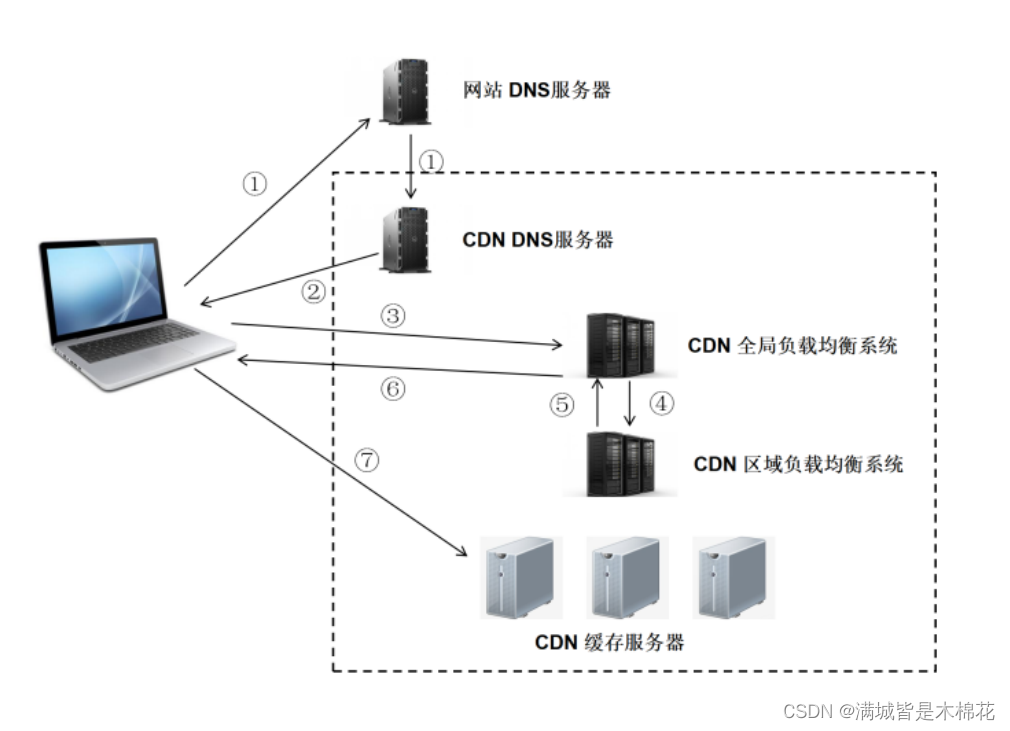
⼀、CDN 1. CDN的概念 CDN(Content Delivery Network,内容分发⽹络)是指⼀种通过互联⽹互相连接的电脑⽹络系统,利 ⽤最靠近每位⽤户的服务器,更快、更可靠地将⾳乐、图⽚、视频、应⽤程序及其他⽂件发送给⽤户&…...

刷题记录:牛客NC19429红球进黑洞 区间拆位异或+区间求和
传送门:牛客 题目描述: 区间求和区间异或k 输入: 10 10 8 5 8 9 3 9 8 3 3 6 2 1 4 1 1 2 6 2 9 10 8 1 1 7 2 4 7 8 2 8 8 6 2 2 3 0 1 1 2 2 9 10 4 1 2 3 输出: 33 50 13 13一道区间求和区间异或的题目,可以称得上是线段树的一道好题 首先对于异或运算来说,并不满足…...

信息数智化招采系统源码——信息数智化招采系统
信息数智化招采系统 服务框架:Spring Cloud、Spring Boot2、Mybatis、OAuth2、Security 前端架构:VUE、Uniapp、Layui、Bootstrap、H5、CSS3 涉及技术:Eureka、Config、Zuul、OAuth2、Security、OSS、Turbine、Zipkin、Feign、Monit…...
20230217使AIO-3399J开发板上跑通Android11系统
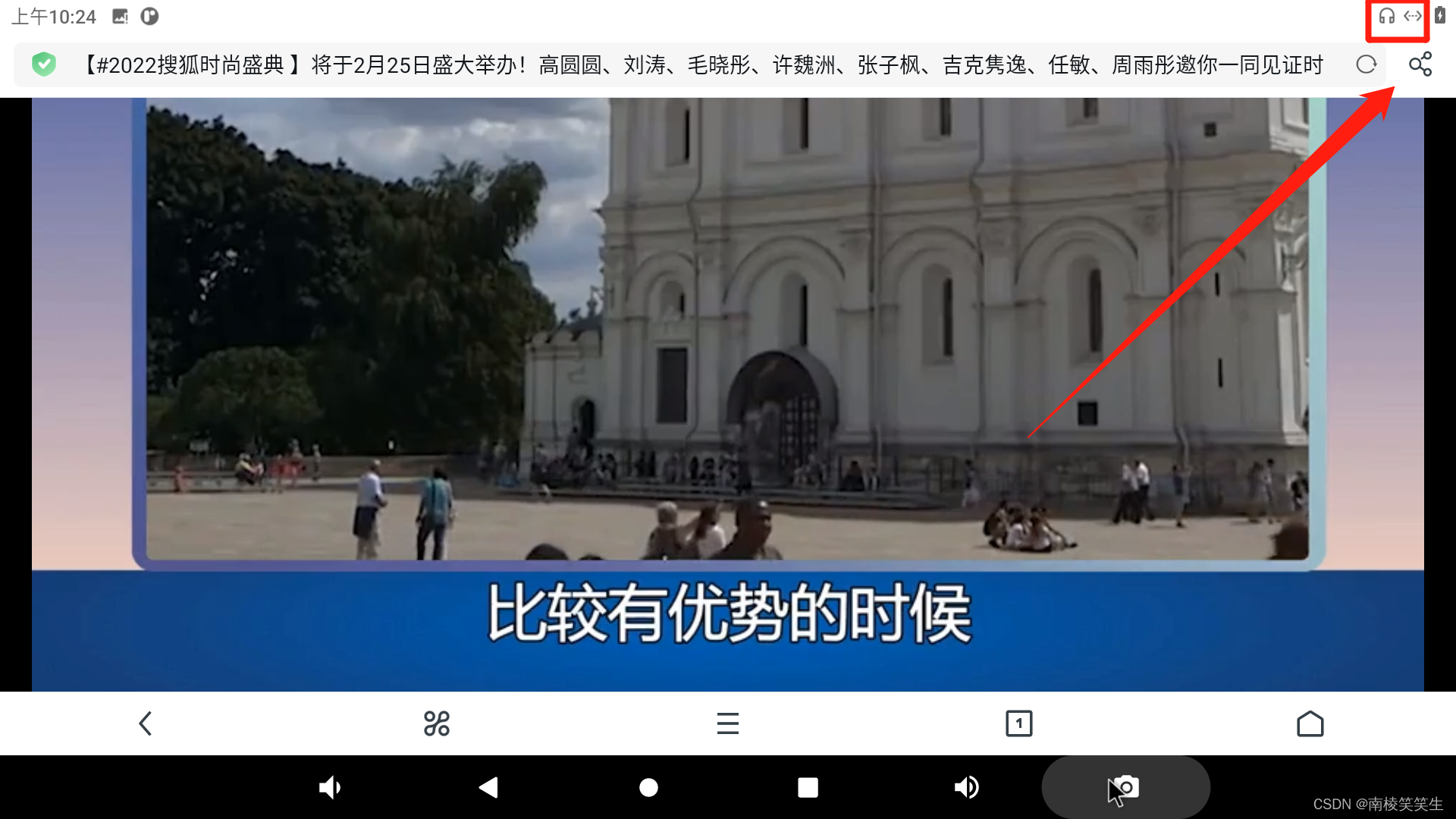
20230217使AIO-3399J开发板上跑通Android11系统 2023/2/17 15:45 1、解压缩SDK:rk3399-android-11-r20211216.tar.xzrootrootrootroot-X99-Turbo:~$ tar xvf rk3399-android-11-r20211216.tar.xz 2、编译U-boot: rootrootrootroot-X99-Turbo:~/rk3399-a…...
Java 基础面试题——面向对象
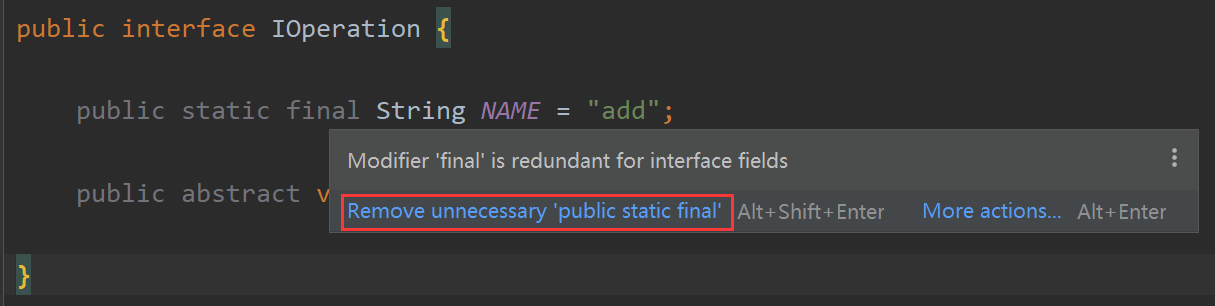
目录1.面向对象和面向过程有什么区别?2.面向对象的有哪些特征?3.静态变量和实例变量有什么区别?4.Java 对象实例化顺序是怎样的?5.浅拷贝和深拷贝的区别是什么?5.1.浅拷贝5.2.深拷贝5.3.总结6.Java 中创建对象的方式有哪几种&…...
,依赖免费pdfbox)
PDF文件替换内容(电子签章),依赖免费pdfbox
首先提前准备,压入如下依赖 <!-- https://mvnrepository.com/artifact/org.apache.pdfbox/pdfbox --> <dependency> <groupId>org.apache.pdfbox</groupId> <artifactId>pdfbox</artifactId>…...
nvm 控制 node版本
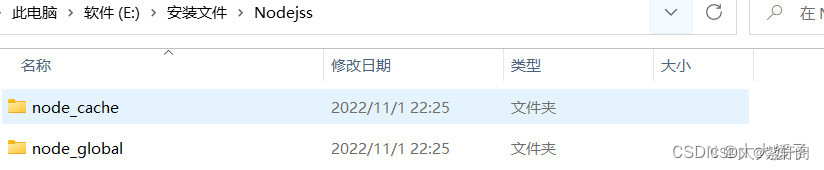
nvm 官网 https://nvm.uihtm.com/ 1、卸掉nodejs,根据官网操作 2、如果之前安装过的nodejs,且安装的目录改变了,需重新配置系统环境 第一步:打开此电脑 > 右键属性 > 高级系统设置 > 环境变量 第二步: 在系统变量中选中…...
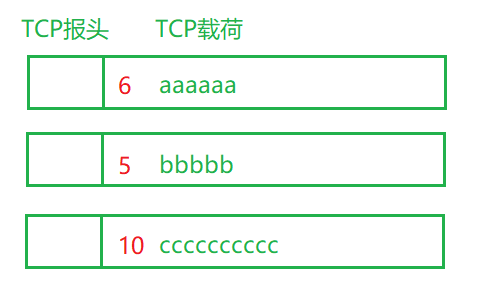
javaEE 初阶 — 传输层 TCP 协议中的异常情况与面向字节流的粘包问题
文章目录1 粘包问题1.1 什么是粘包问题1.2 如何解决粘包问题2 异常情况TCP 的十个特性:确认应答机制 超时重传机制 连接管理机制 滑动窗口 流量控制与拥塞控制 延迟应答与捎带应答 1 粘包问题 1.1 什么是粘包问题 面向字节流引入了一个比较麻烦的粘包问题。 …...
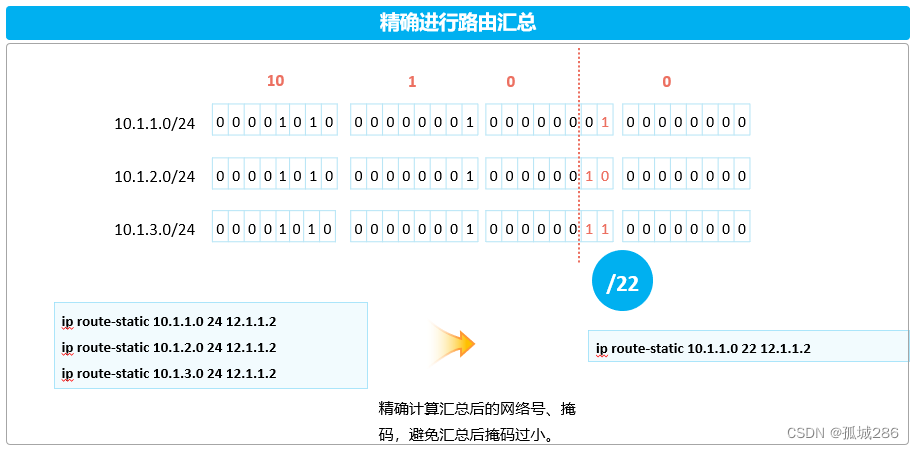
IP路由基础
——IP路由基础(IA)—— HCIA全套笔记已经上线(arpAAAvlanTrunk链路聚合vlan间通信ACL广域网技术以太网交换...........)_孤城286的博客-CSDN博客 目录 ——IP路由基础(IA)—— (1&#…...
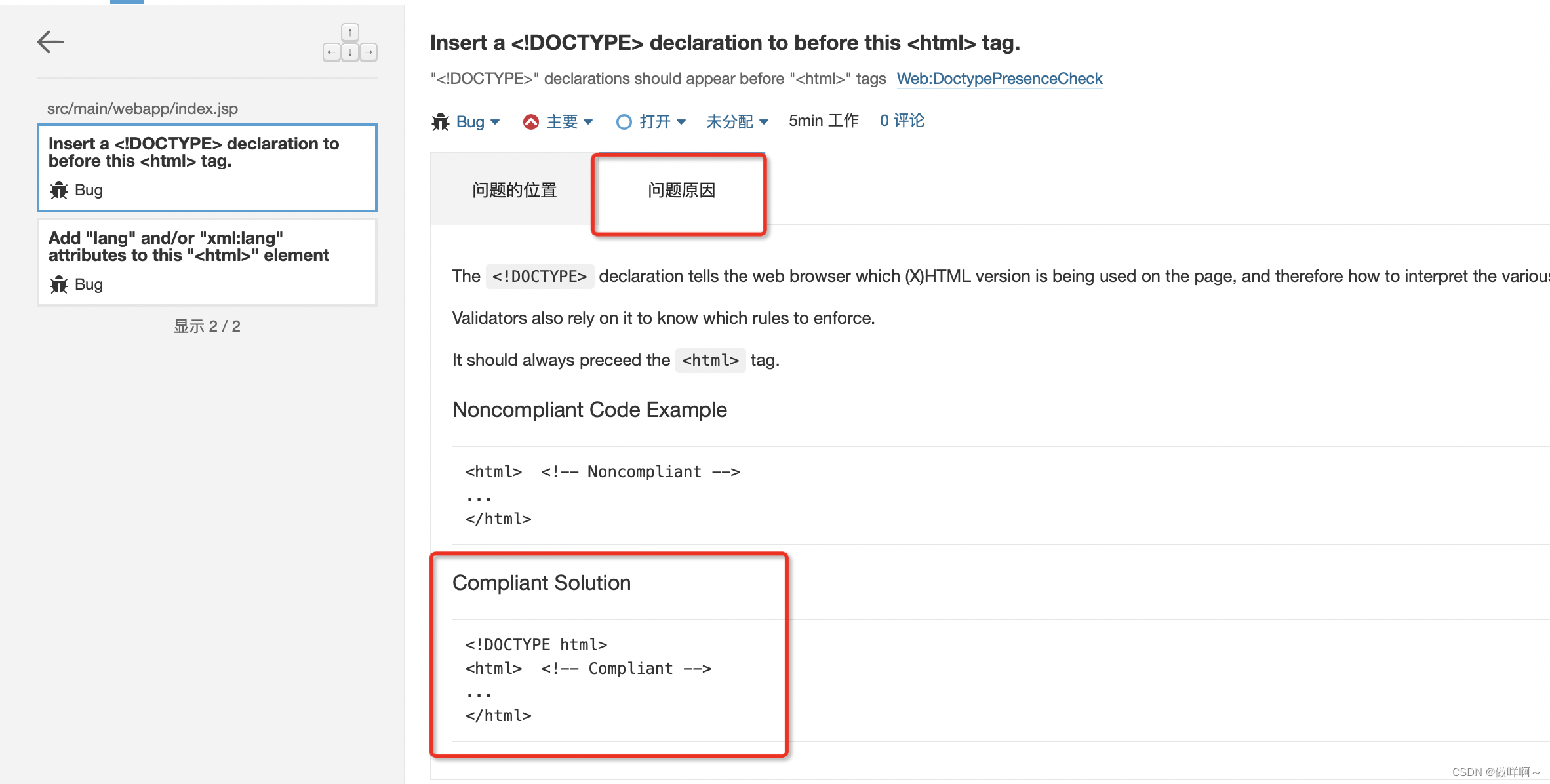
12.centos7部署sonarqube9.6
12.centos7部署sonarqube9.6环境:sonarqube9.6Postgresql13JDK11sonarqube9.6下载地址:Postgresql13 rpm下载地址:JDK11下载地址:准备工作:修改文件句柄数(最大文件数)和用户最大进程数限制修改…...

大学四年自学Java编程,现在拿到28万年薪的offer,还是觉得挺值的
最近刚拿到美团的Java后端工程师的offer,(底薪、奖金、补贴、年终奖、五险一金)总包加在大概有28万的年薪,实际到手不会有这么多,但是我对于这个待遇还是非常满意的。说来还是非常的感慨,我属于那种从大一到…...

MySQL的日志详解
目录 一.介绍 日志分类 二.错误日志 三.二进制日志—binlog 概述 日志格式 操作 四.查询日志 五.慢查询日志 一.介绍 在任何一种数据库中,都会有各种各样的日志,记录着数据库工作的方方面面,以帮助数据库管理员追踪数据库曾经发生过的…...

输出该股票所有收盘比开盘上涨3%以上的日期
1:输出该股票所有收盘比开盘上涨3%以上的日期 #codingutf-8 import tushare as ts import pandas as pd import numpy as np#获取某支股票的历史行情数据 dfts.get_hist_data(code600519,start2001-01-01) #将互联网上的数据获取并且存储到本地 df.to_csv(./maotai…...
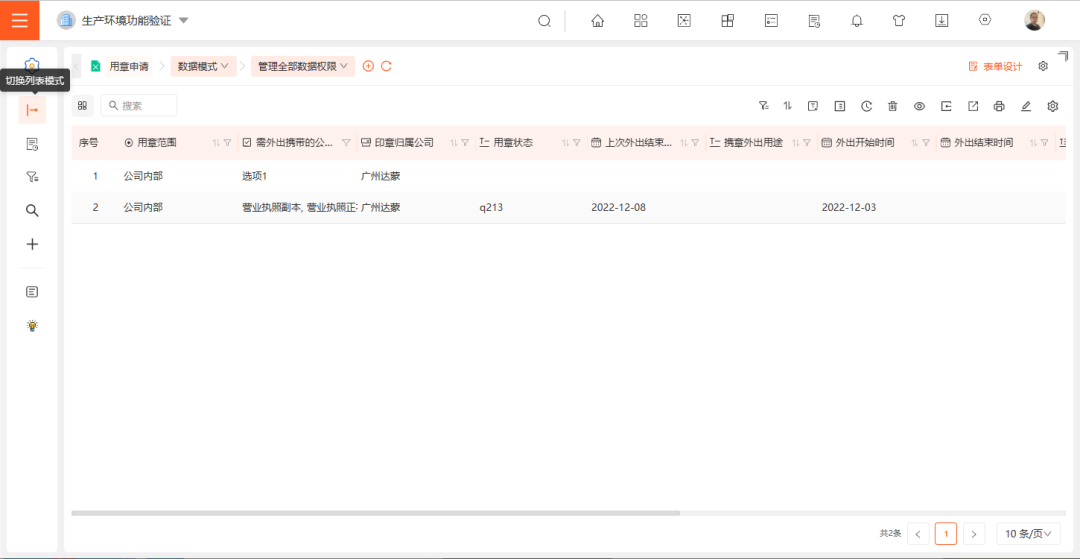
数值卡,让数据可视化玩出新花样丨三叠云
数值卡 路径 仪表盘 >> 仪表盘设计 功能简介 1. 数值卡增加「数值标题」、「图标」、「进度条」功能,使得应用场景更为广泛,实现数据可视化,让用户能够轻松地获取、处理信息。 2.「数据模型」支持0个维度1个指标、1个维度1个指标。…...

OpenClacky:AI Agent技能加密与商业分发平台实战指南
1. 项目概述:从开源共享到知识变现的桥梁在AI Agent(智能体)生态蓬勃发展的今天,我们看到了一个有趣的现象:无数开发者贡献了海量的“技能”(Skills),让像OpenClaw这样的平台功能日益…...

从好奇号火星着陆看复杂系统工程:天空起重机方案与工程管理启示
1. 项目概述:从“不可能”到“火星新地标”的工程壮举2012年8月6日,当“好奇号”火星车在盖尔陨石坑成功着陆,传回第一张火星地表照片时,整个喷气推进实验室(JPL)控制中心沸腾了。这不仅仅是一次成功的行星…...

AITranslate:本地化AI翻译工作流框架,构建可编程翻译管道
1. 项目概述与核心价值最近在折腾一个挺有意思的项目,叫AITranslate。这名字一看就知道,它想用AI来干翻译的活儿。但说实话,现在市面上翻译工具多如牛毛,从老牌的谷歌翻译、DeepL,到各种大厂出的AI翻译插件,…...

InputTip:提升表单体验的动态输入引导组件设计与实战
1. 项目概述:一个被低估的输入增强工具 在桌面应用开发中,我们常常会花费大量精力去构建复杂的业务逻辑和炫酷的界面,却容易忽略一个直接影响用户体验的细节: 输入引导 。回想一下,你是否遇到过这样的场景࿱…...

ImageTrans插件生态:用Python扩展图片OCR与翻译工作流
1. 项目概述:一个为ImageTrans量身定制的插件生态如果你经常需要处理图像中的文字,比如翻译漫画、本地化游戏截图或者处理带文字的UI设计稿,那你很可能听说过或者用过ImageTrans这款工具。它是一款专注于图片文字识别(OCR…...

200+ 发音人怎么缩小范围:先定风格再试听
🎯 200 发音人怎么缩小范围:先定风格再试听面对顶伯文字转语音工具中超过 200 种发音人,选择困难症难免发作。😵 别急,掌握 「先定风格再试听」 的筛选逻辑,就能快速锁定目标。 本文从风格分类、筛选技巧到…...

Spratt Skills:基于LLM规划与代码执行的OpenClaw家庭自动化架构实践
1. 项目概述:Spratt Skills,一个为OpenClaw打造的家庭自动化基础设施套件 如果你正在使用OpenClaw,并且已经厌倦了让LLM(大语言模型)去处理那些它天生就不擅长的事情——比如定时发送消息、轮询航班状态、或者可靠地写…...

革命性AI图像生成工具Fooocus:让创意触手可及的完整解决方案
革命性AI图像生成工具Fooocus:让创意触手可及的完整解决方案 【免费下载链接】Fooocus Focus on prompting and generating 项目地址: https://gitcode.com/GitHub_Trending/fo/Fooocus 你是否曾经被复杂的AI绘画工具吓退?Fooocus正是为你打造的解…...

2026年Hermes Agent/OpenClaw怎么部署?阿里云自动化部署及Token Plan配置
2026年Hermes Agent/OpenClaw怎么部署?阿里云自动化部署及Token Plan配置。OpenClaw是开源的个人AI助手,Hermes Agent则是一个能自我进化的AI智能体框架。阿里云提供计算巢、轻量服务器及无影云电脑三种部署OpenClaw 与 Hermes Agent的方案、百炼Token P…...

Jsxer:Adobe ExtendScript JSXBIN反编译终极指南与深度解析
Jsxer:Adobe ExtendScript JSXBIN反编译终极指南与深度解析 【免费下载链接】jsxer A fast and accurate JSXBIN decompiler. 项目地址: https://gitcode.com/gh_mirrors/js/jsxer Jsxer是一款高性能的Adobe ExtendScript二进制格式(JSXBIN&#…...