
【UniApp开发小程序】小程序首页(展示商品、商品搜索、商品分类搜索)【后端基于若依管理系统开发】
文章目录
- 界面效果
- 界面实现
- 工具js
- 页面
- 首页
- 让文字只显示两行
- 路由跳转传递对象
- 将商品分为两列显示
- 使用中划线划掉原价
- 后端
- 商品
- controller
- service
- mapper
- sql
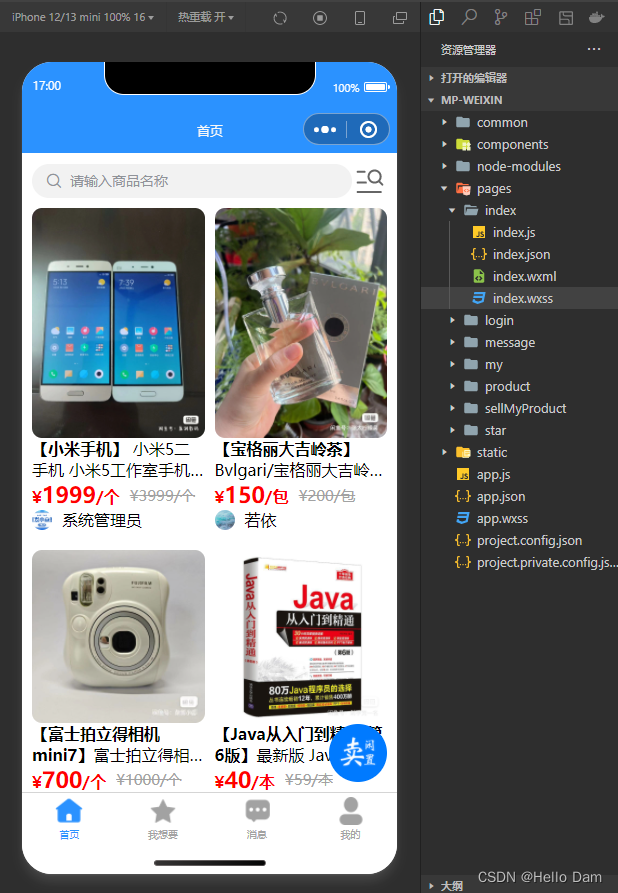
界面效果
【说明】
- 界面中商品的图片来源于闲鱼,若侵权请联系删除
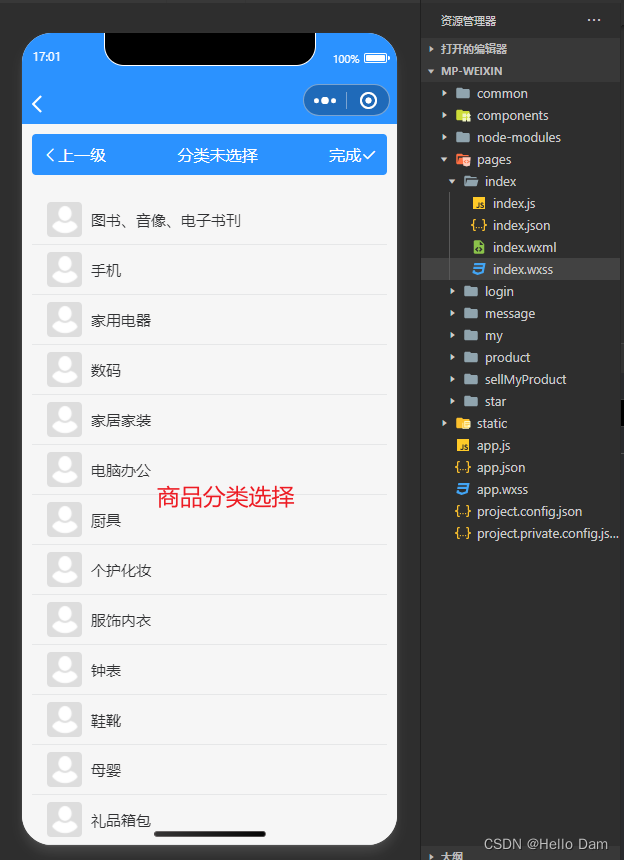
- 关于商品分类页面的实现,请在我的Uniapp系列文章中寻找来查看
- 关于页面中悬浮按钮的实现,请在我的Uniapp系列文章中寻找来查看
界面实现
工具js
该工具类的作用是,给定一个图片的url地址,计算出图片的高宽比,计算高宽比的作用是让图片可以按照正常比例显示
/*** 获取uuid*/
export default {/*** 获取高宽比 乘以 100%*/getAspectRatio(url) {uni.getImageInfo({src: url,success: function(res) {let aspectRatio = res.height * 100.0 / res.width;// console.log("aspectRatio:" + aspectRatio);return aspectRatio + "%";}});},
}
页面
首页
<template><view class="content"><view style="display: flex;align-items: center;"><u-search placeholder="请输入商品名称" v-model="searchForm.keyword" @search="listProductVo" :showAction="false":clearabled="true"></u-search><text class="iconfont" style="font-size: 35px;" @click="selectCategory()"></text></view><u-row customStyle="margin-top: 10px" gutter="10" align="start" v-if="productList[0].length>0&&loadData==false"><u-col span="6" class="col" v-for="(data,index) in productList" :key="index"><view class="productVoItem" v-for="(productVo,index1) in data" :key="index1"@click="seeProductDetail(productVo)"><u--image v-if="productVo.picList!=null&&productVo.picList.length>0" :showLoading="true":src="productVo.picList[0]" width="100%" :height="getAspectRatio(productVo.picList[0])"radius="10" mode="widthFix"></u--image><!-- <u--image v-else :showLoading="true" :src="src" @click="click"></u--image> --><view class="productMes"><text class="productName">【{{productVo.name}}】</text><text>{{productVo.description==null?'':productVo.description}}</text></view><view style="display: flex;align-items: center;"><!-- 现价 --><view class="price">¥<text class="number">{{productVo.price}}</text>/{{productVo.unit}}</view><view style="width: 10px;"></view><!-- 原价 --><view class="originPrice">¥{{productVo.originalPrice}}/{{productVo.unit}}</view></view><view style="display: flex;align-items: center;"><u--image :src="productVo.avatar" width="20" height="20" shape="circle"></u--image><view style="width: 10px;"></view><view> {{productVo.nickname}}</view></view></view></u-col></u-row><u-empty v-if="productList[0].length==0&&loadData==false" mode="data" texColor="#ffffff" iconSize="180"iconColor="#D7DEEB" text="所选择的分类没有对应的商品,请重新选择" textColor="#D7DEEB" textSize="18" marginTop="30"></u-empty><view style="margin-top: 20px;" v-if="loadData==true"><u-skeleton :loading="true" :animate="true" rows="10"></u-skeleton></view><!-- 浮动按钮 --><FloatButton @click="cellMyProduct()"><u--image :src="floatButtonPic" shape="circle" width="60px" height="60px"></u--image></FloatButton></view>
</template><script>import FloatButton from "@/components/FloatButton/FloatButton.vue";import {listProductVo} from "@/api/market/prodct.js";import pictureApi from "@/utils/picture.js";export default {components: {FloatButton},onShow: function() {let categoryNameList = uni.getStorageSync("categoryNameList");if (categoryNameList) {this.categoryNameList = categoryNameList;this.searchForm.productCategoryId = uni.getStorageSync("productCategoryId");this.searchForm.keyword = this.getCategoryLayerName(this.categoryNameList);uni.removeStorageSync("categoryNameList");uni.removeStorageSync("productCategoryId");this.listProductVo();}},data() {return {title: 'Hello',// 浮动按钮的图片floatButtonPic: require("@/static/cellLeaveUnused.png"),searchForm: {// 商品搜索关键词keyword: "",productCategoryId: undefined},productList: [[],[]],loadData: false,}},onLoad() {},created() {this.listProductVo();},methods: {/*** 查询商品vo集合*/listProductVo() {this.loadData = true;listProductVo(this.searchForm).then(res => {this.loadData = false;// console.log("listProductVo:" + JSON.stringify(res))let productVoList = res.rows;this.productList = [[],[]];for (var i = 0; i < productVoList.length; i++) {if (i % 2 == 0) {// 第一列数据this.productList[0].push(productVoList[i]);} else {// 第二列数据this.productList[1].push(productVoList[i]);}}})},/*** 跳转到卖闲置页面*/cellMyProduct() {console.log("我要卖闲置");uni.navigateTo({url: "/pages/sellMyProduct/sellMyProduct"})},/*** 获取高宽比 乘以 100%*/getAspectRatio(url) {return pictureApi.getAspectRatio(url);},/*** 选择分类*/selectCategory() {uni.navigateTo({url: "/pages/sellMyProduct/selectCategory"})},/*** 获取商品名称*/getCategoryLayerName() {let str = '';for (let i = 0; i < this.categoryNameList.length - 1; i++) {str += this.categoryNameList[i] + '/';}return str + this.categoryNameList[this.categoryNameList.length - 1];},/*** 查看商品的详情*/seeProductDetail(productVo) {// console.log("productVo:"+JSON.stringify(productVo))uni.navigateTo({url: "/pages/product/detail?productVo=" + encodeURIComponent(JSON.stringify(productVo))})}}}
</script><style lang="scss">.content {padding: 20rpx;.col {width: 50%;}.productVoItem {margin-bottom: 20px;.productMes {overflow: hidden;text-overflow: ellipsis;display: -webkit-box;/* 显示2行 */-webkit-line-clamp: 2;-webkit-box-orient: vertical;.productName {font-weight: bold;}}.price {color: #ff0000;font-weight: bold;.number {font-size: 22px;}}.originPrice {color: #A2A2A2;font-size: 15px;// 给文字添加中划线text-decoration: line-through;}}}
</style>
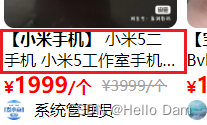
让文字只显示两行
overflow: hidden;
text-overflow: ellipsis;
display: -webkit-box;
/* 显示2行 */
-webkit-line-clamp: 2;
-webkit-box-orient: vertical;
路由跳转传递对象
因为首页已经查询到商品的很多信息了,点击查看商品详情的时候,很多信息不需要再查询一遍了,可以直接将商品的已知信息通过路由传递到新的页面去,需要注意的时候,将对象作为参数传递之前,需要先将对象进行编码
uni.navigateTo({url: "/pages/product/detail?productVo=" + encodeURIComponent(JSON.stringify(productVo))
})
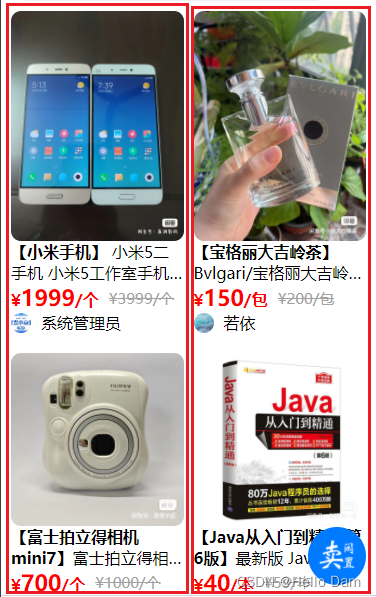
将商品分为两列显示
首先将查询到的商品分为两组
let productVoList = res.rows;
this.productList = [[],[]
];
for (var i = 0; i < productVoList.length; i++) {if (i % 2 == 0) {// 第一列数据this.productList[0].push(productVoList[i]);} else {// 第二列数据this.productList[1].push(productVoList[i]);}
}
然后在布局中使用行列布局即可,即使用一行两列的方式来显示商品信息
使用中划线划掉原价
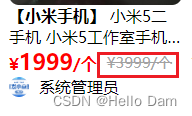
// 给文字添加中划线
text-decoration: line-through;
后端
商品
controller
/*** 查询商品Vo列表*/@PreAuthorize("@ss.hasPermi('market:product:list')")@PostMapping("/listProductVo")@ApiOperation("获取商品列表")public TableDataInfo listProductVo(@RequestBody ProductVo productVo) {startPage();if (productVo.getProductCategoryId() != null) {// --if-- 当分类不为空的时候,只按照分类来搜索productVo.setKeyword(null);}List<ProductVo> list = productService.selectProductVoList(productVo);return getDataTable(list);}
service
/*** 查询商品Vo列表** @param productVo* @return*/
@Override
public List<ProductVo> selectProductVoList(ProductVo productVo) {
//        List<ProductVo> productVoList = new ArrayList<>();List<ProductVo> productVoList = baseMapper.selectProductVoList(productVo);///设置每个商品的图片// 获取所有商品的idList<Long> productIdList = productVoList.stream().map(item -> {return item.getId();}).collect(Collectors.toList());// 查询出所有商品的图片if (productIdList.size() > 0) {List<Picture> pictureList = pictureService.selectPictureListByItemIdListAndType(productIdList, PictureType.PRODUCT.getType());Map<Long, List<String>> itemIdAndPicList = new HashMap<>();for (Picture picture : pictureList) {if (!itemIdAndPicList.containsKey(picture.getItemId())) {List<String> picList = new ArrayList<>();picList.add(picture.getAddress());itemIdAndPicList.put(picture.getItemId(), picList);} else {itemIdAndPicList.get(picture.getItemId()).add(picture.getAddress());}}// 给每个商品设置图片for (ProductVo vo : productVoList) {vo.setPicList(itemIdAndPicList.get(vo.getId()));}}return productVoList;
}
mapper
void starNumDiffOne(@Param("productId") Long productId);
sql
<select id="selectProductVoList" parameterType="ProductVo" resultMap="ProductVoResult">SELECTp.id,p.NAME,p.description,p.original_price,p.price,p.product_category_id,pc.NAME AS productCategoryName,p.user_id,u.user_name as username,u.nick_name as nickname,u.avatar as avatar,p.reviewer_id,u1.user_name as reviewerUserName,p.fineness,p.unit,p.STATUS,p.is_contribute,p.functional_status,p.brand_id,b.NAME AS brandNameFROMproduct AS pLEFT JOIN product_category AS pc ON p.product_category_id = pc.idLEFT JOIN brand AS b ON p.brand_id = b.idLEFT JOIN sys_user AS u ON p.user_id = u.user_idLEFT JOIN sys_user AS u1 ON p.reviewer_id = u1.user_id<where><if test="keyword != null and keyword != ''">and p.name like concat('%', #{keyword}, '%')</if><if test="keyword != null and keyword != ''">or p.description like concat('%', #{keyword}, '%')</if><if test="productCategoryId != null and productCategoryId != ''">and p.product_category_id =#{productCategoryId}</if></where></select>
相关文章:
【UniApp开发小程序】小程序首页(展示商品、商品搜索、商品分类搜索)【后端基于若依管理系统开发】
文章目录 界面效果界面实现工具js页面首页让文字只显示两行路由跳转传递对象将商品分为两列显示使用中划线划掉原价 后端商品controllerservicemappersql 界面效果 【说明】 界面中商品的图片来源于闲鱼,若侵权请联系删除关于商品分类页面的实现,请在我…...

Redis 持久化及集群架构
Redis 持久化及集群架构 本篇技术博文将深入探讨 Redis 持久化机制的原理、配置和使用方式。我们将介绍两种常用的持久化方式:RDB 持久化和 AOF 持久化。您将了解到它们的工作原理、优缺点以及如何根据需求选择合适的持久化方式。 通过深入学习 Redis 持久化及集群…...
FPGA + WS2812采灯控制
文章目录 一、WS2812C-2020-V11、产品概述2、引出端排列及功能3、数据传输时间4、数据传输方法 二、使用WS2812C显示图片1、静态显示2、动态显示 一、WS2812C-2020-V1 1、产品概述 WS2812C-2020-V1是一个集控制电路与发光电路于一体的智能外控LED光源;其外型采用最…...
【视频】使用OBS将MP4推流至腾讯云直播
1、下载OBS OBS官网:https://obsproject.com/ OBS支持Win、Mac、Linux,如果下载速度很慢,建议使用迅雷下载 2、OBS推流设置 2.1 添加场景 默认会有一个“场景”,如果想继续添加可以点击“+”按钮 2.2 添加媒体源 1)点击“来源”窗口中“+”按钮 2)支持的媒体源如…...
Vue基本知识
一、vue入门 Vue为前端的框架,免除了原生js的DOM操作。简化书写。 基于MVVM的思想,实现数据的双向绑定,使编程的重点放在数据上。 1、引入vue.js文件 2、定义vue核心对象,定义数据模型 3、编写视图 //1、引入vue.js <scr…...
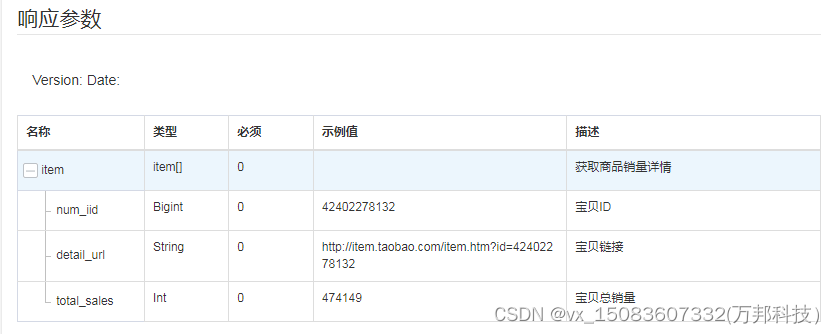
item_get_sales-获取商品销量详情
一、接口参数说明: item_get_sales-获取商品销量详情,点击更多API调试,请移步注册API账号点击获取测试key和secret 公共参数 请求地址: https://api-gw.onebound.cn/taobao/item_get_sales 名称类型必须描述keyString是调用key(…...
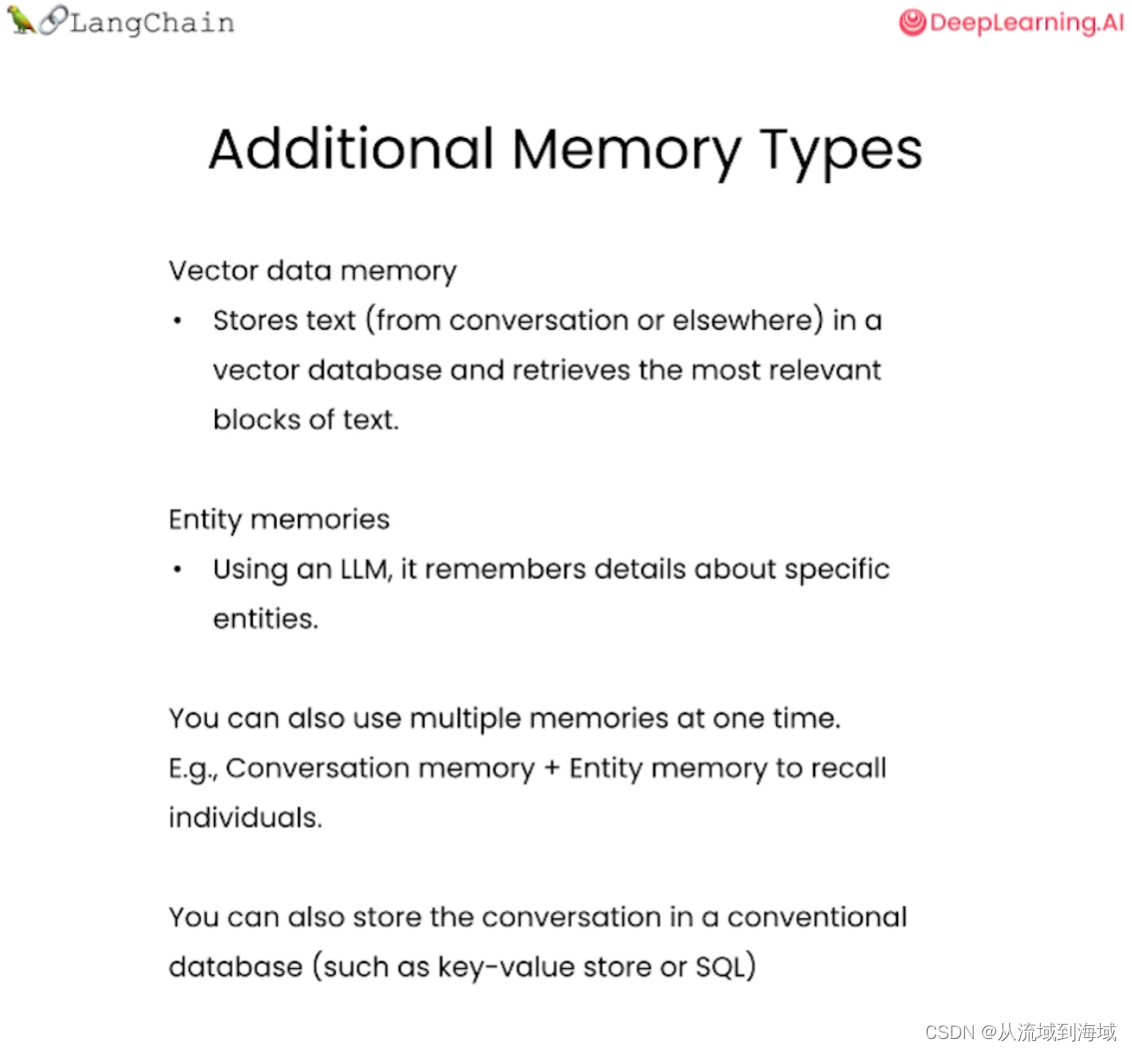
LangChain手记 Memory
整理并翻译自DeepLearning.AILangChain的官方课程:Memory Memory 使用open ai的API调用GPT都是单次调用,所以模型并不记得之前的对话,多轮对话的实现其实是将前面轮次的对话过程保留,在下次对话时作为输入的message数组的一部分&…...
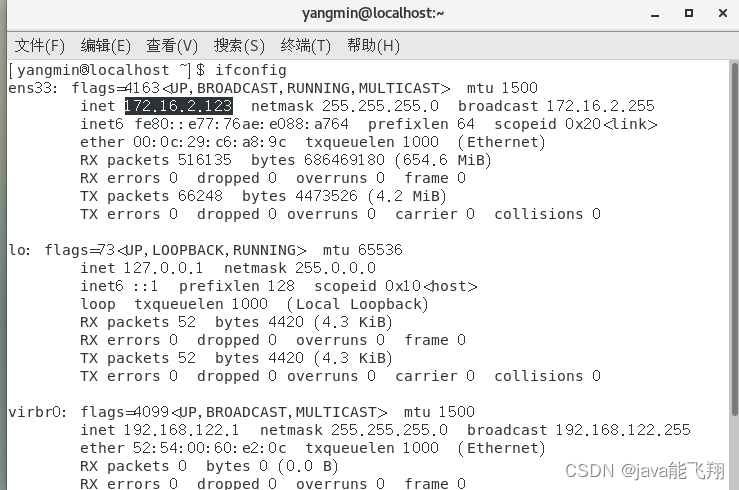
linux下安装.run后缀名文件
1.文件传输 对于大文件,不能直接拖拽,可以借助工具,例如WinSCP 创建会话时,需要提供虚拟机的主机名,可以采取输入ifconfig的命令,如图所示: ifconfig(接口配置)命令在 …...

Angular 性能优化实战
Angular 性能优化实战 Angular 是一个非常强大的前端框架,但是如果不注意性能优化,应用程序可能会变得非常慢并增加加载时间。 以下是一些Angular性能优化经验的实战建议: 1. 使用 OnPush 变更检测策略 默认情况下,Angular检查…...
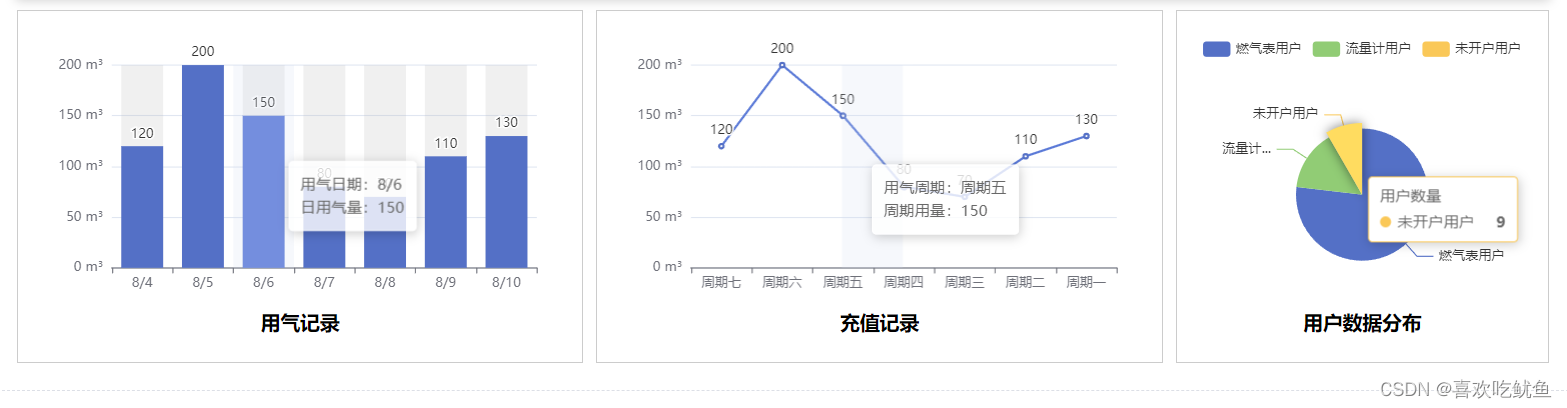
在vue项目使用数据可视化 echarts ,柱状图、折线图、饼状图使用示例详解及属性详解
官网地址:Apache ECharts 一、下载插件并在页面中引入 npm install echarts --save 页面导入: import * as echarts from echarts 全局导入: main.js 中,导入并注册到全局 import echarts from echarts Vue.prototype.$echart…...

九耶丨阁瑞钛伦特-井字棋html5代码
你想了解关于井字棋(Tic-Tac-Toe)的HTML代码吗?以下是一个简单的井子棋的HTML代码示例: <!DOCTYPE html> <html> <head><title>Tic-Tac-Toe</title><style>.board {display: flex;flex-wrap…...
Linux服务器上配置HTTP和HTTPS代理
本文将向你分享如何在Linux服务器上配置HTTP和HTTPS代理的方法,解决可能遇到的问题,让你的爬虫项目顺利运行,畅爬互联网! 配置HTTP代理的步骤 1. 了解HTTP代理的类型:常见的有正向代理和反向代理两种类型。根据实际需求…...
OpenZFS 2.2 发布 RC3,支持 Linux 6.4
导读之前的 OpenZFS 2.2 候选版本已致力于实现与 Linux 6.4 内核的兼容性,而在 2.2-rc3 中,Linux 6.4 支持的元跟踪器已标记为已完成。 OpenZFS 2.2 发布了第 3 个 RC 版本。 之前的 OpenZFS 2.2 候选版本已致力于实现与 Linux 6.4 内核的兼容性&#x…...
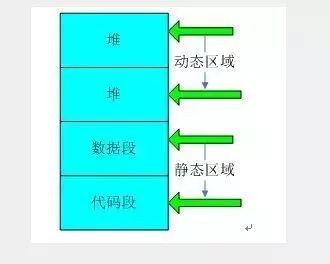
嵌入式 C 语言程序数据基本存储结构
一、5大内存分区 内存分成5个区,它们分别是堆、栈、自由存储区、全局/静态存储区和常量存储区。 1、栈区(stack):FIFO就是那些由编译器在需要的时候分配,在不需要的时候自动清除的变量的存储区。里面的变量通常是局部变量、函数参数等。 …...

记录VS2022离线安装NuGet包的过程
离线安装NuGet包主要分为两个阶段:指定安装源及下载包及其依赖项。本文记录在VS2022中离线安装NuGet包的过程及注意事项。 离线安装NuGet包,主要有两种方式:1)搭建局域网或本机NuGet服务器,将VS2022的源指定为NuGe…...

tomcat的多实例和动静分离
目录 多实例 安装tomcat 配置 tomcat 环境变量 修改server.xml文件 修改开关文件,添加环境变量 tomcat1 tomcat2 启动 浏览器访问测试 nginxtomcat实现动静分离 Nginx实现负载均衡的原理 部署nginx的负载器 搭建第三台tomcat 配置多实例服务器 Tomcat…...
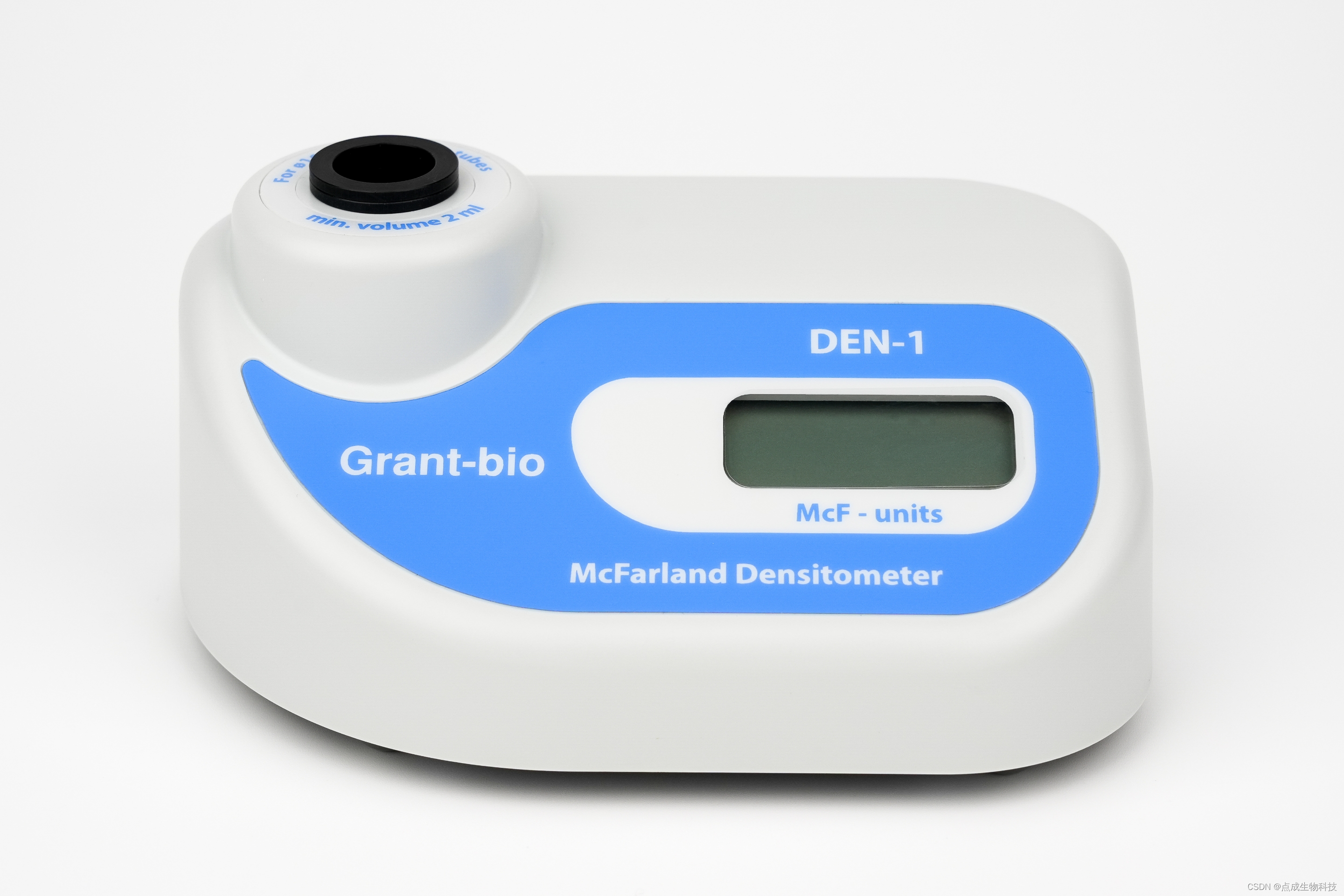
点成案例丨比浊仪用于乳酸菌抑菌活性测定
乳酸菌概述 自1929年英国科学家弗莱明发现青霉素以来,抗生素为人类医学的进步做出了巨大贡献。然而,抗生素在临床上广泛且持续的使用导致病原微生物产生了耐药性。目前,病原微生物对抗生素的耐药性正在威胁人们的健康,寻找具有抑…...

总结synchronized
一.synchronized的特性 synchronized 是 Java 语言中内置的关键字,用于实现线程同步,以确保多线程环境下共享资源的安全访问。 互斥性:synchronized保证了同一时刻只有一个线程可以执行被synchronized修饰的代码块或方法。当一个线程进入sync…...
react实现模拟弹框遮罩的自定义hook
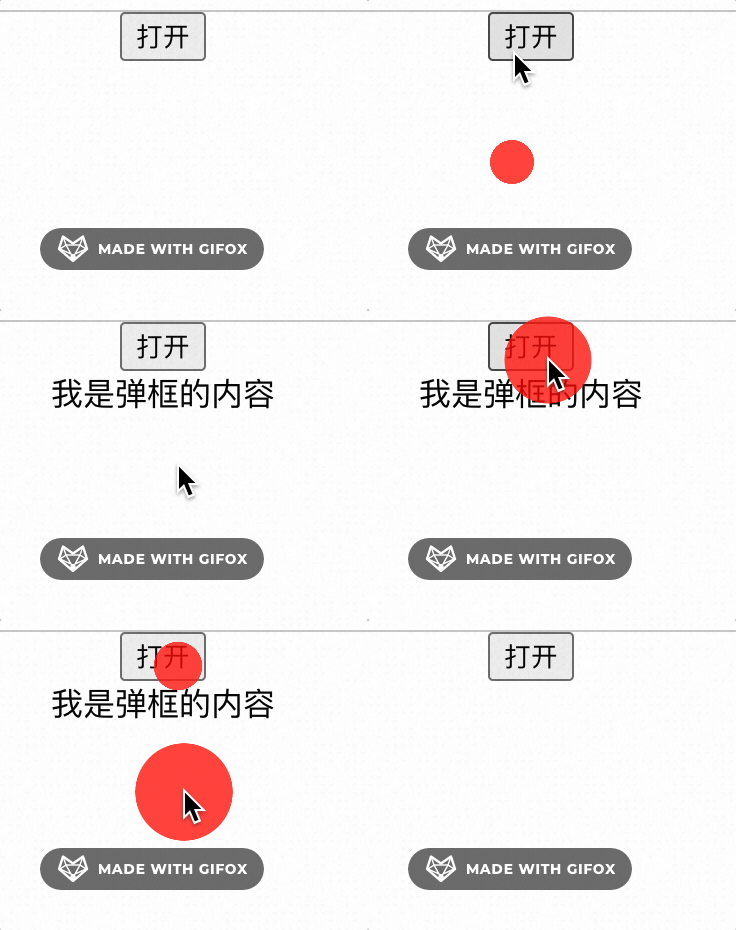
需求描述 点击按钮用于检测鼠标是否命中按钮 代码实现 import React from react; import {useState, useEffect, useRef} from react;// 封装一个hook用来检测当前点击事件是否在某个元素之外 function useClickOutSide(ref,cb) {useEffect(()>{const handleClickOutside…...
直接在html中引入Vue.js的cdn来实现一个简单的博客
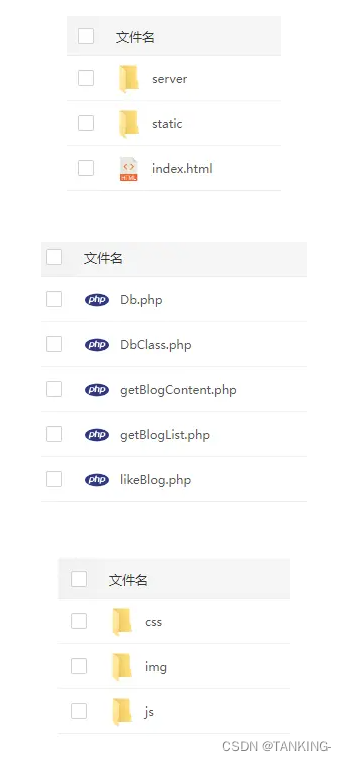
摘要 其实建立一个博客系统是非常简单的,有很多开源的程序,如果你不喜欢博客系统,也可以自己开发,也可以自己简单做一个。我这次就是用Vue.js和php做后端服务实现一个简单的博客。 界面 代码结构 代码 index.html <!DOCTYP…...

机器学习原子间势能模型的不确定性量化:POPS框架解决模型误设挑战
1. 项目概述与核心挑战在材料科学和计算物理领域,机器学习原子间势能模型(MLIAP)的崛起,让我们第一次有机会以接近第一性原理(如密度泛函理论,DFT)的精度,去模拟包含成千上万个原子的…...

孟加拉语作者画像基准测试:朴素贝叶斯与SVM在低资源语言NLP中的表现分析
1. 项目概述:当机器学习遇见孟加拉语社交媒体在社交媒体无处不在的今天,我们每天都会产生海量的文本数据。你有没有想过,仅仅通过一个人写的几段文字,就能大致猜出他的性别和年龄?这听起来有点像数字时代的“读心术”&…...

3步搞定无人机影像处理:ODM免费开源工具完全指南
3步搞定无人机影像处理:ODM免费开源工具完全指南 【免费下载链接】ODM A command line toolkit to generate maps, point clouds, 3D models and DEMs from drone, balloon or kite images. 📷 项目地址: https://gitcode.com/gh_mirrors/od/ODM …...

让电脑永远保持清醒:MouseJiggler鼠标抖动工具完全指南
让电脑永远保持清醒:MouseJiggler鼠标抖动工具完全指南 【免费下载链接】mousejiggler Mouse Jiggler is a very simple piece of software whose sole function is to "fake" mouse input to Windows, and jiggle the mouse pointer back and forth. 项…...

LogExpert深度解析:企业级日志分析平台的架构设计与实战应用
LogExpert深度解析:企业级日志分析平台的架构设计与实战应用 【免费下载链接】LogExpert Windows tail program and log file analyzer. 项目地址: https://gitcode.com/gh_mirrors/lo/LogExpert LogExpert是一款面向Windows平台的专业级日志分析工具&#x…...

3步解锁Heightmapper:从地图到3D地形的终极转换指南
3步解锁Heightmapper:从地图到3D地形的终极转换指南 【免费下载链接】heightmapper interactive heightmaps from terrain data 项目地址: https://gitcode.com/gh_mirrors/he/heightmapper 还在为寻找真实地形数据而烦恼吗?还在为3D建模中的地形…...
)
用Python+Mediapipe+OpenCV做个手势识别小游戏(附完整源码和避坑指南)
用PythonMediapipeOpenCV打造手势控制太空射击游戏 最近在整理旧项目时,翻出一个用Mediapipe手势识别控制的小游戏原型。这个太空射击游戏完全通过手势操作——食指瞄准,握拳射击,手掌移动控制飞船位置。当时为了调试手势映射逻辑,…...

如何免费实现NVIDIA显卡专业级色彩校准:novideo_srgb终极指南
如何免费实现NVIDIA显卡专业级色彩校准:novideo_srgb终极指南 【免费下载链接】novideo_srgb Calibrate monitors to sRGB or other color spaces on NVIDIA GPUs, based on EDID data or ICC profiles 项目地址: https://gitcode.com/gh_mirrors/no/novideo_srgb…...

3分钟掌握中国车牌生成器:从零构建车牌图像数据集
3分钟掌握中国车牌生成器:从零构建车牌图像数据集 【免费下载链接】chinese_license_plate_generator 中国车牌生成器 项目地址: https://gitcode.com/gh_mirrors/ch/chinese_license_plate_generator 你是否曾为车牌识别项目缺乏训练数据而苦恼?…...
)
023、PCB设计软件选择与安装(Altium Designer)
023、PCB设计软件选择与安装(Altium Designer) 从一块烧掉的板子说起 去年冬天,我接手一个同事离职留下的项目——一块四层板的电机驱动板。原理图看着没问题,Layout也走通了,打样回来上电,MOS管直接冒烟。排查三天,最后发现是电源回路的地线回流路径被一根细长的走线…...