
Unity进阶–通过PhotonServer实现人物移动和攻击–PhotonServer(五)
文章目录
- Unity进阶–通过PhotonServer实现人物移动和攻击–PhotonServer(五)
- DLc: 消息类和通信类
- 服务器
- 客户端
Unity进阶–通过PhotonServer实现人物移动和攻击–PhotonServer(五)
DLc: 消息类和通信类
-
Message
namespace Net {public class Message{public byte Type;public int Command;public object Content;public Message() { }public Message(byte type, int command, object content){Type = type;Command = command;Content = content;}}//消息类型public class MessageType{//unity//类型public static byte Type_UI = 0;//账号登录注册public const byte Type_Account = 1;//用户public const byte Type_User = 2;//攻击public const byte Type_Battle = 3;//注册账号public const int Account_Register = 100;public const int Account_Register_Res = 101;//登陆public const int Account_Login = 102;public const int Account_Login_res = 103;//角色部分//选择角色public const int User_Select = 204; public const int User_Select_res = 205; public const int User_Create_Event = 206;//删除角色public const int User_Remove_Event = 207;//攻击和移动//移动point[]public const int Battle_Move = 301;//移动响应id point[]public const int Battle_Move_Event = 302;//攻击 targetidpublic const int Battle_Attack = 303;//攻击响应id targetid 剩余血量public const int Battle_Attack_Event = 304;} }-
peer类
using System;
using System.Collections.Generic;
using Net;
using Photon.SocketServer;
using PhotonHostRuntimeInterfaces;
using PhotonServerFirst.Bll;namespace PhotonServerFirst
{public class PSPeer : ClientPeer{public PSPeer(InitRequest initRequest) : base(initRequest){}//处理客户端断开的后续工作protected override void OnDisconnect(DisconnectReason reasonCode, string reasonDetail){//关闭管理器BLLManager.Instance.accountBLL.OnDisconnect(this);BLLManager.Instance.userBLL.OnDisconnect(this);}//处理客户端的请求protected override void OnOperationRequest(OperationRequest operationRequest, SendParameters sendParameters){PSTest.log.Info("收到客户端的消息");var dic = operationRequest.Parameters;//打包,转为PhotonMessageMessage message = new Message();message.Type = (byte)dic[0];message.Command = (int)dic[1];List<object> objs = new List<object>();for (byte i = 2; i < dic.Count; i++){objs.Add(dic[i]);}message.Content = objs.ToArray();//消息分发switch (message.Type){case MessageType.Type_Account://PSTest.log.Info("收到客户端的登陆消息");BLLManager.Instance.accountBLL.OnOperationRequest(this, message); break;case MessageType.Type_User:BLLManager.Instance.userBLL.OnOperationRequest(this, message);break;case MessageType.Type_Battle:PSTest.log.Info("收到攻击移动命令");BLLManager.Instance.battleMoveBLL.OnOperationRequest(this, message);break;}}}
}
-
-
客户端对接类
using System.Collections;
using System.Collections.Generic;
using UnityEngine;
using ExitGames.Client.Photon;
using Net;public class PhotonManager : MyrSingletonBase<PhotonManager>, IPhotonPeerListener
{private  PhotonPeer peer;void Awake() {base.Awake();DontDestroyOnLoad(this);}// Start is called before the first frame updatevoid Start(){peer = new PhotonPeer(this, ConnectionProtocol.Tcp);peer.Connect("127.0.0.1:4530", "PhotonServerFirst");}void Update(){peer.Service();}private void OnDestroy() {base.OnDestroy();//断开连接peer.Disconnect();    }public void DebugReturn(DebugLevel level, string message){}/// <summary>/// 接收服务器事件/// </summary>/// <param name="eventData"></param>public void OnEvent(EventData eventData){//拆包Message msg = new Message();msg.Type = (byte)eventData.Parameters[0];msg.Command = (int)eventData. Parameters[1];List<object> list = new List<object>();for (byte i = 2; i < eventData.Parameters.Count; i++){list.Add(eventData.Parameters[i]);}msg.Content = list.ToArray();MessageCenter.SendMessage(msg);}/// <summary>/// 接收服务器响应/// </summary>/// <param name="operationResponse"></param>public void OnOperationResponse(OperationResponse operationResponse){if (operationResponse.OperationCode == 1){Debug.Log(operationResponse.Parameters[1]);}}/// <summary>/// 状态改变/// </summary>/// <param name="statusCode"></param>public void OnStatusChanged(StatusCode statusCode){Debug.Log(statusCode);}/// <summary>/// 发送消息/// </summary>public void Send(byte type, int command, params object[] objs){Dictionary<byte, object> dic = new Dictionary<byte,object>();dic.Add(0,type);dic.Add(1,command);byte i = 2;foreach (object o in objs){dic.Add(i++, o);}peer.OpCustom(0, dic, true);}}
服务器
-
BLL管理
using PhotonServerFirst.Bll.BattleMove;
using PhotonServerFirst.Bll.User;
using System;
using System.Collections.Generic;
using System.Linq;
using System.Text;namespace PhotonServerFirst.Bll
{public class BLLManager{private static BLLManager bLLManager;public static BLLManager Instance{get{if(bLLManager == null){bLLManager = new BLLManager();}return bLLManager;}}//登录注册管理public IMessageHandler accountBLL;//角色管理public IMessageHandler userBLL;//移动和攻击管理public IMessageHandler battleMoveBLL;private BLLManager(){accountBLL = new PhsotonServerFirst.Bll.Account.AccountBLL();userBLL = new UserBLL();battleMoveBLL = new BattleMoveBLL();}}
}
-
移动BLL
using Net;
using PhotonServerFirst.Dal;
using PhotonServerFirst.Model.User;
using System;
using System.Collections.Generic;
using System.Linq;
using System.Text;namespace PhotonServerFirst.Bll.BattleMove
{class BattleMoveBLL : IMessageHandler{public void OnDisconnect(PSPeer peer){}public void OnOperationRequest(PSPeer peer, Message message){object[] objs = (object[])message.Content; switch (message.Command){case MessageType.Battle_Move:PSTest.log.Info("BattleMove收到移动命令");Move(peer, objs);break;case MessageType.Battle_Attack:Attack(peer, objs);break;}}private void Attack(PSPeer peer, object[] objs){//targetid//id targetid 剩余血量int targetid = (int)objs[0];//攻击者UserModel user = DALManager.Instance.userDAL.GetUserModel(peer);//被攻击者UserModel targetUser = DALManager.Instance.userDAL.GetUserModel(targetid);//计算伤害targetUser.Hp -= user.userInfo.Attack;foreach (PSPeer otherpeer in DALManager.Instance.userDAL.GetuserPeers()){SendMessage.Send(otherpeer, MessageType.Type_Battle, MessageType.Battle_Attack_Event, user.ID, targetUser.ID, targetUser.Hp);}}private void Move(PSPeer peer, object[] objs){//位置float[] points = (float[])objs[0];//将要移动的客户端UserModel user = DALManager.Instance.userDAL.GetUserModel(peer); user.Points = points;//通知所有客户端移动foreach (PSPeer otherpeer in DALManager.Instance.userDAL.GetuserPeers()){PSTest.log.Info("通知所有客户端移动");SendMessage.Send(otherpeer, MessageType.Type_Battle, MessageType.Battle_Move_Event, user.ID, points);}}}
}
客户端
-
逻辑类
using System.Collections; using System.Collections.Generic; using Net; using UnityEngine;public class BattleManager : ManagerBase {void Start() {MessageCenter.Instance.Register(this);}private UserControll user;public UserControll User{get{if (user == null){user = UserControll.idUserDic[UserControll.ID];}return user;}}void Update(){if (Input.GetMouseButtonDown(0)){Ray ray = Camera.main.ScreenPointToRay(Input.mousePosition);RaycastHit hit;bool res = Physics.Raycast(ray, out hit);if (res){if (hit.collider.tag =="Ground"){//Debug.Log("点击到地面");//移动到hit.pointPhotonManager.Instance.Send(MessageType.Type_Battle, MessageType.Battle_Move, new float[] { hit.point.x,hit.point.y, hit.point.z });//Debug.Log(hit.point);}if (hit.collider.tag =="User"){//Debug.Log("点击到玩家");//获取距离float dis = Vector3.Distance(hit.collider.transform.position, User.transform.position);if (dis > 0 && dis < 3f){UserControll targetUser = hit.collider.GetComponent<UserControll>();PhotonManager.Instance.Send(MessageType.Type_Battle, MessageType.Battle_Attack, targetUser.id);}}}}}public override void ReceiveMessage(Message message){base.ReceiveMessage(message);object[] objs = (object[])message.Content;switch (message. Command){case MessageType.Battle_Move_Event:Debug.Log("移动");Move(objs);break;case MessageType.Battle_Attack_Event:Attack(objs);break;}}//移动void Move(object[] objs){//移动的用户idint userid = (int)objs[0];//移动的位置float[] points = (float[])objs[1];UserControll.idUserDic[ userid].Move(new Vector3(points[0],points[1],points[2]));}public override byte GetMessageType(){return MessageType.Type_Battle;}public void Attack(object[] objs){//攻击者id被攻击者id 当前剩余血量int userid = (int)objs[0];int targetid = (int)objs[1];int hp = (int)objs[2];//攻击UserControll.idUserDic[userid].Attack(targetid);if (hp <= 0){UserControll.idUserDic[targetid].Die();}}} -
角色绑定的类
using System.Collections;
using System.Collections.Generic;
using UnityEngine;
using UnityEngine.AI;public class UserControll : MonoBehaviour
{//保存了所有角色的集合public static Dictionary<int, UserControll> idUserDic = new Dictionary<int, UserControll>();//当前客户端角色的idpublic static int ID;private Animator ani;//private NavMeshAgent agent;//目标位置private Vector3 targetPos;private bool isRun;//角色idpublic int id;private bool isDie;// Start is called before the first frame updatevoid Start(){ani = GetComponent<Animator>();//agent = GetComponent<NavMeshAgent>();}// Update is called once per framevoid Update(){if(isDie){return;}if (isRun){//计算距离float dis = Vector3.Distance(transform. position,targetPos);if (dis > 0.5f){//移动//agent.isStopped = false;// ani.SetBoo1( "IsRun", true);//agent.SetDestination(targetPos);transform.position = targetPos;}else{//停止//agent.isStopped = true;// ani.setBoo1("IsRun", false);isRun = false;}}}public void Move(Vector3 target){targetPos = target;isRun = true;}public void Attack( int targetId){//获得要攻击的角色UserControll targetUser = idUserDic[targetId];transform.LookAt(targetUser.transform);//ani.SetTrigger( "Attack");}public void Die(){//ani. setTrigger("Die");isDie = true;}}
using System.Collections;
using System.Collections.Generic;
using UnityEngine;
using UnityEngine.AI;public class UserControll : MonoBehaviour
{//保存了所有角色的集合public static Dictionary<int, UserControll> idUserDic = new Dictionary<int, UserControll>();//当前客户端角色的idpublic static int ID;private Animator ani;//private NavMeshAgent agent;//目标位置private Vector3 targetPos;private bool isRun;//角色idpublic int id;private bool isDie;// Start is called before the first frame updatevoid Start(){ani = GetComponent<Animator>();//agent = GetComponent<NavMeshAgent>();}// Update is called once per framevoid Update(){if(isDie){return;}if (isRun){//计算距离float dis = Vector3.Distance(transform. position,targetPos);if (dis > 0.5f){//移动//agent.isStopped = false;// ani.SetBoo1( "IsRun", true);//agent.SetDestination(targetPos);transform.position = targetPos;}else{//停止//agent.isStopped = true;// ani.setBoo1("IsRun", false);isRun = false;}}}public void Move(Vector3 target){targetPos = target;isRun = true;}public void Attack( int targetId){//获得要攻击的角色UserControll targetUser = idUserDic[targetId];transform.LookAt(targetUser.transform);//ani.SetTrigger( "Attack");}public void Die(){//ani. setTrigger("Die");isDie = true;}}
相关文章:
)
Unity进阶–通过PhotonServer实现人物移动和攻击–PhotonServer(五)
文章目录 Unity进阶–通过PhotonServer实现人物移动和攻击–PhotonServer(五)DLc: 消息类和通信类服务器客户端 Unity进阶–通过PhotonServer实现人物移动和攻击–PhotonServer(五) DLc: 消息类和通信类 Message namespace Net {public class Message{p…...

中间件: Redis安装与部署
单机部署 yum install -y epel-release yum install -y redissed -i "s/bind 127.0.0.1/bind 0.0.0.0/g" /etc/redis.conf sed -i "s/# requirepass foobared/requirepass abcd1234/g" /etc/redis.conf systemctl restart redis集群部署 启动6个redis节点…...
Java日志框架-JUL
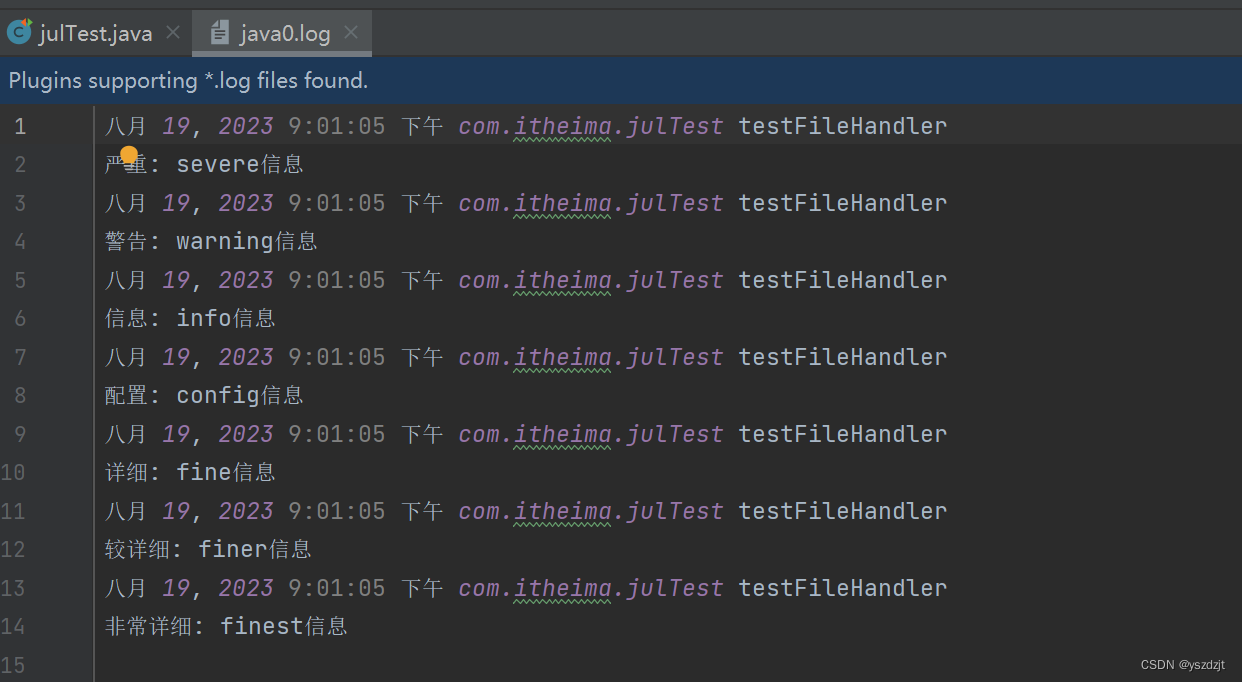
JUL全称Java util logging 入门案例 先来看着入门案例,直接创建logger对象,然后传入日志级别和打印的信息,就能在控制台输出信息。 可以看出只输出了部分的信息,其实默认的日志控制器是有一个默认的日志级别的,默认就…...
【Java】智慧工地SaaS平台源码:AI/云计算/物联网/智慧监管
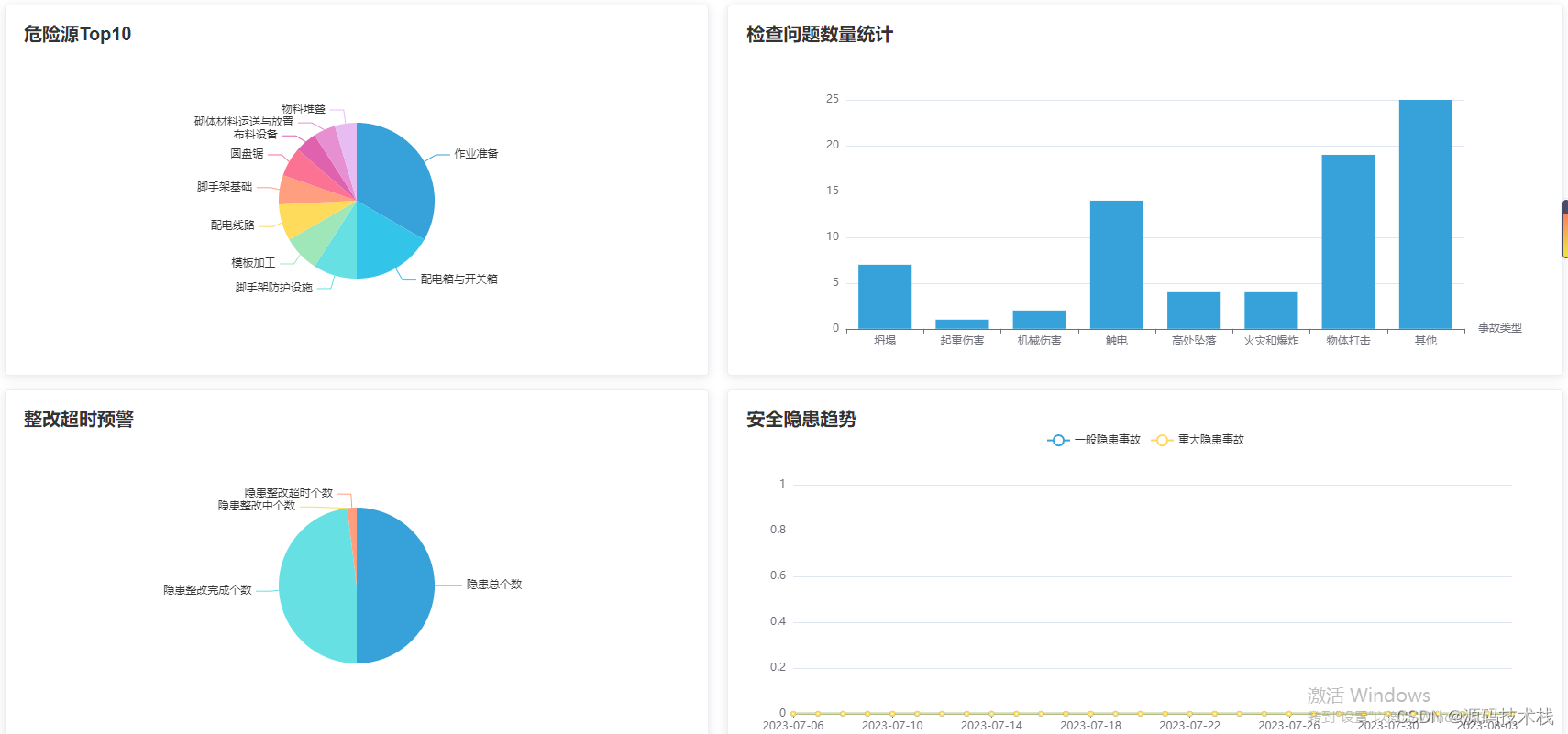
智慧工地是指运用信息化手段,围绕施工过程管理,建立互联协同、智能生产、科学管理的施工项目信息化生态圈,并将此数据在虚拟现实环境下与物联网采集到的工程信息进行数据挖掘分析,提供过程趋势预测及专家预案,实现工程…...
Dodaf架构的学习分享
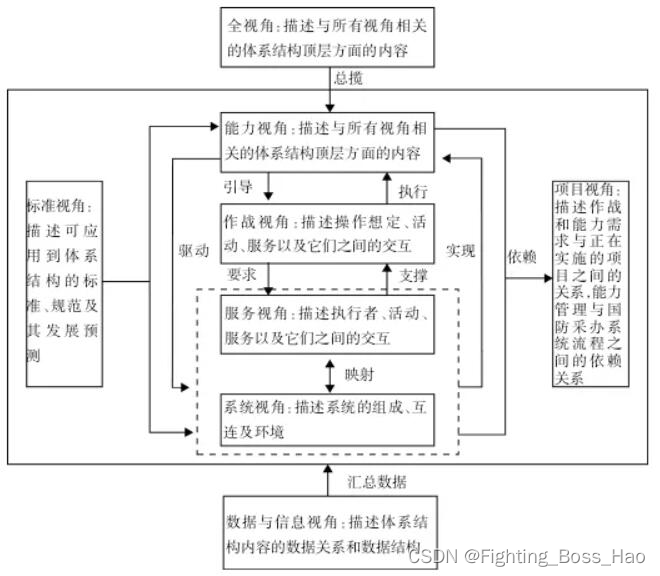
一.Dodaf的内容 Dodaf的背景 DODAF(Department of Defense Architecture Framework)起源于美国国防部,是一个用于支持复杂系统设计、规划和实施的架构框架。以下是DODAF的背景和起源: 复杂系统需求:在军事和国防领域&…...
听GPT 讲Prometheus源代码--discovery
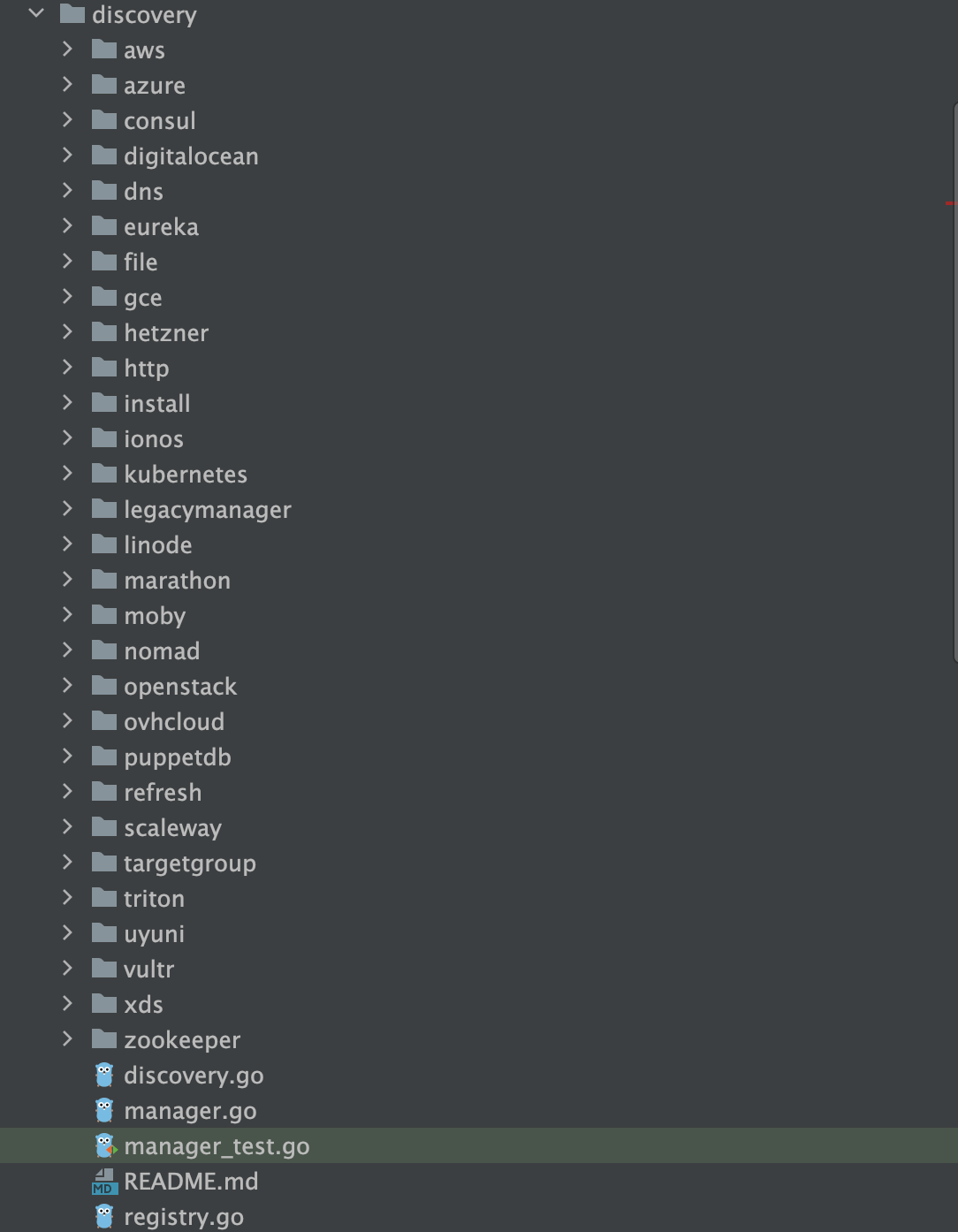
Prometheus是一个开源的系统监控和警报工具包,以下是Prometheus源代码中一些主要的文件夹及其作用: cmd/:这个目录包含了Prometheus主要的命令行工具,如prometheus/,promtool/等。每个子目录都代表一个可执行的命令行应…...

HTTP 介绍
HTTP 介绍 HTTP 协议一般指 HTTP(超文本传输协议)。超文本传输协议(英语:HyperText Transfer Protocol,缩写:HTTP)是一种用于分布式、协作式和超媒体信息系统的应用层协议,是因特网…...

Rust语言深入解析:后向和前向链接算法的实现与应用
内容 - 第一部分 (1/3): Rust,作为一个旨在提供安全、并行和高性能的系统编程语言,为开发者带来了独特的编程模式和工具。其中,对于数据结构和算法的实现,Rust提供了一套强大的机制。本文将详细介绍如何在Rust中实现后…...
快速提高写作生产力——使用PicGo+Github搭建免费图床,并结合Typora
文章目录 简述PicGo下载PicGo获取Token配置PicGo结合Typora总结 简述PicGo PicGo: 一个用于快速上传图片并获取图片 URL 链接的工具 PicGo 本体支持如下图床: 七牛图床 v1.0腾讯云 COS v4\v5 版本 v1.1 & v1.5.0又拍云 v1.2.0GitHub v1.5.0SM.MS V2 v2.3.0-b…...

Java方法的参数可以有默认值吗?
在日常web开发这种,controller层接受参数时可以通过RequestParam(requiredfalse)设置参数非必填。 所以就想Java的方法可以有非必填这种操作吗?网上搜了一下,发现不支持这种操作。 可以通过方法重载的方式来变相实现。不需要传这个参数就会…...

电子商务的安全防范
(1)安全协议问题:我国大多数尚处在 SSL(安全套接层协议)的应用上,SET 协议的应用还只是刚刚试验成功,在信息的安全保密体制上还不成熟,对安全协议 还没有全球性的标准和规范,相对制约了国际性…...
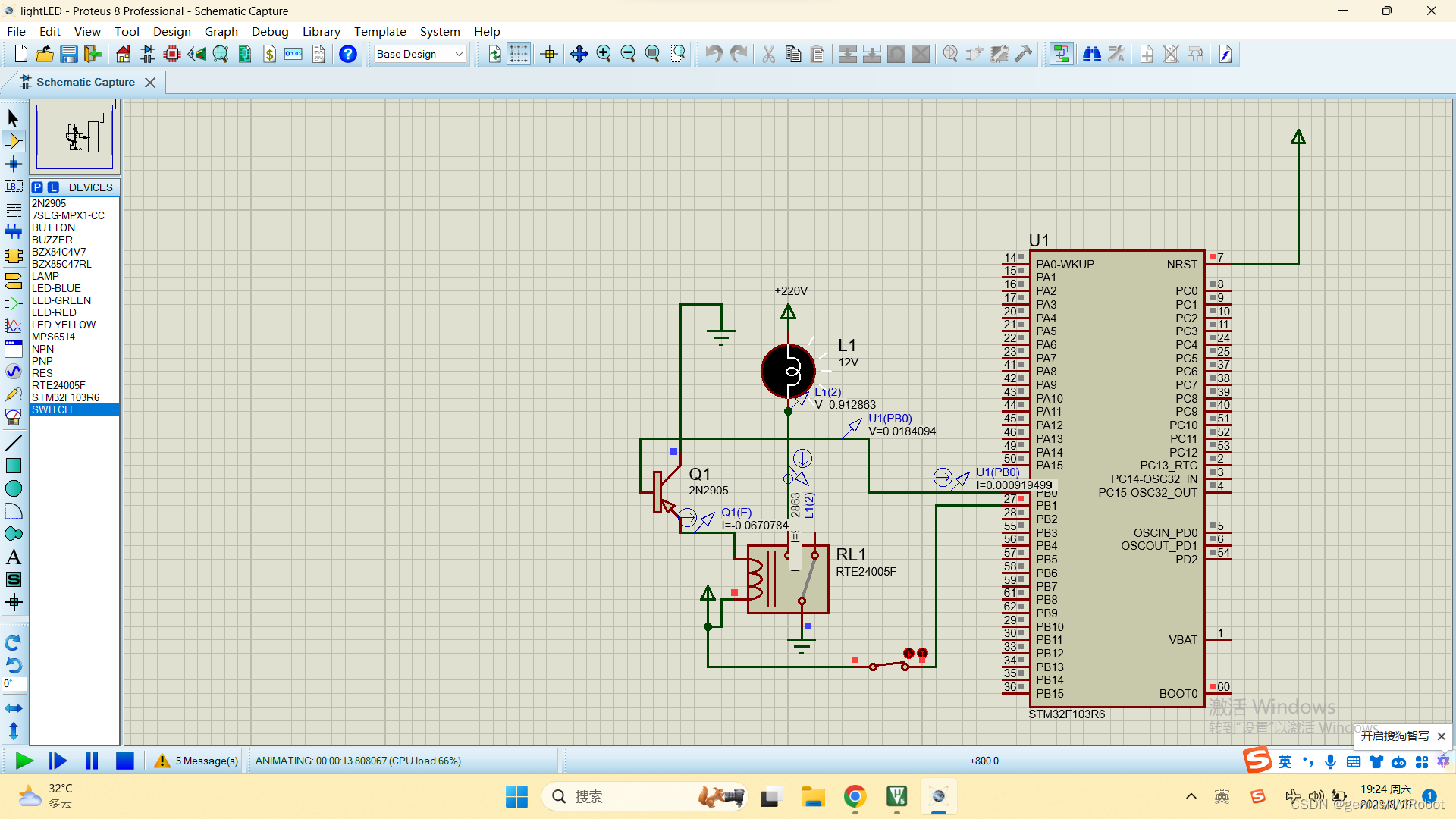
STM32开关输入控制220V灯泡亮灭源代码(附带PROTEUSd电路图)
//main.c文件 /* USER CODE BEGIN Header */ /********************************************************************************* file : main.c* brief : Main program body************************************************************************…...

Spring Boot配置文件
目录 1.配置文件的作用 2.配置文件的格式 3.properties配置文件说明 3.1 properties基本语法 3.2 读取配置文件信息 3.3 properties 缺点分析 4.yml 配置⽂件说明 4.1 yml 基本语法 4.2 yml 使⽤进阶 4.2.1 yml 配置不同数据类型及 null 4.2.2 配置对象 5.propert…...
函数(2)
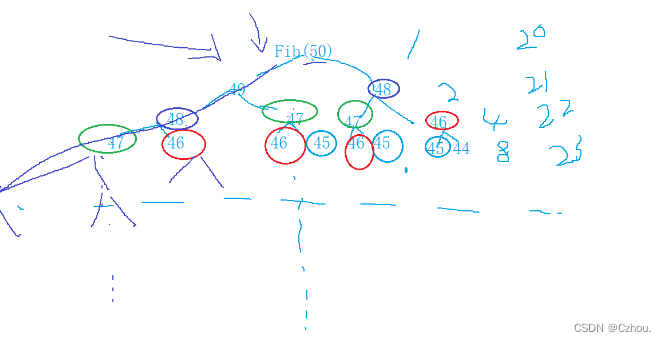
6. 函数的声明和定义 6.1 函数声明: 1. 告诉编译器有一个函数叫什么,参数是什么,返回类型是什么。但是具体是不是存在,函数 声明决定不了。 2. 函数的声明一般出现在函数的使用之前。要满足先声明后使用。 3. 函数的声明一般要放…...
Linux笔试题(4)
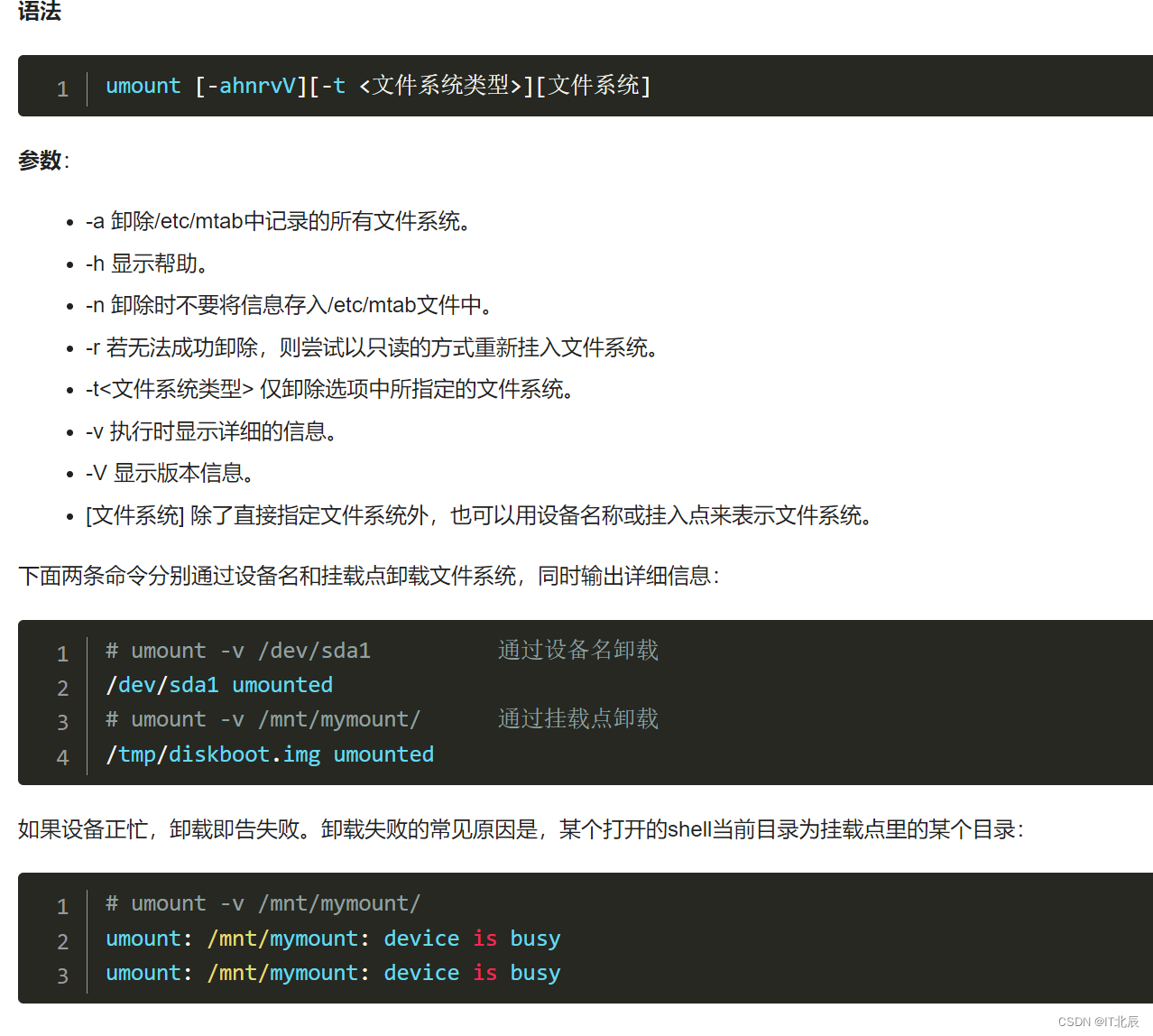
67、在局域网络内的某台主机用ping命令测试网络连接时发现网络内部的主机都可以连同,而不能与公网连通,问题可能是__C_ A.主机ip设置有误 B.没有设置连接局域网的网关 C.局域网的网关或主机的网关设置有误 D.局域网DNS服务器设置有误 解析:在局域网络内的某台主…...
Selenium的使用:WEB功能测试
Selenium是ThrougthWorks公司一个强大的开源WEB功能测试工具系列,本系统包括多款软件 Selenium语言简单,用(Command,target,value)三种元素组成一个行为,并且有协助录制脚本工具,但Selenese有一些严格的限制: …...
从入门到精通系列之十七:minikube启动K8s dashboard)
Kubernetes(K8s)从入门到精通系列之十七:minikube启动K8s dashboard
Kubernetes K8s从入门到精通系列之十七:minikube启动K8s dashboard 一、安装minikube的详细步骤二、查看Pod三、启动dashboard四、创建代理访问dashboard五、远程访问dashboard一、安装minikube的详细步骤 Kubernetes(K8s)从入门到精通系列之十六:linux服务器安装minikube的详…...
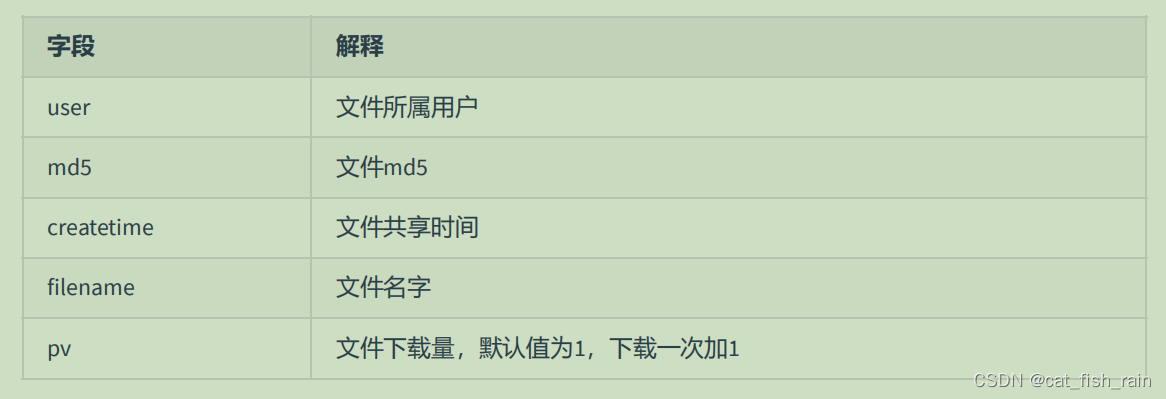
C++ 网络编程项目fastDFS分布式文件系统(五)--nginx+fastdfs
目录 1. 文件上传下载流程 2. Nginx和fastDFS的整合 3. 数据库表 3.1 数据库操 3.2 数据库建表 1. 文件上传下载流程 fileID 需要是一个哈希来判定。 2. 文件下载流程 3. 优化 优化思路 : 直接让客户端连接 fastDFS 的存储节点 , 实现文件下载 举例 , 访问一个…...
)
开发者本地搭建性能监测工具(Windows)
ElasticSearch 8.9.0 开发模式安装 JDK安装 官方提供版本与JDK支持关系:https://www.elastic.co/cn/support/matrix#matrix_jvm 我们安装Elasticsearch 8.9.x,看到支持的最低JDK版本是17。 JDK(Windows/Mac含M1/M2 Arm原生JDK)…...
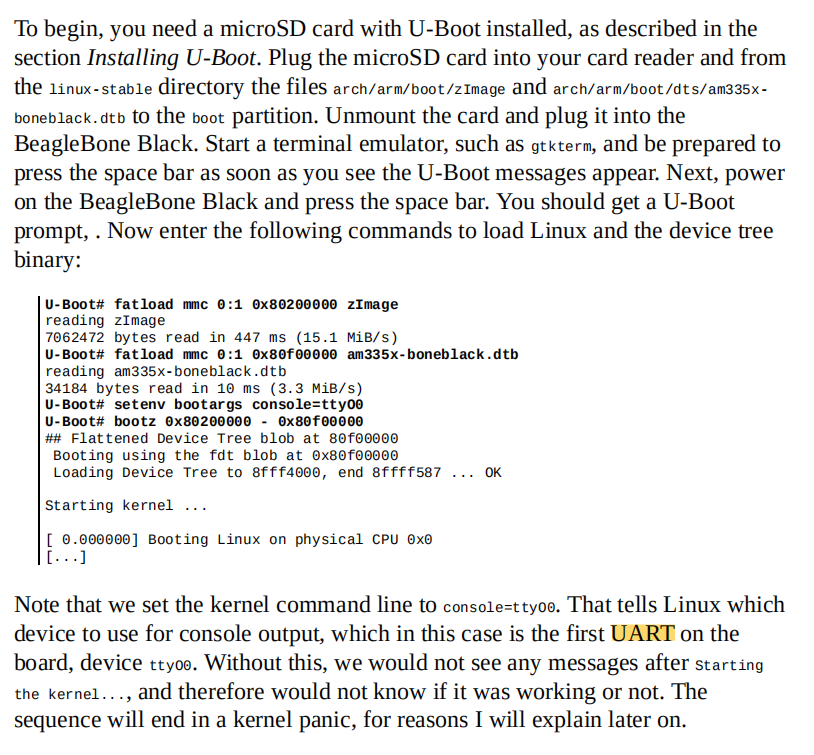
嵌入式Linux开发实操(八):UART串口开发
串口可以说是非常好用的一个接口,它同USB、CAN、I2C、SPI等接口一样,为SOC/MCU构建了丰富的接口功能。那么在嵌入式linux中又是如何搭建和使用UART接口的呢? 一、Console接口即ttyS0 ttyS0通常做为u-boot(bootloader的一种,像是Windows的BIOS),它需要一个交互界面,一般…...

3步打造专业预印本:arxiv.sty LaTeX排版方案实战指南
3步打造专业预印本:arxiv.sty LaTeX排版方案实战指南 【免费下载链接】arxiv-style A Latex style and template for paper preprints (based on NIPS style) 项目地址: https://gitcode.com/gh_mirrors/ar/arxiv-style 在学术研究领域,预印本排版…...

基于ChatGPT与飞书开放平台构建企业级智能聊天机器人实践指南
1. 项目概述:当ChatGPT遇上飞书,打造你的专属智能工作伙伴 最近在折腾一个挺有意思的项目,叫“chatgpt-for-chatbot-feishu”。简单来说,这就是一个桥梁,一个能让OpenAI的ChatGPT模型,直接接入到飞书&…...

Altium Designer20 从零到一:新手必备的安装与核心功能上手指南
1. Altium Designer20安装全攻略 第一次接触Altium Designer20(简称AD20)时,我和大多数电子设计新手一样,面对这个专业软件既兴奋又忐忑。记得当时为了完成课程设计,我在宿舍折腾了整整一个下午才搞定安装。现在回想起…...

Win11 VMware 报错“未能启动虚拟机”?深入解析 Hyper-V 与注册表冲突的修复指南
1. 为什么Win11下VMware会报错"未能启动虚拟机"? 最近帮朋友调试Win11上的VMware Workstation时,遇到了经典的"未能启动虚拟机"错误。这个报错背后其实是Windows 11的虚拟化安全机制与第三方虚拟化软件的兼容性问题。微软在Windows …...
)
别再傻傻做27次实验了!用SPSSAU三分钟搞定正交试验设计(附保姆级极差分析教程)
正交试验设计实战指南:从理论到SPSSAU高效操作 在科研与工程实践中,我们常常面临多因素多水平实验设计的挑战。传统全面试验方法虽然理论严谨,但当因素和水平数量增加时,实验次数呈指数级增长,导致资源浪费和时间成本飙…...

终极解决Windows风扇控制难题:FanControl完全指南
终极解决Windows风扇控制难题:FanControl完全指南 【免费下载链接】FanControl.Releases This is the release repository for Fan Control, a highly customizable fan controlling software for Windows. 项目地址: https://gitcode.com/GitHub_Trending/fa/Fan…...

基于RAG的代码库智能问答工具:askyourgit部署与实战指南
1. 项目概述:当代码库成为你的对话伙伴在软件开发与团队协作的日常中,我们常常面临一个看似简单却异常耗时的问题:“这段代码是谁写的?当时为什么要这么改?”或者“我们项目里有没有处理过类似‘用户登录超时’的逻辑&…...
)
钱学森物理大一统:宇宙速度阶梯尺 全套公版正式文档(带可计算代码)
宇宙速度阶梯尺 全套公版正式文档 (无版权全开源全民通用可直接印刷发布/平台投稿/社区分发) 开篇总纲 定名:本源速度阶梯尺 核心主旨:大道至简,以地球天然标准音速为万物速度本源基底,以宇宙真空光速为速度…...

048路径总和III
路径总和 III 题目链接:https://leetcode.cn/problems/path-sum-iii/description/?envTypestudy-plan-v2&envIdtop-100-liked 我的解答: Map<Long,Integer> map new HashMap<>();//key:前缀和 value:前缀和的个数 publ…...

基于MCP协议构建Jira连接器:打通AI助手与项目管理的技术实践
1. 项目概述:当Jira遇上MCP,一个连接器如何重塑项目管理工具链如果你和我一样,长期在软件研发一线摸爬滚打,那么对Jira这个名字一定不会陌生。它几乎是敏捷开发、缺陷跟踪和项目管理的代名词,无数团队用它来规划冲刺、…...