
html动态爱心代码【一】(附源码)
前言
七夕马上就要到了,为了帮助大家高效表白,下面再给大家带来了实用的HTML浪漫表白代码(附源码)+背景音乐,可用于520,情人节,生日,表白等场景,可直接使用。
效果演示

文案修改
var loverName = "💗李文昊,爱你哟💗" // ��要更改的名字完整代码
<!DOCTYPE html>
<html>
<head><meta http-equiv="Content-Type" content="text/html; charset=UTF-8"><title>💗 Love you 💗 My Dear XXX💗</title><style type="text/css">body {margin: 0;overflow: hidden;background: #000;}canvas {position: absolute;width: 100%;height: 100%;}#pinkboard {animation: anim 1.5s ease-in-out infinite;-webkit-animation: anim 1.5s ease-in-out infinite;-o-animation: anim 1.5s ease-in-out infinite;-moz-animation: anim 1.5s ease-in-out infinite;}@keyframes anim {0% {transform: scale(0.8);}25% {transform: scale(0.7);}50% {transform: scale(1);}75% {transform: scale(0.7);}100% {transform: scale(0.8);}}@-webkit-keyframes anim {0% {-webkit-transform: scale(0.8);}25% {-webkit-transform: scale(0.7);}50% {-webkit-transform: scale(1);}75% {-webkit-transform: scale(0.7);}100% {-webkit-transform: scale(0.8);}}@-o-keyframes anim {0% {-o-transform: scale(0.8);}25% {-o-transform: scale(0.7);}50% {-o-transform: scale(1);}75% {-o-transform: scale(0.7);}100% {-o-transform: scale(0.8);}}@-moz-keyframes anim {0% {-moz-transform: scale(0.8);}25% {-moz-transform: scale(0.7);}50% {-moz-transform: scale(1);}75% {-moz-transform: scale(0.7);}100% {-moz-transform: scale(0.8);}}#name {position: absolute;top: 50%;left: 50%;transform: translate(-50%, -50%);margin-top: -20px;font-size: 46px;color: #ea80b0;}</style>
</head>
<body>
<canvas id="pinkboard" width="1920" height="947"></canvas>
<canvas id="canvas" width="1920" height="947"></canvas><script type="text/javascript">var loverName = "💗李文昊,爱你哟💗"  // ��要更改的名字const colors = ["#eec996","#8fb7d3","#b7d4c6","#c3bedd","#f1d5e4","#cae1d3","#f3c89d","#d0b0c3","#819d53","#c99294","#cec884","#ff8e70","#e0a111","#fffdf6","#cbd7ac","#e8c6c0","#dc9898","#ecc8ba",]; //用来设置的颜��    var canvas = document.getElementById("canvas");var ctx = canvas.getContext("2d");let count = 1;var ww = window.innerWidth;var wh = window.innerHeight;var hearts = [];function init() {requestAnimationFrame(render);canvas.width = ww;canvas.height = wh;for (var i = 0; i < 100; i++) {hearts.push(new Heart());}}function Heart() {this.x = Math.random() * ww;this.y = Math.random() * wh;this.opacity = Math.random() * 0.5 + 0.5;this.vel = {x: (Math.random() - 0.5) * 4,y: (Math.random() - 0.5) * 4,};this.targetScale = Math.random() * 0.15 + 0.02;this.scale = this.targetScale * Math.random();}Heart.prototype.update = function (i) {this.x += this.vel.x;this.y += this.vel.y;this.scale += (this.targetScale - this.scale) * 0.01;if (this.x - this.width > ww || this.x + this.width < 0) {this.scale = 0;this.x = Math.random() * ww;}if (this.y - this.height > wh || this.y + this.height < 0) {this.scale = 0;this.y = Math.random() * wh;}this.width = 473.8;this.height = 408.6;};Heart.prototype.draw = function (i) {ctx.globalAlpha = this.opacity;ctx.font = `${180 * this.scale}px "微软雅黑"`;// ctx.font="20px";ctx.fillStyle = colors[i % 18];ctx.fillText(loverName,this.x - this.width * 0.5,this.y - this.height * 0.5,this.width,this.height);// ctx.drawImage(//   heartImage,//   this.x - this.width * 0.5,//   this.y - this.height * 0.5,//   this.width,//   this.height// );};function render() {ctx.clearRect(0, 0, ww, wh);// ctx.globalAlpha = 1;// ctx.fillStyle = "rgba(255,255,255,0.3)";// ctx.fillRect(0, 0, ww, wh);for (var i = 0; i < 100; i++) {hearts[i].update(i);hearts[i].draw(i);}requestAnimationFrame(render);}init();// var heartImage = new Image();// heartImage.onload = init();// heartImage.src =//   "data:image/svg+xml;base64,PHN2ZyB4bWxucz0iaHR0cDovL3d3dy53My5vcmcvMjAwMC9zdmciIHdpZHRoPSI0NzMuOHB4IiBoZWlnaHQ9IjQwOC42cHgiIHZpZXdCb3g9IjAgMCA0NzMuOCA0MDguNiI+PHBhdGggZmlsbD0iI2QzMjkzMiIgZD0iTTQwNC42LDE2LjZDMzg1LjQsNi4xLDM2My41LDAsMzQwLDBjLTQxLjUsMC03OC41LDE4LjktMTAzLDQ4LjVDMjEyLjMsMTguOSwxNzUuMywwLDEzMy44LDAgYy0yMy4zLDAtNDUuMyw2LjEtNjQuNSwxNi42QzI3LjksMzkuNSwwLDgzLjQsMCwxMzMuOWMwLDE0LjQsMi40LDI4LjMsNi42LDQxLjJDMjkuNiwyNzguNCwyMzcsNDA4LjYsMjM3LDQwOC42IHMyMDcuMi0xMzAuMiwyMzAuMi0yMzMuNWM0LjMtMTIuOSw2LjYtMjYuOCw2LjYtNDEuMkM0NzMuOCw4My40LDQ0NS45LDM5LjYsNDA0LjYsMTYuNnoiLz48L3N2Zz4=";window.addEventListener("resize", function () {ww = window.innerWidth;wh = window.innerHeight;});
</script>
<script>/** Settings*/var settings = {particles: {length: 500, // maximum amount of particlesduration: 2, // particle duration in secvelocity: 100, // particle velocity in pixels/seceffect: -0.75, // play with this for a nice effectsize: 30, // particle size in pixels},};/** RequestAnimationFrame polyfill by Erik M?ller*/(function () {var b = 0;var c = ["ms", "moz", "webkit", "o"];for (var a = 0; a < c.length && !window.requestAnimationFrame; ++a) {window.requestAnimationFrame = window[c[a] + "RequestAnimationFrame"];window.cancelAnimationFrame =window[c[a] + "CancelAnimationFrame"] ||window[c[a] + "CancelRequestAnimationFrame"];}if (!window.requestAnimationFrame) {window.requestAnimationFrame = function (h, e) {var d = new Date().getTime();var f = Math.max(0, 16 - (d - b));var g = window.setTimeout(function () {h(d + f);}, f);b = d + f;return g;};}if (!window.cancelAnimationFrame) {window.cancelAnimationFrame = function (d) {clearTimeout(d);};}})();/** Point class*/var Point = (function () {function Point(x, y) {this.x = typeof x !== "undefined" ? x : 0;this.y = typeof y !== "undefined" ? y : 0;}Point.prototype.clone = function () {return new Point(this.x, this.y);};Point.prototype.length = function (length) {if (typeof length == "undefined")return Math.sqrt(this.x * this.x + this.y * this.y);this.normalize();this.x *= length;this.y *= length;return this;};Point.prototype.normalize = function () {var length = this.length();this.x /= length;this.y /= length;return this;};return Point;})();/** Particle class*/var Particle = (function () {function Particle() {this.position = new Point();this.velocity = new Point();this.acceleration = new Point();this.age = 0;}Particle.prototype.initialize = function (x, y, dx, dy) {this.position.x = x;this.position.y = y;this.velocity.x = dx;this.velocity.y = dy;this.acceleration.x = dx * settings.particles.effect;this.acceleration.y = dy * settings.particles.effect;this.age = 0;};Particle.prototype.update = function (deltaTime) {this.position.x += this.velocity.x * deltaTime;this.position.y += this.velocity.y * deltaTime;this.velocity.x += this.acceleration.x * deltaTime;this.velocity.y += this.acceleration.y * deltaTime;this.age += deltaTime;};Particle.prototype.draw = function (context, image) {function ease(t) {return --t * t * t + 1;}var size = image.width * ease(this.age / settings.particles.duration);context.globalAlpha = 1 - this.age / settings.particles.duration;context.drawImage(image,this.position.x - size / 2,this.position.y - size / 2,size,size);};return Particle;})();/** ParticlePool class*/var ParticlePool = (function () {var particles,firstActive = 0,firstFree = 0,duration = settings.particles.duration;function ParticlePool(length) {// create and populate particle poolparticles = new Array(length);for (var i = 0; i < particles.length; i++)particles[i] = new Particle();}ParticlePool.prototype.add = function (x, y, dx, dy) {particles[firstFree].initialize(x, y, dx, dy);// handle circular queuefirstFree++;if (firstFree == particles.length) firstFree = 0;if (firstActive == firstFree) firstActive++;if (firstActive == particles.length) firstActive = 0;};ParticlePool.prototype.update = function (deltaTime) {var i;// update active particlesif (firstActive < firstFree) {for (i = firstActive; i < firstFree; i++)particles[i].update(deltaTime);}if (firstFree < firstActive) {for (i = firstActive; i < particles.length; i++)particles[i].update(deltaTime);for (i = 0; i < firstFree; i++) particles[i].update(deltaTime);}// remove inactive particleswhile (particles[firstActive].age >= duration &&firstActive != firstFree) {firstActive++;if (firstActive == particles.length) firstActive = 0;}};ParticlePool.prototype.draw = function (context, image) {// draw active particlesif (firstActive < firstFree) {for (i = firstActive; i < firstFree; i++)particles[i].draw(context, image);}if (firstFree < firstActive) {for (i = firstActive; i < particles.length; i++)particles[i].draw(context, image);for (i = 0; i < firstFree; i++) particles[i].draw(context, image);}};return ParticlePool;})();/** Putting it all together*/(function (canvas) {var context = canvas.getContext("2d"),particles = new ParticlePool(settings.particles.length),particleRate =settings.particles.length / settings.particles.duration, // particles/sectime;// get point on heart with -PI <= t <= PIfunction pointOnHeart(t) {return new Point(160 * Math.pow(Math.sin(t), 3),130 * Math.cos(t) -50 * Math.cos(2 * t) -20 * Math.cos(3 * t) -10 * Math.cos(4 * t) +25);}// creating the particle image using a dummy canvasvar image = (function () {var canvas = document.createElement("canvas"),context = canvas.getContext("2d");canvas.width = settings.particles.size;canvas.height = settings.particles.size;// helper function to create the pathfunction to(t) {var point = pointOnHeart(t);point.x =settings.particles.size / 2 +(point.x * settings.particles.size) / 350;point.y =settings.particles.size / 2 -(point.y * settings.particles.size) / 350;return point;}// create the pathcontext.beginPath();var t = -Math.PI;var point = to(t);context.moveTo(point.x, point.y);while (t < Math.PI) {t += 0.01; // baby steps!point = to(t);context.lineTo(point.x, point.y);}context.closePath();// create the fillcontext.fillStyle = "#ea80b0";context.fill();// create the imagevar image = new Image();image.src = canvas.toDataURL();return image;})();// render that thing!function render() {// next animation framerequestAnimationFrame(render);// update timevar newTime = new Date().getTime() / 1000,deltaTime = newTime - (time || newTime);time = newTime;// clear canvascontext.clearRect(0, 0, canvas.width, canvas.height);// create new particlesvar amount = particleRate * deltaTime;for (var i = 0; i < amount; i++) {var pos = pointOnHeart(Math.PI - 2 * Math.PI * Math.random());var dir = pos.clone().length(settings.particles.velocity);particles.add(canvas.width / 2 + pos.x,canvas.height / 2 - pos.y,dir.x,-dir.y);}// update and draw particlesparticles.update(deltaTime);particles.draw(context, image);}// handle (re-)sizing of the canvasfunction onResize() {canvas.width = canvas.clientWidth;canvas.height = canvas.clientHeight;}window.onresize = onResize;// delay rendering bootstrapsetTimeout(function () {onResize();render();}, 10);})(document.getElementById("pinkboard"));</script></body>
</html>
祝大家在情场越来越顺,工作也越来越好!!

相关文章:
html动态爱心代码【一】(附源码)
前言 七夕马上就要到了,为了帮助大家高效表白,下面再给大家带来了实用的HTML浪漫表白代码(附源码)背景音乐,可用于520,情人节,生日,表白等场景,可直接使用。 效果演示 文案修改 var loverNam…...
【仿写tomcat】六、解析xml文件配置端口、线程池核心参数
线程池改造 上一篇文章中我们用了Excutors创建了线程,这里我们将它改造成包含所有线程池核心参数的形式。 package com.tomcatServer.http;import java.util.concurrent.*;/*** 线程池跑龙套** author ez4sterben* date 2023/08/05*/ public class ThreadPool {pr…...
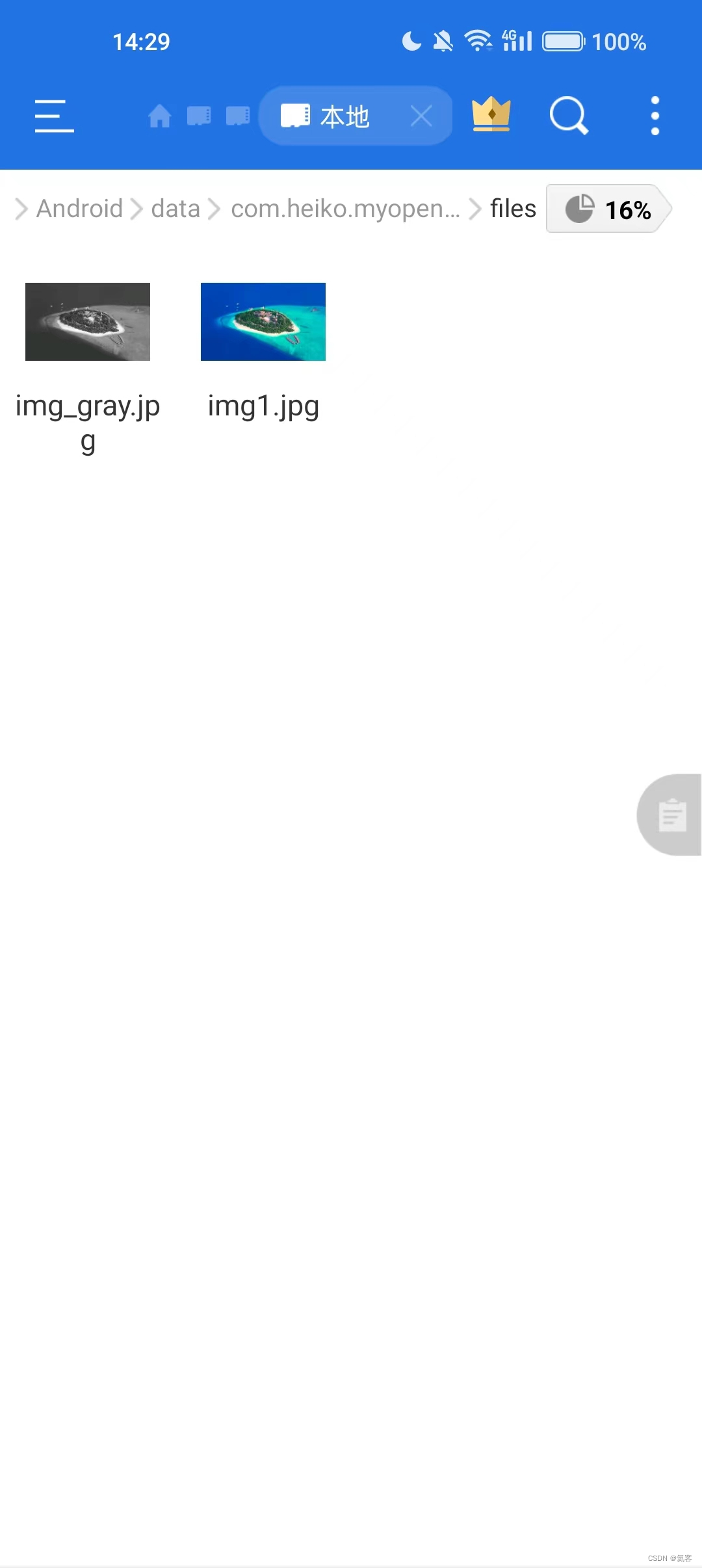
Android Studio 接入OpenCV最简单的例子 : 实现灰度图效果
1. 前言 上文 我们在Windows电脑上实现了人脸功能,接下来我们要把人脸识别的功能移植到Android上。 那么首先第一步,就是要创建一个Native的Android项目,并且配置好OpenGL,并能够调用成功。 这里我们使用的是openCV-4.8.0&#x…...
、扩展SpringCache一站式解决缓存击穿,穿透,雪崩)
(1)、扩展SpringCache一站式解决缓存击穿,穿透,雪崩
1、问题描述 我们在使用SpringCache的@Cacheable注解时,发现并没有设置过期时间这个功能。 @Target({ElementType.TYPE, ElementType.METHOD}) @Retention(RetentionPolicy.RUNTIME) @I...

Rancher使用cert-manager安装报错解决
报错: rancher-rke-01:~/rke/rancher-helm/rancher # helm install rancher rancher-stable/rancher --namespace cattle-system --set hostnamewww.rancher.local Error: INSTALLATION FAILED: Internal error occurred: failed calling webhook "webhook…...
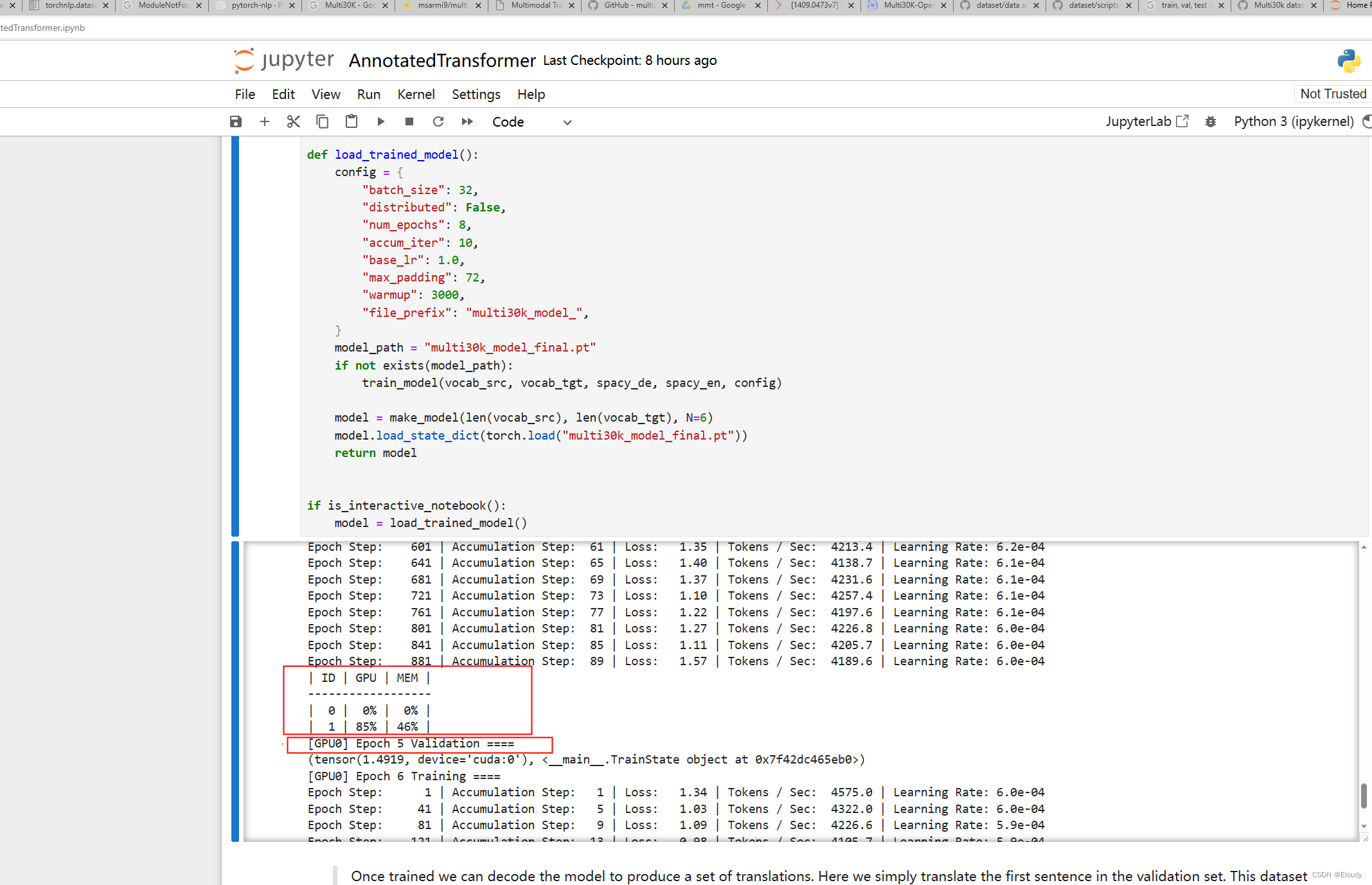
Harvard transformer NLP 模型 openNMT 简介入门
项目网址: OpenNMT - Open-Source Neural Machine Translation logo: 一,从应用的层面先跑通 Harvard transformer GitHub - harvardnlp/annotated-transformer: An annotated implementation of the Transformer paper. git clone https…...
【数据结构OJ题】用栈实现队列
原题链接:https://leetcode.cn/problems/implement-queue-using-stacks/ 目录 1. 题目描述 2. 思路分析 3. 代码实现 1. 题目描述 2. 思路分析 用两个栈实现,一个栈进行入队操作,另一个栈进行出队操作。 出队操作: 当出队的栈…...
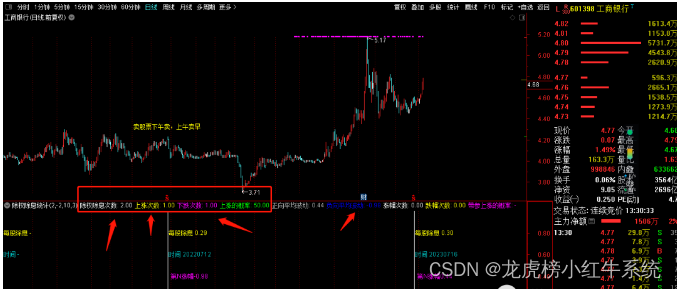
通达信指标公式15:除权除息数据统计分析
#1.关于除权除息指标的介绍:本指标是小红牛原创指标之一,觉得有必要研究一下这个问题,所以就花时间整理一下这个指标相关内容,大家可以在本源码基础上,进一步优化自己的思路。本指标为通达信幅图指标,可以做…...
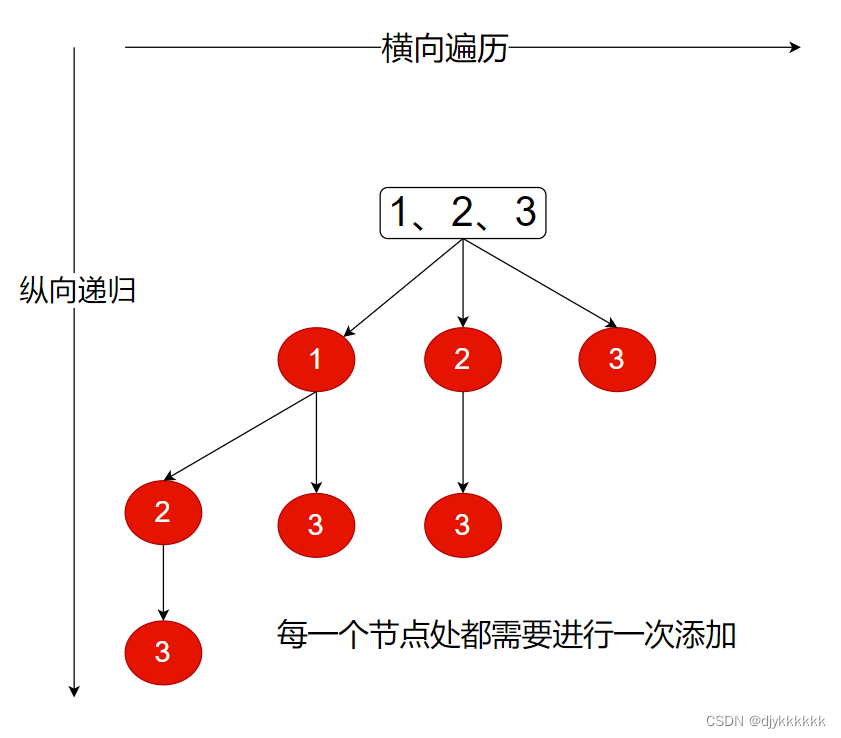
day-27 代码随想录算法训练营(19)回溯part03
39.组合总和 分析:同一个数可以选多次,但是不能有重复的答案; 思路:横向遍历,纵向递归(不同的是递归的时候不需要跳到下一个位置,因为同一个数可以选多次) class Solution { publ…...
)
CSDN编程题-每日一练(2023-08-22)
CSDN编程题-每日一练(2023-08-22) 一、题目名称:最长递增区间二、题目名称:K树三、题目名称:小Q的价值无向图一、题目名称:最长递增区间 时间限制:1000ms内存限制:256M 题目描述: 给一个无序数组,求最长递增的区间长度。如:[5,2,3,8,1,9] 最长区间 2,3,8 长度为 3。…...
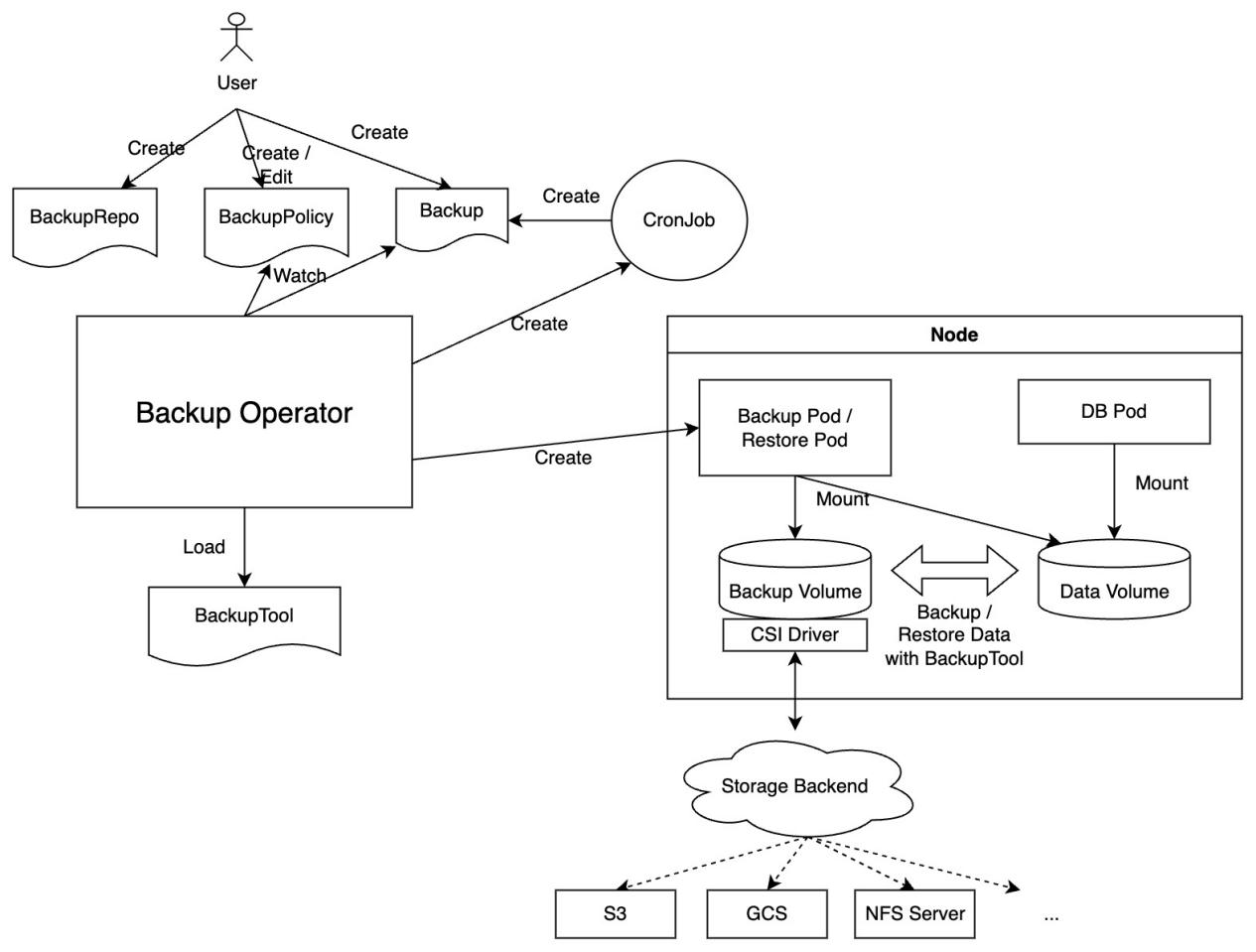
使用 KubeBlocks 为 K8s 提供稳如老狗的数据库服务
原文链接:https://forum.laf.run/d/994 大家好!今天这篇文章主要向大家介绍 Sealos 的数据库服务。在 Sealos 上数据库后端服务由 KubeBlocks 提供,为用户的数据库应用保驾护航。无论你是在公有云还是本地环境中使用,Sealos 都能为…...
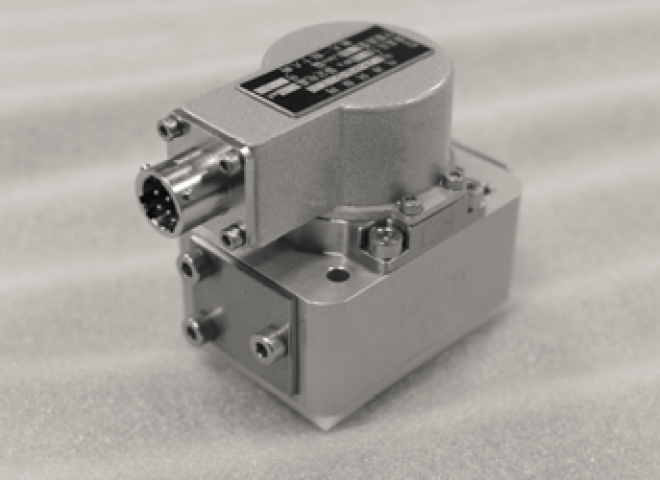
SFL212B-10-21-15、SFL212B-20-21-40喷嘴挡板伺服阀
SFL212B-05-21-10、SFL212B-10-21-15、SFL212B-20-21-40、SFL212-05-32-10、SFL212-10-32-15、SFL212-20-32-40、SFL212A-05-21-10、SFL212A-10-21-15、SFL212A-20-21-40喷嘴挡板力反馈伺服阀,外置伺服放大器,四通,带阀芯阀套的两级伺服阀&am…...
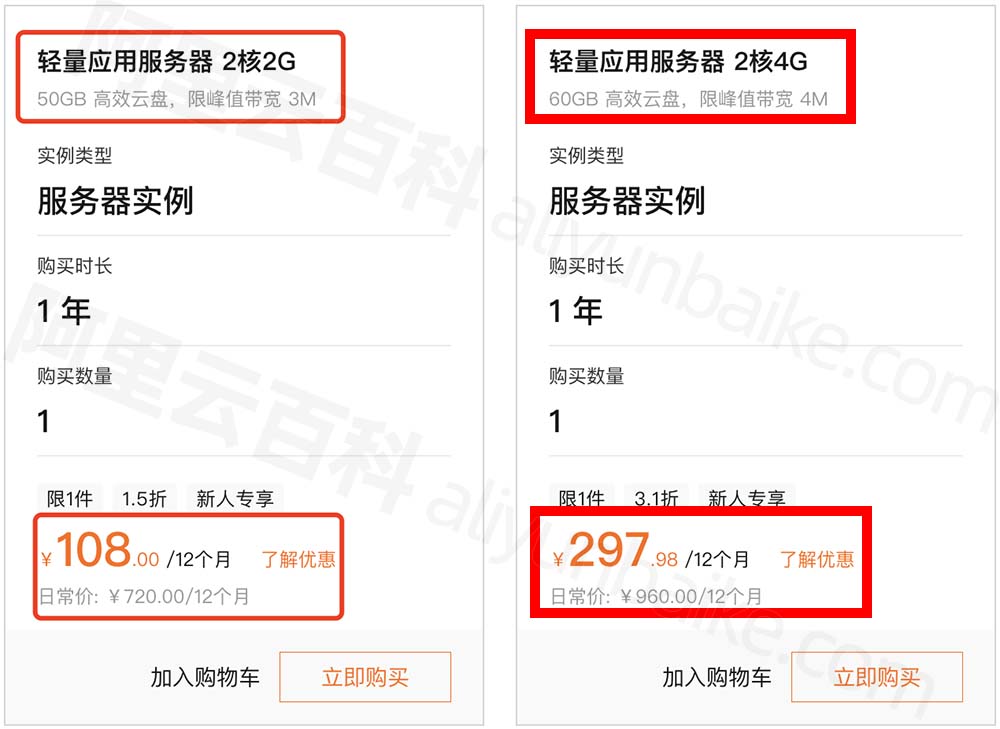
阿里云100元预算可选的云服务器配置2核2G3M带宽
阿里云服务器100元可以买到哪些配置?如果是一年时长,轻量应用服务器2核2G3M带宽一年108元,系统盘为50GB高效云盘。以前阿里云服务器ECS卖过35元一年、69元、88元、89元和99元的都有过,但是现在整体费用上涨,入门级云服…...
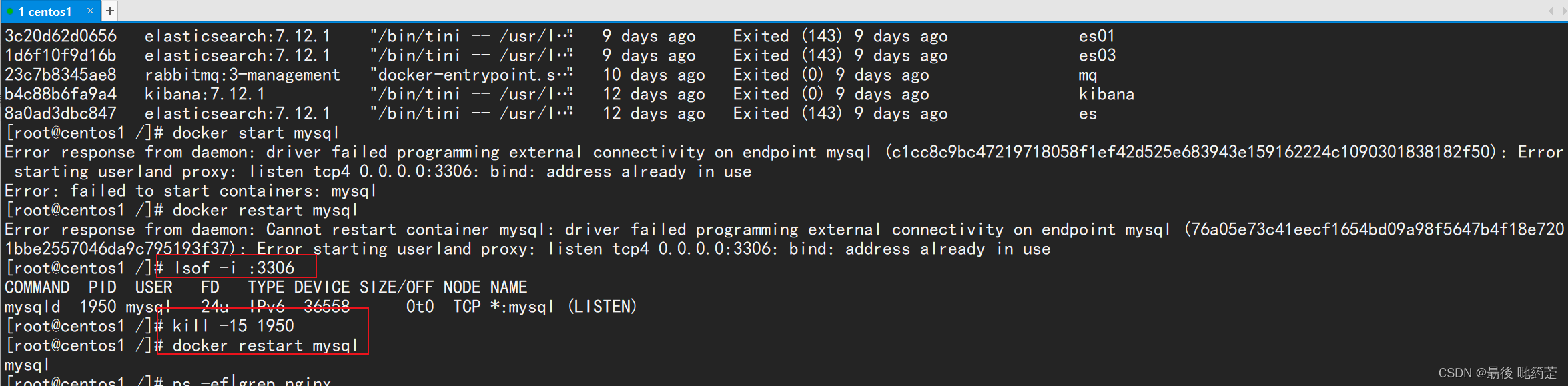
Linux问题--docker启动mysql时提示3306端口被占用
问题描述: 解决方法: 1.如果需要kill掉mysqld服务可以先通过 lsof -i :3306 2. 查询到占用3306的PID,随后使用 kill -15 PID 来kill掉mysqld服务。 最后结果...

2023年中秋月饼市场趋势分析(月饼京东销售数据分析)
中秋将至,月饼作为节令食品将再次掀起消费热潮。今年月饼市场的需求如何呢,是更受欢迎还是热度有所降低,结合数据我们一起来看今年月饼市场的销售表现。 在这里,我们分别选取了2022年第31周-32周和2023年第31周-32周(…...

A Survey on Model Compression for Large Language Models
本文是LLM系列文章,关于模型压缩相关综述,针对《A Survey on Model Compression for Large Language Models》的翻译。 大模型的模型压缩综述 摘要1 引言2 方法3 度量和基准3.1 度量3.2 基准 4 挑战和未来方向5 结论 摘要 大型语言模型(LLM…...

读取/加载 properties/yml 配置文件
大家好 , 我是苏麟 , 今天带来一个简单好用的东西 . 读取/加载 properties/yml配置文件 基于PropertiesConfiguration读取配置文件 引入依赖 <!--加载yml资源--><dependency><groupId>org.springframework.boot</groupId><artifactId>spring-b…...
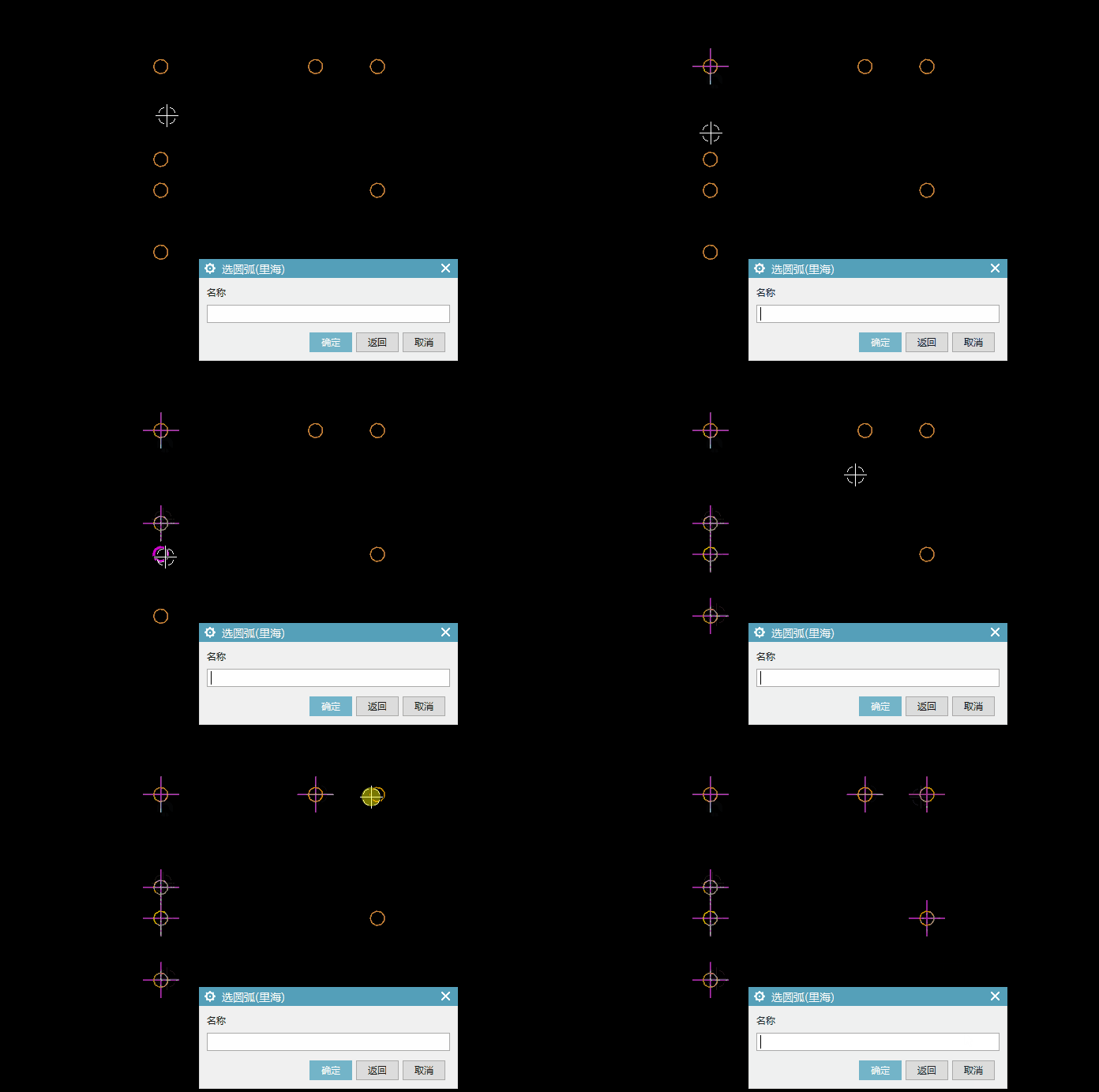
UG\NX二次开发 创建中心线
文章作者:里海 来源网站:王牌飞行员_里海_里海NX二次开发3000例,C\C++,Qt-CSDN博客 简介: 下面是在制图模块创建中心线的例子,用的是ufun函数。 效果: 代码: #include "me.hpp"#include <stdio.h> #include <string.h> #include <uf.h>…...

用java语言写一个网页爬虫 用于获取图片
以下是一个简单的Java程序,用于爬取网站上的图片并下载到本地文件夹: import java.io.*; import java.net.*;public class ImageSpider {public static void main(String[] args) {// 确定要爬取的网站URL和本地保存目录String url "https://www.…...

三数之和-LeetCode
给你一个整数数组 nums ,判断是否存在三元组 [nums[i], nums[j], nums[k]] 满足 i ! j、i ! k 且 j ! k ,同时还满足 nums[i] nums[j] nums[k] 0 。请 你返回所有和为 0 且不重复的三元组。 注意:答案中不可以包含重复的三元组。 示例 1&a…...

Agent-Harness:为AI编码助手套上“缰绳”的工程化框架
1. 项目概述:为什么你的AI编码助手总是“犯傻”?如果你和我一样,已经深度使用过Cursor、Windsurf或者Claude Code这类AI编码助手,那你一定经历过这样的挫败时刻:你满怀期待地让它去修改一个复杂的函数,结果…...

100GbE技术演进:背板PAM4与光模块25G的路线之争
1. 高速以太网技术演进中的十字路口:100GbE的“戏剧性”挑战在通信与网络设备、半导体设计与制造这个圈子里待久了,你会发现技术标准的制定过程,其精彩程度丝毫不亚于一部精心编排的戏剧。尤其是当我们谈论到以太网,这个支撑起全球…...

使用taotoken cli工具一键配置ubuntu开发环境中的多工具密钥
🚀 告别海外账号与网络限制!稳定直连全球优质大模型,限时半价接入中。 👉 点击领取海量免费额度 使用taotoken cli工具一键配置ubuntu开发环境中的多工具密钥 在开发环境中接入多个大模型工具时,手动配置每个工具的AP…...

Anthropic Claude Haiku 4.5 安全突破:勒索行为从96%降至0%
上一篇: Google I/O 2026前瞻:Gemini 4.0、Android XR与AI原生生态的全面突破 下一篇: Anthropic ARR突破440亿美元:Q1营收同比增长80倍深度分析 核心结论: Anthropic通过"困难建议数据集"和宪法训练方法,成功将Claude模型的勒索行…...

BilibiliVideoDownload跨平台视频下载工具:从安装到高级配置的完整指南
BilibiliVideoDownload跨平台视频下载工具:从安装到高级配置的完整指南 【免费下载链接】BilibiliVideoDownload Cross-platform download bilibili video desktop software, support windows, macOS, Linux 项目地址: https://gitcode.com/gh_mirrors/bi/Bilibil…...

用MATLAB复现机载雷达杂波频谱:从Morchin模型到LFM信号仿真的保姆级教程
MATLAB实战:机载雷达杂波频谱建模与LFM信号仿真全解析 雷达信号处理工程师常面临一个经典难题:如何将教科书中的杂波理论转化为可运行的代码?本文将以Morchin模型为核心,手把手带你完成从地/海杂波建模到LFM雷达回波仿真的完整链路…...

智能家居生态博弈下,如何构建本地优先的自主智能家居系统
1. 智能家居生态的十字路口:当选择变成非此即彼几年前,如果你问我怎么搭建一个智能家居,我可能会兴致勃勃地跟你聊起各种开源平台、五花八门的协议和那些充满极客气质的独立品牌设备。那时候,市场像个热闹的集市,虽然有…...

终极解决方案:一键将LaTeX PDF幻灯片转换为PowerPoint格式
终极解决方案:一键将LaTeX PDF幻灯片转换为PowerPoint格式 【免费下载链接】pdf2pptx Convert your (Beamer) PDF slides to (Powerpoint) PPTX 项目地址: https://gitcode.com/gh_mirrors/pd/pdf2pptx 还在为LaTeX Beamer制作的精美幻灯片无法在PowerPoint中…...

基于MCP协议的学术成果商业化AI管道:从论文到商业机会的自动化桥梁
1. 项目概述:从象牙塔到市场的自动化桥梁看到apifyforge/academic-commercialization-pipeline-mcp这个项目标题,我的第一反应是:终于有人把学术界和产业界之间那道无形的墙,用代码给砌出了一条自动化通道。这个项目本质上是一个“…...

PS抠头发太费劲?几种简单方法轻松搞定
作为一名从事平面设计5年的老选手,抠头发绝对是PS修图中最让人头疼的环节——要么抠不干净留杂边,要么太用力丢失细碎发丝,尤其是面对杂色背景、飘逸长发、逆光发丝时,更是让人束手无策。今天就给大家分享3种超实用的PS抠头发丝方…...