
Apache Hudi初探(二)(与flink的结合)--flink写hudi的操作(JobManager端的提交操作)
背景
在Apache Hudi初探(一)(与flink的结合)中,我们提到了Pipelines.hoodieStreamWrite 写hudi文件,这个操作真正写hudi是在Pipelines.hoodieStreamWrite方法下的transform(opName("stream_write", conf), TypeInformation.of(Object.class), operatorFactory),具体分析一下写入的过程。
分析
对于transform(opName("stream_write", conf), TypeInformation.of(Object.class), operatorFactory)这个代码片段,我们主要看operatorFactory 这个对象(transform这个操作是Flink框架的操作):
public class StreamWriteOperator<I> extends AbstractWriteOperator<I> {public StreamWriteOperator(Configuration conf) {super(new StreamWriteFunction<>(conf));}public static <I> WriteOperatorFactory<I> getFactory(Configuration conf) {return WriteOperatorFactory.instance(conf, new StreamWriteOperator<>(conf));}
}
最主要的hudi算子为StreamWriteOperator,其中最主要的操作是由StreamWriteFunction来完成的:
// StreamWriteFunction@Overridepublic void initializeState(FunctionInitializationContext context) throws Exception {this.taskID = getRuntimeContext().getIndexOfThisSubtask();this.metaClient = StreamerUtil.createMetaClient(this.config);this.writeClient = FlinkWriteClients.createWriteClient(this.config, getRuntimeContext());this.writeStatuses = new ArrayList<>();this.writeMetadataState = context.getOperatorStateStore().getListState(new ListStateDescriptor<>("write-metadata-state",TypeInformation.of(WriteMetadataEvent.class)));this.ckpMetadata = CkpMetadata.getInstance(this.metaClient.getFs(), this.metaClient.getBasePath());this.currentInstant = lastPendingInstant();if (context.isRestored()) {restoreWriteMetadata();} else {sendBootstrapEvent();}// blocks flushing until the coordinator starts a new instantthis.confirming = true;}@Overridepublic void open(Configuration parameters) throws IOException {this.tracer = new TotalSizeTracer(this.config);initBuffer();initWriteFunction();}@Overridepublic void snapshotState(FunctionSnapshotContext functionSnapshotContext) throws Exception {if (inputEnded) {return;}snapshotState();// Reload the snapshot state as the current state.reloadWriteMetaState();}@Overridepublic void snapshotState() {// Based on the fact that the coordinator starts the checkpoint first,// it would check the validity.// wait for the buffer data flush out and request a new instantflushRemaining(false);}@Overridepublic void processElement(I value, ProcessFunction<I, Object>.Context ctx, Collector<Object> out) throws Exception {bufferRecord((HoodieRecord<?>) value);}-
initializeState操作,主要是做一些初始化的操作-
this.taskID = getRuntimeContext().getIndexOfThisSubtask();
获取当前的task的索引下标,用来向operator coordinator发送event给operator coordinator,之后 StreamWriteOperatorCoordinator(operator coordinator) 进行处理,后续会说到StreamWriteOperatorCoordinator -
metaClient = StreamerUtil.createMetaClient(this.config)
writeClient = FlinkWriteClients.createWriteClient
初始化hudi的元数据客户端(这里是HoodieTableMetaClient)和写入客户端(这里是HoodieFlinkWriteClient) -
writeStatuses = new ArrayList<>()
记录后续的写入hudi文件的信息 -
writeMetadataState = context.getOperatorStateStore().getListState
记录写入hudi的元数据事件,会在后续的操作中,会包装成event发送给operator coordinator(StreamWriteOperatorCoordinator) -
ckpMetadata = CkpMetadata.getInstance
Flink的checkpoint的元数据信息路径,默认的路径是/${hoodie.basePath}/.hoodie/.aux/ckp_meta -
currentInstant = lastPendingInstant()
获取上次还没有完成的commit -
restoreWriteMetadata或者sendBootstrapEvent,根据是否是从checkpoint恢复过来的进行不同消息的发送,
这里的operator coordinator(StreamWriteOperatorCoordinator)会进行统一的处理,并初始化一个commit
-
-
open操作
写入hudi前的前置操作,比如说初始化TotalSizeTracer记录maxBufferSize便于flush操作
根据write.operation的值(默认是upsert)选择后续的操作是insert或upsert或overwrite,这里是upsert -
processElement操作
这里对传入的HoodieRecord进行缓存,主要是bufferRecord做的事情,- 首先会获取bucketID,之后再往对应的bucket中插入数据
- 如果超出
write.batch.size(默认是128MB),则会进行flushBucket操作,该操作主要是写入hudi操作 //TODO: 具体的写入hudi操作- 首先会获取新的需要提交的commit
- 再进行写入的实际操作
- 写入的文件元数据信息回传到
operator coordinator进行统一处理
-
snapshotState操作- 调用
flushRemaining写入剩下的数据到hudi存储中 - 重新加载当前写入的hudi文件元数据信息到当前flink的state中
- 调用
hudi StreamWriteOperatorCoordinator作用
总的来说,StreamWriteOperatorCoordinator扮演的角色和在Spark中driver的角色一样,都是来最后来提交 元数据信息到huid中。
具体的作用还是得从具体的方法来看:
@Overridepublic void handleEventFromOperator(int i, OperatorEvent operatorEvent) {ValidationUtils.checkState(operatorEvent instanceof WriteMetadataEvent,"The coordinator can only handle WriteMetaEvent");WriteMetadataEvent event = (WriteMetadataEvent) operatorEvent;if (event.isEndInput()) {// handle end input event synchronously// wrap handleEndInputEvent in executeSync to preserve the order of eventsexecutor.executeSync(() -> handleEndInputEvent(event), "handle end input event for instant %s", this.instant);} else {executor.execute(() -> {if (event.isBootstrap()) {handleBootstrapEvent(event);} else {handleWriteMetaEvent(event);}}, "handle write metadata event for instant %s", this.instant);}}...@Overridepublic void notifyCheckpointComplete(long checkpointId) {executor.execute(() -> {// The executor thread inherits the classloader of the #notifyCheckpointComplete// caller, which is a AppClassLoader.Thread.currentThread().setContextClassLoader(getClass().getClassLoader());// for streaming mode, commits the ever received events anyway,// the stream write task snapshot and flush the data buffer synchronously in sequence,// so a successful checkpoint subsumes the old one(follows the checkpoint subsuming contract)final boolean committed = commitInstant(this.instant, checkpointId);if (tableState.scheduleCompaction) {// if async compaction is on, schedule the compactionCompactionUtil.scheduleCompaction(metaClient, writeClient, tableState.isDeltaTimeCompaction, committed);}if (tableState.scheduleClustering) {// if async clustering is on, schedule the clusteringClusteringUtil.scheduleClustering(conf, writeClient, committed);}if (committed) {// start new instant.startInstant();// sync Hive if is enabledsyncHiveAsync();}}, "commits the instant %s", this.instant);}
-
handleEventFromOperator方法用来接受task发送的消息
-
对于
BootStrap类型的WriteMetadataEvent(在StreamWriteFunction方法initializeState中),相当于函数初始化也就会触发
该类型的消息由handleBootstrapEvent来处理(我们这里假设每个任务operator都完成了初始化的操作),对应的数据流如下:initInstant||\/ reset => startInstantstartInstant 这里就会初始化一个hudi写操作的commit信息
-
对于一般的write的信息的event,(比如说在processElement的flushBucket函数中),由
handleWriteMetaEvent来处理:if (this.eventBuffer[event.getTaskID()] != null) {this.eventBuffer[event.getTaskID()].mergeWith(event);} else {this.eventBuffer[event.getTaskID()] = event;}这里只是加到变量名为eventBuffer 的WriteMetadataEvent类型的数组中,后续中会进行处理
-
对于
isEndInput为true的event,这种一般source是基于文件的这种,这里先不讨论
-
-
notifyCheckpointComplete 当对应的checkpointId完成以后,该方法会被调用
- commitInstant 提交hudi元数据,如果如果有发生异常,则回滚当前hudi对应的commit
- scheduleCompaction && scheduleClustering 进行hui的
Compcation和Clustering - 如果成功的提交了,则会开启一个新的commit,如果开了hive同步(
hive_sync.enabled默认为false),则会同步元数据信息到hive
总结
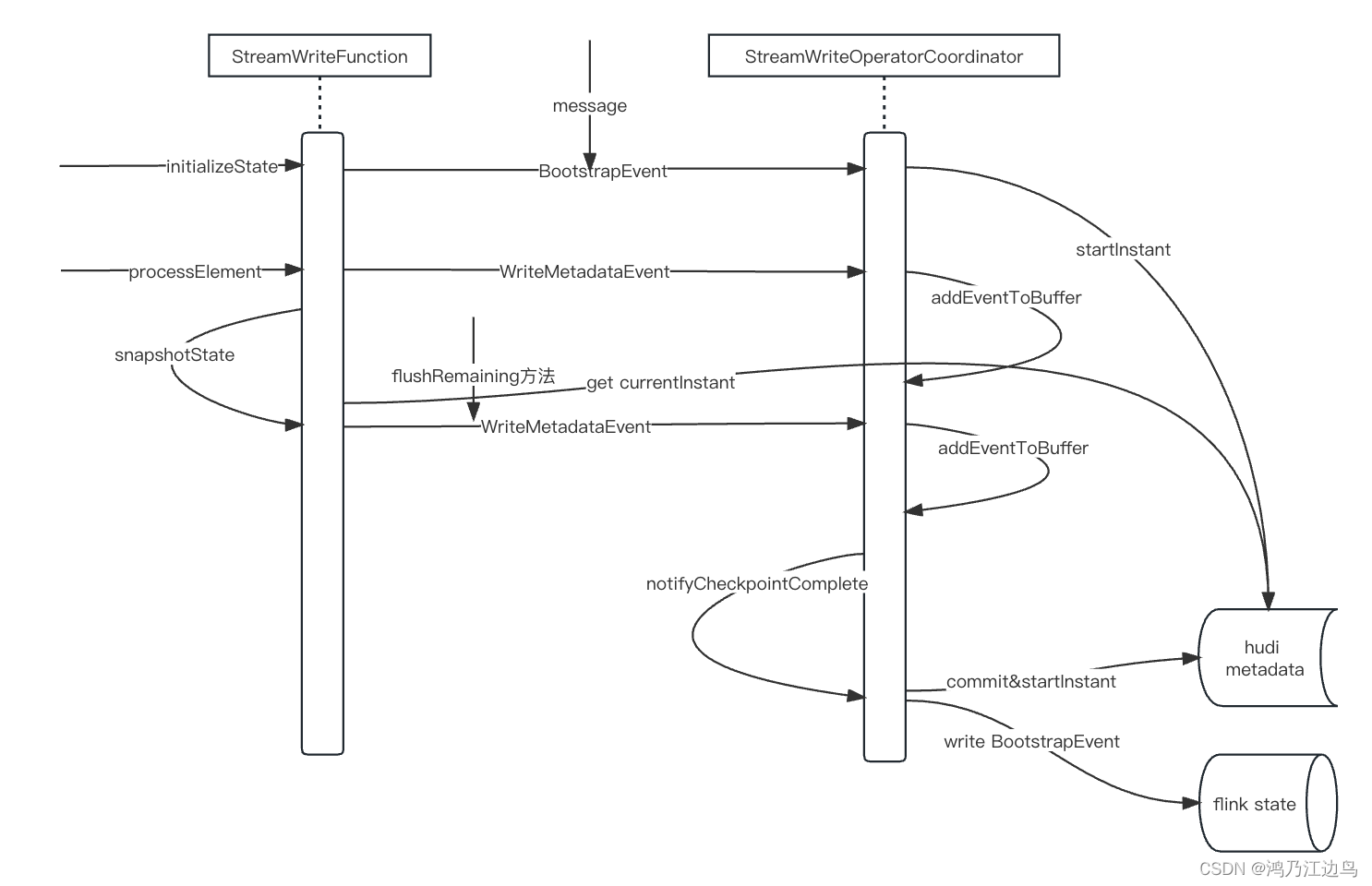
用一张图总结一下交互方式,如下:
相关文章:
Apache Hudi初探(二)(与flink的结合)--flink写hudi的操作(JobManager端的提交操作)
背景 在Apache Hudi初探(一)(与flink的结合)中,我们提到了Pipelines.hoodieStreamWrite 写hudi文件,这个操作真正写hudi是在Pipelines.hoodieStreamWrite方法下的transform(opName("stream_write", conf), TypeInformation.of(Object.class), operatorFa…...
Office ---- excel ---- 怎么批量设置行高
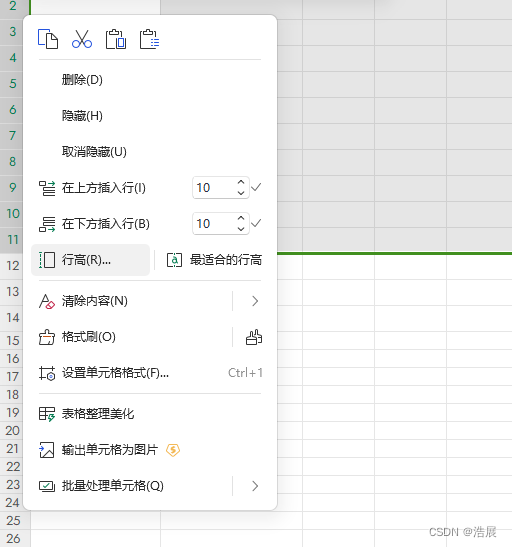
解决方法: 调整行高即可...

Wlan——STA上线流程与802.11MAC帧讲解
目录 802.11MAC帧基本概念 802.11帧结构 802.11MAC帧的分类 管理帧 控制帧 数据帧 STA接入无线网络流程 信号扫描—管理帧 链路认证—管理帧 用户关联—管理帧 用户上线 802.11MAC帧基本概念 802.11协议在802家族中的角色位置 其中802.3标准属于以太网的一种帧格式…...

HTTP的并发连接限制和连接线程池
为什么有并发连接限制和连接线程池 大量的客户端连接到服务器,会导致服务器端需要大量的维护连接资源,同时需要处理客户端的请求,这是如何高效的执行任务成了一个关键的问题,所以,并发连接限制和连接线程池的出现就是…...

【从零学习python 】45.Python中的类方法和静态方法
文章目录 类方法、静态方法类方法静态方法使用场景 进阶案例 类方法、静态方法 类方法 类方法是以类对象作为第一个参数的方法。需要使用装饰器classmethod来标识其为类方法。对于类方法,第一个参数必须是类对象,一般以cls作为第一个参数。 class Dog…...

基于 VisualFoxPro 环境开发应用程序的过程
应用程序开发前开发者要与用户之间广泛沟通,作大量的调查研究和分析工 作,从而明确用户的要求、程序应具备的功能及可以完成的任务。为此要进行两方 面的分析,数据分析和功能分析。数据分析的目的是收集系统应包含的数据、数据 的真实性、…...

SpringBoot整合Quartz,实现数据库方式执行定时任务
springboot整合quartz,实现数据库方式执行定时任务。把定时任务信息存进数据库,项目启动后自动执行定时任务。 1.引入依赖包: <dependency> <groupId>org.springframework.boot</groupId> <ar…...

java中多个list怎么用List表示?
如果你有多个List对象,想要将它们合并成一个List对象,可以使用addAll()方法来实现。addAll()方法将会把一个List中的元素逐个添加到另一个List中。 以下是一个示例,展示了如何将多个List对象合并为一个List对象: import java.ut…...
postgresql 数据排序
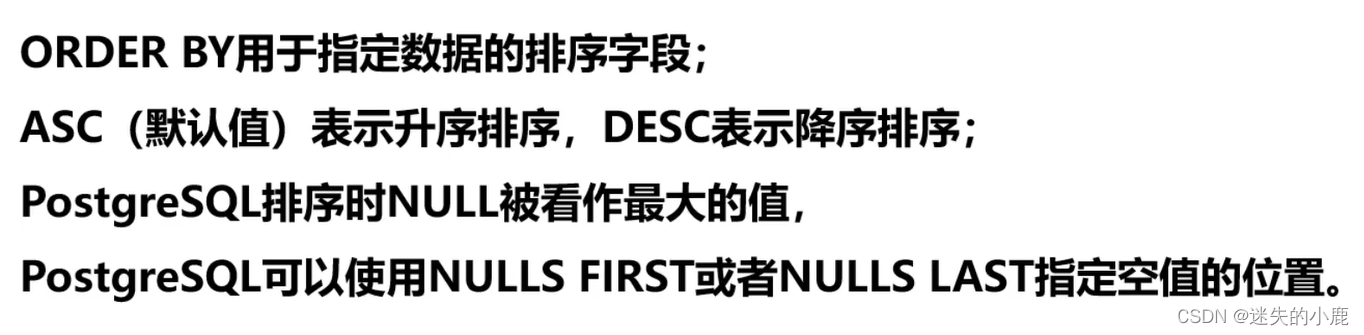
postgresql 常见操作 排序总结 排序 -- 排序的时候null是最大的值(看一下) select employee_id,manager_id from employeesorder by manager_id desc;-- nulls first使null值排在第一位 select employee_id,manager_id from employeesorder by manager_id nulls first;-- null…...

虚拟机 net、桥接、主机三种网络模式寻根问底
虚拟机使用物理主机上的网络适配器直接连接到物理网络中。 这意味着虚拟机就像是通过网线直接连接到路由器一样,成为物理网络中的一个独立设备。 虚拟机可以获取一个永久的IP地址,通过DHCP或手动设置。 虚拟机和物理主机都可以访问对方以及公共网络中的其他设备,比如文件服务…...

python代码——批量将PPT转换成长图
语言:python 3 用法:点击运行后,弹出窗口,选择文件夹,程序运行会将文件夹内的所有PPT文件全部转换成PPT长图,图片名称与PPT文件名称相同,保存位置相同。 如运行中报错,需要自行根据…...
C++信息学奥赛2046:【例5.15】替换字母
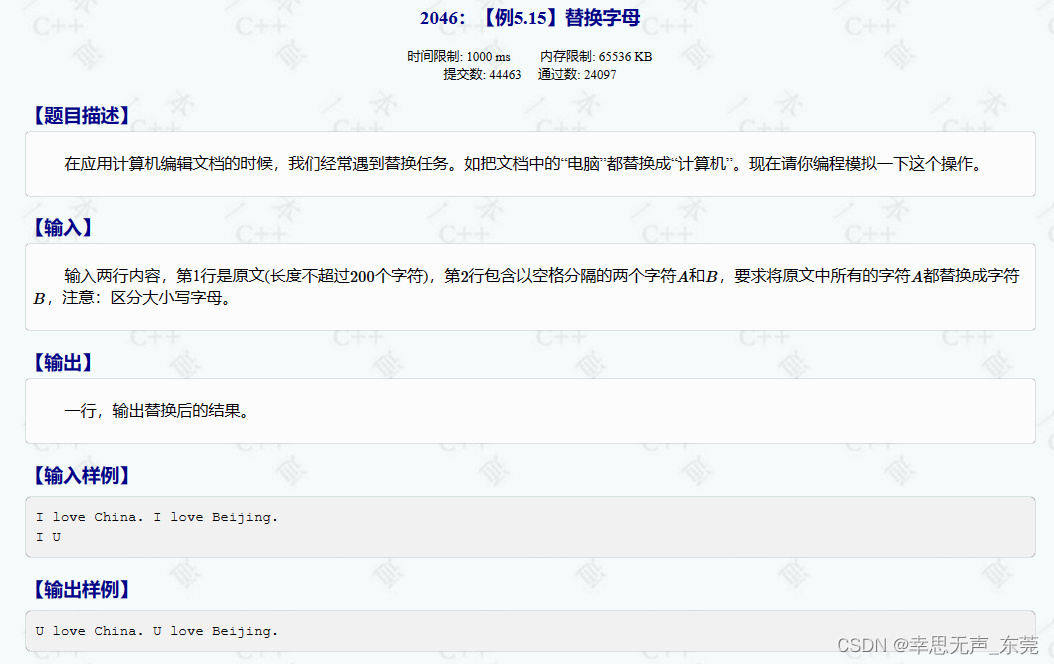
这段代码的功能是对输入的字符串进行处理,将字符串中的字符 a 替换为字符 b 后输出结果。 #include<bits/stdc.h> using namespace std; int main() {string s; // 定义字符串变量s,用来存储输入的字符串char a, b; // 定义字符变量a和bÿ…...
每天一道leetcode:1306. 跳跃游戏 III(图论中等广度优先遍历)
今日份题目: 这里有一个非负整数数组 arr,你最开始位于该数组的起始下标 start 处。当你位于下标 i 处时,你可以跳到 i arr[i] 或者 i - arr[i]。 请你判断自己是否能够跳到对应元素值为 0 的 **任一** 下标处。 注意,不管是什…...

76参考链接
参考链接 官方文件综合介绍[let 和 const](https://es6.ruanyifeng.com/#docs/reference#let 和 const)解构赋值字符串正则数值数组函数对象Symbol[Set 和 Map](https://es6.ruanyifeng.com/#docs/reference#Set 和 Map)[Proxy 和 Reflect](https://es6.ruanyifeng.com/#docs/…...
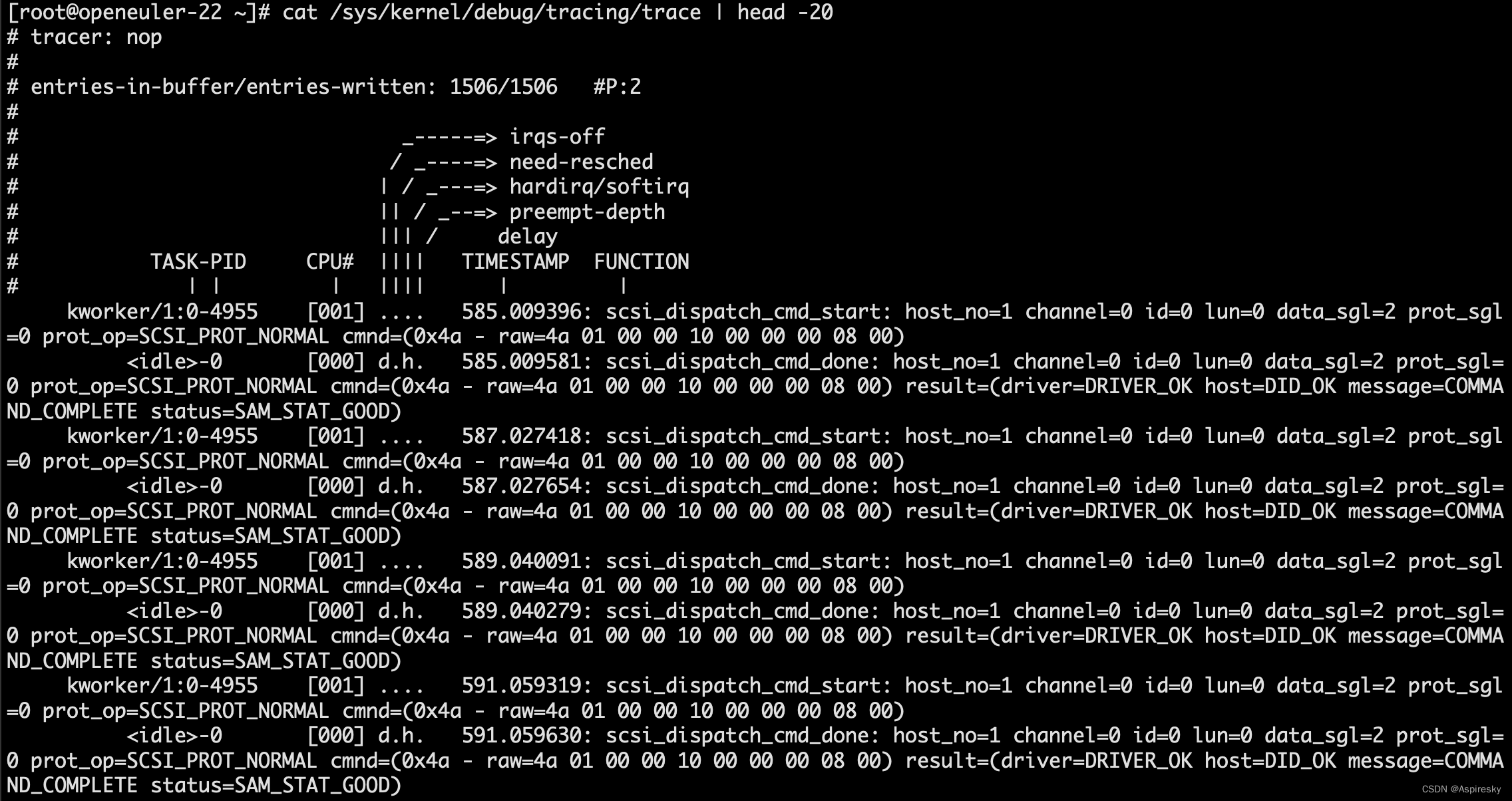
浅析Linux SCSI子系统:调试方法
文章目录 SCSI日志调试功能scsi_logging_level调整SCSI日志等级 SCSI trace events使能SCSI trace events方式一:通过set_event接口方式二:通过enable 跟踪trace信息 相关参考 SCSI日志调试功能 SCSI子系统支持内核选项CONFIG_SCSI_LOGGING配置日志调试…...
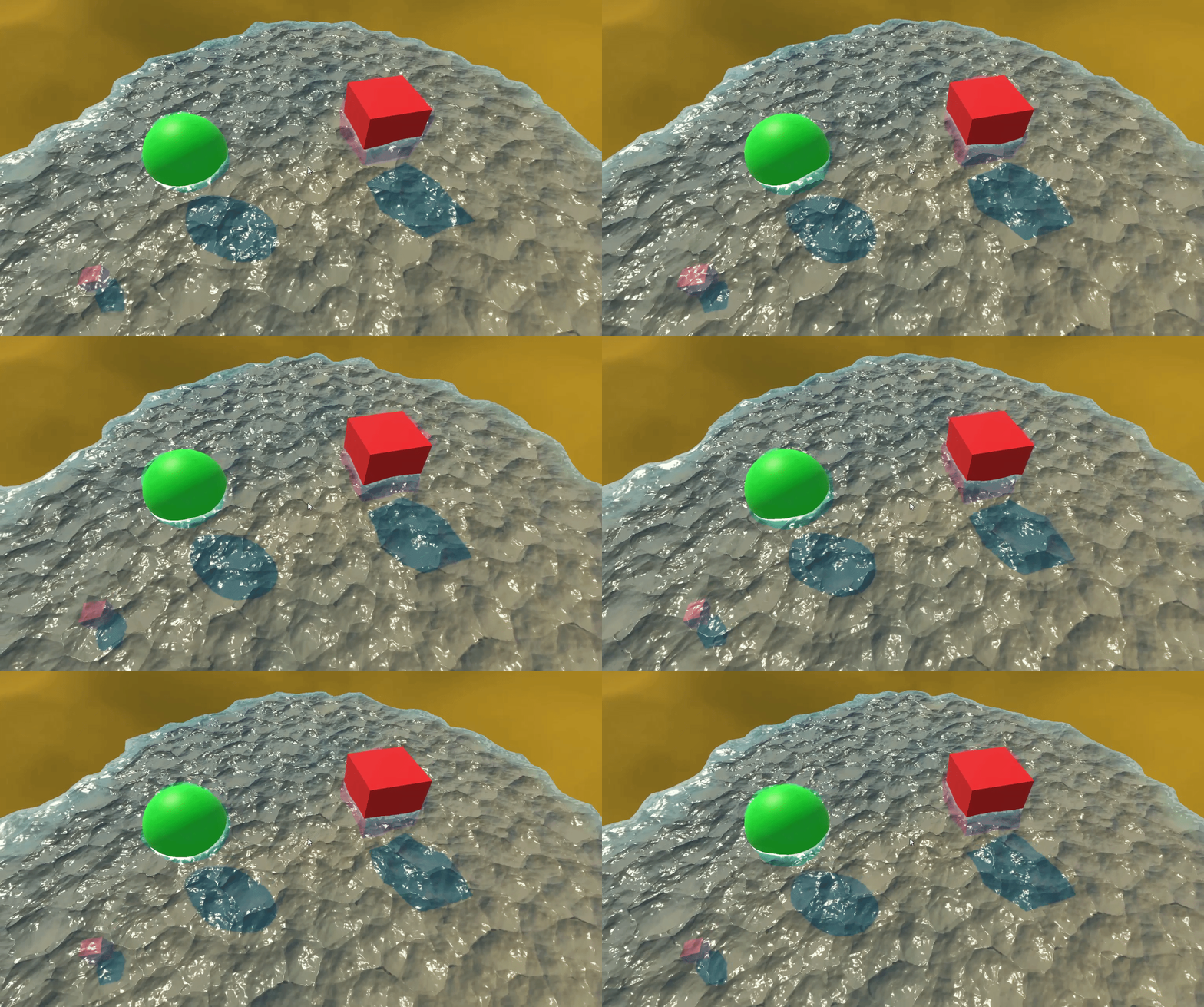
【Unity3D】水面特效
1 前言 水波特效 中通过屏幕后处理实现了环形水波效果,本文通过 Shader Graph 实现了模拟水面特效,包含以下特效细节。 深水区和浅水区颜色差异;水面有波纹,并且在移动;水面起伏波动;水面边缘有水泡&#…...

CSS中的flex布局详细讲解
Flex 布局 Flex 布局是一种现代的 CSS 布局模型,用于实现灵活的盒子布局。它提供了强大的布局能力,使得元素可以自动调整大小、对齐和分布,适用于构建响应式和可伸缩的布局。 Flex 布局使用 flex 容器和 flex 项目的概念。容器是一个父元素…...
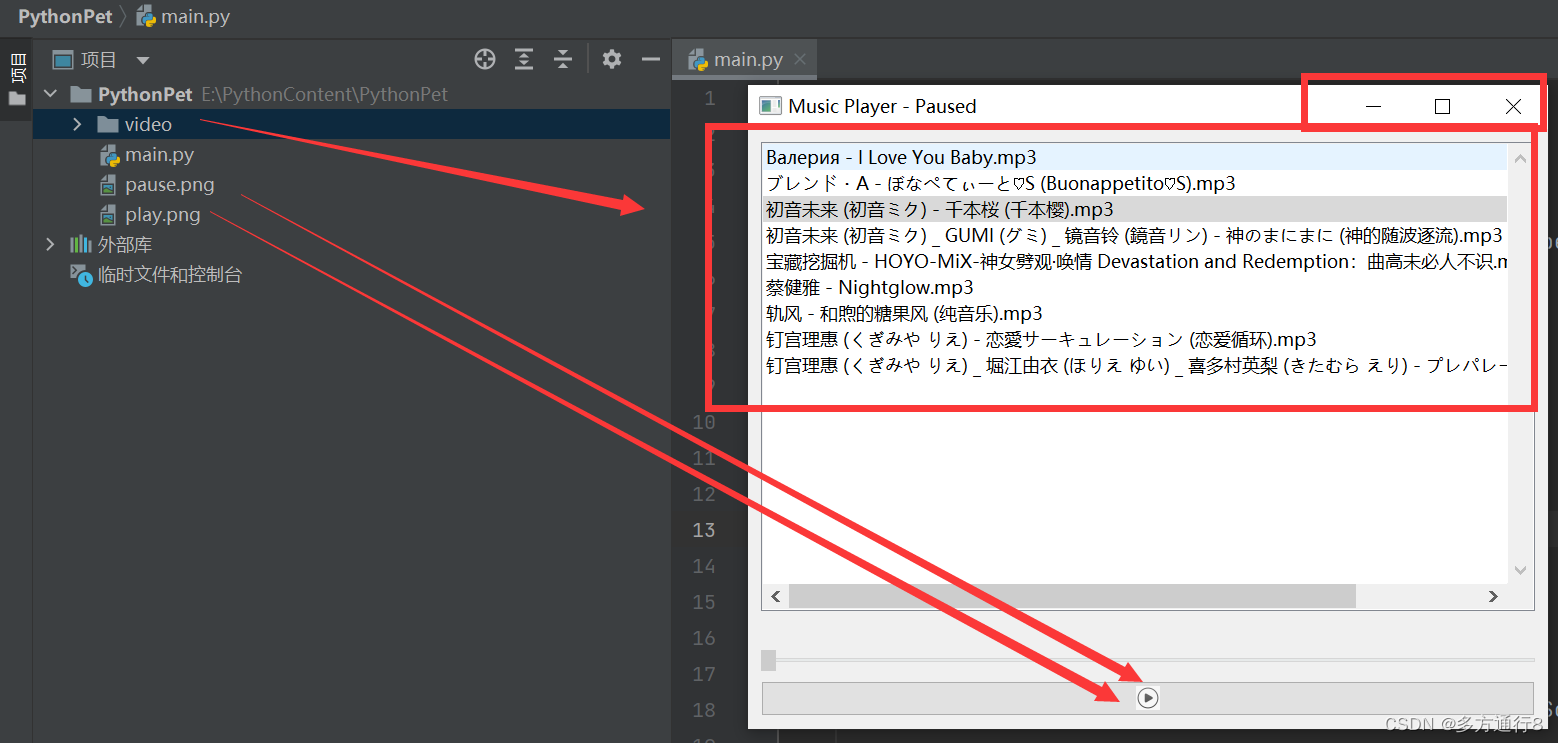
Python功能制作之简单的音乐播放器
需要导入的库: pip install PyQt5 源码: import os from PyQt5.QtCore import Qt, QUrl from PyQt5.QtGui import QIcon, QPixmap from PyQt5.QtMultimedia import QMediaPlayer, QMediaContent from PyQt5.QtWidgets import QApplication, QMainWind…...
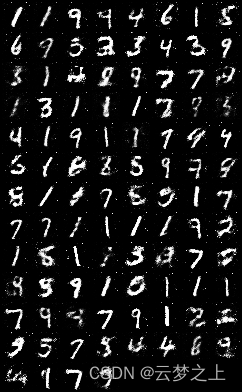
GAN生成对抗模型根据minist数据集生成手写数字图片
文章目录 1.项目介绍2相关网站3具体的代码及结果导入工具包设置超参数定义优化器,以及损失函数训练时的迭代过程训练结果的展示 1.项目介绍 通过用minist数据集进行训练,得到一个GAN模型,可以生成与minist数据集类似的图片。 GAN是一种生成模…...
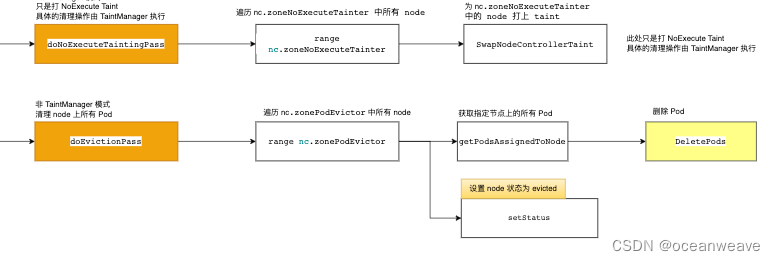
【K8S源码之Pod漂移】整体概况分析 controller-manager 中的 nodelifecycle controller(Pod的驱逐)
参考 k8s 污点驱逐详解-源码分析 - 掘金 k8s驱逐篇(5)-kube-controller-manager驱逐 - 良凯尔 - 博客园 k8s驱逐篇(6)-kube-controller-manager驱逐-NodeLifecycleController源码分析 - 良凯尔 - 博客园 k8s驱逐篇(7)-kube-controller-manager驱逐-taintManager源码分析 - 良…...

单片机开发者如何通过Taotoken调用大模型API优化代码注释
🚀 告别海外账号与网络限制!稳定直连全球优质大模型,限时半价接入中。 👉 点击领取海量免费额度 单片机开发者如何通过Taotoken调用大模型API优化代码注释 对于单片机开发者而言,编写清晰、准确的代码注释是提升项目可…...

LaTeX排版避坑指南:为什么你的多图caption编号对不齐?一个案例讲清subfig、minipage和tabular的选择
LaTeX多图排版实战:从编号错乱到完美对齐的解决方案 第一次在学术论文中遇到多图排版问题时,我盯着那个歪歪扭扭的(c)编号看了整整十分钟——它本该和(a)(b)整齐排列,却像迷路的孩子一样缩在角落。更糟的是,当我引用这些子图时&am…...

2026年AI一键生成歌曲软件精选:音潮 V3.0 零基础闭眼入
2026 年 AI 音乐创作全面大众化,AI 一键生成歌曲软件已经成为日常创作刚需。市面上音潮、Melo、Suno、海绵音乐等AI 音乐生成工具层出不穷,上手难度、成品质感、中文适配度差距明显。经过多轮实测,音潮 V3.0 综合体验一骑绝尘,成为…...

【HAL库实战】STM32F407通过I2C驱动MPU6050全解析
1. 硬件连接与CubeMX配置 第一次用STM32F407驱动MPU6050时,我对着开发板愣了半天——为啥官方例程用的PB6/PB7引脚,我的模块却要接PB8/PB9?后来才发现这是I2C引脚重映射的典型场景。先看硬件接线要点: 物理连接:MPU6…...

避开这些坑:在MATLAB中用DQN做LKA时,我的并行训练为什么失败了?
避开这些坑:在MATLAB中用DQN做LKA时,我的并行训练为什么失败了? 当你第一次在MATLAB中启用UseParalleltrue选项时,可能满怀期待地以为训练速度会直线上升。但现实往往很骨感——要么直接报错终止,要么训练效率反而比串…...

别再死记硬背FIFO了!用Python模拟器带你亲手复现操作系统‘护航效应’
别再死记硬背FIFO了!用Python模拟器带你亲手复现操作系统‘护航效应’ 操作系统中的进程调度算法是计算机科学的核心概念之一,但很多初学者在学习FIFO(先进先出)算法时,往往陷入死记硬背的困境。本文将带你通过Python模…...

Flutter+开源鸿蒙实战|城市共享驿站智能存取系统 Day7 最终闭环篇 多端适配演示+毕设总结+源码梳理+功能扩展
Flutter开源鸿蒙实战|城市共享驿站智能存取系统 Day7 最终闭环篇 多端适配演示毕设总结源码梳理功能扩展 欢迎加入开源鸿蒙跨平台社区:https://openharmonycrossplatform.csdn.net <!-- Schema.org 结构化数据 --> <script type"applicati…...

告别臃肿!Dell G15笔记本散热控制的轻量级开源替代方案
告别臃肿!Dell G15笔记本散热控制的轻量级开源替代方案 【免费下载链接】tcc-g15 Thermal Control Center for Dell G15 - open source alternative to AWCC 项目地址: https://gitcode.com/gh_mirrors/tc/tcc-g15 你是否厌倦了Dell原厂AWCC软件的缓慢响应和…...
)
HDFS源码(二)
DataNode启动源码 创建HttpServer 初始化DataNode Rpc服务 获取NameNode Rpc代理 Datanode向NameNode注册 DataNode与NameNode周期心跳及block块汇报 数据上传源码 创建文件系统及初始化DFSClient 连接NN创建目录 启动DataStreamer线程 向dataQueue队列中写入packet 设置副本写…...

一键式自动化工具OneClickCopaw:从Shell脚本到CI/CD的部署实践
1. 项目概述与核心价值最近在折腾一些自动化脚本时,发现了一个挺有意思的项目,叫iwanglei1/OneClickCopaw。光看名字,你可能会有点懵,“Copaw”是什么?其实,这是一个典型的“一键式”自动化工具,…...