
【案例】登录注册
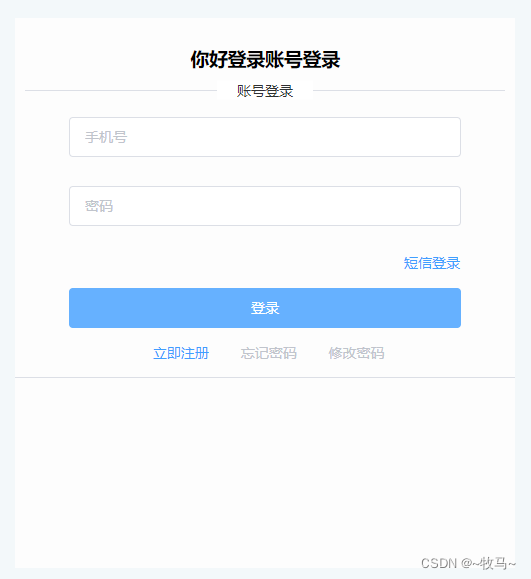
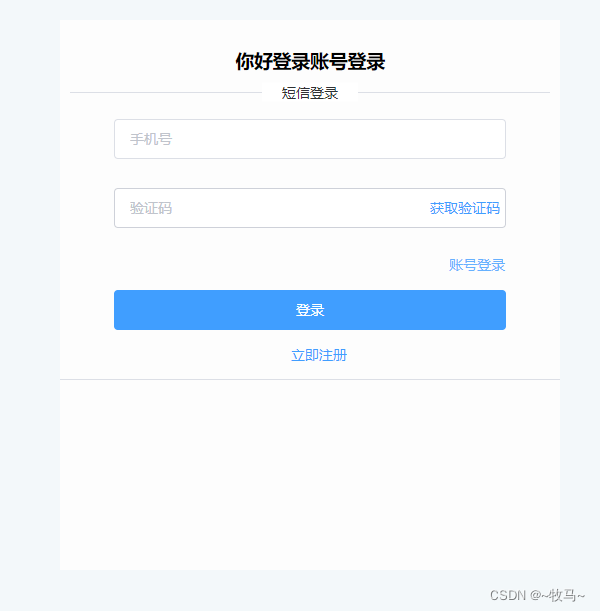
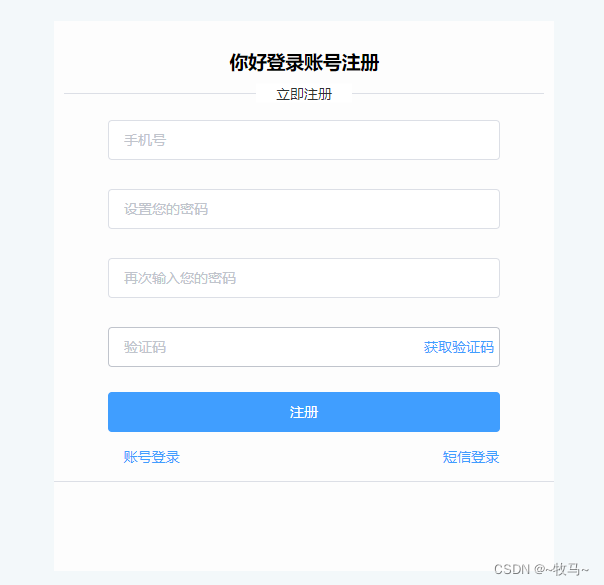
<template><div class="loginhome"><Header :butShow="butShow"></Header><div class="formdiv"><div style="text-align:center;padding:10px;"><h3>你好登录账号{{ stauts == 3? '注册':'登录' }}</h3><el-divider>{{ stauts == 1 ?'账号登录':stauts == 2 ?'短信登录':stauts == 3 ?'立即注册':'--' }}</el-divider></div><el-form :model="Form"><!-- 账号密码登录 --><template v-if="stauts == 1"><table class="table" cellspacing="3"><tr><td colspan="5"><el-form-item prop="phone" :rules="[{ required: true, message: '输入手机号', trigger: 'blur' },{type:'phone', max: 12, message: '输入正确的11位手机号', trigger: 'blur'}]"><el-input type="phone" placeholder="手机号" maxlength="11" v-model="Form.phone"></el-input></el-form-item></td></tr><tr><td colspan="5"><el-form-item prop="password" :rules="[{ required: true, message: '输入密码', trigger: 'blur' },{min:8, max: 20, message: '输入8~20位', trigger: 'blur'}]"><el-input :type="eyeshow ? 'text':'password'" maxlength="20" placeholder="密码" v-model="Form.password" show-password><!-- <el-button slot="suffix" type="text"><i  :class="eyeshow ? 'el-icon-key':'el-icon-unlock'" @click="iClick"></i></el-button> --></el-input></el-form-item></td></tr><tr><td></td><td colspan="3"></td><td><el-button type="text" @click="stauts = 2">短信登录</el-button></td></tr><tr><td colspan="5"><el-button style="width:100%;" type="primary" @click="CodeLoginClick()">登录</el-button></td></tr><tr><td class="table_td"></td><td class="table_td"><el-button type="text" @click="stauts = 3; eyeshow = false;">立即注册</el-button></td><td class="table_td"><el-button type="text" :disabled="true">忘记密码</el-button></td><td class="table_td"><el-button type="text" :disabled="true">修改密码</el-button></td><td class="table_td"></td></tr></table></template><!-- 短信验证码登录 --><template v-else-if="stauts == 2"><table class="table" cellspacing="3"><tr><td colspan="5"><el-form-item prop="telephone" :rules="[{ required: true, message: '输入手机号', trigger: 'blur' },{type:'number', max: 11, message: '输入正确的11位手机号', trigger: 'blur'}]"><el-input type="text" placeholder="手机号" v-model="Form.telephone"></el-input></el-form-item></td></tr><tr><td colspan="5"><el-form-item prop="code" :rules="[{ required: true, message: '输入验证码', trigger: 'blur' },{type:'number',  message: '请输入正确的', trigger: 'blur'}]"><el-input :type="eyeshow ? 'text':'password'" placeholder="验证码" v-model="Form.code"><el-button slot="suffix" type="text" @click="iClick">获取验证码</el-button></el-input></el-form-item></td></tr><tr><td></td><td colspan="3"></td><td><el-button type="text" @click="stauts = 1">账号登录</el-button></td></tr><tr><td colspan="5"><el-button style="width:100%;" type="primary">登录</el-button></td></tr><tr><td class="table_td"></td><td class="table_td"></td><td class="table_td"><el-button type="text" @click="stauts = 3; eyeshow = false;">立即注册</el-button></td><td class="table_td"></td><td class="table_td"></td></tr></table></template><!-- 立即注册 --><template v-else-if="stauts == 3"><table class="table" cellspacing="3"><tr><td colspan="5"><el-form-item prop="register_telephone" :rules="[{ required: true, message: '输入手机号', trigger: 'blur' },{type:'number', max: 11, message: '输入正确的11位手机号', trigger: 'blur'}]"><el-input type="text" placeholder="手机号" v-model="Form.register_telephone"></el-input></el-form-item></td></tr><tr><td colspan="5"><el-form-item prop="register_password" :rules="[{ required: true, message: '设置密码', trigger: 'blur' },{min:8, max: 11, message: '输入8~11位', trigger: 'blur'}]"><el-input :type="eyeshow ? 'text':'password'" placeholder="设置您的密码" v-model="Form.register_password" show-password><!-- <el-button slot="suffix" type="text"><i  :class="eyeshow ? 'el-icon-key':'el-icon-unlock'" @click="iClick"></i></el-button> --></el-input></el-form-item></td></tr><tr><td colspan="5"><el-form-item prop="register_again_password" :rules="[{ required: true, message: '输入密码', trigger: 'blur' },{min:8, max: 11, message: '请输入8~11位', trigger: 'blur'}]"><el-input :type="eyeshow ? 'text':'password'" placeholder="再次输入您的密码" v-model="Form.register_again_password" show-password><!-- <el-button slot="suffix" type="text"><i  :class="eyeshow ? 'el-icon-key':'el-icon-unlock'" @click="iClick"></i></el-button> --></el-input></el-form-item></td></tr><tr><td colspan="5"><el-form-item prop="register_code" :rules="[{ required: true, message: '输入验证码', trigger: 'blur' },{ type:'number',min:6, max: 6, message: '输入完整的验证码', trigger: 'change'}]"><el-input type="text" placeholder="验证码" v-model="Form.register_code"><el-button slot="suffix" type="text" @click="SendCodeClick">获取验证码</el-button></el-input></el-form-item></td></tr><tr><td></td><td colspan="3"></td><td></td></tr><tr><td colspan="5"><el-button style="width:100%;margin-top:3px;" type="primary">注册</el-button></td></tr><tr><td class="table_td"><el-button type="text" @click="stauts = 1; eyeshow = false;">账号登录</el-button></td><td class="table_td"></td><td class="table_td"></td><td class="table_td"></td><td class="table_td"><el-button type="text" @click="stauts = 2">短信登录</el-button></td></tr></table></template></el-form><el-divider></el-divider></div></div>
</template>
<script>
import Header from '@/components/header.vue'
export default {components: {Header},data() {return {stauts: 1,  // 模式butShow: 1,eyeshow: false,againPassword_message: '',Form: {phone: '', password: '',  // 账号登录telephone: '',  code: '',  // 短信登录register_password: '', register_again_password: '', register_telephone:'', register_code:'',  // 立即注册},}},methods: {iClick() {console.log(this.eyeshow);this.eyeshow = !this.eyeshow},// 获取验证码SendCodeClick() {console.log('获取验证码');},//  账号登录CodeLoginClick() {if (this.Form.phone =='17602931841' &&  this.Form.password == '17602931841') {this.$notify.success('登录成功')setTimeout(() => {this.$router.push('/fristhome')},1000)} else {this.$notify.warning('账号或密码错误!!')}}}
}
</script>
<style scoped>
.loginhome { width: 100%;height: calc(100vh); background-color: rgb(243, 248, 250); }
.formdiv { width: 500px; height: 550px; background-color: rgb(253, 253, 253); position: relative; top: 5%; left: calc((100vw - 500px) / 2); }
#i { position: relative; top: 0; right: 0; }
.table { width:80%;margin:0 10%;text-align:center; }
.table_td { width: 25%; }
.input_btu { position: relative; top: 0; right: 0; }
#suffix { position: absolute; top: 0; right: 0; color: red; }
.show-pwd {position: absolute;right: 10px;top: 7px;font-size: 16px;color: red;cursor: pointer;user-select: none;}
</style>
<style>
.table .el-form-item__error {color: #F56C6C;font-size: 12px;line-height: -1;padding-top: 4px;position: absolute;top: 100%;left: 0;
}
.table .el-form-item {margin-bottom: 0px;
}
</style>
相关文章:
【案例】登录注册
<template><div class"loginhome"><Header :butShow"butShow"></Header><div class"formdiv"><div style"text-align:center;padding:10px;"><h3>你好登录账号{{ stauts 3? 注册:登录 }}…...
Unity 物体的运动之跟随鼠标
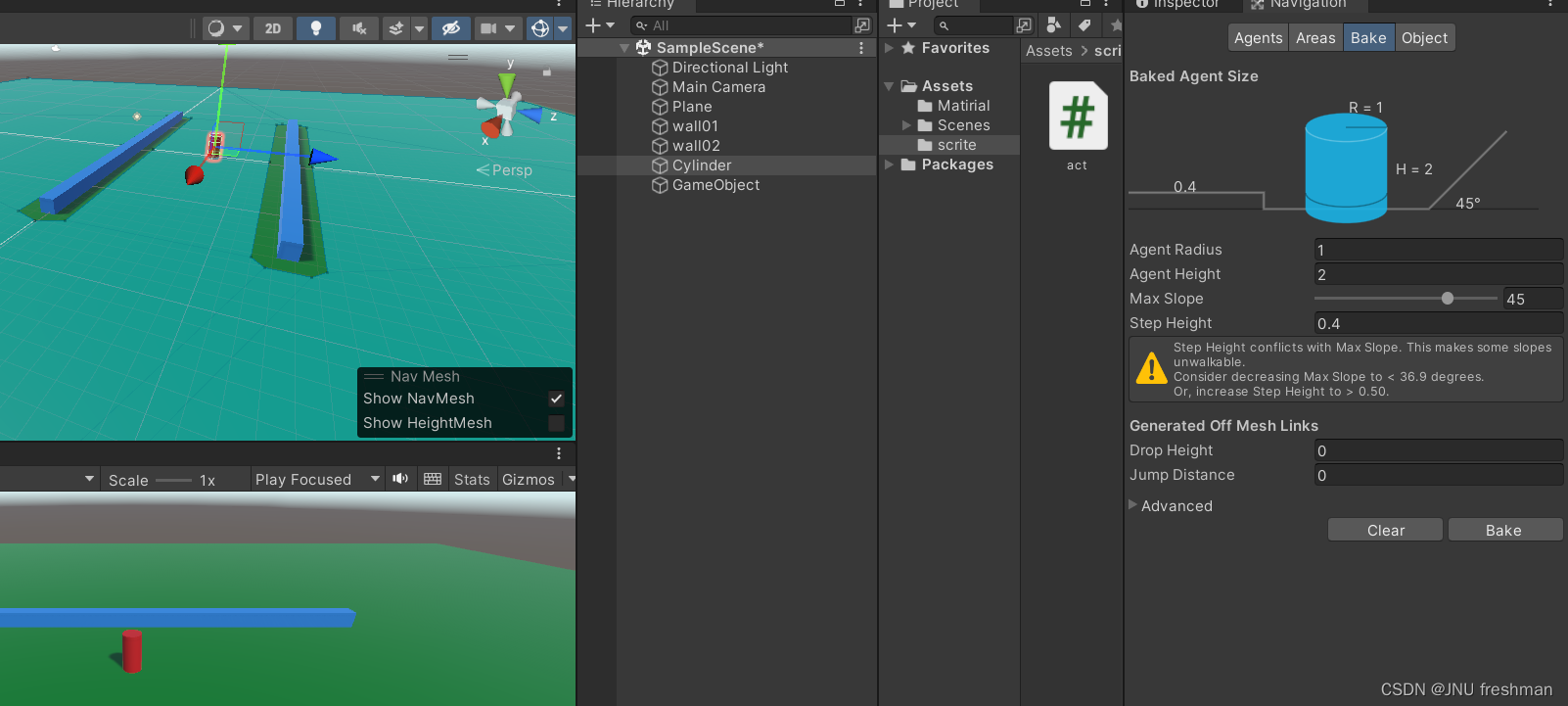
你想让鼠标点击哪里,你的运动的对象就运动到哪里吗? Please follow me ! 首先,你要先添加一个Plane ,以及你的围墙,你的移动的物体 想要实现跟随鼠标移动,我们先创建一个脚本 using System.Collections; using Syst…...
C++基础Ⅱ变量
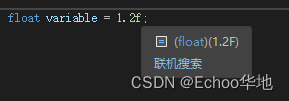
目录儿 4 变量4.1 原始数据类型字符 char整型 short整型 int整型 long整型 long long单精度浮点型 float双精度浮点型 double布尔型 bool 4.2 sizeof 关键字 5 指针和引用 4 变量 4.1 原始数据类型 原始数据类型是构建C程序的最基础数据类型 所有数据都是基于这些原始数据类型…...

Linux管理SpringBoot应用shell脚本实现
Liunx系统如何部署和管理SpringBoot项目应用呢?最简单的方法就是写个shell脚本。 Spring Boot是Java的一个流行框架,用于开发企业级应用程序。下面我们将学习如何在Linux服务器上部署Spring Boot应用,并通过一个脚本实现启动、停止、重启等操…...

一篇搞懂浏览器的工作原理(万字详解)
摘要 本文是学习极客时间上的课程,进而整理出的浏览器工作原理。 第一部分:浏览器的进程和线程 (1)进程和线程的区别? 在浏览器中,各个进程负责处理自己的事情,而不同的进程中,也…...
)
C语言调用python训练的机器学习模型(项目需求轻体量)
问题描述 机器学习模型基本上都是python下的实现与使用,有关C如何调用训练好的模型或是C实现模型的相关教程相对较少 同时,项目需求整个模型大小尽可能小,大概在几十Kb 由于是表格类型的数据,因此主要考虑树模型 一般而言&#…...

get和post请求的区别以及post请求的url参数问题
1.主要区别 1.GET请求方法有以下几个特点: 默认的请求方法;GET请求通常用于获取信息,所以应该是安全的、幂等的;请求数据表现在URL上,以名称/值的形式发送。对请求的长度有限制;在IE和Opera等浏览器会产生…...

android NullPointerException externalCacheDir
先看代码: fun Context.getMyCacheDir(): String {return externalCacheDir!!.absolutePath "/my_cache" }如上代码,在某些手机可能会出现crash。 原因详细阅读api,注意他有一个大大的注解Nullable: Nullablepublic a…...
设计模式-过滤器模式(使用案例)
过滤器模式(Filter Pattern)或标准模式(Criteria Pattern)是一种设计模式,这种模式允许开发人员使用不同的标准来过滤一组对象,通过逻辑运算以解耦的方式把它们连接起来。这种类型的设计模式属于结构型模式…...
成功解决修改已经push到远程git仓库的commit message
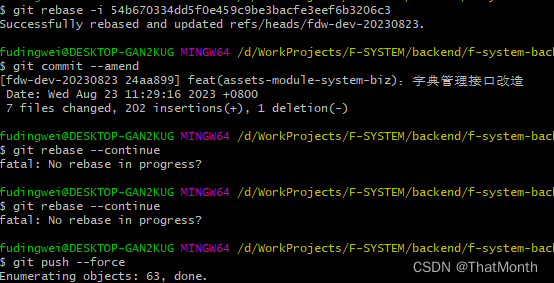
1.使用 Git 命令行进入要修改的项目目录。 2.运行 git log 命令查看提交历史,找到要修改的提交的哈希值(commit hash)。 3.运行 git rebase -i <commit hash> 命令,将 <commit hash> 替换为要修改的提交的哈希值。这将…...

Ubuntu18.04 交叉编译openssl-1.1.1
源码下载地址: openssl 此处使用的是openssl-1.1.1-pre5.tar.gz 解压: $tar -zxvf openssl-1.1.1-pre5.tar.gz $cd openssl-1.1.1-pre5/ 执行配置生成Makefile: $./config no-asm shared --prefix$PWD/__install 或者 $./config no-asm shared no-…...
七夕学算法
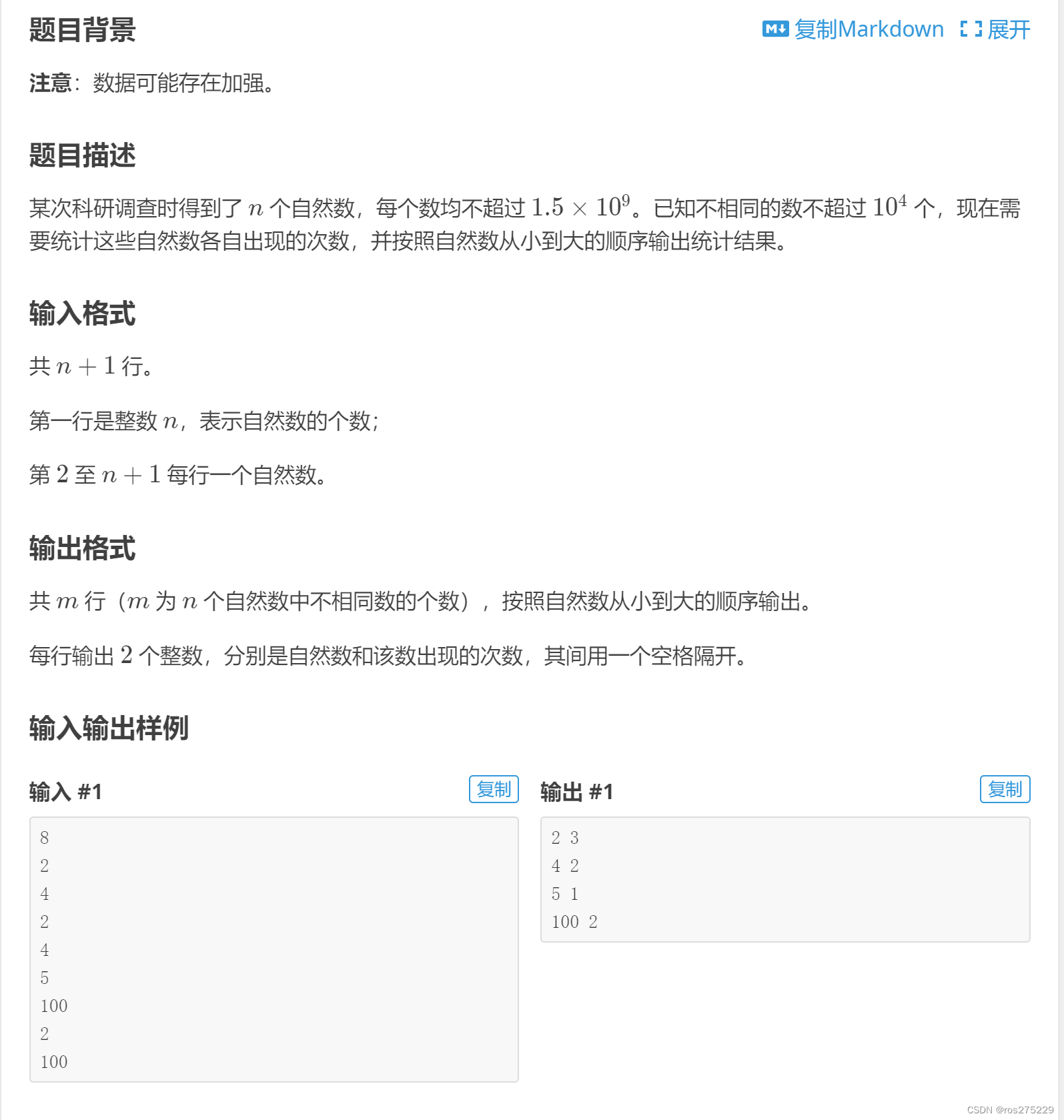
目录 P1031 [NOIP2002 提高组] 均分纸牌 原题链接 : 题面 : 思路 : 代码 : P1036 [NOIP2002 普及组] 选数 原题链接 : 题面 : 思路 : 代码 : P1060 [NOIP2006 普及组] 开心的金明 原题链接 : 题面 : 思路 : 01背包例题 : 代码 : P1100 高低位交换 原题…...
)
在C++中利用rapidjson实现Python中的字典(Dict)
python 中的dict如下: Dicts = {"Stain":{"ResultType": "Physics","Results": [{"Key": "KeyPoints","Title": "瑕疵区域","Unit": "","Value": stainlist…...
数组和指针练习(3)
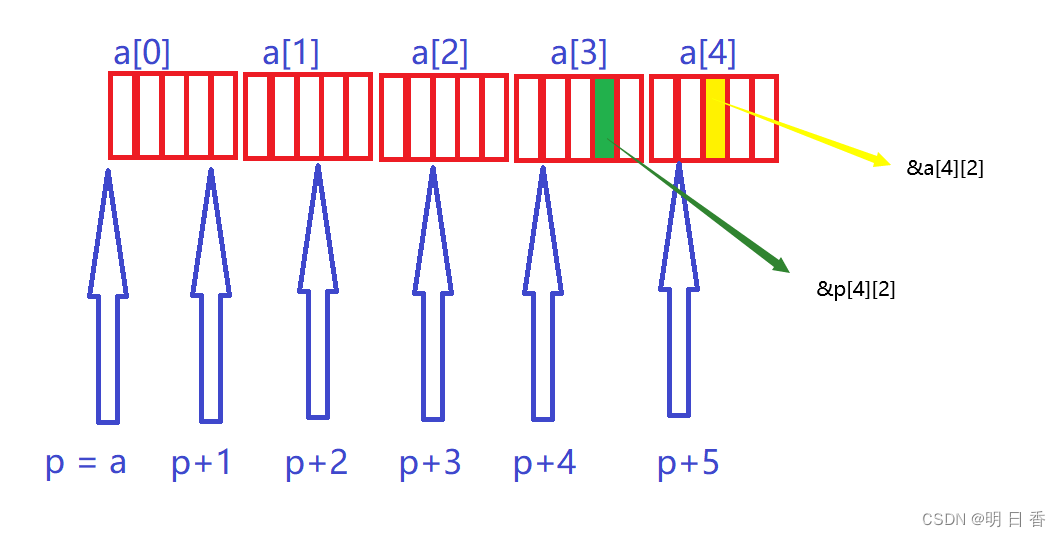
题目: int main() { int a[5][5]; int(*p)[4]; p a; printf( "%p,%d\n", &p[4][2] - &a[4][2], &p[4][2] - &a[4][2]); return 0; } 思路分析: int(*p)[4]; 定义了指针变量p是一个数组指针,且该数组指…...
如何用树莓派Pico针对IoT编程?
目录 一、Raspberry Pi Pico 系列和功能 二、Raspberry Pi Pico 的替代方案 三、对 Raspberry Pi Pico 进行编程 硬件 软件 第 1 步:连接计算机 第 2 步:在 Pico 上安装 MicroPython 第 3 步:为 Thonny 设置解释器 第 4 步ÿ…...
【填坑向】MySQL常见报错及处理系列(ERROR! The server quit without updating PID file)
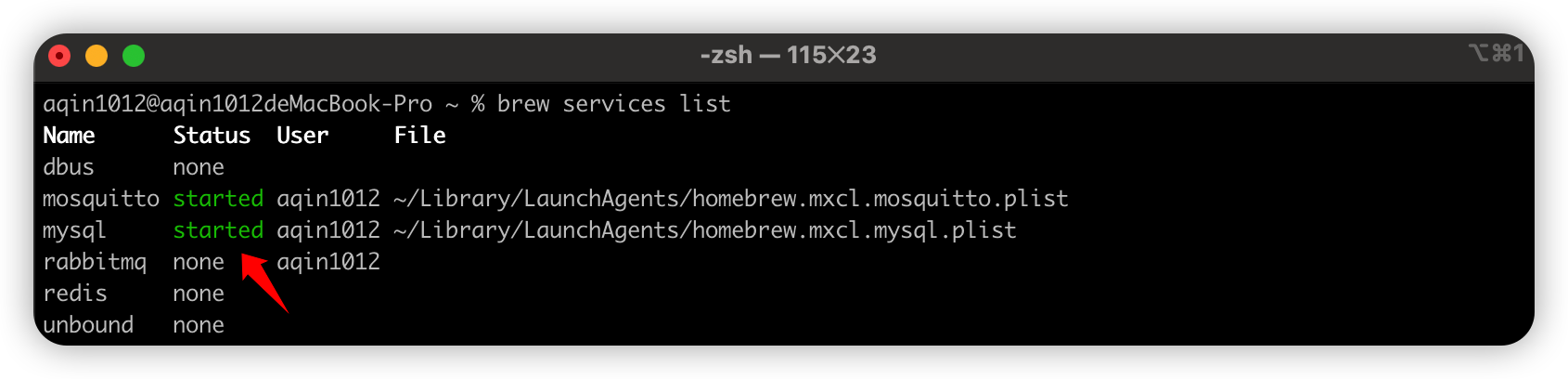
本系列其他文章 【填坑向】MySQL常见报错及处理系列(Communications link failure & Access denied for user ‘root‘‘localhost‘)_AQin1012的博客-CSDN博客翻一下大致的意思就是默认会按照如下的顺序读取配置文件,我上面贴出的配置文…...

如何处理MySQL自增ID用完
检查当前自增ID的最大值:你可以使用以下SQL查询语句来获取当前最大的自增ID值: SELECT MAX(id) FROM your_table;假设你的表名为 your_table 和自增ID列名为 id。 确定使用的自增ID类型:根据当前最大值来判断你使用的自增ID类型。如果当前…...

Docker 安装教程【菜鸟级】
文章目录 前言1.安装及环境1.1.Linux安装1.2.Windows安装 2.初识Docker2.1.进入docker2.2.命令行基本操作 Docker实例Docker安装Centos使用启动、关闭、删除容器将主机中的文件放入容器中的方式查看容器日志 前言 1.安装及环境 1.1.Linux安装 1.2.Windows安装 2.初识Docker…...

centos7.9 用docker安装mysql8.0
一.安装docker 切换到root1.安装依赖包 $ yum install -y yum-utils2.registry更换阿里源 $ yum-config-manager \--add-repo \https://mirrors.aliyun.com/docker-ce/linux/centos/docker-ce.repo$ sed -i s/download.docker.com/mirrors.aliyun.com\/docker-ce/g /etc/yum.…...
)
JVM和消息队列面经(自用)
JVM和消息队列面试八股文,自用。 Minor GC、Young GC、Full GC、Old GC、Major GC、Mixed GC 一文搞懂 - 知乎 32 道 JVM 面试题总结(含答案解析和思维导图) - 知乎 百度安全验证 JVM面经汇总_所幸你是例外的博客-CSDN博客 38道精品JVM面…...

从‘均分误差’到‘功率打架’:实战中调试微电网逆变器下垂系数的避坑指南
从‘均分误差’到‘功率打架’:实战中调试微电网逆变器下垂系数的避坑指南 微电网系统中,多个分布式电源并联运行时,有功功率分配不均的问题如同暗礁,稍有不慎就会导致系统效率下降甚至设备过载。这种被工程师们戏称为"功率打…...

RK3588开发板16GB LPDDR5与64GB eMMC性能解析与实战指南
1. 项目概述:当旗舰开发板遇上LPDDR5与超大存储最近在嵌入式圈子里,关于瑞芯微RK3588这颗“性能猛兽”的讨论热度一直没降下来。作为目前国产SoC里妥妥的旗舰,它集成的四核A76四核A55的CPU架构、高达6Tops算力的NPU,以及丰富的多媒…...

如何用Element React构建企业级React应用:完整组件库实战指南
如何用Element React构建企业级React应用:完整组件库实战指南 【免费下载链接】element-react Element UI 项目地址: https://gitcode.com/gh_mirrors/el/element-react Element React作为一套基于React框架的企业级UI组件库,为开发者提供了50余种…...
)
别再傻傻分不清了!给硬件工程师的SI、PI、EMI关系速查手册(附高频PCB设计实例)
硬件工程师实战指南:SI、PI、EMI的三角关系与高频PCB设计避坑 当你第一次面对DDR4布线导致的EMI测试失败时,可能会陷入这样的困惑:明明是信号完整性问题,为什么整改方案却是调整电源层的去耦电容?这种看似跨领域的因果…...

工业自动化实战:Modbus转Profinet网关配置与机器人PLC通信集成
1. 项目概述与核心需求解析最近在做一个产线自动化升级的项目,客户现场有一套六轴关节机器人,控制器是国产的ES-R6系列,需要和产线主控的西门子S7-1200 PLC进行实时数据交互。机器人负责上下料和精密装配,PLC则统筹整条线的启停、…...
)
告别Qt默认英文!3分钟搞定QMessageBox按钮中文显示(附完整代码示例)
3分钟实现QMessageBox按钮中文显示的实战指南 刚接触Qt开发的程序员经常会遇到一个尴尬问题——精心设计的界面突然弹出英文按钮的对话框。这种"半中半英"的体验在交付给国内客户时尤为明显。今天我们就来解决这个看似简单却困扰很多开发者的问题,无需复杂…...

ESP32 Arduino核心开发终极指南:构建专业级物联网控制系统
ESP32 Arduino核心开发终极指南:构建专业级物联网控制系统 【免费下载链接】arduino-esp32 Arduino core for the ESP32 family of SoCs 项目地址: https://gitcode.com/GitHub_Trending/ar/arduino-esp32 还在为物联网项目开发中的硬件兼容性、开发环境复杂…...

如何用韭菜盒子打造你的VSCode投资信息中心:5大实用功能深度体验
如何用韭菜盒子打造你的VSCode投资信息中心:5大实用功能深度体验 【免费下载链接】leek-fund :chart_with_upwards_trend: 韭菜盒子VSCode插件,可以看股票、基金、期货等实时数据。 LeekFund turns your VS Code and Cursor into a real-time stock, fun…...

2025届最火的十大降重复率平台实际效果
Ai论文网站排名(开题报告、文献综述、降aigc率、降重综合对比) TOP1. 千笔AI TOP2. aipasspaper TOP3. 清北论文 TOP4. 豆包 TOP5. kimi TOP6. deepseek 知网所具备的降AI技术,目的在于使论文里人工智能生成部分的内容重复率得以降低&…...

Flowable 6.7.2 适配达梦数据库踩坑实录:从驱动到Liquibase源码修改全攻略
Flowable 6.7.2 深度适配达梦数据库实战指南:从驱动配置到源码级改造 在国产化替代浪潮中,数据库迁移往往是技术团队面临的首要挑战。当工作流引擎Flowable遇上国产数据库达梦(DM),两者的"语言不通"会导致一系列兼容性问题。本文将…...