
微信小程序canvas type=2d生成海报保存到相册、文字换行溢出显示...、文字删除线、分享面板
一、简介
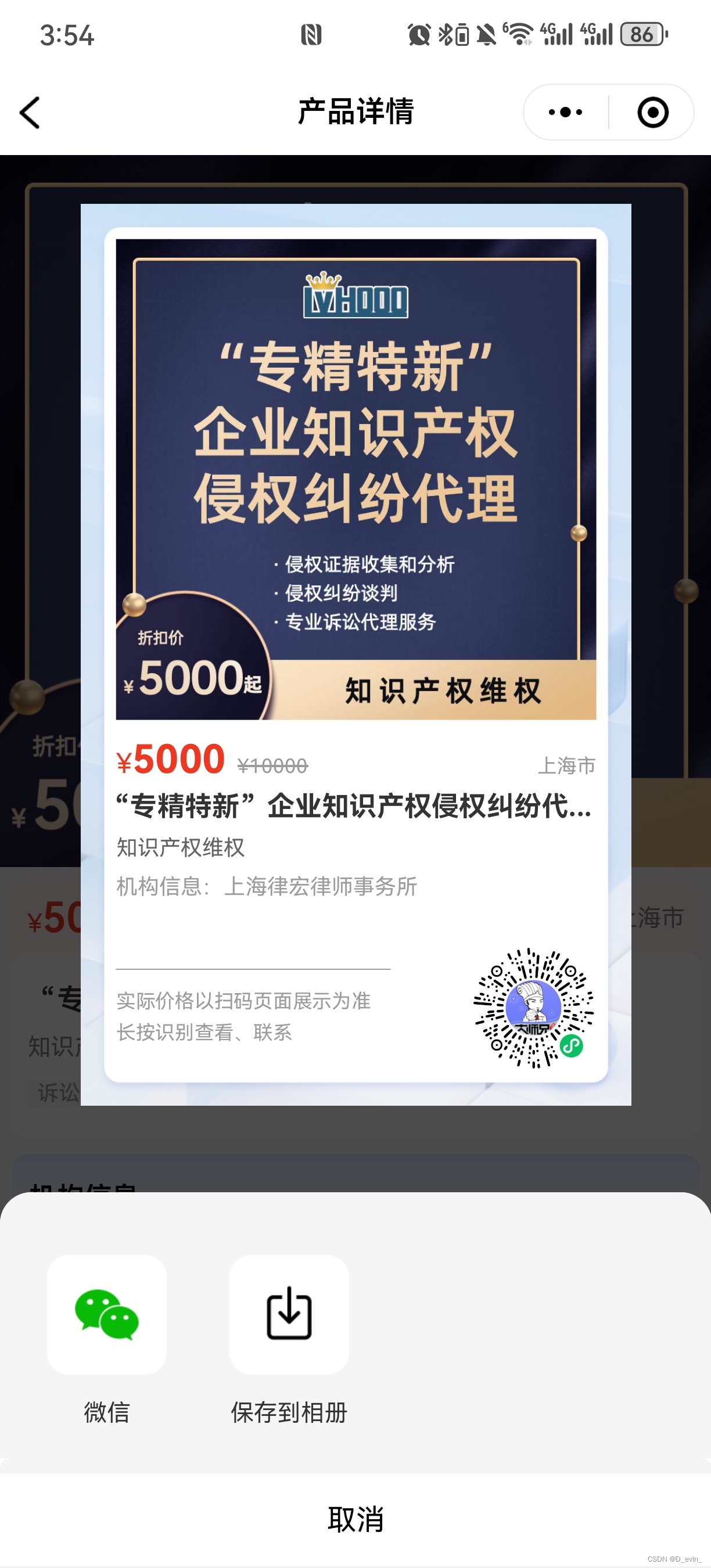
做个简单的生成二维码海报分享,我做的时候也找简单的方法看能不能实现页面直接截图那种生成图片,原生小程序不支持,不多介绍下面有全部代码有注释、参数自行替换运行看看,还有需要优化的地方,有问题可以咨询我,我写的已经上线
如图:



二、 js:
// 产品详情
import {getProductDetails,getDataList,getShareData,getUnlimitedQRCode
} from "../../../../../api/dsxapi";
const ui = require("../../../../../utils/ui");Page({data: {id: null, //跳转传过来的产品iddatas: null, //详情数据images: null, //轮播图current: 0,proTags: null, //产品标签images2: null, //详情图片routeId: null, //哪里打开的show: false, //遮罩层showShare: false, //分享面板shareImg: false, //控制分享图标options: [{name: '微信',icon: 'https://wx.applet.style.51dsx.cn/img/share_button_wechat.png',openType: 'share'},{name: '生成分享图',icon: 'https://wx.applet.style.51dsx.cn/img/share_button_fxt.png'},],posterDatas: {width: 281, //画布宽度height: 460, //画布高度// 缓冲区,无需手动设定pic: null,buttonType: 1,show: false, // 显示隐藏跳转设置success: false, // 是否成功生成过海报canvas: null, // 画布的节点ctx: null, // 画布的上下文dpr: 1, // 设备的像素比},QRcodeImg: null, //小程序二维码photoWidth: null //产品图片宽度},onLoad(options) {this.getlength()this.setData({id: options.id})if (options.routeId) {this.setData({routeId: options.routeId})}if (options.scene) { //扫二维码进来的this.setData({id: decodeURIComponent(options.scene).split('id=')[1].split('&')[0],routeId: decodeURIComponent(options.scene).split('routeId=')[1]})}let that = this;//生成海报初始化let posterDatas = that.data.posterDatasconst query = wx.createSelectorQuery()query.select('#firstCanvas').fields({node: true,size: true},function (res) {const canvas = res.nodeconst ctx = canvas.getContext('2d')const dpr = wx.getSystemInfoSync().pixelRatiocanvas.width = posterDatas.width * dprcanvas.height = posterDatas.height * dprctx.scale(dpr, dpr)posterDatas.canvas = canvasposterDatas.ctx = ctxposterDatas.dpr = dpr//存储that.setData({posterDatas})}).exec()this._getProductDetails(this.data.id)},onShow() {// 判断分享打开并且没登录的跳转登录if (this.data.routeId) {if (wx.getStorageSync("appuser") == undefined || wx.getStorageSync("appuser") == '') {wx.navigateTo({url: "/subPackag/pages/me_jump/login/login",});}}this.getlength()this._getProductDetails(this.data.id)this.setData({show: false})},//自定义导航栏计算getlength() {let windowWidth = wx.getSystemInfoSync().windowWidth;const statusBarHeight = wx.getSystemInfoSync().statusBarHeight;const menuButton = wx.getMenuButtonBoundingClientRect();let navHeight = (menuButton.height + (menuButton.top - statusBarHeight) * 2) * (750 / windowWidth);let statusBarTop = statusBarHeight * (750 / windowWidth);this.setData({navHeight: navHeight + statusBarTop,statusBarTop: menuButton.top,})},//自定义返回按钮onBack() {if (this.data.routeId && this.data.routeId == 5 || this.data.routeId == 797 || this.data.routeId == 6) { //5好友里打开797朋友圈打开1未登录点击登录后大师兄页面返回// wx.navigateTo({//   url: `/subPackag/pages/consult_jump/EnterprisePiece/market/market`,// });// 判断从分享和扫码打开点击为关闭小程序wx.exitMiniProgram({success: function () {},fail: function () {}})} else {wx.navigateBack();}},//跳转企业/园区详情goEnterprise(event) {if (this.data.datas.type == 2) {//园区wx.navigateTo({url: `/subPackag/pages/consult_jump/EnterprisePiece/park/park?id=${event.currentTarget.dataset.id}`,});} else {//企业wx.navigateTo({url: `/subPackag/pages/consult_jump/EnterprisePiece/enterprise/enterprise?id=${event.currentTarget.dataset.id}`,});}},//跳转案例详情goCase(event) {let params = {type: 4,id: event.currentTarget.dataset.id,};getShareData(params).then((res) => {wx.navigateTo({url: `/sDsxPackag/pages/webview/webview?url=${res.data.shareUrl}&title=${res.data.shareTitle}`})})},//跳转大师兄详情goDSXdetails(event) {getDataList({brotherName: event.currentTarget.dataset.item.realName,current: 1,size: 10}).then((res) => {console.log(1111111111111, res);const nowdata = {item: res.data.records[0],};console.log(111, nowdata);var queryBean = JSON.stringify(nowdata);if (wx.getStorageSync('queryBean') !== undefined) {let qb = wx.getStorageSync("queryBean");qb = queryBean;wx.setStorageSync("queryBean", qb);} else {wx.setStorageSync("queryBean", queryBean);}wx.navigateTo({url: `/sDsxPackag/pages/dsx/dsxcard/dsxcard?queryBean=${encodeURIComponent(queryBean)}`,});});},//产品详情_getProductDetails(id) {let params = {id: id};getProductDetails(params).then((res) => {this.setData({datas: res.data,images: res.data.proImgs.split(","),proTags: res.data.proTags.split(","),images2: res.data.proDetailsImgs.split(","),shareImg: true});}).catch(function (imError) {console.log(imError);})},//客服电话servicePhone() {if (this.data.datas.phone) {wx.makePhoneCall({phoneNumber: this.data.datas.phone})} else {wx.makePhoneCall({phoneNumber: '4001512051'})}},//轮播图预览tapAvatar(event) {console.log(event);wx.previewImage({current: event.currentTarget.dataset.item,urls: this.data.images,})console.log(event);},//轮播数字指示swiperChange(e) {var that = this;if (e.detail.source == 'touch') {that.setData({current: e.detail.current})}},//获取二维码//产品详情_getUnlimitedQRCode() {let params = {id: this.data.id,type: 1,envVersion: 'release' //正式版为 "release",体验版为 "trial",开发版为 "develop};getUnlimitedQRCode(params).then((res) => {const base64 = res.data.qrcode;const time = new Date().getTime();//USER_DATA_PATH:文件系统中的用户目录路径 (本地路径)const imgPath = wx.env.USER_DATA_PATH + "/poster" + time + "" + ".png";const imageData = base64.replace(/^data:image\/\w+;base64,/, "");const file = wx.getFileSystemManager();file.writeFileSync(imgPath, imageData, "base64");console.log(imgPath);this.setData({QRcodeImg: imgPath,});}).catch(function (imError) {console.log(imError);})},//引导打开相册权限取消按钮onClickHide1() {let posterDatas = this.data.posterDatas;posterDatas["buttonType"] = 1;this.setData({show: false,showShare: false,posterDatas,options: [{name: '微信',icon: 'https://wx.applet.style.51dsx.cn/img/share_button_wechat.png',openType: 'share'},{name: '生成分享图',icon: 'https://wx.applet.style.51dsx.cn/img/share_button_fxt.png'},],});},//分享按钮onClick(event) {if (!this.data.QRcodeImg) {//获取二维码this._getUnlimitedQRCode()}//获取产品图片宽度wx.getImageInfo({src: this.data.datas.proCover,success: res => {this.setData({photoWidth: res.width})}})this.setData({showShare: true,options2: [{name: '微信',icon: 'https://wx.applet.style.51dsx.cn/img/share_button_wechat.png',openType: 'share'},{name: '生成分享图',icon: 'https://wx.applet.style.51dsx.cn/img/share_button_fxt.png'},],});},//隐藏分享面板onClose() {this.onIsCanvas()this.data.posterDatas["buttonType"] = 1;this.setData({showShare: false,options: [{name: '微信',icon: 'https://wx.applet.style.51dsx.cn/img/share_button_wechat.png',openType: 'share'},{name: '生成分享图',icon: 'https://wx.applet.style.51dsx.cn/img/share_button_fxt.png'},],});},//分享面板里面的点击事件onSelect(event) {console.log(event);if (event.detail.index == 0) {this.setData({showShare: false})this.onIsCanvas()} else if (event.detail.index == 1) {if (this.data.posterDatas.buttonType == 1) {if (this.data.QRcodeImg) {this.data.posterDatas["buttonType"] = 2;this.onBuildPosterSaveAlbum()this.setData({options: [{name: '微信',icon: 'https://wx.applet.style.51dsx.cn/img/share_button_wechat.png',openType: 'share'},{name: '保存到相册',icon: 'https://wx.applet.style.51dsx.cn/img/share_button_down.png'},]})}} else if (this.data.posterDatas.buttonType == 2) {this.onDownloadImges()this.setData({options: [{name: '微信',icon: 'https://wx.applet.style.51dsx.cn/img/share_button_wechat.png',openType: 'share'},{name: '保存到相册',icon: 'https://wx.applet.style.51dsx.cn/img/share_button_down.png'},]});} else if (this.data.posterDatas.buttonType == 3) {let posterDatas = this.data.posterDatas;posterDatas["show"] = false;this.setData({posterDatas,show: true})}}},//海报生成onBuildPosterSaveAlbum() {let that = this;let posterDatas = that.data.posterDataslet canvas = posterDatas.canvaslet ctx = posterDatas.ctx//已生成过海报的直接显示弹窗if (posterDatas.success) {posterDatas["show"] = true;that.setData({posterDatas})return;}posterDatas.show = true;that.setData({posterDatas})wx.showLoading({title: '海报生成中',mask: true});//二维码let promise1 = new Promise(function (resolve, reject) {const photo = canvas.createImage();photo.src = that.data.QRcodeImg;photo.onload = (e) => {resolve(photo);}});// 背景图let promise2 = new Promise(function (resolve, reject) {const photo = canvas.createImage();photo.src = "https://wx.applet.style.51dsx.cn/img/share_ig_bg.png";photo.onload = (e) => {resolve(photo);}});// 产品图let promise3 = new Promise(function (resolve, reject) {const photo = canvas.createImage();photo.src = that.data.datas.proCover;photo.onload = (e) => {resolve(photo);}});//获取图片信息Promise.all([promise1, promise2, promise3]).then(res => {//背景图ctx.drawImage(res[1], 0, 0, posterDatas.width, posterDatas.height);// 产品图// ctx.drawImage(res[2], 18, 18, posterDatas.width-36, 245);ctx.drawImage(res[2], 0, 0, that.data.photoWidth, that.data.photoWidth, 18, 18, posterDatas.width - 36, posterDatas.width - 36);//二维码ctx.drawImage(res[0], posterDatas.width - 82, posterDatas.height - 82, 64, 64);if (that.data.datas.payType == 2) {//面议ctx.font = "bold 20px sans-serif";ctx.fillStyle = "#EF3822";ctx.fillText('面议', 18, 290);ctx.fill();} else {//现价ctx.font = "14px"; //字体大小ctx.fillStyle = "#EF3822"; //字体颜色ctx.fillText('¥', 18, 290);ctx.font = "bold 20px sans-serif";ctx.fillStyle = "#EF3822";const proPrice = ctx.measureText(that.data.datas.proPrice)ctx.fillText(that.data.datas.proPrice, 26, 290);ctx.fill();// 原价let text = '¥' + that.data.datas.proOriginalPricectx.font = "10px sans-serif";ctx.fillStyle = "#9A9A9A";ctx.fillText(text, proPrice.width + 32, 290);ctx.fillStyle = '#9A9A9A';ctx.beginPath();const textWidth = ctx.measureText(text).width;ctx.rect(proPrice.width + 32, 286, textWidth, 1);ctx.fill();}//地区ctx.font = "10px sans-serif";ctx.fillStyle = "#9A9A9A";//画布宽度减去文字长度ctx.fillText(that.data.datas.serviceAreaText, posterDatas.width - ctx.measureText(that.data.datas.serviceAreaText).width - 18, 290);ctx.fill();//标题ctx.fillStyle = "#333333";ctx.font = "bold 14px sans-serif";// ctx.fillText('专精特新企业股权融资方案设计', 18, 310);that.toFormateStr(ctx, that.data.datas.proName, 245, 1, 18, 312, 16, 1) // 绘制文字并换行ctx.fill();//板块ctx.font = "11px sans-serif";ctx.fillStyle = "#646464";ctx.fillText(that.data.datas.proDesc, 18, 332);ctx.fill();//机构信息ctx.font = "11px";ctx.fillStyle = "#9D9D9D";ctx.fillText('机构信息:' + that.data.datas.institutionName, 18, 352);ctx.fill();//线条ctx.save();ctx.rect(18, 390, 140, 0.5);ctx.strokeStyle = "#9A9A9A"ctx.fill();ctx.font = "10px";ctx.fillStyle = "#9D9D9D";ctx.fillText('实际价格以扫码页面展示为准', 18, 410);ctx.fill();ctx.font = "10px";ctx.fillStyle = "#9D9D9D";ctx.fillText('长按识别查看、联系', 18, 426);ctx.fill();// 关闭loadingwx.hideLoading();//显示海报posterDatas.success = true;that.setData({posterDatas})}).catch(err => {console.log(err)wx.hideLoading();wx.showToast({icon: 'none',title: '海报生成失败,请稍后再试.',})})},// 文字换行toFormateStr(ctx, str, draw_width, lineNum, startX, startY, steps, number) {//ctx:canvas的 2d 对象,str:绘制的文字,startX,startY:文字坐标,draw_width:文字最大宽度,lineNum:需要的行数,steps:行高,number:减少最后几个字变成...let strWidth = ctx.measureText(str).width; // 测量文本源尺寸信息(宽度)let startpoint = startY,keyStr = '',sreLN = strWidth / draw_width; // 文本长度除以换行的宽 得到一共生成多少行let liner = Math.ceil(sreLN); // 计算文本源一共能生成多少行let strlen = parseInt(str.length / sreLN); // 等比缩放测量一行文本显示多少个字符// 若文本不足一行,则直接绘制,反之大于传入的最多行数(lineNum)以省略号(...)代替if (strWidth < draw_width) {ctx.fillText(str, startX, startpoint);} else {for (let i = 1; i < liner + 1; i++) {let startPoint = strlen * (i - 1);if (i < lineNum || lineNum == -1) {keyStr = str.substr(startPoint, strlen);ctx.fillText(keyStr, startX, startpoint);} else {keyStr = str.substr(startPoint, strlen - number) + '...';ctx.fillText(keyStr, startX, startpoint);break;}startpoint = startpoint + steps;}}},//画布转图片onCanvasBuildImges() {let that = this;let posterDatas = that.data.posterDatas;wx.canvasToTempFilePath({canvas: posterDatas.canvas,width: posterDatas.width,height: posterDatas.height,// destWidth: posterDatas.width * 3,// destHeight: posterDatas.height * 3,quality: 1,success: function success(res) {posterDatas["pic"] = res.tempFilePath;that.setData({posterDatas})that.onDownloadImges();},fail: function complete(e) {wx.hideLoading();wx.showToast({icon: 'none',title: 'sorry 保存失败,请稍后再试.',})return;}});},//下载图片onDownloadImges() {wx.showLoading({title: '保存中',mask: true});let that = this;let posterDatas = that.data.posterDatas;if (!posterDatas.pic) {that.onCanvasBuildImges();return;}wx.saveImageToPhotosAlbum({filePath: posterDatas.pic,success(res) {wx.hideLoading();wx.showToast({icon: 'none',title: '已保存到相册',})that.onIsCanvas()posterDatas["buttonType"] = 1;that.setData({showShare: false,posterDatas})},fail: function (res) {wx.hideLoading();wx.showToast({icon: 'none',title: '已取消',})posterDatas["buttonType"] = 3;that.setData({posterDatas})return;}})},//在打开授权设置页后回调onBindOpenSetting() {let that = this;let posterDatas = that.data.posterDatas;posterDatas["buttonType"] = 1;that.setData({posterDatas})},//隐藏海报onIsCanvas() {let that = this;let posterDatas = that.data.posterDatas;posterDatas["buttonType"] = 1;posterDatas["show"] = false;that.setData({posterDatas})},onShareAppMessage: function (res) { //分享给好友var that = thisreturn {title: that.data.datas.proName + '—产品详情',path: 'subPackag/pages/consult_jump/EnterprisePiece/product/product?id=' + that.data.datas.id + '&routeId=' + 5,imageUrl: '',success: function (res) {console.log(res);wx.showToast({title: '分享成功',icon: "none"});},fail: function (res) {wx.showToast({title: '分享失败',icon: "none"})}}},onShareTimeline: function () { //分享朋友圈var tha = thisreturn {title: tha.data.datas.proName + '—产品详情',query: 'id=' + tha.data.datas.id + '&routeId=' + 797,imageUrl: tha.data.datas.proCover,success: function (res) {wx.showToast({title: '分享成功',icon: "none"});},fail: function (res) {wx.showToast({title: '分享失败',icon: "none"})}}},
})
三、 wxml:
<!-- 自定义导航 -->
<view class="nav-back" style="height: {{navHeight}}rpx;"><image class="imgbackw" style="margin-top: {{statusBarTop}}px" src="https://wx.applet.style.51dsx.cn/img/icon_navigation_return.png" catchtap="onBack" /><view class="nav-name" style="margin-top: {{statusBarTop}}px">产品详情</view>
</view><view class="product" wx:if="{{datas}}" style="margin-top: {{navHeight}}rpx;"><!-- 轮播 --><view wx:if="{{images[0]!==''}}" class="swiper1" style="overflow: hidden;"><swiper bindchange="swiperChange" class="swiper" indicator-active-color="white" current="0" indicator-color="#fff6" display-multiple-items circular="{{true}}"><swiper-item wx:for="{{images}}" wx:key="index"><image data-item="{{item}}" bindtap="tapAvatar" src="{{item}}" mode="aspectFill" /></swiper-item></swiper><view class="imageCount" wx:if="{{images.length>1}}">{{current+1}}/{{images.length}}</view></view><view class="middle"><view class="price"><view class="price-div"><!-- 价钱、地区 --><view style="display: inline-block;">{{ datas.payType == 2 ? "" : "¥"}}<span class="item1">{{datas.payType == 2 ? "面议" : datas.proPrice}}</span><span class="item3">{{datas.payType == 2 || datas.proOriginalPrice == 0? "": "¥" + datas.proOriginalPrice}}</span></view><view class="area">{{datas.serviceAreaText}}</view></view><view class="info"><!-- 标题、板块、标签 --><view class="item1">{{ datas.proName }}</view><view class="item2" wx:if="{{datas.proDesc}}">{{ datas.proDesc }}</view><view wx:if="{{proTags[0]!==''}}"><view class="item3" wx:for="{{proTags}}" wx:key="index">{{item}}</view></view></view></view><view class="institution"><view class="title">机构信息</view><!-- 机构信息 --><view class="info2" data-id="{{datas.companyId}}" bindtap="goEnterprise"><image src="{{datas.institutionLogo}}" class="img1" mode="aspectFit" /><view class="right"><view class="item1">{{ datas.institutionName }}</view><view class="item2">{{ datas.institutionAddress }}</view></view></view><view wx:if="{{datas.userNames.length > 0}}"><!-- 大师兄左右滑动列表 --><van-divider customStyle="margin:0;" /><view class="BigMasterBox"><view class="BigMasterItem" data-item="{{item}}" bindtap="goDSXdetails" wx:for="{{datas.userNames}}" wx:key="index"><image src="{{item.photo}}" class="img" mode="aspectFill"/><view class="right"><view class="item1">{{ item.realName }}</view><view class="{{item.online == 1 ? 'item2' : 'red'}}">{{item.online == 1? "可咨询": "可预约"}}</view><view class="item3">{{ item.roleName }} |{{ item.unitStartTimeText }}</view></view></view></view><view class="prompt">以上大师兄由产品方所列,由用户自主选择</view></view></view><view class="case" wx:if="{{datas.serviceNames.length > 0}}"><view class="title">服务案例</view><view class="caseBox"><view class="caseItem" data-id="{{item.id}}" bindtap="goCase" wx:for="{{datas.serviceNames}}" wx:key="index"><!-- 案例左右滑动列表 --><image src="https://wx.applet.style.51dsx.cn/img/store_icon_fwal.png" class="img" mode='widthFix' /><view class="right"><view class="item1">{{ item.customerName }}</view><view class="item2">{{ item.sectionText }}</view><view class="item2">{{ item.serviceTime }}年</view></view></view></view></view><view class="details"><view class="median"></view><span> 产品详情 </span><view class="median"></view></view></view><!-- 产品介绍长图列 --><view class="introduce">{{ datas.proDetails }}</view><image wx:if="{{images2[0]!==''}}" class="img3" wx:for="{{images2}}" wx:key="index" src="{{item}}" mode='widthFix' /><view class="bottomBox"><view class="FixedBottom"><view><!-- <view class="item1" bindtap="servicePhone"><image class="img" src="https://image-cos.51dsx.cn/images/2023-05-08/store_button_service.png" /><view class="text">客服</view></view> --><view class="item2" data-id="{{datas.companyId}}" bindtap="goEnterprise"><image class="img" src="https://image-cos.51dsx.cn/images/2023-05-08/store_button_store.png" /><view class="text">店铺</view></view></view><view class="item3" bindtap="servicePhone">联系机构</view></view></view>
</view>
<!-- 海报 -->
<view class="canvasMain" hidden="{{!posterDatas.show}}"><canvas type="2d" id="firstCanvas" class="firstCanvas" style="width:{{posterDatas.width}}px;height:{{posterDatas.height}}px;"></canvas>
</view>
<!-- 分享图标 -->
<image wx:if="{{shareImg}}" class="shareImg" bindtap="onClick" src="https://wx.applet.style.51dsx.cn/img/xiangqing_button_share.png" mode="aspectFill" />
<!-- 弹窗去打开相册权限 -->
<van-overlay z-index="999999" show="{{ show }}"><view class="wrapper"><view class="block" catch:tap="noop"><view class="popup-box"><view class="telephone">进入设置页,开启“保存到相册”</view><van-divider customStyle="margin:0;" /><view class="ncontent"><button class='button' bindtap='onClickHide1'>取消</button><button class='button' open-type='openSetting' bindopensetting='onBindOpenSetting'>确定</button></view></view></view></view>
</van-overlay>
<!-- 分享面板 -->
<van-share-sheet show="{{ showShare }}" title="" options="{{ options }}" bind:select="onSelect" bind:close="onClose" />
四、wxss:
.nav-back {position: fixed;top: 0;left: 0;width: 100vw;text-align: center;background: #fff;z-index: 9999999;
}.nav-back .nav-name {font-size: 32rpx;font-family: PingFang SC-Semibold, PingFang SC;font-weight: 600;color: #000000;line-height: 40rpx;width: 100%;color: #000;height: 60rpx;line-height: 60rpx;
}.imgbackw {width: 60rpx;height: 60rpx;position: absolute;left: 0rpx;z-index: 100;
}.imageCount {padding: 4rpx 20rpx;font-size: 24rpx;border-radius: 40rpx;background-color: rgba(0, 0, 0, 0.6);color:#fff;position:absolute;right:16rpx;bottom:16rpx;
}
.swiper1 {width: 100vw;height: 100vw;transform: translateY(0);
}/* 广告轮播图 */
.swiper {/*再设置个transform的属性*/transform: translateY(0);}.swiper image,
.swiper {width: 100vw;height: 100vw;
}.swiper swiper-item {position: relative;
}
.product {padding-bottom: 164rpx;width: 100%;height: auto;
}.product .FixedBottom .item3 {/* width: 2.47rpx; *//* width: 70%; */width: 88%;height: 88rpx;background: linear-gradient(138deg, #5092f7 0%, #3171e8 100%);border-radius: 80rpx;line-height: 88rpx;font-size: 32rpx;font-weight: 500;color: #ffffff;
}.product .FixedBottom .img {width: 48rpx;height: 48rpx;
}.product .FixedBottom .text {font-size: 24rpx;font-weight: 400;color: #000000;line-height: 36rpx;
}.product .FixedBottom .item1,
.product .FixedBottom .item2 {font-size: 24rpx;color: #000000;line-height: 36rpx;
}.product .FixedBottom .item1,
.product .FixedBottom .item2,
.product .FixedBottom .item3 {display: inline-block;text-align: center;
}.product .bottomBox {width: 100%;background: #fff;position: fixed;left: 50%;transform: translate(-50%, 0);bottom: 0;padding: 20rpx 0rpx 52rpx 0rpx;border-top: 1px solid rgb(247, 246, 246);
}.product .FixedBottom {display: flex;justify-content: space-between;align-items: center;padding: 0 24rpx 0rpx 40rpx;/* margin: 0 auto; */
}.product .img3 {width: 100vw;
}.product .introduce {padding: 20rpx;font-size: 28rpx;color: #444444;line-height: 42rpx;
}/* 内容 价钱信息、机构、案例 */
.middle .details span {margin: 0 20rpx;
}.middle .details .median {display: inline-block;width: 96rpx;border-bottom: #d8d8d8 2rpx solid;
}.middle .details {width: 100%;display: flex;justify-content: center;align-items: center;margin-top: 40rpx;
}.middle .case .caseBox .caseItem .right .item2 {font-size: 24rpx;color: #6f6f6f;line-height: 36rpx;overflow: hidden;text-overflow: ellipsis;display: -webkit-box;-webkit-line-clamp: 1;-webkit-box-orient: vertical;
}.middle .case .caseBox .caseItem .right .item1 {font-size: 28rpx;font-weight: 600;color: #000000;line-height: 40rpx;overflow: hidden;text-overflow: ellipsis;display: -webkit-box;-webkit-line-clamp: 1;-webkit-box-orient: vertical;
}.middle .case .caseBox .caseItem .right {margin-left: 20rpx;
}.middle .case .caseBox .caseItem .img {width: 112rpx;min-width: 112rpx;height: 112rpx;border-radius: 12rpx;
}.middle .case .caseBox .caseItem {display: flex;align-items: center;margin-right: 16rpx;flex-shrink: 0;background: #f6f6f6;border-radius: 8rpx;height: 160rpx;padding: 0rpx 20rpx;min-width: 400rpx;max-width: 400rpx;
}.middle .case .caseBox .caseItem:last-child {margin-right: 0 !important;
}.middle .case .caseBox {border-radius: 12rpx;/* padding: 0.12rpx 0.1rpx; *//* 设置超出滚动 */overflow-x: auto;display: flex;justify-content: space-between;margin-top: 20rpx;
}.product .middle .case {margin-top: 16rpx;padding: 28rpx 20rpx 20rpx 20rpx;background: #fff;border-radius: 20rpx;border: 2rpx solid #ffffff;
}::-webkit-scrollbar {/* 隐藏滚动条 */display: none;
}.BigMasterItem .right {display: inline-block;font-size: 24rpx;color: #000000;line-height: 32rpx;margin-left: 8rpx;}.product .middle .institution .BigMasterBox .BigMasterItem .img {width: 60rpx;height: 60rpx;border-radius: 30rpx;object-fit: cover;
}.product .middle .institution .prompt {margin-top: 16rpx;font-size: 24rpx;color: #9a9a9a;line-height: 36rpx;
}.product .middle .institution .BigMasterBox .BigMasterItem:last-child {margin-right: 0 !important;
}.product .middle .institution .BigMasterBox .BigMasterItem .item1 {display: inline-block;font-size: 28rpx;font-weight: 600;color: #444444;line-height: 36rpx;
}.product .middle .institution .BigMasterBox .BigMasterItem .red {margin-left: 8rpx;display: inline-block;padding: 0 8rpx;height: 32rpx;background: #3a89ff;color: #fff;font-size: 24rpx;line-height: 32rpx;border-radius: 8rpx;
}.product .middle .institution .BigMasterBox .BigMasterItem .item2 {margin-left: 8rpx;display: inline-block;padding: 0 8rpx;height: 32rpx;background: #4dc741;color: #fff;font-size: 24rpx;line-height: 32rpx;border-radius: 8rpx;
}.product .middle .institution .BigMasterBox .BigMasterItem .item3 {margin-top: 4rpx;font-size: 24rpx;color: #9a9a9a;line-height: 28rpx;
}.BigMasterItem {display: flex;align-items: center;margin-right: 16rpx;flex-shrink: 0;background: #f3f8ff;border-radius: 16rpx;padding: 28rpx 24rpx;
}.BigMasterBox {/* 设置超出滚动 */overflow-x: auto;display: flex;justify-content: space-between;margin-top: 20rpx;
}::v-deep .el-divider--horizontal {margin: 0;background-color: #e5e5e5 !important;
}.product .middle .institution .info2 {margin-top: 24rpx;margin-bottom: 24rpx;display: flex;align-items: center;
}.product .middle .institution .img1 {display: inline-block;width: 88rpx;min-width: 88rpx;max-height: 88rpx;border-radius: 12rpx;border: 1rpx solid #ededed;
}.product .middle .institution .info2 .right {margin-left: 16rpx;display: inline-block;
}.product .middle .institution .info2 .right .item1 {font-size: 32rpx;font-weight: 600;color: #000000;line-height: 40rpx;
}.product .middle .institution .info2 .right .item2 {margin-top: 6rpx;font-size: 26rpx;color: #9a9a9a;line-height: 36rpx;min-height: 36rpx;overflow: hidden;text-overflow: ellipsis;display: -webkit-box;-webkit-line-clamp: 1;-webkit-box-orient: vertical;
}.product .middle .institution {margin-top: 16rpx;padding: 28rpx 20rpx 20rpx 20rpx;background: linear-gradient(180deg, #e0edff 0%, #ffffff 23%, #ffffff 100%);border-radius: 20rpx;border: 2rpx solid #ffffff;
}.product .middle .institution .title,
.product .middle .case .title {font-size: 30rpx;font-weight: 600;color: #000000;line-height: 40rpx;
}.product .middle .info .item1 {width: 100%;font-size: 32rpx;font-weight: 600;color: #333333;line-height: 48rpx;overflow: hidden;text-overflow: ellipsis;display: -webkit-box;-webkit-line-clamp: 2;-webkit-box-orient: vertical;
}.product .middle .info .item2 {width: 100%;font-size: 26rpx;color: #868686;line-height: 40rpx;margin-top: 8rpx;overflow: hidden;text-overflow: ellipsis;display: -webkit-box;-webkit-line-clamp: 1;-webkit-box-orient: vertical;margin-bottom: 8rpx;
}.product .middle .info .item3 {display: inline-block;height: 32rpx;font-size: 24rpx;color: #9a9a9a;line-height: 32rpx;background: #f7f7f7;border-radius: 4rpx;padding: 0 12rpx;margin-right: 20rpx;
}.product .middle .info .item3:last-child {margin-right: 0 !important;
}.custom-indicator {position: absolute;right: 16rpx;bottom: 16rpx;padding: 4rpx 20rpx;font-size: 24rpx;border-radius: 40rpx;color: #fff;background: rgba(0, 0, 0, 0.6);
}.swipeItem {height: 100vw;width: 100%;
}.itemImg {height: 100%;width: 100%;object-fit: cover;background-color: #f2f2f2;
}.product .middle {padding: 16rpx 12rpx 24rpx;background: #f7f7f7;
}.product .middle .price {background: #fff1f1;border-radius: 20rpx;padding: 16rpx 0 0;
}.product .middle .info {padding: 28rpx 20rpx 32rpx 20rpx;border-radius: 20rpx;background: #fff;
}.middle .price .price-div {margin-bottom: 12rpx;margin-left: 20rpx;color: #ef3822;font-size: 28rpx;position: relative;
}.middle .price .price-div .area {font-size: 26rpx;color: #808080;display: inline-block;position: absolute;right: 20rpx;top:50%;transform:translate(0,-50%);line-height: 80rpx;
}.middle .price .price-div .item1 {color: #ef3822;font-size: 44rpx;font-weight: 600;
}.middle .price .price-div .item2 {color: #ef3822;font-size: 24rpx;
}.middle .price .price-div .item3 {text-decoration: line-through;margin-left: 20rpx;color: #9a9a9a;font-size: 24rpx;
}/* 生成海报 */
.shareImg{width: 100rpx;height: 100rpx;position: fixed;right: 14rpx;top: 80%;z-index: 99;
}
.popup-box {position: fixed;top: 50vh;left: 50vw;transform:translate(-50%,-50%);width: 62vw;background:#fff;border-radius: 16rpx;opacity: 1;margin: auto;text-align: center;padding: 34rpx 32rpx 36rpx;
}
.telephone{margin-bottom: 20rpx;
}
.canvasMain{position: fixed;top: 8vh;width: 100vw;z-index: 999999 !important;
}
.firstCanvas{margin: 5vh auto 0;z-index: 9999 !important;
}
.ncontent{margin-top: 20rpx;display: flex;justify-content: space-between;
}.van-share-sheet__cancel {font-size: 32rpx !important;
}.van-share-sheet__name{font-size: 26rpx !important;color: #333333 !important;
}
.van-share-sheet__header, .van-share-sheet__options{background: #F5F5F5;
}
.van-share-sheet__icon {width: 128rpx !important;height: 128rpx !important;
}
.van-share-sheet__cancel:before{background-color: #F5F5F5 !important;
}
相关文章:
微信小程序canvas type=2d生成海报保存到相册、文字换行溢出显示...、文字删除线、分享面板
一、简介 做个简单的生成二维码海报分享,我做的时候也找简单的方法看能不能实现页面直接截图那种生成图片,原生小程序不支持,不多介绍下面有全部代码有注释、参数自行替换运行看看,还有需要优化的地方,有问题可以咨询…...

C++卷积神经网络
C卷积神经网络 #include"TP_NNW.h" #include<iostream> #pragma warning(disable:4996) using namespace std; using namespace mnist;float* SGD(Weight* W1, Weight& W5, Weight& Wo, float** X) {Vector2 ve(28, 28);float* temp new float[10];V…...

go 读取yaml映射到struct
安装 go get gopkg.in/yaml.v3创建yaml Mysql:Host: 192.168.214.134Port: 3306UserName: wwPassword: wwDatabase: go_dbCharset: utf8mb4ParseTime: trueLoc: LocalListValue:- haha- test- vv JWTSecret: nidaye定义结构体 type Mysql struct {Host string yaml:&…...
Redis 10 大数据类型
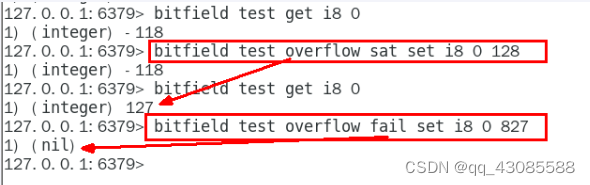
1. which 10 1. redis字符串 2. redis 列表 3. redis哈希表 4. redis集合 5. redis有序集合 6. redis地理空间 7. redis基数统计 8. redis位图 9. redis位域 10. redis流 2. 获取redis常见操作指令 官网英文:https://redis.io/commands 官网中文:https:/…...
优化生产流程:数字化工厂中的OPC UA分布式IO模块应用
背景 近年来,为了提升在全球范围内的竞争力,制造企业希望自己工厂的机器之间协同性更强,自动化设备采集到的数据能够发挥更大的价值,越来越多的传统型工业制造企业开始加入数字化工厂建设的行列,实现智能制造。 数字化…...
Elasticsearch(十四)搜索---搜索匹配功能⑤--全文搜索
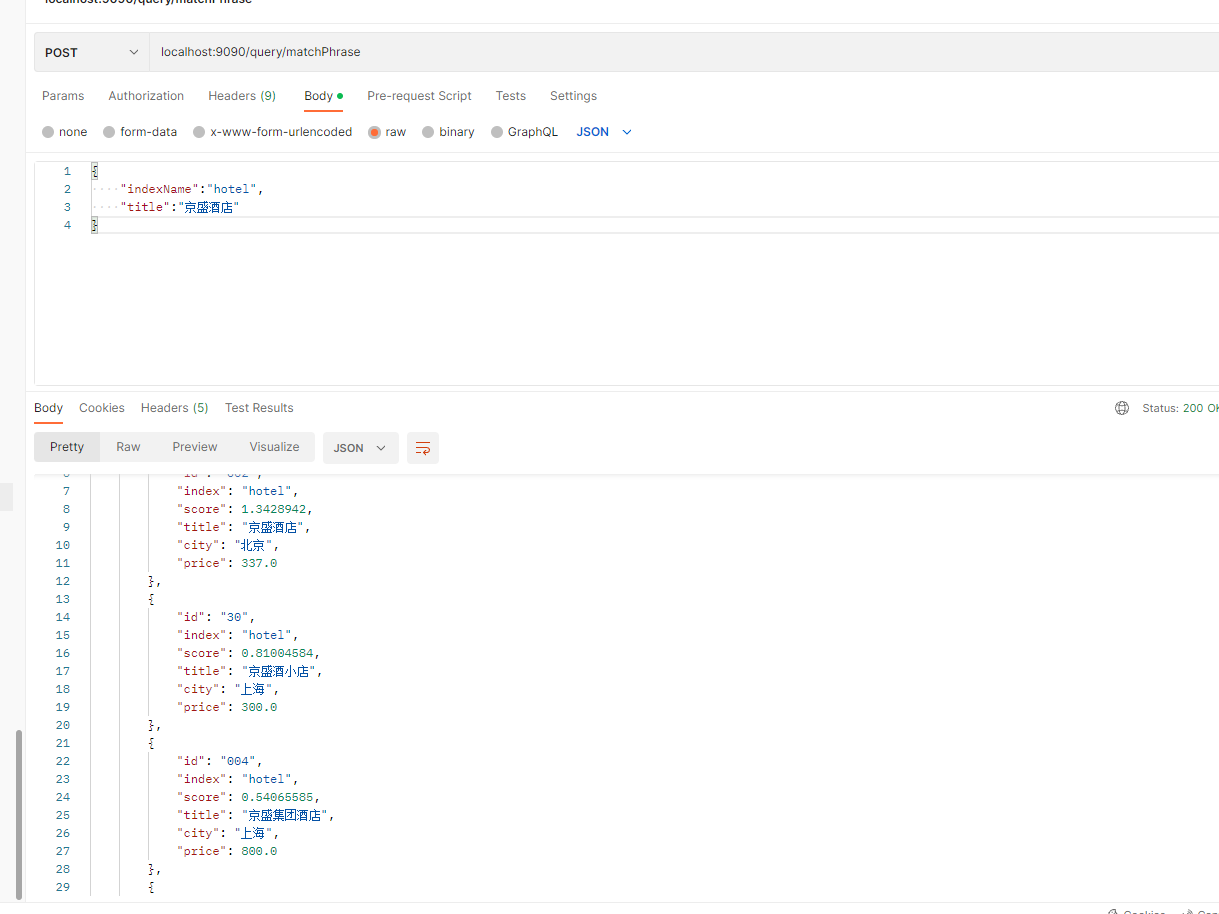
一、前言 不同于之前的term。terms等结构化查询,全文搜索首先对查询词进行分析,然后根据查询词的分词结果构建查询。这里所说的全文指的是文本类型数据(text类型),默认的数据形式是人类的自然语言,如对话内容、图书名…...

已解决Gradle错误:“Unable to load class ‘org.gradle.api.plugins.MavenPlugin‘”
🌷🍁 博主猫头虎 带您 Go to New World.✨🍁 🦄 博客首页——猫头虎的博客🎐 🐳《面试题大全专栏》 文章图文并茂🦕生动形象🦖简单易学!欢迎大家来踩踩~🌺 &a…...
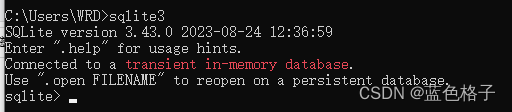
windows中安装sqlite
1. 下载文件 官网下载地址:https://www.sqlite.org/download.html 下载sqlite-dll-win64-x64-3430000.zip和sqlite-tools-win32-x86-3430000.zip文件(32位系统下载sqlite-dll-win32-x86-3430000.zip)。 2. 安装过程 解压文件 解压上一步…...

前端面试:【系统设计与架构】前端架构模式的演进
前端架构模式在现代Web开发中扮演着关键角色,它们帮助我们组织和管理前端应用的复杂性。本文将介绍一些常见的前端架构模式,包括MVC、MVVM、Flux和Redux,以及它们的演进和应用。 1. MVC(Model-View-Controller)&#x…...

【CSS】em单位的理解
1、em单位的定义 MDN的解释:它是相对于父元素的字体大小的一个单位。 例如:父元素font-size:16px;子元素的font-size:2em(也就是32px) 注:有一个误区,虽然他是一个相对…...

无涯教程-Python机器学习 - Based on human supervision函数
Python机器学习 中的 Based on human s - 无涯教程网无涯教程网提供https://www.learnfk.com/python-machine-learning/machine-learning-with-python-based-on-human-supervision.html...

【滑动窗口】leetcode209:长度最小的子数组
一.题目描述 长度最小的子数组 二.思路分析 题目要求:找出长度最小的符合要求的连续子数组,这个要求就是子数组的元素之和大于等于target。 如何确定一个连续的子数组?确定它的左右边界即可。如此一来,我们最先想到的就是暴力枚…...

C++ STL unordered_map
map hashmap 文章目录 Map、HashMap概念map、hashmap 的区别引用头文件初始化赋值unordered_map 自定义键值类型unordered_map 的 value 自定义数据类型遍历常用方法插入查找 key修改 value删除元素清空元素 unordered_map 中每一个元素都是一个 key-value 对,数据…...
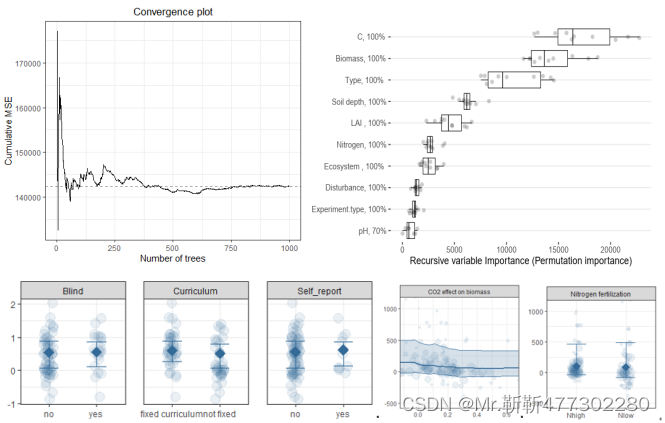
全流程R语言Meta分析核心技术应用
Meta分析是针对某一科研问题,根据明确的搜索策略、选择筛选文献标准、采用严格的评价方法,对来源不同的研究成果进行收集、合并及定量统计分析的方法,最早出现于“循证医学”,现已广泛应用于农林生态,资源环境等方面。…...
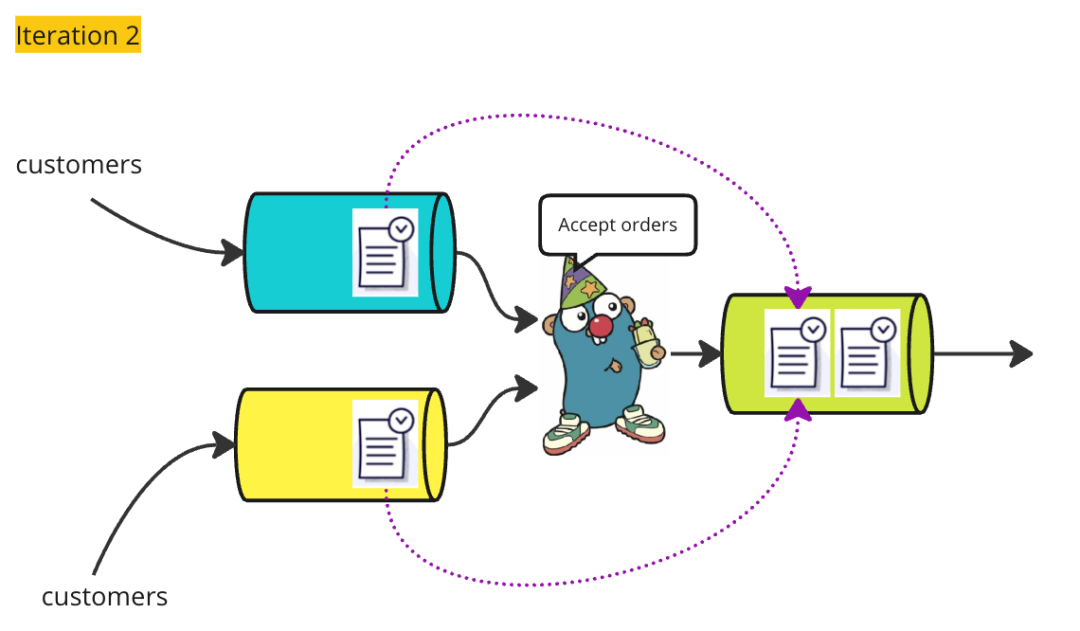
Go并发可视化解释 - Select语句
昨天,我发布了一篇文章,用可视化的方式解释了Golang中通道(Channel)的工作原理。如果你对通道的理解仍然存在困难,最好呢请在阅读本文之前先查看那篇文章。作为一个快速的复习:Partier、Candier 和 Stringe…...
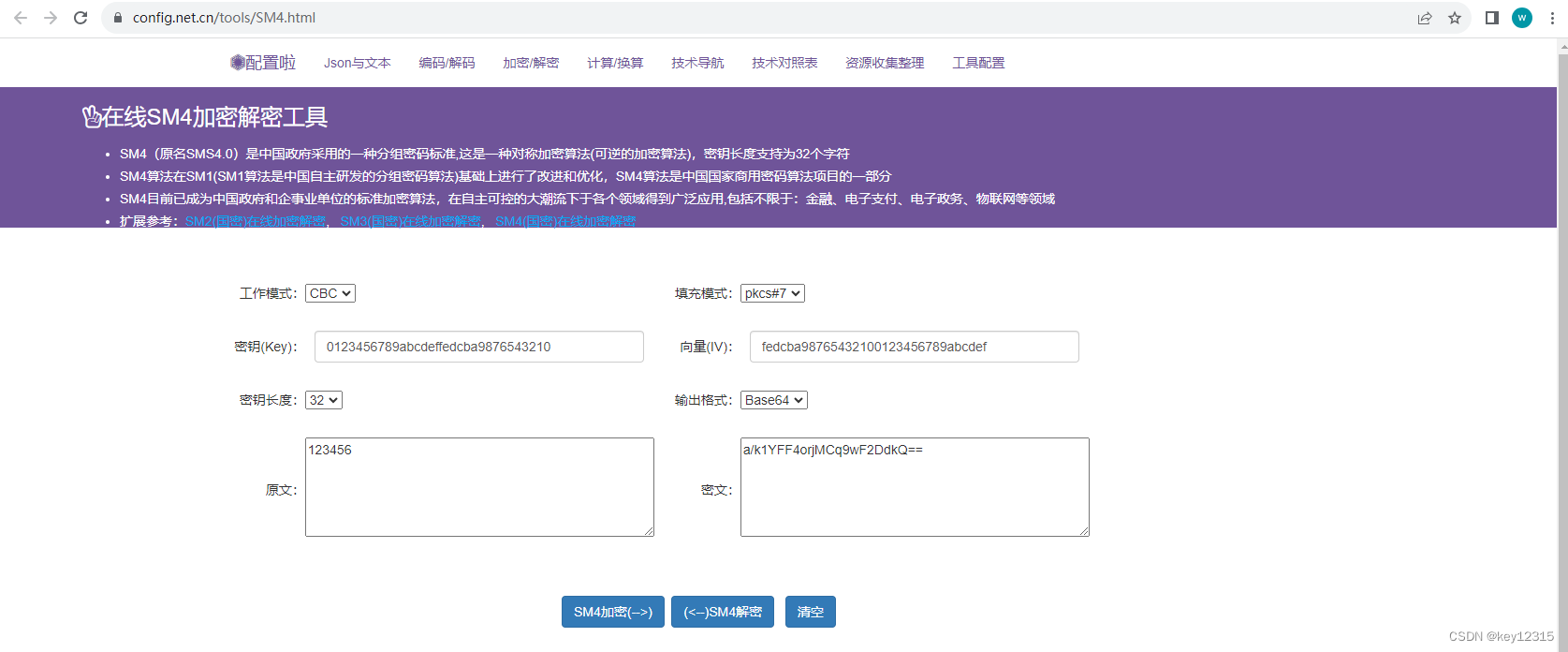
在线SM4(国密)加密解密工具
在线SM4(国密)加密解密工具...

golang的类型断言语法
例子1 在 Go 中,err.(interface{ Timeout() bool }) 是一个类型断言语法。它用于检查一个接口类型的变量 err 是否实现了一个带有 Timeout() bool 方法的接口。 具体而言,该类型断言的语法如下: if v, ok : err.(interface{ Timeout() boo…...

提速换挡 | 至真科技用技术打破业务壁垒,助力出海破局增长
各个行业都在谈出海,但真正成功的又有多少? 李宁出海十年海外业务收入占比仅有1.3%,走出去战略基本失败。 京东出海业务磕磕绊绊,九年过去国际化业务至今在财报上都不配拥有姓名。 几百万砸出去买量,一点水花都没有…...
第3篇:vscode搭建esp32 arduino开发环境
第1篇:Arduino与ESP32开发板的安装方法 第2篇:ESP32 helloword第一个程序示范点亮板载LED 1.下载vscode并安装 https://code.visualstudio.com/ 运行VSCodeUserSetup-x64-1.80.1.exe 2.点击扩展,搜索arduino,并点击安装 3.点击扩展设置,配置arduino…...

Apache Shiro是什么
特点 Apache Shiro是一个强大且易用的Java安全框架,用于身份验证、授权、会话管理和加密。它的设计目标是简化应用程序的安全性实现,使开发人员能够更轻松地处理各种安全性问题,从而提高应用程序的安全性和可维护性。下面是一些Apache Shiro的关键特点和概念: 特点和概念…...

告别臃肿!G-Helper:华硕笔记本用户的终极轻量级控制神器
告别臃肿!G-Helper:华硕笔记本用户的终极轻量级控制神器 【免费下载链接】g-helper Lightweight Armoury Crate alternative for Asus laptops with nearly the same functionality. Works with ROG Zephyrus, Flow, TUF, Strix, Scar, ProArt, Vivobook…...

GEO优化的两大误区:你是在“交学费”还是在“抢红利”?
当AI搜索成为用户的新入口,一批先行者已经吃到了红利。但更多人,还在两个极端之间摇摆。 你有没有遇到过这样的情况? 刷到某个同行,因为上了DeepSeek或豆包的推荐,咨询量翻了几倍。你也心动,开始研究GEO&a…...

Java基础小知识
一、 计算机基础知识1.计算机硬件的分类:运算器 控制器 存储器 输入设备 输出设备二、cmd命令窗口的基本用法操着: 说明:盘符名称 : 盘符切换。E:回车,表示切换到E盘dir 查看当前路径下的内容cd 目录 进入单级目录。cd…...

P2-CIFAR彩色图片识别
● 🍨 本文为🔗365天深度学习训练营中的学习记录博客 ● 🍖 原作者:K同学啊学习目标:1.编写一个完整的深度学习程序 2. 手动推导卷积层与池化层的计算过程一、前期准备1.设置GPUimport torch import torch.nn as nn im…...

保姆级教程:在RK3588开发板上用Python部署NanoTrack,实测120FPS真香
保姆级教程:在RK3588开发板上用Python部署NanoTrack,实测120FPS真香 RK3588作为当前嵌入式AI领域的旗舰级芯片,其强大的NPU算力让边缘设备也能流畅运行复杂的视觉算法。本文将手把手带你完成NanoTrack模型从转换到部署的全流程,实…...

告别单片机C语言:用FlexLua和CH9329模块5分钟自制USB自动化小工具
零代码革命:用FlexLuaCH9329打造办公自动化神器 每天重复点击鼠标、敲击键盘的枯燥操作是否让你疲惫不堪?想象一下,早晨电脑自动打卡、会议自动记录、邮件自动回复——这些看似需要专业编程知识的自动化操作,现在只需5分钟就能实现…...

别再乱用case了!Verilog里case、casez、casex到底啥区别?一个例子讲透
别再乱用case了!Verilog里case、casez、casex到底啥区别?一个例子讲透 第一次在Verilog代码里看到casez和casex时,我下意识以为它们只是case的某种变体语法。直到某次仿真结果出现诡异的不匹配,排查三小时后才发现是casex误用导致…...

Tensor Comprehensions高级特性:多GPU支持和内核重用策略的终极指南
Tensor Comprehensions高级特性:多GPU支持和内核重用策略的终极指南 【免费下载链接】TensorComprehensions A domain specific language to express machine learning workloads. 项目地址: https://gitcode.com/gh_mirrors/te/TensorComprehensions Tensor…...

如何在Linux系统上安装Realtek RTL8125 2.5GbE网卡驱动:完整配置指南
如何在Linux系统上安装Realtek RTL8125 2.5GbE网卡驱动:完整配置指南 【免费下载链接】realtek-r8125-dkms A DKMS package for easy use of Realtek r8125 driver, which supports 2.5 GbE. 项目地址: https://gitcode.com/gh_mirrors/re/realtek-r8125-dkms …...

python健身服务管理系统_健身房教练预约系统qeif6f6f
目录同行可拿货,招校园代理 ,本人源头供货商项目概述核心功能技术实现项目特点应用场景项目技术支持源码获取详细视频演示 :同行可合作点击我获取源码->获取博主联系方式->进我个人主页-->同行可拿货,招校园代理 ,本人源头供货商 项目概述 Python健身服务…...