
Kaggle(3):Predict CO2 Emissions in Rwanda
Kaggle(3):Predict CO2 Emissions in Rwanda

1. Introduction
在本次竞赛中,我们的任务是预测非洲 497 个不同地点 2022 年的二氧化碳排放量。 在训练数据中,我们有 2019-2021 年的二氧化碳排放量
本笔记本的内容:
1.通过平滑消除2020年一次性的新冠疫情趋势。 或者,用 2019 年和 2021 年的平均值来估算 2020 年也是一种有效的方法,但此处未实施
2. 观察靠近最大排放位置的位置也具有较高的排放水平。 执行 K-Means 聚类以根据数据点的位置对数据点进行聚类。 这允许具有相似排放的数据点被分组在一起
3. 以 2019 年和 2020 年为训练数据,用一些集成模型进行实验,以测试其在 2021 年数据上的 CV
import numpy as np
import pandas as pd
import matplotlib.pyplot as plt
import seaborn as sns
import math
from tqdm import tqdm
from sklearn.preprocessing import SplineTransformer
from holidays import CountryHoliday
from tqdm.notebook import tqdm
from typing import Listfrom category_encoders import OneHotEncoder, MEstimateEncoder, GLMMEncoder, OrdinalEncoder
from sklearn.model_selection import RepeatedStratifiedKFold, StratifiedKFold, KFold, RepeatedKFold, TimeSeriesSplit, train_test_split, cross_val_score
from sklearn.ensemble import ExtraTreesRegressor, RandomForestRegressor, GradientBoostingRegressor
from sklearn.ensemble import HistGradientBoostingRegressor, VotingRegressor, StackingRegressor
from sklearn.svm import SVR, LinearSVR
from sklearn.neighbors import KNeighborsRegressor
from sklearn.ensemble import RandomForestClassifier
from sklearn.linear_model import LinearRegression, Ridge, Lasso, ElasticNet, SGDRegressor, LogisticRegression
from sklearn.linear_model import PassiveAggressiveRegressor, ARDRegression
from sklearn.linear_model import TheilSenRegressor, RANSACRegressor, HuberRegressor
from sklearn.cross_decomposition import PLSRegression
from sklearn.neural_network import MLPRegressor
from sklearn.metrics import mean_squared_error, mean_absolute_error, roc_auc_score, roc_curve
from sklearn.metrics.pairwise import euclidean_distances
from sklearn.pipeline import Pipeline, make_pipeline
from sklearn.base import BaseEstimator, TransformerMixin
from sklearn.preprocessing import FunctionTransformer, StandardScaler, MinMaxScaler, LabelEncoder, SplineTransformer
from sklearn.compose import ColumnTransformer
from sklearn.impute import SimpleImputer, KNNImputer
from scipy.cluster.hierarchy import dendrogram, linkage
from scipy.spatial.distance import squareform
from sklearn.feature_selection import RFECV
from sklearn.decomposition import PCA
from xgboost import XGBRegressor, XGBClassifier
import lightgbm as lgbm
from lightgbm import LGBMRegressor, LGBMClassifier
from lightgbm import log_evaluation, early_stopping, record_evaluation
from catboost import CatBoostRegressor, CatBoostClassifier, Pool
from sklearn import set_config
from sklearn.multioutput import MultiOutputClassifier
from datetime import datetime, timedelta
import gcimport warnings
warnings.filterwarnings('ignore')set_config(transform_output = 'pandas')pal = sns.color_palette('viridis')pd.set_option('display.max_rows', 100)
M = 1.07
2. Examine Data
2.1
在这里,我们试图平滑 2020 年的数据以消除新冠趋势
1.使用平滑导入的数据集
2. 使用 2019 年和 2021 年值的平均值 [https://www.kaggle.com/code/kacperrabczewski/rwanda-co2-step-by-step-guide]
extrp = pd.read_csv("./data/PS3E20_train_covid_updated")
extrp = extrp[(extrp["year"] == 2020)]
extrp
| ID_LAT_LON_YEAR_WEEK | latitude | longitude | year | week_no | SulphurDioxide_SO2_column_number_density | SulphurDioxide_SO2_column_number_density_amf | SulphurDioxide_SO2_slant_column_number_density | SulphurDioxide_cloud_fraction | SulphurDioxide_sensor_azimuth_angle | ... | Cloud_cloud_top_height | Cloud_cloud_base_pressure | Cloud_cloud_base_height | Cloud_cloud_optical_depth | Cloud_surface_albedo | Cloud_sensor_azimuth_angle | Cloud_sensor_zenith_angle | Cloud_solar_azimuth_angle | Cloud_solar_zenith_angle | emission | |
|---|---|---|---|---|---|---|---|---|---|---|---|---|---|---|---|---|---|---|---|---|---|
| 53 | ID_-0.510_29.290_2020_00 | -0.510 | 29.290 | 2020 | 0 | 0.000064 | 0.970290 | 0.000073 | 0.163462 | -100.602665 | ... | 5388.602054 | 60747.063530 | 4638.602176 | 6.287709 | 0.283116 | -13.291375 | 33.679610 | -140.309173 | 30.053447 | 3.753601 |
| 54 | ID_-0.510_29.290_2020_01 | -0.510 | 29.290 | 2020 | 1 | NaN | NaN | NaN | NaN | NaN | ... | 6361.488754 | 53750.174162 | 5361.488754 | 19.167269 | 0.317732 | -30.474972 | 48.119754 | -139.437777 | 30.391957 | 4.051966 |
| 55 | ID_-0.510_29.290_2020_02 | -0.510 | 29.290 | 2020 | 2 | -0.000361 | 0.668526 | -0.000231 | 0.086199 | 73.269733 | ... | 5320.715902 | 61012.625000 | 4320.715861 | 48.203733 | 0.265554 | -12.461150 | 35.809728 | -137.854449 | 29.100415 | 4.154116 |
| 56 | ID_-0.510_29.290_2020_03 | -0.510 | 29.290 | 2020 | 3 | 0.000597 | 0.553729 | 0.000331 | 0.149257 | 73.522247 | ... | 6219.319294 | 55704.782998 | 5219.319269 | 12.809350 | 0.267030 | 16.381079 | 35.836898 | -139.017754 | 26.265561 | 4.165751 |
| 57 | ID_-0.510_29.290_2020_04 | -0.510 | 29.290 | 2020 | 4 | 0.000107 | 1.045238 | 0.000112 | 0.224283 | 77.588455 | ... | 6348.560006 | 54829.331776 | 5348.560014 | 35.283981 | 0.268983 | -12.193650 | 47.092968 | -134.474279 | 27.061321 | 4.233635 |
| ... | ... | ... | ... | ... | ... | ... | ... | ... | ... | ... | ... | ... | ... | ... | ... | ... | ... | ... | ... | ... | ... |
| 78965 | ID_-3.299_30.301_2020_48 | -3.299 | 30.301 | 2020 | 48 | 0.000114 | 1.123935 | 0.000125 | 0.149885 | 74.376836 | ... | 6092.323722 | 57479.397776 | 5169.185142 | 15.331296 | 0.261608 | 16.309625 | 39.924967 | -132.258700 | 30.393604 | 26.929207 |
| 78966 | ID_-3.299_30.301_2020_49 | -3.299 | 30.301 | 2020 | 49 | 0.000051 | 0.617927 | 0.000031 | 0.213135 | 72.364738 | ... | 5992.053006 | 57739.300155 | 4992.053006 | 27.214085 | 0.276616 | -0.287656 | 45.624810 | -134.460418 | 30.911741 | 26.606790 |
| 78967 | ID_-3.299_30.301_2020_50 | -3.299 | 30.301 | 2020 | 50 | -0.000235 | 0.633192 | -0.000149 | 0.257000 | -99.141518 | ... | 6104.231241 | 56954.517231 | 5181.570213 | 26.270365 | 0.260574 | -50.411241 | 37.645974 | -132.193161 | 32.516685 | 27.256273 |
| 78968 | ID_-3.299_30.301_2020_51 | -3.299 | 30.301 | 2020 | 51 | NaN | NaN | NaN | NaN | NaN | ... | 4855.537585 | 64839.955718 | 3858.187453 | 14.519789 | 0.248484 | 30.840922 | 39.529722 | -138.964016 | 28.574091 | 25.591976 |
| 78969 | ID_-3.299_30.301_2020_52 | -3.299 | 30.301 | 2020 | 52 | 0.000025 | 1.103025 | 0.000028 | 0.265622 | -99.811790 | ... | 5345.679464 | 62098.716546 | 4345.679397 | 13.082162 | 0.283677 | -13.002957 | 38.243055 | -136.660958 | 29.584058 | 25.559870 |
26341 rows × 76 columns
DATA_DIR = "./data/"
train = pd.read_csv(DATA_DIR + "train.csv")
test = pd.read_csv(DATA_DIR + "test.csv")def add_features(df):#df["week"] = df["year"].astype(str) + "-" + df["week_no"].astype(str)#df["date"] = df["week"].apply(lambda x: get_date_from_week_string(x))#df = df.drop(columns = ["week"])df["week"] = (df["year"] - 2019) * 53 + df["week_no"]#df["lat_long"] = df["latitude"].astype(str) + "#" + df["longitude"].astype(str)return dftrain = add_features(train)
test = add_features(test)
2.2
对预测进行一些有风险的后处理。
假设数据点的 MAX = max(2019 年排放量、2020 年排放量、2021 年排放量)。
如果 2021 年排放量 > 2019 年排放量,我们将 MAX * 1.07 分配给预测,否则我们只分配 MAX。 参考:https://www.kaggle.com/competitions/playground-series-s3e20/discussion/430152
vals = set()
for x in train[["latitude", "longitude"]].values:vals.add(tuple(x))vals = list(vals)
zeros = []for lat, long in vals:subset = train[(train["latitude"] == lat) & (train["longitude"] == long)]em_vals = subset["emission"].valuesif all(x == 0 for x in em_vals):zeros.append([lat, long])
test["2021_emission"] = test["week_no"]
test["2020_emission"] = test["week_no"]
test["2019_emission"] = test["week_no"]for lat, long in vals:test.loc[(test.latitude == lat) & (test.longitude == long), "2021_emission"] = train.loc[(train.latitude == lat) & (train.longitude == long) & (train.year == 2021) & (train.week_no <= 48), "emission"].valuestest.loc[(test.latitude == lat) & (test.longitude == long), "2020_emission"] = train.loc[(train.latitude == lat) & (train.longitude == long) & (train.year == 2020) & (train.week_no <= 48), "emission"].valuestest.loc[(test.latitude == lat) & (test.longitude == long), "2019_emission"] = train.loc[(train.latitude == lat) & (train.longitude == long) & (train.year == 2019) & (train.week_no <= 48), "emission"].values#print(train.loc[(train.latitude == lat) & (train.longitude == long) & (train.year == 2021), "emission"])test["ratio"] = (test["2021_emission"] / test["2019_emission"]).replace(np.nan, 0)
test["pos_ratio"] = test["ratio"].apply(lambda x: max(x, 1))
test["pos_ratio"] = test["pos_ratio"].apply(lambda x: 1.07 if x > 1 else x)
test["max"] = test[["2019_emission", "2020_emission", "2021_emission"]].max(axis=1)
test["lazy_pred"] = test["max"] * test["pos_ratio"]
test = test.drop(columns = ["ratio", "pos_ratio", "max", "2019_emission", "2020_emission", "2021_emission"])
train.loc[train.year == 2020, "emission"] = extrp
train
| ID_LAT_LON_YEAR_WEEK | latitude | longitude | year | week_no | SulphurDioxide_SO2_column_number_density | SulphurDioxide_SO2_column_number_density_amf | SulphurDioxide_SO2_slant_column_number_density | SulphurDioxide_cloud_fraction | SulphurDioxide_sensor_azimuth_angle | ... | Cloud_cloud_base_pressure | Cloud_cloud_base_height | Cloud_cloud_optical_depth | Cloud_surface_albedo | Cloud_sensor_azimuth_angle | Cloud_sensor_zenith_angle | Cloud_solar_azimuth_angle | Cloud_solar_zenith_angle | emission | week | |
|---|---|---|---|---|---|---|---|---|---|---|---|---|---|---|---|---|---|---|---|---|---|
| 0 | ID_-0.510_29.290_2019_00 | -0.510 | 29.290 | 2019 | 0 | -0.000108 | 0.603019 | -0.000065 | 0.255668 | -98.593887 | ... | 61085.809570 | 2615.120483 | 15.568533 | 0.272292 | -12.628986 | 35.632416 | -138.786423 | 30.752140 | 3.750994 | 0 |
| 1 | ID_-0.510_29.290_2019_01 | -0.510 | 29.290 | 2019 | 1 | 0.000021 | 0.728214 | 0.000014 | 0.130988 | 16.592861 | ... | 66969.478735 | 3174.572424 | 8.690601 | 0.256830 | 30.359375 | 39.557633 | -145.183930 | 27.251779 | 4.025176 | 1 |
| 2 | ID_-0.510_29.290_2019_02 | -0.510 | 29.290 | 2019 | 2 | 0.000514 | 0.748199 | 0.000385 | 0.110018 | 72.795837 | ... | 60068.894448 | 3516.282669 | 21.103410 | 0.251101 | 15.377883 | 30.401823 | -142.519545 | 26.193296 | 4.231381 | 2 |
| 3 | ID_-0.510_29.290_2019_03 | -0.510 | 29.290 | 2019 | 3 | NaN | NaN | NaN | NaN | NaN | ... | 51064.547339 | 4180.973322 | 15.386899 | 0.262043 | -11.293399 | 24.380357 | -132.665828 | 28.829155 | 4.305286 | 3 |
| 4 | ID_-0.510_29.290_2019_04 | -0.510 | 29.290 | 2019 | 4 | -0.000079 | 0.676296 | -0.000048 | 0.121164 | 4.121269 | ... | 63751.125781 | 3355.710107 | 8.114694 | 0.235847 | 38.532263 | 37.392979 | -141.509805 | 22.204612 | 4.347317 | 4 |
| ... | ... | ... | ... | ... | ... | ... | ... | ... | ... | ... | ... | ... | ... | ... | ... | ... | ... | ... | ... | ... | ... |
| 79018 | ID_-3.299_30.301_2021_48 | -3.299 | 30.301 | 2021 | 48 | 0.000284 | 1.195643 | 0.000340 | 0.191313 | 72.820518 | ... | 60657.101913 | 4590.879504 | 20.245954 | 0.304797 | -35.140368 | 40.113533 | -129.935508 | 32.095214 | 29.404171 | 154 |
| 79019 | ID_-3.299_30.301_2021_49 | -3.299 | 30.301 | 2021 | 49 | 0.000083 | 1.130868 | 0.000063 | 0.177222 | -12.856753 | ... | 60168.191528 | 4659.130378 | 6.104610 | 0.314015 | 4.667058 | 47.528435 | -134.252871 | 30.771469 | 29.186497 | 155 |
| 79020 | ID_-3.299_30.301_2021_50 | -3.299 | 30.301 | 2021 | 50 | NaN | NaN | NaN | NaN | NaN | ... | 56596.027209 | 5222.646823 | 14.817885 | 0.288058 | -0.340922 | 35.328098 | -134.731723 | 30.716166 | 29.131205 | 156 |
| 79021 | ID_-3.299_30.301_2021_51 | -3.299 | 30.301 | 2021 | 51 | -0.000034 | 0.879397 | -0.000028 | 0.184209 | -100.344827 | ... | 46533.348194 | 6946.858022 | 32.594768 | 0.274047 | 8.427699 | 48.295652 | -139.447849 | 29.112868 | 28.125792 | 157 |
| 79022 | ID_-3.299_30.301_2021_52 | -3.299 | 30.301 | 2021 | 52 | -0.000091 | 0.871951 | -0.000079 | 0.000000 | 76.825638 | ... | 47771.681887 | 6553.295018 | 19.464032 | 0.226276 | -12.808528 | 47.923441 | -136.299984 | 30.246387 | 27.239302 | 158 |
79023 rows × 77 columns
test
| ID_LAT_LON_YEAR_WEEK | latitude | longitude | year | week_no | SulphurDioxide_SO2_column_number_density | SulphurDioxide_SO2_column_number_density_amf | SulphurDioxide_SO2_slant_column_number_density | SulphurDioxide_cloud_fraction | SulphurDioxide_sensor_azimuth_angle | ... | Cloud_cloud_base_pressure | Cloud_cloud_base_height | Cloud_cloud_optical_depth | Cloud_surface_albedo | Cloud_sensor_azimuth_angle | Cloud_sensor_zenith_angle | Cloud_solar_azimuth_angle | Cloud_solar_zenith_angle | week | lazy_pred | |
|---|---|---|---|---|---|---|---|---|---|---|---|---|---|---|---|---|---|---|---|---|---|
| 0 | ID_-0.510_29.290_2022_00 | -0.510 | 29.290 | 2022 | 0 | NaN | NaN | NaN | NaN | NaN | ... | 41047.937500 | 7472.313477 | 7.935617 | 0.240773 | -100.113792 | 33.697044 | -133.047546 | 33.779583 | 159 | 3.753601 |
| 1 | ID_-0.510_29.290_2022_01 | -0.510 | 29.290 | 2022 | 1 | 0.000456 | 0.691164 | 0.000316 | 0.000000 | 76.239196 | ... | 54915.708579 | 5476.147161 | 11.448437 | 0.293119 | -30.510319 | 42.402593 | -138.632822 | 31.012380 | 160 | 4.051966 |
| 2 | ID_-0.510_29.290_2022_02 | -0.510 | 29.290 | 2022 | 2 | 0.000161 | 0.605107 | 0.000106 | 0.079870 | -42.055341 | ... | 39006.093750 | 7984.795703 | 10.753179 | 0.267130 | 39.087361 | 45.936480 | -144.784988 | 26.743361 | 161 | 4.231381 |
| 3 | ID_-0.510_29.290_2022_03 | -0.510 | 29.290 | 2022 | 3 | 0.000350 | 0.696917 | 0.000243 | 0.201028 | 72.169566 | ... | 57646.368368 | 5014.724115 | 11.764556 | 0.304679 | -24.465127 | 42.140419 | -135.027891 | 29.604774 | 162 | 4.305286 |
| 4 | ID_-0.510_29.290_2022_04 | -0.510 | 29.290 | 2022 | 4 | -0.000317 | 0.580527 | -0.000184 | 0.204352 | 76.190865 | ... | 52896.541873 | 5849.280394 | 13.065317 | 0.284221 | -12.907850 | 30.122641 | -135.500119 | 26.276807 | 163 | 4.347317 |
| ... | ... | ... | ... | ... | ... | ... | ... | ... | ... | ... | ... | ... | ... | ... | ... | ... | ... | ... | ... | ... | ... |
| 24348 | ID_-3.299_30.301_2022_44 | -3.299 | 30.301 | 2022 | 44 | -0.000618 | 0.745549 | -0.000461 | 0.234492 | 72.306198 | ... | 55483.459980 | 5260.120056 | 30.398508 | 0.180046 | -25.528588 | 45.284576 | -116.521412 | 29.992562 | 203 | 30.327420 |
| 24349 | ID_-3.299_30.301_2022_45 | -3.299 | 30.301 | 2022 | 45 | NaN | NaN | NaN | NaN | NaN | ... | 53589.917383 | 5678.951521 | 19.223844 | 0.177833 | -13.380005 | 43.770351 | -122.405759 | 29.017975 | 204 | 30.811167 |
| 24350 | ID_-3.299_30.301_2022_46 | -3.299 | 30.301 | 2022 | 46 | NaN | NaN | NaN | NaN | NaN | ... | 62646.761340 | 4336.282491 | 13.801194 | 0.219471 | -5.072065 | 33.226455 | -124.530639 | 30.187472 | 205 | 31.162886 |
| 24351 | ID_-3.299_30.301_2022_47 | -3.299 | 30.301 | 2022 | 47 | 0.000071 | 1.003805 | 0.000077 | 0.205077 | 74.327427 | ... | 50728.313991 | 6188.578464 | 27.887489 | 0.247275 | -0.668714 | 45.885617 | -129.006797 | 30.427455 | 206 | 31.439606 |
| 24352 | ID_-3.299_30.301_2022_48 | -3.299 | 30.301 | 2022 | 48 | NaN | NaN | NaN | NaN | NaN | ... | 46260.039092 | 6777.863819 | 23.771269 | 0.239684 | -40.826139 | 30.680056 | -124.895473 | 34.457720 | 207 | 29.944366 |
24353 rows × 77 columns
Insights
训练数据集有 79023 个观测值,测试数据集有 24353 个观测值。 正如我们所观察到的,某些列具有空值
3. EDA and Data Distribution
def plot_emission(train):plt.figure(figsize=(15, 6))sns.lineplot(data=train, x="week", y="emission", label="Emission", alpha=0.7, color='blue')plt.xlabel('Week')plt.ylabel('Emission')plt.title('Emission over time')plt.legend()plt.tight_layout()plt.show()plot_emission(train)

sns.histplot(train["emission"])
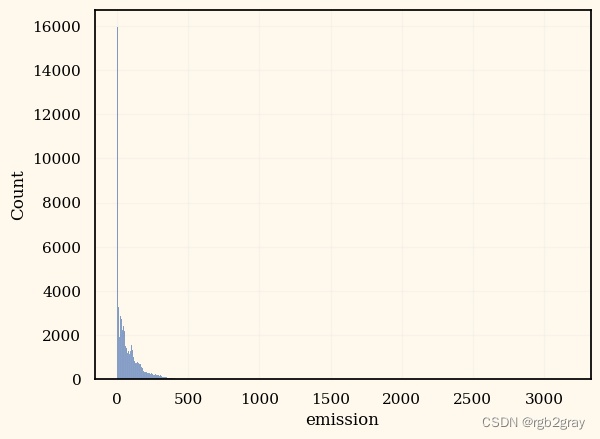
4. Data Transformation
print(len(vals))
497
Insights
有 497 个独特的经纬度组合
4.1
大多数特征只是噪音,我们可以将它们删除。(Reference: multiple discussion posts)
#train = train.drop(columns = ["ID_LAT_LON_YEAR_WEEK", "lat_long"])
#test = test.drop(columns = ["ID_LAT_LON_YEAR_WEEK", "lat_long"])train = train[["latitude", "longitude", "year", "week_no", "emission"]]
test = test[["latitude", "longitude", "year", "week_no", "lazy_pred"]]
4.2
K Means 聚类 + 到最高排放量的距离
#https://www.kaggle.com/code/lucasboesen/simple-catboost-6-features-cv-21-7
from sklearn.cluster import KMeans
import haversine as hskm_train = train.groupby(by=['latitude', 'longitude'], as_index=False)['emission'].mean()
model = KMeans(n_clusters = 7, random_state = 42)
model.fit(km_train)
yhat_train = model.predict(km_train)
km_train['kmeans_group'] = yhat_train""" Own Groups """
# Some locations have emission == 0
km_train['is_zero'] = km_train['emission'].apply(lambda x: 'no_emission_recorded' if x==0 else 'emission_recorded')# Distance to the highest emission location
max_lat_lon_emission = km_train.loc[km_train['emission']==km_train['emission'].max(), ['latitude', 'longitude']]
km_train['distance_to_max_emission'] = km_train.apply(lambda x: hs.haversine((x['latitude'], x['longitude']), (max_lat_lon_emission['latitude'].values[0], max_lat_lon_emission['longitude'].values[0])), axis=1)train = train.merge(km_train[['latitude', 'longitude', 'kmeans_group', 'distance_to_max_emission']], on=['latitude', 'longitude'])
test = test.merge(km_train[['latitude', 'longitude', 'kmeans_group', 'distance_to_max_emission']], on=['latitude', 'longitude'])
#train = train.drop(columns = ["latitude", "longitude"])
#test = test.drop(columns = ["latitude", "longitude"])
train
| latitude | longitude | year | week_no | emission | kmeans_group | distance_to_max_emission | |
|---|---|---|---|---|---|---|---|
| 0 | -0.510 | 29.290 | 2019 | 0 | 3.750994 | 6 | 207.849890 |
| 1 | -0.510 | 29.290 | 2019 | 1 | 4.025176 | 6 | 207.849890 |
| 2 | -0.510 | 29.290 | 2019 | 2 | 4.231381 | 6 | 207.849890 |
| 3 | -0.510 | 29.290 | 2019 | 3 | 4.305286 | 6 | 207.849890 |
| 4 | -0.510 | 29.290 | 2019 | 4 | 4.347317 | 6 | 207.849890 |
| ... | ... | ... | ... | ... | ... | ... | ... |
| 79018 | -3.299 | 30.301 | 2021 | 48 | 29.404171 | 6 | 157.630611 |
| 79019 | -3.299 | 30.301 | 2021 | 49 | 29.186497 | 6 | 157.630611 |
| 79020 | -3.299 | 30.301 | 2021 | 50 | 29.131205 | 6 | 157.630611 |
| 79021 | -3.299 | 30.301 | 2021 | 51 | 28.125792 | 6 | 157.630611 |
| 79022 | -3.299 | 30.301 | 2021 | 52 | 27.239302 | 6 | 157.630611 |
79023 rows × 7 columns
test
| latitude | longitude | year | week_no | lazy_pred | kmeans_group | distance_to_max_emission | |
|---|---|---|---|---|---|---|---|
| 0 | -0.510 | 29.290 | 2022 | 0 | 3.753601 | 6 | 207.849890 |
| 1 | -0.510 | 29.290 | 2022 | 1 | 4.051966 | 6 | 207.849890 |
| 2 | -0.510 | 29.290 | 2022 | 2 | 4.231381 | 6 | 207.849890 |
| 3 | -0.510 | 29.290 | 2022 | 3 | 4.305286 | 6 | 207.849890 |
| 4 | -0.510 | 29.290 | 2022 | 4 | 4.347317 | 6 | 207.849890 |
| ... | ... | ... | ... | ... | ... | ... | ... |
| 24348 | -3.299 | 30.301 | 2022 | 44 | 30.327420 | 6 | 157.630611 |
| 24349 | -3.299 | 30.301 | 2022 | 45 | 30.811167 | 6 | 157.630611 |
| 24350 | -3.299 | 30.301 | 2022 | 46 | 31.162886 | 6 | 157.630611 |
| 24351 | -3.299 | 30.301 | 2022 | 47 | 31.439606 | 6 | 157.630611 |
| 24352 | -3.299 | 30.301 | 2022 | 48 | 29.944366 | 6 | 157.630611 |
24353 rows × 7 columns
cat_params = {'n_estimators': 799, 'learning_rate': 0.09180872710592884,'depth': 8, 'l2_leaf_reg': 1.0242996861886846, 'subsample': 0.38227256755249117, 'colsample_bylevel': 0.7183481537623551,'random_state': 42,"silent": True,
}lgb_params = {'n_estimators': 835, 'max_depth': 12, 'reg_alpha': 3.849279869880706, 'reg_lambda': 0.6840221712299135, 'min_child_samples': 10, 'subsample': 0.6810493885301987, 'learning_rate': 0.0916362259866008, 'colsample_bytree': 0.3133780298325982, 'colsample_bynode': 0.7966712089198238,"random_state": 42,
}xgb_params = {"random_state": 42,
}rf_params = {'n_estimators': 263, 'max_depth': 41, 'min_samples_split': 10, 'min_samples_leaf': 3,"random_state": 42,"verbose": 0
}et_params = {"random_state": 42,"verbose": 0
}
5. Validate Performance on 2021 data
def rmse(a, b):return mean_squared_error(a, b, squared=False)
validation = train[train.year == 2021]
clusters = train["kmeans_group"].unique()for i in range(len(clusters)):cluster = clusters[i]print("==============================================")print(f" Cluster {cluster} ")train_c = train[train["kmeans_group"] == cluster]X_train = train_c[train_c.year < 2021].drop(columns = ["emission", "kmeans_group"])y_train = train_c[train_c.year < 2021]["emission"].copy()X_val = train_c[train_c.year >= 2021].drop(columns = ["emission", "kmeans_group"])y_val = train_c[train_c.year >= 2021]["emission"].copy()#=======================================================================================catboost_reg = CatBoostRegressor(**cat_params)catboost_reg.fit(X_train, y_train, eval_set=(X_val, y_val))catboost_pred = catboost_reg.predict(X_val) * Mprint(f"RMSE of CatBoost: {rmse(catboost_pred, y_val)}")#=======================================================================================lightgbm_reg = LGBMRegressor(**lgb_params,verbose=-1)lightgbm_reg.fit(X_train, y_train, eval_set=(X_val, y_val))lightgbm_pred = lightgbm_reg.predict(X_val) * Mprint(f"RMSE of LightGBM: {rmse(lightgbm_pred, y_val)}")#=======================================================================================xgb_reg = XGBRegressor(**xgb_params)xgb_reg.fit(X_train, y_train, eval_set=[(X_val, y_val)], verbose = False)xgb_pred = xgb_reg.predict(X_val) * Mprint(f"RMSE of XGBoost: {rmse(xgb_pred, y_val)}")#=======================================================================================rf_reg = RandomForestRegressor(**rf_params)rf_reg.fit(X_train, y_train)rf_pred = rf_reg.predict(X_val) * Mprint(f"RMSE of Random Forest: {rmse(rf_pred, y_val)}")#=======================================================================================et_reg = ExtraTreesRegressor(**et_params)et_reg.fit(X_train, y_train)et_pred = et_reg.predict(X_val) * Mprint(f"RMSE of Extra Trees: {rmse(et_pred, y_val)}")overall_pred = lightgbm_pred #(catboost_pred + lightgbm_pred) / 2validation.loc[validation["kmeans_group"] == cluster, "emission"] = overall_predprint(f"RMSE Overall: {rmse(overall_pred, y_val)}")print("==============================================")
print(f"[DONE] RMSE of all clusters: {rmse(validation['emission'], train[train.year == 2021]['emission'])}")
print(f"[DONE] RMSE of all clusters Week 1-20: {rmse(validation[validation.week_no < 21]['emission'], train[(train.year == 2021) & (train.week_no < 21)]['emission'])}")
print(f"[DONE] RMSE of all clusters Week 21+: {rmse(validation[validation.week_no >= 21]['emission'], train[(train.year == 2021) & (train.week_no  >= 21)]['emission'])}")
==============================================Cluster 6
RMSE of CatBoost: 2.3575606902299895
RMSE of LightGBM: 2.2103640167714094
RMSE of XGBoost: 2.5018849673349863
RMSE of Random Forest: 2.6335510523545556
RMSE of Extra Trees: 3.0029623116826776
RMSE Overall: 2.2103640167714094
==============================================Cluster 5
RMSE of CatBoost: 19.175306730779514
RMSE of LightGBM: 17.910821889134688
RMSE of XGBoost: 19.6677120674706
RMSE of Random Forest: 18.856743714624777
RMSE of Extra Trees: 20.70417439300032
RMSE Overall: 17.910821889134688
==============================================Cluster 1
RMSE of CatBoost: 9.26195004601851
RMSE of LightGBM: 8.513309514506675
RMSE of XGBoost: 10.137965612920658
RMSE of Random Forest: 9.838001199034126
RMSE of Extra Trees: 11.043246766709913
RMSE Overall: 8.513309514506675
==============================================Cluster 4
RMSE of CatBoost: 44.564695183442716
RMSE of LightGBM: 43.946690922308754
RMSE of XGBoost: 50.18811358270916
RMSE of Random Forest: 46.39201148051631
RMSE of Extra Trees: 50.58999576441371
RMSE Overall: 43.946690922308754
==============================================Cluster 0
RMSE of CatBoost: 28.408461784012662
RMSE of LightGBM: 26.872533954605416
RMSE of XGBoost: 30.622689084145943
RMSE of Random Forest: 28.46657485784377
RMSE of Extra Trees: 31.733046766544884
RMSE Overall: 26.872533954605416
==============================================Cluster 3
RMSE of CatBoost: 263.29528869714665
RMSE of LightGBM: 326.12883397111284
RMSE of XGBoost: 336.5771065570381
RMSE of Random Forest: 303.9321016178147
RMSE of Extra Trees: 336.67756932119914
RMSE Overall: 326.12883397111284
==============================================Cluster 2
RMSE of CatBoost: 206.96165808156715
RMSE of LightGBM: 222.40891682146665
RMSE of XGBoost: 281.12604107718465
RMSE of Random Forest: 232.11332438348992
RMSE of Extra Trees: 281.29392713471816
RMSE Overall: 222.40891682146665
==============================================
[DONE] RMSE of all clusters: 23.275548123498453
[DONE] RMSE of all clusters Week 1-20: 31.92891146501802
[DONE] RMSE of all clusters Week 21+: 15.108200701163458
6. Predicting 2022 result
clusters = train["kmeans_group"].unique()for i in tqdm(range(len(clusters))):cluster = clusters[i]train_c = train[train["kmeans_group"] == cluster]if "emission" in test.columns:test_c = test[test["kmeans_group"] == cluster].drop(columns = ["emission", "kmeans_group", "lazy_pred"])else:test_c = test[test["kmeans_group"] == cluster].drop(columns = ["kmeans_group", "lazy_pred"])X = train_c.drop(columns = ["emission", "kmeans_group"])y = train_c["emission"].copy()#=======================================================================================catboost_reg = CatBoostRegressor(**cat_params)catboost_reg.fit(X, y)#print(test_c)catboost_pred = catboost_reg.predict(test_c)#=======================================================================================lightgbm_reg = LGBMRegressor(**lgb_params,verbose=-1)lightgbm_reg.fit(X, y)#print(test_c)lightgbm_pred = lightgbm_reg.predict(test_c)#=======================================================================================#xgb_reg = XGBRegressor(**xgb_params)#xgb_reg.fit(X, y, verbose = False)#xgb_pred = xgb_reg.predict(test)#=======================================================================================rf_reg = RandomForestRegressor(**rf_params)rf_reg.fit(X, y)rf_pred = rf_reg.predict(test_c)#=======================================================================================#et_reg = ExtraTreesRegressor(**et_params)#et_reg.fit(X, y)#et_pred = et_reg.predict(test)overall_pred = lightgbm_pred #(catboost_pred + lightgbm_pred) / 2test.loc[test["kmeans_group"] == cluster, "emission"] = overall_pred
0%| | 0/7 [00:00<?, ?it/s]
test["emission"] = test["emission"] * 1.07
test.to_csv('submission.csv', index=False)
相关文章:
Kaggle(3):Predict CO2 Emissions in Rwanda
Kaggle(3):Predict CO2 Emissions in Rwanda 1. Introduction 在本次竞赛中,我们的任务是预测非洲 497 个不同地点 2022 年的二氧化碳排放量。 在训练数据中,我们有 2019-2021 年的二氧化碳排放量 本笔记本的内容&am…...

【技巧分享】如何获取子窗体选择了多少记录数?一招搞定!
Hi,大家好久不见。 我这个更新速度是不是太慢了呀,因为,最近又又又在忙,请大家谅解啦。 现在更新文章、视频都要花好久去考虑,好不容易有个灵感了,一搜索,结果发现之前都已经分享过了(委屈脸&…...

Kotlin AQ
如何学习kotlin? 学习Kotlin的步骤如下: 1. 理解Kotlin的基础:首先,你需要理解Kotlin的基础知识,包括变量、数据类型、运算符、控制流等。你可以通过阅读Kotlin的官方文档或者其他在线教程来学习。 2. 实践编程:理论…...
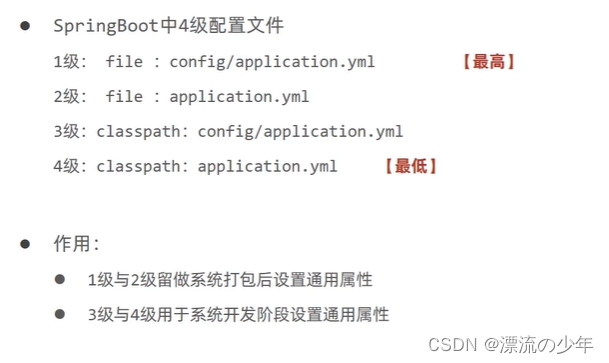
SpringBoot入门篇2 - 配置文件格式、多环境开发、配置文件分类
目录 1.配置文件格式(3种) 例:修改服务器端口。(3种) src/main/resources/application.properties server.port80 src/main/resources/application.yml(主要用这种) server:port: 80 src/m…...

UOS安装6.1.11内核或4.19内核
6.1.11内核 sudo sh -c echo "deb https://proposed-packages.deepin.com/beige-testing unstable main dde community commercial " > /etc/apt/sources.list.d/deepin-testing.list sudo apt update && sudo apt install linux-image-6.1.11-amd64-de…...

HiveSQL刷题
41、同时在线人数问题 现有各直播间的用户访问记录表(live_events)如下,表中每行数据表达的信息为,一个用户何时进入了一个直播间,又在何时离开了该直播间。 user_id (用户id)live_id (直播间id)in_datetime (进入直…...

path路径模块
path模块是Node.js官方提供的、用来处理路径的模块。它提供了一系列的方法和属性,用来满足用户对路径的处理需求。 path.join( )用来将多个路径片段拼接成一个完整的路径字符串 ../会抵消前面的路径 const path require(path) const pathStr path.join(/a,/b,../,/d) conso…...
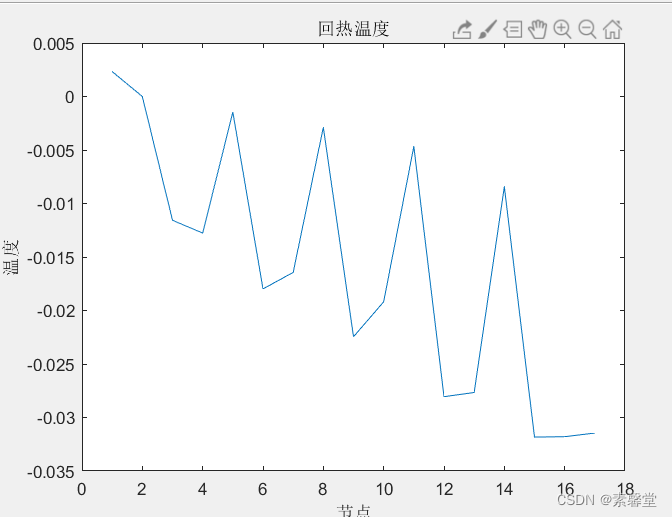
1.文章复现《热电联产系统在区域综合能源系统中的定容选址研究》(附matlab程序)
0.代码链接 文章复现《热电联产系统在区域综合能源系统中的定容选址研究》(matlab程序)-Matlab文档类资源-CSDN文库 1.简述 本文采用遗传算法的方式进行了下述文章的复现并采用电-热节点的方式进行了潮流计算以降低电网的网络损耗 分析了电网的基本数…...
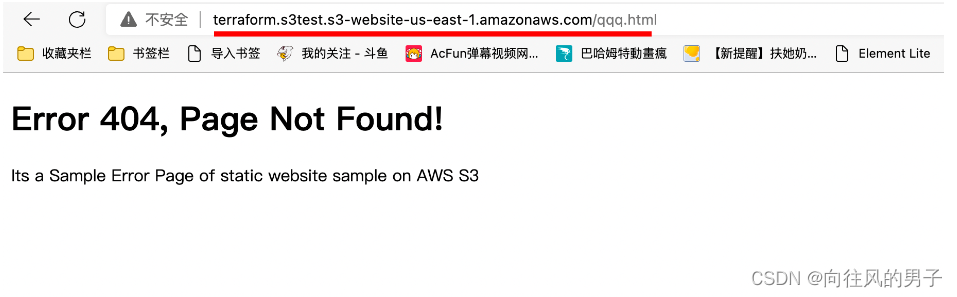
【Terraform学习】使用 Terraform 托管 S3 静态网站(Terraform-AWS最佳实战学习)
使用 Terraform 托管 S3 静态网站 实验步骤 前提条件 安装 Terraform: 地址 下载仓库代码模版 本实验代码位于 task_s3 文件夹中。 变量文件 variables.tf 在上面的代码中,您将声明,aws_access_key,aws_secret_key和区域变量…...

触发JVM fatal error并配置相关JVM参数
1. 絮絮叨叨 工作中,Java服务因为fatal error(致命错误,笔者称其为jvm crash),在服务运行日志中出现了致命错误的概要信息: # # A fatal error has been detected by the Java Runtime Environment: # # S…...

爬虫(bilibili热门课程记录)
什么是爬虫?程序蜘蛛,沿着互联网获取相关信息,收集目标信息。 一、python环境安装 1、先从Download Python | Python.org中下载最新版本的python解释器 2、再从Download PyCharm: Python IDE for Professional Developers by JetBrains中下…...
14-模型 - 增删改查
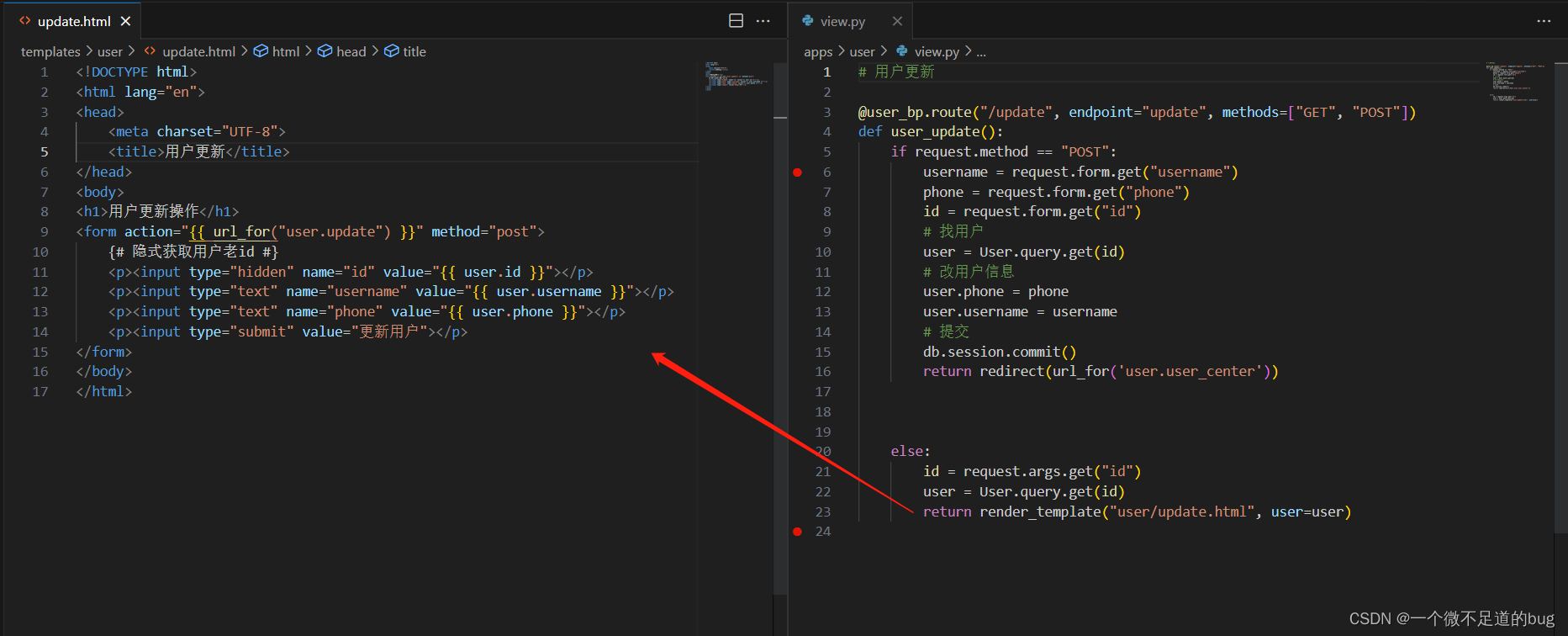
增: # 1. 找到模型类并创建对象 user User() # 2. 给对象的属性赋值 user.username username user.password password user.phone phone # 3. 将user对象添加到session中 (类似缓存) db.session.add(user) # 4. 提交数据 db.session.commit() 删: # 两种删除:# 1. 逻辑删…...

C#与西门子PLC1500的ModbusTcp服务器通信3--搭建ModbusTcp服务器
1、打开仿真工具,创建PLC,注意创建完成后不要关闭 注意,这个IP地址必须与西门子虚拟网卡的IP地址及虚拟机的网卡IP地址同一网段 2、打开博途V15,创建项目,命名为Lan项目 3、添加1500系列CPU1513 4、设置设置IP地址及属…...
Linux系统编程:线程控制
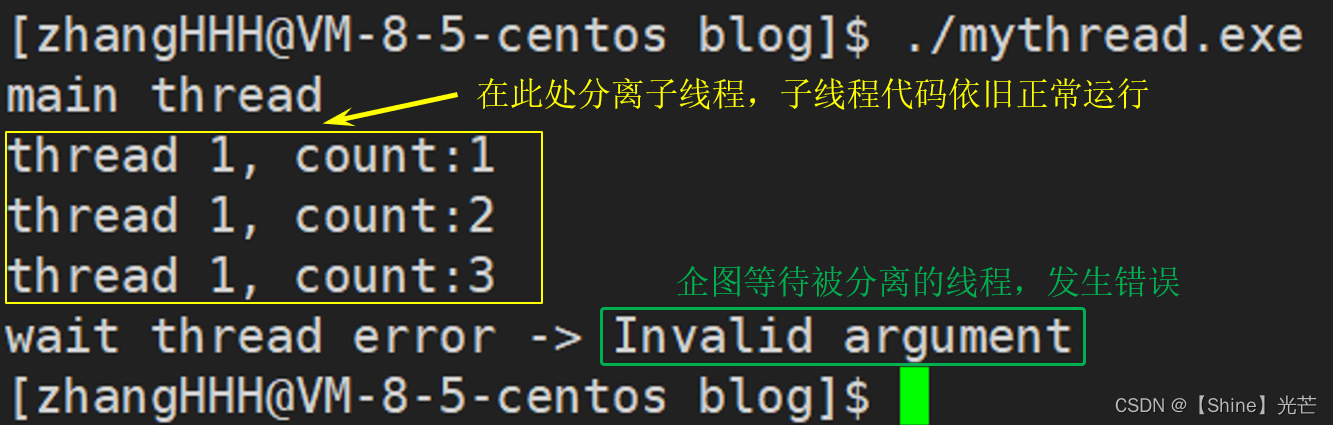
目录 一. 线程的创建 1.1 pthread_create函数 1.2 线程id的本质 二. 多线程中的异常和程序替换 2.1 多线程程序异常 2.2 多线程中的程序替换 三. 线程等待 四. 线程的终止和分离 4.1 线程函数return 4.2 线程取消 pthread_cancel 4.3 线程退出 pthread_exit 4.4 线程…...
基于Java+SpringBoot+Vue前后端分离纺织品企业财务管理系统设计和实现
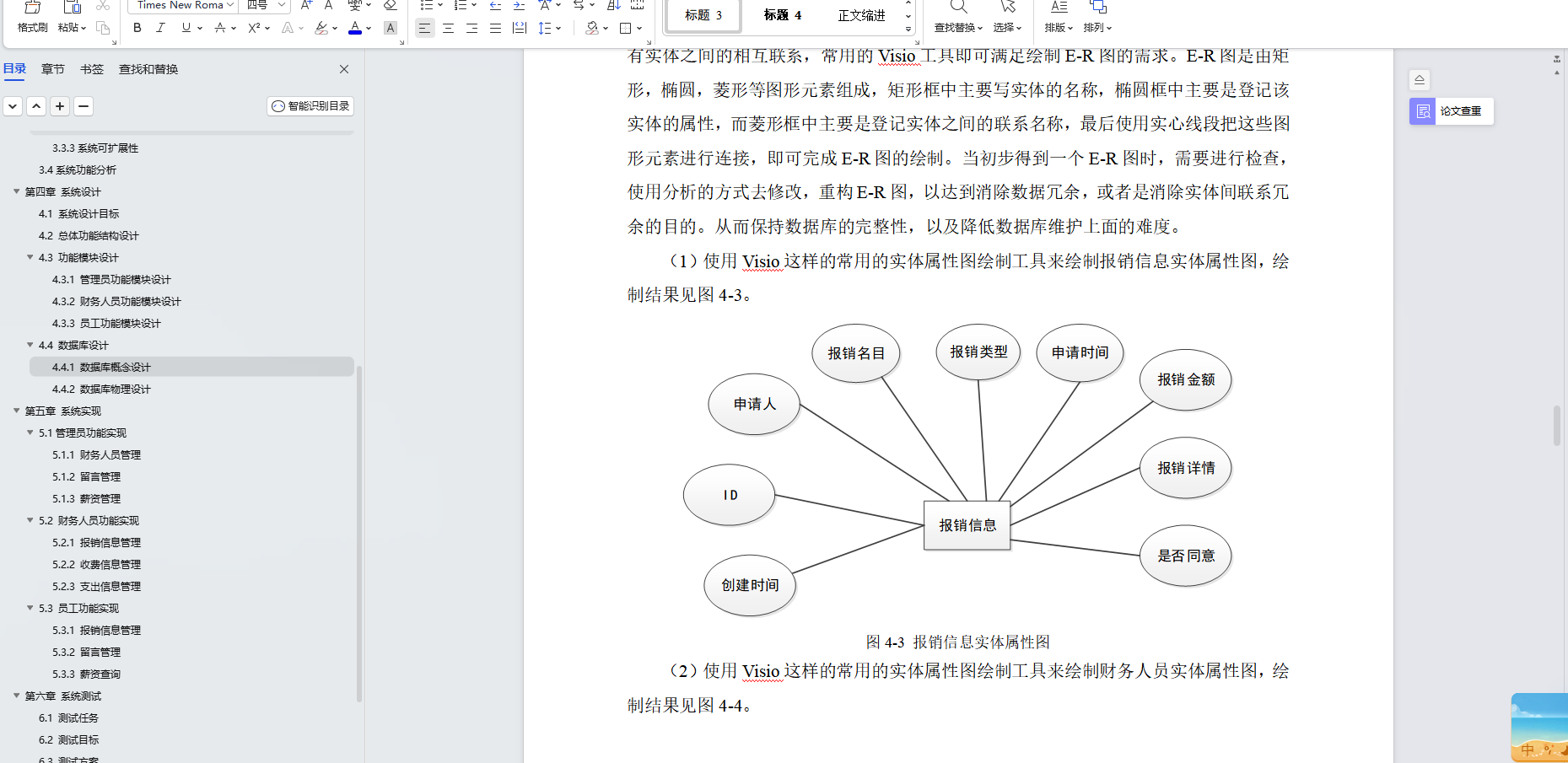
博主介绍:✌全网粉丝30W,csdn特邀作者、博客专家、CSDN新星计划导师、Java领域优质创作者,博客之星、掘金/华为云/阿里云/InfoQ等平台优质作者、专注于Java技术领域和毕业项目实战✌ 🍅文末获取源码联系🍅 👇🏻 精彩专…...

搭建开发环境-Windows
写C# 的请出去。 然后,Windows 是最好的Linux发行版。搭建开发环境-WSLUbuntu...
【 Python 全栈开发 - 人工智能篇 - 45 】集成算法与聚类算法
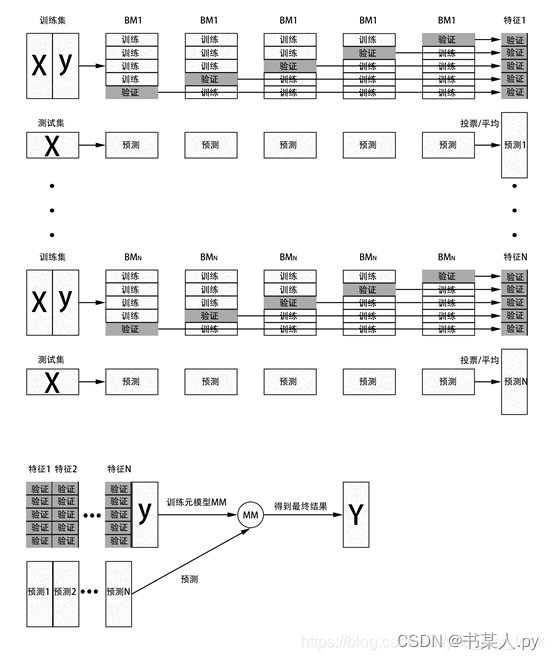
文章目录 一、集成算法1.1 概念1.2 常用集成算法1.2.1 Bagging1.2.2 Boosting1.2.2.1 AdaBoost1.2.2.2 GBDT1.2.2.3 XgBoost 1.2.3 Stacking 二、聚类算法2.1 概念2.2 常用聚类算法2.2.1 K-means2.2.2 层次聚类2.2.3 DBSCAN算法2.2.4 AP聚类算法2.2.5 高斯混合模型聚类算法 一、…...

SSM商城项目实战:账户充值功能实现
SSM商城项目实战:账户充值功能实现 在一个电商平台中,用户账户充值是一个非常重要的功能。本文将介绍如何在SSM(SpringSpringMVCMyBatis)商城项目中实现账户充值功能。通过本文的指导,你将学会如何在项目中添加账户充…...

wireshark工具pcap文件转换
pcap详解_pcap_loop_小虎随笔的博客-CSDN博客 分析802.11无线报文hexdump内容:利用wireshark自带二进制工具text2pcap将hexdump内容转换为pcap文件..._weixin_30835933的博客-CSDN博客 text2pcap: 将hex转储文本转换为Wireshark可打开的pcap文件(wireshark,数据) …...

Python+TinyPNG熊猫网站自动化的压缩图片
前言 本篇在讲什么 PythonTinyPNG自动化处理图片 本篇需要什么 对Python语法有简单认知 依赖Python2.7环境 依赖TinyPNG工具 本篇的特色 具有全流程的图文教学 重实践,轻理论,快速上手 提供全流程的源码内容 ★提高阅读体验★ 👉…...

10分钟重塑Windows体验:Win11Debloat系统优化完全指南
10分钟重塑Windows体验:Win11Debloat系统优化完全指南 【免费下载链接】Win11Debloat 一个简单的PowerShell脚本,用于从Windows中移除预装的无用软件,禁用遥测,从Windows搜索中移除Bing,以及执行各种其他更改以简化和改…...
)
避坑指南:ThingsBoard部件开发中5个常见错误与优化方案(附跑马灯Demo代码)
ThingsBoard部件开发实战:5个高频踩坑点与性能优化技巧(含跑马灯完整实现) 最近在技术社区看到不少开发者讨论ThingsBoard部件开发中的"玄学问题"——明明按照文档操作却出现各种诡异现象。作为经历过完整产品开发周期的技术负责人…...

本地部署开源推送通知系统 ntfy 并实现外部访问
ntfy 是一款简单、轻量级且功能强大的开源推送通知系统,它的核心目标是让用户或开发者能够轻松地从任何设备、任何地方向自己的手机或桌面发送通知。本文将详细介绍如何在 Linux 系统局域网内部署 ntfy 并结合路由侠实现外网访问局域网内部署的 ntfy 。 第一步&…...

3步告别卡顿:用鸣潮工具箱实现流畅游戏体验
3步告别卡顿:用鸣潮工具箱实现流畅游戏体验 【免费下载链接】WaveTools 🧰鸣潮工具箱 项目地址: https://gitcode.com/gh_mirrors/wa/WaveTools 你的游戏还在卡顿吗?试试这个免费解决方案 你是否曾经在《鸣潮》的激烈战斗中遭遇突然的…...

RSA1 - Writeup by AI
RSA1 - Writeup by AI 1. 题目描述项目内容题目来源Bugku题目类型Crypto (密码学)考点RSA 大数分解、私钥计算题目信息 题目给出了 RSA 加密的三个参数: e 65537 N 1018261336751023520497560395829454421245429586704872293236600679847605951423419167478189648…...

LSPosed-Irena深度解析:Android运行时Hook框架的终极指南
LSPosed-Irena深度解析:Android运行时Hook框架的终极指南 【免费下载链接】LSPosed-Irena Useless LSPosed Framework Fork 项目地址: https://gitcode.com/gh_mirrors/ls/LSPosed-Irena 你是否曾想过,在不修改APK源代码的情况下,深度…...
)
贪心算法3(c++)
概念题目最短前缀题目描述 一个字符串的前缀是从该字符串的第一个字符起始的一个子串。例如carbon的字串是:cca,carcarb,carbo,和carbon。我们现在希望能用前缀来缩略的表示单词。例如,carbohydrate通常用carb来缩略表示,现在给你一组单词,要求你找到唯一…...
)
C# WebSocket实战:5分钟搞定实时聊天应用(附完整源码)
C# WebSocket实战:5分钟构建高可靠实时聊天系统 实时通信已成为现代应用的核心需求之一。想象一下,当用户发送消息时,对方能立即看到;当股票价格波动时,交易界面实时更新;当多人协作编辑文档时,…...

AI写的论文如何降到20%以内?分场景教程+工具对比
AI写的论文如何降到20%以内?分场景教程工具对比 “我用DeepSeek写了大半篇论文,导师要求知网AI率必须低于20%,现在已经是52%,我该怎么办?” 这是毕业季最典型的求助问题之一。 不同的情况,处理方法不一样。…...
)
Spring Boot项目实战:手把手教你配置Google Play订阅与Pub/Sub回调(含完整代码)
Spring Boot实战:构建高可靠Google Play订阅与Pub/Sub回调系统 在移动应用商业化路径中,应用内订阅已成为数字服务持续变现的核心模式。根据Statista数据,2023年全球应用订阅收入达到380亿美元,其中Google Play贡献了超过34%的份额…...