
【Qt QAxObject】使用 QAxObject 高效任意读写 Excel 表
1. 用什么操作 Excel 表
Qt 的官网库中是不包含 Microsoft Excel 的操作库,关于对 Microsoft Excel 的操作库可选的有很多,包含基于 Windows 系统本身的 ActiveX、Qt Xlsx、xlsLib、LibXL、qtXLS、BasicExcel、Number Duck。
| 库 | .xls | .xlsx | 读 | 写 | 平台 |
|---|---|---|---|---|---|
| Qt Xlsx | ❌ | ✔️ | ✔️ | ✔️ | 跨平台 |
| xls | ✔️ | ❌ | ❌ | ✔️ | 跨平台 |
| libxls | ✔️ | ❌ | ❌ | ✔️ | 跨平台 |
| libXL | ✔️ | ✔️ | ✔️ | ✔️ | 跨平台 |
| ActiveX | ✔️ | ✔️ | ✔️ | ✔️ | Windows原生 |
| qtXLS | ✔️ | ❌ | ✔️ | ✔️ | Windows |
| BasicExcel | ✔️ | ❌ | ✔️ | ✔️ | Windows |
| Number Duck | ✔️ | ❌ | ✔️ | ✔️ | Windows,Linux |
本文采用基于 Windows 的 ActiveX 对象,在 Qt 中也就是 QAxObjcet 实现读写 Excel 表。
2. QAxObject 简介
在介绍 QAxObject 之前,首先简单了解一下 Windows 上的 COM 组件对象模型,COM 是一个独立于平台的分布式面向对象的系统,用于创建可以交互的二进制软件组件。 COM 是 Microsoft 的 OLE (复合文档的基础技术,) 和 ActiveX (支持 Internet 的组件) 技术。可以使用各种编程语言创建 COM 对象。 面向对象的语言(如 C++)提供了简化 COM 对象的实现的编程机制。 这些对象可以位于单个进程中、其他进程中,甚至在远程计算机上也是如此。
COM 组件模型对象相信介绍可查看:https://download.csdn.net/download/qq_36393978/88268235
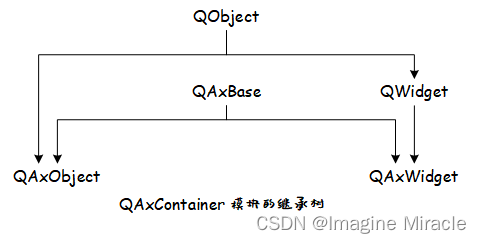
而在 Qt 中的 QAxObject 是对 COM 组件模型对象的封装,QAxObject 派生自QAxBase,QAxBase 提供了一组 API 通过 IUnknown 指针直接访问 COM 对象,具体结构如下图。
而在 Windows 上的 Excel 也是一个这样的 COM 对象,因此,可以采用在 Qt 中使用 QAxObjcet 实现对 Excel 的操作,其基本的操作流程如下:
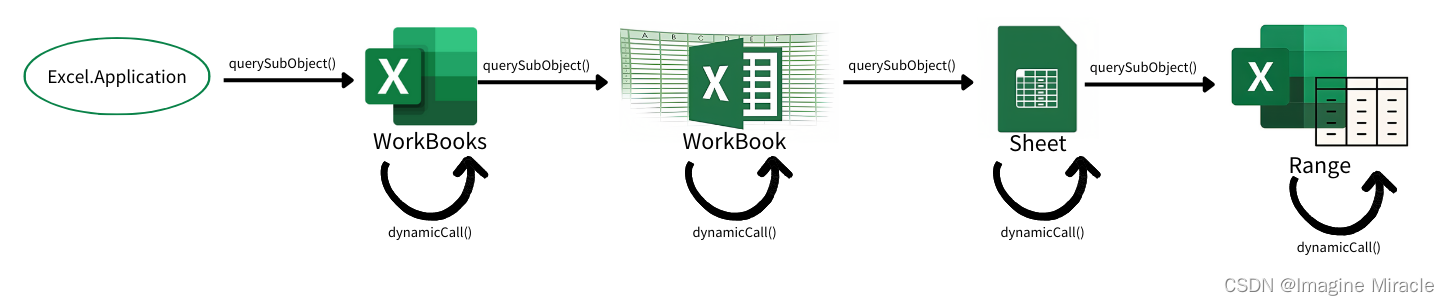
如上图描述了 Excel 的层次结构,Excel.Application 对象 → WorkBooks 对象 → WorkBook 对象 → WorkSheet 对象 → Range 对象,1 个 excel 有一个 Application 对象,1 个 Application 对象有多个 Workbook 对象组成,这些 Workbook 对象由 Workbooks 对象统一管理,Workbook 对象下包含若干个 WorkSheet,这些 WorkSheet 对象由 WorkSheets 对象统一管理,WorkSheet 下面的 Range 对象,对应这 WorkSheet 里面的表格单元了。箭头表示获取其子对象,获取方式需调用 querySubObject() 函数获取子对象实例,各个子对象调用 dynamicCall() 函数执行对各自的具体操作。
3. 基本使用方法
3.1. 包含相关文件
要使用 QAxObject 首先要在 .pro 文件中添加其模块名称 axcontainer,这样工程文件在编译的时候就会加载该模块。
// project.pro
QT       += axcontainer
在头文件中需要包含如下几个头文件
#include <QString>
#include <QFileDialog>
#include <QAxObject>
#include <QVariant>
#include <QVariantList>
3.2. 创建 Excel 进程,获取 Excel 工作簿集
打开文件夹选择 Excel 文件,创建 Excel 进程:
// 打开文件夹
QString strFilePathName = QFileDialog::getOpenFileName(this, QStringLiteral("选择Excel文件"),"", tr("Exel file(*.xls *.xlsx)"));
if(strFilePathName.isNull()) {return ;
}
QAxObject *excel = new QAxObject(this);if (excel->setControl("Excel.Application")) {	// 加载 Microsoft Excel 控件
} else {excel->setControl("ket.Application");  // 加载 WPS Excel 控件
}excel->setProperty("Visible", false);  // 不显示 Excel 窗体
QAxObject* workBooks = excel->querySubObject("WorkBooks");  //获取工作簿集合
workBooks->dynamicCall("Open(const QString&)", strFilePathName); //打开打开已存在的工作簿
QAxObject* workBook = excel->querySubObject("ActiveWorkBook"); //获取当前工作簿
3.3. 获取电子表格集
每个 Excel 工作簿中都可以包含若干电子表格 Sheet:
QAxObject* sheets = workBook->querySubObject("Sheets"); //获取工作表集合,Sheets也可换用WorkSheets
获取需要操作的工作表:
QAxObject* sheet = workBook->querySubObject("WorkSheets(int)", 1);//获取工作表集合的工作表1,即sheet1
3.4. 选取需要操作的单元格范围
每页电子表格包含多个单元格,在操作之前需要选取所要操作的单元格范围:
选取当前页面所有已使用单元格:
//获取该sheet的使用范围对象(一般读取 Excel 时会选取全部范围)
QAxObject* usedRange = sheet->querySubObject("UsedRange");
选取指定范围的单元格:
//获取 sheet 的指定范围(一般写入数据时,会选取指定范围)
QAxObject* usedRange = sheet->querySubObject("Range(const QString)", "A1:C12");
这里的 A1:C12 则表示选取,A 到 C 列的 1~12 行单元格;若写成 A1:A12 则表示选取,A 列的 1~12 行单元格;当然你也可以写成 A1:A1 则表示只选取 A1 这一个单元格。
选择指定单元格:
//获取 sheet 的指定范围(一般修改数据时,会选取指定单元格)
QAxObject* usedRange = sheet->querySubObject("Range(QVariant,QVariant)", "A6");
这里的 A6,则表示选取 A6 这个单元格。
[注]:获取 UsedRange 操作将会得到一个动态创建 (new) 出来的对象。
3.5. 读取单元格范围内容
当选取好要操作的单元各范围后,那么这里介绍如何读取选取范围内所有的单元格内容:
QVariant var = usedRange->dynamicCall("Value");
delete usedRange;
需要注意的是上文代码中除了获取单元格范围 (UsedRange) 操作之外,其余得到的都是该对象的引用,不会占用内存空间,不需要释放,而获取单元格适用范围 (UsedRange) 则得到一个 new 出来新分配的对象,因此在读取或写入操作结束后需要手动释放该对象。
QVariant 类是一个数据联合体,用来存放读取到的 Excel 数据。而事实上通过调用 dynamicCall("Value") 读到的数据类型是 QList<QList<QVariant>> 类型的,因此要将读到的 var 转换为该类型的数据。
QList<QList<QVariant>> xls_data;QVariantList varRows = var.toList();
if (varRows.isEmpty()) {return;
}const int rowCount = varRows.size();
this->excel.rowCount = rowCount;QVariantList rowData;for (int i = 0; i < rowCount; i++){rowData = varRows[i].toList();if (rowData.count() > this->excel.columnCount) {this->excel.columnCount = rowData.count();}this->xls_data.push_back(rowData);
}
3.6. 将读取到的数据用 QTableView 展示出来
这里的 TbleView_table1 是在 Forms 中的直接拖拽的 QTableView 控件。
QStandardItemModel *tab_model;
for (int i = 0; i < xls_data.count(); i++) {for (int j = 0; j < xls_data.at(i).count(); j++) {QStandardItem *item = new QStandardItem(QString(xls_data.at(i).at(j).toByteArray()));tab_model->setItem(i, j, item);//delete item;}
}
this->ui->TbleView_table1->setModel(tab_model);
3.7. 向选取的单元格范围写入数据
想必各位也注意到了,在 Excel 中横轴坐标都是用 A~Z 字母表示为了与纵轴的表示方式区别开来,而我们在操作是常用的则是以数字形式,或者说在设置循环中用数字方式更为方便,因此这里需要实现一个数字转 Excel 横坐标的函数,如下。
QString ExcelProcess::to26AlphabetString(int data)
{QChar ch = (QChar)(data + 0x40);//A对应0x41return QString(ch);
}void ExcelProcess::convertToColName(int data, QString &res)
{Q_ASSERT(data > 0 && data < 65535);int tempData = data / 26;if (tempData > 0) {int mode = data % 26;convertToColName(mode, res);convertToColName(tempData, res);} else {res=(to26AlphabetString(data) + res);}
}
按照指定行、列,一行一行的添加要写入的数据。
QList<QList<QVariant>> data_total;int row = 50 - 30, col = 100 - 10;	// 表示:选取范围为,30~50 行,10~100 列for (int i = 0; i < row; i++) {QList<QVariant> data_row;for (int j = 0; j < col; j++) {data_row.append("ImagineMiracle");}data_total.append(QVariant(data_row));
}
QString row_s, row_e, col_s, col_e, targetRange;
convertToColName(30, row_s);
convertToColName(50, row_e);
convertToColName(10, col_s);
convertToColName(100, col_e);
targetRange= col_s + row_s + ":" + col_e + row_e ;QAxObject* sheet = workBook->querySubObject("WorkSheets(int)", 1);//获取工作表集合的工作表1,即sheet1QAxObject* usedRange = sheet->querySubObject("Range(const QString)", target);
usedRange->setProperty("NumberFormat", "@");    //  设置所有单元格为文本属性
usedRange->dynamicCall("SetValue(const QVariant&", QVariant(data_total));
workBook->dynamicCall("Save()");	// 保存文件
delete usedRange;
3.8. 退出操作
当执行完所有操作后,需要关闭并退出 Excel,代码如下:
workBook->dynamicCall("Close()"); //关闭工作簿
excel->dynamicCall("Quit()"); //退出进程delete excel;
4. 示例演示
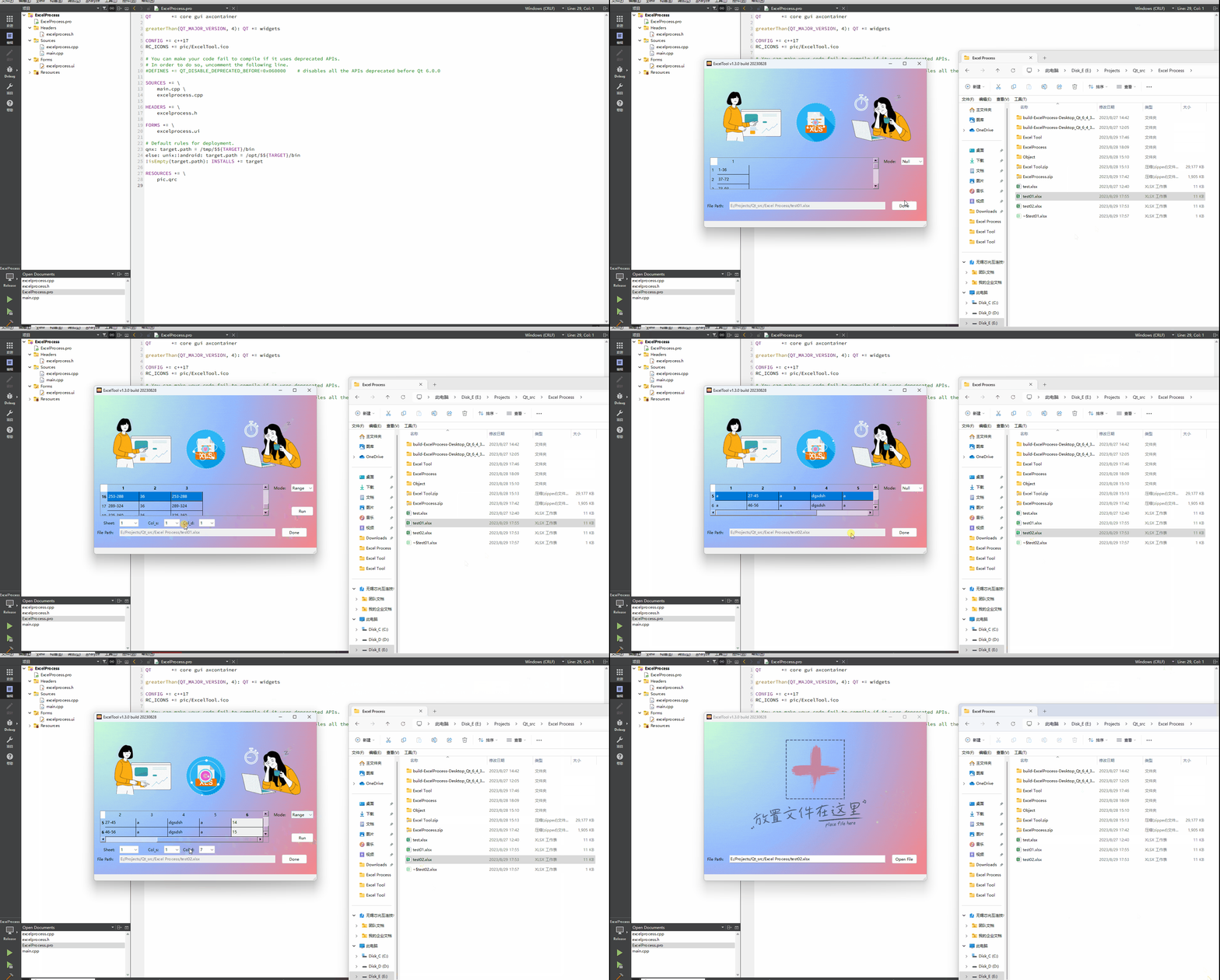
下面是笔者写的一个简单的 Excel 表操作的代码,其功能包含
1.打开并读取 Excel 表内容;
2.根据指定表格中数据的范围计算范围内数据量并写入表格;
3.根据数据量计算数据的所在范围。
完成工程下载链接:ExcelProcess.zip
文件列表如下:
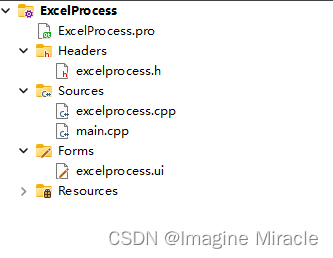
运行效果演示。
5. 附
这里贴出所有源文件的代码:
5.1. ExcelPrecess.pro
QT       += core gui axcontainergreaterThan(QT_MAJOR_VERSION, 4): QT += widgetsCONFIG += c++17
RC_ICONS += pic/ExcelTool.ico# You can make your code fail to compile if it uses deprecated APIs.
# In order to do so, uncomment the following line.
#DEFINES += QT_DISABLE_DEPRECATED_BEFORE=0x060000    # disables all the APIs deprecated before Qt 6.0.0SOURCES += \main.cpp \excelprocess.cppHEADERS += \excelprocess.hFORMS += \excelprocess.ui# Default rules for deployment.
qnx: target.path = /tmp/$${TARGET}/bin
else: unix:!android: target.path = /opt/$${TARGET}/bin
!isEmpty(target.path): INSTALLS += targetRESOURCES += \pic.qrc
5.2. excelprocess.h
#ifndef EXCELPROCESS_H
#define EXCELPROCESS_H#include "ui_excelprocess.h"
#include <QMainWindow>
#include <QLineEdit>
#include <QPushButton>
#include <QString>
#include <QLabel>
#include <QFileDialog>
#include <QStandardPaths>
#include <QDebug>
#include <QDragEnterEvent>
#include <QDropEvent>
#include <QMimeData>
#include <QMovie>
#include <QScopedPointer>
#include <QList>
#include <QAxObject>
#include <QVariant>
#include <QVariantList>
#include <QStandardItemModel>
#include <QThread>
#include <QIcon>QT_BEGIN_NAMESPACE
namespace Ui { class ExcelProcess; }
QT_END_NAMESPACE#define APPNAME ("ExcelTool v1.3.0 build 20230828")typedef struct {QAxObject *excel;QAxObject *workBooks;QAxObject *current_workBook;QAxObject *workSheets;QAxObject *current_workSheet;QAxObject *usedRange;QAxObject *rows;QAxObject *columns;int sheetCount, rowCount, columnCount;}ExcelFile;#define MODECOUNT (3)
static QString excel_mode[MODECOUNT] = {"Null", "Calc", "Range"};typedef struct {int sheet;int col_src;//int col;int col_dest;
} CalcMode;class ExcelProcess : public QMainWindow
{Q_OBJECTprivate slots:void showFiles(void);void on_PBtn_View_clicked();void on_ComBox_Mode_currentIndexChanged(int index);void on_Btn_CalcRun_clicked();void on_LEdit_FilePath_textChanged(const QString &arg1);void on_Btn_RangeRun_clicked();protected:void dragEnterEvent(QDragEnterEvent *event);    // 拖动进入事件void dropEvent(QDropEvent *event);      // 放下事件public:ExcelProcess(QWidget *parent = nullptr);~ExcelProcess();void openExcelFile();void closeExcelFile();void readExcel_OneSheet(int sheet_num);void showOneSheet(int sheet_num);void excelModeDisplay_00(void);void excelModeDisplay_01(void);void excelModeDisplay_02(void);void convertToColName(int data, QString &res);QString to26AlphabetString(int data);void castListListVariant2Variant(const QList<QList<QVariant> > &cells, QVariant &res);private:Ui::ExcelProcess *ui;QString *fileName;QMovie *movie_01;ExcelFile excel;QList<QList<QVariant>> xls_data;    // excel 表数据CalcMode calcMode;QStandardItemModel *tab_model;void initUi(void);void initExcel(void);};
#endif // EXCELPROCESS_H
5.3. excelprocess.cpp
#include "excelprocess.h"
#include "ui_excelprocess.h"void ExcelProcess::showFiles()
{QString str = QFileDialog::getOpenFileName(this, "File Explorer", QStandardPaths::writableLocation(QStandardPaths::DocumentsLocation),"Excel 文件(*.xls *.xlsx);;All file(*.*)");this->ui->LEdit_FilePath->setText(str.toUtf8());*this->fileName = this->ui->LEdit_FilePath->text();qDebug() << *this->fileName << "\n";return ;
}void ExcelProcess::dragEnterEvent(QDragEnterEvent *event)
{if ((!event->mimeData()->urls()[0].fileName().right(3).compare("xls")) || (!event->mimeData()->urls()[0].fileName().right(4).compare("xlsx"))) {event->acceptProposedAction();} else {event->ignore();}return ;
}void ExcelProcess::dropEvent(QDropEvent *event)
{const QMimeData *qm = event->mimeData();*this->fileName = qm->urls()[0].toLocalFile();  // 获取拖入的文件名this->ui->LEdit_FilePath->clear();this->ui->LEdit_FilePath->setText(*this->fileName);return ;
}ExcelProcess::ExcelProcess(QWidget *parent): QMainWindow(parent), ui(new Ui::ExcelProcess)
{ui->setupUi(this);this->fileName = new QString;this->tab_model = new QStandardItemModel();this->setAcceptDrops(true);     // 设置主界面接收拖动进来的文件this->initUi();this->initExcel();return ;
}ExcelProcess::~ExcelProcess()
{delete ui;delete fileName;this->tab_model->clear();delete this->tab_model;if (this->excel.current_workBook != nullptr) {this->excel.current_workBook->dynamicCall("Save()");this->excel.current_workBook->dynamicCall("Close()"); //关闭文件}if (this->excel.workBooks != nullptr) {this->excel.workBooks->dynamicCall("Close()"); //关闭文件}this->excel.excel->dynamicCall("Quit(void)");   // 退出delete this->excel.workBooks;delete this->excel.excel;return ;
}void ExcelProcess::openExcelFile()
{//this->initExcel();if (this->excel.excel == nullptr) {return ;}this->excel.workBooks->dynamicCall("Open (const QString&)", *this->fileName);this->excel.current_workBook = this->excel.excel->querySubObject("ActiveWorkBook");this->excel.workSheets = this->excel.current_workBook->querySubObject("Sheets");this->excel.rowCount = 0;this->excel.columnCount = 0;this->excel.sheetCount = this->excel.workSheets->property("Count").toInt();qDebug() << "Sheet num: " << this->excel.sheetCount << "\n";}void ExcelProcess::closeExcelFile()
{if (this->excel.current_workBook != nullptr) {this->excel.current_workBook->dynamicCall("Save()");this->excel.current_workBook->dynamicCall("Close()"); //关闭文件}if (this->excel.workBooks != nullptr) {this->excel.workBooks->dynamicCall("Close()"); //关闭文件}this->excel.excel->dynamicCall("Quit(void)");   // 退出delete this->excel.workBooks;delete this->excel.excel;this->initExcel();return ;
}void ExcelProcess::readExcel_OneSheet(int sheet_num)
{if (sheet_num > this->excel.sheetCount) {return;}// 读取一个 sheetthis->excel.current_workSheet = this->excel.current_workBook->querySubObject("Sheets(int)", sheet_num);this->excel.usedRange = this->excel.current_workSheet->querySubObject("UsedRange");if (nullptr == this->excel.usedRange || this->excel.usedRange->isNull()) {return;}QVariant var = this->excel.usedRange->dynamicCall("Value");delete this->excel.usedRange;this->excel.usedRange = nullptr;// 读取一个 sheet 结束for (int i = 0; i < this->xls_data.count(); i++) {this->xls_data.value(i).clear();}this->xls_data.clear();QVariantList varRows = var.toList();if (varRows.isEmpty()) {return;}const int rowCount = varRows.size();this->excel.rowCount = rowCount;QVariantList rowData;for (int i = 0; i < rowCount; i++){rowData = varRows[i].toList();if (rowData.count() > this->excel.columnCount) {this->excel.columnCount = rowData.count();}this->xls_data.push_back(rowData);}//this->excel.current_workBook->dynamicCall("Close()");qDebug() << "Sheet:: row:" << this->excel.rowCount << "colum:" << this->excel.columnCount << "\n";this->ui->ComBox_Sheet->clear();for (int i = 1; i <= this->excel.sheetCount; i++) {this->ui->ComBox_Sheet->addItem(QString::number(i));}this->ui->ComBox_Row->clear();for (int i = 1; i <= this->excel.rowCount; i++) {this->ui->ComBox_Row->addItem(QString::number(i));}this->ui->ComBox_Column->clear();for (int i = 1; i <= this->excel.columnCount; i++) {this->ui->ComBox_Column->addItem(QString::number(i));}}void ExcelProcess::showOneSheet(int sheet_num)
{this->readExcel_OneSheet(sheet_num);this->tab_model->clear();for (int i = 0; i < this->xls_data.count(); i++) {for (int j = 0; j < this->xls_data.at(i).count(); j++) {QStandardItem *item = new QStandardItem(QString(this->xls_data.at(i).at(j).toByteArray()));this->tab_model->setItem(i, j, item);//delete item;}}this->ui->TbleView_table1->setModel(this->tab_model);//this->ui->TbleView_table1->setSectionResizeMode(QHeaderView::Stretch);//delete model;
}void ExcelProcess::excelModeDisplay_00()
{this->ui->Lab_Row->setText("Row:");this->ui->Lab_Column->setText("Row:");this->ui->ComBox_Column->clear();for (int i = 1; i <= this->excel.columnCount; i++) {this->ui->ComBox_Column->addItem(QString::number(i));}this->ui->TbleView_table1->show();this->ui->Lab_Sheet->hide();this->ui->Lab_Row->hide();this->ui->Lab_Column->hide();this->ui->ComBox_Sheet->hide();this->ui->ComBox_Row->hide();this->ui->ComBox_Column->hide();this->ui->Btn_CalcRun->hide();this->ui->Btn_RangeRun->hide();this->ui->ComBox_Mode->setCurrentIndex(0);
}void ExcelProcess::excelModeDisplay_01()
{this->ui->Lab_Row->setText("Col_s:");this->ui->Lab_Column->setText("Col_d:");this->ui->ComBox_Mode->setCurrentIndex(1);this->ui->ComBox_Row->clear();this->ui->ComBox_Column->clear();for (int i = 1; i <= this->excel.columnCount; i++) {this->ui->ComBox_Row->addItem(QString::number(i));}for (int i = 1; i <= this->excel.columnCount + 1; i++) {this->ui->ComBox_Column->addItem(QString::number(i));}this->ui->ComBox_Column->setCurrentIndex(this->ui->ComBox_Column->count() - 1);this->ui->Lab_Sheet->show();this->ui->Lab_Row->show();this->ui->Lab_Column->show();this->ui->TbleView_table1->show();this->ui->ComBox_Sheet->show();this->ui->ComBox_Row->show();this->ui->ComBox_Column->show();this->ui->Btn_CalcRun->show();this->ui->Btn_RangeRun->hide();
}void ExcelProcess::excelModeDisplay_02()
{this->ui->Lab_Row->setText("Col_s:");this->ui->Lab_Column->setText("Col_d:");this->ui->ComBox_Mode->setCurrentIndex(2);this->ui->ComBox_Row->clear();this->ui->ComBox_Column->clear();for (int i = 1; i <= this->excel.columnCount; i++) {this->ui->ComBox_Row->addItem(QString::number(i));}for (int i = 1; i <= this->excel.columnCount + 1; i++) {this->ui->ComBox_Column->addItem(QString::number(i));}this->ui->ComBox_Column->setCurrentIndex(this->ui->ComBox_Column->count() - 1);this->ui->Lab_Sheet->show();this->ui->Lab_Row->show();this->ui->Lab_Column->show();this->ui->TbleView_table1->show();this->ui->ComBox_Sheet->show();this->ui->ComBox_Row->show();this->ui->ComBox_Column->show();this->ui->Btn_CalcRun->hide();this->ui->Btn_RangeRun->show();
}void ExcelProcess::convertToColName(int data, QString &res)
{Q_ASSERT(data>0 && data<65535);int tempData = data / 26;if(tempData > 0) {int mode = data % 26;convertToColName(mode,res);convertToColName(tempData,res);} else {res=(to26AlphabetString(data)+res);}
}QString ExcelProcess::to26AlphabetString(int data)
{QChar ch = (QChar)(data + 0x40);//A对应0x41return QString(ch);
}void ExcelProcess::castListListVariant2Variant(const QList<QList<QVariant> > &cells, QVariant &res)
{QVariantList vars;const int rows = cells.size();      //获取行数for(int i = 0; i < rows; ++i){vars.append(QVariant(cells[i]));    //将list(i)添加到QVariantList中 QVariant(cells[i])强制转换}res = QVariant(vars);   //强制转换
}void ExcelProcess::initUi()
{this->setWindowTitle(APPNAME);this->setWindowIcon(QIcon(":/bk/pic/ExcelTool.ico"));this->ui->Lab_FilePath->setText("File Path:");this->ui->PBtn_View->setText("Open File");//this->ui->Lab_BottomBar->setText("");this->ui->Lab_Background->setText("");movie_01 = new QMovie(":/bk/pic/bk_01.gif");this->ui->Lab_Background->setGeometry(0, 0, 700, 500);this->ui->Lab_Background->setMovie(movie_01);movie_01->setScaledSize(this->ui->Lab_Background->size());movie_01->start();this->ui->Lab_Sheet->hide();this->ui->Lab_Row->hide();this->ui->Lab_Column->hide();this->ui->ComBox_Sheet->hide();this->ui->ComBox_Row->hide();this->ui->ComBox_Column->hide();this->ui->Lab_Mode->hide();this->ui->ComBox_Mode->hide();this->ui->Btn_CalcRun->hide();this->ui->Btn_RangeRun->hide();for (int i = 0; i < MODECOUNT; i++) {this->ui->ComBox_Mode->addItem(excel_mode[i]);}this->ui->ComBox_Mode->setCurrentIndex(0);this->ui->TbleView_table1->hide();return ;}void ExcelProcess::initExcel()
{this->excel.excel = new QAxObject("Excel.Application");   // 加载 excel 驱动this->excel.excel->setProperty("Visible", false);//不显示Excel界面,如果为true会看到启动的Excel界面//this->excel.excel->setProperty("Visible", true);this->excel.workBooks = this->excel.excel->querySubObject("WorkBooks");
}void ExcelProcess::on_PBtn_View_clicked()
{*this->fileName = this->ui->LEdit_FilePath->text();if ((0 == this->fileName->right(3).compare("xls")) || (0 == this->fileName->right(4).compare("xlsx")) || this->fileName->isEmpty()) {;} else {this->movie_01->stop();this->movie_01->setFileName(":/bk/pic/bk_04.gif");this->ui->Lab_Background->setMovie(movie_01);movie_01->setScaledSize(this->ui->Lab_Background->size());movie_01->start();return ;}if ("Done" == this->ui->PBtn_View->text()) {//QThread::usleep(5);this->ui->LEdit_FilePath->setEnabled(true);this->ui->PBtn_View->setText("Open File");this->tab_model->clear();this->ui->Lab_Sheet->hide();this->ui->Lab_Row->hide();this->ui->Lab_Column->hide();this->ui->ComBox_Sheet->hide();this->ui->ComBox_Row->hide();this->ui->ComBox_Column->hide();this->ui->Lab_Mode->hide();this->ui->ComBox_Mode->hide();this->ui->Btn_CalcRun->hide();this->ui->Btn_RangeRun->hide();this->ui->TbleView_table1->hide();this->movie_01->stop();this->movie_01->setFileName(":/bk/pic/bk_01.gif");this->ui->Lab_Background->setMovie(movie_01);movie_01->setScaledSize(this->ui->Lab_Background->size());movie_01->start();this->closeExcelFile();} else {if (this->ui->LEdit_FilePath->text().isEmpty()) {this->showFiles();} else {//QThread::usleep(5);this->excelModeDisplay_00();this->ui->LEdit_FilePath->setEnabled(false);this->ui->PBtn_View->setText("Done");this->movie_01->stop();this->movie_01->setFileName(":/bk/pic/bk_02.gif");this->ui->Lab_Background->setMovie(movie_01);movie_01->setScaledSize(this->ui->Lab_Background->size());movie_01->start();this->openExcelFile();this->showOneSheet(1);this->ui->TbleView_table1->setStyleSheet("background-color:transparent");this->ui->TbleView_table1->horizontalHeader()->setStyleSheet("QHeaderView::section{background:transparent},QHeaderView::Stretch");this->ui->TbleView_table1->verticalHeader()->setStyleSheet("QHeaderView::section{background:transparent}");this->ui->TbleView_table1->setCornerButtonEnabled(false);this->ui->Lab_Mode->show();this->ui->ComBox_Mode->show();this->ui->TbleView_table1->show();}}}void ExcelProcess::on_ComBox_Mode_currentIndexChanged(int index)
{switch(index) {case 0: {this->excelModeDisplay_00();break;}case 1: {this->excelModeDisplay_01();break;}case 2: {this->excelModeDisplay_02();break;}default: {break;}}return ;
}void ExcelProcess::on_Btn_CalcRun_clicked()
{this->calcMode.sheet = this->ui->ComBox_Sheet->currentText().toInt();this->calcMode.col_src = this->ui->ComBox_Row->currentText().toInt();this->calcMode.col_dest = this->ui->ComBox_Column->currentText().toInt();QString data, num1, num2, result;qDebug() << "Sheet::" << this->calcMode.sheet;this->showOneSheet(this->calcMode.sheet);QList<QVariant> data_total;for (int i = 0; i < this->excel.rowCount; i++) {data = this->xls_data.at(i).at(this->calcMode.col_src - 1).toByteArray();bool flag = true;num1.clear();num2.clear();for (int i_d = 0; i_d < data.length(); i_d++) {if ('-' == data.at(i_d)) {flag = false;continue;}if (flag) {num1 += data.at(i_d);} else {num2 += data.at(i_d);}}QList<QVariant> data_row;result = QString::number(num2.toInt() - num1.toInt());qDebug() << "num1:" << num1 << "num2:" << num2 << "res:" << result << "\n";data_row.append(QString::number(num2.toInt() - num1.toInt() + 1));data_total.append(QVariant(data_row));}QString col_num, target;this->convertToColName(this->calcMode.col_dest, col_num);qDebug() << "Col:" << col_num << "\n";target = col_num + "1:" + col_num + QString::number(this->excel.rowCount);qDebug() << target ;this->excel.current_workSheet = this->excel.current_workBook->querySubObject("Sheets(int)", this->calcMode.sheet);this->excel.usedRange = this->excel.current_workSheet->querySubObject("Range(const QString)", target);this->excel.usedRange->setProperty("NumberFormat", "@");    //  设置所有单元格为文本属性this->excel.usedRange->dynamicCall("SetValue(const QVariant&", QVariant(data_total));this->excel.current_workBook->dynamicCall("Save()");//this->excel.current_workBook->dynamicCall("Close()");this->showOneSheet(this->calcMode.sheet);delete this->excel.usedRange;}void ExcelProcess::on_LEdit_FilePath_textChanged(const QString &arg1)
{if (arg1.isEmpty()) {this->movie_01->stop();this->movie_01->setFileName(":/bk/pic/bk_01.gif");this->ui->Lab_Background->setMovie(movie_01);movie_01->setScaledSize(this->ui->Lab_Background->size());movie_01->start();*this->fileName = "";} else if ((0 == arg1.right(3).compare("xls")) || (0 == arg1.right(4).compare("xlsx"))) {this->movie_01->stop();this->movie_01->setFileName(":/bk/pic/bk_03.gif");this->ui->Lab_Background->setMovie(movie_01);movie_01->setScaledSize(this->ui->Lab_Background->size());movie_01->start();*this->fileName = this->ui->LEdit_FilePath->text();} else {this->movie_01->stop();this->movie_01->setFileName(":/bk/pic/bk_04.gif");this->ui->Lab_Background->setMovie(movie_01);movie_01->setScaledSize(this->ui->Lab_Background->size());movie_01->start();}return ;
}void ExcelProcess::on_Btn_RangeRun_clicked()
{this->calcMode.sheet = this->ui->ComBox_Sheet->currentText().toInt();this->calcMode.col_src = this->ui->ComBox_Row->currentText().toInt();this->calcMode.col_dest = this->ui->ComBox_Column->currentText().toInt();QString data;int num_src = 0, num1 = 0, num2 = 0;qDebug() << "Sheet::" << this->calcMode.sheet;this->showOneSheet(this->calcMode.sheet);QList<QVariant> data_total;for (int i = 0; i < this->excel.rowCount; i++) {data = this->xls_data.at(i).at(this->calcMode.col_src - 1).toByteArray();num_src = data.toInt();num1 = num2 + 1;num2 = num_src + num1 - 1;QList<QVariant> data_row;qDebug() << "src:" << num_src << "num1:" << num1 << "num2:" << num2 << "\n";qDebug() << "range:" << (QString::number(num1) + "-" + QString::number(num2)) << "\n";data_row.append(QString::number(num1) + "-" + QString::number(num2));data_total.append(QVariant(data_row));}QString col_num, target;this->convertToColName(this->calcMode.col_dest, col_num);qDebug() << "Col:" << col_num << "\n";target = col_num + "1:" + col_num + QString::number(this->excel.rowCount);qDebug() << target ;this->excel.current_workSheet = this->excel.current_workBook->querySubObject("Sheets(int)", this->calcMode.sheet);this->excel.usedRange = this->excel.current_workSheet->querySubObject("Range(const QString)", target);this->excel.usedRange->setProperty("NumberFormat", "@");    //  设置所有单元格为文本属性this->excel.usedRange->dynamicCall("SetValue(const QVariant&", QVariant(data_total));this->excel.current_workBook->dynamicCall("Save()");//this->excel.current_workBook->dynamicCall("Close()");this->showOneSheet(this->calcMode.sheet);delete this->excel.usedRange;}
5.4. main.cpp
#include "excelprocess.h"#include <QApplication>int main(int argc, char *argv[])
{QApplication a(argc, argv);ExcelProcess w;w.show();return a.exec();
}
5.5. excelprocess.ui
<?xml version="1.0" encoding="UTF-8"?>
<ui version="4.0"><class>ExcelProcess</class><widget class="QMainWindow" name="ExcelProcess"><property name="geometry"><rect><x>0</x><y>0</y><width>700</width><height>500</height></rect></property><property name="windowTitle"><string>ExcelProcess</string></property><widget class="QWidget" name="centralwidget"><widget class="QLineEdit" name="LEdit_FilePath"><property name="geometry"><rect><x>80</x><y>420</y><width>490</width><height>24</height></rect></property></widget><widget class="QPushButton" name="PBtn_View"><property name="geometry"><rect><x>590</x><y>417</y><width>80</width><height>30</height></rect></property><property name="text"><string>Open File</string></property></widget><widget class="QLabel" name="Lab_FilePath"><property name="geometry"><rect><x>10</x><y>420</y><width>60</width><height>24</height></rect></property><property name="text"><string>File Path:</string></property></widget><widget class="QLabel" name="Lab_Background"><property name="geometry"><rect><x>700</x><y>500</y><width>53</width><height>16</height></rect></property><property name="text"><string>TextLabel</string></property></widget><widget class="QTableView" name="TbleView_table1"><property name="geometry"><rect><x>19</x><y>280</y><width>531</width><height>100</height></rect></property></widget><widget class="QComboBox" name="ComBox_Sheet"><property name="geometry"><rect><x>80</x><y>390</y><width>60</width><height>24</height></rect></property></widget><widget class="QLabel" name="Lab_Sheet"><property name="geometry"><rect><x>30</x><y>390</y><width>50</width><height>24</height></rect></property><property name="text"><string>Sheet:</string></property></widget><widget class="QLabel" name="Lab_Row"><property name="geometry"><rect><x>170</x><y>390</y><width>50</width><height>24</height></rect></property><property name="text"><string>Row_s:</string></property></widget><widget class="QComboBox" name="ComBox_Row"><property name="geometry"><rect><x>220</x><y>390</y><width>50</width><height>24</height></rect></property></widget><widget class="QLabel" name="Lab_Column"><property name="geometry"><rect><x>280</x><y>390</y><width>50</width><height>24</height></rect></property><property name="text"><string>Col_d:</string></property></widget><widget class="QComboBox" name="ComBox_Column"><property name="geometry"><rect><x>330</x><y>390</y><width>50</width><height>24</height></rect></property></widget><widget class="QComboBox" name="ComBox_Mode"><property name="geometry"><rect><x>620</x><y>280</y><width>70</width><height>24</height></rect></property></widget><widget class="QLabel" name="Lab_Mode"><property name="geometry"><rect><x>565</x><y>280</y><width>50</width><height>24</height></rect></property><property name="text"><string>Mode:</string></property></widget><widget class="QPushButton" name="Btn_CalcRun"><property name="geometry"><rect><x>620</x><y>350</y><width>70</width><height>30</height></rect></property><property name="text"><string>Run</string></property></widget><widget class="QPushButton" name="Btn_RangeRun"><property name="geometry"><rect><x>620</x><y>350</y><width>70</width><height>30</height></rect></property><property name="text"><string>Run</string></property></widget><zorder>Lab_Background</zorder><zorder>Lab_FilePath</zorder><zorder>PBtn_View</zorder><zorder>LEdit_FilePath</zorder><zorder>TbleView_table1</zorder><zorder>ComBox_Sheet</zorder><zorder>Lab_Sheet</zorder><zorder>Lab_Row</zorder><zorder>ComBox_Row</zorder><zorder>Lab_Column</zorder><zorder>ComBox_Column</zorder><zorder>ComBox_Mode</zorder><zorder>Lab_Mode</zorder><zorder>Btn_CalcRun</zorder><zorder>Btn_RangeRun</zorder></widget><widget class="QMenuBar" name="menubar"><property name="geometry"><rect><x>0</x><y>0</y><width>700</width><height>26</height></rect></property></widget><widget class="QStatusBar" name="statusbar"/></widget><resources/><connections/>
</ui>
#完
相关文章:
【Qt QAxObject】使用 QAxObject 高效任意读写 Excel 表
1. 用什么操作 Excel 表 Qt 的官网库中是不包含 Microsoft Excel 的操作库,关于对 Microsoft Excel 的操作库可选的有很多,包含基于 Windows 系统本身的 ActiveX、Qt Xlsx、xlsLib、LibXL、qtXLS、BasicExcel、Number Duck。 库.xls.xlsx读写平台Qt Xls…...
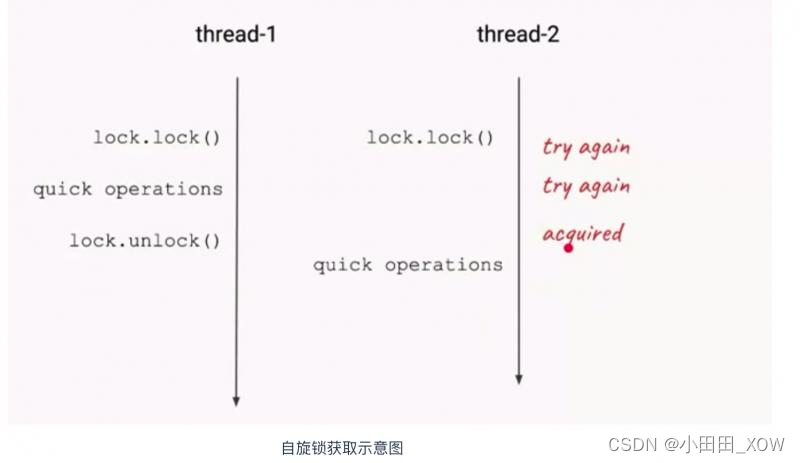
java八股文面试[多线程]——自旋锁
优点: 1. 自旋锁尽可能的减少线程的阻塞,这对于锁的竞争不激烈,且占用锁时间非常短的代码块来说性能能大幅度的提升,因为自旋的消耗会小于线程阻塞挂起再唤醒的操作的消耗 ,这些操作会导致线程发生两次上下文切换&…...
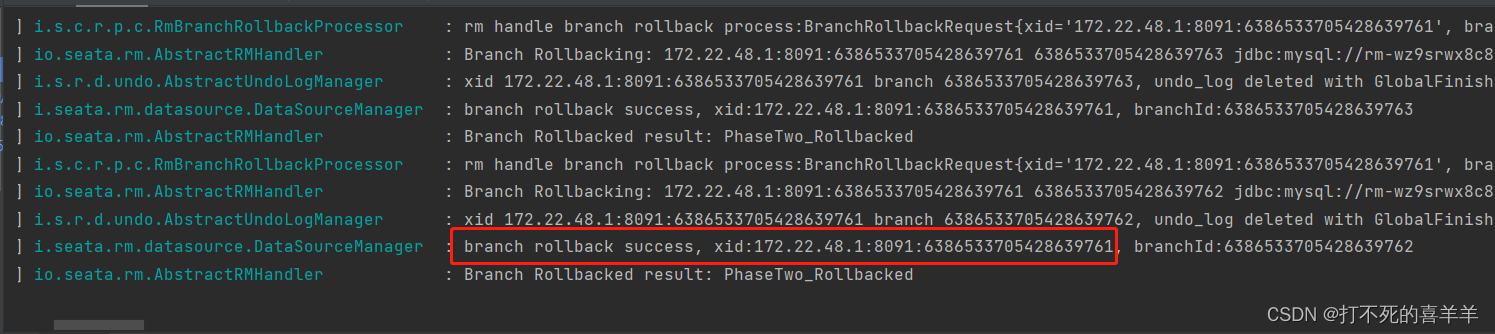
分布式系统的多数据库,实现分布式事务回滚(1.7.0 seata整合2.0.4nacos)
正文 1、解决的应用场景是分布式事务,每个服务有独立的数据库。 2、例如:A服务的数据库是A1,B服务的数据库是B2,A服务通过feign接口调用B服务,B涉及提交数据到B2,业务是在B提交数据之后,在A服…...

PDF可以修改内容吗?有什么注意的事项?
PDF是一种跨平台的电子文档格式,可以在各种设备上轻松阅读和共享。许多人喜欢将文档转换为PDF格式以确保格式的一致性和易读性。但是,PDF文件一般被认为是“只读”文件,即无法编辑。那么,PDF文件是否可以修改呢? 答案是…...
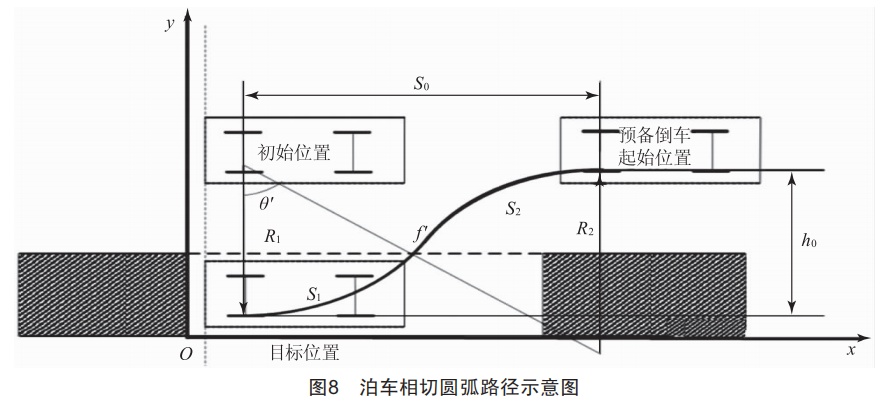
自动泊车的自动驾驶控制算法
1. 自动泊车系统 自动泊车系统(AutomatedParkingASSiSt,APA)利用车辆搭载的传感器感知车辆周边环境,扫描满足当前车辆停放的障碍物空间车位或线车位,并通过人机交互(HumanMachine Interface,HMI)获取驾驶员对目标车位的选择或自动确定目标车位,自动规划泊车路径,通过控制器向车…...

Java doc等文件生成PDF、多个PDF合并
之前写过一遍文章是 图片生成PDF。 今天继续来对 doc等文件进行pdf合并以及多个pdf合并为一个pdf。 兄弟们,还是开箱即用。 1、doc生成pdf 依赖 <!-- doc生成pdf --><dependency><groupId>com.aspose</groupId><artifactId>aspose…...
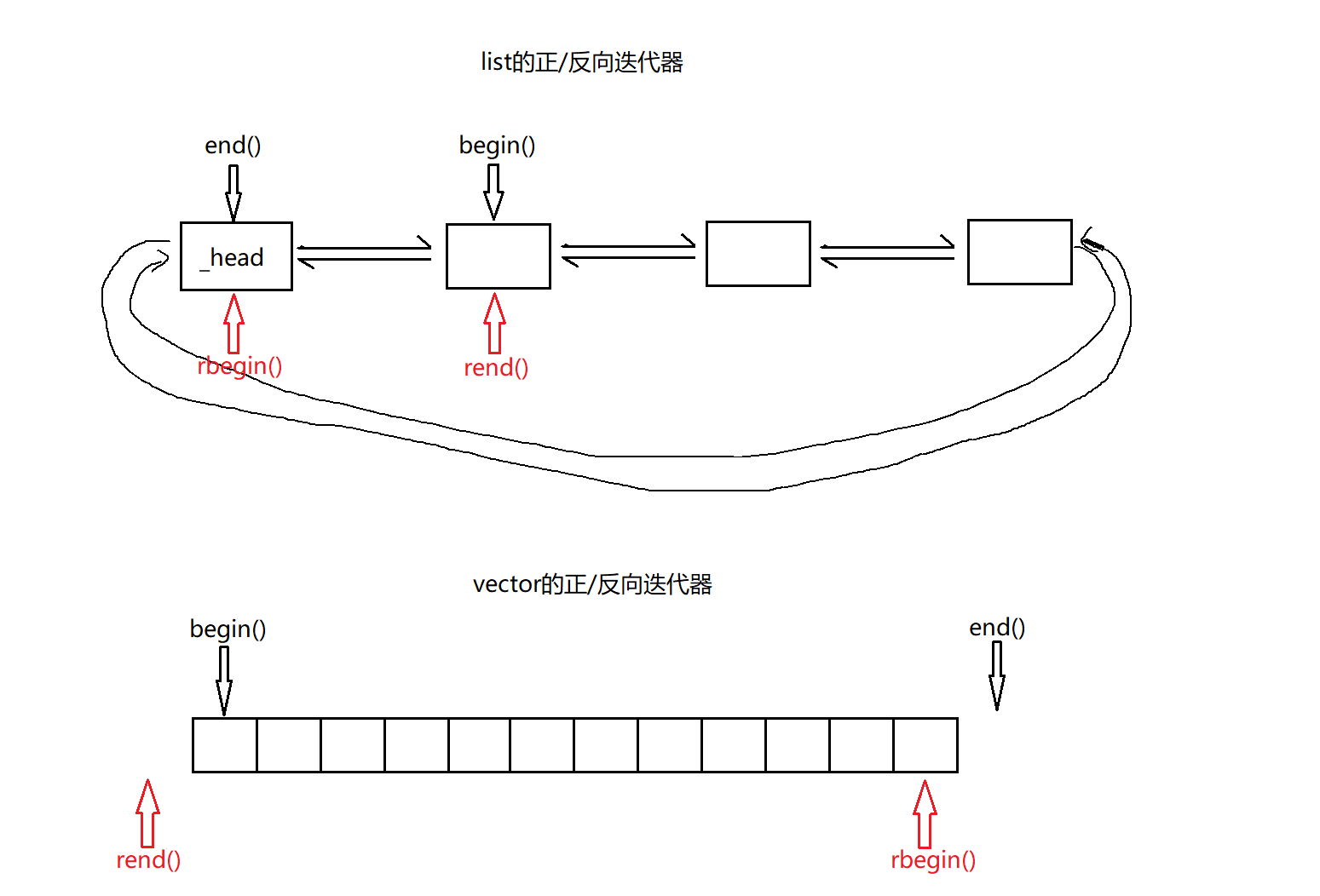
【C++】list类的模拟实现
🏖️作者:malloc不出对象 ⛺专栏:C的学习之路 👦个人简介:一名双非本科院校大二在读的科班编程菜鸟,努力编程只为赶上各位大佬的步伐🙈🙈 目录 前言一、list类的模拟实现1.1 list的…...
机械臂+2d相机实现复合机器人定位抓取
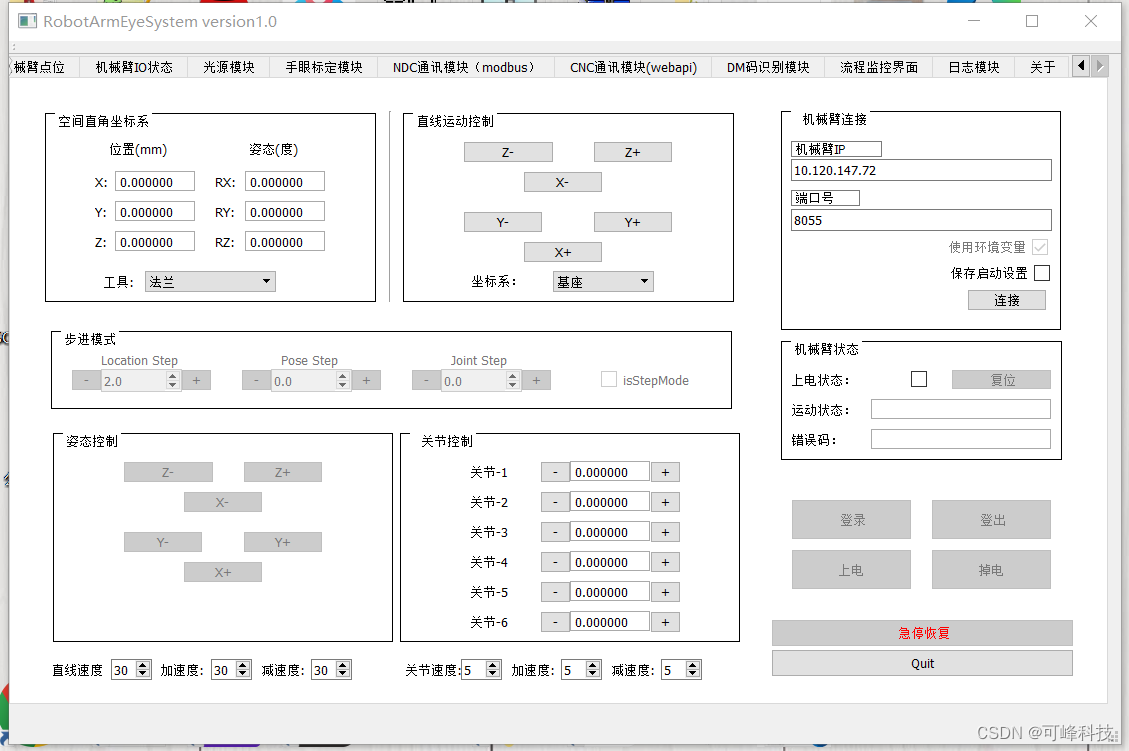
硬件参数 机械臂:艾利特 相机:海康相机 2d识别库:lindmod,github可以搜到 光源:磐鑫光源 软件参数 系统:windows / Linux 开发平台:Qt 开发语言:C 开发视觉库:OpenCV …...
网络编程 http 相关基础概念
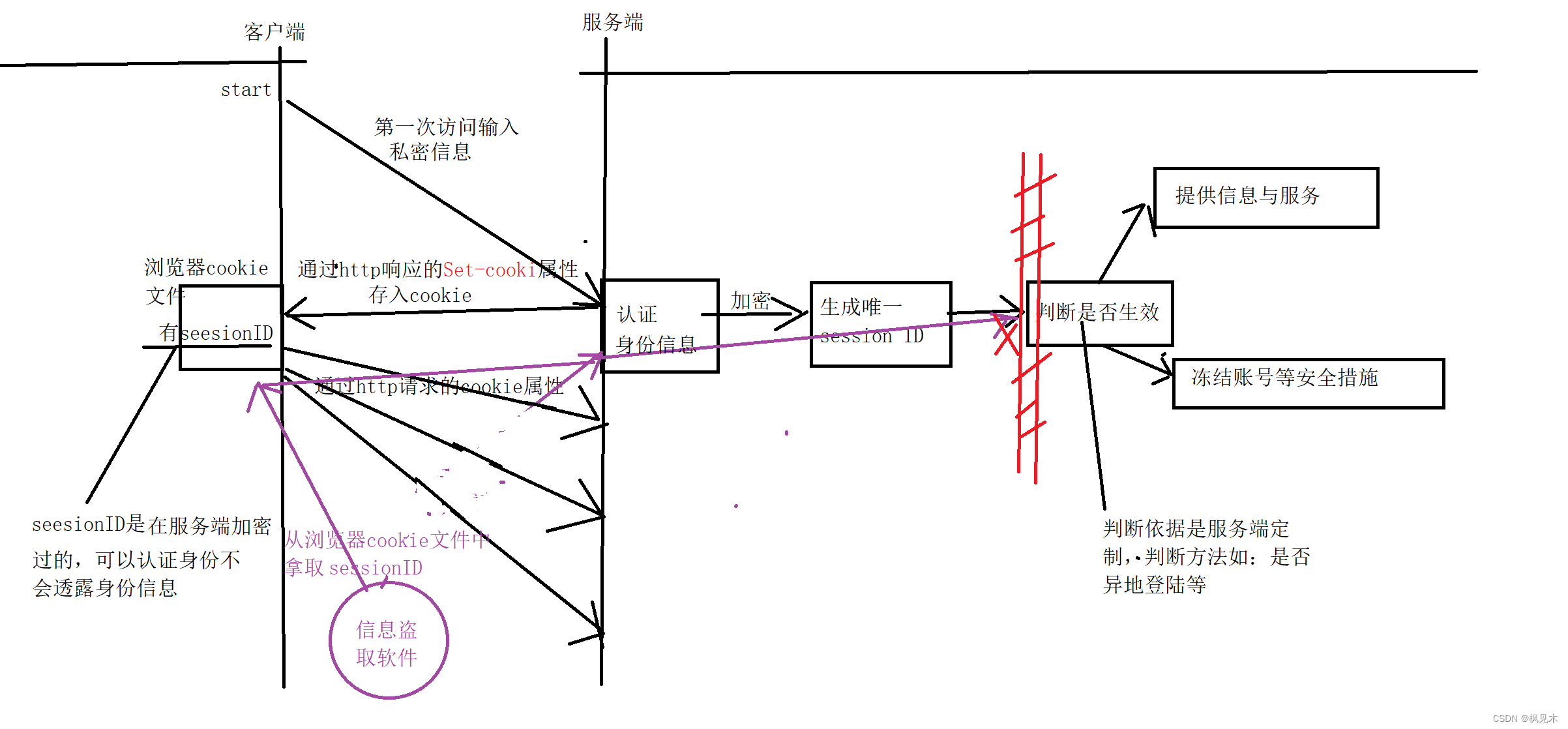
文章目录 表单是什么http请求是什么http请求的结构和说明关于http方法 GET和POST区别http常见状态码http响应http 请求是无状态的含义html是什么 (前端内容,了解即可)html 常见标签 (前端内容,了解即可)关于…...

LatexEasy公式渲染教程
LatexEasy使用简单的URL渲染公式为图片 https://r.latexeasy.com/image.svg?1-sin^2(x) 使用单个HTML图像标签将公式添加到任何现有网站 <img src"https://r.latexeasy.com/image.svg?1-sin^2(x)" />...
十年测试工程师叙述自动化测试学习思路
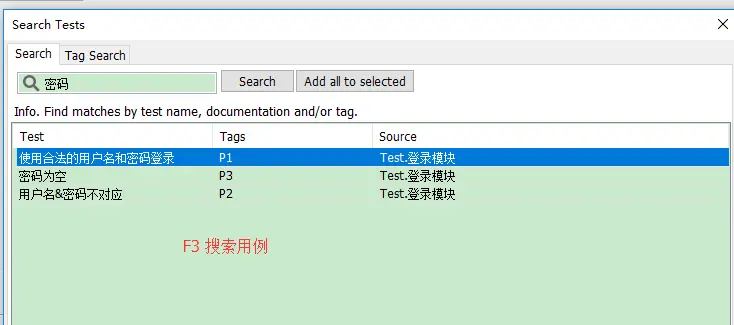
自动化测试介绍 自动化测试(Automated Testing),是指把以人为驱动的测试行为转化为机器执行的过程。实际上自动化测试往往通过一些测试工具或框架,编写自动化测试用例,来模拟手工测试过程。比如说,在项目迭代过程中,持…...
SpringAOP详解(下)
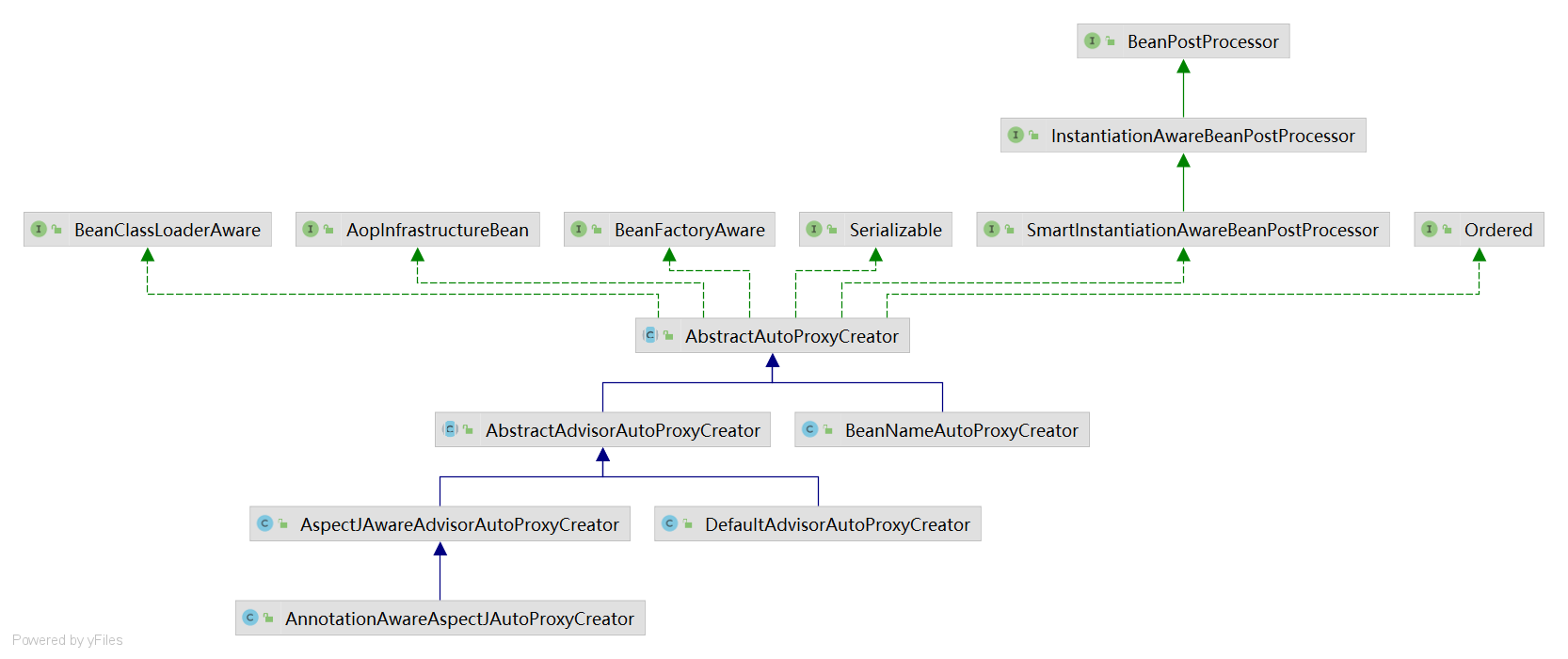
proxyFactory代理对象创建方式和代理对象调用方法过程: springaop创建动态代理对象和代理对象调用方法过程: 一、TargetSource的使用 Lazy注解,当加在属性上时,会产生一个代理对象赋值给这个属性,产生代理对象的代码为…...
)
主流软件漏洞跟踪 Apache RocketMQ NameServer 远程代码执行漏洞(CVE-2023-37582)
主流软件漏洞跟踪 Apache RocketMQ NameServer 远程代码执行漏洞(CVE-2023-37582) 漏洞描述影响版本安全版本如何修复可供参考的资料主流软件漏洞跟踪 Apache RocketMQ NameServer 远程代码执行漏洞(CVE-2023-37582) CVE编号 : CVE-2023-37582 利用情况 : EXP 已公开 …...
Element table根据字段合并表格(可多字段合并),附带拖拽列动态合并
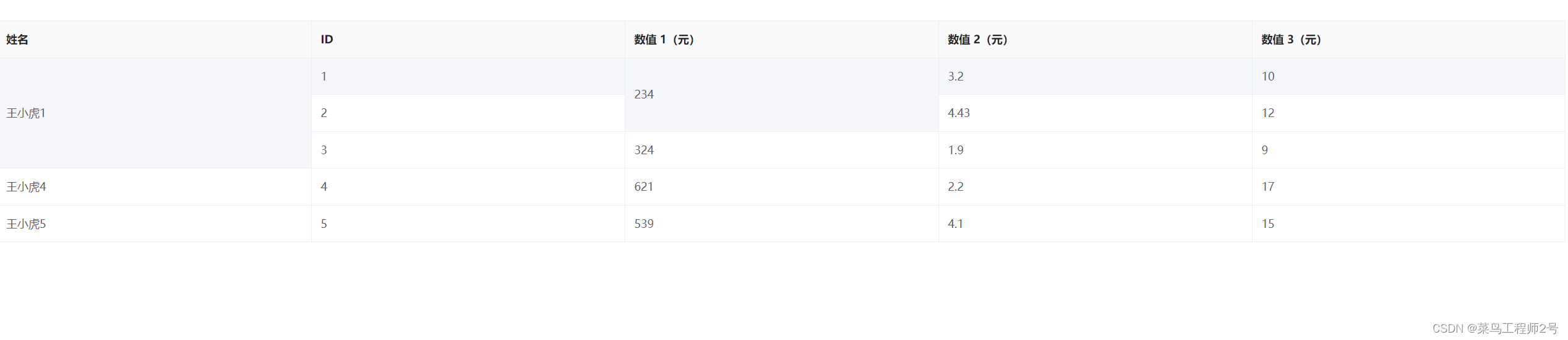
效果如图,姓名 数值1 字段进行自动合并 封装合并列js - tableMerge.js // 获取列合并的行数 // params // tableData: 表格数据 // mergeId: 合并的列的字段名 export const tagRowSpan (tableData, mergeId) >{const tagArr [];let pos 0;tableData.map((i…...
C++标准库STL容器详解
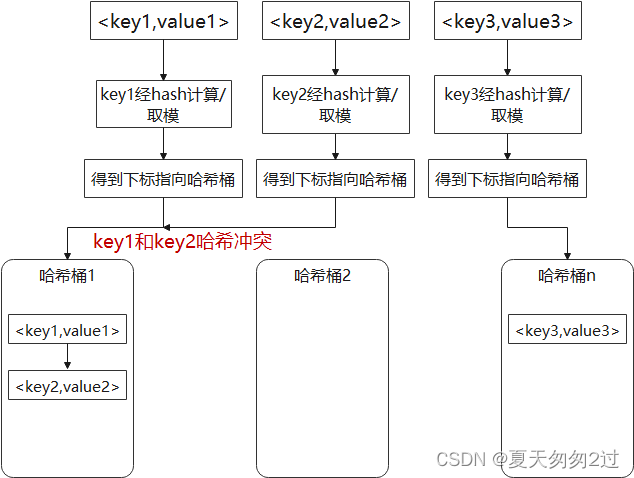
目录 C标准模板库STL容器容器分类容器通用接口 顺序容器vectorlistdeque 容器适配器queuestackpriority_queue 关联容器:红黑树setmultisetmapmultimap 关联容器:哈希表unordered_set和unordered_multisetunordered_map和unordered_multimap 附1…...
是干什么用的?)
ParNew垃圾收集器(Serial+多线程)是干什么用的?
在Java中,ParNew垃圾收集器是一种垃圾收集算法,它是Serial垃圾收集器的多线程版本。它主要用于新生代(Young Generation)的垃圾收集。新生代是Java堆内存的一部分,主要用于存放新创建的对象。 ParNew垃圾收集器的设计目标是在多核CPU上并行地…...

【Android】AES解密抛出异常Cipher functions:OPENSSL_internal:WRONG_FINAL_BLOCK_LENGTH
Java使用AES加密的时候没得问题,但是在解密的时候就出错了,一起来找找原因吧。 首先,Java运行的代码如下,使用AES加解密 Cipher cipher Cipher.getInstance("AES/CBC/NOPadding"); //...主要问题 可调试运行控制台抛…...
:数据类型转换)
菜鸟教程《Python 3 教程》笔记(2):数据类型转换
菜鸟教程《Python 3 教程》笔记(2) 2 数据类型转换2.1 隐式类型转换2.2 显式类型转换2.2.1 int() 函数2.2.2 repr() 函数2.2.3 frozenset ()函数 2 数据类型转换 出处:菜鸟教程 - Python3 数据类型转换 Python 数据类型转换可以分为2种&…...
JVM运行时参数查看
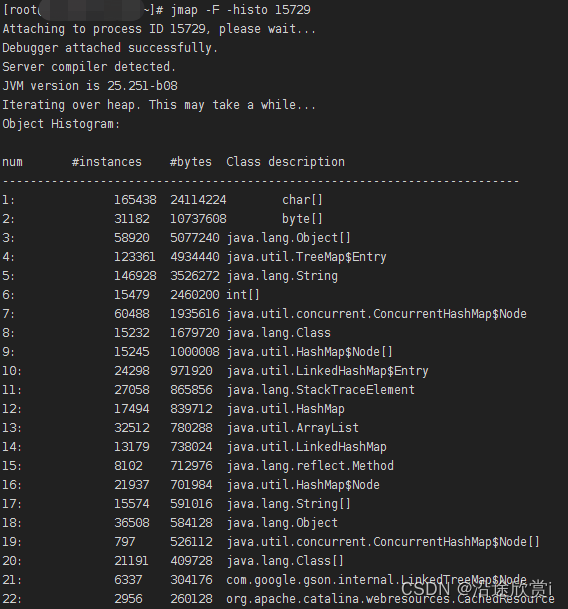
常用命令查找文档站点:https://docs.oracle.com/javase/8/docs/technotes/tools/unix/index.html -XX:PrintFlagsInitial 输出所有参数的名称和默认值,默认不包括Diagnostic和Experimental的参数。可以配合 -XX:UnlockDiagnosticVMOptions和-XX:UnlockEx…...
每日一题:leetcode 1267 统计参与通信的服务器
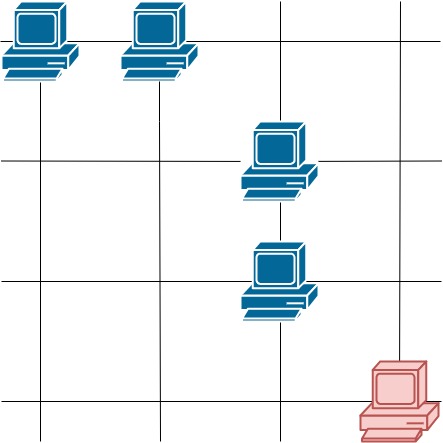
这里有一幅服务器分布图,服务器的位置标识在 m * n 的整数矩阵网格 grid 中,1 表示单元格上有服务器,0 表示没有。 如果两台服务器位于同一行或者同一列,我们就认为它们之间可以进行通信。 请你统计并返回能够与至少一台其他服务…...

Word怎么转图片?免费在线转换工具对比|2026实用方案
Word文档转换为图片是职场和学习中常见的需求。无论是为了方便分享、制作演示素材,还是保护文档隐私,掌握多种转换方法都能大幅提升工作效率。本文将为你盘点2026年最实用的Word转图片在线工具,以及电脑和手机端的完整解决方案。为什么要把Wo…...

Clutch故障排查手册:常见问题及解决方案汇总
Clutch故障排查手册:常见问题及解决方案汇总 【免费下载链接】clutch Extensible platform for infrastructure management 项目地址: https://gitcode.com/gh_mirrors/clu/clutch Clutch是一个可扩展的基础设施管理平台,旨在简化运维操作并提升开…...

HTML到DOCX格式转换的技术实现与解决方案
HTML到DOCX格式转换的技术实现与解决方案 【免费下载链接】html-to-docx HTML to DOCX converter 项目地址: https://gitcode.com/gh_mirrors/ht/html-to-docx 在Web应用开发和企业文档处理流程中,HTML内容与Office文档格式之间的转换一直是一个技术难点。传…...

大模型应用
RAG 入门项目:项目简介:RAG(检索增强生成)核心分为离线处理与在线处理两条主线:离线处理:持续向私有向量知识库补充私有知识文档,可纳入模型训练截止后的最新资料,为模型提供参考依据…...

3种方法彻底解决Realtek RTL8125 2.5GbE网卡驱动兼容性问题
3种方法彻底解决Realtek RTL8125 2.5GbE网卡驱动兼容性问题 【免费下载链接】realtek-r8125-dkms A DKMS package for easy use of Realtek r8125 driver, which supports 2.5 GbE. 项目地址: https://gitcode.com/gh_mirrors/re/realtek-r8125-dkms 你是否正在为Linux系…...

硬件选型干货|钡特电源DQ1-15D1709S与金升阳QA01-17属工业标准模块电源,避坑指南
在工业电子硬件研发中,工业DC-DC模块是板级隔离供电的核心器件,其标准化封装、性能稳定性及国产化水平,直接影响研发效率、系统可靠性与供应链安全。钡特电源DQ1-15D1709S与金升阳QA01-17作为国产直流电源模块领域的代表性型号,均…...

Python盲水印终极指南:3个简单步骤保护你的数字版权
Python盲水印终极指南:3个简单步骤保护你的数字版权 【免费下载链接】BlindWatermark 使用盲水印保护创作者的知识产权using invisible watermark to protect creators intellectual property 项目地址: https://gitcode.com/gh_mirrors/bl/BlindWatermark 在…...

从Delaunay到高质量网格:手把手拆解TetGen算法核心与C++实现避坑指南
从Delaunay到高质量网格:手把手拆解TetGen算法核心与C实现避坑指南 在计算几何与科学计算领域,生成高质量四面体网格是有限元分析、流体仿真和游戏物理引擎等应用的基础。TetGen作为开源网格生成工具的代表,其算法设计与实现细节直接影响着最…...

飞机在飞行中将电力传输至地面接收器
此次演示为太空太阳能新方案奠定了基础。在2025年11月一个狂风大作的日子,一架塞斯纳涡轮螺旋桨飞机在5000米的高度飞越宾夕法尼亚州上空时,遭遇了时速高达70节(约130公里/小时)的侧风,风速几乎与这架小型飞机的飞行速…...
)
SAP ABAP SM30表维护:手把手教你实现‘运费类型’重复描述校验(附完整代码与避坑指南)
SAP ABAP SM30表维护实战:运费类型唯一性校验的深度解析 在物流管理系统中,运费类型的定义往往需要遵循严格的业务规则。一个常见的需求是确保"运输类型运费代码"与"运费描述"的组合具有唯一性,避免因描述重复导致的操作…...