
Elasticsearch实战(四):Springboot实现Elasticsearch指标聚合与下钻分析open-API
文章目录
- 系列文章索引
- 一、指标聚合与分类
- 1、什么是指标聚合(Metric)
- 2、Metric聚合分析分为单值分析和多值分析两类
- 3、概述
- 二、单值分析API设计
- 1、Avg(平均值)
- (1)对所有文档进行avg聚合(DSL)
- (2)对筛选后的文档聚合
- (3)根据Script计算平均值
- (4)总结
- 2、Max(最大值)
- (1)统计所有文档
- (2)统计过滤后的文档
- 3、Min(最小值)
- (1)统计所有文档
- (2)统计筛选后的文档
- 4、Sum(总和)
- (1)统计所有文档汇总
- 5、Cardinality(唯一值)
- (1)统计所有文档
- (2)统计筛选后的文档
- 三、多值分析API设计
- 1、Stats Aggregation
- (1)统计所有文档
- (2)统计筛选文档
- 2、扩展状态统计
- (1)统计所有文档
- (2)统计筛选后的文档
- 3、百分位度量/百分比统计
- (1)统计所有文档
- (2)统计筛选后的文档
- 4、百分位等级/百分比排名聚合
- (1)统计所有文档
- (2)统计过滤后的文档
- 四、JavaAPI实现
系列文章索引
Elasticsearch实战(一):Springboot实现Elasticsearch统一检索功能
Elasticsearch实战(二):Springboot实现Elasticsearch自动汉字、拼音补全,Springboot实现自动拼写纠错
Elasticsearch实战(三):Springboot实现Elasticsearch搜索推荐
Elasticsearch实战(四):Springboot实现Elasticsearch指标聚合与下钻分析
Elasticsearch实战(五):Springboot实现Elasticsearch电商平台日志埋点与搜索热词
一、指标聚合与分类
1、什么是指标聚合(Metric)
聚合分析是数据库中重要的功能特性,完成对某个查询的数据集中数据的聚合计算,
如:找出某字段(或计算表达式的结果)的最大值、最小值,计算和、平均值等。
ES作为搜索引擎兼数据库,同样提供了强大的聚合分析能力。
对一个数据集求最大值、最小值,计算和、平均值等指标的聚合,在ES中称为指标聚合。
2、Metric聚合分析分为单值分析和多值分析两类
1、单值分析,只输出一个分析结果
min,max,avg,sum,cardinality(cardinality 求唯一值,即不重复的字段有多少(相当于mysql中的distinct)
2、多值分析,输出多个分析结果
stats,extended_stats,percentile,percentile_rank
3、概述
官网:https://www.elastic.co/guide/en/elasticsearch/reference/7.4/search-aggregations-metrics.html
语法:
"aggregations" : {"<aggregation_name>" : { <!--聚合的名字 -->"<aggregation_type>" : { <!--聚合的类型 --><aggregation_body> <!--聚合体:对哪些字段进行聚合 -->}[,"meta" : { [<meta_data_body>] } ]? <!--元 -->[,"aggregations" : { [<sub_aggregation>]+ } ]? <!--在聚合里面在定义子聚合-->}[,"<aggregation_name_2>" : { ... } ]* <!--聚合的名字 -->
}
openAPI设计目标与原则:
1、DSL调用与语法进行高度抽象,参数动态设计
2、Open API通过结果转换器支持上百种组合调用qurey,constant_score,match/matchall/filter/sort/size/frm/higthlight/_source/includes
3、逻辑处理公共调用,提升API业务处理能力
4、保留原生API与参数的用法
二、单值分析API设计
1、Avg(平均值)
从聚合文档中提取的价格的平均值。
(1)对所有文档进行avg聚合(DSL)
POST product_list_info/_search
{"size": 0,"aggs": {"result": {"avg": {"field": "price"}}}
}
以上汇总计算了所有文档的平均值。
“size”: 0, 表示只查询文档聚合数量,不查文档,如查询50,size=50
aggs:表示是一个聚合
result:可自定义,聚合后的数据将显示在自定义字段中
OpenAPI查询参数设计:
{"indexName": "product_list_info","map": {"size": 0,"aggs": {"result": {"avg": {"field": "price"}}}}
}
(2)对筛选后的文档聚合
POST product_list_info/_search
{"size": 0,"query": {"term": {"onelevel": "手机通讯"}},"aggs": {"result": {"avg": {"field": "price"}}}
}
OpenAPI查询参数设计:
{"indexName": "product_list_info","map": {"size": 0,"query": {"term": {"onelevel": "手机通讯"}},"aggs": {"result": {"avg": {"field": "price"}}}}
}
(3)根据Script计算平均值
es所使用的脚本语言是painless这是一门安全-高效的脚本语言,基于jvm的
#统计所有
POST product_list_info/_search?size=0
{"aggs": {"result": {"avg": {"script": {"source": "doc.evalcount.value"}}}}
}
结果:"value" : 599929.2282791147
"source": "doc['evalcount']"
"source": "doc.evalcount"
#有条件
POST product_list_info/_search?size=0
{"query": {"term": {"onelevel": "手机通讯"}},"aggs": {"czbk": {"avg": {"script": {"source": "doc.evalcount"}}}}
}
结果:"value" : 600055.6935087288
OpenAPI查询参数设计:
{"indexName": "product_list_info","map": {"size": 0,"aggs": {"czbk": {"avg": {"script": {"source": "doc.evalcount"}}}}}
}
(4)总结
avg平均
1、统一avg(所有文档)
2、有条件avg(部分文档)
3、脚本统计(所有)
4、脚本统计(部分)
2、Max(最大值)
计算从聚合文档中提取的数值的最大值。
(1)统计所有文档
POST product_list_info/_search
{"size": 0,"aggs": {"result": {"max": {"field": "price"}}}
}
结果: “value” : 9.9999999E7
OpenAPI查询参数设计:
{"indexName": "product_list_info","map": {"size": 0,"aggs": {"result": {"max": {"field": "price"}}}}
}
(2)统计过滤后的文档
POST product_list_info/_search
{"size": 0,"query": {"term": {"onelevel": "手机通讯"}},"aggs": {"result": {"max": {"field": "price"}}}
}
结果: “value” : 2474000.0
OpenAPI查询参数设计:
{"indexName": "product_list_info","map": {"size": 0,"query": {"term": {"onelevel": "手机通讯"}},"aggs": {"czbk": {"max": {"field": "price"}}}}
}
结果: “value” : 2474000.0
3、Min(最小值)
计算从聚合文档中提取的数值的最小值。
(1)统计所有文档
POST product_list_info/_search
{"size": 0,"aggs": {"result": {"min": {"field": "price"}}}
}
结果:“value”: 0.0
OpenAPI查询参数设计:
{"indexName": "product_list_info","map": {"size": 0,"aggs": {"result": {"min": {"field": "price"}}}}
}
(2)统计筛选后的文档
POST product_list_info/_search
{"size": 1,"query": {"term": {"onelevel": "手机通讯"}},"aggs": {"czbk": {"min": {"field": "price"}}}
}
结果:“value”: 0.0
参数size=1;可查询出金额为0的数据
OpenAPI查询参数设计:
{"indexName": "product_list_info","map": {"size": 1,"query": {"term": {"onelevel": "手机通讯"}},"aggs": {"result": {"min": {"field": "price"}}}}
}
4、Sum(总和)
(1)统计所有文档汇总
POST product_list_info/_search
{"size": 0,"query": {"constant_score": {"filter": {"match": {"threelevel": "手机"}}}},"aggs": {"result": {"sum": {"field": "price"}}}
}
结果:“value” : 3.433611809E7
OpenAPI查询参数设计:
{"indexName": "product_list_info","map": {"size": 0,"query": {"constant_score": {"filter": {"match": {"threelevel": "手机"}}}},"aggs": {"result": {"sum": {"field": "price"}}}}
}
5、Cardinality(唯一值)
Cardinality Aggregation,基数聚合。它属于multi-value,基于文档的某个值(可以是特定的字段,也可以通过脚本计算而来),计算文档非重复的个数(去重计数),相当于sql中的distinct。
cardinality 求唯一值,即不重复的字段有多少(相当于mysql中的distinct)
(1)统计所有文档
POST product_list_info/_search
{"size": 0,"aggs": {"result": {"cardinality": {"field": "storename"}}}
}
结果:“value” : 103169
OpenAPI查询参数设计:
{"indexName": "product_list_info","map": {"size": 0,"aggs": {"result": {"cardinality": {"field": "storename"}}}}
}
(2)统计筛选后的文档
POST product_list_info/_search
{"size": 0,"query": {"constant_score": {"filter": {"match": {"threelevel": "手机"}}}},"aggs": {"result": {"cardinality": {"field": "storename"}}}
}
OpenAPI查询参数设计:
{"indexName": "product_list_info","map": {"size": 0,"query": {"constant_score": {"filter": {"match": {"threelevel": "手机"}}}},"aggs": {"result": {"cardinality": {"field": "storename"}}}}
}
三、多值分析API设计
1、Stats Aggregation
Stats Aggregation,统计聚合。它属于multi-value,基于文档的某个值(可以是特定的数值型字段,也可以通过脚本计算而来),计算出一些统计信息(min、max、sum、count、avg 5个值)
(1)统计所有文档
POST product_list_info/_search
{"size": 0,"aggs": {"result": {"stats": {"field": "price"}}}
}返回
"aggregations" : {"result" : {"count" : 5072447,"min" : 0.0,"max" : 9.9999999E7,"avg" : 920.1537270512633,"sum" : 4.66743101232E9
OpenAPI查询参数设计:
{"indexName": "product_list_info","map": {"size": 0,"aggs": {"result": {"stats": {"field": "price"}}}}
}
(2)统计筛选文档
POST product_list_info/_search
{"size": 0,"query": {"constant_score": {"filter": {"match": {"threelevel": "手机"}}}},"aggs": {"result": {"stats": {"field": "price"}}}
}
OpenAPI查询参数设计:
{"indexName": "product_list_info","map": {"size": 0,"query": {"constant_score": {"filter": {"match": {"threelevel": "手机"}}}},"aggs": {"result": {"stats": {"field": "price"}}}}
}
2、扩展状态统计
Extended Stats Aggregation,扩展统计聚合。它属于multi-value,比stats多4个统计结果: 平方和、方差、标准差、平均值加/减两个标准差的区间
(1)统计所有文档
POST product_list_info/_search
{"size": 0,"aggs": {"result": {"extended_stats": {"field": "price"}}}
}
返回:
aggregations" : {"result" : {"count" : 5072447,"min" : 0.0,"max" : 9.9999999E7,"avg" : 920.1537270512633,"sum" : 4.66743101232E9,"sum_of_squares" : 2.0182209054045464E16,"variance" : 3.9779448262354884E9,"std_deviation" : 63070.950731977144,"std_deviation_bounds" : {"upper" : 127062.05519100555,"lower" : -125221.74773690302}
sum_of_squares:平方和
variance:方差
std_deviation:标准差
std_deviation_bounds:标准差的区间
OpenAPI查询参数设计:
{"indexName": "product_list_info","map": {"size": 0,"aggs": {"result": {"extended_stats": {"field": "price"}}}}
}
(2)统计筛选后的文档
POST product_list_info/_search
{"size": 1,"query": {"constant_score": {"filter": {"match": {"threelevel": "手机"}}}},"aggs": {"result": {"extended_stats": {"field": "price"}}}
}结果;
aggregations" : {"result" : {"count" : 12402,"min" : 0.0,"max" : 2474000.0,"avg" : 2768.595233833253,"sum" : 3.433611809E7,"sum_of_squares" : 6.445447222627729E12,"variance" : 5.120451870452684E8,"std_deviation" : 22628.41547800615,"std_deviation_bounds" : {"upper" : 48025.42618984555,"lower" : -42488.23572217905
sum_of_squares:平方和
variance:方差
std_deviation:标准差
std_deviation_bounds:标准差的区间
OpenAPI查询参数设计:
{"indexName": "product_list_info","map": {"size": 1,"query": {"constant_score": {"filter": {"match": {"threelevel": "手机"}}}},"aggs": {"czbk": {"extended_stats": {"field": "price"}}}}
}
3、百分位度量/百分比统计
Percentiles Aggregation,百分比聚合。它属于multi-value,对指定字段(脚本)的值按从小到大累计每个值对应的文档数的占比(占所有命中文档数的百分比),返回指定占比比例对应的值。默认返回[1, 5, 25, 50, 75, 95, 99 ]分位上的值。
它们表示了人们感兴趣的常用百分位数值。
(1)统计所有文档
POST product_list_info/_search
{"size": 0,"aggs": {"result": {"percentiles": {"field": "price"}}}
}返回:
aggregations" : {"result" : {"values" : {"1.0" : 0.0,"5.0" : 15.021825109603165,"25.0" : 58.669333121791,"50.0" : 139.7398105623917,"75.0" : 388.2363222057536,"95.0" : 3630.78148822216,"99.0" : 12561.562823894474}}
OpenAPI查询参数设计:
{"indexName": "product_list_info","map": {"size": 0,"aggs": {"result": {"percentiles": {"field": "price"}}}}
}
(2)统计筛选后的文档
POST product_list_info/_search
{"size": 0,"query": {"constant_score": {"filter": {"match": {"threelevel": "手机"}}}},"aggs": {"result": {"percentiles": {"field": "price"}}}
}
OpenAPI查询参数设计:
{"indexName": "product_list_info","map": {"size": 0,"query": {"constant_score": {"filter": {"match": {"threelevel": "手机"}}}},"aggs": {"result": {"percentiles": {"field": "price"}}}}
}
4、百分位等级/百分比排名聚合
百分比排名聚合:这里有另外一个紧密相关的度量叫 percentile_ranks 。 percentiles 度量告诉我们落在某个百分比以下的所有文档的最小值。
(1)统计所有文档
统计价格在15元之内统计价格在30元之内文档数据占有的百分比
tips:
统计数据会变化
这里的15和30;完全可以理解万SLA的200;比较字段不一样而已
POST product_list_info/_search
{"size": 0,"aggs": {"result": {"percentile_ranks": {"field": "price","values": [15,30]}}}
}返回:
价格在15元之内的文档数据占比是4.92%
价格在30元之内的文档数据占比是12.72%
aggregations" : {"result" : {"values" : {"15.0" : 4.92128378837021,"30.0" : 12.724827959646579}}
}
OpenAPI查询参数设计:
{"indexName": "product_list_info","map": {"size": 0,"aggs": {"result": {"percentile_ranks": {"field": "price","values": [15,30]}}}}
}
(2)统计过滤后的文档
POST product_list_info/_search
{"size": 0,"query": {"constant_score": {"filter": {"match": {"threelevel": "手机"}}}},"aggs": {"result": {"percentile_ranks": {"field": "price","values": [15,30]}}}
}
OpenAPI查询参数设计:
{"indexName": "product_list_info","map": {"size": 0,"query": {"constant_score": {"filter": {"match": {"threelevel": "手机"}}}},"aggs": {"result": {"percentile_ranks": {"field": "price","values": [15,30]}}}}
}
四、JavaAPI实现
调用metricAgg方法,传参CommonEntity 。
/** @Description: 指标聚合(Open)* @Method: metricAgg* @Param: [commonEntity]* @Update:* @since: 1.0.0* @Return: java.util.Map<java.lang.String,java.lang.Long>**/
public Map<Object, Object> metricAgg(CommonEntity commonEntity) throws Exception {//查询公共调用,将参数模板化SearchResponse response = getSearchResponse(commonEntity);//定义返回数据Map<Object, Object> map = new HashMap<Object, Object>();// 此处完全可以返回ParsedAggregation ,不用instance,弊端是返回的数据字段多、get的时候需要写死,下面循环map为的是动态获取keyMap<String, Aggregation> aggregationMap = response.getAggregations().asMap();// 将查询出来的数据放到本地局部线程变量中SearchTools.setResponseThreadLocal(response);//此处循环一次,目的是动态获取client端传来的【result】for (Map.Entry<String, Aggregation> m : aggregationMap.entrySet()) {//处理指标聚合metricResultConverter(map, m);}//公共数据处理mbCommonConverter(map);return map;
}
/** @Description: 查询公共调用,参数模板化* @Method: getSearchResponse* @Param: [commonEntity]* @Update:* @since: 1.0.0* @Return: org.elasticsearch.action.search.SearchResponse**/
private SearchResponse getSearchResponse(CommonEntity commonEntity) throws Exception {//定义查询请求SearchRequest searchRequest = new SearchRequest();//指定去哪个索引查询searchRequest.indices(commonEntity.getIndexName());//构建资源查询构建器,主要用于拼接查询条件SearchSourceBuilder sourceBuilder = new SearchSourceBuilder();//将前端的dsl查询转化为XContentParserXContentParser parser = SearchTools.getXContentParser(commonEntity);//将parser解析成功查询APIsourceBuilder.parseXContent(parser);//将sourceBuilder赋给searchRequestsearchRequest.source(sourceBuilder);//执行查询SearchResponse response = client.search(searchRequest, RequestOptions.DEFAULT);return response;
}
/** @Description: 指标聚合结果转化器* @Method: metricResultConverter* @Param: [map, m]* @Update:* @since: 1.0.0* @Return: void**/
private void metricResultConverter(Map<Object, Object> map, Map.Entry<String, Aggregation> m) {//平均值if (m.getValue() instanceof ParsedAvg) {map.put("value", ((ParsedAvg) m.getValue()).getValue());}//最大值else if (m.getValue() instanceof ParsedMax) {map.put("value", ((ParsedMax) m.getValue()).getValue());}//最小值else if (m.getValue() instanceof ParsedMin) {map.put("value", ((ParsedMin) m.getValue()).getValue());}//求和else if (m.getValue() instanceof ParsedSum) {map.put("value", ((ParsedSum) m.getValue()).getValue());}//不重复的值else if (m.getValue() instanceof ParsedCardinality) {map.put("value", ((ParsedCardinality) m.getValue()).getValue());}//扩展状态统计else if (m.getValue() instanceof ParsedExtendedStats) {map.put("count", ((ParsedExtendedStats) m.getValue()).getCount());map.put("min", ((ParsedExtendedStats) m.getValue()).getMin());map.put("max", ((ParsedExtendedStats) m.getValue()).getMax());map.put("avg", ((ParsedExtendedStats) m.getValue()).getAvg());map.put("sum", ((ParsedExtendedStats) m.getValue()).getSum());map.put("sum_of_squares", ((ParsedExtendedStats) m.getValue()).getSumOfSquares());map.put("variance", ((ParsedExtendedStats) m.getValue()).getVariance());map.put("std_deviation", ((ParsedExtendedStats) m.getValue()).getStdDeviation());map.put("lower", ((ParsedExtendedStats) m.getValue()).getStdDeviationBound(ExtendedStats.Bounds.LOWER));map.put("upper", ((ParsedExtendedStats) m.getValue()).getStdDeviationBound(ExtendedStats.Bounds.UPPER));}//状态统计else if (m.getValue() instanceof ParsedStats) {map.put("count", ((ParsedStats) m.getValue()).getCount());map.put("min", ((ParsedStats) m.getValue()).getMin());map.put("max", ((ParsedStats) m.getValue()).getMax());map.put("avg", ((ParsedStats) m.getValue()).getAvg());map.put("sum", ((ParsedStats) m.getValue()).getSum());}//百分位等级else if (m.getValue() instanceof ParsedTDigestPercentileRanks) {for (Iterator<Percentile> iterator = ((ParsedTDigestPercentileRanks) m.getValue()).iterator(); iterator.hasNext(); ) {Percentile p = (Percentile) iterator.next();map.put(p.getValue(), p.getPercent());}}//百分位度量else if (m.getValue() instanceof ParsedTDigestPercentiles) {for (Iterator<Percentile> iterator = ((ParsedTDigestPercentiles) m.getValue()).iterator(); iterator.hasNext(); ) {Percentile p = (Percentile) iterator.next();map.put(p.getPercent(), p.getValue());}}}/** @Description: 公共数据处理(指标聚合、桶聚合)* @Method: mbCommonConverter* @Param: []* @Update:* @since: 1.0.0* @Return: void**/
private void mbCommonConverter(Map<Object, Object> map) {if (!CollectionUtils.isEmpty(ResponseThreadLocal.get())) {//从线程中取出数据map.put("list", ResponseThreadLocal.get());//清空本地线程局部变量中的数据,防止内存泄露ResponseThreadLocal.clear();}}
相关文章:
:Springboot实现Elasticsearch指标聚合与下钻分析open-API)
Elasticsearch实战(四):Springboot实现Elasticsearch指标聚合与下钻分析open-API
文章目录 系列文章索引一、指标聚合与分类1、什么是指标聚合(Metric)2、Metric聚合分析分为单值分析和多值分析两类3、概述 二、单值分析API设计1、Avg(平均值)(1)对所有文档进行avg聚合(DSL)(2…...

Opencv图像暗通道调优
基于雾天退化模型的去雾算法,Opencv图像暗通道调优,(清华版代码)对普通相片也有较好的调优效果,相片更通透。 结合代码实际运行效果、算法理论模型、实际代码。我个人理解,实际效果是对图像的三个颜色通道…...
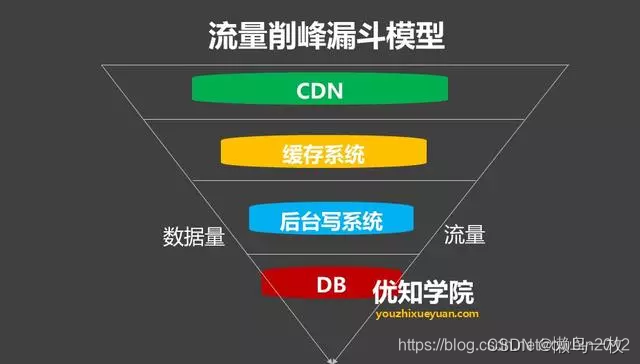
怎样来实现流量削峰方案
削峰从本质上来说就是更多地延缓用户请求,以及层层过滤用户的访问需求,遵从“最后落地到数据库的请求数要尽量少”的原则。 1.消息队列解决削峰 要对流量进行削峰,最容易想到的解决方案就是用消息队列来缓冲瞬时流量,把同步的直…...

git status搜索.c和.h后缀及git新建分支
git status搜索.c和.h后缀及git新建分支 1.脚本代码2.git新建分支(1)创建新分支(2)删除本地分支(3)删除远端分支(4)合并分支3.指定历史版本创建分支1.脚本代码 $ git status | grep "\.[hc]$"$ 是行尾的意思 \b 就是用在你匹配整个单词的时候。 如果不是整个…...
【配置环境】Visual Studio 配置 OpenCV
目录 一,环境 二,下载和配置 OpenCV 三,创建一个 Visual Studio 项目 四,配置 Visual Studio 项目 五,编写并编译 OpenCV 程序 六,解决CMake编译OpenCV报的错误 一,环境 Windows 11 家庭中…...
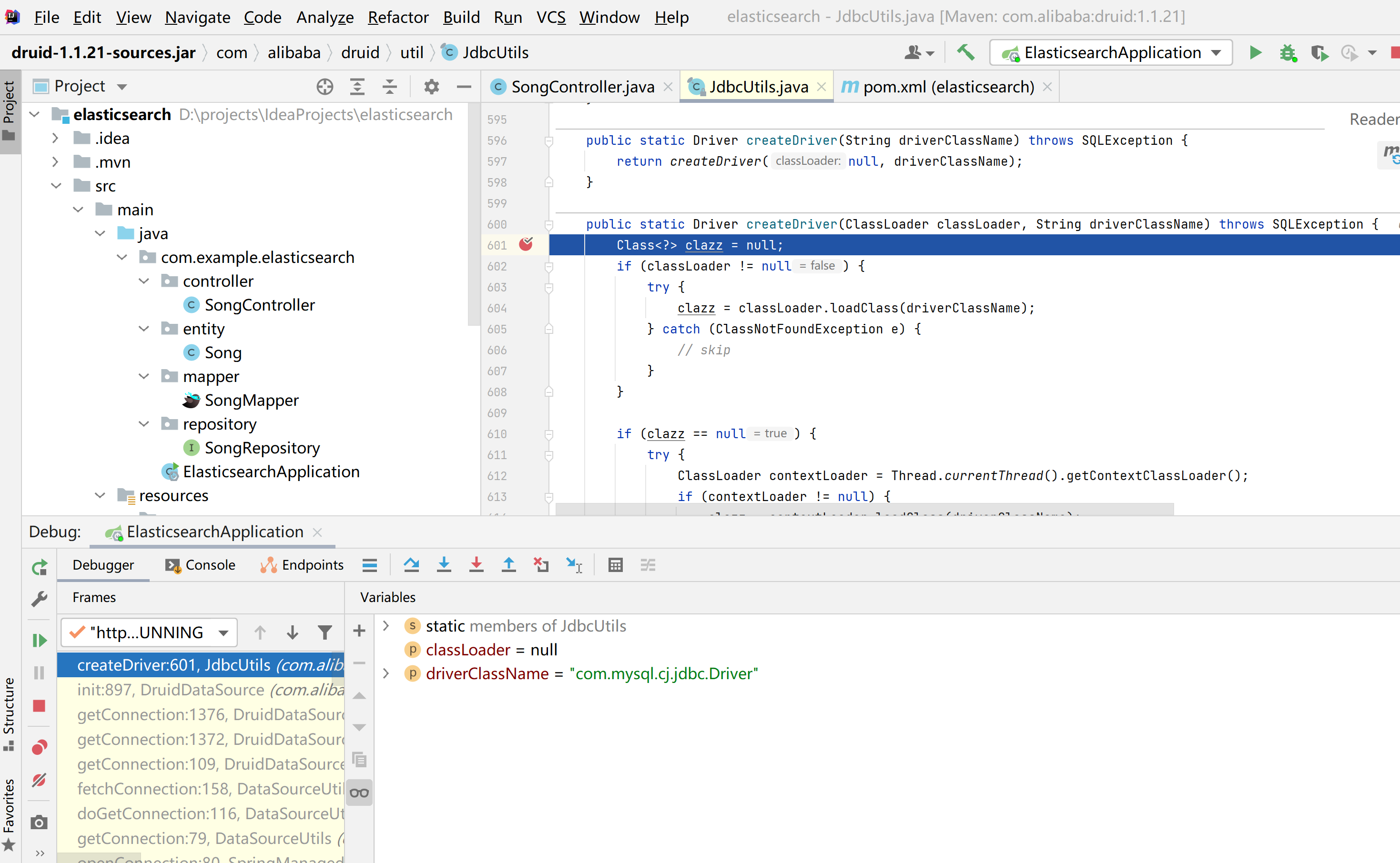
java.sql.SQLException: com.mysql.cj.jdbc.Driver
这篇文章分享一下Springboot整合Elasticsearch时遇到的一个问题,项目正常启动,但是查询数据库的时候发生了一个异常java.sql.SQLException: com.mysql.cj.jdbc.Driver java.sql.SQLException: com.mysql.cj.jdbc.Driverat com.alibaba.druid.util.JdbcU…...
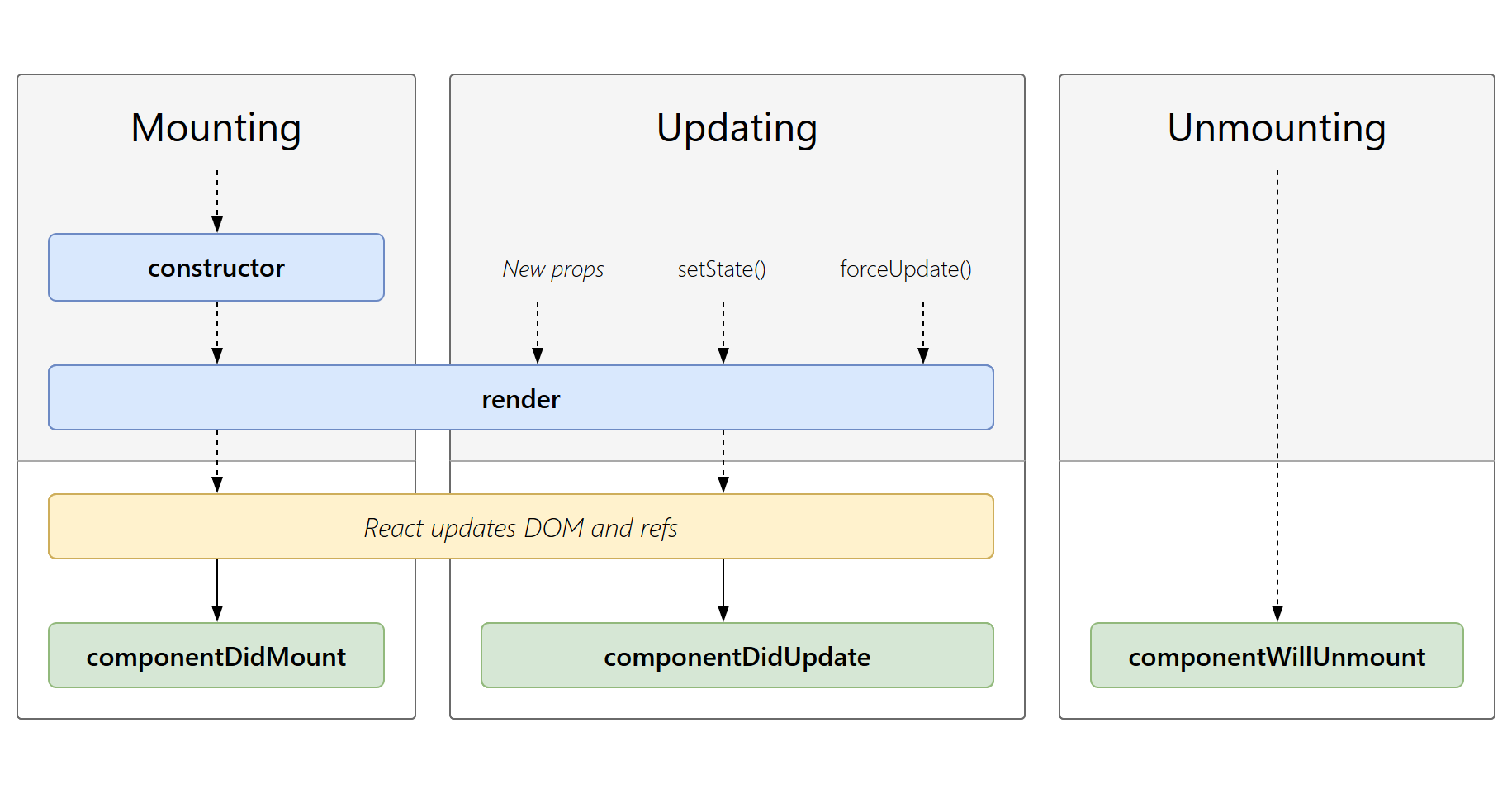
React笔记(四)类组件(2)
一、类组件的props属性 组件中的数据,除了组件内部的状态使用state之外,状态也可以来自组件的外部,外部的状态使用类组件实例上另外一个属性来表示props 1、基本的使用 在components下创建UserInfo组件 import React, { Component } from…...

点云从入门到精通技术详解100篇-点云信息编码
目录 前言 研究发展现状 点云几何信息压缩 点云属性信息压缩 点云压缩算法的相关技术...

Python爬虫解析网页内容
Python爬虫是一种自动化程序,可以模拟人类用户访问网页,获取网页中的内容。爬虫在信息采集、数据分析和网络监测等领域有着广泛的应用。在爬虫过程中,解析网页内容是非常重要的一步。 Python提供了许多强大的库和工具,用于解析网…...

从零开始学习Python爬虫技术,并应用于市场竞争情报收集
在当今信息爆炸的时代,市场竞争情报收集对企业的发展至关重要。Python爬虫技术可以帮助我们高效地收集网络上的有价值信息。本文将从零开始介绍Python爬虫技术,并探讨如何将其应用于市场竞争情报收集。 一、Python爬虫技术基础 安装Python环境 首先&…...

SpringCloudGateway集成SpringDoc CORS问题
SpringCloudGateway集成SpringDoc CORS问题 集成SpringDoc后,在gateway在线文档界面,请求具体的服务接口,报CORS问题 Failed to fetch. Possible Reasons: CORS Network Failure URL scheme must be “http” or “https” for CORS reques…...

国际版阿里云/腾讯云:弹性高性能计算E-HPC入门概述
入门概述 本文介绍E-HPC的运用流程,帮助您快速上手运用弹性高性能核算。 下文以创立集群,在集群中安装GROMACS软件并运转水分子算例进行高性能核算为例,介绍弹性高性能核算的运用流程,帮助您快速上手运用弹性高性能核算。运用流程…...

【博客702】shell flock实现单例模式执行任务
shell flock实现单例模式执行任务 场景 我们需要定时执行一个任务,并且保证每次执行时都需要上一次已经执行完了,即保证同一时间只有一个在运行 示例 假设需要执行的脚本是:ping_and_mtr.sh 创建一个新的脚本来运行你的逻辑脚本࿱…...

数据分析基础-数据可视化07-用数据分析讲故事
如何构建⼀个引⼈⼊胜的故事? ⾸先:要想象什么? 可视化什么⽐如何可视化更重要 统计分析:GIGO(垃圾输⼊,垃圾输出) 在可视化分析环境中: 吉⾼ → 您⽆法从可视化的不适当数据中获…...

策略模式简介
概念: 策略模式(Strategy Pattern)是一种行为型设计模式,它定义了一系列算法,并将每个算法封装到独立的类中,使得它们可以互相替换。通过使用策略模式,客户端可以在运行时选择不同的算法来解决…...

学术加油站|基于端到端性能的学习型基数估计器综合测评
编者按 本文系东北大学李俊虎所著,也是「 OceanBase 学术加油站」系列第 11 篇内容。 「李俊虎:东北大学计算机科学与工程学院在读硕士生,课题方向为数据库查询优化,致力于应用 AI 技术改进传统基数估计器,令数据库选…...

MySQL 使用规范 —— 如何建好字段和索引
一、案例背景 二、库表规范 1. 建表相关规范 2. 字段相关规范 3. 索引相关规范 4. 使用相关规范 三、建表语句 三、语句操作 1. 插入操作 2. 查询操作 四、其他配置 1. 监控活动和性能: 2. 连接数查询和配置 本文的宗旨在于通过简单干净实践的方式教会读…...

Relation Extraction as Open-book Examination: Retrieval-enhanced Prompt Tuning
本文是LLM系列文章,针对《Relation Extraction as Open-book Examination: Retrieval 关系提取作为开卷测试:检索增强提示调整 摘要1 引言2 方法3 实验4 相关工作5 结论 摘要 经过预训练的语言模型通过表现出显著的小样本学习能力,对关系提取…...
FFmpeg报错:Connection to tcp://XXX?timeout=XXX failed: Connection timed out
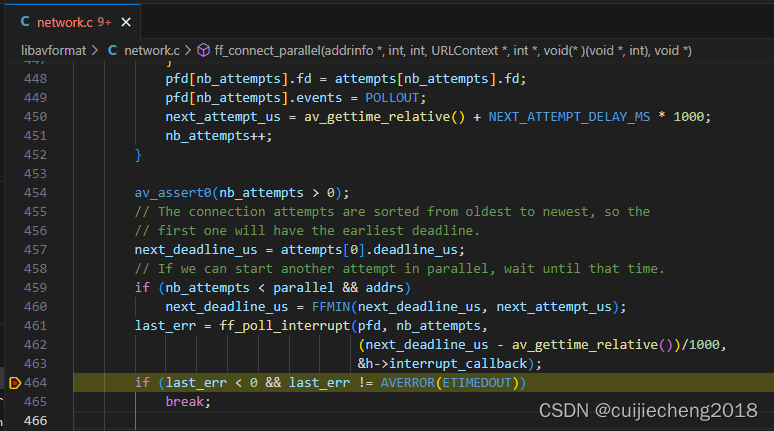
一、现象 通过FFmpeg(FFmpeg的版本是5.0.3)拉摄像机的rtsp流获取音视频数据,执行命令: ./ffmpeg -timeout 3000000 -i "rtsp://172.16.17.156/stream/video5" 报错:Connection to tcp://XXX?timeoutXXX …...
iOS开发Swift-7-得分,问题序号,约束对象,提示框,类方法与静态方法-趣味问答App
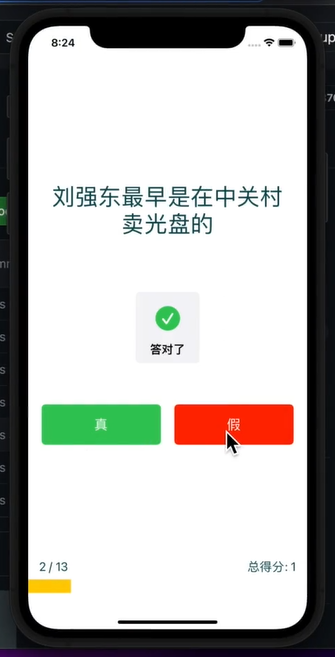
1.根据用户回答计算得分 ViewController.swift: import UIKitclass ViewController: UIViewController {var questionIndex 0var score 0IBOutlet weak var questionLabel: UILabel!IBOutlet weak var scoreLabel: UILabel!override func viewDidLoad() {super.viewDidLoad()…...

LabVIEW多核并行编程实战:从数据流原理到生产者-消费者架构优化
1. 项目概述:从单核到多核的性能跃迁如果你用LabVIEW做过一些稍微复杂的应用,比如高速数据采集、实时图像处理或者复杂的控制算法仿真,大概率会遇到一个瓶颈:程序跑起来感觉“卡”,CPU占用率明明不高,但循环…...

5分钟学会:用SlopeCraft制作惊艳的Minecraft立体地图画终极指南
5分钟学会:用SlopeCraft制作惊艳的Minecraft立体地图画终极指南 【免费下载链接】SlopeCraft Map Pixel Art Generator for Minecraft 项目地址: https://gitcode.com/gh_mirrors/sl/SlopeCraft 你是否曾想将心爱的照片或艺术作品变成Minecraft世界中的立体艺…...

BooruDatasetTagManager AiApiServer深度配置:解决常见模型兼容性问题
BooruDatasetTagManager AiApiServer深度配置:解决常见模型兼容性问题 【免费下载链接】BooruDatasetTagManager 项目地址: https://gitcode.com/gh_mirrors/bo/BooruDatasetTagManager BooruDatasetTagManager是一款功能强大的AI图片标签管理工具ÿ…...

终极Windows和Office激活指南:KMS智能激活工具三步永久激活方案
终极Windows和Office激活指南:KMS智能激活工具三步永久激活方案 【免费下载链接】KMS_VL_ALL_AIO Smart Activation Script 项目地址: https://gitcode.com/gh_mirrors/km/KMS_VL_ALL_AIO 还在为Windows系统频繁弹出激活提示而烦恼吗?Office突然变…...

推理服务为什么一上自动 Prompt 优化就开始成本失控:从 Prompt 版本爆炸到在线 A/B 收敛的工程实战
一、自动 Prompt 优化的成本幻觉 不少团队上线推理服务后,发现同一任务换句 Prompt 输出质量可提升 20%。🚀 自动 Prompt 优化因此成了香饽饽——系统同时维护几十个版本在线分流。但两周后账单涨了 40%。⚡️ 问题不在 Prompt,而是版本爆炸把…...

3分钟快速激活Windows和Office:KMS智能激活工具终极指南
3分钟快速激活Windows和Office:KMS智能激活工具终极指南 【免费下载链接】KMS_VL_ALL_AIO Smart Activation Script 项目地址: https://gitcode.com/gh_mirrors/km/KMS_VL_ALL_AIO 还在为Windows系统频繁弹出激活提示而烦恼吗?Office文档突然变成…...

告别AWCC臃肿:500KB轻量级Alienware灯光风扇控制终极方案
告别AWCC臃肿:500KB轻量级Alienware灯光风扇控制终极方案 【免费下载链接】alienfx-tools Alienware systems lights, fans, and power control tools and apps 项目地址: https://gitcode.com/gh_mirrors/al/alienfx-tools 厌倦了Alienware Command Center&…...

如何从视频中智能提取PPT内容:3步完成自动化内容转换
如何从视频中智能提取PPT内容:3步完成自动化内容转换 【免费下载链接】extract-video-ppt extract the ppt in the video 项目地址: https://gitcode.com/gh_mirrors/ex/extract-video-ppt 你是否曾经花费数小时观看会议录像或教学视频,只为手动截…...

告别WMMA API:用PTX的LDMATRIX和MMA指令在Ampere架构上重构你的FP16矩阵乘法内核
从WMMA到PTX:在Ampere架构上重构FP16矩阵乘法的深度实践 当开发者第一次接触Nvidia的Tensor Core编程时,WMMA(Warp Matrix Multiply Accumulate)API往往是首选方案。这套高层抽象接口屏蔽了硬件细节,让开发者能够快速实…...

PotPlayer百度翻译插件终极指南:免费实现20+语言实时字幕翻译
PotPlayer百度翻译插件终极指南:免费实现20语言实时字幕翻译 【免费下载链接】PotPlayer_Subtitle_Translate_Baidu PotPlayer 字幕在线翻译插件 - 百度平台 项目地址: https://gitcode.com/gh_mirrors/po/PotPlayer_Subtitle_Translate_Baidu PotPlayer字幕…...