
x86_64 ansible 源码编译安装
源码
GitHub - ansible/ansible: Ansible is a radically simple IT automation platform that makes your applications and systems easier to deploy and maintain. Automate everything from code deployment to network configuration to cloud management, in a language that approaches plain English, using SSH, with no agents to install on remote systems. https://docs.ansible.com.
编译安装过程记录
依赖
yeqiang@yeqiang-MS-7B23:~/Downloads/src/ansible$ python3 -m pip install -v -r requirements.txt
Using pip 22.0.2 from /usr/lib/python3/dist-packages/pip (python 3.10)
Defaulting to user installation because normal site-packages is not writeable
Looking in indexes: https://pypi.tuna.tsinghua.edu.cn/simple
Collecting jinja2>=3.0.0Using cached https://pypi.tuna.tsinghua.edu.cn/packages/bc/c3/f068337a370801f372f2f8f6bad74a5c140f6fda3d9de154052708dd3c65/Jinja2-3.1.2-py3-none-any.whl (133 kB)
Requirement already satisfied: PyYAML>=5.1 in /usr/lib/python3/dist-packages (from -r requirements.txt (line 7)) (5.4.1)
Requirement already satisfied: cryptography in /home/yeqiang/.local/lib/python3.10/site-packages (from -r requirements.txt (line 8)) (36.0.2)
Collecting packagingUsing cached https://pypi.tuna.tsinghua.edu.cn/packages/ab/c3/57f0601a2d4fe15de7a553c00adbc901425661bf048f2a22dfc500caf121/packaging-23.1-py3-none-any.whl (48 kB)
Collecting resolvelib<1.1.0,>=0.5.3Downloading https://pypi.tuna.tsinghua.edu.cn/packages/d2/fc/e9ccf0521607bcd244aa0b3fbd574f71b65e9ce6a112c83af988bbbe2e23/resolvelib-1.0.1-py2.py3-none-any.whl (17 kB)
Collecting MarkupSafe>=2.0Using cached https://pypi.tuna.tsinghua.edu.cn/packages/12/b3/d9ed2c0971e1435b8a62354b18d3060b66c8cb1d368399ec0b9baa7c0ee5/MarkupSafe-2.1.3-cp310-cp310-manylinux_2_17_x86_64.manylinux2014_x86_64.whl (25 kB)
Requirement already satisfied: cffi>=1.12 in /home/yeqiang/.local/lib/python3.10/site-packages (from cryptography->-r requirements.txt (line 8)) (1.15.1)
Requirement already satisfied: pycparser in /home/yeqiang/.local/lib/python3.10/site-packages (from cffi>=1.12->cryptography->-r requirements.txt (line 8)) (2.21)
Installing collected packages: resolvelib, packaging, MarkupSafe, jinja2
Successfully installed MarkupSafe-2.1.3 jinja2-3.1.2 packaging-23.1 resolvelib-1.0.1
构建
yeqiang@yeqiang-MS-7B23:~/Downloads/src/ansible$ python3 setup.py build
running build
running build_py
creating build
creating build/lib
creating build/lib/ansible
...copying test/lib/ansible_test/_util/controller/sanity/validate-modules/validate_modules/module_args.py -> build/lib/ansible_test/_util/controller/sanity/validate-modules/validate_modules
copying test/lib/ansible_test/_util/controller/sanity/validate-modules/validate_modules/schema.py -> build/lib/ansible_test/_util/controller/sanity/validate-modules/validate_modules
copying test/lib/ansible_test/_util/controller/sanity/validate-modules/validate_modules/utils.py -> build/lib/ansible_test/_util/controller/sanity/validate-modules/validate_modules
creating build/lib/ansible_test/_util/controller/sanity/yamllint/config
copying test/lib/ansible_test/_util/controller/sanity/yamllint/config/default.yml -> build/lib/ansible_test/_util/controller/sanity/yamllint/config
copying test/lib/ansible_test/_util/controller/sanity/yamllint/config/modules.yml -> build/lib/ansible_test/_util/controller/sanity/yamllint/config
copying test/lib/ansible_test/_util/controller/sanity/yamllint/config/plugins.yml -> build/lib/ansible_test/_util/controller/sanity/yamllint/config
creating build/lib/ansible_test/config
copying test/lib/ansible_test/config/cloud-config-aws.ini.template -> build/lib/ansible_test/config
copying test/lib/ansible_test/config/cloud-config-azure.ini.template -> build/lib/ansible_test/config
copying test/lib/ansible_test/config/cloud-config-cloudscale.ini.template -> build/lib/ansible_test/config
copying test/lib/ansible_test/config/cloud-config-cs.ini.template -> build/lib/ansible_test/config
copying test/lib/ansible_test/config/cloud-config-gcp.ini.template -> build/lib/ansible_test/config
copying test/lib/ansible_test/config/cloud-config-hcloud.ini.template -> build/lib/ansible_test/config
copying test/lib/ansible_test/config/cloud-config-opennebula.ini.template -> build/lib/ansible_test/config
copying test/lib/ansible_test/config/cloud-config-openshift.kubeconfig.template -> build/lib/ansible_test/config
copying test/lib/ansible_test/config/cloud-config-scaleway.ini.template -> build/lib/ansible_test/config
copying test/lib/ansible_test/config/cloud-config-vcenter.ini.template -> build/lib/ansible_test/config
copying test/lib/ansible_test/config/cloud-config-vultr.ini.template -> build/lib/ansible_test/config
copying test/lib/ansible_test/config/inventory.networking.template -> build/lib/ansible_test/config
copying test/lib/ansible_test/config/inventory.winrm.template -> build/lib/ansible_test/config
copying test/lib/ansible_test/config/config.yml -> build/lib/ansible_test/config
running build_scripts
creating build/scripts-3.10
copying and adjusting bin/ansible-test -> build/scripts-3.10
changing mode of build/scripts-3.10/ansible-test from 664 to 775
安装
yeqiang@yeqiang-MS-7B23:~/Downloads/src/ansible$ sudo python3 setup.py install
...byte-compiling build/bdist.linux-x86_64/egg/ansible_test/_util/controller/sanity/integration-aliases/yaml_to_json.py to yaml_to_json.cpython-310.pyc
byte-compiling build/bdist.linux-x86_64/egg/ansible_test/_util/controller/sanity/validate-modules/validate.py to validate.cpython-310.pyc
byte-compiling build/bdist.linux-x86_64/egg/ansible_test/_util/controller/sanity/validate-modules/validate_modules/__init__.py to __init__.cpython-310.pyc
byte-compiling build/bdist.linux-x86_64/egg/ansible_test/_util/controller/sanity/validate-modules/validate_modules/main.py to main.cpython-310.pyc
byte-compiling build/bdist.linux-x86_64/egg/ansible_test/_util/controller/sanity/validate-modules/validate_modules/module_args.py to module_args.cpython-310.pyc
byte-compiling build/bdist.linux-x86_64/egg/ansible_test/_util/controller/sanity/validate-modules/validate_modules/schema.py to schema.cpython-310.pyc
byte-compiling build/bdist.linux-x86_64/egg/ansible_test/_util/controller/sanity/validate-modules/validate_modules/utils.py to utils.cpython-310.pyc
byte-compiling build/bdist.linux-x86_64/egg/ansible_test/_util/controller/sanity/yamllint/yamllinter.py to yamllinter.cpython-310.pyc
byte-compiling build/bdist.linux-x86_64/egg/ansible_test/_util/controller/sanity/pylint/plugins/deprecated.py to deprecated.cpython-310.pyc
byte-compiling build/bdist.linux-x86_64/egg/ansible_test/_util/controller/sanity/pylint/plugins/string_format.py to string_format.cpython-310.pyc
byte-compiling build/bdist.linux-x86_64/egg/ansible_test/_util/controller/sanity/pylint/plugins/unwanted.py to unwanted.cpython-310.pyc
creating build/bdist.linux-x86_64/egg/EGG-INFO
installing scripts to build/bdist.linux-x86_64/egg/EGG-INFO/scripts
running install_scripts
running build_scripts
creating build/bdist.linux-x86_64/egg/EGG-INFO/scripts
copying build/scripts-3.10/ansible-test -> build/bdist.linux-x86_64/egg/EGG-INFO/scripts
changing mode of build/bdist.linux-x86_64/egg/EGG-INFO/scripts/ansible-test to 775
copying lib/ansible_core.egg-info/PKG-INFO -> build/bdist.linux-x86_64/egg/EGG-INFO
copying lib/ansible_core.egg-info/SOURCES.txt -> build/bdist.linux-x86_64/egg/EGG-INFO
copying lib/ansible_core.egg-info/dependency_links.txt -> build/bdist.linux-x86_64/egg/EGG-INFO
copying lib/ansible_core.egg-info/entry_points.txt -> build/bdist.linux-x86_64/egg/EGG-INFO
copying lib/ansible_core.egg-info/not-zip-safe -> build/bdist.linux-x86_64/egg/EGG-INFO
copying lib/ansible_core.egg-info/requires.txt -> build/bdist.linux-x86_64/egg/EGG-INFO
copying lib/ansible_core.egg-info/top_level.txt -> build/bdist.linux-x86_64/egg/EGG-INFO
creating dist
creating 'dist/ansible_core-2.16.0.dev0-py3.10.egg' and adding 'build/bdist.linux-x86_64/egg' to it
removing 'build/bdist.linux-x86_64/egg' (and everything under it)
Processing ansible_core-2.16.0.dev0-py3.10.egg
creating /usr/local/lib/python3.10/dist-packages/ansible_core-2.16.0.dev0-py3.10.egg
Extracting ansible_core-2.16.0.dev0-py3.10.egg to /usr/local/lib/python3.10/dist-packages
Adding ansible-core 2.16.0.dev0 to easy-install.pth file
Installing ansible-test script to /usr/local/bin
Installing ansible script to /usr/local/bin
Installing ansible-config script to /usr/local/bin
Installing ansible-connection script to /usr/local/bin
Installing ansible-console script to /usr/local/bin
Installing ansible-doc script to /usr/local/bin
Installing ansible-galaxy script to /usr/local/bin
Installing ansible-inventory script to /usr/local/bin
Installing ansible-playbook script to /usr/local/bin
Installing ansible-pull script to /usr/local/bin
Installing ansible-vault script to /usr/local/binInstalled /usr/local/lib/python3.10/dist-packages/ansible_core-2.16.0.dev0-py3.10.egg
Processing dependencies for ansible-core==2.16.0.dev0
Searching for resolvelib<1.1.0,>=0.5.3
Reading https://pypi.org/simple/resolvelib/
/usr/lib/python3/dist-packages/pkg_resources/__init__.py:116: PkgResourcesDeprecationWarning:  is an invalid version and will not be supported in a future releasewarnings.warn(
Downloading https://files.pythonhosted.org/packages/d2/fc/e9ccf0521607bcd244aa0b3fbd574f71b65e9ce6a112c83af988bbbe2e23/resolvelib-1.0.1-py2.py3-none-any.whl#sha256=d2da45d1a8dfee81bdd591647783e340ef3bcb104b54c383f70d422ef5cc7dbf
Best match: resolvelib 1.0.1
Processing resolvelib-1.0.1-py2.py3-none-any.whl
Installing resolvelib-1.0.1-py2.py3-none-any.whl to /usr/local/lib/python3.10/dist-packages
Adding resolvelib 1.0.1 to easy-install.pth fileInstalled /usr/local/lib/python3.10/dist-packages/resolvelib-1.0.1-py3.10.egg
Searching for packaging
Reading https://pypi.org/simple/packaging/
Downloading https://files.pythonhosted.org/packages/ab/c3/57f0601a2d4fe15de7a553c00adbc901425661bf048f2a22dfc500caf121/packaging-23.1-py3-none-any.whl#sha256=994793af429502c4ea2ebf6bf664629d07c1a9fe974af92966e4b8d2df7edc61
Best match: packaging 23.1
Processing packaging-23.1-py3-none-any.whl
Installing packaging-23.1-py3-none-any.whl to /usr/local/lib/python3.10/dist-packages
Adding packaging 23.1 to easy-install.pth fileInstalled /usr/local/lib/python3.10/dist-packages/packaging-23.1-py3.10.egg
Searching for jinja2>=3.0.0
Reading https://pypi.org/simple/jinja2/
Downloading https://files.pythonhosted.org/packages/bc/c3/f068337a370801f372f2f8f6bad74a5c140f6fda3d9de154052708dd3c65/Jinja2-3.1.2-py3-none-any.whl#sha256=6088930bfe239f0e6710546ab9c19c9ef35e29792895fed6e6e31a023a182a61
Best match: Jinja2 3.1.2
Processing Jinja2-3.1.2-py3-none-any.whl
Installing Jinja2-3.1.2-py3-none-any.whl to /usr/local/lib/python3.10/dist-packages
Adding Jinja2 3.1.2 to easy-install.pth fileInstalled /usr/local/lib/python3.10/dist-packages/Jinja2-3.1.2-py3.10.egg
Searching for MarkupSafe>=2.0
Reading https://pypi.org/simple/MarkupSafe/
Downloading https://files.pythonhosted.org/packages/12/b3/d9ed2c0971e1435b8a62354b18d3060b66c8cb1d368399ec0b9baa7c0ee5/MarkupSafe-2.1.3-cp310-cp310-manylinux_2_17_x86_64.manylinux2014_x86_64.whl#sha256=65c1a9bcdadc6c28eecee2c119465aebff8f7a584dd719facdd9e825ec61ab52
Best match: MarkupSafe 2.1.3
Processing MarkupSafe-2.1.3-cp310-cp310-manylinux_2_17_x86_64.manylinux2014_x86_64.whl
Installing MarkupSafe-2.1.3-cp310-cp310-manylinux_2_17_x86_64.manylinux2014_x86_64.whl to /usr/local/lib/python3.10/dist-packages
Adding MarkupSafe 2.1.3 to easy-install.pth fileInstalled /usr/local/lib/python3.10/dist-packages/MarkupSafe-2.1.3-py3.10-linux-x86_64.egg
Searching for cryptography==3.4.8
Best match: cryptography 3.4.8
Adding cryptography 3.4.8 to easy-install.pth fileUsing /usr/lib/python3/dist-packages
Searching for PyYAML==5.4.1
Best match: PyYAML 5.4.1
Adding PyYAML 5.4.1 to easy-install.pth fileUsing /usr/lib/python3/dist-packages
Finished processing dependencies for ansible-core==2.16.0.dev0
相关文章:

x86_64 ansible 源码编译安装
源码 GitHub - ansible/ansible: Ansible is a radically simple IT automation platform that makes your applications and systems easier to deploy and maintain. Automate everything from code deployment to network configuration to cloud management, in a languag…...

数据结构学习系列之顺序表的两种插入方式
方式1:在顺序表末端插入数据元素,代码如下:示例代码: int insert_seq_list_1(list_t *seq_list,int data){if(NULL seq_list){printf("入参为NULL\n");return -1;}if(N seq_list->count){printf("顺序表已满…...
)
Matlab/Python教程系列 | 根据目录下的已有图片制作视频(动画)
MATLAB和Python的编程教程: 根据目录下的已有图片制作视频(动画) 注1:本文系“MATLAB/Python编程教程”系列之一,致力于使用Python和Matlab实现特定的功能。本次要实现的功能是:根据目录下的已有图片制作视频(动画)。 在这个教程中,我们将一起学习如何使用MATLAB和Python编…...
Pyecharts数据可视化(一)
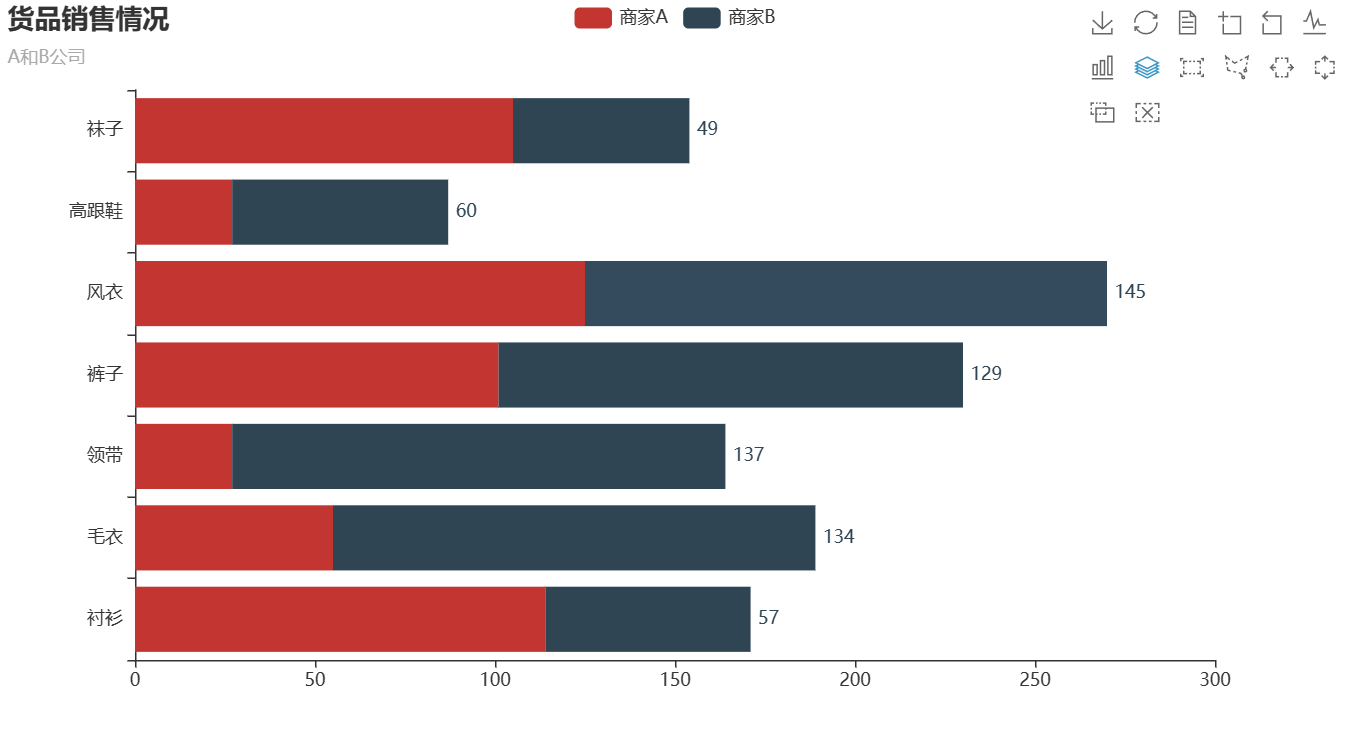
目录 1.Pyecharts简介 2.Pyecharts的常用方法 3.Pyecharts绘制柱状图 3.1 绘制并列柱状图 3.2 绘制水平直方图 1.Pyecharts简介 Pyecharts是一个用于创建交互式图表的Python库。它基于Echarts,一个强大的JavaScript图表库,Pyecharts允许Python开发者…...

stable diffusion实践操作-提示词-图片结构
系列文章目录 stable diffusion实践操作-提示词 文章目录 系列文章目录前言一、提示词汇总1.1 图片结构11.2 图片结构21.3 图片结构3 二、总结 前言 本文主要收纳总结了提示词-图片结构。 一、提示词汇总 1.1 图片结构1 StylesArtistshudson river school哈得逊河学派alpho…...

程序员自由创业周记#2:前期准备
感恩 上次公开了创业的决定后,得到了很多亲朋好友和陌生朋友的鼓励或支持,以不同的形式,感动之情溢于言表。这些都会记在心里,大恩不言谢~ 创业方向 笔者是一名资质平平的iOS开发程序猿,创业项目也就是开发App卖&am…...
:Springboot实现Elasticsearch指标聚合与下钻分析open-API)
Elasticsearch实战(四):Springboot实现Elasticsearch指标聚合与下钻分析open-API
文章目录 系列文章索引一、指标聚合与分类1、什么是指标聚合(Metric)2、Metric聚合分析分为单值分析和多值分析两类3、概述 二、单值分析API设计1、Avg(平均值)(1)对所有文档进行avg聚合(DSL)(2…...
Opencv图像暗通道调优
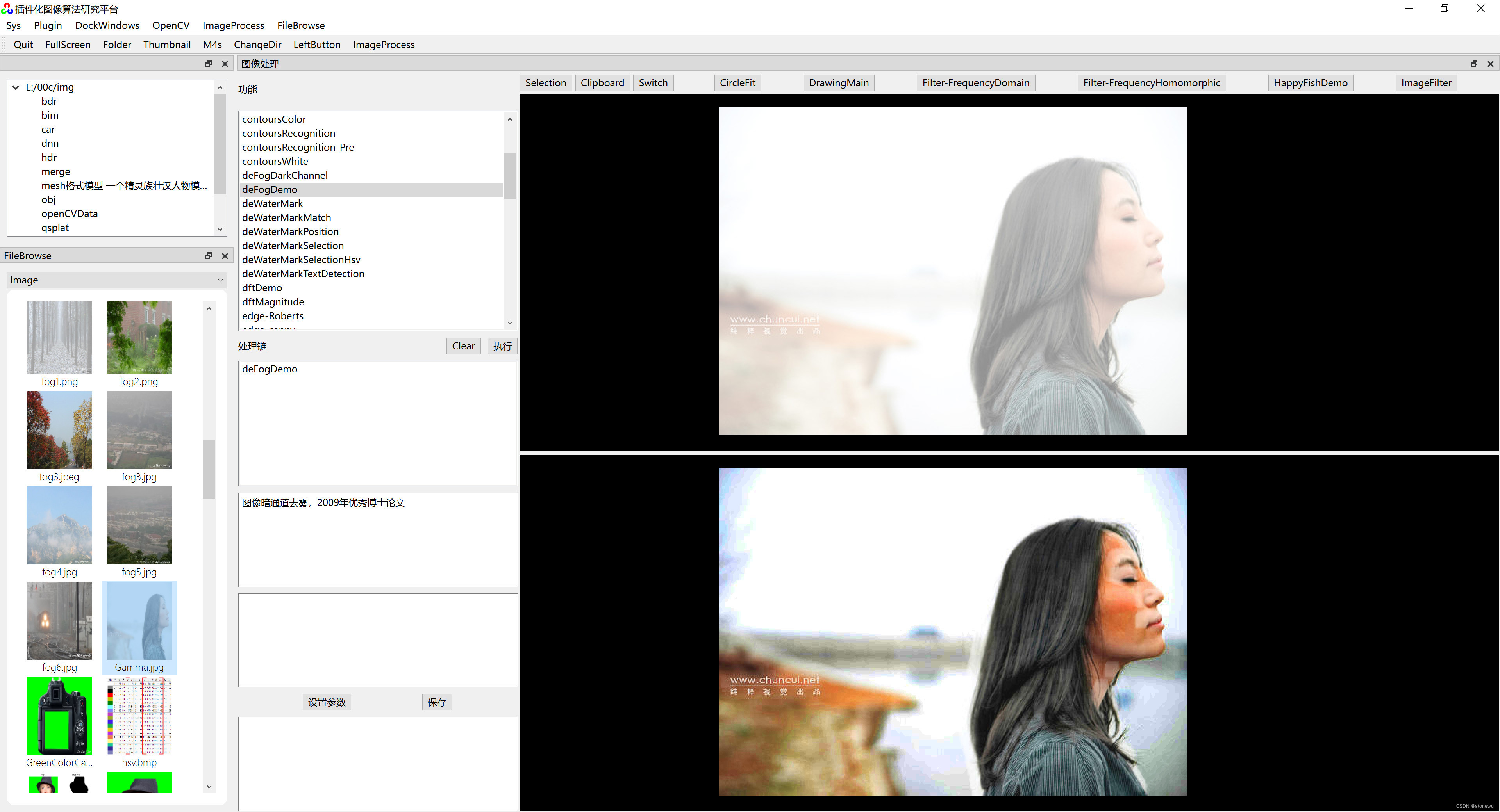
基于雾天退化模型的去雾算法,Opencv图像暗通道调优,(清华版代码)对普通相片也有较好的调优效果,相片更通透。 结合代码实际运行效果、算法理论模型、实际代码。我个人理解,实际效果是对图像的三个颜色通道…...
怎样来实现流量削峰方案
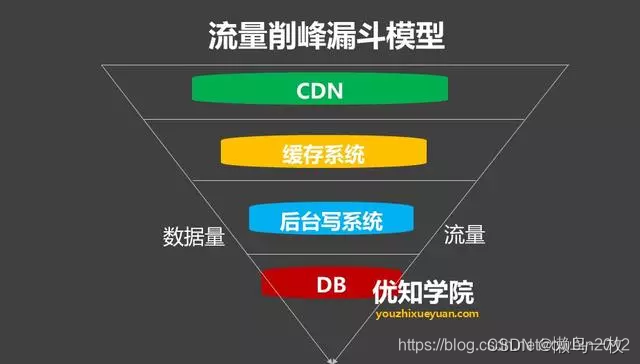
削峰从本质上来说就是更多地延缓用户请求,以及层层过滤用户的访问需求,遵从“最后落地到数据库的请求数要尽量少”的原则。 1.消息队列解决削峰 要对流量进行削峰,最容易想到的解决方案就是用消息队列来缓冲瞬时流量,把同步的直…...

git status搜索.c和.h后缀及git新建分支
git status搜索.c和.h后缀及git新建分支 1.脚本代码2.git新建分支(1)创建新分支(2)删除本地分支(3)删除远端分支(4)合并分支3.指定历史版本创建分支1.脚本代码 $ git status | grep "\.[hc]$"$ 是行尾的意思 \b 就是用在你匹配整个单词的时候。 如果不是整个…...
【配置环境】Visual Studio 配置 OpenCV
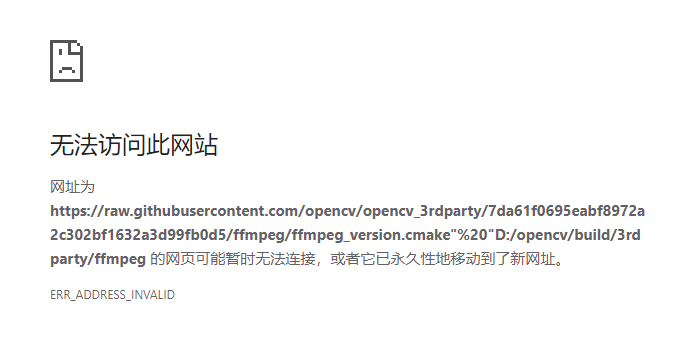
目录 一,环境 二,下载和配置 OpenCV 三,创建一个 Visual Studio 项目 四,配置 Visual Studio 项目 五,编写并编译 OpenCV 程序 六,解决CMake编译OpenCV报的错误 一,环境 Windows 11 家庭中…...
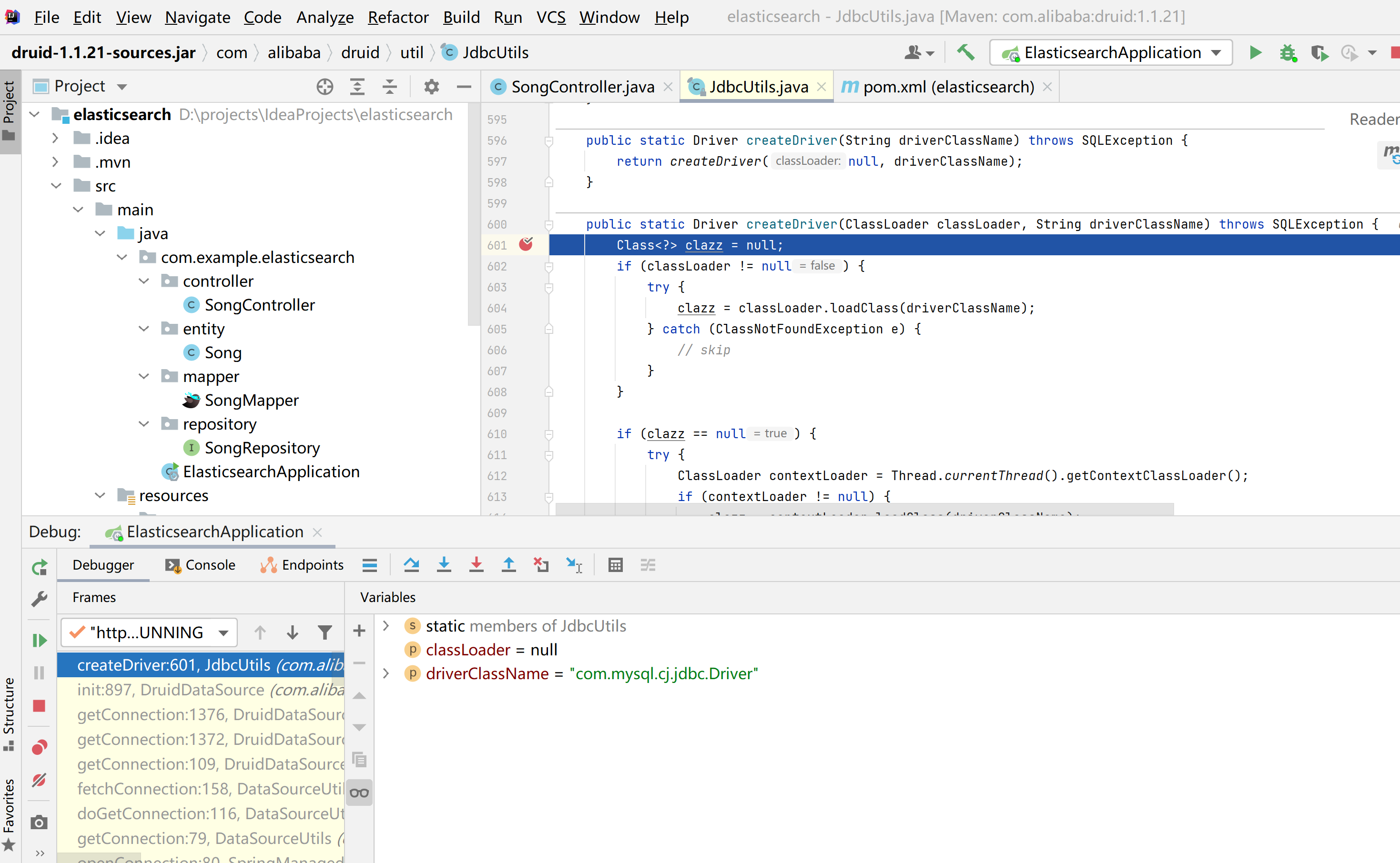
java.sql.SQLException: com.mysql.cj.jdbc.Driver
这篇文章分享一下Springboot整合Elasticsearch时遇到的一个问题,项目正常启动,但是查询数据库的时候发生了一个异常java.sql.SQLException: com.mysql.cj.jdbc.Driver java.sql.SQLException: com.mysql.cj.jdbc.Driverat com.alibaba.druid.util.JdbcU…...
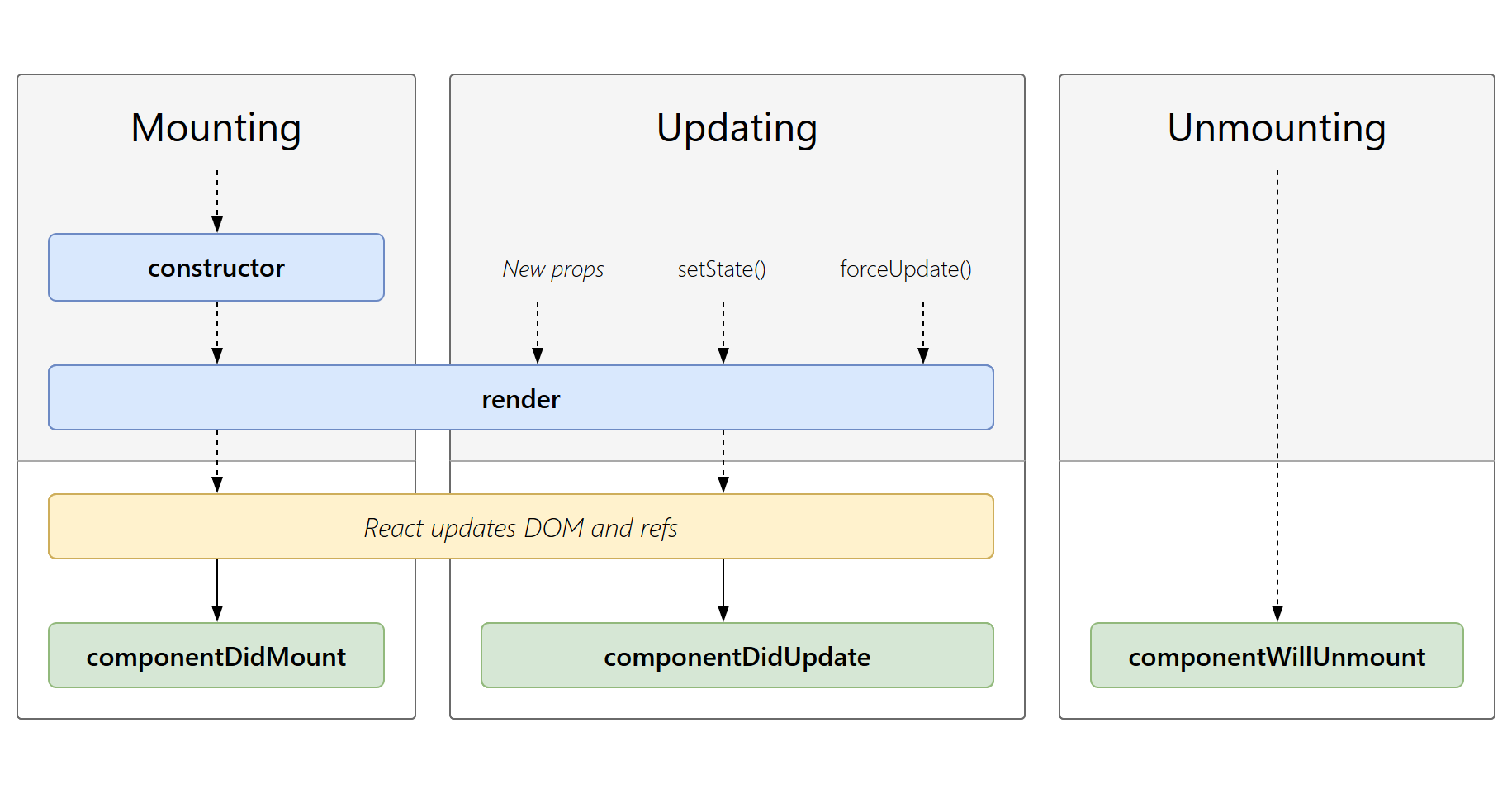
React笔记(四)类组件(2)
一、类组件的props属性 组件中的数据,除了组件内部的状态使用state之外,状态也可以来自组件的外部,外部的状态使用类组件实例上另外一个属性来表示props 1、基本的使用 在components下创建UserInfo组件 import React, { Component } from…...

点云从入门到精通技术详解100篇-点云信息编码
目录 前言 研究发展现状 点云几何信息压缩 点云属性信息压缩 点云压缩算法的相关技术...

Python爬虫解析网页内容
Python爬虫是一种自动化程序,可以模拟人类用户访问网页,获取网页中的内容。爬虫在信息采集、数据分析和网络监测等领域有着广泛的应用。在爬虫过程中,解析网页内容是非常重要的一步。 Python提供了许多强大的库和工具,用于解析网…...

从零开始学习Python爬虫技术,并应用于市场竞争情报收集
在当今信息爆炸的时代,市场竞争情报收集对企业的发展至关重要。Python爬虫技术可以帮助我们高效地收集网络上的有价值信息。本文将从零开始介绍Python爬虫技术,并探讨如何将其应用于市场竞争情报收集。 一、Python爬虫技术基础 安装Python环境 首先&…...

SpringCloudGateway集成SpringDoc CORS问题
SpringCloudGateway集成SpringDoc CORS问题 集成SpringDoc后,在gateway在线文档界面,请求具体的服务接口,报CORS问题 Failed to fetch. Possible Reasons: CORS Network Failure URL scheme must be “http” or “https” for CORS reques…...

国际版阿里云/腾讯云:弹性高性能计算E-HPC入门概述
入门概述 本文介绍E-HPC的运用流程,帮助您快速上手运用弹性高性能核算。 下文以创立集群,在集群中安装GROMACS软件并运转水分子算例进行高性能核算为例,介绍弹性高性能核算的运用流程,帮助您快速上手运用弹性高性能核算。运用流程…...

【博客702】shell flock实现单例模式执行任务
shell flock实现单例模式执行任务 场景 我们需要定时执行一个任务,并且保证每次执行时都需要上一次已经执行完了,即保证同一时间只有一个在运行 示例 假设需要执行的脚本是:ping_and_mtr.sh 创建一个新的脚本来运行你的逻辑脚本࿱…...

数据分析基础-数据可视化07-用数据分析讲故事
如何构建⼀个引⼈⼊胜的故事? ⾸先:要想象什么? 可视化什么⽐如何可视化更重要 统计分析:GIGO(垃圾输⼊,垃圾输出) 在可视化分析环境中: 吉⾼ → 您⽆法从可视化的不适当数据中获…...

Linux串口编程进阶:深入termios2结构体,搞定CH340/FTDI各种转接器的非标准波特率
Linux串口编程实战:破解CH340/FTDI非标准波特率适配难题 当你在工业物联网项目中尝试将某个9600bps的设备升级到115200bps时,可能会发现某些USB转串口适配器死活不配合——明明代码正确,波特率却始终无法生效。这不是你的错,而是…...

Diablo Edit2完全指南:暗黑破坏神2存档修改器终极使用教程
Diablo Edit2完全指南:暗黑破坏神2存档修改器终极使用教程 【免费下载链接】diablo_edit Diablo II Character editor. 项目地址: https://gitcode.com/gh_mirrors/di/diablo_edit 你是否曾经在暗黑破坏神2中花费数小时刷装备却一无所获?或者想要…...
)
别再手动折腾了!CubeMX生成MDK工程后,一键开启STM32F4的FPU和DSP库(附完整配置流程)
解放双手:STM32F4硬件加速全自动配置指南 每次新建工程都要重复配置FPU和DSP库?是时候告别这种低效操作了。本文将带你用CubeMXMDK打造一套零手动干预的完整工作流,让硬件加速功能从工程创建之初就自动就位。 1. 环境准备与工程创建 在开始之…...
)
别再只会拖控件了!FastReport 实战:手把手教你用代码搞定复杂报表(含分组、过滤、合计)
代码驱动报表革命:FastReport高级开发实战指南 在电商后台系统中,销售报表往往需要处理动态分组、条件过滤和跨页合计等复杂需求。传统拖拽式设计工具虽然入门简单,但面对这类业务场景时常常捉襟见肘。本文将带你突破界面限制,通过…...

在华为欧拉openEuler 22.03 SP2上搞定Oracle 11g R2:一个踩坑无数的可视化安装实录
在华为欧拉openEuler 22.03 SP2上搞定Oracle 11g R2:一个踩坑无数的可视化安装实录 当国产操作系统遇上传统商业数据库,这场跨越技术栈的"联姻"注定充满挑战。作为在openEuler 22.03 SP2上成功部署Oracle 11g R2的实践者,我将以时间…...

碧蓝航线Alas脚本:解放双手的终极自动化解决方案
碧蓝航线Alas脚本:解放双手的终极自动化解决方案 【免费下载链接】AzurLaneAutoScript Azur Lane bot (CN/EN/JP/TW) 碧蓝航线脚本 | 无缝委托科研,全自动大世界 项目地址: https://gitcode.com/gh_mirrors/az/AzurLaneAutoScript 你是否厌倦了每…...

如何在5分钟内制作专业滚动歌词?LRC Maker免费在线工具终极指南
如何在5分钟内制作专业滚动歌词?LRC Maker免费在线工具终极指南 【免费下载链接】lrc-maker 歌词滚动姬|可能是你所能见到的最好用的歌词制作工具 项目地址: https://gitcode.com/gh_mirrors/lr/lrc-maker 你是否曾为制作歌词时间轴而烦恼&#x…...

拯救者笔记本终极优化指南:5个必知技巧彻底释放硬件潜能
拯救者笔记本终极优化指南:5个必知技巧彻底释放硬件潜能 【免费下载链接】LenovoLegionToolkit Lightweight Lenovo Vantage and Hotkeys replacement for Lenovo Legion laptops. 项目地址: https://gitcode.com/gh_mirrors/le/LenovoLegionToolkit 你是否厌…...

SAP查询字段定义的字符数
用户常会问到“***的文本描述可以输入多少个字符”。 操作步骤: 输入事物代码:SE11就能看到字段配置的字符数量。如何获得表名称:(OBB8举例) 操作步骤: 输入事物代码:OBB8...

基于MATLAB的GPS捕获、跟踪与PVT计算实现
一、系统架构设计 GPS信号处理流程分为信号捕获、信号跟踪、导航电文解调和PVT解算四个核心模块。以下为MATLAB实现框架: % 主程序流程 [acquired_data, doppler_shift, code_phase] acquisition(signal, PRN_list); [tracked_data, cn0_est] tracking(acquired_d…...