
【hudi】数据湖客户端运维工具Hudi-Cli实战
数据湖客户端运维工具Hudi-Cli实战
help
hudi:student_mysql_cdc_hudi_fl->help
AVAILABLE COMMANDSArchived Commits Commandtrigger archival: trigger archivalshow archived commits: Read commits from archived files and show detailsshow archived commit stats: Read commits from archived files and show detailsBootstrap Commandbootstrap run: Run a bootstrap action for current Hudi tablebootstrap index showmapping: Show bootstrap index mappingbootstrap index showpartitions: Show bootstrap indexed partitionsBuilt-In Commandshelp: Display help about available commandsstacktrace: Display the full stacktrace of the last error.clear: Clear the shell screen.quit, exit: Exit the shell.history: Display or save the history of previously run commandsversion: Show version infoscript: Read and execute commands from a file.Cleans Commandcleans show: Show the cleansclean showpartitions: Show partition level details of a cleancleans run: run cleanClustering Commandclustering run: Run Clusteringclustering scheduleAndExecute: Run Clustering. Make a cluster plan first and execute that plan immediatelyclustering schedule: Schedule ClusteringCommits Commandcommits compare: Compare commits with another Hoodie tablecommits sync: Sync commits with another Hoodie tablecommit showpartitions: Show partition level details of a commitcommits show: Show the commitscommits showarchived: Show the archived commitscommit showfiles: Show file level details of a commitcommit show_write_stats: Show write stats of a commitCompaction Commandcompaction run: Run Compaction for given instant timecompaction scheduleAndExecute: Schedule compaction plan and execute this plancompaction showarchived: Shows compaction details for a specific compaction instantcompaction repair: Renames the files to make them consistent with the timeline as dictated by Hoodie metadata. Use when compaction unschedule fails partially.compaction schedule: Schedule Compactioncompaction show: Shows compaction details for a specific compaction instantcompaction unscheduleFileId: UnSchedule Compaction for a fileIdcompaction validate: Validate Compactioncompaction unschedule: Unschedule Compactioncompactions show all: Shows all compactions that are in active timelinecompactions showarchived: Shows compaction details for specified time windowDiff Commanddiff partition: Check how file differs across range of commits. It is meant to be used only for partitioned tables.diff file: Check how file differs across range of commitsExport Commandexport instants: Export Instants and their metadata from the TimelineFile System View Commandshow fsview all: Show entire file-system viewshow fsview latest: Show latest file-system viewHDFS Parquet Import Commandhdfsparquetimport: Imports Parquet table to a hoodie tableHoodie Log File Commandshow logfile records: Read records from log filesshow logfile metadata: Read commit metadata from log filesHoodie Sync Validate Commandsync validate: Validate the sync by counting the number of recordsKerberos Authentication Commandkerberos kdestroy: Destroy Kerberos authenticationkerberos kinit: Perform Kerberos authenticationMarkers Commandmarker delete: Delete the markerMetadata Commandmetadata stats: Print stats about the metadatametadata list-files: Print a list of all files in a partition from the metadatametadata list-partitions: List all partitions from metadatametadata validate-files: Validate all files in all partitions from the metadatametadata delete: Remove the Metadata Tablemetadata create: Create the Metadata Table if it does not existmetadata init: Update the metadata table from commits since the creationmetadata set: Set options for Metadata TableRepairs Commandrepair deduplicate: De-duplicate a partition path contains duplicates & produce repaired files to replace withrename partition: Rename partition. Usage: rename partition --oldPartition <oldPartition> --newPartition <newPartition>repair overwrite-hoodie-props: Overwrite hoodie.properties with provided file. Risky operation. Proceed with caution!repair migrate-partition-meta: Migrate all partition meta file currently stored in text format to be stored in base file format. See HoodieTableConfig#PARTITION_METAFILE_USE_DATA_FORMAT.repair addpartitionmeta: Add partition metadata to a table, if not presentrepair deprecated partition: Repair deprecated partition ("default"). Re-writes data from the deprecated partition into __HIVE_DEFAULT_PARTITION__repair show empty commit metadata: show failed commitsrepair corrupted clean files: repair corrupted clean filesRollbacks Commandshow rollback: Show details of a rollback instantcommit rollback: Rollback a commitshow rollbacks: List all rollback instantsSavepoints Commandsavepoint rollback: Savepoint a commitsavepoints show: Show the savepointssavepoint create: Savepoint a commitsavepoint delete: Delete the savepointSpark Env Commandset: Set spark launcher env to clishow env: Show spark launcher env by keyshow envs all: Show spark launcher envsStats Commandstats filesizes: File Sizes. Display summary stats on sizes of filesstats wa: Write Amplification. Ratio of how many records were upserted to how many records were actually writtenTable Commandtable update-configs: Update the table configs with configs with provided file.table recover-configs: Recover table configs, from update/delete that failed midway.refresh, metadata refresh, commits refresh, cleans refresh, savepoints refresh: Refresh table metadatacreate: Create a hoodie table if not presenttable delete-configs: Delete the supplied table configs from the table.fetch table schema: Fetches latest table schemaconnect: Connect to a hoodie tabledesc: Describe Hoodie Table propertiesTemp View Commandtemp_query, temp query: query against created temp viewtemps_show, temps show: Show all views nametemp_delete, temp delete: Delete view nameTimeline Commandmetadata timeline show incomplete: List all incomplete instants in active timeline of metadata tablemetadata timeline show active: List all instants in active timeline of metadata tabletimeline show incomplete: List all incomplete instants in active timelinetimeline show active: List all instants in active timelineUpgrade Or Downgrade Commanddowngrade table: Downgrades a tableupgrade table: Upgrades a tableUtils Commandutils loadClass: Load a class
kerberos
kerberos kinit --principal xxx@XXXXX.COM --keytab /xxx/kerberos/xxx.keytab

先看下样例表的表结构:
分区表哦!
-- FLink SQL建表语句
create table student_mysql_cdc_hudi_fl(`_hoodie_commit_time` string comment 'hoodie commit time',`_hoodie_commit_seqno` string comment 'hoodie commit seqno',`_hoodie_record_key` string comment 'hoodie record key',`_hoodie_partition_path` string comment 'hoodie partition path',`_hoodie_file_name` string comment 'hoodie file name',`s_id` bigint not null comment '主键',`s_name` string not null comment '姓名',`s_age` int comment '年龄',`s_sex` string comment '性别',`s_part` string not null comment '分区字段',`create_time` timestamp(6) not null comment '创建时间',`dl_ts` timestamp(6) not null,`dl_s_sex` string not null,PRIMARY KEY(s_id) NOT ENFORCED
)PARTITIONED BY (`dl_s_sex`) with (
,'connector' = 'hudi'
,'hive_sync.table' = 'student_mysql_cdc_hudi'
,'hoodie.datasource.write.drop.partition.columns' = 'true'
,'hoodie.datasource.write.hive_style_partitioning' = 'true'
,'hoodie.datasource.write.partitionpath.field' = 'dl_s_sex'
,'hoodie.datasource.write.precombine.field' = 'dl_ts'
,'path' = 'hdfs://xxx/hudi_db.db/student_mysql_cdc_hudi'
,'precombine.field' = 'dl_ts'
,'primaryKey' = 's_id'
)
table
connect
connect --path /xxx/hudi_db.db/student_mysql_cdc_hudi

desc
desc
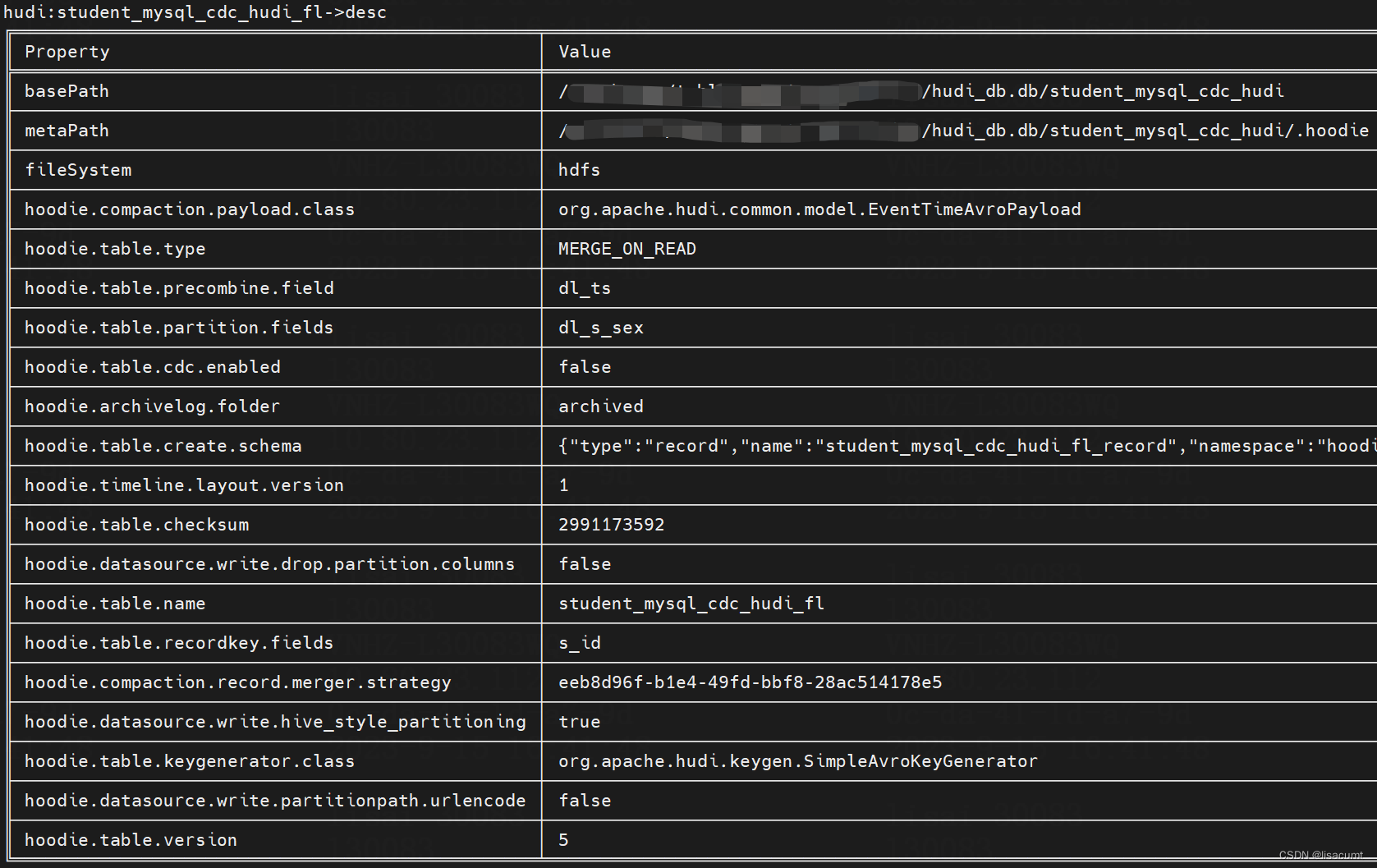
refresh
refresh

fetch table schema
fetch table schema
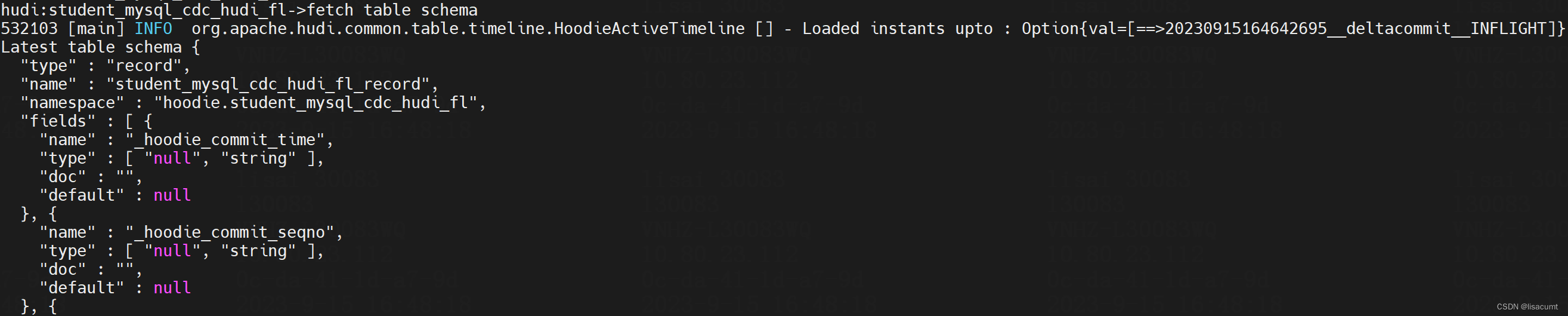
  "type" : "record","name" : "student_mysql_cdc_hudi_fl_record","namespace" : "hoodie.student_mysql_cdc_hudi_fl","fields" : [ {"name" : "_hoodie_commit_time","type" : [ "null", "string" ],"doc" : "","default" : null}, {"name" : "_hoodie_commit_seqno","type" : [ "null", "string" ],"doc" : "","default" : null}, {"name" : "_hoodie_record_key","type" : [ "null", "string" ],"doc" : "","default" : null}, {"name" : "_hoodie_partition_path","type" : [ "null", "string" ],"doc" : "","default" : null}, {"name" : "_hoodie_file_name","type" : [ "null", "string" ],"doc" : "","default" : null}, {"name" : "_hoodie_operation","type" : [ "null", "string" ],"doc" : "","default" : null}, {"name" : "s_id","type" : "long"}, {"name" : "s_name","type" : "string"}, {"name" : "s_age","type" : [ "null", "int" ],"default" : null}, {"name" : "s_sex","type" : [ "null", "string" ],"default" : null}, {"name" : "s_part","type" : "string"}, {"name" : "create_time","type" : {"type" : "long","logicalType" : "timestamp-micros"}}, {"name" : "dl_ts","type" : {"type" : "long","logicalType" : "timestamp-micros"}}, {"name" : "dl_s_sex","type" : "string"} ]
}
commit
commits show
commits show --sortBy "Total Bytes Written" --desc true --limit 10

commits showarchived
commits showarchived

commit showfiles
commit showfiles --commit 20230915164442583

commit showfiles --commit 20230915164442583 --sortBy "Partition Path"

commit showpartitions
commit showpartitions --commit 20230915164442583

commit showpartitions --commit 20230915164442583 --sortBy "Total Bytes Written" --desc true --limit 10

commit show_write_stats
commit show_write_stats --commit 20230915164442583

File System View
show fsview all
show fsview all

show fsview latest
show fsview latest --partitionPath dl_s_sex=female

Log File
show logfile records
# 注意10 是需要取数据记录条数
show logfile records 10 /xxx/hudi_db.db/student_mysql_cdc_hudi/dl_s_sex=female/.bf4b06b4-e897-42df-8a3c-a3a2f737d367_20230915163856302.log.1_0-1-0

数据是json格式的:
{"_hoodie_commit_time": "20230915163856302","_hoodie_commit_seqno": "20230915163856302_0_83","_hoodie_record_key": "88","_hoodie_partition_path": "dl_s_sex=female","_hoodie_file_name": "bf4b06b4-e897-42df-8a3c-a3a2f737d367","_hoodie_operation": "I","s_id": 88,"s_name": "傅亮","s_age": 4,"s_sex": "female","s_part": "2017/11/20","create_time": 790128367000000,"dl_ts": -28800000000,"dl_s_sex": "female"
}
show logfile metadata
show logfile metadata /xxx/xxx/hive/hudi_db.db/student_mysql_cdc_hudi/dl_s_sex=female/dl_create_time_yyyy=1971/dl_create_time_mm=03/.dadac2dd-7e5e-46c3-9b27-f1f03e04a90c_20230915151426134.log.1_0
图片中还有FooterMetadata列没显示全
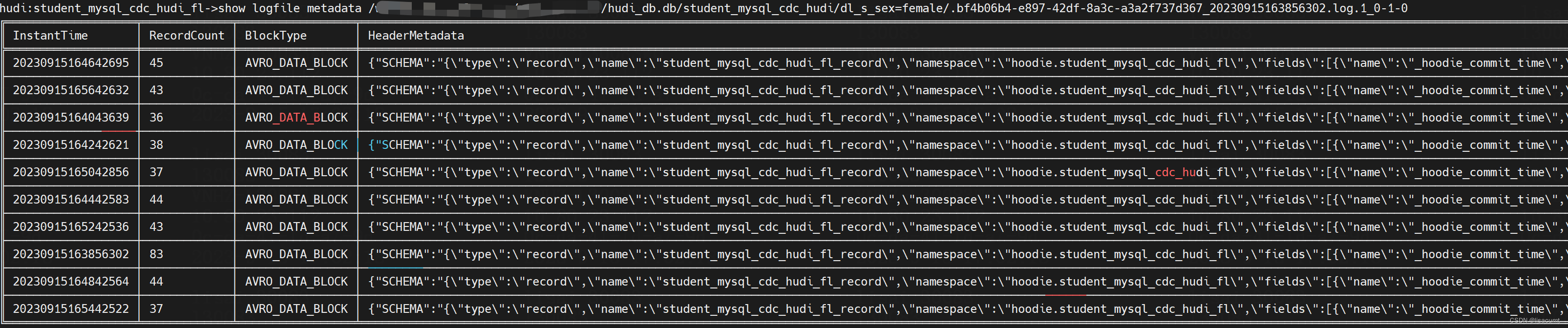
{"SCHEMA": "{\"type\":\"record\",\"name\":\"student_mysql_cdc_hudi_fl_record\",\"namespace\":\"hoodie.student_mysql_cdc_hudi_fl\",\"fields\":[{\"name\":\"_hoodie_commit_time\",\"type\":[\"null\",\"string\"],\"doc\":\"\",\"default\":null},{\"name\":\"_hoodie_commit_seqno\",\"type\":[\"null\",\"string\"],\"doc\":\"\",\"default\":null},{\"name\":\"_hoodie_record_key\",\"type\":[\"null\",\"string\"],\"doc\":\"\",\"default\":null},{\"name\":\"_hoodie_partition_path\",\"type\":[\"null\",\"string\"],\"doc\":\"\",\"default\":null},{\"name\":\"_hoodie_file_name\",\"type\":[\"null\",\"string\"],\"doc\":\"\",\"default\":null},{\"name\":\"_hoodie_operation\",\"type\":[\"null\",\"string\"],\"doc\":\"\",\"default\":null},{\"name\":\"s_id\",\"type\":\"long\"},{\"name\":\"s_name\",\"type\":\"string\"},{\"name\":\"s_age\",\"type\":[\"null\",\"int\"],\"default\":null},{\"name\":\"s_sex\",\"type\":[\"null\",\"string\"],\"default\":null},{\"name\":\"s_part\",\"type\":\"string\"},{\"name\":\"create_time\",\"type\":{\"type\":\"long\",\"logicalType\":\"timestamp-micros\"}},{\"name\":\"dl_ts\",\"type\":{\"type\":\"long\",\"logicalType\":\"timestamp-micros\"}},{\"name\":\"dl_s_sex\",\"type\":\"string\"}]}","INSTANT_TIME": "20230915164442583"
}
differ
diff partition
diff partition dl_s_sex=female

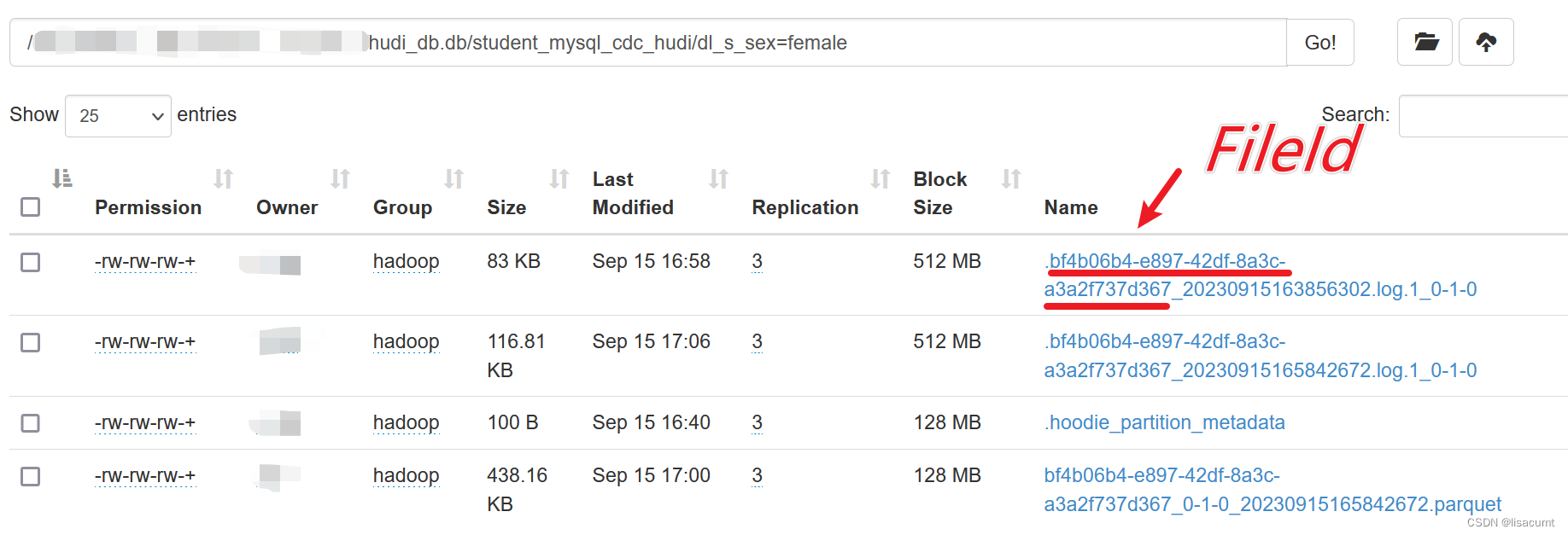
differ file
# 需要提供FileID。就是log文件的部分
# 如log文件:.bf4b06b4-e897-42df-8a3c-a3a2f737d367_20230915163856302.log.1_0-1-0
diff file bf4b06b4-e897-42df-8a3c-a3a2f737d367

rollbacks
show rollbacks
show rollbacks

stats
stats filesizes
stats filesizes --partitionPath dl_s_sex=female --sortBy "95th" --desc true --limit 3

stats wa
stats wa

compaction
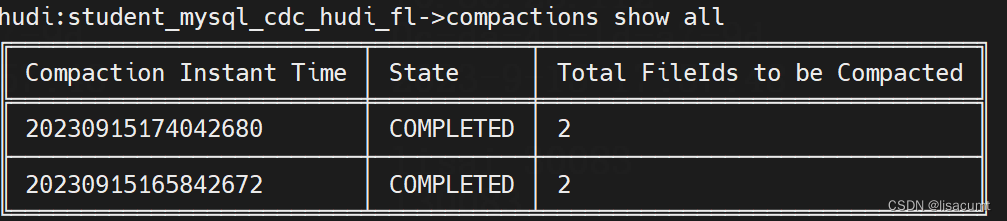
compactions show all
compactions show all
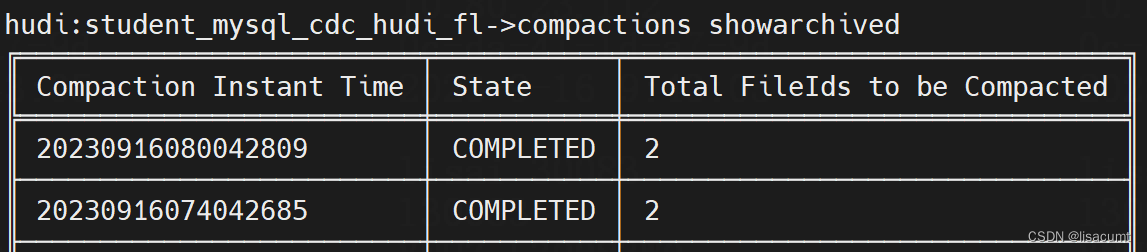
compactions showarchived
compactions showarchived
compaction showarchived
compaction showarchived 20230915200042501

compaction show
compaction show 20230915174042680

参考文章:
Apache Hudi数据湖hudi-cli客户端使用
相关文章:
【hudi】数据湖客户端运维工具Hudi-Cli实战
数据湖客户端运维工具Hudi-Cli实战 help hudi:student_mysql_cdc_hudi_fl->help AVAILABLE COMMANDSArchived Commits Commandtrigger archival: trigger archivalshow archived commits: Read commits from archived files and show detailsshow archived commit stats: …...

RK3588 添加ROOT权限
一.ROOT简介 ROOT权限是Linux和Unix系统中的超级管理员用户帐户,该帐户拥有整个系统的最高权利,可以执行几乎所有操作。ROOT就是获取安卓系统中的最高用户权限,以便执行一些需要高权限才能执行的操作(包括卸载系统自带程序、刷机、备份、还原…...
【云原生】k8s-----集群调度
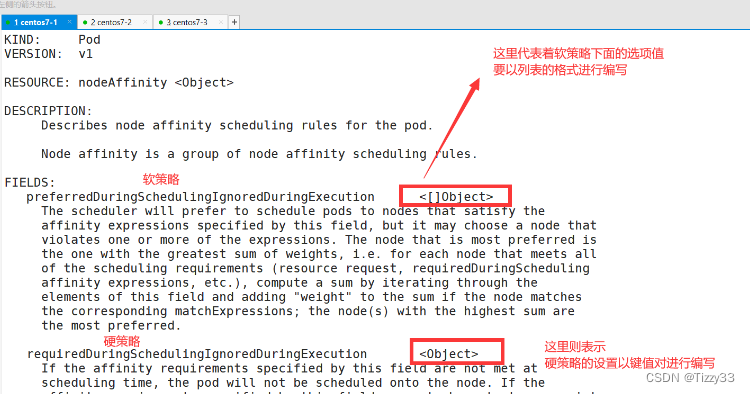
目录 1.k8s的list-watch机制 1.1 list-watc机制简介 1.2 根据list-watch机制,pod的创建流程 2.scheduler的调度策略 2.1 scheduler的调度策略简介 2.2 Scheduler预选策略的算法 2.3 Scheduler优选策略的算法 3. k8s中的标签管理及nodeSelector和nodeName的 调…...
一键集成prometheus监控微服务接口平均响应时长
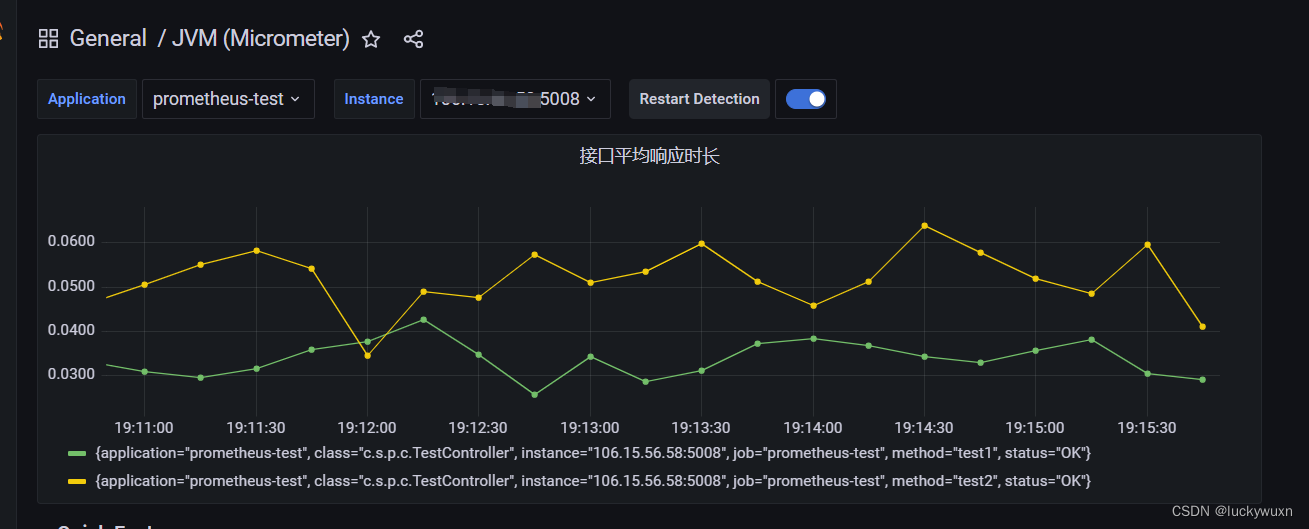
一、效果展示 二、环境准备 prometheus + grafana环境 参考博文:https://blog.csdn.net/luckywuxn/article/details/129475991 三、导入依赖 <dependency><groupId>org.springframework.boot</groupId><artifactId>spring-boot-starter...
2023/9/13 -- C++/QT
作业: 1> 将之前定义的栈类和队列类都实现成模板类 栈: #include <iostream> #define MAX 40 using namespace std;template <typename T> class Stack{ private:T *data;int top; public:Stack();~Stack();Stack(const Stack &ot…...
mybatis mapper.xml转建表语句
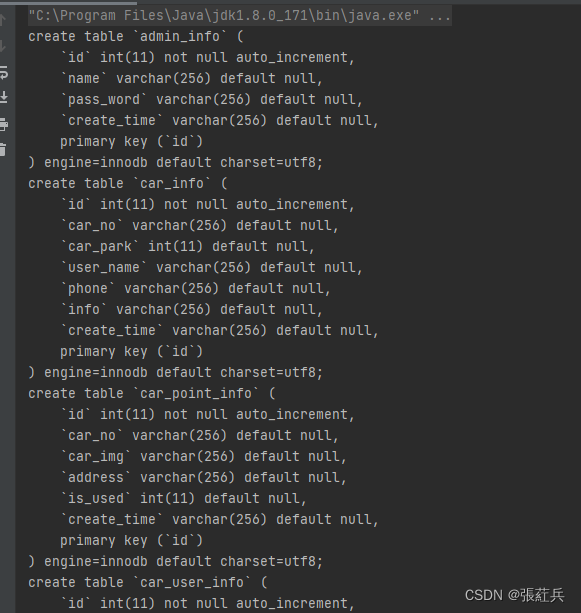
从网上下载了代码,但是发现没有DDL建表语句,只能自己手动创建了,感觉太麻烦,就写了一个工具类 将所有的mapper.xml放入到一个文件夹中,程序会自动读取生成建表语句 依赖的jar <dependency><groupId>org.d…...

封装使用Axios进行前后端交互
Axios是一个强大的HTTP客户端,用于在Vue.js应用中进行前后端数据交互。本文将介绍如何在Vue中使用Axios,并通过一个企业应用场景来演示其实际应用。 Axios简介 公众号:Code程序人生,个人网站:https://creatorblog.cn A…...

SOA、分布式、微服务
SOA: SOA是一种软件设计架构,用于构建分布式系统和应用程序。它将应用程序拆分为一系列松耦合的服务,这些服务通过标准化的接口进行通信,并能够以可编程方式组合和重用。SOA的目标是提高系统的灵活性、可扩展性和可维护性。 特点&…...

json数据传输压缩以及数据切片分割分块传输多种实现方法,大数据量情况下zlib压缩以及bytes指定长度分割
json数据传输压缩以及数据切片分割分块传输多种实现方法,大数据量情况下zlib压缩以及bytes指定长度分割。 import sys import zlib import json import mathKAFKA_MAX_SIZE 1024 * 1024 CONTENT_MIN_MAX_SIZE KAFKA_MAX_SIZE * 0.9def split_data(data):"&q…...

移动端APP测试-如何指定测试策略、测试标准?
制定项目的测试策略是一个重要的步骤,可以帮助测试团队明确测试目标、测试范围、测试方法、测试资源、测试风险等,从而提高测试效率和质量。本篇是一些经验总结,理论分享。并不是绝对正确的,也欢迎大家一起讨论。 文章目录 一、测…...
【Redis】深入探索 Redis 主从结构的创建、配置及其底层原理
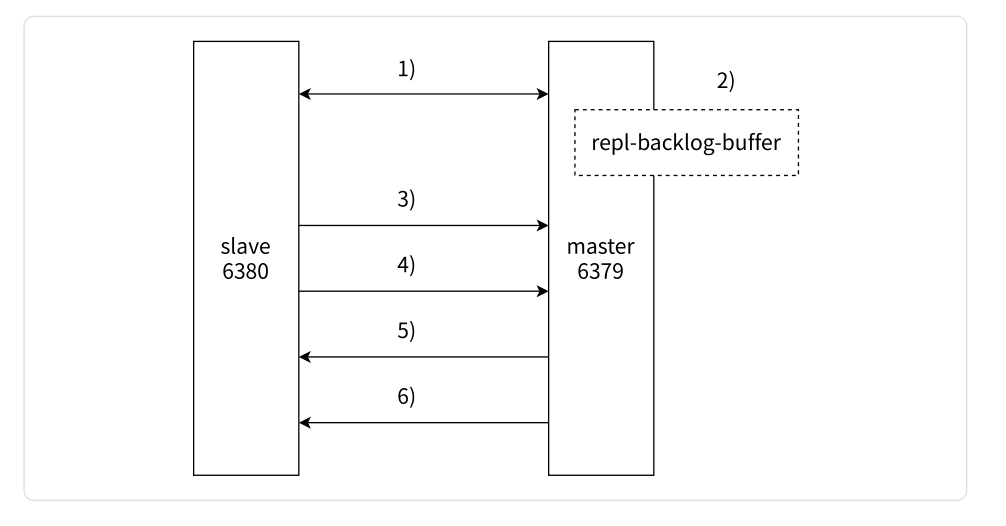
文章目录 前言一、对 Redis 主从结构的认识1.1 什么是主从结构1.2 主从结构解决的问题 二、主从结构创建2.1 配置并建立从节点2.2.1 从节点配置文件2.2.2 启动并连接 Redis 主从节点2.2.3 SLAVEOF 命令2.2.4 断开主从关系 2.2 查看主从节点的信息2.2.1 INFO REPLICATION 命令2.…...
CSS 滚动驱动动画 scroll-timeline ( scroll-timeline-name ❤️ scroll-timeline-axis )
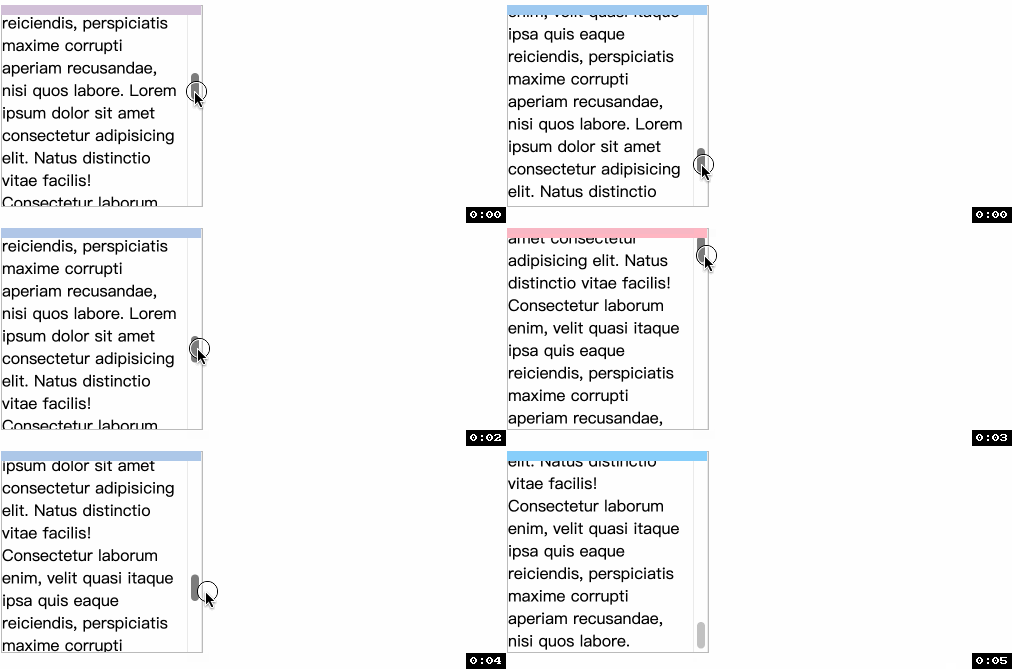
scroll-timelinescroll-timeline-name❤️scroll-timeline-axis 解决问题语法 animation-timeline-nameanimation-timeline-axis scroll-timeline ( scroll-timeline-name ❤️ scroll-timeline-axis ) 在 scroll() 的最后我们遇到了因为定位问题导致滚动效果失效的情况, 当…...
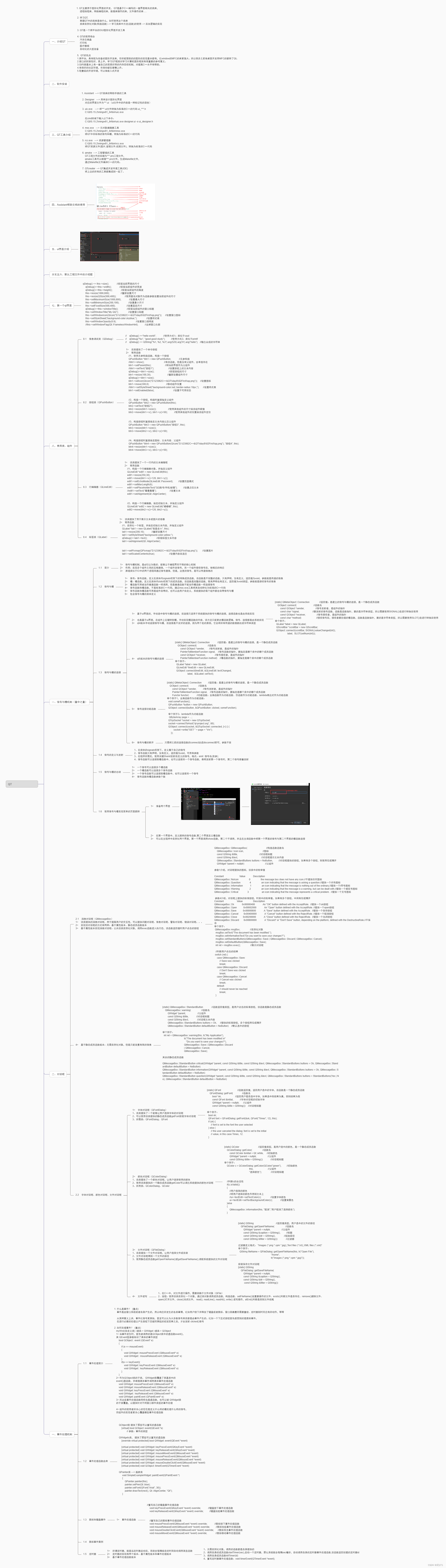
9.19号作业
2> 完成文本编辑器的保存工作 widget.h #ifndef WIDGET_H #define WIDGET_H#include <QWidget> #include <QFontDialog> #include <QFont> #include <QMessageBox> #include <QDebug> #include <QColorDialog> #include <QColor&g…...
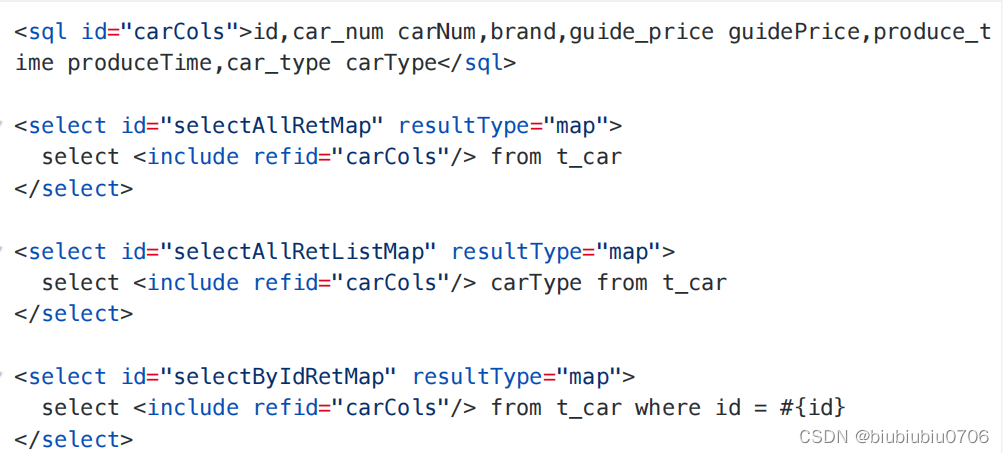
Mybatis学习笔记9 动态SQL
Mybatis学习笔记8 查询返回专题_biubiubiu0706的博客-CSDN博客 动态SQL的业务场景: 例如 批量删除 get请求 uri?id18&id19&id20 或者post id18&id19&id20 String[] idsrequest.getParameterValues("id") 那么这句SQL是需要动态的 还…...
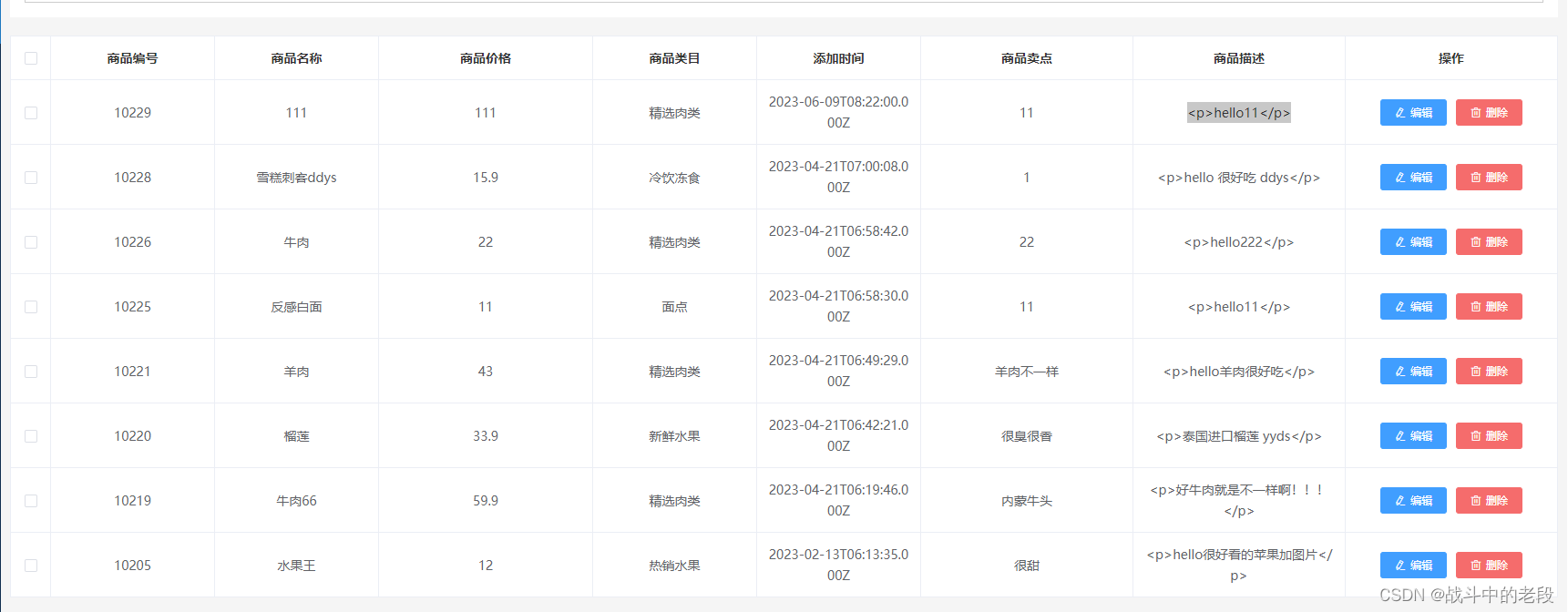
element表格 和后台联调
1.配置接口 projectList:/api/goods/xxx,//产品列表2.请求接口(get请求默认参数page) // 产品列表 pageprojectList(params){return axios.get(base.projectList,{params})}3.获取数据 直接放到created里边去了 刷新页面就可以看到 async projectList(page){let res await t…...

基于SSM的智慧城市实验室主页系统的设计与实现
末尾获取源码 开发语言:Java Java开发工具:JDK1.8 后端框架:SSM 前端:采用Vue技术开发 数据库:MySQL5.7和Navicat管理工具结合 服务器:Tomcat8.5 开发软件:IDEA / Eclipse 是否Maven项目&#x…...

怒赞,阿里P8推荐的Java面试宝典:41个专题PDF(史上最全+面试必备)
《尼恩Java面试宝典》 40岁老架构师 尼恩 经过对大量 Java面试题 的不断梳理、迭代, 编著成5000页的《尼恩Java面试宝典》,致力于体系化, 系统化,形象化 梳理,形成一个大的知识体系,从而帮助大家 进大厂&a…...

线程池各个参数设置说明
1. corePoolSize 核心线程数 看处理业务属于IO密集型还是属于cpu密集型IO密集型: 通常设置为N1,还有一个计算公式:线程数 cpu数*(线程等待时间/线程总的处理时间) 但是由于服务器除了这个服务可能还部署有其他服务,…...
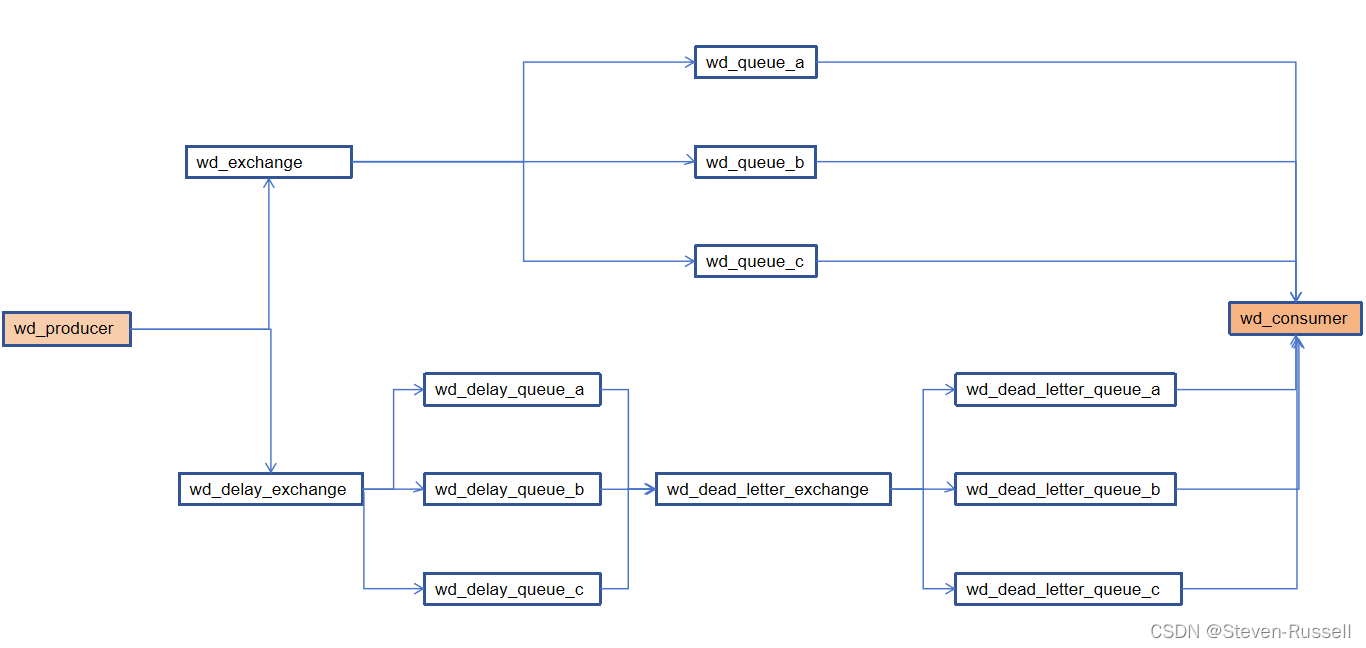
springBoot对接多个mq并且实现延迟队列---未完待续
mq调用流程 创建消息转换器 package com.wd.config;import org.springframework.amqp.support.converter.Jackson2JsonMessageConverter; import org.springframework.amqp.support.converter.MessageConverter; import org.springframework.context.annotation.Bean; import o…...
Pytorch从零开始实战04
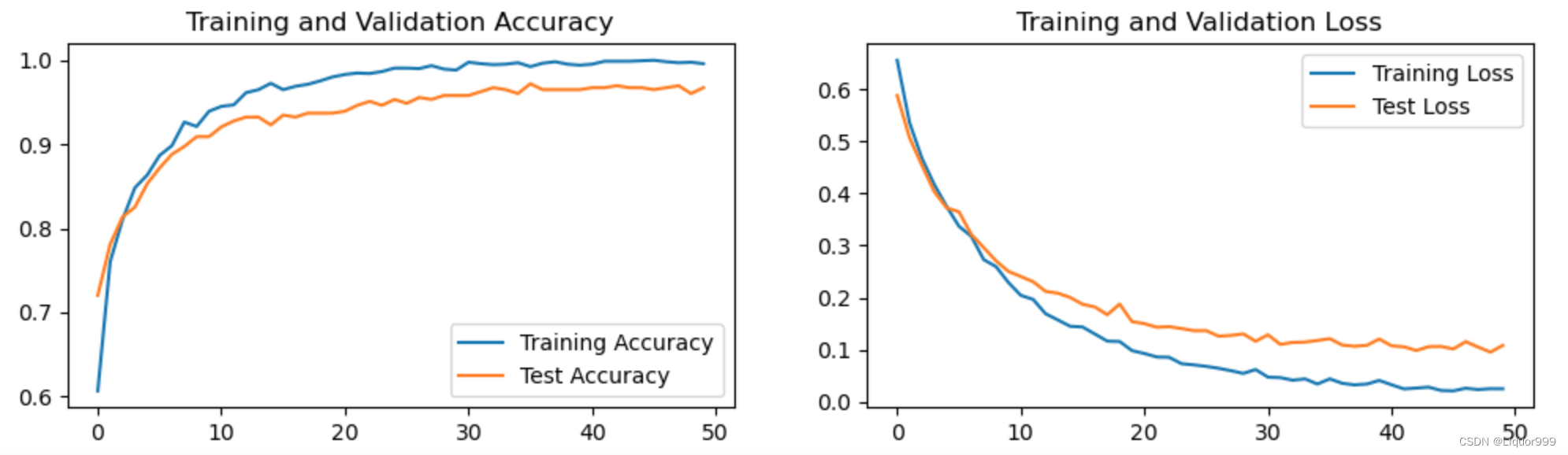
Pytorch从零开始实战——猴痘病识别 本系列来源于365天深度学习训练营 原作者K同学 文章目录 Pytorch从零开始实战——猴痘病识别环境准备数据集模型选择模型训练数据可视化其他模型图片预测 环境准备 本文基于Jupyter notebook,使用Python3.8,Pytor…...

Happy Island Designer完整指南:免费在线岛屿设计工具终极教程
Happy Island Designer完整指南:免费在线岛屿设计工具终极教程 【免费下载链接】HappyIslandDesigner "Happy Island Designer (Alpha)",是一个在线工具,它允许用户设计和定制自己的岛屿。这个工具是受游戏《动物森友会》(Animal C…...

谷歌seo如何发布外链? 新站首月发布的频率与节奏
域名注册后的前30天,谷歌爬虫会对新站点进行密集的抓取与记录。这个阶段的站点就像一张白纸,每一个外源信号都会被放大记录。很多站长习惯在上线首周就去购买几百条低质链接,试图拉高权重,但这往往会导致站点在沙盒期停留更久。根…...

首次接入Taotoken时如何通过模型广场测试不同模型的响应效果
🚀 告别海外账号与网络限制!稳定直连全球优质大模型,限时半价接入中。 👉 点击领取海量免费额度 首次接入Taotoken时如何通过模型广场测试不同模型的响应效果 当你开始使用Taotoken平台,面对众多可选的模型࿰…...

Windows 10 PL2303驱动修复终极指南:3种方案解决串口设备兼容性问题
Windows 10 PL2303驱动修复终极指南:3种方案解决串口设备兼容性问题 【免费下载链接】pl2303-win10 Windows 10 driver for end-of-life PL-2303 chipsets. 项目地址: https://gitcode.com/gh_mirrors/pl/pl2303-win10 PL2303驱动修复方案是解决Windows 10系…...

解放双手:5分钟快速上手智慧树自动化学习工具的完整指南
解放双手:5分钟快速上手智慧树自动化学习工具的完整指南 【免费下载链接】Autovisor 2025智慧树刷课脚本 基于Python Playwright的自动化程序 [有免安装版] 项目地址: https://gitcode.com/gh_mirrors/au/Autovisor 你是否厌倦了每天重复点击智慧树视频的枯燥…...

票据的采集,更新业务 todo 抽空迁移并废弃掉
采集过程 用户校验 参数校验部分 代码号码开票日期校验码(普票或电票必须)金额 是否有id,有id说明已存在,则应该是更新(该用更新接口)如果能查到,说明重复采集了查不到,新增存库...

通过 curl 命令在 Ubuntu 终端快速测试 Taotoken 的 API 连通性
🚀 告别海外账号与网络限制!稳定直连全球优质大模型,限时半价接入中。 👉 点击领取海量免费额度 通过 curl 命令在 Ubuntu 终端快速测试 Taotoken 的 API 连通性 在服务器或容器环境中进行开发或部署时,直接使用 curl…...

终极指南:MobileAgent如何用AI智能体彻底改变跨平台自动化体验
终极指南:MobileAgent如何用AI智能体彻底改变跨平台自动化体验 【免费下载链接】MobileAgent Mobile-Agent: The Powerful GUI Agent Family 项目地址: https://gitcode.com/GitHub_Trending/mo/mobileagent 你是否曾经想过,如果有一个AI助手能够…...

你还在迷信AI的回答?2026年,信息主权争夺战已全面打响
一、AI信息乱象:个人与企业的双重困境 (一)个人用户:深陷“AI虚假陷阱”,决策毫无安全感2026年的今天,AI大模型的“幻觉缺陷”非但没有消失,反而因模型参数膨胀而变得更加隐蔽。用户向豆包询问某…...

5分钟搞定Mac Boot Camp驱动:告别繁琐手动安装的智能工具
5分钟搞定Mac Boot Camp驱动:告别繁琐手动安装的智能工具 【免费下载链接】brigadier Fetch and install Boot Camp ESDs with ease. 项目地址: https://gitcode.com/gh_mirrors/bri/brigadier 还在为Mac电脑安装Windows驱动而头疼吗?Brigadier是…...