
Linux Shell 实现一键部署podman
podman 介绍
使用 Podman 管理容器、Pod 和映像。从本地环境中无缝使用容器和 Kubernetes,Podman 提供与 Docker 非常相似的功能,它不需要在你的系统上运行任何守护进程,并且它也可以在没有 root 权限的情况下运行。
Podman 可以管理和运行任何符合 OCI(Open Container Initiative)规范的容器和容器镜像。Podman 提供了一个与 Docker 兼容的命令行前端来管理 Docker 镜像。
podman download
| podman | podman 文档 | gitlab开源 | podman ubuntu repo |
| download | 参考 | 参考 | 参考 |
创建一键部署脚本
- 主要用于安装Podman容器引擎。脚本首先检查操作系统的版本,并根据不同的操作系统版本选择相应的安装方法。脚本支持CentOS、Red Hat、Oracle Linux、Rocky Linux、AlmaLinux、Ubuntu、Debian、Fedora和SUSE等多个发行版。
- 使用yum包管理器安装Podman及其插件,并配置registries.conf文件。对于Ubuntu和Debian,使用apt包管理器安装Podman及其插件,并配置registries.conf文件。对于Fedora,使用dnf包管理器安装Podman及其插件。对于SUSE,使用zypper包管理器安装Podman及其插件。
- podman --version | awk '{print $3}' #podman版本获取
- podman-compose --version 2>&1 | awk 'NR==1{print $3}' #podman-compose 版本获取
- podman-compose --version 2>&1 | head -n1 | awk '{print $NF}' #podman-compose 版本获取
- podman --help 命令使用参考
vi /podman_install.sh#!/bin/bash
# -*- coding: utf-8 -*-
# Author: CIASM
# update 2023/09/18<<!
# ubuntu To execute this script
ln -sf bash /bin/sh
!install_basics() {# Check if the script is being run as root
if [ "$(id -u)" != "0" ]; thenecho "This script must be run as root."exit 1
fi# Check the CentOS/Red Hat version
if [[ -f /etc/redhat-release ]]; thenOS=$(cat /etc/*release* | grep "^NAME=" | cut -d'=' -f2- | tr -d '"')VERSION=$(cat /etc/*release* | grep -oE '[0-9]+\.[0-9]+' | head -n1)# Check the oralce Linux version
elif [[ -f /etc/oracle-release ]]; thenOS=$(cat /etc/*release* | grep "^NAME=" | cut -d'=' -f2- | tr -d '"')VERSION=$(cat /etc/*release* | grep -oE '[0-9]+\.[0-9]+' | head -n1)# Check the Rock Linux version
elif [[ -f /etc/rocky-release ]]; thenOS=$(cat /etc/*release* | grep "^NAME=" | cut -d'=' -f2- | tr -d '"')VERSION=$(cat /etc/*release* | grep -oE '[0-9]+\.[0-9]+' | head -n1)# Check the AlmaLinux version
elif [[ -f /etc/almalinux-release ]]; thenOS=$(cat /etc/*release* | grep "^NAME=" | cut -d'=' -f2- | tr -d '"')VERSION=$(cat /etc/*release* | grep -oE '[0-9]+\.[0-9]+' | head -n1)# Check the ubuntu version
elif [[ -f /etc/os-release ]]; thenOS=$(cat /etc/*release* | grep "^NAME=" | cut -d'=' -f2- | tr -d '"')VERSION=$(cat /etc/*release* | grep -oE '[0-9]+\.[0-9]+' | head -n1)# Check the suse version
elif [[ -f /etc/SuSE-release ]]; thenOS=$( cat /etc/*release* | grep "^PRETTY_NAME=" | cut -d'=' -f2- | tr -d '"')VERSION=$(cat /etc/*release* | grep -oE '[0-9]+\.[0-9]+' | head -n1)# Check the Debian version
elif [[ -f /etc/os-release ]]; thenOS=$(cat /etc/*release* | grep "^NAME=" | cut -d'=' -f2- | tr -d '"')VERSION=$(cat /etc/*release* | grep -oE '[0-9]+' | head -n1)# Check the Fedora version
elif [[ -f /etc/fedora-release ]]; thenOS=$(cat /etc/*release* | grep "^NAME=" | cut -d'=' -f2- | tr -d '"')VERSION=$(cat /etc/*release* | grep -oE '[0-9]+' | head -n1)elseecho -e "\033[31mThis script only supports $OS $VERSION...\033[0m"exit 1
fi# Check the podman version
if ! command -v podman &> /dev/null; then
#if [ ! -d "/usr/bin/podman" ]; thenecho -e "\033[32m Installing podman for $OS $VERSION...\033[0m"case $VERSION in# CentOS/RedHat/oracle 7 install7.?)echo Installing basics...install_centos_podman;;# CentOS/RedHat/oracle/RockLinux/AlmaLinux 8 install 8.?)echo Installing basics...install_centos_podman;;# CentOS/RedHat/oracle/RockLinux/AlmaLinux 9 install9.?) echo Installing basics...install_centos_podman;;# ubuntu 20.04 Linux install20.04)echo Installing basics...echo "deb https://download.opensuse.org/repositories/devel:/kubic:/libcontainers:/stable/xUbuntu_20.04/ /" | sudo tee /etc/apt/sources.list.d/devel:kubic:libcontainers:stable.listcurl -L "https://download.opensuse.org/repositories/devel:/kubic:/libcontainers:/stable/xUbuntu_20.04/Release.key" | sudo apt-key add -apt updateinstall_ubuntu_podman;;# ubuntu 21 Linux install21.04|21.10)echo Installing basics...echo "deb https://download.opensuse.org/repositories/devel:/kubic:/libcontainers:/stable/xUbuntu_21.04/ /" | sudo tee /etc/apt/sources.list.d/devel:kubic:libcontainers:stable.listcurl -L "https://download.opensuse.org/repositories/devel:/kubic:/libcontainers:/stable/xUbuntu_21.04/Release.key" | sudo apt-key add -apt updateinstall_ubuntu_podman;;# ubuntu 22 Linux install22.04)echo Installing basics...echo "deb https://download.opensuse.org/repositories/devel:/kubic:/libcontainers:/stable/xUbuntu_22.04/ /" | sudo tee /etc/apt/sources.list.d/devel:kubic:libcontainers:stable.listcurl -L "https://download.opensuse.org/repositories/devel:/kubic:/libcontainers:/stable/xUbuntu_22.04/Release.key" | sudo apt-key add -apt updateinstall_ubuntu_podman;;# Debian 10, 11 , 1210)echo Installing basics...echo Installing basics...echo "deb https://download.opensuse.org/repositories/devel:/kubic:/libcontainers:/stable/Debian_10/ /" | sudo tee /etc/apt/sources.list.d/devel:kubic:libcontainers:stable.listcurl -L "https://download.opensuse.org/repositories/devel:/kubic:/libcontainers:/stable/Debian_10/Release.key" | sudo apt-key add -apt updateinstall_ubuntu_podman;;11)echo Installing basics...echo Installing basics...echo "deb https://download.opensuse.org/repositories/devel:/kubic:/libcontainers:/stable/Debian_11/ /" | sudo tee /etc/apt/sources.list.d/devel:kubic:libcontainers:stable.listcurl -L "https://download.opensuse.org/repositories/devel:/kubic:/libcontainers:/stable/Debian_11/Release.key" | sudo apt-key add -apt updateinstall_ubuntu_podman;;12)echo Installing basics...echo Installing basics...echo "deb https://download.opensuse.org/repositories/devel:/kubic:/libcontainers:/stable/Debian_12/ /" | sudo tee /etc/apt/sources.list.d/devel:kubic:libcontainers:stable.listcurl -L "https://download.opensuse.org/repositories/devel:/kubic:/libcontainers:/stable/Debian_12/Release.key" | sudo apt-key add -apt updateinstall_ubuntu_podman;;# Fedora 31,32,3336|37|38)echo Installing basics...install_centos_podman;;# SUSE 12 install12.?)echo Installing basics...sudo SUSEConnect -p sle-sdk/12.4/x86_64install_suse_podman;;# SUSE 15 install15.?)echo Installing basics...sudo SUSEConnect -p sle-sdk/15.3/x86_64install_suse_podman;;*)echo -e "\033[31m Unsupported $OS $VERSION...\033[0m" exit 1;;
esacecho -e "\033[32m podman for $OS $VERSION successfully installed...\033[0m"
elseecho -e "\033[33m podman for $OS $VERSION already installed...\033[0m"
fi}install_centos_podman() {
echo "install podman"
yum -y install podman podman-plugins podman-docker python3
pip3 install podman-compose#registries.conf add config
cat >>/etc/containers/registries.conf<<EOF
[registries_search]
registries=["registry.access.redhat.com", "registry.fedoraproject.org", "docker.io"]
EOFpodman info# start podman
systemctl enable --now podman#check podman version
podman --version | awk '{print $3}'
podman-compose --version 2>&1 | head -n1 | awk '{print $NF}'
}install_ubuntu_podman() {
echo "install podman"
apt -y install podman podman-plugins python3 python3-pip
pip3 install podman-composecat >>/etc/containers/registries.conf<<EOF
[registries_search]
registries=["registry.access.redhat.com", "registry.fedoraproject.org", "docker.io"]
EOFpodman info# start podman
systemctl enable --now podman#check podman version
podman --version | awk '{print $3}'
podman-compose --version 2>&1 | head -n1 | awk '{print $NF}'}install_suse_podman() {
echo "install podman"
sudo zypper in -y podman net-tools vim wget net-tools
}main (){install_basics
}main执行一键安装podman
sh /podman_install.sh相关文章:
Linux Shell 实现一键部署podman
podman 介绍 使用 Podman 管理容器、Pod 和映像。从本地环境中无缝使用容器和 Kubernetes,Podman 提供与 Docker 非常相似的功能,它不需要在你的系统上运行任何守护进程,并且它也可以在没有 root 权限的情况下运行。 Podman 可以管理和运行…...
Biome-BGC生态系统模型与Python融合技术
Biome-BGC是利用站点描述数据、气象数据和植被生理生态参数,模拟日尺度碳、水和氮通量的有效模型,其研究的空间尺度可以从点尺度扩展到陆地生态系统。 在Biome-BGC模型中,对于碳的生物量积累,采用光合酶促反应机理模型计算出每天…...
Matlab图像处理-区域描述
一旦一幅图像的目标区域被确定,我们往往用一套描述子来表示其特性。选择区域描述子的动机不单纯为了减少在区域中原始数据的数量,而且也应有利于区别带有不同特性的区域。因此,当目标区域有大小、旋转、平移等方面的变化时,针对这…...

openGauss学习笔记-69 openGauss 数据库管理-创建和管理普通表-更新表中数据
文章目录 openGauss学习笔记-69 openGauss 数据库管理-创建和管理普通表-更新表中数据 openGauss学习笔记-69 openGauss 数据库管理-创建和管理普通表-更新表中数据 修改已经存储在数据库中数据的行为叫做更新。用户可以更新单独一行、所有行或者指定的部分行。还可以独立更新…...

Flink RowData 与 Row 相互转化工具类
RowData与Row区别 (0)都代表了一条记录。都可以设置RowKind,和列数量Aritry。 (1)RowData 属于Table API,而Row属于Stream API (2)RowData 属于Table内部接口,对用户不友…...
企业架构LNMP学习笔记48
数据结构类型操作: 数据结构:存储数据的方式 数据类型 算法:取数据的方式,代码就把数据进行组合,计算、存储、取出。 排序算法:冒泡排序、堆排序 二分。 key: key的命名规则不同于一般语言…...

docker部署neo4j
拉取镜像 docker pull neo4j:3.5.35-community查看镜像 [rootlocalhost data]# docker images REPOSITORY TAG IMAGE ID CREATED SIZE neo4j 3.5.35-community 3548ff943256 13 months ago 446MB创建容器并运行 docker run -d …...
融云观察:AI Agent 是不是游戏赛道的下一个「赛点」?
本周四 融云直播间,点击报名~ ChatGPT 的出现,不仅让会话成为了未来商业的基本形态,也把大家谈论 AI 的语境从科技产业转向了 AI 与全产业的整合。 关注【融云全球互联网通信云】了解更多 而目前最热衷于拥抱生成式 AI 的行业中,…...
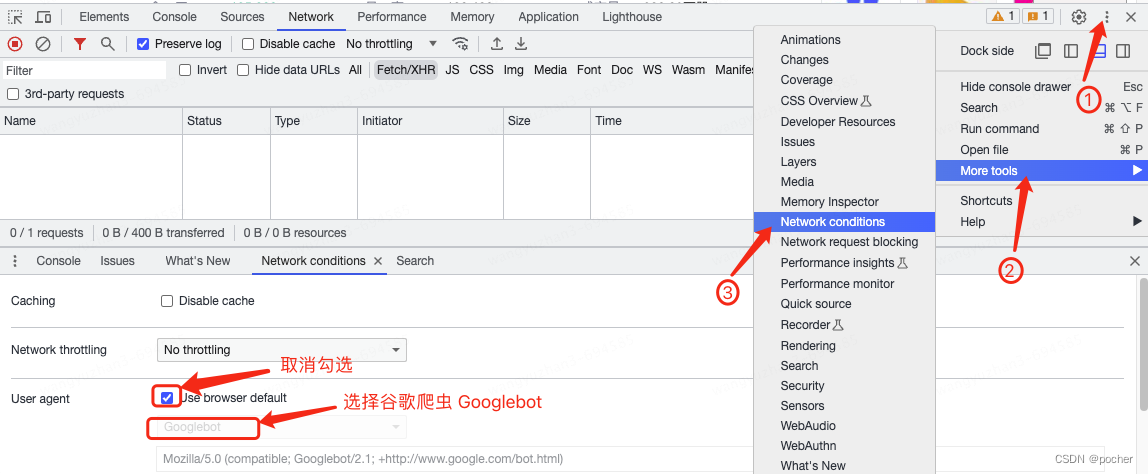
运用谷歌浏览器的开发者工具,模拟搜索引擎蜘蛛抓取网页
第一步:按压键盘上的F12键打开开发这工具,并点击右上角三个小黑点 第二步:选择More tools 第三步:选择Network conditions 第四步:找到User agent一列,取消复选框的勾选 第五步:选择谷歌爬虫…...

uni-app 点击蒙版层时关闭自定义弹窗
click.stop:用于阻止冒泡 click.stop 标签范围内,点击任何区域(包括 click 点击事件)都不会关闭弹窗。标签范围外会关闭弹窗 click.stop 标签内的 click 等事件:如果事件内有关闭弹窗的代码可关闭弹窗 在 template 中 <view class&quo…...
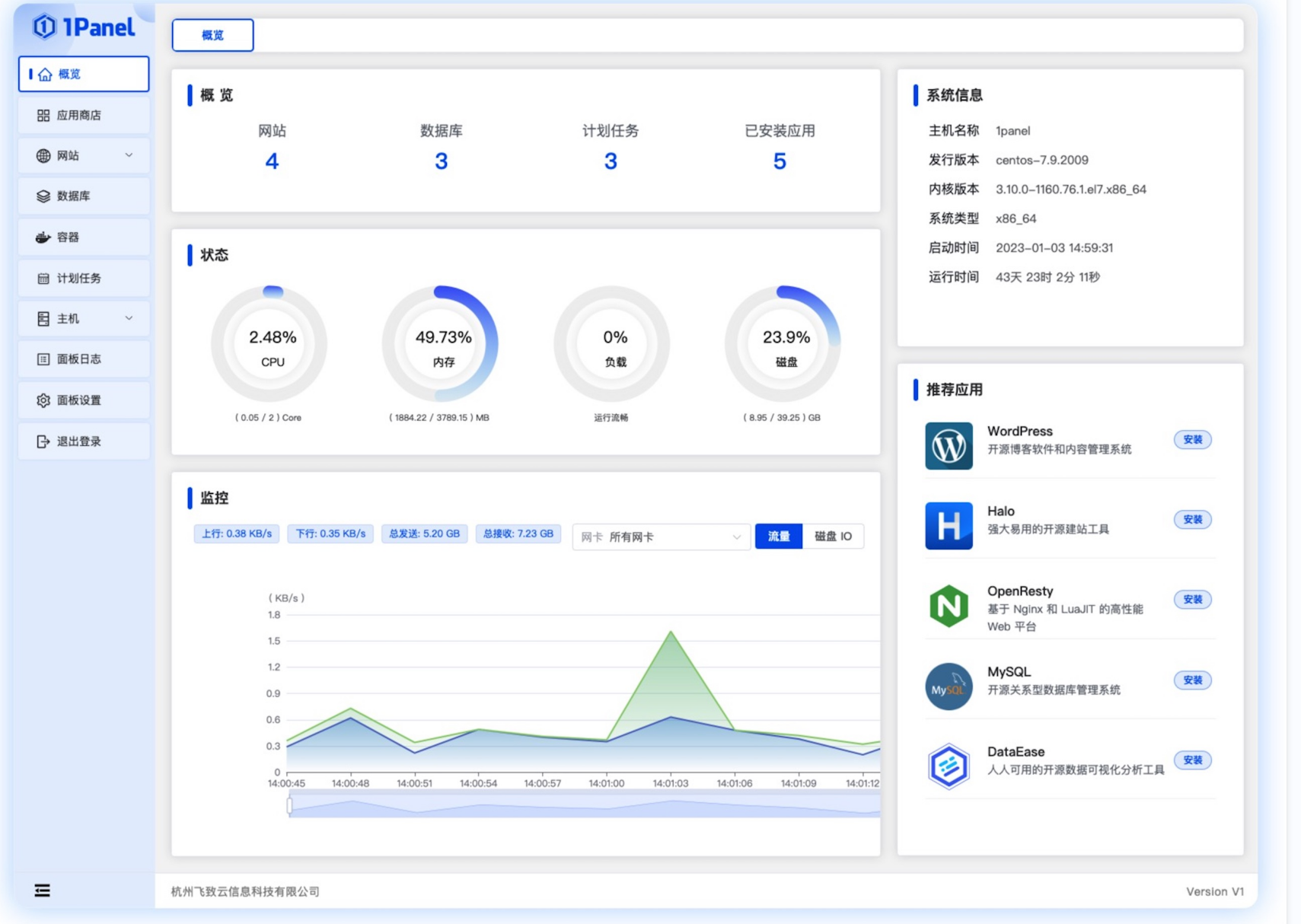
【红包雨功能的】环境部署(弹性伸缩、负载均衡、Redis读写分离、云服务器部署)
文章目录 创建环境创建专用网络VPC安全组创建云服务器打包部署2. Java环境启动项目开机启动任意服务1. 制作服务文件2. 制作启动脚本3. 制作停止脚本4. 增加执行权限5. 设置开机启动 创建镜像继续创建多台云服务器负载均衡弹性伸缩redis的报警规则白名单1. LAMP 环境1. 安装Apa…...

基于Java的设计模式-策略模式
策略模式就是定义一系列的算法,把它们一个个封装起来, 并且使它们可相互替换。 基本概念 策略模式主要是解决多种算法相似的情况下,使用if...else所带来的复杂和难以维护。当存在系统中有多个类,但是区分它们的是只是它们的直接行为,那我们…...
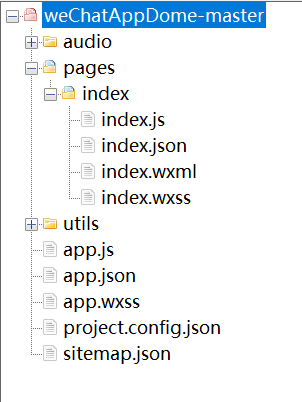
小程序多种姿势更换文章
概述 简单的文章切换demo,通过倒计时、摇一摇、双击进行文章切换 详细 直接看效果图吧!比较简单,主要是练习一下... 小程序不带双击事件,可以记录第一次单击事件和第二次单机事件进行双击操作。 1、摇一摇是通过调用官方的 …...

读书笔记-《ON JAVA 中文版》-摘要25[第二十二章 枚举]
文章目录 第二十二章 枚举1. 基本功能1.1 基本 enum 特性 2. 方法添加2.1 方法添加2.2 覆盖 enum 的方法 3 switch 语句中的 enum4. values 方法的神秘之处5. 实现而非继承6. 随机选择7. 使用接口组织枚举8. 使用 EnumSet 替代 Flags9. 使用 EnumMap10. 常量特定方法11. 本章小…...

DNDC模型建模方法及应用
DNDC(Denitrification-Decomposition,反硝化-分解模型)是目前国际上最为成功的模拟生物地球化学循环的模型之一,自开发以来,经过不断完善和改进,从模拟简单的农田生态系统发展成为可以模拟几乎所有陆地生态…...
Kafka为什么是高性能高并发高可用架构
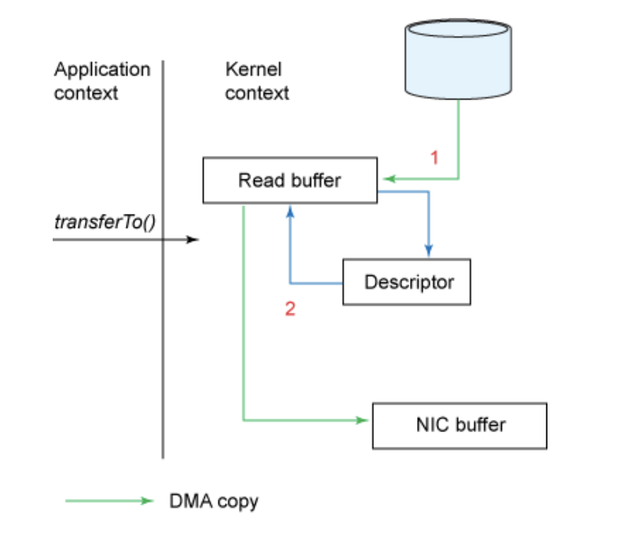
目录 1 前言2 顺序写入3 页缓存4 零拷贝5 Broker 性能6 流数据并行7 总结 1 前言 我们都知道 Kafka 是基于磁盘进行存储的,但 Kafka 官方又称其具有高性能、高吞吐、低延时的特点,其吞吐量动辄几十上百万。小伙伴们是不是有点困惑了,一般认为…...
QT-day3
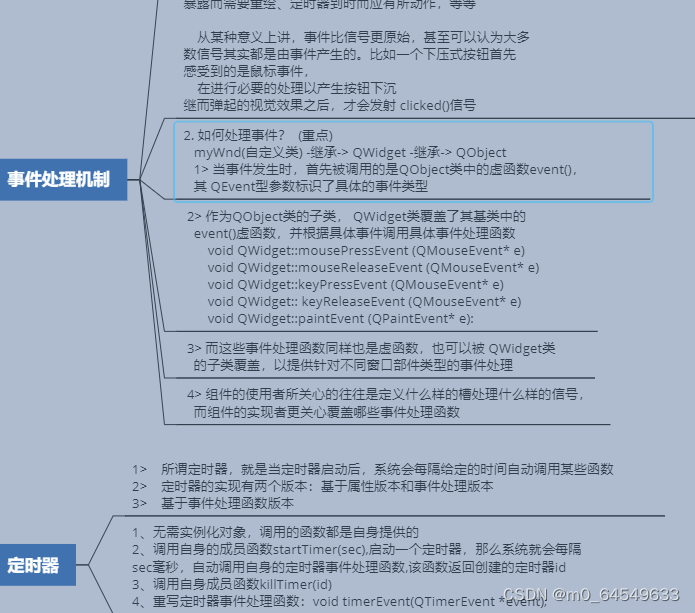
完成文本编辑器的保存工作 void Widget::on_savebton_clicked() {QString fileName QFileDialog::getSaveFileName(this,"保存","./","All(*.*);;Images(*.png *.xpm *.jpg);;Text files (*.txt);;XML files (*.xml)");QFile file(fileName);i…...

开发自测的测试用例设计方法
测试用例设计方法有:等价类划分法、边界值分析法、错误推测法、判定表法、正交实验法。 测试用例就是一个文档,描述输入、动作、或者时间和一个期望的结果,其目的是确定应用程序的某个特性是否正常的工作。 一.等价类划分法 顾名思义&#x…...
【AI视野·今日Sound 声学论文速览 第七期】Tue, 19 Sep 2023
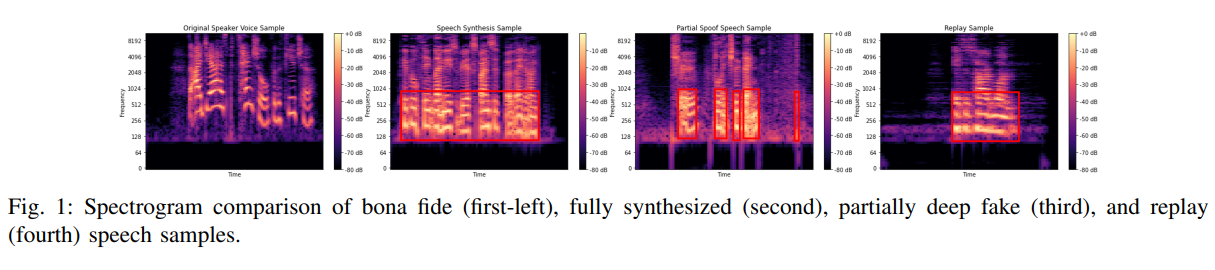
AI视野今日CS.Sound 声学论文速览 Tue, 19 Sep 2023 Totally 1 papers 👉上期速览✈更多精彩请移步主页 Daily Sound Papers Frame-to-Utterance Convergence: A Spectra-Temporal Approach for Unified Spoofing Detection Authors Awais Khan, Khalid Mahmood Ma…...

MySQL 清空表 截断表
清空表:delete from users; 清空表只是清空表中的逻辑数据,但是物理数据不清除,如主键值、索引等不被清除,还是原来的值。 截断表:truncate table users; 截断表可以用于删除表中 的所有数据…...

GitHub 被分号击穿信任防线,AI 逆向工具敲响闭源系统安全警钟
GitHub 被分号击穿三层信任,AI 填平逆向护城河敲响闭源系统安全警钟 2026 年 3 月 4 日,GitHub 收到 Wiz 通过 Bug Bounty 提交的报告,报告描述的攻击入口极其简单:一条构造过的 git push,带一个 push optionÿ…...

MCA Selector终极指南:Minecraft世界区块管理的核心技术解析与实战应用
MCA Selector终极指南:Minecraft世界区块管理的核心技术解析与实战应用 【免费下载链接】mcaselector A tool to select chunks from Minecraft worlds for deletion or export. 项目地址: https://gitcode.com/gh_mirrors/mc/mcaselector MCA Selector是一款…...
)
想让你的Linux终端也下起‘代码雨’?手把手教你安装配置cmatrix屏保(CentOS/Ubuntu双系统保姆级教程)
让你的Linux终端下起"代码雨":cmatrix屏保终极玩法指南 第一次在《黑客帝国》里看到绿色字符如瀑布般倾泻而下的场景时,那种科技感与未来感是否让你心驰神往?现在,你完全可以在自己的Linux终端里复刻这一经典画面。cmat…...

如何设计完美的 TypeScript 错误消息模拟测试数据:深入理解 pretty-ts-errors 测试策略 [特殊字符]
如何设计完美的 TypeScript 错误消息模拟测试数据:深入理解 pretty-ts-errors 测试策略 🔍 【免费下载链接】pretty-ts-errors 🔵 Make TypeScript errors prettier and human-readable in VSCode 🎀 项目地址: https://gitcode…...

探索One-Language/One:统一编程范式如何重塑全栈开发体验
1. 项目概述:从“One”到“One-Language/One”的深度解构最近在GitHub上看到一个挺有意思的项目,叫“One-Language/One”。光看这个名字,可能很多人会有点懵,这到底是个啥?是又一个编程语言?还是一个框架&a…...

终极智能温控指南:FanControl风扇控制软件完整配置教程
终极智能温控指南:FanControl风扇控制软件完整配置教程 【免费下载链接】FanControl.Releases This is the release repository for Fan Control, a highly customizable fan controlling software for Windows. 项目地址: https://gitcode.com/GitHub_Trending/f…...

北京数据恢复公司排名哪家好
在当今数字化时代,数据的重要性不言而喻。无论是个人用户的珍贵照片、文档,还是企业的重要业务数据,一旦丢失都可能造成巨大的损失。在北京,有众多的数据恢复公司,如何选择一家靠谱的公司成为了许多人关心的问题。下面…...

【职业发展】程序员成长路径:从初级到架构师的进阶指南
【职业发展】程序员成长路径:从初级到架构师的进阶指南 引言 程序员的职业发展是一个持续学习和成长的过程。从初级程序员成长为技术架构师,需要经历多个阶段的积累和蜕变。本文将详细分析程序员成长的各个阶段,帮助你规划职业发展路径。 …...

别再死记硬背截止、放大、饱和了!用Arduino+面包板,5分钟直观理解NPN/PNP三极管三种状态
用Arduino点亮三极管:5分钟可视化实验理解电子开关的三种状态 你是否曾被三极管的"截止"、"放大"、"饱和"这些术语困扰?教科书上的电压公式和载流子运动图虽然精确,却难以形成直观认知。今天我们将用Arduino和…...

VCF 9.1 新特性:安装器与 Fleet Depot 支持 HTTP 无认证离线软件源
VMware Cloud Foundation(VCF)9.0 推出了统一软件仓库(Software Depot),支持连接博通在线源或企业内部离线源。但在 9.0 中,离线源默认必须使用 HTTPS 基础认证,即使关闭 HTTPS 也依然需要认证,对纯内网环境很不友好。在 VCF 9.1…...