
iText实战--Table、cell 和 page event
5.1 使用表和单元格事件装饰表
实现PdfPTableEvent 接口
实现PdfPCellEvent 接口
合并表格和单元格事件
5.2 基本构建块的事件
通用块(Chunk)功能
段落(Paragraph)事件
章节(Chapter)和 区域(Section)事件
页面顺序和空白页面
5.3 页面边界概述
媒体盒
作物箱
其他页面边界
5.4 添加页码事件到 PdfWriter
PdfPageEvent 接口
onOpenDocument():当文档打开后触发,初始化变量整个文档可使用
onStartPage():当开始一个新页面触发,初始化页面级变量,不要在这个方法内添加内容
onEndPage():开始一个新页面并在文档关闭前触发,这里添加header、footer、watermark等
onCloseDocument():文档关闭时触发,这里释放资源
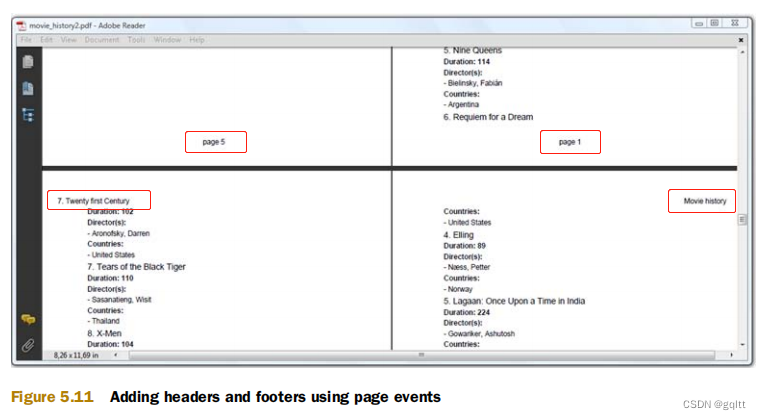
添加页头与页尾
import java.io.FileOutputStream;
import java.io.IOException;
import java.sql.SQLException;
import com.itextpdf.text.Chapter;
import com.itextpdf.text.Document;
import com.itextpdf.text.DocumentException;
import com.itextpdf.text.Element;
import com.itextpdf.text.Font;
import com.itextpdf.text.PageSize;
import com.itextpdf.text.Paragraph;
import com.itextpdf.text.Phrase;
import com.itextpdf.text.Rectangle;
import com.itextpdf.text.Font.FontFamily;
import com.itextpdf.text.pdf.ColumnText;
import com.itextpdf.text.pdf.PdfPageEventHelper;
import com.itextpdf.text.pdf.PdfWriter;public class MovieHistory2 {/** The resulting PDF file. */public static final String RESULT= "results/part1/chapter05/movie_history2.pdf";/** Inner class to add a header and a footer. */class HeaderFooter extends PdfPageEventHelper {/** Alternating phrase for the header. */Phrase[] header = new Phrase[2];/** Current page number (will be reset for every chapter). */int pagenumber;/*** Initialize one of the headers.* @see com.itextpdf.text.pdf.PdfPageEventHelper#onOpenDocument(*      com.itextpdf.text.pdf.PdfWriter, com.itextpdf.text.Document)*/public void onOpenDocument(PdfWriter writer, Document document) {header[0] = new Phrase("Movie history");}/*** Initialize one of the headers, based on the chapter title;* reset the page number.* @see com.itextpdf.text.pdf.PdfPageEventHelper#onChapter(*      com.itextpdf.text.pdf.PdfWriter, com.itextpdf.text.Document, float,*      com.itextpdf.text.Paragraph)*/public void onChapter(PdfWriter writer, Document document,float paragraphPosition, Paragraph title) {header[1] = new Phrase(title.getContent());pagenumber = 1;}/*** Increase the page number.* @see com.itextpdf.text.pdf.PdfPageEventHelper#onStartPage(*      com.itextpdf.text.pdf.PdfWriter, com.itextpdf.text.Document)*/public void onStartPage(PdfWriter writer, Document document) {pagenumber++;}/*** Adds the header and the footer.* @see com.itextpdf.text.pdf.PdfPageEventHelper#onEndPage(*      com.itextpdf.text.pdf.PdfWriter, com.itextpdf.text.Document)*/public void onEndPage(PdfWriter writer, Document document) {Rectangle rect = writer.getBoxSize("art");switch(writer.getPageNumber() % 2) {case 0:ColumnText.showTextAligned(writer.getDirectContent(),Element.ALIGN_RIGHT, header[0],rect.getRight(), rect.getTop(), 0);break;case 1:ColumnText.showTextAligned(writer.getDirectContent(),Element.ALIGN_LEFT, header[1],rect.getLeft(), rect.getTop(), 0);break;}ColumnText.showTextAligned(writer.getDirectContent(),Element.ALIGN_CENTER, new Phrase(String.format("page %d", pagenumber)),(rect.getLeft() + rect.getRight()) / 2, rect.getBottom() - 18, 0);}}/** The different epochs. */public static final String[] EPOCH ={ "Forties", "Fifties", "Sixties", "Seventies", "Eighties","Nineties", "Twenty-first Century" };/** The fonts for the title. */public static final Font[] FONT = new Font[4];static {FONT[0] = new Font(FontFamily.HELVETICA, 24);FONT[1] = new Font(FontFamily.HELVETICA, 18);FONT[2] = new Font(FontFamily.HELVETICA, 14);FONT[3] = new Font(FontFamily.HELVETICA, 12, Font.BOLD);}/*** Creates a PDF document.* @param filename the path to the new PDF document* @throws    DocumentException * @throws    IOException* @throws    SQLException*/public void createPdf(String filename)throws IOException, DocumentException, SQLException {// step 1Document document = new Document(PageSize.A4, 36, 36, 54, 54);// step 2PdfWriter writer = PdfWriter.getInstance(document, new FileOutputStream(RESULT));HeaderFooter event = new HeaderFooter();writer.setBoxSize("art", new Rectangle(36, 54, 559, 788));writer.setPageEvent(event);// step 3document.open();// step 4Chapter chapter = null;// 初始化数据...document.add(chapter);// step 5document.close();}/*** Main method.** @param    args    no arguments needed* @throws DocumentException * @throws IOException * @throws SQLException*/public static void main(String[] args)throws IOException, DocumentException, SQLException {new MovieHistory2().createPdf(RESULT);}
}
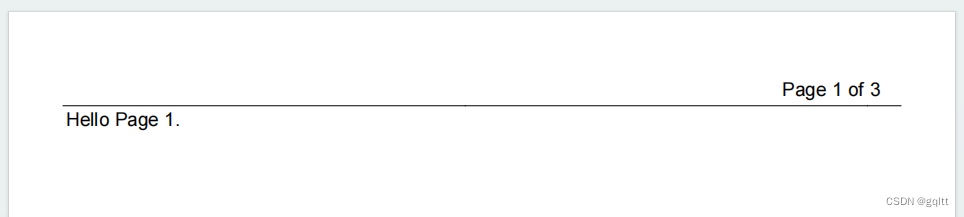
解决 page X of Y 问题
利用XObject特性,iText 真正将PdfTemplate 写入 OutputStream 是在调用releaseTemplate() 时。
import java.io.FileOutputStream;
import java.io.IOException;
import java.sql.SQLException;
import com.itextpdf.text.Document;
import com.itextpdf.text.DocumentException;
import com.itextpdf.text.Element;
import com.itextpdf.text.ExceptionConverter;
import com.itextpdf.text.Image;
import com.itextpdf.text.PageSize;
import com.itextpdf.text.Phrase;
import com.itextpdf.text.Rectangle;
import com.itextpdf.text.pdf.ColumnText;
import com.itextpdf.text.pdf.PdfPCell;
import com.itextpdf.text.pdf.PdfPTable;
import com.itextpdf.text.pdf.PdfPageEventHelper;
import com.itextpdf.text.pdf.PdfTemplate;
import com.itextpdf.text.pdf.PdfWriter;public class MovieCountries1 {/** The resulting PDF file. */public static final String RESULT= "D:/data/iText/inAction/chapter05/movie_countries1.pdf";/*** Inner class to add a table as header.*/class TableHeader extends PdfPageEventHelper {/** The header text. */String header;/** The template with the total number of pages. */PdfTemplate total;/*** Allows us to change the content of the header.* @param header The new header String*/public void setHeader(String header) {this.header = header;}/*** Creates the PdfTemplate that will hold the total number of pages.* @see com.itextpdf.text.pdf.PdfPageEventHelper#onOpenDocument(*      com.itextpdf.text.pdf.PdfWriter, com.itextpdf.text.Document)*/public void onOpenDocument(PdfWriter writer, Document document) {total = writer.getDirectContent().createTemplate(30, 16);}/*** Adds a header to every page* @see com.itextpdf.text.pdf.PdfPageEventHelper#onEndPage(*      com.itextpdf.text.pdf.PdfWriter, com.itextpdf.text.Document)*/public void onEndPage(PdfWriter writer, Document document) {PdfPTable table = new PdfPTable(3);try {table.setWidths(new int[]{24, 24, 2});table.setTotalWidth(527);table.setLockedWidth(true);table.getDefaultCell().setFixedHeight(20);table.getDefaultCell().setBorder(Rectangle.BOTTOM);table.addCell(header);table.getDefaultCell().setHorizontalAlignment(Element.ALIGN_RIGHT);table.addCell(String.format("Page %d of", writer.getPageNumber()));PdfPCell cell = new PdfPCell(Image.getInstance(total));cell.setBorder(Rectangle.BOTTOM);table.addCell(cell);table.writeSelectedRows(0, -1, 34, 803, writer.getDirectContent());}catch(DocumentException de) {throw new ExceptionConverter(de);}}/*** Fills out the total number of pages before the document is closed.* @see com.itextpdf.text.pdf.PdfPageEventHelper#onCloseDocument(*      com.itextpdf.text.pdf.PdfWriter, com.itextpdf.text.Document)*/public void onCloseDocument(PdfWriter writer, Document document) {ColumnText.showTextAligned(total, Element.ALIGN_LEFT,new Phrase(String.valueOf(writer.getPageNumber() - 1)),2, 2, 0);}}/*** Creates a PDF document.* @param filename the path to the new PDF document* @throws    DocumentException * @throws    IOException* @throws    SQLException*/public void createPdf(String filename)throws IOException, DocumentException, SQLException {// step 1Document document = new Document(PageSize.A4, 36, 36, 54, 36);// step 2PdfWriter writer = PdfWriter.getInstance(document, new FileOutputStream(RESULT));TableHeader event = new TableHeader();writer.setPageEvent(event);// step 3document.open();// step 4// 新建页面数据...document.add(new Phrase("Hello Page 1."));document.newPage();document.add(new Phrase("Hello Page 2."));document.newPage();document.add(new Phrase("Hello Page 3."));document.newPage();document.add(new Phrase("Hello Page 4."));// step 4document.close();}/*** Main method.** @param    args    no arguments needed* @throws DocumentException * @throws IOException * @throws SQLException*/public static void main(String[] args)throws IOException, DocumentException, SQLException {new MovieCountries1().createPdf(RESULT);}
}
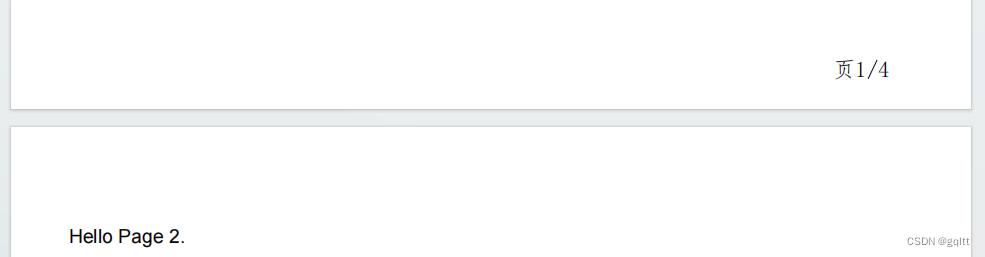
在页尾添加页码
import java.io.FileOutputStream;
import java.io.IOException;
import java.sql.SQLException;
import com.itextpdf.text.Document;
import com.itextpdf.text.DocumentException;
import com.itextpdf.text.ExceptionConverter;
import com.itextpdf.text.PageSize;
import com.itextpdf.text.Phrase;
import com.itextpdf.text.pdf.BaseFont;
import com.itextpdf.text.pdf.PdfContentByte;
import com.itextpdf.text.pdf.PdfPageEventHelper;
import com.itextpdf.text.pdf.PdfTemplate;
import com.itextpdf.text.pdf.PdfWriter;/*** TODO 在此写上类的相关说明.<br>* @author gongqiang <br>* @version 1.0.0 2023年9月18日<br>* @see * @since JDK 1.5.0*/
public class MovieCountries {/** The resulting PDF file. */public static final String RESULT= "D:/data/iText/inAction/chapter05/movie_countries.pdf";/*** Inner class to add a table as header.*/class TableHeader extends PdfPageEventHelper {/** The header text. */String header;/** The template with the total number of pages. */PdfTemplate total;BaseFont baseFont;int fontSize = 14;/*** Allows us to change the content of the header.* @param header The new header String*/public void setHeader(String header) {this.header = header;}/*** Creates the PdfTemplate that will hold the total number of pages.* @see com.itextpdf.text.pdf.PdfPageEventHelper#onOpenDocument(*      com.itextpdf.text.pdf.PdfWriter, com.itextpdf.text.Document)*/public void onOpenDocument(PdfWriter writer, Document document) {total = writer.getDirectContent().createTemplate(30, 16);try {baseFont = BaseFont.createFont("D:/data/iText/fonts/simfang.ttf", BaseFont.IDENTITY_H, BaseFont.NOT_EMBEDDED);} catch (Exception e) {throw new ExceptionConverter(e);}}/*** Adds a header to every page* @see com.itextpdf.text.pdf.PdfPageEventHelper#onEndPage(*      com.itextpdf.text.pdf.PdfWriter, com.itextpdf.text.Document)*/public void onEndPage(PdfWriter writer, Document document) {// 新建获得用户页面文本和图片内容位置的对象PdfContentByte pdfContentByte = writer.getDirectContent();// 保存图形状态pdfContentByte.saveState();String text = "页" + writer.getPageNumber() + "/";//String text = "页 99/";// 获取点字符串的宽度float textSize = baseFont.getWidthPoint(text, fontSize);pdfContentByte.beginText();// 设置随后的文本内容写作的字体和字号pdfContentByte.setFontAndSize(baseFont, fontSize);// 定位'X/'
//            float x = (document.right() + document.left()) / 2;float x = document.right() - 50;float y = 20f;pdfContentByte.setTextMatrix(x, y);pdfContentByte.showText(text);pdfContentByte.endText();// 将模板加入到内容(content)中- // 定位'Y'pdfContentByte.addTemplate(total, x + textSize, y);pdfContentByte.restoreState();}/*** Fills out the total number of pages before the document is closed.* @see com.itextpdf.text.pdf.PdfPageEventHelper#onCloseDocument(*      com.itextpdf.text.pdf.PdfWriter, com.itextpdf.text.Document)*/public void onCloseDocument(PdfWriter writer, Document document) {total.beginText();total.setFontAndSize(baseFont, fontSize);total.setTextMatrix(0, 0);// 设置总页数的值到模板上,并应用到每个界面total.showText(String.valueOf(writer.getPageNumber()));//total.showText(String.valueOf("99"));total.endText();}}/*** Creates a PDF document.* @param filename the path to the new PDF document* @throws    DocumentException * @throws    IOException* @throws    SQLException*/public void createPdf(String filename)throws IOException, DocumentException, SQLException {// step 1Document document = new Document(PageSize.A4, 36, 36, 54, 36);// step 2PdfWriter writer = PdfWriter.getInstance(document, new FileOutputStream(RESULT));TableHeader event = new TableHeader();writer.setPageEvent(event);// step 3document.open();// step 4// 新建页面数据...document.add(new Phrase("Hello Page 1."));document.newPage();document.add(new Phrase("Hello Page 2."));document.newPage();document.add(new Phrase("Hello Page 3."));document.newPage();document.add(new Phrase("Hello Page 4."));// step 4document.close();}/*** Main method.** @param    args    no arguments needed* @throws DocumentException * @throws IOException * @throws SQLException*/public static void main(String[] args)throws IOException, DocumentException, SQLException {new MovieCountries().createPdf(RESULT);}
}
添加水印
如果水印是图片,可以通过PdfContentByte.addImage()、或将图片包装成ColumnText对象,或者添加到表格的cell里。
注意:Image对象需要在onOpenDocument()方法内初始化,避免重复添加图片的字节流。

import java.io.FileOutputStream;
import java.io.IOException;
import java.sql.SQLException;
import com.itextpdf.text.Document;
import com.itextpdf.text.DocumentException;
import com.itextpdf.text.Element;
import com.itextpdf.text.Font;
import com.itextpdf.text.Font.FontFamily;
import com.itextpdf.text.PageSize;
import com.itextpdf.text.Phrase;
import com.itextpdf.text.pdf.ColumnText;
import com.itextpdf.text.pdf.GrayColor;
import com.itextpdf.text.pdf.PdfPageEventHelper;
import com.itextpdf.text.pdf.PdfWriter;public class MovieCountries2 extends MovieCountries1 {/** The resulting PDF file. */public static final String RESULT= "D:/data/iText/inAction/chapter05/movie_countries2.pdf";/*** Inner class to add a watermark to every page.*/class Watermark extends PdfPageEventHelper {Font FONT = new Font(FontFamily.HELVETICA, 52, Font.BOLD, new GrayColor(0.75f));public void onEndPage(PdfWriter writer, Document document) {ColumnText.showTextAligned(writer.getDirectContentUnder(),Element.ALIGN_CENTER, new Phrase("FOOBAR FILM FESTIVAL", FONT),297.5f, 421, writer.getPageNumber() % 2 == 1 ? 45 : -45);}}/*** Creates a PDF document.* @param filename the path to the new PDF document* @throws    DocumentException * @throws    IOException* @throws    SQLException*/public void createPdf(String filename)throws IOException, DocumentException, SQLException {// step 1Document document = new Document(PageSize.A4, 36, 36, 54, 36);// step 2PdfWriter writer = PdfWriter.getInstance(document, new FileOutputStream(RESULT));TableHeader event = new TableHeader();writer.setPageEvent(event);writer.setPageEvent(new Watermark());// step 3document.open();// step 4// 新建页面数据...document.add(new Phrase("Hello Page 1."));document.newPage();document.add(new Phrase("Hello Page 2."));document.newPage();document.add(new Phrase("Hello Page 3."));document.newPage();document.add(new Phrase("Hello Page 4."));// step 5document.close();}/*** Main method.** @param    args    no arguments needed* @throws DocumentException * @throws IOException * @throws SQLException*/public static void main(String[] args)throws IOException, DocumentException, SQLException {new MovieCountries2().createPdf(RESULT);}
}
创建幻灯片
相关文章:
iText实战--Table、cell 和 page event
5.1 使用表和单元格事件装饰表 实现PdfPTableEvent 接口 实现PdfPCellEvent 接口 合并表格和单元格事件 5.2 基本构建块的事件 通用块(Chunk)功能 段落(Paragraph)事件 章节(Chapter)和 区域(…...
WampServer下载安装+cpolar内网穿透实现公网访问本地服务【内网穿透】
文章目录 前言1.WampServer下载安装2.WampServer启动3.安装cpolar内网穿透3.1 注册账号3.2 下载cpolar客户端3.3 登录cpolar web ui管理界面3.4 创建公网地址 4.固定公网地址访问 前言 Wamp 是一个 Windows系统下的 Apache PHP Mysql 集成安装环境,是一组常用来…...

Elasticsearch 入门 索引、分词器
term, match_phrase, match查询 参考 ElasticSearch match, match_phrase, term的区别 term是对输入不分词,进行全文索引查询。存储时是否启用分词器,会影响查询效果match_phase对输入分词,但要求查询时将每个term都搜到,且顺序…...

Android NDK 中有导出 sp智能指针吗?如果没有,可以用什么方法代替 android::sp 智能指针
Android NDK 中有导出 sp智能指针吗?如果没有,可以用什么方法代替 android::sp 智能指针 Author: Lycan Note: 以下问题解答通过大模型生成,主要用于个人学习和备忘,仅供参考,若有错误或者侵权,请联系我修…...

网络爬虫-----爬虫的分类及原理
目录 爬虫的分类 1.通用网络爬虫:搜索引擎的爬虫 2.聚焦网络爬虫:针对特定网页的爬虫 3.增量式网络爬虫 4.深层网络爬虫 通用爬虫与聚焦爬虫的原理 通用爬虫: 聚焦爬虫: 爬虫的分类 网络爬虫按照系统结构和实现技术&#…...
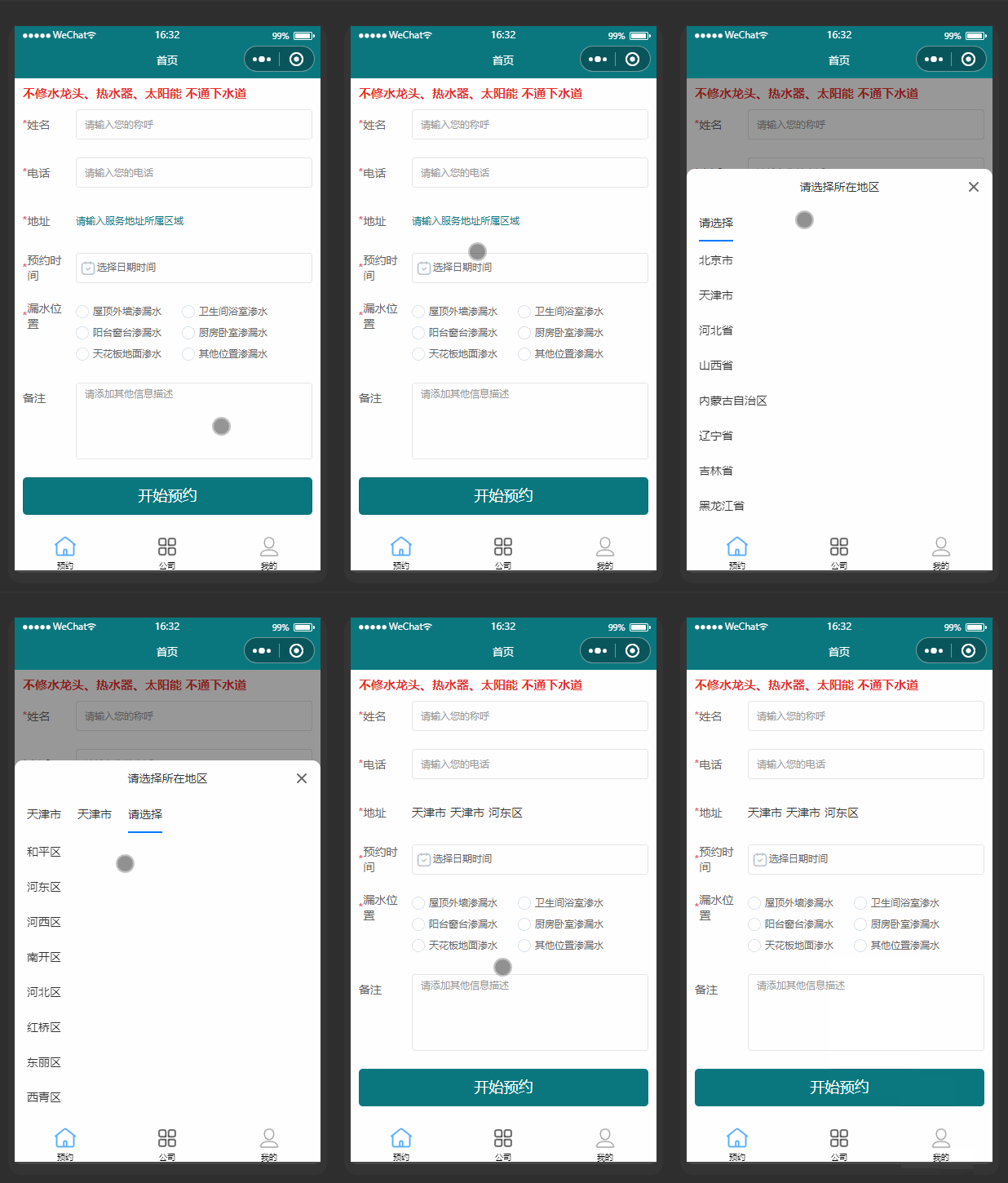
uniapp级联菜单地点区域使用label值,web端el-cascader绑定的value
效果图 一、uniapp uniapp级联菜单地点区域使用label值 1.ui使用 <uni-forms-item label="地址" name="userArea" required><view class="" style="height: 100%;display: flex;align-items: center;">...

合肥先进光源国家重大科技基础设施项目及配套工程启动会纪念
合肥先进光源国家重大科技基础设施项目及配套工程启动会纪念 卡西莫多 合肥长丰岗集里 肥鸭从此别泥塘 先平场地设围栏 进而工地筑基忙 光阴似箭指日争 源流汇智山水长 国器西北扩新地 家校又添新区园 重器托举有群力 大步穿梭两地间 科教兴邦大国策 技术盈身坦荡行…...

力扣第47天--- 第647题、第516题
# 力扣第47天— 第647题、第516题 文章目录 一、第647题--回文子串二、第516题--最长回文子序列 一、第647题–回文子串 逻辑梳理清楚了,就还行。没有想象中那么难。注意遍历顺序,i从大到小。 class Solution { public:int countSubstrings(string …...

dll文件找不到,微软官方地址
dll文件找不到,微软官方地址 文件地址dllMicrosoft Visual C 2008 Redistributable Package ATL 安全更新https://www.microsoft.com/zh-cn/download/details.aspx?id10430Visual C Redistributable for Visual Studio 2012 Update 4https://www.microsoft.com/zh…...
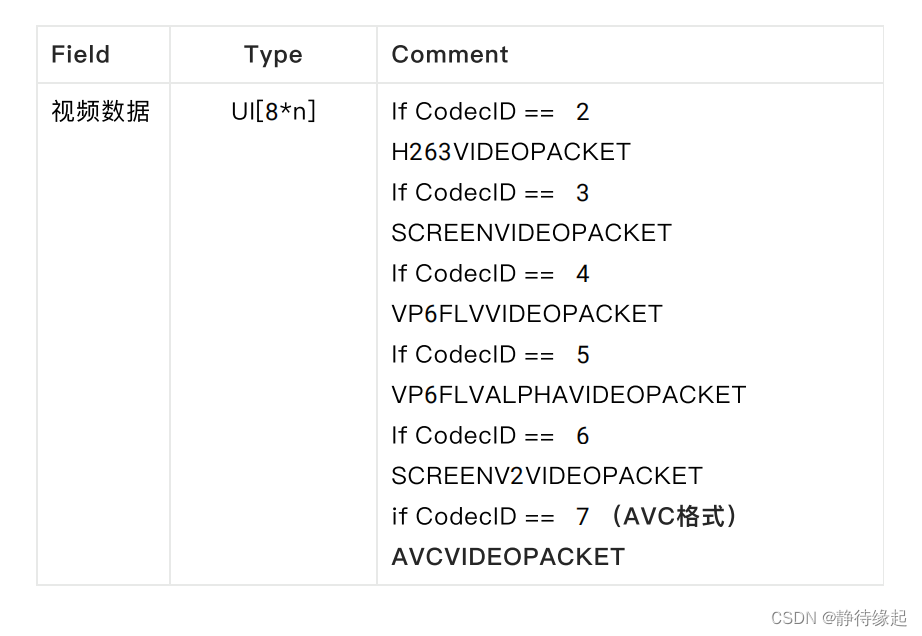
【音视频】FLV封装格式
基本概念 文件头(Header)文件体(Body) flv文件头 主要是看signture和typeflags flv文件体 重点:Tag包数据 Tag结构详细说明 注意: 每个Tag的头字段DataSize只是该Tag下data部分的大小,不包括Tag的header部分的大小 音频 AudioTag Data 所在…...
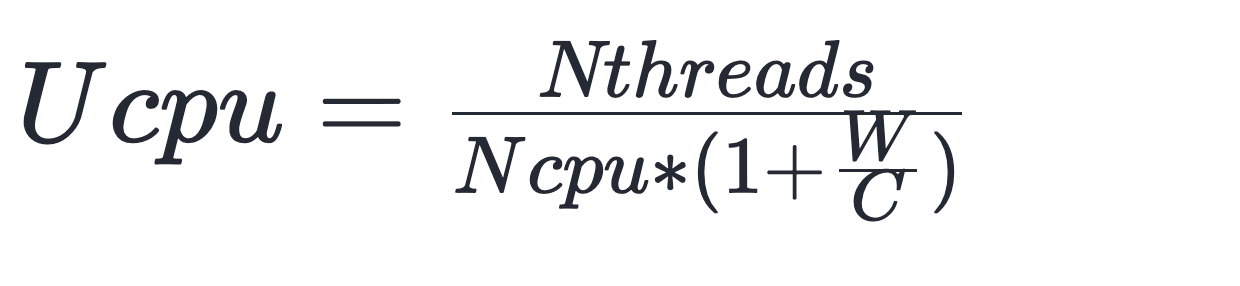
别再纠结线程池池大小、线程数量了,哪有什么固定公式 | 京东云技术团队
可能很多人都看到过一个线程数设置的理论: CPU 密集型的程序 - 核心数 1 I/O 密集型的程序 - 核心数 * 2 不会吧,不会吧,真的有人按照这个理论规划线程数? 线程数和CPU利用率的小测试 抛开一些操作系统,计算机原…...
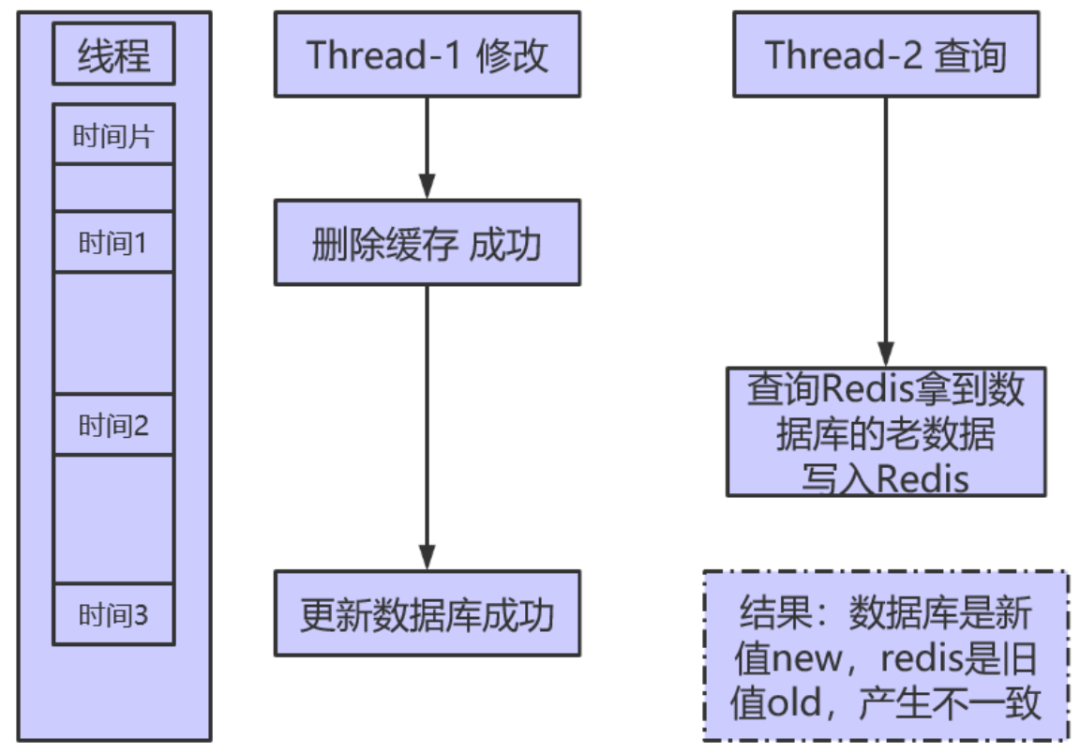
Redis 数据一致性方案的分析与研究
点击下方关注我,然后右上角点击...“设为星标”,就能第一时间收到更新推送啦~~~ 一般的业务场景都是读多写少的,当客户端的请求太多,对数据库的压力越来越大,引入缓存来降低数据库的压力是必然选择,目前业内…...
【网络安全】黑客自学笔记
1️⃣前言 🚀作为一个合格的网络安全工程师,应该做到攻守兼备,毕竟知己知彼,才能百战百胜。 计算机各领域的知识水平决定你渗透水平的上限🚀 【1】比如:你编程水平高,那你在代码审计的时候就会比…...

深入解析Perlin Simplex噪声函数:在C++中构建现代、高效、免费的3D图形背景
引言 在计算机图形中,噪声是一个经常被讨论的话题。无论是为了制造自然的纹理,还是为了模拟复杂的现实世界现象,噪声函数都在其中起着关键作用。而在众多噪声函数中,Perlin Simplex 噪声无疑是最受欢迎的一种。其原因不仅在于其干…...

【计算机辅助蛋白质结构分析、分子对接、片段药物设计技术与应用】
第一天 上午 生物分子互作基础 1.生物分子相互作用研究方法 1.1蛋白-小分子、蛋白-蛋白相互作用原理 1.2 分子对接研究生物分子相互作用 1.3 蛋白蛋白对接研究分子相互作用 蛋白数据库 1. PDB 数据库介绍 1.1 PDB蛋白数据库功能 1.2 PDB蛋白数据可获取资源 1.3 PDB蛋白数据库对…...
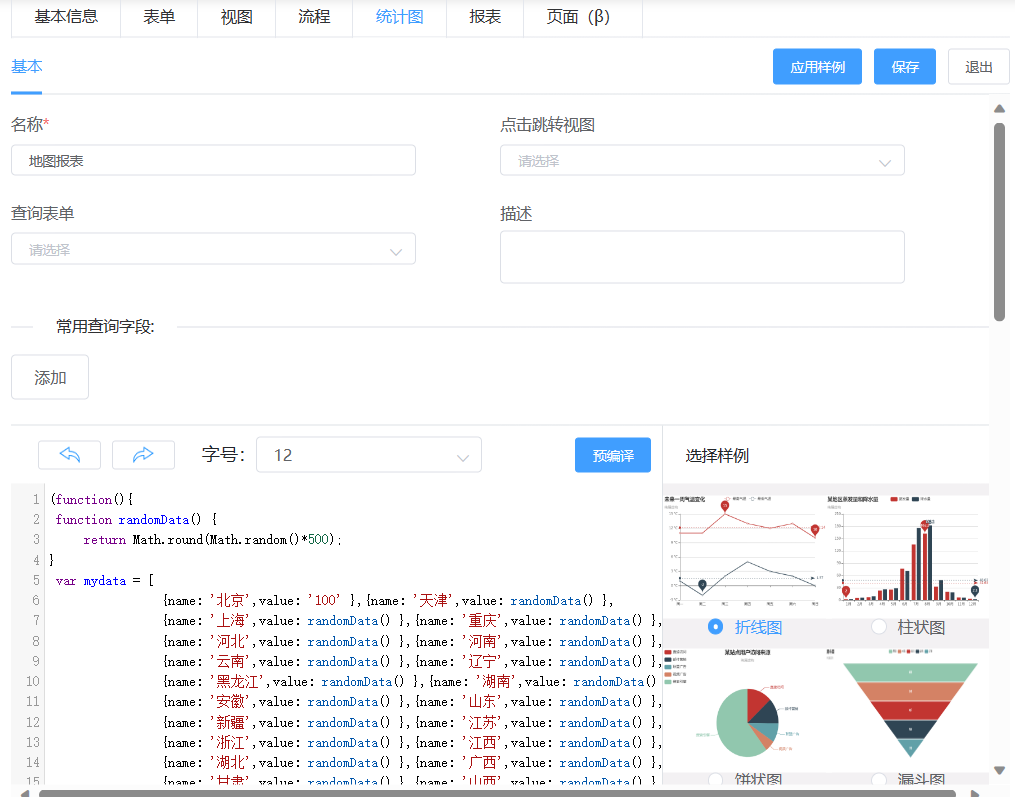
免费开箱即用微鳄售后工单管理系统
编者按:本文介绍基于天翎MyApps低代码平台开发的微鳄售后工单管理系统, 引入低代码平台可以帮助企业快速搭建和部署售后工单管理系统, 以工作流作为支撑,在线完成各环节数据审批,解决售后 工单 服务的全生命周期过程管…...

vant 组件库的基本使用
文章目录 vant组件库1、什么是组件库2、vant组件 全部导入 和 按需导入的区别3、全部导入的使用步骤:4、按需导入的使用步骤:5、封装vant文件包 vant组件库 该项目将使用到vant-ui组件库,这里的目标就是认识他,铺垫知识 1、什么…...
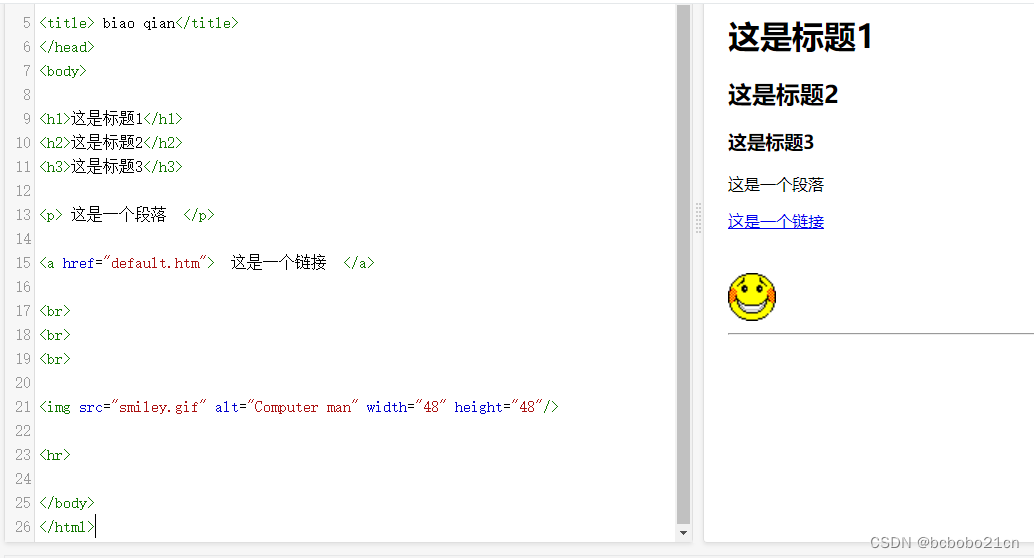
HTML常用基本元素总结
<!DOCTYPE html> <html> <head> <meta charset"utf-8"> <title> biao qian</title> </head> <body><h1>这是标题1</h1> <h2>这是标题2</h2> <h3>这是标题3</h3><p> 这…...

msvcp140.dll重新安装的解决方法是什么?(最新方法)
msvcp140.dll 是 Microsoft Visual C Redistributable 的一个动态链接库文件,它包含了 C 运行时库的一些函数和类,对于许多应用程序和游戏来说都是必需的。如果您的系统中缺失了这个文件,可能会导致程序无法正常运行。下面我们将分享修复 msv…...
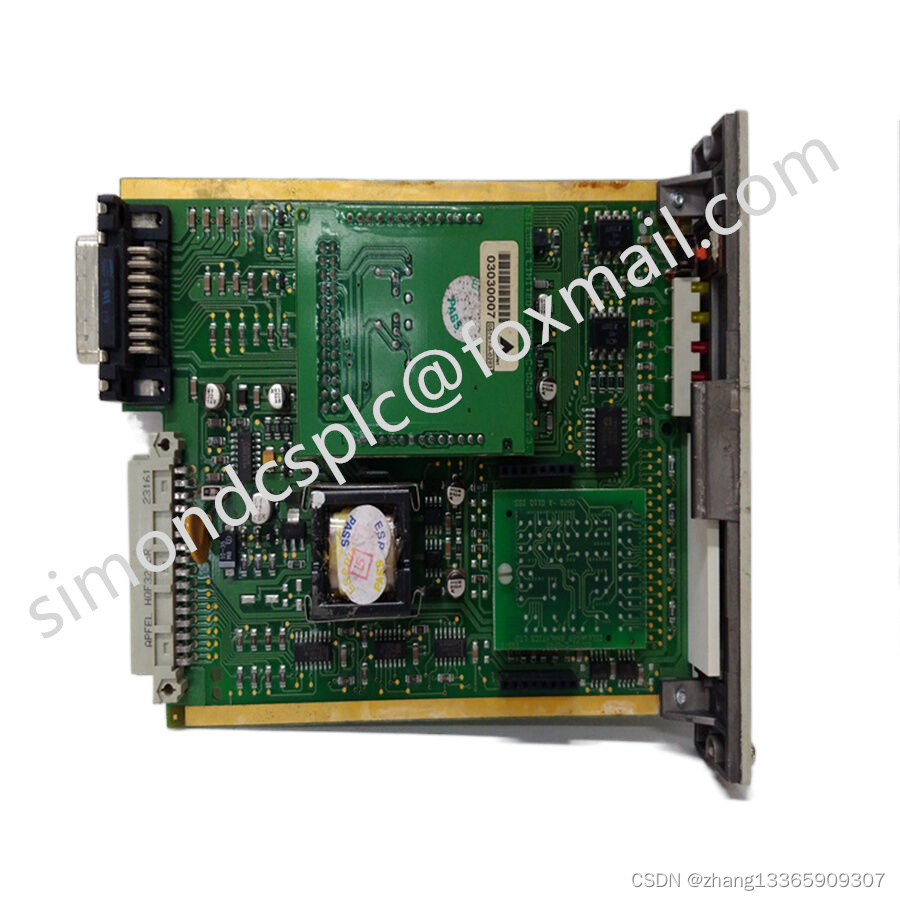
USI-0002 SDI-1624 HONEYWELL ,用于工业和物流4.0的人工智能
USI-0002 SDI-1624 HONEYWELL ,用于工业和物流4.0的人工智能 生产、仓库、运输——生产、储存、分拣或包装货物的地方,也是提货的地方。这意味着几个单独的货物从存储单元如箱子或纸盒中取出并重新组装。有了FLAIROP(机器人采摘的联邦学习)项目费斯托…...

Spratt Skills:基于LLM规划与代码执行的OpenClaw家庭自动化架构实践
1. 项目概述:Spratt Skills,一个为OpenClaw打造的家庭自动化基础设施套件 如果你正在使用OpenClaw,并且已经厌倦了让LLM(大语言模型)去处理那些它天生就不擅长的事情——比如定时发送消息、轮询航班状态、或者可靠地写…...

Taotoken官方价折扣活动对于高频用户的实际成本影响分析
🚀 告别海外账号与网络限制!稳定直连全球优质大模型,限时半价接入中。 👉 点击领取海量免费额度 Taotoken官方价折扣活动对于高频用户的实际成本影响分析 1. 理解Taotoken的计费模式 Taotoken平台采用按Token消耗量计费的模式。…...

Apollo Save Tool:3步解决PlayStation存档管理难题的终极方案
Apollo Save Tool:3步解决PlayStation存档管理难题的终极方案 【免费下载链接】apollo-ps4 Apollo Save Tool (PS4) 项目地址: https://gitcode.com/gh_mirrors/ap/apollo-ps4 你是否曾为丢失珍贵的游戏进度而懊恼?是否在主机升级时面临数百个存档…...

抖音下载器底层架构解析:策略模式与异步编排的高性能实现
抖音下载器底层架构解析:策略模式与异步编排的高性能实现 【免费下载链接】douyin-downloader A practical Douyin downloader for both single-item and profile batch downloads, with progress display, retries, SQLite deduplication, and browser fallback su…...
)
Vit工程化应用(timm 库)
pip install timm import timm import torch from PIL import Image import requests from io import BytesIO# 1. 加载模型 (ViT Base版本,16x16图块,在ImageNet-1k上预训练) # 设置 pretrainedTrue 自动下载权重 model timm.create_model(vit_base_pa…...

基于ChatGPT与Telethon的Telegram频道智能评论机器人开发指南
1. 项目概述与核心价值 如果你在运营Telegram频道,或者需要管理多个社群,肯定遇到过这样的场景:频道里每天都有大量新消息,你想保持活跃度、引导讨论,但手动回复每一条消息不仅耗时耗力,还很难保证回复的质…...

开源物联网平台SiteWhere:微服务架构下的设备管理与数据流实战
1. 项目概述:一个开源的物联网应用平台如果你正在寻找一个能帮你快速搭建、管理和扩展物联网应用的核心平台,而不是从零开始造轮子,那么SiteWhere这个开源项目绝对值得你花时间深入了解。它不是一个简单的设备连接网关,而是一个功…...

利用taotoken模型广场为ai应用快速进行模型选型与测试
🚀 告别海外账号与网络限制!稳定直连全球优质大模型,限时半价接入中。 👉 点击领取海量免费额度 利用Taotoken模型广场为AI应用快速进行模型选型与测试 在构建一个需要集成多种AI能力的应用时,开发者面临的首要挑战往…...

小白程序员必看:收藏这份AI黑话指南,轻松入门大模型世界!
本文用大白话解释了AI领域几个核心概念:AI是总称,LLM是推理模型,Agent能独立执行任务,MCP是标准化接口,Skills是技能包。文章通过生活化比喻和实例,帮助读者理解这些概念如何协同工作,实现高效自…...

2025届最火的六大AI辅助写作网站解析与推荐
Ai论文网站排名(开题报告、文献综述、降aigc率、降重综合对比) TOP1. 千笔AI TOP2. aipasspaper TOP3. 清北论文 TOP4. 豆包 TOP5. kimi TOP6. deepseek 这些年,“论文一键生成”类工具可多了,吸引着有写作压力的学生&#…...