
ASP.NET Core MVC 项目 AOP之Authorization
目录
一:说明
二:传统鉴权授权的基本配置
三 :角色配置说明
四:策略鉴权授权
五:策略鉴权授权Requirement扩展
总结
一:说明
鉴权:是指验证你是否登录,你登录后的身份是什么。
授权:是指验证你的权限,你的身份有没有权限做这个事。
二:传统鉴权授权的基本配置
Program关键代码:
//表示整个应用程序,调用CreateBuilder方法创建一个WebApplicationBuilder对象。
//初始化当前应用程序的管道容器
using Microsoft.AspNetCore.Authentication.Cookies;var builder = WebApplication.CreateBuilder(args);
//向管道容器添加注册中间件
//添加注册控制器视图中间件
builder.Services.AddControllersWithViews();
//添加注册Session中间件
builder.Services.AddSession();
//添加注册鉴权中间件
builder.Services.AddAuthentication(option =>
{option.DefaultAuthenticateScheme = CookieAuthenticationDefaults.AuthenticationScheme;option.DefaultChallengeScheme = CookieAuthenticationDefaults.AuthenticationScheme;option.DefaultSignInScheme = CookieAuthenticationDefaults.AuthenticationScheme;option.DefaultForbidScheme = CookieAuthenticationDefaults.AuthenticationScheme;option.DefaultSignOutScheme = CookieAuthenticationDefaults.AuthenticationScheme;
}).AddCookie(CookieAuthenticationDefaults.AuthenticationScheme, option =>
{//鉴权授权失败跳转登录视图option.LoginPath = "/Home/Login";//没有权限跳转指定视图option.AccessDeniedPath = "/Home/NoAuthority";
});
//配置管道容器中间件,构造WebApplication实例
var app = builder.Build();
//判断是否是开发模式
if (!app.Environment.IsDevelopment())
{//向管道中添加中间件,该中间件将捕获异常、记录异常、重置请求路径并重新执行请求。app.UseExceptionHandler("/Shared/Error");//向管道中添加用于使用HSTS的中间件,该中间件添加了Strict Transport Security标头。默认值为30天app.UseHsts();
}
//向管道添加Session中间件
app.UseSession();
//向管道添加用于将HTTP请求重定向到HTTPS的中间件。
app.UseHttpsRedirection();
//向管道添加为当前请求路径启用静态文件服务
app.UseStaticFiles();
//向管道添加路由配置中间件
app.UseRouting();
//向管道添加鉴权中间件
app.UseAuthentication();
//向管道添加授权中间件
app.UseAuthorization();
//向管道添加默认路由中间件
app.MapControllerRoute(name: "default",pattern: "{controller=Home}/{action=Index}/{id?}");
//向管道添加启动应用程序中间件
app.Run();
User关键代码:
using System.ComponentModel.DataAnnotations;namespace Study_ASP.NET_Core_MVC.Models
{public class User{public int UserId { get; set; }[Display(Name="账号")]public string? UserName { get; set; }public string? Account { get; set; }[Display(Name = "密码")]public string? UserPwd { get; set; }[DataType(DataType.EmailAddress)][Display(Name = "邮箱")]public string? UserEmail { get; set;}public DateTime LoginTime { get; set; }}
}
Home控制器代码:
using Microsoft.AspNetCore.Authentication;
using Microsoft.AspNetCore.Authentication.Cookies;
using Microsoft.AspNetCore.Authorization;
using Microsoft.AspNetCore.Mvc;
using Study_ASP.NET_Core_MVC.Models;
using System.Diagnostics;
using System.Security.Claims;namespace Study_ASP.NET_Core_MVC.Controllers
{public class HomeController : Controller{private readonly ILogger<HomeController> _logger;public HomeController(ILogger<HomeController> logger){_logger = logger;}/// <summary>/// Get请求/// 默认授权/// </summary>/// <returns></returns>[HttpGet][Authorize]public IActionResult Index(){var user = HttpContext.User;return View();}/// <summary>/// Get请求/// </summary>/// <returns></returns>public IActionResult NoAuthority(){return View();}/// <summary>/// Get请求/// 登录视图/// </summary>/// <returns></returns>[HttpGet]public IActionResult Login(){return View();}/// <summary>/// Post请求/// 登录视图/// </summary>/// <param name="UserName"></param>/// <param name="UserPwd"></param>/// <returns></returns>[HttpPost]public async Task<IActionResult> Login(string UserName,string UserPwd){if ("VinCente".Equals(UserName) && "123456".Equals(UserPwd)){var claims = new List<Claim>(){new Claim("UserId","1"),new Claim(ClaimTypes.Role,"Admin"),new Claim(ClaimTypes.Role,"User"),new Claim(ClaimTypes.Name,$"{UserName}---来自于Cookies"),new Claim(ClaimTypes.Email,$"VinCente@123.com"),new Claim("Password",UserPwd),new Claim("Account","Administrator"),new Claim("Role","admin"),new Claim("QQ","7257624")};ClaimsPrincipal userPrincipal = new ClaimsPrincipal(new ClaimsIdentity(claims, "UserMessage"));HttpContext.SignInAsync(CookieAuthenticationDefaults.AuthenticationScheme, userPrincipal, new AuthenticationProperties{//过期时间30分钟ExpiresUtc = DateTime.UtcNow.AddSeconds(30)}).Wait();var user = HttpContext.User;return base.Redirect("/Home/Index");}else{base.ViewBag.Message = "账号或密码错误";}return await Task.FromResult<IActionResult>(View());}}
}
视图代码:
@using Study_ASP.NET_Core_MVC.Models;@model User
@{ViewBag.Title = "登录";
}<h2>登录</h2>
<div class="row"><div class="col-md-8"><section id="loginForm">@using (Html.BeginForm("Login", "Home", new { sid = "123", Account = "VinCente" },FormMethod.Post, true, new { @class = "form-horizontal", role = "form" })){@Html.AntiForgeryToken()<hr />@Html.ValidationSummary(true)<div class="mb-3 row">@Html.LabelFor(m => m.UserName, new { @class = "col-sm-1 col-form-label" })<div class="col-md-6">@Html.TextBoxFor(m => m.UserName, new { @class = "form-control", @placeholder="请输入账号" })</div></div><div class="mb-3 row">@Html.LabelFor(m => m.UserPwd, new { @class = "col-md-1 control-label" })<div class="col-md-6">@Html.PasswordFor(m => m.UserPwd, new { @class = "form-control",@placeholder="请输入密码" })</div></div><div class="mb-3 row"><div class="col-md-offset-2 col-md-6"><button type="submit" class="btn btn-primary mb-3">登录</button>@base.ViewBag.Message</div></div>}</section></div>
</div>
三 :角色配置说明
标记多个角色授权控制器代码:
/// <summary>/// Get请求/// 默认授权/// 授权给角色为Admin的用户,可以访问/// 授权给角色为User的用户,可以访问/// 授权给角色为Tracher的用户,不可以访问,VinCente用户没有Teacher授权/// 同时授权给用户多个角色Roles时,必须同时满足角色Roles,才可以访问/// </summary>/// <returns></returns>[HttpGet]//[Authorize][Authorize(AuthenticationSchemes = CookieAuthenticationDefaults.AuthenticationScheme, Roles = "Admin")]//[Authorize(AuthenticationSchemes = CookieAuthenticationDefaults.AuthenticationScheme, Roles = "User")]//[Authorize(AuthenticationSchemes = CookieAuthenticationDefaults.AuthenticationScheme, Roles = "Teacher")]public IActionResult Index(){var user = HttpContext.User;return View();}标记单个角色授权控制器代码:
/// <summary>/// Get请求/// 默认授权/// 授权给角色为Admin和User的用户,包含其中一个角色,可以访问/// 授权给角色为User和Teacher的用户,包含其中一个角色,可以访问/// 授权给角色为Tracher和Admin的用户,包含其中一个角色,可以访问/// 授权给角色为System和Teacher的用户,不包含其中一个角色,不可以访问/// </summary>/// <returns></returns>[HttpGet]//[Authorize][Authorize(AuthenticationSchemes = CookieAuthenticationDefaults.AuthenticationScheme, Roles = "Admin,User")]//[Authorize(AuthenticationSchemes = CookieAuthenticationDefaults.AuthenticationScheme, Roles = "User,Teacher")]//[Authorize(AuthenticationSchemes = CookieAuthenticationDefaults.AuthenticationScheme, Roles = "Teacher,Admin")]//[Authorize(AuthenticationSchemes = CookieAuthenticationDefaults.AuthenticationScheme, Roles = "System,Teacher")]public IActionResult Index(){var user = HttpContext.User;return View();}四:策略鉴权授权
Program关键代码:
//表示整个应用程序,调用CreateBuilder方法创建一个WebApplicationBuilder对象。
//初始化当前应用程序的管道容器
using Microsoft.AspNetCore.Authentication.Cookies;
using System.Security.Claims;var builder = WebApplication.CreateBuilder(args);
//向管道容器添加注册中间件
//添加注册控制器视图中间件
builder.Services.AddControllersWithViews();
//添加注册Session中间件
builder.Services.AddSession();
//添加注册鉴权授权中间件
builder.Services.AddAuthentication(option =>
{option.DefaultAuthenticateScheme = CookieAuthenticationDefaults.AuthenticationScheme;option.DefaultChallengeScheme = CookieAuthenticationDefaults.AuthenticationScheme;option.DefaultSignInScheme = CookieAuthenticationDefaults.AuthenticationScheme;option.DefaultForbidScheme = CookieAuthenticationDefaults.AuthenticationScheme;option.DefaultSignOutScheme = CookieAuthenticationDefaults.AuthenticationScheme;
}).AddCookie(CookieAuthenticationDefaults.AuthenticationScheme, option =>
{//鉴权授权失败跳转登录视图option.LoginPath = "/Home/Login";//没有权限跳转指定视图option.AccessDeniedPath = "/Home/NoAuthority";
});
//添加注册策略鉴权授权中间件
builder.Services.AddAuthorization(option =>
{//注册一个为RolePolicy的策略授权option.AddPolicy("RolePolicy", policyBuilder =>{//必须包含某个角色//policyBuilder.RequireRole("Teacher");//必须包含Account条件//policyBuilder.RequireClaim("Account");//必须包含指定条件policyBuilder.RequireAssertion(context =>{return context.User.HasClaim(c => c.Type == ClaimTypes.Role) && context.User.Claims.First(c => c.Type.Equals(ClaimTypes.Role)).Value == "Admin" && context.User.Claims.Any(c => c.Type == ClaimTypes.Name);});//policyBuilder.AddRequirements(new QQEmailRequirement());});
});
//配置管道容器中间件,构造WebApplication实例
var app = builder.Build();
//判断是否是开发模式
if (!app.Environment.IsDevelopment())
{//向管道中添加中间件,该中间件将捕获异常、记录异常、重置请求路径并重新执行请求。app.UseExceptionHandler("/Shared/Error");//向管道中添加用于使用HSTS的中间件,该中间件添加了Strict Transport Security标头。默认值为30天app.UseHsts();
}
//向管道添加Session中间件
app.UseSession();
//向管道添加用于将HTTP请求重定向到HTTPS的中间件。
app.UseHttpsRedirection();
//向管道添加为当前请求路径启用静态文件服务
app.UseStaticFiles();
//向管道添加路由配置中间件
app.UseRouting();
//向管道添加鉴权中间件
app.UseAuthentication();
//向管道添加授权中间件
app.UseAuthorization();
//向管道添加默认路由中间件
app.MapControllerRoute(name: "default",pattern: "{controller=Home}/{action=Index}/{id?}");
//向管道添加启动应用程序中间件
app.Run();
控制器代码:
using Microsoft.AspNetCore.Authentication;
using Microsoft.AspNetCore.Authentication.Cookies;
using Microsoft.AspNetCore.Authorization;
using Microsoft.AspNetCore.Mvc;
using Study_ASP.NET_Core_MVC.Models;
using System.Diagnostics;
using System.Security.Claims;namespace Study_ASP.NET_Core_MVC.Controllers
{public class HomeController : Controller{private readonly ILogger<HomeController> _logger;public HomeController(ILogger<HomeController> logger){_logger = logger;}/// <summary>/// Get请求/// 策略授权/// </summary>/// <returns></returns>[HttpGet][Authorize(AuthenticationSchemes = CookieAuthenticationDefaults.AuthenticationScheme, Policy = "RolePolicy")]public IActionResult Index(){var user = HttpContext.User;return View();}/// <summary>/// Get请求/// </summary>/// <returns></returns>public IActionResult NoAuthority(){return View();}/// <summary>/// Get请求/// 登录视图/// </summary>/// <returns></returns>[HttpGet]public IActionResult Login(){return View();}/// <summary>/// Post请求/// 登录视图/// </summary>/// <param name="UserName"></param>/// <param name="UserPwd"></param>/// <returns></returns>[HttpPost]public async Task<IActionResult> Login(string UserName, string UserPwd){if ("VinCente".Equals(UserName) && "123456".Equals(UserPwd)){var claims = new List<Claim>(){new Claim("UserId","1"),new Claim(ClaimTypes.Role,"Admin"),new Claim(ClaimTypes.Role,"User"),new Claim(ClaimTypes.Name,$"{UserName}---来自于Cookies"),new Claim(ClaimTypes.Email,$"VinCente@123.com"),new Claim("Password",UserPwd),new Claim("Account","Administrator"),new Claim("Role","admin"),new Claim("QQ","7257624")};ClaimsPrincipal userPrincipal = new ClaimsPrincipal(new ClaimsIdentity(claims, "UserMessage"));HttpContext.SignInAsync(CookieAuthenticationDefaults.AuthenticationScheme, userPrincipal, new AuthenticationProperties{//过期时间30分钟ExpiresUtc = DateTime.UtcNow.AddSeconds(30)}).Wait();var user = HttpContext.User;return base.Redirect("/Home/Index");}else{base.ViewBag.Message = "账号或密码错误";}return await Task.FromResult<IActionResult>(View());}}
}
五:策略鉴权授权Requirement扩展
IUserService代码:
namespace Study_ASP.NET_Core_MVC.Models
{public interface IUserService{public bool Validata(string userId, string qq);}
}
UserService代码:
namespace Study_ASP.NET_Core_MVC.Models
{public class UserService: IUserService{public bool Validata(string userId, string qq){//在这里去链接数据库去校验这个QQ是否正确return true;}}
}
QQEmailRequirement代码:
using Microsoft.AspNetCore.Authorization;namespace Study_ASP.NET_Core_MVC.Models
{public class QQEmailRequirement:IAuthorizationRequirement{}
}
QQHandler代码:
using Microsoft.AspNetCore.Authorization;namespace Study_ASP.NET_Core_MVC.Models
{public class QQHandler:AuthorizationHandler<QQEmailRequirement>{//初始化构造函数private IUserService _UserService;public QQHandler(IUserService userService){this._UserService = userService;}protected override Task HandleRequirementAsync(AuthorizationHandlerContext context, QQEmailRequirement requirement){if (context.User.Claims.Count() == 0){return Task.CompletedTask;}string userId = context.User.Claims.First(c => c.Type == "UserId").Value;string qq = context.User.Claims.First(c => c.Type == "QQ").Value;if (_UserService.Validata(userId, qq)){//验证通过context.Succeed(requirement);}return Task.CompletedTask;}}
}
Program关键代码:
//表示整个应用程序,调用CreateBuilder方法创建一个WebApplicationBuilder对象。
//初始化当前应用程序的管道容器
using Microsoft.AspNetCore.Authentication.Cookies;
using Microsoft.AspNetCore.Authorization;
using Study_ASP.NET_Core_MVC.Models;
using System.Security.Claims;var builder = WebApplication.CreateBuilder(args);
//向管道容器添加注册中间件
//添加注册控制器视图中间件
builder.Services.AddControllersWithViews();
//添加注册Session中间件
builder.Services.AddSession();
//添加注册鉴权授权中间件
builder.Services.AddAuthentication(option =>
{option.DefaultAuthenticateScheme = CookieAuthenticationDefaults.AuthenticationScheme;option.DefaultChallengeScheme = CookieAuthenticationDefaults.AuthenticationScheme;option.DefaultSignInScheme = CookieAuthenticationDefaults.AuthenticationScheme;option.DefaultForbidScheme = CookieAuthenticationDefaults.AuthenticationScheme;option.DefaultSignOutScheme = CookieAuthenticationDefaults.AuthenticationScheme;
}).AddCookie(CookieAuthenticationDefaults.AuthenticationScheme, option =>
{//鉴权授权失败跳转登录视图option.LoginPath = "/Home/Login";//没有权限跳转指定视图option.AccessDeniedPath = "/Home/NoAuthority";
});
//添加注册策略鉴权授权中间件
builder.Services.AddAuthorization(option =>
{//注册一个为RolePolicy的策略授权option.AddPolicy("RolePolicy", policyBuilder =>{//必须包含某个角色//policyBuilder.RequireRole("Teacher");//必须包含Account条件//policyBuilder.RequireClaim("Account");//必须包含指定条件policyBuilder.RequireAssertion(context =>{return context.User.HasClaim(c => c.Type == ClaimTypes.Role) && context.User.Claims.First(c => c.Type.Equals(ClaimTypes.Role)).Value == "Admin" && context.User.Claims.Any(c => c.Type == ClaimTypes.Name);});policyBuilder.AddRequirements(new QQEmailRequirement());});
});
//添加注册策略鉴权授权中间件外部文件
builder.Services.AddTransient<IUserService, UserService>();
builder.Services.AddTransient<IAuthorizationHandler, QQHandler>();
//配置管道容器中间件,构造WebApplication实例
var app = builder.Build();
//判断是否是开发模式
if (!app.Environment.IsDevelopment())
{//向管道中添加中间件,该中间件将捕获异常、记录异常、重置请求路径并重新执行请求。app.UseExceptionHandler("/Shared/Error");//向管道中添加用于使用HSTS的中间件,该中间件添加了Strict Transport Security标头。默认值为30天app.UseHsts();
}
//向管道添加Session中间件
app.UseSession();
//向管道添加用于将HTTP请求重定向到HTTPS的中间件。
app.UseHttpsRedirection();
//向管道添加为当前请求路径启用静态文件服务
app.UseStaticFiles();
//向管道添加路由配置中间件
app.UseRouting();
//向管道添加鉴权中间件
app.UseAuthentication();
//向管道添加授权中间件
app.UseAuthorization();
//向管道添加默认路由中间件
app.MapControllerRoute(name: "default",pattern: "{controller=Home}/{action=Index}/{id?}");
//向管道添加启动应用程序中间件
app.Run();
控制器代码:
using Microsoft.AspNetCore.Authentication;
using Microsoft.AspNetCore.Authentication.Cookies;
using Microsoft.AspNetCore.Authorization;
using Microsoft.AspNetCore.Mvc;
using Study_ASP.NET_Core_MVC.Models;
using System.Diagnostics;
using System.Security.Claims;namespace Study_ASP.NET_Core_MVC.Controllers
{public class HomeController : Controller{private readonly ILogger<HomeController> _logger;public HomeController(ILogger<HomeController> logger){_logger = logger;}/// <summary>/// Get请求/// 策略授权/// </summary>/// <returns></returns>[HttpGet][Authorize(AuthenticationSchemes = CookieAuthenticationDefaults.AuthenticationScheme, Policy = "RolePolicy")]public IActionResult Index(){var user = HttpContext.User;return View();}/// <summary>/// Get请求/// </summary>/// <returns></returns>public IActionResult NoAuthority(){return View();}/// <summary>/// Get请求/// 登录视图/// </summary>/// <returns></returns>[HttpGet]public IActionResult Login(){return View();}/// <summary>/// Post请求/// 登录视图/// </summary>/// <param name="UserName"></param>/// <param name="UserPwd"></param>/// <returns></returns>[HttpPost]public async Task<IActionResult> Login(string UserName, string UserPwd){if ("VinCente".Equals(UserName) && "123456".Equals(UserPwd)){var claims = new List<Claim>(){new Claim("UserId","1"),new Claim(ClaimTypes.Role,"Admin"),new Claim(ClaimTypes.Role,"User"),new Claim(ClaimTypes.Name,$"{UserName}---来自于Cookies"),new Claim(ClaimTypes.Email,$"VinCente@123.com"),new Claim("Password",UserPwd),new Claim("Account","Administrator"),new Claim("Role","admin"),new Claim("QQ","7257624")};ClaimsPrincipal userPrincipal = new ClaimsPrincipal(new ClaimsIdentity(claims, "UserMessage"));HttpContext.SignInAsync(CookieAuthenticationDefaults.AuthenticationScheme, userPrincipal, new AuthenticationProperties{//过期时间30分钟ExpiresUtc = DateTime.UtcNow.AddSeconds(30)}).Wait();var user = HttpContext.User;return base.Redirect("/Home/Index");}else{base.ViewBag.Message = "账号或密码错误";}return await Task.FromResult<IActionResult>(View());}}
}
总结
使用传统鉴权授权的基本配置,验证用户是否登录,如果当前没有用户信息直接跳转至登录视图,在Program文件中配置,登录之后可以正常访问被标记为[Authorize]的控制器或控制器方法,由于控制器代码中HttpPost的Login方法中写明用户角色。搭配角色使用,在控制器或控制器方法上标记可以访问该控制器或方法的角色,除了当前标记的角色外,都不可以访问该控制器或控制器方法。搭配策略使用,在特殊的控制器或控制器上标记可以访问该控制器或方法的策略名称,符合该策略的用户可以访问。不能访问的用户直接跳转至Home控制器下的NoAuthority方法中的视图,提醒用户没有权限访问该方法。通过使用AddRequirements扩展,可以自定义验证用户鉴权授权。
相关文章:

ASP.NET Core MVC 项目 AOP之Authorization
目录 一:说明 二:传统鉴权授权的基本配置 三 :角色配置说明 四:策略鉴权授权 五:策略鉴权授权Requirement扩展 总结 一:说明 鉴权:是指验证你是否登录,你登录后的身份是什么。…...
智能新冠疫苗接种助手管理系统
项目背景介绍 近几年来,网络事业,特别是Internet发展速度之快是任何人都始料不及的。目前,由于Internet表现出来的便捷,快速等诸多优势,已经使它成为社会各行各业,甚至是平民大众工作,生活不可缺少的一个重…...
Python+Selenium4元素交互1_web自动化(5)
目录 0. 上节回顾 1. 内置的等待条件 2. 元素属性 1. Python对象属性 2. HTML元素属性 3. 元素的交互 1. 输入框 2. 按钮 3. 单选框和复选框 0. 上节回顾 DEBUG的方式:JS断点 Python断点编程语言提供的等待方式:sleepselenium提供的等待方式&…...

2023双非计算机硕士应战秋招算法岗之深度学习基础知识
word版资料自取链接: 链接:https://pan.baidu.com/s/1H5ZMcUq-V7fxFxb5ObiktQ 提取码:kadm 卷积层 全连接神经网络需要非常多的计算资源才能支撑它来做反向传播和前向传播,所以说全连接神经网络可以存储非常多的参数,…...
Python opencv进行矩形识别
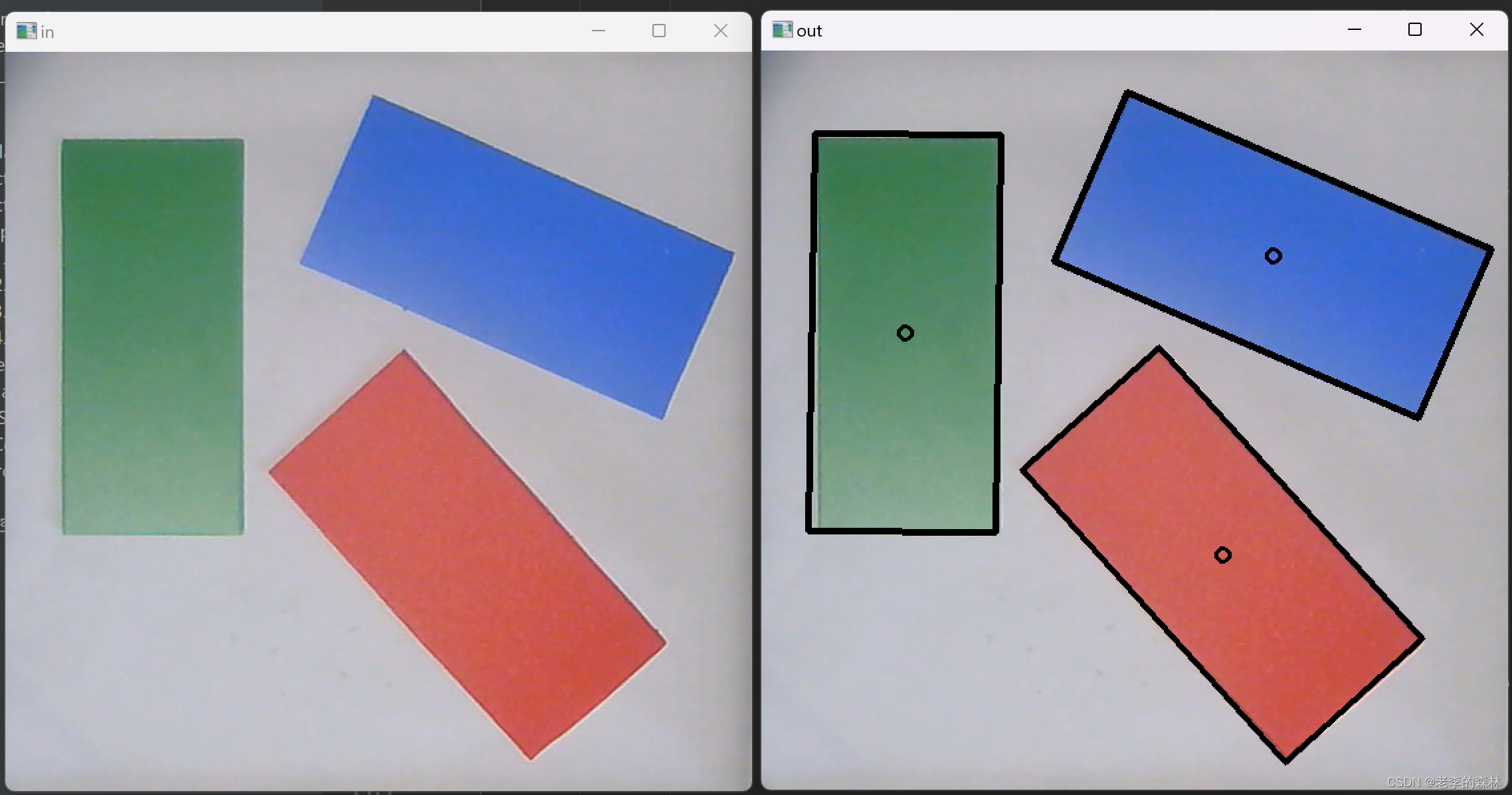
Python opencv进行矩形识别 图像识别中,圆形和矩形识别是最常用的两种,上一篇讲解了圆形识别,本例讲解矩形识别,最后的结果是可以识别出圆心,4个顶点,如下图: 左边是原始图像,右边是识别结果,在我i5 10400的CPU上,执行时间不到8ms。 识别出结果后,计算任意3个顶点…...

网安入门必备的12个kali Linux工具
kali Linux工具帮你评估 Web 服务器的安全性,并帮助你执行黑客渗透测试。 注意:这里不是所提及的所有工具都是开源的。 1. Nmap Nmap ( 网络映射器 )是一款用于 网络发现 和 安全审计 的 网络安全 工具. 主机发现,端口扫描,版本…...
【测试面试】头条大厂,测试开发岗真实一面。你能抵得住吗?
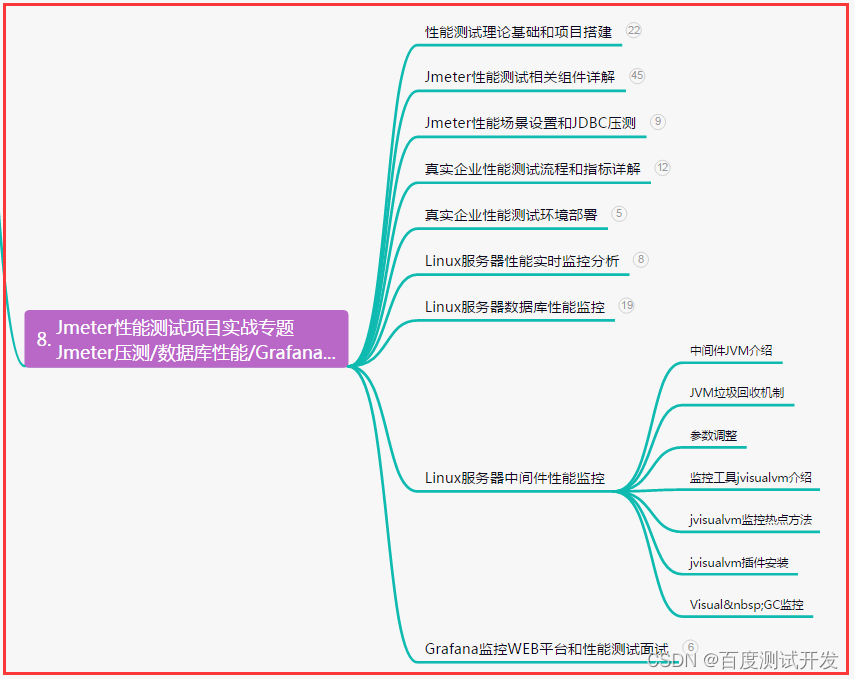
目录:导读前言一、Python编程入门到精通二、接口自动化项目实战三、Web自动化项目实战四、App自动化项目实战五、一线大厂简历六、测试开发DevOps体系七、常用自动化测试工具八、JMeter性能测试九、总结(尾部小惊喜)前言 小吴: 现…...
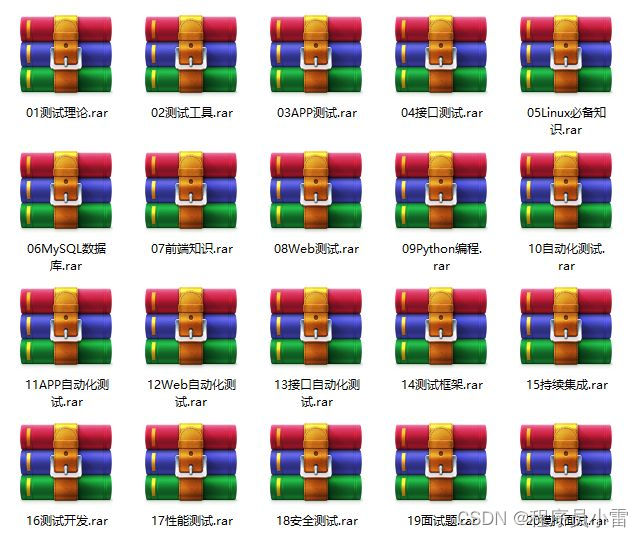
分享app的测试技巧
前言 今天笔者想和大家来唠唠app测试,现在的app有非常的多,这些app都是需要经过测试之后才能发布到应用市场中,app已经成为了我们日常生活中不可或缺的一部分了,但它的功能必须强大,才能受到消费者的重视,…...
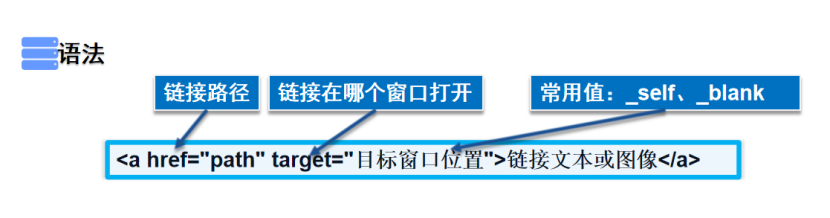
HTML 基础【快速掌握知识点】
目录 一、什么是HTML? 二、HTML的发展史 三、HTML5的优势 四、HTML基本结构 五、DOCTYPE声明 六、title标签 七、meta标签 八、标题标签 九、段落标签 十、换行标签 十一、水平线标签 十二、字体样式标签 十三、特殊符号 十四、图像标签 十五、链接标…...
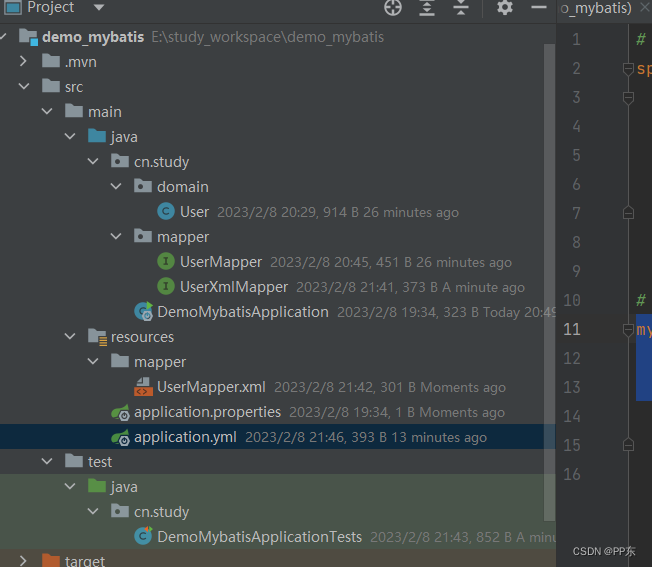
SpringBoot入门(二)
这里写目录标题一、SpringBoot整合Junit1.1 搭建SpringBoot工程1.2 引入starter-test起步依赖1.3 编写类1.4 测试二、SpringBoot整合mybatis2.1 搭建SpringBoot工程2.2 引入mybatis起步依赖,添加驱动2.3 编写DataSource和MyBatis相关配置2.4 定义表和实体类2.5 编写…...
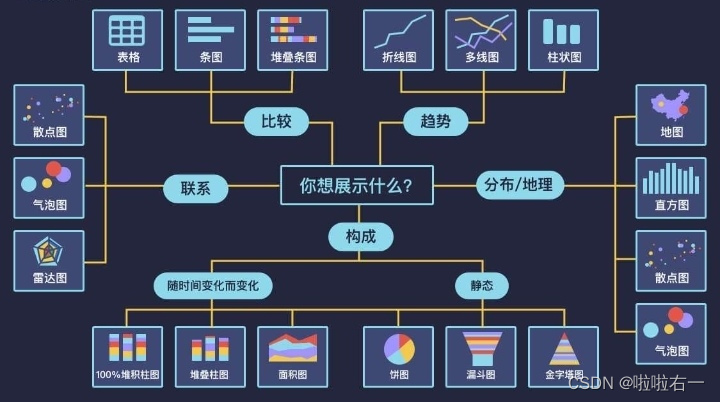
大数据|大数据基础(概念向)
目录 📚大数据概念 🐇常见数据存储单位 🐇大数据的特点(5V) 🐇大数据 VS 数据库 🌟数据库 🌟大数据 📚大数据业务分析基本步骤 🐇收集数据 Ǵ…...
若依配置教程(九)若依前后端分离版部署到服务器Nginx(Windows版)
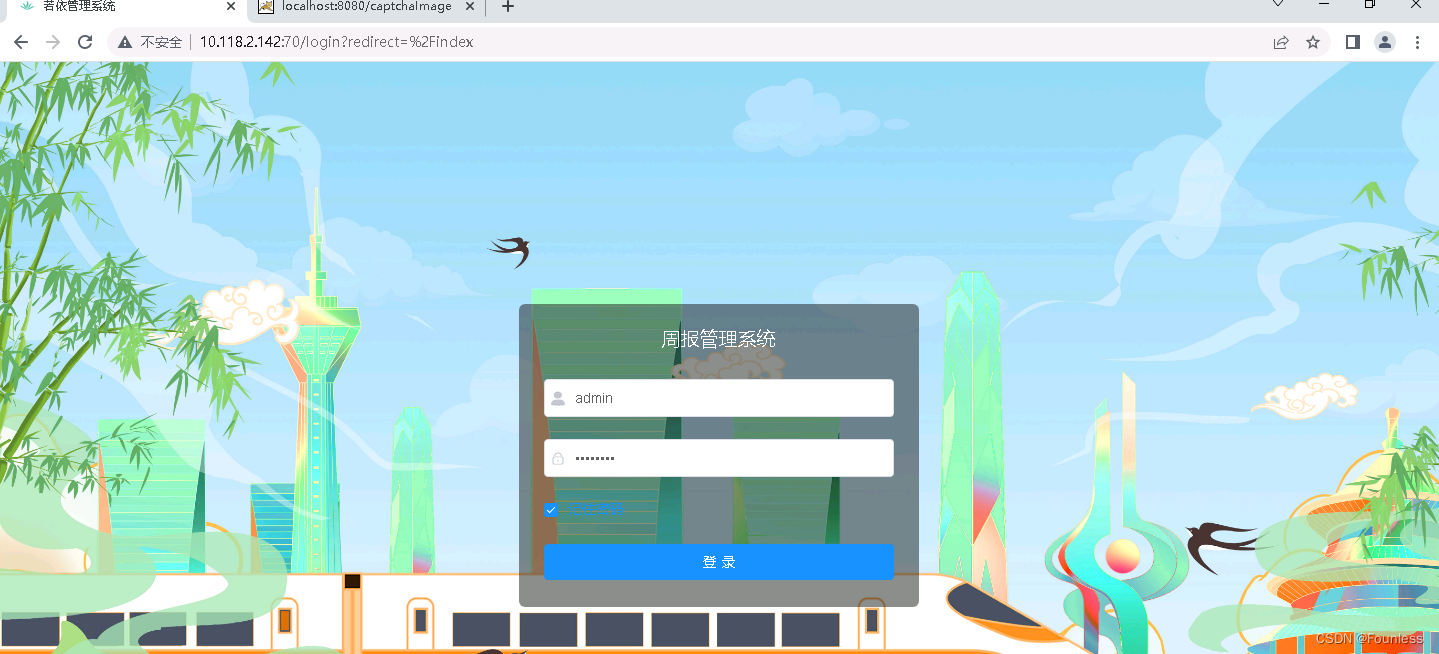
搭建若依环境 要部署到服务器上,首先要在本地运行若依系统 文章目录搭建若依环境后端部署1.在application.yml中修改后台端口,这里默认是8080。2.在application-druid.yml中修改正式环境数据库。3.后端打包部署前端部署下载安装NginxNginx代理配置启动N…...
【仔细理解】计算机视觉基础1——特征提取之Harris角点
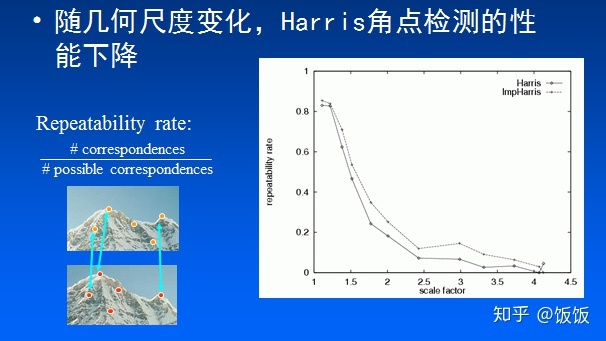
Harris角点是图像特征提取中最基本的方法,本篇内容将详细分析Harris角点的定义、计算方法、特点。 一、Harris角点定义 在图像中,若以正方形的小像素窗口为基本单位,按照上图可以将它们划分三种类型如下: 平坦区域:在任…...
Elasticsearch7.8.0版本进阶——近实时搜索
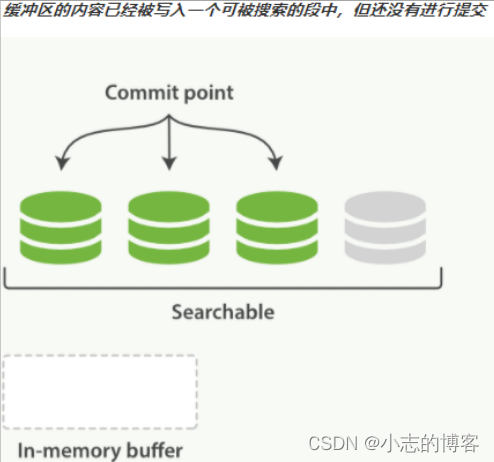
目录一、近实时搜索的概述1.1、按段(per-segment)搜索1.2、更轻量的方式搜索二、为什么Elasticsearch是 近 实时搜索三、如何解决索引了一个文档然后却没有搜到四、哪种情况不需要每秒刷新4.1、使用 Elasticsearch 索引大量的日志文件4.2、使用 Elastics…...
OAK相机深度流探测草莓距离
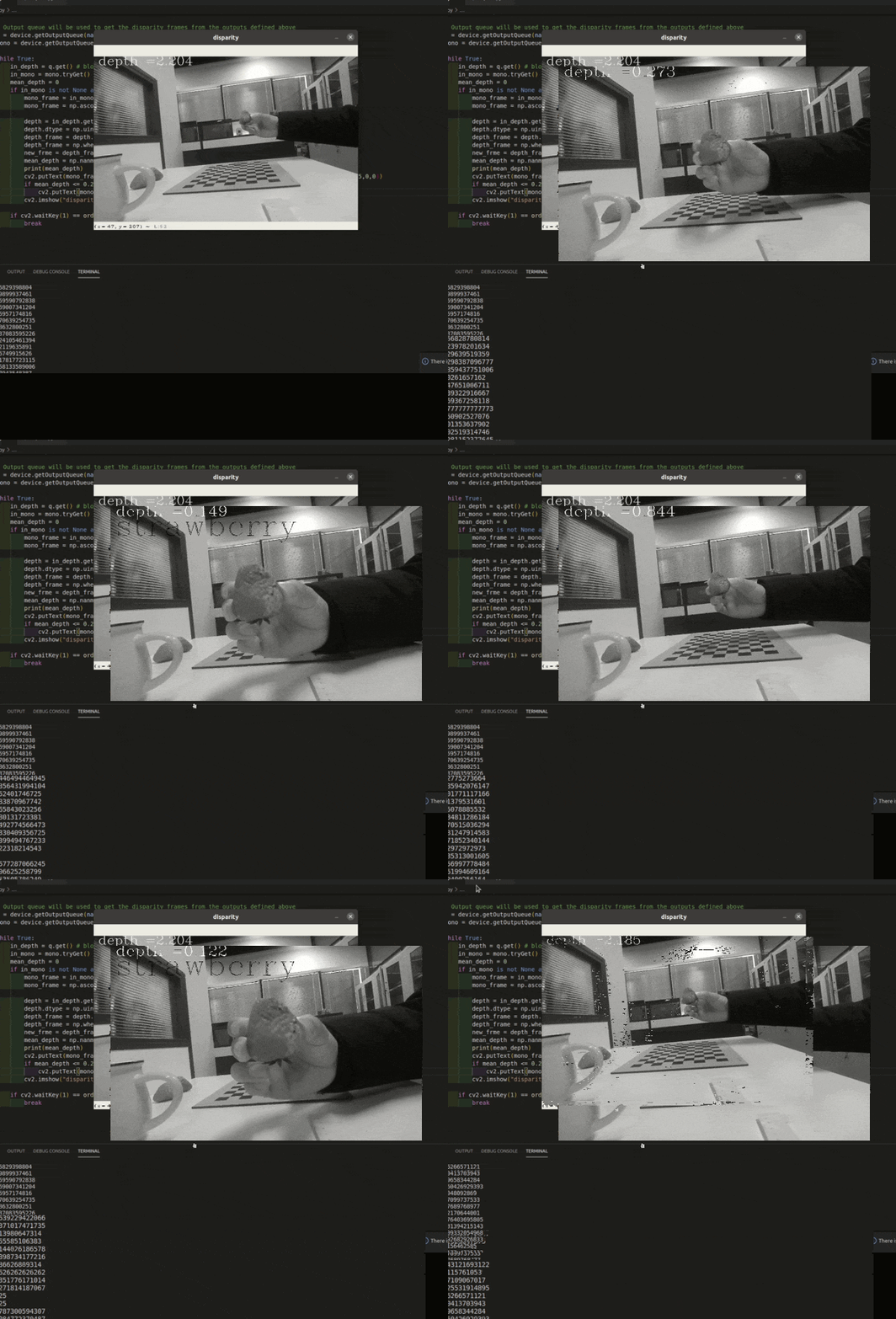
编辑:OAK中国 首发:oakchina.cn 喜欢的话,请多多👍⭐️✍ 内容可能会不定期更新,官网内容都是最新的,请查看首发地址链接。 ▌前言 Hello,大家好,这里是OAK中国,我是助手…...
的相关知识及指令)
文件共享服务器(CIFS)的相关知识及指令
文件共享服务器(CIFS) 微软开发的 共享服务器概述 通过网络提供文件共享拂去,提供文件下载和上传服务(类似于FTP服务器) 创建共享 通过本地登录时,仅受NTFS权限的控制通过网络访问时,受共享…...

springcloud-2service consumer
创建使用会员微服务模块-service consumer思路分析/图解创建Moduel(member-service-consumer-80) & 完成配置new Module->member-service-consumer-80->finish检查父子项目的pom是否添加相应的对应module和parent本项目的pom.xml可以参考provider的,并删掉…...
JavaScript 进阶--charater3
文章目录前言一、编程思想1.1 面向过程介绍1.2 面向对象编程 (oop)对比二、构造函数三、原型3.1原型3.2 constructor 属性3.3 对象原型3.4 原型继承3.5 原型链总结前言 🆑学习目标 理解面向对象思想,掌握函数原型对象运用面向对象封装继承特点…...

Solon2 之基础:三、启动参数说明
启动参数,在应用启动后会被静态化(为了内部更高效的利用)。比如,想通过体外扩展加载配置,是不能改掉它们的。 1、启动参数 启动参数对应的应用配置描述–envsolon.env环境(可用于内部配置切换)…...

引入防关联浏览器以防止数据盗窃
目前,互联网已成为我们生活中不可缺少的且不断发展的一部分。因此,互联网变得更加复杂和多样化,每天都有新的技术、服务和应用推出。在这个不断变化的环境中,虚拟浏览器最近作为一种革命性的新方式出现在互联网上。 简而言之&…...

PlayAI语音合成质量到底如何?12款竞品横向对比+5项MOS/LSD/STOI硬指标揭榜
更多请点击: https://kaifayun.com 第一章:PlayAI语音合成质量评测报告 PlayAI 是一款面向开发者与内容创作者的实时语音合成(TTS)服务,支持多语种、多音色及情感可控输出。本报告基于客观可复现的评测流程࿰…...

Elden Ring帧率解锁终极指南:从60帧到144+的完整教程
Elden Ring帧率解锁终极指南:从60帧到144的完整教程 【免费下载链接】EldenRingFpsUnlockAndMore A small utility to remove frame rate limit, change FOV, add widescreen support and more for Elden Ring 项目地址: https://gitcode.com/gh_mirrors/el/Elden…...

3步快速上手Whisper-WebUI:轻松实现语音转字幕的完整指南
3步快速上手Whisper-WebUI:轻松实现语音转字幕的完整指南 【免费下载链接】Whisper-WebUI A Web UI for easy subtitle using whisper model. 项目地址: https://gitcode.com/gh_mirrors/wh/Whisper-WebUI 还在为视频制作繁琐的字幕而烦恼吗?Whis…...

如何用Nucleus Co-Op让单机游戏变身本地多人分屏神器
如何用Nucleus Co-Op让单机游戏变身本地多人分屏神器 【免费下载链接】nucleuscoop Starts multiple instances of a game for split-screen multiplayer gaming! 项目地址: https://gitcode.com/gh_mirrors/nu/nucleuscoop 还在为想和朋友一起玩游戏却只有一台电脑而烦…...

服务器数据下载安全:实时加密与动态访问控制实战
1. 这不是又一个“加个密码”的方案,而是服务器数据流动的实时安检闸机IP-guard安全网关——这个名字在企业IT运维圈里,常被误读为“桌面端U盘管控工具”或“员工上网行为审计系统”。但真正用过它来守服务器的人,会立刻意识到:它…...

Python到Android的魔法之旅:5步将你的代码变成移动应用
Python到Android的魔法之旅:5步将你的代码变成移动应用 【免费下载链接】python-for-android Turn your Python application into an Android APK 项目地址: https://gitcode.com/gh_mirrors/py/python-for-android 想象一下,你花了几个月时间精心…...

深度解析zenodo_get路径处理机制:如何优雅处理科研数据下载的目录结构
深度解析zenodo_get路径处理机制:如何优雅处理科研数据下载的目录结构 【免费下载链接】zenodo_get Zenodo_get: Downloader for Zenodo records 项目地址: https://gitcode.com/gh_mirrors/ze/zenodo_get 在科研数据管理领域,高效的数据下载工具…...
:openclaw agent 如何触发一次 Agent 运行?)
OpenClaw 源码解析(六):openclaw agent 如何触发一次 Agent 运行?
1. 本期要解决的问题 前几期我们已经从项目整体结构、CLI 命令体系、配置加载、Gateway 运行机制等角度理解了 OpenClaw 的基础框架。到了这一期,可以进一步进入 OpenClaw 最核心的使用动作:用户在终端中执行一条 openclaw agent --message "...&q…...

QKeyMapper终极指南:Windows上最强大的开源按键映射工具
QKeyMapper终极指南:Windows上最强大的开源按键映射工具 【免费下载链接】QKeyMapper [按键映射工具] QKeyMapper,Qt开发Win10&Win11可用,不修改注册表、不需重新启动系统,可立即生效和停止。支持游戏手柄映射到键鼠ÿ…...

HSTracker:macOS上炉石传说玩家的免费智能助手终极指南
HSTracker:macOS上炉石传说玩家的免费智能助手终极指南 【免费下载链接】HSTracker A deck tracker and deck manager for Hearthstone on macOS 项目地址: https://gitcode.com/gh_mirrors/hs/HSTracker 还在为炉石传说对战中记不住对手卡牌而烦恼吗&#x…...