
django 实现:闭包表—树状结构
闭包表—树状结构数据的数据库表设计
闭包表模型
闭包表(Closure Table)是一种通过空间换时间的模型,它是用一个专门的关系表(其实这也是我们推荐的归一化方式)来记录树上节点之间的层级关系以及距离。
场景
我们 基于 django orm实现一个文件树,文件夹直接可以实现无限嵌套
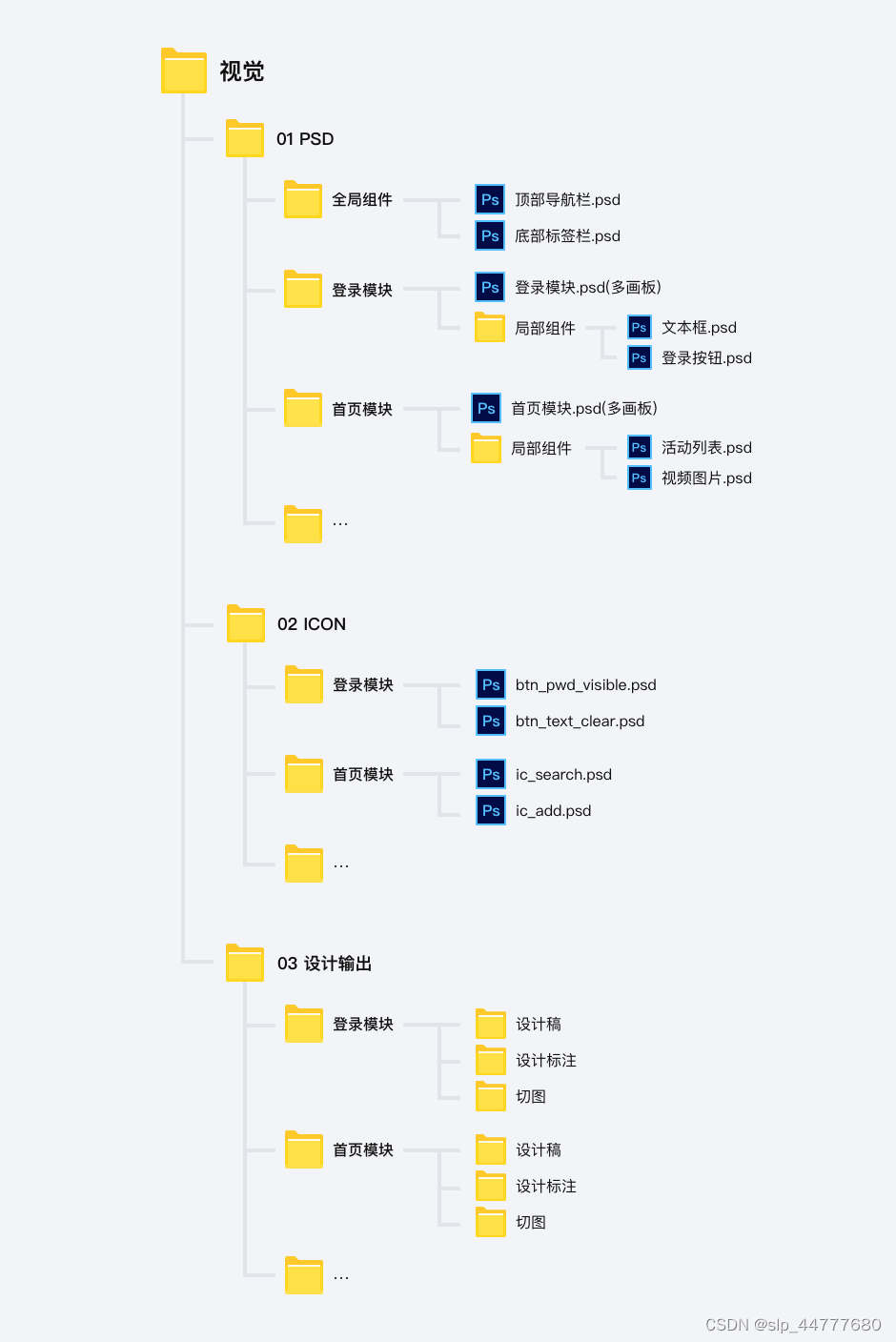
models
#  文件详情表(主要用于记录文件名)
class DmFileDetail(models.Model):file_name = models.CharField("文件名(文件夹名)", max_length=50)is_file = models.BooleanField("是否是文件", default=False)user_id = models.IntegerField("用户id", default=0)create_time = models.IntegerField("创建时间", default=0)update_time = models.IntegerField("创建时间", default=0)is_del = models.BooleanField("是否删除", default=False)class Meta:db_table = 'inchat_dm_file_detail'verbose_name = verbose_name_plural = u'数字人文件详情表'def __str__(self):return self.file_name#  文件关系表(主要用户记录文件之间的关联,即路径)
class DmFileRelation(models.Model):ancestor_id = models.IntegerField("祖先节点ID")descendant_id = models.IntegerField("子孙节点ID")depth = models.IntegerField("深度(层级)", db_index=True)user_id = models.IntegerField("用户id", default=0, db_index=True)is_del = models.BooleanField("是否删除", default=False)class Meta:db_table = 'inchat_dm_file_relation'index_together = ('ancestor_id', 'descendant_id')verbose_name = verbose_name_plural = u'数字人文件关系表'
| id | file_name |
|---|---|
| 1 | AAA |
| 2 | aaa.pdf |
| id | ancestor_id | descendant_id | depth |
|---|---|---|---|
| 1 | 1 | 1 | 0 |
| 2 | 2 | 2 | 0 |
| 3 | 1 | 2 | 1 |
增删改查
class DmRelationNode:"""关系节点"""NAME = "DmRelationNode"RELATION_CLIENT = DmFileRelation@classmethoddef insert_relation_node(cls, node_id, user_id, parent_id):"""插入新的关系节点"""# 自身insert_self = cls.RELATION_CLIENT(ancestor_id=parent_id,descendant_id=node_id,user_id=user_id,depth=1)insert_list = []# 获取父节点所有祖先parent_relation = cls.RELATION_CLIENT.objects.filter(descendant_id=parent_id) \.values_list('ancestor_id', 'depth')for ancestor_id, depth in parent_relation:insert_data = cls.RELATION_CLIENT(ancestor_id=ancestor_id,descendant_id=node_id,depth=depth + 1,user_id=user_id)insert_list.append(insert_data)# 插入自身insert_list.append(insert_self)logger.info('%s insert_relation_node.node_id:%s,parent_id:%s,insert_list:%s', cls.NAME, node_id, parent_id,insert_list)ret = cls.RELATION_CLIENT.objects.bulk_create(insert_list)logger.info('%s insert_relation_node.node_id:%s,parent_id:%s,ret_list:%s', cls.NAME, node_id, parent_id, ret)return ret@classmethoddef get_ancestor_relation(cls, node_id):"""获取某个节点的所有祖先节点"""arges = ['ancestor_id', 'descendant_id', 'depth']ancestor_relation_list = cls.RELATION_CLIENT.objects.filter(descendant_id=node_id, is_del=False).values(*arges)relation_map = dict()relation_dict = relation_mapfor ancestor in ancestor_relation_list:relation_dict['id'] = ancestor['ancestor_id']if ancestor['ancestor_id'] != node_id:relation_dict['children'] = {}relation_dict = relation_dict['children']return ancestor_relation_list@classmethoddef get_descendant_relation(cls, node_id):"""获取所有的子节点"""arges = ['ancestor_id', 'descendant_id', 'depth']descendant_relation_list = cls.RELATION_CLIENT.objects.filter(ancestor_id=node_id, is_del=False).values(*arges)return descendant_relation_list@classmethoddef get_direct_relation(cls, user_id):"""获取所有直系"""arges = ['ancestor_id', 'descendant_id', 'depth']direct_relation = cls.RELATION_CLIENT.objects.filter(depth=1, user_id=user_id, is_del=False).values(*arges)return direct_relation@classmethoddef get_children_node(cls, node_id):"""获取某节点的子节点"""children_node = cls.RELATION_CLIENT.objects.filter(depth=1, ancestor_id=node_id, is_del=False) \.values_list('descendant_id', flat=True)return children_node@classmethoddef remove_node(cls, node_id):"""删除节点"""logger.info('%s remove_node. node_id:%s', cls.NAME, node_id)query = Q(ancestor_id=node_id, is_del=False) | Q(descendant_id=node_id, is_del=False)res = cls.RELATION_CLIENT.objects.filter(query).update(is_del=True)logger.info('%s remove_node. node_id:%s,count:%s', cls.NAME, node_id, res)return res
以下 是一些常规的操作
class DmFileTree:"""DM文件树"""NAME = "DmFileTree"DETAIL_CLIENT = DmFileDetailRELATION_NODE_CLIENT = DmRelationNodeFILE_SAVE_DIR = 'media/dm/'@classmethoddef get_file_map(cls, user_id):"""获取用户所有文件文件名"""file_detail = cls.DETAIL_CLIENT.objects.filter(user_id=user_id).values('id', 'file_name', 'path', 'is_file')file_map = dict()for file in file_detail:file_dict = dict(id=file['id'],name=file['file_name'],is_file=file['is_file'],filePath=cls.FILE_SAVE_DIR + file['path'] + file['file_name'])file_map[file['id']] = file_dictreturn file_map@classmethoddef add_file(cls, user_id, file_name, parent_id, path='', is_file=False):"""新建文件(夹)"""kwargs = dict(file_name=file_name,path=path,is_file=is_file,user_id=user_id,create_time=get_cur_timestamp())file_obj = cls.DETAIL_CLIENT.objects.create(**kwargs)if not file_obj:logger.error('%s add_file failed. kwargs:%s', cls.NAME, kwargs)return Falseres = cls.RELATION_NODE_CLIENT.insert_relation_node(node_id=file_obj.id, user_id=user_id, parent_id=parent_id)if not res:return Falsereturn dict(id=file_obj.id, name=file_name)@classmethoddef get_file_path(cls, file_id):"""获取文件路径"""ancestor_query = cls.RELATION_NODE_CLIENT.get_ancestor_relation(file_id)ancestor = map(lambda x: x['ancestor_id'], ancestor_query)# 过滤0ancestor = list(filter(lambda x: x > 0, ancestor))# 排序ancestor.sort()path = '/'.join(map(str, ancestor))return '/' + path + '/' if path else '/'@classmethoddef get_all_files(cls, user_id):# 获取所有文件名字典file_map = cls.get_file_map(user_id)# 查询所有子目录及文件files_relation_list = cls.RELATION_NODE_CLIENT.get_direct_relation(user_id)file_info = {a['descendant_id']: file_map.get(a['descendant_id']) or {} for a in files_relation_list}tree = cls.list_to_tree(files_relation_list, file_info)return tree@classmethoddef get_child_files(cls, user_id, parent_id):"""获取下级文件"""# 获取所有文件名字典file_map = cls.get_file_map(user_id)file_list = cls.RELATION_NODE_CLIENT.get_children_node(node_id=parent_id)files = map(lambda x: dict(id=x, name=file_map.get(x) or ''), file_list)return files@staticmethoddef list_to_tree(data, node_dict):"""将节点列表转换成树形结构字典:param data: 带有 id 和 parent_id 属性的节点列表:param node_dict: 单节点的数据结构字典:return: 树形结构字典"""tree = []# 遍历每一个节点,将其添加到父节点的字典或根节点列表中for item in data:id = item['descendant_id']parent_id = item['ancestor_id']# 如果父节点为 None,则将当前节点添加到根节点列表中if not parent_id:tree.append(node_dict[id])# 如果父节点存在,则将当前节点添加到父节点的 children 属性中else:parent = node_dict[parent_id]if 'children' not in parent:parent['children'] = []parent['children'].append(node_dict[id])return tree@classmethoddef delete_file(cls, file_id):"""文件删除"""res1 = cls.DETAIL_CLIENT.objects.filter(id=file_id).update(is_del=True)logger.info('%s delete_file. file_id:%s, count:%s', cls.NAME, file_id, res1)res2 = cls.RELATION_NODE_CLIENT.remove_node(file_id)return res1, res2@classmethoddef search_file(cls, file_name):"""搜索文件"""query_set = cls.DETAIL_CLIENT.objects.filter(file_name__icontains=file_name) \.values('id', 'file_name', 'path', 'is_file')file_list = []for file in query_set:file_dict = dict(id=file['id'],name=file['file_name'],is_file=file['is_file'],filePath='media/dm_upload' + file['path'])file_list.append(file_dict)return file_list@classmethoddef get_file_url(cls, file_id, file_obj=None):"""获取文件下载链接"""file_url = ''if not file_obj:file_obj = cls.DETAIL_CLIENT.objects.filter(id=file_id).first()if file_obj:file_url = 'http://127.0.0.1:8000/' + cls.FILE_SAVE_DIR + file_obj.path + file_obj.file_namereturn file_url
除此之外,还有移动、复制文件(夹)。移动就是先删除再新增
相关文章:
django 实现:闭包表—树状结构
闭包表—树状结构数据的数据库表设计 闭包表模型 闭包表(Closure Table)是一种通过空间换时间的模型,它是用一个专门的关系表(其实这也是我们推荐的归一化方式)来记录树上节点之间的层级关系以及距离。 场景 我们 …...

Redis与分布式-集群搭建
接上文 Redis与分布式-哨兵模式 1. 集群搭建 搭建简单的redis集群,创建6个配置,开启集群模式,将之前配置过的redis删除,重新复制6份 针对主节点redis 1,redis 2,redis 3都是以上修改内容,只是…...
C++--位图和布隆过滤器
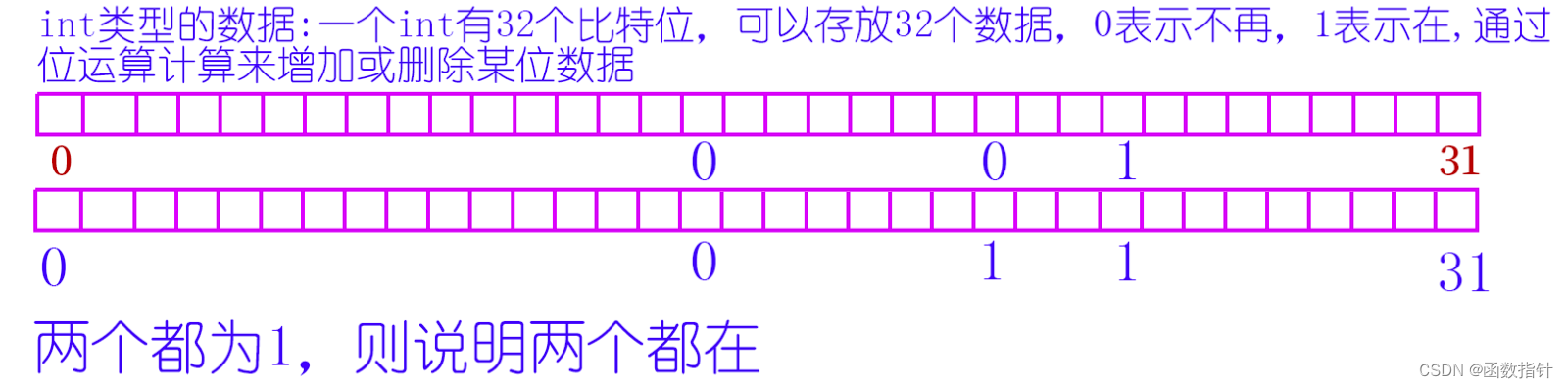
1.什么是位图 所谓位图,就是用每一位来存放某种状态,适用于海量数据,数据无重复的场景。通常是用来判断某个数据存不存在的。比如int 有32位,就可以存放0到31这32个数字在不在某个文件中。当然,其他类型也可以。 2.位…...

linux常识
目录 i.mx6ull开发板配置ip 静态IP配置 命令行配置 配置文件配置 动态IP配置 命令行配置 配置文件配置 为什么编译驱动程序之前要先编译内核? init系统服务 systemv守护进程 systemd守护进程 i.mx6ull开发板配置ip i.mx6ull有两个网卡(eth0和…...

Codeforces Round 901 (Div. 1) B. Jellyfish and Math(思维题/bfs)
题目 t(t<1e5)组样例,每次给出a,b,c,d,m(0<a,b,c,d,m<2的30次方) 初始时,(x,y)(a,b),每次操作,你可以执行以下四种操作之一 ①xx&y,&为与 ②xx|y,|为或 ③yx^y,^为异或 …...
unity 鼠标标记 左键长按生成标记右键长按清除标记,对象转化为子物体
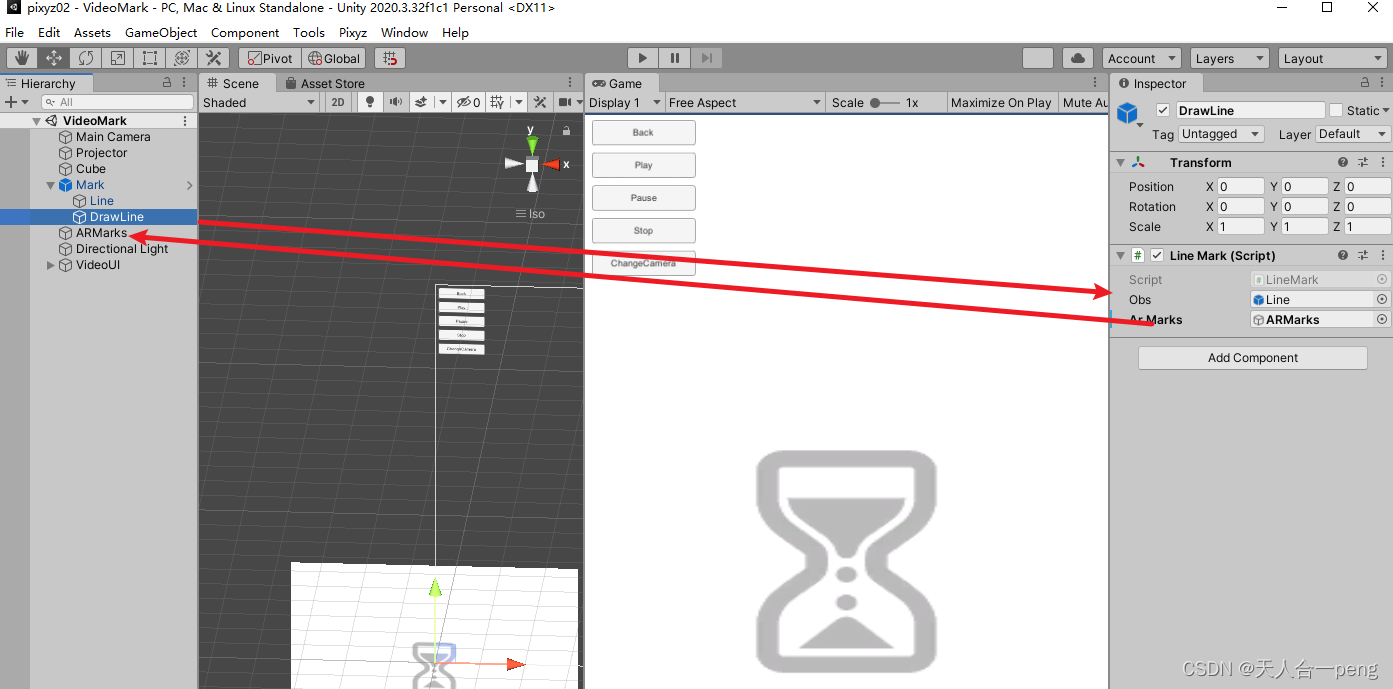
linerender的标记参考 unity linerenderer在Game窗口中任意画线_游戏内编辑linerender-CSDN博客 让生成的标记转化为ARMarks游戏对象的子物体 LineMark.cs using System.Collections; using System.Collections.Generic; using UnityEngine;public class LineMark : MonoBeh…...
解决mac pro 连接4k显示器严重发烫、卡顿问题
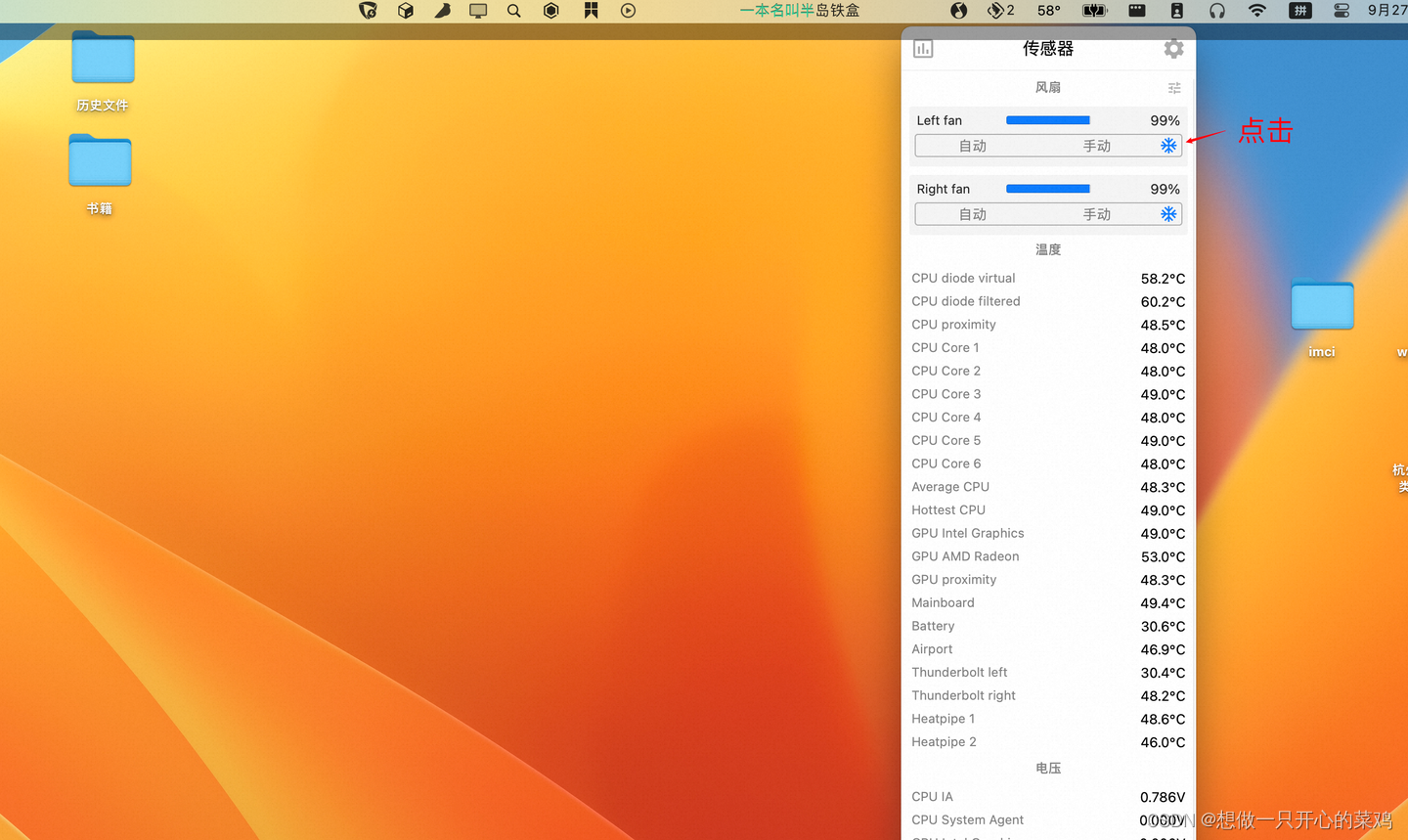
介绍个不用花钱的方法。其实mac自带的风扇散热能力还可以的,但是默认比较懒散,可以用一个软件来控制下,激发下它的潜能。 可以下个stats软件 打开传感器开关,以及同步控制风扇开关 以及cpu显示温度 点击控制台上的温度图标&…...
QT的ui设计中改变样式表的用法
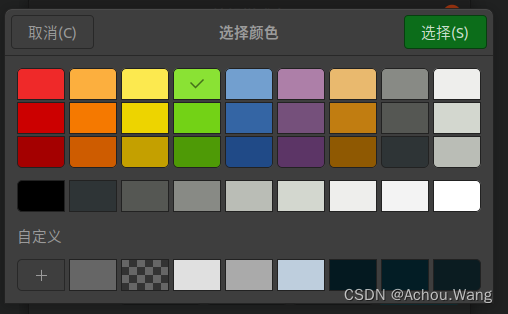
在QT的ui设计中,我们右键会弹出一个改变样式表的选项,很多人不知道这个是干什么的。 首先我们来看下具体的界面 首先我们说一下这个功能具体是干嘛的, 我们在设置很多控件在界面上之后,常常都是使用系统默认的样式,但是当有些时候为了美化界面我们需要对一些控件进行美化…...
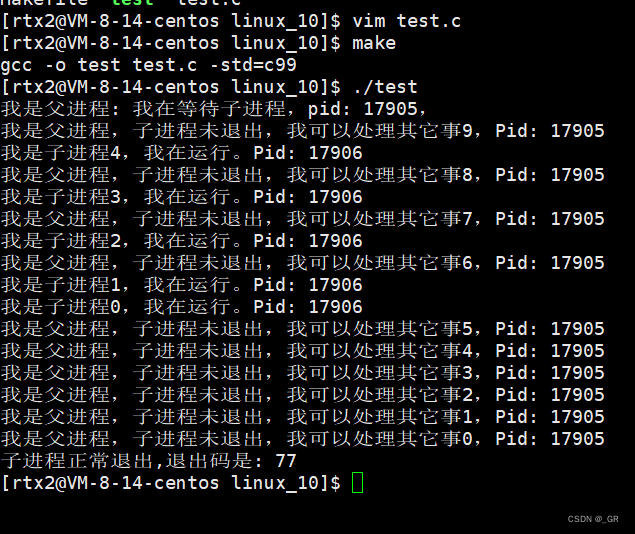
零基础Linux_10(进程)进程终止(main函数的返回值)+进程等待
目录 1. 进程终止 1.1 main函数的返回值 1.2 进程退出码和错误码 1.3 进程终止的常见方法 2. 进程等待 2.1 进程等待的原因 2.2 wait 函数 2.3 waitpid 函数 2.4 int* status参数 2.5 int options非阻塞等待 本篇完。 1. 进程终止 进程终止指的就是程序执行结束了&…...

【已解决】opencv 交叉编译 ffmpeg选项始终为NO
一、opencv 交叉编译没有 ffmpeg ,会导致视频打不开 在交叉编译时候,发现在 pc 端能用 opencv 打开的视频,但是在 rv1126 上打不开。在网上查了很久,原因可能是 交叉编译过程 ffmpeg 造成的。之前 ffmpeg 是直接用 apt 安装的&am…...
rust生命期
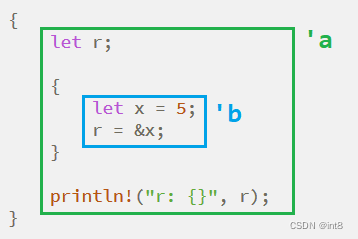
一、生命期是什么 生命期,又叫生存期,就是变量的有效期。 实例1 {let r;{let x 5;r &x;}println!("r: {}", r); }编译错误,原因是r所引用的值已经被释放。 上图中的绿色范围’a表示r的生命期,蓝色范围’b表示…...

实现将一张图片中的目标图片抠出来
要在python中实现将一张图片中的目标图片裁剪出来,需要用到图像处理及机器学习库,以下是一个常用的基本框架 加载图片并使用OpenCV库将其转换为灰度图像 import cv2img cv2.imread(screenshot.jpg) gray cv2.cvtColor(img, cv2.COLOR_BGR2GRAY)准备模…...

Rust 使用Cargo
Rust 使用技巧 Rust 使用crates 假设你正在编写一个 Rust 程序,要使用一个名为 rand 的第三方库来生成随机数。首先,你需要在 Cargo.toml 文件中添加以下依赖项: toml [dependencies] rand "0.7.3" 然后运行 cargo build&…...

【k8s】集群搭建篇
文章目录 搭建kubernetes集群kubeadm初始化操作安装软件(master、所有node节点)Kubernetes Master初始化Kubernetes Node加入集群部署 CNI 网络插件测试 kubernetes 集群停止服务并删除原来的配置 二进制搭建(单master集群)初始化操作部署etcd集群安装Docker部署master节点解压…...

10.1select并发服务器以及客户端
服务器: #include<myhead.h>//do-while只是为了不让花括号单独存在,并不循环 #define ERR_MSG(msg) do{\fprintf(stderr,"%d:",__LINE__);\perror(msg);\ }while(0);#define PORT 8888//端口号1024-49151 #define IP "192.168.2.5…...

几个好用的测试HTTP请求的网站
Reqres (https://reqres.in):Reqres提供了一个模拟的REST API,您可以使用它来测试POST、GET、PUT等HTTP请求,并获得相应的响应结果。 JSONPlaceholder (https://jsonplaceholder.typicode.com):JSONPlaceholder是一个免费的JSON测…...
)
kafka简易搭建(windows环境)
1,下载 Apache Kafka 查找 kafka_2.13-3.2.1.tgz 2,java版本需要17以上 3,配置server.properties的log.dirs目录、zookeeper.properties 的dataDir目录 windows反斜杠地址 4,启动 cd D:\app\kafka_2.13-3.2.1 .\bin\window…...
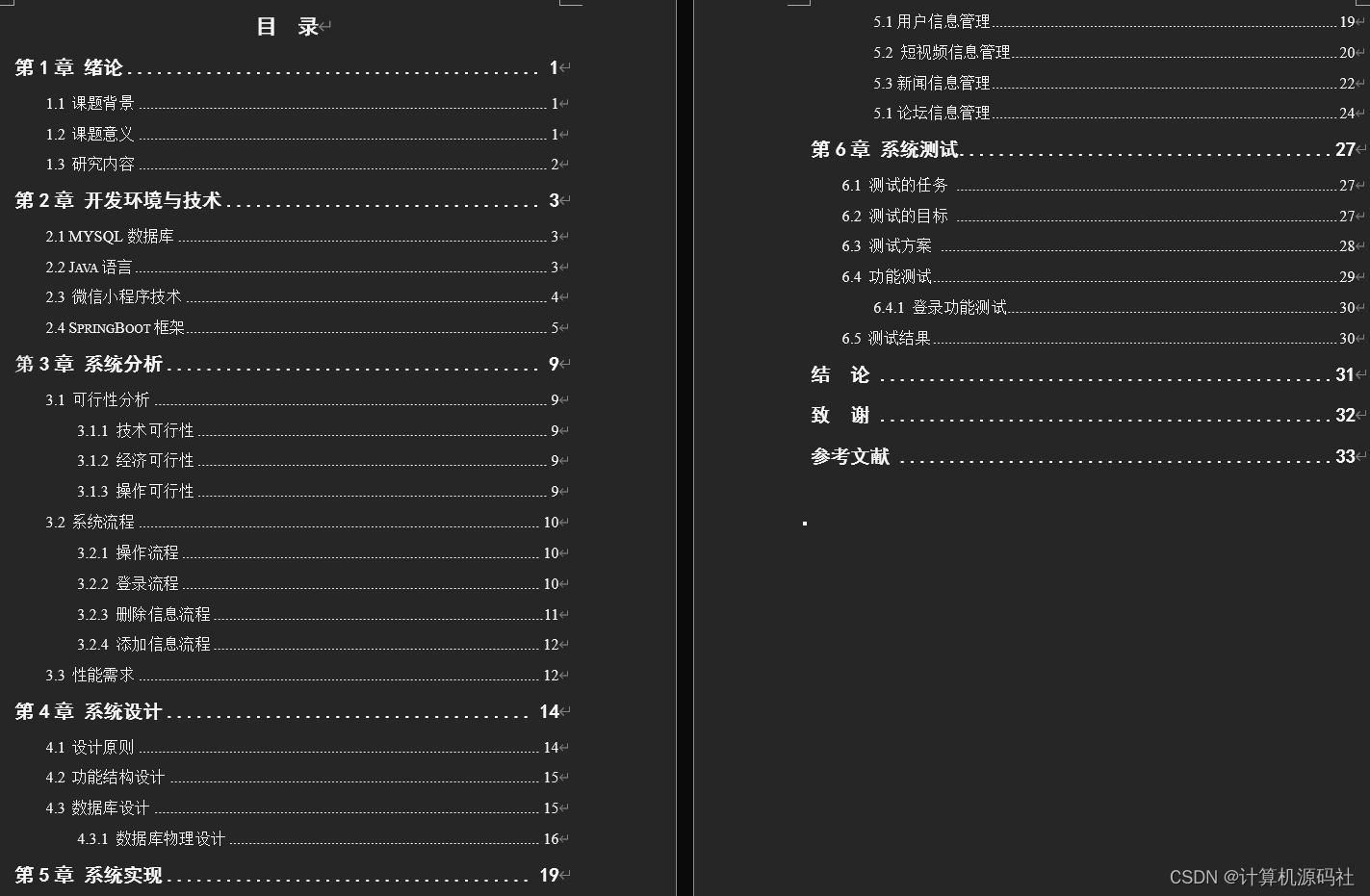
毕业设计选题uniapp+springboot新闻资讯小程序源码 开题 lw 调试
💕💕作者:计算机源码社 💕💕个人简介:本人七年开发经验,擅长Java、Python、PHP、.NET、微信小程序、爬虫、大数据等,大家有这一块的问题可以一起交流! 💕&…...

Linux系统编程基础:进程控制
文章目录 一.子进程的创建操作系统内核视角下的父子进程存在形式验证子进程对父进程数据的写时拷贝 二.进程等待进程非阻塞等待示例: 三.进程替换内核视角下的进程替换过程:综合利用进程控制系统接口实现简单的shell进程 进程控制主要分为三个方面,分别是:子进程的创建,进程等待…...
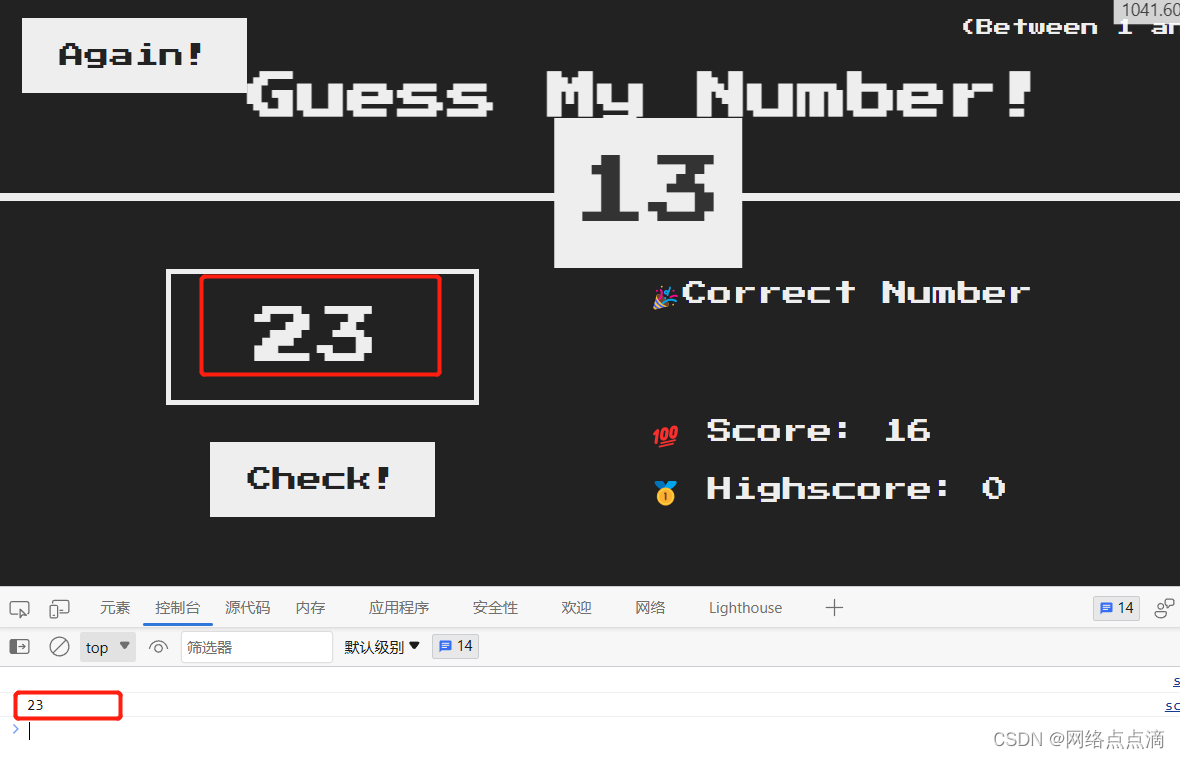
选择和操作元素
上一篇文档我们介绍了DOM元素和DOM的获取;其实除了获取DOM,我们也可以去替换DOM元素中的文本 document.querySelector(.message).textContent "🎉Correct Number"● 除此之外,我们可以设置那个数字部分 document.que…...

功率MOSFET工作原理与电力电子应用解析
1. 功率MOSFET基础概念解析 功率MOSFET(金属氧化物半导体场效应晶体管)是现代电力电子系统的核心开关器件。与普通MOSFET不同,功率MOSFET专为处理高电压(通常>60V)和大电流(>1A)而设计。其…...
)
基于微信小程序的家政服务预约系统(30291)
有需要的同学,源代码和配套文档领取,加文章最下方的名片哦 一、项目演示 项目演示视频 二、资料介绍 完整源代码(前后端源代码SQL脚本)配套文档(LWPPT开题报告/任务书)远程调试控屏包运行一键启动项目&…...

深入解析Arm架构TLB维护机制与A64指令集
1. TLB维护机制基础解析在处理器架构中,TLB(Translation Lookaside Buffer)是内存管理单元(MMU)的核心组件,负责缓存虚拟地址到物理地址的转换结果。当CPU需要访问内存时,首先会查询TLB获取地址…...

基于Qt与STM32的跨平台遥控小车调试助手设计与实现
1. 项目背景与需求分析 遥控小车作为嵌入式开发的经典项目,调试环节往往是最耗时的部分。传统调试方式需要反复修改下位机代码、烧录固件、观察串口打印数据,整个过程效率低下。我在实际项目中就遇到过这样的困扰:每次调整PID参数都要重新编译…...

基于MCP协议构建企业AI数据安全访问中间件:companyscope-mcp实践
1. 项目概述:一个连接企业与AI的“翻译官”最近在折腾AI应用开发,特别是想用Claude、ChatGPT这些大模型来处理公司内部数据时,遇到了一个普遍痛点:模型能力再强,它也是个“外人”,没法直接访问你公司的数据…...

量子机器学习在网络安全中的应用与性能分析
1. 量子机器学习在网络安全中的应用现状量子机器学习(Quantum Machine Learning, QML)近年来在网络安全领域引起了广泛关注。作为一名长期从事网络安全与量子计算交叉研究的从业者,我见证了这项技术从理论探讨到实际验证的发展历程。量子计算…...

为AI智能体构建持久化记忆系统:Shang Tsung项目实战解析
1. 项目概述:为AI智能体注入“灵魂”与“第二大脑”如果你和我一样,长期与各类AI智能体(Agent)打交道,无论是基于Claude Code、OpenClaw,还是其他本地化部署的LLM工具,你一定经历过那种令人沮丧…...

hermes-webui可视化网页界面及cron定时任务配置示范
前期准备 执行git clone https://github.com/nesquena/hermes-webui.git 建议先安装hermes-agent,可参考保姆级 Hermes-Agent 部署:OpenClaw 迁移 微信接入 ComfyUI 联动画图全流程(含报错处理) 执行cd Desktop/work/hermes-w…...

uni-app iOS后台运行 uni-app App如何实现后台定位或音乐播放
iOS上uni.startBackgroundTask基本无效,仅音频播放、定位更新、后台数据刷新三类能力合规;后台定位需manifest声明原生权限地理围栏事件;无声音频保活须onLaunch配置AudioSession并延迟播放。uni.startBackgroundTask 在 iOS 上基本无效&…...

HS2-HF Patch:一站式解决HoneySelect2汉化、去和谐与MOD管理难题
HS2-HF Patch:一站式解决HoneySelect2汉化、去和谐与MOD管理难题 【免费下载链接】HS2-HF_Patch Automatically translate, uncensor and update HoneySelect2! 项目地址: https://gitcode.com/gh_mirrors/hs/HS2-HF_Patch 如果你正在玩HoneySelect2这款游戏…...