
UnitTesting 单元测试
1. 测试分为两种及详细介绍测试书籍:
1.1 Unit Test : 单元测试
- test the business logic in your app : 测试应用中的业务逻辑
1.2 UI Test : 界面测试
- test the UI of your app : 测试应用中的界面
1.3 测试书籍网址:《Testing Swift》  https://www.hackingwithswift.com/store/testing-swift
2. ViewModel 单元测试
2.1 创建 ViewModel,UnitTestingBootcampViewModel.swift
import Foundation
import SwiftUI
import Combine/// 单元测试 ViewModel
class UnitTestingBootcampViewModel: ObservableObject{@Published var isPremium: Bool@Published var dataArray: [String] = []@Published var selectedItem: String? = nillet dataService: NewDataServiceProtocolvar cancellable = Set<AnyCancellable>()init(isPremium: Bool, dataService: NewDataServiceProtocol = NewMockDataService(items: nil)) {self.isPremium = isPremiumself.dataService = dataService}/// 添加子项func addItem(item: String){// 为空不往下执行guard !item.isEmpty else { return }self.dataArray.append(item)}/// 选中项func selectItem(item: String){if let x = dataArray.first(where: {$0 == item}){selectedItem = x}else{selectedItem = nil}}/// 保存项func saveItem(item: String) throws{guard !item.isEmpty else{throw DataError.noData}if let x = dataArray.first(where: {$0 == item}){print("Save item here!!! \(x)")} else {throw DataError.itemNotFound}}/// 错误信息enum DataError: LocalizedError{case noDatacase itemNotFound}/// 请求返回数据func downloadWithEscaping() {dataService.downloadItemsWithEscaping { [weak self] returnedItems inself?.dataArray = returnedItems}}/// 下载用到的组合func downloadWithCombine() {dataService.downloadItemsWithCombine().sink { _ in} receiveValue: { [weak self] returnedItems inself?.dataArray = returnedItems}.store(in: &cancellable)}
}
2.2 创建测试文件
当创建项目时,没有选择 Include Tests/包含测试 选项时,需要添加文件去对应项目,不然测试文件会报 No such module 'XCTest' 编译错误
添加单元测试文件:
方法一 : 选择项目 -> 菜单栏 Editor -> Add Target... -> 弹出对话框,选择 Test 栏下 -> Unit Testing Bundle -> 填写信息/可默认 -> Finish,完成创建单元测试文件。
方法二 : 选择项目,点击 PROJECT 列,最下的 + 按钮,弹出对话框,选择 Test 栏下 ,后面步骤与上一致
创建单元测试文件 UnitTestingBootcampViewModel_Tests.swift
import XCTest
import Combine
/// 导入项目
@testable import SwiftfulThinkingAdvancedLearning// 《Testing Swift》 测试书籍
// 书籍网址: https://www.hackingwithswift.com/store/testing-swift
// Naming Structure: test_UnitOfWork_StateUnderTest_ExpectedBehavior -  结构体命名: 测试_工作单元_测试状态_预期的行为
// Naming Structure: test_[struct or class]_[variable or function]_[expected result] - 测试_[结构体 或者 类的名称]_[类中的变量名 或者 函数名称]_[预期结果 预期值]
// Testing Structure: Given, When, Then - 测试结构: 给定,什么时候,然后final class UnitTestingBootcampViewModel_Tests: XCTestCase {/// 解决多次引用相同的类var viewModel: UnitTestingBootcampViewModel?var cancellables = Set<AnyCancellable>()/// 开始设置数据override func setUpWithError() throws {// Put setup code here. This method is called before the invocation of each test method in the class.viewModel = UnitTestingBootcampViewModel(isPremium: Bool.random())}/// 结束重置数据override func tearDownWithError() throws {// Put teardown code here. This method is called after the invocation of each test method in the class.viewModel = nilcancellables.removeAll()}/// 单元测试函数名,根据命名规则命名:测试_类名称_是否高质量_应该为真func test_UnitTestingBootcampViewModel_isPremium_shouldBeTrue(){// Givenlet userIsPremium: Bool = true// Whenlet vm = UnitTestingBootcampViewModel(isPremium: userIsPremium)// ThenXCTAssertTrue(vm.isPremium)}/// 单元测试函数名 根据命名规则命名:测试_类名称_是否高质量_应该为假func test_UnitTestingBootcampViewModel_isPremium_shouldBeFalse(){// Givenlet userIsPremium: Bool = false// Whenlet vm = UnitTestingBootcampViewModel(isPremium: userIsPremium)// ThenXCTAssertFalse(vm.isPremium)}/// 单元测试函数名 根据命名规则命名:测试_类名称_是否高品质_注入值func test_UnitTestingBootcampViewModel_isPremium_shouldBeInjectedValue(){// Givenlet userIsPremium: Bool = Bool.random()// Whenlet vm = UnitTestingBootcampViewModel(isPremium: userIsPremium)// ThenXCTAssertEqual(vm.isPremium, userIsPremium)}/// 单元测试函数名 根据命名规则命名 - 注入值_压力 / for 循环func test_UnitTestingBootcampViewModel_isPremium_shouldBeInjectedValue_stress(){for _ in 0 ..< 10 {// Givenlet userIsPremium: Bool = Bool.random()// Whenlet vm = UnitTestingBootcampViewModel(isPremium: userIsPremium)// ThenXCTAssertEqual(vm.isPremium, userIsPremium)}}/// 单元测试函数名 根据命名规则命名 - 数组_预期值:为空func test_UnitTestingBootcampViewModel_dataArray_shouldBeEmpty(){// Given// Whenlet vm = UnitTestingBootcampViewModel(isPremium: Bool.random())// Then 断言 = 判定XCTAssertTrue(vm.dataArray.isEmpty)XCTAssertEqual(vm.dataArray.count, 0)}/// 单元测试函数名 根据命名规则命名 - 数组_预期值:添加项func test_UnitTestingBootcampViewModel_dataArray_shouldAddItems(){// Givenlet vm = UnitTestingBootcampViewModel(isPremium: Bool.random())// Whenlet loopCount: Int = Int.random(in: 1..<100)for _ in 0 ..< loopCount{vm.addItem(item: UUID().uuidString)}// Then 断言 = 判定XCTAssertTrue(!vm.dataArray.isEmpty)XCTAssertFalse(vm.dataArray.isEmpty)XCTAssertEqual(vm.dataArray.count, loopCount)XCTAssertNotEqual(vm.dataArray.count, 0)// GreaterThan 大于XCTAssertGreaterThan(vm.dataArray.count, 0)// XCTAssertGreaterThanOrEqual// XCTAssertLessThan// XCTAssertLessThanOrEqual}/// 单元测试函数名 根据命名规则命名 - 数组_预期值:添加空白字符func test_UnitTestingBootcampViewModel_dataArray_shouldNotAddBlankString(){// Givenlet vm = UnitTestingBootcampViewModel(isPremium: Bool.random())// Whenvm.addItem(item: "")// Then 断言 = 判定XCTAssertTrue(vm.dataArray.isEmpty)}/// 单元测试函数名 根据命名规则命名 - 数组_预期值:添加空白字符func test_UnitTestingBootcampViewModel_dataArray_shouldNotAddBlankString2(){// Givenguard let vm = viewModel else {XCTFail()return}// Whenvm.addItem(item: "")// Then 断言 = 判定XCTAssertTrue(vm.dataArray.isEmpty)}/// 单元测试函数名 根据命名规则命名 - 选中项_预期值:开始为空func test_UnitTestingBootcampViewModel_selectedItem_shouldStartAsNil(){// Given// Whenlet vm = UnitTestingBootcampViewModel(isPremium: Bool.random())// Then 断言 = 判定XCTAssertTrue(vm.selectedItem == nil)XCTAssertNil(vm.selectedItem)}/// 单元测试函数名 根据命名规则命名 - 选中项_预期值:应该为空 当选择无效项func test_UnitTestingBootcampViewModel_selectedItem_shouldBeNilWhenSelectingInvalidItem(){// Givenlet vm = UnitTestingBootcampViewModel(isPremium: Bool.random())// Select valid item : 选择有效项let newItem = UUID().uuidStringvm.addItem(item: newItem)vm.selectItem(item: newItem)// Select invalid item : 选择无效项// Whenvm.selectItem(item: UUID().uuidString)// Then 断言 = 判定XCTAssertNil(vm.selectedItem)}/// 单元测试函数名 根据命名规则命名 - 选中项_预期值:应该选中func test_UnitTestingBootcampViewModel_selectedItem_shouldBeSelected(){// Givenlet vm = UnitTestingBootcampViewModel(isPremium: Bool.random())// Whenlet newItem = UUID().uuidStringvm.addItem(item: newItem)vm.selectItem(item: newItem)// Then 断言 = 判定XCTAssertNotNil(vm.selectedItem)XCTAssertEqual(vm.selectedItem, newItem)}/// 单元测试函数名 根据命名规则命名 - 选中项_预期值:选中_压力测试func test_UnitTestingBootcampViewModel_selectedItem_shouldBeSelected_stress(){// Givenlet vm = UnitTestingBootcampViewModel(isPremium: Bool.random())// Whenlet loopCount: Int = Int.random(in: 1..<100)var itemsArray: [String] = []for _ in 0 ..< loopCount {let newItem = UUID().uuidStringvm.addItem(item: newItem)itemsArray.append(newItem)}// 随机取一个字符串let randomItem = itemsArray.randomElement() ?? ""// 检查字符串不为空XCTAssertFalse(randomItem.isEmpty)vm.selectItem(item: randomItem)// Then 断言 = 判定XCTAssertNotNil(vm.selectedItem)XCTAssertEqual(vm.selectedItem, randomItem)}/// 单元测试函数名 根据命名规则命名 - 保存项_预期值:输出错误异常_元素没找到func test_UnitTestingBootcampViewModel_saveItem_shouldThrowError_itemNotFound(){// Givenlet vm = UnitTestingBootcampViewModel(isPremium: Bool.random())// Whenlet loopCount: Int = Int.random(in: 1..<100)for _ in 0 ..< loopCount {vm.addItem(item: UUID().uuidString)}// Then 断言 = 判定XCTAssertThrowsError(try vm.saveItem(item: UUID().uuidString))XCTAssertThrowsError(try vm.saveItem(item: UUID().uuidString), "Should throw Item Not Found error!") { error in// 返回错误let returnedError = error as? UnitTestingBootcampViewModel.DataError// 判断错误是否相同XCTAssertEqual(returnedError, UnitTestingBootcampViewModel.DataError.itemNotFound)}}/// 单元测试函数名 根据命名规则命名 - 保存项_预期值:输出错误异常_没数据func test_UnitTestingBootcampViewModel_saveItem_shouldThrowError_noData(){// Givenlet vm = UnitTestingBootcampViewModel(isPremium: Bool.random())// Whenlet loopCount: Int = Int.random(in: 1..<100)for _ in 0 ..< loopCount {vm.addItem(item: UUID().uuidString)}// Then 断言 = 判定do {try vm.saveItem(item: "")} catch let error {// 返回错误let returnedError = error as? UnitTestingBootcampViewModel.DataError// 判断错误是否相同XCTAssertEqual(returnedError, UnitTestingBootcampViewModel.DataError.noData)}}/// 单元测试函数名 根据命名规则命名 - 保存项_预期值:保存选项func test_UnitTestingBootcampViewModel_saveItem_shouldSaveItem(){// Givenlet vm = UnitTestingBootcampViewModel(isPremium: Bool.random())// Whenlet loopCount: Int = Int.random(in: 1..<100)var itemsArray: [String] = []for _ in 0 ..< loopCount {let newItem = UUID().uuidStringvm.addItem(item: newItem)itemsArray.append(newItem)}// 随机取一个字符串let randomItem = itemsArray.randomElement() ?? ""// 检查字符串不为空XCTAssertFalse(randomItem.isEmpty)// Then 断言 = 判定XCTAssertNoThrow(try vm.saveItem(item: randomItem))do {try vm.saveItem(item: randomItem)} catch  {XCTFail()}}/// 单元测试函数名 根据命名规则命名 - 下载数据_预期值:返回选项func test_UnitTestingBootcampViewModel_downloadWithEscaping_shouldReturnItems(){// Givenlet vm = UnitTestingBootcampViewModel(isPremium: Bool.random())// Whenlet expectation = XCTestExpectation(description: "Should return items after 3 seconds")// dropFirst: 删除第一个发布 数组值,因为初始化为空数组,取的是第二个数组,模拟服务数据返回的数组vm.$dataArray.dropFirst().sink { returnedItems inexpectation.fulfill()}.store(in: &cancellables)vm.downloadWithEscaping()// Then 断言 = 判定 GreaterThan:大于// 为了安全获取到值,设置等待 5 秒wait(for: [expectation], timeout: 5)XCTAssertGreaterThan(vm.dataArray.count, 0)}/// 单元测试函数名 根据命名规则命名 - 下载数据组合_预期值:返回选项func test_UnitTestingBootcampViewModel_downloadWithCombine_shouldReturnItems(){// Givenlet vm = UnitTestingBootcampViewModel(isPremium: Bool.random())// Whenlet expectation = XCTestExpectation(description: "Should return items after a seconds")// dropFirst: 删除第一个发布 数组值,因为初始化为空数组,取的是第二个数组,模拟服务数据返回的数组vm.$dataArray.dropFirst().sink { returnedItems inexpectation.fulfill()}.store(in: &cancellables)vm.downloadWithCombine()// Then 断言 = 判定 GreaterThan:大于// 为了安全获取到值,设置等待 5 秒wait(for: [expectation], timeout: 5)XCTAssertGreaterThan(vm.dataArray.count, 0)}/// 单元测试函数名 根据命名规则命名 - 下载数据组合_预期值:返回选项func test_UnitTestingBootcampViewModel_downloadWithCombine_shouldReturnItems2(){// Givenlet items: [String] = [UUID().uuidString, UUID().uuidString, UUID().uuidString, UUID().uuidString]let dataService: NewDataServiceProtocol = NewMockDataService(items: items)let vm = UnitTestingBootcampViewModel(isPremium: Bool.random(), dataService: dataService)// Whenlet expectation = XCTestExpectation(description: "Should return items after a seconds")// dropFirst: 删除第一个发布 数组值,因为初始化为空数组,取的是第二个数组,模拟服务数据返回的数组vm.$dataArray.dropFirst().sink { returnedItems inexpectation.fulfill()}.store(in: &cancellables)vm.downloadWithCombine()// Then 断言 = 判定 GreaterThan:大于// 为了安全获取到值,设置等待 5 秒wait(for: [expectation], timeout: 5)XCTAssertGreaterThan(vm.dataArray.count, 0)XCTAssertEqual(vm.dataArray.count, items.count)}
}
3. 模拟请求数据 单元测试
3.1 创建模拟请求数据类 NewMockDataService.swift
import Foundation
import SwiftUI
import Combine/// 定义协议
protocol NewDataServiceProtocol{func downloadItemsWithEscaping(completion: @escaping (_ items: [String]) -> ())func downloadItemsWithCombine() -> AnyPublisher<[String], Error>
}/// 实现模拟请求数据
class NewMockDataService: NewDataServiceProtocol {let items: [String]init(items: [String]?) {self.items = items ?? ["ONE", "TWO", "THREE"]}/// 模拟网络下载数据 escaping: 转义字符func downloadItemsWithEscaping(completion: @escaping (_ items: [String]) -> ()) {DispatchQueue.main.asyncAfter(deadline: .now() + 2) {completion(self.items)}}/// 下载组合func downloadItemsWithCombine() -> AnyPublisher<[String], Error> {// 数据转换Just(self.items).tryMap({ publishedItems inguard !publishedItems.isEmpty else {throw URLError(.badServerResponse)}return publishedItems}).eraseToAnyPublisher()}
}
3.2 创建单元测试类 NewMockDataService_Tests.swift
import XCTest
import Combine
/// 导入项目
@testable import SwiftfulThinkingAdvancedLearningfinal class NewMockDataService_Tests: XCTestCase {/// 随时取消控制器var cancellable = Set<AnyCancellable>()override func setUpWithError() throws {// Put setup code here. This method is called before the invocation of each test method in the class.}override func tearDownWithError() throws {// Put teardown code here. This method is called after the invocation of each test method in the class.cancellable.removeAll()}//  单元测试函数名 根据命名规则命名 - 测试_类名_初始化_预期值:正确的设置值func test_NewMockDataService_init_doesSetValuesCorrectly() {// 执行// Given: 给定let items: [String]? = nillet items2: [String]? = []let items3: [String]? = [UUID().uuidString, UUID().uuidString]// When: 时间let dataService = NewMockDataService(items: items)let dataService2 = NewMockDataService(items: items2)let dataService3 = NewMockDataService(items: items3)// Then 然后XCTAssertFalse(dataService.items.isEmpty)XCTAssertTrue(dataService2.items.isEmpty)XCTAssertEqual(dataService3.items.count, items3?.count)}//  单元测试函数名 根据命名规则命名 - 测试_类名_下载转换数据项_预期值:正确的设置值func test_NewMockDataService_downloadItemsWithEscaping_doesReturnValues() {// 执行// Given: 给定let dataService = NewMockDataService(items: nil)// When: 时间var items: [String] = []let expectation = XCTestExpectation()dataService.downloadItemsWithEscaping { returnedItems initems = returnedItemsexpectation.fulfill()}// Then 然后// 等待 5 秒wait(for: [expectation], timeout: 5)// 断言两个数组大小一样XCTAssertEqual(items.count, dataService.items.count)}//  单元测试函数名 根据命名规则命名 - 测试_类名_下载数据项组合_预期值:正确的设置值func test_NewMockDataService_downloadItemsWithCombine_doesReturnValues() {// 执行// Given: 给定let dataService = NewMockDataService(items: nil)// When: 时间var items: [String] = []let expectation = XCTestExpectation()// 下载组合控制dataService.downloadItemsWithCombine().sink { completion inswitch completion{case .finished:expectation.fulfill()case .failure:XCTFail()}} receiveValue: {returnedItems in// fulfill: 完成items = returnedItems}.store(in: &cancellable)// Then 然后// 等待 5 秒wait(for: [expectation], timeout: 5)// 断言两个数组大小一样XCTAssertEqual(items.count, dataService.items.count)}//  单元测试函数名 根据命名规则命名 - 测试_类名_下载数据项组合_预期值:确实失败func test_NewMockDataService_downloadItemsWithCombine_doesFail() {// 执行// Given: 给定let dataService = NewMockDataService(items: [])// When: 时间var items: [String] = []let expectation = XCTestExpectation(description: "Does throw an error")let expectation2 = XCTestExpectation(description: "Does throw URLError.badServerResponse")// 下载组合控制dataService.downloadItemsWithCombine().sink { completion inswitch completion{case .finished:XCTFail()case .failure(let error):expectation.fulfill()//let urlError = error as? URLError// 断言,判定//XCTAssertEqual(urlError, URLError(.badServerResponse))// 错误判断if error as? URLError == URLError(.badServerResponse) {expectation2.fulfill()}}} receiveValue: {returnedItems in// fulfill: 完成items = returnedItems}.store(in: &cancellable)// Then 然后// 等待 5 秒wait(for: [expectation, expectation2], timeout: 5)// 断言两个数组大小一样XCTAssertEqual(items.count, dataService.items.count)}
}
4. 创建单元测试 View,调用测试的 ViewModel UnitTestingBootcampView.swift
import SwiftUI/*1. Unit Test : 单元测试- test the business logic in your app : 测试应用中的业务逻辑2. UI  Test :  界面测试- test the UI of your app : 测试应用中的界面*//// 单元测试
struct UnitTestingBootcampView: View {@StateObject private var vm: UnitTestingBootcampViewModelinit(isPremium: Bool){_vm = StateObject(wrappedValue: UnitTestingBootcampViewModel(isPremium: isPremium))}var body: some View {Text(vm.isPremium.description)}
}struct UnitTestingBootcampView_Previews: PreviewProvider {static var previews: some View {UnitTestingBootcampView(isPremium: true)}
}
相关文章:
UnitTesting 单元测试
1. 测试分为两种及详细介绍测试书籍: 1.1 Unit Test : 单元测试 - test the business logic in your app : 测试应用中的业务逻辑 1.2 UI Test : 界面测试 - test the UI of your app : 测试应用中的界面 1.3 测试书籍网址:《Testing Swift》 https://www.hackingwithswift.c…...

C++内存管理:其五、指针类型转换与嵌入式指针
一、内存池的缺陷 作者在上一版本里面介绍了链表实现内存池,其中有一个小缺陷:虽然较少了cookie的内存损耗,但是加入了一个额外的指针,仍然需要占用内存。我们仔细看内存池的设计思想,可以发现一个关键点:…...
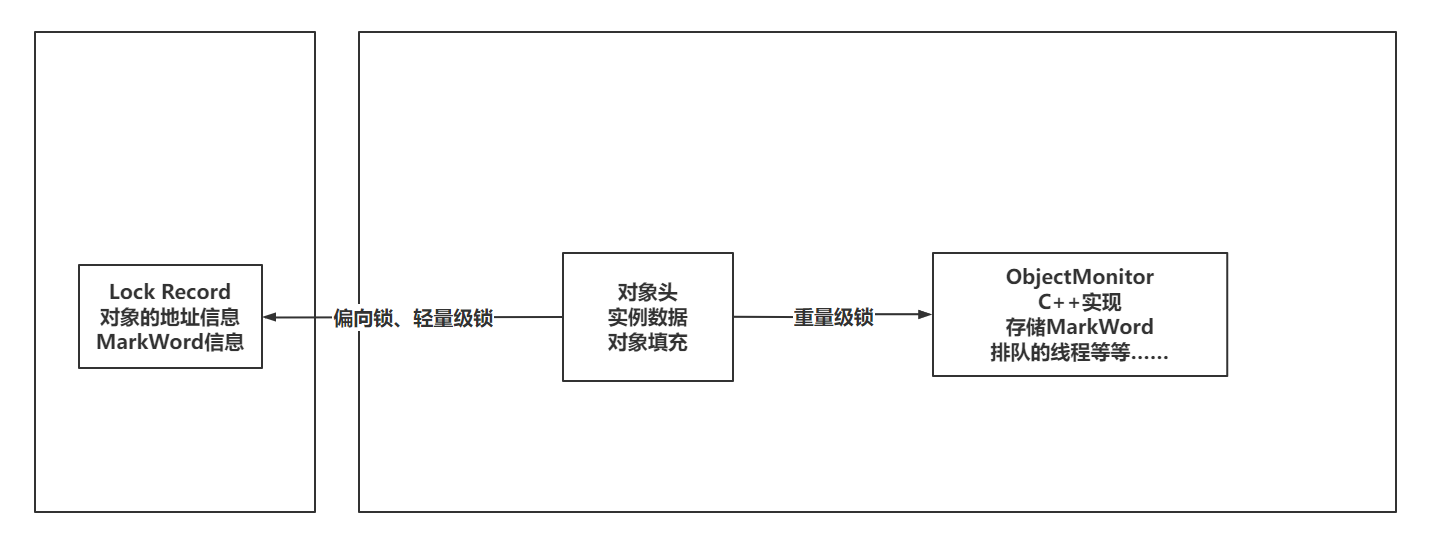
常见锁的分类
入职体验: 今天运维岗位刚入职,但是目前还没有办理入职手续,但是领导发了一堆资料!看了一下,非常多的新东西,只能说努力一把!!! 一、锁的分类 1.1 可重入锁、不可重入锁…...

vue 鼠标划入划出多传一个参数
// item可以传递弹窗显示数据, $event相关参数可以用来做弹窗定位用 mouseover"handleMouseOver($event, item)" mouseleave"handleMouseLeave($event, item)"举个栗子: 做一个hover提示弹窗组件(用的vue3框架 less插件) 可以将组件…...

svn项目同步到gitLab
安装git 确保安装了git 新建一个文件夹svn-git 在文件夹中新建userinfo.txt文件,映射svn用户,这个文件主要是用于将SVN用户映射为Git用户(昵称及其邮箱)。 userinfo.txt具体格式如下: admin admin <admin163.com> lis…...
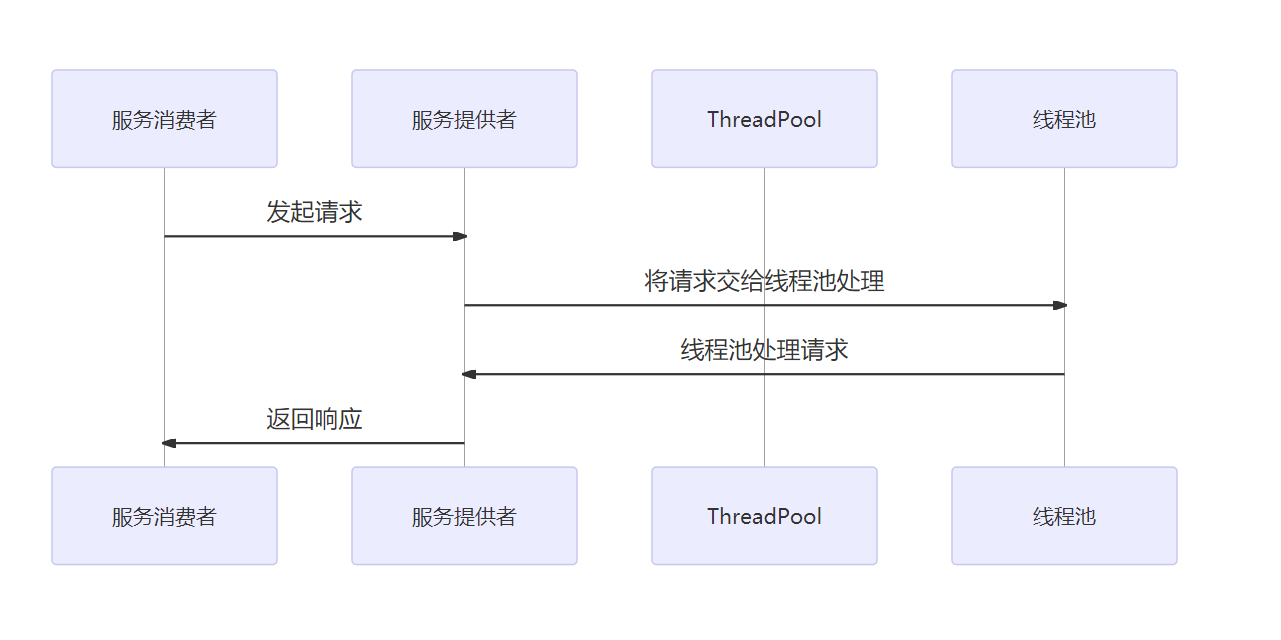
图解Dubbo,Dubbo 服务治理详解
目录 一、介绍1、介绍 Dubbo 服务治理的基本概念和重要性2、阐述 Dubbo 服务治理的实现方式和应用场景 二、Dubbo 服务治理的原理1、Dubbo 服务治理的架构设计2、Dubbo 服务治理的注册与发现机制3、Dubbo 服务治理的负载均衡算法 三、Dubbo 服务治理的实现方式1、基于 Docker 容…...

Css 如何取消a链接点击时的背景颜色
要取消 <a> 链接点击时的背景颜色,可以使用 CSS 的伪类 :active。你可以通过为 a:active 应用 background-color 属性设置为 transparent 或者 none,来取消点击时的背景色。下面是一个示例: a:active {background-color: transparent;…...
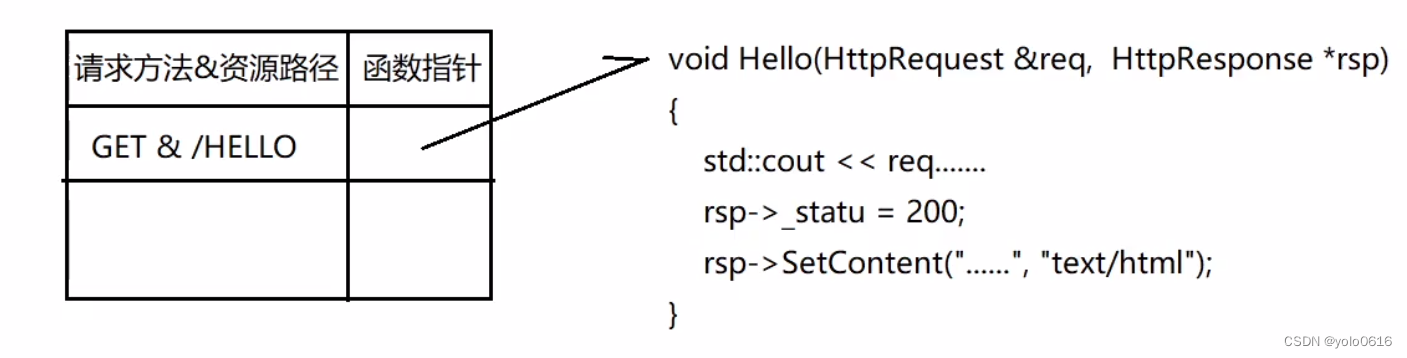
1.16.C++项目:仿muduo库实现并发服务器之HttpContext以及HttpServer模块的设计
文章目录 一、HttpContext模块二、HttpServer模块三、HttpContext模块实现思想(一)功能(二)意义(三)接口 四、HttpServer模块实现思想(一)功能(二)意义&#…...

ABAP 新增PO计划行时 新增行交货日期默认当前最大交期
ABAP 新增PO计划行时 新增行交货日期默认当前最大交期 DATA: ls_poitem TYPE mepoitem. DATA: ls_jhh TYPE meposchedule. DATA: ls_poitemc TYPE REF TO if_purchase_order_item_mm. DATA: is_persistent TYPE mmpur_bool. DATA: lt_eket TYPE TABLE OF eket. DATA: ls_e…...

VSCode怎么创建Java项目
首先安装好Java的开发环境:JDK在VSCode中安装适用于Java开发的插件。打开VSCode,点击左侧的扩展图标,搜索并安装Java Extension Pack插件。等待安装完成后,重启VSCode生效。创建一个新的Java项目,按下Ctrl Shift P&a…...
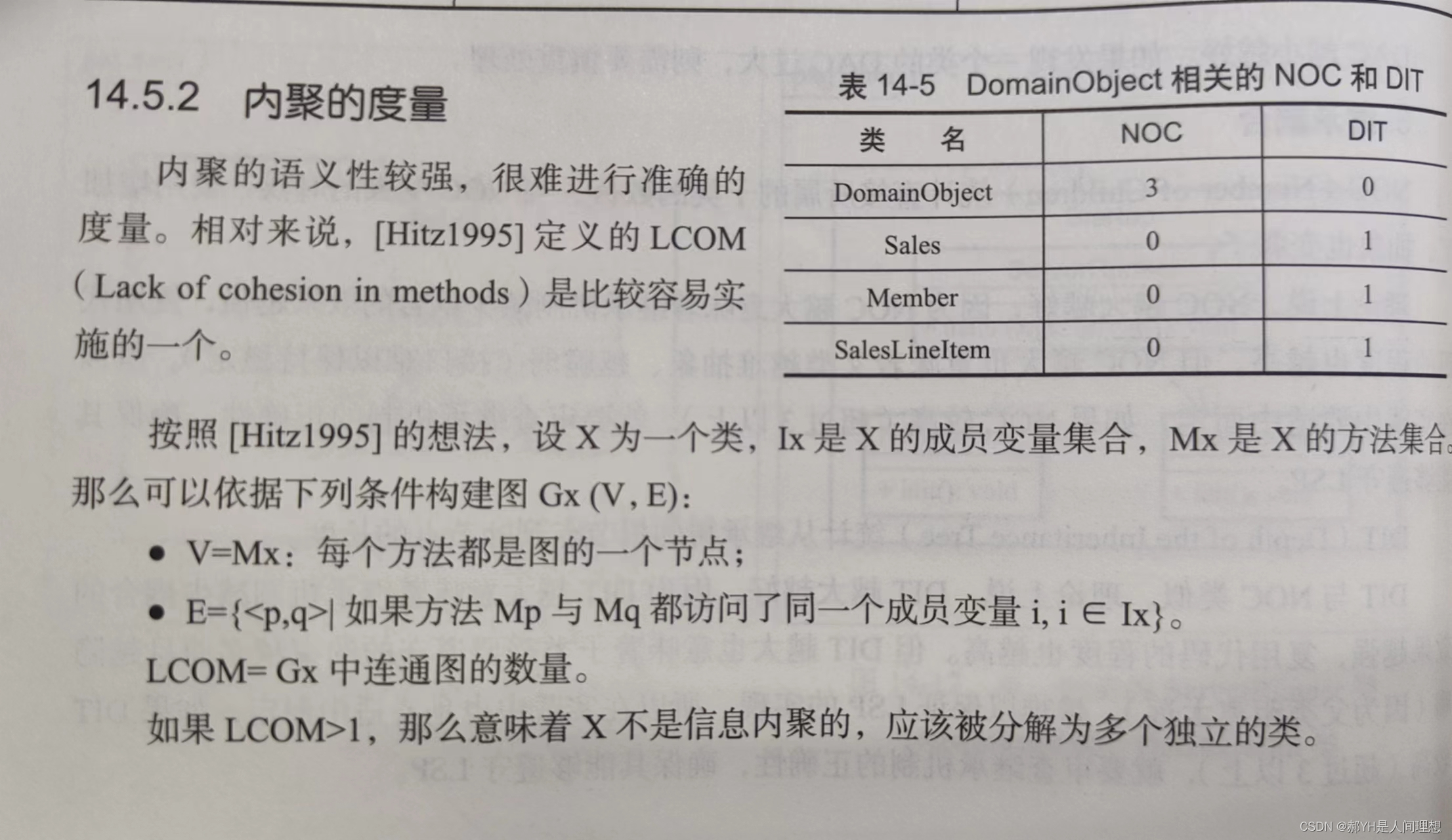
软件工程与计算(十四)详细设计中面向对象方法下的模块化
一.面向对象中的模块 1.类 模块化是消除软件复杂度的一个重要方法,每个代码片段相互独立,这样能够提高可维护性。在面向对象方法中,代码片段最重要的类,整个类的所有代码联合起来构成独立的代码片段。 模块化希望代码片段由两部…...
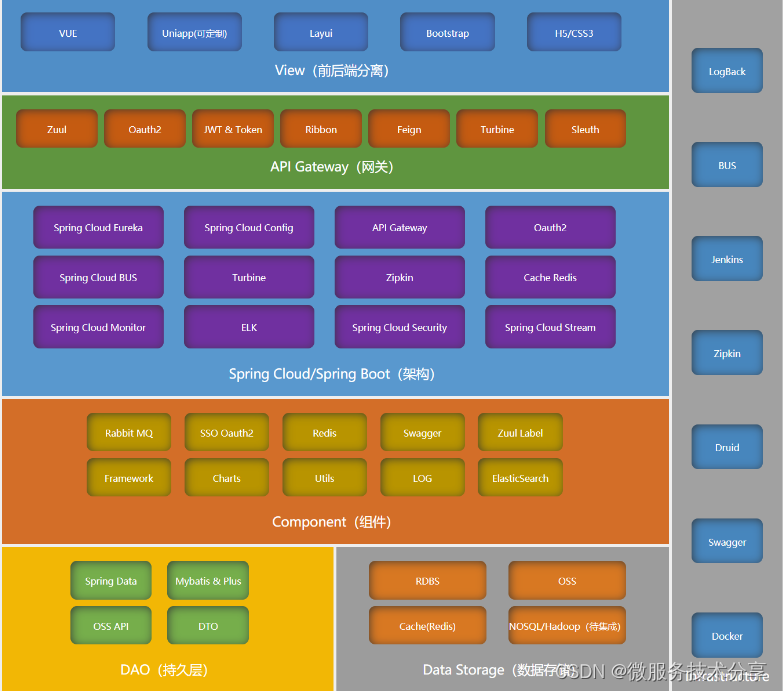
商城免费搭建之java商城 开源java电子商务Spring Cloud+Spring Boot+mybatis+MQ+VR全景+b2b2c
1. 涉及平台 平台管理、商家端(PC端、手机端)、买家平台(H5/公众号、小程序、APP端(IOS/Android)、微服务平台(业务服务) 2. 核心架构 Spring Cloud、Spring Boot、Mybatis、Redis 3. 前端框架…...

python教程:selenium WebDriver 中的几种等待
嗨喽,大家好呀~这里是爱看美女的茜茜呐 强制等待:sleep() import time sleep(5) #等待5秒设置固定休眠时间,单位为秒。 由python的time包提供, 导入 time 包后就可以使用。 缺点: 不智能,使用太多的sleep会影响脚本运行速度。…...

【MATLAB源码-第49期】基于蚁群算法(ACO)算法的栅格路径规划,输出最佳路径图和算法收敛曲线图。
操作环境: MATLAB 2022a 1、算法描述 蚁群算法是一种模拟自然界蚂蚁觅食行为的启发式优化算法。在蚁群系统中,通过模拟蚂蚁之间通过信息素沟通的方式来寻找最短路径。 在栅格路径规划中,蚁群算法的基本步骤如下: 1. 初始化: …...
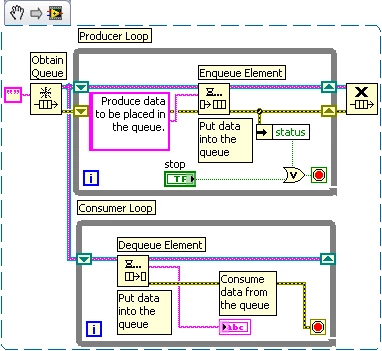
LabVIEW生产者消费者架构
LabVIEW生产者消费者架构 生产者/消费者模式可以轻松地同时处理多个进程,同时还能以不同速率迭代。 缓冲通信 当多个进程以不同速度运行时,就适合采用进程间缓冲通信。有了足够大的缓冲区后,生产者循环可以以快于消费者循环的速度运行&…...

成都瀚网科技:如何有效运营抖店来客呢?
随着电子商务的快速发展和移动互联网的普及,越来越多的企业开始将目光转向线上销售渠道。其中,抖音成为备受关注的平台。作为中国最大的短视频社交平台之一,抖音每天吸引数亿用户,这也为企业提供了巨大的商机。那么,如…...
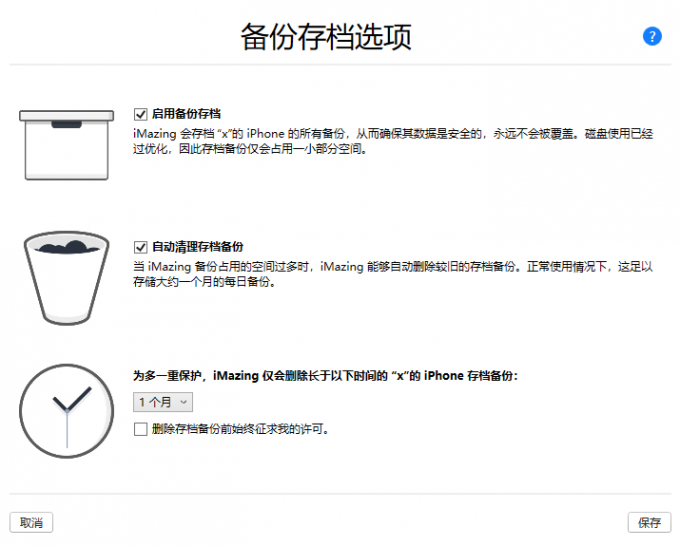
iMazing2.17.3免费苹果手机备份还原助手
强大的 iOS 设备管理软件不管是 iPhone、iPad 或 iPod Touch 设备,只要将 iOS 设备连接到计算机,就可以处理不同类型的数据。iMazing 功能强大、易于使用,可以帮助您安全备份任何 iPhone、iPad 或 iPod Touch,备受用户信赖。 现在…...

sql查询到了数据但是实体类个别字段为null(映射失败)
参考博客: sql查询到了数据但是实体类个别字段为null(映射失败)_sql语句查到值,加字段!null没值-CSDN博客 问题描述: 1.SQL查询到了数据,在idea调试output控制台窗口打印出SQL语句,字段有值; 2.接收实体对象字段无…...

配置VScode开发环境-CUDA编程
如果觉得本篇文章对您的学习起到帮助作用,请 点赞 关注 评论 ,留下您的足迹💪💪💪 本文主要介绍VScode下的CUDA编程配置,因此记录以备日后查看,同时,如果能够帮助到更多人…...

openGauss学习笔记-101 openGauss 数据库管理-管理数据库安全-客户端接入之用SSH隧道进行安全的TCP/IP连接
文章目录 openGauss学习笔记-101 openGauss 数据库管理-管理数据库安全-客户端接入之用SSH隧道进行安全的TCP/IP连接101.1 背景信息101.2 前提条件101.3 操作步骤 openGauss学习笔记-101 openGauss 数据库管理-管理数据库安全-客户端接入之用SSH隧道进行安全的TCP/IP连接 101.…...

为什么顶尖考古团队已弃用传统文献管理?NotebookLM实现遗址报告生成效率提升300%的底层逻辑
更多请点击: https://intelliparadigm.com 第一章:NotebookLM考古学研究辅助的范式革命 NotebookLM 作为 Google 推出的基于文档理解的 AI 助手,正悄然重塑考古学研究的信息处理范式。传统考古工作依赖大量手写笔记、田野报告、碳十四测年数…...

超级记忆与智能体框架:构建LLM长期记忆系统的开源实践
1. 项目概述与核心价值最近在折腾个人知识库和AI工具链的朋友,估计都绕不开一个核心痛点:如何让AI真正“理解”并记住我们给它的私有信息。无论是想打造一个能回答公司内部文档问题的智能助手,还是想构建一个能基于个人笔记进行深度对话的聊天…...

BilibiliDown完整使用教程:三步搞定B站视频批量下载
BilibiliDown完整使用教程:三步搞定B站视频批量下载 【免费下载链接】BilibiliDown (GUI-多平台支持) B站 哔哩哔哩 视频下载器。支持稍后再看、收藏夹、UP主视频批量下载|Bilibili Video Downloader 😳 项目地址: https://gitcode.com/gh_mirrors/bi/…...

MISC实战:从受损pcap到关键数据提取的全链路取证分析
1. 受损pcap文件修复实战指南 遇到打不开的流量包文件就像拿到一张破损的地图,明明知道宝藏就在里面却无从下手。我处理过上百个损坏的pcap文件,最常见的报错是"Not a pcap/pcapng file"或"File has invalid header"。这时候别急着…...

Python崛起背后的四大引擎:从数据科学到Web开发的全栈语言进化
1. 从数据看趋势:Python为何成为开发者社区的“流量明星”最近在Stack Overflow上看到一组数据,挺有意思的。数据科学家David Robinson指出,Python已经成为该平台上访问量增长最快的主流编程语言。这个结论不是空穴来风,而是基于对…...

终极指南:用foo2zjs驱动100+型号打印机在Linux上完美工作
终极指南:用foo2zjs驱动100型号打印机在Linux上完美工作 【免费下载链接】foo2zjs A linux printer driver for QPDL protocol - copy of http://foo2zjs.rkkda.com/ 项目地址: https://gitcode.com/gh_mirrors/fo/foo2zjs 核心关键词:foo2zjs Li…...

保姆级图解:NCCL的bootstrap网络连接到底是怎么“手拉手”建起来的?
保姆级图解:NCCL的bootstrap网络连接到底是怎么"手拉手"建起来的? 想象一群小朋友要围成一个圆圈玩游戏,但彼此都不认识。NCCL的bootstrap网络建立过程,就像这个"手拉手成圈"的奇妙旅程。本文将用最直观的类…...

为什么92%的AI音频项目在ElevenLabs声音库选型阶段就失败?——资深AI音频架构师12年踩坑复盘
更多请点击: https://intelliparadigm.com 第一章:为什么92%的AI音频项目在ElevenLabs声音库选型阶段就失败? ElevenLabs 的声音库看似丰富——超 500 个语音模型、多语言支持、情感调节滑块一应俱全,但真实项目落地中࿰…...

收藏这篇就够了!新手学习 Kali Linux 全指南,避开九成弯路从入门到实战
前言: 当你花了 2 个小时在虚拟机里装好了 Kali Linux—看到屏幕上弹出黑色的终端界面,光标闪烁着 “rootkali:~#” 时,你会不会慌乱?接下来该输什么命令?这些工具怎么用?网上说的 “用 Kali 挖漏洞”&…...

Prisma AI插件OpenClaw:用自然语言智能查询数据库
1. 项目概述:一个为Prisma生态注入AI能力的开源插件如果你正在使用Prisma作为你的Node.js或TypeScript项目的ORM(对象关系映射)工具,并且对如何将生成式AI的能力无缝集成到数据库操作中感到好奇,那么你很可能已经听说过…...