
6-Java中新建一个文件、目录、路径
文章目录
- 前言
- 1-文件、目录、路径
- 2-在当前路径下创建一个文件
- 3-在当前路径下创建一个文件夹(目录)
- 3.1 测试1-路径已经存在
- 3.2 测试2-路径不存在
- 3.2 创建不存在的路径并新建文件
- 3.3 删除已存在的文件并新建
- 4-总结
前言
学习Java中如何新建文件、目录、路径
1-文件、目录、路径
| 文件 | fileName,就如我们在电脑中看到的.txt、.java、.doc等 |
|---|---|
| 目录 | dir,可以理解成文件夹,里面可以包含多个文件夹或文件 |
| 路径 | directoryPath,有绝对路径和相对路径,这个不需要多说,但需要注意的是,如果想把win11电脑上已经存在的路径用来创建File实例,需要注意加转义符 |
2-在当前路径下创建一个文件
Main.java
class MainActivity{public static void main(String[] args){System.out.println("Main thread is running...");FileTest1.createAFileInCurrentPath("DefaultJavaFile1.java", null);}
}
FileTest1.java
import java.io.*;class FileTest1{// the path of the fileNameString directoryPath;// the name of the fileNameString fileName;FileTest1(){}FileTest1(String directoryPath, String fileName){this.directoryPath = directoryPath;this.fileName = fileName;}static void createAFileInCurrentPath(String fileName, String directoryPath){if (null == directoryPath){directoryPath = ".";}File tempFile = new File(directoryPath, fileName);try{tempFile.createNewFile();}catch (IOException e){System.out.println("文件创建异常!");}}}
上面的代码中,如果createAFileInCurrentPath方法传入的directoryPath为"."也是可以的,就表示当前路径
3-在当前路径下创建一个文件夹(目录)
3.1 测试1-路径已经存在
Main.java
import java.io.*;class MainActivity{public static void main(String[] args){System.out.println("Main thread is running...");String existedPath1 = "D:\\JavaAndroidLearnningDiary\\《Java 2实用教程》(5版 耿祥义、张跃平)\\Chapter10\\Leson1";String testFileName1 = "实习日志.java";//create a file in current pathFileTest1.createAFileInCurrentPath("DefaultJavaFile1.java", ".");//create a file in certain pathFile testFile1 = new File(existedPath1, testFileName1);FileTest1.createAFileInCertainPath(testFile1);}
}
FileTest1.java
import java.io.*;class FileTest1{// the path of the fileNameString directoryPath;// the name of the fileNameString fileName;FileTest1(){}FileTest1(String directoryPath, String fileName){this.directoryPath = directoryPath;this.fileName = fileName;}static void createAFileInCurrentPath(String fileName, String directoryPath){if (null == directoryPath){directoryPath = ".";}File tempFile = new File(directoryPath, fileName);try{tempFile.createNewFile();}catch (IOException e){System.out.println("文件创建异常!");}}static void createAFileInCertainPath(File file){try{file.createNewFile();}catch(Exception e){System.out.println(e);}}}
测试结果:编译通过、解释运行正常,创建了新文件
3.2 测试2-路径不存在
Main.java
import java.io.*;class MainActivity{public static void main(String[] args){System.out.println("Main thread is running...");String existedPath1 = "D:\\JavaAndroidLearnningDiary\\《Java 2实用教程》(5版 耿祥义、张跃平)\\Chapter10\\Leson1\\Lesson1~4_Review1";String testFileName1 = "实习日志.java";String unExistedPath1 = "D:\\JavaAndroidLearnningDiary\\《Java 2实用教程》(5版 耿祥义、张跃平)\\Chapter10\\Leson1\\Lesson1~4_Review1\\testDir1";String testFileName2 = "学习笔记.java";//create a file in current pathFileTest1.createAFileInCurrentPath("DefaultJavaFile1.java", ".");//create a file in certain and existed pathFile testFile1 = new File(existedPath1, testFileName1);FileTest1.createAFileInCertainPath(testFile1);//create a file in certain but not existed pathFile testFile2 = new File(unExistedPath1, testFileName2);FileTest1.createAFileInCertainPath(testFile2);}
}
FileTest1.java
import java.io.*;class FileTest1{// the path of the fileNameString directoryPath;// the name of the fileNameString fileName;FileTest1(){}FileTest1(String directoryPath, String fileName){this.directoryPath = directoryPath;this.fileName = fileName;}static void createAFileInCurrentPath(String fileName, String directoryPath){if (null == directoryPath){directoryPath = ".";}File tempFile = new File(directoryPath, fileName);try{tempFile.createNewFile();}catch (IOException e){System.out.println("文件创建异常!");}}static void createAFileInCertainPath(File file){try{file.createNewFile();}catch(Exception e){System.out.println(e);}}}
测试结果如下

3.2 创建不存在的路径并新建文件
Main.java
import java.io.*;class MainActivity{public static void main(String[] args){System.out.println("Main thread is running...");String existedPath1 = "D:\\JavaAndroidLearnningDiary\\《Java 2实用教程》(5版 耿祥义、张跃平)\\Chapter10\\Leson1\\Lesson1~4_Review1";String testFileName1 = "实习日志.java";String unExistedPath1 = "D:\\JavaAndroidLearnningDiary\\《Java 2实用教程》(5版 耿祥义、张跃平)\\Chapter10\\Leson1\\Lesson1~4_Review1\\testDir1";String testFileName2 = "学习笔记.java";//create a file in current pathFileTest1.createAFileInCurrentPath("DefaultJavaFile1.java", ".");//create a file in certain and existed pathFile testFile1 = new File(existedPath1);FileTest1.createAFileInCertainPath(testFile1);//create a file in certain but not existed pathFileTest1.createAFileInCertainPath(testFileName2, unExistedPath1);}
}
FileTest1.java
import java.io.*;class FileTest1{// the path of the fileNameString directoryPath;// the name of the fileNameString fileName;FileTest1(){}FileTest1(String directoryPath, String fileName){this.directoryPath = directoryPath;this.fileName = fileName;}static void createAFileInCurrentPath(String fileName, String directoryPath){if (null == directoryPath){directoryPath = ".";}File tempFile = new File(directoryPath, fileName);try{tempFile.createNewFile();}catch (IOException e){System.out.println("文件创建异常!");}}static void createAFileInCertainPath(File file){try{if (file.exists()){file.createNewFile();}else{System.out.println("the path is not existed ! here are the information of the path:");System.out.println("Name :"+file.getName());System.out.println("AbsoluteFile :"+file.getAbsoluteFile());System.out.println("AbsolutePath :"+file.getAbsolutePath());}}catch(Exception e){System.out.println(e);}}static void createAFileInCertainPath(String fileName, String directoryPath){File tempFileName, tempDirectoryPath;if (null != directoryPath){tempDirectoryPath = new File(directoryPath);System.out.println("Is tempFileName a directory :"+tempDirectoryPath.isDirectory());tempDirectoryPath.mkdirs();}if (null != fileName){tempFileName = new File(directoryPath, fileName);System.out.println("Is tempFileName a file :"+tempFileName.isFile());try{tempFileName.createNewFile();}catch(Exception e){System.out.println("在未存在的路径下创建文件失败!");}}}}
测试结果:编译通过、解释运行,创建成功
3.3 删除已存在的文件并新建
Main.java
import java.io.*;class MainActivity{public static void main(String[] args){System.out.println("Main thread is running...");String existedPath1 = "D:\\JavaAndroidLearnningDiary\\《Java 2实用教程》(5版 耿祥义、张跃平)\\Chapter10\\Leson1\\Lesson1~4_Review1";String testFileName1 = "实习日志.java";String unExistedPath1 = "D:\\JavaAndroidLearnningDiary\\《Java 2实用教程》(5版 耿祥义、张跃平)\\Chapter10\\Leson1\\Lesson1~4_Review1\\testDir2";String testFileName2 = "学习笔记.java";//create a file in current path//create a file in certain and existed pathFile testFile1 = new File(existedPath1);FileTest1.createAFileInCertainPath(testFile1);//create a file in certain but not existed pathFileTest1.createAFileInCertainPath(testFileName2, unExistedPath1);//delete a file in current pathFileTest1.deleteAFileInCurrentPath("DefaultJavaFile1.java");//delete a file in certain pathString deleteTestPath1 = "D:\\TestPath1\\TestDir1\\TestDir2\\TestDir3\\TestDir3_1\\测试.txt";FileTest1.deleteAFileInCeratainPath("D:\\TestPath1\\TestDir1\\TestDir2\\TestDir3\\TestDir3_1", "测试.txt");//delete a dir in certain pathFileTest1.deleteADirInCertainPath("D:\\TestPath1\\TestDir1\\TestDir2\\TestDir3\\TestDir3_2");}
}
FileTest1.java
import java.io.*;class FileTest1{// the path of the fileNameString directoryPath;// the name of the fileNameString fileName;FileTest1(){}FileTest1(String directoryPath, String fileName){this.directoryPath = directoryPath;this.fileName = fileName;}static void createAFileInCurrentPath(String fileName, String directoryPath){if (null == directoryPath){directoryPath = ".";}File tempFile = new File(directoryPath, fileName);try{tempFile.createNewFile();}catch (IOException e){System.out.println("文件创建异常!");}}static void createAFileInCertainPath(File file){try{if (!file.exists()){file.createNewFile();}else{}}catch(Exception e){System.out.println(e);}}static void createAFileInCertainPath(String fileName, String directoryPath){File tempFileName, tempDirectoryPath;if (null != directoryPath){tempDirectoryPath = new File(directoryPath);System.out.println("Is tempFileName a directory :"+tempDirectoryPath.isDirectory());tempDirectoryPath.mkdirs();}if (null != fileName){tempFileName = new File(directoryPath, fileName);System.out.println("Is tempFileName a file :"+tempFileName.isFile());try{tempFileName.createNewFile();}catch(Exception e){System.out.println("在未存在的路径下创建文件失败!");}}}static void deleteAFileInCurrentPath(String fileName){System.out.println("Function deleteAFileInCurrentPath is running---------");File tempFile = new File(fileName);try{if (tempFile.exists()){System.out.println(tempFile.getName()+" 文件存在");tempFile.delete();}else{System.out.println("文件不存在");}}catch(Exception e){System.out.println("删除文件失败!");}System.out.println("Function deleteAFileInCurrentPath is finished---------");}static void deleteAFileInCeratainPath(String directory, String fileName){System.out.println("Function deleteAFileInCeratainPath is running---------");File tempFile = new File(directory, fileName);try{if (tempFile.exists()){System.out.println(tempFile.getName()+" 文件存在");tempFile.delete();}else{System.out.println("文件不存在");}}catch(Exception e){System.out.println("删除文件失败!");}System.out.println("Function deleteAFileInCeratainPath is finished---------");}static void deleteADirInCertainPath(String directory){System.out.println("Function deleteADirInCertainPath is running---------");File tempFile = new File(directory);try{if (tempFile.exists()){System.out.println(tempFile.getName()+" 文件存在");tempFile.delete();}else{System.out.println("文件不存在");}}catch(Exception e){System.out.println("删除文件失败!");}System.out.println("Function deleteADirInCertainPath is finished---------");}}
4-总结
1.简要学习了Java中如何创建文件、目录
2.在调试过程中遇到了一些问题
(1)导包,本来想使用Nullable,但似乎没有相关包
(2)直接在java文件的目录下打开的Windows power Shell窗口中运行时,显示无法加载主类MainActivity,而打开的cmd窗口却可以运行
(3)如果实例化的File对象中的路径是磁盘里不存在的,则isFile、isDirectory全返回false
相关文章:
6-Java中新建一个文件、目录、路径
文章目录前言1-文件、目录、路径2-在当前路径下创建一个文件3-在当前路径下创建一个文件夹(目录)3.1 测试1-路径已经存在3.2 测试2-路径不存在3.2 创建不存在的路径并新建文件3.3 删除已存在的文件并新建4-总结前言 学习Java中如何新建文件、目录、路径…...
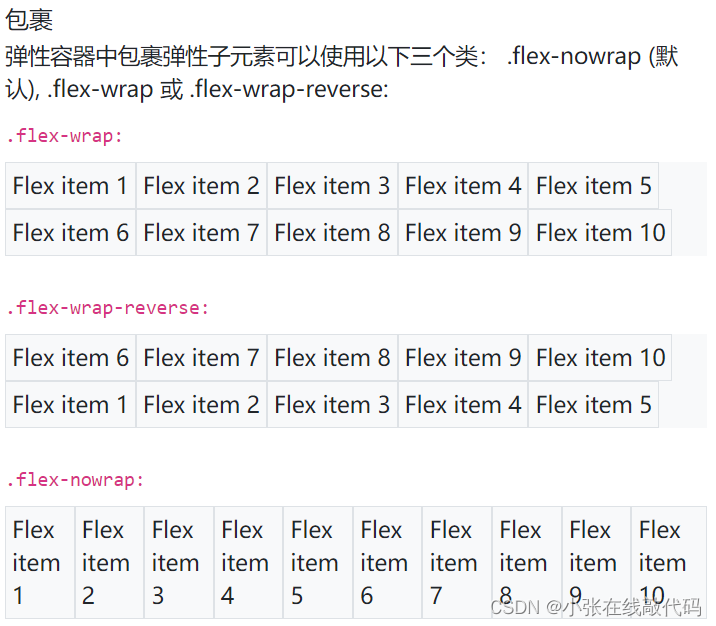
Bootstrap系列之Flex布局
文章目录Bootstrap中的Flexd-flex与d-inline-flex也存在响应式变化flex水平布局flex垂直布局flex水平与垂直也存在响应式变化内容排列(justify-content响应式变化也存在于这里sm,md,lg,xl)子元素对齐方式Align items&a…...
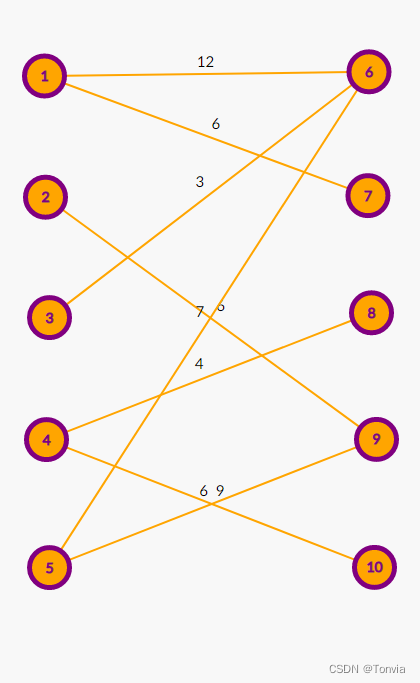
匈牙利算法与KM算法的区别
前记 在学习过程中,发现很多博客将匈牙利算法和KM算法混为一谈,当时只管用不管分析区别,所以现在来分析一下两个算法之间的区别。 匈牙利算法在二分图匹配的求解过程中共两个原则: 1.最大匹配数原则 2.先到先得原则 而KM算法求…...

You Only Need 90K Parameters to Adapt Light 论文阅读笔记
这是BMVC2022的论文,提出了一个轻量化的局部全局双支路的低光照图像质量增强网络,有监督。 思路是先用encoder f(⋅)f(\cdot)f(⋅)转到raw-RGB域,再用decoder gt(⋅)g_t(\cdot)gt(⋅)模拟ISP过程转到sRGB域。虽然文章好像没有明确指出&…...

【vue2小知识】实现axios的二次封装
🥳博 主:初映CY的前说(前端领域) 🌞个人信条:想要变成得到,中间还有做到! 🤘本文核心:在vue2中实现axios的二次封装 目录 一、平常axios的请求发送方式 二、axios的一次封装…...

走近php的数组:数组的定义与数组函数
数组是一种数据结构,它由一组元素组成,这些元素可以是相同类型或不同类型。数组是在程序运行时动态创建的,可以根据需要增加或删除元素,因此它们是非常灵活和实用的数据结构。在大多数编程语言中,数组都有一个索引&…...
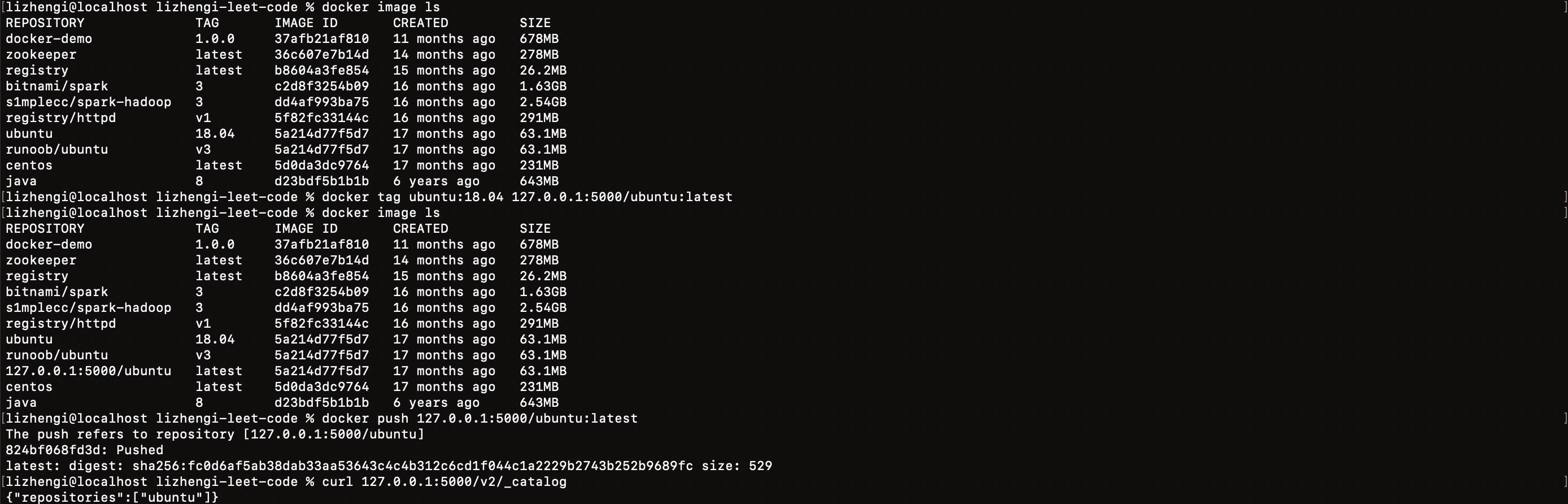
Docker 应用实践-仓库篇
目前 Docker 官方维护了一个公共仓库 Docker Hub,用于查找和与团队共享容器镜像,界上最大的容器镜像存储库,拥有一系列内容源,包括容器社区开发人员、开放源代码项目和独立软件供应商(ISV)在容器中构建和分…...

python+django篮球NBA周边商城vue
目 录 第一章 绪 论 1 1.1背景及意义 1 1.2国内外研究概况 1 1.3 研究的内容 1 第二章 关键技术的研究 3 2.1 vue技术介绍 3 myproject/ <-- 高级别的文件夹 |-- myproject/ <-- Django项目文件夹 | |-- myproje…...
抽象类与接口的区别
抽象类什么是抽象类?抽象类是特殊的类,只是不能被实例化;除此以外,具有类的其他特性;重要的是抽象类可以包括抽象方法,这是普通类所不能的。抽象方法只能声明于抽象类中,且不包含任何实现&#…...

1904. 你完成的完整对局数
题目: 一款新的在线电子游戏在近期发布,在该电子游戏中,以 刻钟 为周期规划若干时长为 15 分钟 的游戏对局。这意味着,在 HH:00、HH:15、HH:30 和 HH:45 ,将会开始一个新的对局,其中 HH 用一个从 00 到 23…...

Vue3:自定义指令以及简单的后台管理权限封装
目录 前言: 自定义指令介绍: 局部的自定义指令: 全局自定义指令: 讲讲后台管理权限管理: 前言: 说起这个自定义指令的使用场景,我第一反应就是,后台管理的权限管理,要…...
剑指 Offer 12. 矩阵中的路径
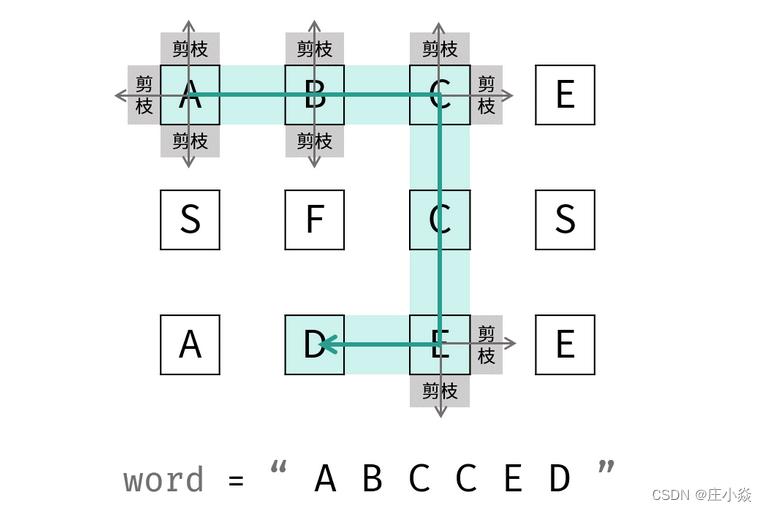
摘要 剑指 Offer 12. 矩阵中的路径 一、回溯算法解析 本问题是典型的矩阵搜索问题,可使用 深度优先搜索(DFS) 剪枝解决。 深度优先搜索: 可以理解为暴力法遍历矩阵中所有字符串可能性。DFS 通过递归,先朝一个方向搜…...
springboot+jersey+tomcat实现跨域方式上传文件到服务器
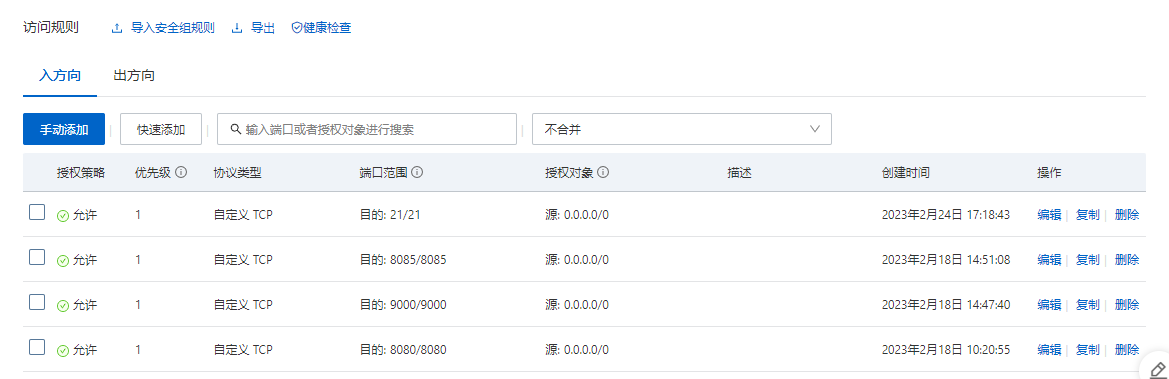
前言 在服务器上,当我们启动了tomcat,就可以以 http://ip地址:8080/文件路径/文件名 的方式,进行访问到我们服务器上处于tomcat的webapps文件夹下的文件 于是为了可以往上面加文件,我们有两种方式,一种就是直接复制文…...

【微信小程序】-- 常用视图容器类组件介绍 -- view、scroll-view和swiper(六)
💌 所属专栏:【微信小程序开发教程】 😀 作 者:我是夜阑的狗🐶 🚀 个人简介:一个正在努力学技术的CV工程师,专注基础和实战分享 ,欢迎咨询! &#…...
猜数字游戏——C++
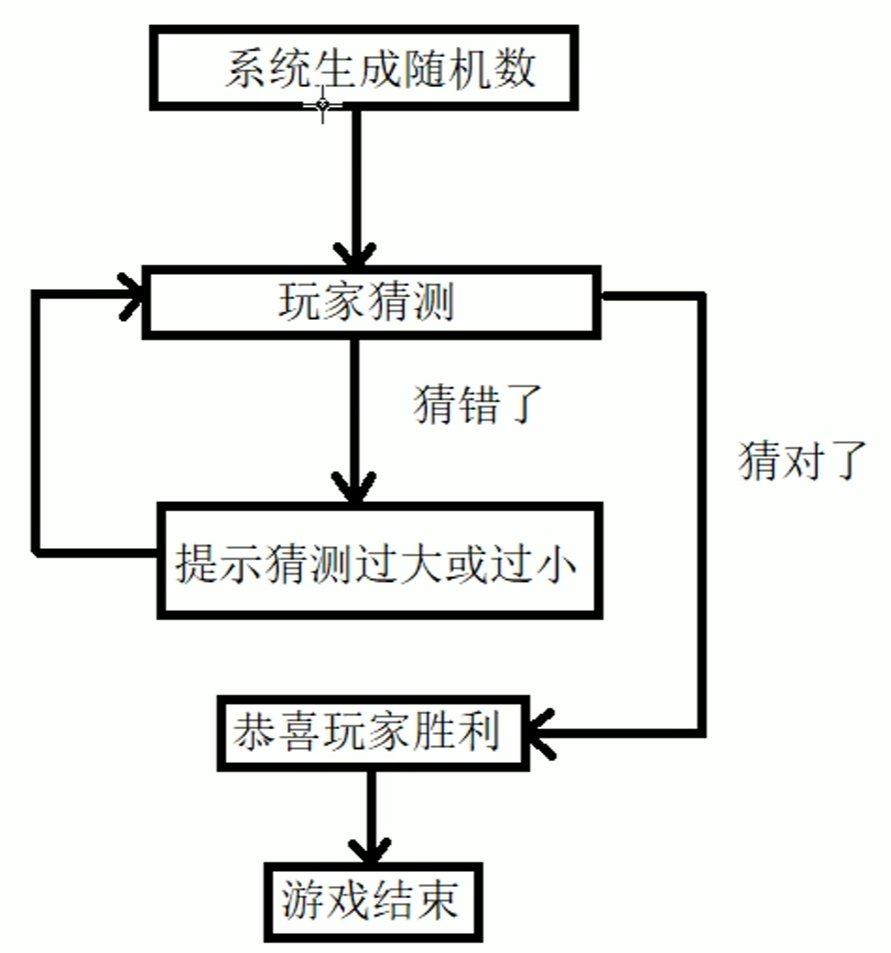
我们在有了一定的C基础了以后,简单的实现一个案例(其实只要会while循环结构就行了),我们本章内容会实现猜数字游戏,大家有什么语法疑问可以看看我写的:C快速入门_染柒_GRQ的博客-CSDN博客,该博客…...

整数对最小和
题目描述 给定两个整数数组 array1 array2。数组元素按升序排列,假设从array1 、array2中分别取出一个元素可构成一对元素,现在需要取出K个元素并对取出的所有元素求和,计算和的最小值 注意事项 两对元素如果对应于array1 array2中的两个下…...

2023-2-22 -javaagent
周三,天气晴,7度 Java Agent Java Agent也叫作java探针,可以实现动态修改java字节码,完成额外的功能。在java类编译成字节码,在jvm执行之前,它可以读取修改字节码,以来完成额外的功能。 使用…...

JavaScript BOM操作
目录 前言 window 对象 location 对象 navigator 对象 screen 对象 history 对象 前言 BOM(Browser Object Model)指的是浏览器对象模型,它是 JavaScript 和浏览器之间的接口。通过 BOM,JavaScript 可以与浏览器窗口交互&…...

【机器学习 | 强基计划】开山篇 | 机器学习介绍及其类别和概念阐述
🤵♂️ 个人主页: @计算机魔术师 👨💻 作者简介:CSDN内容合伙人,全栈领域优质创作者。 机器学习 | 强基计划系列 (一) 作者: 计算机魔术师 版本: 1.0 ( 2022.2.25) 注释:文章会不定时更新补充 文章目录 前言一、机器学习概览1.1 有监督学习和无监督学习1.1.…...
)
华为OD机试真题Java实现【合规数组】真题+解题思路+代码(20222023)
合规数组 题目 给定一个正整数数组 检查数组中是否存在满足规则的数组组合 规则: A = B + 2C 🔥🔥🔥🔥🔥👉👉👉👉👉👉 华为OD机试(Java)真题目录汇总 ## 输入 第一行输出数组的元素个数 接下来一行输出所有数组元素,用空格隔开 输出 如果存在满…...

为什么你的ElevenLabs马来文输出总像“机器人朗读”?资深语音架构师拆解4层韵律建模断层与3个修复级prompt模板
更多请点击: https://intelliparadigm.com 第一章:为什么你的ElevenLabs马来文输出总像“机器人朗读”?资深语音架构师拆解4层韵律建模断层与3个修复级prompt模板 马来语(Bahasa Melayu)虽属声调中性语言,…...

复杂干扰下考虑异质性的非机动车微观行为建模与仿真【附仿真】
✨ 长期致力于非机动车微观交通行为、异质性、感知—决策—行动三阶段、社会力模型、模糊逻辑研究工作,擅长数据搜集与处理、建模仿真、程序编写、仿真设计。 ✅ 专业定制毕设、代码 ✅ 如需沟通交流,点击《获取方式》 (1)非机动车…...

使用Coze制作一个可以“动”的存钱罐,比记账APP更易用
可视化、AI驱动、自动提醒才是你智能存钱的伙伴──────────────────────────────为什么你的存钱计划总是失败?大多数人的存钱失败,并不是由于缺乏决心,而是缺少反馈。存多少钱、目标达成的比例、离目标还有多远…...

DRAM内存计算技术PUDTune:原理、优化与应用
1. 内存计算与DRAM技术背景在传统冯诺依曼架构中,数据需要在处理器和内存之间频繁搬运,这种"内存墙"问题已成为制约计算性能提升的主要瓶颈。内存计算(In-Memory Computing)技术通过直接在存储介质中执行计算操作&#…...

用VMware虚拟机也能玩转PX4无人机仿真?保姆级配置流程与性能优化心得
在VMware虚拟机中高效运行PX4无人机仿真的完整指南 对于许多无人机开发者和爱好者来说,搭建PX4仿真环境是入门的第一步。然而,并非所有人都有条件使用专用硬件或安装双系统。本文将详细介绍如何在VMware虚拟机上配置Ubuntu 18.04系统,并优化P…...

鸿蒙备考题库页面构建:学习进度可视化与练习模式网格设计
鸿蒙备考题库页面构建:学习进度可视化与练习模式网格设计 前言 在 HarmonyOS 6.0 应用开发中,在线教育类页面的核心挑战在于如何将学习进度、练习入口、知识图谱等多维信息高效整合。本文将以“备考题库”应用的主页面为例,深入解析如何在鸿…...

static-php-cli跨平台构建实战:Linux、macOS、Windows全攻略
static-php-cli跨平台构建实战:Linux、macOS、Windows全攻略 【免费下载链接】static-php-cli Build standalone portable PHP binaries on Linux, macOS, Windows, with PHP project together, with popular extensions included. 项目地址: https://gitcode.com…...

【Midjourney拟物化风格实战指南】:20年视觉设计专家亲授3大材质渲染公式与5步出图工作流
更多请点击: https://kaifayun.com 第一章:拟物化风格的本质与Midjourney语义解码 拟物化(Skeuomorphism)并非简单的视觉仿拟,而是一种通过材质、光影、物理反馈等多维语义锚点唤起用户认知惯性的交互范式。在AI图像生…...

Lovable框架实战速成:3天掌握UI动效、状态管理与热重载调试全流程
更多请点击: https://intelliparadigm.com 第一章:Lovable框架核心理念与开发环境搭建 Lovable 是一个以开发者体验(DX)为第一优先级的现代 Go Web 框架,其核心理念可凝练为三个关键词:可读性(…...

98的堂邀请码色花的堂邀请码
兑换不易,可以联系邮箱sht98sht163.com,出邀请。...