
linux 安装谷歌浏览器和对应的驱动
创建文件install-google-chrome.sh
#! /bin/bash# Copyright 2017-present: Intoli, LLC
# Source: https://intoli.com/blog/installing-google-chrome-on-centos/
#
# Redistribution and use in source and binary forms, with or without
# modification, are permitted provided that the following conditions are met:
#
# 1. Redistributions of source code must retain the above copyright notice,
# this list of conditions and the following disclaimer.
#
# 2. Redistributions in binary form must reproduce the above copyright notice,
# this list of conditions and the following disclaimer in the documentation
# and/or other materials provided with the distribution.
#
# THIS SOFTWARE IS PROVIDED BY THE COPYRIGHT HOLDERS AND CONTRIBUTORS "AS IS"
# AND ANY EXPRESS OR IMPLIED WARRANTIES, INCLUDING, BUT NOT LIMITED TO, THE
# IMPLIED WARRANTIES OF MERCHANTABILITY AND FITNESS FOR A PARTICULAR PURPOSE
# ARE DISCLAIMED. IN NO EVENT SHALL THE COPYRIGHT HOLDER OR CONTRIBUTORS BE
# LIABLE FOR ANY DIRECT, INDIRECT, INCIDENTAL, SPECIAL, EXEMPLARY, OR
# CONSEQUENTIAL DAMAGES (INCLUDING, BUT NOT LIMITED TO, PROCUREMENT OF
# SUBSTITUTE GOODS OR SERVICES; LOSS OF USE, DATA, OR PROFITS; OR BUSINESS
# INTERRUPTION) HOWEVER CAUSED AND ON ANY THEORY OF LIABILITY, WHETHER IN
# CONTRACT, STRICT LIABILITY, OR TORT (INCLUDING NEGLIGENCE OR OTHERWISE)
# ARISING IN ANY WAY OUT OF THE USE OF THIS SOFTWARE, EVEN IF ADVISED OF THE
# POSSIBILITY OF SUCH DAMAGE.# What this script does is explained in detail in a blog post located at:
# https://intoli.com/blog/installing-google-chrome-on-centos/
# If you're trying to figure out how things work, then you should visit that!# Require that this runs as root.
[ "$UID" -eq 0 ] || exec sudo "$0" "$@"# Define some global variables.
working_directory="/tmp/google-chrome-installation"
repo_file="/etc/yum.repos.d/google-chrome.repo"# Work in our working directory.
echo "Working in ${working_directory}"
mkdir -p ${working_directory}
rm -rf ${working_directory}/*
pushd ${working_directory}# Add the official Google Chrome Centos 7 repo.
echo "Configuring the Google Chrome repo in ${repo_file}"
echo "[google-chrome]" > $repo_file
echo "name=google-chrome" >> $repo_file
echo "baseurl=http://dl.google.com/linux/chrome/rpm/stable/\$basearch" >> $repo_file
echo "enabled=1" >> $repo_file
echo "gpgcheck=1" >> $repo_file
echo "gpgkey=https://dl-ssl.google.com/linux/linux_signing_key.pub" >> $repo_file# Install the Google Chrome signing key.
yum install -y wget
wget https://dl.google.com/linux/linux_signing_key.pub
rpm --import linux_signing_key.pub# A helper to make sure that Chrome is linked correctly
function installation_status() {google-chrome-stable --version > /dev/null 2>&1[ $? -eq 0 ]
}# Try it the old fashioned way, should work on RHEL 7.X.
echo "Attempting a direction installation with yum."
yum install -y google-chrome-stable
if [ $? -eq 0 ]
thenif installation_status; then# Print out the success message.echo "Successfully installed Google Chrome!"rm -rf ${working_directory}popd > /dev/nullexit 0fi
fi# Uninstall any existing/partially installed versions.
yum --setopt=tsflags=noscripts -y remove google-chrome-stable# Install yumdownloader/repoquery and download the latest RPM.
echo "Downloading the Google Chrome RPM file."
yum install -y yum-utils
# There have been issues in the past with the Chrome repository, so we fall back to downloading
# the latest RPM directly if the package isn't available there. For further details:
# https://productforums.google.com/forum/#!topic/chrome/xNtfk_wAUC4;context-place=forum/chrome
yumdownloader google-chrome-stable || \wget https://dl.google.com/linux/direct/google-chrome-stable_current_x86_64.rpm
rpm_file=$(echo *.rpm)
echo "Downloaded ${rpm_file}"# Install the RPM in a broken state.
rpm -ih --nodeps ${rpm_file}
rm ${rpm_file}# Install font dependencies, see: https://bugs.chromium.org/p/chromium/issues/detail?id=782161
echo "Installing the required font dependencies."
yum install -y \fontconfig \fontpackages-filesystem \ipa-gothic-fonts \xorg-x11-fonts-100dpi \xorg-x11-fonts-75dpi \xorg-x11-fonts-misc \xorg-x11-fonts-Type1 \xorg-x11-utils# Helper function to install packages in the chroot by name (as an argument).
function install_package() {# We'll leave the RPMs around to avoid redownloading things.if [ -f "$1.rpm" ]; thenreturn 0fi# Find the URL for the package.url=$(repoquery --repofrompath=centos7,http://mirror.centos.org/centos/7/os/`arch` \--repoid=centos7 -q --qf="%{location}" "$1" | \sed s/x86_64.rpm$/`arch`.rpm/ | \sed s/i686.rpm$/`arch`.rpm/g | \sort -u)# Download the RPM.wget "${url}" -O "$1.rpm"# Extract it.echo "Extracting $1..."rpm2cpio $1.rpm | cpio -idmv > /dev/null 2>&1
}# Install glibc/ld-linux from CentOS 7.
install_package glibc# Make the library directory and copy over glibc/ld-linux.
lib_directory=/opt/google/chrome/lib
mkdir -p $lib_directory
cp ./lib/* $lib_directory/ 2> /dev/null
cp ./lib64/* $lib_directory/ 2> /dev/null# Install `mount` and its mandatory dependencies from CentOS 7.
for package in "glibc" "util-linux" "libmount" "libblkid" "libuuid" "libselinux" "pcre"; doinstall_package "${package}"
done# Create an `ldd.sh` script to mimic the behavior of `ldd` within the namespace (without bash, etc. dependencies).
echo '#!/bin/bash' > ldd.sh
echo '' >> ldd.sh
echo '# Usage: ldd.sh LIBRARY_PATH EXECUTABLE' >> ldd.sh
echo 'mount --make-rprivate /' >> ldd.sh
echo 'unshare -m bash -c "`tail -n +7 $0`" "$0" "$@"' >> ldd.sh
echo 'exit $?' >> ldd.sh
echo '' >> ldd.sh
echo 'LD=$({ ls -1 ${1}/ld-linux* | head -n1 ; } 2> /dev/null)' >> ldd.sh
echo 'mount --make-private -o remount /' >> ldd.sh
echo 'mount --bind ${1} $(dirname "$({ ls -1 /lib/ld-linux* /lib64/ld-linux* | head -n1 ; } 2> /dev/null)")' >> ldd.sh
echo 'for directory in lib lib64 usr/lib usr/lib64; do' >> ldd.sh
echo '    PATH=./:./bin:./usr/bin LD_LIBRARY_PATH=${1}:./lib64:./usr/lib64:./lib:./usr/lib mount --bind ${1} /${directory} 2> /dev/null' >> ldd.sh
echo 'done' >> ldd.sh
echo 'echo -n "$(LD_TRACE_LOADED_OBJECTS=1 LD_LIBRARY_PATH="${1}" "${LD}" "${2}")"' >> ldd.sh
chmod a+x ldd.sh# Takes the executable as an argument and recursively installs all missing dependencies.
function install_missing_dependencies() {executable="${1}"# Loop through and install missing dependencies.while truedofinished=true# Loop through each of the missing libraries for this round.while read -r linedo# Parse the various library listing formats.if [[ $line == *"/"* ]]; then# Extract the filename when a path is present (e.g. /lib64/).file=`echo $line | sed 's>.*/\([^/:]*\):.*>\1>'`else# Extract the filename for missing libraries without a path.file=`echo $line | awk '{print $1;}'`fiif [ -z $file ]; thencontinuefi# We'll require an empty round before completing.finished=falseecho "Finding dependency for ${file}"# Find the package name for this library.package=$(repoquery --repofrompath=centos7,http://mirror.centos.org/centos/7/os/`arch` \--repoid=centos7 -q --qf="%{name}" --whatprovides "$file" | head -n1)install_package "${package}"# Copy it over to our library directory.find . | grep /${file} | xargs -n1 -I{} cp {} ${lib_directory}/done <<< "$(./ldd.sh "${lib_directory}" "${executable}" 2>&1 | grep -e "no version information" -e "not found")"# Break once no new files have been copied in a loop.if [ "$finished" = true ]; thenbreakfidone
}# Install the missing dependencies for Chrome.
install_missing_dependencies /opt/google/chrome/chromeif ! installation_status; then# Time for the big guns, we'll try to patch the executables to use our lib directory.yum install -y gcc gcc-c++ make autoconf automakeecho "Linking issues were encountered, attempting to patch the `chrome` executable."wget https://github.com/NixOS/patchelf/archive/0.9.tar.gz -O 0.9.tar.gztar zxf 0.9.tar.gzpushd patchelf-0.9./bootstrap.sh./configuremakeLD="$({ ls -1 ${lib_directory}/ld-linux* | head -n1 ; } 2> /dev/null)"./src/patchelf --set-interpreter "${LD}" --set-rpath "${lib_directory}" /opt/google/chrome/chrome./src/patchelf --set-interpreter "${LD}" --set-rpath "${lib_directory}" /opt/google/chrome/chrome-sandboxsed -i 's/\(.*exec cat.*\)/LD_LIBRARY_PATH="" \1/g' /opt/google/chrome/google-chromepopd > /dev/nullecho "Attempted experimental patching of Chrome to use a relocated glibc version."
fi# Clean up the directory stack.
rm -rf ${working_directory}
popd > /dev/null# Print out the success status message and exit.
version="$(google-chrome-stable --version)"
if [ $? -eq 0 ]; thenecho "Successfully installed google-chrome-stable, ${version}."exit 0
elseecho "Installation has failed."echo "Please email contact@intoli.com with the details of your operating system."echo "If you're using using AWS, please include the AMI identifier for the instance."exit 1
fi
然后授予可执行权限
chmod 755 ./install-google-chrome.sh
执行脚本
./install-google-chrome.sh
安装脚本会自动下载、安装chrome(合适的版本),并且目前两个系统中,所缺少的依赖,都会被安装。
测试安装结果
google-chrome-stable --no-sandbox --headless --disable-gpu --screenshot https://www.baidu.com/
如果出现screenshot.png 则安装成功
查看chrome 版本
google-chrome-stable --version
下载对应版本的驱动,换成对应的版本号
https://edgedl.me.gvt1.com/edgedl/chrome/chrome-for-testing/118.0.5993.70/linux64/chrome-linux64.zip
卸载
yum remove google-chrome-stable
rm -rf /usr/bin/chromedriver
linux 历时版本 Chromium Downloads Tool
驱动下载地址 ChromeDriver - WebDriver for Chrome - Downloads
相关文章:

linux 安装谷歌浏览器和对应的驱动
创建文件install-google-chrome.sh #! /bin/bash# Copyright 2017-present: Intoli, LLC # Source: https://intoli.com/blog/installing-google-chrome-on-centos/ # # Redistribution and use in source and binary forms, with or without # modification, are permitted p…...

FPGA的通用FIFO设计verilog,1024*8bit仿真,源码和视频
名称:FIFO存储器设计1024*8bit 软件:Quartus 语言:Verilog 本代码为FIFO通用代码,其他深度和位宽可简单修改以下参数得到 reg [7:0] ram [1023:0];//RAM。深度1024,宽度8 代码功能: 设计一个基于FPGA…...
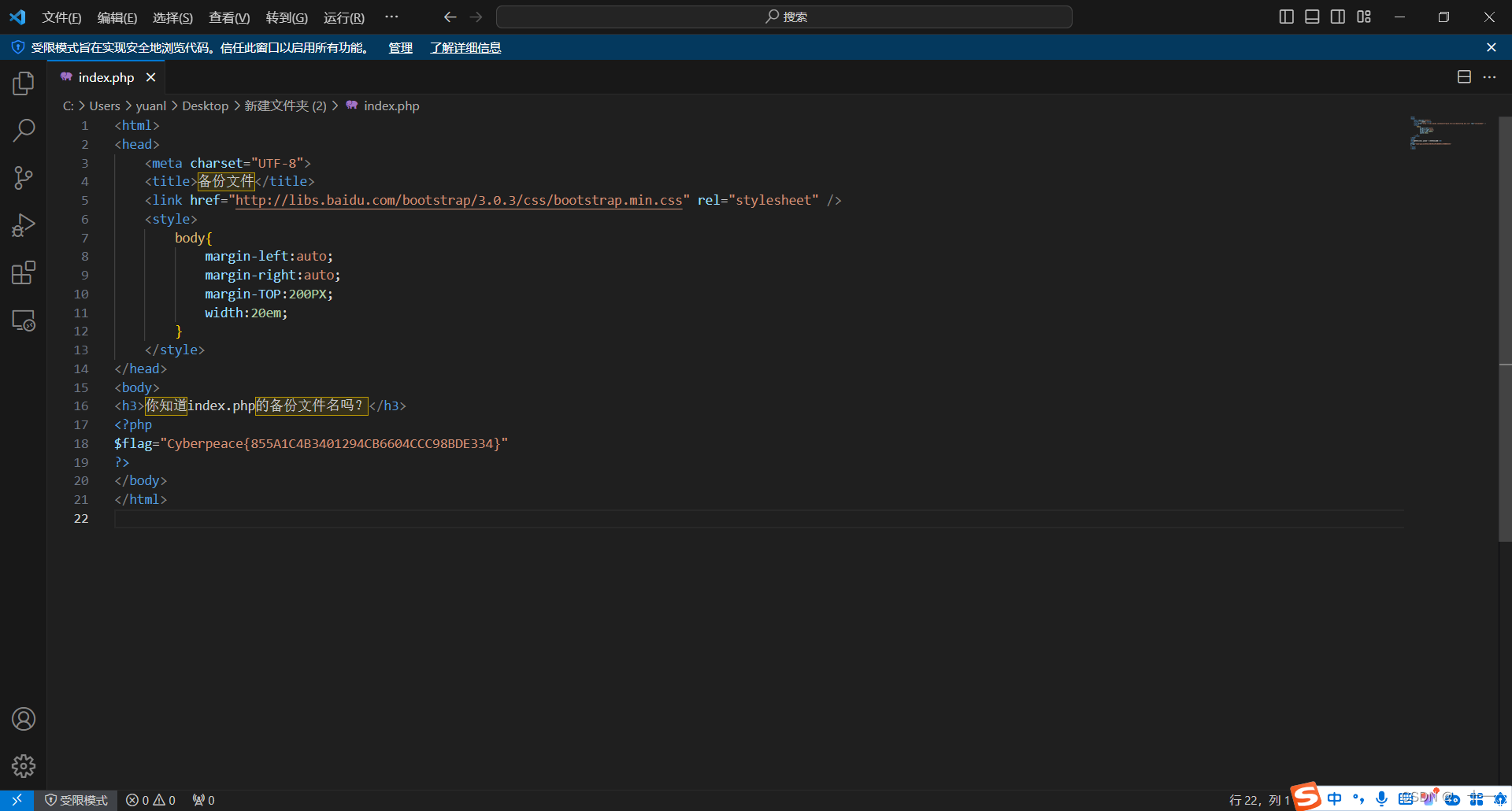
攻防世界web篇-backup
这是链接中的网页,只有一句话 试着使用.bak点缀看看是否有效 这里链接中加上index.php.bak让下在东西 是一个bak文件,将.bak文件改为.php文件试试 打开.php文件后就可以得到flag值...
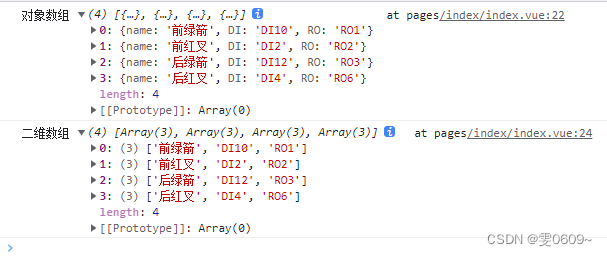
uni-app:js二维数组与对象数组之间的转换
一、二维数组整理成对象数组 效果 [ ["前绿箭","DI10","RO1"], ["前红叉","DI2","RO2"], ["后绿箭","DI12","RO3"], ["后红叉","DI4","RO6"] ] …...
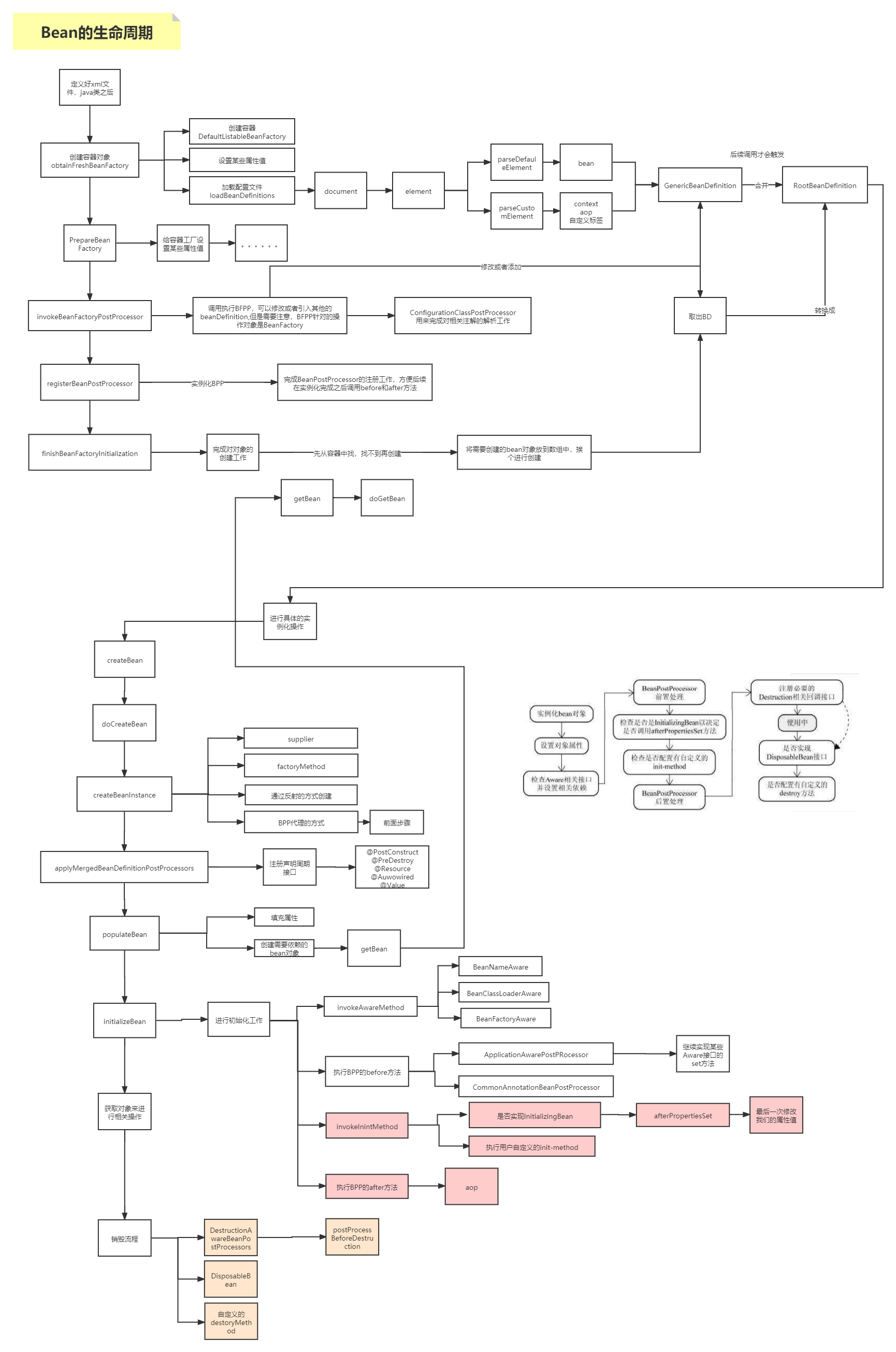
15-bean生命周期,循环依赖
文章目录 1. bean生命周期 1. bean生命周期...

缩短cin时间
std::ios::sync_with_stdio(false);...
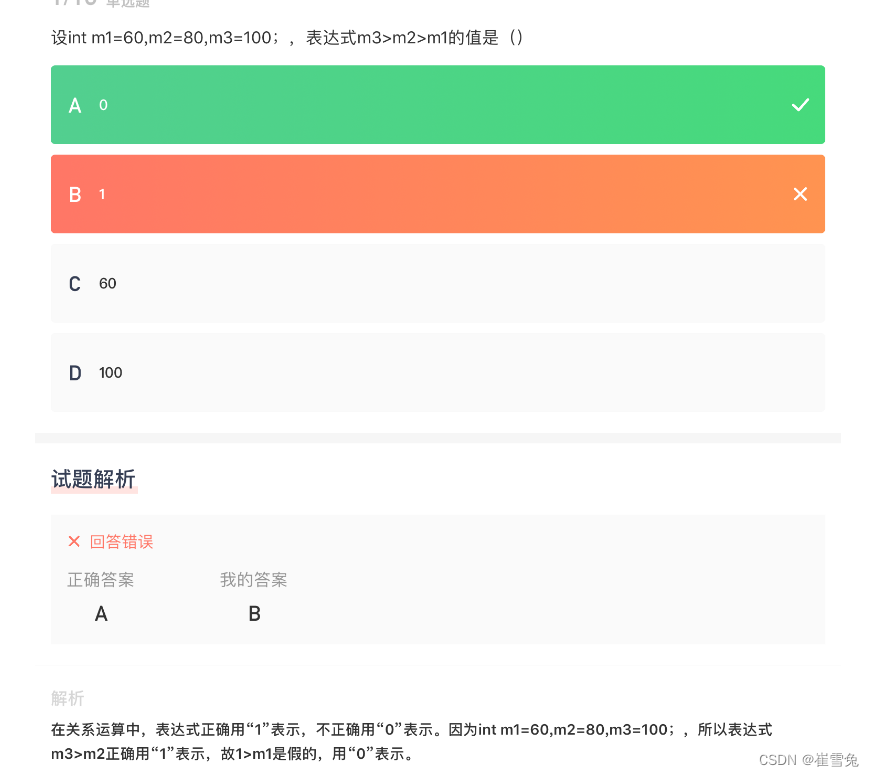
【试题030】C语言之关系表达式例题
1.关系表达式是用关系运算符将两个表达式连接起来 错误示例:a<bc (不是关系运算符,是赋值运算符) 2.题目:设int m160,m280,m3100;,表达式m3>m2>m1的值是 ? 3.代码分析: …...
ArGIS Engine专题(14)之GP模型根据导入范围与地图服务相交实现叠置分析
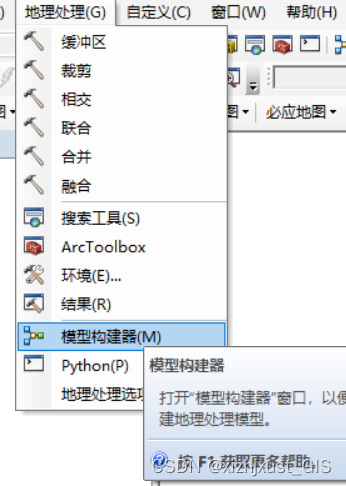
一、结果预览 二、需求简介 前端系统开发时,可能遇到如下场景,如客户给出一个图斑范围,导入到系统中后,需要判断图斑是否与耕地红线等地图服务存在叠加,叠加的面积有多少。虽然arcgis api中提供了相交inserect接口,但只是针对图形几何之间的相交,如何要使用该接口,则需…...
矩阵置零(C++解法)
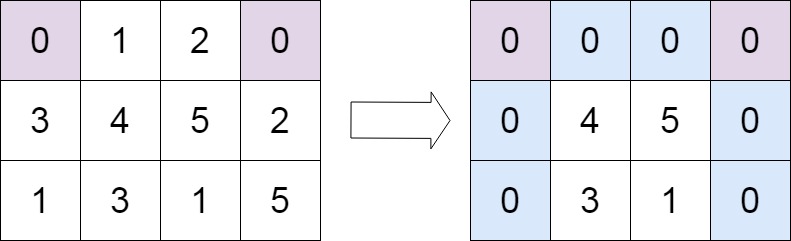
题目 给定一个 m x n 的矩阵,如果一个元素为 0 ,则将其所在行和列的所有元素都设为 0 。请使用 原地 算法。 示例 1: 输入:matrix [[1,1,1],[1,0,1],[1,1,1]] 输出:[[1,0,1],[0,0,0],[1,0,1]]示例 2: 输入…...

Ansible的debug模块介绍,fact变量采集和缓存相关操作演示
目录 一.debug模块的使用方法 1.帮助文档给出的示例 2.主要用到的参数 (1)msg:主要用这个参数来指定要输出的信息 (2)var:打印指定的变量,一般是通过register注册了的变量 (3&…...

零基础新手也能会的H5邀请函制作教程
随着科技的的发展,H5邀请函已经成为了各种活动、婚礼、会议等场合的常见邀约方式。它们不仅可以提供动态、互动的体验,还能让邀请内容更加丰富多彩。下面,我们将通过乔拓云平台,带领大家一步步完成H5邀请函的制作。 1. 选择可靠的…...
推荐《中华小当家》
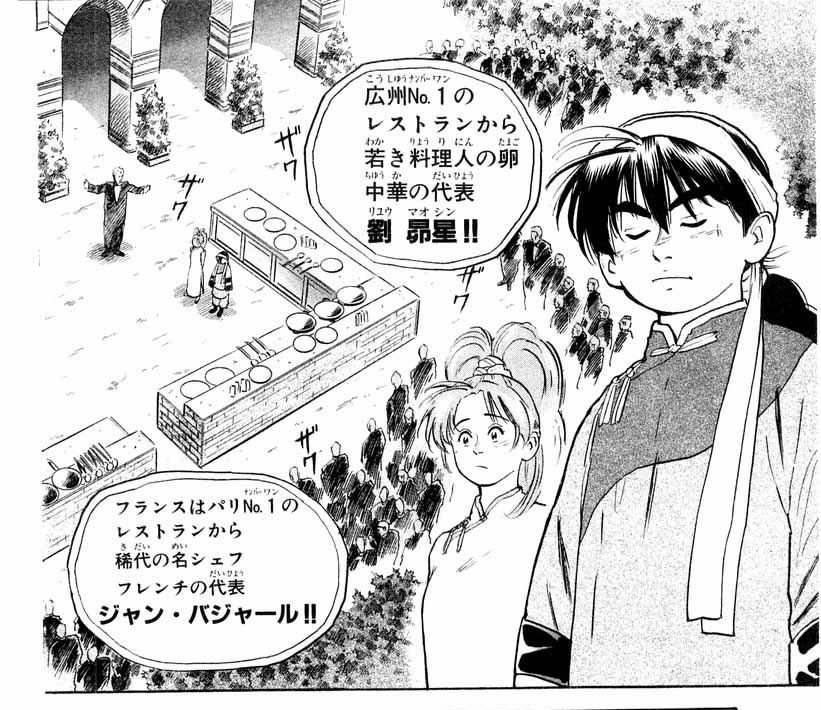
《中华小当家!》 [1] 是日本漫画家小川悦司创作的漫画。该作品于1995年至1999年在日本周刊少年Magazine上连载。作品亦改编为同名电视动画,并于1997年发行播出。 时隔20年推出续作《中华小当家!极》,于2017年11月17日开始连载。…...

接口自动化测试持续集成,Soapui接口功能测试参数化
按照自动化测试分层实现的原理,每一层的脚本实现都要进行参数化,自动化的目标就是要实现脚本代码与测试数据分离。当测试数据进行调整的时候不会对脚本的实现带来震荡,从而提高脚本的稳定性与灵活度,降低脚本的维护成本。Soapui最…...
(N-128)基于springboot,vue酒店管理系统
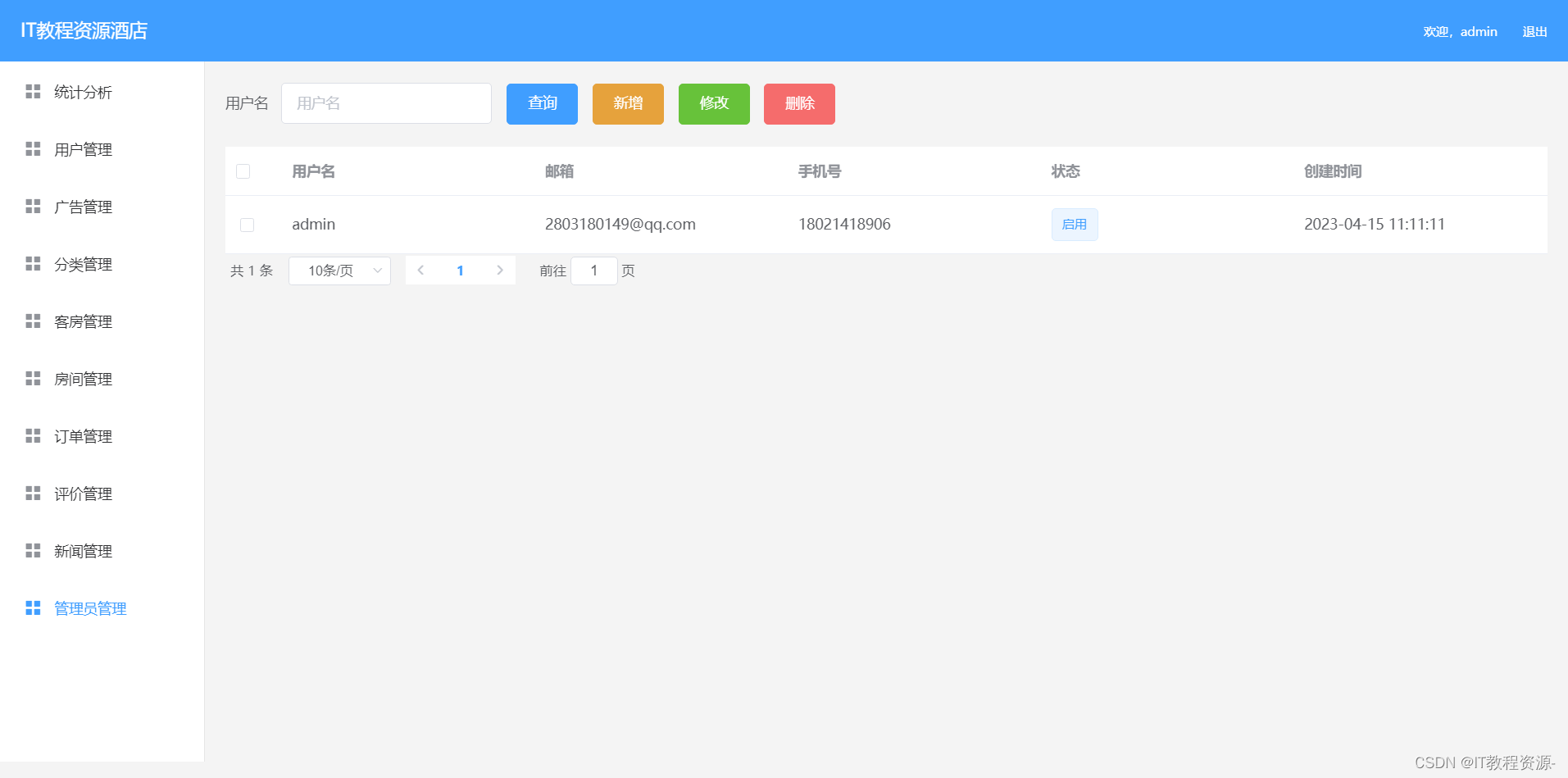
开发工具:IDEA 服务器:Tomcat9.0, jdk1.8 项目构建:maven 数据库:mysql5.7 系统分前后台,项目采用前后端分离 前端技术:vueelementUI 服务端技术:springbootmybatis 本系统功…...

Linux UWB Stack实现——MCPS帧处理
MCPS帧处理 用于处理IEEE 802.15.4中的相关帧,Frame Processing,简写为:fproc。 在实现中,维护了关于帧处理的有限状态机(FSM)。本文从帧处理的数据结构和部分典型处理实现上进行简要的介绍。 1. 数据结构定义 关于帧处理状态…...
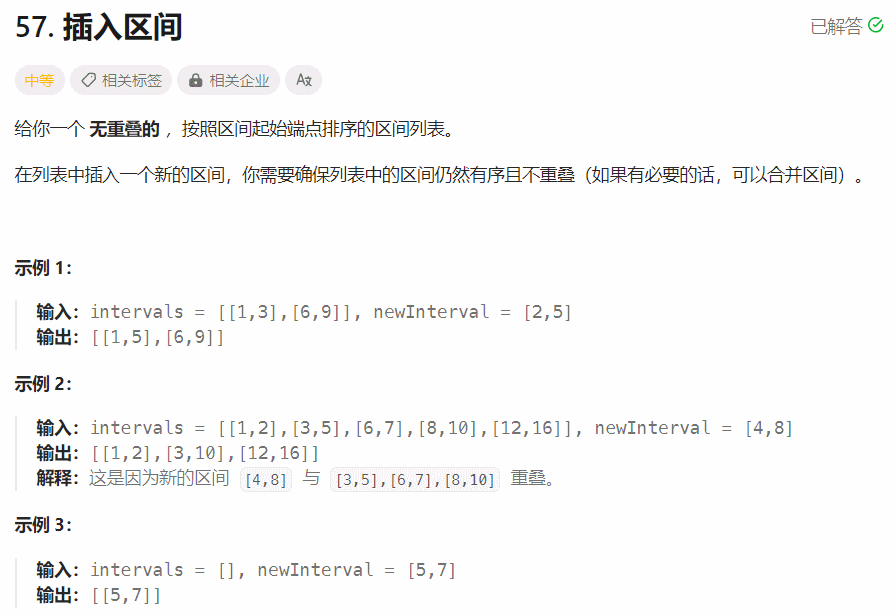
【面试经典150 | 区间】插入区间
文章目录 Tag题目解读题目来源解题思路方法一:合并区间方法二:模拟 其他语言python3 写在最后 Tag 【模拟】【数组】 题目解读 给定一个含有多个无重叠区间的数组,并且数组已经按照区间开始值升序排序。在列表中插入一个新的区间࿰…...
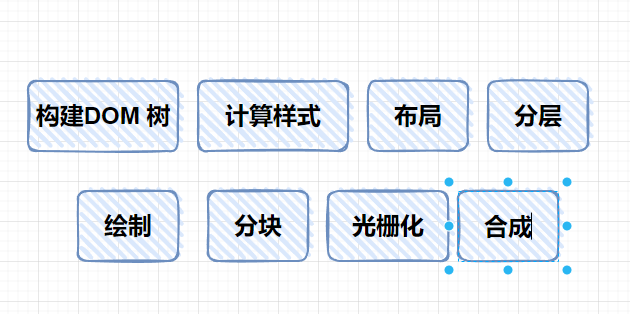
前端 js 之 浏览器工作原理 和 v8引擎 01
嘿,老哥,来了就别跑 !学完 ,不亏 😂 文章目录 一、输入url 之后做了什么二、简单了解下浏览器内核三、浏览器渲染过程 (渲染引擎)四、js 引擎五、chrome五、v8 引擎原理八、浏览器性能优化九、前…...

全波形反演培训的思考与总结
一. InversionNet 最简单的端到端DL_FWI 1. 网络结构: 图1 构建了一个具有编码器-解码器结构的卷积神经网络,根据地震波动数据模拟地下速度结构。编码器主要由卷积层构建,它从输入地震数据中提取高级特征并将其压缩为单个高维向量。解码器然后…...
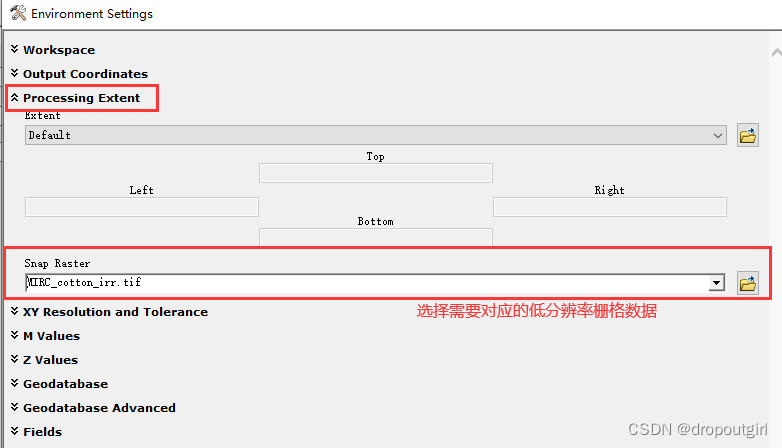
Arcgis聚合工具——实现简单的升尺度
找到Aggregate工具 按如下设置进行操作 注意:如有需要对应的低分辨率影像,必须点开右下角环境Environments选项,进行栅格的捕捉选项设置,以防止升尺度后的影像与需对应的低分辨率影像的栅格单元存在偏移。 点击OK,即可…...

专题:链表常考题目汇总
文章目录 反转类型:206.反转链表完整版二刷记录 25. K个一组反转链表1 :子链表左闭右闭反转版本2 : 子链表左闭右开反转版本(推荐)⭐反转链表左闭右闭和左闭右开 合并类型:21.合并两个有序链表1: 递归法2: …...

基于WebRTC VAD与Web Audio API实现浏览器端智能音频闪避
1. 项目概述与核心价值最近在折腾一个本地音频处理的小工具,目标是实现一个能实时分析音频、自动调整音量的“智能耳机”。听起来是不是有点玄乎?其实核心就是一个基于WebRTC VAD(语音活动检测)和Web Audio API的JavaScript库&…...

LlamaIndex.TS停更启示:从RAG框架设计看LLM应用数据层演进
1. 项目概述:一个已停更的LLM应用数据框架遗产如果你最近在寻找一个能在Node.js、Deno或Bun等JavaScript运行时环境中,帮你轻松将私有数据与大语言模型(如OpenAI GPT、Claude、Llama等)结合起来的TypeScript框架,那么你…...

Cursor Pro免费激活实战指南:自动化配置与设备标识重置方案
Cursor Pro免费激活实战指南:自动化配置与设备标识重置方案 【免费下载链接】cursor-free-vip [Support 0.45](Multi Language 多语言)自动注册 Cursor Ai ,自动重置机器ID , 免费升级使用Pro 功能: Youve reached you…...

矩阵分解在推荐系统中的应用与实践
1. 矩阵分解的机器学习视角矩阵分解(Matrix Factorization)在机器学习领域扮演着基础却关键的角色。我第一次接触这个概念是在推荐系统项目中,当时面对用户-物品评分矩阵中大量的缺失值,传统方法束手无策。直到发现矩阵分解可以将…...

AI Summit London 2022参会价值与实战策略
1. 项目概述:AI Summit London 2022参会机会解析作为全球人工智能领域最具影响力的行业峰会之一,AI Summit London每年吸引着来自科技巨头、初创企业、学术机构和政府部门的顶尖专家。2022年这场盛会尤其值得关注——根据官方披露的数据,当年…...

《吞食天地2忘云殇》8.77版保姆级开荒指南:从常山到成都的装备、阵型与关键道具规划
《吞食天地2忘云殇》8.77版开荒全解析:资源规划与战术进阶手册 当常山的晨雾还未散尽,你的冒险小队已经站在了黑山郡的城门前。这款以三国为背景的经典RPG改版作品,通过独特的装备系统、阵型设计和道具机制,为玩家构建了一个充满策…...

ncmdump:打破音乐格式枷锁的技术钥匙
ncmdump:打破音乐格式枷锁的技术钥匙 【免费下载链接】ncmdump 项目地址: https://gitcode.com/gh_mirrors/ncmd/ncmdump 你是否曾经遇到过这样的困境:在网易云音乐精心收藏的歌曲,下载后却只能在特定应用中播放?那些看似…...
)
AI代码沙箱化落地难题全解(2024企业级Docker隔离标准白皮书首发)
更多请点击: https://intelliparadigm.com 第一章:AI代码沙箱化落地的行业共识与核心挑战 AI代码沙箱化正从安全研究实践演进为工业级开发标准——其核心目标是在隔离、可审计、资源受限的运行环境中执行由大模型生成或用户提交的代码,同时…...

从LlamaDeploy到Llama-Agents:智能体工作流生产级部署实战指南
1. 项目概述:从原型到生产,LlamaDeploy的使命与演进如果你和我一样,在过去一年里深度折腾过基于大语言模型(LLM)的智能体应用,那你肯定经历过这个阶段:在Jupyter Notebook里,用几行代…...

06华夏之光永存:电磁弹射+一次性火箭航天入轨方案【第六篇:电磁弹射核心电池组参数与供配电优化方案】
华夏之光永存:电磁弹射一次性火箭航天入轨方案【第六篇:电磁弹射核心电池组参数与供配电优化方案】核心备注:本文为该系列第六篇核心电池组供配电篇,系列共计10篇保姆式开源落地白皮书,全文基于大功率储能电化学、电力…...