
使用Redis发布订阅模式实现 Session共享
其实并不是实现session共享,而是通过redis的发布订阅,让所有集群的服务器,都让自己的session发送一下消息。比如说userId在第35台服务器上, 有100台服务器,那么第1台服务器收到消息,需要通知userId,不是找到第35台服务器,而是通知所有的服务器,给userId发条消息,其他99台服务器没有userId,那就发送不成功!
1、配置redis
package com.kakarote.crm.config;import com.fasterxml.jackson.annotation.JsonAutoDetect;
import com.fasterxml.jackson.annotation.PropertyAccessor;
import com.fasterxml.jackson.databind.ObjectMapper;
import com.kakarote.crm.constant.RedisConstants;
import org.apache.commons.lang3.StringUtils;
import org.apache.commons.pool2.impl.GenericObjectPoolConfig;
import org.springframework.beans.factory.annotation.Value;
import org.springframework.context.annotation.Bean;
import org.springframework.context.annotation.Configuration;
import org.springframework.data.redis.connection.RedisConnectionFactory;
import org.springframework.data.redis.connection.RedisStandaloneConfiguration;
import org.springframework.data.redis.connection.lettuce.LettuceClientConfiguration;
import org.springframework.data.redis.connection.lettuce.LettuceConnectionFactory;
import org.springframework.data.redis.connection.lettuce.LettucePoolingClientConfiguration;
import org.springframework.data.redis.core.RedisTemplate;
import org.springframework.data.redis.listener.PatternTopic;
import org.springframework.data.redis.listener.RedisMessageListenerContainer;
import org.springframework.data.redis.serializer.GenericJackson2JsonRedisSerializer;
import org.springframework.data.redis.serializer.Jackson2JsonRedisSerializer;
import org.springframework.data.redis.serializer.StringRedisSerializer;import java.time.Duration;@Configuration
public class CrmTemplateConfig {@Value("${spring.redis.host}")private String redisHost;@Value("${spring.redis.port}")private int redisPort;@Value("${spring.redis.password}")private String redisHasrdpwd;@Value("${spring.redis.database}")private Integer database;@Bean(name = "crmRedisTemplate")public RedisTemplate redisTemplate() {RedisTemplate<String, Object> template = new RedisTemplate<>();template.setConnectionFactory(connectionFactory(database, redisHost, redisPort, redisHasrdpwd));template.setKeySerializer(new StringRedisSerializer());template.setValueSerializer(new GenericJackson2JsonRedisSerializer());template.setHashKeySerializer(new StringRedisSerializer());template.setHashValueSerializer(new GenericJackson2JsonRedisSerializer());return template;}public RedisConnectionFactory connectionFactory(int database, String hostName, int port, String password) {RedisStandaloneConfiguration configuration = new RedisStandaloneConfiguration();configuration.setHostName(hostName);configuration.setPort(port);if (StringUtils.isNotBlank(password)) {configuration.setPassword(password);}if (database != 0) {configuration.setDatabase(database);}GenericObjectPoolConfig genericObjectPoolConfig = new GenericObjectPoolConfig();genericObjectPoolConfig.setMaxIdle(10);genericObjectPoolConfig.setMinIdle(10);genericObjectPoolConfig.setMaxTotal(100);genericObjectPoolConfig.setMaxWaitMillis(3000);LettuceClientConfiguration clientConfig = LettucePoolingClientConfiguration.builder().commandTimeout(Duration.ofMillis(8000)).poolConfig(genericObjectPoolConfig).build();LettuceConnectionFactory lettuce = new LettuceConnectionFactory(configuration, clientConfig);lettuce.afterPropertiesSet();return lettuce;}/*** Redis消息监听器容器* 这个容器加载了RedisConnectionFactory和消息监听器* 可以添加多个监听不同话题的redis监听器,只需要把消息监听器和相应的消息订阅处理器绑定,该消息监听器* 通过反射技术调用消息订阅处理器的相关方法进行一些业务处理** @return redis消息监听容器*/@Bean@SuppressWarnings("all")public RedisMessageListenerContainer container(RedisMessageListener listener) {RedisMessageListenerContainer container = new RedisMessageListenerContainer();// 监听所有库的key过期事件container.setConnectionFactory(connectionFactory(database, redisHost, redisPort, redisHasrdpwd));// 所有的订阅消息,都需要在这里进行注册绑定,new PatternTopic(TOPIC_NAME1)表示发布的主题信息// 可以添加多个 messageListener,配置不同的通道container.addMessageListener(listener, new PatternTopic(RedisConstants.WEBSOCKET_REDIS_TOPIC));/*** 设置序列化对象* 特别注意:1. 发布的时候需要设置序列化;订阅方也需要设置序列化*         2. 设置序列化对象必须放在[加入消息监听器]这一步后面,否则会导致接收器接收不到消息*/Jackson2JsonRedisSerializer seria = new Jackson2JsonRedisSerializer(Object.class);ObjectMapper objectMapper = new ObjectMapper();objectMapper.setVisibility(PropertyAccessor.ALL, JsonAutoDetect.Visibility.ANY);objectMapper.enableDefaultTyping(ObjectMapper.DefaultTyping.NON_FINAL);seria.setObjectMapper(objectMapper);container.setTopicSerializer(seria);return container;}
}
2、配置RedisMessageListener
package com.kakarote.crm.config;import cn.hutool.json.JSONUtil;
import com.alibaba.fastjson.JSONObject;
import com.kakarote.crm.constant.CrmConst;
import com.kakarote.crm.entity.BO.MessageDto;
import com.kakarote.crm.websocket.TransferCallWebSocket;
import lombok.extern.slf4j.Slf4j;
import org.springframework.beans.factory.annotation.Autowired;
import org.springframework.data.redis.connection.Message;
import org.springframework.data.redis.connection.MessageListener;
import org.springframework.data.redis.core.RedisTemplate;
import org.springframework.stereotype.Component;@Slf4j
@Component
public class RedisMessageListener implements MessageListener {@Autowiredprivate RedisTemplate<String, Object> crmRedisTemplate;@Overridepublic void onMessage(Message message, byte[] pattern) {// 接收的topiclog.info("RedisMessageListener-接收到消息1,channel:" + new String(pattern));try {//序列化对象(特别注意:发布的时候需要设置序列化;订阅方也需要设置序列化)MessageDto messageDto = (MessageDto) crmRedisTemplate.getValueSerializer().deserialize(message.getBody());log.info("RedisMessageListener-接收到消息2,channel = {}, messageDto = {}", new String(pattern), messageDto);if(messageDto == null){log.info("RedisMessageListener-messageDto = null,无消息进行发送! message = {}", JSONUtil.toJsonStr(message));return;}if(CrmConst.NOTICE_MSG.equals(messageDto.getTitle())){JSONObject content = messageDto.getContent();String toUserId = content.getString("toUserId");String fromUserId = content.getString("fromUserId");JSONObject msg = content.getJSONObject("msg");String resp = TransferCallWebSocket.sendMsgByUserId(fromUserId, toUserId, JSONUtil.toJsonStr(msg));if(!resp.equals("success")){log.info("RedisMessageListener-发送弹框消息,resp = {},content = {}", resp, content);}}}catch (Exception e){log.info("RedisMessageListener-监听消息处理失败,失败原因 = {}, e = ", e.getMessage(), e);}}
}
3、静态类
/*** @description: 常量类* @dateTime: 2021/6/17 16:21*/
public class RedisConstants {/*** UTF-8 字符集*/public static final String UTF8 = "UTF-8";public final static String WEBSOCKET_REDIS_TOPIC = "websocket_topic";public static final String TRANSFER_NOTICE = "transferCallNotice";	public static final String NOTICE_MSG = "noticeMessage";
}
4、消息体
package com.kakarote.crm.entity.BO;import com.alibaba.fastjson.JSONObject;
import lombok.AllArgsConstructor;
import lombok.Data;
import lombok.NoArgsConstructor;import java.io.Serializable;@AllArgsConstructor
@NoArgsConstructor
@Data
public class MessageDto implements Serializable {private String data;private String title;private JSONObject content;
}
5、业务类像通道发送消息
/*** 向通道发布消息*/public boolean convertAndSend(String channel, Object message) {if (StringUtil.isBlank(channel)) {return false;}try {crmRedisTemplate.convertAndSend(channel, message);log.info("发送消息成功,channel:{},message:{}", channel, message);return true;} catch (Exception e) {log.info("发送消息失败,channel:{},message:{}, 失败原因 = {}, e = ", channel, message, e.getMessage(), e);e.printStackTrace();}return false;}
6、websocket配置
@Configuration
@ComponentScan
@EnableAutoConfiguration
public class WebSocketConfiguration implements ServletContextInitializer {@Beanpublic ServerEndpointExporter serverEndpointExporter() {return new ServerEndpointExporter();}@Beanpublic TaskScheduler taskScheduler(){ThreadPoolTaskScheduler taskScheduler = new ThreadPoolTaskScheduler();taskScheduler.setPoolSize(10);taskScheduler.initialize();return taskScheduler;}@Overridepublic void onStartup(ServletContext servletContext) throws ServletException {servletContext.addListener(WebAppRootListener.class);servletContext.setInitParameter("org.apache.tomcat.websocket.textBufferSize","52428800");servletContext.setInitParameter("org.apache.tomcat.websocket.binaryBufferSize","52428800");}
}
7、websocket Controller类
@ServerEndpoint("/crmDzhWebsocket/transferWebsocket/{userId}")
@Component
@Slf4j
public class TransferCallWebSocket {/*** 当前在线连接数*/private static AtomicInteger onlineCount = new AtomicInteger(0);/*** 用来存放每个客户端对应的 WebSocketServer 对象*/private static final ConcurrentHashMap<String, Session> webSocketMap = new ConcurrentHashMap<>();/*** 与某个客户端的连接会话,需要通过它来给客户端发送数据*/private Session session;/*** 接收 userId*/private String userIdKey = "";/*** 连接建立成功调用的方法*/@OnOpenpublic void onOpen(Session session, @PathParam("userId") String userId) {this.session = session;this.userIdKey = userId;if (webSocketMap.containsKey(userId)) {webSocketMap.remove(userId);webSocketMap.put(userId, session);} else {webSocketMap.put(userId, session);addOnlineCount();}log.info("转接通知用户连接:" + userId + ",当前总在线人数为:" + getOnlineCount());try {sendMessage("success");} catch (IOException e) {log.error("转接通知用户:" + userId + ",网络异常!!!!!!");log.info("转接通知用户连接:" + userId + ",网络异常!!!!!!");}}/*** 连接关闭调用的方法*/@OnClosepublic void onClose() {if (webSocketMap.containsKey(userIdKey)) {webSocketMap.remove(userIdKey);subOnlineCount();}log.info("转接通知用户退出:" + userIdKey + ",当前总在线人数为:" + getOnlineCount());}/*** 收到客户端消息后调用的方法** @param message 客户端发送过来的消息*/@OnMessagepublic void onMessage(String message, Session session) {try {if ("ping".equals(message)) {webSocketMap.get(this.userIdKey).getBasicRemote().sendText("pong");return;}log.info("this.userIdKey = {}, message = {}", this.userIdKey, message);} catch (IOException e) {log.error("转接通知发送消息失败,失败原因 = {}, e = ", e.getMessage(), e);e.printStackTrace();}}public static String sendMsgByUserId(String fromUserId, String toUserId, String msg) throws IOException {if(webSocketMap.get(toUserId) != null){try {webSocketMap.get(toUserId).getBasicRemote().sendText(msg);return "success";}catch (Exception e){log.error("发送消息失败,fromUserId = {}, toUserId = {}", fromUserId, toUserId);return e.getMessage();}}return "userId:" + toUserId + "当前不在会话中";}/*** 发生错误时调用** @param session* @param error*/@OnErrorpublic void onError(Session session, Throwable error) {log.info("用户错误:" + session.getId() + ",原因:" + error.getMessage());}/*** 实现服务器主动推送*/public void sendMessage(String message) throws IOException {this.session.getBasicRemote().sendText(message);}public static synchronized AtomicInteger getOnlineCount() {return onlineCount;}public static synchronized void addOnlineCount() {TransferCallWebSocket.onlineCount.getAndIncrement();}public static synchronized void subOnlineCount() {TransferCallWebSocket.onlineCount.getAndDecrement();}}
相关文章:

使用Redis发布订阅模式实现 Session共享
其实并不是实现session共享,而是通过redis的发布订阅,让所有集群的服务器,都让自己的session发送一下消息。比如说userId在第35台服务器上, 有100台服务器,那么第1台服务器收到消息,需要通知userId…...
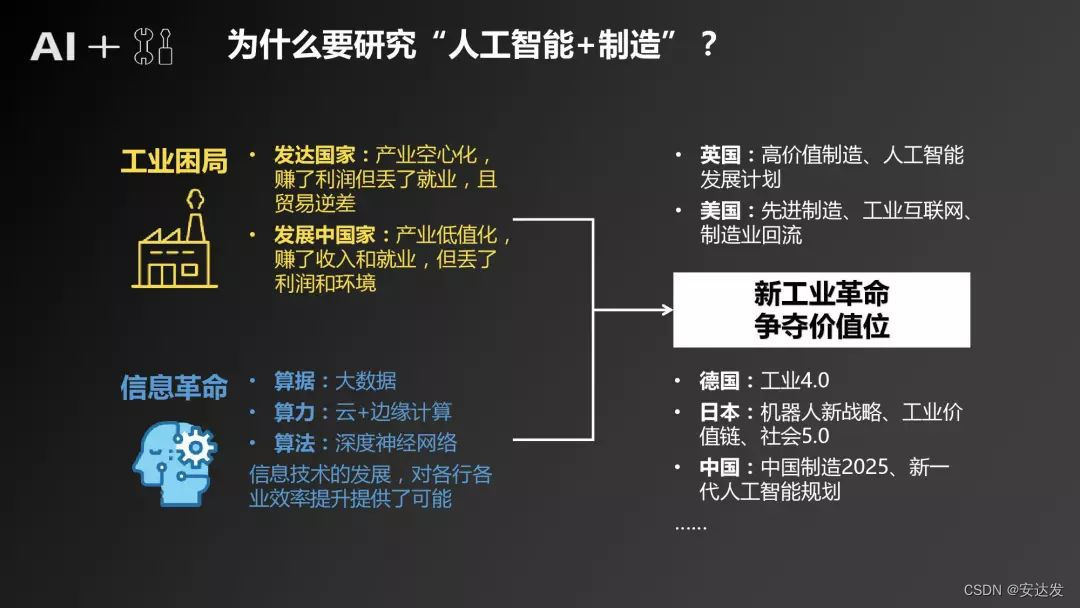
安达发|AI在APS生产计划排程系统中的应用与优势
随着科技的不断发展,人工智能(AI)已经在许多领域取得了显著的成果。在生产管理计划系统中,AI技术的应用也日益受到关注。本文将探讨如何将AI人工智能用在生产管理计划系统上,以提高生产效率、降低成本并优化资源配置。…...
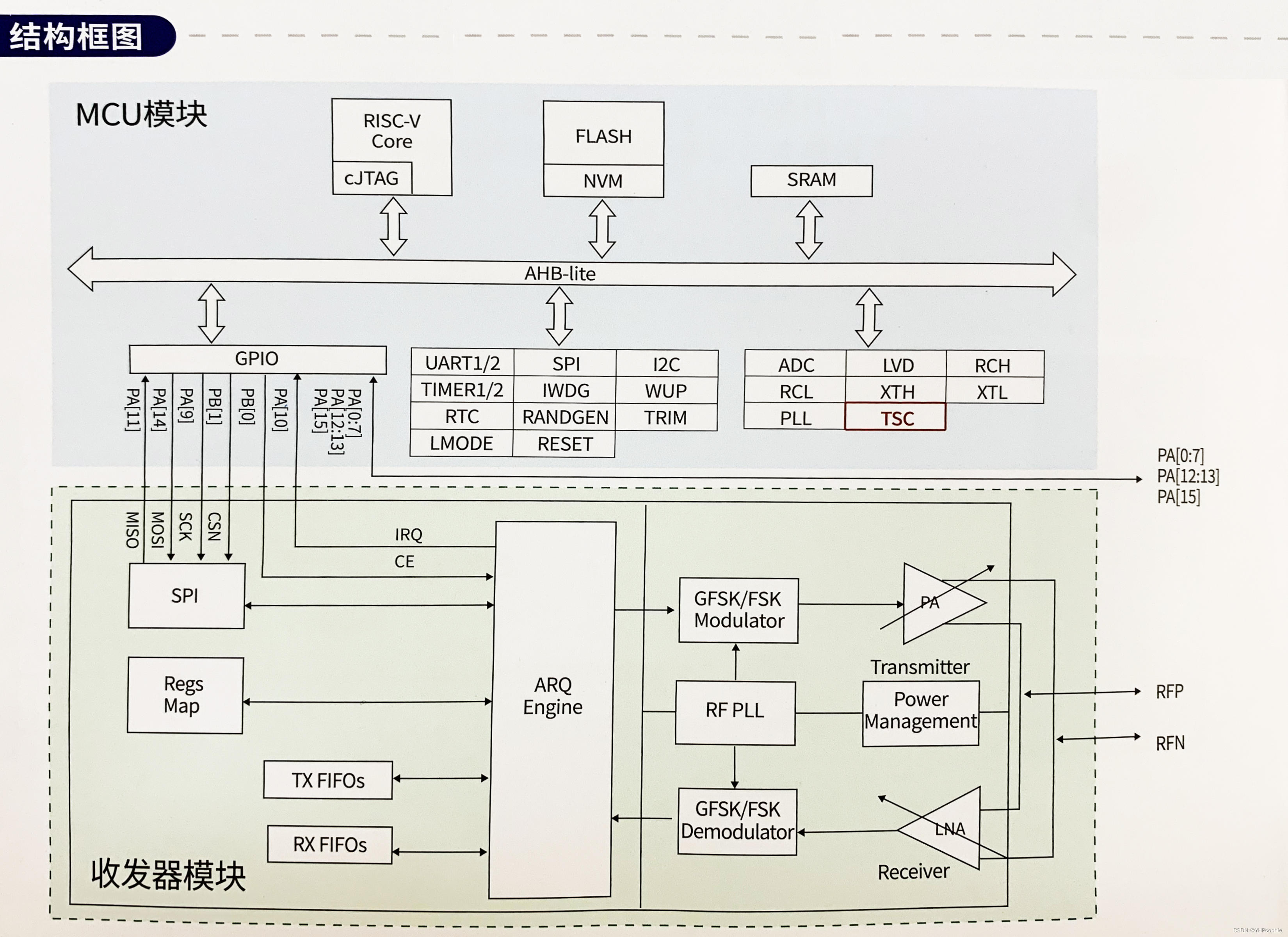
国产低功耗MCU芯片:Si24R03
Si24R03集成了基于RISC-V核的低功耗MCU和工作在2.4GHz ISM频段的无线收发器模块,是一款高度集成的低功耗SOC片。 应用领域: 1、物联网 2、智N门锁 3、电机控制 4、消费电子 5、工业控制 其无线收发器模块是专为低功耗无线场合设计,在关…...

【Java】学生管理系统项目演示
目录 学生管理系统 学生管理系统代码思路分析 nextLine() 和 nextInt() 区别 学生管理系统 需求:实现对学生的增删改查功能,学生(学号,姓名,年龄,地址)字段 学生管理系统代码思路分析 定义学…...

Rust错误处理
返回值和错误处理 panic 深入剖析 主动调用 fn main() {panic!("crash and burn"); }backtrace 栈展开 panic 时的两种终止方式 当出现 panic! 时,程序提供了两种方式来处理终止流程:栈展开和直接终止 何时该使用 panic! 先来一点背景知…...

Golang操作数据库简单示例
目录 准备工作准备数据创建项目连接数据库查询数据修改数据插入数据删除数据释放资源完整代码最终执行结果 准备工作 在开始之前,你需要确保自己安装了Golang的编程环境,安装MySQL数据库,有一个可以用于编写代码的编辑器或IDE工具。我在这里…...

亚马逊测评,买家号支付不了、砍单率高是什么问题,需要怎么解决
下半年旺季很多卖家都在使用自养号测评给产品冲一波权重,但是很多朋友会遇到下不了单或者砍单率过高等问题。有人以为是支付卡的问题,也有人觉得是IP被关联了。其实他们讲的也没错,但是,亚马逊风控不会针对某个点去进行检测&#…...
)
B. Jellyfish and Game-Codeforces Round 902 (Div. 2)
B. Jellyfish and Game 交换k轮使得第一个同学拥有数值总数最大; 很容易看出这道题需要判断k奇偶数。 当k是奇数时可以看作第一个同学操作一轮。 k为偶数可以看作两个同学各操作一轮。 #include<iostream> #include<vector> #include<algorithm>…...
Linux下的命令行参数和环境变量
命令行参数 什么是命令行参数 命令行参数是指在执行命令行程序时,给程序传递的额外参数。在Linux终端中,命令行参数通常通过在命令后面添加空格分隔的参数来传递。 Linux下以main函数举例说明 #include<stdio.h>int main(int argc char* argv[])…...
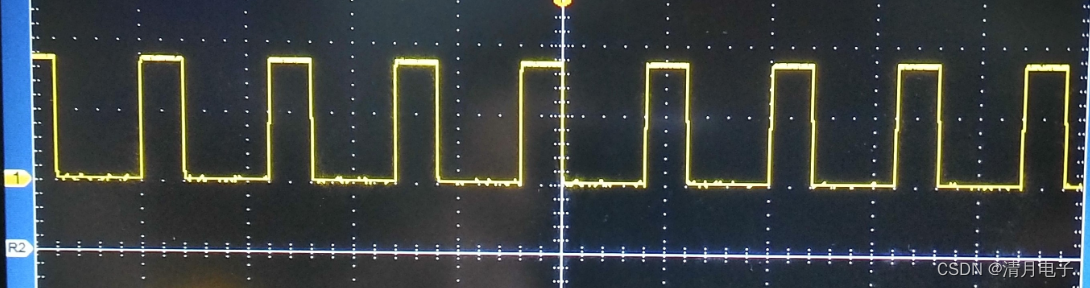
语音芯片KT142C两种音频输出方式PWM和DAC的区别
目录 语音芯片KT142C两种音频输出方式PWM和DAC的区别 一般的语音芯片,输出方式,无外乎两种,即dac输出,或者PWM输出 其中dac的输出,一般应用场景都是外挂功放芯片,实现声音的放大,比如常用的音箱…...

Kotlin 协程的挂起和阻塞的区别
一,简介 Kotlin协程引入了非常强大的异步编程模型,通过挂起而不是阻塞来实现并发操作。以下是有关Kotlin协程挂起和阻塞的详细介绍: 挂起(Suspending): 挂起是指一个协程的执行可以在不阻塞线程的情况下暂…...
解决Github Markdown图片显示残缺的问题
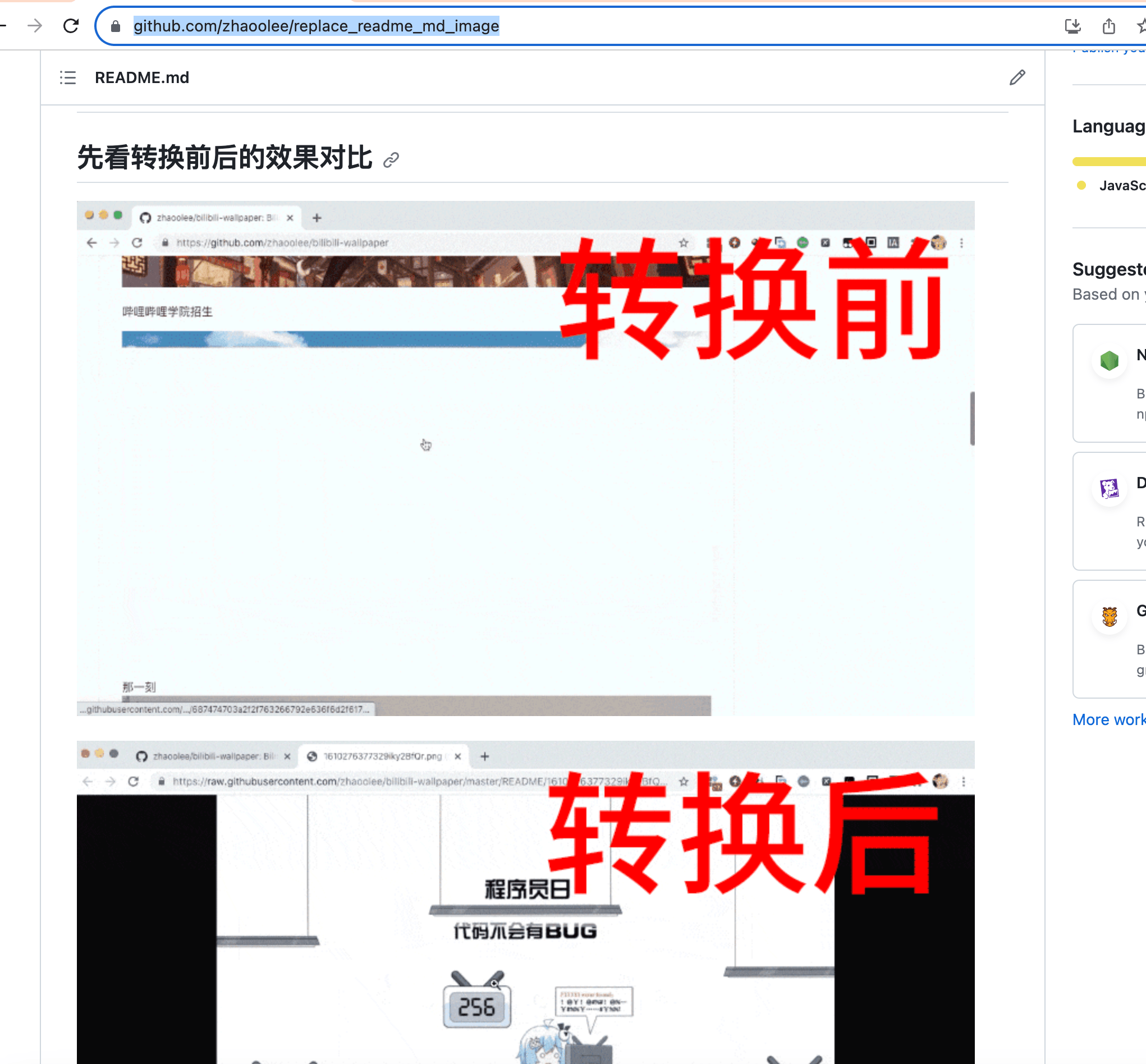
title: 解决Github Markdown图片显示残缺的问题 tags: 个人成长 categories:杂谈 在Github存放Markdown文档,如果图片没有存放在Github服务器上,github会尝试生成Github图片缓存,使用Github图片缓存,进行实际的展示。但比较蛋疼的…...
[MAUI]深入了解.NET MAUI Blazor与Vue的混合开发
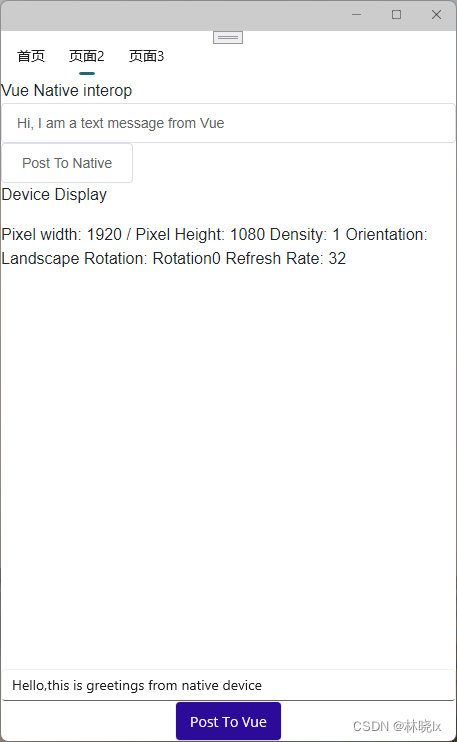
文章目录 Vue在混合开发中的特点创建MAUI项目创建Vue应用使用element-ui组件库JavaScript和原生代码的交互传递根组件参数从设备调用Javascript代码从Vue页面调用原生代码 读取设备信息项目地址 .NET MAUI结合Vue的混合开发可以使用更加熟悉的Vue的语法代替Blazor语法ÿ…...
1209. 带分数
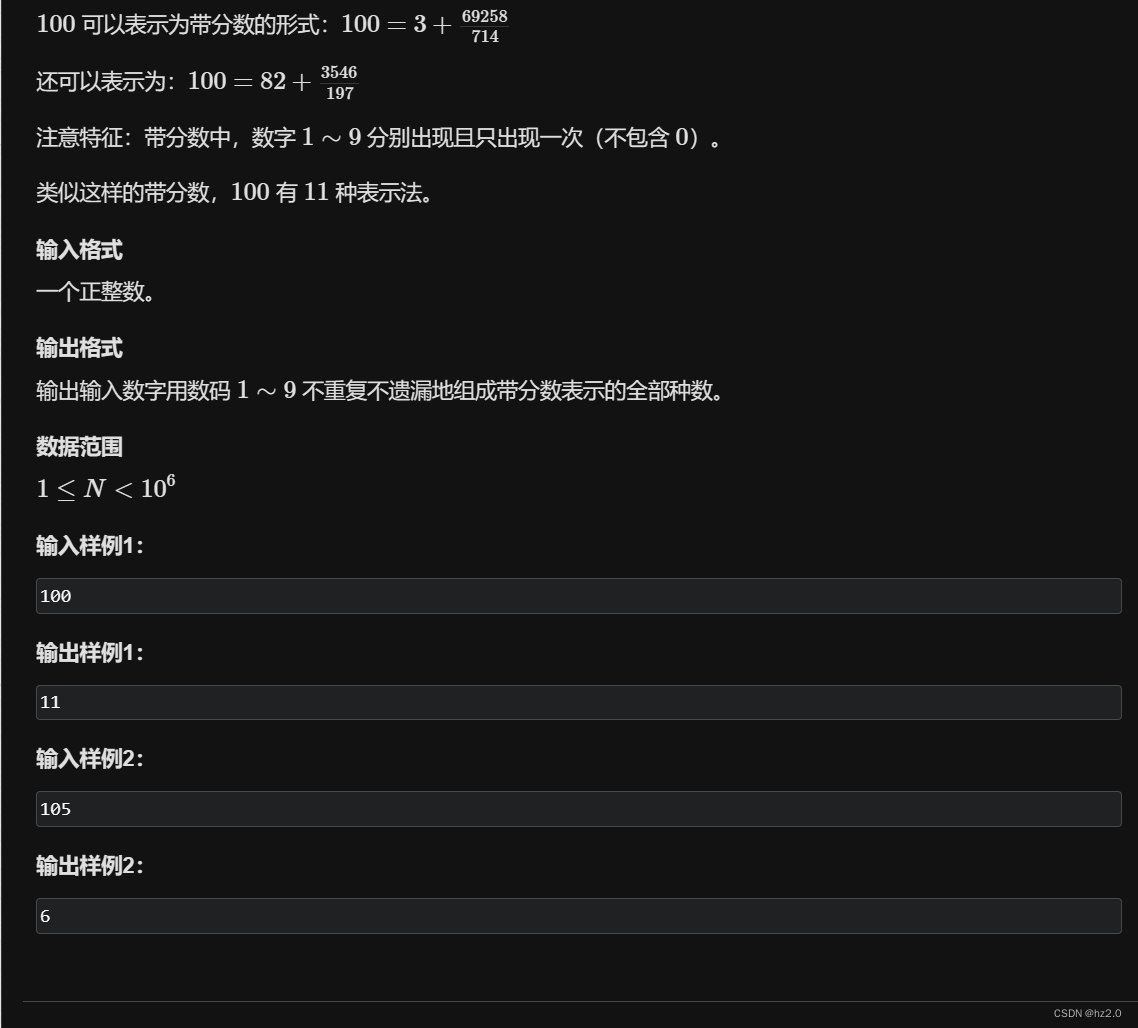
题目: 1209. 带分数 - AcWing题库 思路: 1.targetab/c,由题意a,b,c会包含1~9 且每个数出现且只能出现一次。我们可以抽象化为9个坑位分成3份分别给a,b,c。 2.先采用递归搜索树写出9个坑位的全排列,再分成3个区,分…...

【树莓派触摸屏等学习笔记】
前言 树莓派触摸屏 提示:以下是本篇文章正文内容,下面案例可供参考 一、触摸屏硬件驱动 出现黑屏的时候,恢复一下txt config.txt 全屏显示 showFull Exec :自启动 surf 算法 特征点识别 算法的复杂度挺高的 特性树莓派强大…...

ERR_PNPM_JSON_PARSE Unexpected end of JSON input while parsing empty string in
终端报错: ERR_PNPM_JSON_PARSE Unexpected end of JSON input while parsing empty string in 报错原因:依赖没有删除干净 解决办法: ①删除node_modules ②在package.json的dependencies删除不需要依赖 ③重新pnpm i...
linux基础IO
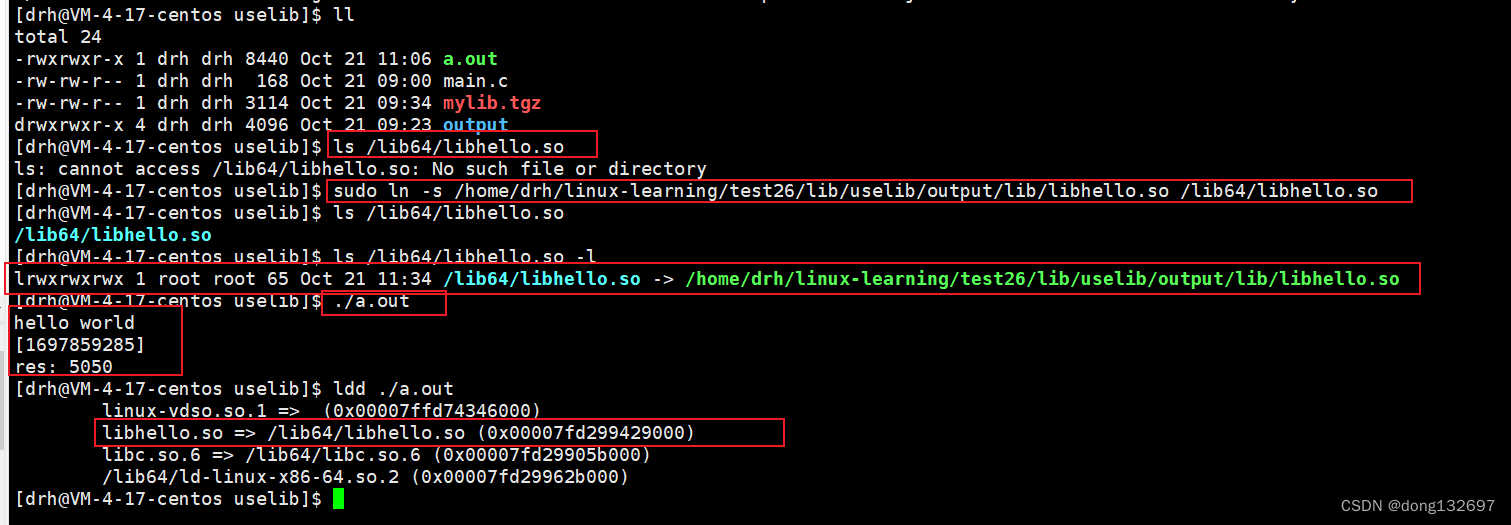
文章目录 前言一、基础IO1、文件预备知识1.1 文件类的系统调用接口1.2 复习c语言接口 2、文件类的系统调用接口2.1 open系统调用2.2 close系统调用2.3 write系统调用2.4 read系统调用 3、文件描述符3.1 文件描述符fd介绍3.2 文件描述符fd分配规则与重定向3.3 重定向原理3.4输入…...

华为OD机试 - TLV格式 - 逻辑分析(Java 2023 B卷 100分)
目录 专栏导读一、题目描述二、输入描述三、输出描述四、解题思路五、Java算法源码六、效果展示1、输入2、输出3、说明 华为OD机试 2023B卷题库疯狂收录中,刷题点这里 专栏导读 本专栏收录于《华为OD机试(JAVA)真题(A卷B卷&#…...
构建一个问题回答文档的应用程序实战代码)
LLMs之RAG:利用langchain实现RAG应用五大思路步骤—基于langchain使用LLMs(ChatGPT)构建一个问题回答文档的应用程序实战代码
LLMs之RAG:利用langchain实现RAG应用五大思路步骤—基于langchain使用LLMs(ChatGPT)构建一个问题回答文档的应用程序实战代码 目录 相关文章...

链式队列----数据结构
队列的基本概念 队列是一种操作受限的线性表(先进先出),只允许在队尾插入,队头删除。 例如去银行办理业务,肯定是先来的先出去,后来的人排在后方,只有第一个人业务办理完了,才会有…...

开发者如何高效使用AI工具并保持技术判断力
1. 开发者如何驾驭AI工具而不被其淹没作为经历过三次技术浪潮的老程序员,我亲眼目睹了从云计算到移动开发再到如今AI工具的演进过程。最近半年,我每天都会收到团队成员类似的困惑:"ChatGPT给出的代码有安全隐患怎么办?"…...

别再折腾双系统了!Win11下用WSL2+Ubuntu 20.04一步搞定CUDA和PyTorch环境
别再折腾双系统了!Win11下用WSL2Ubuntu 20.04一步搞定CUDA和PyTorch环境 还在为AI开发环境反复重装系统?每次切换操作系统都要重启电脑?虚拟机卡顿到怀疑人生?现在,Windows 11用户有了更优雅的解决方案——WSL2配合Ub…...

ncmdumpGUI:网易云音乐NCM文件解密转换的图形界面解决方案
ncmdumpGUI:网易云音乐NCM文件解密转换的图形界面解决方案 【免费下载链接】ncmdumpGUI C#版本网易云音乐ncm文件格式转换,Windows图形界面版本 项目地址: https://gitcode.com/gh_mirrors/nc/ncmdumpGUI 你是否曾经从网易云音乐下载了心爱的歌曲…...

Parquet Viewer:重新定义浏览器数据查看体验的WebAssembly数据处理工具
Parquet Viewer:重新定义浏览器数据查看体验的WebAssembly数据处理工具 【免费下载链接】parquet-viewer View parquet files online 项目地址: https://gitcode.com/gh_mirrors/pa/parquet-viewer 在大数据时代,处理和分析Parquet文件已成为数据…...

【信奥业余科普】C++ 的奇妙之旅 | 13:为什么 0.1+0.2≠0.3?——解密“爆int”溢出与浮点数精度的底层原理
在第 11 篇文章中,我们提到 int、double 等数据类型本质上是向系统申请固定大小的内存空间。在第 12 篇文章中,我们看到整数除法(如 5 / 2)会舍弃小数部分,仅保留整数 2。 这些现象的根本原因在于:计算机内…...

终极赛博朋克2077存档编辑器:从新手到专家的完全指南
终极赛博朋克2077存档编辑器:从新手到专家的完全指南 【免费下载链接】CyberpunkSaveEditor A tool to edit Cyberpunk 2077 sav.dat files 项目地址: https://gitcode.com/gh_mirrors/cy/CyberpunkSaveEditor 赛博朋克2077存档编辑器是一个强大的开源工具&a…...

从YUV序列到码流分析:一次完整的H.266/VVC编码实验与问题排查实录
从YUV序列到码流分析:一次完整的H.266/VVC编码实验与问题排查实录 在视频编码技术快速迭代的今天,H.266/VVC作为新一代标准,其压缩效率相比前代提升显著,但随之而来的复杂度也令许多开发者望而生畏。本文将带您深入实战࿰…...
 主要用于流转税(间接税)计税)
Oracle EBS 的 E-Business Tax (eBTax) 主要用于流转税(间接税)计税
Oracle EBS 的 E-Business Tax (eBTax) 主要用于流转税(间接税)计税,但也支持部分直接税场景。一、核心定位:交易型税种(流转税)eBTax 设计初衷是处理交易层面的税务计算,与采购、销售、发票、付…...

QMCDecode:QQ音乐加密文件快速解码与格式转换的终极解决方案
QMCDecode:QQ音乐加密文件快速解码与格式转换的终极解决方案 【免费下载链接】QMCDecode QQ音乐QMC格式转换为普通格式(qmcflac转flac,qmc0,qmc3转mp3, mflac,mflac0等转flac),仅支持macOS,可自动识别到QQ音乐下载目录,…...

超越DWA和TEB?深入拆解Nav2的MPPI控制器:从采样噪声到插件化Critic的运作机制
超越DWA和TEB?深入拆解Nav2的MPPI控制器:从采样噪声到插件化Critic的运作机制 在机器人运动规划领域,局部轨迹规划器的选择直接影响着机器人的动态性能和避障能力。传统方法如DWA(Dynamic Window Approach)和TEB&#…...