
微信小程序开发的OA会议之会议,投票,个人中心的页面搭建及模板
目录
一.自定义组件
1.1.创建
1.2.定义
1.3.编写
1.4.使用
二.会议
2.1.数据
2.2.显示
2.3. 样式
三.个人中心
3.1.页面
3.2.样式
四.投票
4.1.引用
4.2.数据
4.3.页面
4.4.样式
好啦今天就到这里了,希望能帮到你哦!!!
一.自定义组件
开发者可以将页面内的功能模块抽象成自定义组件,以便在不同的页面中重复使用;也可以将复杂的页面拆分成多个低耦合的模块,有助于代码维护。自定义组件在使用时与基础组件非常相似。
以下的代码都基于我博客中的 :
微信小程序的OA会议之首页搭建
https://blog.csdn.net/m0_74915426/article/details/133936420?spm=1001.2014.3001.5502
1.1.创建
在项目中创建一个名为 : components 的文件,来存放组件
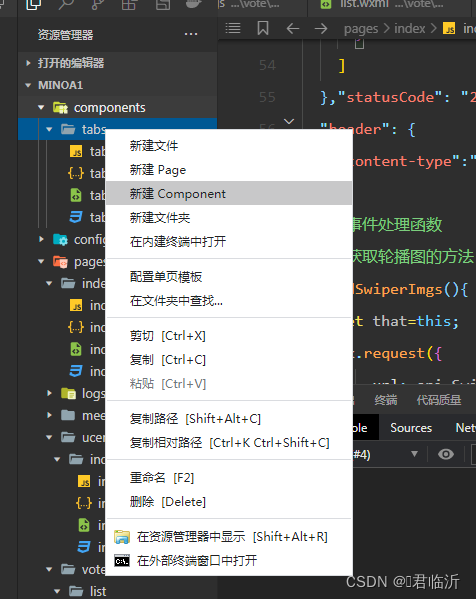
再在components文件夹中创建一个组件,名为 : tabs ,创建操作如图 :
1.2.定义
类似于页面,一个自定义组件由
jsonwxmlwxssjs4个文件组成。要编写一个自定义组件,首先需要在json文件中进行自定义组件声明(将component字段设为true可将这一组文件设为自定义组件):
在 tabs.json 中编写:
{"component": true,"usingComponents": {}
}
同时,还要在
wxml文件中编写组件模板,在wxss文件中加入组件样式,它们的写法与页面的写法类似。具体细节和注意事项参见 组件模板和样式 。
1.3.编写
在 tabs.wxml 中进行编写模板:
<!--components/tabs/tabs.wxml-->
<!-- <text>components/tabs/tabs.wxml</text> -->
<!-- 这是自定义组件的内部WXML结构 -->
<view class="tabs"><view class="tabs_title"><view wx:for="{{tabList}}" wx:key="id" class="title_item  {{index==tabIndex?'item_active':''}}" bindtap="handleItemTap" data-index="{{index}}"><view style="margin-bottom:5rpx">{{item}}</view><view style="width:30px" class="{{index==tabIndex?'item_active1':''}}"></view></view></view><view class="tabs_content"><slot></slot></view>
</view>
在 tabs.js 中进行编写功能 :
// components/tabs/tabs.js
Component({/*** 组件的属性列表*/properties: {// 这里定义了innerText属性,属性值可以在组件使用时指定innerText: {type: String,value: 'default value'
},
tabList:Object},/*** 组件的初始数据*/data: {tabIndex:1},/*** 组件的方法列表*/methods: {handleItemTap(e){// 获取索引const {index} = e.currentTarget.dataset;// 触发 父组件的事件this.triggerEvent("tabsItemChange",{index})this.setData({tabIndex:index})}}
})
在 tabs.wxss 中进行编写样式:
.tabs {position: fixed;top: 0;width: 100%;background-color: #fff;z-index: 99;border-bottom: 1px solid #efefef;padding-bottom: 20rpx;
}.tabs_title {/* width: 400rpx; */width: 90%;display: flex;font-size: 9pt;padding: 0 20rpx;
}.title_item {color: #999;padding: 15rpx 0;display: flex;flex: 1;flex-flow: column nowrap;justify-content: center;align-items: center;
}.item_active {/* color:#ED8137; */color: #000000;font-size: 11pt;font-weight: 800;
}.item_active1 {/* color:#ED8137; */color: #000000;font-size: 11pt;font-weight: 800;border-bottom: 6rpx solid #333;border-radius: 2px;
}1.4.使用
在项目的 project.config.json 文件中的setting属性中进行配置,增加以下两个配置 :
"ignoreDevUnusedFiles": false,
"ignoreUploadUnusedFiles": false,
如图:

需要在哪个页面中进行使用,就需要在哪个页面中进行引用配置
比如说 : 需要在会议页面中进行使用,就要在 会议页面.json (meeting/list/list.json)
中增加以下设置
{"usingComponents": {"tabs": "../../../components/tabs/tabs"}
}
然后再 list.js 中进行初始化数据,在data属性中编写 :
 data: {tabs:['会议中','已完成','已取消','全部会议']
}
在 list.wxml中使用
<!--pages/meeting/list/list.wxml-->
<tabs tabList="{{tabs}}"  bindtabsItemChange="tabsItemChange">
</tabs>
效果图后面一起
注意事项:
一些需要注意的细节:
- 因为 WXML 节点标签名只能是小写字母、中划线和下划线的组合,所以自定义组件的标签名也只能包含这些字符。
- 自定义组件也是可以引用自定义组件的,引用方法类似于页面引用自定义组件的方式(使用 usingComponents 字段)。
- 自定义组件和页面所在项目根目录名不能以“wx-”为前缀,否则会报错。
注意,是否在页面文件中使用
usingComponents会使得页面的this对象的原型稍有差异,包括:
- 使用 usingComponents 页面的原型与不使用时不一致,即 Object.getPrototypeOf(this) 结果不同。
- 使用 usingComponents 时会多一些方法,如 selectComponent 。
- 出于性能考虑,使用 usingComponents 时, setData 内容不会被直接深复制,即 this.setData({ field: obj }) 后 this.data.field === obj 。(深复制会在这个值被组件间传递时发生。)
如果页面比较复杂,新增或删除
usingComponents定义段时建议重新测试一下。
二.会议
学会了自定义组件的使用,在后将会议的页面及效果编写搭建完成
2.1.数据
在会议的 list.js 中进行初始化数据进行页面显示效果 :
// pages/vote/list/list.js
Page({/*** 页面的初始数据*/data: {tabs:['全部','已发起','已参与'],lists: [{'id': '1','image': '/static/persons/8.jpg','name' : '君总','title': '深圳·北京PM大会','vote' : '是否认同与京东进行产品合作','num'  : '304','state':'未投票','time' : '10月09日 17:59','address': '深圳市·南山区'},{'id': '2','image': '/static/persons/16.jpg','name' : '刘老板','title': 'AIWORLD人工智能大会','vote' : '是否投资AI发展','num'  : '480','state':'已投票','time' : '10月09日 17:39','address': '北京市·朝阳区'},{'id': '3','image': '/static/persons/13.jpg','name' : '肖总','title': 'H100太空商业大会','vote' : '是否太空商业进行合作','num'  : '500','state': '未参与','time' : '10月09日 17:31','address': '大连市'},{'id': '4','image': '/static/persons/15.jpg','name' : ' 文总','title': '2023消费升级创新大会','vote' : '是否对本次创新持续升级','num':'217','state':'已投票','time': '11月20日 16:59','address': '北京市·朝阳区'}],lists1: [{'id': '1','image': '/static/persons/2.jpg','name' : '张总','title': '深圳·北京PM大会','vote' : '是否认同与京东进行产品合作','num'  : '304','state':'未投票','time' : '10月09日 17:59','address': '深圳市·南山区'},{'id': '2','image': '/static/persons/16.jpg','name' : '陈总','title': 'AIWORLD人工智能大会','vote' : '是否投资AI发展','num'  : '480','state':'已投票','time' : '10月09日 17:39','address': '北京市·朝阳区'},{'id': '3','image': '/static/persons/13.jpg','name' : '杨总','title': 'H100太空商业大会','vote' : '是否太空商业进行合作','num'  : '500','state': '未参与','time' : '10月09日 17:31','address': '大连市'},{'id': '4','image': '/static/persons/20.jpg','name' : ' 冯总 ','title': '2023消费升级创新大会','vote' : '是否对本次创新持续升级','num':'217','state':'已投票','time': '11月20日 16:59','address': '北京市·朝阳区'}],lists2: [{'id': '1','image': '/static/persons/11.jpg','name' : '徐总','title': '深圳·北京PM大会','vote' : '是否认同与京东进行产品合作','num'  : '422','state':'未投票','time' : '10月09日 17:59','address': '深圳市·南山区'},{'id': '2','image': '/static/persons/16.jpg','name' : '邓总','title': 'AIWORLD人工智能大会','vote' : '是否投资AI发展','num'  : '377','state':'已投票','time' : '10月09日 17:39','address': '北京市·朝阳区'},{'id': '3','image': '/static/persons/17.jpg','name' : '廖总','title': 'H100太空商业大会','vote' : '是否太空商业进行合作','num'  : '463','state': '未参与','time' : '10月09日 17:31','address': '大连市'},{'id': '4','image': '/static/persons/19.jpg','name' : ' 李总 ','title': '2023消费升级创新大会','vote' : '是否对本次创新持续升级','num':'543','state':'已投票','time': '11月20日 16:59','address': '北京市·朝阳区'}]},tabsItemChange(e){console.log(e.detail);let tolists;if(e.detail.index==1){tolists = this.data.lists1;}else if(e.detail.index==2){tolists = this.data.lists2;}else{tolists = this.data.lists;}this.setData({lists: tolists})
},/*** 生命周期函数--监听页面加载*/onLoad(options) {},/*** 生命周期函数--监听页面初次渲染完成*/onReady() {},/*** 生命周期函数--监听页面显示*/onShow() {},/*** 生命周期函数--监听页面隐藏*/onHide() {},/*** 生命周期函数--监听页面卸载*/onUnload() {},/*** 页面相关事件处理函数--监听用户下拉动作*/onPullDownRefresh() {},/*** 页面上拉触底事件的处理函数*/onReachBottom() {},/*** 用户点击右上角分享*/onShareAppMessage() {}
})2.2.显示
在会议的 list.wxml 中进行编写 :
<!--pages/meeting/list/list.wxml-->
<tabs tabList="{{tabs}}"  bindtabsItemChange="tabsItemChange">
</tabs>
<view style="height: 100rpx;"></view>
<block wx:for-items="{{lists}}" wx:for-item="item" wx:key="item.id"><view class="list" data-id="{{item.id}}"><view class="list-img al-center"><image class="video-img" mode="scaleToFill" src="{{item.image}}"></image></view><view class="list-detail"><view class="list-title"><text>{{item.title}}</text></view><view class="list-tag"><view class="state al-center">{{item.state}}</view><view class="join al-center"><text class="list-num">{{item.num}}</text>人报名</view></view><view class="list-info"><text>{{item.address}}</text>|<text>{{item.time}}</text></view></view></view>
</block>
<view class="section bottom-line"><text>到底啦</text>
</view>
2.3. 样式
在会议的 list.wxss 中进行编写样式,美化页面 :
/* pages/meeting/list/list.wxss */
.list {display: flex;flex-direction: row;width: 100%;padding: 0 20rpx 0 0;border-top: 1px solid #eeeeee;background-color: #fff;margin-bottom: 5rpx;/* border-radius: 20rpx;box-shadow: 0px 0px 10px 6px rgba(0,0,0,0.1); */
}.list-img {display: flex;margin: 10rpx 10rpx;width: 150rpx;height: 220rpx;justify-content: center;align-items: center;
}.list-img .video-img {width: 120rpx;height: 120rpx;}.list-detail {margin: 10rpx 10rpx;display: flex;flex-direction: column;width: 600rpx;height: 220rpx;
}.list-title text {font-size: 11pt;color: #333;font-weight: bold;
}.list-detail .list-tag {display: flex;height: 70rpx;
}.list-tag .state {font-size: 9pt;color: #81aaf7;width: 120rpx;border: 1px solid #93b9ff;border-radius: 2px;margin: 10rpx 0rpx;display: flex;justify-content: center;align-items: center;
}.list-tag .join {font-size: 11pt;color: #bbb;margin-left: 20rpx;display: flex;justify-content: center;align-items: center;
}.list-tag .list-num {font-size: 11pt;color: #ff6666;
}.list-info {font-size: 9pt;color: #bbb;margin-top: 20rpx;
}
.bottom-line{display: flex;height: 60rpx;justify-content: center;align-items: center;background-color: #f3f3f3;
}
.bottom-line text{font-size: 9pt;color: #666;
}
效果:

注 : 其中的图片名称及路径,需要根据自己的图片名称及路径进行修改
三.个人中心
3.1.页面
在个人中心页面中编写 .wxml 文件(如 : ucenter/index/index.wxml) 进行页面显示
<!--pages/ucenter/index/index.wxml-->
<!-- <text>pages/ucenter/index/index.wxml</text> -->
<view class="user"><image class="user-img"  src="/static/persons/2.jpg"></image><view class="user-name">ಥ慧瑶ಥ</view><text class="user-up">修改</text>
</view>
<view class="cells"><view class="cell-items"><image src="/static/tabBar/sdk.png" class="cell-items-icon"></image><text class="cell-items-title">我主持的会议</text><text class="cell-items-num">1</text><text class="cell-items-detail">👉</text></view><view style="height: 5rpx;background-color: rgba(135, 206, 250, 0.075);"></view><view class="cell-items"><image src="/static/tabBar/sdk.png" class="cell-items-icon"></image><text class="cell-items-title">我参与的会议</text><text class="cell-items-num">10</text><text class="cell-items-detail">👉</text></view>
</view>
<view style="height: 27rpx;background-color: rgba(135, 206, 250, 0.075);"></view>
<view class="cells"><view class="cell-items"><image src="/static/tabBar/sdk.png" class="cell-items-icon"></image><text class="cell-items-title">我发布的投票</text><text class="cell-items-num">1</text><text class="cell-items-detail">👉</text></view><view style="height: 5rpx;background-color: rgba(135, 206, 250, 0.075);"></view><view class="cell-items"><image src="/static/tabBar/sdk.png" class="cell-items-icon"></image><text class="cell-items-title">我参与的投票</text><text class="cell-items-num">10</text><text class="cell-items-detail">👉</text></view>
</view>
<view style="height: 27rpx;background-color: rgba(135, 206, 250, 0.075);"></view>
<view class="cells"><view class="cell-items"><image src="/static/tabBar/template.png" class="cell-items-icon"></image><text class="cell-items-title">信息</text><text class="cell-items-ion">👉</text></view><view style="height: 5rpx;background-color: rgba(135, 206, 250, 0.075);"></view><view class="cell-items"><image src="/static/tabBar/component.png" class="cell-items-icon"></image><text class="cell-items-title">设置</text><text class="cell-items-ion">👉</text></view>
</view>
3.2.样式
在个人中心的 .wxss 样式文件 中进行编写样式,来美化布局的页面效果
(如 : ucenter/index/index.wxss)
/* pages/ucenter/index/index.wxss */
Page{background-color: rgba(135, 206, 250, 0.075);
}
.user{display: flex;width: 100%;align-items:center;background-color: white;margin-bottom: 28rpx;
}
.user-img{
height: 170rpx;
width: 170rpx;
margin: 30rpx;
border: 1px solid #cdd7ee;
border-radius: 6px;
}
.user-name{
width: 380rpx;
margin-left: 20rpx;
font-weight: 550;
}
.user-up{
color: rgb(136, 133, 133);
}
.cells{background-color: white;
}
.cell-items{display: flex;align-items:center; height: 110rpx;
}
.cell-items-title{width: 290rpx;
}
.cell-items-icon{width: 50rpx;height: 50rpx;margin: 20rpx;
}
.cell-items-num{padding-left: 30rpx;margin-left: 200rpx;width: 70rpx;
}
.cell-items-ion{margin-left: 295rpx;
}
效果图:

四.投票
4.1.引用
在 投票页面的 .json 文件( 如: vote/list/list.json )中进行编写 :
{"usingComponents": {"tabs": "../../../components/tabs/tabs"}
}
4.2.数据
在 投票页面的 .js 文件( 如: vote/list/list.js )中进行编写初始化数据及方法功能 :
// pages/vote/list/list.js
Page({/*** 页面的初始数据*/data: {tabs:['全部','已发起','已参与'],lists: [{'id': '1','image': '/static/persons/8.jpg','name' : '君总','title': '深圳·北京PM大会','vote' : '是否认同与京东进行产品合作','num'  : '304','state':'未投票','time' : '10月09日 17:59','address': '深圳市·南山区'},{'id': '2','image': '/static/persons/16.jpg','name' : '刘老板','title': 'AIWORLD人工智能大会','vote' : '是否投资AI发展','num'  : '480','state':'已投票','time' : '10月09日 17:39','address': '北京市·朝阳区'},{'id': '3','image': '/static/persons/13.jpg','name' : '肖总','title': 'H100太空商业大会','vote' : '是否太空商业进行合作','num'  : '500','state': '未参与','time' : '10月09日 17:31','address': '大连市'},{'id': '4','image': '/static/persons/15.jpg','name' : ' 文总','title': '2023消费升级创新大会','vote' : '是否对本次创新持续升级','num':'217','state':'已投票','time': '11月20日 16:59','address': '北京市·朝阳区'}],lists1: [{'id': '1','image': '/static/persons/2.jpg','name' : '张总','title': '深圳·北京PM大会','vote' : '是否认同与京东进行产品合作','num'  : '304','state':'未投票','time' : '10月09日 17:59','address': '深圳市·南山区'},{'id': '2','image': '/static/persons/16.jpg','name' : '陈总','title': 'AIWORLD人工智能大会','vote' : '是否投资AI发展','num'  : '480','state':'已投票','time' : '10月09日 17:39','address': '北京市·朝阳区'},{'id': '3','image': '/static/persons/13.jpg','name' : '杨总','title': 'H100太空商业大会','vote' : '是否太空商业进行合作','num'  : '500','state': '未参与','time' : '10月09日 17:31','address': '大连市'},{'id': '4','image': '/static/persons/20.jpg','name' : ' 冯总 ','title': '2023消费升级创新大会','vote' : '是否对本次创新持续升级','num':'217','state':'已投票','time': '11月20日 16:59','address': '北京市·朝阳区'}],lists2: [{'id': '1','image': '/static/persons/11.jpg','name' : '徐总','title': '深圳·北京PM大会','vote' : '是否认同与京东进行产品合作','num'  : '422','state':'未投票','time' : '10月09日 17:59','address': '深圳市·南山区'},{'id': '2','image': '/static/persons/16.jpg','name' : '邓总','title': 'AIWORLD人工智能大会','vote' : '是否投资AI发展','num'  : '377','state':'已投票','time' : '10月09日 17:39','address': '北京市·朝阳区'},{'id': '3','image': '/static/persons/17.jpg','name' : '廖总','title': 'H100太空商业大会','vote' : '是否太空商业进行合作','num'  : '463','state': '未参与','time' : '10月09日 17:31','address': '大连市'},{'id': '4','image': '/static/persons/19.jpg','name' : ' 李总 ','title': '2023消费升级创新大会','vote' : '是否对本次创新持续升级','num':'543','state':'已投票','time': '11月20日 16:59','address': '北京市·朝阳区'}]},tabsItemChange(e){console.log(e.detail);let tolists;if(e.detail.index==1){tolists = this.data.lists1;}else if(e.detail.index==2){tolists = this.data.lists2;}else{tolists = this.data.lists;}this.setData({lists: tolists})
},/*** 生命周期函数--监听页面加载*/onLoad(options) {},/*** 生命周期函数--监听页面初次渲染完成*/onReady() {},/*** 生命周期函数--监听页面显示*/onShow() {},/*** 生命周期函数--监听页面隐藏*/onHide() {},/*** 生命周期函数--监听页面卸载*/onUnload() {},/*** 页面相关事件处理函数--监听用户下拉动作*/onPullDownRefresh() {},/*** 页面上拉触底事件的处理函数*/onReachBottom() {},/*** 用户点击右上角分享*/onShareAppMessage() {}
})
4.3.页面
在投票页面的 wxml 文件( 如: vote/list/list.wxml )中进行编写页面标签显示数据及效果 :
<!--pages/vote/list/list.wxml-->
<tabs tabList="{{tabs}}"  bindtabsItemChange="tabsItemChange">
</tabs>
<view style="height: 100rpx;"></view>
<block wx:for-items="{{lists}}" wx:for-item="item" wx:key="item.id"><view class="list" data-id="{{item.id}}"><view class="list-img al-center"><image class="video-img" mode="scaleToFill" src="{{item.image}}"></image></view><view class="list-detail"><view class="list-title"><text><text style="margin-right: 13rpx;"> 发 起 人</text> : {{item.name}}</text></view><view class="list-title"><text>会议名称 : {{item.title}}</text></view><view class="list-title"><text>投票标题 : [ {{item.vote}} ]</text></view><view class="list-tag"><view class="state al-center">{{item.state}}</view><view class="join al-center"><text class="list-num" >{{item.num}}</text>人参与投票</view></view><view class="list-info"><text>{{item.address}}</text> | <text>{{item.time}}</text></view></view></view>
</block>
<view class="section bottom-line"><text>到底啦</text>
</view>
4.4.样式
在投票页面的 .wxss 文件( 如: vote/list/list.wxss)中进行编写页面样式进行美化效果 :
/* pages/vote/list/list.wxss */
.list {display: flex;flex-direction: row;width: 100%;padding: 0 20rpx 0 0;border-top: 1px solid #eeeeee;background-color: #fff;margin-bottom: 5rpx;height: 270rpx;/* border-radius: 20rpx;box-shadow: 0px 0px 10px 6px rgba(0,0,0,0.1); */
}.list-img {display: flex;margin: 10rpx 10rpx;width: 160rpx;height: 250rpx;justify-content: center;align-items: center;flex-direction:column;
}.list-img .video-img {width: 140rpx;height: 160rpx;border-radius: 6px;
}.list-detail {margin: 10rpx 10rpx;display: flex;flex-direction: column;width: 600rpx;height: 300rpx;
}.list-title text {font-size: 9pt;color: #333;font-weight: bold;
}.list-detail  {display: flex;height: 100rpx;
}
.list-tag{display: flex;
}
.state {font-size: 9pt;color: #81aaf7;width: 120rpx;height: 40rpx;border: 1px solid #93b9ff;border-radius: 2px;margin: 10rpx 0rpx;display: flex;justify-content: center;align-items: center;
}.join {font-size: 11pt;color: #bbb;margin-left: 20rpx;display: flex;justify-content: center;align-items: center;
}.list-num {margin-right: 10rpx;font-size: 11pt;color: #ff6666;
}.list-info {font-size: 9pt;color: #bbb;
}
.bottom-line{display: flex;height: 60rpx;justify-content: center;align-items: center;background-color: #f3f3f3;
}
.bottom-line text{font-size: 9pt;color: #666;
}
效果图:

好啦今天就到这里了,希望能帮到你哦!!!
相关文章:
微信小程序开发的OA会议之会议,投票,个人中心的页面搭建及模板
目录 一.自定义组件 1.1.创建 1.2.定义 1.3.编写 1.4.使用 二.会议 2.1.数据 2.2.显示 2.3. 样式 三.个人中心 3.1.页面 3.2.样式 四.投票 4.1.引用 4.2.数据 4.3.页面 4.4.样式 好啦今天就到这里了,希望能帮到你哦!!&…...
决策树-入门
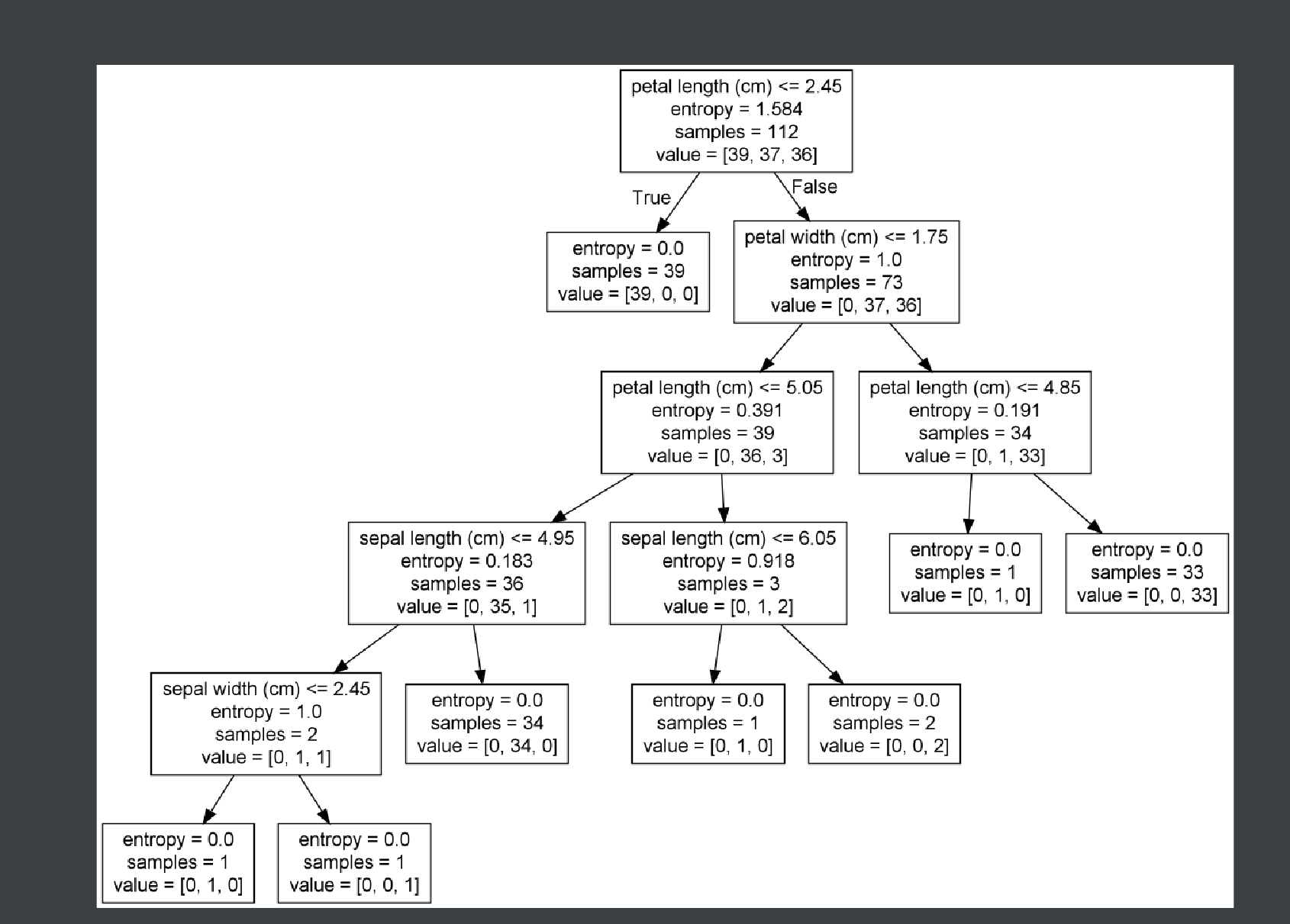
1、认识决策树 决策树思想的来源非常朴素,程序设计中的条件分支结构就是if-then结构,最早的决策树就是利用这类结构分割数据的一种分类学习方法 怎么理解这句话?通过一个对话例子 想一想这个女生为什么把年龄放在最上面判断!&a…...

使用Redis发布订阅模式实现 Session共享
其实并不是实现session共享,而是通过redis的发布订阅,让所有集群的服务器,都让自己的session发送一下消息。比如说userId在第35台服务器上, 有100台服务器,那么第1台服务器收到消息,需要通知userId…...
安达发|AI在APS生产计划排程系统中的应用与优势
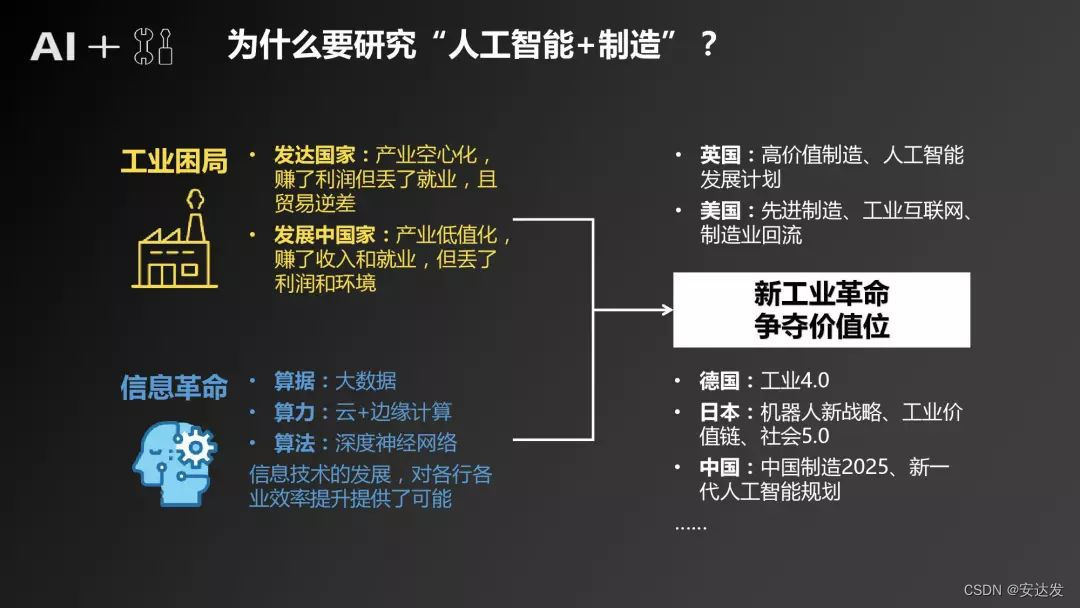
随着科技的不断发展,人工智能(AI)已经在许多领域取得了显著的成果。在生产管理计划系统中,AI技术的应用也日益受到关注。本文将探讨如何将AI人工智能用在生产管理计划系统上,以提高生产效率、降低成本并优化资源配置。…...
国产低功耗MCU芯片:Si24R03
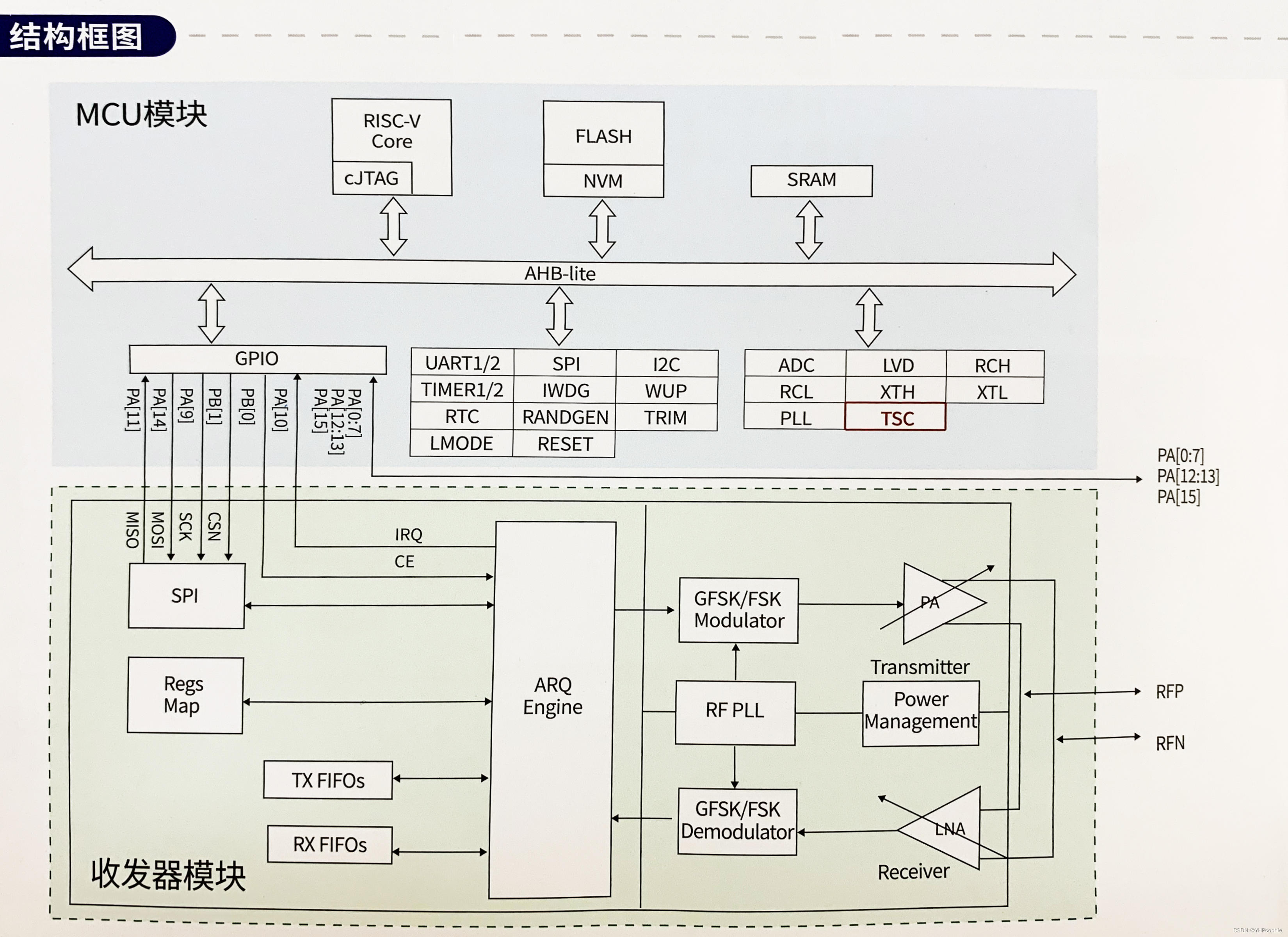
Si24R03集成了基于RISC-V核的低功耗MCU和工作在2.4GHz ISM频段的无线收发器模块,是一款高度集成的低功耗SOC片。 应用领域: 1、物联网 2、智N门锁 3、电机控制 4、消费电子 5、工业控制 其无线收发器模块是专为低功耗无线场合设计,在关…...

【Java】学生管理系统项目演示
目录 学生管理系统 学生管理系统代码思路分析 nextLine() 和 nextInt() 区别 学生管理系统 需求:实现对学生的增删改查功能,学生(学号,姓名,年龄,地址)字段 学生管理系统代码思路分析 定义学…...

Rust错误处理
返回值和错误处理 panic 深入剖析 主动调用 fn main() {panic!("crash and burn"); }backtrace 栈展开 panic 时的两种终止方式 当出现 panic! 时,程序提供了两种方式来处理终止流程:栈展开和直接终止 何时该使用 panic! 先来一点背景知…...

Golang操作数据库简单示例
目录 准备工作准备数据创建项目连接数据库查询数据修改数据插入数据删除数据释放资源完整代码最终执行结果 准备工作 在开始之前,你需要确保自己安装了Golang的编程环境,安装MySQL数据库,有一个可以用于编写代码的编辑器或IDE工具。我在这里…...

亚马逊测评,买家号支付不了、砍单率高是什么问题,需要怎么解决
下半年旺季很多卖家都在使用自养号测评给产品冲一波权重,但是很多朋友会遇到下不了单或者砍单率过高等问题。有人以为是支付卡的问题,也有人觉得是IP被关联了。其实他们讲的也没错,但是,亚马逊风控不会针对某个点去进行检测&#…...
)
B. Jellyfish and Game-Codeforces Round 902 (Div. 2)
B. Jellyfish and Game 交换k轮使得第一个同学拥有数值总数最大; 很容易看出这道题需要判断k奇偶数。 当k是奇数时可以看作第一个同学操作一轮。 k为偶数可以看作两个同学各操作一轮。 #include<iostream> #include<vector> #include<algorithm>…...

Linux下的命令行参数和环境变量
命令行参数 什么是命令行参数 命令行参数是指在执行命令行程序时,给程序传递的额外参数。在Linux终端中,命令行参数通常通过在命令后面添加空格分隔的参数来传递。 Linux下以main函数举例说明 #include<stdio.h>int main(int argc char* argv[])…...
语音芯片KT142C两种音频输出方式PWM和DAC的区别
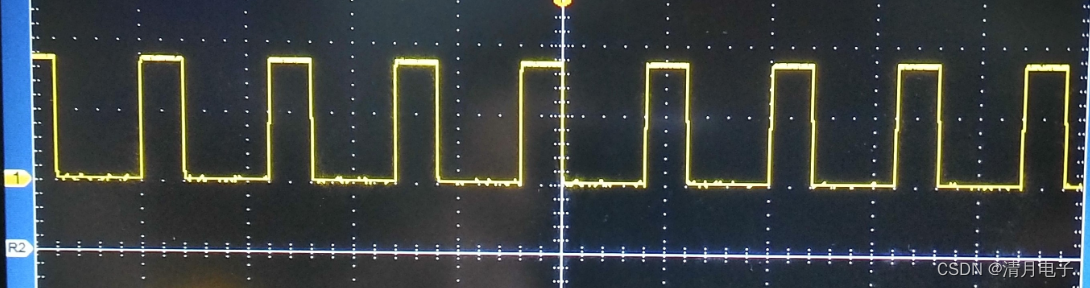
目录 语音芯片KT142C两种音频输出方式PWM和DAC的区别 一般的语音芯片,输出方式,无外乎两种,即dac输出,或者PWM输出 其中dac的输出,一般应用场景都是外挂功放芯片,实现声音的放大,比如常用的音箱…...

Kotlin 协程的挂起和阻塞的区别
一,简介 Kotlin协程引入了非常强大的异步编程模型,通过挂起而不是阻塞来实现并发操作。以下是有关Kotlin协程挂起和阻塞的详细介绍: 挂起(Suspending): 挂起是指一个协程的执行可以在不阻塞线程的情况下暂…...
解决Github Markdown图片显示残缺的问题
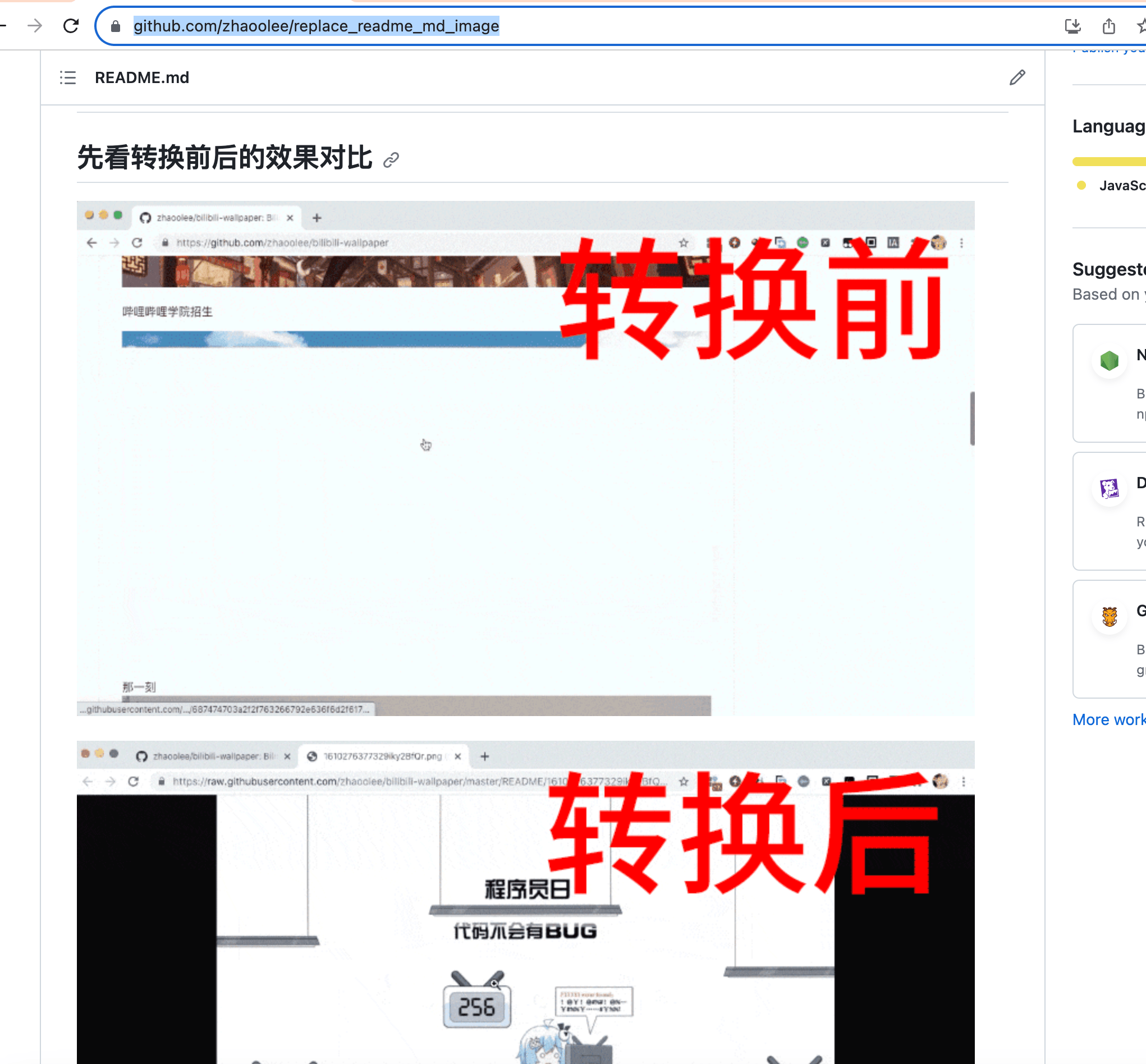
title: 解决Github Markdown图片显示残缺的问题 tags: 个人成长 categories:杂谈 在Github存放Markdown文档,如果图片没有存放在Github服务器上,github会尝试生成Github图片缓存,使用Github图片缓存,进行实际的展示。但比较蛋疼的…...
[MAUI]深入了解.NET MAUI Blazor与Vue的混合开发
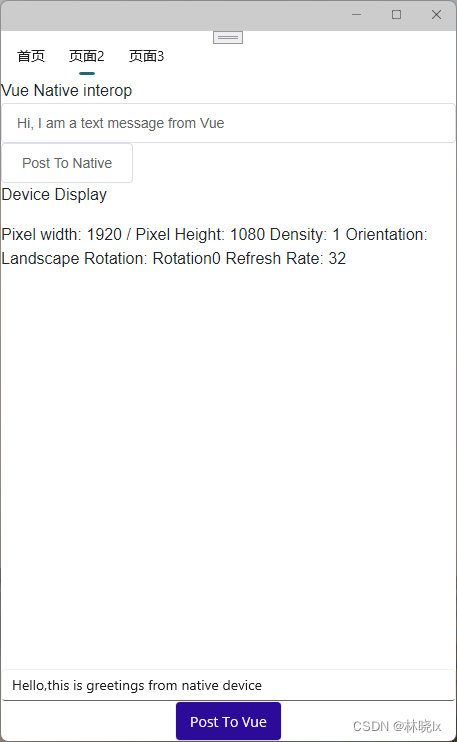
文章目录 Vue在混合开发中的特点创建MAUI项目创建Vue应用使用element-ui组件库JavaScript和原生代码的交互传递根组件参数从设备调用Javascript代码从Vue页面调用原生代码 读取设备信息项目地址 .NET MAUI结合Vue的混合开发可以使用更加熟悉的Vue的语法代替Blazor语法ÿ…...
1209. 带分数
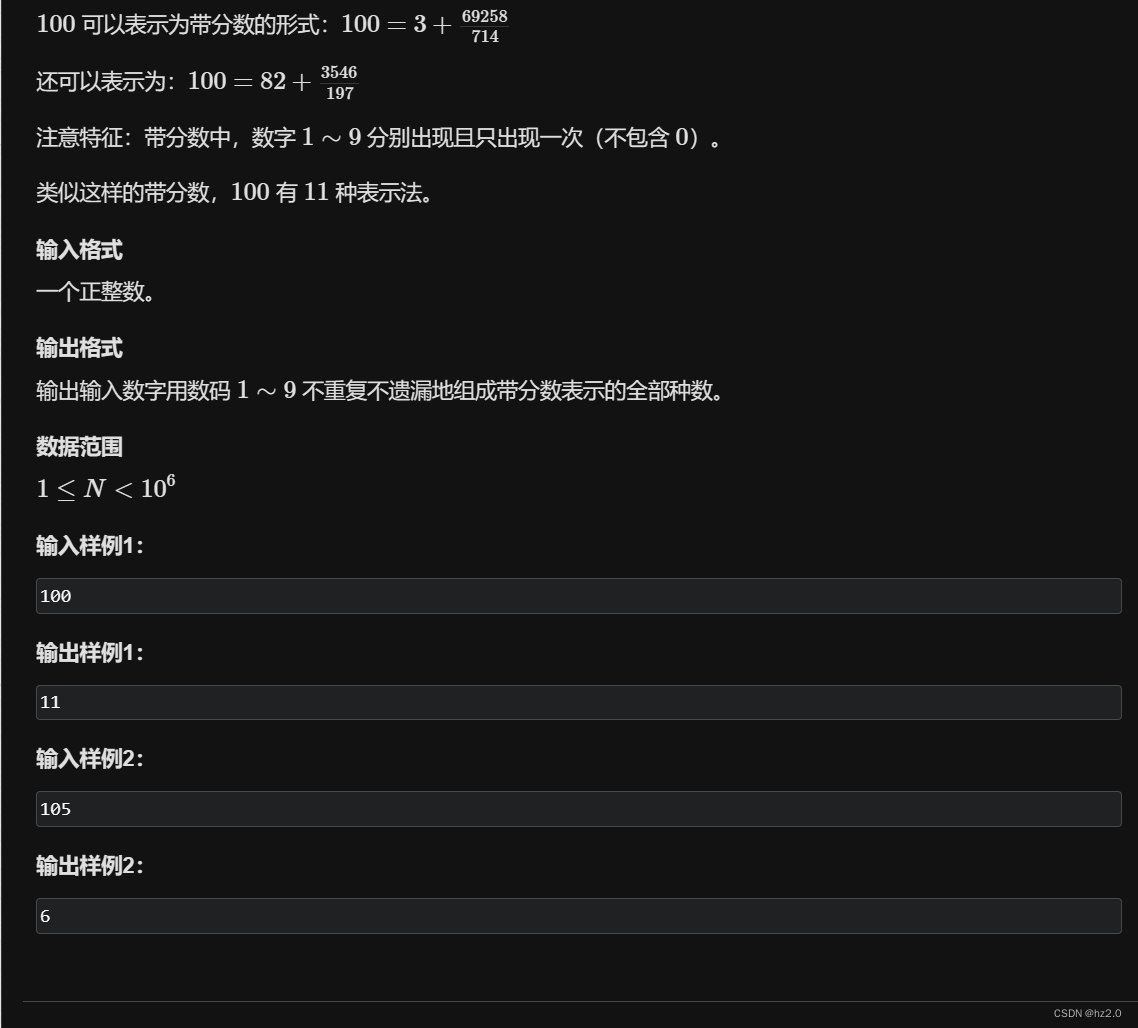
题目: 1209. 带分数 - AcWing题库 思路: 1.targetab/c,由题意a,b,c会包含1~9 且每个数出现且只能出现一次。我们可以抽象化为9个坑位分成3份分别给a,b,c。 2.先采用递归搜索树写出9个坑位的全排列,再分成3个区,分…...

【树莓派触摸屏等学习笔记】
前言 树莓派触摸屏 提示:以下是本篇文章正文内容,下面案例可供参考 一、触摸屏硬件驱动 出现黑屏的时候,恢复一下txt config.txt 全屏显示 showFull Exec :自启动 surf 算法 特征点识别 算法的复杂度挺高的 特性树莓派强大…...

ERR_PNPM_JSON_PARSE Unexpected end of JSON input while parsing empty string in
终端报错: ERR_PNPM_JSON_PARSE Unexpected end of JSON input while parsing empty string in 报错原因:依赖没有删除干净 解决办法: ①删除node_modules ②在package.json的dependencies删除不需要依赖 ③重新pnpm i...
linux基础IO
文章目录 前言一、基础IO1、文件预备知识1.1 文件类的系统调用接口1.2 复习c语言接口 2、文件类的系统调用接口2.1 open系统调用2.2 close系统调用2.3 write系统调用2.4 read系统调用 3、文件描述符3.1 文件描述符fd介绍3.2 文件描述符fd分配规则与重定向3.3 重定向原理3.4输入…...

华为OD机试 - TLV格式 - 逻辑分析(Java 2023 B卷 100分)
目录 专栏导读一、题目描述二、输入描述三、输出描述四、解题思路五、Java算法源码六、效果展示1、输入2、输出3、说明 华为OD机试 2023B卷题库疯狂收录中,刷题点这里 专栏导读 本专栏收录于《华为OD机试(JAVA)真题(A卷B卷&#…...

Maccy:macOS上终极免费的剪贴板管理神器
Maccy:macOS上终极免费的剪贴板管理神器 【免费下载链接】Maccy Lightweight clipboard manager for macOS 项目地址: https://gitcode.com/gh_mirrors/ma/Maccy 还在为复制的内容被覆盖而烦恼吗?Maccy就是你的救星!这款专为macOS设计…...

别再只会用卡方检验了!用SAS的CMH检验搞定临床试验中的中心效应分析
突破传统卡方局限:SAS CMH检验在临床试验中心效应分析中的实战指南 临床试验数据分析师们常常面临一个棘手问题:当多中心研究的数据合并后,不同研究中心间的差异(中心效应)可能掩盖或扭曲真实的治疗效果。传统卡方检验…...

如何高效使用抖音下载器:从入门到精通的完整方案
如何高效使用抖音下载器:从入门到精通的完整方案 【免费下载链接】douyin-downloader A practical Douyin downloader for both single-item and profile batch downloads, with progress display, retries, SQLite deduplication, and browser fallback support. 抖…...

Rust async-await 任务执行原理
Rust async/await 任务执行原理探秘 在现代高并发编程中,Rust的async/await语法凭借其高效、安全的特点成为开发者关注的焦点。它通过协作式多任务机制,在单线程内实现高吞吐量的异步操作。本文将深入剖析其任务执行原理,揭示其如何在不依赖…...

双移线驾驶员模型与多项式双移线模拟 - MATLAB/Simulink 解决方案
双移线驾驶员模型,多项式双移线模拟软件使用:Matlab/Simulink 适用场景:采用多项式搭建双移线期望路径,基于郭孔辉单点预瞄理论,搭建双移线simulink驾驶员模型。 模型包含:双移线模型,二自由度车…...

如何用NVIDIA Profile Inspector解锁显卡隐藏性能:完整新手教程
如何用NVIDIA Profile Inspector解锁显卡隐藏性能:完整新手教程 【免费下载链接】nvidiaProfileInspector 项目地址: https://gitcode.com/gh_mirrors/nv/nvidiaProfileInspector 你是否觉得NVIDIA显卡的性能还有提升空间?是否想要获得比官方控制…...

音频变压器核心技术解析:噪声隔离、阻抗匹配与信号平衡转换
引言在专业音频系统、广播设备、会议系统以及Hi-Fi音响中,音频变压器往往是一个不起眼却至关重要的元件。它利用电磁耦合原理传输信号,同时实现输入与输出之间的电气隔离。与普通的电力变压器不同,音频变压器针对20Hz~20kHz的人耳可听频段进行…...

三步完成Windows和Office永久激活:KMS_VL_ALL_AIO终极指南
三步完成Windows和Office永久激活:KMS_VL_ALL_AIO终极指南 【免费下载链接】KMS_VL_ALL_AIO Smart Activation Script 项目地址: https://gitcode.com/gh_mirrors/km/KMS_VL_ALL_AIO 你是否厌倦了Windows和Office的激活弹窗?是否希望找到一种稳定…...

Linux下备份文件
在Linux系统中备份文件有多种方法,可以根据你的需求选择不同的工具和策略。以下是一些常用的备份方法: 1、使用cp命令 适用于简单的文件复制备份。 复制单个文件 cp /path/to/original_file /path/to/backup_location/复制整个目录 cp -r /path/to/origi…...
)
别再乱用set_multicycle_path了!手把手教你搞定异步复位同步释放的STA约束(附SDC代码)
异步复位同步释放电路的STA约束实战:避开set_multicycle_path的常见陷阱 在数字芯片设计中,异步复位同步释放(Asynchronous Reset Synchronous Release)电路几乎出现在每一个需要可靠复位控制的模块中。这种结构既能保证复位信号的…...