
学习笔记-MongoDB(命令增删改查,聚合,权限管理,索引,java使用)
基础概念
1 什么是mogodb?
MongoDB 是一个基于分布式文件/文档存储的数据库,由 C++ 编写,可以为 Web 应用提供可扩展、高性能、易部署的数据存储解决方案。MongoDB 是一个介于关系数据库和非关系数据库之间的产品,是非关系数据库中功能最丰富、最像关系数据库的。
MongoDB 也是NoSQL数据库:
1.1 NoSQL 和 MongoDB
NoSQL(Not Only SQL)支持类似SQL的功能,与RDBMS(关系型数据库)相辅相成。其性能较高,不使用SQL意味着没有结构化的存储要束之后架构更加灵活。
NoSQL数据库四大家族:
列存储 Hbase
键值(Key-Value)存储 Redis
图像存储 Neo4j
文档存储MongoDB
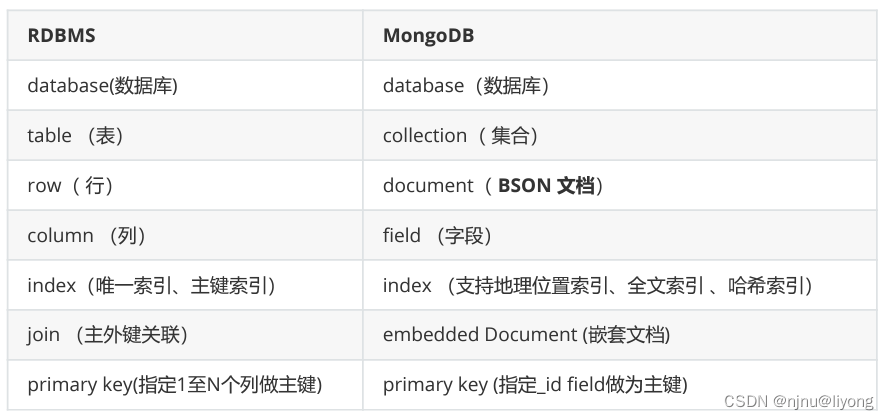
2 mogodb与RDBMS对比
安装实践
#下载文件
wget https://fastdl.mongodb.org/linux/mongodb-linux-x86_64-rhel70-4.1.3.tgz
#解压文件
tar -zxvf mongodb-linux-x86_64-rhel70-4.1.3.tgz -C ../install/mongodb/
#创建目录
mkdir datas logs conf
#修改配置文件
vim mongo.conf #在conf的目录下新建一个配置文件
# 指定配置文件方式的启动服务端
./bin/mongod -f ./conf/mongo.conf
配置文件如下
#监听端口
port=27017
#数据目录
dbpath=/env/liyong/install/mongodb/mongodb/datas
#日志目录
logpath=env/liyong/install/mongodb/mongodb/logs/mongodb.log
#是否追加日志
logappend=true
#是否后台的启动方式登录
fork=true
#默认全部可以访问
bind_ip=0.0.0.0
#是否开启密码,这个记住生成环境一定要开奥!!!! 也就是这个要设置为true
auth=false
这里我遇到了一个坑,我路径创建错了, 这个时候可以把fork=true改为false就可及时看到错误日志,等调试好了以后再开启后台启动。
上面也是按照这个指示来的


配置环境变量:
我们要想在任意目录中使用bin下面的命令,我们需要配置一下环境变量
export MONGO_HOME=/env/liyong/install/mongodb/mongodb/
export PATH=$MONGO_HOME/bin:$PATH
source /etc/profile #刷新
命令篇(增删改查)
数据库基本操作
1 创建数据库
use demo # 不存在则创建
2 查看数据库
show dbs #需要向数据库中插入数据才能看到该数据库
3 确认当前数据库
db
4 删除数据库
db.dropDatabase()
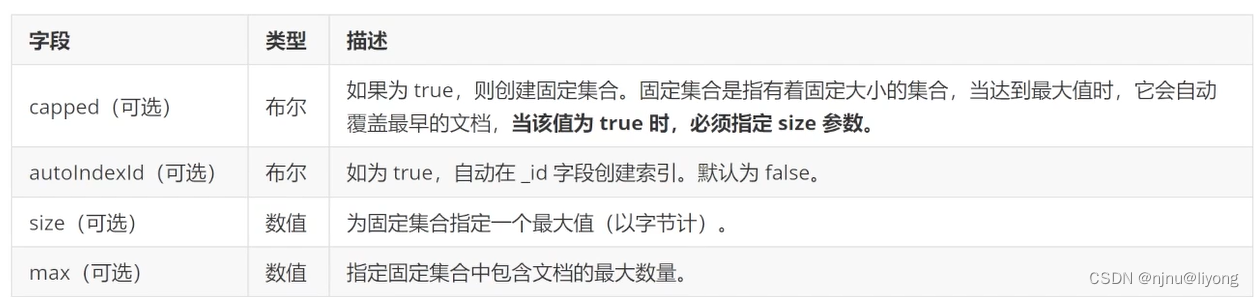
5 创建集合
db.createcollection(name, options); #name 指定名称 options见下表的参数
#创建带参数的集合
db.createCollection("test", { capped : true, size : 6142800, max : 10000 } )
集合操作
基本查询
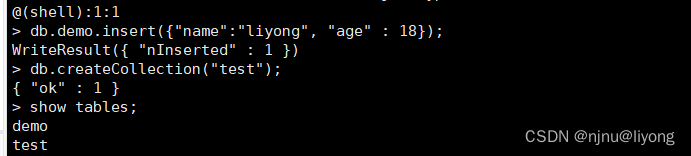
1 查看集合
show tables;
show collections #两者皆可
2 删除集合
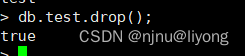
db.collection_name.drop();
3 插入数据
#单条
db.demo.insert({"name":"liyong", "age":18});
#多条
db.demo.insert([{"tom":"liyong", "age":18},{"name":"jack", "age":18}]);
#插入多条数据
db.demo.insertMany([{"tom":"liyong", "age":18},{"name":"jack", "age":18}]);
4 查询数据
db.demo.find();

5 条件查询
db.demo.find({"age" : 18}); #查询所有age为18的数据
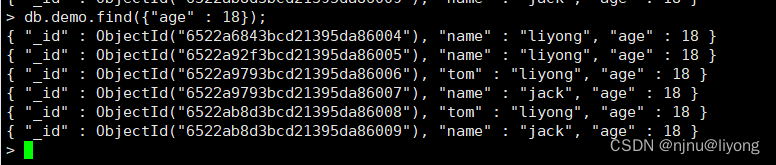
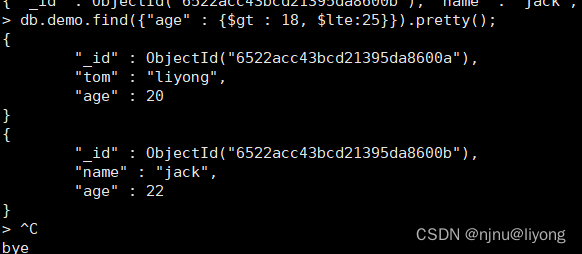
db.demo.find({"age" : {$gt : 18, $lte:25}}); #筛选年龄大于18 小于 25的数据

db.demo.find({"age" : {$gt : 18, $lte:25}}).pretty();
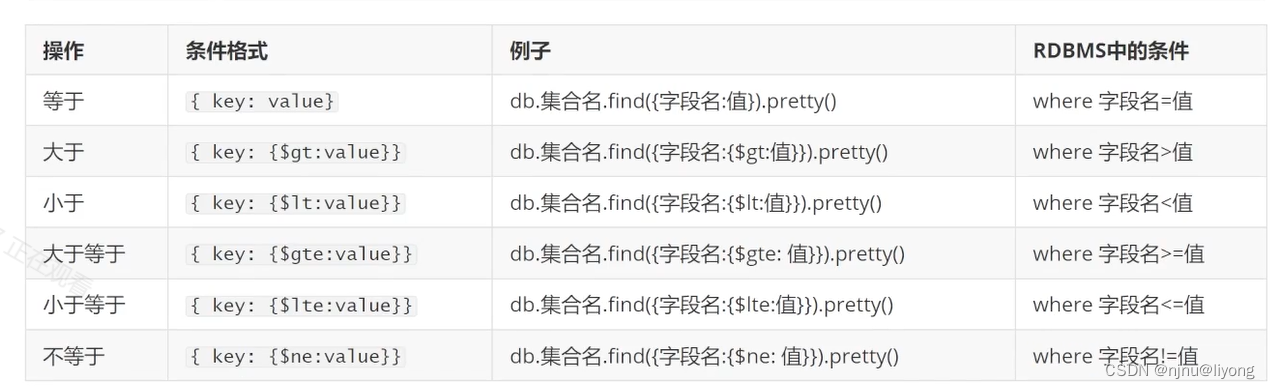
更多条件:
6 逻辑查询
db.demo.find({"name" : "liyong", "age" : 18}); #查询name=liyong 并且 age = 18的数据
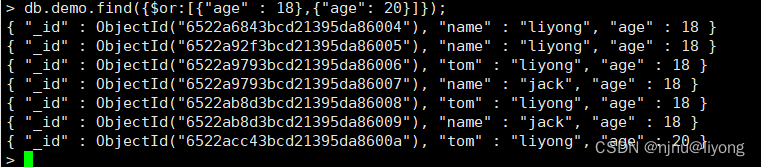
db.demo.find({$or:[{"age" : 18},{"age": 20}]}); #查询年龄为18 或年龄为20的数据
db.demo.find({$or:[{"age" : 18},{"age": 20}], "name" : "liyong"}); #查询年龄为18或年龄为20 并且name为 liyong的数据
db.demo.find({"age": {$not:{$gte :20}}}); #小于等于20的数据
db.demo.find({"age": {$ne:18}}); #查询年龄不等于18的数据



7 大于查询 (小于同理)
db.demo.find({"name":"jack", "age" : {$gte : 20}}); #查询name=jack 并且年龄大于20的数据

8 in 查询
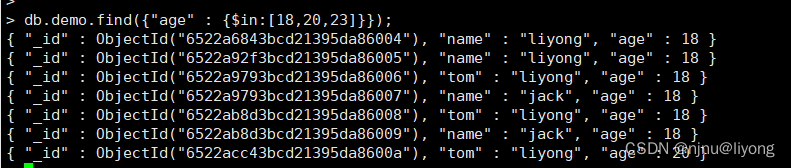
db.demo.find({"age" : {$in:[18,20,23]}}); #查询年龄为18,20,23的数据 也可以用or
9 字符串支持正则表达式查询
db.demo.find({"name" : /^li/}); #查询以li开头的数据

10 嵌套查询
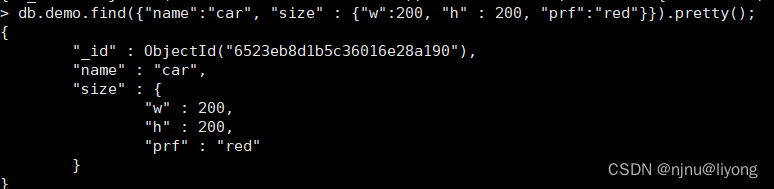
db.demo.find({"name":"car", "size" : {"w":200, "h" : 200, "prf":"red"}}).pretty(); #size 也是一个对象 嵌套查询了db.demo.find({"size.w":200});#查询size是200的数据db.demo.find({"name":"car","size.w":200}); #查询name为car w为200的数据#需要注意的是这些并不会和上面这条语句等价
db.demo.find({"name":"car","size":{"w":200}}); #这条语句只能查询{ "_id" : ObjectId("6523ef1998df89470d6a075f"), "name" : "car", "size" : { "w" : 200 } } 这条数据
11 null查询
db.demo.find({"name": null}); #查询name为空的数据
12 分页查询
#db.集合名.find({条件}).sort({排序字段:排序方式})).skip(跳过的行数).limit(一页显示多少数据)
db.users.find().sort({"_id":1}).limit(3).pretty(); #1为升序 -1为降序
#可以用skip跳过行数 比如这个就是前三条数据被跳过
db.users.find().sort({"_id":1}).skip(3).limit(3).pretty();
数组查询
1 构造数据
db.demo.insertMany([
{ item: "journal", qty: 25, tags: ["blank", "red"], dim_cm: [ 14, 21 ] },
{ item: "notebook", qty: 50, tags: ["red", "blank"], dim_cm: [ 14, 21 ] },
{ item: "paper", qty: 100, tags: ["red", "blank", "plain"], dim_cm: [ 14,
21 ] },
{ item: "planner", qty: 75, tags: ["blank", "red"], dim_cm: [ 22.85, 30 ]
},
{ item: "postcard", qty: 45, tags: ["blue"], dim_cm: [ 10, 15.25 ] }
]);
2 数组匹配
#需要注意的是这个完全是等值查询,blank和red的顺序都不能变
db.demo.find({"tags":["blank","red"]});
#如果不考虑顺序应该
db.demo.find({"tags":{$all:["blank","red"]}});


3 根据数组size查询
db.demo.find({"tags":{$size:2}}); #查询数组长度等于2的数据

数据更新
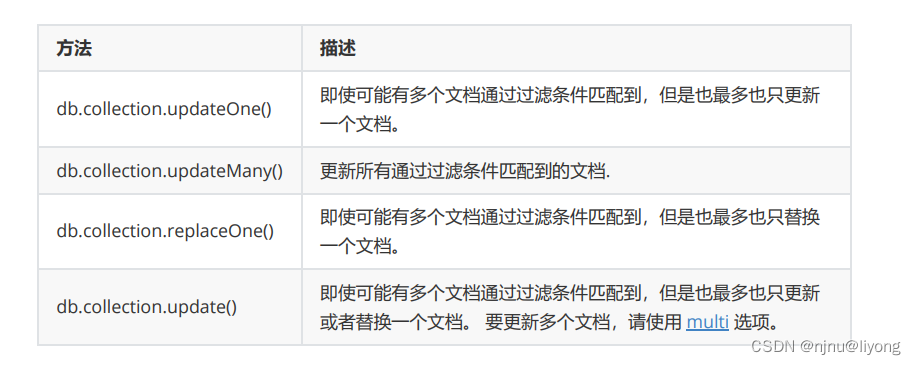
1 基本语法
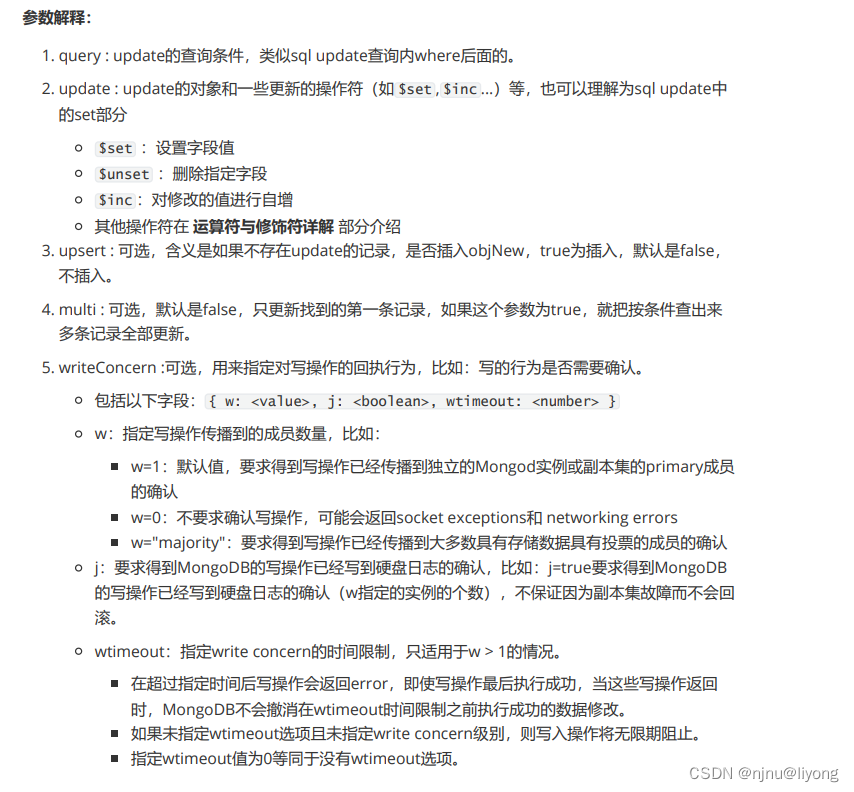
db.demo.update()<query>, #查询条件<update>, #更新条件#可选项{upsert: <boolean>,multi: <boolean>,writeConcern: <document>}
)
注意:
原子性:MongoDB中所有的写操作在单一文档层级上是原子操作
_id字段:一旦设定不能更新 _id 字段的值,也不能用有不同 _id 字段值的文档来替换已经存在的文
档。
2 更新数据
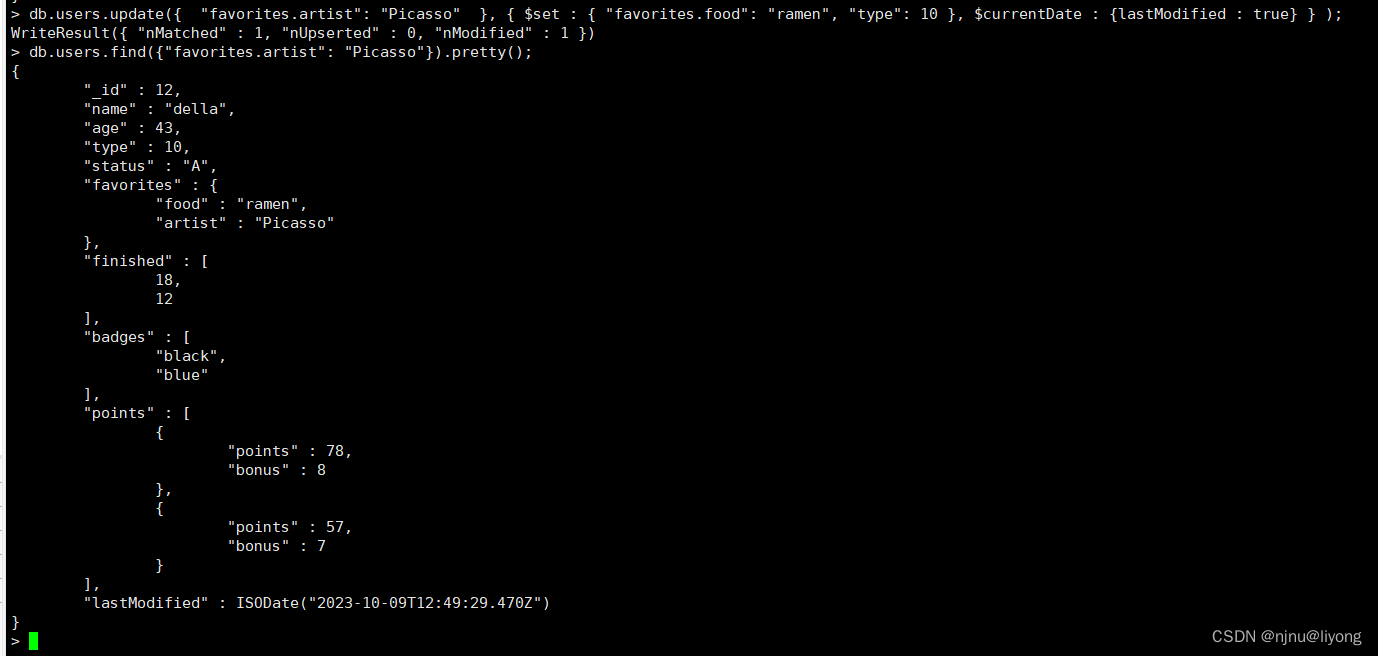
db.users.update({ "favorites.artist": "Picasso" }, { $set : { "favorites.food": "ramen", "type": 10 }, $currentDate : {lastModified : true} } );
使用 $set 操作符把 favorites.food 字段值更新为 “ramen” 并把 type 字段的值更新为 10。
使用 $currentDate 操作符更新 lastModified 字段的值到当前日期。
如果 lastModified 字段不存在, $currentDate 会创建该字段;
db.users.update({"favorites.artist": "Picasso" }, { $set : { "favorites.food": "ramen", "type": 10 }, $currentDate : {lastModified : true} } ,{multi: true});
multi: true 指定更新多条数据 默认为false及更新第一条数据,指定为true后更新所有满足条件的数据。
#这个其实就是相当于上面开启批量更新
db.users.updateMany({"favorites.artist": "Picasso"  }, { $set : { "favorites.food": "ramen", "type": 10111 }, $currentDate : {lastModified : true} });
#这个就是相当于上面的指定批量更新为FALSE
db.users.updateOne({"favorites.artist": "Picasso"  }, { $set : { "favorites.food": "ramen", "type": 10111 }, $currentDate : {lastModified : true} });
3 替换文档
#用法和update类似 前面是 查询条件 后面是替换文档
db.users.replaceOne( { name: "della" }, { name: "louise", age: 34, type: 2, status: "P", favorites: { "artist": "Dali", food: "donuts" } } )
字段运算符,用于在替换文档的时候给字段进行一定的限制更新
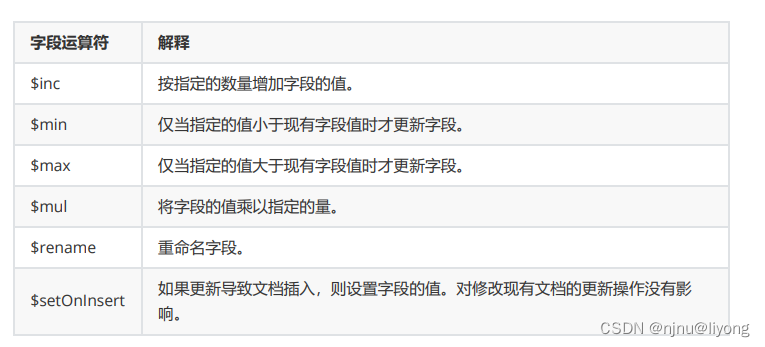
db.users.updateOne({"favorites.artist": "Picasso" }, { $inc : { "type": 500000 }, $currentDate : {lastModified : true} }); #将type字段 + 500000

其它字段运算符用法类似,由于太多了就不举例了。
4 数组运算符
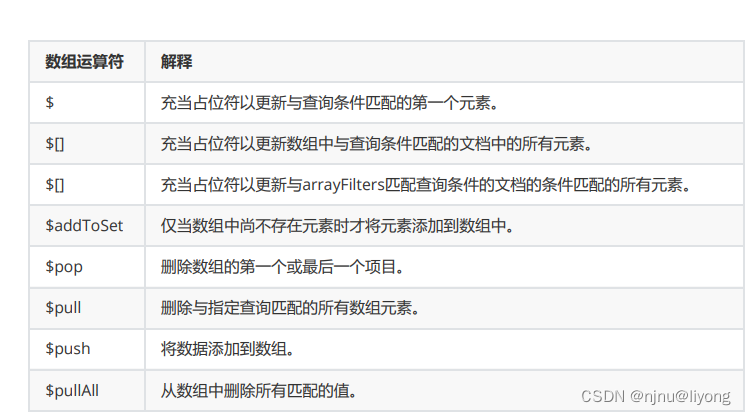
db.demo.updateOne({"item" : "paper"},{$push :{"tags":"white"}}); #向数组中push一条数据

数据删除
db.collection.remove(
<query>,
{
justOne: <boolean>,
writeConcern: <document>
}
)
参数说明:
query :(可选)删除的文档的条件。
justOne : (可选)如果设为 true 或 1,则只删除一个文档,如果不设置该参数,或使用默认值
false,则删除所有匹配条件的文档。
writeConcern :(可选)用来指定MongoDB对写操作的回执行为。
#删除所有
db.goods.remove({})
#删除一条
db.goods.deleteOne({status:"A"})
#删除多条
db.goods.deleteMany({status:"A"})
命令篇进阶(聚合操作)
原始数据:
db.authors.insertMany([
{ "author" : "Vincent", "title" : "Java Primer", "like" : 10 },
{ "author" : "della", "title" : "iOS Primer", "like" : 30 },
{ "author" : "benson", "title" : "Android Primer", "like" : 20 },
{ "author" : "Vincent", "title" : "Html5 Primer", "like" : 40 },
{ "author" : "louise", "title" : "Go Primer", "like" : 30 },
{ "author" : "yilia", "title" : "Swift Primer", "like" : 8 }
])

1 求数量
db.authors.count({"author":"Vincent"}); #根据
db.authors.find({}).count();
db.authors.count();
2 查询某字段去重
db.authors.distinct("author");

3 管道聚合
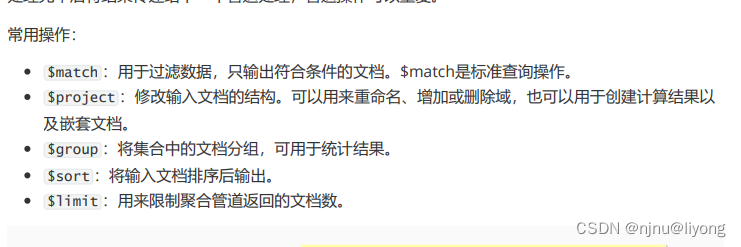
- $match
db.authors.aggregate( {"$match": {"like": {"$gt" : 30} }} ) #匹配like大于30的数据
多个字段分组
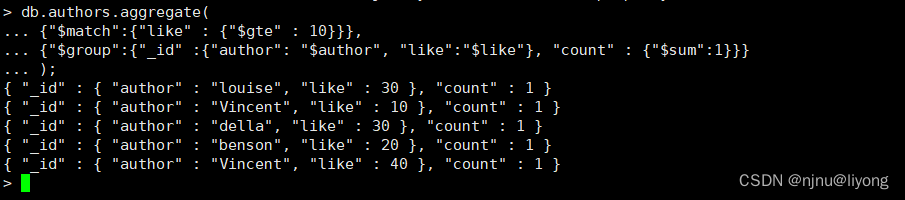
db.authors.aggregate( {"$match":{"like" : {"$gte" : 10}}}, {"$group":{"_id" :{"author": "$author", "like":"$like"}, "count" : {"$sum":1}}} );db.authors.aggregate( {"$match":{"like" : {"$gte" : 10}}}, {"$group":{"_id" :{"like":"$like"}, "count" : {"$sum":1}}} );
#上面的命令的意思是首先匹配出like>=10的数据,然后根据 author 和 like进行分组,后面这条命令根据like进行分组,然后统计数量和 $sum:1每条记录表示为1 如果是2的话结果就是 2 2 4 2

- $group
分组去最大最下,平均
db.authors.aggregate({"$group":{"_id":"$author","count":{"$max":"$like"}}}); #author分组, 求like的最大值db.authors.aggregate({"$group":{"_id":"$author","count":{"$avg":"$like"}}}); #平均值还有最小值,用法一样这里不再举例
将分组后的文档存放到set集合中
#一时是根据author 分组 然后将like放入到集合中 它的特点是不重复
db.authors.aggregate({"$group": {"_id": "$author", "like":{"$addToSet": "$like"}}});

db.authors.aggregate({"$group": {"_id": "$author", "like":{"$push": "$like"}}}); #一时是根据author 分组 然后将like放入到数组中 它的特点是不重复

- $project
db.authors.aggregate( {"$match": {"like": {"$gte" : 10} }}, {"$project": {"_id": 0, "author":1, "title": 1}} ) #筛选出like大于等于10 然后投影出这三个字段 0 表表示展示 1 表示不展示
- $sort
#1:升续 -1:降续
db.authors.aggregate( {"$match": {"like": {"$gte" : 10} }}, {"$group": {"_id": "$author", "count": {"$sum": 1}}}, {"$sort": {"count": -1}} )
- $limit
db.authors.aggregate(
{"$match": {"like": {"$gte" : 10} }},
{"$group": {"_id": "$author", "count": {"$sum": 1}}},
{"$sort": {"count": -1}},
{"$limit": 1}
) #展示一条数据
4 算术表达式
- $add
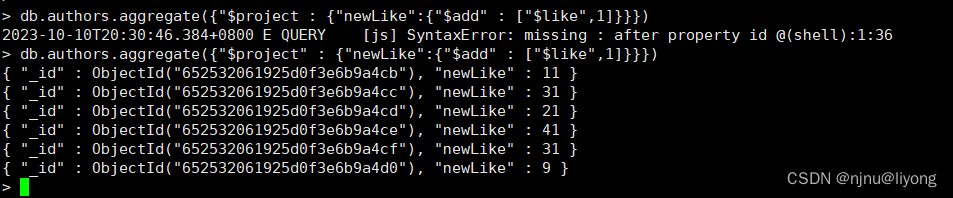
db.authors.aggregate({"$project" : {"newLike":{"$add" : ["$like",1]}}}) #得到的数据是like + 1的数据 不会影响原始的数据
- $subtract
db.authors.aggregate( {"$project": {"newLike": {"$subtract": ["$like", 2]}}} ) #对like字段减去2的操作
# $multiply  $divide $mod 乘除,取余这里不再赘述了
5 字符串操作
db.authors.aggregate(
{"$project": {"newTitle": {"$substr": ["$title", 1, 2] } }}
)
db.authors.aggregate(
{"$project": {"newTitle": {"$concat": ["$title", "(", "$author", ")"] }
}}
)
db.authors.aggregate(
{"$project": {"newTitle": {"$toLower": "$title"} }}
)db.authors.aggregate(
{"$project": {"newAuthor": {"$toUpper": "$author"} }}
)
6 日期操作
用于获取日期中的任意一部分,年月日时分秒 星期等
$year、$month、$dayOfMonth、$dayOfWeek、$dayOfYear、$hour、$minute、$second# 新增一个字段:
db.authors.update(
{},
{"$set": {"publishDate": new Date()}},
true,
true
)
# 查询出版月份
db.authors.aggregate(
{"$project": {"month": {"$month": "$publishDate"}}}
)
7 聚合中的逻辑运算
- $cmp: [exp1, exp2]: 等于 返回0 小于返回负数 大于 返回正数
db.authors.aggregate(
{"$project": {"result": {"$cmp": ["$like", 20]} }}
)
$eq: 用于判断两个表达式是否相等
$ne: 不相等
$gt: 大于
$gte: 大于等于
$lt: 小于
$lte: 小于等于
db.authors.aggregate(
{"$project": {"result": {"$eq": ["$author", "Vincent"]}}}
)
$and:[exp1, exp2, …, expN]
db.authors.aggregate(
{"$project": {
"result": {"$and": [{"$eq": ["$author", "Vincent"]}, {"$gt":
["$like", 20]}]}}
}
)
- $or: [exp1, exp2, …, expN]
db.authors.aggregate(
{"$project": {
"result": {"$or": [{"$eq": ["$author", "Vincent"]}, {"$gt": ["$like",
20]}]}}
}
)
- $not
db.authors.aggregate(
{"$project": {"result": {"$not": {"$eq": ["$author", "Vincent"]}}}}
)
- $cond
db.authors.aggregate(
{"$project": {
"result": {"$cond": [ {"$eq": ["$author", "Vincent"]}, "111", "222"
]}}
}
)
- $ifNull
如果条件的值为null,则返回后面表达式的值,当字段不存在时字段的值也是null
db.authors.aggregate(
{"$project": {
"result": {"$ifNull": ["$notExistFiled", "not exist is null"]}}
}
)
命令篇(权限管理)
1 查询用户
use admin;
#查询所有用户
db.system.users.find().pretty()
#查看单个用户
db.getUser("dus")
2 登录用户
use admin
db.auth("adminUser", "adminPass")
3 创建用户
use admin;
db.createUser({user: "adminUser",pwd: "adminPass",roles: [ { role: "userAdminAnyDatabase", db: "admin" } ]}
)
4 修改用户
use admin;
db.updateUser("demo",{pwd:"demo",roles:[{role:"read",db:"demo"}]})
5 给用户增加权限
db.grantRolesToUser("demo",[{role:"readWrite",db:"demo"}])
6 给用户减少权限
use lijiamandb
db.revokeRolesFromUser(
"demo",
[
{ role: "readWrite", db: "demo" }
]
)
7 删除用户
db.dropUser("demo")
8 查看角色具
#可以看到action中有一些信息参考下面的文章链接即可看懂信息字段是什么意思
db.getRole( "readWrite", { showPrivileges: true } )
内置角色说明:https://www.cnblogs.com/lijiaman/p/13258229.html
MapReduce 编程模型
db.collection.mapReduce(
function() {emit(key,value);}, //map 函数
function(key,values) {return reduceFunction}, //reduce 函数
{out: collection, #结果放到这个集合query: document, #查询条件sort: document, #排序limit: number, #输出多少条finalize: <function>, #reduce以后的结果还可以进行最后一次处理verbose: <boolean> #是否包含时间信息
}
)
使用 MapReduce 要实现两个函数:Map 和 Reduce 函数
Map 调用 emit(key, value),遍历collection 中所有的记录,并将 key 与 value 传递给 Reduce
Reduce 处理Map传递过来的所有记录
参数说明:
map:是JavaScript的函数,负责将每一个输入文档转换为零或多个文档,生成键值对序列,作为
reduce 函数参数
reduce:是JavaScript的函数,对map操作的输出做合并的化简的操作
将key-value变成KeyValues,也就是把values数组变成一个单一的值value
out:统计结果存放集合
query: 筛选条件,只有满足条件的文档才会调用map函数。
sort: 和limit结合的sort排序参数(也是在发往map函数前给文档排序)可以优化分组机制
limit: 发往map函数的文档数量的上限(没有limit单独使用sort的用处不大)
finalize:可以对reduce输出结果最后进行的处理
verbose:是否包括结果信息中的时间信息,默认为fasle
测试数据
db.posts.insert({"post_text": "测试mapreduce。", "user_name": "Vincent","status":"active"})
db.posts.insert({"post_text": "适合于大数据量的聚合操作。","user_name": "Vincent","status":"active"})
db.posts.insert({"post_text": "this is test。","user_name": "Benson","status":"active"})
db.posts.insert({"post_text": "技术文档。", "user_name": "Vincent","status":"active"})
db.posts.insert({"post_text": "hello word", "user_name": "Louise","status":"no active"})
db.posts.insert({"post_text": "lala", "user_name": "Louise","status":"active"})
db.posts.insert({"post_text": "天气预报。", "user_name": "Vincent","status":"no active"})
db.posts.insert({"post_text": "微博头条转发。", "user_name": "Benson","status":"no active"})
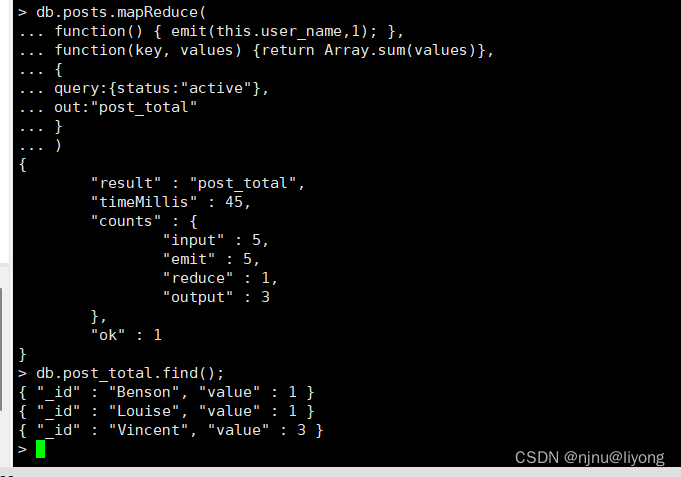
#key 为user_name val 为 1 也可以是各种值 对象或者数组, 然后 第二个function 是写js函数
db.posts.mapReduce(
function() { emit(this.user_name,1); },
function(key, values) {return Array.sum(values)},
{
query:{status:"active"},
out:"post_total"
}
)
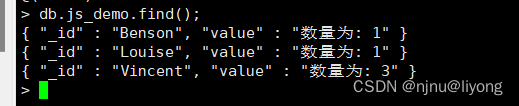
db.posts.mapReduce(function() { emit(this.user_name, 1); },function(key, values) {return Array.sum(values); #在这边只做值相关的操作,具体如果要处理成其它格式最好是放到finalize中去做},{query: { status: "active" },out: "js_demo",finalize: function(key, reducedValue) {return "数量为: " + reducedValue;}}
);
索引篇
创建索引并在后台运行
db.COLLECTION_NAME.createIndex(keys, options)
# 语法中 Key 值为你要创建的索引字段,1 为指定按升序创建索引,如果你想按降序来创建索引指定为-1 即可。
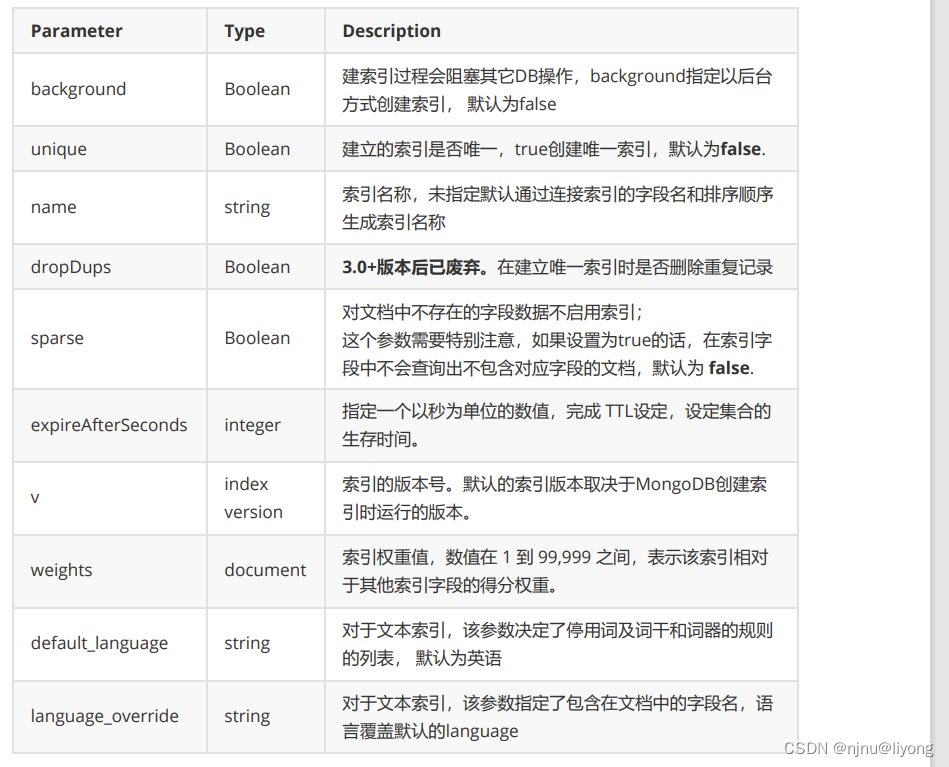
1 获取针对某个集合的索引
db.COLLECTION_NAME.getIndexes()
2 查询某集合索引大小
db.COLLECTION_NAME.totalIndexSize()
3 重建索引
db.COLLECTION_NAME.reIndex()
4 删除索引
db.COLLECTION_NAME.dropIndex("INDEX-NAME")
db.COLLECTION_NAME.dropIndexes()
5 创建索引
db.collection_name.createIndex({"字段名":排序方式}) # 排序方式的取值为1 或者 -1 1 是升序 -1是降序
案例示例
1 基本使用
db.goods.createIndex({"qty":1});
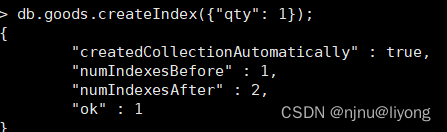
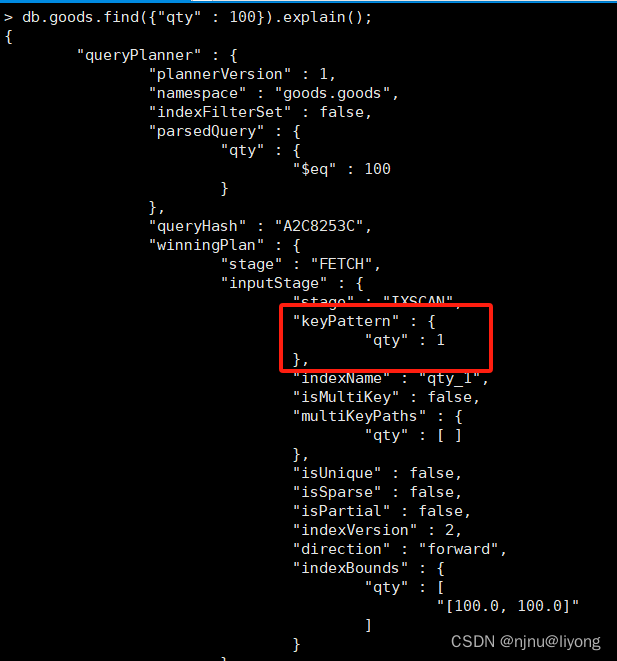
mongo 已经默认有了一个index _id
db.goods.find({"qty" : 100}).explain(); #可以看到这条查询语句走了这个字段的索引
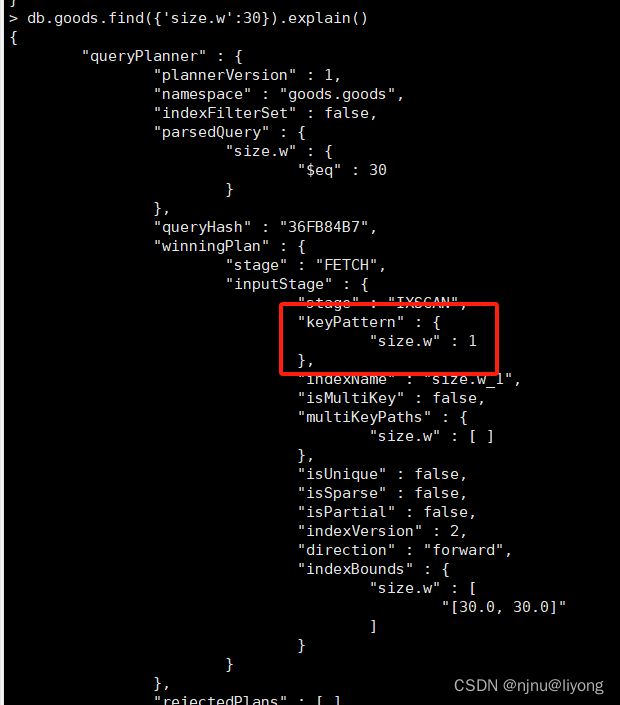
db.goods.createIndex( { "size.w": 1 } )#对子文档创建索引
db.goods.dropIndexes() #删除索引
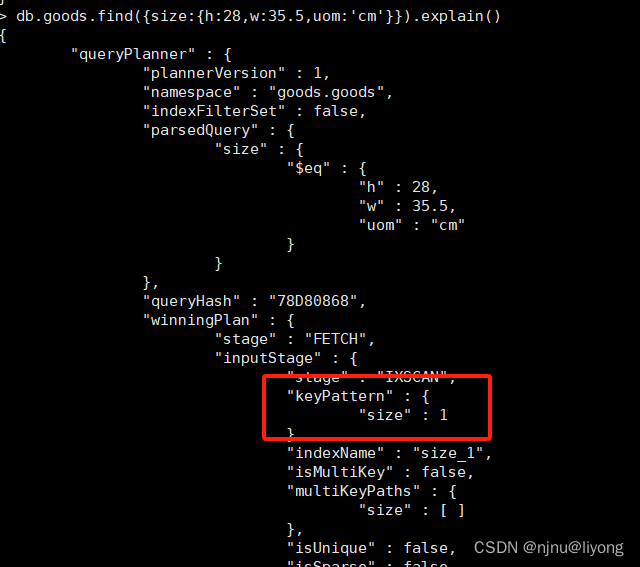
db.goods.createIndex( { "size": 1 } ) #给整个文档创建索引
db.goods.find({size:{h:28,w:35.5,uom:'cm'}}).explain() # 查询 可以看到用了整个文档的索引
2 复合索引
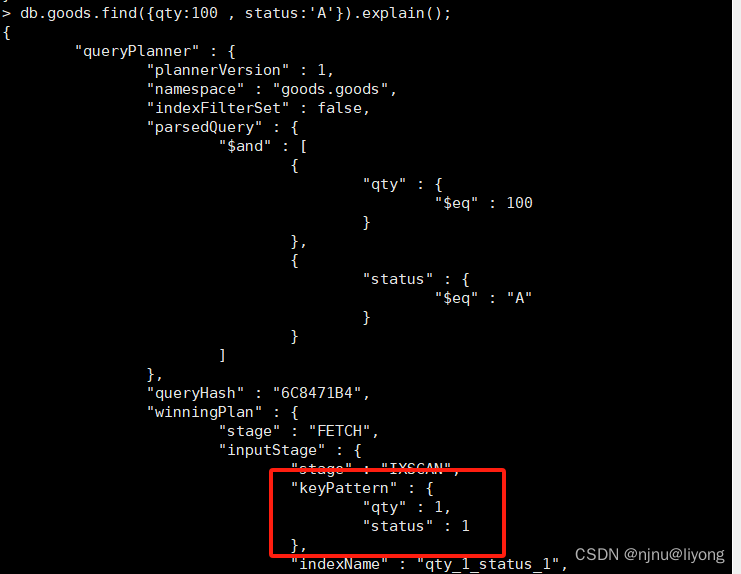
通常我们需要在多个字段的基础上搜索表/集合,这种情况建议在建立复合索引。
创建复合索引时要注意:字段顺序、排序方式
语法:
db.集合名.createIndex( { "字段名1" : 排序方式, "字段名2" : 排序方式 } )
db.goods.createIndex( { "qty": 1 , "status":1} ); #创建索引
db.goods.find({qty:100 , status:'A'}).explain(); #查找数据
3 多键索引Multikey indexes
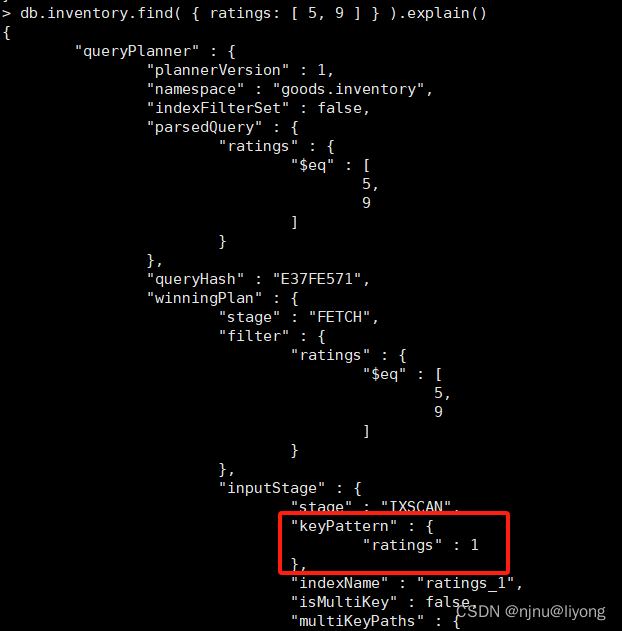
针对属性包含数组数据的情况,MongoDB支持针对数组中每一个Element创建索引。这种索引也就是
Multikey indexes支持strings,numbers和nested documents。
多建索引并不是我们上面讲解的复合索引,多建索引就是为数组中的每一个元素创建索引值。
db.inventory.insertMany([
{ _id: 5, type: "food", item: "aaa", ratings: [ 5, 8, 9 ] },
{ _id: 6, type: "food", item: "bbb", ratings: [ 5, 9 ] },
{ _id: 7, type: "food", item: "ccc", ratings: [ 9, 5, 8 ] },
{ _id: 8, type: "food", item: "ddd", ratings: [ 9, 5 ] },
{ _id: 9, type: "food", item: "eee", ratings: [ 5, 9, 5 ] }
])
db.inventory.createIndex( { ratings: 1 } ) #创建索引
db.inventory.find( { ratings: [ 5, 9 ] } ).explain()
4 多建索引之基于内嵌文档的数组多建索引
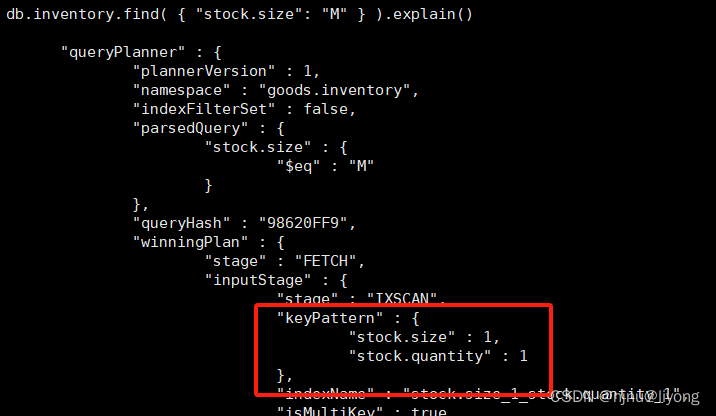
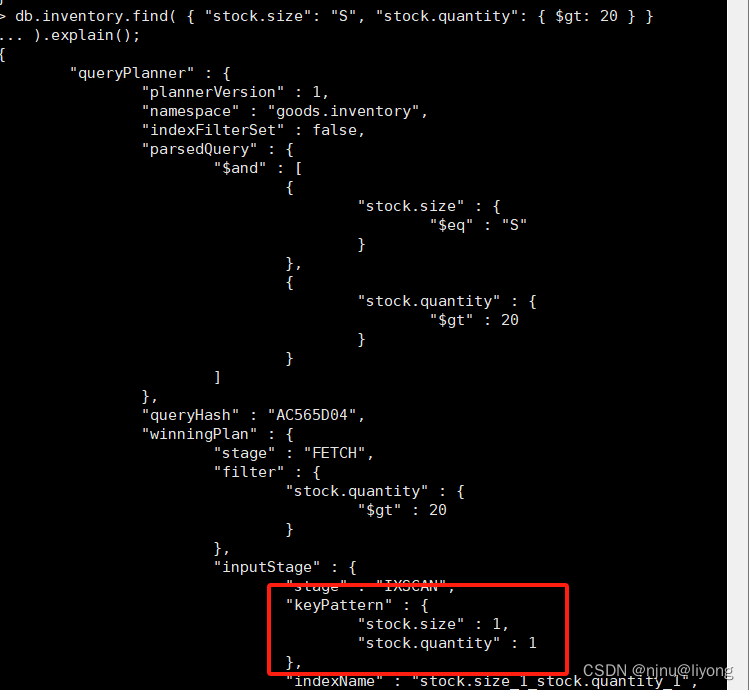
我们在stock数组下的size和quantity进行添加复合多键索引
db.inventory.dropIndexes() #删除索引
db.inventory.createIndex( { "stock.size": 1, "stock.quantity": 1 } ) #创建索引
db.inventory.find( { "stock.size": "M" } ).explain() #查询数据
db.inventory.find( { "stock.size": "S", "stock.quantity": { $gt: 20 } }
5 地理空间索引 Geospatial Index
针对地理空间坐标创建的索引
2dsphere索引,用于存储和查找球面上的点
2d索引,用于存储和查找平面上的点
db.company.insert( {loc : { type: "Point", coordinates: [ 116.482451, 39.914176 ] },name: "来广营地铁站-叶青北园",category : "Parks"} ) #插入数据
db.company.ensureIndex( { loc : "2dsphere" } ) #创建索引
db.company.find({ "loc" : { "$geoWithin" : { "$center":[[116.482451,39.914176],0.05] } } }).explain(); #查询索引
6 全文索引Text index
MongoDB 提供了针对string内容的文本查询,Text Index支持任意属性值为string或string数组元素的索
引查询。
注意:
一个集合仅支持最多一个Text Index,当然这个文本的索引可以覆盖多个字段的。
中文分词支持不佳!推荐使用ES进行全文检索。
db.集合.createIndex({"字段": "text"})
db.集合.find({"$text": {"$search": "coffee"}})
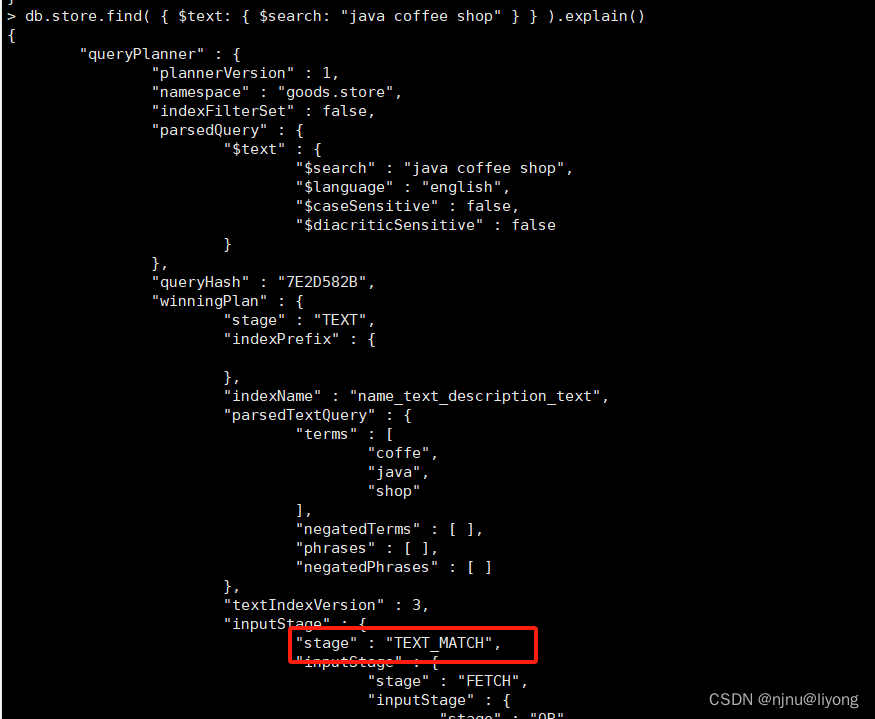
db.store.insert([
{ _id: 1, name: "Java Hut", description: "Coffee and cakes" },
{ _id: 2, name: "Burger Buns", description: "Gourmet hamburgers" },
{ _id: 3, name: "Coffee Shop", description: "Just coffee" },
{ _id: 4, name: "Clothes Clothes Clothes", description: "Discountclothing" },
{ _id: 5, name: "Java Shopping", description: "Indonesian goods" }
])db.store.createIndex( { name: "text", description: "text"})
db.store.find({ $text: { $search: "java coffee shop"}}).explain()
7 哈希索引
hash index仅支持等值查询,不支持范围查询。
db.集合.createIndex({"字段": "hashed"})
查询计划可以具体的看到使用了那些索引
# 创建1千万条记录,预计耗时20分钟左右
for(var i=1;i<10000000;i++){ db.indexDemo.insert({_id:i , num:'index:'+i ,
address:'address:i%9999'})}
# 不使用索引执行计划,查询2.8s
db.indexDemo.find({num:'index:99999'}).explain("executionStats")
db.indexDemo.createIndex( { num: 1 } )
db.indexDemo.getIndexes()
db.indexDemo.dropIndex("num_1")
# 使用索引执行计划,查询0s
db.indexDemo.find({num:'index:99999'}).explain("executionStats")
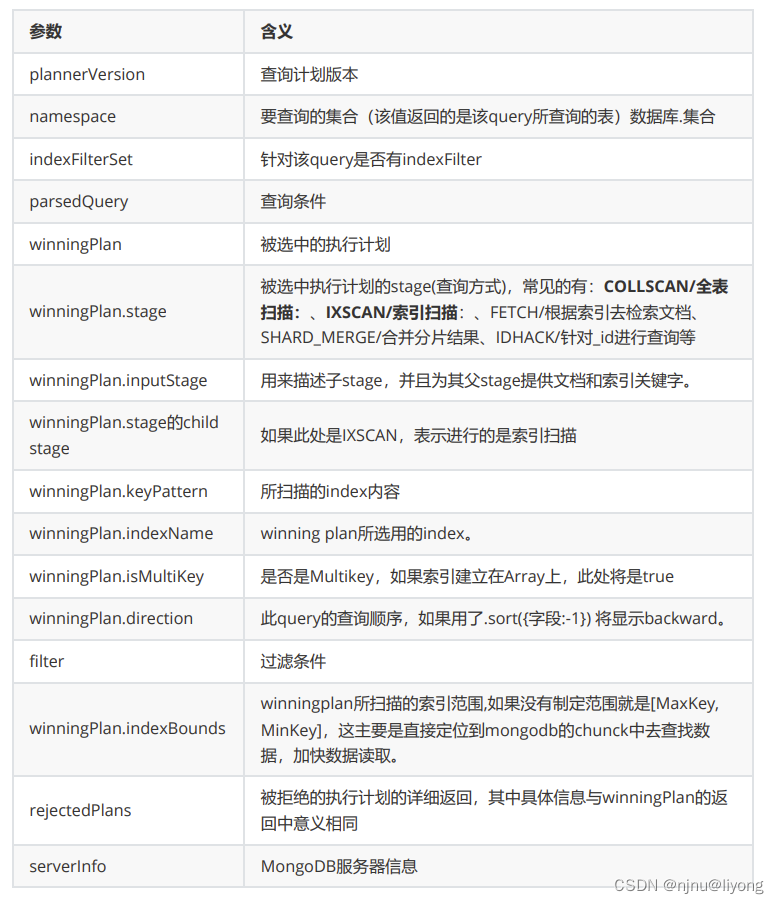
explain()接收不同的参数,通过设置不同参数,可以查看更详细的查询计划。
queryPlanner:默认参数,返回执行计划基本参数
executionStats:会返回执行计划的一些统计信息
allPlansExecution:用来获取最详细执行计划
db.indexDemo.find({num:'index:99999'}).explain("queryPlanner")
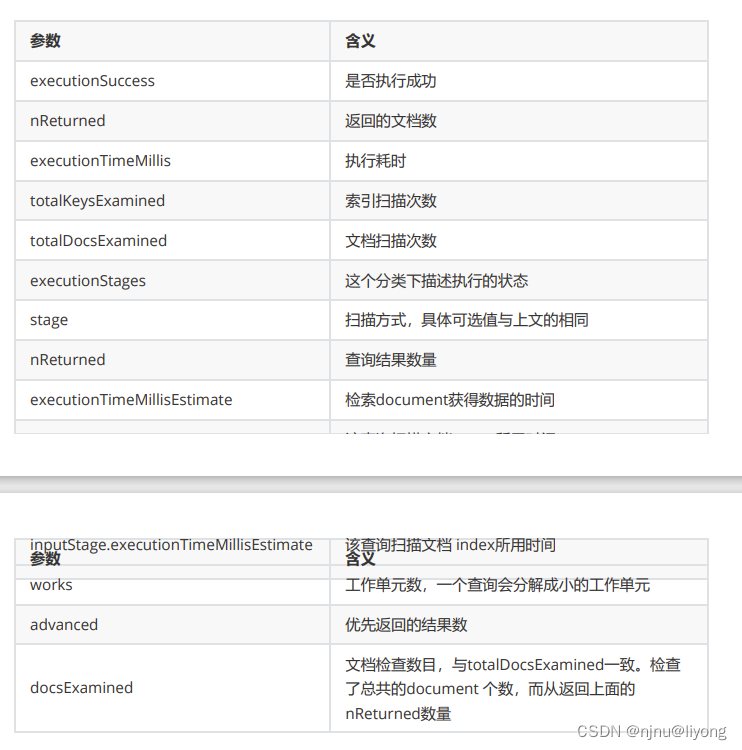
db.indexDemo.find({num:'index:99999'}).explain("executionStats")
{
"queryPlanner" : {...},
"executionStats" : {
"executionSuccess" : true, 【执行状态,true表示成功】
"nReturned" : 1, 【查询返回的条数】
"executionTimeMillis" : 49, 【查询所消耗的时间,单位是毫秒】
"totalKeysExamined" : 0, 【索引扫描的条数】
"totalDocsExamined" : 100000, 【文档扫描的条数】
"executionStages" : {
"stage" : "COLLSCAN",
"filter" : {"num" : {"$eq" : "index:99999"}},
"nReturned" : 1,
"executionTimeMillisEstimate" : 30, 【检索document获得数据的时间】
"works" : 100002,
"advanced" : 1,
"needTime" : 100000,
"needYield" : 0,
"saveState" : 781,
"restoreState" : 781,
"isEOF" : 1,
"invalidates" : 0,
"direction" : "forward",
"docsExamined" : 100000
}
},
"serverInfo" : {...},
"ok" : 1
}
executionTimeMillis :
executionTimeMillis最为直观explain返回值是executionTimeMillis值,指的是这条语句的执行时间,
这个值当然是希望越少越好。
其中有3个executionTimeMillis分别是:
executionStats.executionTimeMillis:整体查询时间。
executionStats.executionStages.executionTimeMillisEstimate:检索Document获得数据的时间
executionStats.executionStages.inputStage.executionTimeMillisEstimate:扫描文档 Index所用时间
nReturned 分析
index与document扫描数与查询返回条目数相关的 3个返回值:
nReturned:查询返回的条目
totalKeysExamined:总索引扫描条目
totalDocsExamined:总文档扫描条目
这些都是直观地影响到executionTimeMillis,我们需要扫描的越少速度越快。 对于查询,最理想的状态
是:
nReturned = totalKeysExamined = otalDocsExamined
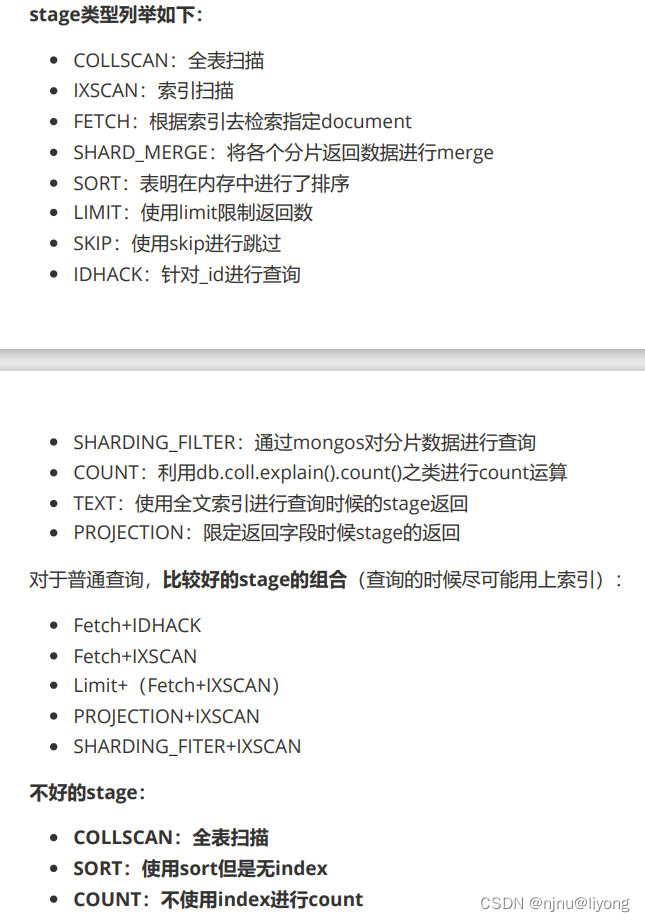
stage 分析
是什么在影响 executionTimeMillis 、totalKeysExamined和totalDocsExamined?
是stage的类型
慢查询分析
开启内置的查询分析器,记录读写操作效率
db.setProfilingLevel(n,m)
# n的取值可选0,1,2
# 0表示不记录
# 1表示记录慢速操作,如果值为1,m必须赋值单位为ms,用于定义慢速查询时间的阈值
# 2表示记录所有的读写操作
db.setProfilingLevel(1,100)
查询监控结果
db.system.profile.find().sort({millis:-1}).limit(3) #可以查询到慢查询
实战篇
1 java 访问 MongoDB
<dependency><groupId>org.mongodb</groupId><artifactId>mongo-java-driver</artifactId><version>3.10.1</version>
</dependency>
public class MongoDBDemo {private static MongoClient mongoClient;private static MongoDatabase mongoDatabase;private static MongoCollection<Document> collection;static {mongoClient = new com.mongodb.MongoClient("111.229.199.181", 27017);mongoDatabase = mongoClient.getDatabase("test");collection = mongoDatabase.getCollection("store");}public static void main(String[] args) {//docAdd();//docQueryAll();docQueryFilter();}/*** 添加文档*/private static void docAdd() {Document document = Document.parse("{name:'benson',city:'beijing',birth_day:new ISODate('2022-08-01'),expectSalary:18000}");Document parse = Document.parse("{name:'benson',city:'beijing1',birth_day:new ISODate('2022-08-01'),expectSalary:18000}");collection.insertMany(Arrays.asList(document, parse));}/*** 查询文档*/private static void docQueryAll() {FindIterable<Document> findIterable = collection.find().sort(Document.parse("{expectSalary:-1}"));for (Document document :findIterable) {System.out.println(document);}}/*** 根据条件进行筛选*/private static void docQueryFilter() {FindIterable<Document> findIterable =collection.find(Filters.gt("name","Java Hut")).sort(Document.parse("{expectSalary:-1}"));for (Document document :findIterable) {System.out.println(document);}}
}
2 MongoTemplate
<dependency><groupId>org.springframework.boot</groupId><artifactId>spring-boot-starter-data-mongodb</artifactId>
</dependency>
spring:data:mongodb:host: 111.229.199.181port: 27017database: test
@Data
@AllArgsConstructor
@NoArgsConstructor
@Builder
@Document("employee")
public class Employee implements Serializable {@Idprivate String id;private int emId;private String firstName;private String lastName;private float salary;
}
@SpringBootTest
class MongoTemplateDemoTest {@AutowiredMongoTemplate mongoTemplate;/*** 插入文档*/@Testpublic void insert() {for (int i = 2; i <= 10; i ++) {Employee employee = Employee.builder().id("100" + i).firstName("wang").lastName("benson").emId(2).salary(15000).build();mongoTemplate.save(employee);}}/*** 查询所有文档*/@Testpublic void testQueryAll() {List<Employee> all = mongoTemplate.findAll(Employee.class);System.out.println(JSONUtil.toJsonStr(all));}/*** 根据id查询*/@Testpublic void findByID() {Employee employee = Employee.builder().id("1001").build();Query query = new Query(Criteria.where("id").is(employee.getId()));List<Employee> employees = mongoTemplate.find(query, Employee.class);System.out.println(JSONUtil.toJsonStr(employees));}/*** 根据名称查询*/@Testpublic void findByName() {Employee employee = Employee.builder().lastName("benson").build();Query query = new Query(Criteria.where("lastName").is(employee.getLastName()));List<Employee> employees = mongoTemplate.find(query, Employee.class);System.out.printf(JSONUtil.toJsonStr(employees));}/*** 更新*/@Testpublic void update() {Employee employee = Employee.builder().id("1001").build();Query query = new Query(Criteria.where("id").is(employee.getId()));Update update = new Update().set("lastName", "liyong");UpdateResult updateResult = mongoTemplate.updateMulti(query, update, Employee.class);System.out.println(JSONUtil.toJsonStr(updateResult));}/*** 删除*/@Testpublic void del() {Employee employee = Employee.builder().lastName("liyong").build();Query query = new Query(Criteria.where("lastName").is(employee.getLastName()));DeleteResult remove = mongoTemplate.remove(query, Employee.class);System.out.println(JSONUtil.toJsonStr(remove));}
}
3 MongoRepository
依赖和配置同第二个步骤
@SpringBootTest
class EmployeeRepositoryTest {@AutowiredEmployeeRepository employeeRepository;@Testpublic void add() {Employee employee = Employee.builder().id("11").firstName("liu").lastName("hero").emId(1).salary(10200).build();employeeRepository.save(employee);}@Testpublic void test() {List<Employee> all = employeeRepository.findAll();System.out.println(JSONUtil.toJsonStr(all));}}
相关文章:
学习笔记-MongoDB(命令增删改查,聚合,权限管理,索引,java使用)
基础概念 1 什么是mogodb? MongoDB 是一个基于分布式文件/文档存储的数据库,由 C 编写,可以为 Web 应用提供可扩展、高性能、易部署的数据存储解决方案。MongoDB 是一个介于关系数据库和非关系数据库之间的产品,是非关系数据库中功…...

第13期 | GPTSecurity周报
GPTSecurity是一个涵盖了前沿学术研究和实践经验分享的社区,集成了生成预训练 Transformer(GPT)、人工智能生成内容(AIGC)以及大型语言模型(LLM)等安全领域应用的知识。在这里,您可以…...

OpenCV学习(一)——图像读取
1. 图像入门 读取图像显示图像写入图像 import cv2# 读取图像 img cv2.imread(lena.jpg) print(img.shape)# 显示图像 cv2.imshow(image, img) cv2.waitKey(0) cv2.destroyAllWindows()# 写入图像 cv2.imwrite(image.jpg, img)1.1 读取图像 读取图像cv.imread(filename, fl…...
并发编程- 线程池ForkJoinPool工作原理分析(实践)
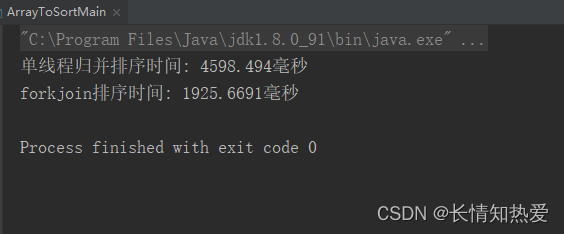
数据结构加油站: Comparison Sorting Visualization 并发设计模式 单线程归并排序 public class MergeSort {private final int[] arrayToSort; //要排序的数组private final int threshold; //拆分的阈值,低于此阈值就不再进行拆分public MergeSort…...

小程序原生开发中的onLoad和onShow
在小程序的原生开发中,onLoad和onShow是两个常用的生命周期函数,用于管理页面的加载和显示。 onLoad:该函数会在页面加载时触发。当页面第一次加载时,它会被调用一次,之后切换到其他页面再返回时不会再触发。可以在on…...

springcloud技术栈以及相关组件
常用中间件 注册中心—nacos分布式服务之间的交互工具—Feign服务安全入口中间件—Gateway各个服务的异步通信组件—rabbitmqRabbitMq分布式场景的应用配置微服务的容器部署–docker分布式检索引擎—elasticSearches在分布式场景的应用分布式事务协调中间间— seata分布式服务…...
)
An Early Evaluation of GPT-4V(ision)
本文是LLM系列文章,针对《An Early Evaluation of GPT-4V(ision)》的翻译。 GPT-4V的早期评估 摘要1 引言2 视觉理解3 语言理解4 视觉谜题解决5 对其他模态的理解6 结论 摘要 在本文中,我们评估了GPT-4V的不同能力,包括视觉理解、语言理解、…...

Vue在移动端实现图片的手指缩放
使用V-View点击图片进行预览: npm install v-viewer --save 在main.js进行引入 在图片下方会有 轮播箭头下一张上一张等,因此要用配置来关闭。 import Viewer from v-viewer // viewer.js一种图片预览处理工具 import viewerjs/dist/viewer.css …...
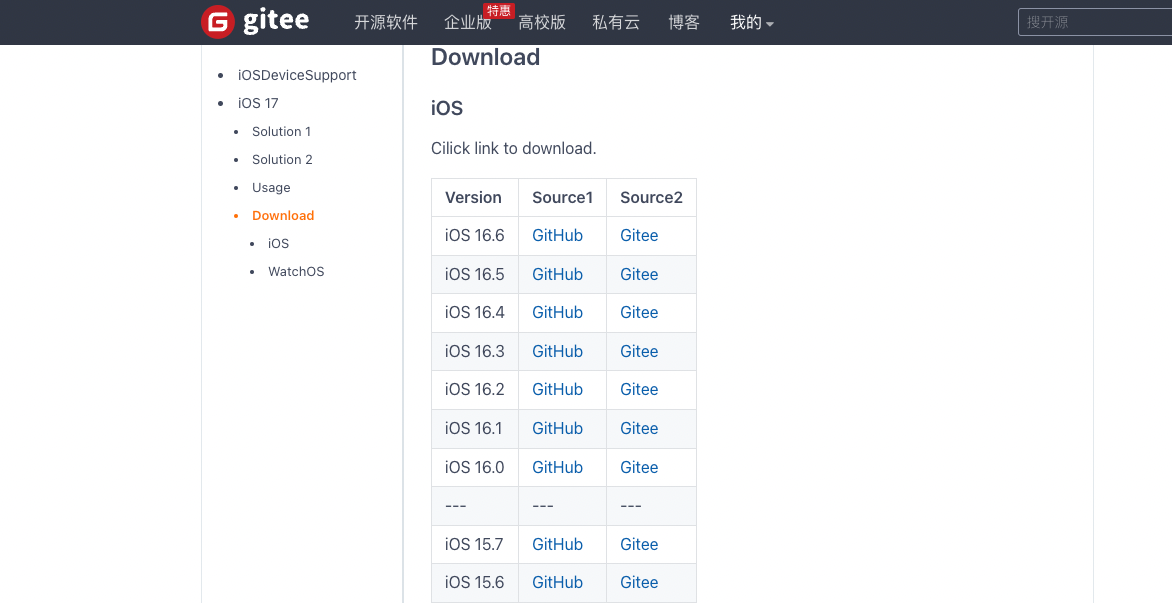
Failed to prepare the device for development
👨🏻💻 热爱摄影的程序员 👨🏻🎨 喜欢编码的设计师 🧕🏻 擅长设计的剪辑师 🧑🏻🏫 一位高冷无情的编码爱好者 大家好,我是 DevO…...
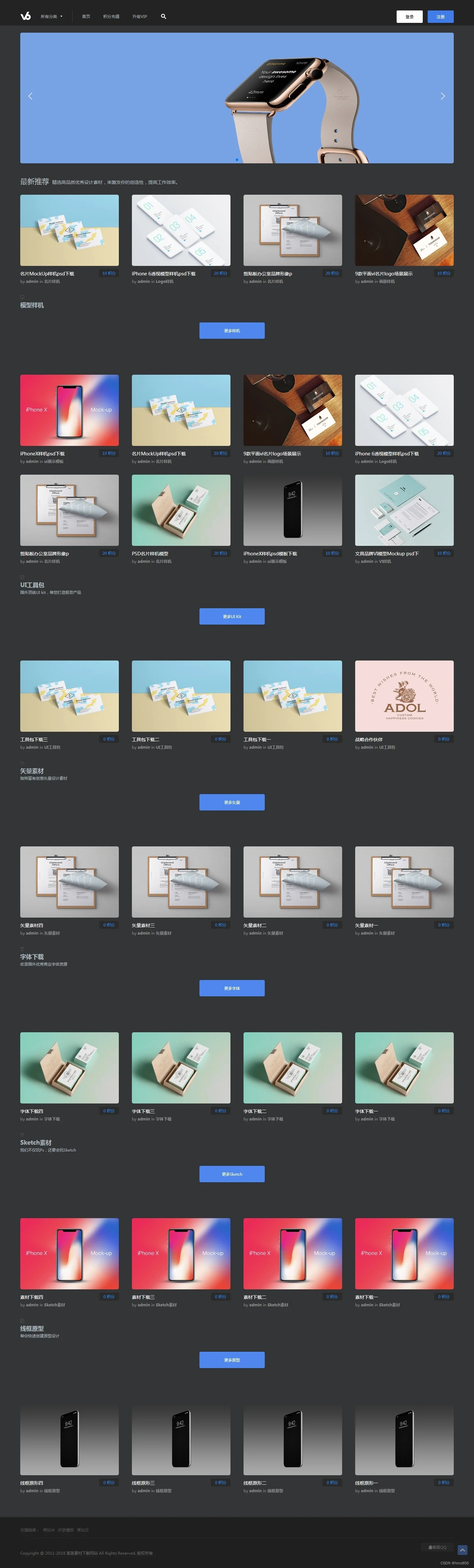
PPT文档图片设计素材资源下载站模板源码/织梦内核(带用户中心+VIP充值系统+安装教程)
源码简介: PPT文档图片设计素材资源下载站模板源码,作为织梦内核素材资源下载站源码,它自带了用户中心和VIP充值系统,也有安装教程。 织梦最新内核开发的模板,该模板属于素材下载、文档下载、图库下载、PPT下载、办公…...
万能鼠标设置 SteerMouse v5.6.8
鼠标可谓是用户们在使用电脑时候的必备外接设备呢!适合你自己的鼠标设置也绝对能够优化你的Mac使用体验!想要更好的Mac体验就试试用Steermouse Mac版吧。它通过软件来自由设置你的鼠标操作!在这款万能鼠标设置工具中,用户可以在偏…...
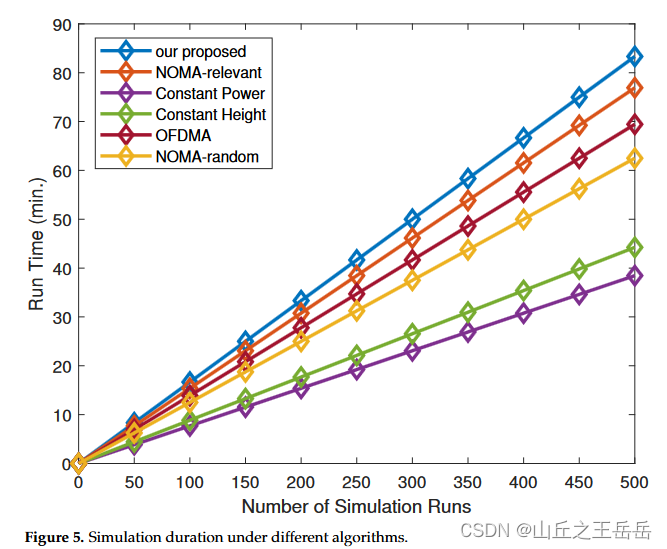
16 用于NOMA IoT网络上行链路安全速率最大化的HAP和UAV协作框架
文章目录 摘要相关模型仿真实验仿真结果 摘要 优化无人机到HAP的信道分配、用户功率和无人机三维位置来研究上行安全传输解决非凸问题,采用K-means聚类算法,将成对的用户划分成不同的组,每个簇可以有相应的无人机服务,然后将构造…...

【C++】STL容器——vector类的使用指南(含代码演示)(11)
前言 大家好吖,欢迎来到 YY 滴C系列 ,热烈欢迎! 本章主要内容面向接触过C的老铁 主要内容含: 欢迎订阅 YY滴C专栏!更多干货持续更新!以下是传送门! 目录 一、vector类——基本介绍二、vector类…...

elementui 修改 el_table 表格颜色,表格下方多了一条线问题
解决: 加入以下代码 .el-table::before { z-index: inherit; } 如果使用了scoped,需要加上stylus /deep/ (其他的css语言有不一样的写法) 或是全局加入 body .el-table::before { z-index: inherit; } 其他背景色,表格边框颜色修改 //表头/de…...

阿里云/腾讯云国际站代理:阿里云服务器介绍
阿里云是由阿里巴巴集团旗下的云计算服务提供商。阿里云提供的服务包括云服务器、数据库服务、数据分析、人工智能、大数据、物联网等多种云计算产品和解决方案。阿里云的数据中心遍布全球多个地区,提供可靠且安全的云计算基础设施和服务。阿里云在中国以及全球范围…...
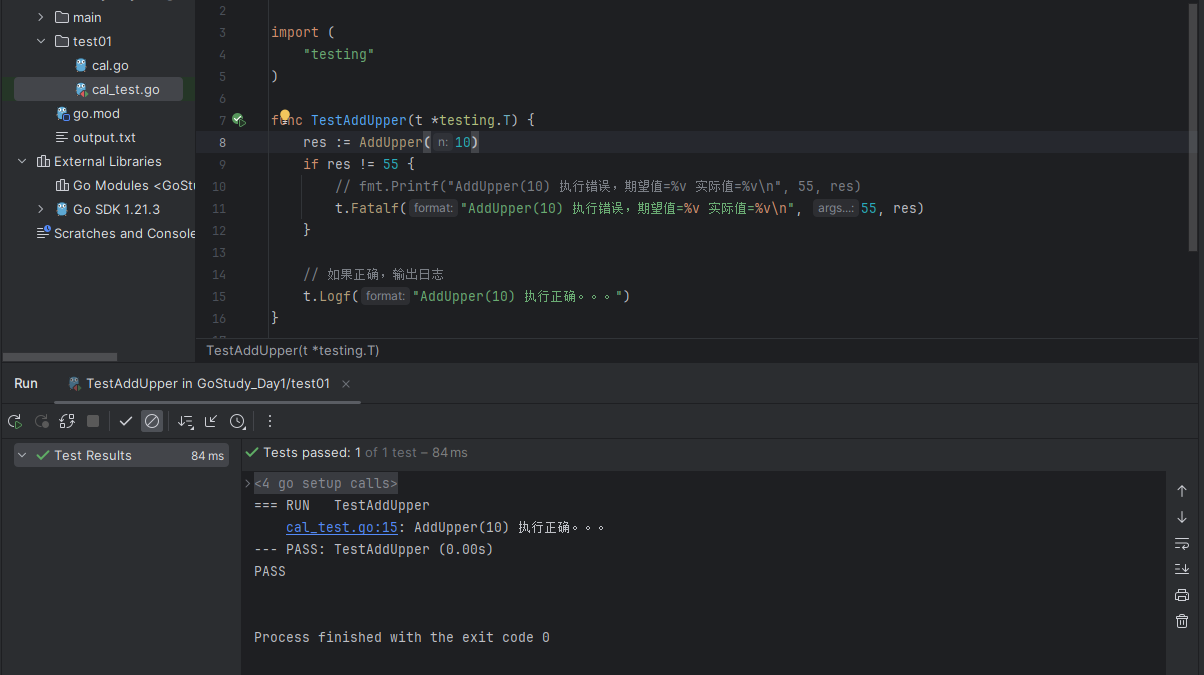
Go学习第十章——文件操作,Json和测试
Go文件操作,Json和测试 1 文件1.1 基本介绍1.2 读取的基本操作1.3 写入的基本操作1.4 使用案例(三个) 2 Go语言的Json使用2.1 序列化案例2.2 反序列化案例 3 单元测试3.1 先看个需求3.2 快速入门3.3 入门总结 1 文件 1.1 基本介绍 文件在程序中是以流的形式来操作…...
概念及基础语法)
学习不同概率分布(二项分布、泊松分布等)概念及基础语法
概率分布是描述随机变量取值的概率情况的函数。常见的概率分布包括二项分布、泊松分布等。 二项分布(Binomial Distribution):描述了一次试验中成功事件发生的次数的概率分布。它的基础语法如下: 概率质量函数:pmf(k, …...

在3台不联网的 CentOS 7.8 服务器上部署 Elasticsearch 6.8 集群
为了在3台不联网的 CentOS 7.8 服务器上部署 Elasticsearch 6.8.23 集群,并考虑到path.data和path.logs的配置,我们可以按照以下步骤进行操作: 1. 准备工作 1.1 从有网络的机器下载 Elasticsearch 6.8.23 的 RPM 包: https://w…...

CentOS 7
导入已有虚拟机 设置SSH免密登录 参考Ubuntu- 远程连接虚拟机(桥连接) 宿主机:Win10虚拟机:VMware保证宿主机和主机在同一个网段下(宿主机和主机通过手机热点连接,在特定网段内,不能更改&#…...
个人记账理财软件 Money Pro mac中文版软件介绍
Money Pro for mac是一款综合性高的理财工具,Money Pro是一套能够协同工作的工具,可用来追踪账户、管理账单以及制作预算,您可以为每个时间段设置不同的预算限值。财务一切尽在掌控之中。 Money Pro for mac软件介绍 Money Pro for mac提供一…...

多模态学习避坑指南:当你的模型出现‘模态懒惰‘时该怎么办?
多模态学习避坑指南:当你的模型出现模态懒惰时该怎么办? 在构建多模态AI系统时,工程师们常常遇到一个棘手问题:模型看似融合了多种数据源,实际表现却不如单模态模型。这种现象被学术界称为"模态懒惰"(Modali…...

PPT如何设置部分内容不可编辑?教你锁定部分对象,只允许修改指定区域
制作好的PPT发给同事或客户后,最担心的就是对方随意拖动图片、删除Logo、修改背景或打乱排版,导致精心设计的页面面目全非。很多人以为PPT没有类似Word的“部分限制编辑”功能,其实不然——PPT提供了多种灵活的保护方式,可以让你锁…...

利用卷积神经网络原理优化万象熔炉·丹青幻境的图像生成效果
利用卷积神经网络原理优化万象熔炉丹青幻境的图像生成效果 最近在玩一个叫“万象熔炉丹青幻境”的AI图像生成工具,效果挺惊艳的,但有时候总觉得生成的图片差点意思——要么细节不够清晰,要么风格不是我想要的。这让我想起了以前做计算机视觉…...

OpenClaw对话式编程:千问3.5-27B生成Python脚本并自动执行
OpenClaw对话式编程:千问3.5-27B生成Python脚本并自动执行 1. 为什么选择OpenClaw做对话式编程? 去年冬天的一个深夜,我盯着屏幕上的Python脚本发呆——这个需要每小时抓取一次数据的自动化任务,已经因为API变更第三次报错了。手…...

寻音捉影·侠客行从零开始:基于ModelScope FunASR的私有化语音检索实践
寻音捉影侠客行:从零开始基于ModelScope FunASR的私有化语音检索实践 1. 什么是“寻音捉影侠客行”? 在信息爆炸的时代,我们每天面对大量语音内容——会议录音、课程回放、采访素材、客服对话……但想从中快速找到一句关键话,却…...

Redis优化以太坊交易池性能实战,hadoop-mapreduce。
区块链加速器:Redis优化以太坊交易池性能方案 以太坊交易池的性能直接影响网络吞吐量和用户体验。传统基于内存的交易池管理面临数据一致性、查询效率及扩展性挑战。Redis作为高性能内存数据库,通过以下方法显著优化交易池性能。 数据结构设计优化 使用R…...

OFA-VE系统在网络安全领域的视觉分析应用
OFA-VE系统在网络安全领域的视觉分析应用 1. 引言 网络安全监控正面临前所未有的挑战。随着网络攻击手段的日益复杂和隐蔽,传统的基于规则和签名的检测方法已经难以应对新型威胁。每天都有海量的图像和文本数据在网络中流动,其中可能隐藏着恶意内容、虚…...

OpenClaw夜间模式:Qwen3.5-9B定时爬取竞品数据并生成报告
OpenClaw夜间模式:Qwen3.5-9B定时爬取竞品数据并生成报告 1. 为什么需要夜间自动化竞品监控 作为独立开发者,我长期被一个问题困扰:每天早晨打开电脑,总需要花1-2小时手动收集各平台的竞品动态。直到发现OpenClaw可以配合Qwen3.…...

终极指南:深入理解Wing语言Preflight和Inflight执行阶段
终极指南:深入理解Wing语言Preflight和Inflight执行阶段 【免费下载链接】wing A programming language for the cloud ☁️ A unified programming model, combining infrastructure and runtime code into one language ⚡ 项目地址: https://gitcode.com/gh_mi…...

别再纠结了!用Python的Pymoo库5分钟搞定多目标优化,找到你的Pareto最优解
用Python的Pymoo库5分钟实现多目标优化:从理论到实战的完整指南 当你在设计一款新产品时,既要控制成本又要保证性能;当你在调整机器学习模型时,既要提高准确率又要降低计算资源消耗——这些看似矛盾的需求,正是多目标优…...