
温故知新:探究Android UI 绘制刷新流程
一、说明:
-
基于之前的了解知道ui的绘制最终会走到Android的
ViewRootImpl中scheduleTraversals进行发送接收vsync信号绘制,在ViewRootImpl中还会进行主线程检测,也就是我们所谓子线程更新ui会抛出异常。 -
像我们常用的刷新ui,
invalidate,和requestLayout方法,(按我之前的理解在ViewRootImpl初始化添加后,在子线程中刷新ui一定会崩溃:如下图)

二、问题:invalidate一定会导致异常崩溃?
2.1、例子:子线程更新TextView文本(注意这里是TextView,为什么是它而不是ImageView,因为我的背景就是使用的TextView,使用它的时候发现了invalidate, 和 requestLayout方法的区别 )
某天我在onResume中利用子线程更新了TextView的一段代码,发现并没有抛出异常崩溃,代码如下:
override fun onResume() {super.onResume()mBind.btTest.setOnClickListener{lifecycleScope.launch(Dispatchers.IO) {mBind.btTest.text = "子线程点击改变:${Thread.currentThread().name}"}}}
我在想为什么呢?,看代码: 一步步debug:TextView控件中:
1.、
public final void setText(CharSequence text) {setText(text, mBufferType);
}
2.、
public void setText(CharSequence text, BufferType type) {setText(text, type, true, 0);if (mCharWrapper != null) {mCharWrapper.mChars = null;}
}
3.、
private void setText(CharSequence text, BufferType type,boolean notifyBefore, int oldlen) {...省略if (mLayout != null) {checkForRelayout();}...省略}
以上主要看第三步中的 checkForRelayout()检测是否需要重绘,方法如下
@UnsupportedAppUsage
private void checkForRelayout() {// If we have a fixed width, we can just swap in a new text layout// if the text height stays the same or if the view height is fixed.if ((mLayoutParams.width != LayoutParams.WRAP_CONTENT|| (mMaxWidthMode == mMinWidthMode && mMaxWidth == mMinWidth))&& (mHint == null || mHintLayout != null)&& (mRight - mLeft - getCompoundPaddingLeft() - getCompoundPaddingRight() > 0)) {// Static width, so try making a new text layout.int oldht = mLayout.getHeight();int want = mLayout.getWidth();int hintWant = mHintLayout == null ? 0 : mHintLayout.getWidth();/** No need to bring the text into view, since the size is not* changing (unless we do the requestLayout(), in which case it* will happen at measure).*/makeNewLayout(want, hintWant, UNKNOWN_BORING, UNKNOWN_BORING,mRight - mLeft - getCompoundPaddingLeft() - getCompoundPaddingRight(),false);//1.检测文本的显示类型,就是我们的过长省略号这种if (mEllipsize != TextUtils.TruncateAt.MARQUEE) {// In a fixed-height view, so use our new text layout.if (mLayoutParams.height != LayoutParams.WRAP_CONTENT&& mLayoutParams.height != LayoutParams.MATCH_PARENT) {autoSizeText();invalidate();return;}// Dynamic height, but height has stayed the same,// so use our new text layout.if (mLayout.getHeight() == oldht&& (mHintLayout == null || mHintLayout.getHeight() == oldht)) {autoSizeText();invalidate();return;}}// We lose: the height has changed and we have a dynamic height.// Request a new view layout using our new text layout.requestLayout();invalidate();} else {// Dynamic width, so we have no choice but to request a new// view layout with a new text layout.nullLayouts();requestLayout();invalidate();}
}
从上面的checkForRelayout()方法中的if (mEllipsize != TextUtils.TruncateAt.MARQUEE)条件知道成立,因为我们没有设置过mEllipsize = 跑马灯效果,所以走了invalidate()方法然后直接return截断,不会走后面的requestLayout()方法,至于requestLayout() 与 invalidate()的区别我就不讲了
2.2、分析requestLayout方法
基于之前的知识我知道调用requestLayout()方法会崩溃,至于为什么调用requestLayout()方法会崩溃?
我们先看requestLayout()方法,暂停一会invalidate()的跟进:
requestLayout()方法代码如下:
public void requestLayout() {if (mMeasureCache != null) mMeasureCache.clear();if (mAttachInfo != null && mAttachInfo.mViewRequestingLayout == null) {// Only trigger request-during-layout logic if this is the view requesting it,// not the views in its parent hierarchyViewRootImpl viewRoot = getViewRootImpl();if (viewRoot != null && viewRoot.isInLayout()) {if (!viewRoot.requestLayoutDuringLayout(this)) {return;}}mAttachInfo.mViewRequestingLayout = this;}mPrivateFlags |= PFLAG_FORCE_LAYOUT;mPrivateFlags |= PFLAG_INVALIDATED;if (mParent != null && !mParent.isLayoutRequested()) {mParent.requestLayout();}if (mAttachInfo != null && mAttachInfo.mViewRequestingLayout == this) {mAttachInfo.mViewRequestingLayout = null;}
}
requestLayout()方法中会循环递归调用 mParent.requestLayout()方法,直到找到ViewRootImpl中的requestLayout()方法,而它的方法做了线程检测如下图:这就是requestLayout()方法会崩溃的原因。

验证猜想: 为TextView设置跑马灯属性,使上面的if (mEllipsize != TextUtils.TruncateAt.MARQUEE)不成立,走下面的requestLayout()方法,代码如下:
override fun onResume() {super.onResume()mBind.btTest.ellipsize = TextUtils.TruncateAt.valueOf("MARQUEE")mBind.btTest.setOnClickListener{lifecycleScope.launch(Dispatchers.IO) {mBind.btTest.text = "子线程点击改变:${Thread.currentThread().name}"}}}
果然点击后崩溃:

2.3、继续分析invalidate()方法,为什么不会导致textview的更新崩溃
看代码在View.java文件中
public void invalidate() {invalidate(true);
}
public void invalidate(boolean invalidateCache) {invalidateInternal(0, 0, mRight - mLeft, mBottom - mTop, invalidateCache, true);
}
void invalidateInternal(int l, int t, int r, int b, boolean invalidateCache,boolean fullInvalidate) {if (mGhostView != null) {mGhostView.invalidate(true);return;}if (skipInvalidate()) {return;}// Reset content capture cachesmPrivateFlags4 &= ~PFLAG4_CONTENT_CAPTURE_IMPORTANCE_MASK;mContentCaptureSessionCached = false;if ((mPrivateFlags & (PFLAG_DRAWN | PFLAG_HAS_BOUNDS)) == (PFLAG_DRAWN | PFLAG_HAS_BOUNDS)|| (invalidateCache && (mPrivateFlags & PFLAG_DRAWING_CACHE_VALID) == PFLAG_DRAWING_CACHE_VALID)|| (mPrivateFlags & PFLAG_INVALIDATED) != PFLAG_INVALIDATED|| (fullInvalidate && isOpaque() != mLastIsOpaque)) {if (fullInvalidate) {mLastIsOpaque = isOpaque();mPrivateFlags &= ~PFLAG_DRAWN;}mPrivateFlags |= PFLAG_DIRTY;if (invalidateCache) {mPrivateFlags |= PFLAG_INVALIDATED;mPrivateFlags &= ~PFLAG_DRAWING_CACHE_VALID;}// Propagate the damage rectangle to the parent view.final AttachInfo ai = mAttachInfo;final ViewParent p = mParent;if (p != null && ai != null && l < r && t < b) {final Rect damage = ai.mTmpInvalRect;damage.set(l, t, r, b);p.invalidateChild(this, damage);}// Damage the entire projection receiver, if necessary.if (mBackground != null && mBackground.isProjected()) {final View receiver = getProjectionReceiver();if (receiver != null) {receiver.damageInParent();}}}
}
核心代码是上面第三段invalidateInternal方法中的invalidateChild方法
它回调到ViewGroup中的invalidateChild方法
看:invalidateChild如下图:我们知道
if (attachInfo != null && attachInfo.mHardwareAccelerated) 条件成立attachInfo不为空 ,且硬件加速被开启(从API 14 (3.0)起。硬件加速默认开启)。 attachInfo 是一个view在attach至其父window被赋值的一系列信息。

所以条件成立后走的onDescendantInvalidated方法 如下:
@CallSuper
public void onDescendantInvalidated(@NonNull View child, @NonNull View target) {/** HW-only, Rect-ignoring damage codepath** We don't deal with rectangles here, since RenderThread native code computes damage for* everything drawn by HWUI (and SW layer / drawing cache doesn't keep track of damage area)*/// if set, combine the animation flag into the parentmPrivateFlags |= (target.mPrivateFlags & PFLAG_DRAW_ANIMATION);if ((target.mPrivateFlags & ~PFLAG_DIRTY_MASK) != 0) {// We lazily use PFLAG_DIRTY, since computing opaque isn't worth the potential// optimization in provides in a DisplayList world.mPrivateFlags = (mPrivateFlags & ~PFLAG_DIRTY_MASK) | PFLAG_DIRTY;// simplified invalidateChildInParent behavior: clear cache validity to be safe...mPrivateFlags &= ~PFLAG_DRAWING_CACHE_VALID;}// ... and mark inval if in software layer that needs to repaint (hw handled in native)if (mLayerType == LAYER_TYPE_SOFTWARE) {// Layered parents should be invalidated. Escalate to a full invalidate (and note that// we do this after consuming any relevant flags from the originating descendant)mPrivateFlags |= PFLAG_INVALIDATED | PFLAG_DIRTY;target = this;}if (mParent != null) {mParent.onDescendantInvalidated(this, target);}
}
上面一段代码核心是 mParent.onDescendantInvalidated(this, target); 类似于requestLayout()方法 onDescendantInvalidated中会循环递归调用 mParent.onDescendantInvalidated(this, target);方法,直到找到ViewRootImpl中的onDescendantInvalidated(this, target)方法,而它的方法没做线程检测如下图:这就是开了硬件加速后invalidate方法不会崩溃的原因。如下图:直接走scheduleTraversals绘制刷新有兴趣可看:


而关闭硬件加速后会怎样呢? 继续看invalidateChild方法
@Deprecated
@Override
public final void invalidateChild(View child, final Rect dirty) {final AttachInfo attachInfo = mAttachInfo;if (attachInfo != null && attachInfo.mHardwareAccelerated) {// HW accelerated fast pathonDescendantInvalidated(child, child);return;}ViewParent parent = this;if (attachInfo != null) {...do {....parent = parent.invalidateChildInParent(location, dirty);....} while (parent != null);}
}
上面一段核心是 parent = parent.invalidateChildInParent(location, dirty);方法 同理while循环不停调用 invalidateChildInParent方法直到找到ViewRootImpl中的invalidateChildInParent(int[] location, Rect dirty)方法,如下图内部进行了线程检测

**验证猜想关闭硬件加速:android:hardwareAccelerated="false"**果然崩溃了。


三、总结
这就是我遇到的问题:单纯的根据TextView在子线程可以更新得出的结论,总的来说要想不崩溃还得绕过ViewRootImpl中的checkThread的检测。至于研究它有什么用,只有知道理解源码的流程,才能写出更好的东西。
Android 学习笔录
Android 性能优化篇:https://qr18.cn/FVlo89
Android Framework底层原理篇:https://qr18.cn/AQpN4J
Android 车载篇:https://qr18.cn/F05ZCM
Android 逆向安全学习笔记:https://qr18.cn/CQ5TcL
Android 音视频篇:https://qr18.cn/Ei3VPD
Jetpack全家桶篇(内含Compose):https://qr18.cn/A0gajp
OkHttp 源码解析笔记:https://qr18.cn/Cw0pBD
Kotlin 篇:https://qr18.cn/CdjtAF
Gradle 篇:https://qr18.cn/DzrmMB
Flutter 篇:https://qr18.cn/DIvKma
Android 八大知识体:https://qr18.cn/CyxarU
Android 核心笔记:https://qr21.cn/CaZQLo
Android 往年面试题锦:https://qr18.cn/CKV8OZ
2023年最新Android 面试题集:https://qr18.cn/CgxrRy
Android 车载开发岗位面试习题:https://qr18.cn/FTlyCJ
音视频面试题锦:https://qr18.cn/AcV6Ap
相关文章:
温故知新:探究Android UI 绘制刷新流程
一、说明: 基于之前的了解知道ui的绘制最终会走到Android的ViewRootImpl中scheduleTraversals进行发送接收vsync信号绘制,在ViewRootImpl中还会进行主线程检测,也就是我们所谓子线程更新ui会抛出异常。 像我们常用的刷新ui,inval…...
)
设计模式-命令模式(Command)
设计模式-命令模式(Command) 一、命令模式概述1.1 什么是命令模式1.2 简单实现命令模式1.3 使用命令模式的注意事项 二、命令模式的用途三、命令模式实现方式3.1 使用匿名内部类实现命令模式3.2 使用Lambda表达式实现命令模式3.3 使用Java内置的函数式接…...

linux批量解压zip
方法一 1,创建unzip.sh #!/bin/bashwhile read line do unzip $linedone < filelist.txt #!/bin/bashwhile read line dounzip "$line" >& log & done < filelist.txt3. 在终端中执行以下命令 $ chmod x unzip.sh $ ./unzip.sh 这…...

HBase导出建表语句
HBase导出建表语句 HBase是一个面向大数据的分布式列存数据库,它以Hadoop作为底层存储和计算平台。在HBase中,数据以表的形式存储,每个表由行和列组成。本文将介绍如何使用HBase导出建表语句,并提供相应的代码示例。 HBase建表语…...
Linux环境配置(云服务器)
目录 1.第一步:购买云服务器 2.第二步:下载Xshell 7 3.第三步:打开Xshell,登录云服务器 4.第四步:更加便捷的云服务器登录方式 1.第一步:购买云服务器 (推荐:阿里云、华为云、腾…...
【性能测试】Linux下Docker安装与docker-compose管理容器(超细整理)
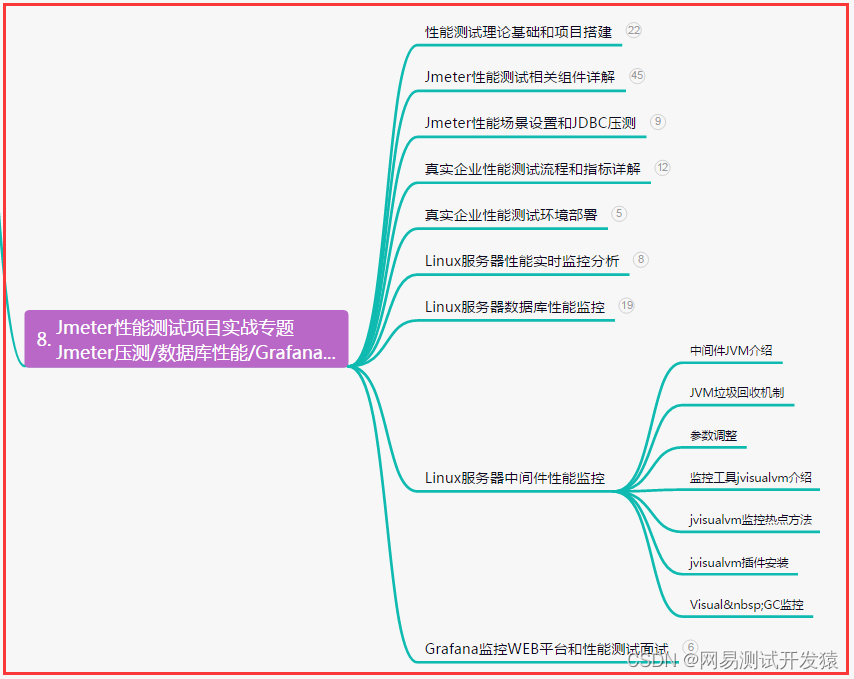
目录:导读 前言一、Python编程入门到精通二、接口自动化项目实战三、Web自动化项目实战四、App自动化项目实战五、一线大厂简历六、测试开发DevOps体系七、常用自动化测试工具八、JMeter性能测试九、总结(尾部小惊喜) 前言 1、Linux下Docker…...

陪玩2.0升级版源码/价值18500元的最新商业版游戏陪玩语音聊天系统源码
陪玩2.0升级版源码,价值18500元的最新商业版游戏陪玩语音聊天系统源码。 修复部分逻辑以及bug 修复bug:店员拒单后,退款会退到店员账号里而不是用户账户里。 修复bug:客户在盲盒下单后,马上取消了订单,但…...
读程序员的制胜技笔记08_死磕优化(上)
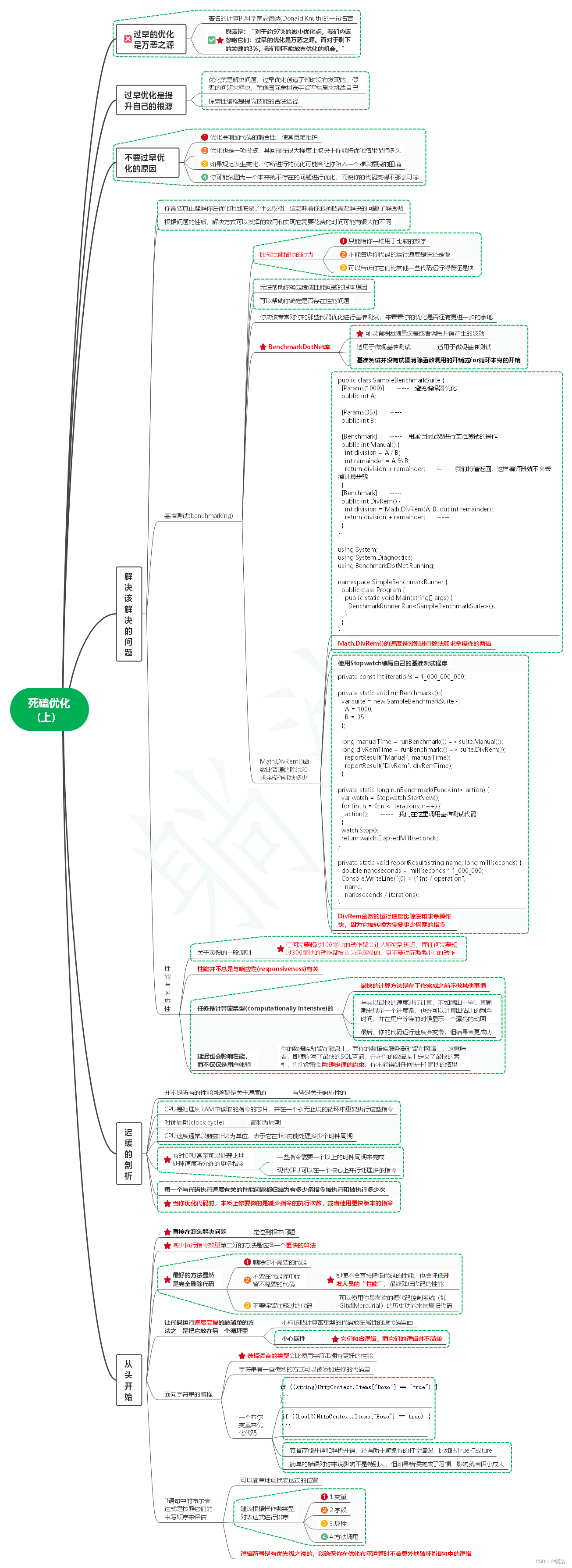
1. 过早的优化是万恶之源 1.1. 著名的计算机科学家高德纳(Donald Knuth)的一句名言 1.2. 原话是:“对于约97%的微小优化点,我们应该忽略它们:过早的优化是万恶之源。而对于剩下的关键的3%,我们则不能放弃优化的机会。” 2. 过早…...
【gltf-pipeline】安装gltf-pipeline 进行文件格式转换
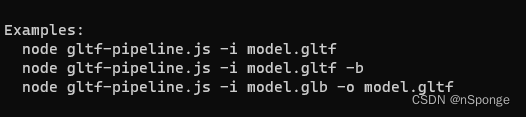
问题 想使用gltf-pipeline进行gltf和glb格式转换。简单记录一下安装过程。 解决 1、安装Node.js Node.js下载路径:https://nodejs.org/en 建议默认设置安装。 添加系统环境变量: 测试安装是否成功: 在cmd.exe中运行: no…...

Android OpenGL ES踩坑记录
因为项目中的一个自定义绘图控件性能不行,改用OpenGL实现,也是第一次使用OpenGL,由于只是绘制2D图形,参考官方以及网上的教程,实现起来还是比较顺畅的,开发时只用了两个手机测试,运行良好&#…...

Vue3 项目完整配置
目录 一、配置简述二、创建项目1、使用包管理工具 pnpm2、新增目录 三、配置 ESLint1、添加代码2、修改 VSCode 配置 四、husky 工具配置五、暂存区 eslint 校验六、axios 配置1、安装创建2、测试 七、导入 Element Plus八、Pinia 持久化实现九、其他导入 .scss 文件需要安装 s…...

二十三种设计模式全面解析-从线程安全到创新应用:探索享元模式的进阶之路
在软件开发领域,线程安全和设计模式都是我们经常遇到的话题。线程安全保证了多线程环境下的数据一致性和可靠性,而设计模式则提供了一套经验丰富的解决方案。在前文中,我们已经了解了线程安全的处理和享元模式的基本概念。但是,如…...

Qt之qobject_cast使用
描述 qobject_cast是Qt中的一个转换函数,主要用于在QObject子类之间进行转换,实现父类指针向子类指针的转换。其语法为: qobject_cast<T>(object);其中,T表示目标类型,object表示要转换的QObject对象指针。 q…...

如何实现云端开发能力快速提升?【DevRun】云上开发创新实践带你实现
随着企业数字化的转型趋势,软件成为数字化转型的关键驱动力,在云计算越来越普及且作用愈发重要的今天,现代应用正以难以想象的速度在增长,同时对软件开发工具提出了新的要求。 华为云CodeArts作为一站式云上开发创新工具…...

猫头虎博主第7期赠书活动:《计算机考研精炼1000题》
🌷🍁 博主猫头虎 带您 Go to New World.✨🍁 🦄 博客首页——猫头虎的博客🎐 🐳《面试题大全专栏》 文章图文并茂🦕生动形象🦖简单易学!欢迎大家来踩踩~🌺 &a…...
Linux常见指令:从基础到理论
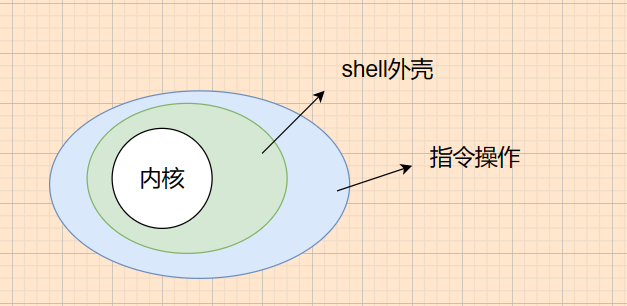
前言 目录 前言 1. find指令 拓展 2. grep指令 拓展 sort指令 uniq指令 wc指令 3. zip/unzip指令 4. tar指令 5. uname指令 拓展 6. Linux常用热键 7. 关机 8. rz指令 拓展 scp指令 9. shell命令以及运行原理 Linux常见指令是使用Linux系统时必不可少的一部分。通过掌握…...

ARM---CAN2.0B读取 汽车BMS报文
Qt CAN编程1- CAN总线整体介绍 - 简书 STM32---CAN2.0B读取新能源汽车BMS报文-CSDN博客 CAN通信标准帧和扩展帧介绍_can扩展帧-CSDN博客 【精选】详解CAN 2.0协议_can2.0-CSDN博客 QT实现CAN通信_五个板栗的技术博客_51CTO博客 linux CAN通讯基于Qt代码编写_pf_can-CSDN博客…...

第十一章 JSP开发模型
文章目录 一. 单选题(共5题,50分)二. 判断题(共5题,50分) 一. 单选题(共5题,50分) (单选题) JSPModel2开发的系统中,实现视图的是() A…...
)
Java面试题-Redis-第四天(线程模型一)
目录 一、Redis为何选择单线程? 二、Redis真的是单线程吗? 三、Redis6.0为何引入多线程 四、Redis6.0引入多线程之后,性能的提升效果如何? 一、Redis为何选择单线程? 通常对于一个数据库来说,CPU通常不…...
逐次变分模态分解(Sequential Variational Mode Decomposition,SVMD)(附代码)

代码原理 逐次变分模态分解(Sequential Variational Mode Decomposition,SVMD)是一种用于信号处理和数据分析的方法。它可以将复杂的信号分解为一系列模态函数,每个模态函数代表了信号中的一个特定频率成分。SVMD的主要目标是提取…...


Python时间序列特征工程实战:从基础到高级技巧
1. 时间序列特征工程实战指南在预测分析领域,时间序列数据就像一本被加密的日记,记录着变量随时间变化的秘密。作为一名数据科学家,我经常需要破解这些密码,而特征工程就是我最常用的解码工具。今天要分享的这套时间序列转换方法&…...

【VSCode日志调试终极指南】:20年DevOps专家亲授5大高阶技巧,90%开发者从未用过的隐藏功能
更多请点击: https://intelliparadigm.com 第一章:VSCode日志调试的核心价值与演进脉络 在现代前端与全栈开发中,日志调试已从辅助手段跃升为关键诊断范式。VSCode 通过集成终端、调试器与扩展生态,将传统 console.log 的原始输出…...

球类运动实测!带赛场数据分析的AI尚运动相机推荐
一、作为赛事组织者,我曾被这些问题逼到崩溃运营草根球类联赛 3 年,从足球、篮球到新兴的匹克球,每一场赛事的记录工作都让我头疼不已。足球比赛中球员大范围跑动,人工拍摄根本跟不上攻防转换节奏,常常错过关键进球&am…...
)
保姆级教程:在野火STM32F429上从零移植LVGL 8.2(基于HAL库,含触摸屏驱动)
野火STM32F429开发板LVGL 8.2移植实战指南 拿到野火STM32F429开发板和5寸电容屏,想快速构建一个带触摸交互的GUI应用?这份保姆级教程将带你从零开始,一步步完成LVGL 8.2的完整移植。不同于简单的代码搬运,我们将深入每个关键配置点…...

存内计算中MDM技术解决寄生电阻挑战
1. 存内计算中的寄生电阻挑战与MDM技术概述在深度神经网络加速器领域,存内计算(CIM)架构正逐渐成为突破传统冯诺依曼架构瓶颈的关键技术。这种将存储与计算融为一体的设计理念,通过消除数据搬运开销,理论上可实现数量级的能效提升。然而&…...

STM32CubeMX实战:DHT11温湿度数据采集与串口打印
1. DHT11温湿度传感器基础认知 第一次接触DHT11这个蓝色小模块时,我完全没想到它会在后来的智能家居项目中扮演如此重要的角色。这个比硬币大不了多少的传感器,内部却藏着测量温湿度的精妙机制。DHT11采用电阻式感温元件和湿敏电容的组合设计,…...

从UART到SSD:盘点那些离不开CRC校验的日常硬件,以及如何用Verilog快速集成
从UART到SSD:盘点那些离不开CRC校验的日常硬件,以及如何用Verilog快速集成 在嵌入式系统和数字电路设计中,数据传输的可靠性始终是工程师面临的核心挑战之一。想象一下,当你通过串口调试设备时,突然出现了一个比特的错…...

Spring,三级缓存,循环依赖问题看这篇就够了!
测试的Springboot版本: 2.6.4,禁止了循环依赖,但是可以通过application.yml开启(哈哈)Lazy注解解决循环依赖情况一:只有简单属性关系的循环依赖涉及的Bean:ASerivce及其实现类ASerivceImplBSerivce及其实现类BSerivceI…...

Qt表格里放下拉框,选setIndexWidget还是QItemDelegate?一个真实项目踩坑后的选择指南
Qt表格下拉框方案深度对比:从setIndexWidget到QItemDelegate的实战抉择 在开发一个需要动态生成带下拉框表格的报表工具时,我遇到了一个看似简单却暗藏玄机的技术选择——如何在QTableView中实现下拉框功能?经过反复试错和性能测试࿰…...