
【kafka】Java客户端代码demo:自动异步提交、手动同步提交及提交颗粒度、动态负载均衡
一,代码及配置项介绍
kafka版本为3.6,部署在3台linux上。
maven依赖如下:
<!-- kafka --><dependency><groupId>org.apache.kafka</groupId><artifactId>kafka_2.13</artifactId><version>3.6.0</version></dependency>
生产者、消费者和topic代码如下:
    String topic = "items-01";@Testpublic void producer() throws ExecutionException, InterruptedException {Properties p = new Properties();p.setProperty(ProducerConfig.BOOTSTRAP_SERVERS_CONFIG,"192.168.184.129:9092,192.168.184.130:9092,192.168.184.131:9092");p.setProperty(ProducerConfig.KEY_SERIALIZER_CLASS_CONFIG, StringSerializer.class.getName());p.setProperty(ProducerConfig.VALUE_SERIALIZER_CLASS_CONFIG, StringSerializer.class.getName());p.setProperty(ProducerConfig.ACKS_CONFIG, "-1");KafkaProducer<String, String> producer = new KafkaProducer<String, String>(p);while(true){for (int i = 0; i < 3; i++) {for (int j = 0; j <3; j++) {ProducerRecord<String, String> record = new ProducerRecord<>(topic, "item"+j,"val" + i);Future<RecordMetadata> send = producer.send(record);RecordMetadata rm = send.get();int partition = rm.partition();long offset = rm.offset();System.out.println("key: "+ record.key()+" val: "+record.value()+" partition: "+partition + " offset: "+offset);}}}}@Testpublic void consumer(){//基础配置Properties properties = new Properties();properties.setProperty(ConsumerConfig.BOOTSTRAP_SERVERS_CONFIG,"192.168.184.129:9092,192.168.184.130:9092,192.168.184.131:9092");properties.setProperty(ConsumerConfig.KEY_DESERIALIZER_CLASS_CONFIG, StringDeserializer.class.getName());properties.setProperty(ConsumerConfig.VALUE_DESERIALIZER_CLASS_CONFIG, StringDeserializer.class.getName());//消费的细节String group = "user-center";properties.setProperty(ConsumerConfig.GROUP_ID_CONFIG,group);//KAKFA IS MQ  IS STORAGE/***         "What to do when there is no initial offset in Kafka or if the current offset*         does not exist any more on the server*         (e.g. because that data has been deleted):*         <ul>*             <li>earliest: automatically reset the offset to the earliest offset*             <li>latest: automatically reset the offset to the latest offset</li>*             <li>none: throw exception to the consumer if no previous offset is found for the consumer's group</li><li>anything else: throw exception to the consumer.</li>*         </ul>";*/properties.setProperty(ConsumerConfig.AUTO_OFFSET_RESET_CONFIG,"latest");//第一次启动,米有offset//自动提交时异步提交,丢数据&&重复数据properties.setProperty(ConsumerConfig.ENABLE_AUTO_COMMIT_CONFIG,"true");//        p.setProperty(ConsumerConfig.AUTO_COMMIT_INTERVAL_MS_CONFIG,"15000");
//        p.setProperty(ConsumerConfig.MAX_POLL_RECORDS_CONFIG,"10");KafkaConsumer<String, String> consumer = new KafkaConsumer<>(properties);consumer.subscribe(Arrays.asList(topic));while(true){ConsumerRecords<String,String> records = consumer.poll(Duration.ofMillis(0));if (!records.isEmpty()){System.out.println();System.out.println("-----------------" + records.count() + "------------------------------");Iterator<ConsumerRecord<String,String>> iterator = records.iterator();while (iterator.hasNext()){ConsumerRecord<String,String> record = iterator.next();int partition = record.partition();long offset = record.offset();System.out.println("key: " + record.key() + " val: " + record.value() + " partition: " + partition + " offset: " + offset);}}}}
这里先简单解释一下,kafka的topic只是一个逻辑上的概念,实际上的物理存储是依赖分布在broker中的分区partition来完成的。kafka依赖的zk中有一个__consumer_offsets[1]话题,存储了所有consumer和group消费的进度,包括当前消费到的进度current-offset、kafka写入磁盘的日志中记录的消息的末尾log-end-offset。
kafka根据消息的key进行哈希取模的结果来将消息分配到不同的partition,partition才是consumer拉取的对象。每次consumer拉取,都是从一个partition中拉取。(这一点,大家可以自己去验证一下)
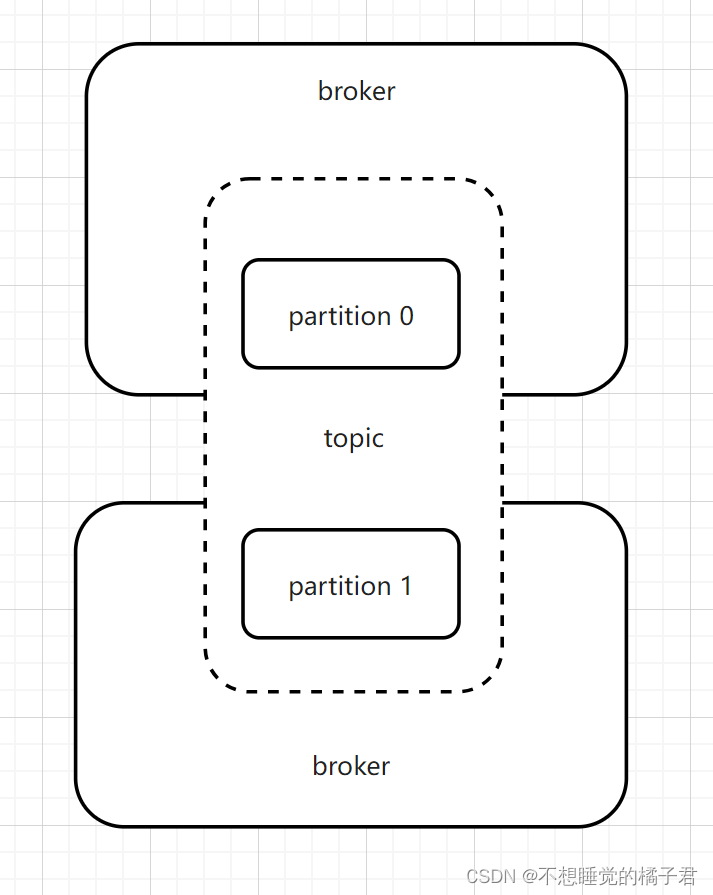
下面代码,是描述的当consumer第一次启动时,在kafka中还没有消费的记录,此时current-offset为"-"时,consumer应如何拉取数据的行为。有3个值可选,latest、earliest、none。
当设置如下配置为latest,没有current-offset时,只拉取consumer启动后的新消息。
earliest,没有current-offset时,从头开始拉取消息消费。
node,没有current-offset时,抛异常。
它们的共同点就是current-offset有值时,自然都会按照current-offset拉取消息。
properties.setProperty(ConsumerConfig.AUTO_OFFSET_RESET_CONFIG,"latest");
下面代码,true表示设置的异步自动提交,false为手动提交。
properties.setProperty(ConsumerConfig.ENABLE_AUTO_COMMIT_CONFIG,"true");
下面代码,设置的是自动提交时,要过多少秒去异步自动提交。
properties.setProperty(ConsumerConfig.AUTO_COMMIT_INTERVAL_MS_CONFIG,"15000");
下面代码,是设置kafka批量拉取多少数据,默认的应该是最大500,小于500。 kafka可以批量的拉取数据,这样可以节省网卡资源。
properties.setProperty(ConsumerConfig.MAX_POLL_RECORDS_CONFIG,"10");
二、异步自动提交
部分设置项如下:
properties.setProperty(ConsumerConfig.AUTO_OFFSET_RESET_CONFIG,"latest");properties.setProperty(ConsumerConfig.ENABLE_AUTO_COMMIT_CONFIG,"true");//自动提交时异步提交,丢数据&&重复数据properties.setProperty(ConsumerConfig.AUTO_COMMIT_INTERVAL_MS_CONFIG,"15000");properties.setProperty(ConsumerConfig.MAX_POLL_RECORDS_CONFIG,"10");
开启生产者,生产出一些消息,可以看到之前拉取完数据的group又有了新的数据。

开启消费者,可以看到消息被消费掉。

因为提交是异步的,我们需要需要为了业务代码留出处理时间。所以需要设置异步提交时间。
假设在间隔时间(AUTO_COMMIT_INTERVAL_MS_CONFIG,自动提交间隔毫秒数配置)内,还没有提交的时候,消费过数据假设数据,consumer挂了。那么consumer再次启动时,从kafka拉取数据,就会因为还没有提交offset,而重新拉取消费过的数据,导致重复消费。
假设现在已经过了延间隔时间,提交成功了,但是业务还没有完成,并且在提交后失败了。那么这个消费失败的消息也不会被重新消费了,导致丢失消息。
为了解决上述的问题,可以使用手动同步提交。
三、手动同步提交
假设我们现在是按照批量拉取,下面介绍2种提交粒度的demo,粒度由小到大,分别是按条提交,按partition提交 && 按批次提交。
3.1 按条提交
public void test1(){//基础配置Properties properties = new Properties();properties.setProperty(ConsumerConfig.BOOTSTRAP_SERVERS_CONFIG,"192.168.184.129:9092,192.168.184.130:9092,192.168.184.131:9092");properties.setProperty(ConsumerConfig.KEY_DESERIALIZER_CLASS_CONFIG, StringDeserializer.class.getName());properties.setProperty(ConsumerConfig.VALUE_DESERIALIZER_CLASS_CONFIG, StringDeserializer.class.getName());//消费的细节String group = "user-center";properties.setProperty(ConsumerConfig.GROUP_ID_CONFIG,group);//KAKFA IS MQ  IS STORAGE/***         "What to do when there is no initial offset in Kafka or if the current offset*         does not exist any more on the server*         (e.g. because that data has been deleted):*         <ul>*             <li>earliest: automatically reset the offset to the earliest offset*             <li>latest: automatically reset the offset to the latest offset</li>*             <li>none: throw exception to the consumer if no previous offset is found for the consumer's group</li><li>anything else: throw exception to the consumer.</li>*         </ul>";*/properties.setProperty(ConsumerConfig.AUTO_OFFSET_RESET_CONFIG,"latest");//第一次启动,米有offset//自动提交时异步提交,丢数据&&重复数据properties.setProperty(ConsumerConfig.ENABLE_AUTO_COMMIT_CONFIG,"true");//        p.setProperty(ConsumerConfig.AUTO_COMMIT_INTERVAL_MS_CONFIG,"15000");
//        p.setProperty(ConsumerConfig.MAX_POLL_RECORDS_CONFIG,"10");KafkaConsumer<String, String> consumer = new KafkaConsumer<>(properties);consumer.subscribe(Arrays.asList(topic));while(true){ConsumerRecords<String,String> records = consumer.poll(Duration.ofMillis(0));if (!records.isEmpty()){System.out.println();System.out.println("-----------------" + records.count() + "------------------------------");Iterator<ConsumerRecord<String,String>> iterator = records.iterator();while (iterator.hasNext()){ConsumerRecord<String,String> next = iterator.next();int p = next.partition();long offset = next.offset();String key = next.key();String value = next.value();System.out.println("key: " + key + " val: " + value + " partition: " + p + " offset: " + offset);TopicPartition sp = new TopicPartition(topic,p);OffsetAndMetadata om = new OffsetAndMetadata(offset);HashMap<TopicPartition, OffsetAndMetadata> map = new HashMap<>();map.put(sp,om);consumer.commitSync(map);}}}}
3.2 按partition提交 && 按批次提交
由于消费者每一次拉取都是从一个partition中拉取,所以其实按partition拉取和按批次拉取,是一回事。整体成功
    @Testpublic void test2(){//基础配置Properties properties = new Properties();properties.setProperty(ConsumerConfig.BOOTSTRAP_SERVERS_CONFIG,"192.168.184.129:9092,192.168.184.130:9092,192.168.184.131:9092");properties.setProperty(ConsumerConfig.KEY_DESERIALIZER_CLASS_CONFIG, StringDeserializer.class.getName());properties.setProperty(ConsumerConfig.VALUE_DESERIALIZER_CLASS_CONFIG, StringDeserializer.class.getName());//消费的细节String group = "user-center";properties.setProperty(ConsumerConfig.GROUP_ID_CONFIG,group);properties.setProperty(ConsumerConfig.AUTO_OFFSET_RESET_CONFIG,"latest");//自动提交时异步提交,丢数据&&重复数据properties.setProperty(ConsumerConfig.ENABLE_AUTO_COMMIT_CONFIG,"false");//        p.setProperty(ConsumerConfig.AUTO_COMMIT_INTERVAL_MS_CONFIG,"15000");
//        p.setProperty(ConsumerConfig.MAX_POLL_RECORDS_CONFIG,"10");KafkaConsumer<String, String> consumer = new KafkaConsumer<>(properties);consumer.subscribe(Arrays.asList(topic));while(true){ConsumerRecords<String,String> records = consumer.poll(Duration.ofMillis(0));if (!records.isEmpty()){System.out.println();System.out.println("-----------------" + records.count() + "------------------------------");Set<TopicPartition> partitions = records.partitions();for (TopicPartition partition : partitions){List<ConsumerRecord<String,String>> pRecords = records.records(partition);Iterator<ConsumerRecord<String,String>> pIterator = pRecords.iterator();while (pIterator.hasNext()){ConsumerRecord<String,String> next = pIterator.next();int p = next.partition();long offset = next.offset();String key = next.key();String value = next.value();System.out.println("key: " + key + " val: " + value + " partition: " + p + " offset: " + offset);}//按partition提交long offset = pRecords.get(pRecords.size() - 1).offset();OffsetAndMetadata om = new OffsetAndMetadata(offset);HashMap<TopicPartition, OffsetAndMetadata> map = new HashMap<>();map.put(partition,om);consumer.commitSync(map);}//按批次提交
//                consumer.commitSync();}}}
四,动态负载均衡
我们知道,对于一个topic,一个group中,为了保证消息的顺序性,默认只能有一个consumer来消费。假设我们有3台消费者,那么此时,另外2台消费者就会闲着不干活。有没有可能能够既保证消费消息的顺序性,又能够提升性能呢?
答案就是kafka的动态负载均衡。
前面提到了,producer会根据消息的key的哈希取模的结果来把消息分配到某个partition,也就是说同一个key的消息,只存在于一个partition中。而且消费者拉取消息,一个批次,只从一个partition中拉取消息。
假设我们现在有一个topic,有2个partition。那么我们可不可以在组内3台消费者中,挑2台出来,各自对应这个topic的2个partition,这样消费者和partition一一对应。既能保证消息的顺序性,又能够提升性能。这就是kafka的动态负载均衡。
代码如下:
//动态负载均衡@Testpublic void test3(){//基础配置Properties properties = new Properties();properties.setProperty(ConsumerConfig.BOOTSTRAP_SERVERS_CONFIG,"192.168.184.129:9092,192.168.184.130:9092,192.168.184.131:9092");properties.setProperty(ConsumerConfig.KEY_DESERIALIZER_CLASS_CONFIG, StringDeserializer.class.getName());properties.setProperty(ConsumerConfig.VALUE_DESERIALIZER_CLASS_CONFIG, StringDeserializer.class.getName());//消费的细节String group = "user-center";properties.setProperty(ConsumerConfig.GROUP_ID_CONFIG,group);properties.setProperty(ConsumerConfig.AUTO_OFFSET_RESET_CONFIG,"latest");//自动提交时异步提交,丢数据&&重复数据properties.setProperty(ConsumerConfig.ENABLE_AUTO_COMMIT_CONFIG,"false");properties.setProperty(ConsumerConfig.AUTO_COMMIT_INTERVAL_MS_CONFIG,"15000");properties.setProperty(ConsumerConfig.MAX_POLL_RECORDS_CONFIG,"10");KafkaConsumer<String, String> consumer = new KafkaConsumer<>(properties);//kafka 的consumer会动态负载均衡consumer.subscribe(Arrays.asList(topic), new ConsumerRebalanceListener() {//Revoked,取消的回调函数@Overridepublic void onPartitionsRevoked(Collection<TopicPartition> partitions) {System.out.println("---onPartitionsRevoked:");Iterator<TopicPartition> iter = partitions.iterator();while(iter.hasNext()){System.out.println(iter.next().partition());}System.out.println();}//Assigned 指定的回调函数@Overridepublic void onPartitionsAssigned(Collection<TopicPartition> partitions) {System.out.println("---onPartitionsAssigned:");Iterator<TopicPartition> iter = partitions.iterator();while(iter.hasNext()){System.out.println(iter.next().partition());}System.out.println();}});while(true){ConsumerRecords<String,String> records = consumer.poll(Duration.ofMillis(0));if (!records.isEmpty()){System.out.println();System.out.println("-----------------" + records.count() + "------------------------------");Iterator<ConsumerRecord<String,String>> iterator = records.iterator();while (iterator.hasNext()){ConsumerRecord<String,String> next = iterator.next();int p = next.partition();long offset = next.offset();String key = next.key();String value = next.value();System.out.println("key: " + key + " val: " + value + " partition: " + p + " offset: " + offset);TopicPartition sp = new TopicPartition(topic,p);OffsetAndMetadata om = new OffsetAndMetadata(offset);HashMap<TopicPartition, OffsetAndMetadata> map = new HashMap<>();map.put(sp,om);consumer.commitSync(map);}}}}
上述代码在订阅时,加了一个ConsumerRebalanceListener监听器,实现了2个回调函数onPartitionsRevoked和onPartitionsAssigned,分别是取消组内消费者负载均衡时触发的回调函数,和指定组内消费者加入负载均衡时触发的回调函数。
在使用动态负载均衡时,需要注意的是,在提交时不要批量提交,否则会报错如下,暂时还没有研究问题原因,有了结果会回来更新的。
org.apache.kafka.clients.consumer.CommitFailedException: Commit cannot be completed since the group has already rebalanced and assigned the partitions to another member. This means that the time between subsequent calls to poll() was longer than the configured max.poll.interval.ms, which typically implies that the poll loop is spending too much time message processing. You can address this either by increasing the session timeout or by reducing the maximum size of batches returned in poll() with max.poll.records.
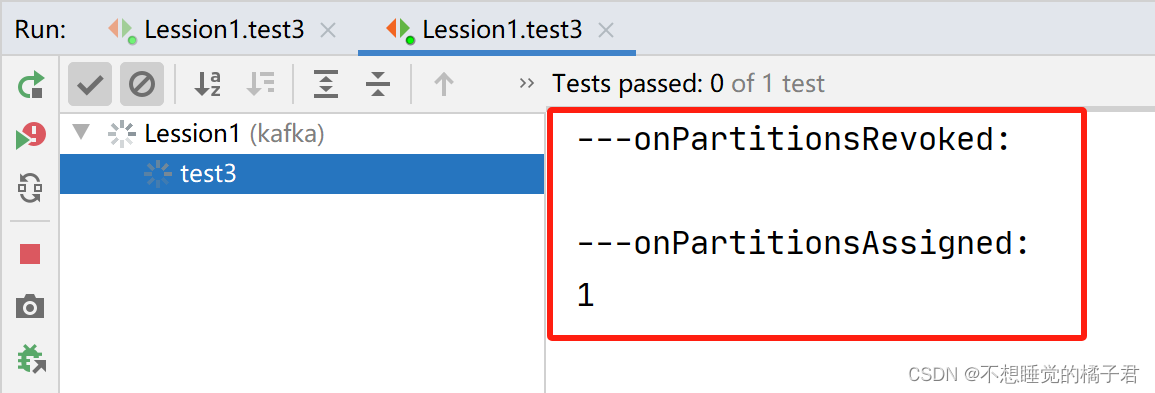
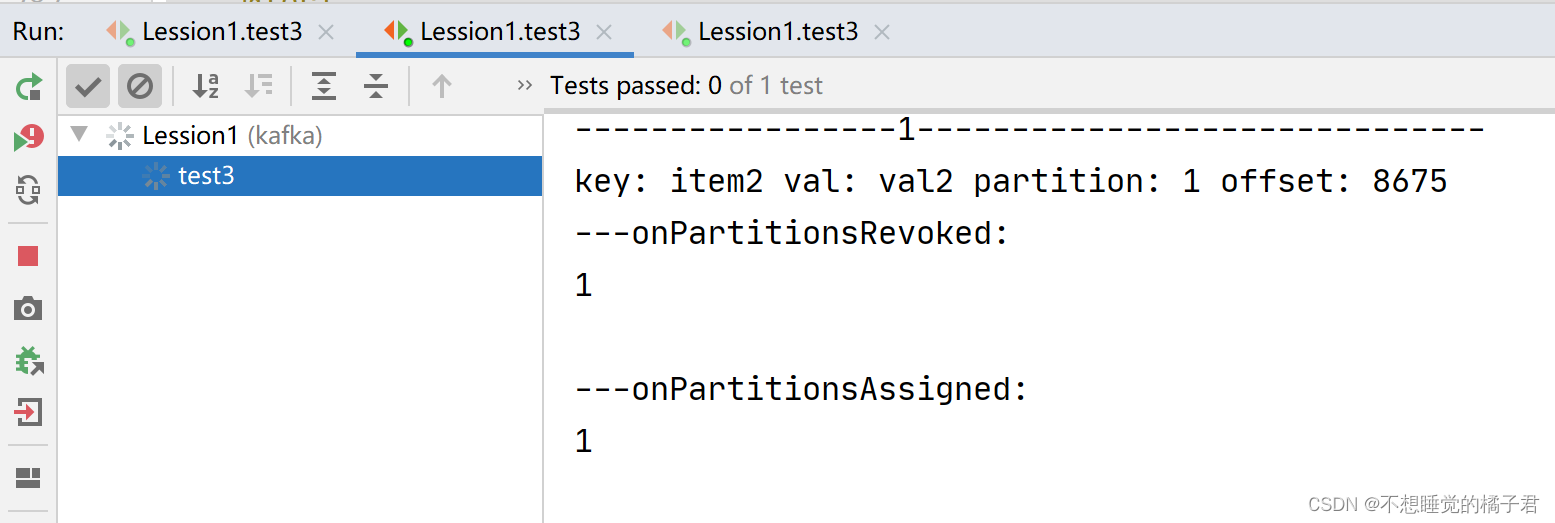
先打开一个消费者A,触发了回调函数onPartitionsAssigned,可以看到partition0 和 partition1都被分配到了A上。
此时打开生产者,可以看到partition0和1的消息都发送到了A上。

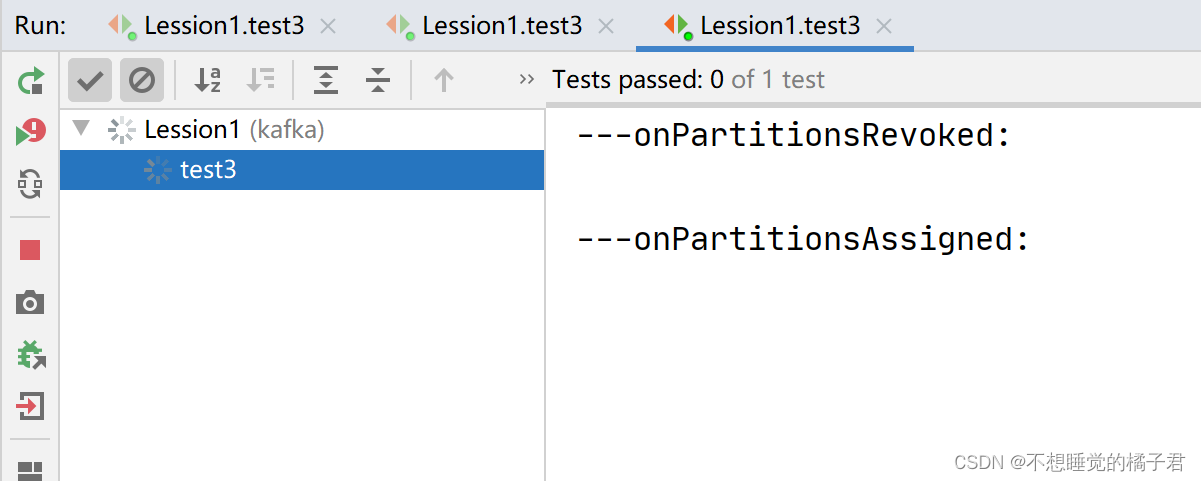
我们再打开一个同一个组内的消费者B。
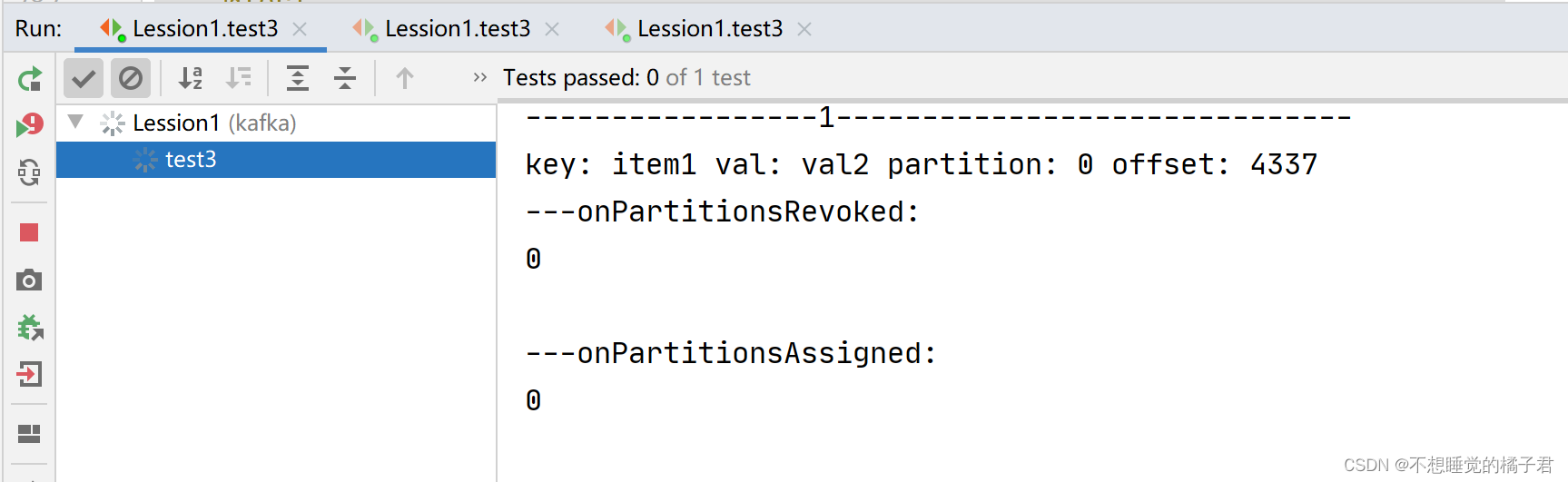
可以看到A取消了partition0和1的分配,被指定了partition0。消费者B则被指定了partition1.
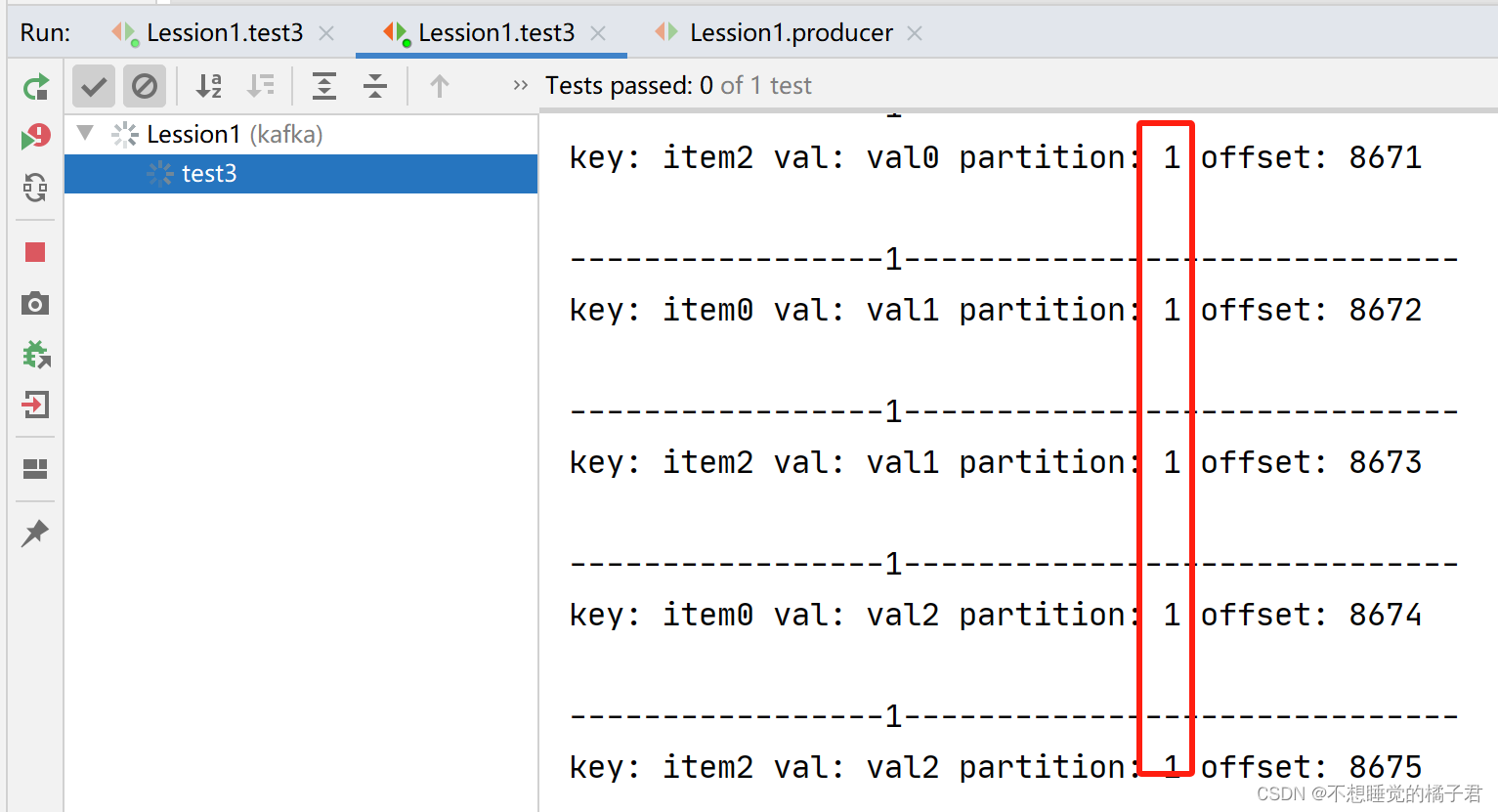
再次打开生产者去生产消息,这次A只消费partition 0的消息,B只消费partition1的消息。

如果我们再启动组内第3台消费者,那么组内消费者会再次负载均衡。由于这个topic只有2个partition,所以即使启动3台组内的消费者,也最多只有2个消费者被分配给某个partition,剩余1个消费者不参与负载均衡。
参考文章:
[1],【kafka】记一次kafka基于linux的原生命令的使用
相关文章:
【kafka】Java客户端代码demo:自动异步提交、手动同步提交及提交颗粒度、动态负载均衡
一,代码及配置项介绍 kafka版本为3.6,部署在3台linux上。 maven依赖如下: <!-- kafka --><dependency><groupId>org.apache.kafka</groupId><artifactId>kafka_2.13</artifactId><version>3.6.0…...
【Git】Gui图形化管理、SSH协议私库集成IDEA使用
一、Gui图形化界面使用 1、根据自己需求打开管理器 2、克隆现有的库 3、图形化界面介绍 1、首先在本地仓库更新一个代码文件,进行使用: 2、进入图形管理界面刷新代码资源: 3、点击Stage changed 跟踪文件,将文件处于暂存区 4、通过…...
AIX5.3安装weblogic10.3
目录 1安装IBM JDK 1.6 2图形化准备 3安装weblogic 准备 4图形化界面安装 1安装IBM JDK 1.6 1.1检查操作系统 # oslevel 5.3.0.0 # bootinfo -y (显示AIX机器硬件是64位) 64 # bootinfo -K (显示AIX系统内核是64位) 64 因此,系统需要安装64位的jdk,…...

聊聊logback的FixedWindowRollingPolicy
序 本文主要研究一下logback的FixedWindowRollingPolicy RollingPolicy ch/qos/logback/core/rolling/RollingPolicy.java /*** A <code>RollingPolicy</code> is responsible for performing the rolling over* of the active log file. The <code>Roll…...

详解机器学习最优化算法
前言 对于几乎所有机器学习算法,无论是有监督学习、无监督学习,还是强化学习,最后一般都归结为求解最优化问题。因此,最优化方法在机器学习算法的推导与实现中占据中心地位。在这篇文章中,小编将对机器学习中所使用的…...
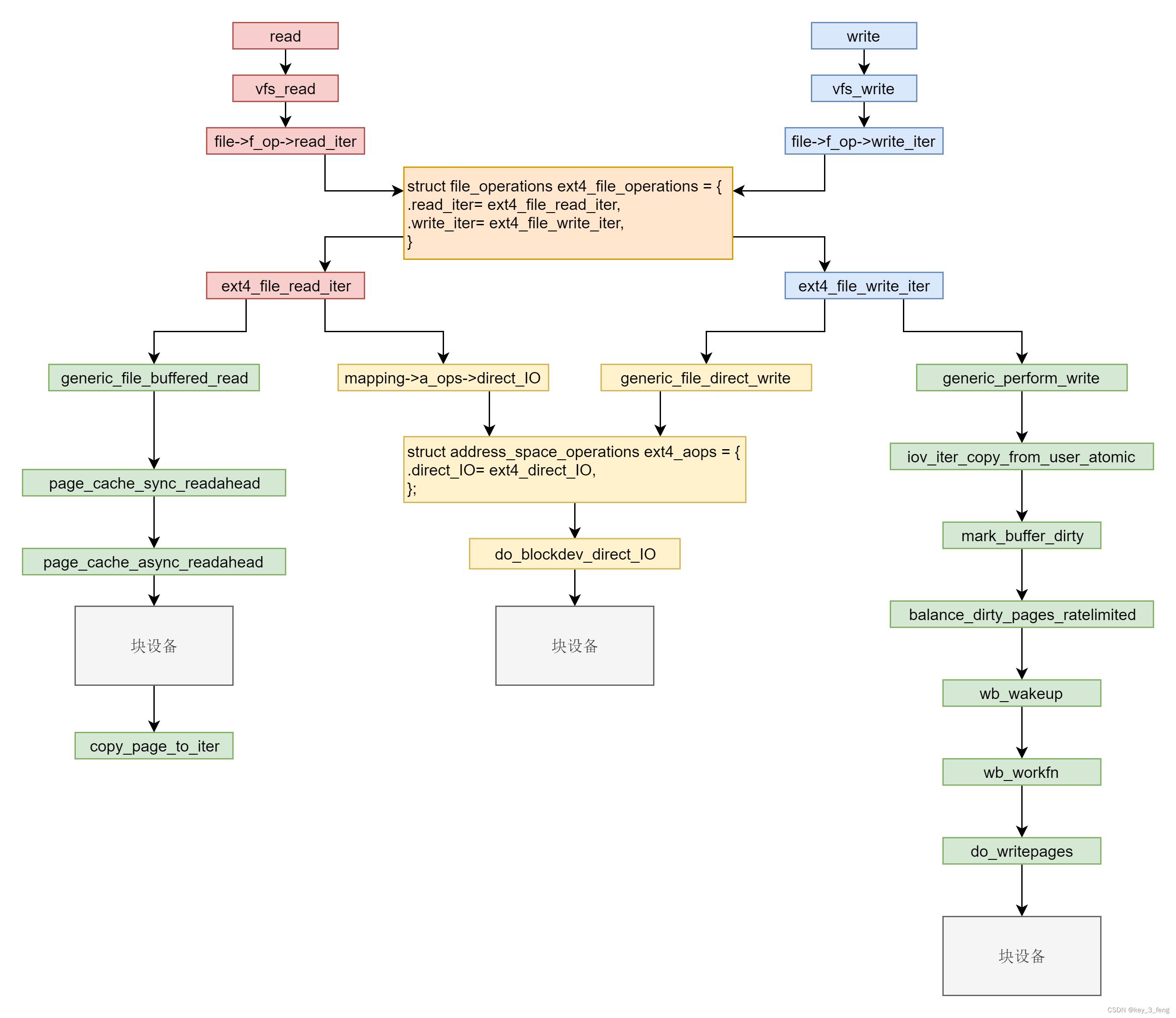
文件缓存的读写
文件系统的读写,其实就是调用系统函数 read 和 write。下面的代码就是 read 和 write 的系统调用,在内核里面的定义。 SYSCALL_DEFINE3(read, unsigned int, fd, char __user *, buf, size_t, count) {struct fd f fdget_pos(fd); ......loff_t pos f…...

Debian 修改主机名
Debian 修改主机名 查看操作系统的版本信息设置主机名查看当前的主机名修改命令行提示符的格式 查看操作系统的版本信息 # cat /etc/issue Debian GNU/Linux 11 \n \l# lsb_release -a No LSB modules are available. Distributor ID: Debian Description: Debian GNU/Linux 1…...

多线程返回计时问题代码案例
Component Slf4j Async public class ThreadSaveDigCategory {private static final int BATCH_COUTN 1000;Autowiredprivate Mapper mapper;public Future<Boolean> saveDigCategoryDatas(List<DigCategoryData> digCategoryDataList){//开始计时long startTime …...
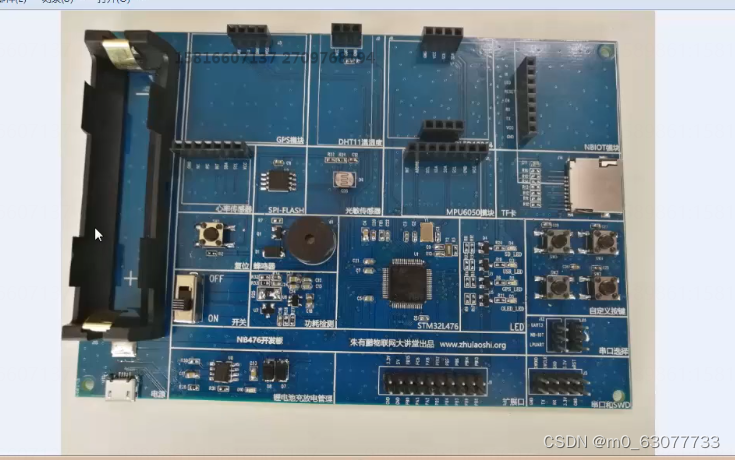
【STM32】STM32的Cube和HAL生态
1.单片机软件开发的时代变化 1.单片机的演进过程 (1)第1代:4004、8008、Zilog那个年代(大约1980年代之前) (2)第2代:51、PIC8/16、AVR那个年代(大约2005年前) (3)第3代:51、PIC32、Cortex-M0、…...

汇编-EQU伪指令(数值替换)
EQU伪指令将一个符号名称与一个整数表达式或一个任意文本相关联, 它有3种格式 在第一种格式中, expression必须是一个有效的整数表达式。在第二种格式中, symbol是一个已存在的符号名称, 已经用或EQU定义过。在第三种格式中&…...
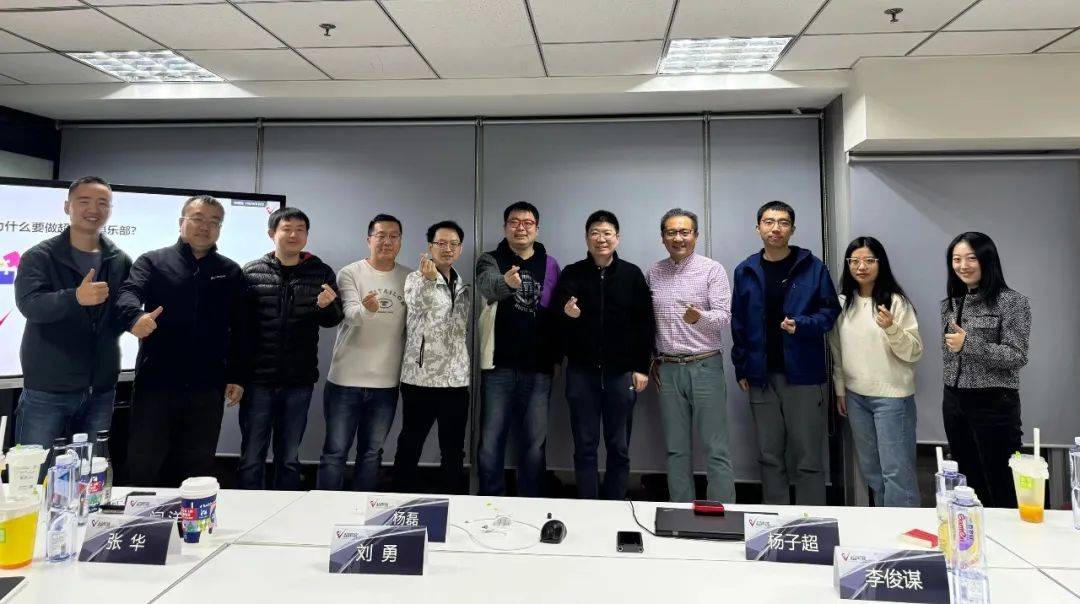
超声波俱乐部分享:Enter AI native application
11月5日,2023年第十四期超声波俱乐部内部分享会在北京望京举行。本期的主题是:Enter AI native application。 到场的嘉宾有:超声波创始人杨子超,超声波联合创始人、和牛商业创始人刘思雨,蓝驰创投合伙人刘勇…...
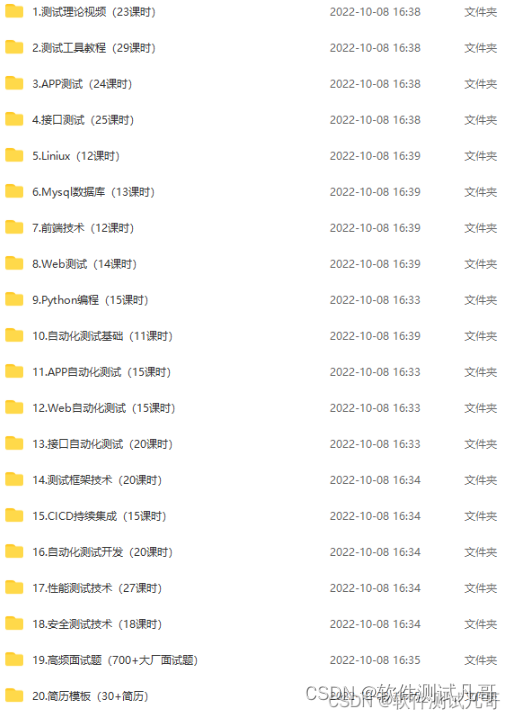
软件测试项目实战经验附视频以及源码【商城项目,app项目,电商项目,银行项目,医药项目,金融项目】(web+app+h5+小程序)
前言: 大家好,我是阿里测试君。 最近很多小伙伴都在面试,但是对于自己的项目经验比较缺少。阿里测试君再度出马,给大家找了一个非常适合练手的软件测试项目,此项目涵盖web端、app端、h5端、小程序端,…...
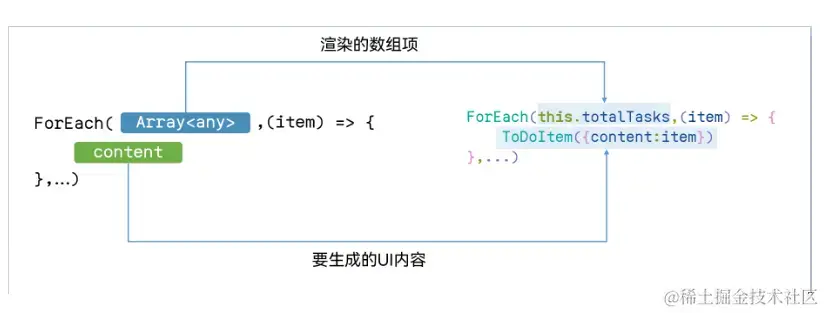
HarmonyOS应用开发-ArkTS基础知识
作者:杨亮Jerry 作为多年的大前端程序开发工作者,就目前的形式,个人浅见,在未来3-5年,移动端依旧是Android系统和iOS系统的天下。不过基于鸿蒙系统的应用开发还是值得我们去花点时间去了解下的,阅读并实践官…...
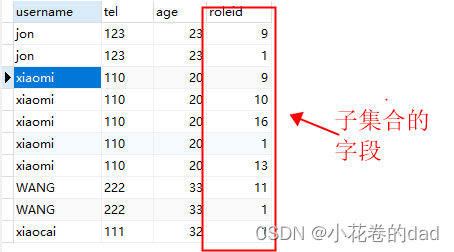
mybatis嵌套查询子集合只有一条数据
我们再用mybatis做嵌套查询时,有时会遇到子集合只有1条数据的情况,例如下这样: 数据库查询结果 xml <resultMap id"userMap" type"com.springboot.demo.test.entity.User"><id column"uid" property…...

Github 生成SSH秘钥及相关问题
1.生成过程参考:Github 生成SSH秘钥(详细教程)_github生成密钥controller节点生成ssh秘钥-CSDN博客 2.遇到的问题:GitHub Connect: kex_exchange_identification: Connection closed by remote host 注意:如果.ssh文…...

STM32外设系列—MPU6050角度传感器
🎀 文章作者:二土电子 🌸 关注公众号获取更多资料! 🐸 期待大家一起学习交流! 文章目录 一、MPU6050简介二、MPU6050寄存器简介2.1 PWR_MGMT_1寄存器2.2 GYRO_CONFIG寄存器2.3 ACCEL_CONFIG寄存器2.4 PW…...
网站小程序分类目录网源码系统+会员登录注册功能 带完整搭建教程
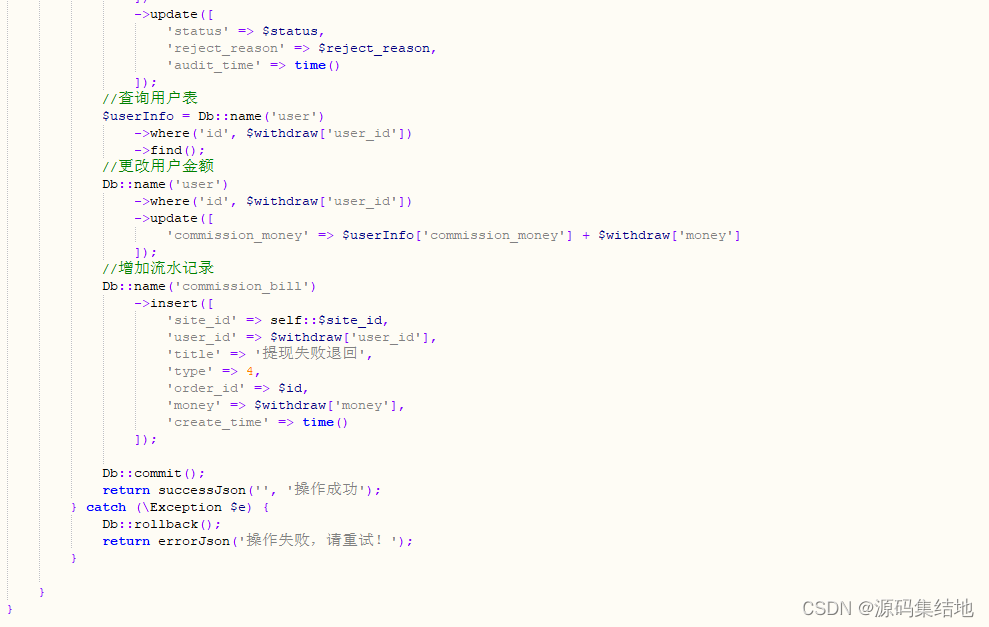
大家好啊,源码小编今天来给大家分享一款网站小程序分类目录网源码系统会员登录注册功能 。 以下是核心代码图模块: 系统特色功能一览: 分类目录:系统按照不同的类别对网站进行分类,方便用户查找自己需要的网站。用户可…...
【Linux网络】手把手实操Linux系统网络服务DHCP
目录 一、什么是dhcp 二、详解dhcp的工作原理 三、dhcp的实操 第一步:3台机器的防火墙和安全机制都需要关闭!!! 第二步:Linux下载dhcp软件,并查看配置文件位置 第三步:读配置文件…...

Huggingface网页解析和下载爬虫
解析网页: import requests from bs4 import BeautifulSoup# 目标网页URL url https://huggingface.co/internlm/internlm-20b/tree/main# 发送GET请求 response requests.get(url)# 检查请求是否成功 if response.status_code 200:# 使用BeautifulSoup解析HTML…...

C# Winform 自定义带SWITCH的卡片
1、创建卡片用户控件 在控件库中添加用户控件(Windows窗体),命名为Card; 在属性/布局栏设置Size为148,128. 2、修改Card.cs using System; using System.Collections.Generic; using System.ComponentModel; using System.Data; u…...

地平线首款舱驾融合芯片即将量产;速腾聚创发布创世架构推出双旗舰感知芯片;多项固态电池技术重大突破;蔡司研发全息透明显示技术
地平线首款舱驾融合芯片即将量产牛喀网获悉,地平线发布中国首款舱驾融合整车智能体芯片星空Starry,该芯片采用5nm车规制程,BPU算力达650TOPS,内存带宽273GB/s,集成20核CPU。其采用统一内存架构与城堡安全物理隔离架构&…...

老王-承载力:一个人活明白的终极标志
承载力:一个人活明白的终极标志“能载万物而不言,是谓大人。” ——《周易坤卦》一、核心命题:何为“活得明白”? 世人常以聪明、成功、财富为人生标杆, 但真正的“明白”,不在外显,而在内在承载…...

6种二极管的区别和用法
一、通用二极管代表型号:1N4001~1N4007、M1、M4、M7等;1.1 特性单向导通、PN结反向耐压高,通常为50~1kv;正向压降0.6~1.5V左右,根据材料不同以及导通电流不同而变化;开关速度慢-us级别下面列出M7-通用二极管的数据手册…...

终极指南:UnityExplorer - 免费高效的Unity游戏运行时调试利器
终极指南:UnityExplorer - 免费高效的Unity游戏运行时调试利器 【免费下载链接】UnityExplorer An in-game UI for exploring, debugging and modifying IL2CPP and Mono Unity games. 项目地址: https://gitcode.com/gh_mirrors/un/UnityExplorer 你是否在U…...

GAN七日实战:从原理到风格迁移的完整学习路径
1. 生成对抗网络入门指南:7天速成实战路线第一次接触GAN时,我被它生成的人脸照片震惊得说不出话——那些根本不存在的人像,连皮肤纹理和发丝反光都真实得可怕。作为计算机视觉领域的革命性技术,生成对抗网络正在重塑内容创作的边界…...

Koodo Reader:如何用AI智能助手打造你的终极数字阅读体验
Koodo Reader:如何用AI智能助手打造你的终极数字阅读体验 【免费下载链接】koodo-reader A modern ebook manager and reader with sync and backup capacities for Windows, macOS, Linux, Android, iOS and Web 项目地址: https://gitcode.com/GitHub_Trending/…...
)
PaddleOCR实战:手把手教你训练一个识别金属零件字符的定制化模型(从PPOCRLabel标注到模型部署)
PaddleOCR工业实战:金属零件字符识别模型定制全流程解析 金属零件表面的字符识别一直是工业质检中的关键环节。与通用OCR不同,工业场景下的字符往往面临反光、油污、低对比度等复杂干扰。本文将完整演示如何基于PaddleOCR框架,从零构建专用于…...

商品中心怎么设计?一次讲清 SPU、SKU、类目、属性、上下架与索引建模
商品中心怎么设计?一次讲清 SPU、SKU、类目、属性、上下架与索引建模 大家好,我是一名有 4 年工作经验的 Java 后端开发。 商品中心几乎是电商系统的基础盘,很多后续问题其实都和商品模型有没有设计稳直接相关。 这篇文章我想系统聊一聊商品中…...

20260422-《我在100天内自学英文翻转人生》
设立一个渴望达成的目标:请定下一个你急欲实现的目标。一定要是你真心渴望达成的目标,越具体越好。,若能让你在短时间内确认达成的进度,就再好不过了。挑选自己细化的影片,看电影时,我经常把自己当成男主角…...
)
ADC0809采集数据老不准?逐次逼近型ADC的误差来源与软件滤波实战(附8086汇编代码)
ADC0809数据采集精度提升实战:误差分析与软件滤波技术解析 当你在实验室里反复调整电位器,却发现ADC0809采集的数据总是飘忽不定时,那种挫败感我深有体会。去年在开发工业温度监控系统时,我连续三天被5℃的波动困扰,直…...