
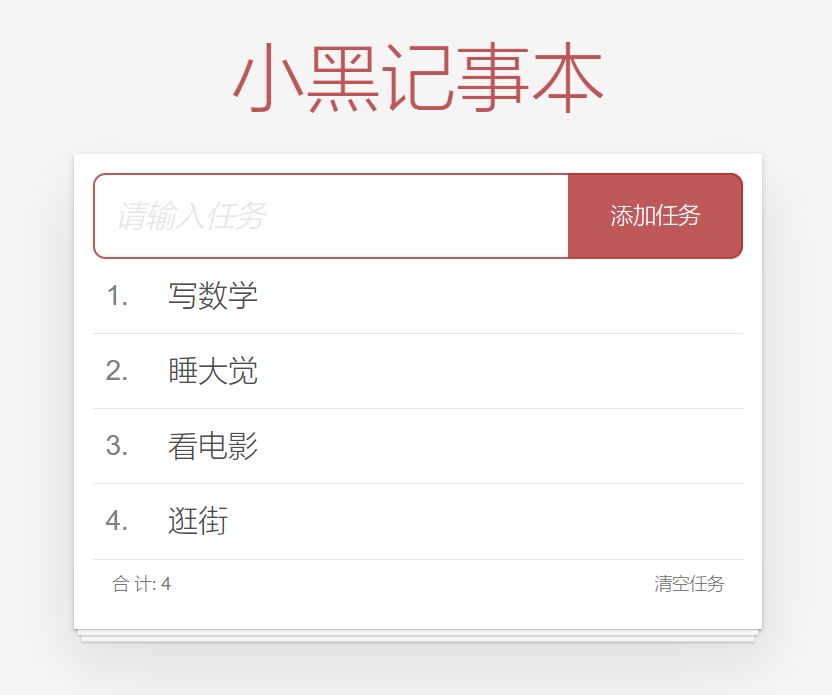
Vue 小黑记事本组件版
渲染功能:
1.提供数据: 提供在公共的父组件 App.vue
2.通过父传子,将数据传递给TodoMain
3.利用 v-for渲染
添加功能:
1.收集表单数据 v-model
2.监听事件(回车+点击都要添加)
3.子传父,讲任务名称传递给父组件 App.vue
4.进行添加 unshift(自己的数据自己负责)
5.清空文本框输入的内容
6.对输入的空数据 进行判断
删除功能
1.监听事件(监听删除的点击) 携带id
2.子传父,讲删除的id传递给父组件的App.vue
3.进行删除filter(自己的数据 自己负责)
底部合计:父传子 传list 渲染
清空功能:子传父 通知父组件 → 父组件进行更新
持久化存储:watch深度监视list的变化 -> 往本地存储 ->进入页面优先读取本地数据
App.vue
<template><!-- 主体区域 --><section id="app"><TodoHeader @add="handleAdd"></TodoHeader><TodoMain :list="list" @handelDel="handelDel"></TodoMain><TodoFooter :list="list" @clear="handleClear"></TodoFooter></section>
</template><script>
import TodoFooter from "./components/TodoFooter.vue";
import TodoHeader from "./components/TodoHeader.vue";
import TodoMain from "./components/TodoMain.vue";
export default {data() {return {list: JSON.parse(localStorage.getItem('list')) || [{ id: 1, name: "打篮球" },{ id: 2, name: "看电影" },{ id: 3, name: "逛街" },],};},components: {TodoFooter,TodoHeader,TodoMain,},methods:{handleAdd(value){this.list.unshift({id : +new Date(),name : value})},handelDel(value){this.list = this.list.filter(item =>item.id !== value)},handleClear(){this.list = []}},watch:{list:{deep : true,handler(newValue){localStorage.setItem('list',JSON.stringify(newValue))}}}
};
</script><style>
</style>
components
TodoHeader
<template><header class="header"><!-- 输入框 --><h1>小黑记事本</h1><input@keyup.enter="add()"placeholder="请输入任务"class="new-todo"v-model.trim="TodoName"/><button @click="add()" class="add">添加任务</button></header>
</template><script>
export default {data() {return {TodoName: "",};},methods: {add() {if (!this.TodoName) {alert("输入内容不能为空!");return}this.$emit("add", this.TodoName);this.TodoName = ''},},
};
</script><style>
</style>
TodoMain
<template><!-- 列表区域 --><section class="main"><ul class="todo-list"><li class="todo" v-for="(item,index) in list" :key="item.id"><div class="view"><span class="index">{{index+1}}.</span> <label>{{item.name}}</label><button class="destroy" @click="del(item.id)"></button></div></li></ul></section>
</template><script>
export default {props:{list:Array},methods:{del(id){this.$emit('handelDel',id)}}
};
</script><style>
</style>
TodoFooter
<template><!-- 统计和清空 --><footer class="footer"><!-- 统计 --><span class="todo-count">合 计:<strong> {{list.length}} </strong></span><!-- 清空 --><button class="clear-completed" @click="clear">清空任务</button></footer>
</template><script>export default {props:{list : Array},methods:{clear(){this.$emit('clear')}}
};
</script><style>
</style>
main.js
import Vue from 'vue'
import App from './App.vue'
import './styles/index.css'Vue.config.productionTip = falsenew Vue({render: h => h(App),
}).$mount('#app')
Styles
index.css
html,
body {margin: 0;padding: 0;
}
body {background: #fff;
}
button {margin: 0;padding: 0;border: 0;background: none;font-size: 100%;vertical-align: baseline;font-family: inherit;font-weight: inherit;color: inherit;-webkit-appearance: none;appearance: none;-webkit-font-smoothing: antialiased;-moz-osx-font-smoothing: grayscale;
}body {font: 14px 'Helvetica Neue', Helvetica, Arial, sans-serif;line-height: 1.4em;background: #f5f5f5;color: #4d4d4d;min-width: 230px;max-width: 550px;margin: 0 auto;-webkit-font-smoothing: antialiased;-moz-osx-font-smoothing: grayscale;font-weight: 300;
}:focus {outline: 0;
}.hidden {display: none;
}#app {background: #fff;margin: 180px 0 40px 0;padding: 15px;position: relative;box-shadow: 0 2px 4px 0 rgba(0, 0, 0, 0.2), 0 25px 50px 0 rgba(0, 0, 0, 0.1);
}
#app .header input {border: 2px solid rgba(175, 47, 47, 0.8);border-radius: 10px;
}
#app .add {position: absolute;right: 15px;top: 15px;height: 68px;width: 140px;text-align: center;background-color: rgba(175, 47, 47, 0.8);color: #fff;cursor: pointer;font-size: 18px;border-radius: 0 10px 10px 0;
}#app input::-webkit-input-placeholder {font-style: italic;font-weight: 300;color: #e6e6e6;
}#app input::-moz-placeholder {font-style: italic;font-weight: 300;color: #e6e6e6;
}#app input::input-placeholder {font-style: italic;font-weight: 300;color: gray;
}#app h1 {position: absolute;top: -120px;width: 100%;left: 50%;transform: translateX(-50%);font-size: 60px;font-weight: 100;text-align: center;color: rgba(175, 47, 47, 0.8);-webkit-text-rendering: optimizeLegibility;-moz-text-rendering: optimizeLegibility;text-rendering: optimizeLegibility;
}.new-todo,
.edit {position: relative;margin: 0;width: 100%;font-size: 24px;font-family: inherit;font-weight: inherit;line-height: 1.4em;border: 0;color: inherit;padding: 6px;box-shadow: inset 0 -1px 5px 0 rgba(0, 0, 0, 0.2);box-sizing: border-box;-webkit-font-smoothing: antialiased;-moz-osx-font-smoothing: grayscale;
}.new-todo {padding: 16px;border: none;background: rgba(0, 0, 0, 0.003);box-shadow: inset 0 -2px 1px rgba(0, 0, 0, 0.03);
}.main {position: relative;z-index: 2;
}.todo-list {margin: 0;padding: 0;list-style: none;overflow: hidden;
}.todo-list li {position: relative;font-size: 24px;height: 60px;box-sizing: border-box;border-bottom: 1px solid #e6e6e6;
}.todo-list li:last-child {border-bottom: none;
}.todo-list .view .index {position: absolute;color: gray;left: 10px;top: 20px;font-size: 22px;
}.todo-list li .toggle {text-align: center;width: 40px;/* auto, since non-WebKit browsers doesn't support input styling */height: auto;position: absolute;top: 0;bottom: 0;margin: auto 0;border: none; /* Mobile Safari */-webkit-appearance: none;appearance: none;
}.todo-list li .toggle {opacity: 0;
}.todo-list li .toggle + label {/*Firefox requires `#` to be escaped - https://bugzilla.mozilla.org/show_bug.cgi?id=922433IE and Edge requires *everything* to be escaped to render, so we do that instead of just the `#` - https://developer.microsoft.com/en-us/microsoft-edge/platform/issues/7157459/*/background-image: url('data:image/svg+xml;utf8,%3Csvg%20xmlns%3D%22http%3A//www.w3.org/2000/svg%22%20width%3D%2240%22%20height%3D%2240%22%20viewBox%3D%22-10%20-18%20100%20135%22%3E%3Ccircle%20cx%3D%2250%22%20cy%3D%2250%22%20r%3D%2250%22%20fill%3D%22none%22%20stroke%3D%22%23ededed%22%20stroke-width%3D%223%22/%3E%3C/svg%3E');background-repeat: no-repeat;background-position: center left;
}.todo-list li .toggle:checked + label {background-image: url('data:image/svg+xml;utf8,%3Csvg%20xmlns%3D%22http%3A//www.w3.org/2000/svg%22%20width%3D%2240%22%20height%3D%2240%22%20viewBox%3D%22-10%20-18%20100%20135%22%3E%3Ccircle%20cx%3D%2250%22%20cy%3D%2250%22%20r%3D%2250%22%20fill%3D%22none%22%20stroke%3D%22%23bddad5%22%20stroke-width%3D%223%22/%3E%3Cpath%20fill%3D%22%235dc2af%22%20d%3D%22M72%2025L42%2071%2027%2056l-4%204%2020%2020%2034-52z%22/%3E%3C/svg%3E');
}.todo-list li label {word-break: break-all;padding: 15px 15px 15px 60px;display: block;line-height: 1.2;transition: color 0.4s;
}.todo-list li.completed label {color: #d9d9d9;text-decoration: line-through;
}.todo-list li .destroy {display: none;position: absolute;top: 0;right: 10px;bottom: 0;width: 40px;height: 40px;margin: auto 0;font-size: 30px;color: #cc9a9a;margin-bottom: 11px;transition: color 0.2s ease-out;
}.todo-list li .destroy:hover {color: #af5b5e;
}.todo-list li .destroy:after {content: '×';
}.todo-list li:hover .destroy {display: block;
}.todo-list li .edit {display: none;
}.todo-list li.editing:last-child {margin-bottom: -1px;
}.footer {color: #777;padding: 10px 15px;height: 20px;text-align: center;border-top: 1px solid #e6e6e6;
}.footer:before {content: '';position: absolute;right: 0;bottom: 0;left: 0;height: 50px;overflow: hidden;box-shadow: 0 1px 1px rgba(0, 0, 0, 0.2), 0 8px 0 -3px #f6f6f6,0 9px 1px -3px rgba(0, 0, 0, 0.2), 0 16px 0 -6px #f6f6f6,0 17px 2px -6px rgba(0, 0, 0, 0.2);
}.todo-count {float: left;text-align: left;
}.todo-count strong {font-weight: 300;
}.filters {margin: 0;padding: 0;list-style: none;position: absolute;right: 0;left: 0;
}.filters li {display: inline;
}.filters li a {color: inherit;margin: 3px;padding: 3px 7px;text-decoration: none;border: 1px solid transparent;border-radius: 3px;
}.filters li a:hover {border-color: rgba(175, 47, 47, 0.1);
}.filters li a.selected {border-color: rgba(175, 47, 47, 0.2);
}.clear-completed,
html .clear-completed:active {float: right;position: relative;line-height: 20px;text-decoration: none;cursor: pointer;
}.clear-completed:hover {text-decoration: underline;
}.info {margin: 50px auto 0;color: #bfbfbf;font-size: 15px;text-shadow: 0 1px 0 rgba(255, 255, 255, 0.5);text-align: center;
}.info p {line-height: 1;
}.info a {color: inherit;text-decoration: none;font-weight: 400;
}.info a:hover {text-decoration: underline;
}/*Hack to remove background from Mobile Safari.Can't use it globally since it destroys checkboxes in Firefox
*/
@media screen and (-webkit-min-device-pixel-ratio: 0) {.toggle-all,.todo-list li .toggle {background: none;}.todo-list li .toggle {height: 40px;}
}@media (max-width: 430px) {.footer {height: 50px;}.filters {bottom: 10px;}
}
相关文章:
Vue 小黑记事本组件版
渲染功能: 1.提供数据: 提供在公共的父组件 App.vue 2.通过父传子,将数据传递给TodoMain 3.利用 v-for渲染 添加功能: 1.收集表单数据 v-model 2.监听事件(回车点击都要添加) 3.子传父,讲…...

javascript如何清空数组?
可以使用以下方法清空JavaScript数组: 直接赋值为空数组 arr []; let arr [1, 2, 3, 4]; arr []; // 现在arr是空数组使用 splice() 方法删除所有元素 let arr [1, 2, 3, 4]; arr.splice(0, arr.length); // 现在arr是空数组使用 length 属性将数组截断 let ar…...

MySQL MHA高可用切换
MySQL MHA 1.什么是 MHA MHA(MasterHigh Availability)是一套优秀的MySQL高可用环境下故障切换和主从复制的软件。 MHA 的出现就是解决MySQL 单点的问题。 MySQL故障切换过程中,MHA能做到0-30秒内自动完成故障切换操作。 MHA能在…...
【Python】【应用】Python应用之一行命令搭建http、ftp服务器
🐚作者简介:花神庙码农(专注于Linux、WLAN、TCP/IP、Python等技术方向)🐳博客主页:花神庙码农 ,地址:https://blog.csdn.net/qxhgd🌐系列专栏:Python应用&…...
C++模拟实现——红黑树
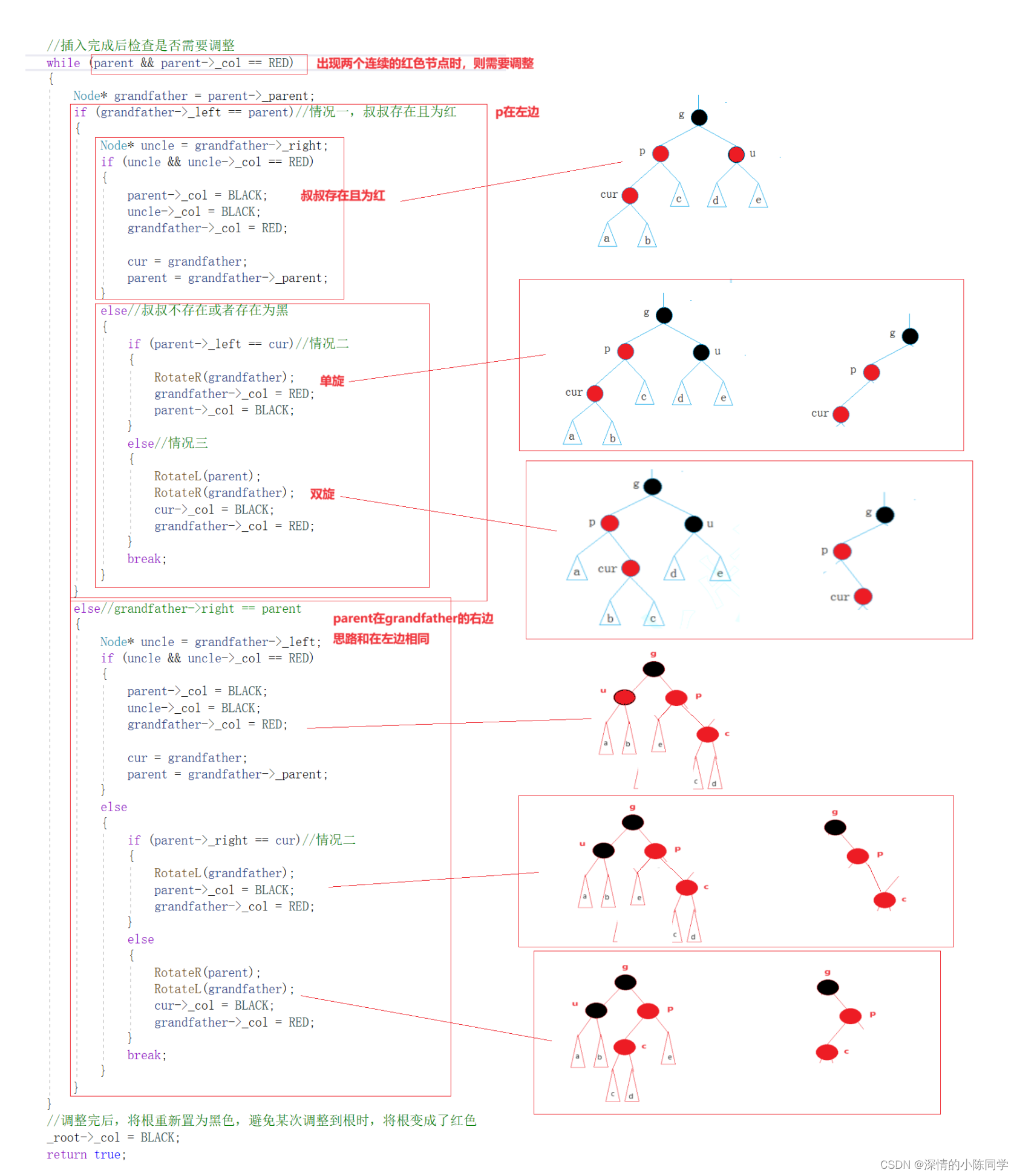
一、介绍 红黑树也是对一般的搜索二叉树不能保证平衡的一个改进,和AVL树采用的思路不同,但同样需要旋转,其本质也是一颗平衡搜索二叉树,其节点有颜色的区分,并且被一些规则束缚,在这些规则下,能…...
java基础-数据类型
1、变量 变量就是申请内存来存储值。也就是说,当创建变量的时候,需要在内存中申请空间。 内存管理系统根据变量的类型为变量分配存储空间,分配的空间只能用来储存该类型数据。 因此,通过定义不同类型的变量,可以在内…...

设计数据库的时候会考虑哪些因素,怎样去建表?
在设计数据库时,通常会考虑以下因素: 数据的结构和关系:首先需要分析业务需求,了解需要存储的数据类型、数据之间的关系以及数据的组织结构。 数据的完整性和一致性:确保数据库中的数据完整性和一致性,例如…...

AI 绘画 | Stable Diffusion精确控制ControlNet扩展插件
ControlNet ControlNet是一个用于控制AI图像生成的插件,通过使用Conditional Generative Adversarial Networks(条件生成对抗网络)的技术来生成图像。它允许用户对生成的图像进行更精细的控制,从而在许多应用场景中非常有用,例如计算机视觉、艺术设计、虚拟现实等。 对于…...

青少年编程学习 等级考试 信奥赛NOI/蓝桥杯/NOC/GESP等比赛资料合集
一、博主愚见 在当今信息技术高速发展的时代,编程已经成为了一种必备的技能。随着社会对于科技人才的需求不断增加,青少年编程学习正逐渐成为一种趋势。为了更好地帮助青少年学习编程,提升他们的技能和素质,博主结合自身多年从事青…...

Linux 函数库
函数库: 我们的C程序中,并没有定义“printf”的函数实现,且在预编译中包含的“stdio.h”中也只有该函数的声明,而没有定义函数的实现,那么,是在哪里实“printf”函数的呢? 最后的答案是:系统把这些函数实现都被做到名为 libc.so.6 的库文件中去…...
Java 入门基础题
目录 1.输出一个整数的每一位 2.判定素数 3.求最大值方法的重载 4.输出闰年 5.打印 X 图形 6.数字9 出现的次数 7.计算分数的值 8. 模拟登陆 9.使用函数求最大值 10.斐波那契数列 星光不负赶路人,加油铁子们!!! 1…...
块设备的工作模式
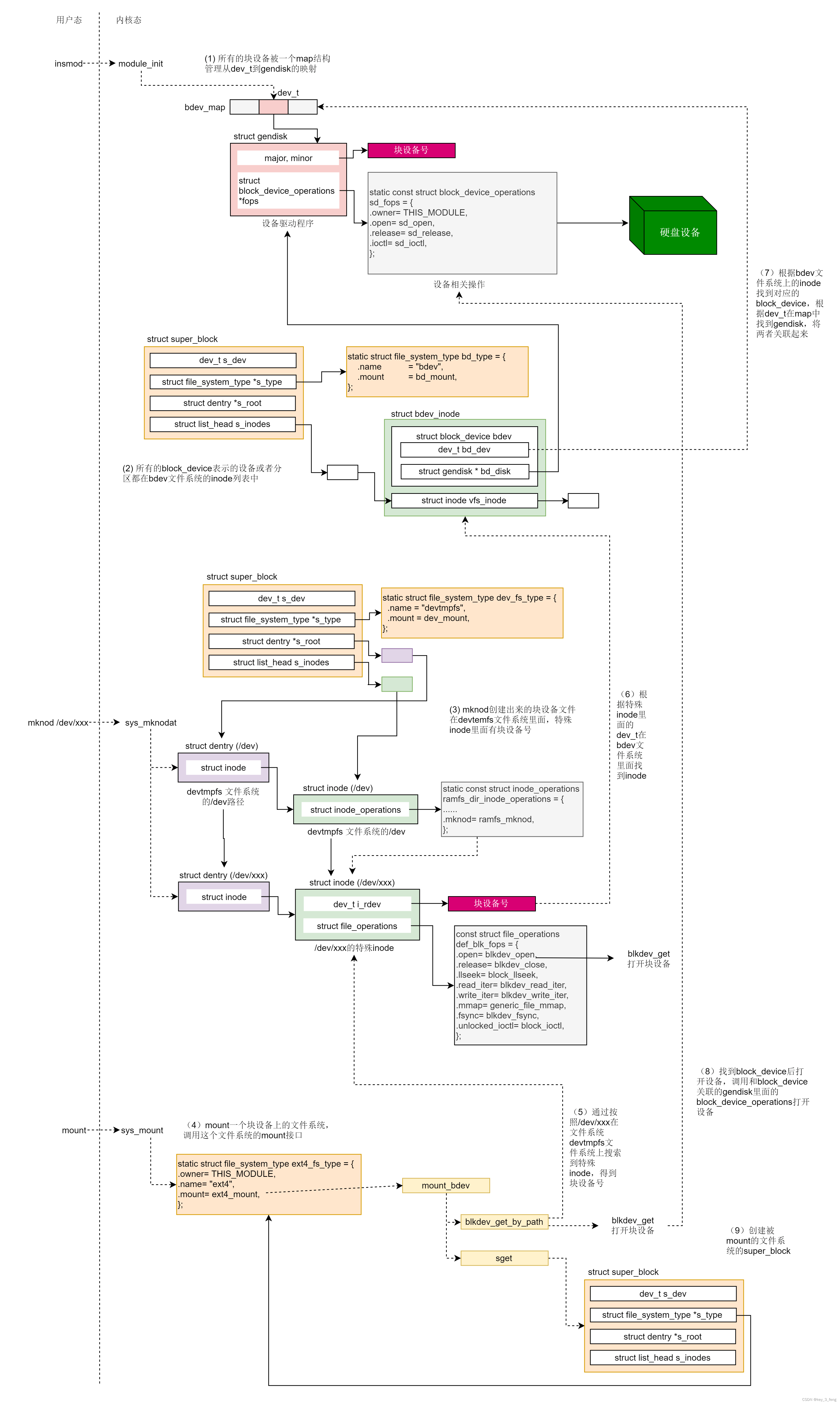
块设备的mknod 还是会创建在 /dev 路径下面,这一点和字符设备一样。/dev 路径下面是 devtmpfs 文件系统。这是块设备遇到的第一个文件系统。我们会为这个块设备文件,分配一个特殊的 inode,这一点和字符设备也是一样的。只不过字符设备走 S_IS…...

Spring核心
Spring Framework Spring的两个核心IOC控制反转IOC容器依赖注入DIIOC容器实现注解管理BeanBean对象定义Bean对象获取 AOP面向切面编程 添加依赖入门案例注解通过Spring创建Java bean对象 xml管理Bean案例main下创建bean.XMl文件 DI依赖注入案例创建Spring配置文件 bean-di.xml …...

ffmpeg命令行处理视频,学习记录
ffmpeg命令行处理视频 截取视频前5s ffmpeg -ss 00:00:00 -t 00:00:05 -i .\public\uploads\20231109\116a292eccf8315f65d7166e794d1730.mp4 .\public\uploads\20231109\116a292eccf8315f65d7166e794d1731.mp4两视频合并为1个 ffmpeg -i F:\xuejiao\code\cms.openlai.com\p…...

Linux应用层点亮硬件的LED灯
一 应用层操作硬件的两种方法 应用层想要对底层硬件进行操控,通常可以通过两种方式: /dev/目录下的设备文件(设备节点);/sys/目录下设备的属性文件。 具体使用哪种方式需要根据不同功能类型设备进行选择,通…...

密钥安全存储方案探讨与实践
随着信息技术的迅猛发展和应用范围的不断扩大,我们日常生活中的许多方面已经与信息技术密不可分。而在信息安全领域中,密钥的安全存储显得尤为重要。本文将探讨密钥安全存储的必要性、相关技术和实践方案,并提出一些解决方案。 一、密钥安全存…...

[pytorch]设备选择以及卷积神经网络的应用
0.写在前面: 首先这篇文章还没写完,因为今天要尝试对我之前的一个框架做一个简单的更新迭代,所以目前先更新这么多. 1.关于设备的选择 首先,目前的大多数电脑都是自带一些GPU(图形计算单元,在这里被称之为cuda), 需要安装相关的驱动才能正常使用这些设备和调用他们的具体情况…...
API SIX系列-服务搭建(一)
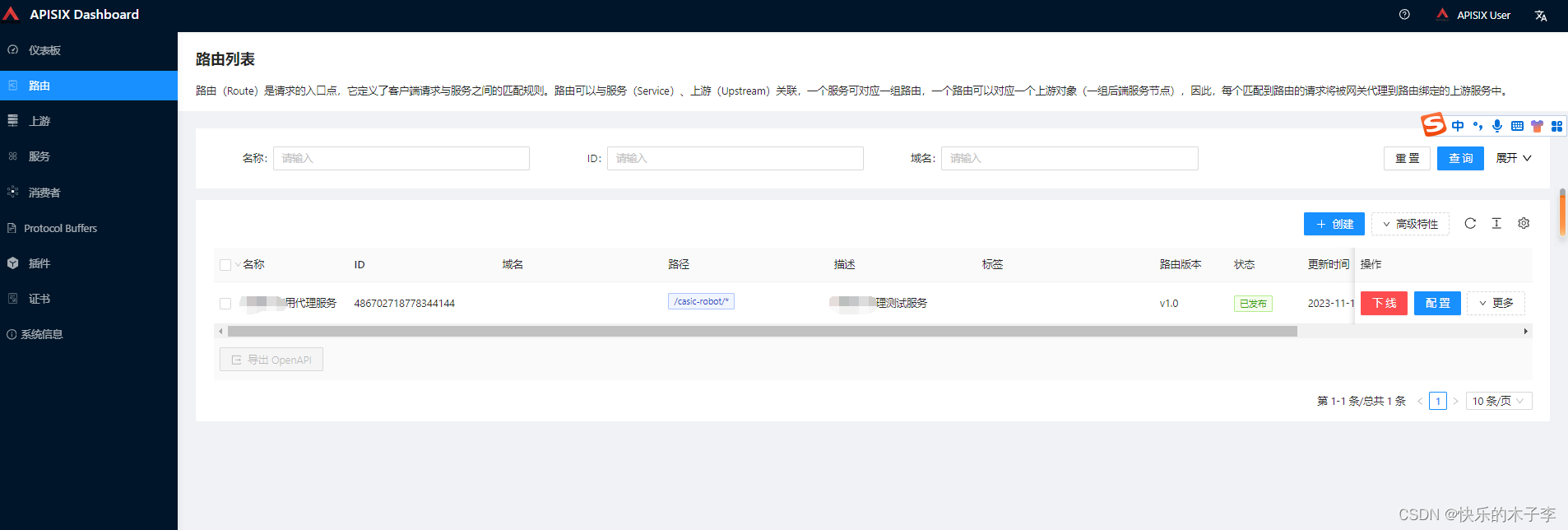
APIsix简介 APISIX是一个微服务API网关,具有高性能、可扩展性等优点。它基于nginx(openresty)、Lua、etcd实现功能,借鉴了Kong的思路。和传统的API网关相比,APISIX具有较高的性能和较低的资源消耗,并且具有…...
)
hadoop 大数据环境配置 同步时间 centos服务器时间同步 linux 安装ntp服务更新时间 hadoop(六)
1. 安装ntp软件 yum install -y ntp 2.创建软连接 # 删除之前得时间 sudo rm -rf /etc/localtime;# 更新时区sudo ln -s /usr/share/zoneinfo/Asia/Shanghai /etc/localtime3. 更新时间 # root 权限运行 sudo ntpdate -u ntp.aliyun.com 4. 开机自启,更新时间 …...
基于单片机智能输液器监控系统的设计
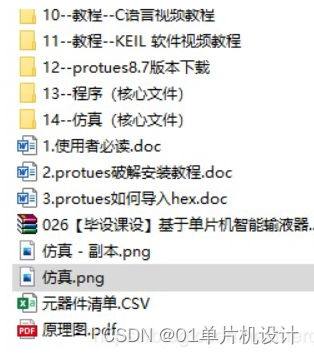
**单片机设计介绍, 基于单片机智能输液器监控系统的设计 文章目录 一 概要二、功能设计设计思路 三、 软件设计原理图 五、 程序六、 文章目录 一 概要 基于单片机的智能输液器监控系统可以实现对输液过程的实时监测和控制,以下是一个基本的设计介绍&am…...

【2026最新】应对Turnitin查重:实测5大英文查降AI宝藏工具,一站式搞定初稿
现在的英文初稿,无论是期刊文章、SCI 还是普通的 Course Essay,基本都需要评估内容的原创度,进行文章 AI 率检测。很多伙伴以为纯手敲就能过,结果一查数据依然不尽如人意。 针对英文内容,咱们必须使用专门的英文检测和…...

别再死记硬背了!用5个生活化比喻彻底搞懂Linux进程的fork、exec和wait
别再死记硬背了!用5个生活化比喻彻底搞懂Linux进程的fork、exec和wait想象你正在厨房准备一顿大餐。菜谱上写着"切菜"、"炒菜"、"装盘"等步骤,但突然发现需要同时处理多道菜品——这时候,你会本能地让家人分工…...

终极Chrome画中画扩展:如何在浏览器中实现高效视频多任务处理
终极Chrome画中画扩展:如何在浏览器中实现高效视频多任务处理 【免费下载链接】picture-in-picture-chrome-extension 项目地址: https://gitcode.com/gh_mirrors/pi/picture-in-picture-chrome-extension 想要在浏览网页、处理文档的同时继续观看视频内容吗…...

终极歌词同步神器LRCGET:5分钟为你的音乐库添加完美歌词
终极歌词同步神器LRCGET:5分钟为你的音乐库添加完美歌词 【免费下载链接】lrcget Utility for mass-downloading LRC synced lyrics for your offline music library. 项目地址: https://gitcode.com/gh_mirrors/lr/lrcget 你是否厌倦了在听歌时手动搜索歌词…...

DeepSeek模型微调全链路解析:从数据准备、LoRA配置到推理部署的7大关键步骤
更多请点击: https://intelliparadigm.com 第一章:DeepSeek模型微调全链路概览 DeepSeek系列大语言模型(如DeepSeek-V2、DeepSeek-Coder)凭借其开源特性、高性能推理能力与丰富的领域适配性,已成为工业界与学术界微调…...

基于STM32与LoRa的低功耗物联网气象站DIY全攻略
1. 项目概述:打造一个低功耗的家庭气象站前阵子想给家里的智能家居系统加点“环境感知”能力,琢磨着搞个能实时监测室外温湿度、风速风向的小玩意儿。市面上成品气象站要么数据出不来,要么功耗感人,不适合长期户外部署。于是&…...

输电线路在线监测系统|架空线路安全运行的“第一道防线“!
输电线路微气象监测站是专为高压输电线路、电网廊道、杆塔运维量身打造的专利级一体化微气象智能监测设备。依托双专利超声波探测技术、六要素集成传感架构、无启动风速高精测量、智能抗干扰稳控系统,实现输电线路沿线气象24小时全自动捕捉、动态实时监测、大风风险…...

对比按量计费与Token Plan套餐的实际成本差异
🚀 告别海外账号与网络限制!稳定直连全球优质大模型,限时半价接入中。 👉 点击领取海量免费额度 对比按量计费与Token Plan套餐的实际成本差异 在构建和运营基于大模型的应用时,成本控制是一个核心的工程考量。Taotok…...

Hermes Agent 框架如何对接 Taotoken 作为自定义模型供应商并配置环境变量
🚀 告别海外账号与网络限制!稳定直连全球优质大模型,限时半价接入中。 👉 点击领取海量免费额度 Hermes Agent 框架如何对接 Taotoken 作为自定义模型供应商并配置环境变量 Hermes Agent 是一个流行的 AI 代理开发框架࿰…...

从《王者荣耀》野怪巡逻到RTS单位集结:拆解Unity Navigation系统在实战中的4种高级用法
从《王者荣耀》野怪巡逻到RTS单位集结:拆解Unity Navigation系统在实战中的4种高级用法在MOBA游戏中,野怪沿着固定路线巡逻时突然转向追击玩家;RTS战场上,上百个单位向同一目标点移动却能保持整齐队形;潜行游戏中&…...