
Java通过Lettuce访问Redis主从,哨兵,集群
操作
-
首先需要maven导入依赖
<dependency><groupId>io.lettuce</groupId><artifactId>lettuce-core</artifactId><version>6.3.0.RELEASE</version>
</dependency>-
测试连接
public class LettuceDemo {public static void main(String[] args) {RedisURI redisUri = RedisURI.builder().withHost("127.0.0.1").withPort(6379).withPassword("123456").withTimeout(Duration.of(10, ChronoUnit.SECONDS)).build();RedisClient redisClient = RedisClient.create(redisUri);StatefulRedisConnection<String, String> connection = redisClient.connect();RedisCommands<String, String> commands = connection.sync();System.out.println(commands.ping());connection.close();redisClient.shutdown();}
}-
同步操作
public class LettuceSyncDemo {public static void main(String[] args) {RedisURI redisUri = RedisURI.builder().withHost("127.0.0.1").withPort(6379).withPassword("123456").withTimeout(Duration.of(10, ChronoUnit.SECONDS)).build();RedisClient redisClient = RedisClient.create(redisUri);StatefulRedisConnection<String, String> connection = redisClient.connect();//获取同步操作命令工具RedisCommands<String, String> commands = connection.sync();System.out.println("清空数据:"+commands.flushdb());System.out.println("判断某个键是否存在:"+commands.exists("username"));System.out.println("新增<'username','xmr'>的键值对:"+commands.set("username", "xmr"));System.out.println("新增<'password','password'>的键值对:"+commands.set("password", "123"));System.out.println("获取<'password'>键的值:"+commands.get("password"));System.out.println("系统中所有的键如下:" + commands.keys("*"));System.out.println("删除键password:"+commands.del("password"));System.out.println("判断键password是否存在:"+commands.exists("password"));System.out.println("设置键username的过期时间为5s:"+commands.expire("username", 5L));System.out.println("查看键username的剩余生存时间:"+commands.ttl("username"));System.out.println("移除键username的生存时间:"+commands.persist("username"));System.out.println("查看键username的剩余生存时间:"+commands.ttl("username"));System.out.println("查看键username所存储的值的类型:"+commands.type("username"));connection.close();redisClient.shutdown();}
}-
异步操作
public class LettuceASyncDemo {public static void main(String[] args) throws Exception {RedisURI redisUri = RedisURI.builder().withHost("127.0.0.1").withPort(6379).withPassword("123456").withTimeout(Duration.of(10, ChronoUnit.SECONDS)).build();RedisClient redisClient = RedisClient.create(redisUri);StatefulRedisConnection<String, String> connection = redisClient.connect();//获取异步操作命令工具RedisAsyncCommands<String, String> commands = connection.async();System.out.println("清空数据:"+commands.flushdb().get());System.out.println("判断某个键是否存在:"+commands.exists("username").get());System.out.println("新增<'username','xmr'>的键值对:"+commands.set("username", "xmr").get());System.out.println("新增<'password','password'>的键值对:"+commands.set("password", "123").get());System.out.println("获取<'password'>键的值:"+commands.get("password").get());System.out.println("系统中所有的键如下:" + commands.keys("*").get());System.out.println("删除键password:"+commands.del("password").get());System.out.println("判断键password是否存在:"+commands.exists("password").get());System.out.println("设置键username的过期时间为5s:"+commands.expire("username", 5L).get());System.out.println("查看键username的剩余生存时间:"+commands.ttl("username").get());System.out.println("移除键username的生存时间:"+commands.persist("username").get());System.out.println("查看键username的剩余生存时间:"+commands.ttl("username").get());System.out.println("查看键username所存储的值的类型:"+commands.type("username").get());connection.close();redisClient.shutdown();}
}-
响应式编程
Lettuce 除了支持异步编程以外,还支持响应式编程,Lettuce 引入的响应式编程框架是Project Reactor,框架官网:https://projectreactor.io/
public class LettuceReactorDemo {public static void main(String[] args) throws Exception {RedisURI redisUri = RedisURI.builder().withHost("127.0.0.1").withPort(6379).withPassword("123456").withTimeout(Duration.of(10, ChronoUnit.SECONDS)).build();RedisClient redisClient = RedisClient.create(redisUri);StatefulRedisConnection<String, String> connection = redisClient.connect();//获取响应式API操作命令工具RedisReactiveCommands<String, String> commands = connection.reactive();Mono<String> setc = commands.set("name", "mayun");System.out.println(setc.block());Mono<String> getc = commands.get("name");getc.subscribe(System.out::println);Flux<String> keys = commands.keys("*");keys.subscribe(System.out::println);//开启一个事务,先把count设置为1,再将count自增1commands.multi().doOnSuccess(r -> {commands.set("count", "1").doOnNext(value -> System.out.println("count1:" +  value)).subscribe();commands.incr("count").doOnNext(value -> System.out.println("count2:" +  value)).subscribe();}).flatMap(s -> commands.exec()).doOnNext(transactionResult -> System.out.println("transactionResult:" + transactionResult.wasDiscarded())).subscribe();Thread.sleep(1000 * 5);connection.close();redisClient.shutdown();}
}-
发布和订阅
public class LettuceReactiveDemo {public static void main(String[] args) throws Exception {RedisURI redisUri = RedisURI.builder().withHost("127.0.0.1").withPort(6379).withPassword("123456").withTimeout(Duration.of(10, ChronoUnit.SECONDS)).build();RedisClient redisClient = RedisClient.create(redisUri);//获取发布订阅操作命令工具StatefulRedisPubSubConnection<String, String> pubsubConn = redisClient.connectPubSub();pubsubConn.addListener(new RedisPubSubListener<String, String>() {@Overridepublic void unsubscribed(String channel, long count) {System.out.println("[unsubscribed]" + channel);}@Overridepublic void subscribed(String channel, long count) {System.out.println("[subscribed]" + channel);}@Overridepublic void punsubscribed(String pattern, long count) {System.out.println("[punsubscribed]" + pattern);}@Overridepublic void psubscribed(String pattern, long count) {System.out.println("[psubscribed]" + pattern);}@Overridepublic void message(String pattern, String channel, String message) {System.out.println("[message]" + pattern + " -> " + channel + " -> " + message);}@Overridepublic void message(String channel, String message) {System.out.println("[message]" + channel + " -> " + message);}});RedisPubSubAsyncCommands<String, String> pubsubCmd = pubsubConn.async();pubsubCmd.psubscribe("CH");pubsubCmd.psubscribe("CH2");pubsubCmd.unsubscribe("CH");Thread.sleep(100 * 5);pubsubConn.close();redisClient.shutdown();}
}-
客户端资源与参数配置
Lettuce 客户端的通信框架集成了 Netty 的非阻塞 IO 操作,客户端资源的设置与 Lettuce 的性能、并发和事件处理紧密相关,如果不熟悉客户端参数配置,不推荐修改默认值,保持默认配置即可。
- 非集群模式
public class LettuceDemo {public static void main(String[] args) throws Exception {ClientResources resources = DefaultClientResources.builder().ioThreadPoolSize(4) //I/O线程数.computationThreadPoolSize(4) //任务线程数.build();RedisURI redisUri = RedisURI.builder().withHost("127.0.0.1").withPort(6379).withPassword("123456").withTimeout(Duration.of(10, ChronoUnit.SECONDS)).build();ClientOptions options = ClientOptions.builder().autoReconnect(true)//是否自动重连.pingBeforeActivateConnection(true)//连接激活之前是否执行PING命令.build();RedisClient client = RedisClient.create(resources, redisUri);client.setOptions(options);StatefulRedisConnection<String, String> connection = client.connect();RedisCommands<String, String> commands = connection.sync();commands.set("name", "关羽");System.out.println(commands.get("name"));connection.close();client.shutdown();resources.shutdown();}
}
- 集群模式
public class LettuceDemo {public static void main(String[] args) throws Exception {ClientResources resources = DefaultClientResources.builder().ioThreadPoolSize(4) //I/O线程数.computationThreadPoolSize(4) //任务线程数.build();RedisURI redisUri = RedisURI.builder().withHost("127.0.0.1").withPort(6379).withPassword("123456").withTimeout(Duration.of(10, ChronoUnit.SECONDS)).build();ClusterClientOptions options = ClusterClientOptions.builder().autoReconnect(true)//是否自动重连.pingBeforeActivateConnection(true)//连接激活之前是否执行PING命令.validateClusterNodeMembership(true)//是否校验集群节点的成员关系.build();RedisClusterClient client = RedisClusterClient.create(resources, redisUri);client.setOptions(options);StatefulRedisClusterConnection<String, String> connection = client.connect();RedisAdvancedClusterCommands<String, String> commands = connection.sync();commands.set("name", "张飞");System.out.println(commands.get("name"));connection.close();client.shutdown();resources.shutdown();}
}-
线程池配置
Lettuce 连接设计的时候,就是线程安全的,所以一个连接可以被多个线程共享,同时 lettuce 连接默认是自动重连的,使用单连接基本可以满足业务需求,大多数情况下不需要配置连接池,多连接并不会给操作带来性能上的提升。
但在某些特殊场景下,比如事物操作,使用连接池会是一个比较好的方案,配置方法如下
public class LettuceDemo {public static void main(String[] args) throws Exception {RedisURI redisUri = RedisURI.builder().withHost("127.0.0.1").withPort(6379).withPassword("123456").withTimeout(Duration.of(10, ChronoUnit.SECONDS)).build();RedisClient client = RedisClient.create(redisUri);//连接池配置GenericObjectPoolConfig poolConfig = new GenericObjectPoolConfig();poolConfig.setMaxIdle(2);GenericObjectPool<StatefulRedisConnection<String, String>> pool = ConnectionPoolSupport.createGenericObjectPool(client::connect, poolConfig);StatefulRedisConnection<String, String> connection = pool.borrowObject();RedisCommands<String, String> commands = connection.sync();commands.set("name", "张飞");System.out.println(commands.get("name"));connection.close();pool.close();client.shutdown();}
}-
主从模式
Redis 一般采用主从复制模式,搭建高可用的架构,简单的说就一个主节点,多个从节点,自动从主节点同步最新数据。
- 自动发现主从模式下所有节点
public class LettuceDemo {public static void main(String[] args) throws Exception {//这里只需要配置一个节点的连接信息,不一定需要是主节点的信息,从节点也可以;可以自动发现主从节点RedisURI uri = RedisURI.builder().withHost("192.168.31.111").withPort(6379).withPassword("123456").build();RedisClient client = RedisClient.create(uri);StatefulRedisMasterReplicaConnection<String, String> connection = MasterReplica.connect(client, StringCodec.UTF8, uri);//从节点读取数据connection.setReadFrom(ReadFrom.REPLICA);RedisCommands<String, String> commands = connection.sync();commands.set("name", "张飞");System.out.println(commands.get("name"));connection.close();client.shutdown();}
}
- 手动指定主从模式下集群节点
public class LettuceDemo {public static void main(String[] args) throws Exception {//集群节点List<RedisURI> uris = new ArrayList();uris.add(RedisURI.builder().withHost("192.168.79.135").withPort(6379).withPassword("123456").build());uris.add(RedisURI.builder().withHost("192.168.79.136").withPort(6379).withPassword("123456").build());uris.add(RedisURI.builder().withHost("192.168.79.137").withPort(6379).withPassword("123456").build());RedisClient client = RedisClient.create();StatefulRedisMasterReplicaConnection<String, String> connection = MasterReplica.connect(client, StringCodec.UTF8, uris);//从节点读取数据connection.setReadFrom(ReadFrom.REPLICA);RedisCommands<String, String> commands = connection.sync();commands.set("name", "张飞");System.out.println(commands.get("name"));connection.close();client.shutdown();}
}-
哨兵模式
哨兵模式可以实现当主节点下线时,通过选举的方式将从节点升级为主节点
public class LettuceDemo {public static void main(String[] args) throws Exception {//集群节点List<RedisURI> uris = new ArrayList();uris.add(RedisURI.builder().withSentinel("192.168.79.135", 26379).withSentinelMasterId("mymaster").withPassword("123456").build());uris.add(RedisURI.builder().withSentinel("192.168.79.135", 26379).withSentinelMasterId("mymaster").withPassword("123456").build());uris.add(RedisURI.builder().withSentinel("192.168.79.135", 26379).withSentinelMasterId("mymaster").withPassword("123456").build());RedisClient client = RedisClient.create();StatefulRedisMasterReplicaConnection<String, String> connection = MasterReplica.connect(client, StringCodec.UTF8, uris);//从节点读取数据connection.setReadFrom(ReadFrom.REPLICA);RedisCommands<String, String> commands = connection.sync();commands.set("name", "赵云");System.out.println(commands.get("name"));connection.close();client.shutdown();}
}-
Cluster 集群模式
基于主从模式和哨兵模式的理念,推出的高可用的架构模型,主要是采用分片方式来存储数据
public class LettuceReactiveDemo {public static void main(String[] args) throws Exception {Set<RedisURI> uris = new HashSet<>();uris.add(RedisURI.builder().withHost("192.168.79.135").withPort(5001).withPassword("123456").build());uris.add(RedisURI.builder().withHost("192.168.79.135").withPort(5002).withPassword("123456").build());uris.add(RedisURI.builder().withHost("192.168.79.135").withPort(5003).withPassword("123456").build());uris.add(RedisURI.builder().withHost("192.168.79.136").withPort(5001).withPassword("123456").build());uris.add(RedisURI.builder().withHost("192.168.79.136").withPort(5002).withPassword("123456").build());uris.add(RedisURI.builder().withHost("192.168.79.136").withPort(5003).withPassword("123456").build());RedisClusterClient client = RedisClusterClient.create(uris);StatefulRedisClusterConnection<String, String> connection = client.connect();RedisAdvancedClusterCommands<String, String> commands = connection.sync();commands.set("name", "关羽");System.out.println(commands.get("name"));//选择从节点,只读NodeSelection<String, String> replicas = commands.replicas();NodeSelectionCommands<String, String> nodeSelectionCommands = replicas.commands();Executions<List<String>> keys = nodeSelectionCommands.keys("*");keys.forEach(key -> System.out.println(key));connection.close();client.shutdown();}
}
小结
Lettuce 相比老牌的 Jedis 客户端,功能更加强大,不仅解决了线程安全的问题,还支持异步和响应式编程,支持集群,Sentinel,管道和编码器等等功能。
了解更多的信息,可以访问官网地址:https://lettuce.io/
参考:
【进阶篇】Redis实战之Lettuce使用技巧详解 - 知乎
相关文章:

Java通过Lettuce访问Redis主从,哨兵,集群
操作 首先需要maven导入依赖 <dependency><groupId>io.lettuce</groupId><artifactId>lettuce-core</artifactId><version>6.3.0.RELEASE</version> </dependency> 测试连接 public class LettuceDemo {public static voi…...

嵌入式数据库Sqlite
本文主要是介绍如何再Ubuntu下使用sqlite数据库,并且嵌入式QT环境下使用C语言来构建一个sqlite数据库,使用sqlite browser进行数据库的可视化。 1、安装sqlite 在ubuntu系统中的安装需要先下载一个安装包,SQLite Download Page 安装命令&a…...
计算机网络:网络层ARP协议
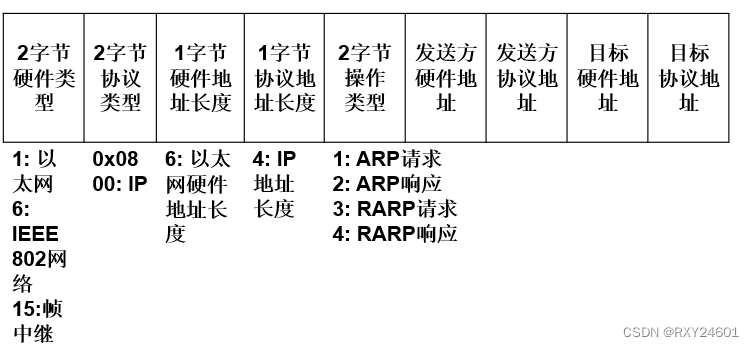
在实现IP通信时使用了两个地址:IP地址(网络层地址)和MAC地址(数据链路层地址) 问题:已知一个机器(主机或路由器)的IP地址,如何找到相应的MAC地址? 为了解决…...
集成环信IM时常见问题及解决——包括消息、群组、推送
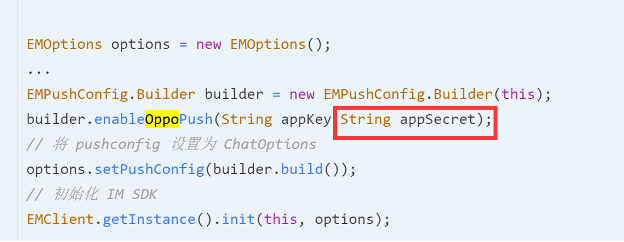
一、消息 环信是不支持空会话的,在插入一个会话,一定要给这个会话再插入一条消息; 发送透传消息也就是cmd消息时,value的em_开头的字段为环信内部消息字段,如果使用会出现收不到消息回调的情况; 如果发送…...

Selenium自动化测试框架
一.Selenium概述 1.1 什么是框架? 框架(framework)是一个框子——指其约束性,也是一个架子——指其支撑性。是一个基本概念上的 结构用于去解决或者处理复杂的问题。 框架是整个或部分系统的可重用设计,表现为一组抽象构件及…...
C#实现观察者模式
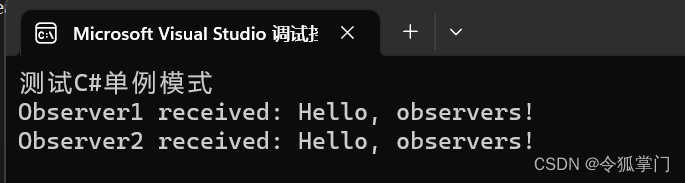
观察者模式是一种软件设计模式,当一个对象的状态发生变化时,其所有依赖者都会自动得到通知。 观察者模式也被称为“发布-订阅”模式,它定义了对象之间的一对多的依赖性,当一个对象状态改变时,所有依赖于它的对象都会得…...

什么是持续部署
管理软件开发和部署有 3 种常见的方法:持续集成、持续交付,然后是持续部署。尽管它们经常被混淆,但它们是明显不同的。 正如您将在本文后面看到的,它们相互融合,并补充彼此的风格。但这篇文章并不是关于他们三个。今天…...
【Python】Loguru模块更简洁的日志记录库
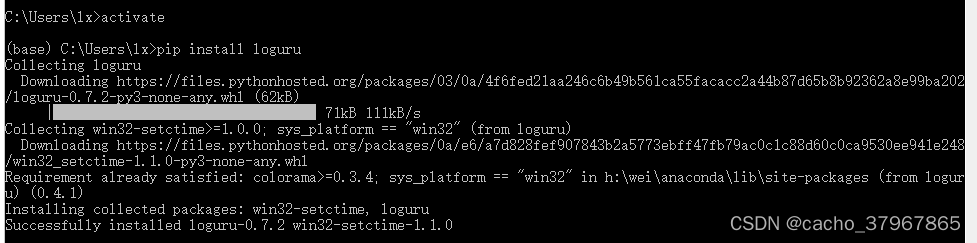
Loguru: 更优雅的日志记录解决方案! loguru 是一个Python 简易且强大的第三方日志记录库,该库旨在通过添加一系列有用的功能来解决标准记录器的注意事项,从而减少 Python 日志记录的痛苦。 使用自带自带的 logging 模块的话,则需要…...

智慧环保:科技驱动下的环境保护新篇章
智慧环保:科技驱动下的环境保护新篇章 环境保护已经成为当今社会的重要议题,而科技的飞速发展为我们开启了智慧环保的新篇章。在这篇文章中,我们将介绍智慧环保所带来的机会和创新,以及科技在环境保护中的重要作用。 智慧环保的理…...
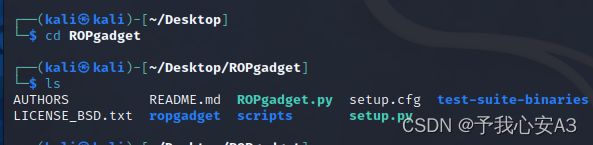
CTF-PWN环境搭建手册
工欲善其事必先利其器,作为一名CTF的pwn手,一定要有自己的专用解题环境。本文将详细记录kali下的pwn解题环境的安装过程,B站也会配备配套视频。 目录 安装前的准备工作 虚拟机环境编辑 VM版本安装教程 1. 下载Kali的VM虚拟机文件 2. 新…...

Nginx安装配置与SSL证书安装部署
一、Nginx Nginx是一款高性能的开源Web服务器和反向代理服务器,被广泛用于构建现代化的Web应用和提供静态内容。 nginx官网 这里下载nginx-1.24.0-zip Nginx是一款高性能的开源Web服务器和反向代理服务器,被广泛用于构建现代化的Web应用和提供静态内…...

高性能面试八股文之编译流程程序调度
1. C的编译流程 C语言程序的编译过程通常包括预处理(Preprocessing)、编译(Compilation)、汇编(Assembly)、链接(Linking)四个主要阶段。下面是这些阶段的详细说明: 1.…...

opencv的MinGW-W64编译
最近使用Qt,需要用到opencv,安装详情参考下面这个网址,写的挺好: opencv的MinGW-W64编译 - 知乎 我电脑安装Qt中自带了MinGW,所以不需要像上面网址中的下载MinGw,只需要将Qt中自带的MinGW添加到环境变量即可,如&…...
在Go编程中调用外部命令的几种场景
1.摘要 在很多场合, 使用Go语言需要调用外部命令来完成一些特定的任务, 例如: 使用Go语言调用Linux命令来获取执行的结果,又或者调用第三方程序执行来完成额外的任务。在go的标准库中, 专门提供了os/exec包来对调用外部程序提供支持, 本文将对调用外部命令的几种使用方法进行总…...

python学习:break用法详解
嗨喽,大家好呀~这里是爱看美女的茜茜呐 在执行while循环或者for循环时,只要循环条件满足,程序会一直执行循环体。 但在某些场景,我们希望在循环结束前就强制结束循环。 Python中有两种强制结束循环的方法: continue语…...

【算法萌新闯力扣】:找到所有数组中消失对数字
力扣热题:找到所有数组中消失对数字 开篇 这两天刚交了蓝桥杯的报名费,刷题的积极性高涨。算上打卡题,今天刷了10道算法题了,题目都比较简单,挑选了一道还不错的题目与大家分享。 题目链接:448.找到所有数组中消失对…...
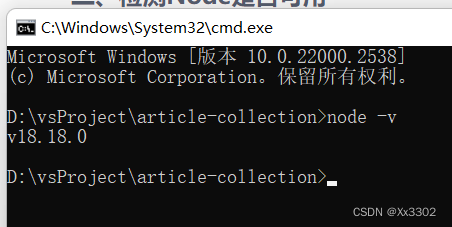
Node.js 安装配置
文章目录 安装检测Node是否可用 安装 首先我们需要从官网下载Node安装包:Node.Js中文网,下载后双击安装没有什么特殊的地方,安装路径默认是C盘,不想安装C盘的话可以选择一下其他的盘符。安装完成以后可以不用配置环境变量,Node安装已经自动给…...
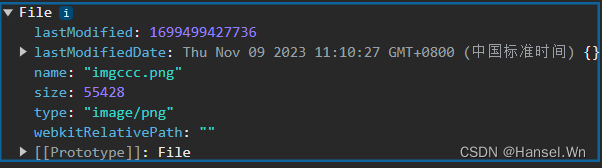
前端JS 使用input完成文件上传操作,并对文件进行类型转换
使用input实现文件上传 // 定义一个用于文件上传的按钮<input type"file" name"upload1" />// accept属性用于定义允许上传的文件类型, onchange用于绑定文件上传之后的相应函数<input type"file" name"upload2"…...

探索AI交互:Python与ChatGPT的完美结合!
大家好!我是爱摸鱼的小鸿,人生苦短,我用Python!关注我,收看技术干货。 随着人工智能的迅速发展,AI交互正成为技术领域的一大亮点。在这个过程中,Python编程语言和ChatGPT模型的结合展现出强大的…...
CI/CD - jenkins
目录 一、部署 1、简介 2、部署 二、配置 三、实时触发 四、自动化构建docker镜像 五、通过ssh插件交付任务 六、添加jenkins节点 七、RBAC 八、pipeline 九、jenkins结合ansible参数化构建 1、安装ansible 2、新建gitlab项目 3、jenkins新建项目playbook 一、部…...

TVBOX最新电视直播软件tv版下载与安装教程
如何安装最新版电视直播软件tv版TVBOX?先讲清楚:TVBox 是开源播放器,本身不带影视资源,装好后必须配置 “数据源 / 接口” 才能用。下面分「下载 → 安装 → 配置 → 常见问题」一步步来。(如果不会配置,可…...

急救场景下的志愿者调度与AED就近匹配
急救场景下的志愿者调度与AED就近匹配——120急救通的设计思路 一、问题的起点:黄金4分钟 心脏骤停后,每延迟1分钟,存活率下降7%-10%。医学上公认的黄金抢救时间是4分钟。 而现实是:城市中120救护车平均到达时间超过10分钟&#x…...

长沙自动变速箱维修哪家强?这些公司口碑好
好的,遵照您的指示,我将以资深变速箱维修领域分析者的身份,围绕“长沙自动变速箱维修哪家强”这一核心问题,撰写一篇客观、实用、合规的深度分析文章。车主选维修店,最怕被“宰”与被“拖”在长沙,如果你的…...
)
从选型到设计:手把手教你根据7系列FPGA数据手册做项目选型(以Kintex-7为例)
从选型到设计:手把手教你根据7系列FPGA数据手册做项目选型(以Kintex-7为例) 在硬件系统设计中,FPGA选型往往决定着项目的成败。面对Xilinx 7系列丰富的产品线,工程师需要像外科医生选择手术器械一样精准——既要考虑当…...

Go语言性能分析:pprof与trace
Go语言性能分析:pprof与trace 1. pprof使用 import ("net/http/pprof"_ "net/http/pprof" )func main() {http.ListenAndServe(":6060", nil) }2. trace使用 import "runtime/trace"func main() {f, _ : os.Create("t…...

别再死记硬背Transformer了!用大白话和代码图解,5分钟搞懂Self-Attention核心
用图书馆借书的故事讲透Transformer自注意力机制 想象你走进一个巨大的图书馆,书架上摆满了各种书籍。你需要找到一本关于"深度学习"的书,但你不确定具体是哪一本。这时候,图书管理员会怎么做?她会根据你的需求…...

PPTXjs终极指南:3分钟学会在浏览器中完美预览PPTX文件
PPTXjs终极指南:3分钟学会在浏览器中完美预览PPTX文件 【免费下载链接】PPTXjs jquery plugin for convertation pptx to html 项目地址: https://gitcode.com/gh_mirrors/pp/PPTXjs 还在为PPT文件兼容性问题烦恼吗?当精心制作的演示文稿在不同设…...

Java static 关键字从浅入深
文章目录前言一、static 的基本概念1.1 static 修饰什么1.2 static 的一句话理解二、static 变量2.1 类变量与实例变量2.2 使用场景三、static 方法3.1 静态方法的特点3.2 使用场景四、static 代码块4.1 static 代码块什么时候执行4.2 初始化顺序五、static 内部类5.1 静态内部…...

《ROS 2机器人开发从入门到实践》 2.3 使用功能包组织C++节点
简介: 上一小节我们用功能包组织了python节点,这节我们把C节点也装进功能包。 参考资料: 参考资料均来自于鱼香ROS社区创始人小鱼,资源如下: ①:【《ROS 2机器人开发从入门到实践》 2.3 使用功能包组织…...

手把手教你用MATLAB图形放大法找方程根:从画图到定位,解决迭代法初值难题
手把手教你用MATLAB图形放大法找方程根:从画图到定位,解决迭代法初值难题 在数值计算的世界里,寻找方程的根就像在黑暗森林中探险——没有地图的指引,盲目选择起点可能导致算法陷入无限循环或收敛到错误解。而MATLAB的图形放大法&…...